Deprecated: Creation of dynamic property Yoast\WP\SEO\Presentations\Indexable_Term_Archive_Presentation::$robots is deprecated in /var/www/staging.beencrypted.com/site/web/app/plugins/wordpress-seo/src/presentations/abstract-presentation.php on line 64
Deprecated: Creation of dynamic property Yoast\WP\SEO\Surfaces\Values\Meta::$canonical is deprecated in /var/www/staging.beencrypted.com/site/web/app/plugins/wordpress-seo/src/surfaces/values/meta.php on line 202
Deprecated: Creation of dynamic property Yoast\WP\SEO\Surfaces\Values\Meta::$canonical is deprecated in /var/www/staging.beencrypted.com/site/web/app/plugins/wordpress-seo/src/surfaces/values/meta.php on line 202
Deprecated: Using null as an array offset is deprecated, use an empty string instead in /var/www/staging.beencrypted.com/site/web/wp/wp-includes/class-wp-block-type-registry.php on line 168
Deprecated: Using null as an array offset is deprecated, use an empty string instead in /var/www/staging.beencrypted.com/site/web/wp/wp-includes/class-wp-block-type-registry.php on line 168
Deprecated: Using null as an array offset is deprecated, use an empty string instead in /var/www/staging.beencrypted.com/site/web/wp/wp-includes/class-wp-block-type-registry.php on line 168
Deprecated: Using null as an array offset is deprecated, use an empty string instead in /var/www/staging.beencrypted.com/site/web/wp/wp-includes/class-wp-block-type-registry.php on line 168
Deprecated: Using null as an array offset is deprecated, use an empty string instead in /var/www/staging.beencrypted.com/site/web/wp/wp-includes/class-wp-block-type-registry.php on line 168
Deprecated: Using null as an array offset is deprecated, use an empty string instead in /var/www/staging.beencrypted.com/site/web/wp/wp-includes/class-wp-block-type-registry.php on line 168
Deprecated: Using null as an array offset is deprecated, use an empty string instead in /var/www/staging.beencrypted.com/site/web/wp/wp-includes/class-wp-block-type-registry.php on line 168
Deprecated: Using null as an array offset is deprecated, use an empty string instead in /var/www/staging.beencrypted.com/site/web/wp/wp-includes/class-wp-block-type-registry.php on line 168
Deprecated: Using null as an array offset is deprecated, use an empty string instead in /var/www/staging.beencrypted.com/site/web/wp/wp-includes/class-wp-block-type-registry.php on line 168
Deprecated: Using null as an array offset is deprecated, use an empty string instead in /var/www/staging.beencrypted.com/site/web/wp/wp-includes/class-wp-block-type-registry.php on line 168
Deprecated: Using null as an array offset is deprecated, use an empty string instead in /var/www/staging.beencrypted.com/site/web/wp/wp-includes/class-wp-block-type-registry.php on line 168
Deprecated: Using null as an array offset is deprecated, use an empty string instead in /var/www/staging.beencrypted.com/site/web/wp/wp-includes/class-wp-block-type-registry.php on line 168
Deprecated: Using null as an array offset is deprecated, use an empty string instead in /var/www/staging.beencrypted.com/site/web/wp/wp-includes/class-wp-block-type-registry.php on line 168
Deprecated: Using null as an array offset is deprecated, use an empty string instead in /var/www/staging.beencrypted.com/site/web/wp/wp-includes/class-wp-block-type-registry.php on line 168
Deprecated: Using null as an array offset is deprecated, use an empty string instead in /var/www/staging.beencrypted.com/site/web/wp/wp-includes/class-wp-block-type-registry.php on line 168
Deprecated: Using null as an array offset is deprecated, use an empty string instead in /var/www/staging.beencrypted.com/site/web/wp/wp-includes/class-wp-block-type-registry.php on line 168
Deprecated: Using null as an array offset is deprecated, use an empty string instead in /var/www/staging.beencrypted.com/site/web/wp/wp-includes/class-wp-block-type-registry.php on line 168
Deprecated: Using null as an array offset is deprecated, use an empty string instead in /var/www/staging.beencrypted.com/site/web/wp/wp-includes/class-wp-block-type-registry.php on line 168
Deprecated: Using null as an array offset is deprecated, use an empty string instead in /var/www/staging.beencrypted.com/site/web/wp/wp-includes/class-wp-block-type-registry.php on line 168
Deprecated: Using null as an array offset is deprecated, use an empty string instead in /var/www/staging.beencrypted.com/site/web/wp/wp-includes/class-wp-block-type-registry.php on line 168
Deprecated: Using null as an array offset is deprecated, use an empty string instead in /var/www/staging.beencrypted.com/site/web/wp/wp-includes/class-wp-block-type-registry.php on line 168
Deprecated: Using null as an array offset is deprecated, use an empty string instead in /var/www/staging.beencrypted.com/site/web/wp/wp-includes/class-wp-block-type-registry.php on line 168
Deprecated: Using null as an array offset is deprecated, use an empty string instead in /var/www/staging.beencrypted.com/site/web/wp/wp-includes/class-wp-block-type-registry.php on line 168
Deprecated: Using null as an array offset is deprecated, use an empty string instead in /var/www/staging.beencrypted.com/site/web/wp/wp-includes/class-wp-block-type-registry.php on line 168
Deprecated: Using null as an array offset is deprecated, use an empty string instead in /var/www/staging.beencrypted.com/site/web/wp/wp-includes/class-wp-block-type-registry.php on line 168
Deprecated: Using null as an array offset is deprecated, use an empty string instead in /var/www/staging.beencrypted.com/site/web/wp/wp-includes/class-wp-block-type-registry.php on line 168
Deprecated: Using null as an array offset is deprecated, use an empty string instead in /var/www/staging.beencrypted.com/site/web/wp/wp-includes/class-wp-block-type-registry.php on line 168
Deprecated: Using null as an array offset is deprecated, use an empty string instead in /var/www/staging.beencrypted.com/site/web/wp/wp-includes/class-wp-block-type-registry.php on line 168
Deprecated: Using null as an array offset is deprecated, use an empty string instead in /var/www/staging.beencrypted.com/site/web/wp/wp-includes/class-wp-block-type-registry.php on line 168
Deprecated: Using null as an array offset is deprecated, use an empty string instead in /var/www/staging.beencrypted.com/site/web/wp/wp-includes/class-wp-block-type-registry.php on line 168
Deprecated: Using null as an array offset is deprecated, use an empty string instead in /var/www/staging.beencrypted.com/site/web/wp/wp-includes/class-wp-block-type-registry.php on line 168
Deprecated: Using null as an array offset is deprecated, use an empty string instead in /var/www/staging.beencrypted.com/site/web/wp/wp-includes/class-wp-block-type-registry.php on line 168
Deprecated: Using null as an array offset is deprecated, use an empty string instead in /var/www/staging.beencrypted.com/site/web/wp/wp-includes/class-wp-block-type-registry.php on line 168
Deprecated: Using null as an array offset is deprecated, use an empty string instead in /var/www/staging.beencrypted.com/site/web/wp/wp-includes/class-wp-block-type-registry.php on line 168
Deprecated: Using null as an array offset is deprecated, use an empty string instead in /var/www/staging.beencrypted.com/site/web/wp/wp-includes/class-wp-block-type-registry.php on line 168
Deprecated: Using null as an array offset is deprecated, use an empty string instead in /var/www/staging.beencrypted.com/site/web/wp/wp-includes/class-wp-block-type-registry.php on line 168
Deprecated: Using null as an array offset is deprecated, use an empty string instead in /var/www/staging.beencrypted.com/site/web/wp/wp-includes/class-wp-block-type-registry.php on line 168
Deprecated: Using null as an array offset is deprecated, use an empty string instead in /var/www/staging.beencrypted.com/site/web/wp/wp-includes/class-wp-block-type-registry.php on line 168
Deprecated: Using null as an array offset is deprecated, use an empty string instead in /var/www/staging.beencrypted.com/site/web/wp/wp-includes/class-wp-block-type-registry.php on line 168
Deprecated: Using null as an array offset is deprecated, use an empty string instead in /var/www/staging.beencrypted.com/site/web/wp/wp-includes/class-wp-block-type-registry.php on line 168
Deprecated: Using null as an array offset is deprecated, use an empty string instead in /var/www/staging.beencrypted.com/site/web/wp/wp-includes/class-wp-block-type-registry.php on line 168
Deprecated: Using null as an array offset is deprecated, use an empty string instead in /var/www/staging.beencrypted.com/site/web/wp/wp-includes/class-wp-block-type-registry.php on line 168
Deprecated: Using null as an array offset is deprecated, use an empty string instead in /var/www/staging.beencrypted.com/site/web/wp/wp-includes/class-wp-block-type-registry.php on line 168
Deprecated: Using null as an array offset is deprecated, use an empty string instead in /var/www/staging.beencrypted.com/site/web/wp/wp-includes/class-wp-block-type-registry.php on line 168
Deprecated: Using null as an array offset is deprecated, use an empty string instead in /var/www/staging.beencrypted.com/site/web/wp/wp-includes/class-wp-block-type-registry.php on line 168
Deprecated: Using null as an array offset is deprecated, use an empty string instead in /var/www/staging.beencrypted.com/site/web/wp/wp-includes/class-wp-block-type-registry.php on line 168
Deprecated: Using null as an array offset is deprecated, use an empty string instead in /var/www/staging.beencrypted.com/site/web/wp/wp-includes/class-wp-block-type-registry.php on line 168
Deprecated: Using null as an array offset is deprecated, use an empty string instead in /var/www/staging.beencrypted.com/site/web/wp/wp-includes/class-wp-block-type-registry.php on line 168
Deprecated: Using null as an array offset is deprecated, use an empty string instead in /var/www/staging.beencrypted.com/site/web/wp/wp-includes/class-wp-block-type-registry.php on line 168
Deprecated: Using null as an array offset is deprecated, use an empty string instead in /var/www/staging.beencrypted.com/site/web/wp/wp-includes/class-wp-block-type-registry.php on line 168
Deprecated: Using null as an array offset is deprecated, use an empty string instead in /var/www/staging.beencrypted.com/site/web/wp/wp-includes/class-wp-block-type-registry.php on line 168
Deprecated: Using null as an array offset is deprecated, use an empty string instead in /var/www/staging.beencrypted.com/site/web/wp/wp-includes/class-wp-block-type-registry.php on line 168
Deprecated: Using null as an array offset is deprecated, use an empty string instead in /var/www/staging.beencrypted.com/site/web/wp/wp-includes/class-wp-block-type-registry.php on line 168
Deprecated: Using null as an array offset is deprecated, use an empty string instead in /var/www/staging.beencrypted.com/site/web/wp/wp-includes/class-wp-block-type-registry.php on line 168
Deprecated: Using null as an array offset is deprecated, use an empty string instead in /var/www/staging.beencrypted.com/site/web/wp/wp-includes/class-wp-block-type-registry.php on line 168
Deprecated: Using null as an array offset is deprecated, use an empty string instead in /var/www/staging.beencrypted.com/site/web/wp/wp-includes/class-wp-block-type-registry.php on line 168
Deprecated: Using null as an array offset is deprecated, use an empty string instead in /var/www/staging.beencrypted.com/site/web/wp/wp-includes/class-wp-block-type-registry.php on line 168
Deprecated: Using null as an array offset is deprecated, use an empty string instead in /var/www/staging.beencrypted.com/site/web/wp/wp-includes/class-wp-block-type-registry.php on line 168
Deprecated: Using null as an array offset is deprecated, use an empty string instead in /var/www/staging.beencrypted.com/site/web/wp/wp-includes/class-wp-block-type-registry.php on line 168
Deprecated: Using null as an array offset is deprecated, use an empty string instead in /var/www/staging.beencrypted.com/site/web/wp/wp-includes/class-wp-block-type-registry.php on line 168
Deprecated: Using null as an array offset is deprecated, use an empty string instead in /var/www/staging.beencrypted.com/site/web/wp/wp-includes/class-wp-block-type-registry.php on line 168
Deprecated: Using null as an array offset is deprecated, use an empty string instead in /var/www/staging.beencrypted.com/site/web/wp/wp-includes/class-wp-block-type-registry.php on line 168
Deprecated: Using null as an array offset is deprecated, use an empty string instead in /var/www/staging.beencrypted.com/site/web/wp/wp-includes/class-wp-block-type-registry.php on line 168
Deprecated: Using null as an array offset is deprecated, use an empty string instead in /var/www/staging.beencrypted.com/site/web/wp/wp-includes/class-wp-block-type-registry.php on line 168
Deprecated: Using null as an array offset is deprecated, use an empty string instead in /var/www/staging.beencrypted.com/site/web/wp/wp-includes/class-wp-block-type-registry.php on line 168
Deprecated: Using null as an array offset is deprecated, use an empty string instead in /var/www/staging.beencrypted.com/site/web/wp/wp-includes/class-wp-block-type-registry.php on line 168
Deprecated: Using null as an array offset is deprecated, use an empty string instead in /var/www/staging.beencrypted.com/site/web/wp/wp-includes/class-wp-block-type-registry.php on line 168
Deprecated: Using null as an array offset is deprecated, use an empty string instead in /var/www/staging.beencrypted.com/site/web/wp/wp-includes/class-wp-block-type-registry.php on line 168
Deprecated: Using null as an array offset is deprecated, use an empty string instead in /var/www/staging.beencrypted.com/site/web/wp/wp-includes/class-wp-block-type-registry.php on line 168
Deprecated: Using null as an array offset is deprecated, use an empty string instead in /var/www/staging.beencrypted.com/site/web/wp/wp-includes/class-wp-block-type-registry.php on line 168
Deprecated: Using null as an array offset is deprecated, use an empty string instead in /var/www/staging.beencrypted.com/site/web/wp/wp-includes/class-wp-block-type-registry.php on line 168
Deprecated: Using null as an array offset is deprecated, use an empty string instead in /var/www/staging.beencrypted.com/site/web/wp/wp-includes/class-wp-block-type-registry.php on line 168
Deprecated: Using null as an array offset is deprecated, use an empty string instead in /var/www/staging.beencrypted.com/site/web/wp/wp-includes/class-wp-block-type-registry.php on line 168
Deprecated: Using null as an array offset is deprecated, use an empty string instead in /var/www/staging.beencrypted.com/site/web/wp/wp-includes/class-wp-block-type-registry.php on line 168
Deprecated: Using null as an array offset is deprecated, use an empty string instead in /var/www/staging.beencrypted.com/site/web/wp/wp-includes/class-wp-block-type-registry.php on line 168
Deprecated: Using null as an array offset is deprecated, use an empty string instead in /var/www/staging.beencrypted.com/site/web/wp/wp-includes/class-wp-block-type-registry.php on line 168
Deprecated: Using null as an array offset is deprecated, use an empty string instead in /var/www/staging.beencrypted.com/site/web/wp/wp-includes/class-wp-block-type-registry.php on line 168
Deprecated: Using null as an array offset is deprecated, use an empty string instead in /var/www/staging.beencrypted.com/site/web/wp/wp-includes/class-wp-block-type-registry.php on line 168
Deprecated: Using null as an array offset is deprecated, use an empty string instead in /var/www/staging.beencrypted.com/site/web/wp/wp-includes/class-wp-block-type-registry.php on line 168
Deprecated: Using null as an array offset is deprecated, use an empty string instead in /var/www/staging.beencrypted.com/site/web/wp/wp-includes/class-wp-block-type-registry.php on line 168
Deprecated: Using null as an array offset is deprecated, use an empty string instead in /var/www/staging.beencrypted.com/site/web/wp/wp-includes/class-wp-block-type-registry.php on line 168
Deprecated: Using null as an array offset is deprecated, use an empty string instead in /var/www/staging.beencrypted.com/site/web/wp/wp-includes/class-wp-block-type-registry.php on line 168
Deprecated: Using null as an array offset is deprecated, use an empty string instead in /var/www/staging.beencrypted.com/site/web/wp/wp-includes/class-wp-block-type-registry.php on line 168
Deprecated: Using null as an array offset is deprecated, use an empty string instead in /var/www/staging.beencrypted.com/site/web/wp/wp-includes/class-wp-block-type-registry.php on line 168
Deprecated: Using null as an array offset is deprecated, use an empty string instead in /var/www/staging.beencrypted.com/site/web/wp/wp-includes/class-wp-block-type-registry.php on line 168
Deprecated: Using null as an array offset is deprecated, use an empty string instead in /var/www/staging.beencrypted.com/site/web/wp/wp-includes/class-wp-block-type-registry.php on line 168
Deprecated: Using null as an array offset is deprecated, use an empty string instead in /var/www/staging.beencrypted.com/site/web/wp/wp-includes/class-wp-block-type-registry.php on line 168
Deprecated: Using null as an array offset is deprecated, use an empty string instead in /var/www/staging.beencrypted.com/site/web/wp/wp-includes/class-wp-block-type-registry.php on line 168
Deprecated: Using null as an array offset is deprecated, use an empty string instead in /var/www/staging.beencrypted.com/site/web/wp/wp-includes/class-wp-block-type-registry.php on line 168
Deprecated: Using null as an array offset is deprecated, use an empty string instead in /var/www/staging.beencrypted.com/site/web/wp/wp-includes/class-wp-block-type-registry.php on line 168
Deprecated: Using null as an array offset is deprecated, use an empty string instead in /var/www/staging.beencrypted.com/site/web/wp/wp-includes/class-wp-block-type-registry.php on line 168
Deprecated: Using null as an array offset is deprecated, use an empty string instead in /var/www/staging.beencrypted.com/site/web/wp/wp-includes/class-wp-block-type-registry.php on line 168
Deprecated: Using null as an array offset is deprecated, use an empty string instead in /var/www/staging.beencrypted.com/site/web/wp/wp-includes/class-wp-block-type-registry.php on line 168
Deprecated: Using null as an array offset is deprecated, use an empty string instead in /var/www/staging.beencrypted.com/site/web/wp/wp-includes/class-wp-block-type-registry.php on line 168
Deprecated: Using null as an array offset is deprecated, use an empty string instead in /var/www/staging.beencrypted.com/site/web/wp/wp-includes/class-wp-block-type-registry.php on line 168
Deprecated: Using null as an array offset is deprecated, use an empty string instead in /var/www/staging.beencrypted.com/site/web/wp/wp-includes/class-wp-block-type-registry.php on line 168
Deprecated: Using null as an array offset is deprecated, use an empty string instead in /var/www/staging.beencrypted.com/site/web/wp/wp-includes/class-wp-block-type-registry.php on line 168
Deprecated: Using null as an array offset is deprecated, use an empty string instead in /var/www/staging.beencrypted.com/site/web/wp/wp-includes/class-wp-block-type-registry.php on line 168
Deprecated: Using null as an array offset is deprecated, use an empty string instead in /var/www/staging.beencrypted.com/site/web/wp/wp-includes/class-wp-block-type-registry.php on line 168
Deprecated: Using null as an array offset is deprecated, use an empty string instead in /var/www/staging.beencrypted.com/site/web/wp/wp-includes/class-wp-block-type-registry.php on line 168
Deprecated: Using null as an array offset is deprecated, use an empty string instead in /var/www/staging.beencrypted.com/site/web/wp/wp-includes/class-wp-block-type-registry.php on line 168
Deprecated: Using null as an array offset is deprecated, use an empty string instead in /var/www/staging.beencrypted.com/site/web/wp/wp-includes/class-wp-block-type-registry.php on line 168
Deprecated: Using null as an array offset is deprecated, use an empty string instead in /var/www/staging.beencrypted.com/site/web/wp/wp-includes/class-wp-block-type-registry.php on line 168
Deprecated: Using null as an array offset is deprecated, use an empty string instead in /var/www/staging.beencrypted.com/site/web/wp/wp-includes/class-wp-block-type-registry.php on line 168
Deprecated: Using null as an array offset is deprecated, use an empty string instead in /var/www/staging.beencrypted.com/site/web/wp/wp-includes/class-wp-block-type-registry.php on line 168
Deprecated: Using null as an array offset is deprecated, use an empty string instead in /var/www/staging.beencrypted.com/site/web/wp/wp-includes/class-wp-block-type-registry.php on line 168
Deprecated: Using null as an array offset is deprecated, use an empty string instead in /var/www/staging.beencrypted.com/site/web/wp/wp-includes/class-wp-block-type-registry.php on line 168
Deprecated: Using null as an array offset is deprecated, use an empty string instead in /var/www/staging.beencrypted.com/site/web/wp/wp-includes/class-wp-block-type-registry.php on line 168
Deprecated: Using null as an array offset is deprecated, use an empty string instead in /var/www/staging.beencrypted.com/site/web/wp/wp-includes/class-wp-block-type-registry.php on line 168
Deprecated: Using null as an array offset is deprecated, use an empty string instead in /var/www/staging.beencrypted.com/site/web/wp/wp-includes/class-wp-block-type-registry.php on line 168
Deprecated: Using null as an array offset is deprecated, use an empty string instead in /var/www/staging.beencrypted.com/site/web/wp/wp-includes/class-wp-block-type-registry.php on line 168
Deprecated: Using null as an array offset is deprecated, use an empty string instead in /var/www/staging.beencrypted.com/site/web/wp/wp-includes/class-wp-block-type-registry.php on line 168
Deprecated: Using null as an array offset is deprecated, use an empty string instead in /var/www/staging.beencrypted.com/site/web/wp/wp-includes/class-wp-block-type-registry.php on line 168
Deprecated: Using null as an array offset is deprecated, use an empty string instead in /var/www/staging.beencrypted.com/site/web/wp/wp-includes/class-wp-block-type-registry.php on line 168
Deprecated: Using null as an array offset is deprecated, use an empty string instead in /var/www/staging.beencrypted.com/site/web/wp/wp-includes/class-wp-block-type-registry.php on line 168
Deprecated: Using null as an array offset is deprecated, use an empty string instead in /var/www/staging.beencrypted.com/site/web/wp/wp-includes/class-wp-block-type-registry.php on line 168
Deprecated: Using null as an array offset is deprecated, use an empty string instead in /var/www/staging.beencrypted.com/site/web/wp/wp-includes/class-wp-block-type-registry.php on line 168
Deprecated: Using null as an array offset is deprecated, use an empty string instead in /var/www/staging.beencrypted.com/site/web/wp/wp-includes/class-wp-block-type-registry.php on line 168
Deprecated: Using null as an array offset is deprecated, use an empty string instead in /var/www/staging.beencrypted.com/site/web/wp/wp-includes/class-wp-block-type-registry.php on line 168
Deprecated: Using null as an array offset is deprecated, use an empty string instead in /var/www/staging.beencrypted.com/site/web/wp/wp-includes/class-wp-block-type-registry.php on line 168
Deprecated: Using null as an array offset is deprecated, use an empty string instead in /var/www/staging.beencrypted.com/site/web/wp/wp-includes/class-wp-block-type-registry.php on line 168
Deprecated: Using null as an array offset is deprecated, use an empty string instead in /var/www/staging.beencrypted.com/site/web/wp/wp-includes/class-wp-block-type-registry.php on line 168
Deprecated: Using null as an array offset is deprecated, use an empty string instead in /var/www/staging.beencrypted.com/site/web/wp/wp-includes/class-wp-block-type-registry.php on line 168
Deprecated: Using null as an array offset is deprecated, use an empty string instead in /var/www/staging.beencrypted.com/site/web/wp/wp-includes/class-wp-block-type-registry.php on line 168
Deprecated: Using null as an array offset is deprecated, use an empty string instead in /var/www/staging.beencrypted.com/site/web/wp/wp-includes/class-wp-block-type-registry.php on line 168
Deprecated: Using null as an array offset is deprecated, use an empty string instead in /var/www/staging.beencrypted.com/site/web/wp/wp-includes/class-wp-block-type-registry.php on line 168
Deprecated: Using null as an array offset is deprecated, use an empty string instead in /var/www/staging.beencrypted.com/site/web/wp/wp-includes/class-wp-block-type-registry.php on line 168
Deprecated: Using null as an array offset is deprecated, use an empty string instead in /var/www/staging.beencrypted.com/site/web/wp/wp-includes/class-wp-block-type-registry.php on line 168
Deprecated: Using null as an array offset is deprecated, use an empty string instead in /var/www/staging.beencrypted.com/site/web/wp/wp-includes/class-wp-block-type-registry.php on line 168
Deprecated: Using null as an array offset is deprecated, use an empty string instead in /var/www/staging.beencrypted.com/site/web/wp/wp-includes/class-wp-block-type-registry.php on line 168
Deprecated: Using null as an array offset is deprecated, use an empty string instead in /var/www/staging.beencrypted.com/site/web/wp/wp-includes/class-wp-block-type-registry.php on line 168
Deprecated: Using null as an array offset is deprecated, use an empty string instead in /var/www/staging.beencrypted.com/site/web/wp/wp-includes/class-wp-block-type-registry.php on line 168
Deprecated: Using null as an array offset is deprecated, use an empty string instead in /var/www/staging.beencrypted.com/site/web/wp/wp-includes/class-wp-block-type-registry.php on line 168
Deprecated: Using null as an array offset is deprecated, use an empty string instead in /var/www/staging.beencrypted.com/site/web/wp/wp-includes/class-wp-block-type-registry.php on line 168
Deprecated: Using null as an array offset is deprecated, use an empty string instead in /var/www/staging.beencrypted.com/site/web/wp/wp-includes/class-wp-block-type-registry.php on line 168
Deprecated: Using null as an array offset is deprecated, use an empty string instead in /var/www/staging.beencrypted.com/site/web/wp/wp-includes/class-wp-block-type-registry.php on line 168
Deprecated: Using null as an array offset is deprecated, use an empty string instead in /var/www/staging.beencrypted.com/site/web/wp/wp-includes/class-wp-block-type-registry.php on line 168
Deprecated: Using null as an array offset is deprecated, use an empty string instead in /var/www/staging.beencrypted.com/site/web/wp/wp-includes/class-wp-block-type-registry.php on line 168
Deprecated: Using null as an array offset is deprecated, use an empty string instead in /var/www/staging.beencrypted.com/site/web/wp/wp-includes/class-wp-block-type-registry.php on line 168
Deprecated: Using null as an array offset is deprecated, use an empty string instead in /var/www/staging.beencrypted.com/site/web/wp/wp-includes/class-wp-block-type-registry.php on line 168
Deprecated: Using null as an array offset is deprecated, use an empty string instead in /var/www/staging.beencrypted.com/site/web/wp/wp-includes/class-wp-block-type-registry.php on line 168
Deprecated: Using null as an array offset is deprecated, use an empty string instead in /var/www/staging.beencrypted.com/site/web/wp/wp-includes/class-wp-block-type-registry.php on line 168
Deprecated: Using null as an array offset is deprecated, use an empty string instead in /var/www/staging.beencrypted.com/site/web/wp/wp-includes/class-wp-block-type-registry.php on line 168
Deprecated: Using null as an array offset is deprecated, use an empty string instead in /var/www/staging.beencrypted.com/site/web/wp/wp-includes/class-wp-block-type-registry.php on line 168
Deprecated: Using null as an array offset is deprecated, use an empty string instead in /var/www/staging.beencrypted.com/site/web/wp/wp-includes/class-wp-block-type-registry.php on line 168
Deprecated: Using null as an array offset is deprecated, use an empty string instead in /var/www/staging.beencrypted.com/site/web/wp/wp-includes/class-wp-block-type-registry.php on line 168
Deprecated: Using null as an array offset is deprecated, use an empty string instead in /var/www/staging.beencrypted.com/site/web/wp/wp-includes/class-wp-block-type-registry.php on line 168
Deprecated: Using null as an array offset is deprecated, use an empty string instead in /var/www/staging.beencrypted.com/site/web/wp/wp-includes/class-wp-block-type-registry.php on line 168
Deprecated: Using null as an array offset is deprecated, use an empty string instead in /var/www/staging.beencrypted.com/site/web/wp/wp-includes/class-wp-block-type-registry.php on line 168
Deprecated: Using null as an array offset is deprecated, use an empty string instead in /var/www/staging.beencrypted.com/site/web/wp/wp-includes/class-wp-block-type-registry.php on line 168
Deprecated: Using null as an array offset is deprecated, use an empty string instead in /var/www/staging.beencrypted.com/site/web/wp/wp-includes/class-wp-block-type-registry.php on line 168
Deprecated: Using null as an array offset is deprecated, use an empty string instead in /var/www/staging.beencrypted.com/site/web/wp/wp-includes/class-wp-block-type-registry.php on line 168
Deprecated: Using null as an array offset is deprecated, use an empty string instead in /var/www/staging.beencrypted.com/site/web/wp/wp-includes/class-wp-block-type-registry.php on line 168
Deprecated: Using null as an array offset is deprecated, use an empty string instead in /var/www/staging.beencrypted.com/site/web/wp/wp-includes/class-wp-block-type-registry.php on line 168
Deprecated: Using null as an array offset is deprecated, use an empty string instead in /var/www/staging.beencrypted.com/site/web/wp/wp-includes/class-wp-block-type-registry.php on line 168
Deprecated: Using null as an array offset is deprecated, use an empty string instead in /var/www/staging.beencrypted.com/site/web/wp/wp-includes/class-wp-block-type-registry.php on line 168
Deprecated: Using null as an array offset is deprecated, use an empty string instead in /var/www/staging.beencrypted.com/site/web/wp/wp-includes/class-wp-block-type-registry.php on line 168
Deprecated: Using null as an array offset is deprecated, use an empty string instead in /var/www/staging.beencrypted.com/site/web/wp/wp-includes/class-wp-block-type-registry.php on line 168
Deprecated: Using null as an array offset is deprecated, use an empty string instead in /var/www/staging.beencrypted.com/site/web/wp/wp-includes/class-wp-block-type-registry.php on line 168
Deprecated: Using null as an array offset is deprecated, use an empty string instead in /var/www/staging.beencrypted.com/site/web/wp/wp-includes/class-wp-block-type-registry.php on line 168
Deprecated: Using null as an array offset is deprecated, use an empty string instead in /var/www/staging.beencrypted.com/site/web/wp/wp-includes/class-wp-block-type-registry.php on line 168
Deprecated: Using null as an array offset is deprecated, use an empty string instead in /var/www/staging.beencrypted.com/site/web/wp/wp-includes/class-wp-block-type-registry.php on line 168
Deprecated: Using null as an array offset is deprecated, use an empty string instead in /var/www/staging.beencrypted.com/site/web/wp/wp-includes/class-wp-block-type-registry.php on line 168
Deprecated: Using null as an array offset is deprecated, use an empty string instead in /var/www/staging.beencrypted.com/site/web/wp/wp-includes/class-wp-block-type-registry.php on line 168
Deprecated: Using null as an array offset is deprecated, use an empty string instead in /var/www/staging.beencrypted.com/site/web/wp/wp-includes/class-wp-block-type-registry.php on line 168
Deprecated: Using null as an array offset is deprecated, use an empty string instead in /var/www/staging.beencrypted.com/site/web/wp/wp-includes/class-wp-block-type-registry.php on line 168
Deprecated: Using null as an array offset is deprecated, use an empty string instead in /var/www/staging.beencrypted.com/site/web/wp/wp-includes/class-wp-block-type-registry.php on line 168
Deprecated: Using null as an array offset is deprecated, use an empty string instead in /var/www/staging.beencrypted.com/site/web/wp/wp-includes/class-wp-block-type-registry.php on line 168
Deprecated: Using null as an array offset is deprecated, use an empty string instead in /var/www/staging.beencrypted.com/site/web/wp/wp-includes/class-wp-block-type-registry.php on line 168
Deprecated: Using null as an array offset is deprecated, use an empty string instead in /var/www/staging.beencrypted.com/site/web/wp/wp-includes/class-wp-block-type-registry.php on line 168
Deprecated: Using null as an array offset is deprecated, use an empty string instead in /var/www/staging.beencrypted.com/site/web/wp/wp-includes/class-wp-block-type-registry.php on line 168
Deprecated: Using null as an array offset is deprecated, use an empty string instead in /var/www/staging.beencrypted.com/site/web/wp/wp-includes/class-wp-block-type-registry.php on line 168
Deprecated: Using null as an array offset is deprecated, use an empty string instead in /var/www/staging.beencrypted.com/site/web/wp/wp-includes/class-wp-block-type-registry.php on line 168
Deprecated: Using null as an array offset is deprecated, use an empty string instead in /var/www/staging.beencrypted.com/site/web/wp/wp-includes/class-wp-block-type-registry.php on line 168
Deprecated: Using null as an array offset is deprecated, use an empty string instead in /var/www/staging.beencrypted.com/site/web/wp/wp-includes/class-wp-block-type-registry.php on line 168
Deprecated: Using null as an array offset is deprecated, use an empty string instead in /var/www/staging.beencrypted.com/site/web/wp/wp-includes/class-wp-block-type-registry.php on line 168
Deprecated: Using null as an array offset is deprecated, use an empty string instead in /var/www/staging.beencrypted.com/site/web/wp/wp-includes/class-wp-block-type-registry.php on line 168
Deprecated: Using null as an array offset is deprecated, use an empty string instead in /var/www/staging.beencrypted.com/site/web/wp/wp-includes/class-wp-block-type-registry.php on line 168
Deprecated: Using null as an array offset is deprecated, use an empty string instead in /var/www/staging.beencrypted.com/site/web/wp/wp-includes/class-wp-block-type-registry.php on line 168
Deprecated: Using null as an array offset is deprecated, use an empty string instead in /var/www/staging.beencrypted.com/site/web/wp/wp-includes/class-wp-block-type-registry.php on line 168
Deprecated: Using null as an array offset is deprecated, use an empty string instead in /var/www/staging.beencrypted.com/site/web/wp/wp-includes/class-wp-block-type-registry.php on line 168
Deprecated: Using null as an array offset is deprecated, use an empty string instead in /var/www/staging.beencrypted.com/site/web/wp/wp-includes/class-wp-block-type-registry.php on line 168
Deprecated: Using null as an array offset is deprecated, use an empty string instead in /var/www/staging.beencrypted.com/site/web/wp/wp-includes/class-wp-block-type-registry.php on line 168
Deprecated: Using null as an array offset is deprecated, use an empty string instead in /var/www/staging.beencrypted.com/site/web/wp/wp-includes/class-wp-block-type-registry.php on line 168
Deprecated: Using null as an array offset is deprecated, use an empty string instead in /var/www/staging.beencrypted.com/site/web/wp/wp-includes/class-wp-block-type-registry.php on line 168
Deprecated: Using null as an array offset is deprecated, use an empty string instead in /var/www/staging.beencrypted.com/site/web/wp/wp-includes/class-wp-block-type-registry.php on line 168
Deprecated: Using null as an array offset is deprecated, use an empty string instead in /var/www/staging.beencrypted.com/site/web/wp/wp-includes/class-wp-block-type-registry.php on line 168
Deprecated: Using null as an array offset is deprecated, use an empty string instead in /var/www/staging.beencrypted.com/site/web/wp/wp-includes/class-wp-block-type-registry.php on line 168
Deprecated: Using null as an array offset is deprecated, use an empty string instead in /var/www/staging.beencrypted.com/site/web/wp/wp-includes/class-wp-block-type-registry.php on line 168
Deprecated: Using null as an array offset is deprecated, use an empty string instead in /var/www/staging.beencrypted.com/site/web/wp/wp-includes/class-wp-block-type-registry.php on line 168
Deprecated: Using null as an array offset is deprecated, use an empty string instead in /var/www/staging.beencrypted.com/site/web/wp/wp-includes/class-wp-block-type-registry.php on line 168
Deprecated: Using null as an array offset is deprecated, use an empty string instead in /var/www/staging.beencrypted.com/site/web/wp/wp-includes/class-wp-block-type-registry.php on line 168
Deprecated: Using null as an array offset is deprecated, use an empty string instead in /var/www/staging.beencrypted.com/site/web/wp/wp-includes/class-wp-block-type-registry.php on line 168
Deprecated: Using null as an array offset is deprecated, use an empty string instead in /var/www/staging.beencrypted.com/site/web/wp/wp-includes/class-wp-block-type-registry.php on line 168
Deprecated: Using null as an array offset is deprecated, use an empty string instead in /var/www/staging.beencrypted.com/site/web/wp/wp-includes/class-wp-block-type-registry.php on line 168
Deprecated: Using null as an array offset is deprecated, use an empty string instead in /var/www/staging.beencrypted.com/site/web/wp/wp-includes/class-wp-block-type-registry.php on line 168
Deprecated: Using null as an array offset is deprecated, use an empty string instead in /var/www/staging.beencrypted.com/site/web/wp/wp-includes/class-wp-block-type-registry.php on line 168
Deprecated: Using null as an array offset is deprecated, use an empty string instead in /var/www/staging.beencrypted.com/site/web/wp/wp-includes/class-wp-block-type-registry.php on line 168
Deprecated: Using null as an array offset is deprecated, use an empty string instead in /var/www/staging.beencrypted.com/site/web/wp/wp-includes/class-wp-block-type-registry.php on line 168
Deprecated: Using null as an array offset is deprecated, use an empty string instead in /var/www/staging.beencrypted.com/site/web/wp/wp-includes/class-wp-block-type-registry.php on line 168
Deprecated: Using null as an array offset is deprecated, use an empty string instead in /var/www/staging.beencrypted.com/site/web/wp/wp-includes/class-wp-block-type-registry.php on line 168
Deprecated: Using null as an array offset is deprecated, use an empty string instead in /var/www/staging.beencrypted.com/site/web/wp/wp-includes/class-wp-block-type-registry.php on line 168
Deprecated: Using null as an array offset is deprecated, use an empty string instead in /var/www/staging.beencrypted.com/site/web/wp/wp-includes/class-wp-block-type-registry.php on line 168
Deprecated: Using null as an array offset is deprecated, use an empty string instead in /var/www/staging.beencrypted.com/site/web/wp/wp-includes/class-wp-block-type-registry.php on line 168
Deprecated: Using null as an array offset is deprecated, use an empty string instead in /var/www/staging.beencrypted.com/site/web/wp/wp-includes/class-wp-block-type-registry.php on line 168
Deprecated: Using null as an array offset is deprecated, use an empty string instead in /var/www/staging.beencrypted.com/site/web/wp/wp-includes/class-wp-block-type-registry.php on line 168
Deprecated: Using null as an array offset is deprecated, use an empty string instead in /var/www/staging.beencrypted.com/site/web/wp/wp-includes/class-wp-block-type-registry.php on line 168
Deprecated: Using null as an array offset is deprecated, use an empty string instead in /var/www/staging.beencrypted.com/site/web/wp/wp-includes/class-wp-block-type-registry.php on line 168
Deprecated: Using null as an array offset is deprecated, use an empty string instead in /var/www/staging.beencrypted.com/site/web/wp/wp-includes/class-wp-block-type-registry.php on line 168
Deprecated: Using null as an array offset is deprecated, use an empty string instead in /var/www/staging.beencrypted.com/site/web/wp/wp-includes/class-wp-block-type-registry.php on line 168
Deprecated: Using null as an array offset is deprecated, use an empty string instead in /var/www/staging.beencrypted.com/site/web/wp/wp-includes/class-wp-block-type-registry.php on line 168
Deprecated: Using null as an array offset is deprecated, use an empty string instead in /var/www/staging.beencrypted.com/site/web/wp/wp-includes/class-wp-block-type-registry.php on line 168
Deprecated: Using null as an array offset is deprecated, use an empty string instead in /var/www/staging.beencrypted.com/site/web/wp/wp-includes/class-wp-block-type-registry.php on line 168
Deprecated: Using null as an array offset is deprecated, use an empty string instead in /var/www/staging.beencrypted.com/site/web/wp/wp-includes/class-wp-block-type-registry.php on line 168
Deprecated: Using null as an array offset is deprecated, use an empty string instead in /var/www/staging.beencrypted.com/site/web/wp/wp-includes/class-wp-block-type-registry.php on line 168
Deprecated: Using null as an array offset is deprecated, use an empty string instead in /var/www/staging.beencrypted.com/site/web/wp/wp-includes/class-wp-block-type-registry.php on line 168
Deprecated: Using null as an array offset is deprecated, use an empty string instead in /var/www/staging.beencrypted.com/site/web/wp/wp-includes/class-wp-block-type-registry.php on line 168
Deprecated: Using null as an array offset is deprecated, use an empty string instead in /var/www/staging.beencrypted.com/site/web/wp/wp-includes/class-wp-block-type-registry.php on line 168
Deprecated: Using null as an array offset is deprecated, use an empty string instead in /var/www/staging.beencrypted.com/site/web/wp/wp-includes/class-wp-block-type-registry.php on line 168
Deprecated: Using null as an array offset is deprecated, use an empty string instead in /var/www/staging.beencrypted.com/site/web/wp/wp-includes/class-wp-block-type-registry.php on line 168
Deprecated: Using null as an array offset is deprecated, use an empty string instead in /var/www/staging.beencrypted.com/site/web/wp/wp-includes/class-wp-block-type-registry.php on line 168
Deprecated: Using null as an array offset is deprecated, use an empty string instead in /var/www/staging.beencrypted.com/site/web/wp/wp-includes/class-wp-block-type-registry.php on line 168
Deprecated: Using null as an array offset is deprecated, use an empty string instead in /var/www/staging.beencrypted.com/site/web/wp/wp-includes/class-wp-block-type-registry.php on line 168
Deprecated: Using null as an array offset is deprecated, use an empty string instead in /var/www/staging.beencrypted.com/site/web/wp/wp-includes/class-wp-block-type-registry.php on line 168
Deprecated: Using null as an array offset is deprecated, use an empty string instead in /var/www/staging.beencrypted.com/site/web/wp/wp-includes/class-wp-block-type-registry.php on line 168
Deprecated: Using null as an array offset is deprecated, use an empty string instead in /var/www/staging.beencrypted.com/site/web/wp/wp-includes/class-wp-block-type-registry.php on line 168
Deprecated: Using null as an array offset is deprecated, use an empty string instead in /var/www/staging.beencrypted.com/site/web/wp/wp-includes/class-wp-block-type-registry.php on line 168
Deprecated: Using null as an array offset is deprecated, use an empty string instead in /var/www/staging.beencrypted.com/site/web/wp/wp-includes/class-wp-block-type-registry.php on line 168
Deprecated: Using null as an array offset is deprecated, use an empty string instead in /var/www/staging.beencrypted.com/site/web/wp/wp-includes/class-wp-block-type-registry.php on line 168
Deprecated: Using null as an array offset is deprecated, use an empty string instead in /var/www/staging.beencrypted.com/site/web/wp/wp-includes/class-wp-block-type-registry.php on line 168
Deprecated: Using null as an array offset is deprecated, use an empty string instead in /var/www/staging.beencrypted.com/site/web/wp/wp-includes/class-wp-block-type-registry.php on line 168
Deprecated: Using null as an array offset is deprecated, use an empty string instead in /var/www/staging.beencrypted.com/site/web/wp/wp-includes/class-wp-block-type-registry.php on line 168
Deprecated: Using null as an array offset is deprecated, use an empty string instead in /var/www/staging.beencrypted.com/site/web/wp/wp-includes/class-wp-block-type-registry.php on line 168
Deprecated: Using null as an array offset is deprecated, use an empty string instead in /var/www/staging.beencrypted.com/site/web/wp/wp-includes/class-wp-block-type-registry.php on line 168
Deprecated: Using null as an array offset is deprecated, use an empty string instead in /var/www/staging.beencrypted.com/site/web/wp/wp-includes/class-wp-block-type-registry.php on line 168
Deprecated: Using null as an array offset is deprecated, use an empty string instead in /var/www/staging.beencrypted.com/site/web/wp/wp-includes/class-wp-block-type-registry.php on line 168
Deprecated: Using null as an array offset is deprecated, use an empty string instead in /var/www/staging.beencrypted.com/site/web/wp/wp-includes/class-wp-block-type-registry.php on line 168
Deprecated: Using null as an array offset is deprecated, use an empty string instead in /var/www/staging.beencrypted.com/site/web/wp/wp-includes/class-wp-block-type-registry.php on line 168
Deprecated: Using null as an array offset is deprecated, use an empty string instead in /var/www/staging.beencrypted.com/site/web/wp/wp-includes/class-wp-block-type-registry.php on line 168
Deprecated: Using null as an array offset is deprecated, use an empty string instead in /var/www/staging.beencrypted.com/site/web/wp/wp-includes/class-wp-block-type-registry.php on line 168
Deprecated: Using null as an array offset is deprecated, use an empty string instead in /var/www/staging.beencrypted.com/site/web/wp/wp-includes/class-wp-block-type-registry.php on line 168
Deprecated: Using null as an array offset is deprecated, use an empty string instead in /var/www/staging.beencrypted.com/site/web/wp/wp-includes/class-wp-block-type-registry.php on line 168
Deprecated: Using null as an array offset is deprecated, use an empty string instead in /var/www/staging.beencrypted.com/site/web/wp/wp-includes/class-wp-block-type-registry.php on line 168
Deprecated: Using null as an array offset is deprecated, use an empty string instead in /var/www/staging.beencrypted.com/site/web/wp/wp-includes/class-wp-block-type-registry.php on line 168
Deprecated: Using null as an array offset is deprecated, use an empty string instead in /var/www/staging.beencrypted.com/site/web/wp/wp-includes/class-wp-block-type-registry.php on line 168
Deprecated: Using null as an array offset is deprecated, use an empty string instead in /var/www/staging.beencrypted.com/site/web/wp/wp-includes/class-wp-block-type-registry.php on line 168
Deprecated: Using null as an array offset is deprecated, use an empty string instead in /var/www/staging.beencrypted.com/site/web/wp/wp-includes/class-wp-block-type-registry.php on line 168
Deprecated: Using null as an array offset is deprecated, use an empty string instead in /var/www/staging.beencrypted.com/site/web/wp/wp-includes/class-wp-block-type-registry.php on line 168
Deprecated: Using null as an array offset is deprecated, use an empty string instead in /var/www/staging.beencrypted.com/site/web/wp/wp-includes/class-wp-block-type-registry.php on line 168
Deprecated: Using null as an array offset is deprecated, use an empty string instead in /var/www/staging.beencrypted.com/site/web/wp/wp-includes/class-wp-block-type-registry.php on line 168
Deprecated: Using null as an array offset is deprecated, use an empty string instead in /var/www/staging.beencrypted.com/site/web/wp/wp-includes/class-wp-block-type-registry.php on line 168
Deprecated: Using null as an array offset is deprecated, use an empty string instead in /var/www/staging.beencrypted.com/site/web/wp/wp-includes/class-wp-block-type-registry.php on line 168
Deprecated: Using null as an array offset is deprecated, use an empty string instead in /var/www/staging.beencrypted.com/site/web/wp/wp-includes/class-wp-block-type-registry.php on line 168
Deprecated: Using null as an array offset is deprecated, use an empty string instead in /var/www/staging.beencrypted.com/site/web/wp/wp-includes/class-wp-block-type-registry.php on line 168
Deprecated: Using null as an array offset is deprecated, use an empty string instead in /var/www/staging.beencrypted.com/site/web/wp/wp-includes/class-wp-block-type-registry.php on line 168
Deprecated: Using null as an array offset is deprecated, use an empty string instead in /var/www/staging.beencrypted.com/site/web/wp/wp-includes/class-wp-block-type-registry.php on line 168
Deprecated: Using null as an array offset is deprecated, use an empty string instead in /var/www/staging.beencrypted.com/site/web/wp/wp-includes/class-wp-block-type-registry.php on line 168
Deprecated: Using null as an array offset is deprecated, use an empty string instead in /var/www/staging.beencrypted.com/site/web/wp/wp-includes/class-wp-block-type-registry.php on line 168
Deprecated: Using null as an array offset is deprecated, use an empty string instead in /var/www/staging.beencrypted.com/site/web/wp/wp-includes/class-wp-block-type-registry.php on line 168
Deprecated: Using null as an array offset is deprecated, use an empty string instead in /var/www/staging.beencrypted.com/site/web/wp/wp-includes/class-wp-block-type-registry.php on line 168
Deprecated: Using null as an array offset is deprecated, use an empty string instead in /var/www/staging.beencrypted.com/site/web/wp/wp-includes/class-wp-block-type-registry.php on line 168
Deprecated: Using null as an array offset is deprecated, use an empty string instead in /var/www/staging.beencrypted.com/site/web/wp/wp-includes/class-wp-block-type-registry.php on line 168
Deprecated: Using null as an array offset is deprecated, use an empty string instead in /var/www/staging.beencrypted.com/site/web/wp/wp-includes/class-wp-block-type-registry.php on line 168
Deprecated: Using null as an array offset is deprecated, use an empty string instead in /var/www/staging.beencrypted.com/site/web/wp/wp-includes/class-wp-block-type-registry.php on line 168
Deprecated: Using null as an array offset is deprecated, use an empty string instead in /var/www/staging.beencrypted.com/site/web/wp/wp-includes/class-wp-block-type-registry.php on line 168
Deprecated: Using null as an array offset is deprecated, use an empty string instead in /var/www/staging.beencrypted.com/site/web/wp/wp-includes/class-wp-block-type-registry.php on line 168
Deprecated: Using null as an array offset is deprecated, use an empty string instead in /var/www/staging.beencrypted.com/site/web/wp/wp-includes/class-wp-block-type-registry.php on line 168
Deprecated: Using null as an array offset is deprecated, use an empty string instead in /var/www/staging.beencrypted.com/site/web/wp/wp-includes/class-wp-block-type-registry.php on line 168
Deprecated: Using null as an array offset is deprecated, use an empty string instead in /var/www/staging.beencrypted.com/site/web/wp/wp-includes/class-wp-block-type-registry.php on line 168
Deprecated: Using null as an array offset is deprecated, use an empty string instead in /var/www/staging.beencrypted.com/site/web/wp/wp-includes/class-wp-block-type-registry.php on line 168
Deprecated: Using null as an array offset is deprecated, use an empty string instead in /var/www/staging.beencrypted.com/site/web/wp/wp-includes/class-wp-block-type-registry.php on line 168
Deprecated: Using null as an array offset is deprecated, use an empty string instead in /var/www/staging.beencrypted.com/site/web/wp/wp-includes/class-wp-block-type-registry.php on line 168
Deprecated: Using null as an array offset is deprecated, use an empty string instead in /var/www/staging.beencrypted.com/site/web/wp/wp-includes/class-wp-block-type-registry.php on line 168
Deprecated: Using null as an array offset is deprecated, use an empty string instead in /var/www/staging.beencrypted.com/site/web/wp/wp-includes/class-wp-block-type-registry.php on line 168
Deprecated: Using null as an array offset is deprecated, use an empty string instead in /var/www/staging.beencrypted.com/site/web/wp/wp-includes/class-wp-block-type-registry.php on line 168
Deprecated: Using null as an array offset is deprecated, use an empty string instead in /var/www/staging.beencrypted.com/site/web/wp/wp-includes/class-wp-block-type-registry.php on line 168
Deprecated: Using null as an array offset is deprecated, use an empty string instead in /var/www/staging.beencrypted.com/site/web/wp/wp-includes/class-wp-block-type-registry.php on line 168
Deprecated: Using null as an array offset is deprecated, use an empty string instead in /var/www/staging.beencrypted.com/site/web/wp/wp-includes/class-wp-block-type-registry.php on line 168
Deprecated: Using null as an array offset is deprecated, use an empty string instead in /var/www/staging.beencrypted.com/site/web/wp/wp-includes/class-wp-block-type-registry.php on line 168
Deprecated: Using null as an array offset is deprecated, use an empty string instead in /var/www/staging.beencrypted.com/site/web/wp/wp-includes/class-wp-block-type-registry.php on line 168
Deprecated: Using null as an array offset is deprecated, use an empty string instead in /var/www/staging.beencrypted.com/site/web/wp/wp-includes/class-wp-block-type-registry.php on line 168
Deprecated: Using null as an array offset is deprecated, use an empty string instead in /var/www/staging.beencrypted.com/site/web/wp/wp-includes/class-wp-block-type-registry.php on line 168
Deprecated: Using null as an array offset is deprecated, use an empty string instead in /var/www/staging.beencrypted.com/site/web/wp/wp-includes/class-wp-block-type-registry.php on line 168
Deprecated: Using null as an array offset is deprecated, use an empty string instead in /var/www/staging.beencrypted.com/site/web/wp/wp-includes/class-wp-block-type-registry.php on line 168
Deprecated: Using null as an array offset is deprecated, use an empty string instead in /var/www/staging.beencrypted.com/site/web/wp/wp-includes/class-wp-block-type-registry.php on line 168
Deprecated: Using null as an array offset is deprecated, use an empty string instead in /var/www/staging.beencrypted.com/site/web/wp/wp-includes/class-wp-block-type-registry.php on line 168
Deprecated: Using null as an array offset is deprecated, use an empty string instead in /var/www/staging.beencrypted.com/site/web/wp/wp-includes/class-wp-block-type-registry.php on line 168
Deprecated: Using null as an array offset is deprecated, use an empty string instead in /var/www/staging.beencrypted.com/site/web/wp/wp-includes/class-wp-block-type-registry.php on line 168
Deprecated: Using null as an array offset is deprecated, use an empty string instead in /var/www/staging.beencrypted.com/site/web/wp/wp-includes/class-wp-block-type-registry.php on line 168
Deprecated: Using null as an array offset is deprecated, use an empty string instead in /var/www/staging.beencrypted.com/site/web/wp/wp-includes/class-wp-block-type-registry.php on line 168
Deprecated: Using null as an array offset is deprecated, use an empty string instead in /var/www/staging.beencrypted.com/site/web/wp/wp-includes/class-wp-block-type-registry.php on line 168
Deprecated: Using null as an array offset is deprecated, use an empty string instead in /var/www/staging.beencrypted.com/site/web/wp/wp-includes/class-wp-block-type-registry.php on line 168
Deprecated: Using null as an array offset is deprecated, use an empty string instead in /var/www/staging.beencrypted.com/site/web/wp/wp-includes/class-wp-block-type-registry.php on line 168
Deprecated: Using null as an array offset is deprecated, use an empty string instead in /var/www/staging.beencrypted.com/site/web/wp/wp-includes/class-wp-block-type-registry.php on line 168
Deprecated: Using null as an array offset is deprecated, use an empty string instead in /var/www/staging.beencrypted.com/site/web/wp/wp-includes/class-wp-block-type-registry.php on line 168
Deprecated: Using null as an array offset is deprecated, use an empty string instead in /var/www/staging.beencrypted.com/site/web/wp/wp-includes/class-wp-block-type-registry.php on line 168
Deprecated: Using null as an array offset is deprecated, use an empty string instead in /var/www/staging.beencrypted.com/site/web/wp/wp-includes/class-wp-block-type-registry.php on line 168
Deprecated: Using null as an array offset is deprecated, use an empty string instead in /var/www/staging.beencrypted.com/site/web/wp/wp-includes/class-wp-block-type-registry.php on line 168
Deprecated: Using null as an array offset is deprecated, use an empty string instead in /var/www/staging.beencrypted.com/site/web/wp/wp-includes/class-wp-block-type-registry.php on line 168
Deprecated: Using null as an array offset is deprecated, use an empty string instead in /var/www/staging.beencrypted.com/site/web/wp/wp-includes/class-wp-block-type-registry.php on line 168
Deprecated: Using null as an array offset is deprecated, use an empty string instead in /var/www/staging.beencrypted.com/site/web/wp/wp-includes/class-wp-block-type-registry.php on line 168
Deprecated: Using null as an array offset is deprecated, use an empty string instead in /var/www/staging.beencrypted.com/site/web/wp/wp-includes/class-wp-block-type-registry.php on line 168
Deprecated: Using null as an array offset is deprecated, use an empty string instead in /var/www/staging.beencrypted.com/site/web/wp/wp-includes/class-wp-block-type-registry.php on line 168
Deprecated: Using null as an array offset is deprecated, use an empty string instead in /var/www/staging.beencrypted.com/site/web/wp/wp-includes/class-wp-block-type-registry.php on line 168
Deprecated: Using null as an array offset is deprecated, use an empty string instead in /var/www/staging.beencrypted.com/site/web/wp/wp-includes/class-wp-block-type-registry.php on line 168
Deprecated: Using null as an array offset is deprecated, use an empty string instead in /var/www/staging.beencrypted.com/site/web/wp/wp-includes/class-wp-block-type-registry.php on line 168
Deprecated: Using null as an array offset is deprecated, use an empty string instead in /var/www/staging.beencrypted.com/site/web/wp/wp-includes/class-wp-block-type-registry.php on line 168
Deprecated: Using null as an array offset is deprecated, use an empty string instead in /var/www/staging.beencrypted.com/site/web/wp/wp-includes/class-wp-block-type-registry.php on line 168
Deprecated: Using null as an array offset is deprecated, use an empty string instead in /var/www/staging.beencrypted.com/site/web/wp/wp-includes/class-wp-block-type-registry.php on line 168
Deprecated: Using null as an array offset is deprecated, use an empty string instead in /var/www/staging.beencrypted.com/site/web/wp/wp-includes/class-wp-block-type-registry.php on line 168
Deprecated: Using null as an array offset is deprecated, use an empty string instead in /var/www/staging.beencrypted.com/site/web/wp/wp-includes/class-wp-block-type-registry.php on line 168
Deprecated: Using null as an array offset is deprecated, use an empty string instead in /var/www/staging.beencrypted.com/site/web/wp/wp-includes/class-wp-block-type-registry.php on line 168
Deprecated: Using null as an array offset is deprecated, use an empty string instead in /var/www/staging.beencrypted.com/site/web/wp/wp-includes/class-wp-block-type-registry.php on line 168
Deprecated: Using null as an array offset is deprecated, use an empty string instead in /var/www/staging.beencrypted.com/site/web/wp/wp-includes/class-wp-block-type-registry.php on line 168
Deprecated: Using null as an array offset is deprecated, use an empty string instead in /var/www/staging.beencrypted.com/site/web/wp/wp-includes/class-wp-block-type-registry.php on line 168
Deprecated: Using null as an array offset is deprecated, use an empty string instead in /var/www/staging.beencrypted.com/site/web/wp/wp-includes/class-wp-block-type-registry.php on line 168
Deprecated: Using null as an array offset is deprecated, use an empty string instead in /var/www/staging.beencrypted.com/site/web/wp/wp-includes/class-wp-block-type-registry.php on line 168
Deprecated: Using null as an array offset is deprecated, use an empty string instead in /var/www/staging.beencrypted.com/site/web/wp/wp-includes/class-wp-block-type-registry.php on line 168
Deprecated: Using null as an array offset is deprecated, use an empty string instead in /var/www/staging.beencrypted.com/site/web/wp/wp-includes/class-wp-block-type-registry.php on line 168
Deprecated: Using null as an array offset is deprecated, use an empty string instead in /var/www/staging.beencrypted.com/site/web/wp/wp-includes/class-wp-block-type-registry.php on line 168
Deprecated: Using null as an array offset is deprecated, use an empty string instead in /var/www/staging.beencrypted.com/site/web/wp/wp-includes/class-wp-block-type-registry.php on line 168
Deprecated: Using null as an array offset is deprecated, use an empty string instead in /var/www/staging.beencrypted.com/site/web/wp/wp-includes/class-wp-block-type-registry.php on line 168
Deprecated: Using null as an array offset is deprecated, use an empty string instead in /var/www/staging.beencrypted.com/site/web/wp/wp-includes/class-wp-block-type-registry.php on line 168
Deprecated: Using null as an array offset is deprecated, use an empty string instead in /var/www/staging.beencrypted.com/site/web/wp/wp-includes/class-wp-block-type-registry.php on line 168
Deprecated: Using null as an array offset is deprecated, use an empty string instead in /var/www/staging.beencrypted.com/site/web/wp/wp-includes/class-wp-block-type-registry.php on line 168
Deprecated: Using null as an array offset is deprecated, use an empty string instead in /var/www/staging.beencrypted.com/site/web/wp/wp-includes/class-wp-block-type-registry.php on line 168
Deprecated: Using null as an array offset is deprecated, use an empty string instead in /var/www/staging.beencrypted.com/site/web/wp/wp-includes/class-wp-block-type-registry.php on line 168
Deprecated: Using null as an array offset is deprecated, use an empty string instead in /var/www/staging.beencrypted.com/site/web/wp/wp-includes/class-wp-block-type-registry.php on line 168
Deprecated: Using null as an array offset is deprecated, use an empty string instead in /var/www/staging.beencrypted.com/site/web/wp/wp-includes/class-wp-block-type-registry.php on line 168
Deprecated: Using null as an array offset is deprecated, use an empty string instead in /var/www/staging.beencrypted.com/site/web/wp/wp-includes/class-wp-block-type-registry.php on line 168
Deprecated: Using null as an array offset is deprecated, use an empty string instead in /var/www/staging.beencrypted.com/site/web/wp/wp-includes/class-wp-block-type-registry.php on line 168
Deprecated: Using null as an array offset is deprecated, use an empty string instead in /var/www/staging.beencrypted.com/site/web/wp/wp-includes/class-wp-block-type-registry.php on line 168
Deprecated: Using null as an array offset is deprecated, use an empty string instead in /var/www/staging.beencrypted.com/site/web/wp/wp-includes/class-wp-block-type-registry.php on line 168
Deprecated: Using null as an array offset is deprecated, use an empty string instead in /var/www/staging.beencrypted.com/site/web/wp/wp-includes/class-wp-block-type-registry.php on line 168
Deprecated: Using null as an array offset is deprecated, use an empty string instead in /var/www/staging.beencrypted.com/site/web/wp/wp-includes/class-wp-block-type-registry.php on line 168
Deprecated: Using null as an array offset is deprecated, use an empty string instead in /var/www/staging.beencrypted.com/site/web/wp/wp-includes/class-wp-block-type-registry.php on line 168
Deprecated: Using null as an array offset is deprecated, use an empty string instead in /var/www/staging.beencrypted.com/site/web/wp/wp-includes/class-wp-block-type-registry.php on line 168
Deprecated: Using null as an array offset is deprecated, use an empty string instead in /var/www/staging.beencrypted.com/site/web/wp/wp-includes/class-wp-block-type-registry.php on line 168
Deprecated: Using null as an array offset is deprecated, use an empty string instead in /var/www/staging.beencrypted.com/site/web/wp/wp-includes/class-wp-block-type-registry.php on line 168
Deprecated: Using null as an array offset is deprecated, use an empty string instead in /var/www/staging.beencrypted.com/site/web/wp/wp-includes/class-wp-block-type-registry.php on line 168
Deprecated: Using null as an array offset is deprecated, use an empty string instead in /var/www/staging.beencrypted.com/site/web/wp/wp-includes/class-wp-block-type-registry.php on line 168
Deprecated: Using null as an array offset is deprecated, use an empty string instead in /var/www/staging.beencrypted.com/site/web/wp/wp-includes/class-wp-block-type-registry.php on line 168
Deprecated: Using null as an array offset is deprecated, use an empty string instead in /var/www/staging.beencrypted.com/site/web/wp/wp-includes/class-wp-block-type-registry.php on line 168
Deprecated: Using null as an array offset is deprecated, use an empty string instead in /var/www/staging.beencrypted.com/site/web/wp/wp-includes/class-wp-block-type-registry.php on line 168
Deprecated: Using null as an array offset is deprecated, use an empty string instead in /var/www/staging.beencrypted.com/site/web/wp/wp-includes/class-wp-block-type-registry.php on line 168
Deprecated: Using null as an array offset is deprecated, use an empty string instead in /var/www/staging.beencrypted.com/site/web/wp/wp-includes/class-wp-block-type-registry.php on line 168
Deprecated: Using null as an array offset is deprecated, use an empty string instead in /var/www/staging.beencrypted.com/site/web/wp/wp-includes/class-wp-block-type-registry.php on line 168
Deprecated: Using null as an array offset is deprecated, use an empty string instead in /var/www/staging.beencrypted.com/site/web/wp/wp-includes/class-wp-block-type-registry.php on line 168
Deprecated: Using null as an array offset is deprecated, use an empty string instead in /var/www/staging.beencrypted.com/site/web/wp/wp-includes/class-wp-block-type-registry.php on line 168
Deprecated: Using null as an array offset is deprecated, use an empty string instead in /var/www/staging.beencrypted.com/site/web/wp/wp-includes/class-wp-block-type-registry.php on line 168
Deprecated: Using null as an array offset is deprecated, use an empty string instead in /var/www/staging.beencrypted.com/site/web/wp/wp-includes/class-wp-block-type-registry.php on line 168
Deprecated: Using null as an array offset is deprecated, use an empty string instead in /var/www/staging.beencrypted.com/site/web/wp/wp-includes/class-wp-block-type-registry.php on line 168
Deprecated: Using null as an array offset is deprecated, use an empty string instead in /var/www/staging.beencrypted.com/site/web/wp/wp-includes/class-wp-block-type-registry.php on line 168
Deprecated: Using null as an array offset is deprecated, use an empty string instead in /var/www/staging.beencrypted.com/site/web/wp/wp-includes/class-wp-block-type-registry.php on line 168
Deprecated: Using null as an array offset is deprecated, use an empty string instead in /var/www/staging.beencrypted.com/site/web/wp/wp-includes/class-wp-block-type-registry.php on line 168
Deprecated: Using null as an array offset is deprecated, use an empty string instead in /var/www/staging.beencrypted.com/site/web/wp/wp-includes/class-wp-block-type-registry.php on line 168
Deprecated: Using null as an array offset is deprecated, use an empty string instead in /var/www/staging.beencrypted.com/site/web/wp/wp-includes/class-wp-block-type-registry.php on line 168
Deprecated: Using null as an array offset is deprecated, use an empty string instead in /var/www/staging.beencrypted.com/site/web/wp/wp-includes/class-wp-block-type-registry.php on line 168
Deprecated: Using null as an array offset is deprecated, use an empty string instead in /var/www/staging.beencrypted.com/site/web/wp/wp-includes/class-wp-block-type-registry.php on line 168
Deprecated: Using null as an array offset is deprecated, use an empty string instead in /var/www/staging.beencrypted.com/site/web/wp/wp-includes/class-wp-block-type-registry.php on line 168
Deprecated: Using null as an array offset is deprecated, use an empty string instead in /var/www/staging.beencrypted.com/site/web/wp/wp-includes/class-wp-block-type-registry.php on line 168
Deprecated: Using null as an array offset is deprecated, use an empty string instead in /var/www/staging.beencrypted.com/site/web/wp/wp-includes/class-wp-block-type-registry.php on line 168
Deprecated: Using null as an array offset is deprecated, use an empty string instead in /var/www/staging.beencrypted.com/site/web/wp/wp-includes/class-wp-block-type-registry.php on line 168
Deprecated: Using null as an array offset is deprecated, use an empty string instead in /var/www/staging.beencrypted.com/site/web/wp/wp-includes/class-wp-block-type-registry.php on line 168
Deprecated: Using null as an array offset is deprecated, use an empty string instead in /var/www/staging.beencrypted.com/site/web/wp/wp-includes/class-wp-block-type-registry.php on line 168
Deprecated: Using null as an array offset is deprecated, use an empty string instead in /var/www/staging.beencrypted.com/site/web/wp/wp-includes/class-wp-block-type-registry.php on line 168
Deprecated: Using null as an array offset is deprecated, use an empty string instead in /var/www/staging.beencrypted.com/site/web/wp/wp-includes/class-wp-block-type-registry.php on line 168
Deprecated: Using null as an array offset is deprecated, use an empty string instead in /var/www/staging.beencrypted.com/site/web/wp/wp-includes/class-wp-block-type-registry.php on line 168
Deprecated: Using null as an array offset is deprecated, use an empty string instead in /var/www/staging.beencrypted.com/site/web/wp/wp-includes/class-wp-block-type-registry.php on line 168
Deprecated: Using null as an array offset is deprecated, use an empty string instead in /var/www/staging.beencrypted.com/site/web/wp/wp-includes/class-wp-block-type-registry.php on line 168
Deprecated: Using null as an array offset is deprecated, use an empty string instead in /var/www/staging.beencrypted.com/site/web/wp/wp-includes/class-wp-block-type-registry.php on line 168
Deprecated: Using null as an array offset is deprecated, use an empty string instead in /var/www/staging.beencrypted.com/site/web/wp/wp-includes/class-wp-block-type-registry.php on line 168
Deprecated: Using null as an array offset is deprecated, use an empty string instead in /var/www/staging.beencrypted.com/site/web/wp/wp-includes/class-wp-block-type-registry.php on line 168
Deprecated: Using null as an array offset is deprecated, use an empty string instead in /var/www/staging.beencrypted.com/site/web/wp/wp-includes/class-wp-block-type-registry.php on line 168
Deprecated: Using null as an array offset is deprecated, use an empty string instead in /var/www/staging.beencrypted.com/site/web/wp/wp-includes/class-wp-block-type-registry.php on line 168
Deprecated: Using null as an array offset is deprecated, use an empty string instead in /var/www/staging.beencrypted.com/site/web/wp/wp-includes/class-wp-block-type-registry.php on line 168
Deprecated: Using null as an array offset is deprecated, use an empty string instead in /var/www/staging.beencrypted.com/site/web/wp/wp-includes/class-wp-block-type-registry.php on line 168
Deprecated: Using null as an array offset is deprecated, use an empty string instead in /var/www/staging.beencrypted.com/site/web/wp/wp-includes/class-wp-block-type-registry.php on line 168
Deprecated: Using null as an array offset is deprecated, use an empty string instead in /var/www/staging.beencrypted.com/site/web/wp/wp-includes/class-wp-block-type-registry.php on line 168
Deprecated: Using null as an array offset is deprecated, use an empty string instead in /var/www/staging.beencrypted.com/site/web/wp/wp-includes/class-wp-block-type-registry.php on line 168
Deprecated: Using null as an array offset is deprecated, use an empty string instead in /var/www/staging.beencrypted.com/site/web/wp/wp-includes/class-wp-block-type-registry.php on line 168
Deprecated: Using null as an array offset is deprecated, use an empty string instead in /var/www/staging.beencrypted.com/site/web/wp/wp-includes/class-wp-block-type-registry.php on line 168
Deprecated: Using null as an array offset is deprecated, use an empty string instead in /var/www/staging.beencrypted.com/site/web/wp/wp-includes/class-wp-block-type-registry.php on line 168
Deprecated: Using null as an array offset is deprecated, use an empty string instead in /var/www/staging.beencrypted.com/site/web/wp/wp-includes/class-wp-block-type-registry.php on line 168
Deprecated: Using null as an array offset is deprecated, use an empty string instead in /var/www/staging.beencrypted.com/site/web/wp/wp-includes/class-wp-block-type-registry.php on line 168
Deprecated: Using null as an array offset is deprecated, use an empty string instead in /var/www/staging.beencrypted.com/site/web/wp/wp-includes/class-wp-block-type-registry.php on line 168
Deprecated: Using null as an array offset is deprecated, use an empty string instead in /var/www/staging.beencrypted.com/site/web/wp/wp-includes/class-wp-block-type-registry.php on line 168
Deprecated: Using null as an array offset is deprecated, use an empty string instead in /var/www/staging.beencrypted.com/site/web/wp/wp-includes/class-wp-block-type-registry.php on line 168
Deprecated: Using null as an array offset is deprecated, use an empty string instead in /var/www/staging.beencrypted.com/site/web/wp/wp-includes/class-wp-block-type-registry.php on line 168
Deprecated: Using null as an array offset is deprecated, use an empty string instead in /var/www/staging.beencrypted.com/site/web/wp/wp-includes/class-wp-block-type-registry.php on line 168
Deprecated: Using null as an array offset is deprecated, use an empty string instead in /var/www/staging.beencrypted.com/site/web/wp/wp-includes/class-wp-block-type-registry.php on line 168
Deprecated: Using null as an array offset is deprecated, use an empty string instead in /var/www/staging.beencrypted.com/site/web/wp/wp-includes/class-wp-block-type-registry.php on line 168
Deprecated: Using null as an array offset is deprecated, use an empty string instead in /var/www/staging.beencrypted.com/site/web/wp/wp-includes/class-wp-block-type-registry.php on line 168
Deprecated: Using null as an array offset is deprecated, use an empty string instead in /var/www/staging.beencrypted.com/site/web/wp/wp-includes/class-wp-block-type-registry.php on line 168
Deprecated: Using null as an array offset is deprecated, use an empty string instead in /var/www/staging.beencrypted.com/site/web/wp/wp-includes/class-wp-block-type-registry.php on line 168
Deprecated: Using null as an array offset is deprecated, use an empty string instead in /var/www/staging.beencrypted.com/site/web/wp/wp-includes/class-wp-block-type-registry.php on line 168
Deprecated: Using null as an array offset is deprecated, use an empty string instead in /var/www/staging.beencrypted.com/site/web/wp/wp-includes/class-wp-block-type-registry.php on line 168
Deprecated: Using null as an array offset is deprecated, use an empty string instead in /var/www/staging.beencrypted.com/site/web/wp/wp-includes/class-wp-block-type-registry.php on line 168
Deprecated: Using null as an array offset is deprecated, use an empty string instead in /var/www/staging.beencrypted.com/site/web/wp/wp-includes/class-wp-block-type-registry.php on line 168
Deprecated: Using null as an array offset is deprecated, use an empty string instead in /var/www/staging.beencrypted.com/site/web/wp/wp-includes/class-wp-block-type-registry.php on line 168
Deprecated: Using null as an array offset is deprecated, use an empty string instead in /var/www/staging.beencrypted.com/site/web/wp/wp-includes/class-wp-block-type-registry.php on line 168
Deprecated: Using null as an array offset is deprecated, use an empty string instead in /var/www/staging.beencrypted.com/site/web/wp/wp-includes/class-wp-block-type-registry.php on line 168
Deprecated: Using null as an array offset is deprecated, use an empty string instead in /var/www/staging.beencrypted.com/site/web/wp/wp-includes/class-wp-block-type-registry.php on line 168
Deprecated: Using null as an array offset is deprecated, use an empty string instead in /var/www/staging.beencrypted.com/site/web/wp/wp-includes/class-wp-block-type-registry.php on line 168
Deprecated: Using null as an array offset is deprecated, use an empty string instead in /var/www/staging.beencrypted.com/site/web/wp/wp-includes/class-wp-block-type-registry.php on line 168
Deprecated: Using null as an array offset is deprecated, use an empty string instead in /var/www/staging.beencrypted.com/site/web/wp/wp-includes/class-wp-block-type-registry.php on line 168
Deprecated: Using null as an array offset is deprecated, use an empty string instead in /var/www/staging.beencrypted.com/site/web/wp/wp-includes/class-wp-block-type-registry.php on line 168
Deprecated: Using null as an array offset is deprecated, use an empty string instead in /var/www/staging.beencrypted.com/site/web/wp/wp-includes/class-wp-block-type-registry.php on line 168
Deprecated: Using null as an array offset is deprecated, use an empty string instead in /var/www/staging.beencrypted.com/site/web/wp/wp-includes/class-wp-block-type-registry.php on line 168
Deprecated: Using null as an array offset is deprecated, use an empty string instead in /var/www/staging.beencrypted.com/site/web/wp/wp-includes/class-wp-block-type-registry.php on line 168
Deprecated: Using null as an array offset is deprecated, use an empty string instead in /var/www/staging.beencrypted.com/site/web/wp/wp-includes/class-wp-block-type-registry.php on line 168
Deprecated: Using null as an array offset is deprecated, use an empty string instead in /var/www/staging.beencrypted.com/site/web/wp/wp-includes/class-wp-block-type-registry.php on line 168
Deprecated: Using null as an array offset is deprecated, use an empty string instead in /var/www/staging.beencrypted.com/site/web/wp/wp-includes/class-wp-block-type-registry.php on line 168
Deprecated: Using null as an array offset is deprecated, use an empty string instead in /var/www/staging.beencrypted.com/site/web/wp/wp-includes/class-wp-block-type-registry.php on line 168
Deprecated: Using null as an array offset is deprecated, use an empty string instead in /var/www/staging.beencrypted.com/site/web/wp/wp-includes/class-wp-block-type-registry.php on line 168
Deprecated: Using null as an array offset is deprecated, use an empty string instead in /var/www/staging.beencrypted.com/site/web/wp/wp-includes/class-wp-block-type-registry.php on line 168
Deprecated: Using null as an array offset is deprecated, use an empty string instead in /var/www/staging.beencrypted.com/site/web/wp/wp-includes/class-wp-block-type-registry.php on line 168
Deprecated: Using null as an array offset is deprecated, use an empty string instead in /var/www/staging.beencrypted.com/site/web/wp/wp-includes/class-wp-block-type-registry.php on line 168
Deprecated: Using null as an array offset is deprecated, use an empty string instead in /var/www/staging.beencrypted.com/site/web/wp/wp-includes/class-wp-block-type-registry.php on line 168
Deprecated: Using null as an array offset is deprecated, use an empty string instead in /var/www/staging.beencrypted.com/site/web/wp/wp-includes/class-wp-block-type-registry.php on line 168
Deprecated: Using null as an array offset is deprecated, use an empty string instead in /var/www/staging.beencrypted.com/site/web/wp/wp-includes/class-wp-block-type-registry.php on line 168
Deprecated: Using null as an array offset is deprecated, use an empty string instead in /var/www/staging.beencrypted.com/site/web/wp/wp-includes/class-wp-block-type-registry.php on line 168
Deprecated: Using null as an array offset is deprecated, use an empty string instead in /var/www/staging.beencrypted.com/site/web/wp/wp-includes/class-wp-block-type-registry.php on line 168
Deprecated: Using null as an array offset is deprecated, use an empty string instead in /var/www/staging.beencrypted.com/site/web/wp/wp-includes/class-wp-block-type-registry.php on line 168
Deprecated: Using null as an array offset is deprecated, use an empty string instead in /var/www/staging.beencrypted.com/site/web/wp/wp-includes/class-wp-block-type-registry.php on line 168
Deprecated: Using null as an array offset is deprecated, use an empty string instead in /var/www/staging.beencrypted.com/site/web/wp/wp-includes/class-wp-block-type-registry.php on line 168
Deprecated: Using null as an array offset is deprecated, use an empty string instead in /var/www/staging.beencrypted.com/site/web/wp/wp-includes/class-wp-block-type-registry.php on line 168
Deprecated: Using null as an array offset is deprecated, use an empty string instead in /var/www/staging.beencrypted.com/site/web/wp/wp-includes/class-wp-block-type-registry.php on line 168
Deprecated: Using null as an array offset is deprecated, use an empty string instead in /var/www/staging.beencrypted.com/site/web/wp/wp-includes/class-wp-block-type-registry.php on line 168
Deprecated: Using null as an array offset is deprecated, use an empty string instead in /var/www/staging.beencrypted.com/site/web/wp/wp-includes/class-wp-block-type-registry.php on line 168
Deprecated: Using null as an array offset is deprecated, use an empty string instead in /var/www/staging.beencrypted.com/site/web/wp/wp-includes/class-wp-block-type-registry.php on line 168
Deprecated: Using null as an array offset is deprecated, use an empty string instead in /var/www/staging.beencrypted.com/site/web/wp/wp-includes/class-wp-block-type-registry.php on line 168
Deprecated: Using null as an array offset is deprecated, use an empty string instead in /var/www/staging.beencrypted.com/site/web/wp/wp-includes/class-wp-block-type-registry.php on line 168
Deprecated: Using null as an array offset is deprecated, use an empty string instead in /var/www/staging.beencrypted.com/site/web/wp/wp-includes/class-wp-block-type-registry.php on line 168
Deprecated: Using null as an array offset is deprecated, use an empty string instead in /var/www/staging.beencrypted.com/site/web/wp/wp-includes/class-wp-block-type-registry.php on line 168
Deprecated: Using null as an array offset is deprecated, use an empty string instead in /var/www/staging.beencrypted.com/site/web/wp/wp-includes/class-wp-block-type-registry.php on line 168
Deprecated: Using null as an array offset is deprecated, use an empty string instead in /var/www/staging.beencrypted.com/site/web/wp/wp-includes/class-wp-block-type-registry.php on line 168
Deprecated: Using null as an array offset is deprecated, use an empty string instead in /var/www/staging.beencrypted.com/site/web/wp/wp-includes/class-wp-block-type-registry.php on line 168
Deprecated: Using null as an array offset is deprecated, use an empty string instead in /var/www/staging.beencrypted.com/site/web/wp/wp-includes/class-wp-block-type-registry.php on line 168
Deprecated: Using null as an array offset is deprecated, use an empty string instead in /var/www/staging.beencrypted.com/site/web/wp/wp-includes/class-wp-block-type-registry.php on line 168
Deprecated: Using null as an array offset is deprecated, use an empty string instead in /var/www/staging.beencrypted.com/site/web/wp/wp-includes/class-wp-block-type-registry.php on line 168
Deprecated: Using null as an array offset is deprecated, use an empty string instead in /var/www/staging.beencrypted.com/site/web/wp/wp-includes/class-wp-block-type-registry.php on line 168
Deprecated: Using null as an array offset is deprecated, use an empty string instead in /var/www/staging.beencrypted.com/site/web/wp/wp-includes/class-wp-block-type-registry.php on line 168
Deprecated: Using null as an array offset is deprecated, use an empty string instead in /var/www/staging.beencrypted.com/site/web/wp/wp-includes/class-wp-block-type-registry.php on line 168
Deprecated: Using null as an array offset is deprecated, use an empty string instead in /var/www/staging.beencrypted.com/site/web/wp/wp-includes/class-wp-block-type-registry.php on line 168
Deprecated: Using null as an array offset is deprecated, use an empty string instead in /var/www/staging.beencrypted.com/site/web/wp/wp-includes/class-wp-block-type-registry.php on line 168
Deprecated: Using null as an array offset is deprecated, use an empty string instead in /var/www/staging.beencrypted.com/site/web/wp/wp-includes/class-wp-block-type-registry.php on line 168
Deprecated: Using null as an array offset is deprecated, use an empty string instead in /var/www/staging.beencrypted.com/site/web/wp/wp-includes/class-wp-block-type-registry.php on line 168
Deprecated: Using null as an array offset is deprecated, use an empty string instead in /var/www/staging.beencrypted.com/site/web/wp/wp-includes/class-wp-block-type-registry.php on line 168
Deprecated: Using null as an array offset is deprecated, use an empty string instead in /var/www/staging.beencrypted.com/site/web/wp/wp-includes/class-wp-block-type-registry.php on line 168
Deprecated: Using null as an array offset is deprecated, use an empty string instead in /var/www/staging.beencrypted.com/site/web/wp/wp-includes/class-wp-block-type-registry.php on line 168
Deprecated: Using null as an array offset is deprecated, use an empty string instead in /var/www/staging.beencrypted.com/site/web/wp/wp-includes/class-wp-block-type-registry.php on line 168
Deprecated: Using null as an array offset is deprecated, use an empty string instead in /var/www/staging.beencrypted.com/site/web/wp/wp-includes/class-wp-block-type-registry.php on line 168
Deprecated: Using null as an array offset is deprecated, use an empty string instead in /var/www/staging.beencrypted.com/site/web/wp/wp-includes/class-wp-block-type-registry.php on line 168
Deprecated: Using null as an array offset is deprecated, use an empty string instead in /var/www/staging.beencrypted.com/site/web/wp/wp-includes/class-wp-block-type-registry.php on line 168
Deprecated: Using null as an array offset is deprecated, use an empty string instead in /var/www/staging.beencrypted.com/site/web/wp/wp-includes/class-wp-block-type-registry.php on line 168
Deprecated: Using null as an array offset is deprecated, use an empty string instead in /var/www/staging.beencrypted.com/site/web/wp/wp-includes/class-wp-block-type-registry.php on line 168
Deprecated: Using null as an array offset is deprecated, use an empty string instead in /var/www/staging.beencrypted.com/site/web/wp/wp-includes/class-wp-block-type-registry.php on line 168
Deprecated: Using null as an array offset is deprecated, use an empty string instead in /var/www/staging.beencrypted.com/site/web/wp/wp-includes/class-wp-block-type-registry.php on line 168
Deprecated: Using null as an array offset is deprecated, use an empty string instead in /var/www/staging.beencrypted.com/site/web/wp/wp-includes/class-wp-block-type-registry.php on line 168
Deprecated: Using null as an array offset is deprecated, use an empty string instead in /var/www/staging.beencrypted.com/site/web/wp/wp-includes/class-wp-block-type-registry.php on line 168
Deprecated: Using null as an array offset is deprecated, use an empty string instead in /var/www/staging.beencrypted.com/site/web/wp/wp-includes/class-wp-block-type-registry.php on line 168
Deprecated: Using null as an array offset is deprecated, use an empty string instead in /var/www/staging.beencrypted.com/site/web/wp/wp-includes/class-wp-block-type-registry.php on line 168
Deprecated: Using null as an array offset is deprecated, use an empty string instead in /var/www/staging.beencrypted.com/site/web/wp/wp-includes/class-wp-block-type-registry.php on line 168
Deprecated: Using null as an array offset is deprecated, use an empty string instead in /var/www/staging.beencrypted.com/site/web/wp/wp-includes/class-wp-block-type-registry.php on line 168
Deprecated: Using null as an array offset is deprecated, use an empty string instead in /var/www/staging.beencrypted.com/site/web/wp/wp-includes/class-wp-block-type-registry.php on line 168
Deprecated: Using null as an array offset is deprecated, use an empty string instead in /var/www/staging.beencrypted.com/site/web/wp/wp-includes/class-wp-block-type-registry.php on line 168
Deprecated: Using null as an array offset is deprecated, use an empty string instead in /var/www/staging.beencrypted.com/site/web/wp/wp-includes/class-wp-block-type-registry.php on line 168
Deprecated: Using null as an array offset is deprecated, use an empty string instead in /var/www/staging.beencrypted.com/site/web/wp/wp-includes/class-wp-block-type-registry.php on line 168
Deprecated: Using null as an array offset is deprecated, use an empty string instead in /var/www/staging.beencrypted.com/site/web/wp/wp-includes/class-wp-block-type-registry.php on line 168
Deprecated: Using null as an array offset is deprecated, use an empty string instead in /var/www/staging.beencrypted.com/site/web/wp/wp-includes/class-wp-block-type-registry.php on line 168
Deprecated: Using null as an array offset is deprecated, use an empty string instead in /var/www/staging.beencrypted.com/site/web/wp/wp-includes/class-wp-block-type-registry.php on line 168
Deprecated: Using null as an array offset is deprecated, use an empty string instead in /var/www/staging.beencrypted.com/site/web/wp/wp-includes/class-wp-block-type-registry.php on line 168
Deprecated: Using null as an array offset is deprecated, use an empty string instead in /var/www/staging.beencrypted.com/site/web/wp/wp-includes/class-wp-block-type-registry.php on line 168
Deprecated: Using null as an array offset is deprecated, use an empty string instead in /var/www/staging.beencrypted.com/site/web/wp/wp-includes/class-wp-block-type-registry.php on line 168
Deprecated: Using null as an array offset is deprecated, use an empty string instead in /var/www/staging.beencrypted.com/site/web/wp/wp-includes/class-wp-block-type-registry.php on line 168
Deprecated: Using null as an array offset is deprecated, use an empty string instead in /var/www/staging.beencrypted.com/site/web/wp/wp-includes/class-wp-block-type-registry.php on line 168
Deprecated: Using null as an array offset is deprecated, use an empty string instead in /var/www/staging.beencrypted.com/site/web/wp/wp-includes/class-wp-block-type-registry.php on line 168
Deprecated: Using null as an array offset is deprecated, use an empty string instead in /var/www/staging.beencrypted.com/site/web/wp/wp-includes/class-wp-block-type-registry.php on line 168
Deprecated: Using null as an array offset is deprecated, use an empty string instead in /var/www/staging.beencrypted.com/site/web/wp/wp-includes/class-wp-block-type-registry.php on line 168
Deprecated: Using null as an array offset is deprecated, use an empty string instead in /var/www/staging.beencrypted.com/site/web/wp/wp-includes/class-wp-block-type-registry.php on line 168
Deprecated: Using null as an array offset is deprecated, use an empty string instead in /var/www/staging.beencrypted.com/site/web/wp/wp-includes/class-wp-block-type-registry.php on line 168
Deprecated: Using null as an array offset is deprecated, use an empty string instead in /var/www/staging.beencrypted.com/site/web/wp/wp-includes/class-wp-block-type-registry.php on line 168
Deprecated: Using null as an array offset is deprecated, use an empty string instead in /var/www/staging.beencrypted.com/site/web/wp/wp-includes/class-wp-block-type-registry.php on line 168
Deprecated: Using null as an array offset is deprecated, use an empty string instead in /var/www/staging.beencrypted.com/site/web/wp/wp-includes/class-wp-block-type-registry.php on line 168
Deprecated: Using null as an array offset is deprecated, use an empty string instead in /var/www/staging.beencrypted.com/site/web/wp/wp-includes/class-wp-block-type-registry.php on line 168
Deprecated: Using null as an array offset is deprecated, use an empty string instead in /var/www/staging.beencrypted.com/site/web/wp/wp-includes/class-wp-block-type-registry.php on line 168
Deprecated: Using null as an array offset is deprecated, use an empty string instead in /var/www/staging.beencrypted.com/site/web/wp/wp-includes/class-wp-block-type-registry.php on line 168
Deprecated: Using null as an array offset is deprecated, use an empty string instead in /var/www/staging.beencrypted.com/site/web/wp/wp-includes/class-wp-block-type-registry.php on line 168
Deprecated: Using null as an array offset is deprecated, use an empty string instead in /var/www/staging.beencrypted.com/site/web/wp/wp-includes/class-wp-block-type-registry.php on line 168
Deprecated: Using null as an array offset is deprecated, use an empty string instead in /var/www/staging.beencrypted.com/site/web/wp/wp-includes/class-wp-block-type-registry.php on line 168
Deprecated: Using null as an array offset is deprecated, use an empty string instead in /var/www/staging.beencrypted.com/site/web/wp/wp-includes/class-wp-block-type-registry.php on line 168
Deprecated: Using null as an array offset is deprecated, use an empty string instead in /var/www/staging.beencrypted.com/site/web/wp/wp-includes/class-wp-block-type-registry.php on line 168
Deprecated: Using null as an array offset is deprecated, use an empty string instead in /var/www/staging.beencrypted.com/site/web/wp/wp-includes/class-wp-block-type-registry.php on line 168
Deprecated: Using null as an array offset is deprecated, use an empty string instead in /var/www/staging.beencrypted.com/site/web/wp/wp-includes/class-wp-block-type-registry.php on line 168
Deprecated: Using null as an array offset is deprecated, use an empty string instead in /var/www/staging.beencrypted.com/site/web/wp/wp-includes/class-wp-block-type-registry.php on line 168
Deprecated: Using null as an array offset is deprecated, use an empty string instead in /var/www/staging.beencrypted.com/site/web/wp/wp-includes/class-wp-block-type-registry.php on line 168
Deprecated: Using null as an array offset is deprecated, use an empty string instead in /var/www/staging.beencrypted.com/site/web/wp/wp-includes/class-wp-block-type-registry.php on line 168
Deprecated: Using null as an array offset is deprecated, use an empty string instead in /var/www/staging.beencrypted.com/site/web/wp/wp-includes/class-wp-block-type-registry.php on line 168
Deprecated: Using null as an array offset is deprecated, use an empty string instead in /var/www/staging.beencrypted.com/site/web/wp/wp-includes/class-wp-block-type-registry.php on line 168
Deprecated: Using null as an array offset is deprecated, use an empty string instead in /var/www/staging.beencrypted.com/site/web/wp/wp-includes/class-wp-block-type-registry.php on line 168
Deprecated: Using null as an array offset is deprecated, use an empty string instead in /var/www/staging.beencrypted.com/site/web/wp/wp-includes/class-wp-block-type-registry.php on line 168
Deprecated: Using null as an array offset is deprecated, use an empty string instead in /var/www/staging.beencrypted.com/site/web/wp/wp-includes/class-wp-block-type-registry.php on line 168
Deprecated: Using null as an array offset is deprecated, use an empty string instead in /var/www/staging.beencrypted.com/site/web/wp/wp-includes/class-wp-block-type-registry.php on line 168
Deprecated: Using null as an array offset is deprecated, use an empty string instead in /var/www/staging.beencrypted.com/site/web/wp/wp-includes/class-wp-block-type-registry.php on line 168
Deprecated: Using null as an array offset is deprecated, use an empty string instead in /var/www/staging.beencrypted.com/site/web/wp/wp-includes/class-wp-block-type-registry.php on line 168
Deprecated: Using null as an array offset is deprecated, use an empty string instead in /var/www/staging.beencrypted.com/site/web/wp/wp-includes/class-wp-block-type-registry.php on line 168
Deprecated: Using null as an array offset is deprecated, use an empty string instead in /var/www/staging.beencrypted.com/site/web/wp/wp-includes/class-wp-block-type-registry.php on line 168
Deprecated: Using null as an array offset is deprecated, use an empty string instead in /var/www/staging.beencrypted.com/site/web/wp/wp-includes/class-wp-block-type-registry.php on line 168
Deprecated: Using null as an array offset is deprecated, use an empty string instead in /var/www/staging.beencrypted.com/site/web/wp/wp-includes/class-wp-block-type-registry.php on line 168
Deprecated: Using null as an array offset is deprecated, use an empty string instead in /var/www/staging.beencrypted.com/site/web/wp/wp-includes/class-wp-block-type-registry.php on line 168
Deprecated: Using null as an array offset is deprecated, use an empty string instead in /var/www/staging.beencrypted.com/site/web/wp/wp-includes/class-wp-block-type-registry.php on line 168
Deprecated: Using null as an array offset is deprecated, use an empty string instead in /var/www/staging.beencrypted.com/site/web/wp/wp-includes/class-wp-block-type-registry.php on line 168
Deprecated: Using null as an array offset is deprecated, use an empty string instead in /var/www/staging.beencrypted.com/site/web/wp/wp-includes/class-wp-block-type-registry.php on line 168
Deprecated: Using null as an array offset is deprecated, use an empty string instead in /var/www/staging.beencrypted.com/site/web/wp/wp-includes/class-wp-block-type-registry.php on line 168
Deprecated: Using null as an array offset is deprecated, use an empty string instead in /var/www/staging.beencrypted.com/site/web/wp/wp-includes/class-wp-block-type-registry.php on line 168
Deprecated: Using null as an array offset is deprecated, use an empty string instead in /var/www/staging.beencrypted.com/site/web/wp/wp-includes/class-wp-block-type-registry.php on line 168
Deprecated: Using null as an array offset is deprecated, use an empty string instead in /var/www/staging.beencrypted.com/site/web/wp/wp-includes/class-wp-block-type-registry.php on line 168
Deprecated: Using null as an array offset is deprecated, use an empty string instead in /var/www/staging.beencrypted.com/site/web/wp/wp-includes/class-wp-block-type-registry.php on line 168
Deprecated: Using null as an array offset is deprecated, use an empty string instead in /var/www/staging.beencrypted.com/site/web/wp/wp-includes/class-wp-block-type-registry.php on line 168
Deprecated: Using null as an array offset is deprecated, use an empty string instead in /var/www/staging.beencrypted.com/site/web/wp/wp-includes/class-wp-block-type-registry.php on line 168
Deprecated: Using null as an array offset is deprecated, use an empty string instead in /var/www/staging.beencrypted.com/site/web/wp/wp-includes/class-wp-block-type-registry.php on line 168
Deprecated: Using null as an array offset is deprecated, use an empty string instead in /var/www/staging.beencrypted.com/site/web/wp/wp-includes/class-wp-block-type-registry.php on line 168
Deprecated: Using null as an array offset is deprecated, use an empty string instead in /var/www/staging.beencrypted.com/site/web/wp/wp-includes/class-wp-block-type-registry.php on line 168
Deprecated: Using null as an array offset is deprecated, use an empty string instead in /var/www/staging.beencrypted.com/site/web/wp/wp-includes/class-wp-block-type-registry.php on line 168
Deprecated: Using null as an array offset is deprecated, use an empty string instead in /var/www/staging.beencrypted.com/site/web/wp/wp-includes/class-wp-block-type-registry.php on line 168
Deprecated: Using null as an array offset is deprecated, use an empty string instead in /var/www/staging.beencrypted.com/site/web/wp/wp-includes/class-wp-block-type-registry.php on line 168
Deprecated: Using null as an array offset is deprecated, use an empty string instead in /var/www/staging.beencrypted.com/site/web/wp/wp-includes/class-wp-block-type-registry.php on line 168
Deprecated: Using null as an array offset is deprecated, use an empty string instead in /var/www/staging.beencrypted.com/site/web/wp/wp-includes/class-wp-block-type-registry.php on line 168
Deprecated: Using null as an array offset is deprecated, use an empty string instead in /var/www/staging.beencrypted.com/site/web/wp/wp-includes/class-wp-block-type-registry.php on line 168
Deprecated: Using null as an array offset is deprecated, use an empty string instead in /var/www/staging.beencrypted.com/site/web/wp/wp-includes/class-wp-block-type-registry.php on line 168
Deprecated: Using null as an array offset is deprecated, use an empty string instead in /var/www/staging.beencrypted.com/site/web/wp/wp-includes/class-wp-block-type-registry.php on line 168
Deprecated: Using null as an array offset is deprecated, use an empty string instead in /var/www/staging.beencrypted.com/site/web/wp/wp-includes/class-wp-block-type-registry.php on line 168
Deprecated: Using null as an array offset is deprecated, use an empty string instead in /var/www/staging.beencrypted.com/site/web/wp/wp-includes/class-wp-block-type-registry.php on line 168
Deprecated: Using null as an array offset is deprecated, use an empty string instead in /var/www/staging.beencrypted.com/site/web/wp/wp-includes/class-wp-block-type-registry.php on line 168
Deprecated: Using null as an array offset is deprecated, use an empty string instead in /var/www/staging.beencrypted.com/site/web/wp/wp-includes/class-wp-block-type-registry.php on line 168
Deprecated: Using null as an array offset is deprecated, use an empty string instead in /var/www/staging.beencrypted.com/site/web/wp/wp-includes/class-wp-block-type-registry.php on line 168
Deprecated: Using null as an array offset is deprecated, use an empty string instead in /var/www/staging.beencrypted.com/site/web/wp/wp-includes/class-wp-block-type-registry.php on line 168
Deprecated: Using null as an array offset is deprecated, use an empty string instead in /var/www/staging.beencrypted.com/site/web/wp/wp-includes/class-wp-block-type-registry.php on line 168
Deprecated: Using null as an array offset is deprecated, use an empty string instead in /var/www/staging.beencrypted.com/site/web/wp/wp-includes/class-wp-block-type-registry.php on line 168
Deprecated: Using null as an array offset is deprecated, use an empty string instead in /var/www/staging.beencrypted.com/site/web/wp/wp-includes/class-wp-block-type-registry.php on line 168
Deprecated: Using null as an array offset is deprecated, use an empty string instead in /var/www/staging.beencrypted.com/site/web/wp/wp-includes/class-wp-block-type-registry.php on line 168
Deprecated: Using null as an array offset is deprecated, use an empty string instead in /var/www/staging.beencrypted.com/site/web/wp/wp-includes/class-wp-block-type-registry.php on line 168
Deprecated: Using null as an array offset is deprecated, use an empty string instead in /var/www/staging.beencrypted.com/site/web/wp/wp-includes/class-wp-block-type-registry.php on line 168
Deprecated: Using null as an array offset is deprecated, use an empty string instead in /var/www/staging.beencrypted.com/site/web/wp/wp-includes/class-wp-block-type-registry.php on line 168
Deprecated: Using null as an array offset is deprecated, use an empty string instead in /var/www/staging.beencrypted.com/site/web/wp/wp-includes/class-wp-block-type-registry.php on line 168
Deprecated: Using null as an array offset is deprecated, use an empty string instead in /var/www/staging.beencrypted.com/site/web/wp/wp-includes/class-wp-block-type-registry.php on line 168
Deprecated: Using null as an array offset is deprecated, use an empty string instead in /var/www/staging.beencrypted.com/site/web/wp/wp-includes/class-wp-block-type-registry.php on line 168
Deprecated: Using null as an array offset is deprecated, use an empty string instead in /var/www/staging.beencrypted.com/site/web/wp/wp-includes/class-wp-block-type-registry.php on line 168
Deprecated: Using null as an array offset is deprecated, use an empty string instead in /var/www/staging.beencrypted.com/site/web/wp/wp-includes/class-wp-block-type-registry.php on line 168
Deprecated: Using null as an array offset is deprecated, use an empty string instead in /var/www/staging.beencrypted.com/site/web/wp/wp-includes/class-wp-block-type-registry.php on line 168
Deprecated: Using null as an array offset is deprecated, use an empty string instead in /var/www/staging.beencrypted.com/site/web/wp/wp-includes/class-wp-block-type-registry.php on line 168
Deprecated: Using null as an array offset is deprecated, use an empty string instead in /var/www/staging.beencrypted.com/site/web/wp/wp-includes/class-wp-block-type-registry.php on line 168
Deprecated: Using null as an array offset is deprecated, use an empty string instead in /var/www/staging.beencrypted.com/site/web/wp/wp-includes/class-wp-block-type-registry.php on line 168
Deprecated: Using null as an array offset is deprecated, use an empty string instead in /var/www/staging.beencrypted.com/site/web/wp/wp-includes/class-wp-block-type-registry.php on line 168
Deprecated: Using null as an array offset is deprecated, use an empty string instead in /var/www/staging.beencrypted.com/site/web/wp/wp-includes/class-wp-block-type-registry.php on line 168
Deprecated: Using null as an array offset is deprecated, use an empty string instead in /var/www/staging.beencrypted.com/site/web/wp/wp-includes/class-wp-block-type-registry.php on line 168
Deprecated: Using null as an array offset is deprecated, use an empty string instead in /var/www/staging.beencrypted.com/site/web/wp/wp-includes/class-wp-block-type-registry.php on line 168
Deprecated: Using null as an array offset is deprecated, use an empty string instead in /var/www/staging.beencrypted.com/site/web/wp/wp-includes/class-wp-block-type-registry.php on line 168
Deprecated: Using null as an array offset is deprecated, use an empty string instead in /var/www/staging.beencrypted.com/site/web/wp/wp-includes/class-wp-block-type-registry.php on line 168
Deprecated: Using null as an array offset is deprecated, use an empty string instead in /var/www/staging.beencrypted.com/site/web/wp/wp-includes/class-wp-block-type-registry.php on line 168
Deprecated: Using null as an array offset is deprecated, use an empty string instead in /var/www/staging.beencrypted.com/site/web/wp/wp-includes/class-wp-block-type-registry.php on line 168
Deprecated: Using null as an array offset is deprecated, use an empty string instead in /var/www/staging.beencrypted.com/site/web/wp/wp-includes/class-wp-block-type-registry.php on line 168
Deprecated: Using null as an array offset is deprecated, use an empty string instead in /var/www/staging.beencrypted.com/site/web/wp/wp-includes/class-wp-block-type-registry.php on line 168
Deprecated: Using null as an array offset is deprecated, use an empty string instead in /var/www/staging.beencrypted.com/site/web/wp/wp-includes/class-wp-block-type-registry.php on line 168
Deprecated: Using null as an array offset is deprecated, use an empty string instead in /var/www/staging.beencrypted.com/site/web/wp/wp-includes/class-wp-block-type-registry.php on line 168
Deprecated: Using null as an array offset is deprecated, use an empty string instead in /var/www/staging.beencrypted.com/site/web/wp/wp-includes/class-wp-block-type-registry.php on line 168
Deprecated: Using null as an array offset is deprecated, use an empty string instead in /var/www/staging.beencrypted.com/site/web/wp/wp-includes/class-wp-block-type-registry.php on line 168
Deprecated: Using null as an array offset is deprecated, use an empty string instead in /var/www/staging.beencrypted.com/site/web/wp/wp-includes/class-wp-block-type-registry.php on line 168
Deprecated: Using null as an array offset is deprecated, use an empty string instead in /var/www/staging.beencrypted.com/site/web/wp/wp-includes/class-wp-block-type-registry.php on line 168
Deprecated: Using null as an array offset is deprecated, use an empty string instead in /var/www/staging.beencrypted.com/site/web/wp/wp-includes/class-wp-block-type-registry.php on line 168
Deprecated: Using null as an array offset is deprecated, use an empty string instead in /var/www/staging.beencrypted.com/site/web/wp/wp-includes/class-wp-block-type-registry.php on line 168
Deprecated: Using null as an array offset is deprecated, use an empty string instead in /var/www/staging.beencrypted.com/site/web/wp/wp-includes/class-wp-block-type-registry.php on line 168
Deprecated: Using null as an array offset is deprecated, use an empty string instead in /var/www/staging.beencrypted.com/site/web/wp/wp-includes/class-wp-block-type-registry.php on line 168
Deprecated: Using null as an array offset is deprecated, use an empty string instead in /var/www/staging.beencrypted.com/site/web/wp/wp-includes/class-wp-block-type-registry.php on line 168
Deprecated: Using null as an array offset is deprecated, use an empty string instead in /var/www/staging.beencrypted.com/site/web/wp/wp-includes/class-wp-block-type-registry.php on line 168
Deprecated: Using null as an array offset is deprecated, use an empty string instead in /var/www/staging.beencrypted.com/site/web/wp/wp-includes/class-wp-block-type-registry.php on line 168
Deprecated: Using null as an array offset is deprecated, use an empty string instead in /var/www/staging.beencrypted.com/site/web/wp/wp-includes/class-wp-block-type-registry.php on line 168
Deprecated: Using null as an array offset is deprecated, use an empty string instead in /var/www/staging.beencrypted.com/site/web/wp/wp-includes/class-wp-block-type-registry.php on line 168
Deprecated: Using null as an array offset is deprecated, use an empty string instead in /var/www/staging.beencrypted.com/site/web/wp/wp-includes/class-wp-block-type-registry.php on line 168
Deprecated: Using null as an array offset is deprecated, use an empty string instead in /var/www/staging.beencrypted.com/site/web/wp/wp-includes/class-wp-block-type-registry.php on line 168
Deprecated: Using null as an array offset is deprecated, use an empty string instead in /var/www/staging.beencrypted.com/site/web/wp/wp-includes/class-wp-block-type-registry.php on line 168
Deprecated: Using null as an array offset is deprecated, use an empty string instead in /var/www/staging.beencrypted.com/site/web/wp/wp-includes/class-wp-block-type-registry.php on line 168
Deprecated: Using null as an array offset is deprecated, use an empty string instead in /var/www/staging.beencrypted.com/site/web/wp/wp-includes/class-wp-block-type-registry.php on line 168
Deprecated: Using null as an array offset is deprecated, use an empty string instead in /var/www/staging.beencrypted.com/site/web/wp/wp-includes/class-wp-block-type-registry.php on line 168
Deprecated: Using null as an array offset is deprecated, use an empty string instead in /var/www/staging.beencrypted.com/site/web/wp/wp-includes/class-wp-block-type-registry.php on line 168
Deprecated: Using null as an array offset is deprecated, use an empty string instead in /var/www/staging.beencrypted.com/site/web/wp/wp-includes/class-wp-block-type-registry.php on line 168
Deprecated: Using null as an array offset is deprecated, use an empty string instead in /var/www/staging.beencrypted.com/site/web/wp/wp-includes/class-wp-block-type-registry.php on line 168
Deprecated: Using null as an array offset is deprecated, use an empty string instead in /var/www/staging.beencrypted.com/site/web/wp/wp-includes/class-wp-block-type-registry.php on line 168
Deprecated: Using null as an array offset is deprecated, use an empty string instead in /var/www/staging.beencrypted.com/site/web/wp/wp-includes/class-wp-block-type-registry.php on line 168
Deprecated: Using null as an array offset is deprecated, use an empty string instead in /var/www/staging.beencrypted.com/site/web/wp/wp-includes/class-wp-block-type-registry.php on line 168
Deprecated: Using null as an array offset is deprecated, use an empty string instead in /var/www/staging.beencrypted.com/site/web/wp/wp-includes/class-wp-block-type-registry.php on line 168
Deprecated: Using null as an array offset is deprecated, use an empty string instead in /var/www/staging.beencrypted.com/site/web/wp/wp-includes/class-wp-block-type-registry.php on line 168
Deprecated: Using null as an array offset is deprecated, use an empty string instead in /var/www/staging.beencrypted.com/site/web/wp/wp-includes/class-wp-block-type-registry.php on line 168
Deprecated: Using null as an array offset is deprecated, use an empty string instead in /var/www/staging.beencrypted.com/site/web/wp/wp-includes/class-wp-block-type-registry.php on line 168
Deprecated: Using null as an array offset is deprecated, use an empty string instead in /var/www/staging.beencrypted.com/site/web/wp/wp-includes/class-wp-block-type-registry.php on line 168
Deprecated: Using null as an array offset is deprecated, use an empty string instead in /var/www/staging.beencrypted.com/site/web/wp/wp-includes/class-wp-block-type-registry.php on line 168
Deprecated: Using null as an array offset is deprecated, use an empty string instead in /var/www/staging.beencrypted.com/site/web/wp/wp-includes/class-wp-block-type-registry.php on line 168
Deprecated: Using null as an array offset is deprecated, use an empty string instead in /var/www/staging.beencrypted.com/site/web/wp/wp-includes/class-wp-block-type-registry.php on line 168
Deprecated: Using null as an array offset is deprecated, use an empty string instead in /var/www/staging.beencrypted.com/site/web/wp/wp-includes/class-wp-block-type-registry.php on line 168
Deprecated: Using null as an array offset is deprecated, use an empty string instead in /var/www/staging.beencrypted.com/site/web/wp/wp-includes/class-wp-block-type-registry.php on line 168
Deprecated: Using null as an array offset is deprecated, use an empty string instead in /var/www/staging.beencrypted.com/site/web/wp/wp-includes/class-wp-block-type-registry.php on line 168
Deprecated: Using null as an array offset is deprecated, use an empty string instead in /var/www/staging.beencrypted.com/site/web/wp/wp-includes/class-wp-block-type-registry.php on line 168
Deprecated: Using null as an array offset is deprecated, use an empty string instead in /var/www/staging.beencrypted.com/site/web/wp/wp-includes/class-wp-block-type-registry.php on line 168
Deprecated: Using null as an array offset is deprecated, use an empty string instead in /var/www/staging.beencrypted.com/site/web/wp/wp-includes/class-wp-block-type-registry.php on line 168
Deprecated: Using null as an array offset is deprecated, use an empty string instead in /var/www/staging.beencrypted.com/site/web/wp/wp-includes/class-wp-block-type-registry.php on line 168
Deprecated: Using null as an array offset is deprecated, use an empty string instead in /var/www/staging.beencrypted.com/site/web/wp/wp-includes/class-wp-block-type-registry.php on line 168
Deprecated: Using null as an array offset is deprecated, use an empty string instead in /var/www/staging.beencrypted.com/site/web/wp/wp-includes/class-wp-block-type-registry.php on line 168
Deprecated: Using null as an array offset is deprecated, use an empty string instead in /var/www/staging.beencrypted.com/site/web/wp/wp-includes/class-wp-block-type-registry.php on line 168
Deprecated: Using null as an array offset is deprecated, use an empty string instead in /var/www/staging.beencrypted.com/site/web/wp/wp-includes/class-wp-block-type-registry.php on line 168
Deprecated: Using null as an array offset is deprecated, use an empty string instead in /var/www/staging.beencrypted.com/site/web/wp/wp-includes/class-wp-block-type-registry.php on line 168
Deprecated: Using null as an array offset is deprecated, use an empty string instead in /var/www/staging.beencrypted.com/site/web/wp/wp-includes/class-wp-block-type-registry.php on line 168
Deprecated: Using null as an array offset is deprecated, use an empty string instead in /var/www/staging.beencrypted.com/site/web/wp/wp-includes/class-wp-block-type-registry.php on line 168
Deprecated: Using null as an array offset is deprecated, use an empty string instead in /var/www/staging.beencrypted.com/site/web/wp/wp-includes/class-wp-block-type-registry.php on line 168
Deprecated: Using null as an array offset is deprecated, use an empty string instead in /var/www/staging.beencrypted.com/site/web/wp/wp-includes/class-wp-block-type-registry.php on line 168
Deprecated: Using null as an array offset is deprecated, use an empty string instead in /var/www/staging.beencrypted.com/site/web/wp/wp-includes/class-wp-block-type-registry.php on line 168
Deprecated: Using null as an array offset is deprecated, use an empty string instead in /var/www/staging.beencrypted.com/site/web/wp/wp-includes/class-wp-block-type-registry.php on line 168
Deprecated: Using null as an array offset is deprecated, use an empty string instead in /var/www/staging.beencrypted.com/site/web/wp/wp-includes/class-wp-block-type-registry.php on line 168
Deprecated: Using null as an array offset is deprecated, use an empty string instead in /var/www/staging.beencrypted.com/site/web/wp/wp-includes/class-wp-block-type-registry.php on line 168
Deprecated: Using null as an array offset is deprecated, use an empty string instead in /var/www/staging.beencrypted.com/site/web/wp/wp-includes/class-wp-block-type-registry.php on line 168
Deprecated: Using null as an array offset is deprecated, use an empty string instead in /var/www/staging.beencrypted.com/site/web/wp/wp-includes/class-wp-block-type-registry.php on line 168
Deprecated: Using null as an array offset is deprecated, use an empty string instead in /var/www/staging.beencrypted.com/site/web/wp/wp-includes/class-wp-block-type-registry.php on line 168
Deprecated: Using null as an array offset is deprecated, use an empty string instead in /var/www/staging.beencrypted.com/site/web/wp/wp-includes/class-wp-block-type-registry.php on line 168
Deprecated: Using null as an array offset is deprecated, use an empty string instead in /var/www/staging.beencrypted.com/site/web/wp/wp-includes/class-wp-block-type-registry.php on line 168
Deprecated: Using null as an array offset is deprecated, use an empty string instead in /var/www/staging.beencrypted.com/site/web/wp/wp-includes/class-wp-block-type-registry.php on line 168
Deprecated: Using null as an array offset is deprecated, use an empty string instead in /var/www/staging.beencrypted.com/site/web/wp/wp-includes/class-wp-block-type-registry.php on line 168
Deprecated: Using null as an array offset is deprecated, use an empty string instead in /var/www/staging.beencrypted.com/site/web/wp/wp-includes/class-wp-block-type-registry.php on line 168
Deprecated: Using null as an array offset is deprecated, use an empty string instead in /var/www/staging.beencrypted.com/site/web/wp/wp-includes/class-wp-block-type-registry.php on line 168
Deprecated: Using null as an array offset is deprecated, use an empty string instead in /var/www/staging.beencrypted.com/site/web/wp/wp-includes/class-wp-block-type-registry.php on line 168
Deprecated: Using null as an array offset is deprecated, use an empty string instead in /var/www/staging.beencrypted.com/site/web/wp/wp-includes/class-wp-block-type-registry.php on line 168
Deprecated: Using null as an array offset is deprecated, use an empty string instead in /var/www/staging.beencrypted.com/site/web/wp/wp-includes/class-wp-block-type-registry.php on line 168
Deprecated: Using null as an array offset is deprecated, use an empty string instead in /var/www/staging.beencrypted.com/site/web/wp/wp-includes/class-wp-block-type-registry.php on line 168
Deprecated: Using null as an array offset is deprecated, use an empty string instead in /var/www/staging.beencrypted.com/site/web/wp/wp-includes/class-wp-block-type-registry.php on line 168
Deprecated: Using null as an array offset is deprecated, use an empty string instead in /var/www/staging.beencrypted.com/site/web/wp/wp-includes/class-wp-block-type-registry.php on line 168
Deprecated: Using null as an array offset is deprecated, use an empty string instead in /var/www/staging.beencrypted.com/site/web/wp/wp-includes/class-wp-block-type-registry.php on line 168
Deprecated: Using null as an array offset is deprecated, use an empty string instead in /var/www/staging.beencrypted.com/site/web/wp/wp-includes/class-wp-block-type-registry.php on line 168
Deprecated: Using null as an array offset is deprecated, use an empty string instead in /var/www/staging.beencrypted.com/site/web/wp/wp-includes/class-wp-block-type-registry.php on line 168
Deprecated: Using null as an array offset is deprecated, use an empty string instead in /var/www/staging.beencrypted.com/site/web/wp/wp-includes/class-wp-block-type-registry.php on line 168
Deprecated: Using null as an array offset is deprecated, use an empty string instead in /var/www/staging.beencrypted.com/site/web/wp/wp-includes/class-wp-block-type-registry.php on line 168
Deprecated: Using null as an array offset is deprecated, use an empty string instead in /var/www/staging.beencrypted.com/site/web/wp/wp-includes/class-wp-block-type-registry.php on line 168
Deprecated: Using null as an array offset is deprecated, use an empty string instead in /var/www/staging.beencrypted.com/site/web/wp/wp-includes/class-wp-block-type-registry.php on line 168
Deprecated: Using null as an array offset is deprecated, use an empty string instead in /var/www/staging.beencrypted.com/site/web/wp/wp-includes/class-wp-block-type-registry.php on line 168
Deprecated: Using null as an array offset is deprecated, use an empty string instead in /var/www/staging.beencrypted.com/site/web/wp/wp-includes/class-wp-block-type-registry.php on line 168
Deprecated: Using null as an array offset is deprecated, use an empty string instead in /var/www/staging.beencrypted.com/site/web/wp/wp-includes/class-wp-block-type-registry.php on line 168
Deprecated: Using null as an array offset is deprecated, use an empty string instead in /var/www/staging.beencrypted.com/site/web/wp/wp-includes/class-wp-block-type-registry.php on line 168
Deprecated: Using null as an array offset is deprecated, use an empty string instead in /var/www/staging.beencrypted.com/site/web/wp/wp-includes/class-wp-block-type-registry.php on line 168
Deprecated: Using null as an array offset is deprecated, use an empty string instead in /var/www/staging.beencrypted.com/site/web/wp/wp-includes/class-wp-block-type-registry.php on line 168
Deprecated: Using null as an array offset is deprecated, use an empty string instead in /var/www/staging.beencrypted.com/site/web/wp/wp-includes/class-wp-block-type-registry.php on line 168
Deprecated: Using null as an array offset is deprecated, use an empty string instead in /var/www/staging.beencrypted.com/site/web/wp/wp-includes/class-wp-block-type-registry.php on line 168
Deprecated: Using null as an array offset is deprecated, use an empty string instead in /var/www/staging.beencrypted.com/site/web/wp/wp-includes/class-wp-block-type-registry.php on line 168
Deprecated: Using null as an array offset is deprecated, use an empty string instead in /var/www/staging.beencrypted.com/site/web/wp/wp-includes/class-wp-block-type-registry.php on line 168
Deprecated: Using null as an array offset is deprecated, use an empty string instead in /var/www/staging.beencrypted.com/site/web/wp/wp-includes/class-wp-block-type-registry.php on line 168
Deprecated: Using null as an array offset is deprecated, use an empty string instead in /var/www/staging.beencrypted.com/site/web/wp/wp-includes/class-wp-block-type-registry.php on line 168
Deprecated: Using null as an array offset is deprecated, use an empty string instead in /var/www/staging.beencrypted.com/site/web/wp/wp-includes/class-wp-block-type-registry.php on line 168
Deprecated: Using null as an array offset is deprecated, use an empty string instead in /var/www/staging.beencrypted.com/site/web/wp/wp-includes/class-wp-block-type-registry.php on line 168
Deprecated: Using null as an array offset is deprecated, use an empty string instead in /var/www/staging.beencrypted.com/site/web/wp/wp-includes/class-wp-block-type-registry.php on line 168
Deprecated: Using null as an array offset is deprecated, use an empty string instead in /var/www/staging.beencrypted.com/site/web/wp/wp-includes/class-wp-block-type-registry.php on line 168
Deprecated: Using null as an array offset is deprecated, use an empty string instead in /var/www/staging.beencrypted.com/site/web/wp/wp-includes/class-wp-block-type-registry.php on line 168
Deprecated: Using null as an array offset is deprecated, use an empty string instead in /var/www/staging.beencrypted.com/site/web/wp/wp-includes/class-wp-block-type-registry.php on line 168
Deprecated: Using null as an array offset is deprecated, use an empty string instead in /var/www/staging.beencrypted.com/site/web/wp/wp-includes/class-wp-block-type-registry.php on line 168
Deprecated: Using null as an array offset is deprecated, use an empty string instead in /var/www/staging.beencrypted.com/site/web/wp/wp-includes/class-wp-block-type-registry.php on line 168
Deprecated: Using null as an array offset is deprecated, use an empty string instead in /var/www/staging.beencrypted.com/site/web/wp/wp-includes/class-wp-block-type-registry.php on line 168
Deprecated: Using null as an array offset is deprecated, use an empty string instead in /var/www/staging.beencrypted.com/site/web/wp/wp-includes/class-wp-block-type-registry.php on line 168
Deprecated: Using null as an array offset is deprecated, use an empty string instead in /var/www/staging.beencrypted.com/site/web/wp/wp-includes/class-wp-block-type-registry.php on line 168
Deprecated: Using null as an array offset is deprecated, use an empty string instead in /var/www/staging.beencrypted.com/site/web/wp/wp-includes/class-wp-block-type-registry.php on line 168
Deprecated: Using null as an array offset is deprecated, use an empty string instead in /var/www/staging.beencrypted.com/site/web/wp/wp-includes/class-wp-block-type-registry.php on line 168
Deprecated: Using null as an array offset is deprecated, use an empty string instead in /var/www/staging.beencrypted.com/site/web/wp/wp-includes/class-wp-block-type-registry.php on line 168
Deprecated: Using null as an array offset is deprecated, use an empty string instead in /var/www/staging.beencrypted.com/site/web/wp/wp-includes/class-wp-block-type-registry.php on line 168
Deprecated: Using null as an array offset is deprecated, use an empty string instead in /var/www/staging.beencrypted.com/site/web/wp/wp-includes/class-wp-block-type-registry.php on line 168
Deprecated: Using null as an array offset is deprecated, use an empty string instead in /var/www/staging.beencrypted.com/site/web/wp/wp-includes/class-wp-block-type-registry.php on line 168
Deprecated: Using null as an array offset is deprecated, use an empty string instead in /var/www/staging.beencrypted.com/site/web/wp/wp-includes/class-wp-block-type-registry.php on line 168
Deprecated: Using null as an array offset is deprecated, use an empty string instead in /var/www/staging.beencrypted.com/site/web/wp/wp-includes/class-wp-block-type-registry.php on line 168
Deprecated: Using null as an array offset is deprecated, use an empty string instead in /var/www/staging.beencrypted.com/site/web/wp/wp-includes/class-wp-block-type-registry.php on line 168
Deprecated: Using null as an array offset is deprecated, use an empty string instead in /var/www/staging.beencrypted.com/site/web/wp/wp-includes/class-wp-block-type-registry.php on line 168
Deprecated: Using null as an array offset is deprecated, use an empty string instead in /var/www/staging.beencrypted.com/site/web/wp/wp-includes/class-wp-block-type-registry.php on line 168
Deprecated: Using null as an array offset is deprecated, use an empty string instead in /var/www/staging.beencrypted.com/site/web/wp/wp-includes/class-wp-block-type-registry.php on line 168
Deprecated: Using null as an array offset is deprecated, use an empty string instead in /var/www/staging.beencrypted.com/site/web/wp/wp-includes/class-wp-block-type-registry.php on line 168
Deprecated: Using null as an array offset is deprecated, use an empty string instead in /var/www/staging.beencrypted.com/site/web/wp/wp-includes/class-wp-block-type-registry.php on line 168
Deprecated: Using null as an array offset is deprecated, use an empty string instead in /var/www/staging.beencrypted.com/site/web/wp/wp-includes/class-wp-block-type-registry.php on line 168
Deprecated: Using null as an array offset is deprecated, use an empty string instead in /var/www/staging.beencrypted.com/site/web/wp/wp-includes/class-wp-block-type-registry.php on line 168
Deprecated: Using null as an array offset is deprecated, use an empty string instead in /var/www/staging.beencrypted.com/site/web/wp/wp-includes/class-wp-block-type-registry.php on line 168
Deprecated: Using null as an array offset is deprecated, use an empty string instead in /var/www/staging.beencrypted.com/site/web/wp/wp-includes/class-wp-block-type-registry.php on line 168
Deprecated: Using null as an array offset is deprecated, use an empty string instead in /var/www/staging.beencrypted.com/site/web/wp/wp-includes/class-wp-block-type-registry.php on line 168
Deprecated: Using null as an array offset is deprecated, use an empty string instead in /var/www/staging.beencrypted.com/site/web/wp/wp-includes/class-wp-block-type-registry.php on line 168
Deprecated: Using null as an array offset is deprecated, use an empty string instead in /var/www/staging.beencrypted.com/site/web/wp/wp-includes/class-wp-block-type-registry.php on line 168
TunnelBear is a popular VPN provider because of its unique free plan, but it has shortcomings. One major issue is that it has McAfee, a US-based company, as its parent company. The VPN operates from Canada and is subject to US and Canadian laws. Additionally, the VPN’s privacy policy claims to follow a zero-logging policy. […]
The post 10 Best Alternatives of Tunnelbear (Free and Paid in 2024) appeared first on BeEncrypted.
]]>Deprecated: Using null as an array offset is deprecated, use an empty string instead in /var/www/staging.beencrypted.com/site/web/wp/wp-includes/class-wp-block-type-registry.php on line 168
Deprecated: Using null as an array offset is deprecated, use an empty string instead in /var/www/staging.beencrypted.com/site/web/wp/wp-includes/class-wp-block-type-registry.php on line 168
Deprecated: Using null as an array offset is deprecated, use an empty string instead in /var/www/staging.beencrypted.com/site/web/wp/wp-includes/class-wp-block-type-registry.php on line 168
Deprecated: Using null as an array offset is deprecated, use an empty string instead in /var/www/staging.beencrypted.com/site/web/wp/wp-includes/class-wp-block-type-registry.php on line 168
Deprecated: Using null as an array offset is deprecated, use an empty string instead in /var/www/staging.beencrypted.com/site/web/wp/wp-includes/class-wp-block-type-registry.php on line 168
Deprecated: Using null as an array offset is deprecated, use an empty string instead in /var/www/staging.beencrypted.com/site/web/wp/wp-includes/class-wp-block-type-registry.php on line 168
Deprecated: Using null as an array offset is deprecated, use an empty string instead in /var/www/staging.beencrypted.com/site/web/wp/wp-includes/class-wp-block-type-registry.php on line 168
Deprecated: Using null as an array offset is deprecated, use an empty string instead in /var/www/staging.beencrypted.com/site/web/wp/wp-includes/class-wp-block-type-registry.php on line 168
Deprecated: Using null as an array offset is deprecated, use an empty string instead in /var/www/staging.beencrypted.com/site/web/wp/wp-includes/class-wp-block-type-registry.php on line 168
Deprecated: Using null as an array offset is deprecated, use an empty string instead in /var/www/staging.beencrypted.com/site/web/wp/wp-includes/class-wp-block-type-registry.php on line 168
Deprecated: Using null as an array offset is deprecated, use an empty string instead in /var/www/staging.beencrypted.com/site/web/wp/wp-includes/class-wp-block-type-registry.php on line 168
Deprecated: Using null as an array offset is deprecated, use an empty string instead in /var/www/staging.beencrypted.com/site/web/wp/wp-includes/class-wp-block-type-registry.php on line 168
Deprecated: Using null as an array offset is deprecated, use an empty string instead in /var/www/staging.beencrypted.com/site/web/wp/wp-includes/class-wp-block-type-registry.php on line 168
Deprecated: Using null as an array offset is deprecated, use an empty string instead in /var/www/staging.beencrypted.com/site/web/wp/wp-includes/class-wp-block-type-registry.php on line 168
Deprecated: Using null as an array offset is deprecated, use an empty string instead in /var/www/staging.beencrypted.com/site/web/wp/wp-includes/class-wp-block-type-registry.php on line 168
Deprecated: Using null as an array offset is deprecated, use an empty string instead in /var/www/staging.beencrypted.com/site/web/wp/wp-includes/class-wp-block-type-registry.php on line 168
Deprecated: Using null as an array offset is deprecated, use an empty string instead in /var/www/staging.beencrypted.com/site/web/wp/wp-includes/class-wp-block-type-registry.php on line 168
Deprecated: Using null as an array offset is deprecated, use an empty string instead in /var/www/staging.beencrypted.com/site/web/wp/wp-includes/class-wp-block-type-registry.php on line 168
Deprecated: Using null as an array offset is deprecated, use an empty string instead in /var/www/staging.beencrypted.com/site/web/wp/wp-includes/class-wp-block-type-registry.php on line 168
Deprecated: Using null as an array offset is deprecated, use an empty string instead in /var/www/staging.beencrypted.com/site/web/wp/wp-includes/class-wp-block-type-registry.php on line 168
Deprecated: Using null as an array offset is deprecated, use an empty string instead in /var/www/staging.beencrypted.com/site/web/wp/wp-includes/class-wp-block-type-registry.php on line 168
Deprecated: Using null as an array offset is deprecated, use an empty string instead in /var/www/staging.beencrypted.com/site/web/wp/wp-includes/class-wp-block-type-registry.php on line 168
Deprecated: Using null as an array offset is deprecated, use an empty string instead in /var/www/staging.beencrypted.com/site/web/wp/wp-includes/class-wp-block-type-registry.php on line 168
Deprecated: Using null as an array offset is deprecated, use an empty string instead in /var/www/staging.beencrypted.com/site/web/wp/wp-includes/class-wp-block-type-registry.php on line 168
Deprecated: Using null as an array offset is deprecated, use an empty string instead in /var/www/staging.beencrypted.com/site/web/wp/wp-includes/class-wp-block-type-registry.php on line 168
Deprecated: Using null as an array offset is deprecated, use an empty string instead in /var/www/staging.beencrypted.com/site/web/wp/wp-includes/class-wp-block-type-registry.php on line 168
Deprecated: Using null as an array offset is deprecated, use an empty string instead in /var/www/staging.beencrypted.com/site/web/wp/wp-includes/class-wp-block-type-registry.php on line 168
Deprecated: Using null as an array offset is deprecated, use an empty string instead in /var/www/staging.beencrypted.com/site/web/wp/wp-includes/class-wp-block-type-registry.php on line 168
Deprecated: Using null as an array offset is deprecated, use an empty string instead in /var/www/staging.beencrypted.com/site/web/wp/wp-includes/class-wp-block-type-registry.php on line 168
Deprecated: Using null as an array offset is deprecated, use an empty string instead in /var/www/staging.beencrypted.com/site/web/wp/wp-includes/class-wp-block-type-registry.php on line 168
Deprecated: Using null as an array offset is deprecated, use an empty string instead in /var/www/staging.beencrypted.com/site/web/wp/wp-includes/class-wp-block-type-registry.php on line 168
Deprecated: Using null as an array offset is deprecated, use an empty string instead in /var/www/staging.beencrypted.com/site/web/wp/wp-includes/class-wp-block-type-registry.php on line 168
Deprecated: Using null as an array offset is deprecated, use an empty string instead in /var/www/staging.beencrypted.com/site/web/wp/wp-includes/class-wp-block-type-registry.php on line 168
Deprecated: Using null as an array offset is deprecated, use an empty string instead in /var/www/staging.beencrypted.com/site/web/wp/wp-includes/class-wp-block-type-registry.php on line 168
Deprecated: Using null as an array offset is deprecated, use an empty string instead in /var/www/staging.beencrypted.com/site/web/wp/wp-includes/class-wp-block-type-registry.php on line 168
Deprecated: Using null as an array offset is deprecated, use an empty string instead in /var/www/staging.beencrypted.com/site/web/wp/wp-includes/class-wp-block-type-registry.php on line 168
Deprecated: Using null as an array offset is deprecated, use an empty string instead in /var/www/staging.beencrypted.com/site/web/wp/wp-includes/class-wp-block-type-registry.php on line 168
Deprecated: Using null as an array offset is deprecated, use an empty string instead in /var/www/staging.beencrypted.com/site/web/wp/wp-includes/class-wp-block-type-registry.php on line 168
Deprecated: Using null as an array offset is deprecated, use an empty string instead in /var/www/staging.beencrypted.com/site/web/wp/wp-includes/class-wp-block-type-registry.php on line 168
Deprecated: Using null as an array offset is deprecated, use an empty string instead in /var/www/staging.beencrypted.com/site/web/wp/wp-includes/class-wp-block-type-registry.php on line 168
Deprecated: Using null as an array offset is deprecated, use an empty string instead in /var/www/staging.beencrypted.com/site/web/wp/wp-includes/class-wp-block-type-registry.php on line 168
Deprecated: Using null as an array offset is deprecated, use an empty string instead in /var/www/staging.beencrypted.com/site/web/wp/wp-includes/class-wp-block-type-registry.php on line 168
Deprecated: Using null as an array offset is deprecated, use an empty string instead in /var/www/staging.beencrypted.com/site/web/wp/wp-includes/class-wp-block-type-registry.php on line 168
Deprecated: Using null as an array offset is deprecated, use an empty string instead in /var/www/staging.beencrypted.com/site/web/wp/wp-includes/class-wp-block-type-registry.php on line 168
Deprecated: Using null as an array offset is deprecated, use an empty string instead in /var/www/staging.beencrypted.com/site/web/wp/wp-includes/class-wp-block-type-registry.php on line 168
Deprecated: Using null as an array offset is deprecated, use an empty string instead in /var/www/staging.beencrypted.com/site/web/wp/wp-includes/class-wp-block-type-registry.php on line 168
Deprecated: Using null as an array offset is deprecated, use an empty string instead in /var/www/staging.beencrypted.com/site/web/wp/wp-includes/class-wp-block-type-registry.php on line 168
Deprecated: Using null as an array offset is deprecated, use an empty string instead in /var/www/staging.beencrypted.com/site/web/wp/wp-includes/class-wp-block-type-registry.php on line 168
Deprecated: Using null as an array offset is deprecated, use an empty string instead in /var/www/staging.beencrypted.com/site/web/wp/wp-includes/class-wp-block-type-registry.php on line 168
Deprecated: Using null as an array offset is deprecated, use an empty string instead in /var/www/staging.beencrypted.com/site/web/wp/wp-includes/class-wp-block-type-registry.php on line 168
Deprecated: Using null as an array offset is deprecated, use an empty string instead in /var/www/staging.beencrypted.com/site/web/wp/wp-includes/class-wp-block-type-registry.php on line 168
Deprecated: Using null as an array offset is deprecated, use an empty string instead in /var/www/staging.beencrypted.com/site/web/wp/wp-includes/class-wp-block-type-registry.php on line 168
Deprecated: Using null as an array offset is deprecated, use an empty string instead in /var/www/staging.beencrypted.com/site/web/wp/wp-includes/class-wp-block-type-registry.php on line 168
Deprecated: Using null as an array offset is deprecated, use an empty string instead in /var/www/staging.beencrypted.com/site/web/wp/wp-includes/class-wp-block-type-registry.php on line 168
Deprecated: Using null as an array offset is deprecated, use an empty string instead in /var/www/staging.beencrypted.com/site/web/wp/wp-includes/class-wp-block-type-registry.php on line 168
Deprecated: Using null as an array offset is deprecated, use an empty string instead in /var/www/staging.beencrypted.com/site/web/wp/wp-includes/class-wp-block-type-registry.php on line 168
Deprecated: Using null as an array offset is deprecated, use an empty string instead in /var/www/staging.beencrypted.com/site/web/wp/wp-includes/class-wp-block-type-registry.php on line 168
Deprecated: Using null as an array offset is deprecated, use an empty string instead in /var/www/staging.beencrypted.com/site/web/wp/wp-includes/class-wp-block-type-registry.php on line 168
Deprecated: Using null as an array offset is deprecated, use an empty string instead in /var/www/staging.beencrypted.com/site/web/wp/wp-includes/class-wp-block-type-registry.php on line 168
Deprecated: Using null as an array offset is deprecated, use an empty string instead in /var/www/staging.beencrypted.com/site/web/wp/wp-includes/class-wp-block-type-registry.php on line 168
Deprecated: Using null as an array offset is deprecated, use an empty string instead in /var/www/staging.beencrypted.com/site/web/wp/wp-includes/class-wp-block-type-registry.php on line 168
Deprecated: Using null as an array offset is deprecated, use an empty string instead in /var/www/staging.beencrypted.com/site/web/wp/wp-includes/class-wp-block-type-registry.php on line 168
Deprecated: Using null as an array offset is deprecated, use an empty string instead in /var/www/staging.beencrypted.com/site/web/wp/wp-includes/class-wp-block-type-registry.php on line 168
Deprecated: Using null as an array offset is deprecated, use an empty string instead in /var/www/staging.beencrypted.com/site/web/wp/wp-includes/class-wp-block-type-registry.php on line 168
Deprecated: Using null as an array offset is deprecated, use an empty string instead in /var/www/staging.beencrypted.com/site/web/wp/wp-includes/class-wp-block-type-registry.php on line 168
Deprecated: Using null as an array offset is deprecated, use an empty string instead in /var/www/staging.beencrypted.com/site/web/wp/wp-includes/class-wp-block-type-registry.php on line 168
Deprecated: Using null as an array offset is deprecated, use an empty string instead in /var/www/staging.beencrypted.com/site/web/wp/wp-includes/class-wp-block-type-registry.php on line 168
Deprecated: Using null as an array offset is deprecated, use an empty string instead in /var/www/staging.beencrypted.com/site/web/wp/wp-includes/class-wp-block-type-registry.php on line 168
Deprecated: Using null as an array offset is deprecated, use an empty string instead in /var/www/staging.beencrypted.com/site/web/wp/wp-includes/class-wp-block-type-registry.php on line 168
Deprecated: Using null as an array offset is deprecated, use an empty string instead in /var/www/staging.beencrypted.com/site/web/wp/wp-includes/class-wp-block-type-registry.php on line 168
Deprecated: Using null as an array offset is deprecated, use an empty string instead in /var/www/staging.beencrypted.com/site/web/wp/wp-includes/class-wp-block-type-registry.php on line 168
Deprecated: Using null as an array offset is deprecated, use an empty string instead in /var/www/staging.beencrypted.com/site/web/wp/wp-includes/class-wp-block-type-registry.php on line 168
Deprecated: Using null as an array offset is deprecated, use an empty string instead in /var/www/staging.beencrypted.com/site/web/wp/wp-includes/class-wp-block-type-registry.php on line 168
Deprecated: Using null as an array offset is deprecated, use an empty string instead in /var/www/staging.beencrypted.com/site/web/wp/wp-includes/class-wp-block-type-registry.php on line 168
Deprecated: Using null as an array offset is deprecated, use an empty string instead in /var/www/staging.beencrypted.com/site/web/wp/wp-includes/class-wp-block-type-registry.php on line 168
Deprecated: Using null as an array offset is deprecated, use an empty string instead in /var/www/staging.beencrypted.com/site/web/wp/wp-includes/class-wp-block-type-registry.php on line 168
Deprecated: Using null as an array offset is deprecated, use an empty string instead in /var/www/staging.beencrypted.com/site/web/wp/wp-includes/class-wp-block-type-registry.php on line 168
Deprecated: Using null as an array offset is deprecated, use an empty string instead in /var/www/staging.beencrypted.com/site/web/wp/wp-includes/class-wp-block-type-registry.php on line 168
Deprecated: Using null as an array offset is deprecated, use an empty string instead in /var/www/staging.beencrypted.com/site/web/wp/wp-includes/class-wp-block-type-registry.php on line 168
Deprecated: Using null as an array offset is deprecated, use an empty string instead in /var/www/staging.beencrypted.com/site/web/wp/wp-includes/class-wp-block-type-registry.php on line 168
Deprecated: Using null as an array offset is deprecated, use an empty string instead in /var/www/staging.beencrypted.com/site/web/wp/wp-includes/class-wp-block-type-registry.php on line 168
Deprecated: Using null as an array offset is deprecated, use an empty string instead in /var/www/staging.beencrypted.com/site/web/wp/wp-includes/class-wp-block-type-registry.php on line 168
Deprecated: Using null as an array offset is deprecated, use an empty string instead in /var/www/staging.beencrypted.com/site/web/wp/wp-includes/class-wp-block-type-registry.php on line 168
Deprecated: Using null as an array offset is deprecated, use an empty string instead in /var/www/staging.beencrypted.com/site/web/wp/wp-includes/class-wp-block-type-registry.php on line 168
Deprecated: Using null as an array offset is deprecated, use an empty string instead in /var/www/staging.beencrypted.com/site/web/wp/wp-includes/class-wp-block-type-registry.php on line 168
Deprecated: Using null as an array offset is deprecated, use an empty string instead in /var/www/staging.beencrypted.com/site/web/wp/wp-includes/class-wp-block-type-registry.php on line 168
Deprecated: Using null as an array offset is deprecated, use an empty string instead in /var/www/staging.beencrypted.com/site/web/wp/wp-includes/class-wp-block-type-registry.php on line 168
Deprecated: Using null as an array offset is deprecated, use an empty string instead in /var/www/staging.beencrypted.com/site/web/wp/wp-includes/class-wp-block-type-registry.php on line 168
Deprecated: Using null as an array offset is deprecated, use an empty string instead in /var/www/staging.beencrypted.com/site/web/wp/wp-includes/class-wp-block-type-registry.php on line 168
Deprecated: Using null as an array offset is deprecated, use an empty string instead in /var/www/staging.beencrypted.com/site/web/wp/wp-includes/class-wp-block-type-registry.php on line 168
Deprecated: Using null as an array offset is deprecated, use an empty string instead in /var/www/staging.beencrypted.com/site/web/wp/wp-includes/class-wp-block-type-registry.php on line 168
Deprecated: Using null as an array offset is deprecated, use an empty string instead in /var/www/staging.beencrypted.com/site/web/wp/wp-includes/class-wp-block-type-registry.php on line 168
Deprecated: Using null as an array offset is deprecated, use an empty string instead in /var/www/staging.beencrypted.com/site/web/wp/wp-includes/class-wp-block-type-registry.php on line 168
Deprecated: Using null as an array offset is deprecated, use an empty string instead in /var/www/staging.beencrypted.com/site/web/wp/wp-includes/class-wp-block-type-registry.php on line 168
Deprecated: Using null as an array offset is deprecated, use an empty string instead in /var/www/staging.beencrypted.com/site/web/wp/wp-includes/class-wp-block-type-registry.php on line 168
Deprecated: Using null as an array offset is deprecated, use an empty string instead in /var/www/staging.beencrypted.com/site/web/wp/wp-includes/class-wp-block-type-registry.php on line 168
Deprecated: Using null as an array offset is deprecated, use an empty string instead in /var/www/staging.beencrypted.com/site/web/wp/wp-includes/class-wp-block-type-registry.php on line 168
Deprecated: Using null as an array offset is deprecated, use an empty string instead in /var/www/staging.beencrypted.com/site/web/wp/wp-includes/class-wp-block-type-registry.php on line 168
Deprecated: Using null as an array offset is deprecated, use an empty string instead in /var/www/staging.beencrypted.com/site/web/wp/wp-includes/class-wp-block-type-registry.php on line 168
Deprecated: Using null as an array offset is deprecated, use an empty string instead in /var/www/staging.beencrypted.com/site/web/wp/wp-includes/class-wp-block-type-registry.php on line 168
Deprecated: Using null as an array offset is deprecated, use an empty string instead in /var/www/staging.beencrypted.com/site/web/wp/wp-includes/class-wp-block-type-registry.php on line 168
Deprecated: Using null as an array offset is deprecated, use an empty string instead in /var/www/staging.beencrypted.com/site/web/wp/wp-includes/class-wp-block-type-registry.php on line 168
Deprecated: Using null as an array offset is deprecated, use an empty string instead in /var/www/staging.beencrypted.com/site/web/wp/wp-includes/class-wp-block-type-registry.php on line 168
Deprecated: Using null as an array offset is deprecated, use an empty string instead in /var/www/staging.beencrypted.com/site/web/wp/wp-includes/class-wp-block-type-registry.php on line 168
Deprecated: Using null as an array offset is deprecated, use an empty string instead in /var/www/staging.beencrypted.com/site/web/wp/wp-includes/class-wp-block-type-registry.php on line 168
Deprecated: Using null as an array offset is deprecated, use an empty string instead in /var/www/staging.beencrypted.com/site/web/wp/wp-includes/class-wp-block-type-registry.php on line 168
Deprecated: Using null as an array offset is deprecated, use an empty string instead in /var/www/staging.beencrypted.com/site/web/wp/wp-includes/class-wp-block-type-registry.php on line 168
Deprecated: Using null as an array offset is deprecated, use an empty string instead in /var/www/staging.beencrypted.com/site/web/wp/wp-includes/class-wp-block-type-registry.php on line 168
Deprecated: Using null as an array offset is deprecated, use an empty string instead in /var/www/staging.beencrypted.com/site/web/wp/wp-includes/class-wp-block-type-registry.php on line 168
Deprecated: Using null as an array offset is deprecated, use an empty string instead in /var/www/staging.beencrypted.com/site/web/wp/wp-includes/class-wp-block-type-registry.php on line 168
Deprecated: Using null as an array offset is deprecated, use an empty string instead in /var/www/staging.beencrypted.com/site/web/wp/wp-includes/class-wp-block-type-registry.php on line 168
Deprecated: Using null as an array offset is deprecated, use an empty string instead in /var/www/staging.beencrypted.com/site/web/wp/wp-includes/class-wp-block-type-registry.php on line 168
Deprecated: Using null as an array offset is deprecated, use an empty string instead in /var/www/staging.beencrypted.com/site/web/wp/wp-includes/class-wp-block-type-registry.php on line 168
Deprecated: Using null as an array offset is deprecated, use an empty string instead in /var/www/staging.beencrypted.com/site/web/wp/wp-includes/class-wp-block-type-registry.php on line 168
Deprecated: Using null as an array offset is deprecated, use an empty string instead in /var/www/staging.beencrypted.com/site/web/wp/wp-includes/class-wp-block-type-registry.php on line 168
Deprecated: Using null as an array offset is deprecated, use an empty string instead in /var/www/staging.beencrypted.com/site/web/wp/wp-includes/class-wp-block-type-registry.php on line 168
Deprecated: Using null as an array offset is deprecated, use an empty string instead in /var/www/staging.beencrypted.com/site/web/wp/wp-includes/class-wp-block-type-registry.php on line 168
Deprecated: Using null as an array offset is deprecated, use an empty string instead in /var/www/staging.beencrypted.com/site/web/wp/wp-includes/class-wp-block-type-registry.php on line 168
Deprecated: Using null as an array offset is deprecated, use an empty string instead in /var/www/staging.beencrypted.com/site/web/wp/wp-includes/class-wp-block-type-registry.php on line 168
Deprecated: Using null as an array offset is deprecated, use an empty string instead in /var/www/staging.beencrypted.com/site/web/wp/wp-includes/class-wp-block-type-registry.php on line 168
Deprecated: Using null as an array offset is deprecated, use an empty string instead in /var/www/staging.beencrypted.com/site/web/wp/wp-includes/class-wp-block-type-registry.php on line 168
Deprecated: Using null as an array offset is deprecated, use an empty string instead in /var/www/staging.beencrypted.com/site/web/wp/wp-includes/class-wp-block-type-registry.php on line 168
Deprecated: Using null as an array offset is deprecated, use an empty string instead in /var/www/staging.beencrypted.com/site/web/wp/wp-includes/class-wp-block-type-registry.php on line 168
Deprecated: Using null as an array offset is deprecated, use an empty string instead in /var/www/staging.beencrypted.com/site/web/wp/wp-includes/class-wp-block-type-registry.php on line 168
Deprecated: Using null as an array offset is deprecated, use an empty string instead in /var/www/staging.beencrypted.com/site/web/wp/wp-includes/class-wp-block-type-registry.php on line 168
Deprecated: Using null as an array offset is deprecated, use an empty string instead in /var/www/staging.beencrypted.com/site/web/wp/wp-includes/class-wp-block-type-registry.php on line 168
Deprecated: Using null as an array offset is deprecated, use an empty string instead in /var/www/staging.beencrypted.com/site/web/wp/wp-includes/class-wp-block-type-registry.php on line 168
Deprecated: Using null as an array offset is deprecated, use an empty string instead in /var/www/staging.beencrypted.com/site/web/wp/wp-includes/class-wp-block-type-registry.php on line 168
Deprecated: Using null as an array offset is deprecated, use an empty string instead in /var/www/staging.beencrypted.com/site/web/wp/wp-includes/class-wp-block-type-registry.php on line 168
Deprecated: Using null as an array offset is deprecated, use an empty string instead in /var/www/staging.beencrypted.com/site/web/wp/wp-includes/class-wp-block-type-registry.php on line 168
Deprecated: Using null as an array offset is deprecated, use an empty string instead in /var/www/staging.beencrypted.com/site/web/wp/wp-includes/class-wp-block-type-registry.php on line 168
Deprecated: Using null as an array offset is deprecated, use an empty string instead in /var/www/staging.beencrypted.com/site/web/wp/wp-includes/class-wp-block-type-registry.php on line 168
Deprecated: Using null as an array offset is deprecated, use an empty string instead in /var/www/staging.beencrypted.com/site/web/wp/wp-includes/class-wp-block-type-registry.php on line 168
Deprecated: Using null as an array offset is deprecated, use an empty string instead in /var/www/staging.beencrypted.com/site/web/wp/wp-includes/class-wp-block-type-registry.php on line 168
Deprecated: Using null as an array offset is deprecated, use an empty string instead in /var/www/staging.beencrypted.com/site/web/wp/wp-includes/class-wp-block-type-registry.php on line 168
Deprecated: Using null as an array offset is deprecated, use an empty string instead in /var/www/staging.beencrypted.com/site/web/wp/wp-includes/class-wp-block-type-registry.php on line 168
Deprecated: Using null as an array offset is deprecated, use an empty string instead in /var/www/staging.beencrypted.com/site/web/wp/wp-includes/class-wp-block-type-registry.php on line 168
Deprecated: Using null as an array offset is deprecated, use an empty string instead in /var/www/staging.beencrypted.com/site/web/wp/wp-includes/class-wp-block-type-registry.php on line 168
Deprecated: Using null as an array offset is deprecated, use an empty string instead in /var/www/staging.beencrypted.com/site/web/wp/wp-includes/class-wp-block-type-registry.php on line 168
Deprecated: Using null as an array offset is deprecated, use an empty string instead in /var/www/staging.beencrypted.com/site/web/wp/wp-includes/class-wp-block-type-registry.php on line 168
Deprecated: Using null as an array offset is deprecated, use an empty string instead in /var/www/staging.beencrypted.com/site/web/wp/wp-includes/class-wp-block-type-registry.php on line 168
Deprecated: Using null as an array offset is deprecated, use an empty string instead in /var/www/staging.beencrypted.com/site/web/wp/wp-includes/class-wp-block-type-registry.php on line 168
Deprecated: Using null as an array offset is deprecated, use an empty string instead in /var/www/staging.beencrypted.com/site/web/wp/wp-includes/class-wp-block-type-registry.php on line 168
Deprecated: Using null as an array offset is deprecated, use an empty string instead in /var/www/staging.beencrypted.com/site/web/wp/wp-includes/class-wp-block-type-registry.php on line 168
Deprecated: Using null as an array offset is deprecated, use an empty string instead in /var/www/staging.beencrypted.com/site/web/wp/wp-includes/class-wp-block-type-registry.php on line 168
Deprecated: Using null as an array offset is deprecated, use an empty string instead in /var/www/staging.beencrypted.com/site/web/wp/wp-includes/class-wp-block-type-registry.php on line 168
Deprecated: Using null as an array offset is deprecated, use an empty string instead in /var/www/staging.beencrypted.com/site/web/wp/wp-includes/class-wp-block-type-registry.php on line 168
Deprecated: Using null as an array offset is deprecated, use an empty string instead in /var/www/staging.beencrypted.com/site/web/wp/wp-includes/class-wp-block-type-registry.php on line 168
Deprecated: Using null as an array offset is deprecated, use an empty string instead in /var/www/staging.beencrypted.com/site/web/wp/wp-includes/class-wp-block-type-registry.php on line 168
Deprecated: Using null as an array offset is deprecated, use an empty string instead in /var/www/staging.beencrypted.com/site/web/wp/wp-includes/class-wp-block-type-registry.php on line 168
Deprecated: Using null as an array offset is deprecated, use an empty string instead in /var/www/staging.beencrypted.com/site/web/wp/wp-includes/class-wp-block-type-registry.php on line 168
Deprecated: Using null as an array offset is deprecated, use an empty string instead in /var/www/staging.beencrypted.com/site/web/wp/wp-includes/class-wp-block-type-registry.php on line 168
Deprecated: Using null as an array offset is deprecated, use an empty string instead in /var/www/staging.beencrypted.com/site/web/wp/wp-includes/class-wp-block-type-registry.php on line 168
Deprecated: Using null as an array offset is deprecated, use an empty string instead in /var/www/staging.beencrypted.com/site/web/wp/wp-includes/class-wp-block-type-registry.php on line 168
Deprecated: Using null as an array offset is deprecated, use an empty string instead in /var/www/staging.beencrypted.com/site/web/wp/wp-includes/class-wp-block-type-registry.php on line 168
Deprecated: Using null as an array offset is deprecated, use an empty string instead in /var/www/staging.beencrypted.com/site/web/wp/wp-includes/class-wp-block-type-registry.php on line 168
Deprecated: Using null as an array offset is deprecated, use an empty string instead in /var/www/staging.beencrypted.com/site/web/wp/wp-includes/class-wp-block-type-registry.php on line 168
Deprecated: Using null as an array offset is deprecated, use an empty string instead in /var/www/staging.beencrypted.com/site/web/wp/wp-includes/class-wp-block-type-registry.php on line 168
Deprecated: Using null as an array offset is deprecated, use an empty string instead in /var/www/staging.beencrypted.com/site/web/wp/wp-includes/class-wp-block-type-registry.php on line 168
Deprecated: Using null as an array offset is deprecated, use an empty string instead in /var/www/staging.beencrypted.com/site/web/wp/wp-includes/class-wp-block-type-registry.php on line 168
Deprecated: Using null as an array offset is deprecated, use an empty string instead in /var/www/staging.beencrypted.com/site/web/wp/wp-includes/class-wp-block-type-registry.php on line 168
Deprecated: Using null as an array offset is deprecated, use an empty string instead in /var/www/staging.beencrypted.com/site/web/wp/wp-includes/class-wp-block-type-registry.php on line 168
Deprecated: Using null as an array offset is deprecated, use an empty string instead in /var/www/staging.beencrypted.com/site/web/wp/wp-includes/class-wp-block-type-registry.php on line 168
Deprecated: Using null as an array offset is deprecated, use an empty string instead in /var/www/staging.beencrypted.com/site/web/wp/wp-includes/class-wp-block-type-registry.php on line 168
Deprecated: Using null as an array offset is deprecated, use an empty string instead in /var/www/staging.beencrypted.com/site/web/wp/wp-includes/class-wp-block-type-registry.php on line 168
Deprecated: Using null as an array offset is deprecated, use an empty string instead in /var/www/staging.beencrypted.com/site/web/wp/wp-includes/class-wp-block-type-registry.php on line 168
Deprecated: Using null as an array offset is deprecated, use an empty string instead in /var/www/staging.beencrypted.com/site/web/wp/wp-includes/class-wp-block-type-registry.php on line 168
Deprecated: Using null as an array offset is deprecated, use an empty string instead in /var/www/staging.beencrypted.com/site/web/wp/wp-includes/class-wp-block-type-registry.php on line 168
Deprecated: Using null as an array offset is deprecated, use an empty string instead in /var/www/staging.beencrypted.com/site/web/wp/wp-includes/class-wp-block-type-registry.php on line 168
Deprecated: Using null as an array offset is deprecated, use an empty string instead in /var/www/staging.beencrypted.com/site/web/wp/wp-includes/class-wp-block-type-registry.php on line 168
Deprecated: Using null as an array offset is deprecated, use an empty string instead in /var/www/staging.beencrypted.com/site/web/wp/wp-includes/class-wp-block-type-registry.php on line 168
Deprecated: Using null as an array offset is deprecated, use an empty string instead in /var/www/staging.beencrypted.com/site/web/wp/wp-includes/class-wp-block-type-registry.php on line 168
Deprecated: Using null as an array offset is deprecated, use an empty string instead in /var/www/staging.beencrypted.com/site/web/wp/wp-includes/class-wp-block-type-registry.php on line 168
Deprecated: Using null as an array offset is deprecated, use an empty string instead in /var/www/staging.beencrypted.com/site/web/wp/wp-includes/class-wp-block-type-registry.php on line 168
Deprecated: Using null as an array offset is deprecated, use an empty string instead in /var/www/staging.beencrypted.com/site/web/wp/wp-includes/class-wp-block-type-registry.php on line 168
Deprecated: Using null as an array offset is deprecated, use an empty string instead in /var/www/staging.beencrypted.com/site/web/wp/wp-includes/class-wp-block-type-registry.php on line 168
Deprecated: Using null as an array offset is deprecated, use an empty string instead in /var/www/staging.beencrypted.com/site/web/wp/wp-includes/class-wp-block-type-registry.php on line 168
Deprecated: Using null as an array offset is deprecated, use an empty string instead in /var/www/staging.beencrypted.com/site/web/wp/wp-includes/class-wp-block-type-registry.php on line 168
Deprecated: Using null as an array offset is deprecated, use an empty string instead in /var/www/staging.beencrypted.com/site/web/wp/wp-includes/class-wp-block-type-registry.php on line 168
Deprecated: Using null as an array offset is deprecated, use an empty string instead in /var/www/staging.beencrypted.com/site/web/wp/wp-includes/class-wp-block-type-registry.php on line 168
Deprecated: Using null as an array offset is deprecated, use an empty string instead in /var/www/staging.beencrypted.com/site/web/wp/wp-includes/class-wp-block-type-registry.php on line 168
Deprecated: Using null as an array offset is deprecated, use an empty string instead in /var/www/staging.beencrypted.com/site/web/wp/wp-includes/class-wp-block-type-registry.php on line 168
Deprecated: Using null as an array offset is deprecated, use an empty string instead in /var/www/staging.beencrypted.com/site/web/wp/wp-includes/class-wp-block-type-registry.php on line 168
Deprecated: Using null as an array offset is deprecated, use an empty string instead in /var/www/staging.beencrypted.com/site/web/wp/wp-includes/class-wp-block-type-registry.php on line 168
Deprecated: Using null as an array offset is deprecated, use an empty string instead in /var/www/staging.beencrypted.com/site/web/wp/wp-includes/class-wp-block-type-registry.php on line 168
Deprecated: Using null as an array offset is deprecated, use an empty string instead in /var/www/staging.beencrypted.com/site/web/wp/wp-includes/class-wp-block-type-registry.php on line 168
Deprecated: Using null as an array offset is deprecated, use an empty string instead in /var/www/staging.beencrypted.com/site/web/wp/wp-includes/class-wp-block-type-registry.php on line 168
Deprecated: Using null as an array offset is deprecated, use an empty string instead in /var/www/staging.beencrypted.com/site/web/wp/wp-includes/class-wp-block-type-registry.php on line 168
Deprecated: Using null as an array offset is deprecated, use an empty string instead in /var/www/staging.beencrypted.com/site/web/wp/wp-includes/class-wp-block-type-registry.php on line 168
Deprecated: Using null as an array offset is deprecated, use an empty string instead in /var/www/staging.beencrypted.com/site/web/wp/wp-includes/class-wp-block-type-registry.php on line 168
Deprecated: Using null as an array offset is deprecated, use an empty string instead in /var/www/staging.beencrypted.com/site/web/wp/wp-includes/class-wp-block-type-registry.php on line 168
Deprecated: Using null as an array offset is deprecated, use an empty string instead in /var/www/staging.beencrypted.com/site/web/wp/wp-includes/class-wp-block-type-registry.php on line 168
Deprecated: Using null as an array offset is deprecated, use an empty string instead in /var/www/staging.beencrypted.com/site/web/wp/wp-includes/class-wp-block-type-registry.php on line 168
Deprecated: Using null as an array offset is deprecated, use an empty string instead in /var/www/staging.beencrypted.com/site/web/wp/wp-includes/class-wp-block-type-registry.php on line 168
Deprecated: Using null as an array offset is deprecated, use an empty string instead in /var/www/staging.beencrypted.com/site/web/wp/wp-includes/class-wp-block-type-registry.php on line 168
Deprecated: Using null as an array offset is deprecated, use an empty string instead in /var/www/staging.beencrypted.com/site/web/wp/wp-includes/class-wp-block-type-registry.php on line 168
Deprecated: Using null as an array offset is deprecated, use an empty string instead in /var/www/staging.beencrypted.com/site/web/wp/wp-includes/class-wp-block-type-registry.php on line 168
Deprecated: Using null as an array offset is deprecated, use an empty string instead in /var/www/staging.beencrypted.com/site/web/wp/wp-includes/class-wp-block-type-registry.php on line 168
Deprecated: Using null as an array offset is deprecated, use an empty string instead in /var/www/staging.beencrypted.com/site/web/wp/wp-includes/class-wp-block-type-registry.php on line 168
Deprecated: Using null as an array offset is deprecated, use an empty string instead in /var/www/staging.beencrypted.com/site/web/wp/wp-includes/class-wp-block-type-registry.php on line 168
Deprecated: Using null as an array offset is deprecated, use an empty string instead in /var/www/staging.beencrypted.com/site/web/wp/wp-includes/class-wp-block-type-registry.php on line 168
Deprecated: Using null as an array offset is deprecated, use an empty string instead in /var/www/staging.beencrypted.com/site/web/wp/wp-includes/class-wp-block-type-registry.php on line 168
Deprecated: Using null as an array offset is deprecated, use an empty string instead in /var/www/staging.beencrypted.com/site/web/wp/wp-includes/class-wp-block-type-registry.php on line 168
Deprecated: Using null as an array offset is deprecated, use an empty string instead in /var/www/staging.beencrypted.com/site/web/wp/wp-includes/class-wp-block-type-registry.php on line 168
Deprecated: Using null as an array offset is deprecated, use an empty string instead in /var/www/staging.beencrypted.com/site/web/wp/wp-includes/class-wp-block-type-registry.php on line 168
Deprecated: Using null as an array offset is deprecated, use an empty string instead in /var/www/staging.beencrypted.com/site/web/wp/wp-includes/class-wp-block-type-registry.php on line 168
Deprecated: Using null as an array offset is deprecated, use an empty string instead in /var/www/staging.beencrypted.com/site/web/wp/wp-includes/class-wp-block-type-registry.php on line 168
Deprecated: Using null as an array offset is deprecated, use an empty string instead in /var/www/staging.beencrypted.com/site/web/wp/wp-includes/class-wp-block-type-registry.php on line 168
Deprecated: Using null as an array offset is deprecated, use an empty string instead in /var/www/staging.beencrypted.com/site/web/wp/wp-includes/class-wp-block-type-registry.php on line 168
Deprecated: Using null as an array offset is deprecated, use an empty string instead in /var/www/staging.beencrypted.com/site/web/wp/wp-includes/class-wp-block-type-registry.php on line 168
Deprecated: Using null as an array offset is deprecated, use an empty string instead in /var/www/staging.beencrypted.com/site/web/wp/wp-includes/class-wp-block-type-registry.php on line 168
Deprecated: Using null as an array offset is deprecated, use an empty string instead in /var/www/staging.beencrypted.com/site/web/wp/wp-includes/class-wp-block-type-registry.php on line 168
Deprecated: Using null as an array offset is deprecated, use an empty string instead in /var/www/staging.beencrypted.com/site/web/wp/wp-includes/class-wp-block-type-registry.php on line 168
Deprecated: Using null as an array offset is deprecated, use an empty string instead in /var/www/staging.beencrypted.com/site/web/wp/wp-includes/class-wp-block-type-registry.php on line 168
Deprecated: Using null as an array offset is deprecated, use an empty string instead in /var/www/staging.beencrypted.com/site/web/wp/wp-includes/class-wp-block-type-registry.php on line 168
Deprecated: Using null as an array offset is deprecated, use an empty string instead in /var/www/staging.beencrypted.com/site/web/wp/wp-includes/class-wp-block-type-registry.php on line 168
Deprecated: Using null as an array offset is deprecated, use an empty string instead in /var/www/staging.beencrypted.com/site/web/wp/wp-includes/class-wp-block-type-registry.php on line 168
Deprecated: Using null as an array offset is deprecated, use an empty string instead in /var/www/staging.beencrypted.com/site/web/wp/wp-includes/class-wp-block-type-registry.php on line 168
Deprecated: Using null as an array offset is deprecated, use an empty string instead in /var/www/staging.beencrypted.com/site/web/wp/wp-includes/class-wp-block-type-registry.php on line 168
Deprecated: Using null as an array offset is deprecated, use an empty string instead in /var/www/staging.beencrypted.com/site/web/wp/wp-includes/class-wp-block-type-registry.php on line 168
Deprecated: Using null as an array offset is deprecated, use an empty string instead in /var/www/staging.beencrypted.com/site/web/wp/wp-includes/class-wp-block-type-registry.php on line 168
Deprecated: Using null as an array offset is deprecated, use an empty string instead in /var/www/staging.beencrypted.com/site/web/wp/wp-includes/class-wp-block-type-registry.php on line 168
Deprecated: Using null as an array offset is deprecated, use an empty string instead in /var/www/staging.beencrypted.com/site/web/wp/wp-includes/class-wp-block-type-registry.php on line 168
Deprecated: Using null as an array offset is deprecated, use an empty string instead in /var/www/staging.beencrypted.com/site/web/wp/wp-includes/class-wp-block-type-registry.php on line 168
Deprecated: Using null as an array offset is deprecated, use an empty string instead in /var/www/staging.beencrypted.com/site/web/wp/wp-includes/class-wp-block-type-registry.php on line 168
Deprecated: Using null as an array offset is deprecated, use an empty string instead in /var/www/staging.beencrypted.com/site/web/wp/wp-includes/class-wp-block-type-registry.php on line 168
Deprecated: Using null as an array offset is deprecated, use an empty string instead in /var/www/staging.beencrypted.com/site/web/wp/wp-includes/class-wp-block-type-registry.php on line 168
Deprecated: Using null as an array offset is deprecated, use an empty string instead in /var/www/staging.beencrypted.com/site/web/wp/wp-includes/class-wp-block-type-registry.php on line 168
Deprecated: Using null as an array offset is deprecated, use an empty string instead in /var/www/staging.beencrypted.com/site/web/wp/wp-includes/class-wp-block-type-registry.php on line 168
Deprecated: Using null as an array offset is deprecated, use an empty string instead in /var/www/staging.beencrypted.com/site/web/wp/wp-includes/class-wp-block-type-registry.php on line 168
Deprecated: Using null as an array offset is deprecated, use an empty string instead in /var/www/staging.beencrypted.com/site/web/wp/wp-includes/class-wp-block-type-registry.php on line 168
Deprecated: Using null as an array offset is deprecated, use an empty string instead in /var/www/staging.beencrypted.com/site/web/wp/wp-includes/class-wp-block-type-registry.php on line 168
Deprecated: Using null as an array offset is deprecated, use an empty string instead in /var/www/staging.beencrypted.com/site/web/wp/wp-includes/class-wp-block-type-registry.php on line 168
Deprecated: Using null as an array offset is deprecated, use an empty string instead in /var/www/staging.beencrypted.com/site/web/wp/wp-includes/class-wp-block-type-registry.php on line 168
Deprecated: Using null as an array offset is deprecated, use an empty string instead in /var/www/staging.beencrypted.com/site/web/wp/wp-includes/class-wp-block-type-registry.php on line 168
Deprecated: Using null as an array offset is deprecated, use an empty string instead in /var/www/staging.beencrypted.com/site/web/wp/wp-includes/class-wp-block-type-registry.php on line 168
Deprecated: Using null as an array offset is deprecated, use an empty string instead in /var/www/staging.beencrypted.com/site/web/wp/wp-includes/class-wp-block-type-registry.php on line 168
Deprecated: Using null as an array offset is deprecated, use an empty string instead in /var/www/staging.beencrypted.com/site/web/wp/wp-includes/class-wp-block-type-registry.php on line 168
Deprecated: Using null as an array offset is deprecated, use an empty string instead in /var/www/staging.beencrypted.com/site/web/wp/wp-includes/class-wp-block-type-registry.php on line 168
Deprecated: Using null as an array offset is deprecated, use an empty string instead in /var/www/staging.beencrypted.com/site/web/wp/wp-includes/class-wp-block-type-registry.php on line 168
Deprecated: Using null as an array offset is deprecated, use an empty string instead in /var/www/staging.beencrypted.com/site/web/wp/wp-includes/class-wp-block-type-registry.php on line 168
Deprecated: Using null as an array offset is deprecated, use an empty string instead in /var/www/staging.beencrypted.com/site/web/wp/wp-includes/class-wp-block-type-registry.php on line 168
Deprecated: Using null as an array offset is deprecated, use an empty string instead in /var/www/staging.beencrypted.com/site/web/wp/wp-includes/class-wp-block-type-registry.php on line 168
Deprecated: Using null as an array offset is deprecated, use an empty string instead in /var/www/staging.beencrypted.com/site/web/wp/wp-includes/class-wp-block-type-registry.php on line 168
Deprecated: Using null as an array offset is deprecated, use an empty string instead in /var/www/staging.beencrypted.com/site/web/wp/wp-includes/class-wp-block-type-registry.php on line 168
Deprecated: Using null as an array offset is deprecated, use an empty string instead in /var/www/staging.beencrypted.com/site/web/wp/wp-includes/class-wp-block-type-registry.php on line 168
Deprecated: Using null as an array offset is deprecated, use an empty string instead in /var/www/staging.beencrypted.com/site/web/wp/wp-includes/class-wp-block-type-registry.php on line 168
Deprecated: Using null as an array offset is deprecated, use an empty string instead in /var/www/staging.beencrypted.com/site/web/wp/wp-includes/class-wp-block-type-registry.php on line 168
Deprecated: Using null as an array offset is deprecated, use an empty string instead in /var/www/staging.beencrypted.com/site/web/wp/wp-includes/class-wp-block-type-registry.php on line 168
Deprecated: Using null as an array offset is deprecated, use an empty string instead in /var/www/staging.beencrypted.com/site/web/wp/wp-includes/class-wp-block-type-registry.php on line 168
Deprecated: Using null as an array offset is deprecated, use an empty string instead in /var/www/staging.beencrypted.com/site/web/wp/wp-includes/class-wp-block-type-registry.php on line 168
Deprecated: Using null as an array offset is deprecated, use an empty string instead in /var/www/staging.beencrypted.com/site/web/wp/wp-includes/class-wp-block-type-registry.php on line 168
Deprecated: Using null as an array offset is deprecated, use an empty string instead in /var/www/staging.beencrypted.com/site/web/wp/wp-includes/class-wp-block-type-registry.php on line 168
Deprecated: Using null as an array offset is deprecated, use an empty string instead in /var/www/staging.beencrypted.com/site/web/wp/wp-includes/class-wp-block-type-registry.php on line 168
Deprecated: Using null as an array offset is deprecated, use an empty string instead in /var/www/staging.beencrypted.com/site/web/wp/wp-includes/class-wp-block-type-registry.php on line 168
Deprecated: Using null as an array offset is deprecated, use an empty string instead in /var/www/staging.beencrypted.com/site/web/wp/wp-includes/class-wp-block-type-registry.php on line 168
Deprecated: Using null as an array offset is deprecated, use an empty string instead in /var/www/staging.beencrypted.com/site/web/wp/wp-includes/class-wp-block-type-registry.php on line 168
Deprecated: Using null as an array offset is deprecated, use an empty string instead in /var/www/staging.beencrypted.com/site/web/wp/wp-includes/class-wp-block-type-registry.php on line 168
Deprecated: Using null as an array offset is deprecated, use an empty string instead in /var/www/staging.beencrypted.com/site/web/wp/wp-includes/class-wp-block-type-registry.php on line 168
Deprecated: Using null as an array offset is deprecated, use an empty string instead in /var/www/staging.beencrypted.com/site/web/wp/wp-includes/class-wp-block-type-registry.php on line 168
Deprecated: Using null as an array offset is deprecated, use an empty string instead in /var/www/staging.beencrypted.com/site/web/wp/wp-includes/class-wp-block-type-registry.php on line 168
Deprecated: Using null as an array offset is deprecated, use an empty string instead in /var/www/staging.beencrypted.com/site/web/wp/wp-includes/class-wp-block-type-registry.php on line 168
Deprecated: Using null as an array offset is deprecated, use an empty string instead in /var/www/staging.beencrypted.com/site/web/wp/wp-includes/class-wp-block-type-registry.php on line 168
Deprecated: Using null as an array offset is deprecated, use an empty string instead in /var/www/staging.beencrypted.com/site/web/wp/wp-includes/class-wp-block-type-registry.php on line 168
Deprecated: Using null as an array offset is deprecated, use an empty string instead in /var/www/staging.beencrypted.com/site/web/wp/wp-includes/class-wp-block-type-registry.php on line 168
Deprecated: Using null as an array offset is deprecated, use an empty string instead in /var/www/staging.beencrypted.com/site/web/wp/wp-includes/class-wp-block-type-registry.php on line 168
Deprecated: Using null as an array offset is deprecated, use an empty string instead in /var/www/staging.beencrypted.com/site/web/wp/wp-includes/class-wp-block-type-registry.php on line 168
Deprecated: Using null as an array offset is deprecated, use an empty string instead in /var/www/staging.beencrypted.com/site/web/wp/wp-includes/class-wp-block-type-registry.php on line 168
Deprecated: Using null as an array offset is deprecated, use an empty string instead in /var/www/staging.beencrypted.com/site/web/wp/wp-includes/class-wp-block-type-registry.php on line 168
Deprecated: Using null as an array offset is deprecated, use an empty string instead in /var/www/staging.beencrypted.com/site/web/wp/wp-includes/class-wp-block-type-registry.php on line 168
Deprecated: Using null as an array offset is deprecated, use an empty string instead in /var/www/staging.beencrypted.com/site/web/wp/wp-includes/class-wp-block-type-registry.php on line 168
Deprecated: Using null as an array offset is deprecated, use an empty string instead in /var/www/staging.beencrypted.com/site/web/wp/wp-includes/class-wp-block-type-registry.php on line 168
Deprecated: Using null as an array offset is deprecated, use an empty string instead in /var/www/staging.beencrypted.com/site/web/wp/wp-includes/class-wp-block-type-registry.php on line 168
Deprecated: Using null as an array offset is deprecated, use an empty string instead in /var/www/staging.beencrypted.com/site/web/wp/wp-includes/class-wp-block-type-registry.php on line 168
Deprecated: Using null as an array offset is deprecated, use an empty string instead in /var/www/staging.beencrypted.com/site/web/wp/wp-includes/class-wp-block-type-registry.php on line 168
Deprecated: Using null as an array offset is deprecated, use an empty string instead in /var/www/staging.beencrypted.com/site/web/wp/wp-includes/class-wp-block-type-registry.php on line 168
Deprecated: Using null as an array offset is deprecated, use an empty string instead in /var/www/staging.beencrypted.com/site/web/wp/wp-includes/class-wp-block-type-registry.php on line 168
Deprecated: Using null as an array offset is deprecated, use an empty string instead in /var/www/staging.beencrypted.com/site/web/wp/wp-includes/class-wp-block-type-registry.php on line 168
Deprecated: Using null as an array offset is deprecated, use an empty string instead in /var/www/staging.beencrypted.com/site/web/wp/wp-includes/class-wp-block-type-registry.php on line 168
Deprecated: Using null as an array offset is deprecated, use an empty string instead in /var/www/staging.beencrypted.com/site/web/wp/wp-includes/class-wp-block-type-registry.php on line 168
Deprecated: Using null as an array offset is deprecated, use an empty string instead in /var/www/staging.beencrypted.com/site/web/wp/wp-includes/class-wp-block-type-registry.php on line 168
Deprecated: Using null as an array offset is deprecated, use an empty string instead in /var/www/staging.beencrypted.com/site/web/wp/wp-includes/class-wp-block-type-registry.php on line 168
Deprecated: Using null as an array offset is deprecated, use an empty string instead in /var/www/staging.beencrypted.com/site/web/wp/wp-includes/class-wp-block-type-registry.php on line 168
Deprecated: Using null as an array offset is deprecated, use an empty string instead in /var/www/staging.beencrypted.com/site/web/wp/wp-includes/class-wp-block-type-registry.php on line 168
Deprecated: Using null as an array offset is deprecated, use an empty string instead in /var/www/staging.beencrypted.com/site/web/wp/wp-includes/class-wp-block-type-registry.php on line 168
Deprecated: Using null as an array offset is deprecated, use an empty string instead in /var/www/staging.beencrypted.com/site/web/wp/wp-includes/class-wp-block-type-registry.php on line 168
Deprecated: Using null as an array offset is deprecated, use an empty string instead in /var/www/staging.beencrypted.com/site/web/wp/wp-includes/class-wp-block-type-registry.php on line 168
Deprecated: Using null as an array offset is deprecated, use an empty string instead in /var/www/staging.beencrypted.com/site/web/wp/wp-includes/class-wp-block-type-registry.php on line 168
Deprecated: Using null as an array offset is deprecated, use an empty string instead in /var/www/staging.beencrypted.com/site/web/wp/wp-includes/class-wp-block-type-registry.php on line 168
Deprecated: Using null as an array offset is deprecated, use an empty string instead in /var/www/staging.beencrypted.com/site/web/wp/wp-includes/class-wp-block-type-registry.php on line 168
Deprecated: Using null as an array offset is deprecated, use an empty string instead in /var/www/staging.beencrypted.com/site/web/wp/wp-includes/class-wp-block-type-registry.php on line 168
Deprecated: Using null as an array offset is deprecated, use an empty string instead in /var/www/staging.beencrypted.com/site/web/wp/wp-includes/class-wp-block-type-registry.php on line 168
Deprecated: Using null as an array offset is deprecated, use an empty string instead in /var/www/staging.beencrypted.com/site/web/wp/wp-includes/class-wp-block-type-registry.php on line 168
Deprecated: Using null as an array offset is deprecated, use an empty string instead in /var/www/staging.beencrypted.com/site/web/wp/wp-includes/class-wp-block-type-registry.php on line 168
Deprecated: Using null as an array offset is deprecated, use an empty string instead in /var/www/staging.beencrypted.com/site/web/wp/wp-includes/class-wp-block-type-registry.php on line 168
Deprecated: Using null as an array offset is deprecated, use an empty string instead in /var/www/staging.beencrypted.com/site/web/wp/wp-includes/class-wp-block-type-registry.php on line 168
Deprecated: Using null as an array offset is deprecated, use an empty string instead in /var/www/staging.beencrypted.com/site/web/wp/wp-includes/class-wp-block-type-registry.php on line 168
Deprecated: Using null as an array offset is deprecated, use an empty string instead in /var/www/staging.beencrypted.com/site/web/wp/wp-includes/class-wp-block-type-registry.php on line 168
Deprecated: Using null as an array offset is deprecated, use an empty string instead in /var/www/staging.beencrypted.com/site/web/wp/wp-includes/class-wp-block-type-registry.php on line 168
Deprecated: Using null as an array offset is deprecated, use an empty string instead in /var/www/staging.beencrypted.com/site/web/wp/wp-includes/class-wp-block-type-registry.php on line 168
Deprecated: Using null as an array offset is deprecated, use an empty string instead in /var/www/staging.beencrypted.com/site/web/wp/wp-includes/class-wp-block-type-registry.php on line 168
Deprecated: Using null as an array offset is deprecated, use an empty string instead in /var/www/staging.beencrypted.com/site/web/wp/wp-includes/class-wp-block-type-registry.php on line 168
Deprecated: Using null as an array offset is deprecated, use an empty string instead in /var/www/staging.beencrypted.com/site/web/wp/wp-includes/class-wp-block-type-registry.php on line 168
Deprecated: Using null as an array offset is deprecated, use an empty string instead in /var/www/staging.beencrypted.com/site/web/wp/wp-includes/class-wp-block-type-registry.php on line 168
Deprecated: Using null as an array offset is deprecated, use an empty string instead in /var/www/staging.beencrypted.com/site/web/wp/wp-includes/class-wp-block-type-registry.php on line 168
Deprecated: Using null as an array offset is deprecated, use an empty string instead in /var/www/staging.beencrypted.com/site/web/wp/wp-includes/class-wp-block-type-registry.php on line 168
Deprecated: Using null as an array offset is deprecated, use an empty string instead in /var/www/staging.beencrypted.com/site/web/wp/wp-includes/class-wp-block-type-registry.php on line 168
Deprecated: Using null as an array offset is deprecated, use an empty string instead in /var/www/staging.beencrypted.com/site/web/wp/wp-includes/class-wp-block-type-registry.php on line 168
Deprecated: Using null as an array offset is deprecated, use an empty string instead in /var/www/staging.beencrypted.com/site/web/wp/wp-includes/class-wp-block-type-registry.php on line 168
Deprecated: Using null as an array offset is deprecated, use an empty string instead in /var/www/staging.beencrypted.com/site/web/wp/wp-includes/class-wp-block-type-registry.php on line 168
Deprecated: Using null as an array offset is deprecated, use an empty string instead in /var/www/staging.beencrypted.com/site/web/wp/wp-includes/class-wp-block-type-registry.php on line 168
Deprecated: Using null as an array offset is deprecated, use an empty string instead in /var/www/staging.beencrypted.com/site/web/wp/wp-includes/class-wp-block-type-registry.php on line 168
Deprecated: Using null as an array offset is deprecated, use an empty string instead in /var/www/staging.beencrypted.com/site/web/wp/wp-includes/class-wp-block-type-registry.php on line 168
Deprecated: Using null as an array offset is deprecated, use an empty string instead in /var/www/staging.beencrypted.com/site/web/wp/wp-includes/class-wp-block-type-registry.php on line 168
Deprecated: Using null as an array offset is deprecated, use an empty string instead in /var/www/staging.beencrypted.com/site/web/wp/wp-includes/class-wp-block-type-registry.php on line 168
Deprecated: Using null as an array offset is deprecated, use an empty string instead in /var/www/staging.beencrypted.com/site/web/wp/wp-includes/class-wp-block-type-registry.php on line 168
Deprecated: Using null as an array offset is deprecated, use an empty string instead in /var/www/staging.beencrypted.com/site/web/wp/wp-includes/class-wp-block-type-registry.php on line 168
Deprecated: Using null as an array offset is deprecated, use an empty string instead in /var/www/staging.beencrypted.com/site/web/wp/wp-includes/class-wp-block-type-registry.php on line 168
Deprecated: Using null as an array offset is deprecated, use an empty string instead in /var/www/staging.beencrypted.com/site/web/wp/wp-includes/class-wp-block-type-registry.php on line 168
Deprecated: Using null as an array offset is deprecated, use an empty string instead in /var/www/staging.beencrypted.com/site/web/wp/wp-includes/class-wp-block-type-registry.php on line 168
Deprecated: Using null as an array offset is deprecated, use an empty string instead in /var/www/staging.beencrypted.com/site/web/wp/wp-includes/class-wp-block-type-registry.php on line 168
Deprecated: Using null as an array offset is deprecated, use an empty string instead in /var/www/staging.beencrypted.com/site/web/wp/wp-includes/class-wp-block-type-registry.php on line 168
Deprecated: Using null as an array offset is deprecated, use an empty string instead in /var/www/staging.beencrypted.com/site/web/wp/wp-includes/class-wp-block-type-registry.php on line 168
Deprecated: Using null as an array offset is deprecated, use an empty string instead in /var/www/staging.beencrypted.com/site/web/wp/wp-includes/class-wp-block-type-registry.php on line 168
Deprecated: Using null as an array offset is deprecated, use an empty string instead in /var/www/staging.beencrypted.com/site/web/wp/wp-includes/class-wp-block-type-registry.php on line 168
Deprecated: Using null as an array offset is deprecated, use an empty string instead in /var/www/staging.beencrypted.com/site/web/wp/wp-includes/class-wp-block-type-registry.php on line 168
Deprecated: Using null as an array offset is deprecated, use an empty string instead in /var/www/staging.beencrypted.com/site/web/wp/wp-includes/class-wp-block-type-registry.php on line 168
Deprecated: Using null as an array offset is deprecated, use an empty string instead in /var/www/staging.beencrypted.com/site/web/wp/wp-includes/class-wp-block-type-registry.php on line 168
Deprecated: Using null as an array offset is deprecated, use an empty string instead in /var/www/staging.beencrypted.com/site/web/wp/wp-includes/class-wp-block-type-registry.php on line 168
Deprecated: Using null as an array offset is deprecated, use an empty string instead in /var/www/staging.beencrypted.com/site/web/wp/wp-includes/class-wp-block-type-registry.php on line 168
Deprecated: Using null as an array offset is deprecated, use an empty string instead in /var/www/staging.beencrypted.com/site/web/wp/wp-includes/class-wp-block-type-registry.php on line 168
Deprecated: Using null as an array offset is deprecated, use an empty string instead in /var/www/staging.beencrypted.com/site/web/wp/wp-includes/class-wp-block-type-registry.php on line 168
Deprecated: Using null as an array offset is deprecated, use an empty string instead in /var/www/staging.beencrypted.com/site/web/wp/wp-includes/class-wp-block-type-registry.php on line 168
Deprecated: Using null as an array offset is deprecated, use an empty string instead in /var/www/staging.beencrypted.com/site/web/wp/wp-includes/class-wp-block-type-registry.php on line 168
Deprecated: Using null as an array offset is deprecated, use an empty string instead in /var/www/staging.beencrypted.com/site/web/wp/wp-includes/class-wp-block-type-registry.php on line 168
Deprecated: Using null as an array offset is deprecated, use an empty string instead in /var/www/staging.beencrypted.com/site/web/wp/wp-includes/class-wp-block-type-registry.php on line 168
Deprecated: Using null as an array offset is deprecated, use an empty string instead in /var/www/staging.beencrypted.com/site/web/wp/wp-includes/class-wp-block-type-registry.php on line 168
Deprecated: Using null as an array offset is deprecated, use an empty string instead in /var/www/staging.beencrypted.com/site/web/wp/wp-includes/class-wp-block-type-registry.php on line 168
Deprecated: Using null as an array offset is deprecated, use an empty string instead in /var/www/staging.beencrypted.com/site/web/wp/wp-includes/class-wp-block-type-registry.php on line 168
Deprecated: Using null as an array offset is deprecated, use an empty string instead in /var/www/staging.beencrypted.com/site/web/wp/wp-includes/class-wp-block-type-registry.php on line 168
Deprecated: Using null as an array offset is deprecated, use an empty string instead in /var/www/staging.beencrypted.com/site/web/wp/wp-includes/class-wp-block-type-registry.php on line 168
Deprecated: Using null as an array offset is deprecated, use an empty string instead in /var/www/staging.beencrypted.com/site/web/wp/wp-includes/class-wp-block-type-registry.php on line 168
Deprecated: Using null as an array offset is deprecated, use an empty string instead in /var/www/staging.beencrypted.com/site/web/wp/wp-includes/class-wp-block-type-registry.php on line 168
Deprecated: Using null as an array offset is deprecated, use an empty string instead in /var/www/staging.beencrypted.com/site/web/wp/wp-includes/class-wp-block-type-registry.php on line 168
Deprecated: Using null as an array offset is deprecated, use an empty string instead in /var/www/staging.beencrypted.com/site/web/wp/wp-includes/class-wp-block-type-registry.php on line 168
Deprecated: Using null as an array offset is deprecated, use an empty string instead in /var/www/staging.beencrypted.com/site/web/wp/wp-includes/class-wp-block-type-registry.php on line 168
Deprecated: Using null as an array offset is deprecated, use an empty string instead in /var/www/staging.beencrypted.com/site/web/wp/wp-includes/class-wp-block-type-registry.php on line 168
Deprecated: Using null as an array offset is deprecated, use an empty string instead in /var/www/staging.beencrypted.com/site/web/wp/wp-includes/class-wp-block-type-registry.php on line 168
Deprecated: Using null as an array offset is deprecated, use an empty string instead in /var/www/staging.beencrypted.com/site/web/wp/wp-includes/class-wp-block-type-registry.php on line 168
Deprecated: Using null as an array offset is deprecated, use an empty string instead in /var/www/staging.beencrypted.com/site/web/wp/wp-includes/class-wp-block-type-registry.php on line 168
Deprecated: Using null as an array offset is deprecated, use an empty string instead in /var/www/staging.beencrypted.com/site/web/wp/wp-includes/class-wp-block-type-registry.php on line 168
Deprecated: Using null as an array offset is deprecated, use an empty string instead in /var/www/staging.beencrypted.com/site/web/wp/wp-includes/class-wp-block-type-registry.php on line 168
Deprecated: Using null as an array offset is deprecated, use an empty string instead in /var/www/staging.beencrypted.com/site/web/wp/wp-includes/class-wp-block-type-registry.php on line 168
Deprecated: Using null as an array offset is deprecated, use an empty string instead in /var/www/staging.beencrypted.com/site/web/wp/wp-includes/class-wp-block-type-registry.php on line 168
Deprecated: Using null as an array offset is deprecated, use an empty string instead in /var/www/staging.beencrypted.com/site/web/wp/wp-includes/class-wp-block-type-registry.php on line 168
Deprecated: Using null as an array offset is deprecated, use an empty string instead in /var/www/staging.beencrypted.com/site/web/wp/wp-includes/class-wp-block-type-registry.php on line 168
Deprecated: Using null as an array offset is deprecated, use an empty string instead in /var/www/staging.beencrypted.com/site/web/wp/wp-includes/class-wp-block-type-registry.php on line 168
Deprecated: Using null as an array offset is deprecated, use an empty string instead in /var/www/staging.beencrypted.com/site/web/wp/wp-includes/class-wp-block-type-registry.php on line 168
Deprecated: Using null as an array offset is deprecated, use an empty string instead in /var/www/staging.beencrypted.com/site/web/wp/wp-includes/class-wp-block-type-registry.php on line 168
Deprecated: Using null as an array offset is deprecated, use an empty string instead in /var/www/staging.beencrypted.com/site/web/wp/wp-includes/class-wp-block-type-registry.php on line 168
Deprecated: Using null as an array offset is deprecated, use an empty string instead in /var/www/staging.beencrypted.com/site/web/wp/wp-includes/class-wp-block-type-registry.php on line 168
Deprecated: Using null as an array offset is deprecated, use an empty string instead in /var/www/staging.beencrypted.com/site/web/wp/wp-includes/class-wp-block-type-registry.php on line 168
Deprecated: Using null as an array offset is deprecated, use an empty string instead in /var/www/staging.beencrypted.com/site/web/wp/wp-includes/class-wp-block-type-registry.php on line 168
Deprecated: Using null as an array offset is deprecated, use an empty string instead in /var/www/staging.beencrypted.com/site/web/wp/wp-includes/class-wp-block-type-registry.php on line 168
Deprecated: Using null as an array offset is deprecated, use an empty string instead in /var/www/staging.beencrypted.com/site/web/wp/wp-includes/class-wp-block-type-registry.php on line 168
Deprecated: Using null as an array offset is deprecated, use an empty string instead in /var/www/staging.beencrypted.com/site/web/wp/wp-includes/class-wp-block-type-registry.php on line 168
Deprecated: Using null as an array offset is deprecated, use an empty string instead in /var/www/staging.beencrypted.com/site/web/wp/wp-includes/class-wp-block-type-registry.php on line 168
Deprecated: Using null as an array offset is deprecated, use an empty string instead in /var/www/staging.beencrypted.com/site/web/wp/wp-includes/class-wp-block-type-registry.php on line 168
Deprecated: Using null as an array offset is deprecated, use an empty string instead in /var/www/staging.beencrypted.com/site/web/wp/wp-includes/class-wp-block-type-registry.php on line 168
Deprecated: Using null as an array offset is deprecated, use an empty string instead in /var/www/staging.beencrypted.com/site/web/wp/wp-includes/class-wp-block-type-registry.php on line 168
Deprecated: Using null as an array offset is deprecated, use an empty string instead in /var/www/staging.beencrypted.com/site/web/wp/wp-includes/class-wp-block-type-registry.php on line 168
Deprecated: Using null as an array offset is deprecated, use an empty string instead in /var/www/staging.beencrypted.com/site/web/wp/wp-includes/class-wp-block-type-registry.php on line 168
Deprecated: Using null as an array offset is deprecated, use an empty string instead in /var/www/staging.beencrypted.com/site/web/wp/wp-includes/class-wp-block-type-registry.php on line 168
Deprecated: Using null as an array offset is deprecated, use an empty string instead in /var/www/staging.beencrypted.com/site/web/wp/wp-includes/class-wp-block-type-registry.php on line 168
Deprecated: Using null as an array offset is deprecated, use an empty string instead in /var/www/staging.beencrypted.com/site/web/wp/wp-includes/class-wp-block-type-registry.php on line 168
Deprecated: Using null as an array offset is deprecated, use an empty string instead in /var/www/staging.beencrypted.com/site/web/wp/wp-includes/class-wp-block-type-registry.php on line 168
Deprecated: Using null as an array offset is deprecated, use an empty string instead in /var/www/staging.beencrypted.com/site/web/wp/wp-includes/class-wp-block-type-registry.php on line 168
Deprecated: Using null as an array offset is deprecated, use an empty string instead in /var/www/staging.beencrypted.com/site/web/wp/wp-includes/class-wp-block-type-registry.php on line 168
Deprecated: Using null as an array offset is deprecated, use an empty string instead in /var/www/staging.beencrypted.com/site/web/wp/wp-includes/class-wp-block-type-registry.php on line 168
Deprecated: Using null as an array offset is deprecated, use an empty string instead in /var/www/staging.beencrypted.com/site/web/wp/wp-includes/class-wp-block-type-registry.php on line 168
Deprecated: Using null as an array offset is deprecated, use an empty string instead in /var/www/staging.beencrypted.com/site/web/wp/wp-includes/class-wp-block-type-registry.php on line 168
Deprecated: Using null as an array offset is deprecated, use an empty string instead in /var/www/staging.beencrypted.com/site/web/wp/wp-includes/class-wp-block-type-registry.php on line 168
Deprecated: Using null as an array offset is deprecated, use an empty string instead in /var/www/staging.beencrypted.com/site/web/wp/wp-includes/class-wp-block-type-registry.php on line 168
Deprecated: Using null as an array offset is deprecated, use an empty string instead in /var/www/staging.beencrypted.com/site/web/wp/wp-includes/class-wp-block-type-registry.php on line 168
Deprecated: Using null as an array offset is deprecated, use an empty string instead in /var/www/staging.beencrypted.com/site/web/wp/wp-includes/class-wp-block-type-registry.php on line 168
Deprecated: Using null as an array offset is deprecated, use an empty string instead in /var/www/staging.beencrypted.com/site/web/wp/wp-includes/class-wp-block-type-registry.php on line 168
Deprecated: Using null as an array offset is deprecated, use an empty string instead in /var/www/staging.beencrypted.com/site/web/wp/wp-includes/class-wp-block-type-registry.php on line 168
Deprecated: Using null as an array offset is deprecated, use an empty string instead in /var/www/staging.beencrypted.com/site/web/wp/wp-includes/class-wp-block-type-registry.php on line 168
Deprecated: Using null as an array offset is deprecated, use an empty string instead in /var/www/staging.beencrypted.com/site/web/wp/wp-includes/class-wp-block-type-registry.php on line 168
Deprecated: Using null as an array offset is deprecated, use an empty string instead in /var/www/staging.beencrypted.com/site/web/wp/wp-includes/class-wp-block-type-registry.php on line 168
Deprecated: Using null as an array offset is deprecated, use an empty string instead in /var/www/staging.beencrypted.com/site/web/wp/wp-includes/class-wp-block-type-registry.php on line 168
Deprecated: Using null as an array offset is deprecated, use an empty string instead in /var/www/staging.beencrypted.com/site/web/wp/wp-includes/class-wp-block-type-registry.php on line 168
Deprecated: Using null as an array offset is deprecated, use an empty string instead in /var/www/staging.beencrypted.com/site/web/wp/wp-includes/class-wp-block-type-registry.php on line 168
Deprecated: Using null as an array offset is deprecated, use an empty string instead in /var/www/staging.beencrypted.com/site/web/wp/wp-includes/class-wp-block-type-registry.php on line 168
Deprecated: Using null as an array offset is deprecated, use an empty string instead in /var/www/staging.beencrypted.com/site/web/wp/wp-includes/class-wp-block-type-registry.php on line 168
Deprecated: Using null as an array offset is deprecated, use an empty string instead in /var/www/staging.beencrypted.com/site/web/wp/wp-includes/class-wp-block-type-registry.php on line 168
Deprecated: Using null as an array offset is deprecated, use an empty string instead in /var/www/staging.beencrypted.com/site/web/wp/wp-includes/class-wp-block-type-registry.php on line 168
Deprecated: Using null as an array offset is deprecated, use an empty string instead in /var/www/staging.beencrypted.com/site/web/wp/wp-includes/class-wp-block-type-registry.php on line 168
Deprecated: Using null as an array offset is deprecated, use an empty string instead in /var/www/staging.beencrypted.com/site/web/wp/wp-includes/class-wp-block-type-registry.php on line 168
Deprecated: Using null as an array offset is deprecated, use an empty string instead in /var/www/staging.beencrypted.com/site/web/wp/wp-includes/class-wp-block-type-registry.php on line 168
Deprecated: Using null as an array offset is deprecated, use an empty string instead in /var/www/staging.beencrypted.com/site/web/wp/wp-includes/class-wp-block-type-registry.php on line 168
Deprecated: Using null as an array offset is deprecated, use an empty string instead in /var/www/staging.beencrypted.com/site/web/wp/wp-includes/class-wp-block-type-registry.php on line 168
Deprecated: Using null as an array offset is deprecated, use an empty string instead in /var/www/staging.beencrypted.com/site/web/wp/wp-includes/class-wp-block-type-registry.php on line 168
Deprecated: Using null as an array offset is deprecated, use an empty string instead in /var/www/staging.beencrypted.com/site/web/wp/wp-includes/class-wp-block-type-registry.php on line 168
Deprecated: Using null as an array offset is deprecated, use an empty string instead in /var/www/staging.beencrypted.com/site/web/wp/wp-includes/class-wp-block-type-registry.php on line 168
Deprecated: Using null as an array offset is deprecated, use an empty string instead in /var/www/staging.beencrypted.com/site/web/wp/wp-includes/class-wp-block-type-registry.php on line 168
Deprecated: Using null as an array offset is deprecated, use an empty string instead in /var/www/staging.beencrypted.com/site/web/wp/wp-includes/class-wp-block-type-registry.php on line 168
Deprecated: Using null as an array offset is deprecated, use an empty string instead in /var/www/staging.beencrypted.com/site/web/wp/wp-includes/class-wp-block-type-registry.php on line 168
Deprecated: Using null as an array offset is deprecated, use an empty string instead in /var/www/staging.beencrypted.com/site/web/wp/wp-includes/class-wp-block-type-registry.php on line 168
Deprecated: Using null as an array offset is deprecated, use an empty string instead in /var/www/staging.beencrypted.com/site/web/wp/wp-includes/class-wp-block-type-registry.php on line 168
Deprecated: Using null as an array offset is deprecated, use an empty string instead in /var/www/staging.beencrypted.com/site/web/wp/wp-includes/class-wp-block-type-registry.php on line 168
Deprecated: Using null as an array offset is deprecated, use an empty string instead in /var/www/staging.beencrypted.com/site/web/wp/wp-includes/class-wp-block-type-registry.php on line 168
Deprecated: Using null as an array offset is deprecated, use an empty string instead in /var/www/staging.beencrypted.com/site/web/wp/wp-includes/class-wp-block-type-registry.php on line 168
Deprecated: Using null as an array offset is deprecated, use an empty string instead in /var/www/staging.beencrypted.com/site/web/wp/wp-includes/class-wp-block-type-registry.php on line 168
Deprecated: Using null as an array offset is deprecated, use an empty string instead in /var/www/staging.beencrypted.com/site/web/wp/wp-includes/class-wp-block-type-registry.php on line 168
Deprecated: Using null as an array offset is deprecated, use an empty string instead in /var/www/staging.beencrypted.com/site/web/wp/wp-includes/class-wp-block-type-registry.php on line 168
Deprecated: Using null as an array offset is deprecated, use an empty string instead in /var/www/staging.beencrypted.com/site/web/wp/wp-includes/class-wp-block-type-registry.php on line 168
Deprecated: Using null as an array offset is deprecated, use an empty string instead in /var/www/staging.beencrypted.com/site/web/wp/wp-includes/class-wp-block-type-registry.php on line 168
Deprecated: Using null as an array offset is deprecated, use an empty string instead in /var/www/staging.beencrypted.com/site/web/wp/wp-includes/class-wp-block-type-registry.php on line 168
Deprecated: Using null as an array offset is deprecated, use an empty string instead in /var/www/staging.beencrypted.com/site/web/wp/wp-includes/class-wp-block-type-registry.php on line 168
Deprecated: Using null as an array offset is deprecated, use an empty string instead in /var/www/staging.beencrypted.com/site/web/wp/wp-includes/class-wp-block-type-registry.php on line 168
Deprecated: Using null as an array offset is deprecated, use an empty string instead in /var/www/staging.beencrypted.com/site/web/wp/wp-includes/class-wp-block-type-registry.php on line 168
Deprecated: Using null as an array offset is deprecated, use an empty string instead in /var/www/staging.beencrypted.com/site/web/wp/wp-includes/class-wp-block-type-registry.php on line 168
Deprecated: Using null as an array offset is deprecated, use an empty string instead in /var/www/staging.beencrypted.com/site/web/wp/wp-includes/class-wp-block-type-registry.php on line 168
Deprecated: Using null as an array offset is deprecated, use an empty string instead in /var/www/staging.beencrypted.com/site/web/wp/wp-includes/class-wp-block-type-registry.php on line 168
Deprecated: Using null as an array offset is deprecated, use an empty string instead in /var/www/staging.beencrypted.com/site/web/wp/wp-includes/class-wp-block-type-registry.php on line 168
Deprecated: Using null as an array offset is deprecated, use an empty string instead in /var/www/staging.beencrypted.com/site/web/wp/wp-includes/class-wp-block-type-registry.php on line 168
Deprecated: Using null as an array offset is deprecated, use an empty string instead in /var/www/staging.beencrypted.com/site/web/wp/wp-includes/class-wp-block-type-registry.php on line 168
Deprecated: Using null as an array offset is deprecated, use an empty string instead in /var/www/staging.beencrypted.com/site/web/wp/wp-includes/class-wp-block-type-registry.php on line 168
Deprecated: Using null as an array offset is deprecated, use an empty string instead in /var/www/staging.beencrypted.com/site/web/wp/wp-includes/class-wp-block-type-registry.php on line 168
Deprecated: Using null as an array offset is deprecated, use an empty string instead in /var/www/staging.beencrypted.com/site/web/wp/wp-includes/class-wp-block-type-registry.php on line 168
Deprecated: Using null as an array offset is deprecated, use an empty string instead in /var/www/staging.beencrypted.com/site/web/wp/wp-includes/class-wp-block-type-registry.php on line 168
Deprecated: Using null as an array offset is deprecated, use an empty string instead in /var/www/staging.beencrypted.com/site/web/wp/wp-includes/class-wp-block-type-registry.php on line 168
Deprecated: Using null as an array offset is deprecated, use an empty string instead in /var/www/staging.beencrypted.com/site/web/wp/wp-includes/class-wp-block-type-registry.php on line 168
Deprecated: Using null as an array offset is deprecated, use an empty string instead in /var/www/staging.beencrypted.com/site/web/wp/wp-includes/class-wp-block-type-registry.php on line 168
Deprecated: Using null as an array offset is deprecated, use an empty string instead in /var/www/staging.beencrypted.com/site/web/wp/wp-includes/class-wp-block-type-registry.php on line 168
Deprecated: Using null as an array offset is deprecated, use an empty string instead in /var/www/staging.beencrypted.com/site/web/wp/wp-includes/class-wp-block-type-registry.php on line 168
Deprecated: Using null as an array offset is deprecated, use an empty string instead in /var/www/staging.beencrypted.com/site/web/wp/wp-includes/class-wp-block-type-registry.php on line 168
Deprecated: Using null as an array offset is deprecated, use an empty string instead in /var/www/staging.beencrypted.com/site/web/wp/wp-includes/class-wp-block-type-registry.php on line 168
Deprecated: Using null as an array offset is deprecated, use an empty string instead in /var/www/staging.beencrypted.com/site/web/wp/wp-includes/class-wp-block-type-registry.php on line 168
Deprecated: Using null as an array offset is deprecated, use an empty string instead in /var/www/staging.beencrypted.com/site/web/wp/wp-includes/class-wp-block-type-registry.php on line 168
Deprecated: Using null as an array offset is deprecated, use an empty string instead in /var/www/staging.beencrypted.com/site/web/wp/wp-includes/class-wp-block-type-registry.php on line 168
Deprecated: Using null as an array offset is deprecated, use an empty string instead in /var/www/staging.beencrypted.com/site/web/wp/wp-includes/class-wp-block-type-registry.php on line 168
Deprecated: Using null as an array offset is deprecated, use an empty string instead in /var/www/staging.beencrypted.com/site/web/wp/wp-includes/class-wp-block-type-registry.php on line 168
Deprecated: Using null as an array offset is deprecated, use an empty string instead in /var/www/staging.beencrypted.com/site/web/wp/wp-includes/class-wp-block-type-registry.php on line 168
Deprecated: Using null as an array offset is deprecated, use an empty string instead in /var/www/staging.beencrypted.com/site/web/wp/wp-includes/class-wp-block-type-registry.php on line 168
Deprecated: Using null as an array offset is deprecated, use an empty string instead in /var/www/staging.beencrypted.com/site/web/wp/wp-includes/class-wp-block-type-registry.php on line 168
Deprecated: Using null as an array offset is deprecated, use an empty string instead in /var/www/staging.beencrypted.com/site/web/wp/wp-includes/class-wp-block-type-registry.php on line 168
Deprecated: Using null as an array offset is deprecated, use an empty string instead in /var/www/staging.beencrypted.com/site/web/wp/wp-includes/class-wp-block-type-registry.php on line 168
Deprecated: Using null as an array offset is deprecated, use an empty string instead in /var/www/staging.beencrypted.com/site/web/wp/wp-includes/class-wp-block-type-registry.php on line 168
Deprecated: Using null as an array offset is deprecated, use an empty string instead in /var/www/staging.beencrypted.com/site/web/wp/wp-includes/class-wp-block-type-registry.php on line 168
Deprecated: Using null as an array offset is deprecated, use an empty string instead in /var/www/staging.beencrypted.com/site/web/wp/wp-includes/class-wp-block-type-registry.php on line 168
Deprecated: Using null as an array offset is deprecated, use an empty string instead in /var/www/staging.beencrypted.com/site/web/wp/wp-includes/class-wp-block-type-registry.php on line 168
Deprecated: Using null as an array offset is deprecated, use an empty string instead in /var/www/staging.beencrypted.com/site/web/wp/wp-includes/class-wp-block-type-registry.php on line 168
Deprecated: Using null as an array offset is deprecated, use an empty string instead in /var/www/staging.beencrypted.com/site/web/wp/wp-includes/class-wp-block-type-registry.php on line 168
Deprecated: Using null as an array offset is deprecated, use an empty string instead in /var/www/staging.beencrypted.com/site/web/wp/wp-includes/class-wp-block-type-registry.php on line 168
Deprecated: Using null as an array offset is deprecated, use an empty string instead in /var/www/staging.beencrypted.com/site/web/wp/wp-includes/class-wp-block-type-registry.php on line 168
Deprecated: Using null as an array offset is deprecated, use an empty string instead in /var/www/staging.beencrypted.com/site/web/wp/wp-includes/class-wp-block-type-registry.php on line 168
Deprecated: Using null as an array offset is deprecated, use an empty string instead in /var/www/staging.beencrypted.com/site/web/wp/wp-includes/class-wp-block-type-registry.php on line 168
Deprecated: Using null as an array offset is deprecated, use an empty string instead in /var/www/staging.beencrypted.com/site/web/wp/wp-includes/class-wp-block-type-registry.php on line 168
Deprecated: Using null as an array offset is deprecated, use an empty string instead in /var/www/staging.beencrypted.com/site/web/wp/wp-includes/class-wp-block-type-registry.php on line 168
Deprecated: Using null as an array offset is deprecated, use an empty string instead in /var/www/staging.beencrypted.com/site/web/wp/wp-includes/class-wp-block-type-registry.php on line 168
Deprecated: Using null as an array offset is deprecated, use an empty string instead in /var/www/staging.beencrypted.com/site/web/wp/wp-includes/class-wp-block-type-registry.php on line 168
Deprecated: Using null as an array offset is deprecated, use an empty string instead in /var/www/staging.beencrypted.com/site/web/wp/wp-includes/class-wp-block-type-registry.php on line 168
Deprecated: Using null as an array offset is deprecated, use an empty string instead in /var/www/staging.beencrypted.com/site/web/wp/wp-includes/class-wp-block-type-registry.php on line 168
Deprecated: Using null as an array offset is deprecated, use an empty string instead in /var/www/staging.beencrypted.com/site/web/wp/wp-includes/class-wp-block-type-registry.php on line 168
Deprecated: Using null as an array offset is deprecated, use an empty string instead in /var/www/staging.beencrypted.com/site/web/wp/wp-includes/class-wp-block-type-registry.php on line 168
Deprecated: Using null as an array offset is deprecated, use an empty string instead in /var/www/staging.beencrypted.com/site/web/wp/wp-includes/class-wp-block-type-registry.php on line 168
Deprecated: Using null as an array offset is deprecated, use an empty string instead in /var/www/staging.beencrypted.com/site/web/wp/wp-includes/class-wp-block-type-registry.php on line 168
Deprecated: Using null as an array offset is deprecated, use an empty string instead in /var/www/staging.beencrypted.com/site/web/wp/wp-includes/class-wp-block-type-registry.php on line 168
Deprecated: Using null as an array offset is deprecated, use an empty string instead in /var/www/staging.beencrypted.com/site/web/wp/wp-includes/class-wp-block-type-registry.php on line 168
Deprecated: Using null as an array offset is deprecated, use an empty string instead in /var/www/staging.beencrypted.com/site/web/wp/wp-includes/class-wp-block-type-registry.php on line 168
Deprecated: Using null as an array offset is deprecated, use an empty string instead in /var/www/staging.beencrypted.com/site/web/wp/wp-includes/class-wp-block-type-registry.php on line 168
Deprecated: Using null as an array offset is deprecated, use an empty string instead in /var/www/staging.beencrypted.com/site/web/wp/wp-includes/class-wp-block-type-registry.php on line 168
Deprecated: Using null as an array offset is deprecated, use an empty string instead in /var/www/staging.beencrypted.com/site/web/wp/wp-includes/class-wp-block-type-registry.php on line 168
Deprecated: Using null as an array offset is deprecated, use an empty string instead in /var/www/staging.beencrypted.com/site/web/wp/wp-includes/class-wp-block-type-registry.php on line 168
Deprecated: Using null as an array offset is deprecated, use an empty string instead in /var/www/staging.beencrypted.com/site/web/wp/wp-includes/class-wp-block-type-registry.php on line 168
Deprecated: Using null as an array offset is deprecated, use an empty string instead in /var/www/staging.beencrypted.com/site/web/wp/wp-includes/class-wp-block-type-registry.php on line 168
Deprecated: Using null as an array offset is deprecated, use an empty string instead in /var/www/staging.beencrypted.com/site/web/wp/wp-includes/class-wp-block-type-registry.php on line 168
Deprecated: Using null as an array offset is deprecated, use an empty string instead in /var/www/staging.beencrypted.com/site/web/wp/wp-includes/class-wp-block-type-registry.php on line 168
Deprecated: Using null as an array offset is deprecated, use an empty string instead in /var/www/staging.beencrypted.com/site/web/wp/wp-includes/class-wp-block-type-registry.php on line 168
Deprecated: Using null as an array offset is deprecated, use an empty string instead in /var/www/staging.beencrypted.com/site/web/wp/wp-includes/class-wp-block-type-registry.php on line 168
Deprecated: Using null as an array offset is deprecated, use an empty string instead in /var/www/staging.beencrypted.com/site/web/wp/wp-includes/class-wp-block-type-registry.php on line 168
Deprecated: Using null as an array offset is deprecated, use an empty string instead in /var/www/staging.beencrypted.com/site/web/wp/wp-includes/class-wp-block-type-registry.php on line 168
Deprecated: Using null as an array offset is deprecated, use an empty string instead in /var/www/staging.beencrypted.com/site/web/wp/wp-includes/class-wp-block-type-registry.php on line 168
Deprecated: Using null as an array offset is deprecated, use an empty string instead in /var/www/staging.beencrypted.com/site/web/wp/wp-includes/class-wp-block-type-registry.php on line 168
Deprecated: Using null as an array offset is deprecated, use an empty string instead in /var/www/staging.beencrypted.com/site/web/wp/wp-includes/class-wp-block-type-registry.php on line 168
Deprecated: Using null as an array offset is deprecated, use an empty string instead in /var/www/staging.beencrypted.com/site/web/wp/wp-includes/class-wp-block-type-registry.php on line 168
Deprecated: Using null as an array offset is deprecated, use an empty string instead in /var/www/staging.beencrypted.com/site/web/wp/wp-includes/class-wp-block-type-registry.php on line 168
Deprecated: Using null as an array offset is deprecated, use an empty string instead in /var/www/staging.beencrypted.com/site/web/wp/wp-includes/class-wp-block-type-registry.php on line 168
Deprecated: Using null as an array offset is deprecated, use an empty string instead in /var/www/staging.beencrypted.com/site/web/wp/wp-includes/class-wp-block-type-registry.php on line 168
Deprecated: Using null as an array offset is deprecated, use an empty string instead in /var/www/staging.beencrypted.com/site/web/wp/wp-includes/class-wp-block-type-registry.php on line 168
Deprecated: Using null as an array offset is deprecated, use an empty string instead in /var/www/staging.beencrypted.com/site/web/wp/wp-includes/class-wp-block-type-registry.php on line 168
Deprecated: Using null as an array offset is deprecated, use an empty string instead in /var/www/staging.beencrypted.com/site/web/wp/wp-includes/class-wp-block-type-registry.php on line 168
Deprecated: Using null as an array offset is deprecated, use an empty string instead in /var/www/staging.beencrypted.com/site/web/wp/wp-includes/class-wp-block-type-registry.php on line 168
Deprecated: Using null as an array offset is deprecated, use an empty string instead in /var/www/staging.beencrypted.com/site/web/wp/wp-includes/class-wp-block-type-registry.php on line 168
Deprecated: Using null as an array offset is deprecated, use an empty string instead in /var/www/staging.beencrypted.com/site/web/wp/wp-includes/class-wp-block-type-registry.php on line 168
Deprecated: Using null as an array offset is deprecated, use an empty string instead in /var/www/staging.beencrypted.com/site/web/wp/wp-includes/class-wp-block-type-registry.php on line 168
Deprecated: Using null as an array offset is deprecated, use an empty string instead in /var/www/staging.beencrypted.com/site/web/wp/wp-includes/class-wp-block-type-registry.php on line 168
Deprecated: Using null as an array offset is deprecated, use an empty string instead in /var/www/staging.beencrypted.com/site/web/wp/wp-includes/class-wp-block-type-registry.php on line 168
Deprecated: Using null as an array offset is deprecated, use an empty string instead in /var/www/staging.beencrypted.com/site/web/wp/wp-includes/class-wp-block-type-registry.php on line 168
Deprecated: Using null as an array offset is deprecated, use an empty string instead in /var/www/staging.beencrypted.com/site/web/wp/wp-includes/class-wp-block-type-registry.php on line 168
Deprecated: Using null as an array offset is deprecated, use an empty string instead in /var/www/staging.beencrypted.com/site/web/wp/wp-includes/class-wp-block-type-registry.php on line 168
Deprecated: Using null as an array offset is deprecated, use an empty string instead in /var/www/staging.beencrypted.com/site/web/wp/wp-includes/class-wp-block-type-registry.php on line 168
Deprecated: Using null as an array offset is deprecated, use an empty string instead in /var/www/staging.beencrypted.com/site/web/wp/wp-includes/class-wp-block-type-registry.php on line 168
Deprecated: Using null as an array offset is deprecated, use an empty string instead in /var/www/staging.beencrypted.com/site/web/wp/wp-includes/class-wp-block-type-registry.php on line 168
Deprecated: Using null as an array offset is deprecated, use an empty string instead in /var/www/staging.beencrypted.com/site/web/wp/wp-includes/class-wp-block-type-registry.php on line 168
Deprecated: Using null as an array offset is deprecated, use an empty string instead in /var/www/staging.beencrypted.com/site/web/wp/wp-includes/class-wp-block-type-registry.php on line 168
Deprecated: Using null as an array offset is deprecated, use an empty string instead in /var/www/staging.beencrypted.com/site/web/wp/wp-includes/class-wp-block-type-registry.php on line 168
Deprecated: Using null as an array offset is deprecated, use an empty string instead in /var/www/staging.beencrypted.com/site/web/wp/wp-includes/class-wp-block-type-registry.php on line 168
Deprecated: Using null as an array offset is deprecated, use an empty string instead in /var/www/staging.beencrypted.com/site/web/wp/wp-includes/class-wp-block-type-registry.php on line 168
Deprecated: Using null as an array offset is deprecated, use an empty string instead in /var/www/staging.beencrypted.com/site/web/wp/wp-includes/class-wp-block-type-registry.php on line 168
Deprecated: Using null as an array offset is deprecated, use an empty string instead in /var/www/staging.beencrypted.com/site/web/wp/wp-includes/class-wp-block-type-registry.php on line 168
Deprecated: Using null as an array offset is deprecated, use an empty string instead in /var/www/staging.beencrypted.com/site/web/wp/wp-includes/class-wp-block-type-registry.php on line 168
Deprecated: Using null as an array offset is deprecated, use an empty string instead in /var/www/staging.beencrypted.com/site/web/wp/wp-includes/class-wp-block-type-registry.php on line 168
Deprecated: Using null as an array offset is deprecated, use an empty string instead in /var/www/staging.beencrypted.com/site/web/wp/wp-includes/class-wp-block-type-registry.php on line 168
Deprecated: Using null as an array offset is deprecated, use an empty string instead in /var/www/staging.beencrypted.com/site/web/wp/wp-includes/class-wp-block-type-registry.php on line 168
Deprecated: Using null as an array offset is deprecated, use an empty string instead in /var/www/staging.beencrypted.com/site/web/wp/wp-includes/class-wp-block-type-registry.php on line 168
Deprecated: Using null as an array offset is deprecated, use an empty string instead in /var/www/staging.beencrypted.com/site/web/wp/wp-includes/class-wp-block-type-registry.php on line 168
Deprecated: Using null as an array offset is deprecated, use an empty string instead in /var/www/staging.beencrypted.com/site/web/wp/wp-includes/class-wp-block-type-registry.php on line 168
Deprecated: Using null as an array offset is deprecated, use an empty string instead in /var/www/staging.beencrypted.com/site/web/wp/wp-includes/class-wp-block-type-registry.php on line 168
Deprecated: Using null as an array offset is deprecated, use an empty string instead in /var/www/staging.beencrypted.com/site/web/wp/wp-includes/class-wp-block-type-registry.php on line 168
Deprecated: Using null as an array offset is deprecated, use an empty string instead in /var/www/staging.beencrypted.com/site/web/wp/wp-includes/class-wp-block-type-registry.php on line 168
Deprecated: Using null as an array offset is deprecated, use an empty string instead in /var/www/staging.beencrypted.com/site/web/wp/wp-includes/class-wp-block-type-registry.php on line 168
Deprecated: Using null as an array offset is deprecated, use an empty string instead in /var/www/staging.beencrypted.com/site/web/wp/wp-includes/class-wp-block-type-registry.php on line 168
Deprecated: Using null as an array offset is deprecated, use an empty string instead in /var/www/staging.beencrypted.com/site/web/wp/wp-includes/class-wp-block-type-registry.php on line 168
Deprecated: Using null as an array offset is deprecated, use an empty string instead in /var/www/staging.beencrypted.com/site/web/wp/wp-includes/class-wp-block-type-registry.php on line 168
Deprecated: Using null as an array offset is deprecated, use an empty string instead in /var/www/staging.beencrypted.com/site/web/wp/wp-includes/class-wp-block-type-registry.php on line 168
Deprecated: Using null as an array offset is deprecated, use an empty string instead in /var/www/staging.beencrypted.com/site/web/wp/wp-includes/class-wp-block-type-registry.php on line 168
Deprecated: Using null as an array offset is deprecated, use an empty string instead in /var/www/staging.beencrypted.com/site/web/wp/wp-includes/class-wp-block-type-registry.php on line 168
Deprecated: Using null as an array offset is deprecated, use an empty string instead in /var/www/staging.beencrypted.com/site/web/wp/wp-includes/class-wp-block-type-registry.php on line 168
Deprecated: Using null as an array offset is deprecated, use an empty string instead in /var/www/staging.beencrypted.com/site/web/wp/wp-includes/class-wp-block-type-registry.php on line 168
Deprecated: Using null as an array offset is deprecated, use an empty string instead in /var/www/staging.beencrypted.com/site/web/wp/wp-includes/class-wp-block-type-registry.php on line 168
Deprecated: Using null as an array offset is deprecated, use an empty string instead in /var/www/staging.beencrypted.com/site/web/wp/wp-includes/class-wp-block-type-registry.php on line 168
Deprecated: Using null as an array offset is deprecated, use an empty string instead in /var/www/staging.beencrypted.com/site/web/wp/wp-includes/class-wp-block-type-registry.php on line 168
Deprecated: Using null as an array offset is deprecated, use an empty string instead in /var/www/staging.beencrypted.com/site/web/wp/wp-includes/class-wp-block-type-registry.php on line 168
Deprecated: Using null as an array offset is deprecated, use an empty string instead in /var/www/staging.beencrypted.com/site/web/wp/wp-includes/class-wp-block-type-registry.php on line 168
Deprecated: Using null as an array offset is deprecated, use an empty string instead in /var/www/staging.beencrypted.com/site/web/wp/wp-includes/class-wp-block-type-registry.php on line 168
Deprecated: Using null as an array offset is deprecated, use an empty string instead in /var/www/staging.beencrypted.com/site/web/wp/wp-includes/class-wp-block-type-registry.php on line 168
Deprecated: Using null as an array offset is deprecated, use an empty string instead in /var/www/staging.beencrypted.com/site/web/wp/wp-includes/class-wp-block-type-registry.php on line 168
Deprecated: Using null as an array offset is deprecated, use an empty string instead in /var/www/staging.beencrypted.com/site/web/wp/wp-includes/class-wp-block-type-registry.php on line 168
Deprecated: Using null as an array offset is deprecated, use an empty string instead in /var/www/staging.beencrypted.com/site/web/wp/wp-includes/class-wp-block-type-registry.php on line 168
Deprecated: Using null as an array offset is deprecated, use an empty string instead in /var/www/staging.beencrypted.com/site/web/wp/wp-includes/class-wp-block-type-registry.php on line 168
Deprecated: Using null as an array offset is deprecated, use an empty string instead in /var/www/staging.beencrypted.com/site/web/wp/wp-includes/class-wp-block-type-registry.php on line 168
Deprecated: Using null as an array offset is deprecated, use an empty string instead in /var/www/staging.beencrypted.com/site/web/wp/wp-includes/class-wp-block-type-registry.php on line 168
Deprecated: Using null as an array offset is deprecated, use an empty string instead in /var/www/staging.beencrypted.com/site/web/wp/wp-includes/class-wp-block-type-registry.php on line 168
Deprecated: Using null as an array offset is deprecated, use an empty string instead in /var/www/staging.beencrypted.com/site/web/wp/wp-includes/class-wp-block-type-registry.php on line 168
Deprecated: Using null as an array offset is deprecated, use an empty string instead in /var/www/staging.beencrypted.com/site/web/wp/wp-includes/class-wp-block-type-registry.php on line 168
Deprecated: Using null as an array offset is deprecated, use an empty string instead in /var/www/staging.beencrypted.com/site/web/wp/wp-includes/class-wp-block-type-registry.php on line 168
Deprecated: Using null as an array offset is deprecated, use an empty string instead in /var/www/staging.beencrypted.com/site/web/wp/wp-includes/class-wp-block-type-registry.php on line 168
Deprecated: Using null as an array offset is deprecated, use an empty string instead in /var/www/staging.beencrypted.com/site/web/wp/wp-includes/class-wp-block-type-registry.php on line 168
Deprecated: Using null as an array offset is deprecated, use an empty string instead in /var/www/staging.beencrypted.com/site/web/wp/wp-includes/class-wp-block-type-registry.php on line 168
Deprecated: Using null as an array offset is deprecated, use an empty string instead in /var/www/staging.beencrypted.com/site/web/wp/wp-includes/class-wp-block-type-registry.php on line 168
Deprecated: Using null as an array offset is deprecated, use an empty string instead in /var/www/staging.beencrypted.com/site/web/wp/wp-includes/class-wp-block-type-registry.php on line 168
Deprecated: Using null as an array offset is deprecated, use an empty string instead in /var/www/staging.beencrypted.com/site/web/wp/wp-includes/class-wp-block-type-registry.php on line 168
Deprecated: Using null as an array offset is deprecated, use an empty string instead in /var/www/staging.beencrypted.com/site/web/wp/wp-includes/class-wp-block-type-registry.php on line 168
Deprecated: Using null as an array offset is deprecated, use an empty string instead in /var/www/staging.beencrypted.com/site/web/wp/wp-includes/class-wp-block-type-registry.php on line 168
Deprecated: Using null as an array offset is deprecated, use an empty string instead in /var/www/staging.beencrypted.com/site/web/wp/wp-includes/class-wp-block-type-registry.php on line 168
Deprecated: Using null as an array offset is deprecated, use an empty string instead in /var/www/staging.beencrypted.com/site/web/wp/wp-includes/class-wp-block-type-registry.php on line 168
Deprecated: Using null as an array offset is deprecated, use an empty string instead in /var/www/staging.beencrypted.com/site/web/wp/wp-includes/class-wp-block-type-registry.php on line 168
Deprecated: Using null as an array offset is deprecated, use an empty string instead in /var/www/staging.beencrypted.com/site/web/wp/wp-includes/class-wp-block-type-registry.php on line 168
Deprecated: Using null as an array offset is deprecated, use an empty string instead in /var/www/staging.beencrypted.com/site/web/wp/wp-includes/class-wp-block-type-registry.php on line 168
Deprecated: Using null as an array offset is deprecated, use an empty string instead in /var/www/staging.beencrypted.com/site/web/wp/wp-includes/class-wp-block-type-registry.php on line 168
Deprecated: Using null as an array offset is deprecated, use an empty string instead in /var/www/staging.beencrypted.com/site/web/wp/wp-includes/class-wp-block-type-registry.php on line 168
Deprecated: Using null as an array offset is deprecated, use an empty string instead in /var/www/staging.beencrypted.com/site/web/wp/wp-includes/class-wp-block-type-registry.php on line 168
Deprecated: Using null as an array offset is deprecated, use an empty string instead in /var/www/staging.beencrypted.com/site/web/wp/wp-includes/class-wp-block-type-registry.php on line 168
Deprecated: Using null as an array offset is deprecated, use an empty string instead in /var/www/staging.beencrypted.com/site/web/wp/wp-includes/class-wp-block-type-registry.php on line 168
Deprecated: Using null as an array offset is deprecated, use an empty string instead in /var/www/staging.beencrypted.com/site/web/wp/wp-includes/class-wp-block-type-registry.php on line 168
Deprecated: Using null as an array offset is deprecated, use an empty string instead in /var/www/staging.beencrypted.com/site/web/wp/wp-includes/class-wp-block-type-registry.php on line 168
Deprecated: Using null as an array offset is deprecated, use an empty string instead in /var/www/staging.beencrypted.com/site/web/wp/wp-includes/class-wp-block-type-registry.php on line 168
Deprecated: Using null as an array offset is deprecated, use an empty string instead in /var/www/staging.beencrypted.com/site/web/wp/wp-includes/class-wp-block-type-registry.php on line 168
Deprecated: Using null as an array offset is deprecated, use an empty string instead in /var/www/staging.beencrypted.com/site/web/wp/wp-includes/class-wp-block-type-registry.php on line 168
Deprecated: Using null as an array offset is deprecated, use an empty string instead in /var/www/staging.beencrypted.com/site/web/wp/wp-includes/class-wp-block-type-registry.php on line 168
Deprecated: Using null as an array offset is deprecated, use an empty string instead in /var/www/staging.beencrypted.com/site/web/wp/wp-includes/class-wp-block-type-registry.php on line 168
Deprecated: Using null as an array offset is deprecated, use an empty string instead in /var/www/staging.beencrypted.com/site/web/wp/wp-includes/class-wp-block-type-registry.php on line 168
Deprecated: Using null as an array offset is deprecated, use an empty string instead in /var/www/staging.beencrypted.com/site/web/wp/wp-includes/class-wp-block-type-registry.php on line 168
Deprecated: Using null as an array offset is deprecated, use an empty string instead in /var/www/staging.beencrypted.com/site/web/wp/wp-includes/class-wp-block-type-registry.php on line 168
Deprecated: Using null as an array offset is deprecated, use an empty string instead in /var/www/staging.beencrypted.com/site/web/wp/wp-includes/class-wp-block-type-registry.php on line 168
Deprecated: Using null as an array offset is deprecated, use an empty string instead in /var/www/staging.beencrypted.com/site/web/wp/wp-includes/class-wp-block-type-registry.php on line 168
Deprecated: Using null as an array offset is deprecated, use an empty string instead in /var/www/staging.beencrypted.com/site/web/wp/wp-includes/class-wp-block-type-registry.php on line 168
Deprecated: Using null as an array offset is deprecated, use an empty string instead in /var/www/staging.beencrypted.com/site/web/wp/wp-includes/class-wp-block-type-registry.php on line 168
Deprecated: Using null as an array offset is deprecated, use an empty string instead in /var/www/staging.beencrypted.com/site/web/wp/wp-includes/class-wp-block-type-registry.php on line 168
Deprecated: Using null as an array offset is deprecated, use an empty string instead in /var/www/staging.beencrypted.com/site/web/wp/wp-includes/class-wp-block-type-registry.php on line 168
Deprecated: Using null as an array offset is deprecated, use an empty string instead in /var/www/staging.beencrypted.com/site/web/wp/wp-includes/class-wp-block-type-registry.php on line 168
Deprecated: Using null as an array offset is deprecated, use an empty string instead in /var/www/staging.beencrypted.com/site/web/wp/wp-includes/class-wp-block-type-registry.php on line 168
Deprecated: Using null as an array offset is deprecated, use an empty string instead in /var/www/staging.beencrypted.com/site/web/wp/wp-includes/class-wp-block-type-registry.php on line 168
Deprecated: Using null as an array offset is deprecated, use an empty string instead in /var/www/staging.beencrypted.com/site/web/wp/wp-includes/class-wp-block-type-registry.php on line 168
Deprecated: Using null as an array offset is deprecated, use an empty string instead in /var/www/staging.beencrypted.com/site/web/wp/wp-includes/class-wp-block-type-registry.php on line 168
Deprecated: Using null as an array offset is deprecated, use an empty string instead in /var/www/staging.beencrypted.com/site/web/wp/wp-includes/class-wp-block-type-registry.php on line 168
Deprecated: Using null as an array offset is deprecated, use an empty string instead in /var/www/staging.beencrypted.com/site/web/wp/wp-includes/class-wp-block-type-registry.php on line 168
Deprecated: Using null as an array offset is deprecated, use an empty string instead in /var/www/staging.beencrypted.com/site/web/wp/wp-includes/class-wp-block-type-registry.php on line 168
Deprecated: Using null as an array offset is deprecated, use an empty string instead in /var/www/staging.beencrypted.com/site/web/wp/wp-includes/class-wp-block-type-registry.php on line 168
Deprecated: Using null as an array offset is deprecated, use an empty string instead in /var/www/staging.beencrypted.com/site/web/wp/wp-includes/class-wp-block-type-registry.php on line 168
Deprecated: Using null as an array offset is deprecated, use an empty string instead in /var/www/staging.beencrypted.com/site/web/wp/wp-includes/class-wp-block-type-registry.php on line 168
Deprecated: Using null as an array offset is deprecated, use an empty string instead in /var/www/staging.beencrypted.com/site/web/wp/wp-includes/class-wp-block-type-registry.php on line 168
Deprecated: Using null as an array offset is deprecated, use an empty string instead in /var/www/staging.beencrypted.com/site/web/wp/wp-includes/class-wp-block-type-registry.php on line 168
Deprecated: Using null as an array offset is deprecated, use an empty string instead in /var/www/staging.beencrypted.com/site/web/wp/wp-includes/class-wp-block-type-registry.php on line 168
Deprecated: Using null as an array offset is deprecated, use an empty string instead in /var/www/staging.beencrypted.com/site/web/wp/wp-includes/class-wp-block-type-registry.php on line 168
Deprecated: Using null as an array offset is deprecated, use an empty string instead in /var/www/staging.beencrypted.com/site/web/wp/wp-includes/class-wp-block-type-registry.php on line 168
Deprecated: Using null as an array offset is deprecated, use an empty string instead in /var/www/staging.beencrypted.com/site/web/wp/wp-includes/class-wp-block-type-registry.php on line 168
Deprecated: Using null as an array offset is deprecated, use an empty string instead in /var/www/staging.beencrypted.com/site/web/wp/wp-includes/class-wp-block-type-registry.php on line 168
Deprecated: Using null as an array offset is deprecated, use an empty string instead in /var/www/staging.beencrypted.com/site/web/wp/wp-includes/class-wp-block-type-registry.php on line 168
Deprecated: Using null as an array offset is deprecated, use an empty string instead in /var/www/staging.beencrypted.com/site/web/wp/wp-includes/class-wp-block-type-registry.php on line 168
Deprecated: Using null as an array offset is deprecated, use an empty string instead in /var/www/staging.beencrypted.com/site/web/wp/wp-includes/class-wp-block-type-registry.php on line 168
Deprecated: Using null as an array offset is deprecated, use an empty string instead in /var/www/staging.beencrypted.com/site/web/wp/wp-includes/class-wp-block-type-registry.php on line 168
Deprecated: Using null as an array offset is deprecated, use an empty string instead in /var/www/staging.beencrypted.com/site/web/wp/wp-includes/class-wp-block-type-registry.php on line 168
Deprecated: Using null as an array offset is deprecated, use an empty string instead in /var/www/staging.beencrypted.com/site/web/wp/wp-includes/class-wp-block-type-registry.php on line 168
Deprecated: Using null as an array offset is deprecated, use an empty string instead in /var/www/staging.beencrypted.com/site/web/wp/wp-includes/class-wp-block-type-registry.php on line 168
Deprecated: Using null as an array offset is deprecated, use an empty string instead in /var/www/staging.beencrypted.com/site/web/wp/wp-includes/class-wp-block-type-registry.php on line 168
Deprecated: Using null as an array offset is deprecated, use an empty string instead in /var/www/staging.beencrypted.com/site/web/wp/wp-includes/class-wp-block-type-registry.php on line 168
Deprecated: Using null as an array offset is deprecated, use an empty string instead in /var/www/staging.beencrypted.com/site/web/wp/wp-includes/class-wp-block-type-registry.php on line 168
Deprecated: Using null as an array offset is deprecated, use an empty string instead in /var/www/staging.beencrypted.com/site/web/wp/wp-includes/class-wp-block-type-registry.php on line 168
Deprecated: Using null as an array offset is deprecated, use an empty string instead in /var/www/staging.beencrypted.com/site/web/wp/wp-includes/class-wp-block-type-registry.php on line 168
Deprecated: Using null as an array offset is deprecated, use an empty string instead in /var/www/staging.beencrypted.com/site/web/wp/wp-includes/class-wp-block-type-registry.php on line 168
Deprecated: Using null as an array offset is deprecated, use an empty string instead in /var/www/staging.beencrypted.com/site/web/wp/wp-includes/class-wp-block-type-registry.php on line 168
Deprecated: Using null as an array offset is deprecated, use an empty string instead in /var/www/staging.beencrypted.com/site/web/wp/wp-includes/class-wp-block-type-registry.php on line 168
Deprecated: Using null as an array offset is deprecated, use an empty string instead in /var/www/staging.beencrypted.com/site/web/wp/wp-includes/class-wp-block-type-registry.php on line 168
Deprecated: Using null as an array offset is deprecated, use an empty string instead in /var/www/staging.beencrypted.com/site/web/wp/wp-includes/class-wp-block-type-registry.php on line 168
Deprecated: Using null as an array offset is deprecated, use an empty string instead in /var/www/staging.beencrypted.com/site/web/wp/wp-includes/class-wp-block-type-registry.php on line 168
Deprecated: Using null as an array offset is deprecated, use an empty string instead in /var/www/staging.beencrypted.com/site/web/wp/wp-includes/class-wp-block-type-registry.php on line 168
Deprecated: Using null as an array offset is deprecated, use an empty string instead in /var/www/staging.beencrypted.com/site/web/wp/wp-includes/class-wp-block-type-registry.php on line 168
Deprecated: Using null as an array offset is deprecated, use an empty string instead in /var/www/staging.beencrypted.com/site/web/wp/wp-includes/class-wp-block-type-registry.php on line 168
Deprecated: Using null as an array offset is deprecated, use an empty string instead in /var/www/staging.beencrypted.com/site/web/wp/wp-includes/class-wp-block-type-registry.php on line 168
Deprecated: Using null as an array offset is deprecated, use an empty string instead in /var/www/staging.beencrypted.com/site/web/wp/wp-includes/class-wp-block-type-registry.php on line 168
Deprecated: Using null as an array offset is deprecated, use an empty string instead in /var/www/staging.beencrypted.com/site/web/wp/wp-includes/class-wp-block-type-registry.php on line 168
Deprecated: Using null as an array offset is deprecated, use an empty string instead in /var/www/staging.beencrypted.com/site/web/wp/wp-includes/class-wp-block-type-registry.php on line 168
Deprecated: Using null as an array offset is deprecated, use an empty string instead in /var/www/staging.beencrypted.com/site/web/wp/wp-includes/class-wp-block-type-registry.php on line 168
Deprecated: Using null as an array offset is deprecated, use an empty string instead in /var/www/staging.beencrypted.com/site/web/wp/wp-includes/class-wp-block-type-registry.php on line 168
Deprecated: Using null as an array offset is deprecated, use an empty string instead in /var/www/staging.beencrypted.com/site/web/wp/wp-includes/class-wp-block-type-registry.php on line 168
Deprecated: Using null as an array offset is deprecated, use an empty string instead in /var/www/staging.beencrypted.com/site/web/wp/wp-includes/class-wp-block-type-registry.php on line 168
Deprecated: Using null as an array offset is deprecated, use an empty string instead in /var/www/staging.beencrypted.com/site/web/wp/wp-includes/class-wp-block-type-registry.php on line 168
Deprecated: Using null as an array offset is deprecated, use an empty string instead in /var/www/staging.beencrypted.com/site/web/wp/wp-includes/class-wp-block-type-registry.php on line 168
Deprecated: Using null as an array offset is deprecated, use an empty string instead in /var/www/staging.beencrypted.com/site/web/wp/wp-includes/class-wp-block-type-registry.php on line 168
Deprecated: Using null as an array offset is deprecated, use an empty string instead in /var/www/staging.beencrypted.com/site/web/wp/wp-includes/class-wp-block-type-registry.php on line 168
Deprecated: Using null as an array offset is deprecated, use an empty string instead in /var/www/staging.beencrypted.com/site/web/wp/wp-includes/class-wp-block-type-registry.php on line 168
Deprecated: Using null as an array offset is deprecated, use an empty string instead in /var/www/staging.beencrypted.com/site/web/wp/wp-includes/class-wp-block-type-registry.php on line 168
Deprecated: Using null as an array offset is deprecated, use an empty string instead in /var/www/staging.beencrypted.com/site/web/wp/wp-includes/class-wp-block-type-registry.php on line 168
Deprecated: Using null as an array offset is deprecated, use an empty string instead in /var/www/staging.beencrypted.com/site/web/wp/wp-includes/class-wp-block-type-registry.php on line 168
Deprecated: Using null as an array offset is deprecated, use an empty string instead in /var/www/staging.beencrypted.com/site/web/wp/wp-includes/class-wp-block-type-registry.php on line 168
Deprecated: Using null as an array offset is deprecated, use an empty string instead in /var/www/staging.beencrypted.com/site/web/wp/wp-includes/class-wp-block-type-registry.php on line 168
Deprecated: Using null as an array offset is deprecated, use an empty string instead in /var/www/staging.beencrypted.com/site/web/wp/wp-includes/class-wp-block-type-registry.php on line 168
Deprecated: Using null as an array offset is deprecated, use an empty string instead in /var/www/staging.beencrypted.com/site/web/wp/wp-includes/class-wp-block-type-registry.php on line 168
Deprecated: Using null as an array offset is deprecated, use an empty string instead in /var/www/staging.beencrypted.com/site/web/wp/wp-includes/class-wp-block-type-registry.php on line 168
Deprecated: Using null as an array offset is deprecated, use an empty string instead in /var/www/staging.beencrypted.com/site/web/wp/wp-includes/class-wp-block-type-registry.php on line 168
Deprecated: Using null as an array offset is deprecated, use an empty string instead in /var/www/staging.beencrypted.com/site/web/wp/wp-includes/class-wp-block-type-registry.php on line 168
Deprecated: Using null as an array offset is deprecated, use an empty string instead in /var/www/staging.beencrypted.com/site/web/wp/wp-includes/class-wp-block-type-registry.php on line 168
Deprecated: Using null as an array offset is deprecated, use an empty string instead in /var/www/staging.beencrypted.com/site/web/wp/wp-includes/class-wp-block-type-registry.php on line 168
Deprecated: Using null as an array offset is deprecated, use an empty string instead in /var/www/staging.beencrypted.com/site/web/wp/wp-includes/class-wp-block-type-registry.php on line 168
Deprecated: Using null as an array offset is deprecated, use an empty string instead in /var/www/staging.beencrypted.com/site/web/wp/wp-includes/class-wp-block-type-registry.php on line 168
Deprecated: Using null as an array offset is deprecated, use an empty string instead in /var/www/staging.beencrypted.com/site/web/wp/wp-includes/class-wp-block-type-registry.php on line 168
Deprecated: Using null as an array offset is deprecated, use an empty string instead in /var/www/staging.beencrypted.com/site/web/wp/wp-includes/class-wp-block-type-registry.php on line 168
Deprecated: Using null as an array offset is deprecated, use an empty string instead in /var/www/staging.beencrypted.com/site/web/wp/wp-includes/class-wp-block-type-registry.php on line 168
Deprecated: Using null as an array offset is deprecated, use an empty string instead in /var/www/staging.beencrypted.com/site/web/wp/wp-includes/class-wp-block-type-registry.php on line 168
Deprecated: Using null as an array offset is deprecated, use an empty string instead in /var/www/staging.beencrypted.com/site/web/wp/wp-includes/class-wp-block-type-registry.php on line 168
Deprecated: Using null as an array offset is deprecated, use an empty string instead in /var/www/staging.beencrypted.com/site/web/wp/wp-includes/class-wp-block-type-registry.php on line 168
Deprecated: Using null as an array offset is deprecated, use an empty string instead in /var/www/staging.beencrypted.com/site/web/wp/wp-includes/class-wp-block-type-registry.php on line 168
Deprecated: Using null as an array offset is deprecated, use an empty string instead in /var/www/staging.beencrypted.com/site/web/wp/wp-includes/class-wp-block-type-registry.php on line 168
Deprecated: Using null as an array offset is deprecated, use an empty string instead in /var/www/staging.beencrypted.com/site/web/wp/wp-includes/class-wp-block-type-registry.php on line 168
Deprecated: Using null as an array offset is deprecated, use an empty string instead in /var/www/staging.beencrypted.com/site/web/wp/wp-includes/class-wp-block-type-registry.php on line 168
Deprecated: Using null as an array offset is deprecated, use an empty string instead in /var/www/staging.beencrypted.com/site/web/wp/wp-includes/class-wp-block-type-registry.php on line 168
Deprecated: Using null as an array offset is deprecated, use an empty string instead in /var/www/staging.beencrypted.com/site/web/wp/wp-includes/class-wp-block-type-registry.php on line 168
Deprecated: Using null as an array offset is deprecated, use an empty string instead in /var/www/staging.beencrypted.com/site/web/wp/wp-includes/class-wp-block-type-registry.php on line 168
Deprecated: Using null as an array offset is deprecated, use an empty string instead in /var/www/staging.beencrypted.com/site/web/wp/wp-includes/class-wp-block-type-registry.php on line 168
Deprecated: Using null as an array offset is deprecated, use an empty string instead in /var/www/staging.beencrypted.com/site/web/wp/wp-includes/class-wp-block-type-registry.php on line 168
Deprecated: Using null as an array offset is deprecated, use an empty string instead in /var/www/staging.beencrypted.com/site/web/wp/wp-includes/class-wp-block-type-registry.php on line 168
Deprecated: Using null as an array offset is deprecated, use an empty string instead in /var/www/staging.beencrypted.com/site/web/wp/wp-includes/class-wp-block-type-registry.php on line 168
Deprecated: Using null as an array offset is deprecated, use an empty string instead in /var/www/staging.beencrypted.com/site/web/wp/wp-includes/class-wp-block-type-registry.php on line 168
Deprecated: Using null as an array offset is deprecated, use an empty string instead in /var/www/staging.beencrypted.com/site/web/wp/wp-includes/class-wp-block-type-registry.php on line 168
Deprecated: Using null as an array offset is deprecated, use an empty string instead in /var/www/staging.beencrypted.com/site/web/wp/wp-includes/class-wp-block-type-registry.php on line 168
Deprecated: Using null as an array offset is deprecated, use an empty string instead in /var/www/staging.beencrypted.com/site/web/wp/wp-includes/class-wp-block-type-registry.php on line 168
Deprecated: Using null as an array offset is deprecated, use an empty string instead in /var/www/staging.beencrypted.com/site/web/wp/wp-includes/class-wp-block-type-registry.php on line 168
Deprecated: Using null as an array offset is deprecated, use an empty string instead in /var/www/staging.beencrypted.com/site/web/wp/wp-includes/class-wp-block-type-registry.php on line 168
Deprecated: Using null as an array offset is deprecated, use an empty string instead in /var/www/staging.beencrypted.com/site/web/wp/wp-includes/class-wp-block-type-registry.php on line 168
Deprecated: Using null as an array offset is deprecated, use an empty string instead in /var/www/staging.beencrypted.com/site/web/wp/wp-includes/class-wp-block-type-registry.php on line 168
Deprecated: Using null as an array offset is deprecated, use an empty string instead in /var/www/staging.beencrypted.com/site/web/wp/wp-includes/class-wp-block-type-registry.php on line 168
Deprecated: Using null as an array offset is deprecated, use an empty string instead in /var/www/staging.beencrypted.com/site/web/wp/wp-includes/class-wp-block-type-registry.php on line 168
Deprecated: Using null as an array offset is deprecated, use an empty string instead in /var/www/staging.beencrypted.com/site/web/wp/wp-includes/class-wp-block-type-registry.php on line 168
Deprecated: Using null as an array offset is deprecated, use an empty string instead in /var/www/staging.beencrypted.com/site/web/wp/wp-includes/class-wp-block-type-registry.php on line 168
Deprecated: Using null as an array offset is deprecated, use an empty string instead in /var/www/staging.beencrypted.com/site/web/wp/wp-includes/class-wp-block-type-registry.php on line 168
Deprecated: Using null as an array offset is deprecated, use an empty string instead in /var/www/staging.beencrypted.com/site/web/wp/wp-includes/class-wp-block-type-registry.php on line 168
Deprecated: Using null as an array offset is deprecated, use an empty string instead in /var/www/staging.beencrypted.com/site/web/wp/wp-includes/class-wp-block-type-registry.php on line 168
Deprecated: Using null as an array offset is deprecated, use an empty string instead in /var/www/staging.beencrypted.com/site/web/wp/wp-includes/class-wp-block-type-registry.php on line 168
Deprecated: Using null as an array offset is deprecated, use an empty string instead in /var/www/staging.beencrypted.com/site/web/wp/wp-includes/class-wp-block-type-registry.php on line 168
Deprecated: Using null as an array offset is deprecated, use an empty string instead in /var/www/staging.beencrypted.com/site/web/wp/wp-includes/class-wp-block-type-registry.php on line 168
Deprecated: Using null as an array offset is deprecated, use an empty string instead in /var/www/staging.beencrypted.com/site/web/wp/wp-includes/class-wp-block-type-registry.php on line 168
Deprecated: Using null as an array offset is deprecated, use an empty string instead in /var/www/staging.beencrypted.com/site/web/wp/wp-includes/class-wp-block-type-registry.php on line 168
Deprecated: Twig\Node\Expression\FilterExpression::__construct(): Implicitly marking parameter $tag as nullable is deprecated, the explicit nullable type must be used instead in /var/www/staging.beencrypted.com/site/vendor/twig/twig/src/Node/Expression/FilterExpression.php on line 20
Deprecated: Creation of dynamic property Timber\User::$name is deprecated in /var/www/staging.beencrypted.com/site/vendor/timber/timber/lib/User.php on line 118
Deprecated: Creation of dynamic property Timber\Post::$_edit_lock is deprecated in /var/www/staging.beencrypted.com/site/vendor/timber/timber/lib/Core.php on line 71
Deprecated: Creation of dynamic property Timber\Post::$yoast-structured-data-blocks-images-cache is deprecated in /var/www/staging.beencrypted.com/site/vendor/timber/timber/lib/Core.php on line 71
Deprecated: Creation of dynamic property Timber\Post::$_eb_reusable_block_ids is deprecated in /var/www/staging.beencrypted.com/site/vendor/timber/timber/lib/Core.php on line 71
Deprecated: Creation of dynamic property Timber\Post::$_edit_last is deprecated in /var/www/staging.beencrypted.com/site/vendor/timber/timber/lib/Core.php on line 71
Deprecated: Creation of dynamic property Timber\Post::$xs_review_overview_settings is deprecated in /var/www/staging.beencrypted.com/site/vendor/timber/timber/lib/Core.php on line 71
Deprecated: Creation of dynamic property Timber\Post::$_yoast_wpseo_focuskeywords is deprecated in /var/www/staging.beencrypted.com/site/vendor/timber/timber/lib/Core.php on line 71
Deprecated: Creation of dynamic property Timber\Post::$_yoast_wpseo_keywordsynonyms is deprecated in /var/www/staging.beencrypted.com/site/vendor/timber/timber/lib/Core.php on line 71
Deprecated: Creation of dynamic property Timber\Post::$_yoast_wpseo_estimated-reading-time-minutes is deprecated in /var/www/staging.beencrypted.com/site/vendor/timber/timber/lib/Core.php on line 71
Deprecated: Creation of dynamic property Timber\Post::$_generateblocks_dynamic_css_version is deprecated in /var/www/staging.beencrypted.com/site/vendor/timber/timber/lib/Core.php on line 71
Deprecated: Creation of dynamic property Timber\Post::$_generateblocks_reusable_blocks is deprecated in /var/www/staging.beencrypted.com/site/vendor/timber/timber/lib/Core.php on line 71
Deprecated: Creation of dynamic property Timber\Post::$_yoast_wpseo_primary_category is deprecated in /var/www/staging.beencrypted.com/site/vendor/timber/timber/lib/Core.php on line 71
Deprecated: Creation of dynamic property Timber\Post::$ilj_blacklistdefinition is deprecated in /var/www/staging.beencrypted.com/site/vendor/timber/timber/lib/Core.php on line 71
Deprecated: Creation of dynamic property Timber\Post::$ilj_linkdefinition is deprecated in /var/www/staging.beencrypted.com/site/vendor/timber/timber/lib/Core.php on line 71
Deprecated: Creation of dynamic property Timber\Post::$_yoast_wpseo_wordproof_timestamp is deprecated in /var/www/staging.beencrypted.com/site/vendor/timber/timber/lib/Core.php on line 71
Deprecated: Creation of dynamic property Timber\Post::$rmp_vote_count is deprecated in /var/www/staging.beencrypted.com/site/vendor/timber/timber/lib/Core.php on line 71
Deprecated: Creation of dynamic property Timber\Post::$rmp_rating_val_sum is deprecated in /var/www/staging.beencrypted.com/site/vendor/timber/timber/lib/Core.php on line 71
Deprecated: Creation of dynamic property Timber\Post::$rmp_avg_rating is deprecated in /var/www/staging.beencrypted.com/site/vendor/timber/timber/lib/Core.php on line 71
Deprecated: Creation of dynamic property Timber\Post::$_yoast_wpseo_focuskw is deprecated in /var/www/staging.beencrypted.com/site/vendor/timber/timber/lib/Core.php on line 71
Deprecated: Creation of dynamic property Timber\Post::$_yoast_wpseo_title is deprecated in /var/www/staging.beencrypted.com/site/vendor/timber/timber/lib/Core.php on line 71
Deprecated: Creation of dynamic property Timber\Post::$_yoast_wpseo_metadesc is deprecated in /var/www/staging.beencrypted.com/site/vendor/timber/timber/lib/Core.php on line 71
Deprecated: Creation of dynamic property Timber\Post::$_yoast_wpseo_linkdex is deprecated in /var/www/staging.beencrypted.com/site/vendor/timber/timber/lib/Core.php on line 71
Deprecated: Creation of dynamic property Timber\Post::$_yoast_wpseo_content_score is deprecated in /var/www/staging.beencrypted.com/site/vendor/timber/timber/lib/Core.php on line 71
Deprecated: Creation of dynamic property Timber\Post::$boxtitle is deprecated in /var/www/staging.beencrypted.com/site/vendor/timber/timber/lib/Core.php on line 71
Deprecated: Creation of dynamic property Timber\Post::$_boxtitle is deprecated in /var/www/staging.beencrypted.com/site/vendor/timber/timber/lib/Core.php on line 71
Deprecated: Creation of dynamic property Timber\Post::$affiliate_url is deprecated in /var/www/staging.beencrypted.com/site/vendor/timber/timber/lib/Core.php on line 71
Deprecated: Creation of dynamic property Timber\Post::$_affiliate_url is deprecated in /var/www/staging.beencrypted.com/site/vendor/timber/timber/lib/Core.php on line 71
Deprecated: Creation of dynamic property Timber\Post::$anchor_affi is deprecated in /var/www/staging.beencrypted.com/site/vendor/timber/timber/lib/Core.php on line 71
Deprecated: Creation of dynamic property Timber\Post::$_anchor_affi is deprecated in /var/www/staging.beencrypted.com/site/vendor/timber/timber/lib/Core.php on line 71
Deprecated: Creation of dynamic property Timber\Post::$pointers_list is deprecated in /var/www/staging.beencrypted.com/site/vendor/timber/timber/lib/Core.php on line 71
Deprecated: Creation of dynamic property Timber\Post::$_pointers_list is deprecated in /var/www/staging.beencrypted.com/site/vendor/timber/timber/lib/Core.php on line 71
Deprecated: Creation of dynamic property Timber\Post::$affiliate_message is deprecated in /var/www/staging.beencrypted.com/site/vendor/timber/timber/lib/Core.php on line 71
Deprecated: Creation of dynamic property Timber\Post::$_affiliate_message is deprecated in /var/www/staging.beencrypted.com/site/vendor/timber/timber/lib/Core.php on line 71
Deprecated: Creation of dynamic property Timber\Post::$banner is deprecated in /var/www/staging.beencrypted.com/site/vendor/timber/timber/lib/Core.php on line 71
Deprecated: Creation of dynamic property Timber\Post::$_banner is deprecated in /var/www/staging.beencrypted.com/site/vendor/timber/timber/lib/Core.php on line 71
Deprecated: Creation of dynamic property Timber\Post::$ilj_limitincominglinks is deprecated in /var/www/staging.beencrypted.com/site/vendor/timber/timber/lib/Core.php on line 71
Deprecated: Creation of dynamic property Timber\Post::$ilj_maxincominglinks is deprecated in /var/www/staging.beencrypted.com/site/vendor/timber/timber/lib/Core.php on line 71
Deprecated: Creation of dynamic property Timber\Post::$ilj_limitlinksperparagraph is deprecated in /var/www/staging.beencrypted.com/site/vendor/timber/timber/lib/Core.php on line 71
Deprecated: Creation of dynamic property Timber\Post::$ilj_linksperparagraph is deprecated in /var/www/staging.beencrypted.com/site/vendor/timber/timber/lib/Core.php on line 71
Deprecated: Creation of dynamic property Timber\Post::$_prlipro-post-options is deprecated in /var/www/staging.beencrypted.com/site/vendor/timber/timber/lib/Core.php on line 71
Deprecated: Creation of dynamic property Timber\Post::$_thumbnail_id is deprecated in /var/www/staging.beencrypted.com/site/vendor/timber/timber/lib/Core.php on line 71
Deprecated: Creation of dynamic property Timber\Post::$number_of_votes is deprecated in /var/www/staging.beencrypted.com/site/vendor/timber/timber/lib/Core.php on line 71
Deprecated: Creation of dynamic property Timber\Post::$_number_of_votes is deprecated in /var/www/staging.beencrypted.com/site/vendor/timber/timber/lib/Core.php on line 71
Deprecated: Creation of dynamic property Timber\Post::$average_rating is deprecated in /var/www/staging.beencrypted.com/site/vendor/timber/timber/lib/Core.php on line 71
Deprecated: Creation of dynamic property Timber\Post::$_average_rating is deprecated in /var/www/staging.beencrypted.com/site/vendor/timber/timber/lib/Core.php on line 71
Deprecated: Creation of dynamic property Timber\Post::$affiliate_text is deprecated in /var/www/staging.beencrypted.com/site/vendor/timber/timber/lib/Core.php on line 71
Deprecated: Creation of dynamic property Timber\Post::$_affiliate_text is deprecated in /var/www/staging.beencrypted.com/site/vendor/timber/timber/lib/Core.php on line 71
Deprecated: Creation of dynamic property Timber\Post::$_yoast_indexnow_last_ping is deprecated in /var/www/staging.beencrypted.com/site/vendor/timber/timber/lib/Core.php on line 71
Deprecated: Creation of dynamic property Timber\Post::$tap_disable_autolinker is deprecated in /var/www/staging.beencrypted.com/site/vendor/timber/timber/lib/Core.php on line 71
Deprecated: Creation of dynamic property Timber\Post::$tap_autolink_inside_heading is deprecated in /var/www/staging.beencrypted.com/site/vendor/timber/timber/lib/Core.php on line 71
Deprecated: Creation of dynamic property Timber\Post::$tap_autolink_random_placement is deprecated in /var/www/staging.beencrypted.com/site/vendor/timber/timber/lib/Core.php on line 71
Deprecated: Creation of dynamic property Timber\Post::$tap_post_autolinker_limit is deprecated in /var/www/staging.beencrypted.com/site/vendor/timber/timber/lib/Core.php on line 71
Deprecated: Creation of dynamic property Timber\Post::$ldl_content is deprecated in /var/www/staging.beencrypted.com/site/vendor/timber/timber/lib/Core.php on line 71
Deprecated: Creation of dynamic property Timber\Post::$lrc_last_sections is deprecated in /var/www/staging.beencrypted.com/site/vendor/timber/timber/lib/Core.php on line 71
Deprecated: Creation of dynamic property Timber\Post::$post_date_gmt is deprecated in /var/www/staging.beencrypted.com/site/vendor/timber/timber/lib/Core.php on line 71
Deprecated: Creation of dynamic property Timber\Post::$comment_status is deprecated in /var/www/staging.beencrypted.com/site/vendor/timber/timber/lib/Core.php on line 71
Deprecated: Creation of dynamic property Timber\Post::$ping_status is deprecated in /var/www/staging.beencrypted.com/site/vendor/timber/timber/lib/Core.php on line 71
Deprecated: Creation of dynamic property Timber\Post::$post_password is deprecated in /var/www/staging.beencrypted.com/site/vendor/timber/timber/lib/Core.php on line 71
Deprecated: Creation of dynamic property Timber\Post::$post_name is deprecated in /var/www/staging.beencrypted.com/site/vendor/timber/timber/lib/Core.php on line 71
Deprecated: Creation of dynamic property Timber\Post::$to_ping is deprecated in /var/www/staging.beencrypted.com/site/vendor/timber/timber/lib/Core.php on line 71
Deprecated: Creation of dynamic property Timber\Post::$pinged is deprecated in /var/www/staging.beencrypted.com/site/vendor/timber/timber/lib/Core.php on line 71
Deprecated: Creation of dynamic property Timber\Post::$post_modified is deprecated in /var/www/staging.beencrypted.com/site/vendor/timber/timber/lib/Core.php on line 71
Deprecated: Creation of dynamic property Timber\Post::$post_modified_gmt is deprecated in /var/www/staging.beencrypted.com/site/vendor/timber/timber/lib/Core.php on line 71
Deprecated: Creation of dynamic property Timber\Post::$post_content_filtered is deprecated in /var/www/staging.beencrypted.com/site/vendor/timber/timber/lib/Core.php on line 71
Deprecated: Creation of dynamic property Timber\Post::$guid is deprecated in /var/www/staging.beencrypted.com/site/vendor/timber/timber/lib/Core.php on line 71
Deprecated: Creation of dynamic property Timber\Post::$menu_order is deprecated in /var/www/staging.beencrypted.com/site/vendor/timber/timber/lib/Core.php on line 71
Deprecated: Creation of dynamic property Timber\Post::$post_mime_type is deprecated in /var/www/staging.beencrypted.com/site/vendor/timber/timber/lib/Core.php on line 71
Deprecated: Creation of dynamic property Timber\Post::$comment_count is deprecated in /var/www/staging.beencrypted.com/site/vendor/timber/timber/lib/Core.php on line 71
Deprecated: Creation of dynamic property Timber\Post::$filter is deprecated in /var/www/staging.beencrypted.com/site/vendor/timber/timber/lib/Core.php on line 71
Deprecated: Creation of dynamic property Timber\Post::$status is deprecated in /var/www/staging.beencrypted.com/site/vendor/timber/timber/lib/Core.php on line 71
Deprecated: Creation of dynamic property Timber\Post::$inline_featured_image is deprecated in /var/www/staging.beencrypted.com/site/vendor/timber/timber/lib/Core.php on line 71
Deprecated: Creation of dynamic property Timber\Post::$_edit_lock is deprecated in /var/www/staging.beencrypted.com/site/vendor/timber/timber/lib/Core.php on line 71
Deprecated: Creation of dynamic property Timber\Post::$_edit_last is deprecated in /var/www/staging.beencrypted.com/site/vendor/timber/timber/lib/Core.php on line 71
Deprecated: Creation of dynamic property Timber\Post::$ilj_blacklistdefinition is deprecated in /var/www/staging.beencrypted.com/site/vendor/timber/timber/lib/Core.php on line 71
Deprecated: Creation of dynamic property Timber\Post::$ilj_linkdefinition is deprecated in /var/www/staging.beencrypted.com/site/vendor/timber/timber/lib/Core.php on line 71
Deprecated: Creation of dynamic property Timber\Post::$_yoast_wpseo_primary_category is deprecated in /var/www/staging.beencrypted.com/site/vendor/timber/timber/lib/Core.php on line 71
Deprecated: Creation of dynamic property Timber\Post::$_yoast_wpseo_focuskw is deprecated in /var/www/staging.beencrypted.com/site/vendor/timber/timber/lib/Core.php on line 71
Deprecated: Creation of dynamic property Timber\Post::$_yoast_wpseo_title is deprecated in /var/www/staging.beencrypted.com/site/vendor/timber/timber/lib/Core.php on line 71
Deprecated: Creation of dynamic property Timber\Post::$_yoast_wpseo_metadesc is deprecated in /var/www/staging.beencrypted.com/site/vendor/timber/timber/lib/Core.php on line 71
Deprecated: Creation of dynamic property Timber\Post::$_yoast_wpseo_linkdex is deprecated in /var/www/staging.beencrypted.com/site/vendor/timber/timber/lib/Core.php on line 71
Deprecated: Creation of dynamic property Timber\Post::$_yoast_wpseo_content_score is deprecated in /var/www/staging.beencrypted.com/site/vendor/timber/timber/lib/Core.php on line 71
Deprecated: Creation of dynamic property Timber\Post::$_yoast_wpseo_focuskeywords is deprecated in /var/www/staging.beencrypted.com/site/vendor/timber/timber/lib/Core.php on line 71
Deprecated: Creation of dynamic property Timber\Post::$_yoast_wpseo_keywordsynonyms is deprecated in /var/www/staging.beencrypted.com/site/vendor/timber/timber/lib/Core.php on line 71
Deprecated: Creation of dynamic property Timber\Post::$_yoast_wpseo_estimated-reading-time-minutes is deprecated in /var/www/staging.beencrypted.com/site/vendor/timber/timber/lib/Core.php on line 71
Deprecated: Creation of dynamic property Timber\Post::$_generateblocks_reusable_blocks is deprecated in /var/www/staging.beencrypted.com/site/vendor/timber/timber/lib/Core.php on line 71
Deprecated: Creation of dynamic property Timber\Post::$_oembed_b8a1bc7d7a595cbe91d6e799fd06f1ed is deprecated in /var/www/staging.beencrypted.com/site/vendor/timber/timber/lib/Core.php on line 71
Deprecated: Creation of dynamic property Timber\Post::$_oembed_time_b8a1bc7d7a595cbe91d6e799fd06f1ed is deprecated in /var/www/staging.beencrypted.com/site/vendor/timber/timber/lib/Core.php on line 71
Deprecated: Creation of dynamic property Timber\Post::$_oembed_83d3945370145387d15e227f4164f17d is deprecated in /var/www/staging.beencrypted.com/site/vendor/timber/timber/lib/Core.php on line 71
Deprecated: Creation of dynamic property Timber\Post::$_oembed_time_83d3945370145387d15e227f4164f17d is deprecated in /var/www/staging.beencrypted.com/site/vendor/timber/timber/lib/Core.php on line 71
Deprecated: Creation of dynamic property Timber\Post::$_oembed_c3da48ea402f3182f841ff98eb090b2e is deprecated in /var/www/staging.beencrypted.com/site/vendor/timber/timber/lib/Core.php on line 71
Deprecated: Creation of dynamic property Timber\Post::$_oembed_time_c3da48ea402f3182f841ff98eb090b2e is deprecated in /var/www/staging.beencrypted.com/site/vendor/timber/timber/lib/Core.php on line 71
Deprecated: Creation of dynamic property Timber\Post::$_oembed_1f12940994ca4f518231de42a89725f2 is deprecated in /var/www/staging.beencrypted.com/site/vendor/timber/timber/lib/Core.php on line 71
Deprecated: Creation of dynamic property Timber\Post::$_oembed_time_1f12940994ca4f518231de42a89725f2 is deprecated in /var/www/staging.beencrypted.com/site/vendor/timber/timber/lib/Core.php on line 71
Deprecated: Creation of dynamic property Timber\Post::$_oembed_20a96c8bab41f67122d6c911ab6047ab is deprecated in /var/www/staging.beencrypted.com/site/vendor/timber/timber/lib/Core.php on line 71
Deprecated: Creation of dynamic property Timber\Post::$_oembed_time_20a96c8bab41f67122d6c911ab6047ab is deprecated in /var/www/staging.beencrypted.com/site/vendor/timber/timber/lib/Core.php on line 71
Deprecated: Creation of dynamic property Timber\Post::$_oembed_a4cd79c21d17d7dc3edcb035e7103c6a is deprecated in /var/www/staging.beencrypted.com/site/vendor/timber/timber/lib/Core.php on line 71
Deprecated: Creation of dynamic property Timber\Post::$_oembed_9ced57270594b43f614c92356f1bcef5 is deprecated in /var/www/staging.beencrypted.com/site/vendor/timber/timber/lib/Core.php on line 71
Deprecated: Creation of dynamic property Timber\Post::$_oembed_85af562762d7a63a0278ba011385533e is deprecated in /var/www/staging.beencrypted.com/site/vendor/timber/timber/lib/Core.php on line 71
Deprecated: Creation of dynamic property Timber\Post::$_oembed_time_85af562762d7a63a0278ba011385533e is deprecated in /var/www/staging.beencrypted.com/site/vendor/timber/timber/lib/Core.php on line 71
Deprecated: Creation of dynamic property Timber\Post::$_oembed_007e929a92eed28e16e5430a566ca477 is deprecated in /var/www/staging.beencrypted.com/site/vendor/timber/timber/lib/Core.php on line 71
Deprecated: Creation of dynamic property Timber\Post::$_oembed_681faf00de692045e1f0d6ad612cc676 is deprecated in /var/www/staging.beencrypted.com/site/vendor/timber/timber/lib/Core.php on line 71
Deprecated: Creation of dynamic property Timber\Post::$_uagb_toc_options is deprecated in /var/www/staging.beencrypted.com/site/vendor/timber/timber/lib/Core.php on line 71
Deprecated: Creation of dynamic property Timber\Post::$_uag_page_assets is deprecated in /var/www/staging.beencrypted.com/site/vendor/timber/timber/lib/Core.php on line 71
Deprecated: Creation of dynamic property Timber\Post::$_rocket_exclude_remove_unused_css is deprecated in /var/www/staging.beencrypted.com/site/vendor/timber/timber/lib/Core.php on line 71
Deprecated: Creation of dynamic property Timber\Post::$_oembed_2c9d6046fbbc93a5dad8c633234b7832 is deprecated in /var/www/staging.beencrypted.com/site/vendor/timber/timber/lib/Core.php on line 71
Deprecated: Creation of dynamic property Timber\Post::$_oembed_09b3ffc3497c22f4c55fa767981908dd is deprecated in /var/www/staging.beencrypted.com/site/vendor/timber/timber/lib/Core.php on line 71
Deprecated: Creation of dynamic property Timber\Post::$_oembed_944cd2a2c9a84f99ce02265e2efbfa93 is deprecated in /var/www/staging.beencrypted.com/site/vendor/timber/timber/lib/Core.php on line 71
Deprecated: Creation of dynamic property Timber\Post::$_oembed_3c599b5addc33e17d4f4c9956fca40b6 is deprecated in /var/www/staging.beencrypted.com/site/vendor/timber/timber/lib/Core.php on line 71
Deprecated: Creation of dynamic property Timber\Post::$_oembed_99c20ee5a7a6349f4743899447bba4d0 is deprecated in /var/www/staging.beencrypted.com/site/vendor/timber/timber/lib/Core.php on line 71
Deprecated: Creation of dynamic property Timber\Post::$_oembed_time_99c20ee5a7a6349f4743899447bba4d0 is deprecated in /var/www/staging.beencrypted.com/site/vendor/timber/timber/lib/Core.php on line 71
Deprecated: Creation of dynamic property Timber\Post::$_oembed_18d8f03ecc08d7a094d16cee9e82cbb7 is deprecated in /var/www/staging.beencrypted.com/site/vendor/timber/timber/lib/Core.php on line 71
Deprecated: Creation of dynamic property Timber\Post::$_oembed_time_18d8f03ecc08d7a094d16cee9e82cbb7 is deprecated in /var/www/staging.beencrypted.com/site/vendor/timber/timber/lib/Core.php on line 71
Deprecated: Creation of dynamic property Timber\Post::$_oembed_b915a215666f7b1abbe5103a03101f6a is deprecated in /var/www/staging.beencrypted.com/site/vendor/timber/timber/lib/Core.php on line 71
Deprecated: Creation of dynamic property Timber\Post::$_oembed_82dfa78ee0d97ee718a4e6148d919062 is deprecated in /var/www/staging.beencrypted.com/site/vendor/timber/timber/lib/Core.php on line 71
Deprecated: Creation of dynamic property Timber\Post::$_oembed_time_82dfa78ee0d97ee718a4e6148d919062 is deprecated in /var/www/staging.beencrypted.com/site/vendor/timber/timber/lib/Core.php on line 71
Deprecated: Creation of dynamic property Timber\Post::$_oembed_62045993500a6c33b7f762269694cb6e is deprecated in /var/www/staging.beencrypted.com/site/vendor/timber/timber/lib/Core.php on line 71
Deprecated: Creation of dynamic property Timber\Post::$_oembed_time_62045993500a6c33b7f762269694cb6e is deprecated in /var/www/staging.beencrypted.com/site/vendor/timber/timber/lib/Core.php on line 71
Deprecated: Creation of dynamic property Timber\Post::$_oembed_145757fede84f85158e75365fd707423 is deprecated in /var/www/staging.beencrypted.com/site/vendor/timber/timber/lib/Core.php on line 71
Deprecated: Creation of dynamic property Timber\Post::$_oembed_time_145757fede84f85158e75365fd707423 is deprecated in /var/www/staging.beencrypted.com/site/vendor/timber/timber/lib/Core.php on line 71
Deprecated: Creation of dynamic property Timber\Post::$_oembed_3984634a537e9659ac1b1a325ed0e101 is deprecated in /var/www/staging.beencrypted.com/site/vendor/timber/timber/lib/Core.php on line 71
Deprecated: Creation of dynamic property Timber\Post::$_oembed_b8eb11c62e55db7b6d34a0008fc1a4fd is deprecated in /var/www/staging.beencrypted.com/site/vendor/timber/timber/lib/Core.php on line 71
Deprecated: Creation of dynamic property Timber\Post::$_oembed_time_b8eb11c62e55db7b6d34a0008fc1a4fd is deprecated in /var/www/staging.beencrypted.com/site/vendor/timber/timber/lib/Core.php on line 71
Deprecated: Creation of dynamic property Timber\Post::$_oembed_fcecc177997bec515c32201cbce16aaf is deprecated in /var/www/staging.beencrypted.com/site/vendor/timber/timber/lib/Core.php on line 71
Deprecated: Creation of dynamic property Timber\Post::$_oembed_aaa9e5456e4b4ecb00004199a5c3e34b is deprecated in /var/www/staging.beencrypted.com/site/vendor/timber/timber/lib/Core.php on line 71
Deprecated: Creation of dynamic property Timber\Post::$_oembed_time_aaa9e5456e4b4ecb00004199a5c3e34b is deprecated in /var/www/staging.beencrypted.com/site/vendor/timber/timber/lib/Core.php on line 71
Deprecated: Creation of dynamic property Timber\Post::$_oembed_fb8e97df13b9bd58e4e85f2312bae2f6 is deprecated in /var/www/staging.beencrypted.com/site/vendor/timber/timber/lib/Core.php on line 71
Deprecated: Creation of dynamic property Timber\Post::$_oembed_time_fb8e97df13b9bd58e4e85f2312bae2f6 is deprecated in /var/www/staging.beencrypted.com/site/vendor/timber/timber/lib/Core.php on line 71
Deprecated: Creation of dynamic property Timber\Post::$_oembed_39ceace9013a1b596697c4114fc8e496 is deprecated in /var/www/staging.beencrypted.com/site/vendor/timber/timber/lib/Core.php on line 71
Deprecated: Creation of dynamic property Timber\Post::$_oembed_time_39ceace9013a1b596697c4114fc8e496 is deprecated in /var/www/staging.beencrypted.com/site/vendor/timber/timber/lib/Core.php on line 71
Deprecated: Creation of dynamic property Timber\Post::$_oembed_505d8ab84c1fae38e9e86e68dbb26b36 is deprecated in /var/www/staging.beencrypted.com/site/vendor/timber/timber/lib/Core.php on line 71
Deprecated: Creation of dynamic property Timber\Post::$_oembed_time_505d8ab84c1fae38e9e86e68dbb26b36 is deprecated in /var/www/staging.beencrypted.com/site/vendor/timber/timber/lib/Core.php on line 71
Deprecated: Creation of dynamic property Timber\Post::$_oembed_3dfb01f7af40517a8dfa6e1238893380 is deprecated in /var/www/staging.beencrypted.com/site/vendor/timber/timber/lib/Core.php on line 71
Deprecated: Creation of dynamic property Timber\Post::$_oembed_763761f0cddd2c08c82cf0977e702bf5 is deprecated in /var/www/staging.beencrypted.com/site/vendor/timber/timber/lib/Core.php on line 71
Deprecated: Creation of dynamic property Timber\Post::$_oembed_afa9b181c9b9f13536e21034327f1674 is deprecated in /var/www/staging.beencrypted.com/site/vendor/timber/timber/lib/Core.php on line 71
Deprecated: Creation of dynamic property Timber\Post::$_oembed_time_afa9b181c9b9f13536e21034327f1674 is deprecated in /var/www/staging.beencrypted.com/site/vendor/timber/timber/lib/Core.php on line 71
Deprecated: Creation of dynamic property Timber\Post::$_oembed_22159c7b6dd5543e040f2ca0d4598f9c is deprecated in /var/www/staging.beencrypted.com/site/vendor/timber/timber/lib/Core.php on line 71
Deprecated: Creation of dynamic property Timber\Post::$_oembed_time_22159c7b6dd5543e040f2ca0d4598f9c is deprecated in /var/www/staging.beencrypted.com/site/vendor/timber/timber/lib/Core.php on line 71
Deprecated: Creation of dynamic property Timber\Post::$_oembed_26e200c457816b8c768da9494a8471cd is deprecated in /var/www/staging.beencrypted.com/site/vendor/timber/timber/lib/Core.php on line 71
Deprecated: Creation of dynamic property Timber\Post::$_oembed_time_26e200c457816b8c768da9494a8471cd is deprecated in /var/www/staging.beencrypted.com/site/vendor/timber/timber/lib/Core.php on line 71
Deprecated: Creation of dynamic property Timber\Post::$_oembed_7139844e57f43dc117244f2b15ddf4ce is deprecated in /var/www/staging.beencrypted.com/site/vendor/timber/timber/lib/Core.php on line 71
Deprecated: Creation of dynamic property Timber\Post::$_oembed_time_7139844e57f43dc117244f2b15ddf4ce is deprecated in /var/www/staging.beencrypted.com/site/vendor/timber/timber/lib/Core.php on line 71
Deprecated: Creation of dynamic property Timber\Post::$_oembed_2ffa5de218467020acae594f018cb6fb is deprecated in /var/www/staging.beencrypted.com/site/vendor/timber/timber/lib/Core.php on line 71
Deprecated: Creation of dynamic property Timber\Post::$_oembed_time_2ffa5de218467020acae594f018cb6fb is deprecated in /var/www/staging.beencrypted.com/site/vendor/timber/timber/lib/Core.php on line 71
Deprecated: Creation of dynamic property Timber\Post::$_oembed_c02177b8de5d8548f5a966d4cd8c3d26 is deprecated in /var/www/staging.beencrypted.com/site/vendor/timber/timber/lib/Core.php on line 71
Deprecated: Creation of dynamic property Timber\Post::$_oembed_time_c02177b8de5d8548f5a966d4cd8c3d26 is deprecated in /var/www/staging.beencrypted.com/site/vendor/timber/timber/lib/Core.php on line 71
Deprecated: Creation of dynamic property Timber\Post::$_wp_old_date is deprecated in /var/www/staging.beencrypted.com/site/vendor/timber/timber/lib/Core.php on line 71
Deprecated: Creation of dynamic property Timber\Post::$yoast-structured-data-blocks-images-cache is deprecated in /var/www/staging.beencrypted.com/site/vendor/timber/timber/lib/Core.php on line 71
Deprecated: Creation of dynamic property Timber\Post::$xs_review_overview_settings is deprecated in /var/www/staging.beencrypted.com/site/vendor/timber/timber/lib/Core.php on line 71
Deprecated: Creation of dynamic property Timber\Post::$_yoast_wpseo_wordproof_timestamp is deprecated in /var/www/staging.beencrypted.com/site/vendor/timber/timber/lib/Core.php on line 71
Deprecated: Creation of dynamic property Timber\Post::$rmp_vote_count is deprecated in /var/www/staging.beencrypted.com/site/vendor/timber/timber/lib/Core.php on line 71
Deprecated: Creation of dynamic property Timber\Post::$rmp_rating_val_sum is deprecated in /var/www/staging.beencrypted.com/site/vendor/timber/timber/lib/Core.php on line 71
Deprecated: Creation of dynamic property Timber\Post::$rmp_avg_rating is deprecated in /var/www/staging.beencrypted.com/site/vendor/timber/timber/lib/Core.php on line 71
Deprecated: Creation of dynamic property Timber\Post::$_eb_reusable_block_ids is deprecated in /var/www/staging.beencrypted.com/site/vendor/timber/timber/lib/Core.php on line 71
Deprecated: Creation of dynamic property Timber\Post::$_generateblocks_dynamic_css_version is deprecated in /var/www/staging.beencrypted.com/site/vendor/timber/timber/lib/Core.php on line 71
Deprecated: Creation of dynamic property Timber\Post::$boxtitle is deprecated in /var/www/staging.beencrypted.com/site/vendor/timber/timber/lib/Core.php on line 71
Deprecated: Creation of dynamic property Timber\Post::$_boxtitle is deprecated in /var/www/staging.beencrypted.com/site/vendor/timber/timber/lib/Core.php on line 71
Deprecated: Creation of dynamic property Timber\Post::$affiliate_url is deprecated in /var/www/staging.beencrypted.com/site/vendor/timber/timber/lib/Core.php on line 71
Deprecated: Creation of dynamic property Timber\Post::$_affiliate_url is deprecated in /var/www/staging.beencrypted.com/site/vendor/timber/timber/lib/Core.php on line 71
Deprecated: Creation of dynamic property Timber\Post::$anchor_affi is deprecated in /var/www/staging.beencrypted.com/site/vendor/timber/timber/lib/Core.php on line 71
Deprecated: Creation of dynamic property Timber\Post::$_anchor_affi is deprecated in /var/www/staging.beencrypted.com/site/vendor/timber/timber/lib/Core.php on line 71
Deprecated: Creation of dynamic property Timber\Post::$pointers_list is deprecated in /var/www/staging.beencrypted.com/site/vendor/timber/timber/lib/Core.php on line 71
Deprecated: Creation of dynamic property Timber\Post::$_pointers_list is deprecated in /var/www/staging.beencrypted.com/site/vendor/timber/timber/lib/Core.php on line 71
Deprecated: Creation of dynamic property Timber\Post::$affiliate_message is deprecated in /var/www/staging.beencrypted.com/site/vendor/timber/timber/lib/Core.php on line 71
Deprecated: Creation of dynamic property Timber\Post::$_affiliate_message is deprecated in /var/www/staging.beencrypted.com/site/vendor/timber/timber/lib/Core.php on line 71
Deprecated: Creation of dynamic property Timber\Post::$banner is deprecated in /var/www/staging.beencrypted.com/site/vendor/timber/timber/lib/Core.php on line 71
Deprecated: Creation of dynamic property Timber\Post::$_banner is deprecated in /var/www/staging.beencrypted.com/site/vendor/timber/timber/lib/Core.php on line 71
Deprecated: Creation of dynamic property Timber\Post::$ilj_limitincominglinks is deprecated in /var/www/staging.beencrypted.com/site/vendor/timber/timber/lib/Core.php on line 71
Deprecated: Creation of dynamic property Timber\Post::$ilj_maxincominglinks is deprecated in /var/www/staging.beencrypted.com/site/vendor/timber/timber/lib/Core.php on line 71
Deprecated: Creation of dynamic property Timber\Post::$ilj_limitlinksperparagraph is deprecated in /var/www/staging.beencrypted.com/site/vendor/timber/timber/lib/Core.php on line 71
Deprecated: Creation of dynamic property Timber\Post::$ilj_linksperparagraph is deprecated in /var/www/staging.beencrypted.com/site/vendor/timber/timber/lib/Core.php on line 71
Deprecated: Creation of dynamic property Timber\Post::$_prlipro-post-options is deprecated in /var/www/staging.beencrypted.com/site/vendor/timber/timber/lib/Core.php on line 71
Deprecated: Creation of dynamic property Timber\Post::$_thumbnail_id is deprecated in /var/www/staging.beencrypted.com/site/vendor/timber/timber/lib/Core.php on line 71
Deprecated: Creation of dynamic property Timber\Post::$number_of_votes is deprecated in /var/www/staging.beencrypted.com/site/vendor/timber/timber/lib/Core.php on line 71
Deprecated: Creation of dynamic property Timber\Post::$_number_of_votes is deprecated in /var/www/staging.beencrypted.com/site/vendor/timber/timber/lib/Core.php on line 71
Deprecated: Creation of dynamic property Timber\Post::$average_rating is deprecated in /var/www/staging.beencrypted.com/site/vendor/timber/timber/lib/Core.php on line 71
Deprecated: Creation of dynamic property Timber\Post::$_average_rating is deprecated in /var/www/staging.beencrypted.com/site/vendor/timber/timber/lib/Core.php on line 71
Deprecated: Creation of dynamic property Timber\Post::$affiliate_text is deprecated in /var/www/staging.beencrypted.com/site/vendor/timber/timber/lib/Core.php on line 71
Deprecated: Creation of dynamic property Timber\Post::$_affiliate_text is deprecated in /var/www/staging.beencrypted.com/site/vendor/timber/timber/lib/Core.php on line 71
Deprecated: Creation of dynamic property Timber\Post::$_yoast_indexnow_last_ping is deprecated in /var/www/staging.beencrypted.com/site/vendor/timber/timber/lib/Core.php on line 71
Deprecated: Creation of dynamic property Timber\Post::$tap_disable_autolinker is deprecated in /var/www/staging.beencrypted.com/site/vendor/timber/timber/lib/Core.php on line 71
Deprecated: Creation of dynamic property Timber\Post::$tap_autolink_inside_heading is deprecated in /var/www/staging.beencrypted.com/site/vendor/timber/timber/lib/Core.php on line 71
Deprecated: Creation of dynamic property Timber\Post::$tap_autolink_random_placement is deprecated in /var/www/staging.beencrypted.com/site/vendor/timber/timber/lib/Core.php on line 71
Deprecated: Creation of dynamic property Timber\Post::$tap_post_autolinker_limit is deprecated in /var/www/staging.beencrypted.com/site/vendor/timber/timber/lib/Core.php on line 71
Deprecated: Creation of dynamic property Timber\Post::$ldl_content is deprecated in /var/www/staging.beencrypted.com/site/vendor/timber/timber/lib/Core.php on line 71
Deprecated: Creation of dynamic property Timber\Post::$lrc_last_sections is deprecated in /var/www/staging.beencrypted.com/site/vendor/timber/timber/lib/Core.php on line 71
Deprecated: Creation of dynamic property Timber\Post::$post_date_gmt is deprecated in /var/www/staging.beencrypted.com/site/vendor/timber/timber/lib/Core.php on line 71
Deprecated: Creation of dynamic property Timber\Post::$comment_status is deprecated in /var/www/staging.beencrypted.com/site/vendor/timber/timber/lib/Core.php on line 71
Deprecated: Creation of dynamic property Timber\Post::$ping_status is deprecated in /var/www/staging.beencrypted.com/site/vendor/timber/timber/lib/Core.php on line 71
Deprecated: Creation of dynamic property Timber\Post::$post_password is deprecated in /var/www/staging.beencrypted.com/site/vendor/timber/timber/lib/Core.php on line 71
Deprecated: Creation of dynamic property Timber\Post::$post_name is deprecated in /var/www/staging.beencrypted.com/site/vendor/timber/timber/lib/Core.php on line 71
Deprecated: Creation of dynamic property Timber\Post::$to_ping is deprecated in /var/www/staging.beencrypted.com/site/vendor/timber/timber/lib/Core.php on line 71
Deprecated: Creation of dynamic property Timber\Post::$pinged is deprecated in /var/www/staging.beencrypted.com/site/vendor/timber/timber/lib/Core.php on line 71
Deprecated: Creation of dynamic property Timber\Post::$post_modified is deprecated in /var/www/staging.beencrypted.com/site/vendor/timber/timber/lib/Core.php on line 71
Deprecated: Creation of dynamic property Timber\Post::$post_modified_gmt is deprecated in /var/www/staging.beencrypted.com/site/vendor/timber/timber/lib/Core.php on line 71
Deprecated: Creation of dynamic property Timber\Post::$post_content_filtered is deprecated in /var/www/staging.beencrypted.com/site/vendor/timber/timber/lib/Core.php on line 71
Deprecated: Creation of dynamic property Timber\Post::$guid is deprecated in /var/www/staging.beencrypted.com/site/vendor/timber/timber/lib/Core.php on line 71
Deprecated: Creation of dynamic property Timber\Post::$menu_order is deprecated in /var/www/staging.beencrypted.com/site/vendor/timber/timber/lib/Core.php on line 71
Deprecated: Creation of dynamic property Timber\Post::$post_mime_type is deprecated in /var/www/staging.beencrypted.com/site/vendor/timber/timber/lib/Core.php on line 71
Deprecated: Creation of dynamic property Timber\Post::$comment_count is deprecated in /var/www/staging.beencrypted.com/site/vendor/timber/timber/lib/Core.php on line 71
Deprecated: Creation of dynamic property Timber\Post::$filter is deprecated in /var/www/staging.beencrypted.com/site/vendor/timber/timber/lib/Core.php on line 71
Deprecated: Creation of dynamic property Timber\Post::$status is deprecated in /var/www/staging.beencrypted.com/site/vendor/timber/timber/lib/Core.php on line 71
Deprecated: Creation of dynamic property Timber\Post::$_edit_lock is deprecated in /var/www/staging.beencrypted.com/site/vendor/timber/timber/lib/Core.php on line 71
Deprecated: Creation of dynamic property Timber\Post::$_edit_last is deprecated in /var/www/staging.beencrypted.com/site/vendor/timber/timber/lib/Core.php on line 71
Deprecated: Creation of dynamic property Timber\Post::$_vc_post_settings is deprecated in /var/www/staging.beencrypted.com/site/vendor/timber/timber/lib/Core.php on line 71
Deprecated: Creation of dynamic property Timber\Post::$_yoast_wpseo_primary_category is deprecated in /var/www/staging.beencrypted.com/site/vendor/timber/timber/lib/Core.php on line 71
Deprecated: Creation of dynamic property Timber\Post::$td_post_theme_settings is deprecated in /var/www/staging.beencrypted.com/site/vendor/timber/timber/lib/Core.php on line 71
Deprecated: Creation of dynamic property Timber\Post::$post_views_count is deprecated in /var/www/staging.beencrypted.com/site/vendor/timber/timber/lib/Core.php on line 71
Deprecated: Creation of dynamic property Timber\Post::$_wp_old_slug is deprecated in /var/www/staging.beencrypted.com/site/vendor/timber/timber/lib/Core.php on line 71
Deprecated: Creation of dynamic property Timber\Post::$_yoast_wpseo_focuskw_text_input is deprecated in /var/www/staging.beencrypted.com/site/vendor/timber/timber/lib/Core.php on line 71
Deprecated: Creation of dynamic property Timber\Post::$_yoast_wpseo_focuskw is deprecated in /var/www/staging.beencrypted.com/site/vendor/timber/timber/lib/Core.php on line 71
Deprecated: Creation of dynamic property Timber\Post::$_yoast_wpseo_title is deprecated in /var/www/staging.beencrypted.com/site/vendor/timber/timber/lib/Core.php on line 71
Deprecated: Creation of dynamic property Timber\Post::$_yoast_wpseo_linkdex is deprecated in /var/www/staging.beencrypted.com/site/vendor/timber/timber/lib/Core.php on line 71
Deprecated: Creation of dynamic property Timber\Post::$_cma_show_related_questions is deprecated in /var/www/staging.beencrypted.com/site/vendor/timber/timber/lib/Core.php on line 71
Deprecated: Creation of dynamic property Timber\Post::$ampforwp_custom_content_editor is deprecated in /var/www/staging.beencrypted.com/site/vendor/timber/timber/lib/Core.php on line 71
Deprecated: Creation of dynamic property Timber\Post::$ampforwp_custom_content_editor_checkbox is deprecated in /var/www/staging.beencrypted.com/site/vendor/timber/timber/lib/Core.php on line 71
Deprecated: Creation of dynamic property Timber\Post::$ampforwp-amp-on-off is deprecated in /var/www/staging.beencrypted.com/site/vendor/timber/timber/lib/Core.php on line 71
Deprecated: Creation of dynamic property Timber\Post::$_oembed_41a5083e5673176391eecd5af55e70ab is deprecated in /var/www/staging.beencrypted.com/site/vendor/timber/timber/lib/Core.php on line 71
Deprecated: Creation of dynamic property Timber\Post::$_oembed_time_41a5083e5673176391eecd5af55e70ab is deprecated in /var/www/staging.beencrypted.com/site/vendor/timber/timber/lib/Core.php on line 71
Deprecated: Creation of dynamic property Timber\Post::$_oembed_950f7be972afdc573cadf379b9870fb1 is deprecated in /var/www/staging.beencrypted.com/site/vendor/timber/timber/lib/Core.php on line 71
Deprecated: Creation of dynamic property Timber\Post::$_oembed_time_950f7be972afdc573cadf379b9870fb1 is deprecated in /var/www/staging.beencrypted.com/site/vendor/timber/timber/lib/Core.php on line 71
Deprecated: Creation of dynamic property Timber\Post::$_oembed_453565289a306b062c112b801e16c301 is deprecated in /var/www/staging.beencrypted.com/site/vendor/timber/timber/lib/Core.php on line 71
Deprecated: Creation of dynamic property Timber\Post::$_oembed_time_453565289a306b062c112b801e16c301 is deprecated in /var/www/staging.beencrypted.com/site/vendor/timber/timber/lib/Core.php on line 71
Deprecated: Creation of dynamic property Timber\Post::$_oembed_cc9133116bc3fe7e2e237c07625543a1 is deprecated in /var/www/staging.beencrypted.com/site/vendor/timber/timber/lib/Core.php on line 71
Deprecated: Creation of dynamic property Timber\Post::$_oembed_time_cc9133116bc3fe7e2e237c07625543a1 is deprecated in /var/www/staging.beencrypted.com/site/vendor/timber/timber/lib/Core.php on line 71
Deprecated: Creation of dynamic property Timber\Post::$_oembed_165530bb98a3719ffe2b2fad5b4a22ec is deprecated in /var/www/staging.beencrypted.com/site/vendor/timber/timber/lib/Core.php on line 71
Deprecated: Creation of dynamic property Timber\Post::$_oembed_time_165530bb98a3719ffe2b2fad5b4a22ec is deprecated in /var/www/staging.beencrypted.com/site/vendor/timber/timber/lib/Core.php on line 71
Deprecated: Creation of dynamic property Timber\Post::$_oembed_08db63f13bef50a92b63338a1a910601 is deprecated in /var/www/staging.beencrypted.com/site/vendor/timber/timber/lib/Core.php on line 71
Deprecated: Creation of dynamic property Timber\Post::$_oembed_time_08db63f13bef50a92b63338a1a910601 is deprecated in /var/www/staging.beencrypted.com/site/vendor/timber/timber/lib/Core.php on line 71
Deprecated: Creation of dynamic property Timber\Post::$_oembed_8e9273d248e5e0cb55197be7f2f51754 is deprecated in /var/www/staging.beencrypted.com/site/vendor/timber/timber/lib/Core.php on line 71
Deprecated: Creation of dynamic property Timber\Post::$_oembed_time_8e9273d248e5e0cb55197be7f2f51754 is deprecated in /var/www/staging.beencrypted.com/site/vendor/timber/timber/lib/Core.php on line 71
Deprecated: Creation of dynamic property Timber\Post::$_oembed_be8eb4bcfc266ce02e865ffe81f0ef12 is deprecated in /var/www/staging.beencrypted.com/site/vendor/timber/timber/lib/Core.php on line 71
Deprecated: Creation of dynamic property Timber\Post::$_oembed_time_be8eb4bcfc266ce02e865ffe81f0ef12 is deprecated in /var/www/staging.beencrypted.com/site/vendor/timber/timber/lib/Core.php on line 71
Deprecated: Creation of dynamic property Timber\Post::$_oembed_29aab280da211591652bbf6df2d2a0d6 is deprecated in /var/www/staging.beencrypted.com/site/vendor/timber/timber/lib/Core.php on line 71
Deprecated: Creation of dynamic property Timber\Post::$_oembed_time_29aab280da211591652bbf6df2d2a0d6 is deprecated in /var/www/staging.beencrypted.com/site/vendor/timber/timber/lib/Core.php on line 71
Deprecated: Creation of dynamic property Timber\Post::$_oembed_17e84c5b4490c85228fb3467b25acc21 is deprecated in /var/www/staging.beencrypted.com/site/vendor/timber/timber/lib/Core.php on line 71
Deprecated: Creation of dynamic property Timber\Post::$_oembed_time_17e84c5b4490c85228fb3467b25acc21 is deprecated in /var/www/staging.beencrypted.com/site/vendor/timber/timber/lib/Core.php on line 71
Deprecated: Creation of dynamic property Timber\Post::$_oembed_d2c2b3c900d8ba5b181137388de5b860 is deprecated in /var/www/staging.beencrypted.com/site/vendor/timber/timber/lib/Core.php on line 71
Deprecated: Creation of dynamic property Timber\Post::$_oembed_time_d2c2b3c900d8ba5b181137388de5b860 is deprecated in /var/www/staging.beencrypted.com/site/vendor/timber/timber/lib/Core.php on line 71
Deprecated: Creation of dynamic property Timber\Post::$_oembed_dce5936bb69a3056249f8f863252488c is deprecated in /var/www/staging.beencrypted.com/site/vendor/timber/timber/lib/Core.php on line 71
Deprecated: Creation of dynamic property Timber\Post::$_oembed_time_dce5936bb69a3056249f8f863252488c is deprecated in /var/www/staging.beencrypted.com/site/vendor/timber/timber/lib/Core.php on line 71
Deprecated: Creation of dynamic property Timber\Post::$_oembed_c3e544207756f2627c0a2e88a3269506 is deprecated in /var/www/staging.beencrypted.com/site/vendor/timber/timber/lib/Core.php on line 71
Deprecated: Creation of dynamic property Timber\Post::$_oembed_time_c3e544207756f2627c0a2e88a3269506 is deprecated in /var/www/staging.beencrypted.com/site/vendor/timber/timber/lib/Core.php on line 71
Deprecated: Creation of dynamic property Timber\Post::$_oembed_433c9f55dddce09fe9257c363018b41c is deprecated in /var/www/staging.beencrypted.com/site/vendor/timber/timber/lib/Core.php on line 71
Deprecated: Creation of dynamic property Timber\Post::$_oembed_time_433c9f55dddce09fe9257c363018b41c is deprecated in /var/www/staging.beencrypted.com/site/vendor/timber/timber/lib/Core.php on line 71
Deprecated: Creation of dynamic property Timber\Post::$_oembed_a77df165142f98584e45181689c257ee is deprecated in /var/www/staging.beencrypted.com/site/vendor/timber/timber/lib/Core.php on line 71
Deprecated: Creation of dynamic property Timber\Post::$_oembed_time_a77df165142f98584e45181689c257ee is deprecated in /var/www/staging.beencrypted.com/site/vendor/timber/timber/lib/Core.php on line 71
Deprecated: Creation of dynamic property Timber\Post::$_oembed_510a8f02506b088e6962017f91473dcf is deprecated in /var/www/staging.beencrypted.com/site/vendor/timber/timber/lib/Core.php on line 71
Deprecated: Creation of dynamic property Timber\Post::$_oembed_time_510a8f02506b088e6962017f91473dcf is deprecated in /var/www/staging.beencrypted.com/site/vendor/timber/timber/lib/Core.php on line 71
Deprecated: Creation of dynamic property Timber\Post::$_oembed_5633f21e6c3108efc7c362b2d9c91917 is deprecated in /var/www/staging.beencrypted.com/site/vendor/timber/timber/lib/Core.php on line 71
Deprecated: Creation of dynamic property Timber\Post::$_oembed_time_5633f21e6c3108efc7c362b2d9c91917 is deprecated in /var/www/staging.beencrypted.com/site/vendor/timber/timber/lib/Core.php on line 71
Deprecated: Creation of dynamic property Timber\Post::$_oembed_8fee7e5d77ac3b098718f2a5dfe556ab is deprecated in /var/www/staging.beencrypted.com/site/vendor/timber/timber/lib/Core.php on line 71
Deprecated: Creation of dynamic property Timber\Post::$_oembed_time_8fee7e5d77ac3b098718f2a5dfe556ab is deprecated in /var/www/staging.beencrypted.com/site/vendor/timber/timber/lib/Core.php on line 71
Deprecated: Creation of dynamic property Timber\Post::$_oembed_38addd4d45b2908db91c6b8b9dacfe1b is deprecated in /var/www/staging.beencrypted.com/site/vendor/timber/timber/lib/Core.php on line 71
Deprecated: Creation of dynamic property Timber\Post::$_oembed_time_38addd4d45b2908db91c6b8b9dacfe1b is deprecated in /var/www/staging.beencrypted.com/site/vendor/timber/timber/lib/Core.php on line 71
Deprecated: Creation of dynamic property Timber\Post::$_oembed_bd3baa08c135e8a2a048a3b21de8566c is deprecated in /var/www/staging.beencrypted.com/site/vendor/timber/timber/lib/Core.php on line 71
Deprecated: Creation of dynamic property Timber\Post::$_oembed_time_bd3baa08c135e8a2a048a3b21de8566c is deprecated in /var/www/staging.beencrypted.com/site/vendor/timber/timber/lib/Core.php on line 71
Deprecated: Creation of dynamic property Timber\Post::$_oembed_9429ad5e301f2449b2359876a4971ead is deprecated in /var/www/staging.beencrypted.com/site/vendor/timber/timber/lib/Core.php on line 71
Deprecated: Creation of dynamic property Timber\Post::$_oembed_time_9429ad5e301f2449b2359876a4971ead is deprecated in /var/www/staging.beencrypted.com/site/vendor/timber/timber/lib/Core.php on line 71
Deprecated: Creation of dynamic property Timber\Post::$_oembed_36e98737575f9b53b79787035e522cbf is deprecated in /var/www/staging.beencrypted.com/site/vendor/timber/timber/lib/Core.php on line 71
Deprecated: Creation of dynamic property Timber\Post::$_oembed_time_36e98737575f9b53b79787035e522cbf is deprecated in /var/www/staging.beencrypted.com/site/vendor/timber/timber/lib/Core.php on line 71
Deprecated: Creation of dynamic property Timber\Post::$_oembed_e29d8cd54aa46200243f4ce664c252eb is deprecated in /var/www/staging.beencrypted.com/site/vendor/timber/timber/lib/Core.php on line 71
Deprecated: Creation of dynamic property Timber\Post::$_oembed_time_e29d8cd54aa46200243f4ce664c252eb is deprecated in /var/www/staging.beencrypted.com/site/vendor/timber/timber/lib/Core.php on line 71
Deprecated: Creation of dynamic property Timber\Post::$_oembed_ebce68be38d6b28f7e688deac27016bf is deprecated in /var/www/staging.beencrypted.com/site/vendor/timber/timber/lib/Core.php on line 71
Deprecated: Creation of dynamic property Timber\Post::$_oembed_time_ebce68be38d6b28f7e688deac27016bf is deprecated in /var/www/staging.beencrypted.com/site/vendor/timber/timber/lib/Core.php on line 71
Deprecated: Creation of dynamic property Timber\Post::$_oembed_24bcc4e65a690f656de509f15363ee3e is deprecated in /var/www/staging.beencrypted.com/site/vendor/timber/timber/lib/Core.php on line 71
Deprecated: Creation of dynamic property Timber\Post::$_oembed_time_24bcc4e65a690f656de509f15363ee3e is deprecated in /var/www/staging.beencrypted.com/site/vendor/timber/timber/lib/Core.php on line 71
Deprecated: Creation of dynamic property Timber\Post::$_oembed_f2ff8dc1383d6c20e2b5f3e50b49ef9c is deprecated in /var/www/staging.beencrypted.com/site/vendor/timber/timber/lib/Core.php on line 71
Deprecated: Creation of dynamic property Timber\Post::$_oembed_time_f2ff8dc1383d6c20e2b5f3e50b49ef9c is deprecated in /var/www/staging.beencrypted.com/site/vendor/timber/timber/lib/Core.php on line 71
Deprecated: Creation of dynamic property Timber\Post::$_oembed_5ae7def2ffe6414141836489305433e3 is deprecated in /var/www/staging.beencrypted.com/site/vendor/timber/timber/lib/Core.php on line 71
Deprecated: Creation of dynamic property Timber\Post::$_oembed_time_5ae7def2ffe6414141836489305433e3 is deprecated in /var/www/staging.beencrypted.com/site/vendor/timber/timber/lib/Core.php on line 71
Deprecated: Creation of dynamic property Timber\Post::$_oembed_377a49a27940980e73bf5c1a0993f0a0 is deprecated in /var/www/staging.beencrypted.com/site/vendor/timber/timber/lib/Core.php on line 71
Deprecated: Creation of dynamic property Timber\Post::$_oembed_time_377a49a27940980e73bf5c1a0993f0a0 is deprecated in /var/www/staging.beencrypted.com/site/vendor/timber/timber/lib/Core.php on line 71
Deprecated: Creation of dynamic property Timber\Post::$_oembed_73a2f6b4391141f66cfbb82266169cf3 is deprecated in /var/www/staging.beencrypted.com/site/vendor/timber/timber/lib/Core.php on line 71
Deprecated: Creation of dynamic property Timber\Post::$_oembed_time_73a2f6b4391141f66cfbb82266169cf3 is deprecated in /var/www/staging.beencrypted.com/site/vendor/timber/timber/lib/Core.php on line 71
Deprecated: Creation of dynamic property Timber\Post::$_oembed_81086a8af348f42ab5db523bd39d4969 is deprecated in /var/www/staging.beencrypted.com/site/vendor/timber/timber/lib/Core.php on line 71
Deprecated: Creation of dynamic property Timber\Post::$_oembed_time_81086a8af348f42ab5db523bd39d4969 is deprecated in /var/www/staging.beencrypted.com/site/vendor/timber/timber/lib/Core.php on line 71
Deprecated: Creation of dynamic property Timber\Post::$_oembed_b9b967e2f8985a64d8eb0c8058740bee is deprecated in /var/www/staging.beencrypted.com/site/vendor/timber/timber/lib/Core.php on line 71
Deprecated: Creation of dynamic property Timber\Post::$_oembed_time_b9b967e2f8985a64d8eb0c8058740bee is deprecated in /var/www/staging.beencrypted.com/site/vendor/timber/timber/lib/Core.php on line 71
Deprecated: Creation of dynamic property Timber\Post::$_oembed_52fcb81110aedd0b7803ff09bb483d11 is deprecated in /var/www/staging.beencrypted.com/site/vendor/timber/timber/lib/Core.php on line 71
Deprecated: Creation of dynamic property Timber\Post::$_oembed_time_52fcb81110aedd0b7803ff09bb483d11 is deprecated in /var/www/staging.beencrypted.com/site/vendor/timber/timber/lib/Core.php on line 71
Deprecated: Creation of dynamic property Timber\Post::$_oembed_a752ab77f29721c7ef7944883163fd0f is deprecated in /var/www/staging.beencrypted.com/site/vendor/timber/timber/lib/Core.php on line 71
Deprecated: Creation of dynamic property Timber\Post::$_oembed_time_a752ab77f29721c7ef7944883163fd0f is deprecated in /var/www/staging.beencrypted.com/site/vendor/timber/timber/lib/Core.php on line 71
Deprecated: Creation of dynamic property Timber\Post::$_oembed_356deebd9c4ddf13706b97b6d2a0530e is deprecated in /var/www/staging.beencrypted.com/site/vendor/timber/timber/lib/Core.php on line 71
Deprecated: Creation of dynamic property Timber\Post::$_oembed_time_356deebd9c4ddf13706b97b6d2a0530e is deprecated in /var/www/staging.beencrypted.com/site/vendor/timber/timber/lib/Core.php on line 71
Deprecated: Creation of dynamic property Timber\Post::$_oembed_46c287ecca661a15899062228b068bb4 is deprecated in /var/www/staging.beencrypted.com/site/vendor/timber/timber/lib/Core.php on line 71
Deprecated: Creation of dynamic property Timber\Post::$_oembed_time_46c287ecca661a15899062228b068bb4 is deprecated in /var/www/staging.beencrypted.com/site/vendor/timber/timber/lib/Core.php on line 71
Deprecated: Creation of dynamic property Timber\Post::$_oembed_95c285e2c5594bb7b17d26a288b2609f is deprecated in /var/www/staging.beencrypted.com/site/vendor/timber/timber/lib/Core.php on line 71
Deprecated: Creation of dynamic property Timber\Post::$_oembed_time_95c285e2c5594bb7b17d26a288b2609f is deprecated in /var/www/staging.beencrypted.com/site/vendor/timber/timber/lib/Core.php on line 71
Deprecated: Creation of dynamic property Timber\Post::$_oembed_8845c60e7041d7c9ee0193ac36a47de6 is deprecated in /var/www/staging.beencrypted.com/site/vendor/timber/timber/lib/Core.php on line 71
Deprecated: Creation of dynamic property Timber\Post::$_oembed_time_8845c60e7041d7c9ee0193ac36a47de6 is deprecated in /var/www/staging.beencrypted.com/site/vendor/timber/timber/lib/Core.php on line 71
Deprecated: Creation of dynamic property Timber\Post::$_oembed_d4398c46bfcb32462cbffff790560cf8 is deprecated in /var/www/staging.beencrypted.com/site/vendor/timber/timber/lib/Core.php on line 71
Deprecated: Creation of dynamic property Timber\Post::$_oembed_time_d4398c46bfcb32462cbffff790560cf8 is deprecated in /var/www/staging.beencrypted.com/site/vendor/timber/timber/lib/Core.php on line 71
Deprecated: Creation of dynamic property Timber\Post::$_oembed_fa184bf737ed4316b2b40e00634a0d3f is deprecated in /var/www/staging.beencrypted.com/site/vendor/timber/timber/lib/Core.php on line 71
Deprecated: Creation of dynamic property Timber\Post::$_oembed_time_fa184bf737ed4316b2b40e00634a0d3f is deprecated in /var/www/staging.beencrypted.com/site/vendor/timber/timber/lib/Core.php on line 71
Deprecated: Creation of dynamic property Timber\Post::$_oembed_e50064d59e3dc11d1ab1347ac7b84f5a is deprecated in /var/www/staging.beencrypted.com/site/vendor/timber/timber/lib/Core.php on line 71
Deprecated: Creation of dynamic property Timber\Post::$_oembed_time_e50064d59e3dc11d1ab1347ac7b84f5a is deprecated in /var/www/staging.beencrypted.com/site/vendor/timber/timber/lib/Core.php on line 71
Deprecated: Creation of dynamic property Timber\Post::$_oembed_75ffb9c11c0a65a3a27c80cb9fa76b0d is deprecated in /var/www/staging.beencrypted.com/site/vendor/timber/timber/lib/Core.php on line 71
Deprecated: Creation of dynamic property Timber\Post::$_oembed_time_75ffb9c11c0a65a3a27c80cb9fa76b0d is deprecated in /var/www/staging.beencrypted.com/site/vendor/timber/timber/lib/Core.php on line 71
Deprecated: Creation of dynamic property Timber\Post::$_oembed_a0e58751e2e204d10f74e3d552861737 is deprecated in /var/www/staging.beencrypted.com/site/vendor/timber/timber/lib/Core.php on line 71
Deprecated: Creation of dynamic property Timber\Post::$_oembed_time_a0e58751e2e204d10f74e3d552861737 is deprecated in /var/www/staging.beencrypted.com/site/vendor/timber/timber/lib/Core.php on line 71
Deprecated: Creation of dynamic property Timber\Post::$_wp_old_date is deprecated in /var/www/staging.beencrypted.com/site/vendor/timber/timber/lib/Core.php on line 71
Deprecated: Creation of dynamic property Timber\Post::$use_ampforwp_page_builder is deprecated in /var/www/staging.beencrypted.com/site/vendor/timber/timber/lib/Core.php on line 71
Deprecated: Creation of dynamic property Timber\Post::$ampforwp_page_builder_enable is deprecated in /var/www/staging.beencrypted.com/site/vendor/timber/timber/lib/Core.php on line 71
Deprecated: Creation of dynamic property Timber\Post::$amp-page-builder is deprecated in /var/www/staging.beencrypted.com/site/vendor/timber/timber/lib/Core.php on line 71
Deprecated: Creation of dynamic property Timber\Post::$_yoast_wpseo_metadesc is deprecated in /var/www/staging.beencrypted.com/site/vendor/timber/timber/lib/Core.php on line 71
Deprecated: Creation of dynamic property Timber\Post::$_oembed_400f398b5cce0182f2716585b9459140 is deprecated in /var/www/staging.beencrypted.com/site/vendor/timber/timber/lib/Core.php on line 71
Deprecated: Creation of dynamic property Timber\Post::$_yoast_wpseo_estimated-reading-time-minutes is deprecated in /var/www/staging.beencrypted.com/site/vendor/timber/timber/lib/Core.php on line 71
Deprecated: Creation of dynamic property Timber\Post::$inline_featured_image is deprecated in /var/www/staging.beencrypted.com/site/vendor/timber/timber/lib/Core.php on line 71
Deprecated: Creation of dynamic property Timber\Post::$_yoast_wpseo_focuskeywords is deprecated in /var/www/staging.beencrypted.com/site/vendor/timber/timber/lib/Core.php on line 71
Deprecated: Creation of dynamic property Timber\Post::$_yoast_wpseo_keywordsynonyms is deprecated in /var/www/staging.beencrypted.com/site/vendor/timber/timber/lib/Core.php on line 71
Deprecated: Creation of dynamic property Timber\Post::$_yoast_wpseo_is_cornerstone is deprecated in /var/www/staging.beencrypted.com/site/vendor/timber/timber/lib/Core.php on line 71
Deprecated: Creation of dynamic property Timber\Post::$ilj_blacklistdefinition is deprecated in /var/www/staging.beencrypted.com/site/vendor/timber/timber/lib/Core.php on line 71
Deprecated: Creation of dynamic property Timber\Post::$ilj_linkdefinition is deprecated in /var/www/staging.beencrypted.com/site/vendor/timber/timber/lib/Core.php on line 71
Deprecated: Creation of dynamic property Timber\Post::$_oembed_007e929a92eed28e16e5430a566ca477 is deprecated in /var/www/staging.beencrypted.com/site/vendor/timber/timber/lib/Core.php on line 71
Deprecated: Creation of dynamic property Timber\Post::$_oembed_681faf00de692045e1f0d6ad612cc676 is deprecated in /var/www/staging.beencrypted.com/site/vendor/timber/timber/lib/Core.php on line 71
Deprecated: Creation of dynamic property Timber\Post::$_oembed_c3da48ea402f3182f841ff98eb090b2e is deprecated in /var/www/staging.beencrypted.com/site/vendor/timber/timber/lib/Core.php on line 71
Deprecated: Creation of dynamic property Timber\Post::$_oembed_time_c3da48ea402f3182f841ff98eb090b2e is deprecated in /var/www/staging.beencrypted.com/site/vendor/timber/timber/lib/Core.php on line 71
Deprecated: Creation of dynamic property Timber\Post::$_oembed_1f12940994ca4f518231de42a89725f2 is deprecated in /var/www/staging.beencrypted.com/site/vendor/timber/timber/lib/Core.php on line 71
Deprecated: Creation of dynamic property Timber\Post::$_oembed_time_1f12940994ca4f518231de42a89725f2 is deprecated in /var/www/staging.beencrypted.com/site/vendor/timber/timber/lib/Core.php on line 71
Deprecated: Creation of dynamic property Timber\Post::$_oembed_20a96c8bab41f67122d6c911ab6047ab is deprecated in /var/www/staging.beencrypted.com/site/vendor/timber/timber/lib/Core.php on line 71
Deprecated: Creation of dynamic property Timber\Post::$_oembed_time_20a96c8bab41f67122d6c911ab6047ab is deprecated in /var/www/staging.beencrypted.com/site/vendor/timber/timber/lib/Core.php on line 71
Deprecated: Creation of dynamic property Timber\Post::$_oembed_a4cd79c21d17d7dc3edcb035e7103c6a is deprecated in /var/www/staging.beencrypted.com/site/vendor/timber/timber/lib/Core.php on line 71
Deprecated: Creation of dynamic property Timber\Post::$_oembed_9ced57270594b43f614c92356f1bcef5 is deprecated in /var/www/staging.beencrypted.com/site/vendor/timber/timber/lib/Core.php on line 71
Deprecated: Creation of dynamic property Timber\Post::$_oembed_85af562762d7a63a0278ba011385533e is deprecated in /var/www/staging.beencrypted.com/site/vendor/timber/timber/lib/Core.php on line 71
Deprecated: Creation of dynamic property Timber\Post::$_oembed_time_85af562762d7a63a0278ba011385533e is deprecated in /var/www/staging.beencrypted.com/site/vendor/timber/timber/lib/Core.php on line 71
Deprecated: Creation of dynamic property Timber\Post::$_oembed_edfaab193b8594b9d80584b6c19c72b3 is deprecated in /var/www/staging.beencrypted.com/site/vendor/timber/timber/lib/Core.php on line 71
Deprecated: Creation of dynamic property Timber\Post::$_oembed_time_edfaab193b8594b9d80584b6c19c72b3 is deprecated in /var/www/staging.beencrypted.com/site/vendor/timber/timber/lib/Core.php on line 71
Deprecated: Creation of dynamic property Timber\Post::$_oembed_946db75f50ddb7ea3cd980aee326712f is deprecated in /var/www/staging.beencrypted.com/site/vendor/timber/timber/lib/Core.php on line 71
Deprecated: Creation of dynamic property Timber\Post::$_oembed_99c20ee5a7a6349f4743899447bba4d0 is deprecated in /var/www/staging.beencrypted.com/site/vendor/timber/timber/lib/Core.php on line 71
Deprecated: Creation of dynamic property Timber\Post::$_oembed_time_99c20ee5a7a6349f4743899447bba4d0 is deprecated in /var/www/staging.beencrypted.com/site/vendor/timber/timber/lib/Core.php on line 71
Deprecated: Creation of dynamic property Timber\Post::$_oembed_18d8f03ecc08d7a094d16cee9e82cbb7 is deprecated in /var/www/staging.beencrypted.com/site/vendor/timber/timber/lib/Core.php on line 71
Deprecated: Creation of dynamic property Timber\Post::$_oembed_time_18d8f03ecc08d7a094d16cee9e82cbb7 is deprecated in /var/www/staging.beencrypted.com/site/vendor/timber/timber/lib/Core.php on line 71
Deprecated: Creation of dynamic property Timber\Post::$_oembed_b915a215666f7b1abbe5103a03101f6a is deprecated in /var/www/staging.beencrypted.com/site/vendor/timber/timber/lib/Core.php on line 71
Deprecated: Creation of dynamic property Timber\Post::$_oembed_82dfa78ee0d97ee718a4e6148d919062 is deprecated in /var/www/staging.beencrypted.com/site/vendor/timber/timber/lib/Core.php on line 71
Deprecated: Creation of dynamic property Timber\Post::$_oembed_time_82dfa78ee0d97ee718a4e6148d919062 is deprecated in /var/www/staging.beencrypted.com/site/vendor/timber/timber/lib/Core.php on line 71
Deprecated: Creation of dynamic property Timber\Post::$_oembed_62045993500a6c33b7f762269694cb6e is deprecated in /var/www/staging.beencrypted.com/site/vendor/timber/timber/lib/Core.php on line 71
Deprecated: Creation of dynamic property Timber\Post::$_oembed_time_62045993500a6c33b7f762269694cb6e is deprecated in /var/www/staging.beencrypted.com/site/vendor/timber/timber/lib/Core.php on line 71
Deprecated: Creation of dynamic property Timber\Post::$_oembed_145757fede84f85158e75365fd707423 is deprecated in /var/www/staging.beencrypted.com/site/vendor/timber/timber/lib/Core.php on line 71
Deprecated: Creation of dynamic property Timber\Post::$_oembed_time_145757fede84f85158e75365fd707423 is deprecated in /var/www/staging.beencrypted.com/site/vendor/timber/timber/lib/Core.php on line 71
Deprecated: Creation of dynamic property Timber\Post::$_oembed_3984634a537e9659ac1b1a325ed0e101 is deprecated in /var/www/staging.beencrypted.com/site/vendor/timber/timber/lib/Core.php on line 71
Deprecated: Creation of dynamic property Timber\Post::$_oembed_b8eb11c62e55db7b6d34a0008fc1a4fd is deprecated in /var/www/staging.beencrypted.com/site/vendor/timber/timber/lib/Core.php on line 71
Deprecated: Creation of dynamic property Timber\Post::$_oembed_time_b8eb11c62e55db7b6d34a0008fc1a4fd is deprecated in /var/www/staging.beencrypted.com/site/vendor/timber/timber/lib/Core.php on line 71
Deprecated: Creation of dynamic property Timber\Post::$_oembed_fcecc177997bec515c32201cbce16aaf is deprecated in /var/www/staging.beencrypted.com/site/vendor/timber/timber/lib/Core.php on line 71
Deprecated: Creation of dynamic property Timber\Post::$_oembed_b8a1bc7d7a595cbe91d6e799fd06f1ed is deprecated in /var/www/staging.beencrypted.com/site/vendor/timber/timber/lib/Core.php on line 71
Deprecated: Creation of dynamic property Timber\Post::$_oembed_time_b8a1bc7d7a595cbe91d6e799fd06f1ed is deprecated in /var/www/staging.beencrypted.com/site/vendor/timber/timber/lib/Core.php on line 71
Deprecated: Creation of dynamic property Timber\Post::$_oembed_83d3945370145387d15e227f4164f17d is deprecated in /var/www/staging.beencrypted.com/site/vendor/timber/timber/lib/Core.php on line 71
Deprecated: Creation of dynamic property Timber\Post::$_oembed_time_83d3945370145387d15e227f4164f17d is deprecated in /var/www/staging.beencrypted.com/site/vendor/timber/timber/lib/Core.php on line 71
Deprecated: Creation of dynamic property Timber\Post::$_oembed_aaa9e5456e4b4ecb00004199a5c3e34b is deprecated in /var/www/staging.beencrypted.com/site/vendor/timber/timber/lib/Core.php on line 71
Deprecated: Creation of dynamic property Timber\Post::$_oembed_time_aaa9e5456e4b4ecb00004199a5c3e34b is deprecated in /var/www/staging.beencrypted.com/site/vendor/timber/timber/lib/Core.php on line 71
Deprecated: Creation of dynamic property Timber\Post::$_oembed_fb8e97df13b9bd58e4e85f2312bae2f6 is deprecated in /var/www/staging.beencrypted.com/site/vendor/timber/timber/lib/Core.php on line 71
Deprecated: Creation of dynamic property Timber\Post::$_oembed_time_fb8e97df13b9bd58e4e85f2312bae2f6 is deprecated in /var/www/staging.beencrypted.com/site/vendor/timber/timber/lib/Core.php on line 71
Deprecated: Creation of dynamic property Timber\Post::$_oembed_39ceace9013a1b596697c4114fc8e496 is deprecated in /var/www/staging.beencrypted.com/site/vendor/timber/timber/lib/Core.php on line 71
Deprecated: Creation of dynamic property Timber\Post::$_oembed_time_39ceace9013a1b596697c4114fc8e496 is deprecated in /var/www/staging.beencrypted.com/site/vendor/timber/timber/lib/Core.php on line 71
Deprecated: Creation of dynamic property Timber\Post::$_oembed_505d8ab84c1fae38e9e86e68dbb26b36 is deprecated in /var/www/staging.beencrypted.com/site/vendor/timber/timber/lib/Core.php on line 71
Deprecated: Creation of dynamic property Timber\Post::$_oembed_time_505d8ab84c1fae38e9e86e68dbb26b36 is deprecated in /var/www/staging.beencrypted.com/site/vendor/timber/timber/lib/Core.php on line 71
Deprecated: Creation of dynamic property Timber\Post::$_oembed_3dfb01f7af40517a8dfa6e1238893380 is deprecated in /var/www/staging.beencrypted.com/site/vendor/timber/timber/lib/Core.php on line 71
Deprecated: Creation of dynamic property Timber\Post::$_oembed_763761f0cddd2c08c82cf0977e702bf5 is deprecated in /var/www/staging.beencrypted.com/site/vendor/timber/timber/lib/Core.php on line 71
Deprecated: Creation of dynamic property Timber\Post::$_oembed_afa9b181c9b9f13536e21034327f1674 is deprecated in /var/www/staging.beencrypted.com/site/vendor/timber/timber/lib/Core.php on line 71
Deprecated: Creation of dynamic property Timber\Post::$_oembed_time_afa9b181c9b9f13536e21034327f1674 is deprecated in /var/www/staging.beencrypted.com/site/vendor/timber/timber/lib/Core.php on line 71
Deprecated: Creation of dynamic property Timber\Post::$_oembed_22159c7b6dd5543e040f2ca0d4598f9c is deprecated in /var/www/staging.beencrypted.com/site/vendor/timber/timber/lib/Core.php on line 71
Deprecated: Creation of dynamic property Timber\Post::$_oembed_time_22159c7b6dd5543e040f2ca0d4598f9c is deprecated in /var/www/staging.beencrypted.com/site/vendor/timber/timber/lib/Core.php on line 71
Deprecated: Creation of dynamic property Timber\Post::$_oembed_26e200c457816b8c768da9494a8471cd is deprecated in /var/www/staging.beencrypted.com/site/vendor/timber/timber/lib/Core.php on line 71
Deprecated: Creation of dynamic property Timber\Post::$_oembed_time_26e200c457816b8c768da9494a8471cd is deprecated in /var/www/staging.beencrypted.com/site/vendor/timber/timber/lib/Core.php on line 71
Deprecated: Creation of dynamic property Timber\Post::$_oembed_7139844e57f43dc117244f2b15ddf4ce is deprecated in /var/www/staging.beencrypted.com/site/vendor/timber/timber/lib/Core.php on line 71
Deprecated: Creation of dynamic property Timber\Post::$_oembed_time_7139844e57f43dc117244f2b15ddf4ce is deprecated in /var/www/staging.beencrypted.com/site/vendor/timber/timber/lib/Core.php on line 71
Deprecated: Creation of dynamic property Timber\Post::$_oembed_2ffa5de218467020acae594f018cb6fb is deprecated in /var/www/staging.beencrypted.com/site/vendor/timber/timber/lib/Core.php on line 71
Deprecated: Creation of dynamic property Timber\Post::$_oembed_time_2ffa5de218467020acae594f018cb6fb is deprecated in /var/www/staging.beencrypted.com/site/vendor/timber/timber/lib/Core.php on line 71
Deprecated: Creation of dynamic property Timber\Post::$_oembed_c02177b8de5d8548f5a966d4cd8c3d26 is deprecated in /var/www/staging.beencrypted.com/site/vendor/timber/timber/lib/Core.php on line 71
Deprecated: Creation of dynamic property Timber\Post::$_oembed_time_c02177b8de5d8548f5a966d4cd8c3d26 is deprecated in /var/www/staging.beencrypted.com/site/vendor/timber/timber/lib/Core.php on line 71
Deprecated: Creation of dynamic property Timber\Post::$_uagb_toc_options is deprecated in /var/www/staging.beencrypted.com/site/vendor/timber/timber/lib/Core.php on line 71
Deprecated: Creation of dynamic property Timber\Post::$_uag_page_assets is deprecated in /var/www/staging.beencrypted.com/site/vendor/timber/timber/lib/Core.php on line 71
Deprecated: Creation of dynamic property Timber\Post::$_generateblocks_dynamic_css_version is deprecated in /var/www/staging.beencrypted.com/site/vendor/timber/timber/lib/Core.php on line 71
Deprecated: Creation of dynamic property Timber\Post::$_oembed_2c9d6046fbbc93a5dad8c633234b7832 is deprecated in /var/www/staging.beencrypted.com/site/vendor/timber/timber/lib/Core.php on line 71
Deprecated: Creation of dynamic property Timber\Post::$_oembed_09b3ffc3497c22f4c55fa767981908dd is deprecated in /var/www/staging.beencrypted.com/site/vendor/timber/timber/lib/Core.php on line 71
Deprecated: Creation of dynamic property Timber\Post::$_oembed_944cd2a2c9a84f99ce02265e2efbfa93 is deprecated in /var/www/staging.beencrypted.com/site/vendor/timber/timber/lib/Core.php on line 71
Deprecated: Creation of dynamic property Timber\Post::$_oembed_3c599b5addc33e17d4f4c9956fca40b6 is deprecated in /var/www/staging.beencrypted.com/site/vendor/timber/timber/lib/Core.php on line 71
Deprecated: Creation of dynamic property Timber\Post::$xs_review_overview_settings is deprecated in /var/www/staging.beencrypted.com/site/vendor/timber/timber/lib/Core.php on line 71
Deprecated: Creation of dynamic property Timber\Post::$_yoast_wpseo_wordproof_timestamp is deprecated in /var/www/staging.beencrypted.com/site/vendor/timber/timber/lib/Core.php on line 71
Deprecated: Creation of dynamic property Timber\Post::$rmp_vote_count is deprecated in /var/www/staging.beencrypted.com/site/vendor/timber/timber/lib/Core.php on line 71
Deprecated: Creation of dynamic property Timber\Post::$rmp_rating_val_sum is deprecated in /var/www/staging.beencrypted.com/site/vendor/timber/timber/lib/Core.php on line 71
Deprecated: Creation of dynamic property Timber\Post::$rmp_avg_rating is deprecated in /var/www/staging.beencrypted.com/site/vendor/timber/timber/lib/Core.php on line 71
Deprecated: Creation of dynamic property Timber\Post::$_eb_reusable_block_ids is deprecated in /var/www/staging.beencrypted.com/site/vendor/timber/timber/lib/Core.php on line 71
Deprecated: Creation of dynamic property Timber\Post::$affiliate_url is deprecated in /var/www/staging.beencrypted.com/site/vendor/timber/timber/lib/Core.php on line 71
Deprecated: Creation of dynamic property Timber\Post::$_affiliate_url is deprecated in /var/www/staging.beencrypted.com/site/vendor/timber/timber/lib/Core.php on line 71
Deprecated: Creation of dynamic property Timber\Post::$anchor_affi is deprecated in /var/www/staging.beencrypted.com/site/vendor/timber/timber/lib/Core.php on line 71
Deprecated: Creation of dynamic property Timber\Post::$_anchor_affi is deprecated in /var/www/staging.beencrypted.com/site/vendor/timber/timber/lib/Core.php on line 71
Deprecated: Creation of dynamic property Timber\Post::$pointers_list is deprecated in /var/www/staging.beencrypted.com/site/vendor/timber/timber/lib/Core.php on line 71
Deprecated: Creation of dynamic property Timber\Post::$_pointers_list is deprecated in /var/www/staging.beencrypted.com/site/vendor/timber/timber/lib/Core.php on line 71
Deprecated: Creation of dynamic property Timber\Post::$affiliate_message is deprecated in /var/www/staging.beencrypted.com/site/vendor/timber/timber/lib/Core.php on line 71
Deprecated: Creation of dynamic property Timber\Post::$_affiliate_message is deprecated in /var/www/staging.beencrypted.com/site/vendor/timber/timber/lib/Core.php on line 71
Deprecated: Creation of dynamic property Timber\Post::$banner is deprecated in /var/www/staging.beencrypted.com/site/vendor/timber/timber/lib/Core.php on line 71
Deprecated: Creation of dynamic property Timber\Post::$_banner is deprecated in /var/www/staging.beencrypted.com/site/vendor/timber/timber/lib/Core.php on line 71
Deprecated: Creation of dynamic property Timber\Post::$boxtitle is deprecated in /var/www/staging.beencrypted.com/site/vendor/timber/timber/lib/Core.php on line 71
Deprecated: Creation of dynamic property Timber\Post::$_boxtitle is deprecated in /var/www/staging.beencrypted.com/site/vendor/timber/timber/lib/Core.php on line 71
Deprecated: Creation of dynamic property Timber\Post::$ilj_limitincominglinks is deprecated in /var/www/staging.beencrypted.com/site/vendor/timber/timber/lib/Core.php on line 71
Deprecated: Creation of dynamic property Timber\Post::$ilj_maxincominglinks is deprecated in /var/www/staging.beencrypted.com/site/vendor/timber/timber/lib/Core.php on line 71
Deprecated: Creation of dynamic property Timber\Post::$ilj_limitlinksperparagraph is deprecated in /var/www/staging.beencrypted.com/site/vendor/timber/timber/lib/Core.php on line 71
Deprecated: Creation of dynamic property Timber\Post::$ilj_linksperparagraph is deprecated in /var/www/staging.beencrypted.com/site/vendor/timber/timber/lib/Core.php on line 71
Deprecated: Creation of dynamic property Timber\Post::$_yoast_wpseo_content_score is deprecated in /var/www/staging.beencrypted.com/site/vendor/timber/timber/lib/Core.php on line 71
Deprecated: Creation of dynamic property Timber\Post::$_prlipro-post-options is deprecated in /var/www/staging.beencrypted.com/site/vendor/timber/timber/lib/Core.php on line 71
Deprecated: Creation of dynamic property Timber\Post::$_thumbnail_id is deprecated in /var/www/staging.beencrypted.com/site/vendor/timber/timber/lib/Core.php on line 71
Deprecated: Creation of dynamic property Timber\Post::$yoast-structured-data-blocks-images-cache is deprecated in /var/www/staging.beencrypted.com/site/vendor/timber/timber/lib/Core.php on line 71
Deprecated: Creation of dynamic property Timber\Post::$number_of_votes is deprecated in /var/www/staging.beencrypted.com/site/vendor/timber/timber/lib/Core.php on line 71
Deprecated: Creation of dynamic property Timber\Post::$_number_of_votes is deprecated in /var/www/staging.beencrypted.com/site/vendor/timber/timber/lib/Core.php on line 71
Deprecated: Creation of dynamic property Timber\Post::$average_rating is deprecated in /var/www/staging.beencrypted.com/site/vendor/timber/timber/lib/Core.php on line 71
Deprecated: Creation of dynamic property Timber\Post::$_average_rating is deprecated in /var/www/staging.beencrypted.com/site/vendor/timber/timber/lib/Core.php on line 71
Deprecated: Creation of dynamic property Timber\Post::$affiliate_text is deprecated in /var/www/staging.beencrypted.com/site/vendor/timber/timber/lib/Core.php on line 71
Deprecated: Creation of dynamic property Timber\Post::$_affiliate_text is deprecated in /var/www/staging.beencrypted.com/site/vendor/timber/timber/lib/Core.php on line 71
Deprecated: Creation of dynamic property Timber\Post::$_yoast_indexnow_last_ping is deprecated in /var/www/staging.beencrypted.com/site/vendor/timber/timber/lib/Core.php on line 71
Deprecated: Creation of dynamic property Timber\Post::$tap_disable_autolinker is deprecated in /var/www/staging.beencrypted.com/site/vendor/timber/timber/lib/Core.php on line 71
Deprecated: Creation of dynamic property Timber\Post::$tap_autolink_inside_heading is deprecated in /var/www/staging.beencrypted.com/site/vendor/timber/timber/lib/Core.php on line 71
Deprecated: Creation of dynamic property Timber\Post::$tap_autolink_random_placement is deprecated in /var/www/staging.beencrypted.com/site/vendor/timber/timber/lib/Core.php on line 71
Deprecated: Creation of dynamic property Timber\Post::$tap_post_autolinker_limit is deprecated in /var/www/staging.beencrypted.com/site/vendor/timber/timber/lib/Core.php on line 71
Deprecated: Creation of dynamic property Timber\Post::$ldl_content is deprecated in /var/www/staging.beencrypted.com/site/vendor/timber/timber/lib/Core.php on line 71
Deprecated: Creation of dynamic property Timber\Post::$lrc_last_sections is deprecated in /var/www/staging.beencrypted.com/site/vendor/timber/timber/lib/Core.php on line 71
Deprecated: Creation of dynamic property Timber\Post::$post_date_gmt is deprecated in /var/www/staging.beencrypted.com/site/vendor/timber/timber/lib/Core.php on line 71
Deprecated: Creation of dynamic property Timber\Post::$comment_status is deprecated in /var/www/staging.beencrypted.com/site/vendor/timber/timber/lib/Core.php on line 71
Deprecated: Creation of dynamic property Timber\Post::$ping_status is deprecated in /var/www/staging.beencrypted.com/site/vendor/timber/timber/lib/Core.php on line 71
Deprecated: Creation of dynamic property Timber\Post::$post_password is deprecated in /var/www/staging.beencrypted.com/site/vendor/timber/timber/lib/Core.php on line 71
Deprecated: Creation of dynamic property Timber\Post::$post_name is deprecated in /var/www/staging.beencrypted.com/site/vendor/timber/timber/lib/Core.php on line 71
Deprecated: Creation of dynamic property Timber\Post::$to_ping is deprecated in /var/www/staging.beencrypted.com/site/vendor/timber/timber/lib/Core.php on line 71
Deprecated: Creation of dynamic property Timber\Post::$pinged is deprecated in /var/www/staging.beencrypted.com/site/vendor/timber/timber/lib/Core.php on line 71
Deprecated: Creation of dynamic property Timber\Post::$post_modified is deprecated in /var/www/staging.beencrypted.com/site/vendor/timber/timber/lib/Core.php on line 71
Deprecated: Creation of dynamic property Timber\Post::$post_modified_gmt is deprecated in /var/www/staging.beencrypted.com/site/vendor/timber/timber/lib/Core.php on line 71
Deprecated: Creation of dynamic property Timber\Post::$post_content_filtered is deprecated in /var/www/staging.beencrypted.com/site/vendor/timber/timber/lib/Core.php on line 71
Deprecated: Creation of dynamic property Timber\Post::$guid is deprecated in /var/www/staging.beencrypted.com/site/vendor/timber/timber/lib/Core.php on line 71
Deprecated: Creation of dynamic property Timber\Post::$menu_order is deprecated in /var/www/staging.beencrypted.com/site/vendor/timber/timber/lib/Core.php on line 71
Deprecated: Creation of dynamic property Timber\Post::$post_mime_type is deprecated in /var/www/staging.beencrypted.com/site/vendor/timber/timber/lib/Core.php on line 71
Deprecated: Creation of dynamic property Timber\Post::$comment_count is deprecated in /var/www/staging.beencrypted.com/site/vendor/timber/timber/lib/Core.php on line 71
Deprecated: Creation of dynamic property Timber\Post::$filter is deprecated in /var/www/staging.beencrypted.com/site/vendor/timber/timber/lib/Core.php on line 71
Deprecated: Creation of dynamic property Timber\Post::$status is deprecated in /var/www/staging.beencrypted.com/site/vendor/timber/timber/lib/Core.php on line 71
Deprecated: Creation of dynamic property Timber\Post::$_edit_lock is deprecated in /var/www/staging.beencrypted.com/site/vendor/timber/timber/lib/Core.php on line 71
Deprecated: Creation of dynamic property Timber\Post::$_edit_last is deprecated in /var/www/staging.beencrypted.com/site/vendor/timber/timber/lib/Core.php on line 71
Deprecated: Creation of dynamic property Timber\Post::$_vc_post_settings is deprecated in /var/www/staging.beencrypted.com/site/vendor/timber/timber/lib/Core.php on line 71
Deprecated: Creation of dynamic property Timber\Post::$_yoast_wpseo_primary_category is deprecated in /var/www/staging.beencrypted.com/site/vendor/timber/timber/lib/Core.php on line 71
Deprecated: Creation of dynamic property Timber\Post::$ampforwp_custom_content_editor is deprecated in /var/www/staging.beencrypted.com/site/vendor/timber/timber/lib/Core.php on line 71
Deprecated: Creation of dynamic property Timber\Post::$ampforwp_custom_content_editor_checkbox is deprecated in /var/www/staging.beencrypted.com/site/vendor/timber/timber/lib/Core.php on line 71
Deprecated: Creation of dynamic property Timber\Post::$ampforwp-amp-on-off is deprecated in /var/www/staging.beencrypted.com/site/vendor/timber/timber/lib/Core.php on line 71
Deprecated: Creation of dynamic property Timber\Post::$_cma_show_related_questions is deprecated in /var/www/staging.beencrypted.com/site/vendor/timber/timber/lib/Core.php on line 71
Deprecated: Creation of dynamic property Timber\Post::$post_views_count is deprecated in /var/www/staging.beencrypted.com/site/vendor/timber/timber/lib/Core.php on line 71
Deprecated: Creation of dynamic property Timber\Post::$td_post_theme_settings is deprecated in /var/www/staging.beencrypted.com/site/vendor/timber/timber/lib/Core.php on line 71
Deprecated: Creation of dynamic property Timber\Post::$_yoast_wpseo_focuskw is deprecated in /var/www/staging.beencrypted.com/site/vendor/timber/timber/lib/Core.php on line 71
Deprecated: Creation of dynamic property Timber\Post::$_yoast_wpseo_metadesc is deprecated in /var/www/staging.beencrypted.com/site/vendor/timber/timber/lib/Core.php on line 71
Deprecated: Creation of dynamic property Timber\Post::$_yoast_wpseo_linkdex is deprecated in /var/www/staging.beencrypted.com/site/vendor/timber/timber/lib/Core.php on line 71
Deprecated: Creation of dynamic property Timber\Post::$_wp_old_date is deprecated in /var/www/staging.beencrypted.com/site/vendor/timber/timber/lib/Core.php on line 71
Deprecated: Creation of dynamic property Timber\Post::$_wp_old_slug is deprecated in /var/www/staging.beencrypted.com/site/vendor/timber/timber/lib/Core.php on line 71
Deprecated: Creation of dynamic property Timber\Post::$inline_featured_image is deprecated in /var/www/staging.beencrypted.com/site/vendor/timber/timber/lib/Core.php on line 71
Deprecated: Creation of dynamic property Timber\Post::$_yoast_wpseo_focuskeywords is deprecated in /var/www/staging.beencrypted.com/site/vendor/timber/timber/lib/Core.php on line 71
Deprecated: Creation of dynamic property Timber\Post::$_yoast_wpseo_keywordsynonyms is deprecated in /var/www/staging.beencrypted.com/site/vendor/timber/timber/lib/Core.php on line 71
Deprecated: Creation of dynamic property Timber\Post::$_yoast_wpseo_estimated-reading-time-minutes is deprecated in /var/www/staging.beencrypted.com/site/vendor/timber/timber/lib/Core.php on line 71
Deprecated: Creation of dynamic property Timber\Post::$_yoast_wpseo_is_cornerstone is deprecated in /var/www/staging.beencrypted.com/site/vendor/timber/timber/lib/Core.php on line 71
Deprecated: Creation of dynamic property Timber\Post::$_oembed_edfaab193b8594b9d80584b6c19c72b3 is deprecated in /var/www/staging.beencrypted.com/site/vendor/timber/timber/lib/Core.php on line 71
Deprecated: Creation of dynamic property Timber\Post::$_oembed_time_edfaab193b8594b9d80584b6c19c72b3 is deprecated in /var/www/staging.beencrypted.com/site/vendor/timber/timber/lib/Core.php on line 71
Deprecated: Creation of dynamic property Timber\Post::$_oembed_99c20ee5a7a6349f4743899447bba4d0 is deprecated in /var/www/staging.beencrypted.com/site/vendor/timber/timber/lib/Core.php on line 71
Deprecated: Creation of dynamic property Timber\Post::$_oembed_time_99c20ee5a7a6349f4743899447bba4d0 is deprecated in /var/www/staging.beencrypted.com/site/vendor/timber/timber/lib/Core.php on line 71
Deprecated: Creation of dynamic property Timber\Post::$_oembed_18d8f03ecc08d7a094d16cee9e82cbb7 is deprecated in /var/www/staging.beencrypted.com/site/vendor/timber/timber/lib/Core.php on line 71
Deprecated: Creation of dynamic property Timber\Post::$_oembed_time_18d8f03ecc08d7a094d16cee9e82cbb7 is deprecated in /var/www/staging.beencrypted.com/site/vendor/timber/timber/lib/Core.php on line 71
Deprecated: Creation of dynamic property Timber\Post::$_oembed_b915a215666f7b1abbe5103a03101f6a is deprecated in /var/www/staging.beencrypted.com/site/vendor/timber/timber/lib/Core.php on line 71
Deprecated: Creation of dynamic property Timber\Post::$_oembed_82dfa78ee0d97ee718a4e6148d919062 is deprecated in /var/www/staging.beencrypted.com/site/vendor/timber/timber/lib/Core.php on line 71
Deprecated: Creation of dynamic property Timber\Post::$_oembed_time_82dfa78ee0d97ee718a4e6148d919062 is deprecated in /var/www/staging.beencrypted.com/site/vendor/timber/timber/lib/Core.php on line 71
Deprecated: Creation of dynamic property Timber\Post::$_oembed_62045993500a6c33b7f762269694cb6e is deprecated in /var/www/staging.beencrypted.com/site/vendor/timber/timber/lib/Core.php on line 71
Deprecated: Creation of dynamic property Timber\Post::$_oembed_time_62045993500a6c33b7f762269694cb6e is deprecated in /var/www/staging.beencrypted.com/site/vendor/timber/timber/lib/Core.php on line 71
Deprecated: Creation of dynamic property Timber\Post::$_oembed_145757fede84f85158e75365fd707423 is deprecated in /var/www/staging.beencrypted.com/site/vendor/timber/timber/lib/Core.php on line 71
Deprecated: Creation of dynamic property Timber\Post::$_oembed_time_145757fede84f85158e75365fd707423 is deprecated in /var/www/staging.beencrypted.com/site/vendor/timber/timber/lib/Core.php on line 71
Deprecated: Creation of dynamic property Timber\Post::$_oembed_3984634a537e9659ac1b1a325ed0e101 is deprecated in /var/www/staging.beencrypted.com/site/vendor/timber/timber/lib/Core.php on line 71
Deprecated: Creation of dynamic property Timber\Post::$_oembed_b8eb11c62e55db7b6d34a0008fc1a4fd is deprecated in /var/www/staging.beencrypted.com/site/vendor/timber/timber/lib/Core.php on line 71
Deprecated: Creation of dynamic property Timber\Post::$_oembed_time_b8eb11c62e55db7b6d34a0008fc1a4fd is deprecated in /var/www/staging.beencrypted.com/site/vendor/timber/timber/lib/Core.php on line 71
Deprecated: Creation of dynamic property Timber\Post::$_oembed_fcecc177997bec515c32201cbce16aaf is deprecated in /var/www/staging.beencrypted.com/site/vendor/timber/timber/lib/Core.php on line 71
Deprecated: Creation of dynamic property Timber\Post::$_oembed_b8a1bc7d7a595cbe91d6e799fd06f1ed is deprecated in /var/www/staging.beencrypted.com/site/vendor/timber/timber/lib/Core.php on line 71
Deprecated: Creation of dynamic property Timber\Post::$_oembed_time_b8a1bc7d7a595cbe91d6e799fd06f1ed is deprecated in /var/www/staging.beencrypted.com/site/vendor/timber/timber/lib/Core.php on line 71
Deprecated: Creation of dynamic property Timber\Post::$_oembed_83d3945370145387d15e227f4164f17d is deprecated in /var/www/staging.beencrypted.com/site/vendor/timber/timber/lib/Core.php on line 71
Deprecated: Creation of dynamic property Timber\Post::$_oembed_time_83d3945370145387d15e227f4164f17d is deprecated in /var/www/staging.beencrypted.com/site/vendor/timber/timber/lib/Core.php on line 71
Deprecated: Creation of dynamic property Timber\Post::$_oembed_aaa9e5456e4b4ecb00004199a5c3e34b is deprecated in /var/www/staging.beencrypted.com/site/vendor/timber/timber/lib/Core.php on line 71
Deprecated: Creation of dynamic property Timber\Post::$_oembed_time_aaa9e5456e4b4ecb00004199a5c3e34b is deprecated in /var/www/staging.beencrypted.com/site/vendor/timber/timber/lib/Core.php on line 71
Deprecated: Creation of dynamic property Timber\Post::$_oembed_fb8e97df13b9bd58e4e85f2312bae2f6 is deprecated in /var/www/staging.beencrypted.com/site/vendor/timber/timber/lib/Core.php on line 71
Deprecated: Creation of dynamic property Timber\Post::$_oembed_time_fb8e97df13b9bd58e4e85f2312bae2f6 is deprecated in /var/www/staging.beencrypted.com/site/vendor/timber/timber/lib/Core.php on line 71
Deprecated: Creation of dynamic property Timber\Post::$_oembed_39ceace9013a1b596697c4114fc8e496 is deprecated in /var/www/staging.beencrypted.com/site/vendor/timber/timber/lib/Core.php on line 71
Deprecated: Creation of dynamic property Timber\Post::$_oembed_time_39ceace9013a1b596697c4114fc8e496 is deprecated in /var/www/staging.beencrypted.com/site/vendor/timber/timber/lib/Core.php on line 71
Deprecated: Creation of dynamic property Timber\Post::$_oembed_505d8ab84c1fae38e9e86e68dbb26b36 is deprecated in /var/www/staging.beencrypted.com/site/vendor/timber/timber/lib/Core.php on line 71
Deprecated: Creation of dynamic property Timber\Post::$_oembed_time_505d8ab84c1fae38e9e86e68dbb26b36 is deprecated in /var/www/staging.beencrypted.com/site/vendor/timber/timber/lib/Core.php on line 71
Deprecated: Creation of dynamic property Timber\Post::$_oembed_3dfb01f7af40517a8dfa6e1238893380 is deprecated in /var/www/staging.beencrypted.com/site/vendor/timber/timber/lib/Core.php on line 71
Deprecated: Creation of dynamic property Timber\Post::$_oembed_763761f0cddd2c08c82cf0977e702bf5 is deprecated in /var/www/staging.beencrypted.com/site/vendor/timber/timber/lib/Core.php on line 71
Deprecated: Creation of dynamic property Timber\Post::$_oembed_afa9b181c9b9f13536e21034327f1674 is deprecated in /var/www/staging.beencrypted.com/site/vendor/timber/timber/lib/Core.php on line 71
Deprecated: Creation of dynamic property Timber\Post::$_oembed_time_afa9b181c9b9f13536e21034327f1674 is deprecated in /var/www/staging.beencrypted.com/site/vendor/timber/timber/lib/Core.php on line 71
Deprecated: Creation of dynamic property Timber\Post::$_oembed_22159c7b6dd5543e040f2ca0d4598f9c is deprecated in /var/www/staging.beencrypted.com/site/vendor/timber/timber/lib/Core.php on line 71
Deprecated: Creation of dynamic property Timber\Post::$_oembed_time_22159c7b6dd5543e040f2ca0d4598f9c is deprecated in /var/www/staging.beencrypted.com/site/vendor/timber/timber/lib/Core.php on line 71
Deprecated: Creation of dynamic property Timber\Post::$_oembed_26e200c457816b8c768da9494a8471cd is deprecated in /var/www/staging.beencrypted.com/site/vendor/timber/timber/lib/Core.php on line 71
Deprecated: Creation of dynamic property Timber\Post::$_oembed_time_26e200c457816b8c768da9494a8471cd is deprecated in /var/www/staging.beencrypted.com/site/vendor/timber/timber/lib/Core.php on line 71
Deprecated: Creation of dynamic property Timber\Post::$_oembed_7139844e57f43dc117244f2b15ddf4ce is deprecated in /var/www/staging.beencrypted.com/site/vendor/timber/timber/lib/Core.php on line 71
Deprecated: Creation of dynamic property Timber\Post::$_oembed_time_7139844e57f43dc117244f2b15ddf4ce is deprecated in /var/www/staging.beencrypted.com/site/vendor/timber/timber/lib/Core.php on line 71
Deprecated: Creation of dynamic property Timber\Post::$_oembed_2ffa5de218467020acae594f018cb6fb is deprecated in /var/www/staging.beencrypted.com/site/vendor/timber/timber/lib/Core.php on line 71
Deprecated: Creation of dynamic property Timber\Post::$_oembed_time_2ffa5de218467020acae594f018cb6fb is deprecated in /var/www/staging.beencrypted.com/site/vendor/timber/timber/lib/Core.php on line 71
Deprecated: Creation of dynamic property Timber\Post::$_oembed_c02177b8de5d8548f5a966d4cd8c3d26 is deprecated in /var/www/staging.beencrypted.com/site/vendor/timber/timber/lib/Core.php on line 71
Deprecated: Creation of dynamic property Timber\Post::$_oembed_time_c02177b8de5d8548f5a966d4cd8c3d26 is deprecated in /var/www/staging.beencrypted.com/site/vendor/timber/timber/lib/Core.php on line 71
Deprecated: Creation of dynamic property Timber\Post::$ilj_blacklistdefinition is deprecated in /var/www/staging.beencrypted.com/site/vendor/timber/timber/lib/Core.php on line 71
Deprecated: Creation of dynamic property Timber\Post::$ilj_linkdefinition is deprecated in /var/www/staging.beencrypted.com/site/vendor/timber/timber/lib/Core.php on line 71
Deprecated: Creation of dynamic property Timber\Post::$_oembed_007e929a92eed28e16e5430a566ca477 is deprecated in /var/www/staging.beencrypted.com/site/vendor/timber/timber/lib/Core.php on line 71
Deprecated: Creation of dynamic property Timber\Post::$_oembed_681faf00de692045e1f0d6ad612cc676 is deprecated in /var/www/staging.beencrypted.com/site/vendor/timber/timber/lib/Core.php on line 71
Deprecated: Creation of dynamic property Timber\Post::$_oembed_c3da48ea402f3182f841ff98eb090b2e is deprecated in /var/www/staging.beencrypted.com/site/vendor/timber/timber/lib/Core.php on line 71
Deprecated: Creation of dynamic property Timber\Post::$_oembed_time_c3da48ea402f3182f841ff98eb090b2e is deprecated in /var/www/staging.beencrypted.com/site/vendor/timber/timber/lib/Core.php on line 71
Deprecated: Creation of dynamic property Timber\Post::$_oembed_1f12940994ca4f518231de42a89725f2 is deprecated in /var/www/staging.beencrypted.com/site/vendor/timber/timber/lib/Core.php on line 71
Deprecated: Creation of dynamic property Timber\Post::$_oembed_time_1f12940994ca4f518231de42a89725f2 is deprecated in /var/www/staging.beencrypted.com/site/vendor/timber/timber/lib/Core.php on line 71
Deprecated: Creation of dynamic property Timber\Post::$_oembed_20a96c8bab41f67122d6c911ab6047ab is deprecated in /var/www/staging.beencrypted.com/site/vendor/timber/timber/lib/Core.php on line 71
Deprecated: Creation of dynamic property Timber\Post::$_oembed_time_20a96c8bab41f67122d6c911ab6047ab is deprecated in /var/www/staging.beencrypted.com/site/vendor/timber/timber/lib/Core.php on line 71
Deprecated: Creation of dynamic property Timber\Post::$_oembed_a4cd79c21d17d7dc3edcb035e7103c6a is deprecated in /var/www/staging.beencrypted.com/site/vendor/timber/timber/lib/Core.php on line 71
Deprecated: Creation of dynamic property Timber\Post::$_oembed_9ced57270594b43f614c92356f1bcef5 is deprecated in /var/www/staging.beencrypted.com/site/vendor/timber/timber/lib/Core.php on line 71
Deprecated: Creation of dynamic property Timber\Post::$_oembed_85af562762d7a63a0278ba011385533e is deprecated in /var/www/staging.beencrypted.com/site/vendor/timber/timber/lib/Core.php on line 71
Deprecated: Creation of dynamic property Timber\Post::$_oembed_time_85af562762d7a63a0278ba011385533e is deprecated in /var/www/staging.beencrypted.com/site/vendor/timber/timber/lib/Core.php on line 71
Deprecated: Creation of dynamic property Timber\Post::$_oembed_946db75f50ddb7ea3cd980aee326712f is deprecated in /var/www/staging.beencrypted.com/site/vendor/timber/timber/lib/Core.php on line 71
Deprecated: Creation of dynamic property Timber\Post::$_uag_page_assets is deprecated in /var/www/staging.beencrypted.com/site/vendor/timber/timber/lib/Core.php on line 71
Deprecated: Creation of dynamic property Timber\Post::$_uag_css_file_name is deprecated in /var/www/staging.beencrypted.com/site/vendor/timber/timber/lib/Core.php on line 71
Deprecated: Creation of dynamic property Timber\Post::$_uag_js_file_name is deprecated in /var/www/staging.beencrypted.com/site/vendor/timber/timber/lib/Core.php on line 71
Deprecated: Creation of dynamic property Timber\Post::$_generateblocks_dynamic_css_version is deprecated in /var/www/staging.beencrypted.com/site/vendor/timber/timber/lib/Core.php on line 71
Deprecated: Creation of dynamic property Timber\Post::$_generateblocks_reusable_blocks is deprecated in /var/www/staging.beencrypted.com/site/vendor/timber/timber/lib/Core.php on line 71
Deprecated: Creation of dynamic property Timber\Post::$_oembed_2c9d6046fbbc93a5dad8c633234b7832 is deprecated in /var/www/staging.beencrypted.com/site/vendor/timber/timber/lib/Core.php on line 71
Deprecated: Creation of dynamic property Timber\Post::$_oembed_09b3ffc3497c22f4c55fa767981908dd is deprecated in /var/www/staging.beencrypted.com/site/vendor/timber/timber/lib/Core.php on line 71
Deprecated: Creation of dynamic property Timber\Post::$_oembed_944cd2a2c9a84f99ce02265e2efbfa93 is deprecated in /var/www/staging.beencrypted.com/site/vendor/timber/timber/lib/Core.php on line 71
Deprecated: Creation of dynamic property Timber\Post::$_oembed_3c599b5addc33e17d4f4c9956fca40b6 is deprecated in /var/www/staging.beencrypted.com/site/vendor/timber/timber/lib/Core.php on line 71
Deprecated: Creation of dynamic property Timber\Post::$xs_review_overview_settings is deprecated in /var/www/staging.beencrypted.com/site/vendor/timber/timber/lib/Core.php on line 71
Deprecated: Creation of dynamic property Timber\Post::$_yoast_wpseo_wordproof_timestamp is deprecated in /var/www/staging.beencrypted.com/site/vendor/timber/timber/lib/Core.php on line 71
Deprecated: Creation of dynamic property Timber\Post::$rmp_vote_count is deprecated in /var/www/staging.beencrypted.com/site/vendor/timber/timber/lib/Core.php on line 71
Deprecated: Creation of dynamic property Timber\Post::$rmp_rating_val_sum is deprecated in /var/www/staging.beencrypted.com/site/vendor/timber/timber/lib/Core.php on line 71
Deprecated: Creation of dynamic property Timber\Post::$rmp_avg_rating is deprecated in /var/www/staging.beencrypted.com/site/vendor/timber/timber/lib/Core.php on line 71
Deprecated: Creation of dynamic property Timber\Post::$_eb_reusable_block_ids is deprecated in /var/www/staging.beencrypted.com/site/vendor/timber/timber/lib/Core.php on line 71
Deprecated: Creation of dynamic property Timber\Post::$_yoast_wpseo_title is deprecated in /var/www/staging.beencrypted.com/site/vendor/timber/timber/lib/Core.php on line 71
Deprecated: Creation of dynamic property Timber\Post::$boxtitle is deprecated in /var/www/staging.beencrypted.com/site/vendor/timber/timber/lib/Core.php on line 71
Deprecated: Creation of dynamic property Timber\Post::$_boxtitle is deprecated in /var/www/staging.beencrypted.com/site/vendor/timber/timber/lib/Core.php on line 71
Deprecated: Creation of dynamic property Timber\Post::$affiliate_url is deprecated in /var/www/staging.beencrypted.com/site/vendor/timber/timber/lib/Core.php on line 71
Deprecated: Creation of dynamic property Timber\Post::$_affiliate_url is deprecated in /var/www/staging.beencrypted.com/site/vendor/timber/timber/lib/Core.php on line 71
Deprecated: Creation of dynamic property Timber\Post::$anchor_affi is deprecated in /var/www/staging.beencrypted.com/site/vendor/timber/timber/lib/Core.php on line 71
Deprecated: Creation of dynamic property Timber\Post::$_anchor_affi is deprecated in /var/www/staging.beencrypted.com/site/vendor/timber/timber/lib/Core.php on line 71
Deprecated: Creation of dynamic property Timber\Post::$pointers_list is deprecated in /var/www/staging.beencrypted.com/site/vendor/timber/timber/lib/Core.php on line 71
Deprecated: Creation of dynamic property Timber\Post::$_pointers_list is deprecated in /var/www/staging.beencrypted.com/site/vendor/timber/timber/lib/Core.php on line 71
Deprecated: Creation of dynamic property Timber\Post::$affiliate_message is deprecated in /var/www/staging.beencrypted.com/site/vendor/timber/timber/lib/Core.php on line 71
Deprecated: Creation of dynamic property Timber\Post::$_affiliate_message is deprecated in /var/www/staging.beencrypted.com/site/vendor/timber/timber/lib/Core.php on line 71
Deprecated: Creation of dynamic property Timber\Post::$banner is deprecated in /var/www/staging.beencrypted.com/site/vendor/timber/timber/lib/Core.php on line 71
Deprecated: Creation of dynamic property Timber\Post::$_banner is deprecated in /var/www/staging.beencrypted.com/site/vendor/timber/timber/lib/Core.php on line 71
Deprecated: Creation of dynamic property Timber\Post::$_prlipro-post-options is deprecated in /var/www/staging.beencrypted.com/site/vendor/timber/timber/lib/Core.php on line 71
Deprecated: Creation of dynamic property Timber\Post::$_yoast_wpseo_content_score is deprecated in /var/www/staging.beencrypted.com/site/vendor/timber/timber/lib/Core.php on line 71
Deprecated: Creation of dynamic property Timber\Post::$_thumbnail_id is deprecated in /var/www/staging.beencrypted.com/site/vendor/timber/timber/lib/Core.php on line 71
Deprecated: Creation of dynamic property Timber\Post::$number_of_votes is deprecated in /var/www/staging.beencrypted.com/site/vendor/timber/timber/lib/Core.php on line 71
Deprecated: Creation of dynamic property Timber\Post::$_number_of_votes is deprecated in /var/www/staging.beencrypted.com/site/vendor/timber/timber/lib/Core.php on line 71
Deprecated: Creation of dynamic property Timber\Post::$average_rating is deprecated in /var/www/staging.beencrypted.com/site/vendor/timber/timber/lib/Core.php on line 71
Deprecated: Creation of dynamic property Timber\Post::$_average_rating is deprecated in /var/www/staging.beencrypted.com/site/vendor/timber/timber/lib/Core.php on line 71
Deprecated: Creation of dynamic property Timber\Post::$affiliate_text is deprecated in /var/www/staging.beencrypted.com/site/vendor/timber/timber/lib/Core.php on line 71
Deprecated: Creation of dynamic property Timber\Post::$_affiliate_text is deprecated in /var/www/staging.beencrypted.com/site/vendor/timber/timber/lib/Core.php on line 71
Deprecated: Creation of dynamic property Timber\Post::$_yoast_indexnow_last_ping is deprecated in /var/www/staging.beencrypted.com/site/vendor/timber/timber/lib/Core.php on line 71
Deprecated: Creation of dynamic property Timber\Post::$tap_disable_autolinker is deprecated in /var/www/staging.beencrypted.com/site/vendor/timber/timber/lib/Core.php on line 71
Deprecated: Creation of dynamic property Timber\Post::$tap_autolink_inside_heading is deprecated in /var/www/staging.beencrypted.com/site/vendor/timber/timber/lib/Core.php on line 71
Deprecated: Creation of dynamic property Timber\Post::$tap_autolink_random_placement is deprecated in /var/www/staging.beencrypted.com/site/vendor/timber/timber/lib/Core.php on line 71
Deprecated: Creation of dynamic property Timber\Post::$tap_post_autolinker_limit is deprecated in /var/www/staging.beencrypted.com/site/vendor/timber/timber/lib/Core.php on line 71
Deprecated: Creation of dynamic property Timber\Post::$ldl_content is deprecated in /var/www/staging.beencrypted.com/site/vendor/timber/timber/lib/Core.php on line 71
Deprecated: Creation of dynamic property Timber\Post::$lrc_last_sections is deprecated in /var/www/staging.beencrypted.com/site/vendor/timber/timber/lib/Core.php on line 71
Deprecated: Creation of dynamic property Timber\Post::$yoast-structured-data-blocks-images-cache is deprecated in /var/www/staging.beencrypted.com/site/vendor/timber/timber/lib/Core.php on line 71
Deprecated: Creation of dynamic property Timber\Post::$post_date_gmt is deprecated in /var/www/staging.beencrypted.com/site/vendor/timber/timber/lib/Core.php on line 71
Deprecated: Creation of dynamic property Timber\Post::$comment_status is deprecated in /var/www/staging.beencrypted.com/site/vendor/timber/timber/lib/Core.php on line 71
Deprecated: Creation of dynamic property Timber\Post::$ping_status is deprecated in /var/www/staging.beencrypted.com/site/vendor/timber/timber/lib/Core.php on line 71
Deprecated: Creation of dynamic property Timber\Post::$post_password is deprecated in /var/www/staging.beencrypted.com/site/vendor/timber/timber/lib/Core.php on line 71
Deprecated: Creation of dynamic property Timber\Post::$post_name is deprecated in /var/www/staging.beencrypted.com/site/vendor/timber/timber/lib/Core.php on line 71
Deprecated: Creation of dynamic property Timber\Post::$to_ping is deprecated in /var/www/staging.beencrypted.com/site/vendor/timber/timber/lib/Core.php on line 71
Deprecated: Creation of dynamic property Timber\Post::$pinged is deprecated in /var/www/staging.beencrypted.com/site/vendor/timber/timber/lib/Core.php on line 71
Deprecated: Creation of dynamic property Timber\Post::$post_modified is deprecated in /var/www/staging.beencrypted.com/site/vendor/timber/timber/lib/Core.php on line 71
Deprecated: Creation of dynamic property Timber\Post::$post_modified_gmt is deprecated in /var/www/staging.beencrypted.com/site/vendor/timber/timber/lib/Core.php on line 71
Deprecated: Creation of dynamic property Timber\Post::$post_content_filtered is deprecated in /var/www/staging.beencrypted.com/site/vendor/timber/timber/lib/Core.php on line 71
Deprecated: Creation of dynamic property Timber\Post::$guid is deprecated in /var/www/staging.beencrypted.com/site/vendor/timber/timber/lib/Core.php on line 71
Deprecated: Creation of dynamic property Timber\Post::$menu_order is deprecated in /var/www/staging.beencrypted.com/site/vendor/timber/timber/lib/Core.php on line 71
Deprecated: Creation of dynamic property Timber\Post::$post_mime_type is deprecated in /var/www/staging.beencrypted.com/site/vendor/timber/timber/lib/Core.php on line 71
Deprecated: Creation of dynamic property Timber\Post::$comment_count is deprecated in /var/www/staging.beencrypted.com/site/vendor/timber/timber/lib/Core.php on line 71
Deprecated: Creation of dynamic property Timber\Post::$filter is deprecated in /var/www/staging.beencrypted.com/site/vendor/timber/timber/lib/Core.php on line 71
Deprecated: Creation of dynamic property Timber\Post::$status is deprecated in /var/www/staging.beencrypted.com/site/vendor/timber/timber/lib/Core.php on line 71
Deprecated: Creation of dynamic property Timber\Post::$_edit_lock is deprecated in /var/www/staging.beencrypted.com/site/vendor/timber/timber/lib/Core.php on line 71
Deprecated: Creation of dynamic property Timber\Post::$_edit_last is deprecated in /var/www/staging.beencrypted.com/site/vendor/timber/timber/lib/Core.php on line 71
Deprecated: Creation of dynamic property Timber\Post::$_vc_post_settings is deprecated in /var/www/staging.beencrypted.com/site/vendor/timber/timber/lib/Core.php on line 71
Deprecated: Creation of dynamic property Timber\Post::$_yoast_wpseo_primary_category is deprecated in /var/www/staging.beencrypted.com/site/vendor/timber/timber/lib/Core.php on line 71
Deprecated: Creation of dynamic property Timber\Post::$td_post_theme_settings is deprecated in /var/www/staging.beencrypted.com/site/vendor/timber/timber/lib/Core.php on line 71
Deprecated: Creation of dynamic property Timber\Post::$_yoast_wpseo_focuskw_text_input is deprecated in /var/www/staging.beencrypted.com/site/vendor/timber/timber/lib/Core.php on line 71
Deprecated: Creation of dynamic property Timber\Post::$_yoast_wpseo_focuskw is deprecated in /var/www/staging.beencrypted.com/site/vendor/timber/timber/lib/Core.php on line 71
Deprecated: Creation of dynamic property Timber\Post::$_yoast_wpseo_linkdex is deprecated in /var/www/staging.beencrypted.com/site/vendor/timber/timber/lib/Core.php on line 71
Deprecated: Creation of dynamic property Timber\Post::$post_views_count is deprecated in /var/www/staging.beencrypted.com/site/vendor/timber/timber/lib/Core.php on line 71
Deprecated: Creation of dynamic property Timber\Post::$_wp_old_slug is deprecated in /var/www/staging.beencrypted.com/site/vendor/timber/timber/lib/Core.php on line 71
Deprecated: Creation of dynamic property Timber\Post::$ampforwp_custom_content_editor is deprecated in /var/www/staging.beencrypted.com/site/vendor/timber/timber/lib/Core.php on line 71
Deprecated: Creation of dynamic property Timber\Post::$ampforwp_custom_content_editor_checkbox is deprecated in /var/www/staging.beencrypted.com/site/vendor/timber/timber/lib/Core.php on line 71
Deprecated: Creation of dynamic property Timber\Post::$ampforwp-amp-on-off is deprecated in /var/www/staging.beencrypted.com/site/vendor/timber/timber/lib/Core.php on line 71
Deprecated: Creation of dynamic property Timber\Post::$_cma_show_related_questions is deprecated in /var/www/staging.beencrypted.com/site/vendor/timber/timber/lib/Core.php on line 71
Deprecated: Creation of dynamic property Timber\Post::$_wp_old_date is deprecated in /var/www/staging.beencrypted.com/site/vendor/timber/timber/lib/Core.php on line 71
Deprecated: Creation of dynamic property Timber\Post::$inline_featured_image is deprecated in /var/www/staging.beencrypted.com/site/vendor/timber/timber/lib/Core.php on line 71
Deprecated: Creation of dynamic property Timber\Post::$_yoast_wpseo_metadesc is deprecated in /var/www/staging.beencrypted.com/site/vendor/timber/timber/lib/Core.php on line 71
Deprecated: Creation of dynamic property Timber\Post::$_yoast_wpseo_focuskeywords is deprecated in /var/www/staging.beencrypted.com/site/vendor/timber/timber/lib/Core.php on line 71
Deprecated: Creation of dynamic property Timber\Post::$_yoast_wpseo_keywordsynonyms is deprecated in /var/www/staging.beencrypted.com/site/vendor/timber/timber/lib/Core.php on line 71
Deprecated: Creation of dynamic property Timber\Post::$_yoast_wpseo_estimated-reading-time-minutes is deprecated in /var/www/staging.beencrypted.com/site/vendor/timber/timber/lib/Core.php on line 71
Deprecated: Creation of dynamic property Timber\Post::$_yoast_wpseo_is_cornerstone is deprecated in /var/www/staging.beencrypted.com/site/vendor/timber/timber/lib/Core.php on line 71
Deprecated: Creation of dynamic property Timber\Post::$ilj_blacklistdefinition is deprecated in /var/www/staging.beencrypted.com/site/vendor/timber/timber/lib/Core.php on line 71
Deprecated: Creation of dynamic property Timber\Post::$ilj_linkdefinition is deprecated in /var/www/staging.beencrypted.com/site/vendor/timber/timber/lib/Core.php on line 71
Deprecated: Creation of dynamic property Timber\Post::$_yoast_wpseo_title is deprecated in /var/www/staging.beencrypted.com/site/vendor/timber/timber/lib/Core.php on line 71
Deprecated: Creation of dynamic property Timber\Post::$_oembed_007e929a92eed28e16e5430a566ca477 is deprecated in /var/www/staging.beencrypted.com/site/vendor/timber/timber/lib/Core.php on line 71
Deprecated: Creation of dynamic property Timber\Post::$_oembed_681faf00de692045e1f0d6ad612cc676 is deprecated in /var/www/staging.beencrypted.com/site/vendor/timber/timber/lib/Core.php on line 71
Deprecated: Creation of dynamic property Timber\Post::$_oembed_c3da48ea402f3182f841ff98eb090b2e is deprecated in /var/www/staging.beencrypted.com/site/vendor/timber/timber/lib/Core.php on line 71
Deprecated: Creation of dynamic property Timber\Post::$_oembed_time_c3da48ea402f3182f841ff98eb090b2e is deprecated in /var/www/staging.beencrypted.com/site/vendor/timber/timber/lib/Core.php on line 71
Deprecated: Creation of dynamic property Timber\Post::$_oembed_1f12940994ca4f518231de42a89725f2 is deprecated in /var/www/staging.beencrypted.com/site/vendor/timber/timber/lib/Core.php on line 71
Deprecated: Creation of dynamic property Timber\Post::$_oembed_time_1f12940994ca4f518231de42a89725f2 is deprecated in /var/www/staging.beencrypted.com/site/vendor/timber/timber/lib/Core.php on line 71
Deprecated: Creation of dynamic property Timber\Post::$_oembed_20a96c8bab41f67122d6c911ab6047ab is deprecated in /var/www/staging.beencrypted.com/site/vendor/timber/timber/lib/Core.php on line 71
Deprecated: Creation of dynamic property Timber\Post::$_oembed_time_20a96c8bab41f67122d6c911ab6047ab is deprecated in /var/www/staging.beencrypted.com/site/vendor/timber/timber/lib/Core.php on line 71
Deprecated: Creation of dynamic property Timber\Post::$_oembed_a4cd79c21d17d7dc3edcb035e7103c6a is deprecated in /var/www/staging.beencrypted.com/site/vendor/timber/timber/lib/Core.php on line 71
Deprecated: Creation of dynamic property Timber\Post::$_oembed_9ced57270594b43f614c92356f1bcef5 is deprecated in /var/www/staging.beencrypted.com/site/vendor/timber/timber/lib/Core.php on line 71
Deprecated: Creation of dynamic property Timber\Post::$_oembed_85af562762d7a63a0278ba011385533e is deprecated in /var/www/staging.beencrypted.com/site/vendor/timber/timber/lib/Core.php on line 71
Deprecated: Creation of dynamic property Timber\Post::$_oembed_time_85af562762d7a63a0278ba011385533e is deprecated in /var/www/staging.beencrypted.com/site/vendor/timber/timber/lib/Core.php on line 71
Deprecated: Creation of dynamic property Timber\Post::$_oembed_edfaab193b8594b9d80584b6c19c72b3 is deprecated in /var/www/staging.beencrypted.com/site/vendor/timber/timber/lib/Core.php on line 71
Deprecated: Creation of dynamic property Timber\Post::$_oembed_time_edfaab193b8594b9d80584b6c19c72b3 is deprecated in /var/www/staging.beencrypted.com/site/vendor/timber/timber/lib/Core.php on line 71
Deprecated: Creation of dynamic property Timber\Post::$_oembed_946db75f50ddb7ea3cd980aee326712f is deprecated in /var/www/staging.beencrypted.com/site/vendor/timber/timber/lib/Core.php on line 71
Deprecated: Creation of dynamic property Timber\Post::$_oembed_99c20ee5a7a6349f4743899447bba4d0 is deprecated in /var/www/staging.beencrypted.com/site/vendor/timber/timber/lib/Core.php on line 71
Deprecated: Creation of dynamic property Timber\Post::$_oembed_time_99c20ee5a7a6349f4743899447bba4d0 is deprecated in /var/www/staging.beencrypted.com/site/vendor/timber/timber/lib/Core.php on line 71
Deprecated: Creation of dynamic property Timber\Post::$_oembed_18d8f03ecc08d7a094d16cee9e82cbb7 is deprecated in /var/www/staging.beencrypted.com/site/vendor/timber/timber/lib/Core.php on line 71
Deprecated: Creation of dynamic property Timber\Post::$_oembed_time_18d8f03ecc08d7a094d16cee9e82cbb7 is deprecated in /var/www/staging.beencrypted.com/site/vendor/timber/timber/lib/Core.php on line 71
Deprecated: Creation of dynamic property Timber\Post::$_oembed_b915a215666f7b1abbe5103a03101f6a is deprecated in /var/www/staging.beencrypted.com/site/vendor/timber/timber/lib/Core.php on line 71
Deprecated: Creation of dynamic property Timber\Post::$_oembed_82dfa78ee0d97ee718a4e6148d919062 is deprecated in /var/www/staging.beencrypted.com/site/vendor/timber/timber/lib/Core.php on line 71
Deprecated: Creation of dynamic property Timber\Post::$_oembed_time_82dfa78ee0d97ee718a4e6148d919062 is deprecated in /var/www/staging.beencrypted.com/site/vendor/timber/timber/lib/Core.php on line 71
Deprecated: Creation of dynamic property Timber\Post::$_oembed_62045993500a6c33b7f762269694cb6e is deprecated in /var/www/staging.beencrypted.com/site/vendor/timber/timber/lib/Core.php on line 71
Deprecated: Creation of dynamic property Timber\Post::$_oembed_time_62045993500a6c33b7f762269694cb6e is deprecated in /var/www/staging.beencrypted.com/site/vendor/timber/timber/lib/Core.php on line 71
Deprecated: Creation of dynamic property Timber\Post::$_oembed_145757fede84f85158e75365fd707423 is deprecated in /var/www/staging.beencrypted.com/site/vendor/timber/timber/lib/Core.php on line 71
Deprecated: Creation of dynamic property Timber\Post::$_oembed_time_145757fede84f85158e75365fd707423 is deprecated in /var/www/staging.beencrypted.com/site/vendor/timber/timber/lib/Core.php on line 71
Deprecated: Creation of dynamic property Timber\Post::$_oembed_3984634a537e9659ac1b1a325ed0e101 is deprecated in /var/www/staging.beencrypted.com/site/vendor/timber/timber/lib/Core.php on line 71
Deprecated: Creation of dynamic property Timber\Post::$_oembed_b8eb11c62e55db7b6d34a0008fc1a4fd is deprecated in /var/www/staging.beencrypted.com/site/vendor/timber/timber/lib/Core.php on line 71
Deprecated: Creation of dynamic property Timber\Post::$_oembed_time_b8eb11c62e55db7b6d34a0008fc1a4fd is deprecated in /var/www/staging.beencrypted.com/site/vendor/timber/timber/lib/Core.php on line 71
Deprecated: Creation of dynamic property Timber\Post::$_oembed_fcecc177997bec515c32201cbce16aaf is deprecated in /var/www/staging.beencrypted.com/site/vendor/timber/timber/lib/Core.php on line 71
Deprecated: Creation of dynamic property Timber\Post::$_oembed_b8a1bc7d7a595cbe91d6e799fd06f1ed is deprecated in /var/www/staging.beencrypted.com/site/vendor/timber/timber/lib/Core.php on line 71
Deprecated: Creation of dynamic property Timber\Post::$_oembed_time_b8a1bc7d7a595cbe91d6e799fd06f1ed is deprecated in /var/www/staging.beencrypted.com/site/vendor/timber/timber/lib/Core.php on line 71
Deprecated: Creation of dynamic property Timber\Post::$_oembed_83d3945370145387d15e227f4164f17d is deprecated in /var/www/staging.beencrypted.com/site/vendor/timber/timber/lib/Core.php on line 71
Deprecated: Creation of dynamic property Timber\Post::$_oembed_time_83d3945370145387d15e227f4164f17d is deprecated in /var/www/staging.beencrypted.com/site/vendor/timber/timber/lib/Core.php on line 71
Deprecated: Creation of dynamic property Timber\Post::$_oembed_aaa9e5456e4b4ecb00004199a5c3e34b is deprecated in /var/www/staging.beencrypted.com/site/vendor/timber/timber/lib/Core.php on line 71
Deprecated: Creation of dynamic property Timber\Post::$_oembed_time_aaa9e5456e4b4ecb00004199a5c3e34b is deprecated in /var/www/staging.beencrypted.com/site/vendor/timber/timber/lib/Core.php on line 71
Deprecated: Creation of dynamic property Timber\Post::$_oembed_fb8e97df13b9bd58e4e85f2312bae2f6 is deprecated in /var/www/staging.beencrypted.com/site/vendor/timber/timber/lib/Core.php on line 71
Deprecated: Creation of dynamic property Timber\Post::$_oembed_time_fb8e97df13b9bd58e4e85f2312bae2f6 is deprecated in /var/www/staging.beencrypted.com/site/vendor/timber/timber/lib/Core.php on line 71
Deprecated: Creation of dynamic property Timber\Post::$_oembed_39ceace9013a1b596697c4114fc8e496 is deprecated in /var/www/staging.beencrypted.com/site/vendor/timber/timber/lib/Core.php on line 71
Deprecated: Creation of dynamic property Timber\Post::$_oembed_time_39ceace9013a1b596697c4114fc8e496 is deprecated in /var/www/staging.beencrypted.com/site/vendor/timber/timber/lib/Core.php on line 71
Deprecated: Creation of dynamic property Timber\Post::$_oembed_505d8ab84c1fae38e9e86e68dbb26b36 is deprecated in /var/www/staging.beencrypted.com/site/vendor/timber/timber/lib/Core.php on line 71
Deprecated: Creation of dynamic property Timber\Post::$_oembed_time_505d8ab84c1fae38e9e86e68dbb26b36 is deprecated in /var/www/staging.beencrypted.com/site/vendor/timber/timber/lib/Core.php on line 71
Deprecated: Creation of dynamic property Timber\Post::$_oembed_3dfb01f7af40517a8dfa6e1238893380 is deprecated in /var/www/staging.beencrypted.com/site/vendor/timber/timber/lib/Core.php on line 71
Deprecated: Creation of dynamic property Timber\Post::$_oembed_763761f0cddd2c08c82cf0977e702bf5 is deprecated in /var/www/staging.beencrypted.com/site/vendor/timber/timber/lib/Core.php on line 71
Deprecated: Creation of dynamic property Timber\Post::$_oembed_afa9b181c9b9f13536e21034327f1674 is deprecated in /var/www/staging.beencrypted.com/site/vendor/timber/timber/lib/Core.php on line 71
Deprecated: Creation of dynamic property Timber\Post::$_oembed_time_afa9b181c9b9f13536e21034327f1674 is deprecated in /var/www/staging.beencrypted.com/site/vendor/timber/timber/lib/Core.php on line 71
Deprecated: Creation of dynamic property Timber\Post::$_oembed_22159c7b6dd5543e040f2ca0d4598f9c is deprecated in /var/www/staging.beencrypted.com/site/vendor/timber/timber/lib/Core.php on line 71
Deprecated: Creation of dynamic property Timber\Post::$_oembed_time_22159c7b6dd5543e040f2ca0d4598f9c is deprecated in /var/www/staging.beencrypted.com/site/vendor/timber/timber/lib/Core.php on line 71
Deprecated: Creation of dynamic property Timber\Post::$_oembed_26e200c457816b8c768da9494a8471cd is deprecated in /var/www/staging.beencrypted.com/site/vendor/timber/timber/lib/Core.php on line 71
Deprecated: Creation of dynamic property Timber\Post::$_oembed_time_26e200c457816b8c768da9494a8471cd is deprecated in /var/www/staging.beencrypted.com/site/vendor/timber/timber/lib/Core.php on line 71
Deprecated: Creation of dynamic property Timber\Post::$_oembed_7139844e57f43dc117244f2b15ddf4ce is deprecated in /var/www/staging.beencrypted.com/site/vendor/timber/timber/lib/Core.php on line 71
Deprecated: Creation of dynamic property Timber\Post::$_oembed_time_7139844e57f43dc117244f2b15ddf4ce is deprecated in /var/www/staging.beencrypted.com/site/vendor/timber/timber/lib/Core.php on line 71
Deprecated: Creation of dynamic property Timber\Post::$_oembed_2ffa5de218467020acae594f018cb6fb is deprecated in /var/www/staging.beencrypted.com/site/vendor/timber/timber/lib/Core.php on line 71
Deprecated: Creation of dynamic property Timber\Post::$_oembed_time_2ffa5de218467020acae594f018cb6fb is deprecated in /var/www/staging.beencrypted.com/site/vendor/timber/timber/lib/Core.php on line 71
Deprecated: Creation of dynamic property Timber\Post::$_oembed_c02177b8de5d8548f5a966d4cd8c3d26 is deprecated in /var/www/staging.beencrypted.com/site/vendor/timber/timber/lib/Core.php on line 71
Deprecated: Creation of dynamic property Timber\Post::$_oembed_time_c02177b8de5d8548f5a966d4cd8c3d26 is deprecated in /var/www/staging.beencrypted.com/site/vendor/timber/timber/lib/Core.php on line 71
Deprecated: Creation of dynamic property Timber\Post::$_generateblocks_reusable_blocks is deprecated in /var/www/staging.beencrypted.com/site/vendor/timber/timber/lib/Core.php on line 71
Deprecated: Creation of dynamic property Timber\Post::$_uag_page_assets is deprecated in /var/www/staging.beencrypted.com/site/vendor/timber/timber/lib/Core.php on line 71
Deprecated: Creation of dynamic property Timber\Post::$_oembed_2c9d6046fbbc93a5dad8c633234b7832 is deprecated in /var/www/staging.beencrypted.com/site/vendor/timber/timber/lib/Core.php on line 71
Deprecated: Creation of dynamic property Timber\Post::$_oembed_09b3ffc3497c22f4c55fa767981908dd is deprecated in /var/www/staging.beencrypted.com/site/vendor/timber/timber/lib/Core.php on line 71
Deprecated: Creation of dynamic property Timber\Post::$_oembed_944cd2a2c9a84f99ce02265e2efbfa93 is deprecated in /var/www/staging.beencrypted.com/site/vendor/timber/timber/lib/Core.php on line 71
Deprecated: Creation of dynamic property Timber\Post::$_oembed_3c599b5addc33e17d4f4c9956fca40b6 is deprecated in /var/www/staging.beencrypted.com/site/vendor/timber/timber/lib/Core.php on line 71
Deprecated: Creation of dynamic property Timber\Post::$rmp_vote_count is deprecated in /var/www/staging.beencrypted.com/site/vendor/timber/timber/lib/Core.php on line 71
Deprecated: Creation of dynamic property Timber\Post::$rmp_rating_val_sum is deprecated in /var/www/staging.beencrypted.com/site/vendor/timber/timber/lib/Core.php on line 71
Deprecated: Creation of dynamic property Timber\Post::$rmp_avg_rating is deprecated in /var/www/staging.beencrypted.com/site/vendor/timber/timber/lib/Core.php on line 71
Deprecated: Creation of dynamic property Timber\Post::$_eb_reusable_block_ids is deprecated in /var/www/staging.beencrypted.com/site/vendor/timber/timber/lib/Core.php on line 71
Deprecated: Creation of dynamic property Timber\Post::$xs_review_overview_settings is deprecated in /var/www/staging.beencrypted.com/site/vendor/timber/timber/lib/Core.php on line 71
Deprecated: Creation of dynamic property Timber\Post::$_yoast_wpseo_wordproof_timestamp is deprecated in /var/www/staging.beencrypted.com/site/vendor/timber/timber/lib/Core.php on line 71
Deprecated: Creation of dynamic property Timber\Post::$boxtitle is deprecated in /var/www/staging.beencrypted.com/site/vendor/timber/timber/lib/Core.php on line 71
Deprecated: Creation of dynamic property Timber\Post::$_boxtitle is deprecated in /var/www/staging.beencrypted.com/site/vendor/timber/timber/lib/Core.php on line 71
Deprecated: Creation of dynamic property Timber\Post::$affiliate_url is deprecated in /var/www/staging.beencrypted.com/site/vendor/timber/timber/lib/Core.php on line 71
Deprecated: Creation of dynamic property Timber\Post::$_affiliate_url is deprecated in /var/www/staging.beencrypted.com/site/vendor/timber/timber/lib/Core.php on line 71
Deprecated: Creation of dynamic property Timber\Post::$anchor_affi is deprecated in /var/www/staging.beencrypted.com/site/vendor/timber/timber/lib/Core.php on line 71
Deprecated: Creation of dynamic property Timber\Post::$_anchor_affi is deprecated in /var/www/staging.beencrypted.com/site/vendor/timber/timber/lib/Core.php on line 71
Deprecated: Creation of dynamic property Timber\Post::$pointers_list is deprecated in /var/www/staging.beencrypted.com/site/vendor/timber/timber/lib/Core.php on line 71
Deprecated: Creation of dynamic property Timber\Post::$_pointers_list is deprecated in /var/www/staging.beencrypted.com/site/vendor/timber/timber/lib/Core.php on line 71
Deprecated: Creation of dynamic property Timber\Post::$affiliate_message is deprecated in /var/www/staging.beencrypted.com/site/vendor/timber/timber/lib/Core.php on line 71
Deprecated: Creation of dynamic property Timber\Post::$_affiliate_message is deprecated in /var/www/staging.beencrypted.com/site/vendor/timber/timber/lib/Core.php on line 71
Deprecated: Creation of dynamic property Timber\Post::$banner is deprecated in /var/www/staging.beencrypted.com/site/vendor/timber/timber/lib/Core.php on line 71
Deprecated: Creation of dynamic property Timber\Post::$_banner is deprecated in /var/www/staging.beencrypted.com/site/vendor/timber/timber/lib/Core.php on line 71
Deprecated: Creation of dynamic property Timber\Post::$_prlipro-post-options is deprecated in /var/www/staging.beencrypted.com/site/vendor/timber/timber/lib/Core.php on line 71
Deprecated: Creation of dynamic property Timber\Post::$_yoast_wpseo_content_score is deprecated in /var/www/staging.beencrypted.com/site/vendor/timber/timber/lib/Core.php on line 71
Deprecated: Creation of dynamic property Timber\Post::$_thumbnail_id is deprecated in /var/www/staging.beencrypted.com/site/vendor/timber/timber/lib/Core.php on line 71
Deprecated: Creation of dynamic property Timber\Post::$number_of_votes is deprecated in /var/www/staging.beencrypted.com/site/vendor/timber/timber/lib/Core.php on line 71
Deprecated: Creation of dynamic property Timber\Post::$_number_of_votes is deprecated in /var/www/staging.beencrypted.com/site/vendor/timber/timber/lib/Core.php on line 71
Deprecated: Creation of dynamic property Timber\Post::$average_rating is deprecated in /var/www/staging.beencrypted.com/site/vendor/timber/timber/lib/Core.php on line 71
Deprecated: Creation of dynamic property Timber\Post::$_average_rating is deprecated in /var/www/staging.beencrypted.com/site/vendor/timber/timber/lib/Core.php on line 71
Deprecated: Creation of dynamic property Timber\Post::$affiliate_text is deprecated in /var/www/staging.beencrypted.com/site/vendor/timber/timber/lib/Core.php on line 71
Deprecated: Creation of dynamic property Timber\Post::$_affiliate_text is deprecated in /var/www/staging.beencrypted.com/site/vendor/timber/timber/lib/Core.php on line 71
Deprecated: Creation of dynamic property Timber\Post::$_yoast_indexnow_last_ping is deprecated in /var/www/staging.beencrypted.com/site/vendor/timber/timber/lib/Core.php on line 71
Deprecated: Creation of dynamic property Timber\Post::$tap_disable_autolinker is deprecated in /var/www/staging.beencrypted.com/site/vendor/timber/timber/lib/Core.php on line 71
Deprecated: Creation of dynamic property Timber\Post::$tap_autolink_inside_heading is deprecated in /var/www/staging.beencrypted.com/site/vendor/timber/timber/lib/Core.php on line 71
Deprecated: Creation of dynamic property Timber\Post::$tap_autolink_random_placement is deprecated in /var/www/staging.beencrypted.com/site/vendor/timber/timber/lib/Core.php on line 71
Deprecated: Creation of dynamic property Timber\Post::$tap_post_autolinker_limit is deprecated in /var/www/staging.beencrypted.com/site/vendor/timber/timber/lib/Core.php on line 71
Deprecated: Creation of dynamic property Timber\Post::$ldl_content is deprecated in /var/www/staging.beencrypted.com/site/vendor/timber/timber/lib/Core.php on line 71
Deprecated: Creation of dynamic property Timber\Post::$lrc_last_sections is deprecated in /var/www/staging.beencrypted.com/site/vendor/timber/timber/lib/Core.php on line 71
Deprecated: Creation of dynamic property Timber\Post::$post_date_gmt is deprecated in /var/www/staging.beencrypted.com/site/vendor/timber/timber/lib/Core.php on line 71
Deprecated: Creation of dynamic property Timber\Post::$comment_status is deprecated in /var/www/staging.beencrypted.com/site/vendor/timber/timber/lib/Core.php on line 71
Deprecated: Creation of dynamic property Timber\Post::$ping_status is deprecated in /var/www/staging.beencrypted.com/site/vendor/timber/timber/lib/Core.php on line 71
Deprecated: Creation of dynamic property Timber\Post::$post_password is deprecated in /var/www/staging.beencrypted.com/site/vendor/timber/timber/lib/Core.php on line 71
Deprecated: Creation of dynamic property Timber\Post::$post_name is deprecated in /var/www/staging.beencrypted.com/site/vendor/timber/timber/lib/Core.php on line 71
Deprecated: Creation of dynamic property Timber\Post::$to_ping is deprecated in /var/www/staging.beencrypted.com/site/vendor/timber/timber/lib/Core.php on line 71
Deprecated: Creation of dynamic property Timber\Post::$pinged is deprecated in /var/www/staging.beencrypted.com/site/vendor/timber/timber/lib/Core.php on line 71
Deprecated: Creation of dynamic property Timber\Post::$post_modified is deprecated in /var/www/staging.beencrypted.com/site/vendor/timber/timber/lib/Core.php on line 71
Deprecated: Creation of dynamic property Timber\Post::$post_modified_gmt is deprecated in /var/www/staging.beencrypted.com/site/vendor/timber/timber/lib/Core.php on line 71
Deprecated: Creation of dynamic property Timber\Post::$post_content_filtered is deprecated in /var/www/staging.beencrypted.com/site/vendor/timber/timber/lib/Core.php on line 71
Deprecated: Creation of dynamic property Timber\Post::$guid is deprecated in /var/www/staging.beencrypted.com/site/vendor/timber/timber/lib/Core.php on line 71
Deprecated: Creation of dynamic property Timber\Post::$menu_order is deprecated in /var/www/staging.beencrypted.com/site/vendor/timber/timber/lib/Core.php on line 71
Deprecated: Creation of dynamic property Timber\Post::$post_mime_type is deprecated in /var/www/staging.beencrypted.com/site/vendor/timber/timber/lib/Core.php on line 71
Deprecated: Creation of dynamic property Timber\Post::$comment_count is deprecated in /var/www/staging.beencrypted.com/site/vendor/timber/timber/lib/Core.php on line 71
Deprecated: Creation of dynamic property Timber\Post::$filter is deprecated in /var/www/staging.beencrypted.com/site/vendor/timber/timber/lib/Core.php on line 71
Deprecated: Creation of dynamic property Timber\Post::$status is deprecated in /var/www/staging.beencrypted.com/site/vendor/timber/timber/lib/Core.php on line 71
Deprecated: Creation of dynamic property Timber\Post::$_vc_post_settings is deprecated in /var/www/staging.beencrypted.com/site/vendor/timber/timber/lib/Core.php on line 71
Deprecated: Creation of dynamic property Timber\Post::$_cma_show_related_questions is deprecated in /var/www/staging.beencrypted.com/site/vendor/timber/timber/lib/Core.php on line 71
Deprecated: Creation of dynamic property Timber\Post::$td_post_theme_settings is deprecated in /var/www/staging.beencrypted.com/site/vendor/timber/timber/lib/Core.php on line 71
Deprecated: Creation of dynamic property Timber\Post::$_yoast_wpseo_content_score is deprecated in /var/www/staging.beencrypted.com/site/vendor/timber/timber/lib/Core.php on line 71
Deprecated: Creation of dynamic property Timber\Post::$_wp_old_slug is deprecated in /var/www/staging.beencrypted.com/site/vendor/timber/timber/lib/Core.php on line 71
Deprecated: Creation of dynamic property Timber\Post::$post_views_count is deprecated in /var/www/staging.beencrypted.com/site/vendor/timber/timber/lib/Core.php on line 71
Deprecated: Creation of dynamic property Timber\Post::$_wp_old_date is deprecated in /var/www/staging.beencrypted.com/site/vendor/timber/timber/lib/Core.php on line 71
Deprecated: Creation of dynamic property Timber\Post::$_yoast_wpseo_primary_category is deprecated in /var/www/staging.beencrypted.com/site/vendor/timber/timber/lib/Core.php on line 71
Deprecated: Creation of dynamic property Timber\Post::$_yoast_wpseo_estimated-reading-time-minutes is deprecated in /var/www/staging.beencrypted.com/site/vendor/timber/timber/lib/Core.php on line 71
Deprecated: Creation of dynamic property Timber\Post::$inline_featured_image is deprecated in /var/www/staging.beencrypted.com/site/vendor/timber/timber/lib/Core.php on line 71
Deprecated: Creation of dynamic property Timber\Post::$_edit_lock is deprecated in /var/www/staging.beencrypted.com/site/vendor/timber/timber/lib/Core.php on line 71
Deprecated: Creation of dynamic property Timber\Post::$_yoast_post_redirect_info is deprecated in /var/www/staging.beencrypted.com/site/vendor/timber/timber/lib/Core.php on line 71
Deprecated: Creation of dynamic property Timber\Post::$_edit_last is deprecated in /var/www/staging.beencrypted.com/site/vendor/timber/timber/lib/Core.php on line 71
Deprecated: Creation of dynamic property Timber\Post::$_yoast_wpseo_focuskeywords is deprecated in /var/www/staging.beencrypted.com/site/vendor/timber/timber/lib/Core.php on line 71
Deprecated: Creation of dynamic property Timber\Post::$_yoast_wpseo_keywordsynonyms is deprecated in /var/www/staging.beencrypted.com/site/vendor/timber/timber/lib/Core.php on line 71
Deprecated: Creation of dynamic property Timber\Post::$ilj_blacklistdefinition is deprecated in /var/www/staging.beencrypted.com/site/vendor/timber/timber/lib/Core.php on line 71
Deprecated: Creation of dynamic property Timber\Post::$ilj_linkdefinition is deprecated in /var/www/staging.beencrypted.com/site/vendor/timber/timber/lib/Core.php on line 71
Deprecated: Creation of dynamic property Timber\Post::$_uag_page_assets is deprecated in /var/www/staging.beencrypted.com/site/vendor/timber/timber/lib/Core.php on line 71
Deprecated: Creation of dynamic property Timber\Post::$_oembed_007e929a92eed28e16e5430a566ca477 is deprecated in /var/www/staging.beencrypted.com/site/vendor/timber/timber/lib/Core.php on line 71
Deprecated: Creation of dynamic property Timber\Post::$_oembed_681faf00de692045e1f0d6ad612cc676 is deprecated in /var/www/staging.beencrypted.com/site/vendor/timber/timber/lib/Core.php on line 71
Deprecated: Creation of dynamic property Timber\Post::$_oembed_c3da48ea402f3182f841ff98eb090b2e is deprecated in /var/www/staging.beencrypted.com/site/vendor/timber/timber/lib/Core.php on line 71
Deprecated: Creation of dynamic property Timber\Post::$_oembed_time_c3da48ea402f3182f841ff98eb090b2e is deprecated in /var/www/staging.beencrypted.com/site/vendor/timber/timber/lib/Core.php on line 71
Deprecated: Creation of dynamic property Timber\Post::$_oembed_1f12940994ca4f518231de42a89725f2 is deprecated in /var/www/staging.beencrypted.com/site/vendor/timber/timber/lib/Core.php on line 71
Deprecated: Creation of dynamic property Timber\Post::$_oembed_time_1f12940994ca4f518231de42a89725f2 is deprecated in /var/www/staging.beencrypted.com/site/vendor/timber/timber/lib/Core.php on line 71
Deprecated: Creation of dynamic property Timber\Post::$_oembed_20a96c8bab41f67122d6c911ab6047ab is deprecated in /var/www/staging.beencrypted.com/site/vendor/timber/timber/lib/Core.php on line 71
Deprecated: Creation of dynamic property Timber\Post::$_oembed_time_20a96c8bab41f67122d6c911ab6047ab is deprecated in /var/www/staging.beencrypted.com/site/vendor/timber/timber/lib/Core.php on line 71
Deprecated: Creation of dynamic property Timber\Post::$_oembed_a4cd79c21d17d7dc3edcb035e7103c6a is deprecated in /var/www/staging.beencrypted.com/site/vendor/timber/timber/lib/Core.php on line 71
Deprecated: Creation of dynamic property Timber\Post::$_oembed_9ced57270594b43f614c92356f1bcef5 is deprecated in /var/www/staging.beencrypted.com/site/vendor/timber/timber/lib/Core.php on line 71
Deprecated: Creation of dynamic property Timber\Post::$_oembed_85af562762d7a63a0278ba011385533e is deprecated in /var/www/staging.beencrypted.com/site/vendor/timber/timber/lib/Core.php on line 71
Deprecated: Creation of dynamic property Timber\Post::$_oembed_time_85af562762d7a63a0278ba011385533e is deprecated in /var/www/staging.beencrypted.com/site/vendor/timber/timber/lib/Core.php on line 71
Deprecated: Creation of dynamic property Timber\Post::$_oembed_edfaab193b8594b9d80584b6c19c72b3 is deprecated in /var/www/staging.beencrypted.com/site/vendor/timber/timber/lib/Core.php on line 71
Deprecated: Creation of dynamic property Timber\Post::$_oembed_time_edfaab193b8594b9d80584b6c19c72b3 is deprecated in /var/www/staging.beencrypted.com/site/vendor/timber/timber/lib/Core.php on line 71
Deprecated: Creation of dynamic property Timber\Post::$_oembed_946db75f50ddb7ea3cd980aee326712f is deprecated in /var/www/staging.beencrypted.com/site/vendor/timber/timber/lib/Core.php on line 71
Deprecated: Creation of dynamic property Timber\Post::$_oembed_99c20ee5a7a6349f4743899447bba4d0 is deprecated in /var/www/staging.beencrypted.com/site/vendor/timber/timber/lib/Core.php on line 71
Deprecated: Creation of dynamic property Timber\Post::$_oembed_time_99c20ee5a7a6349f4743899447bba4d0 is deprecated in /var/www/staging.beencrypted.com/site/vendor/timber/timber/lib/Core.php on line 71
Deprecated: Creation of dynamic property Timber\Post::$_oembed_18d8f03ecc08d7a094d16cee9e82cbb7 is deprecated in /var/www/staging.beencrypted.com/site/vendor/timber/timber/lib/Core.php on line 71
Deprecated: Creation of dynamic property Timber\Post::$_oembed_time_18d8f03ecc08d7a094d16cee9e82cbb7 is deprecated in /var/www/staging.beencrypted.com/site/vendor/timber/timber/lib/Core.php on line 71
Deprecated: Creation of dynamic property Timber\Post::$_oembed_b915a215666f7b1abbe5103a03101f6a is deprecated in /var/www/staging.beencrypted.com/site/vendor/timber/timber/lib/Core.php on line 71
Deprecated: Creation of dynamic property Timber\Post::$_oembed_82dfa78ee0d97ee718a4e6148d919062 is deprecated in /var/www/staging.beencrypted.com/site/vendor/timber/timber/lib/Core.php on line 71
Deprecated: Creation of dynamic property Timber\Post::$_oembed_time_82dfa78ee0d97ee718a4e6148d919062 is deprecated in /var/www/staging.beencrypted.com/site/vendor/timber/timber/lib/Core.php on line 71
Deprecated: Creation of dynamic property Timber\Post::$_oembed_62045993500a6c33b7f762269694cb6e is deprecated in /var/www/staging.beencrypted.com/site/vendor/timber/timber/lib/Core.php on line 71
Deprecated: Creation of dynamic property Timber\Post::$_oembed_time_62045993500a6c33b7f762269694cb6e is deprecated in /var/www/staging.beencrypted.com/site/vendor/timber/timber/lib/Core.php on line 71
Deprecated: Creation of dynamic property Timber\Post::$_oembed_145757fede84f85158e75365fd707423 is deprecated in /var/www/staging.beencrypted.com/site/vendor/timber/timber/lib/Core.php on line 71
Deprecated: Creation of dynamic property Timber\Post::$_oembed_time_145757fede84f85158e75365fd707423 is deprecated in /var/www/staging.beencrypted.com/site/vendor/timber/timber/lib/Core.php on line 71
Deprecated: Creation of dynamic property Timber\Post::$_oembed_3984634a537e9659ac1b1a325ed0e101 is deprecated in /var/www/staging.beencrypted.com/site/vendor/timber/timber/lib/Core.php on line 71
Deprecated: Creation of dynamic property Timber\Post::$_oembed_b8eb11c62e55db7b6d34a0008fc1a4fd is deprecated in /var/www/staging.beencrypted.com/site/vendor/timber/timber/lib/Core.php on line 71
Deprecated: Creation of dynamic property Timber\Post::$_oembed_time_b8eb11c62e55db7b6d34a0008fc1a4fd is deprecated in /var/www/staging.beencrypted.com/site/vendor/timber/timber/lib/Core.php on line 71
Deprecated: Creation of dynamic property Timber\Post::$_oembed_fcecc177997bec515c32201cbce16aaf is deprecated in /var/www/staging.beencrypted.com/site/vendor/timber/timber/lib/Core.php on line 71
Deprecated: Creation of dynamic property Timber\Post::$_oembed_b8a1bc7d7a595cbe91d6e799fd06f1ed is deprecated in /var/www/staging.beencrypted.com/site/vendor/timber/timber/lib/Core.php on line 71
Deprecated: Creation of dynamic property Timber\Post::$_oembed_time_b8a1bc7d7a595cbe91d6e799fd06f1ed is deprecated in /var/www/staging.beencrypted.com/site/vendor/timber/timber/lib/Core.php on line 71
Deprecated: Creation of dynamic property Timber\Post::$_oembed_83d3945370145387d15e227f4164f17d is deprecated in /var/www/staging.beencrypted.com/site/vendor/timber/timber/lib/Core.php on line 71
Deprecated: Creation of dynamic property Timber\Post::$_oembed_time_83d3945370145387d15e227f4164f17d is deprecated in /var/www/staging.beencrypted.com/site/vendor/timber/timber/lib/Core.php on line 71
Deprecated: Creation of dynamic property Timber\Post::$_oembed_aaa9e5456e4b4ecb00004199a5c3e34b is deprecated in /var/www/staging.beencrypted.com/site/vendor/timber/timber/lib/Core.php on line 71
Deprecated: Creation of dynamic property Timber\Post::$_oembed_time_aaa9e5456e4b4ecb00004199a5c3e34b is deprecated in /var/www/staging.beencrypted.com/site/vendor/timber/timber/lib/Core.php on line 71
Deprecated: Creation of dynamic property Timber\Post::$_oembed_fb8e97df13b9bd58e4e85f2312bae2f6 is deprecated in /var/www/staging.beencrypted.com/site/vendor/timber/timber/lib/Core.php on line 71
Deprecated: Creation of dynamic property Timber\Post::$_oembed_time_fb8e97df13b9bd58e4e85f2312bae2f6 is deprecated in /var/www/staging.beencrypted.com/site/vendor/timber/timber/lib/Core.php on line 71
Deprecated: Creation of dynamic property Timber\Post::$_oembed_39ceace9013a1b596697c4114fc8e496 is deprecated in /var/www/staging.beencrypted.com/site/vendor/timber/timber/lib/Core.php on line 71
Deprecated: Creation of dynamic property Timber\Post::$_oembed_time_39ceace9013a1b596697c4114fc8e496 is deprecated in /var/www/staging.beencrypted.com/site/vendor/timber/timber/lib/Core.php on line 71
Deprecated: Creation of dynamic property Timber\Post::$_oembed_505d8ab84c1fae38e9e86e68dbb26b36 is deprecated in /var/www/staging.beencrypted.com/site/vendor/timber/timber/lib/Core.php on line 71
Deprecated: Creation of dynamic property Timber\Post::$_oembed_time_505d8ab84c1fae38e9e86e68dbb26b36 is deprecated in /var/www/staging.beencrypted.com/site/vendor/timber/timber/lib/Core.php on line 71
Deprecated: Creation of dynamic property Timber\Post::$_oembed_3dfb01f7af40517a8dfa6e1238893380 is deprecated in /var/www/staging.beencrypted.com/site/vendor/timber/timber/lib/Core.php on line 71
Deprecated: Creation of dynamic property Timber\Post::$_oembed_763761f0cddd2c08c82cf0977e702bf5 is deprecated in /var/www/staging.beencrypted.com/site/vendor/timber/timber/lib/Core.php on line 71
Deprecated: Creation of dynamic property Timber\Post::$_oembed_afa9b181c9b9f13536e21034327f1674 is deprecated in /var/www/staging.beencrypted.com/site/vendor/timber/timber/lib/Core.php on line 71
Deprecated: Creation of dynamic property Timber\Post::$_oembed_time_afa9b181c9b9f13536e21034327f1674 is deprecated in /var/www/staging.beencrypted.com/site/vendor/timber/timber/lib/Core.php on line 71
Deprecated: Creation of dynamic property Timber\Post::$_oembed_22159c7b6dd5543e040f2ca0d4598f9c is deprecated in /var/www/staging.beencrypted.com/site/vendor/timber/timber/lib/Core.php on line 71
Deprecated: Creation of dynamic property Timber\Post::$_oembed_time_22159c7b6dd5543e040f2ca0d4598f9c is deprecated in /var/www/staging.beencrypted.com/site/vendor/timber/timber/lib/Core.php on line 71
Deprecated: Creation of dynamic property Timber\Post::$_oembed_26e200c457816b8c768da9494a8471cd is deprecated in /var/www/staging.beencrypted.com/site/vendor/timber/timber/lib/Core.php on line 71
Deprecated: Creation of dynamic property Timber\Post::$_oembed_time_26e200c457816b8c768da9494a8471cd is deprecated in /var/www/staging.beencrypted.com/site/vendor/timber/timber/lib/Core.php on line 71
Deprecated: Creation of dynamic property Timber\Post::$_oembed_7139844e57f43dc117244f2b15ddf4ce is deprecated in /var/www/staging.beencrypted.com/site/vendor/timber/timber/lib/Core.php on line 71
Deprecated: Creation of dynamic property Timber\Post::$_oembed_time_7139844e57f43dc117244f2b15ddf4ce is deprecated in /var/www/staging.beencrypted.com/site/vendor/timber/timber/lib/Core.php on line 71
Deprecated: Creation of dynamic property Timber\Post::$_oembed_2ffa5de218467020acae594f018cb6fb is deprecated in /var/www/staging.beencrypted.com/site/vendor/timber/timber/lib/Core.php on line 71
Deprecated: Creation of dynamic property Timber\Post::$_oembed_time_2ffa5de218467020acae594f018cb6fb is deprecated in /var/www/staging.beencrypted.com/site/vendor/timber/timber/lib/Core.php on line 71
Deprecated: Creation of dynamic property Timber\Post::$_oembed_c02177b8de5d8548f5a966d4cd8c3d26 is deprecated in /var/www/staging.beencrypted.com/site/vendor/timber/timber/lib/Core.php on line 71
Deprecated: Creation of dynamic property Timber\Post::$_oembed_time_c02177b8de5d8548f5a966d4cd8c3d26 is deprecated in /var/www/staging.beencrypted.com/site/vendor/timber/timber/lib/Core.php on line 71
Deprecated: Creation of dynamic property Timber\Post::$_oembed_2c9d6046fbbc93a5dad8c633234b7832 is deprecated in /var/www/staging.beencrypted.com/site/vendor/timber/timber/lib/Core.php on line 71
Deprecated: Creation of dynamic property Timber\Post::$_oembed_09b3ffc3497c22f4c55fa767981908dd is deprecated in /var/www/staging.beencrypted.com/site/vendor/timber/timber/lib/Core.php on line 71
Deprecated: Creation of dynamic property Timber\Post::$_oembed_944cd2a2c9a84f99ce02265e2efbfa93 is deprecated in /var/www/staging.beencrypted.com/site/vendor/timber/timber/lib/Core.php on line 71
Deprecated: Creation of dynamic property Timber\Post::$_oembed_3c599b5addc33e17d4f4c9956fca40b6 is deprecated in /var/www/staging.beencrypted.com/site/vendor/timber/timber/lib/Core.php on line 71
Deprecated: Creation of dynamic property Timber\Post::$_yoast_wpseo_focuskw is deprecated in /var/www/staging.beencrypted.com/site/vendor/timber/timber/lib/Core.php on line 71
Deprecated: Creation of dynamic property Timber\Post::$_yoast_wpseo_title is deprecated in /var/www/staging.beencrypted.com/site/vendor/timber/timber/lib/Core.php on line 71
Deprecated: Creation of dynamic property Timber\Post::$_yoast_wpseo_metadesc is deprecated in /var/www/staging.beencrypted.com/site/vendor/timber/timber/lib/Core.php on line 71
Deprecated: Creation of dynamic property Timber\Post::$_yoast_wpseo_linkdex is deprecated in /var/www/staging.beencrypted.com/site/vendor/timber/timber/lib/Core.php on line 71
Deprecated: Creation of dynamic property Timber\Post::$_eb_reusable_block_ids is deprecated in /var/www/staging.beencrypted.com/site/vendor/timber/timber/lib/Core.php on line 71
Deprecated: Creation of dynamic property Timber\Post::$xs_review_overview_settings is deprecated in /var/www/staging.beencrypted.com/site/vendor/timber/timber/lib/Core.php on line 71
Deprecated: Creation of dynamic property Timber\Post::$boxtitle is deprecated in /var/www/staging.beencrypted.com/site/vendor/timber/timber/lib/Core.php on line 71
Deprecated: Creation of dynamic property Timber\Post::$_boxtitle is deprecated in /var/www/staging.beencrypted.com/site/vendor/timber/timber/lib/Core.php on line 71
Deprecated: Creation of dynamic property Timber\Post::$affiliate_url is deprecated in /var/www/staging.beencrypted.com/site/vendor/timber/timber/lib/Core.php on line 71
Deprecated: Creation of dynamic property Timber\Post::$_affiliate_url is deprecated in /var/www/staging.beencrypted.com/site/vendor/timber/timber/lib/Core.php on line 71
Deprecated: Creation of dynamic property Timber\Post::$anchor_affi is deprecated in /var/www/staging.beencrypted.com/site/vendor/timber/timber/lib/Core.php on line 71
Deprecated: Creation of dynamic property Timber\Post::$_anchor_affi is deprecated in /var/www/staging.beencrypted.com/site/vendor/timber/timber/lib/Core.php on line 71
Deprecated: Creation of dynamic property Timber\Post::$pointers_list is deprecated in /var/www/staging.beencrypted.com/site/vendor/timber/timber/lib/Core.php on line 71
Deprecated: Creation of dynamic property Timber\Post::$_pointers_list is deprecated in /var/www/staging.beencrypted.com/site/vendor/timber/timber/lib/Core.php on line 71
Deprecated: Creation of dynamic property Timber\Post::$affiliate_message is deprecated in /var/www/staging.beencrypted.com/site/vendor/timber/timber/lib/Core.php on line 71
Deprecated: Creation of dynamic property Timber\Post::$_affiliate_message is deprecated in /var/www/staging.beencrypted.com/site/vendor/timber/timber/lib/Core.php on line 71
Deprecated: Creation of dynamic property Timber\Post::$banner is deprecated in /var/www/staging.beencrypted.com/site/vendor/timber/timber/lib/Core.php on line 71
Deprecated: Creation of dynamic property Timber\Post::$_banner is deprecated in /var/www/staging.beencrypted.com/site/vendor/timber/timber/lib/Core.php on line 71
Deprecated: Creation of dynamic property Timber\Post::$_thumbnail_id is deprecated in /var/www/staging.beencrypted.com/site/vendor/timber/timber/lib/Core.php on line 71
Deprecated: Creation of dynamic property Timber\Post::$_prlipro-post-options is deprecated in /var/www/staging.beencrypted.com/site/vendor/timber/timber/lib/Core.php on line 71
Deprecated: Creation of dynamic property Timber\Post::$number_of_votes is deprecated in /var/www/staging.beencrypted.com/site/vendor/timber/timber/lib/Core.php on line 71
Deprecated: Creation of dynamic property Timber\Post::$_number_of_votes is deprecated in /var/www/staging.beencrypted.com/site/vendor/timber/timber/lib/Core.php on line 71
Deprecated: Creation of dynamic property Timber\Post::$average_rating is deprecated in /var/www/staging.beencrypted.com/site/vendor/timber/timber/lib/Core.php on line 71
Deprecated: Creation of dynamic property Timber\Post::$_average_rating is deprecated in /var/www/staging.beencrypted.com/site/vendor/timber/timber/lib/Core.php on line 71
Deprecated: Creation of dynamic property Timber\Post::$affiliate_text is deprecated in /var/www/staging.beencrypted.com/site/vendor/timber/timber/lib/Core.php on line 71
Deprecated: Creation of dynamic property Timber\Post::$_affiliate_text is deprecated in /var/www/staging.beencrypted.com/site/vendor/timber/timber/lib/Core.php on line 71
Deprecated: Creation of dynamic property Timber\Post::$_yoast_indexnow_last_ping is deprecated in /var/www/staging.beencrypted.com/site/vendor/timber/timber/lib/Core.php on line 71
Deprecated: Creation of dynamic property Timber\Post::$tap_disable_autolinker is deprecated in /var/www/staging.beencrypted.com/site/vendor/timber/timber/lib/Core.php on line 71
Deprecated: Creation of dynamic property Timber\Post::$tap_autolink_inside_heading is deprecated in /var/www/staging.beencrypted.com/site/vendor/timber/timber/lib/Core.php on line 71
Deprecated: Creation of dynamic property Timber\Post::$tap_autolink_random_placement is deprecated in /var/www/staging.beencrypted.com/site/vendor/timber/timber/lib/Core.php on line 71
Deprecated: Creation of dynamic property Timber\Post::$tap_post_autolinker_limit is deprecated in /var/www/staging.beencrypted.com/site/vendor/timber/timber/lib/Core.php on line 71
Deprecated: Creation of dynamic property Timber\Post::$_yoast_wpseo_wordproof_timestamp is deprecated in /var/www/staging.beencrypted.com/site/vendor/timber/timber/lib/Core.php on line 71
Deprecated: Creation of dynamic property Timber\Post::$ldl_content is deprecated in /var/www/staging.beencrypted.com/site/vendor/timber/timber/lib/Core.php on line 71
Deprecated: Creation of dynamic property Timber\Post::$lrc_last_sections is deprecated in /var/www/staging.beencrypted.com/site/vendor/timber/timber/lib/Core.php on line 71
Deprecated: Creation of dynamic property Timber\Post::$post_date_gmt is deprecated in /var/www/staging.beencrypted.com/site/vendor/timber/timber/lib/Core.php on line 71
Deprecated: Creation of dynamic property Timber\Post::$comment_status is deprecated in /var/www/staging.beencrypted.com/site/vendor/timber/timber/lib/Core.php on line 71
Deprecated: Creation of dynamic property Timber\Post::$ping_status is deprecated in /var/www/staging.beencrypted.com/site/vendor/timber/timber/lib/Core.php on line 71
Deprecated: Creation of dynamic property Timber\Post::$post_password is deprecated in /var/www/staging.beencrypted.com/site/vendor/timber/timber/lib/Core.php on line 71
Deprecated: Creation of dynamic property Timber\Post::$post_name is deprecated in /var/www/staging.beencrypted.com/site/vendor/timber/timber/lib/Core.php on line 71
Deprecated: Creation of dynamic property Timber\Post::$to_ping is deprecated in /var/www/staging.beencrypted.com/site/vendor/timber/timber/lib/Core.php on line 71
Deprecated: Creation of dynamic property Timber\Post::$pinged is deprecated in /var/www/staging.beencrypted.com/site/vendor/timber/timber/lib/Core.php on line 71
Deprecated: Creation of dynamic property Timber\Post::$post_modified is deprecated in /var/www/staging.beencrypted.com/site/vendor/timber/timber/lib/Core.php on line 71
Deprecated: Creation of dynamic property Timber\Post::$post_modified_gmt is deprecated in /var/www/staging.beencrypted.com/site/vendor/timber/timber/lib/Core.php on line 71
Deprecated: Creation of dynamic property Timber\Post::$post_content_filtered is deprecated in /var/www/staging.beencrypted.com/site/vendor/timber/timber/lib/Core.php on line 71
Deprecated: Creation of dynamic property Timber\Post::$guid is deprecated in /var/www/staging.beencrypted.com/site/vendor/timber/timber/lib/Core.php on line 71
Deprecated: Creation of dynamic property Timber\Post::$menu_order is deprecated in /var/www/staging.beencrypted.com/site/vendor/timber/timber/lib/Core.php on line 71
Deprecated: Creation of dynamic property Timber\Post::$post_mime_type is deprecated in /var/www/staging.beencrypted.com/site/vendor/timber/timber/lib/Core.php on line 71
Deprecated: Creation of dynamic property Timber\Post::$comment_count is deprecated in /var/www/staging.beencrypted.com/site/vendor/timber/timber/lib/Core.php on line 71
Deprecated: Creation of dynamic property Timber\Post::$filter is deprecated in /var/www/staging.beencrypted.com/site/vendor/timber/timber/lib/Core.php on line 71
Deprecated: Creation of dynamic property Timber\Post::$status is deprecated in /var/www/staging.beencrypted.com/site/vendor/timber/timber/lib/Core.php on line 71
Deprecated: Creation of dynamic property Timber\Post::$_vc_post_settings is deprecated in /var/www/staging.beencrypted.com/site/vendor/timber/timber/lib/Core.php on line 71
Deprecated: Creation of dynamic property Timber\Post::$_cma_show_related_questions is deprecated in /var/www/staging.beencrypted.com/site/vendor/timber/timber/lib/Core.php on line 71
Deprecated: Creation of dynamic property Timber\Post::$td_post_theme_settings is deprecated in /var/www/staging.beencrypted.com/site/vendor/timber/timber/lib/Core.php on line 71
Deprecated: Creation of dynamic property Timber\Post::$_yoast_wpseo_focuskw is deprecated in /var/www/staging.beencrypted.com/site/vendor/timber/timber/lib/Core.php on line 71
Deprecated: Creation of dynamic property Timber\Post::$_yoast_wpseo_linkdex is deprecated in /var/www/staging.beencrypted.com/site/vendor/timber/timber/lib/Core.php on line 71
Deprecated: Creation of dynamic property Timber\Post::$_yoast_wpseo_content_score is deprecated in /var/www/staging.beencrypted.com/site/vendor/timber/timber/lib/Core.php on line 71
Deprecated: Creation of dynamic property Timber\Post::$post_views_count is deprecated in /var/www/staging.beencrypted.com/site/vendor/timber/timber/lib/Core.php on line 71
Deprecated: Creation of dynamic property Timber\Post::$_wp_old_date is deprecated in /var/www/staging.beencrypted.com/site/vendor/timber/timber/lib/Core.php on line 71
Deprecated: Creation of dynamic property Timber\Post::$_yoast_wpseo_primary_category is deprecated in /var/www/staging.beencrypted.com/site/vendor/timber/timber/lib/Core.php on line 71
Deprecated: Creation of dynamic property Timber\Post::$ampforwp_custom_content_editor is deprecated in /var/www/staging.beencrypted.com/site/vendor/timber/timber/lib/Core.php on line 71
Deprecated: Creation of dynamic property Timber\Post::$ampforwp_custom_content_editor_checkbox is deprecated in /var/www/staging.beencrypted.com/site/vendor/timber/timber/lib/Core.php on line 71
Deprecated: Creation of dynamic property Timber\Post::$ampforwp-amp-on-off is deprecated in /var/www/staging.beencrypted.com/site/vendor/timber/timber/lib/Core.php on line 71
Deprecated: Creation of dynamic property Timber\Post::$_yoast_wpseo_estimated-reading-time-minutes is deprecated in /var/www/staging.beencrypted.com/site/vendor/timber/timber/lib/Core.php on line 71
Deprecated: Creation of dynamic property Timber\Post::$inline_featured_image is deprecated in /var/www/staging.beencrypted.com/site/vendor/timber/timber/lib/Core.php on line 71
Deprecated: Creation of dynamic property Timber\Post::$_edit_lock is deprecated in /var/www/staging.beencrypted.com/site/vendor/timber/timber/lib/Core.php on line 71
Deprecated: Creation of dynamic property Timber\Post::$_wp_old_slug is deprecated in /var/www/staging.beencrypted.com/site/vendor/timber/timber/lib/Core.php on line 71
Deprecated: Creation of dynamic property Timber\Post::$_yoast_post_redirect_info is deprecated in /var/www/staging.beencrypted.com/site/vendor/timber/timber/lib/Core.php on line 71
Deprecated: Creation of dynamic property Timber\Post::$_edit_last is deprecated in /var/www/staging.beencrypted.com/site/vendor/timber/timber/lib/Core.php on line 71
Deprecated: Creation of dynamic property Timber\Post::$_yoast_wpseo_focuskeywords is deprecated in /var/www/staging.beencrypted.com/site/vendor/timber/timber/lib/Core.php on line 71
Deprecated: Creation of dynamic property Timber\Post::$_yoast_wpseo_keywordsynonyms is deprecated in /var/www/staging.beencrypted.com/site/vendor/timber/timber/lib/Core.php on line 71
Deprecated: Creation of dynamic property Timber\Post::$_oembed_007e929a92eed28e16e5430a566ca477 is deprecated in /var/www/staging.beencrypted.com/site/vendor/timber/timber/lib/Core.php on line 71
Deprecated: Creation of dynamic property Timber\Post::$_oembed_681faf00de692045e1f0d6ad612cc676 is deprecated in /var/www/staging.beencrypted.com/site/vendor/timber/timber/lib/Core.php on line 71
Deprecated: Creation of dynamic property Timber\Post::$_oembed_c3da48ea402f3182f841ff98eb090b2e is deprecated in /var/www/staging.beencrypted.com/site/vendor/timber/timber/lib/Core.php on line 71
Deprecated: Creation of dynamic property Timber\Post::$_oembed_time_c3da48ea402f3182f841ff98eb090b2e is deprecated in /var/www/staging.beencrypted.com/site/vendor/timber/timber/lib/Core.php on line 71
Deprecated: Creation of dynamic property Timber\Post::$_oembed_1f12940994ca4f518231de42a89725f2 is deprecated in /var/www/staging.beencrypted.com/site/vendor/timber/timber/lib/Core.php on line 71
Deprecated: Creation of dynamic property Timber\Post::$_oembed_time_1f12940994ca4f518231de42a89725f2 is deprecated in /var/www/staging.beencrypted.com/site/vendor/timber/timber/lib/Core.php on line 71
Deprecated: Creation of dynamic property Timber\Post::$_oembed_20a96c8bab41f67122d6c911ab6047ab is deprecated in /var/www/staging.beencrypted.com/site/vendor/timber/timber/lib/Core.php on line 71
Deprecated: Creation of dynamic property Timber\Post::$_oembed_time_20a96c8bab41f67122d6c911ab6047ab is deprecated in /var/www/staging.beencrypted.com/site/vendor/timber/timber/lib/Core.php on line 71
Deprecated: Creation of dynamic property Timber\Post::$_oembed_a4cd79c21d17d7dc3edcb035e7103c6a is deprecated in /var/www/staging.beencrypted.com/site/vendor/timber/timber/lib/Core.php on line 71
Deprecated: Creation of dynamic property Timber\Post::$_oembed_9ced57270594b43f614c92356f1bcef5 is deprecated in /var/www/staging.beencrypted.com/site/vendor/timber/timber/lib/Core.php on line 71
Deprecated: Creation of dynamic property Timber\Post::$_oembed_85af562762d7a63a0278ba011385533e is deprecated in /var/www/staging.beencrypted.com/site/vendor/timber/timber/lib/Core.php on line 71
Deprecated: Creation of dynamic property Timber\Post::$_oembed_time_85af562762d7a63a0278ba011385533e is deprecated in /var/www/staging.beencrypted.com/site/vendor/timber/timber/lib/Core.php on line 71
Deprecated: Creation of dynamic property Timber\Post::$ilj_blacklistdefinition is deprecated in /var/www/staging.beencrypted.com/site/vendor/timber/timber/lib/Core.php on line 71
Deprecated: Creation of dynamic property Timber\Post::$ilj_linkdefinition is deprecated in /var/www/staging.beencrypted.com/site/vendor/timber/timber/lib/Core.php on line 71
Deprecated: Creation of dynamic property Timber\Post::$_yoast_wpseo_metadesc is deprecated in /var/www/staging.beencrypted.com/site/vendor/timber/timber/lib/Core.php on line 71
Deprecated: Creation of dynamic property Timber\Post::$_yoast_wpseo_is_cornerstone is deprecated in /var/www/staging.beencrypted.com/site/vendor/timber/timber/lib/Core.php on line 71
Deprecated: Creation of dynamic property Timber\Post::$_oembed_edfaab193b8594b9d80584b6c19c72b3 is deprecated in /var/www/staging.beencrypted.com/site/vendor/timber/timber/lib/Core.php on line 71
Deprecated: Creation of dynamic property Timber\Post::$_oembed_time_edfaab193b8594b9d80584b6c19c72b3 is deprecated in /var/www/staging.beencrypted.com/site/vendor/timber/timber/lib/Core.php on line 71
Deprecated: Creation of dynamic property Timber\Post::$_oembed_946db75f50ddb7ea3cd980aee326712f is deprecated in /var/www/staging.beencrypted.com/site/vendor/timber/timber/lib/Core.php on line 71
Deprecated: Creation of dynamic property Timber\Post::$_oembed_99c20ee5a7a6349f4743899447bba4d0 is deprecated in /var/www/staging.beencrypted.com/site/vendor/timber/timber/lib/Core.php on line 71
Deprecated: Creation of dynamic property Timber\Post::$_oembed_time_99c20ee5a7a6349f4743899447bba4d0 is deprecated in /var/www/staging.beencrypted.com/site/vendor/timber/timber/lib/Core.php on line 71
Deprecated: Creation of dynamic property Timber\Post::$_oembed_18d8f03ecc08d7a094d16cee9e82cbb7 is deprecated in /var/www/staging.beencrypted.com/site/vendor/timber/timber/lib/Core.php on line 71
Deprecated: Creation of dynamic property Timber\Post::$_oembed_time_18d8f03ecc08d7a094d16cee9e82cbb7 is deprecated in /var/www/staging.beencrypted.com/site/vendor/timber/timber/lib/Core.php on line 71
Deprecated: Creation of dynamic property Timber\Post::$_oembed_b915a215666f7b1abbe5103a03101f6a is deprecated in /var/www/staging.beencrypted.com/site/vendor/timber/timber/lib/Core.php on line 71
Deprecated: Creation of dynamic property Timber\Post::$_oembed_82dfa78ee0d97ee718a4e6148d919062 is deprecated in /var/www/staging.beencrypted.com/site/vendor/timber/timber/lib/Core.php on line 71
Deprecated: Creation of dynamic property Timber\Post::$_oembed_time_82dfa78ee0d97ee718a4e6148d919062 is deprecated in /var/www/staging.beencrypted.com/site/vendor/timber/timber/lib/Core.php on line 71
Deprecated: Creation of dynamic property Timber\Post::$_oembed_62045993500a6c33b7f762269694cb6e is deprecated in /var/www/staging.beencrypted.com/site/vendor/timber/timber/lib/Core.php on line 71
Deprecated: Creation of dynamic property Timber\Post::$_oembed_time_62045993500a6c33b7f762269694cb6e is deprecated in /var/www/staging.beencrypted.com/site/vendor/timber/timber/lib/Core.php on line 71
Deprecated: Creation of dynamic property Timber\Post::$_oembed_145757fede84f85158e75365fd707423 is deprecated in /var/www/staging.beencrypted.com/site/vendor/timber/timber/lib/Core.php on line 71
Deprecated: Creation of dynamic property Timber\Post::$_oembed_time_145757fede84f85158e75365fd707423 is deprecated in /var/www/staging.beencrypted.com/site/vendor/timber/timber/lib/Core.php on line 71
Deprecated: Creation of dynamic property Timber\Post::$_oembed_3984634a537e9659ac1b1a325ed0e101 is deprecated in /var/www/staging.beencrypted.com/site/vendor/timber/timber/lib/Core.php on line 71
Deprecated: Creation of dynamic property Timber\Post::$_oembed_b8eb11c62e55db7b6d34a0008fc1a4fd is deprecated in /var/www/staging.beencrypted.com/site/vendor/timber/timber/lib/Core.php on line 71
Deprecated: Creation of dynamic property Timber\Post::$_oembed_time_b8eb11c62e55db7b6d34a0008fc1a4fd is deprecated in /var/www/staging.beencrypted.com/site/vendor/timber/timber/lib/Core.php on line 71
Deprecated: Creation of dynamic property Timber\Post::$_oembed_fcecc177997bec515c32201cbce16aaf is deprecated in /var/www/staging.beencrypted.com/site/vendor/timber/timber/lib/Core.php on line 71
Deprecated: Creation of dynamic property Timber\Post::$_oembed_b8a1bc7d7a595cbe91d6e799fd06f1ed is deprecated in /var/www/staging.beencrypted.com/site/vendor/timber/timber/lib/Core.php on line 71
Deprecated: Creation of dynamic property Timber\Post::$_oembed_time_b8a1bc7d7a595cbe91d6e799fd06f1ed is deprecated in /var/www/staging.beencrypted.com/site/vendor/timber/timber/lib/Core.php on line 71
Deprecated: Creation of dynamic property Timber\Post::$_oembed_83d3945370145387d15e227f4164f17d is deprecated in /var/www/staging.beencrypted.com/site/vendor/timber/timber/lib/Core.php on line 71
Deprecated: Creation of dynamic property Timber\Post::$_oembed_time_83d3945370145387d15e227f4164f17d is deprecated in /var/www/staging.beencrypted.com/site/vendor/timber/timber/lib/Core.php on line 71
Deprecated: Creation of dynamic property Timber\Post::$_oembed_aaa9e5456e4b4ecb00004199a5c3e34b is deprecated in /var/www/staging.beencrypted.com/site/vendor/timber/timber/lib/Core.php on line 71
Deprecated: Creation of dynamic property Timber\Post::$_oembed_time_aaa9e5456e4b4ecb00004199a5c3e34b is deprecated in /var/www/staging.beencrypted.com/site/vendor/timber/timber/lib/Core.php on line 71
Deprecated: Creation of dynamic property Timber\Post::$_oembed_fb8e97df13b9bd58e4e85f2312bae2f6 is deprecated in /var/www/staging.beencrypted.com/site/vendor/timber/timber/lib/Core.php on line 71
Deprecated: Creation of dynamic property Timber\Post::$_oembed_time_fb8e97df13b9bd58e4e85f2312bae2f6 is deprecated in /var/www/staging.beencrypted.com/site/vendor/timber/timber/lib/Core.php on line 71
Deprecated: Creation of dynamic property Timber\Post::$_oembed_39ceace9013a1b596697c4114fc8e496 is deprecated in /var/www/staging.beencrypted.com/site/vendor/timber/timber/lib/Core.php on line 71
Deprecated: Creation of dynamic property Timber\Post::$_oembed_time_39ceace9013a1b596697c4114fc8e496 is deprecated in /var/www/staging.beencrypted.com/site/vendor/timber/timber/lib/Core.php on line 71
Deprecated: Creation of dynamic property Timber\Post::$_oembed_505d8ab84c1fae38e9e86e68dbb26b36 is deprecated in /var/www/staging.beencrypted.com/site/vendor/timber/timber/lib/Core.php on line 71
Deprecated: Creation of dynamic property Timber\Post::$_oembed_time_505d8ab84c1fae38e9e86e68dbb26b36 is deprecated in /var/www/staging.beencrypted.com/site/vendor/timber/timber/lib/Core.php on line 71
Deprecated: Creation of dynamic property Timber\Post::$_oembed_3dfb01f7af40517a8dfa6e1238893380 is deprecated in /var/www/staging.beencrypted.com/site/vendor/timber/timber/lib/Core.php on line 71
Deprecated: Creation of dynamic property Timber\Post::$_oembed_763761f0cddd2c08c82cf0977e702bf5 is deprecated in /var/www/staging.beencrypted.com/site/vendor/timber/timber/lib/Core.php on line 71
Deprecated: Creation of dynamic property Timber\Post::$_oembed_afa9b181c9b9f13536e21034327f1674 is deprecated in /var/www/staging.beencrypted.com/site/vendor/timber/timber/lib/Core.php on line 71
Deprecated: Creation of dynamic property Timber\Post::$_oembed_time_afa9b181c9b9f13536e21034327f1674 is deprecated in /var/www/staging.beencrypted.com/site/vendor/timber/timber/lib/Core.php on line 71
Deprecated: Creation of dynamic property Timber\Post::$_oembed_22159c7b6dd5543e040f2ca0d4598f9c is deprecated in /var/www/staging.beencrypted.com/site/vendor/timber/timber/lib/Core.php on line 71
Deprecated: Creation of dynamic property Timber\Post::$_oembed_time_22159c7b6dd5543e040f2ca0d4598f9c is deprecated in /var/www/staging.beencrypted.com/site/vendor/timber/timber/lib/Core.php on line 71
Deprecated: Creation of dynamic property Timber\Post::$_oembed_26e200c457816b8c768da9494a8471cd is deprecated in /var/www/staging.beencrypted.com/site/vendor/timber/timber/lib/Core.php on line 71
Deprecated: Creation of dynamic property Timber\Post::$_oembed_time_26e200c457816b8c768da9494a8471cd is deprecated in /var/www/staging.beencrypted.com/site/vendor/timber/timber/lib/Core.php on line 71
Deprecated: Creation of dynamic property Timber\Post::$_oembed_7139844e57f43dc117244f2b15ddf4ce is deprecated in /var/www/staging.beencrypted.com/site/vendor/timber/timber/lib/Core.php on line 71
Deprecated: Creation of dynamic property Timber\Post::$_oembed_time_7139844e57f43dc117244f2b15ddf4ce is deprecated in /var/www/staging.beencrypted.com/site/vendor/timber/timber/lib/Core.php on line 71
Deprecated: Creation of dynamic property Timber\Post::$_oembed_2ffa5de218467020acae594f018cb6fb is deprecated in /var/www/staging.beencrypted.com/site/vendor/timber/timber/lib/Core.php on line 71
Deprecated: Creation of dynamic property Timber\Post::$_oembed_time_2ffa5de218467020acae594f018cb6fb is deprecated in /var/www/staging.beencrypted.com/site/vendor/timber/timber/lib/Core.php on line 71
Deprecated: Creation of dynamic property Timber\Post::$_oembed_c02177b8de5d8548f5a966d4cd8c3d26 is deprecated in /var/www/staging.beencrypted.com/site/vendor/timber/timber/lib/Core.php on line 71
Deprecated: Creation of dynamic property Timber\Post::$_oembed_time_c02177b8de5d8548f5a966d4cd8c3d26 is deprecated in /var/www/staging.beencrypted.com/site/vendor/timber/timber/lib/Core.php on line 71
Deprecated: Creation of dynamic property Timber\Post::$_uag_page_assets is deprecated in /var/www/staging.beencrypted.com/site/vendor/timber/timber/lib/Core.php on line 71
Deprecated: Creation of dynamic property Timber\Post::$xs_review_overview_settings is deprecated in /var/www/staging.beencrypted.com/site/vendor/timber/timber/lib/Core.php on line 71
Deprecated: Creation of dynamic property Timber\Post::$_yoast_wpseo_wordproof_timestamp is deprecated in /var/www/staging.beencrypted.com/site/vendor/timber/timber/lib/Core.php on line 71
Deprecated: Creation of dynamic property Timber\Post::$_eb_reusable_block_ids is deprecated in /var/www/staging.beencrypted.com/site/vendor/timber/timber/lib/Core.php on line 71
Deprecated: Creation of dynamic property Timber\Post::$_thumbnail_id is deprecated in /var/www/staging.beencrypted.com/site/vendor/timber/timber/lib/Core.php on line 71
Deprecated: Creation of dynamic property Timber\Post::$boxtitle is deprecated in /var/www/staging.beencrypted.com/site/vendor/timber/timber/lib/Core.php on line 71
Deprecated: Creation of dynamic property Timber\Post::$_boxtitle is deprecated in /var/www/staging.beencrypted.com/site/vendor/timber/timber/lib/Core.php on line 71
Deprecated: Creation of dynamic property Timber\Post::$affiliate_url is deprecated in /var/www/staging.beencrypted.com/site/vendor/timber/timber/lib/Core.php on line 71
Deprecated: Creation of dynamic property Timber\Post::$_affiliate_url is deprecated in /var/www/staging.beencrypted.com/site/vendor/timber/timber/lib/Core.php on line 71
Deprecated: Creation of dynamic property Timber\Post::$anchor_affi is deprecated in /var/www/staging.beencrypted.com/site/vendor/timber/timber/lib/Core.php on line 71
Deprecated: Creation of dynamic property Timber\Post::$_anchor_affi is deprecated in /var/www/staging.beencrypted.com/site/vendor/timber/timber/lib/Core.php on line 71
Deprecated: Creation of dynamic property Timber\Post::$pointers_list is deprecated in /var/www/staging.beencrypted.com/site/vendor/timber/timber/lib/Core.php on line 71
Deprecated: Creation of dynamic property Timber\Post::$_pointers_list is deprecated in /var/www/staging.beencrypted.com/site/vendor/timber/timber/lib/Core.php on line 71
Deprecated: Creation of dynamic property Timber\Post::$affiliate_message is deprecated in /var/www/staging.beencrypted.com/site/vendor/timber/timber/lib/Core.php on line 71
Deprecated: Creation of dynamic property Timber\Post::$_affiliate_message is deprecated in /var/www/staging.beencrypted.com/site/vendor/timber/timber/lib/Core.php on line 71
Deprecated: Creation of dynamic property Timber\Post::$banner is deprecated in /var/www/staging.beencrypted.com/site/vendor/timber/timber/lib/Core.php on line 71
Deprecated: Creation of dynamic property Timber\Post::$_banner is deprecated in /var/www/staging.beencrypted.com/site/vendor/timber/timber/lib/Core.php on line 71
Deprecated: Creation of dynamic property Timber\Post::$_prlipro-post-options is deprecated in /var/www/staging.beencrypted.com/site/vendor/timber/timber/lib/Core.php on line 71
Deprecated: Creation of dynamic property Timber\Post::$number_of_votes is deprecated in /var/www/staging.beencrypted.com/site/vendor/timber/timber/lib/Core.php on line 71
Deprecated: Creation of dynamic property Timber\Post::$_number_of_votes is deprecated in /var/www/staging.beencrypted.com/site/vendor/timber/timber/lib/Core.php on line 71
Deprecated: Creation of dynamic property Timber\Post::$average_rating is deprecated in /var/www/staging.beencrypted.com/site/vendor/timber/timber/lib/Core.php on line 71
Deprecated: Creation of dynamic property Timber\Post::$_average_rating is deprecated in /var/www/staging.beencrypted.com/site/vendor/timber/timber/lib/Core.php on line 71
Deprecated: Creation of dynamic property Timber\Post::$affiliate_text is deprecated in /var/www/staging.beencrypted.com/site/vendor/timber/timber/lib/Core.php on line 71
Deprecated: Creation of dynamic property Timber\Post::$_affiliate_text is deprecated in /var/www/staging.beencrypted.com/site/vendor/timber/timber/lib/Core.php on line 71
Deprecated: Creation of dynamic property Timber\Post::$_yoast_indexnow_last_ping is deprecated in /var/www/staging.beencrypted.com/site/vendor/timber/timber/lib/Core.php on line 71
Deprecated: Creation of dynamic property Timber\Post::$tap_disable_autolinker is deprecated in /var/www/staging.beencrypted.com/site/vendor/timber/timber/lib/Core.php on line 71
Deprecated: Creation of dynamic property Timber\Post::$tap_autolink_inside_heading is deprecated in /var/www/staging.beencrypted.com/site/vendor/timber/timber/lib/Core.php on line 71
Deprecated: Creation of dynamic property Timber\Post::$tap_autolink_random_placement is deprecated in /var/www/staging.beencrypted.com/site/vendor/timber/timber/lib/Core.php on line 71
Deprecated: Creation of dynamic property Timber\Post::$tap_post_autolinker_limit is deprecated in /var/www/staging.beencrypted.com/site/vendor/timber/timber/lib/Core.php on line 71
Deprecated: Creation of dynamic property Timber\Post::$ldl_content is deprecated in /var/www/staging.beencrypted.com/site/vendor/timber/timber/lib/Core.php on line 71
Deprecated: Creation of dynamic property Timber\Post::$lrc_last_sections is deprecated in /var/www/staging.beencrypted.com/site/vendor/timber/timber/lib/Core.php on line 71
Deprecated: Creation of dynamic property Timber\Post::$post_date_gmt is deprecated in /var/www/staging.beencrypted.com/site/vendor/timber/timber/lib/Core.php on line 71
Deprecated: Creation of dynamic property Timber\Post::$comment_status is deprecated in /var/www/staging.beencrypted.com/site/vendor/timber/timber/lib/Core.php on line 71
Deprecated: Creation of dynamic property Timber\Post::$ping_status is deprecated in /var/www/staging.beencrypted.com/site/vendor/timber/timber/lib/Core.php on line 71
Deprecated: Creation of dynamic property Timber\Post::$post_password is deprecated in /var/www/staging.beencrypted.com/site/vendor/timber/timber/lib/Core.php on line 71
Deprecated: Creation of dynamic property Timber\Post::$post_name is deprecated in /var/www/staging.beencrypted.com/site/vendor/timber/timber/lib/Core.php on line 71
Deprecated: Creation of dynamic property Timber\Post::$to_ping is deprecated in /var/www/staging.beencrypted.com/site/vendor/timber/timber/lib/Core.php on line 71
Deprecated: Creation of dynamic property Timber\Post::$pinged is deprecated in /var/www/staging.beencrypted.com/site/vendor/timber/timber/lib/Core.php on line 71
Deprecated: Creation of dynamic property Timber\Post::$post_modified is deprecated in /var/www/staging.beencrypted.com/site/vendor/timber/timber/lib/Core.php on line 71
Deprecated: Creation of dynamic property Timber\Post::$post_modified_gmt is deprecated in /var/www/staging.beencrypted.com/site/vendor/timber/timber/lib/Core.php on line 71
Deprecated: Creation of dynamic property Timber\Post::$post_content_filtered is deprecated in /var/www/staging.beencrypted.com/site/vendor/timber/timber/lib/Core.php on line 71
Deprecated: Creation of dynamic property Timber\Post::$guid is deprecated in /var/www/staging.beencrypted.com/site/vendor/timber/timber/lib/Core.php on line 71
Deprecated: Creation of dynamic property Timber\Post::$menu_order is deprecated in /var/www/staging.beencrypted.com/site/vendor/timber/timber/lib/Core.php on line 71
Deprecated: Creation of dynamic property Timber\Post::$post_mime_type is deprecated in /var/www/staging.beencrypted.com/site/vendor/timber/timber/lib/Core.php on line 71
Deprecated: Creation of dynamic property Timber\Post::$comment_count is deprecated in /var/www/staging.beencrypted.com/site/vendor/timber/timber/lib/Core.php on line 71
Deprecated: Creation of dynamic property Timber\Post::$filter is deprecated in /var/www/staging.beencrypted.com/site/vendor/timber/timber/lib/Core.php on line 71
Deprecated: Creation of dynamic property Timber\Post::$status is deprecated in /var/www/staging.beencrypted.com/site/vendor/timber/timber/lib/Core.php on line 71
Deprecated: Creation of dynamic property Timber\Post::$_edit_lock is deprecated in /var/www/staging.beencrypted.com/site/vendor/timber/timber/lib/Core.php on line 71
Deprecated: Creation of dynamic property Timber\Post::$_edit_last is deprecated in /var/www/staging.beencrypted.com/site/vendor/timber/timber/lib/Core.php on line 71
Deprecated: Creation of dynamic property Timber\Post::$ilj_blacklistdefinition is deprecated in /var/www/staging.beencrypted.com/site/vendor/timber/timber/lib/Core.php on line 71
Deprecated: Creation of dynamic property Timber\Post::$ilj_linkdefinition is deprecated in /var/www/staging.beencrypted.com/site/vendor/timber/timber/lib/Core.php on line 71
Deprecated: Creation of dynamic property Timber\Post::$_yoast_wpseo_primary_category is deprecated in /var/www/staging.beencrypted.com/site/vendor/timber/timber/lib/Core.php on line 71
Deprecated: Creation of dynamic property Timber\Post::$_yoast_wpseo_content_score is deprecated in /var/www/staging.beencrypted.com/site/vendor/timber/timber/lib/Core.php on line 71
Deprecated: Creation of dynamic property Timber\Post::$_yoast_wpseo_focuskeywords is deprecated in /var/www/staging.beencrypted.com/site/vendor/timber/timber/lib/Core.php on line 71
Deprecated: Creation of dynamic property Timber\Post::$_yoast_wpseo_keywordsynonyms is deprecated in /var/www/staging.beencrypted.com/site/vendor/timber/timber/lib/Core.php on line 71
Deprecated: Creation of dynamic property Timber\Post::$_yoast_wpseo_estimated-reading-time-minutes is deprecated in /var/www/staging.beencrypted.com/site/vendor/timber/timber/lib/Core.php on line 71
Deprecated: Creation of dynamic property Timber\Post::$_oembed_b8a1bc7d7a595cbe91d6e799fd06f1ed is deprecated in /var/www/staging.beencrypted.com/site/vendor/timber/timber/lib/Core.php on line 71
Deprecated: Creation of dynamic property Timber\Post::$_oembed_time_b8a1bc7d7a595cbe91d6e799fd06f1ed is deprecated in /var/www/staging.beencrypted.com/site/vendor/timber/timber/lib/Core.php on line 71
Deprecated: Creation of dynamic property Timber\Post::$_oembed_83d3945370145387d15e227f4164f17d is deprecated in /var/www/staging.beencrypted.com/site/vendor/timber/timber/lib/Core.php on line 71
Deprecated: Creation of dynamic property Timber\Post::$_oembed_time_83d3945370145387d15e227f4164f17d is deprecated in /var/www/staging.beencrypted.com/site/vendor/timber/timber/lib/Core.php on line 71
Deprecated: Creation of dynamic property Timber\Post::$_oembed_2c9d6046fbbc93a5dad8c633234b7832 is deprecated in /var/www/staging.beencrypted.com/site/vendor/timber/timber/lib/Core.php on line 71
Deprecated: Creation of dynamic property Timber\Post::$_oembed_09b3ffc3497c22f4c55fa767981908dd is deprecated in /var/www/staging.beencrypted.com/site/vendor/timber/timber/lib/Core.php on line 71
Deprecated: Creation of dynamic property Timber\Post::$_oembed_c3da48ea402f3182f841ff98eb090b2e is deprecated in /var/www/staging.beencrypted.com/site/vendor/timber/timber/lib/Core.php on line 71
Deprecated: Creation of dynamic property Timber\Post::$_oembed_time_c3da48ea402f3182f841ff98eb090b2e is deprecated in /var/www/staging.beencrypted.com/site/vendor/timber/timber/lib/Core.php on line 71
Deprecated: Creation of dynamic property Timber\Post::$_oembed_1f12940994ca4f518231de42a89725f2 is deprecated in /var/www/staging.beencrypted.com/site/vendor/timber/timber/lib/Core.php on line 71
Deprecated: Creation of dynamic property Timber\Post::$_oembed_time_1f12940994ca4f518231de42a89725f2 is deprecated in /var/www/staging.beencrypted.com/site/vendor/timber/timber/lib/Core.php on line 71
Deprecated: Creation of dynamic property Timber\Post::$_oembed_20a96c8bab41f67122d6c911ab6047ab is deprecated in /var/www/staging.beencrypted.com/site/vendor/timber/timber/lib/Core.php on line 71
Deprecated: Creation of dynamic property Timber\Post::$_oembed_time_20a96c8bab41f67122d6c911ab6047ab is deprecated in /var/www/staging.beencrypted.com/site/vendor/timber/timber/lib/Core.php on line 71
Deprecated: Creation of dynamic property Timber\Post::$_oembed_85af562762d7a63a0278ba011385533e is deprecated in /var/www/staging.beencrypted.com/site/vendor/timber/timber/lib/Core.php on line 71
Deprecated: Creation of dynamic property Timber\Post::$_oembed_time_85af562762d7a63a0278ba011385533e is deprecated in /var/www/staging.beencrypted.com/site/vendor/timber/timber/lib/Core.php on line 71
Deprecated: Creation of dynamic property Timber\Post::$_oembed_944cd2a2c9a84f99ce02265e2efbfa93 is deprecated in /var/www/staging.beencrypted.com/site/vendor/timber/timber/lib/Core.php on line 71
Deprecated: Creation of dynamic property Timber\Post::$_oembed_3c599b5addc33e17d4f4c9956fca40b6 is deprecated in /var/www/staging.beencrypted.com/site/vendor/timber/timber/lib/Core.php on line 71
Deprecated: Creation of dynamic property Timber\Post::$_oembed_99c20ee5a7a6349f4743899447bba4d0 is deprecated in /var/www/staging.beencrypted.com/site/vendor/timber/timber/lib/Core.php on line 71
Deprecated: Creation of dynamic property Timber\Post::$_oembed_time_99c20ee5a7a6349f4743899447bba4d0 is deprecated in /var/www/staging.beencrypted.com/site/vendor/timber/timber/lib/Core.php on line 71
Deprecated: Creation of dynamic property Timber\Post::$_oembed_18d8f03ecc08d7a094d16cee9e82cbb7 is deprecated in /var/www/staging.beencrypted.com/site/vendor/timber/timber/lib/Core.php on line 71
Deprecated: Creation of dynamic property Timber\Post::$_oembed_time_18d8f03ecc08d7a094d16cee9e82cbb7 is deprecated in /var/www/staging.beencrypted.com/site/vendor/timber/timber/lib/Core.php on line 71
Deprecated: Creation of dynamic property Timber\Post::$_oembed_b915a215666f7b1abbe5103a03101f6a is deprecated in /var/www/staging.beencrypted.com/site/vendor/timber/timber/lib/Core.php on line 71
Deprecated: Creation of dynamic property Timber\Post::$_oembed_82dfa78ee0d97ee718a4e6148d919062 is deprecated in /var/www/staging.beencrypted.com/site/vendor/timber/timber/lib/Core.php on line 71
Deprecated: Creation of dynamic property Timber\Post::$_oembed_time_82dfa78ee0d97ee718a4e6148d919062 is deprecated in /var/www/staging.beencrypted.com/site/vendor/timber/timber/lib/Core.php on line 71
Deprecated: Creation of dynamic property Timber\Post::$_oembed_62045993500a6c33b7f762269694cb6e is deprecated in /var/www/staging.beencrypted.com/site/vendor/timber/timber/lib/Core.php on line 71
Deprecated: Creation of dynamic property Timber\Post::$_oembed_time_62045993500a6c33b7f762269694cb6e is deprecated in /var/www/staging.beencrypted.com/site/vendor/timber/timber/lib/Core.php on line 71
Deprecated: Creation of dynamic property Timber\Post::$_oembed_145757fede84f85158e75365fd707423 is deprecated in /var/www/staging.beencrypted.com/site/vendor/timber/timber/lib/Core.php on line 71
Deprecated: Creation of dynamic property Timber\Post::$_oembed_time_145757fede84f85158e75365fd707423 is deprecated in /var/www/staging.beencrypted.com/site/vendor/timber/timber/lib/Core.php on line 71
Deprecated: Creation of dynamic property Timber\Post::$_oembed_3984634a537e9659ac1b1a325ed0e101 is deprecated in /var/www/staging.beencrypted.com/site/vendor/timber/timber/lib/Core.php on line 71
Deprecated: Creation of dynamic property Timber\Post::$_oembed_b8eb11c62e55db7b6d34a0008fc1a4fd is deprecated in /var/www/staging.beencrypted.com/site/vendor/timber/timber/lib/Core.php on line 71
Deprecated: Creation of dynamic property Timber\Post::$_oembed_time_b8eb11c62e55db7b6d34a0008fc1a4fd is deprecated in /var/www/staging.beencrypted.com/site/vendor/timber/timber/lib/Core.php on line 71
Deprecated: Creation of dynamic property Timber\Post::$_oembed_fcecc177997bec515c32201cbce16aaf is deprecated in /var/www/staging.beencrypted.com/site/vendor/timber/timber/lib/Core.php on line 71
Deprecated: Creation of dynamic property Timber\Post::$_oembed_aaa9e5456e4b4ecb00004199a5c3e34b is deprecated in /var/www/staging.beencrypted.com/site/vendor/timber/timber/lib/Core.php on line 71
Deprecated: Creation of dynamic property Timber\Post::$_oembed_time_aaa9e5456e4b4ecb00004199a5c3e34b is deprecated in /var/www/staging.beencrypted.com/site/vendor/timber/timber/lib/Core.php on line 71
Deprecated: Creation of dynamic property Timber\Post::$_oembed_fb8e97df13b9bd58e4e85f2312bae2f6 is deprecated in /var/www/staging.beencrypted.com/site/vendor/timber/timber/lib/Core.php on line 71
Deprecated: Creation of dynamic property Timber\Post::$_oembed_time_fb8e97df13b9bd58e4e85f2312bae2f6 is deprecated in /var/www/staging.beencrypted.com/site/vendor/timber/timber/lib/Core.php on line 71
Deprecated: Creation of dynamic property Timber\Post::$_oembed_39ceace9013a1b596697c4114fc8e496 is deprecated in /var/www/staging.beencrypted.com/site/vendor/timber/timber/lib/Core.php on line 71
Deprecated: Creation of dynamic property Timber\Post::$_oembed_time_39ceace9013a1b596697c4114fc8e496 is deprecated in /var/www/staging.beencrypted.com/site/vendor/timber/timber/lib/Core.php on line 71
Deprecated: Creation of dynamic property Timber\Post::$_oembed_505d8ab84c1fae38e9e86e68dbb26b36 is deprecated in /var/www/staging.beencrypted.com/site/vendor/timber/timber/lib/Core.php on line 71
Deprecated: Creation of dynamic property Timber\Post::$_oembed_time_505d8ab84c1fae38e9e86e68dbb26b36 is deprecated in /var/www/staging.beencrypted.com/site/vendor/timber/timber/lib/Core.php on line 71
Deprecated: Creation of dynamic property Timber\Post::$_oembed_3dfb01f7af40517a8dfa6e1238893380 is deprecated in /var/www/staging.beencrypted.com/site/vendor/timber/timber/lib/Core.php on line 71
Deprecated: Creation of dynamic property Timber\Post::$_oembed_763761f0cddd2c08c82cf0977e702bf5 is deprecated in /var/www/staging.beencrypted.com/site/vendor/timber/timber/lib/Core.php on line 71
Deprecated: Creation of dynamic property Timber\Post::$_oembed_afa9b181c9b9f13536e21034327f1674 is deprecated in /var/www/staging.beencrypted.com/site/vendor/timber/timber/lib/Core.php on line 71
Deprecated: Creation of dynamic property Timber\Post::$_oembed_time_afa9b181c9b9f13536e21034327f1674 is deprecated in /var/www/staging.beencrypted.com/site/vendor/timber/timber/lib/Core.php on line 71
Deprecated: Creation of dynamic property Timber\Post::$_oembed_22159c7b6dd5543e040f2ca0d4598f9c is deprecated in /var/www/staging.beencrypted.com/site/vendor/timber/timber/lib/Core.php on line 71
Deprecated: Creation of dynamic property Timber\Post::$_oembed_time_22159c7b6dd5543e040f2ca0d4598f9c is deprecated in /var/www/staging.beencrypted.com/site/vendor/timber/timber/lib/Core.php on line 71
Deprecated: Creation of dynamic property Timber\Post::$_oembed_26e200c457816b8c768da9494a8471cd is deprecated in /var/www/staging.beencrypted.com/site/vendor/timber/timber/lib/Core.php on line 71
Deprecated: Creation of dynamic property Timber\Post::$_oembed_time_26e200c457816b8c768da9494a8471cd is deprecated in /var/www/staging.beencrypted.com/site/vendor/timber/timber/lib/Core.php on line 71
Deprecated: Creation of dynamic property Timber\Post::$_oembed_7139844e57f43dc117244f2b15ddf4ce is deprecated in /var/www/staging.beencrypted.com/site/vendor/timber/timber/lib/Core.php on line 71
Deprecated: Creation of dynamic property Timber\Post::$_oembed_time_7139844e57f43dc117244f2b15ddf4ce is deprecated in /var/www/staging.beencrypted.com/site/vendor/timber/timber/lib/Core.php on line 71
Deprecated: Creation of dynamic property Timber\Post::$_oembed_2ffa5de218467020acae594f018cb6fb is deprecated in /var/www/staging.beencrypted.com/site/vendor/timber/timber/lib/Core.php on line 71
Deprecated: Creation of dynamic property Timber\Post::$_oembed_time_2ffa5de218467020acae594f018cb6fb is deprecated in /var/www/staging.beencrypted.com/site/vendor/timber/timber/lib/Core.php on line 71
Deprecated: Creation of dynamic property Timber\Post::$_oembed_c02177b8de5d8548f5a966d4cd8c3d26 is deprecated in /var/www/staging.beencrypted.com/site/vendor/timber/timber/lib/Core.php on line 71
Deprecated: Creation of dynamic property Timber\Post::$_oembed_time_c02177b8de5d8548f5a966d4cd8c3d26 is deprecated in /var/www/staging.beencrypted.com/site/vendor/timber/timber/lib/Core.php on line 71
Deprecated: Creation of dynamic property Timber\Post::$_yoast_wpseo_focuskw is deprecated in /var/www/staging.beencrypted.com/site/vendor/timber/timber/lib/Core.php on line 71
Deprecated: Creation of dynamic property Timber\Post::$_yoast_wpseo_title is deprecated in /var/www/staging.beencrypted.com/site/vendor/timber/timber/lib/Core.php on line 71
Deprecated: Creation of dynamic property Timber\Post::$_yoast_wpseo_metadesc is deprecated in /var/www/staging.beencrypted.com/site/vendor/timber/timber/lib/Core.php on line 71
Deprecated: Creation of dynamic property Timber\Post::$_yoast_wpseo_linkdex is deprecated in /var/www/staging.beencrypted.com/site/vendor/timber/timber/lib/Core.php on line 71
Deprecated: Creation of dynamic property Timber\Post::$_yoast_wpseo_bctitle is deprecated in /var/www/staging.beencrypted.com/site/vendor/timber/timber/lib/Core.php on line 71
Deprecated: Creation of dynamic property Timber\Post::$_eb_reusable_block_ids is deprecated in /var/www/staging.beencrypted.com/site/vendor/timber/timber/lib/Core.php on line 71
Deprecated: Creation of dynamic property Timber\Post::$xs_review_overview_settings is deprecated in /var/www/staging.beencrypted.com/site/vendor/timber/timber/lib/Core.php on line 71
Deprecated: Creation of dynamic property Timber\Post::$boxtitle is deprecated in /var/www/staging.beencrypted.com/site/vendor/timber/timber/lib/Core.php on line 71
Deprecated: Creation of dynamic property Timber\Post::$_boxtitle is deprecated in /var/www/staging.beencrypted.com/site/vendor/timber/timber/lib/Core.php on line 71
Deprecated: Creation of dynamic property Timber\Post::$affiliate_url is deprecated in /var/www/staging.beencrypted.com/site/vendor/timber/timber/lib/Core.php on line 71
Deprecated: Creation of dynamic property Timber\Post::$_affiliate_url is deprecated in /var/www/staging.beencrypted.com/site/vendor/timber/timber/lib/Core.php on line 71
Deprecated: Creation of dynamic property Timber\Post::$anchor_affi is deprecated in /var/www/staging.beencrypted.com/site/vendor/timber/timber/lib/Core.php on line 71
Deprecated: Creation of dynamic property Timber\Post::$_anchor_affi is deprecated in /var/www/staging.beencrypted.com/site/vendor/timber/timber/lib/Core.php on line 71
Deprecated: Creation of dynamic property Timber\Post::$pointers_list is deprecated in /var/www/staging.beencrypted.com/site/vendor/timber/timber/lib/Core.php on line 71
Deprecated: Creation of dynamic property Timber\Post::$_pointers_list is deprecated in /var/www/staging.beencrypted.com/site/vendor/timber/timber/lib/Core.php on line 71
Deprecated: Creation of dynamic property Timber\Post::$affiliate_message is deprecated in /var/www/staging.beencrypted.com/site/vendor/timber/timber/lib/Core.php on line 71
Deprecated: Creation of dynamic property Timber\Post::$_affiliate_message is deprecated in /var/www/staging.beencrypted.com/site/vendor/timber/timber/lib/Core.php on line 71
Deprecated: Creation of dynamic property Timber\Post::$banner is deprecated in /var/www/staging.beencrypted.com/site/vendor/timber/timber/lib/Core.php on line 71
Deprecated: Creation of dynamic property Timber\Post::$_banner is deprecated in /var/www/staging.beencrypted.com/site/vendor/timber/timber/lib/Core.php on line 71
Deprecated: Creation of dynamic property Timber\Post::$_thumbnail_id is deprecated in /var/www/staging.beencrypted.com/site/vendor/timber/timber/lib/Core.php on line 71
Deprecated: Creation of dynamic property Timber\Post::$_prlipro-post-options is deprecated in /var/www/staging.beencrypted.com/site/vendor/timber/timber/lib/Core.php on line 71
Deprecated: Creation of dynamic property Timber\Post::$number_of_votes is deprecated in /var/www/staging.beencrypted.com/site/vendor/timber/timber/lib/Core.php on line 71
Deprecated: Creation of dynamic property Timber\Post::$_number_of_votes is deprecated in /var/www/staging.beencrypted.com/site/vendor/timber/timber/lib/Core.php on line 71
Deprecated: Creation of dynamic property Timber\Post::$average_rating is deprecated in /var/www/staging.beencrypted.com/site/vendor/timber/timber/lib/Core.php on line 71
Deprecated: Creation of dynamic property Timber\Post::$_average_rating is deprecated in /var/www/staging.beencrypted.com/site/vendor/timber/timber/lib/Core.php on line 71
Deprecated: Creation of dynamic property Timber\Post::$affiliate_text is deprecated in /var/www/staging.beencrypted.com/site/vendor/timber/timber/lib/Core.php on line 71
Deprecated: Creation of dynamic property Timber\Post::$_affiliate_text is deprecated in /var/www/staging.beencrypted.com/site/vendor/timber/timber/lib/Core.php on line 71
Deprecated: Creation of dynamic property Timber\Post::$_yoast_indexnow_last_ping is deprecated in /var/www/staging.beencrypted.com/site/vendor/timber/timber/lib/Core.php on line 71
Deprecated: Creation of dynamic property Timber\Post::$tap_disable_autolinker is deprecated in /var/www/staging.beencrypted.com/site/vendor/timber/timber/lib/Core.php on line 71
Deprecated: Creation of dynamic property Timber\Post::$tap_autolink_inside_heading is deprecated in /var/www/staging.beencrypted.com/site/vendor/timber/timber/lib/Core.php on line 71
Deprecated: Creation of dynamic property Timber\Post::$tap_autolink_random_placement is deprecated in /var/www/staging.beencrypted.com/site/vendor/timber/timber/lib/Core.php on line 71
Deprecated: Creation of dynamic property Timber\Post::$tap_post_autolinker_limit is deprecated in /var/www/staging.beencrypted.com/site/vendor/timber/timber/lib/Core.php on line 71
Deprecated: Creation of dynamic property Timber\Post::$_yoast_wpseo_wordproof_timestamp is deprecated in /var/www/staging.beencrypted.com/site/vendor/timber/timber/lib/Core.php on line 71
Deprecated: Creation of dynamic property Timber\Post::$ldl_content is deprecated in /var/www/staging.beencrypted.com/site/vendor/timber/timber/lib/Core.php on line 71
Deprecated: Creation of dynamic property Timber\Post::$lrc_last_sections is deprecated in /var/www/staging.beencrypted.com/site/vendor/timber/timber/lib/Core.php on line 71
Deprecated: Creation of dynamic property Timber\Post::$post_date_gmt is deprecated in /var/www/staging.beencrypted.com/site/vendor/timber/timber/lib/Core.php on line 71
Deprecated: Creation of dynamic property Timber\Post::$comment_status is deprecated in /var/www/staging.beencrypted.com/site/vendor/timber/timber/lib/Core.php on line 71
Deprecated: Creation of dynamic property Timber\Post::$ping_status is deprecated in /var/www/staging.beencrypted.com/site/vendor/timber/timber/lib/Core.php on line 71
Deprecated: Creation of dynamic property Timber\Post::$post_password is deprecated in /var/www/staging.beencrypted.com/site/vendor/timber/timber/lib/Core.php on line 71
Deprecated: Creation of dynamic property Timber\Post::$post_name is deprecated in /var/www/staging.beencrypted.com/site/vendor/timber/timber/lib/Core.php on line 71
Deprecated: Creation of dynamic property Timber\Post::$to_ping is deprecated in /var/www/staging.beencrypted.com/site/vendor/timber/timber/lib/Core.php on line 71
Deprecated: Creation of dynamic property Timber\Post::$pinged is deprecated in /var/www/staging.beencrypted.com/site/vendor/timber/timber/lib/Core.php on line 71
Deprecated: Creation of dynamic property Timber\Post::$post_modified is deprecated in /var/www/staging.beencrypted.com/site/vendor/timber/timber/lib/Core.php on line 71
Deprecated: Creation of dynamic property Timber\Post::$post_modified_gmt is deprecated in /var/www/staging.beencrypted.com/site/vendor/timber/timber/lib/Core.php on line 71
Deprecated: Creation of dynamic property Timber\Post::$post_content_filtered is deprecated in /var/www/staging.beencrypted.com/site/vendor/timber/timber/lib/Core.php on line 71
Deprecated: Creation of dynamic property Timber\Post::$guid is deprecated in /var/www/staging.beencrypted.com/site/vendor/timber/timber/lib/Core.php on line 71
Deprecated: Creation of dynamic property Timber\Post::$menu_order is deprecated in /var/www/staging.beencrypted.com/site/vendor/timber/timber/lib/Core.php on line 71
Deprecated: Creation of dynamic property Timber\Post::$post_mime_type is deprecated in /var/www/staging.beencrypted.com/site/vendor/timber/timber/lib/Core.php on line 71
Deprecated: Creation of dynamic property Timber\Post::$comment_count is deprecated in /var/www/staging.beencrypted.com/site/vendor/timber/timber/lib/Core.php on line 71
Deprecated: Creation of dynamic property Timber\Post::$filter is deprecated in /var/www/staging.beencrypted.com/site/vendor/timber/timber/lib/Core.php on line 71
Deprecated: Creation of dynamic property Timber\Post::$status is deprecated in /var/www/staging.beencrypted.com/site/vendor/timber/timber/lib/Core.php on line 71
Deprecated: Creation of dynamic property Timber\Post::$_vc_post_settings is deprecated in /var/www/staging.beencrypted.com/site/vendor/timber/timber/lib/Core.php on line 71
Deprecated: Creation of dynamic property Timber\Post::$_cma_show_related_questions is deprecated in /var/www/staging.beencrypted.com/site/vendor/timber/timber/lib/Core.php on line 71
Deprecated: Creation of dynamic property Timber\Post::$td_post_theme_settings is deprecated in /var/www/staging.beencrypted.com/site/vendor/timber/timber/lib/Core.php on line 71
Deprecated: Creation of dynamic property Timber\Post::$_yoast_wpseo_content_score is deprecated in /var/www/staging.beencrypted.com/site/vendor/timber/timber/lib/Core.php on line 71
Deprecated: Creation of dynamic property Timber\Post::$post_views_count is deprecated in /var/www/staging.beencrypted.com/site/vendor/timber/timber/lib/Core.php on line 71
Deprecated: Creation of dynamic property Timber\Post::$_wp_old_slug is deprecated in /var/www/staging.beencrypted.com/site/vendor/timber/timber/lib/Core.php on line 71
Deprecated: Creation of dynamic property Timber\Post::$_yoast_wpseo_primary_category is deprecated in /var/www/staging.beencrypted.com/site/vendor/timber/timber/lib/Core.php on line 71
Deprecated: Creation of dynamic property Timber\Post::$inline_featured_image is deprecated in /var/www/staging.beencrypted.com/site/vendor/timber/timber/lib/Core.php on line 71
Deprecated: Creation of dynamic property Timber\Post::$_yoast_wpseo_focuskeywords is deprecated in /var/www/staging.beencrypted.com/site/vendor/timber/timber/lib/Core.php on line 71
Deprecated: Creation of dynamic property Timber\Post::$_yoast_wpseo_keywordsynonyms is deprecated in /var/www/staging.beencrypted.com/site/vendor/timber/timber/lib/Core.php on line 71
Deprecated: Creation of dynamic property Timber\Post::$_yoast_wpseo_estimated-reading-time-minutes is deprecated in /var/www/staging.beencrypted.com/site/vendor/timber/timber/lib/Core.php on line 71
Deprecated: Creation of dynamic property Timber\Post::$_edit_lock is deprecated in /var/www/staging.beencrypted.com/site/vendor/timber/timber/lib/Core.php on line 71
Deprecated: Creation of dynamic property Timber\Post::$_yoast_post_redirect_info is deprecated in /var/www/staging.beencrypted.com/site/vendor/timber/timber/lib/Core.php on line 71
Deprecated: Creation of dynamic property Timber\Post::$_edit_last is deprecated in /var/www/staging.beencrypted.com/site/vendor/timber/timber/lib/Core.php on line 71
Deprecated: Creation of dynamic property Timber\Post::$_generate-sidebar-layout-meta is deprecated in /var/www/staging.beencrypted.com/site/vendor/timber/timber/lib/Core.php on line 71
Deprecated: Creation of dynamic property Timber\Post::$_yoast_wpseo_metadesc is deprecated in /var/www/staging.beencrypted.com/site/vendor/timber/timber/lib/Core.php on line 71
Deprecated: Creation of dynamic property Timber\Post::$_wp_old_date is deprecated in /var/www/staging.beencrypted.com/site/vendor/timber/timber/lib/Core.php on line 71
Deprecated: Creation of dynamic property Timber\Post::$ilj_blacklistdefinition is deprecated in /var/www/staging.beencrypted.com/site/vendor/timber/timber/lib/Core.php on line 71
Deprecated: Creation of dynamic property Timber\Post::$ilj_linkdefinition is deprecated in /var/www/staging.beencrypted.com/site/vendor/timber/timber/lib/Core.php on line 71
Deprecated: Creation of dynamic property Timber\Post::$_uag_page_assets is deprecated in /var/www/staging.beencrypted.com/site/vendor/timber/timber/lib/Core.php on line 71
Deprecated: Creation of dynamic property Timber\Post::$_oembed_007e929a92eed28e16e5430a566ca477 is deprecated in /var/www/staging.beencrypted.com/site/vendor/timber/timber/lib/Core.php on line 71
Deprecated: Creation of dynamic property Timber\Post::$_oembed_681faf00de692045e1f0d6ad612cc676 is deprecated in /var/www/staging.beencrypted.com/site/vendor/timber/timber/lib/Core.php on line 71
Deprecated: Creation of dynamic property Timber\Post::$_oembed_c3da48ea402f3182f841ff98eb090b2e is deprecated in /var/www/staging.beencrypted.com/site/vendor/timber/timber/lib/Core.php on line 71
Deprecated: Creation of dynamic property Timber\Post::$_oembed_time_c3da48ea402f3182f841ff98eb090b2e is deprecated in /var/www/staging.beencrypted.com/site/vendor/timber/timber/lib/Core.php on line 71
Deprecated: Creation of dynamic property Timber\Post::$_oembed_1f12940994ca4f518231de42a89725f2 is deprecated in /var/www/staging.beencrypted.com/site/vendor/timber/timber/lib/Core.php on line 71
Deprecated: Creation of dynamic property Timber\Post::$_oembed_time_1f12940994ca4f518231de42a89725f2 is deprecated in /var/www/staging.beencrypted.com/site/vendor/timber/timber/lib/Core.php on line 71
Deprecated: Creation of dynamic property Timber\Post::$_oembed_20a96c8bab41f67122d6c911ab6047ab is deprecated in /var/www/staging.beencrypted.com/site/vendor/timber/timber/lib/Core.php on line 71
Deprecated: Creation of dynamic property Timber\Post::$_oembed_time_20a96c8bab41f67122d6c911ab6047ab is deprecated in /var/www/staging.beencrypted.com/site/vendor/timber/timber/lib/Core.php on line 71
Deprecated: Creation of dynamic property Timber\Post::$_oembed_a4cd79c21d17d7dc3edcb035e7103c6a is deprecated in /var/www/staging.beencrypted.com/site/vendor/timber/timber/lib/Core.php on line 71
Deprecated: Creation of dynamic property Timber\Post::$_oembed_9ced57270594b43f614c92356f1bcef5 is deprecated in /var/www/staging.beencrypted.com/site/vendor/timber/timber/lib/Core.php on line 71
Deprecated: Creation of dynamic property Timber\Post::$_oembed_85af562762d7a63a0278ba011385533e is deprecated in /var/www/staging.beencrypted.com/site/vendor/timber/timber/lib/Core.php on line 71
Deprecated: Creation of dynamic property Timber\Post::$_oembed_time_85af562762d7a63a0278ba011385533e is deprecated in /var/www/staging.beencrypted.com/site/vendor/timber/timber/lib/Core.php on line 71
Deprecated: Creation of dynamic property Timber\Post::$_eb_reusable_block_ids is deprecated in /var/www/staging.beencrypted.com/site/vendor/timber/timber/lib/Core.php on line 71
Deprecated: Creation of dynamic property Timber\Post::$xs_review_overview_settings is deprecated in /var/www/staging.beencrypted.com/site/vendor/timber/timber/lib/Core.php on line 71
Deprecated: Creation of dynamic property Timber\Post::$boxtitle is deprecated in /var/www/staging.beencrypted.com/site/vendor/timber/timber/lib/Core.php on line 71
Deprecated: Creation of dynamic property Timber\Post::$_boxtitle is deprecated in /var/www/staging.beencrypted.com/site/vendor/timber/timber/lib/Core.php on line 71
Deprecated: Creation of dynamic property Timber\Post::$affiliate_url is deprecated in /var/www/staging.beencrypted.com/site/vendor/timber/timber/lib/Core.php on line 71
Deprecated: Creation of dynamic property Timber\Post::$_affiliate_url is deprecated in /var/www/staging.beencrypted.com/site/vendor/timber/timber/lib/Core.php on line 71
Deprecated: Creation of dynamic property Timber\Post::$anchor_affi is deprecated in /var/www/staging.beencrypted.com/site/vendor/timber/timber/lib/Core.php on line 71
Deprecated: Creation of dynamic property Timber\Post::$_anchor_affi is deprecated in /var/www/staging.beencrypted.com/site/vendor/timber/timber/lib/Core.php on line 71
Deprecated: Creation of dynamic property Timber\Post::$pointers_list is deprecated in /var/www/staging.beencrypted.com/site/vendor/timber/timber/lib/Core.php on line 71
Deprecated: Creation of dynamic property Timber\Post::$_pointers_list is deprecated in /var/www/staging.beencrypted.com/site/vendor/timber/timber/lib/Core.php on line 71
Deprecated: Creation of dynamic property Timber\Post::$affiliate_message is deprecated in /var/www/staging.beencrypted.com/site/vendor/timber/timber/lib/Core.php on line 71
Deprecated: Creation of dynamic property Timber\Post::$_affiliate_message is deprecated in /var/www/staging.beencrypted.com/site/vendor/timber/timber/lib/Core.php on line 71
Deprecated: Creation of dynamic property Timber\Post::$banner is deprecated in /var/www/staging.beencrypted.com/site/vendor/timber/timber/lib/Core.php on line 71
Deprecated: Creation of dynamic property Timber\Post::$_banner is deprecated in /var/www/staging.beencrypted.com/site/vendor/timber/timber/lib/Core.php on line 71
Deprecated: Creation of dynamic property Timber\Post::$_prlipro-post-options is deprecated in /var/www/staging.beencrypted.com/site/vendor/timber/timber/lib/Core.php on line 71
Deprecated: Creation of dynamic property Timber\Post::$_thumbnail_id is deprecated in /var/www/staging.beencrypted.com/site/vendor/timber/timber/lib/Core.php on line 71
Deprecated: Creation of dynamic property Timber\Post::$number_of_votes is deprecated in /var/www/staging.beencrypted.com/site/vendor/timber/timber/lib/Core.php on line 71
Deprecated: Creation of dynamic property Timber\Post::$_number_of_votes is deprecated in /var/www/staging.beencrypted.com/site/vendor/timber/timber/lib/Core.php on line 71
Deprecated: Creation of dynamic property Timber\Post::$average_rating is deprecated in /var/www/staging.beencrypted.com/site/vendor/timber/timber/lib/Core.php on line 71
Deprecated: Creation of dynamic property Timber\Post::$_average_rating is deprecated in /var/www/staging.beencrypted.com/site/vendor/timber/timber/lib/Core.php on line 71
Deprecated: Creation of dynamic property Timber\Post::$affiliate_text is deprecated in /var/www/staging.beencrypted.com/site/vendor/timber/timber/lib/Core.php on line 71
Deprecated: Creation of dynamic property Timber\Post::$_affiliate_text is deprecated in /var/www/staging.beencrypted.com/site/vendor/timber/timber/lib/Core.php on line 71
Deprecated: Creation of dynamic property Timber\Post::$_yoast_wpseo_focuskw is deprecated in /var/www/staging.beencrypted.com/site/vendor/timber/timber/lib/Core.php on line 71
Deprecated: Creation of dynamic property Timber\Post::$_yoast_wpseo_linkdex is deprecated in /var/www/staging.beencrypted.com/site/vendor/timber/timber/lib/Core.php on line 71
Deprecated: Creation of dynamic property Timber\Post::$_yoast_indexnow_last_ping is deprecated in /var/www/staging.beencrypted.com/site/vendor/timber/timber/lib/Core.php on line 71
Deprecated: Creation of dynamic property Timber\Post::$tap_disable_autolinker is deprecated in /var/www/staging.beencrypted.com/site/vendor/timber/timber/lib/Core.php on line 71
Deprecated: Creation of dynamic property Timber\Post::$tap_autolink_inside_heading is deprecated in /var/www/staging.beencrypted.com/site/vendor/timber/timber/lib/Core.php on line 71
Deprecated: Creation of dynamic property Timber\Post::$tap_autolink_random_placement is deprecated in /var/www/staging.beencrypted.com/site/vendor/timber/timber/lib/Core.php on line 71
Deprecated: Creation of dynamic property Timber\Post::$tap_post_autolinker_limit is deprecated in /var/www/staging.beencrypted.com/site/vendor/timber/timber/lib/Core.php on line 71
Deprecated: Creation of dynamic property Timber\Post::$_yoast_wpseo_wordproof_timestamp is deprecated in /var/www/staging.beencrypted.com/site/vendor/timber/timber/lib/Core.php on line 71
Deprecated: Creation of dynamic property Timber\Post::$ldl_content is deprecated in /var/www/staging.beencrypted.com/site/vendor/timber/timber/lib/Core.php on line 71
Deprecated: Creation of dynamic property Timber\Post::$lrc_last_sections is deprecated in /var/www/staging.beencrypted.com/site/vendor/timber/timber/lib/Core.php on line 71
Deprecated: Creation of dynamic property Timber\Post::$post_date_gmt is deprecated in /var/www/staging.beencrypted.com/site/vendor/timber/timber/lib/Core.php on line 71
Deprecated: Creation of dynamic property Timber\Post::$comment_status is deprecated in /var/www/staging.beencrypted.com/site/vendor/timber/timber/lib/Core.php on line 71
Deprecated: Creation of dynamic property Timber\Post::$ping_status is deprecated in /var/www/staging.beencrypted.com/site/vendor/timber/timber/lib/Core.php on line 71
Deprecated: Creation of dynamic property Timber\Post::$post_password is deprecated in /var/www/staging.beencrypted.com/site/vendor/timber/timber/lib/Core.php on line 71
Deprecated: Creation of dynamic property Timber\Post::$post_name is deprecated in /var/www/staging.beencrypted.com/site/vendor/timber/timber/lib/Core.php on line 71
Deprecated: Creation of dynamic property Timber\Post::$to_ping is deprecated in /var/www/staging.beencrypted.com/site/vendor/timber/timber/lib/Core.php on line 71
Deprecated: Creation of dynamic property Timber\Post::$pinged is deprecated in /var/www/staging.beencrypted.com/site/vendor/timber/timber/lib/Core.php on line 71
Deprecated: Creation of dynamic property Timber\Post::$post_modified is deprecated in /var/www/staging.beencrypted.com/site/vendor/timber/timber/lib/Core.php on line 71
Deprecated: Creation of dynamic property Timber\Post::$post_modified_gmt is deprecated in /var/www/staging.beencrypted.com/site/vendor/timber/timber/lib/Core.php on line 71
Deprecated: Creation of dynamic property Timber\Post::$post_content_filtered is deprecated in /var/www/staging.beencrypted.com/site/vendor/timber/timber/lib/Core.php on line 71
Deprecated: Creation of dynamic property Timber\Post::$guid is deprecated in /var/www/staging.beencrypted.com/site/vendor/timber/timber/lib/Core.php on line 71
Deprecated: Creation of dynamic property Timber\Post::$menu_order is deprecated in /var/www/staging.beencrypted.com/site/vendor/timber/timber/lib/Core.php on line 71
Deprecated: Creation of dynamic property Timber\Post::$post_mime_type is deprecated in /var/www/staging.beencrypted.com/site/vendor/timber/timber/lib/Core.php on line 71
Deprecated: Creation of dynamic property Timber\Post::$comment_count is deprecated in /var/www/staging.beencrypted.com/site/vendor/timber/timber/lib/Core.php on line 71
Deprecated: Creation of dynamic property Timber\Post::$filter is deprecated in /var/www/staging.beencrypted.com/site/vendor/timber/timber/lib/Core.php on line 71
Deprecated: Creation of dynamic property Timber\Post::$status is deprecated in /var/www/staging.beencrypted.com/site/vendor/timber/timber/lib/Core.php on line 71
Deprecated: Creation of dynamic property Timber\Post::$_vc_post_settings is deprecated in /var/www/staging.beencrypted.com/site/vendor/timber/timber/lib/Core.php on line 71
Deprecated: Creation of dynamic property Timber\Post::$_edit_lock is deprecated in /var/www/staging.beencrypted.com/site/vendor/timber/timber/lib/Core.php on line 71
Deprecated: Creation of dynamic property Timber\Post::$_edit_last is deprecated in /var/www/staging.beencrypted.com/site/vendor/timber/timber/lib/Core.php on line 71
Deprecated: Creation of dynamic property Timber\Post::$_yoast_wpseo_primary_category is deprecated in /var/www/staging.beencrypted.com/site/vendor/timber/timber/lib/Core.php on line 71
Deprecated: Creation of dynamic property Timber\Post::$ampforwp_custom_content_editor is deprecated in /var/www/staging.beencrypted.com/site/vendor/timber/timber/lib/Core.php on line 71
Deprecated: Creation of dynamic property Timber\Post::$ampforwp_custom_content_editor_checkbox is deprecated in /var/www/staging.beencrypted.com/site/vendor/timber/timber/lib/Core.php on line 71
Deprecated: Creation of dynamic property Timber\Post::$ampforwp-amp-on-off is deprecated in /var/www/staging.beencrypted.com/site/vendor/timber/timber/lib/Core.php on line 71
Deprecated: Creation of dynamic property Timber\Post::$_cma_show_related_questions is deprecated in /var/www/staging.beencrypted.com/site/vendor/timber/timber/lib/Core.php on line 71
Deprecated: Creation of dynamic property Timber\Post::$_wp_old_slug is deprecated in /var/www/staging.beencrypted.com/site/vendor/timber/timber/lib/Core.php on line 71
Deprecated: Creation of dynamic property Timber\Post::$_yoast_post_redirect_info is deprecated in /var/www/staging.beencrypted.com/site/vendor/timber/timber/lib/Core.php on line 71
Deprecated: Creation of dynamic property Timber\Post::$inline_featured_image is deprecated in /var/www/staging.beencrypted.com/site/vendor/timber/timber/lib/Core.php on line 71
Deprecated: Creation of dynamic property Timber\Post::$_yoast_wpseo_focuskeywords is deprecated in /var/www/staging.beencrypted.com/site/vendor/timber/timber/lib/Core.php on line 71
Deprecated: Creation of dynamic property Timber\Post::$_yoast_wpseo_keywordsynonyms is deprecated in /var/www/staging.beencrypted.com/site/vendor/timber/timber/lib/Core.php on line 71
Deprecated: Creation of dynamic property Timber\Post::$_yoast_wpseo_estimated-reading-time-minutes is deprecated in /var/www/staging.beencrypted.com/site/vendor/timber/timber/lib/Core.php on line 71
Deprecated: Creation of dynamic property Timber\Post::$_wp_old_date is deprecated in /var/www/staging.beencrypted.com/site/vendor/timber/timber/lib/Core.php on line 71
Deprecated: Creation of dynamic property Timber\Post::$_yoast_wpseo_metadesc is deprecated in /var/www/staging.beencrypted.com/site/vendor/timber/timber/lib/Core.php on line 71
Deprecated: Creation of dynamic property Timber\Post::$ilj_blacklistdefinition is deprecated in /var/www/staging.beencrypted.com/site/vendor/timber/timber/lib/Core.php on line 71
Deprecated: Creation of dynamic property Timber\Post::$ilj_linkdefinition is deprecated in /var/www/staging.beencrypted.com/site/vendor/timber/timber/lib/Core.php on line 71
Deprecated: Creation of dynamic property Timber\Post::$_yoast_wpseo_title is deprecated in /var/www/staging.beencrypted.com/site/vendor/timber/timber/lib/Core.php on line 71
Deprecated: Creation of dynamic property Timber\Post::$_oembed_007e929a92eed28e16e5430a566ca477 is deprecated in /var/www/staging.beencrypted.com/site/vendor/timber/timber/lib/Core.php on line 71
Deprecated: Creation of dynamic property Timber\Post::$_oembed_681faf00de692045e1f0d6ad612cc676 is deprecated in /var/www/staging.beencrypted.com/site/vendor/timber/timber/lib/Core.php on line 71
Deprecated: Creation of dynamic property Timber\Post::$_oembed_c3da48ea402f3182f841ff98eb090b2e is deprecated in /var/www/staging.beencrypted.com/site/vendor/timber/timber/lib/Core.php on line 71
Deprecated: Creation of dynamic property Timber\Post::$_oembed_time_c3da48ea402f3182f841ff98eb090b2e is deprecated in /var/www/staging.beencrypted.com/site/vendor/timber/timber/lib/Core.php on line 71
Deprecated: Creation of dynamic property Timber\Post::$_oembed_1f12940994ca4f518231de42a89725f2 is deprecated in /var/www/staging.beencrypted.com/site/vendor/timber/timber/lib/Core.php on line 71
Deprecated: Creation of dynamic property Timber\Post::$_oembed_time_1f12940994ca4f518231de42a89725f2 is deprecated in /var/www/staging.beencrypted.com/site/vendor/timber/timber/lib/Core.php on line 71
Deprecated: Creation of dynamic property Timber\Post::$_oembed_20a96c8bab41f67122d6c911ab6047ab is deprecated in /var/www/staging.beencrypted.com/site/vendor/timber/timber/lib/Core.php on line 71
Deprecated: Creation of dynamic property Timber\Post::$_oembed_time_20a96c8bab41f67122d6c911ab6047ab is deprecated in /var/www/staging.beencrypted.com/site/vendor/timber/timber/lib/Core.php on line 71
Deprecated: Creation of dynamic property Timber\Post::$_oembed_a4cd79c21d17d7dc3edcb035e7103c6a is deprecated in /var/www/staging.beencrypted.com/site/vendor/timber/timber/lib/Core.php on line 71
Deprecated: Creation of dynamic property Timber\Post::$_oembed_9ced57270594b43f614c92356f1bcef5 is deprecated in /var/www/staging.beencrypted.com/site/vendor/timber/timber/lib/Core.php on line 71
Deprecated: Creation of dynamic property Timber\Post::$_oembed_85af562762d7a63a0278ba011385533e is deprecated in /var/www/staging.beencrypted.com/site/vendor/timber/timber/lib/Core.php on line 71
Deprecated: Creation of dynamic property Timber\Post::$_oembed_time_85af562762d7a63a0278ba011385533e is deprecated in /var/www/staging.beencrypted.com/site/vendor/timber/timber/lib/Core.php on line 71
Deprecated: Creation of dynamic property Timber\Post::$_uag_page_assets is deprecated in /var/www/staging.beencrypted.com/site/vendor/timber/timber/lib/Core.php on line 71
Deprecated: Creation of dynamic property Timber\Post::$_eb_reusable_block_ids is deprecated in /var/www/staging.beencrypted.com/site/vendor/timber/timber/lib/Core.php on line 71
Deprecated: Creation of dynamic property Timber\Post::$xs_review_overview_settings is deprecated in /var/www/staging.beencrypted.com/site/vendor/timber/timber/lib/Core.php on line 71
Deprecated: Creation of dynamic property Timber\Post::$_yoast_wpseo_focuskw is deprecated in /var/www/staging.beencrypted.com/site/vendor/timber/timber/lib/Core.php on line 71
Deprecated: Creation of dynamic property Timber\Post::$_yoast_wpseo_linkdex is deprecated in /var/www/staging.beencrypted.com/site/vendor/timber/timber/lib/Core.php on line 71
Deprecated: Creation of dynamic property Timber\Post::$_yoast_wpseo_wordproof_timestamp is deprecated in /var/www/staging.beencrypted.com/site/vendor/timber/timber/lib/Core.php on line 71
Deprecated: Creation of dynamic property Timber\Post::$rmp_vote_count is deprecated in /var/www/staging.beencrypted.com/site/vendor/timber/timber/lib/Core.php on line 71
Deprecated: Creation of dynamic property Timber\Post::$rmp_rating_val_sum is deprecated in /var/www/staging.beencrypted.com/site/vendor/timber/timber/lib/Core.php on line 71
Deprecated: Creation of dynamic property Timber\Post::$rmp_avg_rating is deprecated in /var/www/staging.beencrypted.com/site/vendor/timber/timber/lib/Core.php on line 71
Deprecated: Creation of dynamic property Timber\Post::$boxtitle is deprecated in /var/www/staging.beencrypted.com/site/vendor/timber/timber/lib/Core.php on line 71
Deprecated: Creation of dynamic property Timber\Post::$_boxtitle is deprecated in /var/www/staging.beencrypted.com/site/vendor/timber/timber/lib/Core.php on line 71
Deprecated: Creation of dynamic property Timber\Post::$affiliate_url is deprecated in /var/www/staging.beencrypted.com/site/vendor/timber/timber/lib/Core.php on line 71
Deprecated: Creation of dynamic property Timber\Post::$_affiliate_url is deprecated in /var/www/staging.beencrypted.com/site/vendor/timber/timber/lib/Core.php on line 71
Deprecated: Creation of dynamic property Timber\Post::$anchor_affi is deprecated in /var/www/staging.beencrypted.com/site/vendor/timber/timber/lib/Core.php on line 71
Deprecated: Creation of dynamic property Timber\Post::$_anchor_affi is deprecated in /var/www/staging.beencrypted.com/site/vendor/timber/timber/lib/Core.php on line 71
Deprecated: Creation of dynamic property Timber\Post::$pointers_list is deprecated in /var/www/staging.beencrypted.com/site/vendor/timber/timber/lib/Core.php on line 71
Deprecated: Creation of dynamic property Timber\Post::$_pointers_list is deprecated in /var/www/staging.beencrypted.com/site/vendor/timber/timber/lib/Core.php on line 71
Deprecated: Creation of dynamic property Timber\Post::$affiliate_message is deprecated in /var/www/staging.beencrypted.com/site/vendor/timber/timber/lib/Core.php on line 71
Deprecated: Creation of dynamic property Timber\Post::$_affiliate_message is deprecated in /var/www/staging.beencrypted.com/site/vendor/timber/timber/lib/Core.php on line 71
Deprecated: Creation of dynamic property Timber\Post::$banner is deprecated in /var/www/staging.beencrypted.com/site/vendor/timber/timber/lib/Core.php on line 71
Deprecated: Creation of dynamic property Timber\Post::$_banner is deprecated in /var/www/staging.beencrypted.com/site/vendor/timber/timber/lib/Core.php on line 71
Deprecated: Creation of dynamic property Timber\Post::$_prlipro-post-options is deprecated in /var/www/staging.beencrypted.com/site/vendor/timber/timber/lib/Core.php on line 71
Deprecated: Creation of dynamic property Timber\Post::$_yoast_wpseo_content_score is deprecated in /var/www/staging.beencrypted.com/site/vendor/timber/timber/lib/Core.php on line 71
Deprecated: Creation of dynamic property Timber\Post::$_thumbnail_id is deprecated in /var/www/staging.beencrypted.com/site/vendor/timber/timber/lib/Core.php on line 71
Deprecated: Creation of dynamic property Timber\Post::$number_of_votes is deprecated in /var/www/staging.beencrypted.com/site/vendor/timber/timber/lib/Core.php on line 71
Deprecated: Creation of dynamic property Timber\Post::$_number_of_votes is deprecated in /var/www/staging.beencrypted.com/site/vendor/timber/timber/lib/Core.php on line 71
Deprecated: Creation of dynamic property Timber\Post::$average_rating is deprecated in /var/www/staging.beencrypted.com/site/vendor/timber/timber/lib/Core.php on line 71
Deprecated: Creation of dynamic property Timber\Post::$_average_rating is deprecated in /var/www/staging.beencrypted.com/site/vendor/timber/timber/lib/Core.php on line 71
Deprecated: Creation of dynamic property Timber\Post::$affiliate_text is deprecated in /var/www/staging.beencrypted.com/site/vendor/timber/timber/lib/Core.php on line 71
Deprecated: Creation of dynamic property Timber\Post::$_affiliate_text is deprecated in /var/www/staging.beencrypted.com/site/vendor/timber/timber/lib/Core.php on line 71
Deprecated: Creation of dynamic property Timber\Post::$_yoast_indexnow_last_ping is deprecated in /var/www/staging.beencrypted.com/site/vendor/timber/timber/lib/Core.php on line 71
Deprecated: Creation of dynamic property Timber\Post::$tap_disable_autolinker is deprecated in /var/www/staging.beencrypted.com/site/vendor/timber/timber/lib/Core.php on line 71
Deprecated: Creation of dynamic property Timber\Post::$tap_autolink_inside_heading is deprecated in /var/www/staging.beencrypted.com/site/vendor/timber/timber/lib/Core.php on line 71
Deprecated: Creation of dynamic property Timber\Post::$tap_autolink_random_placement is deprecated in /var/www/staging.beencrypted.com/site/vendor/timber/timber/lib/Core.php on line 71
Deprecated: Creation of dynamic property Timber\Post::$tap_post_autolinker_limit is deprecated in /var/www/staging.beencrypted.com/site/vendor/timber/timber/lib/Core.php on line 71
Deprecated: Creation of dynamic property Timber\Post::$ldl_content is deprecated in /var/www/staging.beencrypted.com/site/vendor/timber/timber/lib/Core.php on line 71
Deprecated: Creation of dynamic property Timber\Post::$lrc_last_sections is deprecated in /var/www/staging.beencrypted.com/site/vendor/timber/timber/lib/Core.php on line 71
Deprecated: Creation of dynamic property Timber\Post::$post_date_gmt is deprecated in /var/www/staging.beencrypted.com/site/vendor/timber/timber/lib/Core.php on line 71
Deprecated: Creation of dynamic property Timber\Post::$comment_status is deprecated in /var/www/staging.beencrypted.com/site/vendor/timber/timber/lib/Core.php on line 71
Deprecated: Creation of dynamic property Timber\Post::$ping_status is deprecated in /var/www/staging.beencrypted.com/site/vendor/timber/timber/lib/Core.php on line 71
Deprecated: Creation of dynamic property Timber\Post::$post_password is deprecated in /var/www/staging.beencrypted.com/site/vendor/timber/timber/lib/Core.php on line 71
Deprecated: Creation of dynamic property Timber\Post::$post_name is deprecated in /var/www/staging.beencrypted.com/site/vendor/timber/timber/lib/Core.php on line 71
Deprecated: Creation of dynamic property Timber\Post::$to_ping is deprecated in /var/www/staging.beencrypted.com/site/vendor/timber/timber/lib/Core.php on line 71
Deprecated: Creation of dynamic property Timber\Post::$pinged is deprecated in /var/www/staging.beencrypted.com/site/vendor/timber/timber/lib/Core.php on line 71
Deprecated: Creation of dynamic property Timber\Post::$post_modified is deprecated in /var/www/staging.beencrypted.com/site/vendor/timber/timber/lib/Core.php on line 71
Deprecated: Creation of dynamic property Timber\Post::$post_modified_gmt is deprecated in /var/www/staging.beencrypted.com/site/vendor/timber/timber/lib/Core.php on line 71
Deprecated: Creation of dynamic property Timber\Post::$post_content_filtered is deprecated in /var/www/staging.beencrypted.com/site/vendor/timber/timber/lib/Core.php on line 71
Deprecated: Creation of dynamic property Timber\Post::$guid is deprecated in /var/www/staging.beencrypted.com/site/vendor/timber/timber/lib/Core.php on line 71
Deprecated: Creation of dynamic property Timber\Post::$menu_order is deprecated in /var/www/staging.beencrypted.com/site/vendor/timber/timber/lib/Core.php on line 71
Deprecated: Creation of dynamic property Timber\Post::$post_mime_type is deprecated in /var/www/staging.beencrypted.com/site/vendor/timber/timber/lib/Core.php on line 71
Deprecated: Creation of dynamic property Timber\Post::$comment_count is deprecated in /var/www/staging.beencrypted.com/site/vendor/timber/timber/lib/Core.php on line 71
Deprecated: Creation of dynamic property Timber\Post::$filter is deprecated in /var/www/staging.beencrypted.com/site/vendor/timber/timber/lib/Core.php on line 71
Deprecated: Creation of dynamic property Timber\Post::$status is deprecated in /var/www/staging.beencrypted.com/site/vendor/timber/timber/lib/Core.php on line 71
Deprecated: Creation of dynamic property Timber\Post::$_menu_item_type is deprecated in /var/www/staging.beencrypted.com/site/vendor/timber/timber/lib/Core.php on line 71
Deprecated: Creation of dynamic property Timber\Post::$_menu_item_menu_item_parent is deprecated in /var/www/staging.beencrypted.com/site/vendor/timber/timber/lib/Core.php on line 71
Deprecated: Creation of dynamic property Timber\Post::$_menu_item_object_id is deprecated in /var/www/staging.beencrypted.com/site/vendor/timber/timber/lib/Core.php on line 71
Deprecated: Creation of dynamic property Timber\Post::$_menu_item_object is deprecated in /var/www/staging.beencrypted.com/site/vendor/timber/timber/lib/Core.php on line 71
Deprecated: Creation of dynamic property Timber\Post::$_menu_item_target is deprecated in /var/www/staging.beencrypted.com/site/vendor/timber/timber/lib/Core.php on line 71
Deprecated: Creation of dynamic property Timber\Post::$_menu_item_classes is deprecated in /var/www/staging.beencrypted.com/site/vendor/timber/timber/lib/Core.php on line 71
Deprecated: Creation of dynamic property Timber\Post::$_menu_item_xfn is deprecated in /var/www/staging.beencrypted.com/site/vendor/timber/timber/lib/Core.php on line 71
Deprecated: Creation of dynamic property Timber\Post::$_menu_item_url is deprecated in /var/www/staging.beencrypted.com/site/vendor/timber/timber/lib/Core.php on line 71
Deprecated: Creation of dynamic property Timber\Post::$post_date_gmt is deprecated in /var/www/staging.beencrypted.com/site/vendor/timber/timber/lib/Core.php on line 71
Deprecated: Creation of dynamic property Timber\Post::$comment_status is deprecated in /var/www/staging.beencrypted.com/site/vendor/timber/timber/lib/Core.php on line 71
Deprecated: Creation of dynamic property Timber\Post::$ping_status is deprecated in /var/www/staging.beencrypted.com/site/vendor/timber/timber/lib/Core.php on line 71
Deprecated: Creation of dynamic property Timber\Post::$post_password is deprecated in /var/www/staging.beencrypted.com/site/vendor/timber/timber/lib/Core.php on line 71
Deprecated: Creation of dynamic property Timber\Post::$post_name is deprecated in /var/www/staging.beencrypted.com/site/vendor/timber/timber/lib/Core.php on line 71
Deprecated: Creation of dynamic property Timber\Post::$to_ping is deprecated in /var/www/staging.beencrypted.com/site/vendor/timber/timber/lib/Core.php on line 71
Deprecated: Creation of dynamic property Timber\Post::$pinged is deprecated in /var/www/staging.beencrypted.com/site/vendor/timber/timber/lib/Core.php on line 71
Deprecated: Creation of dynamic property Timber\Post::$post_modified is deprecated in /var/www/staging.beencrypted.com/site/vendor/timber/timber/lib/Core.php on line 71
Deprecated: Creation of dynamic property Timber\Post::$post_modified_gmt is deprecated in /var/www/staging.beencrypted.com/site/vendor/timber/timber/lib/Core.php on line 71
Deprecated: Creation of dynamic property Timber\Post::$post_content_filtered is deprecated in /var/www/staging.beencrypted.com/site/vendor/timber/timber/lib/Core.php on line 71
Deprecated: Creation of dynamic property Timber\Post::$guid is deprecated in /var/www/staging.beencrypted.com/site/vendor/timber/timber/lib/Core.php on line 71
Deprecated: Creation of dynamic property Timber\Post::$menu_order is deprecated in /var/www/staging.beencrypted.com/site/vendor/timber/timber/lib/Core.php on line 71
Deprecated: Creation of dynamic property Timber\Post::$post_mime_type is deprecated in /var/www/staging.beencrypted.com/site/vendor/timber/timber/lib/Core.php on line 71
Deprecated: Creation of dynamic property Timber\Post::$comment_count is deprecated in /var/www/staging.beencrypted.com/site/vendor/timber/timber/lib/Core.php on line 71
Deprecated: Creation of dynamic property Timber\Post::$filter is deprecated in /var/www/staging.beencrypted.com/site/vendor/timber/timber/lib/Core.php on line 71
Deprecated: Creation of dynamic property Timber\Post::$db_id is deprecated in /var/www/staging.beencrypted.com/site/vendor/timber/timber/lib/Core.php on line 71
Deprecated: Creation of dynamic property Timber\Post::$menu_item_parent is deprecated in /var/www/staging.beencrypted.com/site/vendor/timber/timber/lib/Core.php on line 71
Deprecated: Creation of dynamic property Timber\Post::$object_id is deprecated in /var/www/staging.beencrypted.com/site/vendor/timber/timber/lib/Core.php on line 71
Deprecated: Creation of dynamic property Timber\Post::$object is deprecated in /var/www/staging.beencrypted.com/site/vendor/timber/timber/lib/Core.php on line 71
Deprecated: Creation of dynamic property Timber\Post::$type_label is deprecated in /var/www/staging.beencrypted.com/site/vendor/timber/timber/lib/Core.php on line 71
Deprecated: Creation of dynamic property Timber\Post::$url is deprecated in /var/www/staging.beencrypted.com/site/vendor/timber/timber/lib/Core.php on line 71
Deprecated: Creation of dynamic property Timber\Post::$target is deprecated in /var/www/staging.beencrypted.com/site/vendor/timber/timber/lib/Core.php on line 71
Deprecated: Creation of dynamic property Timber\Post::$attr_title is deprecated in /var/www/staging.beencrypted.com/site/vendor/timber/timber/lib/Core.php on line 71
Deprecated: Creation of dynamic property Timber\Post::$description is deprecated in /var/www/staging.beencrypted.com/site/vendor/timber/timber/lib/Core.php on line 71
Deprecated: Creation of dynamic property Timber\Post::$classes is deprecated in /var/www/staging.beencrypted.com/site/vendor/timber/timber/lib/Core.php on line 71
Deprecated: Creation of dynamic property Timber\Post::$xfn is deprecated in /var/www/staging.beencrypted.com/site/vendor/timber/timber/lib/Core.php on line 71
Deprecated: Creation of dynamic property Timber\Post::$current is deprecated in /var/www/staging.beencrypted.com/site/vendor/timber/timber/lib/Core.php on line 71
Deprecated: Creation of dynamic property Timber\Post::$current_item_ancestor is deprecated in /var/www/staging.beencrypted.com/site/vendor/timber/timber/lib/Core.php on line 71
Deprecated: Creation of dynamic property Timber\Post::$current_item_parent is deprecated in /var/www/staging.beencrypted.com/site/vendor/timber/timber/lib/Core.php on line 71
Deprecated: Creation of dynamic property Timber\Post::$__title is deprecated in /var/www/staging.beencrypted.com/site/vendor/timber/timber/lib/Core.php on line 71
Deprecated: Creation of dynamic property Timber\Post::$status is deprecated in /var/www/staging.beencrypted.com/site/vendor/timber/timber/lib/Core.php on line 71
Deprecated: Creation of dynamic property Timber\MenuItem::$ImageClass is deprecated in /var/www/staging.beencrypted.com/site/vendor/timber/timber/lib/Core.php on line 71
Deprecated: Creation of dynamic property Timber\MenuItem::$TermClass is deprecated in /var/www/staging.beencrypted.com/site/vendor/timber/timber/lib/Core.php on line 71
Deprecated: Creation of dynamic property Timber\MenuItem::$custom is deprecated in /var/www/staging.beencrypted.com/site/vendor/timber/timber/lib/Core.php on line 71
Deprecated: Creation of dynamic property Timber\MenuItem::$___content is deprecated in /var/www/staging.beencrypted.com/site/vendor/timber/timber/lib/Core.php on line 71
Deprecated: Creation of dynamic property Timber\MenuItem::$_permalink is deprecated in /var/www/staging.beencrypted.com/site/vendor/timber/timber/lib/Core.php on line 71
Deprecated: Creation of dynamic property Timber\MenuItem::$_next is deprecated in /var/www/staging.beencrypted.com/site/vendor/timber/timber/lib/Core.php on line 71
Deprecated: Creation of dynamic property Timber\MenuItem::$_prev is deprecated in /var/www/staging.beencrypted.com/site/vendor/timber/timber/lib/Core.php on line 71
Deprecated: Creation of dynamic property Timber\MenuItem::$_css_class is deprecated in /var/www/staging.beencrypted.com/site/vendor/timber/timber/lib/Core.php on line 71
Deprecated: Creation of dynamic property Timber\MenuItem::$post_author is deprecated in /var/www/staging.beencrypted.com/site/vendor/timber/timber/lib/Core.php on line 71
Deprecated: Creation of dynamic property Timber\MenuItem::$post_content is deprecated in /var/www/staging.beencrypted.com/site/vendor/timber/timber/lib/Core.php on line 71
Deprecated: Creation of dynamic property Timber\MenuItem::$post_date is deprecated in /var/www/staging.beencrypted.com/site/vendor/timber/timber/lib/Core.php on line 71
Deprecated: Creation of dynamic property Timber\MenuItem::$post_excerpt is deprecated in /var/www/staging.beencrypted.com/site/vendor/timber/timber/lib/Core.php on line 71
Deprecated: Creation of dynamic property Timber\MenuItem::$post_parent is deprecated in /var/www/staging.beencrypted.com/site/vendor/timber/timber/lib/Core.php on line 71
Deprecated: Creation of dynamic property Timber\MenuItem::$post_status is deprecated in /var/www/staging.beencrypted.com/site/vendor/timber/timber/lib/Core.php on line 71
Deprecated: Creation of dynamic property Timber\MenuItem::$post_title is deprecated in /var/www/staging.beencrypted.com/site/vendor/timber/timber/lib/Core.php on line 71
Deprecated: Creation of dynamic property Timber\MenuItem::$post_type is deprecated in /var/www/staging.beencrypted.com/site/vendor/timber/timber/lib/Core.php on line 71
Deprecated: Creation of dynamic property Timber\MenuItem::$__type is deprecated in /var/www/staging.beencrypted.com/site/vendor/timber/timber/lib/Core.php on line 71
Deprecated: Creation of dynamic property Timber\MenuItem::$_menu_item_type is deprecated in /var/www/staging.beencrypted.com/site/vendor/timber/timber/lib/Core.php on line 71
Deprecated: Creation of dynamic property Timber\MenuItem::$_menu_item_menu_item_parent is deprecated in /var/www/staging.beencrypted.com/site/vendor/timber/timber/lib/Core.php on line 71
Deprecated: Creation of dynamic property Timber\MenuItem::$_menu_item_object is deprecated in /var/www/staging.beencrypted.com/site/vendor/timber/timber/lib/Core.php on line 71
Deprecated: Creation of dynamic property Timber\MenuItem::$_menu_item_target is deprecated in /var/www/staging.beencrypted.com/site/vendor/timber/timber/lib/Core.php on line 71
Deprecated: Creation of dynamic property Timber\MenuItem::$_menu_item_classes is deprecated in /var/www/staging.beencrypted.com/site/vendor/timber/timber/lib/Core.php on line 71
Deprecated: Creation of dynamic property Timber\MenuItem::$_menu_item_xfn is deprecated in /var/www/staging.beencrypted.com/site/vendor/timber/timber/lib/Core.php on line 71
Deprecated: Creation of dynamic property Timber\MenuItem::$post_date_gmt is deprecated in /var/www/staging.beencrypted.com/site/vendor/timber/timber/lib/Core.php on line 71
Deprecated: Creation of dynamic property Timber\MenuItem::$comment_status is deprecated in /var/www/staging.beencrypted.com/site/vendor/timber/timber/lib/Core.php on line 71
Deprecated: Creation of dynamic property Timber\MenuItem::$ping_status is deprecated in /var/www/staging.beencrypted.com/site/vendor/timber/timber/lib/Core.php on line 71
Deprecated: Creation of dynamic property Timber\MenuItem::$post_password is deprecated in /var/www/staging.beencrypted.com/site/vendor/timber/timber/lib/Core.php on line 71
Deprecated: Creation of dynamic property Timber\MenuItem::$to_ping is deprecated in /var/www/staging.beencrypted.com/site/vendor/timber/timber/lib/Core.php on line 71
Deprecated: Creation of dynamic property Timber\MenuItem::$pinged is deprecated in /var/www/staging.beencrypted.com/site/vendor/timber/timber/lib/Core.php on line 71
Deprecated: Creation of dynamic property Timber\MenuItem::$post_modified is deprecated in /var/www/staging.beencrypted.com/site/vendor/timber/timber/lib/Core.php on line 71
Deprecated: Creation of dynamic property Timber\MenuItem::$post_modified_gmt is deprecated in /var/www/staging.beencrypted.com/site/vendor/timber/timber/lib/Core.php on line 71
Deprecated: Creation of dynamic property Timber\MenuItem::$post_content_filtered is deprecated in /var/www/staging.beencrypted.com/site/vendor/timber/timber/lib/Core.php on line 71
Deprecated: Creation of dynamic property Timber\MenuItem::$guid is deprecated in /var/www/staging.beencrypted.com/site/vendor/timber/timber/lib/Core.php on line 71
Deprecated: Creation of dynamic property Timber\MenuItem::$menu_order is deprecated in /var/www/staging.beencrypted.com/site/vendor/timber/timber/lib/Core.php on line 71
Deprecated: Creation of dynamic property Timber\MenuItem::$post_mime_type is deprecated in /var/www/staging.beencrypted.com/site/vendor/timber/timber/lib/Core.php on line 71
Deprecated: Creation of dynamic property Timber\MenuItem::$comment_count is deprecated in /var/www/staging.beencrypted.com/site/vendor/timber/timber/lib/Core.php on line 71
Deprecated: Creation of dynamic property Timber\MenuItem::$filter is deprecated in /var/www/staging.beencrypted.com/site/vendor/timber/timber/lib/Core.php on line 71
Deprecated: Creation of dynamic property Timber\MenuItem::$db_id is deprecated in /var/www/staging.beencrypted.com/site/vendor/timber/timber/lib/Core.php on line 71
Deprecated: Creation of dynamic property Timber\MenuItem::$menu_item_parent is deprecated in /var/www/staging.beencrypted.com/site/vendor/timber/timber/lib/Core.php on line 71
Deprecated: Creation of dynamic property Timber\MenuItem::$object_id is deprecated in /var/www/staging.beencrypted.com/site/vendor/timber/timber/lib/Core.php on line 71
Deprecated: Creation of dynamic property Timber\MenuItem::$object is deprecated in /var/www/staging.beencrypted.com/site/vendor/timber/timber/lib/Core.php on line 71
Deprecated: Creation of dynamic property Timber\MenuItem::$type_label is deprecated in /var/www/staging.beencrypted.com/site/vendor/timber/timber/lib/Core.php on line 71
Deprecated: Creation of dynamic property Timber\MenuItem::$target is deprecated in /var/www/staging.beencrypted.com/site/vendor/timber/timber/lib/Core.php on line 71
Deprecated: Creation of dynamic property Timber\MenuItem::$attr_title is deprecated in /var/www/staging.beencrypted.com/site/vendor/timber/timber/lib/Core.php on line 71
Deprecated: Creation of dynamic property Timber\MenuItem::$description is deprecated in /var/www/staging.beencrypted.com/site/vendor/timber/timber/lib/Core.php on line 71
Deprecated: Creation of dynamic property Timber\MenuItem::$xfn is deprecated in /var/www/staging.beencrypted.com/site/vendor/timber/timber/lib/Core.php on line 71
Deprecated: Creation of dynamic property Timber\MenuItem::$__title is deprecated in /var/www/staging.beencrypted.com/site/vendor/timber/timber/lib/Core.php on line 71
Deprecated: Creation of dynamic property Timber\MenuItem::$status is deprecated in /var/www/staging.beencrypted.com/site/vendor/timber/timber/lib/Core.php on line 71
Deprecated: Creation of dynamic property Timber\MenuItem::$name is deprecated in /var/www/staging.beencrypted.com/site/vendor/timber/timber/lib/MenuItem.php on line 92
Deprecated: Creation of dynamic property Timber\Post::$_menu_item_type is deprecated in /var/www/staging.beencrypted.com/site/vendor/timber/timber/lib/Core.php on line 71
Deprecated: Creation of dynamic property Timber\Post::$_menu_item_menu_item_parent is deprecated in /var/www/staging.beencrypted.com/site/vendor/timber/timber/lib/Core.php on line 71
Deprecated: Creation of dynamic property Timber\Post::$_menu_item_object_id is deprecated in /var/www/staging.beencrypted.com/site/vendor/timber/timber/lib/Core.php on line 71
Deprecated: Creation of dynamic property Timber\Post::$_menu_item_object is deprecated in /var/www/staging.beencrypted.com/site/vendor/timber/timber/lib/Core.php on line 71
Deprecated: Creation of dynamic property Timber\Post::$_menu_item_target is deprecated in /var/www/staging.beencrypted.com/site/vendor/timber/timber/lib/Core.php on line 71
Deprecated: Creation of dynamic property Timber\Post::$_menu_item_classes is deprecated in /var/www/staging.beencrypted.com/site/vendor/timber/timber/lib/Core.php on line 71
Deprecated: Creation of dynamic property Timber\Post::$_menu_item_xfn is deprecated in /var/www/staging.beencrypted.com/site/vendor/timber/timber/lib/Core.php on line 71
Deprecated: Creation of dynamic property Timber\Post::$_menu_item_url is deprecated in /var/www/staging.beencrypted.com/site/vendor/timber/timber/lib/Core.php on line 71
Deprecated: Creation of dynamic property Timber\Post::$post_date_gmt is deprecated in /var/www/staging.beencrypted.com/site/vendor/timber/timber/lib/Core.php on line 71
Deprecated: Creation of dynamic property Timber\Post::$comment_status is deprecated in /var/www/staging.beencrypted.com/site/vendor/timber/timber/lib/Core.php on line 71
Deprecated: Creation of dynamic property Timber\Post::$ping_status is deprecated in /var/www/staging.beencrypted.com/site/vendor/timber/timber/lib/Core.php on line 71
Deprecated: Creation of dynamic property Timber\Post::$post_password is deprecated in /var/www/staging.beencrypted.com/site/vendor/timber/timber/lib/Core.php on line 71
Deprecated: Creation of dynamic property Timber\Post::$post_name is deprecated in /var/www/staging.beencrypted.com/site/vendor/timber/timber/lib/Core.php on line 71
Deprecated: Creation of dynamic property Timber\Post::$to_ping is deprecated in /var/www/staging.beencrypted.com/site/vendor/timber/timber/lib/Core.php on line 71
Deprecated: Creation of dynamic property Timber\Post::$pinged is deprecated in /var/www/staging.beencrypted.com/site/vendor/timber/timber/lib/Core.php on line 71
Deprecated: Creation of dynamic property Timber\Post::$post_modified is deprecated in /var/www/staging.beencrypted.com/site/vendor/timber/timber/lib/Core.php on line 71
Deprecated: Creation of dynamic property Timber\Post::$post_modified_gmt is deprecated in /var/www/staging.beencrypted.com/site/vendor/timber/timber/lib/Core.php on line 71
Deprecated: Creation of dynamic property Timber\Post::$post_content_filtered is deprecated in /var/www/staging.beencrypted.com/site/vendor/timber/timber/lib/Core.php on line 71
Deprecated: Creation of dynamic property Timber\Post::$guid is deprecated in /var/www/staging.beencrypted.com/site/vendor/timber/timber/lib/Core.php on line 71
Deprecated: Creation of dynamic property Timber\Post::$menu_order is deprecated in /var/www/staging.beencrypted.com/site/vendor/timber/timber/lib/Core.php on line 71
Deprecated: Creation of dynamic property Timber\Post::$post_mime_type is deprecated in /var/www/staging.beencrypted.com/site/vendor/timber/timber/lib/Core.php on line 71
Deprecated: Creation of dynamic property Timber\Post::$comment_count is deprecated in /var/www/staging.beencrypted.com/site/vendor/timber/timber/lib/Core.php on line 71
Deprecated: Creation of dynamic property Timber\Post::$filter is deprecated in /var/www/staging.beencrypted.com/site/vendor/timber/timber/lib/Core.php on line 71
Deprecated: Creation of dynamic property Timber\Post::$db_id is deprecated in /var/www/staging.beencrypted.com/site/vendor/timber/timber/lib/Core.php on line 71
Deprecated: Creation of dynamic property Timber\Post::$menu_item_parent is deprecated in /var/www/staging.beencrypted.com/site/vendor/timber/timber/lib/Core.php on line 71
Deprecated: Creation of dynamic property Timber\Post::$object_id is deprecated in /var/www/staging.beencrypted.com/site/vendor/timber/timber/lib/Core.php on line 71
Deprecated: Creation of dynamic property Timber\Post::$object is deprecated in /var/www/staging.beencrypted.com/site/vendor/timber/timber/lib/Core.php on line 71
Deprecated: Creation of dynamic property Timber\Post::$type_label is deprecated in /var/www/staging.beencrypted.com/site/vendor/timber/timber/lib/Core.php on line 71
Deprecated: Creation of dynamic property Timber\Post::$url is deprecated in /var/www/staging.beencrypted.com/site/vendor/timber/timber/lib/Core.php on line 71
Deprecated: Creation of dynamic property Timber\Post::$target is deprecated in /var/www/staging.beencrypted.com/site/vendor/timber/timber/lib/Core.php on line 71
Deprecated: Creation of dynamic property Timber\Post::$attr_title is deprecated in /var/www/staging.beencrypted.com/site/vendor/timber/timber/lib/Core.php on line 71
Deprecated: Creation of dynamic property Timber\Post::$description is deprecated in /var/www/staging.beencrypted.com/site/vendor/timber/timber/lib/Core.php on line 71
Deprecated: Creation of dynamic property Timber\Post::$classes is deprecated in /var/www/staging.beencrypted.com/site/vendor/timber/timber/lib/Core.php on line 71
Deprecated: Creation of dynamic property Timber\Post::$xfn is deprecated in /var/www/staging.beencrypted.com/site/vendor/timber/timber/lib/Core.php on line 71
Deprecated: Creation of dynamic property Timber\Post::$current is deprecated in /var/www/staging.beencrypted.com/site/vendor/timber/timber/lib/Core.php on line 71
Deprecated: Creation of dynamic property Timber\Post::$current_item_ancestor is deprecated in /var/www/staging.beencrypted.com/site/vendor/timber/timber/lib/Core.php on line 71
Deprecated: Creation of dynamic property Timber\Post::$current_item_parent is deprecated in /var/www/staging.beencrypted.com/site/vendor/timber/timber/lib/Core.php on line 71
Deprecated: Creation of dynamic property Timber\Post::$__title is deprecated in /var/www/staging.beencrypted.com/site/vendor/timber/timber/lib/Core.php on line 71
Deprecated: Creation of dynamic property Timber\Post::$status is deprecated in /var/www/staging.beencrypted.com/site/vendor/timber/timber/lib/Core.php on line 71
Deprecated: Creation of dynamic property Timber\MenuItem::$ImageClass is deprecated in /var/www/staging.beencrypted.com/site/vendor/timber/timber/lib/Core.php on line 71
Deprecated: Creation of dynamic property Timber\MenuItem::$TermClass is deprecated in /var/www/staging.beencrypted.com/site/vendor/timber/timber/lib/Core.php on line 71
Deprecated: Creation of dynamic property Timber\MenuItem::$custom is deprecated in /var/www/staging.beencrypted.com/site/vendor/timber/timber/lib/Core.php on line 71
Deprecated: Creation of dynamic property Timber\MenuItem::$___content is deprecated in /var/www/staging.beencrypted.com/site/vendor/timber/timber/lib/Core.php on line 71
Deprecated: Creation of dynamic property Timber\MenuItem::$_permalink is deprecated in /var/www/staging.beencrypted.com/site/vendor/timber/timber/lib/Core.php on line 71
Deprecated: Creation of dynamic property Timber\MenuItem::$_next is deprecated in /var/www/staging.beencrypted.com/site/vendor/timber/timber/lib/Core.php on line 71
Deprecated: Creation of dynamic property Timber\MenuItem::$_prev is deprecated in /var/www/staging.beencrypted.com/site/vendor/timber/timber/lib/Core.php on line 71
Deprecated: Creation of dynamic property Timber\MenuItem::$_css_class is deprecated in /var/www/staging.beencrypted.com/site/vendor/timber/timber/lib/Core.php on line 71
Deprecated: Creation of dynamic property Timber\MenuItem::$post_author is deprecated in /var/www/staging.beencrypted.com/site/vendor/timber/timber/lib/Core.php on line 71
Deprecated: Creation of dynamic property Timber\MenuItem::$post_content is deprecated in /var/www/staging.beencrypted.com/site/vendor/timber/timber/lib/Core.php on line 71
Deprecated: Creation of dynamic property Timber\MenuItem::$post_date is deprecated in /var/www/staging.beencrypted.com/site/vendor/timber/timber/lib/Core.php on line 71
Deprecated: Creation of dynamic property Timber\MenuItem::$post_excerpt is deprecated in /var/www/staging.beencrypted.com/site/vendor/timber/timber/lib/Core.php on line 71
Deprecated: Creation of dynamic property Timber\MenuItem::$post_parent is deprecated in /var/www/staging.beencrypted.com/site/vendor/timber/timber/lib/Core.php on line 71
Deprecated: Creation of dynamic property Timber\MenuItem::$post_status is deprecated in /var/www/staging.beencrypted.com/site/vendor/timber/timber/lib/Core.php on line 71
Deprecated: Creation of dynamic property Timber\MenuItem::$post_title is deprecated in /var/www/staging.beencrypted.com/site/vendor/timber/timber/lib/Core.php on line 71
Deprecated: Creation of dynamic property Timber\MenuItem::$post_type is deprecated in /var/www/staging.beencrypted.com/site/vendor/timber/timber/lib/Core.php on line 71
Deprecated: Creation of dynamic property Timber\MenuItem::$__type is deprecated in /var/www/staging.beencrypted.com/site/vendor/timber/timber/lib/Core.php on line 71
Deprecated: Creation of dynamic property Timber\MenuItem::$_menu_item_type is deprecated in /var/www/staging.beencrypted.com/site/vendor/timber/timber/lib/Core.php on line 71
Deprecated: Creation of dynamic property Timber\MenuItem::$_menu_item_menu_item_parent is deprecated in /var/www/staging.beencrypted.com/site/vendor/timber/timber/lib/Core.php on line 71
Deprecated: Creation of dynamic property Timber\MenuItem::$_menu_item_object is deprecated in /var/www/staging.beencrypted.com/site/vendor/timber/timber/lib/Core.php on line 71
Deprecated: Creation of dynamic property Timber\MenuItem::$_menu_item_target is deprecated in /var/www/staging.beencrypted.com/site/vendor/timber/timber/lib/Core.php on line 71
Deprecated: Creation of dynamic property Timber\MenuItem::$_menu_item_classes is deprecated in /var/www/staging.beencrypted.com/site/vendor/timber/timber/lib/Core.php on line 71
Deprecated: Creation of dynamic property Timber\MenuItem::$_menu_item_xfn is deprecated in /var/www/staging.beencrypted.com/site/vendor/timber/timber/lib/Core.php on line 71
Deprecated: Creation of dynamic property Timber\MenuItem::$post_date_gmt is deprecated in /var/www/staging.beencrypted.com/site/vendor/timber/timber/lib/Core.php on line 71
Deprecated: Creation of dynamic property Timber\MenuItem::$comment_status is deprecated in /var/www/staging.beencrypted.com/site/vendor/timber/timber/lib/Core.php on line 71
Deprecated: Creation of dynamic property Timber\MenuItem::$ping_status is deprecated in /var/www/staging.beencrypted.com/site/vendor/timber/timber/lib/Core.php on line 71
Deprecated: Creation of dynamic property Timber\MenuItem::$post_password is deprecated in /var/www/staging.beencrypted.com/site/vendor/timber/timber/lib/Core.php on line 71
Deprecated: Creation of dynamic property Timber\MenuItem::$to_ping is deprecated in /var/www/staging.beencrypted.com/site/vendor/timber/timber/lib/Core.php on line 71
Deprecated: Creation of dynamic property Timber\MenuItem::$pinged is deprecated in /var/www/staging.beencrypted.com/site/vendor/timber/timber/lib/Core.php on line 71
Deprecated: Creation of dynamic property Timber\MenuItem::$post_modified is deprecated in /var/www/staging.beencrypted.com/site/vendor/timber/timber/lib/Core.php on line 71
Deprecated: Creation of dynamic property Timber\MenuItem::$post_modified_gmt is deprecated in /var/www/staging.beencrypted.com/site/vendor/timber/timber/lib/Core.php on line 71
Deprecated: Creation of dynamic property Timber\MenuItem::$post_content_filtered is deprecated in /var/www/staging.beencrypted.com/site/vendor/timber/timber/lib/Core.php on line 71
Deprecated: Creation of dynamic property Timber\MenuItem::$guid is deprecated in /var/www/staging.beencrypted.com/site/vendor/timber/timber/lib/Core.php on line 71
Deprecated: Creation of dynamic property Timber\MenuItem::$menu_order is deprecated in /var/www/staging.beencrypted.com/site/vendor/timber/timber/lib/Core.php on line 71
Deprecated: Creation of dynamic property Timber\MenuItem::$post_mime_type is deprecated in /var/www/staging.beencrypted.com/site/vendor/timber/timber/lib/Core.php on line 71
Deprecated: Creation of dynamic property Timber\MenuItem::$comment_count is deprecated in /var/www/staging.beencrypted.com/site/vendor/timber/timber/lib/Core.php on line 71
Deprecated: Creation of dynamic property Timber\MenuItem::$filter is deprecated in /var/www/staging.beencrypted.com/site/vendor/timber/timber/lib/Core.php on line 71
Deprecated: Creation of dynamic property Timber\MenuItem::$db_id is deprecated in /var/www/staging.beencrypted.com/site/vendor/timber/timber/lib/Core.php on line 71
Deprecated: Creation of dynamic property Timber\MenuItem::$menu_item_parent is deprecated in /var/www/staging.beencrypted.com/site/vendor/timber/timber/lib/Core.php on line 71
Deprecated: Creation of dynamic property Timber\MenuItem::$object_id is deprecated in /var/www/staging.beencrypted.com/site/vendor/timber/timber/lib/Core.php on line 71
Deprecated: Creation of dynamic property Timber\MenuItem::$object is deprecated in /var/www/staging.beencrypted.com/site/vendor/timber/timber/lib/Core.php on line 71
Deprecated: Creation of dynamic property Timber\MenuItem::$type_label is deprecated in /var/www/staging.beencrypted.com/site/vendor/timber/timber/lib/Core.php on line 71
Deprecated: Creation of dynamic property Timber\MenuItem::$target is deprecated in /var/www/staging.beencrypted.com/site/vendor/timber/timber/lib/Core.php on line 71
Deprecated: Creation of dynamic property Timber\MenuItem::$attr_title is deprecated in /var/www/staging.beencrypted.com/site/vendor/timber/timber/lib/Core.php on line 71
Deprecated: Creation of dynamic property Timber\MenuItem::$description is deprecated in /var/www/staging.beencrypted.com/site/vendor/timber/timber/lib/Core.php on line 71
Deprecated: Creation of dynamic property Timber\MenuItem::$xfn is deprecated in /var/www/staging.beencrypted.com/site/vendor/timber/timber/lib/Core.php on line 71
Deprecated: Creation of dynamic property Timber\MenuItem::$__title is deprecated in /var/www/staging.beencrypted.com/site/vendor/timber/timber/lib/Core.php on line 71
Deprecated: Creation of dynamic property Timber\MenuItem::$status is deprecated in /var/www/staging.beencrypted.com/site/vendor/timber/timber/lib/Core.php on line 71
Deprecated: Creation of dynamic property Timber\MenuItem::$name is deprecated in /var/www/staging.beencrypted.com/site/vendor/timber/timber/lib/MenuItem.php on line 92
Deprecated: Creation of dynamic property Timber\Post::$_menu_item_type is deprecated in /var/www/staging.beencrypted.com/site/vendor/timber/timber/lib/Core.php on line 71
Deprecated: Creation of dynamic property Timber\Post::$_menu_item_menu_item_parent is deprecated in /var/www/staging.beencrypted.com/site/vendor/timber/timber/lib/Core.php on line 71
Deprecated: Creation of dynamic property Timber\Post::$_menu_item_object_id is deprecated in /var/www/staging.beencrypted.com/site/vendor/timber/timber/lib/Core.php on line 71
Deprecated: Creation of dynamic property Timber\Post::$_menu_item_object is deprecated in /var/www/staging.beencrypted.com/site/vendor/timber/timber/lib/Core.php on line 71
Deprecated: Creation of dynamic property Timber\Post::$_menu_item_target is deprecated in /var/www/staging.beencrypted.com/site/vendor/timber/timber/lib/Core.php on line 71
Deprecated: Creation of dynamic property Timber\Post::$_menu_item_classes is deprecated in /var/www/staging.beencrypted.com/site/vendor/timber/timber/lib/Core.php on line 71
Deprecated: Creation of dynamic property Timber\Post::$_menu_item_xfn is deprecated in /var/www/staging.beencrypted.com/site/vendor/timber/timber/lib/Core.php on line 71
Deprecated: Creation of dynamic property Timber\Post::$_menu_item_url is deprecated in /var/www/staging.beencrypted.com/site/vendor/timber/timber/lib/Core.php on line 71
Deprecated: Creation of dynamic property Timber\Post::$post_date_gmt is deprecated in /var/www/staging.beencrypted.com/site/vendor/timber/timber/lib/Core.php on line 71
Deprecated: Creation of dynamic property Timber\Post::$comment_status is deprecated in /var/www/staging.beencrypted.com/site/vendor/timber/timber/lib/Core.php on line 71
Deprecated: Creation of dynamic property Timber\Post::$ping_status is deprecated in /var/www/staging.beencrypted.com/site/vendor/timber/timber/lib/Core.php on line 71
Deprecated: Creation of dynamic property Timber\Post::$post_password is deprecated in /var/www/staging.beencrypted.com/site/vendor/timber/timber/lib/Core.php on line 71
Deprecated: Creation of dynamic property Timber\Post::$post_name is deprecated in /var/www/staging.beencrypted.com/site/vendor/timber/timber/lib/Core.php on line 71
Deprecated: Creation of dynamic property Timber\Post::$to_ping is deprecated in /var/www/staging.beencrypted.com/site/vendor/timber/timber/lib/Core.php on line 71
Deprecated: Creation of dynamic property Timber\Post::$pinged is deprecated in /var/www/staging.beencrypted.com/site/vendor/timber/timber/lib/Core.php on line 71
Deprecated: Creation of dynamic property Timber\Post::$post_modified is deprecated in /var/www/staging.beencrypted.com/site/vendor/timber/timber/lib/Core.php on line 71
Deprecated: Creation of dynamic property Timber\Post::$post_modified_gmt is deprecated in /var/www/staging.beencrypted.com/site/vendor/timber/timber/lib/Core.php on line 71
Deprecated: Creation of dynamic property Timber\Post::$post_content_filtered is deprecated in /var/www/staging.beencrypted.com/site/vendor/timber/timber/lib/Core.php on line 71
Deprecated: Creation of dynamic property Timber\Post::$guid is deprecated in /var/www/staging.beencrypted.com/site/vendor/timber/timber/lib/Core.php on line 71
Deprecated: Creation of dynamic property Timber\Post::$menu_order is deprecated in /var/www/staging.beencrypted.com/site/vendor/timber/timber/lib/Core.php on line 71
Deprecated: Creation of dynamic property Timber\Post::$post_mime_type is deprecated in /var/www/staging.beencrypted.com/site/vendor/timber/timber/lib/Core.php on line 71
Deprecated: Creation of dynamic property Timber\Post::$comment_count is deprecated in /var/www/staging.beencrypted.com/site/vendor/timber/timber/lib/Core.php on line 71
Deprecated: Creation of dynamic property Timber\Post::$filter is deprecated in /var/www/staging.beencrypted.com/site/vendor/timber/timber/lib/Core.php on line 71
Deprecated: Creation of dynamic property Timber\Post::$db_id is deprecated in /var/www/staging.beencrypted.com/site/vendor/timber/timber/lib/Core.php on line 71
Deprecated: Creation of dynamic property Timber\Post::$menu_item_parent is deprecated in /var/www/staging.beencrypted.com/site/vendor/timber/timber/lib/Core.php on line 71
Deprecated: Creation of dynamic property Timber\Post::$object_id is deprecated in /var/www/staging.beencrypted.com/site/vendor/timber/timber/lib/Core.php on line 71
Deprecated: Creation of dynamic property Timber\Post::$object is deprecated in /var/www/staging.beencrypted.com/site/vendor/timber/timber/lib/Core.php on line 71
Deprecated: Creation of dynamic property Timber\Post::$type_label is deprecated in /var/www/staging.beencrypted.com/site/vendor/timber/timber/lib/Core.php on line 71
Deprecated: Creation of dynamic property Timber\Post::$url is deprecated in /var/www/staging.beencrypted.com/site/vendor/timber/timber/lib/Core.php on line 71
Deprecated: Creation of dynamic property Timber\Post::$target is deprecated in /var/www/staging.beencrypted.com/site/vendor/timber/timber/lib/Core.php on line 71
Deprecated: Creation of dynamic property Timber\Post::$attr_title is deprecated in /var/www/staging.beencrypted.com/site/vendor/timber/timber/lib/Core.php on line 71
Deprecated: Creation of dynamic property Timber\Post::$description is deprecated in /var/www/staging.beencrypted.com/site/vendor/timber/timber/lib/Core.php on line 71
Deprecated: Creation of dynamic property Timber\Post::$classes is deprecated in /var/www/staging.beencrypted.com/site/vendor/timber/timber/lib/Core.php on line 71
Deprecated: Creation of dynamic property Timber\Post::$xfn is deprecated in /var/www/staging.beencrypted.com/site/vendor/timber/timber/lib/Core.php on line 71
Deprecated: Creation of dynamic property Timber\Post::$current is deprecated in /var/www/staging.beencrypted.com/site/vendor/timber/timber/lib/Core.php on line 71
Deprecated: Creation of dynamic property Timber\Post::$current_item_ancestor is deprecated in /var/www/staging.beencrypted.com/site/vendor/timber/timber/lib/Core.php on line 71
Deprecated: Creation of dynamic property Timber\Post::$current_item_parent is deprecated in /var/www/staging.beencrypted.com/site/vendor/timber/timber/lib/Core.php on line 71
Deprecated: Creation of dynamic property Timber\Post::$__title is deprecated in /var/www/staging.beencrypted.com/site/vendor/timber/timber/lib/Core.php on line 71
Deprecated: Creation of dynamic property Timber\Post::$status is deprecated in /var/www/staging.beencrypted.com/site/vendor/timber/timber/lib/Core.php on line 71
Deprecated: Creation of dynamic property Timber\MenuItem::$ImageClass is deprecated in /var/www/staging.beencrypted.com/site/vendor/timber/timber/lib/Core.php on line 71
Deprecated: Creation of dynamic property Timber\MenuItem::$TermClass is deprecated in /var/www/staging.beencrypted.com/site/vendor/timber/timber/lib/Core.php on line 71
Deprecated: Creation of dynamic property Timber\MenuItem::$custom is deprecated in /var/www/staging.beencrypted.com/site/vendor/timber/timber/lib/Core.php on line 71
Deprecated: Creation of dynamic property Timber\MenuItem::$___content is deprecated in /var/www/staging.beencrypted.com/site/vendor/timber/timber/lib/Core.php on line 71
Deprecated: Creation of dynamic property Timber\MenuItem::$_permalink is deprecated in /var/www/staging.beencrypted.com/site/vendor/timber/timber/lib/Core.php on line 71
Deprecated: Creation of dynamic property Timber\MenuItem::$_next is deprecated in /var/www/staging.beencrypted.com/site/vendor/timber/timber/lib/Core.php on line 71
Deprecated: Creation of dynamic property Timber\MenuItem::$_prev is deprecated in /var/www/staging.beencrypted.com/site/vendor/timber/timber/lib/Core.php on line 71
Deprecated: Creation of dynamic property Timber\MenuItem::$_css_class is deprecated in /var/www/staging.beencrypted.com/site/vendor/timber/timber/lib/Core.php on line 71
Deprecated: Creation of dynamic property Timber\MenuItem::$post_author is deprecated in /var/www/staging.beencrypted.com/site/vendor/timber/timber/lib/Core.php on line 71
Deprecated: Creation of dynamic property Timber\MenuItem::$post_content is deprecated in /var/www/staging.beencrypted.com/site/vendor/timber/timber/lib/Core.php on line 71
Deprecated: Creation of dynamic property Timber\MenuItem::$post_date is deprecated in /var/www/staging.beencrypted.com/site/vendor/timber/timber/lib/Core.php on line 71
Deprecated: Creation of dynamic property Timber\MenuItem::$post_excerpt is deprecated in /var/www/staging.beencrypted.com/site/vendor/timber/timber/lib/Core.php on line 71
Deprecated: Creation of dynamic property Timber\MenuItem::$post_parent is deprecated in /var/www/staging.beencrypted.com/site/vendor/timber/timber/lib/Core.php on line 71
Deprecated: Creation of dynamic property Timber\MenuItem::$post_status is deprecated in /var/www/staging.beencrypted.com/site/vendor/timber/timber/lib/Core.php on line 71
Deprecated: Creation of dynamic property Timber\MenuItem::$post_title is deprecated in /var/www/staging.beencrypted.com/site/vendor/timber/timber/lib/Core.php on line 71
Deprecated: Creation of dynamic property Timber\MenuItem::$post_type is deprecated in /var/www/staging.beencrypted.com/site/vendor/timber/timber/lib/Core.php on line 71
Deprecated: Creation of dynamic property Timber\MenuItem::$__type is deprecated in /var/www/staging.beencrypted.com/site/vendor/timber/timber/lib/Core.php on line 71
Deprecated: Creation of dynamic property Timber\MenuItem::$_menu_item_type is deprecated in /var/www/staging.beencrypted.com/site/vendor/timber/timber/lib/Core.php on line 71
Deprecated: Creation of dynamic property Timber\MenuItem::$_menu_item_menu_item_parent is deprecated in /var/www/staging.beencrypted.com/site/vendor/timber/timber/lib/Core.php on line 71
Deprecated: Creation of dynamic property Timber\MenuItem::$_menu_item_object is deprecated in /var/www/staging.beencrypted.com/site/vendor/timber/timber/lib/Core.php on line 71
Deprecated: Creation of dynamic property Timber\MenuItem::$_menu_item_target is deprecated in /var/www/staging.beencrypted.com/site/vendor/timber/timber/lib/Core.php on line 71
Deprecated: Creation of dynamic property Timber\MenuItem::$_menu_item_classes is deprecated in /var/www/staging.beencrypted.com/site/vendor/timber/timber/lib/Core.php on line 71
Deprecated: Creation of dynamic property Timber\MenuItem::$_menu_item_xfn is deprecated in /var/www/staging.beencrypted.com/site/vendor/timber/timber/lib/Core.php on line 71
Deprecated: Creation of dynamic property Timber\MenuItem::$post_date_gmt is deprecated in /var/www/staging.beencrypted.com/site/vendor/timber/timber/lib/Core.php on line 71
Deprecated: Creation of dynamic property Timber\MenuItem::$comment_status is deprecated in /var/www/staging.beencrypted.com/site/vendor/timber/timber/lib/Core.php on line 71
Deprecated: Creation of dynamic property Timber\MenuItem::$ping_status is deprecated in /var/www/staging.beencrypted.com/site/vendor/timber/timber/lib/Core.php on line 71
Deprecated: Creation of dynamic property Timber\MenuItem::$post_password is deprecated in /var/www/staging.beencrypted.com/site/vendor/timber/timber/lib/Core.php on line 71
Deprecated: Creation of dynamic property Timber\MenuItem::$to_ping is deprecated in /var/www/staging.beencrypted.com/site/vendor/timber/timber/lib/Core.php on line 71
Deprecated: Creation of dynamic property Timber\MenuItem::$pinged is deprecated in /var/www/staging.beencrypted.com/site/vendor/timber/timber/lib/Core.php on line 71
Deprecated: Creation of dynamic property Timber\MenuItem::$post_modified is deprecated in /var/www/staging.beencrypted.com/site/vendor/timber/timber/lib/Core.php on line 71
Deprecated: Creation of dynamic property Timber\MenuItem::$post_modified_gmt is deprecated in /var/www/staging.beencrypted.com/site/vendor/timber/timber/lib/Core.php on line 71
Deprecated: Creation of dynamic property Timber\MenuItem::$post_content_filtered is deprecated in /var/www/staging.beencrypted.com/site/vendor/timber/timber/lib/Core.php on line 71
Deprecated: Creation of dynamic property Timber\MenuItem::$guid is deprecated in /var/www/staging.beencrypted.com/site/vendor/timber/timber/lib/Core.php on line 71
Deprecated: Creation of dynamic property Timber\MenuItem::$menu_order is deprecated in /var/www/staging.beencrypted.com/site/vendor/timber/timber/lib/Core.php on line 71
Deprecated: Creation of dynamic property Timber\MenuItem::$post_mime_type is deprecated in /var/www/staging.beencrypted.com/site/vendor/timber/timber/lib/Core.php on line 71
Deprecated: Creation of dynamic property Timber\MenuItem::$comment_count is deprecated in /var/www/staging.beencrypted.com/site/vendor/timber/timber/lib/Core.php on line 71
Deprecated: Creation of dynamic property Timber\MenuItem::$filter is deprecated in /var/www/staging.beencrypted.com/site/vendor/timber/timber/lib/Core.php on line 71
Deprecated: Creation of dynamic property Timber\MenuItem::$db_id is deprecated in /var/www/staging.beencrypted.com/site/vendor/timber/timber/lib/Core.php on line 71
Deprecated: Creation of dynamic property Timber\MenuItem::$menu_item_parent is deprecated in /var/www/staging.beencrypted.com/site/vendor/timber/timber/lib/Core.php on line 71
Deprecated: Creation of dynamic property Timber\MenuItem::$object_id is deprecated in /var/www/staging.beencrypted.com/site/vendor/timber/timber/lib/Core.php on line 71
Deprecated: Creation of dynamic property Timber\MenuItem::$object is deprecated in /var/www/staging.beencrypted.com/site/vendor/timber/timber/lib/Core.php on line 71
Deprecated: Creation of dynamic property Timber\MenuItem::$type_label is deprecated in /var/www/staging.beencrypted.com/site/vendor/timber/timber/lib/Core.php on line 71
Deprecated: Creation of dynamic property Timber\MenuItem::$target is deprecated in /var/www/staging.beencrypted.com/site/vendor/timber/timber/lib/Core.php on line 71
Deprecated: Creation of dynamic property Timber\MenuItem::$attr_title is deprecated in /var/www/staging.beencrypted.com/site/vendor/timber/timber/lib/Core.php on line 71
Deprecated: Creation of dynamic property Timber\MenuItem::$description is deprecated in /var/www/staging.beencrypted.com/site/vendor/timber/timber/lib/Core.php on line 71
Deprecated: Creation of dynamic property Timber\MenuItem::$xfn is deprecated in /var/www/staging.beencrypted.com/site/vendor/timber/timber/lib/Core.php on line 71
Deprecated: Creation of dynamic property Timber\MenuItem::$__title is deprecated in /var/www/staging.beencrypted.com/site/vendor/timber/timber/lib/Core.php on line 71
Deprecated: Creation of dynamic property Timber\MenuItem::$status is deprecated in /var/www/staging.beencrypted.com/site/vendor/timber/timber/lib/Core.php on line 71
Deprecated: Creation of dynamic property Timber\MenuItem::$name is deprecated in /var/www/staging.beencrypted.com/site/vendor/timber/timber/lib/MenuItem.php on line 92
Deprecated: Creation of dynamic property Timber\Post::$_menu_item_type is deprecated in /var/www/staging.beencrypted.com/site/vendor/timber/timber/lib/Core.php on line 71
Deprecated: Creation of dynamic property Timber\Post::$_menu_item_menu_item_parent is deprecated in /var/www/staging.beencrypted.com/site/vendor/timber/timber/lib/Core.php on line 71
Deprecated: Creation of dynamic property Timber\Post::$_menu_item_object_id is deprecated in /var/www/staging.beencrypted.com/site/vendor/timber/timber/lib/Core.php on line 71
Deprecated: Creation of dynamic property Timber\Post::$_menu_item_object is deprecated in /var/www/staging.beencrypted.com/site/vendor/timber/timber/lib/Core.php on line 71
Deprecated: Creation of dynamic property Timber\Post::$_menu_item_target is deprecated in /var/www/staging.beencrypted.com/site/vendor/timber/timber/lib/Core.php on line 71
Deprecated: Creation of dynamic property Timber\Post::$_menu_item_classes is deprecated in /var/www/staging.beencrypted.com/site/vendor/timber/timber/lib/Core.php on line 71
Deprecated: Creation of dynamic property Timber\Post::$_menu_item_xfn is deprecated in /var/www/staging.beencrypted.com/site/vendor/timber/timber/lib/Core.php on line 71
Deprecated: Creation of dynamic property Timber\Post::$_menu_item_url is deprecated in /var/www/staging.beencrypted.com/site/vendor/timber/timber/lib/Core.php on line 71
Deprecated: Creation of dynamic property Timber\Post::$post_date_gmt is deprecated in /var/www/staging.beencrypted.com/site/vendor/timber/timber/lib/Core.php on line 71
Deprecated: Creation of dynamic property Timber\Post::$comment_status is deprecated in /var/www/staging.beencrypted.com/site/vendor/timber/timber/lib/Core.php on line 71
Deprecated: Creation of dynamic property Timber\Post::$ping_status is deprecated in /var/www/staging.beencrypted.com/site/vendor/timber/timber/lib/Core.php on line 71
Deprecated: Creation of dynamic property Timber\Post::$post_password is deprecated in /var/www/staging.beencrypted.com/site/vendor/timber/timber/lib/Core.php on line 71
Deprecated: Creation of dynamic property Timber\Post::$post_name is deprecated in /var/www/staging.beencrypted.com/site/vendor/timber/timber/lib/Core.php on line 71
Deprecated: Creation of dynamic property Timber\Post::$to_ping is deprecated in /var/www/staging.beencrypted.com/site/vendor/timber/timber/lib/Core.php on line 71
Deprecated: Creation of dynamic property Timber\Post::$pinged is deprecated in /var/www/staging.beencrypted.com/site/vendor/timber/timber/lib/Core.php on line 71
Deprecated: Creation of dynamic property Timber\Post::$post_modified is deprecated in /var/www/staging.beencrypted.com/site/vendor/timber/timber/lib/Core.php on line 71
Deprecated: Creation of dynamic property Timber\Post::$post_modified_gmt is deprecated in /var/www/staging.beencrypted.com/site/vendor/timber/timber/lib/Core.php on line 71
Deprecated: Creation of dynamic property Timber\Post::$post_content_filtered is deprecated in /var/www/staging.beencrypted.com/site/vendor/timber/timber/lib/Core.php on line 71
Deprecated: Creation of dynamic property Timber\Post::$guid is deprecated in /var/www/staging.beencrypted.com/site/vendor/timber/timber/lib/Core.php on line 71
Deprecated: Creation of dynamic property Timber\Post::$menu_order is deprecated in /var/www/staging.beencrypted.com/site/vendor/timber/timber/lib/Core.php on line 71
Deprecated: Creation of dynamic property Timber\Post::$post_mime_type is deprecated in /var/www/staging.beencrypted.com/site/vendor/timber/timber/lib/Core.php on line 71
Deprecated: Creation of dynamic property Timber\Post::$comment_count is deprecated in /var/www/staging.beencrypted.com/site/vendor/timber/timber/lib/Core.php on line 71
Deprecated: Creation of dynamic property Timber\Post::$filter is deprecated in /var/www/staging.beencrypted.com/site/vendor/timber/timber/lib/Core.php on line 71
Deprecated: Creation of dynamic property Timber\Post::$db_id is deprecated in /var/www/staging.beencrypted.com/site/vendor/timber/timber/lib/Core.php on line 71
Deprecated: Creation of dynamic property Timber\Post::$menu_item_parent is deprecated in /var/www/staging.beencrypted.com/site/vendor/timber/timber/lib/Core.php on line 71
Deprecated: Creation of dynamic property Timber\Post::$object_id is deprecated in /var/www/staging.beencrypted.com/site/vendor/timber/timber/lib/Core.php on line 71
Deprecated: Creation of dynamic property Timber\Post::$object is deprecated in /var/www/staging.beencrypted.com/site/vendor/timber/timber/lib/Core.php on line 71
Deprecated: Creation of dynamic property Timber\Post::$type_label is deprecated in /var/www/staging.beencrypted.com/site/vendor/timber/timber/lib/Core.php on line 71
Deprecated: Creation of dynamic property Timber\Post::$url is deprecated in /var/www/staging.beencrypted.com/site/vendor/timber/timber/lib/Core.php on line 71
Deprecated: Creation of dynamic property Timber\Post::$target is deprecated in /var/www/staging.beencrypted.com/site/vendor/timber/timber/lib/Core.php on line 71
Deprecated: Creation of dynamic property Timber\Post::$attr_title is deprecated in /var/www/staging.beencrypted.com/site/vendor/timber/timber/lib/Core.php on line 71
Deprecated: Creation of dynamic property Timber\Post::$description is deprecated in /var/www/staging.beencrypted.com/site/vendor/timber/timber/lib/Core.php on line 71
Deprecated: Creation of dynamic property Timber\Post::$classes is deprecated in /var/www/staging.beencrypted.com/site/vendor/timber/timber/lib/Core.php on line 71
Deprecated: Creation of dynamic property Timber\Post::$xfn is deprecated in /var/www/staging.beencrypted.com/site/vendor/timber/timber/lib/Core.php on line 71
Deprecated: Creation of dynamic property Timber\Post::$current is deprecated in /var/www/staging.beencrypted.com/site/vendor/timber/timber/lib/Core.php on line 71
Deprecated: Creation of dynamic property Timber\Post::$current_item_ancestor is deprecated in /var/www/staging.beencrypted.com/site/vendor/timber/timber/lib/Core.php on line 71
Deprecated: Creation of dynamic property Timber\Post::$current_item_parent is deprecated in /var/www/staging.beencrypted.com/site/vendor/timber/timber/lib/Core.php on line 71
Deprecated: Creation of dynamic property Timber\Post::$__title is deprecated in /var/www/staging.beencrypted.com/site/vendor/timber/timber/lib/Core.php on line 71
Deprecated: Creation of dynamic property Timber\Post::$status is deprecated in /var/www/staging.beencrypted.com/site/vendor/timber/timber/lib/Core.php on line 71
Deprecated: Creation of dynamic property Timber\MenuItem::$ImageClass is deprecated in /var/www/staging.beencrypted.com/site/vendor/timber/timber/lib/Core.php on line 71
Deprecated: Creation of dynamic property Timber\MenuItem::$TermClass is deprecated in /var/www/staging.beencrypted.com/site/vendor/timber/timber/lib/Core.php on line 71
Deprecated: Creation of dynamic property Timber\MenuItem::$custom is deprecated in /var/www/staging.beencrypted.com/site/vendor/timber/timber/lib/Core.php on line 71
Deprecated: Creation of dynamic property Timber\MenuItem::$___content is deprecated in /var/www/staging.beencrypted.com/site/vendor/timber/timber/lib/Core.php on line 71
Deprecated: Creation of dynamic property Timber\MenuItem::$_permalink is deprecated in /var/www/staging.beencrypted.com/site/vendor/timber/timber/lib/Core.php on line 71
Deprecated: Creation of dynamic property Timber\MenuItem::$_next is deprecated in /var/www/staging.beencrypted.com/site/vendor/timber/timber/lib/Core.php on line 71
Deprecated: Creation of dynamic property Timber\MenuItem::$_prev is deprecated in /var/www/staging.beencrypted.com/site/vendor/timber/timber/lib/Core.php on line 71
Deprecated: Creation of dynamic property Timber\MenuItem::$_css_class is deprecated in /var/www/staging.beencrypted.com/site/vendor/timber/timber/lib/Core.php on line 71
Deprecated: Creation of dynamic property Timber\MenuItem::$post_author is deprecated in /var/www/staging.beencrypted.com/site/vendor/timber/timber/lib/Core.php on line 71
Deprecated: Creation of dynamic property Timber\MenuItem::$post_content is deprecated in /var/www/staging.beencrypted.com/site/vendor/timber/timber/lib/Core.php on line 71
Deprecated: Creation of dynamic property Timber\MenuItem::$post_date is deprecated in /var/www/staging.beencrypted.com/site/vendor/timber/timber/lib/Core.php on line 71
Deprecated: Creation of dynamic property Timber\MenuItem::$post_excerpt is deprecated in /var/www/staging.beencrypted.com/site/vendor/timber/timber/lib/Core.php on line 71
Deprecated: Creation of dynamic property Timber\MenuItem::$post_parent is deprecated in /var/www/staging.beencrypted.com/site/vendor/timber/timber/lib/Core.php on line 71
Deprecated: Creation of dynamic property Timber\MenuItem::$post_status is deprecated in /var/www/staging.beencrypted.com/site/vendor/timber/timber/lib/Core.php on line 71
Deprecated: Creation of dynamic property Timber\MenuItem::$post_title is deprecated in /var/www/staging.beencrypted.com/site/vendor/timber/timber/lib/Core.php on line 71
Deprecated: Creation of dynamic property Timber\MenuItem::$post_type is deprecated in /var/www/staging.beencrypted.com/site/vendor/timber/timber/lib/Core.php on line 71
Deprecated: Creation of dynamic property Timber\MenuItem::$__type is deprecated in /var/www/staging.beencrypted.com/site/vendor/timber/timber/lib/Core.php on line 71
Deprecated: Creation of dynamic property Timber\MenuItem::$_menu_item_type is deprecated in /var/www/staging.beencrypted.com/site/vendor/timber/timber/lib/Core.php on line 71
Deprecated: Creation of dynamic property Timber\MenuItem::$_menu_item_menu_item_parent is deprecated in /var/www/staging.beencrypted.com/site/vendor/timber/timber/lib/Core.php on line 71
Deprecated: Creation of dynamic property Timber\MenuItem::$_menu_item_object is deprecated in /var/www/staging.beencrypted.com/site/vendor/timber/timber/lib/Core.php on line 71
Deprecated: Creation of dynamic property Timber\MenuItem::$_menu_item_target is deprecated in /var/www/staging.beencrypted.com/site/vendor/timber/timber/lib/Core.php on line 71
Deprecated: Creation of dynamic property Timber\MenuItem::$_menu_item_classes is deprecated in /var/www/staging.beencrypted.com/site/vendor/timber/timber/lib/Core.php on line 71
Deprecated: Creation of dynamic property Timber\MenuItem::$_menu_item_xfn is deprecated in /var/www/staging.beencrypted.com/site/vendor/timber/timber/lib/Core.php on line 71
Deprecated: Creation of dynamic property Timber\MenuItem::$post_date_gmt is deprecated in /var/www/staging.beencrypted.com/site/vendor/timber/timber/lib/Core.php on line 71
Deprecated: Creation of dynamic property Timber\MenuItem::$comment_status is deprecated in /var/www/staging.beencrypted.com/site/vendor/timber/timber/lib/Core.php on line 71
Deprecated: Creation of dynamic property Timber\MenuItem::$ping_status is deprecated in /var/www/staging.beencrypted.com/site/vendor/timber/timber/lib/Core.php on line 71
Deprecated: Creation of dynamic property Timber\MenuItem::$post_password is deprecated in /var/www/staging.beencrypted.com/site/vendor/timber/timber/lib/Core.php on line 71
Deprecated: Creation of dynamic property Timber\MenuItem::$to_ping is deprecated in /var/www/staging.beencrypted.com/site/vendor/timber/timber/lib/Core.php on line 71
Deprecated: Creation of dynamic property Timber\MenuItem::$pinged is deprecated in /var/www/staging.beencrypted.com/site/vendor/timber/timber/lib/Core.php on line 71
Deprecated: Creation of dynamic property Timber\MenuItem::$post_modified is deprecated in /var/www/staging.beencrypted.com/site/vendor/timber/timber/lib/Core.php on line 71
Deprecated: Creation of dynamic property Timber\MenuItem::$post_modified_gmt is deprecated in /var/www/staging.beencrypted.com/site/vendor/timber/timber/lib/Core.php on line 71
Deprecated: Creation of dynamic property Timber\MenuItem::$post_content_filtered is deprecated in /var/www/staging.beencrypted.com/site/vendor/timber/timber/lib/Core.php on line 71
Deprecated: Creation of dynamic property Timber\MenuItem::$guid is deprecated in /var/www/staging.beencrypted.com/site/vendor/timber/timber/lib/Core.php on line 71
Deprecated: Creation of dynamic property Timber\MenuItem::$menu_order is deprecated in /var/www/staging.beencrypted.com/site/vendor/timber/timber/lib/Core.php on line 71
Deprecated: Creation of dynamic property Timber\MenuItem::$post_mime_type is deprecated in /var/www/staging.beencrypted.com/site/vendor/timber/timber/lib/Core.php on line 71
Deprecated: Creation of dynamic property Timber\MenuItem::$comment_count is deprecated in /var/www/staging.beencrypted.com/site/vendor/timber/timber/lib/Core.php on line 71
Deprecated: Creation of dynamic property Timber\MenuItem::$filter is deprecated in /var/www/staging.beencrypted.com/site/vendor/timber/timber/lib/Core.php on line 71
Deprecated: Creation of dynamic property Timber\MenuItem::$db_id is deprecated in /var/www/staging.beencrypted.com/site/vendor/timber/timber/lib/Core.php on line 71
Deprecated: Creation of dynamic property Timber\MenuItem::$menu_item_parent is deprecated in /var/www/staging.beencrypted.com/site/vendor/timber/timber/lib/Core.php on line 71
Deprecated: Creation of dynamic property Timber\MenuItem::$object_id is deprecated in /var/www/staging.beencrypted.com/site/vendor/timber/timber/lib/Core.php on line 71
Deprecated: Creation of dynamic property Timber\MenuItem::$object is deprecated in /var/www/staging.beencrypted.com/site/vendor/timber/timber/lib/Core.php on line 71
Deprecated: Creation of dynamic property Timber\MenuItem::$type_label is deprecated in /var/www/staging.beencrypted.com/site/vendor/timber/timber/lib/Core.php on line 71
Deprecated: Creation of dynamic property Timber\MenuItem::$target is deprecated in /var/www/staging.beencrypted.com/site/vendor/timber/timber/lib/Core.php on line 71
Deprecated: Creation of dynamic property Timber\MenuItem::$attr_title is deprecated in /var/www/staging.beencrypted.com/site/vendor/timber/timber/lib/Core.php on line 71
Deprecated: Creation of dynamic property Timber\MenuItem::$description is deprecated in /var/www/staging.beencrypted.com/site/vendor/timber/timber/lib/Core.php on line 71
Deprecated: Creation of dynamic property Timber\MenuItem::$xfn is deprecated in /var/www/staging.beencrypted.com/site/vendor/timber/timber/lib/Core.php on line 71
Deprecated: Creation of dynamic property Timber\MenuItem::$__title is deprecated in /var/www/staging.beencrypted.com/site/vendor/timber/timber/lib/Core.php on line 71
Deprecated: Creation of dynamic property Timber\MenuItem::$status is deprecated in /var/www/staging.beencrypted.com/site/vendor/timber/timber/lib/Core.php on line 71
Deprecated: Creation of dynamic property Timber\MenuItem::$name is deprecated in /var/www/staging.beencrypted.com/site/vendor/timber/timber/lib/MenuItem.php on line 92
Deprecated: Creation of dynamic property Timber\Post::$_menu_item_type is deprecated in /var/www/staging.beencrypted.com/site/vendor/timber/timber/lib/Core.php on line 71
Deprecated: Creation of dynamic property Timber\Post::$_menu_item_menu_item_parent is deprecated in /var/www/staging.beencrypted.com/site/vendor/timber/timber/lib/Core.php on line 71
Deprecated: Creation of dynamic property Timber\Post::$_menu_item_object_id is deprecated in /var/www/staging.beencrypted.com/site/vendor/timber/timber/lib/Core.php on line 71
Deprecated: Creation of dynamic property Timber\Post::$_menu_item_object is deprecated in /var/www/staging.beencrypted.com/site/vendor/timber/timber/lib/Core.php on line 71
Deprecated: Creation of dynamic property Timber\Post::$_menu_item_target is deprecated in /var/www/staging.beencrypted.com/site/vendor/timber/timber/lib/Core.php on line 71
Deprecated: Creation of dynamic property Timber\Post::$_menu_item_classes is deprecated in /var/www/staging.beencrypted.com/site/vendor/timber/timber/lib/Core.php on line 71
Deprecated: Creation of dynamic property Timber\Post::$_menu_item_xfn is deprecated in /var/www/staging.beencrypted.com/site/vendor/timber/timber/lib/Core.php on line 71
Deprecated: Creation of dynamic property Timber\Post::$_menu_item_url is deprecated in /var/www/staging.beencrypted.com/site/vendor/timber/timber/lib/Core.php on line 71
Deprecated: Creation of dynamic property Timber\Post::$post_date_gmt is deprecated in /var/www/staging.beencrypted.com/site/vendor/timber/timber/lib/Core.php on line 71
Deprecated: Creation of dynamic property Timber\Post::$comment_status is deprecated in /var/www/staging.beencrypted.com/site/vendor/timber/timber/lib/Core.php on line 71
Deprecated: Creation of dynamic property Timber\Post::$ping_status is deprecated in /var/www/staging.beencrypted.com/site/vendor/timber/timber/lib/Core.php on line 71
Deprecated: Creation of dynamic property Timber\Post::$post_password is deprecated in /var/www/staging.beencrypted.com/site/vendor/timber/timber/lib/Core.php on line 71
Deprecated: Creation of dynamic property Timber\Post::$post_name is deprecated in /var/www/staging.beencrypted.com/site/vendor/timber/timber/lib/Core.php on line 71
Deprecated: Creation of dynamic property Timber\Post::$to_ping is deprecated in /var/www/staging.beencrypted.com/site/vendor/timber/timber/lib/Core.php on line 71
Deprecated: Creation of dynamic property Timber\Post::$pinged is deprecated in /var/www/staging.beencrypted.com/site/vendor/timber/timber/lib/Core.php on line 71
Deprecated: Creation of dynamic property Timber\Post::$post_modified is deprecated in /var/www/staging.beencrypted.com/site/vendor/timber/timber/lib/Core.php on line 71
Deprecated: Creation of dynamic property Timber\Post::$post_modified_gmt is deprecated in /var/www/staging.beencrypted.com/site/vendor/timber/timber/lib/Core.php on line 71
Deprecated: Creation of dynamic property Timber\Post::$post_content_filtered is deprecated in /var/www/staging.beencrypted.com/site/vendor/timber/timber/lib/Core.php on line 71
Deprecated: Creation of dynamic property Timber\Post::$guid is deprecated in /var/www/staging.beencrypted.com/site/vendor/timber/timber/lib/Core.php on line 71
Deprecated: Creation of dynamic property Timber\Post::$menu_order is deprecated in /var/www/staging.beencrypted.com/site/vendor/timber/timber/lib/Core.php on line 71
Deprecated: Creation of dynamic property Timber\Post::$post_mime_type is deprecated in /var/www/staging.beencrypted.com/site/vendor/timber/timber/lib/Core.php on line 71
Deprecated: Creation of dynamic property Timber\Post::$comment_count is deprecated in /var/www/staging.beencrypted.com/site/vendor/timber/timber/lib/Core.php on line 71
Deprecated: Creation of dynamic property Timber\Post::$filter is deprecated in /var/www/staging.beencrypted.com/site/vendor/timber/timber/lib/Core.php on line 71
Deprecated: Creation of dynamic property Timber\Post::$db_id is deprecated in /var/www/staging.beencrypted.com/site/vendor/timber/timber/lib/Core.php on line 71
Deprecated: Creation of dynamic property Timber\Post::$menu_item_parent is deprecated in /var/www/staging.beencrypted.com/site/vendor/timber/timber/lib/Core.php on line 71
Deprecated: Creation of dynamic property Timber\Post::$object_id is deprecated in /var/www/staging.beencrypted.com/site/vendor/timber/timber/lib/Core.php on line 71
Deprecated: Creation of dynamic property Timber\Post::$object is deprecated in /var/www/staging.beencrypted.com/site/vendor/timber/timber/lib/Core.php on line 71
Deprecated: Creation of dynamic property Timber\Post::$type_label is deprecated in /var/www/staging.beencrypted.com/site/vendor/timber/timber/lib/Core.php on line 71
Deprecated: Creation of dynamic property Timber\Post::$url is deprecated in /var/www/staging.beencrypted.com/site/vendor/timber/timber/lib/Core.php on line 71
Deprecated: Creation of dynamic property Timber\Post::$target is deprecated in /var/www/staging.beencrypted.com/site/vendor/timber/timber/lib/Core.php on line 71
Deprecated: Creation of dynamic property Timber\Post::$attr_title is deprecated in /var/www/staging.beencrypted.com/site/vendor/timber/timber/lib/Core.php on line 71
Deprecated: Creation of dynamic property Timber\Post::$description is deprecated in /var/www/staging.beencrypted.com/site/vendor/timber/timber/lib/Core.php on line 71
Deprecated: Creation of dynamic property Timber\Post::$classes is deprecated in /var/www/staging.beencrypted.com/site/vendor/timber/timber/lib/Core.php on line 71
Deprecated: Creation of dynamic property Timber\Post::$xfn is deprecated in /var/www/staging.beencrypted.com/site/vendor/timber/timber/lib/Core.php on line 71
Deprecated: Creation of dynamic property Timber\Post::$current is deprecated in /var/www/staging.beencrypted.com/site/vendor/timber/timber/lib/Core.php on line 71
Deprecated: Creation of dynamic property Timber\Post::$current_item_ancestor is deprecated in /var/www/staging.beencrypted.com/site/vendor/timber/timber/lib/Core.php on line 71
Deprecated: Creation of dynamic property Timber\Post::$current_item_parent is deprecated in /var/www/staging.beencrypted.com/site/vendor/timber/timber/lib/Core.php on line 71
Deprecated: Creation of dynamic property Timber\Post::$__title is deprecated in /var/www/staging.beencrypted.com/site/vendor/timber/timber/lib/Core.php on line 71
Deprecated: Creation of dynamic property Timber\Post::$status is deprecated in /var/www/staging.beencrypted.com/site/vendor/timber/timber/lib/Core.php on line 71
Deprecated: Creation of dynamic property Timber\MenuItem::$ImageClass is deprecated in /var/www/staging.beencrypted.com/site/vendor/timber/timber/lib/Core.php on line 71
Deprecated: Creation of dynamic property Timber\MenuItem::$TermClass is deprecated in /var/www/staging.beencrypted.com/site/vendor/timber/timber/lib/Core.php on line 71
Deprecated: Creation of dynamic property Timber\MenuItem::$custom is deprecated in /var/www/staging.beencrypted.com/site/vendor/timber/timber/lib/Core.php on line 71
Deprecated: Creation of dynamic property Timber\MenuItem::$___content is deprecated in /var/www/staging.beencrypted.com/site/vendor/timber/timber/lib/Core.php on line 71
Deprecated: Creation of dynamic property Timber\MenuItem::$_permalink is deprecated in /var/www/staging.beencrypted.com/site/vendor/timber/timber/lib/Core.php on line 71
Deprecated: Creation of dynamic property Timber\MenuItem::$_next is deprecated in /var/www/staging.beencrypted.com/site/vendor/timber/timber/lib/Core.php on line 71
Deprecated: Creation of dynamic property Timber\MenuItem::$_prev is deprecated in /var/www/staging.beencrypted.com/site/vendor/timber/timber/lib/Core.php on line 71
Deprecated: Creation of dynamic property Timber\MenuItem::$_css_class is deprecated in /var/www/staging.beencrypted.com/site/vendor/timber/timber/lib/Core.php on line 71
Deprecated: Creation of dynamic property Timber\MenuItem::$post_author is deprecated in /var/www/staging.beencrypted.com/site/vendor/timber/timber/lib/Core.php on line 71
Deprecated: Creation of dynamic property Timber\MenuItem::$post_content is deprecated in /var/www/staging.beencrypted.com/site/vendor/timber/timber/lib/Core.php on line 71
Deprecated: Creation of dynamic property Timber\MenuItem::$post_date is deprecated in /var/www/staging.beencrypted.com/site/vendor/timber/timber/lib/Core.php on line 71
Deprecated: Creation of dynamic property Timber\MenuItem::$post_excerpt is deprecated in /var/www/staging.beencrypted.com/site/vendor/timber/timber/lib/Core.php on line 71
Deprecated: Creation of dynamic property Timber\MenuItem::$post_parent is deprecated in /var/www/staging.beencrypted.com/site/vendor/timber/timber/lib/Core.php on line 71
Deprecated: Creation of dynamic property Timber\MenuItem::$post_status is deprecated in /var/www/staging.beencrypted.com/site/vendor/timber/timber/lib/Core.php on line 71
Deprecated: Creation of dynamic property Timber\MenuItem::$post_title is deprecated in /var/www/staging.beencrypted.com/site/vendor/timber/timber/lib/Core.php on line 71
Deprecated: Creation of dynamic property Timber\MenuItem::$post_type is deprecated in /var/www/staging.beencrypted.com/site/vendor/timber/timber/lib/Core.php on line 71
Deprecated: Creation of dynamic property Timber\MenuItem::$__type is deprecated in /var/www/staging.beencrypted.com/site/vendor/timber/timber/lib/Core.php on line 71
Deprecated: Creation of dynamic property Timber\MenuItem::$_menu_item_type is deprecated in /var/www/staging.beencrypted.com/site/vendor/timber/timber/lib/Core.php on line 71
Deprecated: Creation of dynamic property Timber\MenuItem::$_menu_item_menu_item_parent is deprecated in /var/www/staging.beencrypted.com/site/vendor/timber/timber/lib/Core.php on line 71
Deprecated: Creation of dynamic property Timber\MenuItem::$_menu_item_object is deprecated in /var/www/staging.beencrypted.com/site/vendor/timber/timber/lib/Core.php on line 71
Deprecated: Creation of dynamic property Timber\MenuItem::$_menu_item_target is deprecated in /var/www/staging.beencrypted.com/site/vendor/timber/timber/lib/Core.php on line 71
Deprecated: Creation of dynamic property Timber\MenuItem::$_menu_item_classes is deprecated in /var/www/staging.beencrypted.com/site/vendor/timber/timber/lib/Core.php on line 71
Deprecated: Creation of dynamic property Timber\MenuItem::$_menu_item_xfn is deprecated in /var/www/staging.beencrypted.com/site/vendor/timber/timber/lib/Core.php on line 71
Deprecated: Creation of dynamic property Timber\MenuItem::$post_date_gmt is deprecated in /var/www/staging.beencrypted.com/site/vendor/timber/timber/lib/Core.php on line 71
Deprecated: Creation of dynamic property Timber\MenuItem::$comment_status is deprecated in /var/www/staging.beencrypted.com/site/vendor/timber/timber/lib/Core.php on line 71
Deprecated: Creation of dynamic property Timber\MenuItem::$ping_status is deprecated in /var/www/staging.beencrypted.com/site/vendor/timber/timber/lib/Core.php on line 71
Deprecated: Creation of dynamic property Timber\MenuItem::$post_password is deprecated in /var/www/staging.beencrypted.com/site/vendor/timber/timber/lib/Core.php on line 71
Deprecated: Creation of dynamic property Timber\MenuItem::$to_ping is deprecated in /var/www/staging.beencrypted.com/site/vendor/timber/timber/lib/Core.php on line 71
Deprecated: Creation of dynamic property Timber\MenuItem::$pinged is deprecated in /var/www/staging.beencrypted.com/site/vendor/timber/timber/lib/Core.php on line 71
Deprecated: Creation of dynamic property Timber\MenuItem::$post_modified is deprecated in /var/www/staging.beencrypted.com/site/vendor/timber/timber/lib/Core.php on line 71
Deprecated: Creation of dynamic property Timber\MenuItem::$post_modified_gmt is deprecated in /var/www/staging.beencrypted.com/site/vendor/timber/timber/lib/Core.php on line 71
Deprecated: Creation of dynamic property Timber\MenuItem::$post_content_filtered is deprecated in /var/www/staging.beencrypted.com/site/vendor/timber/timber/lib/Core.php on line 71
Deprecated: Creation of dynamic property Timber\MenuItem::$guid is deprecated in /var/www/staging.beencrypted.com/site/vendor/timber/timber/lib/Core.php on line 71
Deprecated: Creation of dynamic property Timber\MenuItem::$menu_order is deprecated in /var/www/staging.beencrypted.com/site/vendor/timber/timber/lib/Core.php on line 71
Deprecated: Creation of dynamic property Timber\MenuItem::$post_mime_type is deprecated in /var/www/staging.beencrypted.com/site/vendor/timber/timber/lib/Core.php on line 71
Deprecated: Creation of dynamic property Timber\MenuItem::$comment_count is deprecated in /var/www/staging.beencrypted.com/site/vendor/timber/timber/lib/Core.php on line 71
Deprecated: Creation of dynamic property Timber\MenuItem::$filter is deprecated in /var/www/staging.beencrypted.com/site/vendor/timber/timber/lib/Core.php on line 71
Deprecated: Creation of dynamic property Timber\MenuItem::$db_id is deprecated in /var/www/staging.beencrypted.com/site/vendor/timber/timber/lib/Core.php on line 71
Deprecated: Creation of dynamic property Timber\MenuItem::$menu_item_parent is deprecated in /var/www/staging.beencrypted.com/site/vendor/timber/timber/lib/Core.php on line 71
Deprecated: Creation of dynamic property Timber\MenuItem::$object_id is deprecated in /var/www/staging.beencrypted.com/site/vendor/timber/timber/lib/Core.php on line 71
Deprecated: Creation of dynamic property Timber\MenuItem::$object is deprecated in /var/www/staging.beencrypted.com/site/vendor/timber/timber/lib/Core.php on line 71
Deprecated: Creation of dynamic property Timber\MenuItem::$type_label is deprecated in /var/www/staging.beencrypted.com/site/vendor/timber/timber/lib/Core.php on line 71
Deprecated: Creation of dynamic property Timber\MenuItem::$target is deprecated in /var/www/staging.beencrypted.com/site/vendor/timber/timber/lib/Core.php on line 71
Deprecated: Creation of dynamic property Timber\MenuItem::$attr_title is deprecated in /var/www/staging.beencrypted.com/site/vendor/timber/timber/lib/Core.php on line 71
Deprecated: Creation of dynamic property Timber\MenuItem::$description is deprecated in /var/www/staging.beencrypted.com/site/vendor/timber/timber/lib/Core.php on line 71
Deprecated: Creation of dynamic property Timber\MenuItem::$xfn is deprecated in /var/www/staging.beencrypted.com/site/vendor/timber/timber/lib/Core.php on line 71
Deprecated: Creation of dynamic property Timber\MenuItem::$__title is deprecated in /var/www/staging.beencrypted.com/site/vendor/timber/timber/lib/Core.php on line 71
Deprecated: Creation of dynamic property Timber\MenuItem::$status is deprecated in /var/www/staging.beencrypted.com/site/vendor/timber/timber/lib/Core.php on line 71
Deprecated: Creation of dynamic property Timber\MenuItem::$name is deprecated in /var/www/staging.beencrypted.com/site/vendor/timber/timber/lib/MenuItem.php on line 92
Deprecated: Creation of dynamic property Timber\Post::$_menu_item_type is deprecated in /var/www/staging.beencrypted.com/site/vendor/timber/timber/lib/Core.php on line 71
Deprecated: Creation of dynamic property Timber\Post::$_menu_item_menu_item_parent is deprecated in /var/www/staging.beencrypted.com/site/vendor/timber/timber/lib/Core.php on line 71
Deprecated: Creation of dynamic property Timber\Post::$_menu_item_object_id is deprecated in /var/www/staging.beencrypted.com/site/vendor/timber/timber/lib/Core.php on line 71
Deprecated: Creation of dynamic property Timber\Post::$_menu_item_object is deprecated in /var/www/staging.beencrypted.com/site/vendor/timber/timber/lib/Core.php on line 71
Deprecated: Creation of dynamic property Timber\Post::$_menu_item_target is deprecated in /var/www/staging.beencrypted.com/site/vendor/timber/timber/lib/Core.php on line 71
Deprecated: Creation of dynamic property Timber\Post::$_menu_item_classes is deprecated in /var/www/staging.beencrypted.com/site/vendor/timber/timber/lib/Core.php on line 71
Deprecated: Creation of dynamic property Timber\Post::$_menu_item_xfn is deprecated in /var/www/staging.beencrypted.com/site/vendor/timber/timber/lib/Core.php on line 71
Deprecated: Creation of dynamic property Timber\Post::$_menu_item_url is deprecated in /var/www/staging.beencrypted.com/site/vendor/timber/timber/lib/Core.php on line 71
Deprecated: Creation of dynamic property Timber\Post::$post_date_gmt is deprecated in /var/www/staging.beencrypted.com/site/vendor/timber/timber/lib/Core.php on line 71
Deprecated: Creation of dynamic property Timber\Post::$comment_status is deprecated in /var/www/staging.beencrypted.com/site/vendor/timber/timber/lib/Core.php on line 71
Deprecated: Creation of dynamic property Timber\Post::$ping_status is deprecated in /var/www/staging.beencrypted.com/site/vendor/timber/timber/lib/Core.php on line 71
Deprecated: Creation of dynamic property Timber\Post::$post_password is deprecated in /var/www/staging.beencrypted.com/site/vendor/timber/timber/lib/Core.php on line 71
Deprecated: Creation of dynamic property Timber\Post::$post_name is deprecated in /var/www/staging.beencrypted.com/site/vendor/timber/timber/lib/Core.php on line 71
Deprecated: Creation of dynamic property Timber\Post::$to_ping is deprecated in /var/www/staging.beencrypted.com/site/vendor/timber/timber/lib/Core.php on line 71
Deprecated: Creation of dynamic property Timber\Post::$pinged is deprecated in /var/www/staging.beencrypted.com/site/vendor/timber/timber/lib/Core.php on line 71
Deprecated: Creation of dynamic property Timber\Post::$post_modified is deprecated in /var/www/staging.beencrypted.com/site/vendor/timber/timber/lib/Core.php on line 71
Deprecated: Creation of dynamic property Timber\Post::$post_modified_gmt is deprecated in /var/www/staging.beencrypted.com/site/vendor/timber/timber/lib/Core.php on line 71
Deprecated: Creation of dynamic property Timber\Post::$post_content_filtered is deprecated in /var/www/staging.beencrypted.com/site/vendor/timber/timber/lib/Core.php on line 71
Deprecated: Creation of dynamic property Timber\Post::$guid is deprecated in /var/www/staging.beencrypted.com/site/vendor/timber/timber/lib/Core.php on line 71
Deprecated: Creation of dynamic property Timber\Post::$menu_order is deprecated in /var/www/staging.beencrypted.com/site/vendor/timber/timber/lib/Core.php on line 71
Deprecated: Creation of dynamic property Timber\Post::$post_mime_type is deprecated in /var/www/staging.beencrypted.com/site/vendor/timber/timber/lib/Core.php on line 71
Deprecated: Creation of dynamic property Timber\Post::$comment_count is deprecated in /var/www/staging.beencrypted.com/site/vendor/timber/timber/lib/Core.php on line 71
Deprecated: Creation of dynamic property Timber\Post::$filter is deprecated in /var/www/staging.beencrypted.com/site/vendor/timber/timber/lib/Core.php on line 71
Deprecated: Creation of dynamic property Timber\Post::$db_id is deprecated in /var/www/staging.beencrypted.com/site/vendor/timber/timber/lib/Core.php on line 71
Deprecated: Creation of dynamic property Timber\Post::$menu_item_parent is deprecated in /var/www/staging.beencrypted.com/site/vendor/timber/timber/lib/Core.php on line 71
Deprecated: Creation of dynamic property Timber\Post::$object_id is deprecated in /var/www/staging.beencrypted.com/site/vendor/timber/timber/lib/Core.php on line 71
Deprecated: Creation of dynamic property Timber\Post::$object is deprecated in /var/www/staging.beencrypted.com/site/vendor/timber/timber/lib/Core.php on line 71
Deprecated: Creation of dynamic property Timber\Post::$type_label is deprecated in /var/www/staging.beencrypted.com/site/vendor/timber/timber/lib/Core.php on line 71
Deprecated: Creation of dynamic property Timber\Post::$url is deprecated in /var/www/staging.beencrypted.com/site/vendor/timber/timber/lib/Core.php on line 71
Deprecated: Creation of dynamic property Timber\Post::$target is deprecated in /var/www/staging.beencrypted.com/site/vendor/timber/timber/lib/Core.php on line 71
Deprecated: Creation of dynamic property Timber\Post::$attr_title is deprecated in /var/www/staging.beencrypted.com/site/vendor/timber/timber/lib/Core.php on line 71
Deprecated: Creation of dynamic property Timber\Post::$description is deprecated in /var/www/staging.beencrypted.com/site/vendor/timber/timber/lib/Core.php on line 71
Deprecated: Creation of dynamic property Timber\Post::$classes is deprecated in /var/www/staging.beencrypted.com/site/vendor/timber/timber/lib/Core.php on line 71
Deprecated: Creation of dynamic property Timber\Post::$xfn is deprecated in /var/www/staging.beencrypted.com/site/vendor/timber/timber/lib/Core.php on line 71
Deprecated: Creation of dynamic property Timber\Post::$current is deprecated in /var/www/staging.beencrypted.com/site/vendor/timber/timber/lib/Core.php on line 71
Deprecated: Creation of dynamic property Timber\Post::$current_item_ancestor is deprecated in /var/www/staging.beencrypted.com/site/vendor/timber/timber/lib/Core.php on line 71
Deprecated: Creation of dynamic property Timber\Post::$current_item_parent is deprecated in /var/www/staging.beencrypted.com/site/vendor/timber/timber/lib/Core.php on line 71
Deprecated: Creation of dynamic property Timber\Post::$__title is deprecated in /var/www/staging.beencrypted.com/site/vendor/timber/timber/lib/Core.php on line 71
Deprecated: Creation of dynamic property Timber\Post::$status is deprecated in /var/www/staging.beencrypted.com/site/vendor/timber/timber/lib/Core.php on line 71
Deprecated: Creation of dynamic property Timber\MenuItem::$ImageClass is deprecated in /var/www/staging.beencrypted.com/site/vendor/timber/timber/lib/Core.php on line 71
Deprecated: Creation of dynamic property Timber\MenuItem::$TermClass is deprecated in /var/www/staging.beencrypted.com/site/vendor/timber/timber/lib/Core.php on line 71
Deprecated: Creation of dynamic property Timber\MenuItem::$custom is deprecated in /var/www/staging.beencrypted.com/site/vendor/timber/timber/lib/Core.php on line 71
Deprecated: Creation of dynamic property Timber\MenuItem::$___content is deprecated in /var/www/staging.beencrypted.com/site/vendor/timber/timber/lib/Core.php on line 71
Deprecated: Creation of dynamic property Timber\MenuItem::$_permalink is deprecated in /var/www/staging.beencrypted.com/site/vendor/timber/timber/lib/Core.php on line 71
Deprecated: Creation of dynamic property Timber\MenuItem::$_next is deprecated in /var/www/staging.beencrypted.com/site/vendor/timber/timber/lib/Core.php on line 71
Deprecated: Creation of dynamic property Timber\MenuItem::$_prev is deprecated in /var/www/staging.beencrypted.com/site/vendor/timber/timber/lib/Core.php on line 71
Deprecated: Creation of dynamic property Timber\MenuItem::$_css_class is deprecated in /var/www/staging.beencrypted.com/site/vendor/timber/timber/lib/Core.php on line 71
Deprecated: Creation of dynamic property Timber\MenuItem::$post_author is deprecated in /var/www/staging.beencrypted.com/site/vendor/timber/timber/lib/Core.php on line 71
Deprecated: Creation of dynamic property Timber\MenuItem::$post_content is deprecated in /var/www/staging.beencrypted.com/site/vendor/timber/timber/lib/Core.php on line 71
Deprecated: Creation of dynamic property Timber\MenuItem::$post_date is deprecated in /var/www/staging.beencrypted.com/site/vendor/timber/timber/lib/Core.php on line 71
Deprecated: Creation of dynamic property Timber\MenuItem::$post_excerpt is deprecated in /var/www/staging.beencrypted.com/site/vendor/timber/timber/lib/Core.php on line 71
Deprecated: Creation of dynamic property Timber\MenuItem::$post_parent is deprecated in /var/www/staging.beencrypted.com/site/vendor/timber/timber/lib/Core.php on line 71
Deprecated: Creation of dynamic property Timber\MenuItem::$post_status is deprecated in /var/www/staging.beencrypted.com/site/vendor/timber/timber/lib/Core.php on line 71
Deprecated: Creation of dynamic property Timber\MenuItem::$post_title is deprecated in /var/www/staging.beencrypted.com/site/vendor/timber/timber/lib/Core.php on line 71
Deprecated: Creation of dynamic property Timber\MenuItem::$post_type is deprecated in /var/www/staging.beencrypted.com/site/vendor/timber/timber/lib/Core.php on line 71
Deprecated: Creation of dynamic property Timber\MenuItem::$__type is deprecated in /var/www/staging.beencrypted.com/site/vendor/timber/timber/lib/Core.php on line 71
Deprecated: Creation of dynamic property Timber\MenuItem::$_menu_item_type is deprecated in /var/www/staging.beencrypted.com/site/vendor/timber/timber/lib/Core.php on line 71
Deprecated: Creation of dynamic property Timber\MenuItem::$_menu_item_menu_item_parent is deprecated in /var/www/staging.beencrypted.com/site/vendor/timber/timber/lib/Core.php on line 71
Deprecated: Creation of dynamic property Timber\MenuItem::$_menu_item_object is deprecated in /var/www/staging.beencrypted.com/site/vendor/timber/timber/lib/Core.php on line 71
Deprecated: Creation of dynamic property Timber\MenuItem::$_menu_item_target is deprecated in /var/www/staging.beencrypted.com/site/vendor/timber/timber/lib/Core.php on line 71
Deprecated: Creation of dynamic property Timber\MenuItem::$_menu_item_classes is deprecated in /var/www/staging.beencrypted.com/site/vendor/timber/timber/lib/Core.php on line 71
Deprecated: Creation of dynamic property Timber\MenuItem::$_menu_item_xfn is deprecated in /var/www/staging.beencrypted.com/site/vendor/timber/timber/lib/Core.php on line 71
Deprecated: Creation of dynamic property Timber\MenuItem::$post_date_gmt is deprecated in /var/www/staging.beencrypted.com/site/vendor/timber/timber/lib/Core.php on line 71
Deprecated: Creation of dynamic property Timber\MenuItem::$comment_status is deprecated in /var/www/staging.beencrypted.com/site/vendor/timber/timber/lib/Core.php on line 71
Deprecated: Creation of dynamic property Timber\MenuItem::$ping_status is deprecated in /var/www/staging.beencrypted.com/site/vendor/timber/timber/lib/Core.php on line 71
Deprecated: Creation of dynamic property Timber\MenuItem::$post_password is deprecated in /var/www/staging.beencrypted.com/site/vendor/timber/timber/lib/Core.php on line 71
Deprecated: Creation of dynamic property Timber\MenuItem::$to_ping is deprecated in /var/www/staging.beencrypted.com/site/vendor/timber/timber/lib/Core.php on line 71
Deprecated: Creation of dynamic property Timber\MenuItem::$pinged is deprecated in /var/www/staging.beencrypted.com/site/vendor/timber/timber/lib/Core.php on line 71
Deprecated: Creation of dynamic property Timber\MenuItem::$post_modified is deprecated in /var/www/staging.beencrypted.com/site/vendor/timber/timber/lib/Core.php on line 71
Deprecated: Creation of dynamic property Timber\MenuItem::$post_modified_gmt is deprecated in /var/www/staging.beencrypted.com/site/vendor/timber/timber/lib/Core.php on line 71
Deprecated: Creation of dynamic property Timber\MenuItem::$post_content_filtered is deprecated in /var/www/staging.beencrypted.com/site/vendor/timber/timber/lib/Core.php on line 71
Deprecated: Creation of dynamic property Timber\MenuItem::$guid is deprecated in /var/www/staging.beencrypted.com/site/vendor/timber/timber/lib/Core.php on line 71
Deprecated: Creation of dynamic property Timber\MenuItem::$menu_order is deprecated in /var/www/staging.beencrypted.com/site/vendor/timber/timber/lib/Core.php on line 71
Deprecated: Creation of dynamic property Timber\MenuItem::$post_mime_type is deprecated in /var/www/staging.beencrypted.com/site/vendor/timber/timber/lib/Core.php on line 71
Deprecated: Creation of dynamic property Timber\MenuItem::$comment_count is deprecated in /var/www/staging.beencrypted.com/site/vendor/timber/timber/lib/Core.php on line 71
Deprecated: Creation of dynamic property Timber\MenuItem::$filter is deprecated in /var/www/staging.beencrypted.com/site/vendor/timber/timber/lib/Core.php on line 71
Deprecated: Creation of dynamic property Timber\MenuItem::$db_id is deprecated in /var/www/staging.beencrypted.com/site/vendor/timber/timber/lib/Core.php on line 71
Deprecated: Creation of dynamic property Timber\MenuItem::$menu_item_parent is deprecated in /var/www/staging.beencrypted.com/site/vendor/timber/timber/lib/Core.php on line 71
Deprecated: Creation of dynamic property Timber\MenuItem::$object_id is deprecated in /var/www/staging.beencrypted.com/site/vendor/timber/timber/lib/Core.php on line 71
Deprecated: Creation of dynamic property Timber\MenuItem::$object is deprecated in /var/www/staging.beencrypted.com/site/vendor/timber/timber/lib/Core.php on line 71
Deprecated: Creation of dynamic property Timber\MenuItem::$type_label is deprecated in /var/www/staging.beencrypted.com/site/vendor/timber/timber/lib/Core.php on line 71
Deprecated: Creation of dynamic property Timber\MenuItem::$target is deprecated in /var/www/staging.beencrypted.com/site/vendor/timber/timber/lib/Core.php on line 71
Deprecated: Creation of dynamic property Timber\MenuItem::$attr_title is deprecated in /var/www/staging.beencrypted.com/site/vendor/timber/timber/lib/Core.php on line 71
Deprecated: Creation of dynamic property Timber\MenuItem::$description is deprecated in /var/www/staging.beencrypted.com/site/vendor/timber/timber/lib/Core.php on line 71
Deprecated: Creation of dynamic property Timber\MenuItem::$xfn is deprecated in /var/www/staging.beencrypted.com/site/vendor/timber/timber/lib/Core.php on line 71
Deprecated: Creation of dynamic property Timber\MenuItem::$__title is deprecated in /var/www/staging.beencrypted.com/site/vendor/timber/timber/lib/Core.php on line 71
Deprecated: Creation of dynamic property Timber\MenuItem::$status is deprecated in /var/www/staging.beencrypted.com/site/vendor/timber/timber/lib/Core.php on line 71
Deprecated: Creation of dynamic property Timber\MenuItem::$name is deprecated in /var/www/staging.beencrypted.com/site/vendor/timber/timber/lib/MenuItem.php on line 92
Deprecated: Creation of dynamic property Timber\Post::$_menu_item_type is deprecated in /var/www/staging.beencrypted.com/site/vendor/timber/timber/lib/Core.php on line 71
Deprecated: Creation of dynamic property Timber\Post::$_menu_item_menu_item_parent is deprecated in /var/www/staging.beencrypted.com/site/vendor/timber/timber/lib/Core.php on line 71
Deprecated: Creation of dynamic property Timber\Post::$_menu_item_object_id is deprecated in /var/www/staging.beencrypted.com/site/vendor/timber/timber/lib/Core.php on line 71
Deprecated: Creation of dynamic property Timber\Post::$_menu_item_object is deprecated in /var/www/staging.beencrypted.com/site/vendor/timber/timber/lib/Core.php on line 71
Deprecated: Creation of dynamic property Timber\Post::$_menu_item_target is deprecated in /var/www/staging.beencrypted.com/site/vendor/timber/timber/lib/Core.php on line 71
Deprecated: Creation of dynamic property Timber\Post::$_menu_item_classes is deprecated in /var/www/staging.beencrypted.com/site/vendor/timber/timber/lib/Core.php on line 71
Deprecated: Creation of dynamic property Timber\Post::$_menu_item_xfn is deprecated in /var/www/staging.beencrypted.com/site/vendor/timber/timber/lib/Core.php on line 71
Deprecated: Creation of dynamic property Timber\Post::$_menu_item_url is deprecated in /var/www/staging.beencrypted.com/site/vendor/timber/timber/lib/Core.php on line 71
Deprecated: Creation of dynamic property Timber\Post::$post_date_gmt is deprecated in /var/www/staging.beencrypted.com/site/vendor/timber/timber/lib/Core.php on line 71
Deprecated: Creation of dynamic property Timber\Post::$comment_status is deprecated in /var/www/staging.beencrypted.com/site/vendor/timber/timber/lib/Core.php on line 71
Deprecated: Creation of dynamic property Timber\Post::$ping_status is deprecated in /var/www/staging.beencrypted.com/site/vendor/timber/timber/lib/Core.php on line 71
Deprecated: Creation of dynamic property Timber\Post::$post_password is deprecated in /var/www/staging.beencrypted.com/site/vendor/timber/timber/lib/Core.php on line 71
Deprecated: Creation of dynamic property Timber\Post::$post_name is deprecated in /var/www/staging.beencrypted.com/site/vendor/timber/timber/lib/Core.php on line 71
Deprecated: Creation of dynamic property Timber\Post::$to_ping is deprecated in /var/www/staging.beencrypted.com/site/vendor/timber/timber/lib/Core.php on line 71
Deprecated: Creation of dynamic property Timber\Post::$pinged is deprecated in /var/www/staging.beencrypted.com/site/vendor/timber/timber/lib/Core.php on line 71
Deprecated: Creation of dynamic property Timber\Post::$post_modified is deprecated in /var/www/staging.beencrypted.com/site/vendor/timber/timber/lib/Core.php on line 71
Deprecated: Creation of dynamic property Timber\Post::$post_modified_gmt is deprecated in /var/www/staging.beencrypted.com/site/vendor/timber/timber/lib/Core.php on line 71
Deprecated: Creation of dynamic property Timber\Post::$post_content_filtered is deprecated in /var/www/staging.beencrypted.com/site/vendor/timber/timber/lib/Core.php on line 71
Deprecated: Creation of dynamic property Timber\Post::$guid is deprecated in /var/www/staging.beencrypted.com/site/vendor/timber/timber/lib/Core.php on line 71
Deprecated: Creation of dynamic property Timber\Post::$menu_order is deprecated in /var/www/staging.beencrypted.com/site/vendor/timber/timber/lib/Core.php on line 71
Deprecated: Creation of dynamic property Timber\Post::$post_mime_type is deprecated in /var/www/staging.beencrypted.com/site/vendor/timber/timber/lib/Core.php on line 71
Deprecated: Creation of dynamic property Timber\Post::$comment_count is deprecated in /var/www/staging.beencrypted.com/site/vendor/timber/timber/lib/Core.php on line 71
Deprecated: Creation of dynamic property Timber\Post::$filter is deprecated in /var/www/staging.beencrypted.com/site/vendor/timber/timber/lib/Core.php on line 71
Deprecated: Creation of dynamic property Timber\Post::$db_id is deprecated in /var/www/staging.beencrypted.com/site/vendor/timber/timber/lib/Core.php on line 71
Deprecated: Creation of dynamic property Timber\Post::$menu_item_parent is deprecated in /var/www/staging.beencrypted.com/site/vendor/timber/timber/lib/Core.php on line 71
Deprecated: Creation of dynamic property Timber\Post::$object_id is deprecated in /var/www/staging.beencrypted.com/site/vendor/timber/timber/lib/Core.php on line 71
Deprecated: Creation of dynamic property Timber\Post::$object is deprecated in /var/www/staging.beencrypted.com/site/vendor/timber/timber/lib/Core.php on line 71
Deprecated: Creation of dynamic property Timber\Post::$type_label is deprecated in /var/www/staging.beencrypted.com/site/vendor/timber/timber/lib/Core.php on line 71
Deprecated: Creation of dynamic property Timber\Post::$url is deprecated in /var/www/staging.beencrypted.com/site/vendor/timber/timber/lib/Core.php on line 71
Deprecated: Creation of dynamic property Timber\Post::$target is deprecated in /var/www/staging.beencrypted.com/site/vendor/timber/timber/lib/Core.php on line 71
Deprecated: Creation of dynamic property Timber\Post::$attr_title is deprecated in /var/www/staging.beencrypted.com/site/vendor/timber/timber/lib/Core.php on line 71
Deprecated: Creation of dynamic property Timber\Post::$description is deprecated in /var/www/staging.beencrypted.com/site/vendor/timber/timber/lib/Core.php on line 71
Deprecated: Creation of dynamic property Timber\Post::$classes is deprecated in /var/www/staging.beencrypted.com/site/vendor/timber/timber/lib/Core.php on line 71
Deprecated: Creation of dynamic property Timber\Post::$xfn is deprecated in /var/www/staging.beencrypted.com/site/vendor/timber/timber/lib/Core.php on line 71
Deprecated: Creation of dynamic property Timber\Post::$current is deprecated in /var/www/staging.beencrypted.com/site/vendor/timber/timber/lib/Core.php on line 71
Deprecated: Creation of dynamic property Timber\Post::$current_item_ancestor is deprecated in /var/www/staging.beencrypted.com/site/vendor/timber/timber/lib/Core.php on line 71
Deprecated: Creation of dynamic property Timber\Post::$current_item_parent is deprecated in /var/www/staging.beencrypted.com/site/vendor/timber/timber/lib/Core.php on line 71
Deprecated: Creation of dynamic property Timber\Post::$__title is deprecated in /var/www/staging.beencrypted.com/site/vendor/timber/timber/lib/Core.php on line 71
Deprecated: Creation of dynamic property Timber\Post::$status is deprecated in /var/www/staging.beencrypted.com/site/vendor/timber/timber/lib/Core.php on line 71
Deprecated: Creation of dynamic property Timber\MenuItem::$ImageClass is deprecated in /var/www/staging.beencrypted.com/site/vendor/timber/timber/lib/Core.php on line 71
Deprecated: Creation of dynamic property Timber\MenuItem::$TermClass is deprecated in /var/www/staging.beencrypted.com/site/vendor/timber/timber/lib/Core.php on line 71
Deprecated: Creation of dynamic property Timber\MenuItem::$custom is deprecated in /var/www/staging.beencrypted.com/site/vendor/timber/timber/lib/Core.php on line 71
Deprecated: Creation of dynamic property Timber\MenuItem::$___content is deprecated in /var/www/staging.beencrypted.com/site/vendor/timber/timber/lib/Core.php on line 71
Deprecated: Creation of dynamic property Timber\MenuItem::$_permalink is deprecated in /var/www/staging.beencrypted.com/site/vendor/timber/timber/lib/Core.php on line 71
Deprecated: Creation of dynamic property Timber\MenuItem::$_next is deprecated in /var/www/staging.beencrypted.com/site/vendor/timber/timber/lib/Core.php on line 71
Deprecated: Creation of dynamic property Timber\MenuItem::$_prev is deprecated in /var/www/staging.beencrypted.com/site/vendor/timber/timber/lib/Core.php on line 71
Deprecated: Creation of dynamic property Timber\MenuItem::$_css_class is deprecated in /var/www/staging.beencrypted.com/site/vendor/timber/timber/lib/Core.php on line 71
Deprecated: Creation of dynamic property Timber\MenuItem::$post_author is deprecated in /var/www/staging.beencrypted.com/site/vendor/timber/timber/lib/Core.php on line 71
Deprecated: Creation of dynamic property Timber\MenuItem::$post_content is deprecated in /var/www/staging.beencrypted.com/site/vendor/timber/timber/lib/Core.php on line 71
Deprecated: Creation of dynamic property Timber\MenuItem::$post_date is deprecated in /var/www/staging.beencrypted.com/site/vendor/timber/timber/lib/Core.php on line 71
Deprecated: Creation of dynamic property Timber\MenuItem::$post_excerpt is deprecated in /var/www/staging.beencrypted.com/site/vendor/timber/timber/lib/Core.php on line 71
Deprecated: Creation of dynamic property Timber\MenuItem::$post_parent is deprecated in /var/www/staging.beencrypted.com/site/vendor/timber/timber/lib/Core.php on line 71
Deprecated: Creation of dynamic property Timber\MenuItem::$post_status is deprecated in /var/www/staging.beencrypted.com/site/vendor/timber/timber/lib/Core.php on line 71
Deprecated: Creation of dynamic property Timber\MenuItem::$post_title is deprecated in /var/www/staging.beencrypted.com/site/vendor/timber/timber/lib/Core.php on line 71
Deprecated: Creation of dynamic property Timber\MenuItem::$post_type is deprecated in /var/www/staging.beencrypted.com/site/vendor/timber/timber/lib/Core.php on line 71
Deprecated: Creation of dynamic property Timber\MenuItem::$__type is deprecated in /var/www/staging.beencrypted.com/site/vendor/timber/timber/lib/Core.php on line 71
Deprecated: Creation of dynamic property Timber\MenuItem::$_menu_item_type is deprecated in /var/www/staging.beencrypted.com/site/vendor/timber/timber/lib/Core.php on line 71
Deprecated: Creation of dynamic property Timber\MenuItem::$_menu_item_menu_item_parent is deprecated in /var/www/staging.beencrypted.com/site/vendor/timber/timber/lib/Core.php on line 71
Deprecated: Creation of dynamic property Timber\MenuItem::$_menu_item_object is deprecated in /var/www/staging.beencrypted.com/site/vendor/timber/timber/lib/Core.php on line 71
Deprecated: Creation of dynamic property Timber\MenuItem::$_menu_item_target is deprecated in /var/www/staging.beencrypted.com/site/vendor/timber/timber/lib/Core.php on line 71
Deprecated: Creation of dynamic property Timber\MenuItem::$_menu_item_classes is deprecated in /var/www/staging.beencrypted.com/site/vendor/timber/timber/lib/Core.php on line 71
Deprecated: Creation of dynamic property Timber\MenuItem::$_menu_item_xfn is deprecated in /var/www/staging.beencrypted.com/site/vendor/timber/timber/lib/Core.php on line 71
Deprecated: Creation of dynamic property Timber\MenuItem::$post_date_gmt is deprecated in /var/www/staging.beencrypted.com/site/vendor/timber/timber/lib/Core.php on line 71
Deprecated: Creation of dynamic property Timber\MenuItem::$comment_status is deprecated in /var/www/staging.beencrypted.com/site/vendor/timber/timber/lib/Core.php on line 71
Deprecated: Creation of dynamic property Timber\MenuItem::$ping_status is deprecated in /var/www/staging.beencrypted.com/site/vendor/timber/timber/lib/Core.php on line 71
Deprecated: Creation of dynamic property Timber\MenuItem::$post_password is deprecated in /var/www/staging.beencrypted.com/site/vendor/timber/timber/lib/Core.php on line 71
Deprecated: Creation of dynamic property Timber\MenuItem::$to_ping is deprecated in /var/www/staging.beencrypted.com/site/vendor/timber/timber/lib/Core.php on line 71
Deprecated: Creation of dynamic property Timber\MenuItem::$pinged is deprecated in /var/www/staging.beencrypted.com/site/vendor/timber/timber/lib/Core.php on line 71
Deprecated: Creation of dynamic property Timber\MenuItem::$post_modified is deprecated in /var/www/staging.beencrypted.com/site/vendor/timber/timber/lib/Core.php on line 71
Deprecated: Creation of dynamic property Timber\MenuItem::$post_modified_gmt is deprecated in /var/www/staging.beencrypted.com/site/vendor/timber/timber/lib/Core.php on line 71
Deprecated: Creation of dynamic property Timber\MenuItem::$post_content_filtered is deprecated in /var/www/staging.beencrypted.com/site/vendor/timber/timber/lib/Core.php on line 71
Deprecated: Creation of dynamic property Timber\MenuItem::$guid is deprecated in /var/www/staging.beencrypted.com/site/vendor/timber/timber/lib/Core.php on line 71
Deprecated: Creation of dynamic property Timber\MenuItem::$menu_order is deprecated in /var/www/staging.beencrypted.com/site/vendor/timber/timber/lib/Core.php on line 71
Deprecated: Creation of dynamic property Timber\MenuItem::$post_mime_type is deprecated in /var/www/staging.beencrypted.com/site/vendor/timber/timber/lib/Core.php on line 71
Deprecated: Creation of dynamic property Timber\MenuItem::$comment_count is deprecated in /var/www/staging.beencrypted.com/site/vendor/timber/timber/lib/Core.php on line 71
Deprecated: Creation of dynamic property Timber\MenuItem::$filter is deprecated in /var/www/staging.beencrypted.com/site/vendor/timber/timber/lib/Core.php on line 71
Deprecated: Creation of dynamic property Timber\MenuItem::$db_id is deprecated in /var/www/staging.beencrypted.com/site/vendor/timber/timber/lib/Core.php on line 71
Deprecated: Creation of dynamic property Timber\MenuItem::$menu_item_parent is deprecated in /var/www/staging.beencrypted.com/site/vendor/timber/timber/lib/Core.php on line 71
Deprecated: Creation of dynamic property Timber\MenuItem::$object_id is deprecated in /var/www/staging.beencrypted.com/site/vendor/timber/timber/lib/Core.php on line 71
Deprecated: Creation of dynamic property Timber\MenuItem::$object is deprecated in /var/www/staging.beencrypted.com/site/vendor/timber/timber/lib/Core.php on line 71
Deprecated: Creation of dynamic property Timber\MenuItem::$type_label is deprecated in /var/www/staging.beencrypted.com/site/vendor/timber/timber/lib/Core.php on line 71
Deprecated: Creation of dynamic property Timber\MenuItem::$target is deprecated in /var/www/staging.beencrypted.com/site/vendor/timber/timber/lib/Core.php on line 71
Deprecated: Creation of dynamic property Timber\MenuItem::$attr_title is deprecated in /var/www/staging.beencrypted.com/site/vendor/timber/timber/lib/Core.php on line 71
Deprecated: Creation of dynamic property Timber\MenuItem::$description is deprecated in /var/www/staging.beencrypted.com/site/vendor/timber/timber/lib/Core.php on line 71
Deprecated: Creation of dynamic property Timber\MenuItem::$xfn is deprecated in /var/www/staging.beencrypted.com/site/vendor/timber/timber/lib/Core.php on line 71
Deprecated: Creation of dynamic property Timber\MenuItem::$__title is deprecated in /var/www/staging.beencrypted.com/site/vendor/timber/timber/lib/Core.php on line 71
Deprecated: Creation of dynamic property Timber\MenuItem::$status is deprecated in /var/www/staging.beencrypted.com/site/vendor/timber/timber/lib/Core.php on line 71
Deprecated: Creation of dynamic property Timber\MenuItem::$name is deprecated in /var/www/staging.beencrypted.com/site/vendor/timber/timber/lib/MenuItem.php on line 92
Deprecated: Creation of dynamic property Timber\Post::$_menu_item_type is deprecated in /var/www/staging.beencrypted.com/site/vendor/timber/timber/lib/Core.php on line 71
Deprecated: Creation of dynamic property Timber\Post::$_menu_item_menu_item_parent is deprecated in /var/www/staging.beencrypted.com/site/vendor/timber/timber/lib/Core.php on line 71
Deprecated: Creation of dynamic property Timber\Post::$_menu_item_object_id is deprecated in /var/www/staging.beencrypted.com/site/vendor/timber/timber/lib/Core.php on line 71
Deprecated: Creation of dynamic property Timber\Post::$_menu_item_object is deprecated in /var/www/staging.beencrypted.com/site/vendor/timber/timber/lib/Core.php on line 71
Deprecated: Creation of dynamic property Timber\Post::$_menu_item_target is deprecated in /var/www/staging.beencrypted.com/site/vendor/timber/timber/lib/Core.php on line 71
Deprecated: Creation of dynamic property Timber\Post::$_menu_item_classes is deprecated in /var/www/staging.beencrypted.com/site/vendor/timber/timber/lib/Core.php on line 71
Deprecated: Creation of dynamic property Timber\Post::$_menu_item_xfn is deprecated in /var/www/staging.beencrypted.com/site/vendor/timber/timber/lib/Core.php on line 71
Deprecated: Creation of dynamic property Timber\Post::$_menu_item_url is deprecated in /var/www/staging.beencrypted.com/site/vendor/timber/timber/lib/Core.php on line 71
Deprecated: Creation of dynamic property Timber\Post::$post_date_gmt is deprecated in /var/www/staging.beencrypted.com/site/vendor/timber/timber/lib/Core.php on line 71
Deprecated: Creation of dynamic property Timber\Post::$comment_status is deprecated in /var/www/staging.beencrypted.com/site/vendor/timber/timber/lib/Core.php on line 71
Deprecated: Creation of dynamic property Timber\Post::$ping_status is deprecated in /var/www/staging.beencrypted.com/site/vendor/timber/timber/lib/Core.php on line 71
Deprecated: Creation of dynamic property Timber\Post::$post_password is deprecated in /var/www/staging.beencrypted.com/site/vendor/timber/timber/lib/Core.php on line 71
Deprecated: Creation of dynamic property Timber\Post::$post_name is deprecated in /var/www/staging.beencrypted.com/site/vendor/timber/timber/lib/Core.php on line 71
Deprecated: Creation of dynamic property Timber\Post::$to_ping is deprecated in /var/www/staging.beencrypted.com/site/vendor/timber/timber/lib/Core.php on line 71
Deprecated: Creation of dynamic property Timber\Post::$pinged is deprecated in /var/www/staging.beencrypted.com/site/vendor/timber/timber/lib/Core.php on line 71
Deprecated: Creation of dynamic property Timber\Post::$post_modified is deprecated in /var/www/staging.beencrypted.com/site/vendor/timber/timber/lib/Core.php on line 71
Deprecated: Creation of dynamic property Timber\Post::$post_modified_gmt is deprecated in /var/www/staging.beencrypted.com/site/vendor/timber/timber/lib/Core.php on line 71
Deprecated: Creation of dynamic property Timber\Post::$post_content_filtered is deprecated in /var/www/staging.beencrypted.com/site/vendor/timber/timber/lib/Core.php on line 71
Deprecated: Creation of dynamic property Timber\Post::$guid is deprecated in /var/www/staging.beencrypted.com/site/vendor/timber/timber/lib/Core.php on line 71
Deprecated: Creation of dynamic property Timber\Post::$menu_order is deprecated in /var/www/staging.beencrypted.com/site/vendor/timber/timber/lib/Core.php on line 71
Deprecated: Creation of dynamic property Timber\Post::$post_mime_type is deprecated in /var/www/staging.beencrypted.com/site/vendor/timber/timber/lib/Core.php on line 71
Deprecated: Creation of dynamic property Timber\Post::$comment_count is deprecated in /var/www/staging.beencrypted.com/site/vendor/timber/timber/lib/Core.php on line 71
Deprecated: Creation of dynamic property Timber\Post::$filter is deprecated in /var/www/staging.beencrypted.com/site/vendor/timber/timber/lib/Core.php on line 71
Deprecated: Creation of dynamic property Timber\Post::$db_id is deprecated in /var/www/staging.beencrypted.com/site/vendor/timber/timber/lib/Core.php on line 71
Deprecated: Creation of dynamic property Timber\Post::$menu_item_parent is deprecated in /var/www/staging.beencrypted.com/site/vendor/timber/timber/lib/Core.php on line 71
Deprecated: Creation of dynamic property Timber\Post::$object_id is deprecated in /var/www/staging.beencrypted.com/site/vendor/timber/timber/lib/Core.php on line 71
Deprecated: Creation of dynamic property Timber\Post::$object is deprecated in /var/www/staging.beencrypted.com/site/vendor/timber/timber/lib/Core.php on line 71
Deprecated: Creation of dynamic property Timber\Post::$type_label is deprecated in /var/www/staging.beencrypted.com/site/vendor/timber/timber/lib/Core.php on line 71
Deprecated: Creation of dynamic property Timber\Post::$url is deprecated in /var/www/staging.beencrypted.com/site/vendor/timber/timber/lib/Core.php on line 71
Deprecated: Creation of dynamic property Timber\Post::$target is deprecated in /var/www/staging.beencrypted.com/site/vendor/timber/timber/lib/Core.php on line 71
Deprecated: Creation of dynamic property Timber\Post::$attr_title is deprecated in /var/www/staging.beencrypted.com/site/vendor/timber/timber/lib/Core.php on line 71
Deprecated: Creation of dynamic property Timber\Post::$description is deprecated in /var/www/staging.beencrypted.com/site/vendor/timber/timber/lib/Core.php on line 71
Deprecated: Creation of dynamic property Timber\Post::$classes is deprecated in /var/www/staging.beencrypted.com/site/vendor/timber/timber/lib/Core.php on line 71
Deprecated: Creation of dynamic property Timber\Post::$xfn is deprecated in /var/www/staging.beencrypted.com/site/vendor/timber/timber/lib/Core.php on line 71
Deprecated: Creation of dynamic property Timber\Post::$current is deprecated in /var/www/staging.beencrypted.com/site/vendor/timber/timber/lib/Core.php on line 71
Deprecated: Creation of dynamic property Timber\Post::$current_item_ancestor is deprecated in /var/www/staging.beencrypted.com/site/vendor/timber/timber/lib/Core.php on line 71
Deprecated: Creation of dynamic property Timber\Post::$current_item_parent is deprecated in /var/www/staging.beencrypted.com/site/vendor/timber/timber/lib/Core.php on line 71
Deprecated: Creation of dynamic property Timber\Post::$__title is deprecated in /var/www/staging.beencrypted.com/site/vendor/timber/timber/lib/Core.php on line 71
Deprecated: Creation of dynamic property Timber\Post::$status is deprecated in /var/www/staging.beencrypted.com/site/vendor/timber/timber/lib/Core.php on line 71
Deprecated: Creation of dynamic property Timber\MenuItem::$ImageClass is deprecated in /var/www/staging.beencrypted.com/site/vendor/timber/timber/lib/Core.php on line 71
Deprecated: Creation of dynamic property Timber\MenuItem::$TermClass is deprecated in /var/www/staging.beencrypted.com/site/vendor/timber/timber/lib/Core.php on line 71
Deprecated: Creation of dynamic property Timber\MenuItem::$custom is deprecated in /var/www/staging.beencrypted.com/site/vendor/timber/timber/lib/Core.php on line 71
Deprecated: Creation of dynamic property Timber\MenuItem::$___content is deprecated in /var/www/staging.beencrypted.com/site/vendor/timber/timber/lib/Core.php on line 71
Deprecated: Creation of dynamic property Timber\MenuItem::$_permalink is deprecated in /var/www/staging.beencrypted.com/site/vendor/timber/timber/lib/Core.php on line 71
Deprecated: Creation of dynamic property Timber\MenuItem::$_next is deprecated in /var/www/staging.beencrypted.com/site/vendor/timber/timber/lib/Core.php on line 71
Deprecated: Creation of dynamic property Timber\MenuItem::$_prev is deprecated in /var/www/staging.beencrypted.com/site/vendor/timber/timber/lib/Core.php on line 71
Deprecated: Creation of dynamic property Timber\MenuItem::$_css_class is deprecated in /var/www/staging.beencrypted.com/site/vendor/timber/timber/lib/Core.php on line 71
Deprecated: Creation of dynamic property Timber\MenuItem::$post_author is deprecated in /var/www/staging.beencrypted.com/site/vendor/timber/timber/lib/Core.php on line 71
Deprecated: Creation of dynamic property Timber\MenuItem::$post_content is deprecated in /var/www/staging.beencrypted.com/site/vendor/timber/timber/lib/Core.php on line 71
Deprecated: Creation of dynamic property Timber\MenuItem::$post_date is deprecated in /var/www/staging.beencrypted.com/site/vendor/timber/timber/lib/Core.php on line 71
Deprecated: Creation of dynamic property Timber\MenuItem::$post_excerpt is deprecated in /var/www/staging.beencrypted.com/site/vendor/timber/timber/lib/Core.php on line 71
Deprecated: Creation of dynamic property Timber\MenuItem::$post_parent is deprecated in /var/www/staging.beencrypted.com/site/vendor/timber/timber/lib/Core.php on line 71
Deprecated: Creation of dynamic property Timber\MenuItem::$post_status is deprecated in /var/www/staging.beencrypted.com/site/vendor/timber/timber/lib/Core.php on line 71
Deprecated: Creation of dynamic property Timber\MenuItem::$post_title is deprecated in /var/www/staging.beencrypted.com/site/vendor/timber/timber/lib/Core.php on line 71
Deprecated: Creation of dynamic property Timber\MenuItem::$post_type is deprecated in /var/www/staging.beencrypted.com/site/vendor/timber/timber/lib/Core.php on line 71
Deprecated: Creation of dynamic property Timber\MenuItem::$__type is deprecated in /var/www/staging.beencrypted.com/site/vendor/timber/timber/lib/Core.php on line 71
Deprecated: Creation of dynamic property Timber\MenuItem::$_menu_item_type is deprecated in /var/www/staging.beencrypted.com/site/vendor/timber/timber/lib/Core.php on line 71
Deprecated: Creation of dynamic property Timber\MenuItem::$_menu_item_menu_item_parent is deprecated in /var/www/staging.beencrypted.com/site/vendor/timber/timber/lib/Core.php on line 71
Deprecated: Creation of dynamic property Timber\MenuItem::$_menu_item_object is deprecated in /var/www/staging.beencrypted.com/site/vendor/timber/timber/lib/Core.php on line 71
Deprecated: Creation of dynamic property Timber\MenuItem::$_menu_item_target is deprecated in /var/www/staging.beencrypted.com/site/vendor/timber/timber/lib/Core.php on line 71
Deprecated: Creation of dynamic property Timber\MenuItem::$_menu_item_classes is deprecated in /var/www/staging.beencrypted.com/site/vendor/timber/timber/lib/Core.php on line 71
Deprecated: Creation of dynamic property Timber\MenuItem::$_menu_item_xfn is deprecated in /var/www/staging.beencrypted.com/site/vendor/timber/timber/lib/Core.php on line 71
Deprecated: Creation of dynamic property Timber\MenuItem::$post_date_gmt is deprecated in /var/www/staging.beencrypted.com/site/vendor/timber/timber/lib/Core.php on line 71
Deprecated: Creation of dynamic property Timber\MenuItem::$comment_status is deprecated in /var/www/staging.beencrypted.com/site/vendor/timber/timber/lib/Core.php on line 71
Deprecated: Creation of dynamic property Timber\MenuItem::$ping_status is deprecated in /var/www/staging.beencrypted.com/site/vendor/timber/timber/lib/Core.php on line 71
Deprecated: Creation of dynamic property Timber\MenuItem::$post_password is deprecated in /var/www/staging.beencrypted.com/site/vendor/timber/timber/lib/Core.php on line 71
Deprecated: Creation of dynamic property Timber\MenuItem::$to_ping is deprecated in /var/www/staging.beencrypted.com/site/vendor/timber/timber/lib/Core.php on line 71
Deprecated: Creation of dynamic property Timber\MenuItem::$pinged is deprecated in /var/www/staging.beencrypted.com/site/vendor/timber/timber/lib/Core.php on line 71
Deprecated: Creation of dynamic property Timber\MenuItem::$post_modified is deprecated in /var/www/staging.beencrypted.com/site/vendor/timber/timber/lib/Core.php on line 71
Deprecated: Creation of dynamic property Timber\MenuItem::$post_modified_gmt is deprecated in /var/www/staging.beencrypted.com/site/vendor/timber/timber/lib/Core.php on line 71
Deprecated: Creation of dynamic property Timber\MenuItem::$post_content_filtered is deprecated in /var/www/staging.beencrypted.com/site/vendor/timber/timber/lib/Core.php on line 71
Deprecated: Creation of dynamic property Timber\MenuItem::$guid is deprecated in /var/www/staging.beencrypted.com/site/vendor/timber/timber/lib/Core.php on line 71
Deprecated: Creation of dynamic property Timber\MenuItem::$menu_order is deprecated in /var/www/staging.beencrypted.com/site/vendor/timber/timber/lib/Core.php on line 71
Deprecated: Creation of dynamic property Timber\MenuItem::$post_mime_type is deprecated in /var/www/staging.beencrypted.com/site/vendor/timber/timber/lib/Core.php on line 71
Deprecated: Creation of dynamic property Timber\MenuItem::$comment_count is deprecated in /var/www/staging.beencrypted.com/site/vendor/timber/timber/lib/Core.php on line 71
Deprecated: Creation of dynamic property Timber\MenuItem::$filter is deprecated in /var/www/staging.beencrypted.com/site/vendor/timber/timber/lib/Core.php on line 71
Deprecated: Creation of dynamic property Timber\MenuItem::$db_id is deprecated in /var/www/staging.beencrypted.com/site/vendor/timber/timber/lib/Core.php on line 71
Deprecated: Creation of dynamic property Timber\MenuItem::$menu_item_parent is deprecated in /var/www/staging.beencrypted.com/site/vendor/timber/timber/lib/Core.php on line 71
Deprecated: Creation of dynamic property Timber\MenuItem::$object_id is deprecated in /var/www/staging.beencrypted.com/site/vendor/timber/timber/lib/Core.php on line 71
Deprecated: Creation of dynamic property Timber\MenuItem::$object is deprecated in /var/www/staging.beencrypted.com/site/vendor/timber/timber/lib/Core.php on line 71
Deprecated: Creation of dynamic property Timber\MenuItem::$type_label is deprecated in /var/www/staging.beencrypted.com/site/vendor/timber/timber/lib/Core.php on line 71
Deprecated: Creation of dynamic property Timber\MenuItem::$target is deprecated in /var/www/staging.beencrypted.com/site/vendor/timber/timber/lib/Core.php on line 71
Deprecated: Creation of dynamic property Timber\MenuItem::$attr_title is deprecated in /var/www/staging.beencrypted.com/site/vendor/timber/timber/lib/Core.php on line 71
Deprecated: Creation of dynamic property Timber\MenuItem::$description is deprecated in /var/www/staging.beencrypted.com/site/vendor/timber/timber/lib/Core.php on line 71
Deprecated: Creation of dynamic property Timber\MenuItem::$xfn is deprecated in /var/www/staging.beencrypted.com/site/vendor/timber/timber/lib/Core.php on line 71
Deprecated: Creation of dynamic property Timber\MenuItem::$__title is deprecated in /var/www/staging.beencrypted.com/site/vendor/timber/timber/lib/Core.php on line 71
Deprecated: Creation of dynamic property Timber\MenuItem::$status is deprecated in /var/www/staging.beencrypted.com/site/vendor/timber/timber/lib/Core.php on line 71
Deprecated: Creation of dynamic property Timber\MenuItem::$name is deprecated in /var/www/staging.beencrypted.com/site/vendor/timber/timber/lib/MenuItem.php on line 92
Deprecated: Creation of dynamic property Timber\Post::$_menu_item_type is deprecated in /var/www/staging.beencrypted.com/site/vendor/timber/timber/lib/Core.php on line 71
Deprecated: Creation of dynamic property Timber\Post::$_menu_item_menu_item_parent is deprecated in /var/www/staging.beencrypted.com/site/vendor/timber/timber/lib/Core.php on line 71
Deprecated: Creation of dynamic property Timber\Post::$_menu_item_object_id is deprecated in /var/www/staging.beencrypted.com/site/vendor/timber/timber/lib/Core.php on line 71
Deprecated: Creation of dynamic property Timber\Post::$_menu_item_object is deprecated in /var/www/staging.beencrypted.com/site/vendor/timber/timber/lib/Core.php on line 71
Deprecated: Creation of dynamic property Timber\Post::$_menu_item_target is deprecated in /var/www/staging.beencrypted.com/site/vendor/timber/timber/lib/Core.php on line 71
Deprecated: Creation of dynamic property Timber\Post::$_menu_item_classes is deprecated in /var/www/staging.beencrypted.com/site/vendor/timber/timber/lib/Core.php on line 71
Deprecated: Creation of dynamic property Timber\Post::$_menu_item_xfn is deprecated in /var/www/staging.beencrypted.com/site/vendor/timber/timber/lib/Core.php on line 71
Deprecated: Creation of dynamic property Timber\Post::$_menu_item_url is deprecated in /var/www/staging.beencrypted.com/site/vendor/timber/timber/lib/Core.php on line 71
Deprecated: Creation of dynamic property Timber\Post::$post_date_gmt is deprecated in /var/www/staging.beencrypted.com/site/vendor/timber/timber/lib/Core.php on line 71
Deprecated: Creation of dynamic property Timber\Post::$comment_status is deprecated in /var/www/staging.beencrypted.com/site/vendor/timber/timber/lib/Core.php on line 71
Deprecated: Creation of dynamic property Timber\Post::$ping_status is deprecated in /var/www/staging.beencrypted.com/site/vendor/timber/timber/lib/Core.php on line 71
Deprecated: Creation of dynamic property Timber\Post::$post_password is deprecated in /var/www/staging.beencrypted.com/site/vendor/timber/timber/lib/Core.php on line 71
Deprecated: Creation of dynamic property Timber\Post::$post_name is deprecated in /var/www/staging.beencrypted.com/site/vendor/timber/timber/lib/Core.php on line 71
Deprecated: Creation of dynamic property Timber\Post::$to_ping is deprecated in /var/www/staging.beencrypted.com/site/vendor/timber/timber/lib/Core.php on line 71
Deprecated: Creation of dynamic property Timber\Post::$pinged is deprecated in /var/www/staging.beencrypted.com/site/vendor/timber/timber/lib/Core.php on line 71
Deprecated: Creation of dynamic property Timber\Post::$post_modified is deprecated in /var/www/staging.beencrypted.com/site/vendor/timber/timber/lib/Core.php on line 71
Deprecated: Creation of dynamic property Timber\Post::$post_modified_gmt is deprecated in /var/www/staging.beencrypted.com/site/vendor/timber/timber/lib/Core.php on line 71
Deprecated: Creation of dynamic property Timber\Post::$post_content_filtered is deprecated in /var/www/staging.beencrypted.com/site/vendor/timber/timber/lib/Core.php on line 71
Deprecated: Creation of dynamic property Timber\Post::$guid is deprecated in /var/www/staging.beencrypted.com/site/vendor/timber/timber/lib/Core.php on line 71
Deprecated: Creation of dynamic property Timber\Post::$menu_order is deprecated in /var/www/staging.beencrypted.com/site/vendor/timber/timber/lib/Core.php on line 71
Deprecated: Creation of dynamic property Timber\Post::$post_mime_type is deprecated in /var/www/staging.beencrypted.com/site/vendor/timber/timber/lib/Core.php on line 71
Deprecated: Creation of dynamic property Timber\Post::$comment_count is deprecated in /var/www/staging.beencrypted.com/site/vendor/timber/timber/lib/Core.php on line 71
Deprecated: Creation of dynamic property Timber\Post::$filter is deprecated in /var/www/staging.beencrypted.com/site/vendor/timber/timber/lib/Core.php on line 71
Deprecated: Creation of dynamic property Timber\Post::$db_id is deprecated in /var/www/staging.beencrypted.com/site/vendor/timber/timber/lib/Core.php on line 71
Deprecated: Creation of dynamic property Timber\Post::$menu_item_parent is deprecated in /var/www/staging.beencrypted.com/site/vendor/timber/timber/lib/Core.php on line 71
Deprecated: Creation of dynamic property Timber\Post::$object_id is deprecated in /var/www/staging.beencrypted.com/site/vendor/timber/timber/lib/Core.php on line 71
Deprecated: Creation of dynamic property Timber\Post::$object is deprecated in /var/www/staging.beencrypted.com/site/vendor/timber/timber/lib/Core.php on line 71
Deprecated: Creation of dynamic property Timber\Post::$type_label is deprecated in /var/www/staging.beencrypted.com/site/vendor/timber/timber/lib/Core.php on line 71
Deprecated: Creation of dynamic property Timber\Post::$url is deprecated in /var/www/staging.beencrypted.com/site/vendor/timber/timber/lib/Core.php on line 71
Deprecated: Creation of dynamic property Timber\Post::$target is deprecated in /var/www/staging.beencrypted.com/site/vendor/timber/timber/lib/Core.php on line 71
Deprecated: Creation of dynamic property Timber\Post::$attr_title is deprecated in /var/www/staging.beencrypted.com/site/vendor/timber/timber/lib/Core.php on line 71
Deprecated: Creation of dynamic property Timber\Post::$description is deprecated in /var/www/staging.beencrypted.com/site/vendor/timber/timber/lib/Core.php on line 71
Deprecated: Creation of dynamic property Timber\Post::$classes is deprecated in /var/www/staging.beencrypted.com/site/vendor/timber/timber/lib/Core.php on line 71
Deprecated: Creation of dynamic property Timber\Post::$xfn is deprecated in /var/www/staging.beencrypted.com/site/vendor/timber/timber/lib/Core.php on line 71
Deprecated: Creation of dynamic property Timber\Post::$current is deprecated in /var/www/staging.beencrypted.com/site/vendor/timber/timber/lib/Core.php on line 71
Deprecated: Creation of dynamic property Timber\Post::$current_item_ancestor is deprecated in /var/www/staging.beencrypted.com/site/vendor/timber/timber/lib/Core.php on line 71
Deprecated: Creation of dynamic property Timber\Post::$current_item_parent is deprecated in /var/www/staging.beencrypted.com/site/vendor/timber/timber/lib/Core.php on line 71
Deprecated: Creation of dynamic property Timber\Post::$__title is deprecated in /var/www/staging.beencrypted.com/site/vendor/timber/timber/lib/Core.php on line 71
Deprecated: Creation of dynamic property Timber\Post::$status is deprecated in /var/www/staging.beencrypted.com/site/vendor/timber/timber/lib/Core.php on line 71
Deprecated: Creation of dynamic property Timber\MenuItem::$ImageClass is deprecated in /var/www/staging.beencrypted.com/site/vendor/timber/timber/lib/Core.php on line 71
Deprecated: Creation of dynamic property Timber\MenuItem::$TermClass is deprecated in /var/www/staging.beencrypted.com/site/vendor/timber/timber/lib/Core.php on line 71
Deprecated: Creation of dynamic property Timber\MenuItem::$custom is deprecated in /var/www/staging.beencrypted.com/site/vendor/timber/timber/lib/Core.php on line 71
Deprecated: Creation of dynamic property Timber\MenuItem::$___content is deprecated in /var/www/staging.beencrypted.com/site/vendor/timber/timber/lib/Core.php on line 71
Deprecated: Creation of dynamic property Timber\MenuItem::$_permalink is deprecated in /var/www/staging.beencrypted.com/site/vendor/timber/timber/lib/Core.php on line 71
Deprecated: Creation of dynamic property Timber\MenuItem::$_next is deprecated in /var/www/staging.beencrypted.com/site/vendor/timber/timber/lib/Core.php on line 71
Deprecated: Creation of dynamic property Timber\MenuItem::$_prev is deprecated in /var/www/staging.beencrypted.com/site/vendor/timber/timber/lib/Core.php on line 71
Deprecated: Creation of dynamic property Timber\MenuItem::$_css_class is deprecated in /var/www/staging.beencrypted.com/site/vendor/timber/timber/lib/Core.php on line 71
Deprecated: Creation of dynamic property Timber\MenuItem::$post_author is deprecated in /var/www/staging.beencrypted.com/site/vendor/timber/timber/lib/Core.php on line 71
Deprecated: Creation of dynamic property Timber\MenuItem::$post_content is deprecated in /var/www/staging.beencrypted.com/site/vendor/timber/timber/lib/Core.php on line 71
Deprecated: Creation of dynamic property Timber\MenuItem::$post_date is deprecated in /var/www/staging.beencrypted.com/site/vendor/timber/timber/lib/Core.php on line 71
Deprecated: Creation of dynamic property Timber\MenuItem::$post_excerpt is deprecated in /var/www/staging.beencrypted.com/site/vendor/timber/timber/lib/Core.php on line 71
Deprecated: Creation of dynamic property Timber\MenuItem::$post_parent is deprecated in /var/www/staging.beencrypted.com/site/vendor/timber/timber/lib/Core.php on line 71
Deprecated: Creation of dynamic property Timber\MenuItem::$post_status is deprecated in /var/www/staging.beencrypted.com/site/vendor/timber/timber/lib/Core.php on line 71
Deprecated: Creation of dynamic property Timber\MenuItem::$post_title is deprecated in /var/www/staging.beencrypted.com/site/vendor/timber/timber/lib/Core.php on line 71
Deprecated: Creation of dynamic property Timber\MenuItem::$post_type is deprecated in /var/www/staging.beencrypted.com/site/vendor/timber/timber/lib/Core.php on line 71
Deprecated: Creation of dynamic property Timber\MenuItem::$__type is deprecated in /var/www/staging.beencrypted.com/site/vendor/timber/timber/lib/Core.php on line 71
Deprecated: Creation of dynamic property Timber\MenuItem::$_menu_item_type is deprecated in /var/www/staging.beencrypted.com/site/vendor/timber/timber/lib/Core.php on line 71
Deprecated: Creation of dynamic property Timber\MenuItem::$_menu_item_menu_item_parent is deprecated in /var/www/staging.beencrypted.com/site/vendor/timber/timber/lib/Core.php on line 71
Deprecated: Creation of dynamic property Timber\MenuItem::$_menu_item_object is deprecated in /var/www/staging.beencrypted.com/site/vendor/timber/timber/lib/Core.php on line 71
Deprecated: Creation of dynamic property Timber\MenuItem::$_menu_item_target is deprecated in /var/www/staging.beencrypted.com/site/vendor/timber/timber/lib/Core.php on line 71
Deprecated: Creation of dynamic property Timber\MenuItem::$_menu_item_classes is deprecated in /var/www/staging.beencrypted.com/site/vendor/timber/timber/lib/Core.php on line 71
Deprecated: Creation of dynamic property Timber\MenuItem::$_menu_item_xfn is deprecated in /var/www/staging.beencrypted.com/site/vendor/timber/timber/lib/Core.php on line 71
Deprecated: Creation of dynamic property Timber\MenuItem::$post_date_gmt is deprecated in /var/www/staging.beencrypted.com/site/vendor/timber/timber/lib/Core.php on line 71
Deprecated: Creation of dynamic property Timber\MenuItem::$comment_status is deprecated in /var/www/staging.beencrypted.com/site/vendor/timber/timber/lib/Core.php on line 71
Deprecated: Creation of dynamic property Timber\MenuItem::$ping_status is deprecated in /var/www/staging.beencrypted.com/site/vendor/timber/timber/lib/Core.php on line 71
Deprecated: Creation of dynamic property Timber\MenuItem::$post_password is deprecated in /var/www/staging.beencrypted.com/site/vendor/timber/timber/lib/Core.php on line 71
Deprecated: Creation of dynamic property Timber\MenuItem::$to_ping is deprecated in /var/www/staging.beencrypted.com/site/vendor/timber/timber/lib/Core.php on line 71
Deprecated: Creation of dynamic property Timber\MenuItem::$pinged is deprecated in /var/www/staging.beencrypted.com/site/vendor/timber/timber/lib/Core.php on line 71
Deprecated: Creation of dynamic property Timber\MenuItem::$post_modified is deprecated in /var/www/staging.beencrypted.com/site/vendor/timber/timber/lib/Core.php on line 71
Deprecated: Creation of dynamic property Timber\MenuItem::$post_modified_gmt is deprecated in /var/www/staging.beencrypted.com/site/vendor/timber/timber/lib/Core.php on line 71
Deprecated: Creation of dynamic property Timber\MenuItem::$post_content_filtered is deprecated in /var/www/staging.beencrypted.com/site/vendor/timber/timber/lib/Core.php on line 71
Deprecated: Creation of dynamic property Timber\MenuItem::$guid is deprecated in /var/www/staging.beencrypted.com/site/vendor/timber/timber/lib/Core.php on line 71
Deprecated: Creation of dynamic property Timber\MenuItem::$menu_order is deprecated in /var/www/staging.beencrypted.com/site/vendor/timber/timber/lib/Core.php on line 71
Deprecated: Creation of dynamic property Timber\MenuItem::$post_mime_type is deprecated in /var/www/staging.beencrypted.com/site/vendor/timber/timber/lib/Core.php on line 71
Deprecated: Creation of dynamic property Timber\MenuItem::$comment_count is deprecated in /var/www/staging.beencrypted.com/site/vendor/timber/timber/lib/Core.php on line 71
Deprecated: Creation of dynamic property Timber\MenuItem::$filter is deprecated in /var/www/staging.beencrypted.com/site/vendor/timber/timber/lib/Core.php on line 71
Deprecated: Creation of dynamic property Timber\MenuItem::$db_id is deprecated in /var/www/staging.beencrypted.com/site/vendor/timber/timber/lib/Core.php on line 71
Deprecated: Creation of dynamic property Timber\MenuItem::$menu_item_parent is deprecated in /var/www/staging.beencrypted.com/site/vendor/timber/timber/lib/Core.php on line 71
Deprecated: Creation of dynamic property Timber\MenuItem::$object_id is deprecated in /var/www/staging.beencrypted.com/site/vendor/timber/timber/lib/Core.php on line 71
Deprecated: Creation of dynamic property Timber\MenuItem::$object is deprecated in /var/www/staging.beencrypted.com/site/vendor/timber/timber/lib/Core.php on line 71
Deprecated: Creation of dynamic property Timber\MenuItem::$type_label is deprecated in /var/www/staging.beencrypted.com/site/vendor/timber/timber/lib/Core.php on line 71
Deprecated: Creation of dynamic property Timber\MenuItem::$target is deprecated in /var/www/staging.beencrypted.com/site/vendor/timber/timber/lib/Core.php on line 71
Deprecated: Creation of dynamic property Timber\MenuItem::$attr_title is deprecated in /var/www/staging.beencrypted.com/site/vendor/timber/timber/lib/Core.php on line 71
Deprecated: Creation of dynamic property Timber\MenuItem::$description is deprecated in /var/www/staging.beencrypted.com/site/vendor/timber/timber/lib/Core.php on line 71
Deprecated: Creation of dynamic property Timber\MenuItem::$xfn is deprecated in /var/www/staging.beencrypted.com/site/vendor/timber/timber/lib/Core.php on line 71
Deprecated: Creation of dynamic property Timber\MenuItem::$__title is deprecated in /var/www/staging.beencrypted.com/site/vendor/timber/timber/lib/Core.php on line 71
Deprecated: Creation of dynamic property Timber\MenuItem::$status is deprecated in /var/www/staging.beencrypted.com/site/vendor/timber/timber/lib/Core.php on line 71
Deprecated: Creation of dynamic property Timber\MenuItem::$name is deprecated in /var/www/staging.beencrypted.com/site/vendor/timber/timber/lib/MenuItem.php on line 92
Deprecated: Creation of dynamic property Timber\Post::$_menu_item_type is deprecated in /var/www/staging.beencrypted.com/site/vendor/timber/timber/lib/Core.php on line 71
Deprecated: Creation of dynamic property Timber\Post::$_menu_item_menu_item_parent is deprecated in /var/www/staging.beencrypted.com/site/vendor/timber/timber/lib/Core.php on line 71
Deprecated: Creation of dynamic property Timber\Post::$_menu_item_object_id is deprecated in /var/www/staging.beencrypted.com/site/vendor/timber/timber/lib/Core.php on line 71
Deprecated: Creation of dynamic property Timber\Post::$_menu_item_object is deprecated in /var/www/staging.beencrypted.com/site/vendor/timber/timber/lib/Core.php on line 71
Deprecated: Creation of dynamic property Timber\Post::$_menu_item_target is deprecated in /var/www/staging.beencrypted.com/site/vendor/timber/timber/lib/Core.php on line 71
Deprecated: Creation of dynamic property Timber\Post::$_menu_item_classes is deprecated in /var/www/staging.beencrypted.com/site/vendor/timber/timber/lib/Core.php on line 71
Deprecated: Creation of dynamic property Timber\Post::$_menu_item_xfn is deprecated in /var/www/staging.beencrypted.com/site/vendor/timber/timber/lib/Core.php on line 71
Deprecated: Creation of dynamic property Timber\Post::$_menu_item_url is deprecated in /var/www/staging.beencrypted.com/site/vendor/timber/timber/lib/Core.php on line 71
Deprecated: Creation of dynamic property Timber\Post::$post_date_gmt is deprecated in /var/www/staging.beencrypted.com/site/vendor/timber/timber/lib/Core.php on line 71
Deprecated: Creation of dynamic property Timber\Post::$comment_status is deprecated in /var/www/staging.beencrypted.com/site/vendor/timber/timber/lib/Core.php on line 71
Deprecated: Creation of dynamic property Timber\Post::$ping_status is deprecated in /var/www/staging.beencrypted.com/site/vendor/timber/timber/lib/Core.php on line 71
Deprecated: Creation of dynamic property Timber\Post::$post_password is deprecated in /var/www/staging.beencrypted.com/site/vendor/timber/timber/lib/Core.php on line 71
Deprecated: Creation of dynamic property Timber\Post::$post_name is deprecated in /var/www/staging.beencrypted.com/site/vendor/timber/timber/lib/Core.php on line 71
Deprecated: Creation of dynamic property Timber\Post::$to_ping is deprecated in /var/www/staging.beencrypted.com/site/vendor/timber/timber/lib/Core.php on line 71
Deprecated: Creation of dynamic property Timber\Post::$pinged is deprecated in /var/www/staging.beencrypted.com/site/vendor/timber/timber/lib/Core.php on line 71
Deprecated: Creation of dynamic property Timber\Post::$post_modified is deprecated in /var/www/staging.beencrypted.com/site/vendor/timber/timber/lib/Core.php on line 71
Deprecated: Creation of dynamic property Timber\Post::$post_modified_gmt is deprecated in /var/www/staging.beencrypted.com/site/vendor/timber/timber/lib/Core.php on line 71
Deprecated: Creation of dynamic property Timber\Post::$post_content_filtered is deprecated in /var/www/staging.beencrypted.com/site/vendor/timber/timber/lib/Core.php on line 71
Deprecated: Creation of dynamic property Timber\Post::$guid is deprecated in /var/www/staging.beencrypted.com/site/vendor/timber/timber/lib/Core.php on line 71
Deprecated: Creation of dynamic property Timber\Post::$menu_order is deprecated in /var/www/staging.beencrypted.com/site/vendor/timber/timber/lib/Core.php on line 71
Deprecated: Creation of dynamic property Timber\Post::$post_mime_type is deprecated in /var/www/staging.beencrypted.com/site/vendor/timber/timber/lib/Core.php on line 71
Deprecated: Creation of dynamic property Timber\Post::$comment_count is deprecated in /var/www/staging.beencrypted.com/site/vendor/timber/timber/lib/Core.php on line 71
Deprecated: Creation of dynamic property Timber\Post::$filter is deprecated in /var/www/staging.beencrypted.com/site/vendor/timber/timber/lib/Core.php on line 71
Deprecated: Creation of dynamic property Timber\Post::$db_id is deprecated in /var/www/staging.beencrypted.com/site/vendor/timber/timber/lib/Core.php on line 71
Deprecated: Creation of dynamic property Timber\Post::$menu_item_parent is deprecated in /var/www/staging.beencrypted.com/site/vendor/timber/timber/lib/Core.php on line 71
Deprecated: Creation of dynamic property Timber\Post::$object_id is deprecated in /var/www/staging.beencrypted.com/site/vendor/timber/timber/lib/Core.php on line 71
Deprecated: Creation of dynamic property Timber\Post::$object is deprecated in /var/www/staging.beencrypted.com/site/vendor/timber/timber/lib/Core.php on line 71
Deprecated: Creation of dynamic property Timber\Post::$type_label is deprecated in /var/www/staging.beencrypted.com/site/vendor/timber/timber/lib/Core.php on line 71
Deprecated: Creation of dynamic property Timber\Post::$url is deprecated in /var/www/staging.beencrypted.com/site/vendor/timber/timber/lib/Core.php on line 71
Deprecated: Creation of dynamic property Timber\Post::$target is deprecated in /var/www/staging.beencrypted.com/site/vendor/timber/timber/lib/Core.php on line 71
Deprecated: Creation of dynamic property Timber\Post::$attr_title is deprecated in /var/www/staging.beencrypted.com/site/vendor/timber/timber/lib/Core.php on line 71
Deprecated: Creation of dynamic property Timber\Post::$description is deprecated in /var/www/staging.beencrypted.com/site/vendor/timber/timber/lib/Core.php on line 71
Deprecated: Creation of dynamic property Timber\Post::$classes is deprecated in /var/www/staging.beencrypted.com/site/vendor/timber/timber/lib/Core.php on line 71
Deprecated: Creation of dynamic property Timber\Post::$xfn is deprecated in /var/www/staging.beencrypted.com/site/vendor/timber/timber/lib/Core.php on line 71
Deprecated: Creation of dynamic property Timber\Post::$current is deprecated in /var/www/staging.beencrypted.com/site/vendor/timber/timber/lib/Core.php on line 71
Deprecated: Creation of dynamic property Timber\Post::$current_item_ancestor is deprecated in /var/www/staging.beencrypted.com/site/vendor/timber/timber/lib/Core.php on line 71
Deprecated: Creation of dynamic property Timber\Post::$current_item_parent is deprecated in /var/www/staging.beencrypted.com/site/vendor/timber/timber/lib/Core.php on line 71
Deprecated: Creation of dynamic property Timber\Post::$__title is deprecated in /var/www/staging.beencrypted.com/site/vendor/timber/timber/lib/Core.php on line 71
Deprecated: Creation of dynamic property Timber\Post::$status is deprecated in /var/www/staging.beencrypted.com/site/vendor/timber/timber/lib/Core.php on line 71
Deprecated: Creation of dynamic property Timber\MenuItem::$ImageClass is deprecated in /var/www/staging.beencrypted.com/site/vendor/timber/timber/lib/Core.php on line 71
Deprecated: Creation of dynamic property Timber\MenuItem::$TermClass is deprecated in /var/www/staging.beencrypted.com/site/vendor/timber/timber/lib/Core.php on line 71
Deprecated: Creation of dynamic property Timber\MenuItem::$custom is deprecated in /var/www/staging.beencrypted.com/site/vendor/timber/timber/lib/Core.php on line 71
Deprecated: Creation of dynamic property Timber\MenuItem::$___content is deprecated in /var/www/staging.beencrypted.com/site/vendor/timber/timber/lib/Core.php on line 71
Deprecated: Creation of dynamic property Timber\MenuItem::$_permalink is deprecated in /var/www/staging.beencrypted.com/site/vendor/timber/timber/lib/Core.php on line 71
Deprecated: Creation of dynamic property Timber\MenuItem::$_next is deprecated in /var/www/staging.beencrypted.com/site/vendor/timber/timber/lib/Core.php on line 71
Deprecated: Creation of dynamic property Timber\MenuItem::$_prev is deprecated in /var/www/staging.beencrypted.com/site/vendor/timber/timber/lib/Core.php on line 71
Deprecated: Creation of dynamic property Timber\MenuItem::$_css_class is deprecated in /var/www/staging.beencrypted.com/site/vendor/timber/timber/lib/Core.php on line 71
Deprecated: Creation of dynamic property Timber\MenuItem::$post_author is deprecated in /var/www/staging.beencrypted.com/site/vendor/timber/timber/lib/Core.php on line 71
Deprecated: Creation of dynamic property Timber\MenuItem::$post_content is deprecated in /var/www/staging.beencrypted.com/site/vendor/timber/timber/lib/Core.php on line 71
Deprecated: Creation of dynamic property Timber\MenuItem::$post_date is deprecated in /var/www/staging.beencrypted.com/site/vendor/timber/timber/lib/Core.php on line 71
Deprecated: Creation of dynamic property Timber\MenuItem::$post_excerpt is deprecated in /var/www/staging.beencrypted.com/site/vendor/timber/timber/lib/Core.php on line 71
Deprecated: Creation of dynamic property Timber\MenuItem::$post_parent is deprecated in /var/www/staging.beencrypted.com/site/vendor/timber/timber/lib/Core.php on line 71
Deprecated: Creation of dynamic property Timber\MenuItem::$post_status is deprecated in /var/www/staging.beencrypted.com/site/vendor/timber/timber/lib/Core.php on line 71
Deprecated: Creation of dynamic property Timber\MenuItem::$post_title is deprecated in /var/www/staging.beencrypted.com/site/vendor/timber/timber/lib/Core.php on line 71
Deprecated: Creation of dynamic property Timber\MenuItem::$post_type is deprecated in /var/www/staging.beencrypted.com/site/vendor/timber/timber/lib/Core.php on line 71
Deprecated: Creation of dynamic property Timber\MenuItem::$__type is deprecated in /var/www/staging.beencrypted.com/site/vendor/timber/timber/lib/Core.php on line 71
Deprecated: Creation of dynamic property Timber\MenuItem::$_menu_item_type is deprecated in /var/www/staging.beencrypted.com/site/vendor/timber/timber/lib/Core.php on line 71
Deprecated: Creation of dynamic property Timber\MenuItem::$_menu_item_menu_item_parent is deprecated in /var/www/staging.beencrypted.com/site/vendor/timber/timber/lib/Core.php on line 71
Deprecated: Creation of dynamic property Timber\MenuItem::$_menu_item_object is deprecated in /var/www/staging.beencrypted.com/site/vendor/timber/timber/lib/Core.php on line 71
Deprecated: Creation of dynamic property Timber\MenuItem::$_menu_item_target is deprecated in /var/www/staging.beencrypted.com/site/vendor/timber/timber/lib/Core.php on line 71
Deprecated: Creation of dynamic property Timber\MenuItem::$_menu_item_classes is deprecated in /var/www/staging.beencrypted.com/site/vendor/timber/timber/lib/Core.php on line 71
Deprecated: Creation of dynamic property Timber\MenuItem::$_menu_item_xfn is deprecated in /var/www/staging.beencrypted.com/site/vendor/timber/timber/lib/Core.php on line 71
Deprecated: Creation of dynamic property Timber\MenuItem::$post_date_gmt is deprecated in /var/www/staging.beencrypted.com/site/vendor/timber/timber/lib/Core.php on line 71
Deprecated: Creation of dynamic property Timber\MenuItem::$comment_status is deprecated in /var/www/staging.beencrypted.com/site/vendor/timber/timber/lib/Core.php on line 71
Deprecated: Creation of dynamic property Timber\MenuItem::$ping_status is deprecated in /var/www/staging.beencrypted.com/site/vendor/timber/timber/lib/Core.php on line 71
Deprecated: Creation of dynamic property Timber\MenuItem::$post_password is deprecated in /var/www/staging.beencrypted.com/site/vendor/timber/timber/lib/Core.php on line 71
Deprecated: Creation of dynamic property Timber\MenuItem::$to_ping is deprecated in /var/www/staging.beencrypted.com/site/vendor/timber/timber/lib/Core.php on line 71
Deprecated: Creation of dynamic property Timber\MenuItem::$pinged is deprecated in /var/www/staging.beencrypted.com/site/vendor/timber/timber/lib/Core.php on line 71
Deprecated: Creation of dynamic property Timber\MenuItem::$post_modified is deprecated in /var/www/staging.beencrypted.com/site/vendor/timber/timber/lib/Core.php on line 71
Deprecated: Creation of dynamic property Timber\MenuItem::$post_modified_gmt is deprecated in /var/www/staging.beencrypted.com/site/vendor/timber/timber/lib/Core.php on line 71
Deprecated: Creation of dynamic property Timber\MenuItem::$post_content_filtered is deprecated in /var/www/staging.beencrypted.com/site/vendor/timber/timber/lib/Core.php on line 71
Deprecated: Creation of dynamic property Timber\MenuItem::$guid is deprecated in /var/www/staging.beencrypted.com/site/vendor/timber/timber/lib/Core.php on line 71
Deprecated: Creation of dynamic property Timber\MenuItem::$menu_order is deprecated in /var/www/staging.beencrypted.com/site/vendor/timber/timber/lib/Core.php on line 71
Deprecated: Creation of dynamic property Timber\MenuItem::$post_mime_type is deprecated in /var/www/staging.beencrypted.com/site/vendor/timber/timber/lib/Core.php on line 71
Deprecated: Creation of dynamic property Timber\MenuItem::$comment_count is deprecated in /var/www/staging.beencrypted.com/site/vendor/timber/timber/lib/Core.php on line 71
Deprecated: Creation of dynamic property Timber\MenuItem::$filter is deprecated in /var/www/staging.beencrypted.com/site/vendor/timber/timber/lib/Core.php on line 71
Deprecated: Creation of dynamic property Timber\MenuItem::$db_id is deprecated in /var/www/staging.beencrypted.com/site/vendor/timber/timber/lib/Core.php on line 71
Deprecated: Creation of dynamic property Timber\MenuItem::$menu_item_parent is deprecated in /var/www/staging.beencrypted.com/site/vendor/timber/timber/lib/Core.php on line 71
Deprecated: Creation of dynamic property Timber\MenuItem::$object_id is deprecated in /var/www/staging.beencrypted.com/site/vendor/timber/timber/lib/Core.php on line 71
Deprecated: Creation of dynamic property Timber\MenuItem::$object is deprecated in /var/www/staging.beencrypted.com/site/vendor/timber/timber/lib/Core.php on line 71
Deprecated: Creation of dynamic property Timber\MenuItem::$type_label is deprecated in /var/www/staging.beencrypted.com/site/vendor/timber/timber/lib/Core.php on line 71
Deprecated: Creation of dynamic property Timber\MenuItem::$target is deprecated in /var/www/staging.beencrypted.com/site/vendor/timber/timber/lib/Core.php on line 71
Deprecated: Creation of dynamic property Timber\MenuItem::$attr_title is deprecated in /var/www/staging.beencrypted.com/site/vendor/timber/timber/lib/Core.php on line 71
Deprecated: Creation of dynamic property Timber\MenuItem::$description is deprecated in /var/www/staging.beencrypted.com/site/vendor/timber/timber/lib/Core.php on line 71
Deprecated: Creation of dynamic property Timber\MenuItem::$xfn is deprecated in /var/www/staging.beencrypted.com/site/vendor/timber/timber/lib/Core.php on line 71
Deprecated: Creation of dynamic property Timber\MenuItem::$__title is deprecated in /var/www/staging.beencrypted.com/site/vendor/timber/timber/lib/Core.php on line 71
Deprecated: Creation of dynamic property Timber\MenuItem::$status is deprecated in /var/www/staging.beencrypted.com/site/vendor/timber/timber/lib/Core.php on line 71
Deprecated: Creation of dynamic property Timber\MenuItem::$name is deprecated in /var/www/staging.beencrypted.com/site/vendor/timber/timber/lib/MenuItem.php on line 92
Deprecated: Creation of dynamic property Timber\Post::$_menu_item_type is deprecated in /var/www/staging.beencrypted.com/site/vendor/timber/timber/lib/Core.php on line 71
Deprecated: Creation of dynamic property Timber\Post::$_menu_item_menu_item_parent is deprecated in /var/www/staging.beencrypted.com/site/vendor/timber/timber/lib/Core.php on line 71
Deprecated: Creation of dynamic property Timber\Post::$_menu_item_object_id is deprecated in /var/www/staging.beencrypted.com/site/vendor/timber/timber/lib/Core.php on line 71
Deprecated: Creation of dynamic property Timber\Post::$_menu_item_object is deprecated in /var/www/staging.beencrypted.com/site/vendor/timber/timber/lib/Core.php on line 71
Deprecated: Creation of dynamic property Timber\Post::$_menu_item_target is deprecated in /var/www/staging.beencrypted.com/site/vendor/timber/timber/lib/Core.php on line 71
Deprecated: Creation of dynamic property Timber\Post::$_menu_item_classes is deprecated in /var/www/staging.beencrypted.com/site/vendor/timber/timber/lib/Core.php on line 71
Deprecated: Creation of dynamic property Timber\Post::$_menu_item_xfn is deprecated in /var/www/staging.beencrypted.com/site/vendor/timber/timber/lib/Core.php on line 71
Deprecated: Creation of dynamic property Timber\Post::$_menu_item_url is deprecated in /var/www/staging.beencrypted.com/site/vendor/timber/timber/lib/Core.php on line 71
Deprecated: Creation of dynamic property Timber\Post::$post_date_gmt is deprecated in /var/www/staging.beencrypted.com/site/vendor/timber/timber/lib/Core.php on line 71
Deprecated: Creation of dynamic property Timber\Post::$comment_status is deprecated in /var/www/staging.beencrypted.com/site/vendor/timber/timber/lib/Core.php on line 71
Deprecated: Creation of dynamic property Timber\Post::$ping_status is deprecated in /var/www/staging.beencrypted.com/site/vendor/timber/timber/lib/Core.php on line 71
Deprecated: Creation of dynamic property Timber\Post::$post_password is deprecated in /var/www/staging.beencrypted.com/site/vendor/timber/timber/lib/Core.php on line 71
Deprecated: Creation of dynamic property Timber\Post::$post_name is deprecated in /var/www/staging.beencrypted.com/site/vendor/timber/timber/lib/Core.php on line 71
Deprecated: Creation of dynamic property Timber\Post::$to_ping is deprecated in /var/www/staging.beencrypted.com/site/vendor/timber/timber/lib/Core.php on line 71
Deprecated: Creation of dynamic property Timber\Post::$pinged is deprecated in /var/www/staging.beencrypted.com/site/vendor/timber/timber/lib/Core.php on line 71
Deprecated: Creation of dynamic property Timber\Post::$post_modified is deprecated in /var/www/staging.beencrypted.com/site/vendor/timber/timber/lib/Core.php on line 71
Deprecated: Creation of dynamic property Timber\Post::$post_modified_gmt is deprecated in /var/www/staging.beencrypted.com/site/vendor/timber/timber/lib/Core.php on line 71
Deprecated: Creation of dynamic property Timber\Post::$post_content_filtered is deprecated in /var/www/staging.beencrypted.com/site/vendor/timber/timber/lib/Core.php on line 71
Deprecated: Creation of dynamic property Timber\Post::$guid is deprecated in /var/www/staging.beencrypted.com/site/vendor/timber/timber/lib/Core.php on line 71
Deprecated: Creation of dynamic property Timber\Post::$menu_order is deprecated in /var/www/staging.beencrypted.com/site/vendor/timber/timber/lib/Core.php on line 71
Deprecated: Creation of dynamic property Timber\Post::$post_mime_type is deprecated in /var/www/staging.beencrypted.com/site/vendor/timber/timber/lib/Core.php on line 71
Deprecated: Creation of dynamic property Timber\Post::$comment_count is deprecated in /var/www/staging.beencrypted.com/site/vendor/timber/timber/lib/Core.php on line 71
Deprecated: Creation of dynamic property Timber\Post::$filter is deprecated in /var/www/staging.beencrypted.com/site/vendor/timber/timber/lib/Core.php on line 71
Deprecated: Creation of dynamic property Timber\Post::$db_id is deprecated in /var/www/staging.beencrypted.com/site/vendor/timber/timber/lib/Core.php on line 71
Deprecated: Creation of dynamic property Timber\Post::$menu_item_parent is deprecated in /var/www/staging.beencrypted.com/site/vendor/timber/timber/lib/Core.php on line 71
Deprecated: Creation of dynamic property Timber\Post::$object_id is deprecated in /var/www/staging.beencrypted.com/site/vendor/timber/timber/lib/Core.php on line 71
Deprecated: Creation of dynamic property Timber\Post::$object is deprecated in /var/www/staging.beencrypted.com/site/vendor/timber/timber/lib/Core.php on line 71
Deprecated: Creation of dynamic property Timber\Post::$type_label is deprecated in /var/www/staging.beencrypted.com/site/vendor/timber/timber/lib/Core.php on line 71
Deprecated: Creation of dynamic property Timber\Post::$url is deprecated in /var/www/staging.beencrypted.com/site/vendor/timber/timber/lib/Core.php on line 71
Deprecated: Creation of dynamic property Timber\Post::$target is deprecated in /var/www/staging.beencrypted.com/site/vendor/timber/timber/lib/Core.php on line 71
Deprecated: Creation of dynamic property Timber\Post::$attr_title is deprecated in /var/www/staging.beencrypted.com/site/vendor/timber/timber/lib/Core.php on line 71
Deprecated: Creation of dynamic property Timber\Post::$description is deprecated in /var/www/staging.beencrypted.com/site/vendor/timber/timber/lib/Core.php on line 71
Deprecated: Creation of dynamic property Timber\Post::$classes is deprecated in /var/www/staging.beencrypted.com/site/vendor/timber/timber/lib/Core.php on line 71
Deprecated: Creation of dynamic property Timber\Post::$xfn is deprecated in /var/www/staging.beencrypted.com/site/vendor/timber/timber/lib/Core.php on line 71
Deprecated: Creation of dynamic property Timber\Post::$current is deprecated in /var/www/staging.beencrypted.com/site/vendor/timber/timber/lib/Core.php on line 71
Deprecated: Creation of dynamic property Timber\Post::$current_item_ancestor is deprecated in /var/www/staging.beencrypted.com/site/vendor/timber/timber/lib/Core.php on line 71
Deprecated: Creation of dynamic property Timber\Post::$current_item_parent is deprecated in /var/www/staging.beencrypted.com/site/vendor/timber/timber/lib/Core.php on line 71
Deprecated: Creation of dynamic property Timber\Post::$__title is deprecated in /var/www/staging.beencrypted.com/site/vendor/timber/timber/lib/Core.php on line 71
Deprecated: Creation of dynamic property Timber\Post::$status is deprecated in /var/www/staging.beencrypted.com/site/vendor/timber/timber/lib/Core.php on line 71
Deprecated: Creation of dynamic property Timber\MenuItem::$ImageClass is deprecated in /var/www/staging.beencrypted.com/site/vendor/timber/timber/lib/Core.php on line 71
Deprecated: Creation of dynamic property Timber\MenuItem::$TermClass is deprecated in /var/www/staging.beencrypted.com/site/vendor/timber/timber/lib/Core.php on line 71
Deprecated: Creation of dynamic property Timber\MenuItem::$custom is deprecated in /var/www/staging.beencrypted.com/site/vendor/timber/timber/lib/Core.php on line 71
Deprecated: Creation of dynamic property Timber\MenuItem::$___content is deprecated in /var/www/staging.beencrypted.com/site/vendor/timber/timber/lib/Core.php on line 71
Deprecated: Creation of dynamic property Timber\MenuItem::$_permalink is deprecated in /var/www/staging.beencrypted.com/site/vendor/timber/timber/lib/Core.php on line 71
Deprecated: Creation of dynamic property Timber\MenuItem::$_next is deprecated in /var/www/staging.beencrypted.com/site/vendor/timber/timber/lib/Core.php on line 71
Deprecated: Creation of dynamic property Timber\MenuItem::$_prev is deprecated in /var/www/staging.beencrypted.com/site/vendor/timber/timber/lib/Core.php on line 71
Deprecated: Creation of dynamic property Timber\MenuItem::$_css_class is deprecated in /var/www/staging.beencrypted.com/site/vendor/timber/timber/lib/Core.php on line 71
Deprecated: Creation of dynamic property Timber\MenuItem::$post_author is deprecated in /var/www/staging.beencrypted.com/site/vendor/timber/timber/lib/Core.php on line 71
Deprecated: Creation of dynamic property Timber\MenuItem::$post_content is deprecated in /var/www/staging.beencrypted.com/site/vendor/timber/timber/lib/Core.php on line 71
Deprecated: Creation of dynamic property Timber\MenuItem::$post_date is deprecated in /var/www/staging.beencrypted.com/site/vendor/timber/timber/lib/Core.php on line 71
Deprecated: Creation of dynamic property Timber\MenuItem::$post_excerpt is deprecated in /var/www/staging.beencrypted.com/site/vendor/timber/timber/lib/Core.php on line 71
Deprecated: Creation of dynamic property Timber\MenuItem::$post_parent is deprecated in /var/www/staging.beencrypted.com/site/vendor/timber/timber/lib/Core.php on line 71
Deprecated: Creation of dynamic property Timber\MenuItem::$post_status is deprecated in /var/www/staging.beencrypted.com/site/vendor/timber/timber/lib/Core.php on line 71
Deprecated: Creation of dynamic property Timber\MenuItem::$post_title is deprecated in /var/www/staging.beencrypted.com/site/vendor/timber/timber/lib/Core.php on line 71
Deprecated: Creation of dynamic property Timber\MenuItem::$post_type is deprecated in /var/www/staging.beencrypted.com/site/vendor/timber/timber/lib/Core.php on line 71
Deprecated: Creation of dynamic property Timber\MenuItem::$__type is deprecated in /var/www/staging.beencrypted.com/site/vendor/timber/timber/lib/Core.php on line 71
Deprecated: Creation of dynamic property Timber\MenuItem::$_menu_item_type is deprecated in /var/www/staging.beencrypted.com/site/vendor/timber/timber/lib/Core.php on line 71
Deprecated: Creation of dynamic property Timber\MenuItem::$_menu_item_menu_item_parent is deprecated in /var/www/staging.beencrypted.com/site/vendor/timber/timber/lib/Core.php on line 71
Deprecated: Creation of dynamic property Timber\MenuItem::$_menu_item_object is deprecated in /var/www/staging.beencrypted.com/site/vendor/timber/timber/lib/Core.php on line 71
Deprecated: Creation of dynamic property Timber\MenuItem::$_menu_item_target is deprecated in /var/www/staging.beencrypted.com/site/vendor/timber/timber/lib/Core.php on line 71
Deprecated: Creation of dynamic property Timber\MenuItem::$_menu_item_classes is deprecated in /var/www/staging.beencrypted.com/site/vendor/timber/timber/lib/Core.php on line 71
Deprecated: Creation of dynamic property Timber\MenuItem::$_menu_item_xfn is deprecated in /var/www/staging.beencrypted.com/site/vendor/timber/timber/lib/Core.php on line 71
Deprecated: Creation of dynamic property Timber\MenuItem::$post_date_gmt is deprecated in /var/www/staging.beencrypted.com/site/vendor/timber/timber/lib/Core.php on line 71
Deprecated: Creation of dynamic property Timber\MenuItem::$comment_status is deprecated in /var/www/staging.beencrypted.com/site/vendor/timber/timber/lib/Core.php on line 71
Deprecated: Creation of dynamic property Timber\MenuItem::$ping_status is deprecated in /var/www/staging.beencrypted.com/site/vendor/timber/timber/lib/Core.php on line 71
Deprecated: Creation of dynamic property Timber\MenuItem::$post_password is deprecated in /var/www/staging.beencrypted.com/site/vendor/timber/timber/lib/Core.php on line 71
Deprecated: Creation of dynamic property Timber\MenuItem::$to_ping is deprecated in /var/www/staging.beencrypted.com/site/vendor/timber/timber/lib/Core.php on line 71
Deprecated: Creation of dynamic property Timber\MenuItem::$pinged is deprecated in /var/www/staging.beencrypted.com/site/vendor/timber/timber/lib/Core.php on line 71
Deprecated: Creation of dynamic property Timber\MenuItem::$post_modified is deprecated in /var/www/staging.beencrypted.com/site/vendor/timber/timber/lib/Core.php on line 71
Deprecated: Creation of dynamic property Timber\MenuItem::$post_modified_gmt is deprecated in /var/www/staging.beencrypted.com/site/vendor/timber/timber/lib/Core.php on line 71
Deprecated: Creation of dynamic property Timber\MenuItem::$post_content_filtered is deprecated in /var/www/staging.beencrypted.com/site/vendor/timber/timber/lib/Core.php on line 71
Deprecated: Creation of dynamic property Timber\MenuItem::$guid is deprecated in /var/www/staging.beencrypted.com/site/vendor/timber/timber/lib/Core.php on line 71
Deprecated: Creation of dynamic property Timber\MenuItem::$menu_order is deprecated in /var/www/staging.beencrypted.com/site/vendor/timber/timber/lib/Core.php on line 71
Deprecated: Creation of dynamic property Timber\MenuItem::$post_mime_type is deprecated in /var/www/staging.beencrypted.com/site/vendor/timber/timber/lib/Core.php on line 71
Deprecated: Creation of dynamic property Timber\MenuItem::$comment_count is deprecated in /var/www/staging.beencrypted.com/site/vendor/timber/timber/lib/Core.php on line 71
Deprecated: Creation of dynamic property Timber\MenuItem::$filter is deprecated in /var/www/staging.beencrypted.com/site/vendor/timber/timber/lib/Core.php on line 71
Deprecated: Creation of dynamic property Timber\MenuItem::$db_id is deprecated in /var/www/staging.beencrypted.com/site/vendor/timber/timber/lib/Core.php on line 71
Deprecated: Creation of dynamic property Timber\MenuItem::$menu_item_parent is deprecated in /var/www/staging.beencrypted.com/site/vendor/timber/timber/lib/Core.php on line 71
Deprecated: Creation of dynamic property Timber\MenuItem::$object_id is deprecated in /var/www/staging.beencrypted.com/site/vendor/timber/timber/lib/Core.php on line 71
Deprecated: Creation of dynamic property Timber\MenuItem::$object is deprecated in /var/www/staging.beencrypted.com/site/vendor/timber/timber/lib/Core.php on line 71
Deprecated: Creation of dynamic property Timber\MenuItem::$type_label is deprecated in /var/www/staging.beencrypted.com/site/vendor/timber/timber/lib/Core.php on line 71
Deprecated: Creation of dynamic property Timber\MenuItem::$target is deprecated in /var/www/staging.beencrypted.com/site/vendor/timber/timber/lib/Core.php on line 71
Deprecated: Creation of dynamic property Timber\MenuItem::$attr_title is deprecated in /var/www/staging.beencrypted.com/site/vendor/timber/timber/lib/Core.php on line 71
Deprecated: Creation of dynamic property Timber\MenuItem::$description is deprecated in /var/www/staging.beencrypted.com/site/vendor/timber/timber/lib/Core.php on line 71
Deprecated: Creation of dynamic property Timber\MenuItem::$xfn is deprecated in /var/www/staging.beencrypted.com/site/vendor/timber/timber/lib/Core.php on line 71
Deprecated: Creation of dynamic property Timber\MenuItem::$__title is deprecated in /var/www/staging.beencrypted.com/site/vendor/timber/timber/lib/Core.php on line 71
Deprecated: Creation of dynamic property Timber\MenuItem::$status is deprecated in /var/www/staging.beencrypted.com/site/vendor/timber/timber/lib/Core.php on line 71
Deprecated: Creation of dynamic property Timber\MenuItem::$name is deprecated in /var/www/staging.beencrypted.com/site/vendor/timber/timber/lib/MenuItem.php on line 92
Deprecated: Creation of dynamic property Timber\Post::$_menu_item_type is deprecated in /var/www/staging.beencrypted.com/site/vendor/timber/timber/lib/Core.php on line 71
Deprecated: Creation of dynamic property Timber\Post::$_menu_item_menu_item_parent is deprecated in /var/www/staging.beencrypted.com/site/vendor/timber/timber/lib/Core.php on line 71
Deprecated: Creation of dynamic property Timber\Post::$_menu_item_object_id is deprecated in /var/www/staging.beencrypted.com/site/vendor/timber/timber/lib/Core.php on line 71
Deprecated: Creation of dynamic property Timber\Post::$_menu_item_object is deprecated in /var/www/staging.beencrypted.com/site/vendor/timber/timber/lib/Core.php on line 71
Deprecated: Creation of dynamic property Timber\Post::$_menu_item_target is deprecated in /var/www/staging.beencrypted.com/site/vendor/timber/timber/lib/Core.php on line 71
Deprecated: Creation of dynamic property Timber\Post::$_menu_item_classes is deprecated in /var/www/staging.beencrypted.com/site/vendor/timber/timber/lib/Core.php on line 71
Deprecated: Creation of dynamic property Timber\Post::$_menu_item_xfn is deprecated in /var/www/staging.beencrypted.com/site/vendor/timber/timber/lib/Core.php on line 71
Deprecated: Creation of dynamic property Timber\Post::$_menu_item_url is deprecated in /var/www/staging.beencrypted.com/site/vendor/timber/timber/lib/Core.php on line 71
Deprecated: Creation of dynamic property Timber\Post::$post_date_gmt is deprecated in /var/www/staging.beencrypted.com/site/vendor/timber/timber/lib/Core.php on line 71
Deprecated: Creation of dynamic property Timber\Post::$comment_status is deprecated in /var/www/staging.beencrypted.com/site/vendor/timber/timber/lib/Core.php on line 71
Deprecated: Creation of dynamic property Timber\Post::$ping_status is deprecated in /var/www/staging.beencrypted.com/site/vendor/timber/timber/lib/Core.php on line 71
Deprecated: Creation of dynamic property Timber\Post::$post_password is deprecated in /var/www/staging.beencrypted.com/site/vendor/timber/timber/lib/Core.php on line 71
Deprecated: Creation of dynamic property Timber\Post::$post_name is deprecated in /var/www/staging.beencrypted.com/site/vendor/timber/timber/lib/Core.php on line 71
Deprecated: Creation of dynamic property Timber\Post::$to_ping is deprecated in /var/www/staging.beencrypted.com/site/vendor/timber/timber/lib/Core.php on line 71
Deprecated: Creation of dynamic property Timber\Post::$pinged is deprecated in /var/www/staging.beencrypted.com/site/vendor/timber/timber/lib/Core.php on line 71
Deprecated: Creation of dynamic property Timber\Post::$post_modified is deprecated in /var/www/staging.beencrypted.com/site/vendor/timber/timber/lib/Core.php on line 71
Deprecated: Creation of dynamic property Timber\Post::$post_modified_gmt is deprecated in /var/www/staging.beencrypted.com/site/vendor/timber/timber/lib/Core.php on line 71
Deprecated: Creation of dynamic property Timber\Post::$post_content_filtered is deprecated in /var/www/staging.beencrypted.com/site/vendor/timber/timber/lib/Core.php on line 71
Deprecated: Creation of dynamic property Timber\Post::$guid is deprecated in /var/www/staging.beencrypted.com/site/vendor/timber/timber/lib/Core.php on line 71
Deprecated: Creation of dynamic property Timber\Post::$menu_order is deprecated in /var/www/staging.beencrypted.com/site/vendor/timber/timber/lib/Core.php on line 71
Deprecated: Creation of dynamic property Timber\Post::$post_mime_type is deprecated in /var/www/staging.beencrypted.com/site/vendor/timber/timber/lib/Core.php on line 71
Deprecated: Creation of dynamic property Timber\Post::$comment_count is deprecated in /var/www/staging.beencrypted.com/site/vendor/timber/timber/lib/Core.php on line 71
Deprecated: Creation of dynamic property Timber\Post::$filter is deprecated in /var/www/staging.beencrypted.com/site/vendor/timber/timber/lib/Core.php on line 71
Deprecated: Creation of dynamic property Timber\Post::$db_id is deprecated in /var/www/staging.beencrypted.com/site/vendor/timber/timber/lib/Core.php on line 71
Deprecated: Creation of dynamic property Timber\Post::$menu_item_parent is deprecated in /var/www/staging.beencrypted.com/site/vendor/timber/timber/lib/Core.php on line 71
Deprecated: Creation of dynamic property Timber\Post::$object_id is deprecated in /var/www/staging.beencrypted.com/site/vendor/timber/timber/lib/Core.php on line 71
Deprecated: Creation of dynamic property Timber\Post::$object is deprecated in /var/www/staging.beencrypted.com/site/vendor/timber/timber/lib/Core.php on line 71
Deprecated: Creation of dynamic property Timber\Post::$type_label is deprecated in /var/www/staging.beencrypted.com/site/vendor/timber/timber/lib/Core.php on line 71
Deprecated: Creation of dynamic property Timber\Post::$url is deprecated in /var/www/staging.beencrypted.com/site/vendor/timber/timber/lib/Core.php on line 71
Deprecated: Creation of dynamic property Timber\Post::$target is deprecated in /var/www/staging.beencrypted.com/site/vendor/timber/timber/lib/Core.php on line 71
Deprecated: Creation of dynamic property Timber\Post::$attr_title is deprecated in /var/www/staging.beencrypted.com/site/vendor/timber/timber/lib/Core.php on line 71
Deprecated: Creation of dynamic property Timber\Post::$description is deprecated in /var/www/staging.beencrypted.com/site/vendor/timber/timber/lib/Core.php on line 71
Deprecated: Creation of dynamic property Timber\Post::$classes is deprecated in /var/www/staging.beencrypted.com/site/vendor/timber/timber/lib/Core.php on line 71
Deprecated: Creation of dynamic property Timber\Post::$xfn is deprecated in /var/www/staging.beencrypted.com/site/vendor/timber/timber/lib/Core.php on line 71
Deprecated: Creation of dynamic property Timber\Post::$current is deprecated in /var/www/staging.beencrypted.com/site/vendor/timber/timber/lib/Core.php on line 71
Deprecated: Creation of dynamic property Timber\Post::$current_item_ancestor is deprecated in /var/www/staging.beencrypted.com/site/vendor/timber/timber/lib/Core.php on line 71
Deprecated: Creation of dynamic property Timber\Post::$current_item_parent is deprecated in /var/www/staging.beencrypted.com/site/vendor/timber/timber/lib/Core.php on line 71
Deprecated: Creation of dynamic property Timber\Post::$__title is deprecated in /var/www/staging.beencrypted.com/site/vendor/timber/timber/lib/Core.php on line 71
Deprecated: Creation of dynamic property Timber\Post::$status is deprecated in /var/www/staging.beencrypted.com/site/vendor/timber/timber/lib/Core.php on line 71
Deprecated: Creation of dynamic property Timber\MenuItem::$ImageClass is deprecated in /var/www/staging.beencrypted.com/site/vendor/timber/timber/lib/Core.php on line 71
Deprecated: Creation of dynamic property Timber\MenuItem::$TermClass is deprecated in /var/www/staging.beencrypted.com/site/vendor/timber/timber/lib/Core.php on line 71
Deprecated: Creation of dynamic property Timber\MenuItem::$custom is deprecated in /var/www/staging.beencrypted.com/site/vendor/timber/timber/lib/Core.php on line 71
Deprecated: Creation of dynamic property Timber\MenuItem::$___content is deprecated in /var/www/staging.beencrypted.com/site/vendor/timber/timber/lib/Core.php on line 71
Deprecated: Creation of dynamic property Timber\MenuItem::$_permalink is deprecated in /var/www/staging.beencrypted.com/site/vendor/timber/timber/lib/Core.php on line 71
Deprecated: Creation of dynamic property Timber\MenuItem::$_next is deprecated in /var/www/staging.beencrypted.com/site/vendor/timber/timber/lib/Core.php on line 71
Deprecated: Creation of dynamic property Timber\MenuItem::$_prev is deprecated in /var/www/staging.beencrypted.com/site/vendor/timber/timber/lib/Core.php on line 71
Deprecated: Creation of dynamic property Timber\MenuItem::$_css_class is deprecated in /var/www/staging.beencrypted.com/site/vendor/timber/timber/lib/Core.php on line 71
Deprecated: Creation of dynamic property Timber\MenuItem::$post_author is deprecated in /var/www/staging.beencrypted.com/site/vendor/timber/timber/lib/Core.php on line 71
Deprecated: Creation of dynamic property Timber\MenuItem::$post_content is deprecated in /var/www/staging.beencrypted.com/site/vendor/timber/timber/lib/Core.php on line 71
Deprecated: Creation of dynamic property Timber\MenuItem::$post_date is deprecated in /var/www/staging.beencrypted.com/site/vendor/timber/timber/lib/Core.php on line 71
Deprecated: Creation of dynamic property Timber\MenuItem::$post_excerpt is deprecated in /var/www/staging.beencrypted.com/site/vendor/timber/timber/lib/Core.php on line 71
Deprecated: Creation of dynamic property Timber\MenuItem::$post_parent is deprecated in /var/www/staging.beencrypted.com/site/vendor/timber/timber/lib/Core.php on line 71
Deprecated: Creation of dynamic property Timber\MenuItem::$post_status is deprecated in /var/www/staging.beencrypted.com/site/vendor/timber/timber/lib/Core.php on line 71
Deprecated: Creation of dynamic property Timber\MenuItem::$post_title is deprecated in /var/www/staging.beencrypted.com/site/vendor/timber/timber/lib/Core.php on line 71
Deprecated: Creation of dynamic property Timber\MenuItem::$post_type is deprecated in /var/www/staging.beencrypted.com/site/vendor/timber/timber/lib/Core.php on line 71
Deprecated: Creation of dynamic property Timber\MenuItem::$__type is deprecated in /var/www/staging.beencrypted.com/site/vendor/timber/timber/lib/Core.php on line 71
Deprecated: Creation of dynamic property Timber\MenuItem::$_menu_item_type is deprecated in /var/www/staging.beencrypted.com/site/vendor/timber/timber/lib/Core.php on line 71
Deprecated: Creation of dynamic property Timber\MenuItem::$_menu_item_menu_item_parent is deprecated in /var/www/staging.beencrypted.com/site/vendor/timber/timber/lib/Core.php on line 71
Deprecated: Creation of dynamic property Timber\MenuItem::$_menu_item_object is deprecated in /var/www/staging.beencrypted.com/site/vendor/timber/timber/lib/Core.php on line 71
Deprecated: Creation of dynamic property Timber\MenuItem::$_menu_item_target is deprecated in /var/www/staging.beencrypted.com/site/vendor/timber/timber/lib/Core.php on line 71
Deprecated: Creation of dynamic property Timber\MenuItem::$_menu_item_classes is deprecated in /var/www/staging.beencrypted.com/site/vendor/timber/timber/lib/Core.php on line 71
Deprecated: Creation of dynamic property Timber\MenuItem::$_menu_item_xfn is deprecated in /var/www/staging.beencrypted.com/site/vendor/timber/timber/lib/Core.php on line 71
Deprecated: Creation of dynamic property Timber\MenuItem::$post_date_gmt is deprecated in /var/www/staging.beencrypted.com/site/vendor/timber/timber/lib/Core.php on line 71
Deprecated: Creation of dynamic property Timber\MenuItem::$comment_status is deprecated in /var/www/staging.beencrypted.com/site/vendor/timber/timber/lib/Core.php on line 71
Deprecated: Creation of dynamic property Timber\MenuItem::$ping_status is deprecated in /var/www/staging.beencrypted.com/site/vendor/timber/timber/lib/Core.php on line 71
Deprecated: Creation of dynamic property Timber\MenuItem::$post_password is deprecated in /var/www/staging.beencrypted.com/site/vendor/timber/timber/lib/Core.php on line 71
Deprecated: Creation of dynamic property Timber\MenuItem::$to_ping is deprecated in /var/www/staging.beencrypted.com/site/vendor/timber/timber/lib/Core.php on line 71
Deprecated: Creation of dynamic property Timber\MenuItem::$pinged is deprecated in /var/www/staging.beencrypted.com/site/vendor/timber/timber/lib/Core.php on line 71
Deprecated: Creation of dynamic property Timber\MenuItem::$post_modified is deprecated in /var/www/staging.beencrypted.com/site/vendor/timber/timber/lib/Core.php on line 71
Deprecated: Creation of dynamic property Timber\MenuItem::$post_modified_gmt is deprecated in /var/www/staging.beencrypted.com/site/vendor/timber/timber/lib/Core.php on line 71
Deprecated: Creation of dynamic property Timber\MenuItem::$post_content_filtered is deprecated in /var/www/staging.beencrypted.com/site/vendor/timber/timber/lib/Core.php on line 71
Deprecated: Creation of dynamic property Timber\MenuItem::$guid is deprecated in /var/www/staging.beencrypted.com/site/vendor/timber/timber/lib/Core.php on line 71
Deprecated: Creation of dynamic property Timber\MenuItem::$menu_order is deprecated in /var/www/staging.beencrypted.com/site/vendor/timber/timber/lib/Core.php on line 71
Deprecated: Creation of dynamic property Timber\MenuItem::$post_mime_type is deprecated in /var/www/staging.beencrypted.com/site/vendor/timber/timber/lib/Core.php on line 71
Deprecated: Creation of dynamic property Timber\MenuItem::$comment_count is deprecated in /var/www/staging.beencrypted.com/site/vendor/timber/timber/lib/Core.php on line 71
Deprecated: Creation of dynamic property Timber\MenuItem::$filter is deprecated in /var/www/staging.beencrypted.com/site/vendor/timber/timber/lib/Core.php on line 71
Deprecated: Creation of dynamic property Timber\MenuItem::$db_id is deprecated in /var/www/staging.beencrypted.com/site/vendor/timber/timber/lib/Core.php on line 71
Deprecated: Creation of dynamic property Timber\MenuItem::$menu_item_parent is deprecated in /var/www/staging.beencrypted.com/site/vendor/timber/timber/lib/Core.php on line 71
Deprecated: Creation of dynamic property Timber\MenuItem::$object_id is deprecated in /var/www/staging.beencrypted.com/site/vendor/timber/timber/lib/Core.php on line 71
Deprecated: Creation of dynamic property Timber\MenuItem::$object is deprecated in /var/www/staging.beencrypted.com/site/vendor/timber/timber/lib/Core.php on line 71
Deprecated: Creation of dynamic property Timber\MenuItem::$type_label is deprecated in /var/www/staging.beencrypted.com/site/vendor/timber/timber/lib/Core.php on line 71
Deprecated: Creation of dynamic property Timber\MenuItem::$target is deprecated in /var/www/staging.beencrypted.com/site/vendor/timber/timber/lib/Core.php on line 71
Deprecated: Creation of dynamic property Timber\MenuItem::$attr_title is deprecated in /var/www/staging.beencrypted.com/site/vendor/timber/timber/lib/Core.php on line 71
Deprecated: Creation of dynamic property Timber\MenuItem::$description is deprecated in /var/www/staging.beencrypted.com/site/vendor/timber/timber/lib/Core.php on line 71
Deprecated: Creation of dynamic property Timber\MenuItem::$xfn is deprecated in /var/www/staging.beencrypted.com/site/vendor/timber/timber/lib/Core.php on line 71
Deprecated: Creation of dynamic property Timber\MenuItem::$__title is deprecated in /var/www/staging.beencrypted.com/site/vendor/timber/timber/lib/Core.php on line 71
Deprecated: Creation of dynamic property Timber\MenuItem::$status is deprecated in /var/www/staging.beencrypted.com/site/vendor/timber/timber/lib/Core.php on line 71
Deprecated: Creation of dynamic property Timber\MenuItem::$name is deprecated in /var/www/staging.beencrypted.com/site/vendor/timber/timber/lib/MenuItem.php on line 92
Deprecated: Creation of dynamic property Timber\Post::$_menu_item_type is deprecated in /var/www/staging.beencrypted.com/site/vendor/timber/timber/lib/Core.php on line 71
Deprecated: Creation of dynamic property Timber\Post::$_menu_item_menu_item_parent is deprecated in /var/www/staging.beencrypted.com/site/vendor/timber/timber/lib/Core.php on line 71
Deprecated: Creation of dynamic property Timber\Post::$_menu_item_object_id is deprecated in /var/www/staging.beencrypted.com/site/vendor/timber/timber/lib/Core.php on line 71
Deprecated: Creation of dynamic property Timber\Post::$_menu_item_object is deprecated in /var/www/staging.beencrypted.com/site/vendor/timber/timber/lib/Core.php on line 71
Deprecated: Creation of dynamic property Timber\Post::$_menu_item_target is deprecated in /var/www/staging.beencrypted.com/site/vendor/timber/timber/lib/Core.php on line 71
Deprecated: Creation of dynamic property Timber\Post::$_menu_item_classes is deprecated in /var/www/staging.beencrypted.com/site/vendor/timber/timber/lib/Core.php on line 71
Deprecated: Creation of dynamic property Timber\Post::$_menu_item_xfn is deprecated in /var/www/staging.beencrypted.com/site/vendor/timber/timber/lib/Core.php on line 71
Deprecated: Creation of dynamic property Timber\Post::$_menu_item_url is deprecated in /var/www/staging.beencrypted.com/site/vendor/timber/timber/lib/Core.php on line 71
Deprecated: Creation of dynamic property Timber\Post::$post_date_gmt is deprecated in /var/www/staging.beencrypted.com/site/vendor/timber/timber/lib/Core.php on line 71
Deprecated: Creation of dynamic property Timber\Post::$comment_status is deprecated in /var/www/staging.beencrypted.com/site/vendor/timber/timber/lib/Core.php on line 71
Deprecated: Creation of dynamic property Timber\Post::$ping_status is deprecated in /var/www/staging.beencrypted.com/site/vendor/timber/timber/lib/Core.php on line 71
Deprecated: Creation of dynamic property Timber\Post::$post_password is deprecated in /var/www/staging.beencrypted.com/site/vendor/timber/timber/lib/Core.php on line 71
Deprecated: Creation of dynamic property Timber\Post::$post_name is deprecated in /var/www/staging.beencrypted.com/site/vendor/timber/timber/lib/Core.php on line 71
Deprecated: Creation of dynamic property Timber\Post::$to_ping is deprecated in /var/www/staging.beencrypted.com/site/vendor/timber/timber/lib/Core.php on line 71
Deprecated: Creation of dynamic property Timber\Post::$pinged is deprecated in /var/www/staging.beencrypted.com/site/vendor/timber/timber/lib/Core.php on line 71
Deprecated: Creation of dynamic property Timber\Post::$post_modified is deprecated in /var/www/staging.beencrypted.com/site/vendor/timber/timber/lib/Core.php on line 71
Deprecated: Creation of dynamic property Timber\Post::$post_modified_gmt is deprecated in /var/www/staging.beencrypted.com/site/vendor/timber/timber/lib/Core.php on line 71
Deprecated: Creation of dynamic property Timber\Post::$post_content_filtered is deprecated in /var/www/staging.beencrypted.com/site/vendor/timber/timber/lib/Core.php on line 71
Deprecated: Creation of dynamic property Timber\Post::$guid is deprecated in /var/www/staging.beencrypted.com/site/vendor/timber/timber/lib/Core.php on line 71
Deprecated: Creation of dynamic property Timber\Post::$menu_order is deprecated in /var/www/staging.beencrypted.com/site/vendor/timber/timber/lib/Core.php on line 71
Deprecated: Creation of dynamic property Timber\Post::$post_mime_type is deprecated in /var/www/staging.beencrypted.com/site/vendor/timber/timber/lib/Core.php on line 71
Deprecated: Creation of dynamic property Timber\Post::$comment_count is deprecated in /var/www/staging.beencrypted.com/site/vendor/timber/timber/lib/Core.php on line 71
Deprecated: Creation of dynamic property Timber\Post::$filter is deprecated in /var/www/staging.beencrypted.com/site/vendor/timber/timber/lib/Core.php on line 71
Deprecated: Creation of dynamic property Timber\Post::$db_id is deprecated in /var/www/staging.beencrypted.com/site/vendor/timber/timber/lib/Core.php on line 71
Deprecated: Creation of dynamic property Timber\Post::$menu_item_parent is deprecated in /var/www/staging.beencrypted.com/site/vendor/timber/timber/lib/Core.php on line 71
Deprecated: Creation of dynamic property Timber\Post::$object_id is deprecated in /var/www/staging.beencrypted.com/site/vendor/timber/timber/lib/Core.php on line 71
Deprecated: Creation of dynamic property Timber\Post::$object is deprecated in /var/www/staging.beencrypted.com/site/vendor/timber/timber/lib/Core.php on line 71
Deprecated: Creation of dynamic property Timber\Post::$type_label is deprecated in /var/www/staging.beencrypted.com/site/vendor/timber/timber/lib/Core.php on line 71
Deprecated: Creation of dynamic property Timber\Post::$url is deprecated in /var/www/staging.beencrypted.com/site/vendor/timber/timber/lib/Core.php on line 71
Deprecated: Creation of dynamic property Timber\Post::$target is deprecated in /var/www/staging.beencrypted.com/site/vendor/timber/timber/lib/Core.php on line 71
Deprecated: Creation of dynamic property Timber\Post::$attr_title is deprecated in /var/www/staging.beencrypted.com/site/vendor/timber/timber/lib/Core.php on line 71
Deprecated: Creation of dynamic property Timber\Post::$description is deprecated in /var/www/staging.beencrypted.com/site/vendor/timber/timber/lib/Core.php on line 71
Deprecated: Creation of dynamic property Timber\Post::$classes is deprecated in /var/www/staging.beencrypted.com/site/vendor/timber/timber/lib/Core.php on line 71
Deprecated: Creation of dynamic property Timber\Post::$xfn is deprecated in /var/www/staging.beencrypted.com/site/vendor/timber/timber/lib/Core.php on line 71
Deprecated: Creation of dynamic property Timber\Post::$current is deprecated in /var/www/staging.beencrypted.com/site/vendor/timber/timber/lib/Core.php on line 71
Deprecated: Creation of dynamic property Timber\Post::$current_item_ancestor is deprecated in /var/www/staging.beencrypted.com/site/vendor/timber/timber/lib/Core.php on line 71
Deprecated: Creation of dynamic property Timber\Post::$current_item_parent is deprecated in /var/www/staging.beencrypted.com/site/vendor/timber/timber/lib/Core.php on line 71
Deprecated: Creation of dynamic property Timber\Post::$__title is deprecated in /var/www/staging.beencrypted.com/site/vendor/timber/timber/lib/Core.php on line 71
Deprecated: Creation of dynamic property Timber\Post::$status is deprecated in /var/www/staging.beencrypted.com/site/vendor/timber/timber/lib/Core.php on line 71
Deprecated: Creation of dynamic property Timber\MenuItem::$ImageClass is deprecated in /var/www/staging.beencrypted.com/site/vendor/timber/timber/lib/Core.php on line 71
Deprecated: Creation of dynamic property Timber\MenuItem::$TermClass is deprecated in /var/www/staging.beencrypted.com/site/vendor/timber/timber/lib/Core.php on line 71
Deprecated: Creation of dynamic property Timber\MenuItem::$custom is deprecated in /var/www/staging.beencrypted.com/site/vendor/timber/timber/lib/Core.php on line 71
Deprecated: Creation of dynamic property Timber\MenuItem::$___content is deprecated in /var/www/staging.beencrypted.com/site/vendor/timber/timber/lib/Core.php on line 71
Deprecated: Creation of dynamic property Timber\MenuItem::$_permalink is deprecated in /var/www/staging.beencrypted.com/site/vendor/timber/timber/lib/Core.php on line 71
Deprecated: Creation of dynamic property Timber\MenuItem::$_next is deprecated in /var/www/staging.beencrypted.com/site/vendor/timber/timber/lib/Core.php on line 71
Deprecated: Creation of dynamic property Timber\MenuItem::$_prev is deprecated in /var/www/staging.beencrypted.com/site/vendor/timber/timber/lib/Core.php on line 71
Deprecated: Creation of dynamic property Timber\MenuItem::$_css_class is deprecated in /var/www/staging.beencrypted.com/site/vendor/timber/timber/lib/Core.php on line 71
Deprecated: Creation of dynamic property Timber\MenuItem::$post_author is deprecated in /var/www/staging.beencrypted.com/site/vendor/timber/timber/lib/Core.php on line 71
Deprecated: Creation of dynamic property Timber\MenuItem::$post_content is deprecated in /var/www/staging.beencrypted.com/site/vendor/timber/timber/lib/Core.php on line 71
Deprecated: Creation of dynamic property Timber\MenuItem::$post_date is deprecated in /var/www/staging.beencrypted.com/site/vendor/timber/timber/lib/Core.php on line 71
Deprecated: Creation of dynamic property Timber\MenuItem::$post_excerpt is deprecated in /var/www/staging.beencrypted.com/site/vendor/timber/timber/lib/Core.php on line 71
Deprecated: Creation of dynamic property Timber\MenuItem::$post_parent is deprecated in /var/www/staging.beencrypted.com/site/vendor/timber/timber/lib/Core.php on line 71
Deprecated: Creation of dynamic property Timber\MenuItem::$post_status is deprecated in /var/www/staging.beencrypted.com/site/vendor/timber/timber/lib/Core.php on line 71
Deprecated: Creation of dynamic property Timber\MenuItem::$post_title is deprecated in /var/www/staging.beencrypted.com/site/vendor/timber/timber/lib/Core.php on line 71
Deprecated: Creation of dynamic property Timber\MenuItem::$post_type is deprecated in /var/www/staging.beencrypted.com/site/vendor/timber/timber/lib/Core.php on line 71
Deprecated: Creation of dynamic property Timber\MenuItem::$__type is deprecated in /var/www/staging.beencrypted.com/site/vendor/timber/timber/lib/Core.php on line 71
Deprecated: Creation of dynamic property Timber\MenuItem::$_menu_item_type is deprecated in /var/www/staging.beencrypted.com/site/vendor/timber/timber/lib/Core.php on line 71
Deprecated: Creation of dynamic property Timber\MenuItem::$_menu_item_menu_item_parent is deprecated in /var/www/staging.beencrypted.com/site/vendor/timber/timber/lib/Core.php on line 71
Deprecated: Creation of dynamic property Timber\MenuItem::$_menu_item_object is deprecated in /var/www/staging.beencrypted.com/site/vendor/timber/timber/lib/Core.php on line 71
Deprecated: Creation of dynamic property Timber\MenuItem::$_menu_item_target is deprecated in /var/www/staging.beencrypted.com/site/vendor/timber/timber/lib/Core.php on line 71
Deprecated: Creation of dynamic property Timber\MenuItem::$_menu_item_classes is deprecated in /var/www/staging.beencrypted.com/site/vendor/timber/timber/lib/Core.php on line 71
Deprecated: Creation of dynamic property Timber\MenuItem::$_menu_item_xfn is deprecated in /var/www/staging.beencrypted.com/site/vendor/timber/timber/lib/Core.php on line 71
Deprecated: Creation of dynamic property Timber\MenuItem::$post_date_gmt is deprecated in /var/www/staging.beencrypted.com/site/vendor/timber/timber/lib/Core.php on line 71
Deprecated: Creation of dynamic property Timber\MenuItem::$comment_status is deprecated in /var/www/staging.beencrypted.com/site/vendor/timber/timber/lib/Core.php on line 71
Deprecated: Creation of dynamic property Timber\MenuItem::$ping_status is deprecated in /var/www/staging.beencrypted.com/site/vendor/timber/timber/lib/Core.php on line 71
Deprecated: Creation of dynamic property Timber\MenuItem::$post_password is deprecated in /var/www/staging.beencrypted.com/site/vendor/timber/timber/lib/Core.php on line 71
Deprecated: Creation of dynamic property Timber\MenuItem::$to_ping is deprecated in /var/www/staging.beencrypted.com/site/vendor/timber/timber/lib/Core.php on line 71
Deprecated: Creation of dynamic property Timber\MenuItem::$pinged is deprecated in /var/www/staging.beencrypted.com/site/vendor/timber/timber/lib/Core.php on line 71
Deprecated: Creation of dynamic property Timber\MenuItem::$post_modified is deprecated in /var/www/staging.beencrypted.com/site/vendor/timber/timber/lib/Core.php on line 71
Deprecated: Creation of dynamic property Timber\MenuItem::$post_modified_gmt is deprecated in /var/www/staging.beencrypted.com/site/vendor/timber/timber/lib/Core.php on line 71
Deprecated: Creation of dynamic property Timber\MenuItem::$post_content_filtered is deprecated in /var/www/staging.beencrypted.com/site/vendor/timber/timber/lib/Core.php on line 71
Deprecated: Creation of dynamic property Timber\MenuItem::$guid is deprecated in /var/www/staging.beencrypted.com/site/vendor/timber/timber/lib/Core.php on line 71
Deprecated: Creation of dynamic property Timber\MenuItem::$menu_order is deprecated in /var/www/staging.beencrypted.com/site/vendor/timber/timber/lib/Core.php on line 71
Deprecated: Creation of dynamic property Timber\MenuItem::$post_mime_type is deprecated in /var/www/staging.beencrypted.com/site/vendor/timber/timber/lib/Core.php on line 71
Deprecated: Creation of dynamic property Timber\MenuItem::$comment_count is deprecated in /var/www/staging.beencrypted.com/site/vendor/timber/timber/lib/Core.php on line 71
Deprecated: Creation of dynamic property Timber\MenuItem::$filter is deprecated in /var/www/staging.beencrypted.com/site/vendor/timber/timber/lib/Core.php on line 71
Deprecated: Creation of dynamic property Timber\MenuItem::$db_id is deprecated in /var/www/staging.beencrypted.com/site/vendor/timber/timber/lib/Core.php on line 71
Deprecated: Creation of dynamic property Timber\MenuItem::$menu_item_parent is deprecated in /var/www/staging.beencrypted.com/site/vendor/timber/timber/lib/Core.php on line 71
Deprecated: Creation of dynamic property Timber\MenuItem::$object_id is deprecated in /var/www/staging.beencrypted.com/site/vendor/timber/timber/lib/Core.php on line 71
Deprecated: Creation of dynamic property Timber\MenuItem::$object is deprecated in /var/www/staging.beencrypted.com/site/vendor/timber/timber/lib/Core.php on line 71
Deprecated: Creation of dynamic property Timber\MenuItem::$type_label is deprecated in /var/www/staging.beencrypted.com/site/vendor/timber/timber/lib/Core.php on line 71
Deprecated: Creation of dynamic property Timber\MenuItem::$target is deprecated in /var/www/staging.beencrypted.com/site/vendor/timber/timber/lib/Core.php on line 71
Deprecated: Creation of dynamic property Timber\MenuItem::$attr_title is deprecated in /var/www/staging.beencrypted.com/site/vendor/timber/timber/lib/Core.php on line 71
Deprecated: Creation of dynamic property Timber\MenuItem::$description is deprecated in /var/www/staging.beencrypted.com/site/vendor/timber/timber/lib/Core.php on line 71
Deprecated: Creation of dynamic property Timber\MenuItem::$xfn is deprecated in /var/www/staging.beencrypted.com/site/vendor/timber/timber/lib/Core.php on line 71
Deprecated: Creation of dynamic property Timber\MenuItem::$__title is deprecated in /var/www/staging.beencrypted.com/site/vendor/timber/timber/lib/Core.php on line 71
Deprecated: Creation of dynamic property Timber\MenuItem::$status is deprecated in /var/www/staging.beencrypted.com/site/vendor/timber/timber/lib/Core.php on line 71
Deprecated: Creation of dynamic property Timber\MenuItem::$name is deprecated in /var/www/staging.beencrypted.com/site/vendor/timber/timber/lib/MenuItem.php on line 92
Deprecated: Creation of dynamic property Timber\Post::$_menu_item_type is deprecated in /var/www/staging.beencrypted.com/site/vendor/timber/timber/lib/Core.php on line 71
Deprecated: Creation of dynamic property Timber\Post::$_menu_item_menu_item_parent is deprecated in /var/www/staging.beencrypted.com/site/vendor/timber/timber/lib/Core.php on line 71
Deprecated: Creation of dynamic property Timber\Post::$_menu_item_object_id is deprecated in /var/www/staging.beencrypted.com/site/vendor/timber/timber/lib/Core.php on line 71
Deprecated: Creation of dynamic property Timber\Post::$_menu_item_object is deprecated in /var/www/staging.beencrypted.com/site/vendor/timber/timber/lib/Core.php on line 71
Deprecated: Creation of dynamic property Timber\Post::$_menu_item_target is deprecated in /var/www/staging.beencrypted.com/site/vendor/timber/timber/lib/Core.php on line 71
Deprecated: Creation of dynamic property Timber\Post::$_menu_item_classes is deprecated in /var/www/staging.beencrypted.com/site/vendor/timber/timber/lib/Core.php on line 71
Deprecated: Creation of dynamic property Timber\Post::$_menu_item_xfn is deprecated in /var/www/staging.beencrypted.com/site/vendor/timber/timber/lib/Core.php on line 71
Deprecated: Creation of dynamic property Timber\Post::$_menu_item_url is deprecated in /var/www/staging.beencrypted.com/site/vendor/timber/timber/lib/Core.php on line 71
Deprecated: Creation of dynamic property Timber\Post::$post_date_gmt is deprecated in /var/www/staging.beencrypted.com/site/vendor/timber/timber/lib/Core.php on line 71
Deprecated: Creation of dynamic property Timber\Post::$comment_status is deprecated in /var/www/staging.beencrypted.com/site/vendor/timber/timber/lib/Core.php on line 71
Deprecated: Creation of dynamic property Timber\Post::$ping_status is deprecated in /var/www/staging.beencrypted.com/site/vendor/timber/timber/lib/Core.php on line 71
Deprecated: Creation of dynamic property Timber\Post::$post_password is deprecated in /var/www/staging.beencrypted.com/site/vendor/timber/timber/lib/Core.php on line 71
Deprecated: Creation of dynamic property Timber\Post::$post_name is deprecated in /var/www/staging.beencrypted.com/site/vendor/timber/timber/lib/Core.php on line 71
Deprecated: Creation of dynamic property Timber\Post::$to_ping is deprecated in /var/www/staging.beencrypted.com/site/vendor/timber/timber/lib/Core.php on line 71
Deprecated: Creation of dynamic property Timber\Post::$pinged is deprecated in /var/www/staging.beencrypted.com/site/vendor/timber/timber/lib/Core.php on line 71
Deprecated: Creation of dynamic property Timber\Post::$post_modified is deprecated in /var/www/staging.beencrypted.com/site/vendor/timber/timber/lib/Core.php on line 71
Deprecated: Creation of dynamic property Timber\Post::$post_modified_gmt is deprecated in /var/www/staging.beencrypted.com/site/vendor/timber/timber/lib/Core.php on line 71
Deprecated: Creation of dynamic property Timber\Post::$post_content_filtered is deprecated in /var/www/staging.beencrypted.com/site/vendor/timber/timber/lib/Core.php on line 71
Deprecated: Creation of dynamic property Timber\Post::$guid is deprecated in /var/www/staging.beencrypted.com/site/vendor/timber/timber/lib/Core.php on line 71
Deprecated: Creation of dynamic property Timber\Post::$menu_order is deprecated in /var/www/staging.beencrypted.com/site/vendor/timber/timber/lib/Core.php on line 71
Deprecated: Creation of dynamic property Timber\Post::$post_mime_type is deprecated in /var/www/staging.beencrypted.com/site/vendor/timber/timber/lib/Core.php on line 71
Deprecated: Creation of dynamic property Timber\Post::$comment_count is deprecated in /var/www/staging.beencrypted.com/site/vendor/timber/timber/lib/Core.php on line 71
Deprecated: Creation of dynamic property Timber\Post::$filter is deprecated in /var/www/staging.beencrypted.com/site/vendor/timber/timber/lib/Core.php on line 71
Deprecated: Creation of dynamic property Timber\Post::$db_id is deprecated in /var/www/staging.beencrypted.com/site/vendor/timber/timber/lib/Core.php on line 71
Deprecated: Creation of dynamic property Timber\Post::$menu_item_parent is deprecated in /var/www/staging.beencrypted.com/site/vendor/timber/timber/lib/Core.php on line 71
Deprecated: Creation of dynamic property Timber\Post::$object_id is deprecated in /var/www/staging.beencrypted.com/site/vendor/timber/timber/lib/Core.php on line 71
Deprecated: Creation of dynamic property Timber\Post::$object is deprecated in /var/www/staging.beencrypted.com/site/vendor/timber/timber/lib/Core.php on line 71
Deprecated: Creation of dynamic property Timber\Post::$type_label is deprecated in /var/www/staging.beencrypted.com/site/vendor/timber/timber/lib/Core.php on line 71
Deprecated: Creation of dynamic property Timber\Post::$url is deprecated in /var/www/staging.beencrypted.com/site/vendor/timber/timber/lib/Core.php on line 71
Deprecated: Creation of dynamic property Timber\Post::$target is deprecated in /var/www/staging.beencrypted.com/site/vendor/timber/timber/lib/Core.php on line 71
Deprecated: Creation of dynamic property Timber\Post::$attr_title is deprecated in /var/www/staging.beencrypted.com/site/vendor/timber/timber/lib/Core.php on line 71
Deprecated: Creation of dynamic property Timber\Post::$description is deprecated in /var/www/staging.beencrypted.com/site/vendor/timber/timber/lib/Core.php on line 71
Deprecated: Creation of dynamic property Timber\Post::$classes is deprecated in /var/www/staging.beencrypted.com/site/vendor/timber/timber/lib/Core.php on line 71
Deprecated: Creation of dynamic property Timber\Post::$xfn is deprecated in /var/www/staging.beencrypted.com/site/vendor/timber/timber/lib/Core.php on line 71
Deprecated: Creation of dynamic property Timber\Post::$current is deprecated in /var/www/staging.beencrypted.com/site/vendor/timber/timber/lib/Core.php on line 71
Deprecated: Creation of dynamic property Timber\Post::$current_item_ancestor is deprecated in /var/www/staging.beencrypted.com/site/vendor/timber/timber/lib/Core.php on line 71
Deprecated: Creation of dynamic property Timber\Post::$current_item_parent is deprecated in /var/www/staging.beencrypted.com/site/vendor/timber/timber/lib/Core.php on line 71
Deprecated: Creation of dynamic property Timber\Post::$__title is deprecated in /var/www/staging.beencrypted.com/site/vendor/timber/timber/lib/Core.php on line 71
Deprecated: Creation of dynamic property Timber\Post::$status is deprecated in /var/www/staging.beencrypted.com/site/vendor/timber/timber/lib/Core.php on line 71
Deprecated: Creation of dynamic property Timber\MenuItem::$ImageClass is deprecated in /var/www/staging.beencrypted.com/site/vendor/timber/timber/lib/Core.php on line 71
Deprecated: Creation of dynamic property Timber\MenuItem::$TermClass is deprecated in /var/www/staging.beencrypted.com/site/vendor/timber/timber/lib/Core.php on line 71
Deprecated: Creation of dynamic property Timber\MenuItem::$custom is deprecated in /var/www/staging.beencrypted.com/site/vendor/timber/timber/lib/Core.php on line 71
Deprecated: Creation of dynamic property Timber\MenuItem::$___content is deprecated in /var/www/staging.beencrypted.com/site/vendor/timber/timber/lib/Core.php on line 71
Deprecated: Creation of dynamic property Timber\MenuItem::$_permalink is deprecated in /var/www/staging.beencrypted.com/site/vendor/timber/timber/lib/Core.php on line 71
Deprecated: Creation of dynamic property Timber\MenuItem::$_next is deprecated in /var/www/staging.beencrypted.com/site/vendor/timber/timber/lib/Core.php on line 71
Deprecated: Creation of dynamic property Timber\MenuItem::$_prev is deprecated in /var/www/staging.beencrypted.com/site/vendor/timber/timber/lib/Core.php on line 71
Deprecated: Creation of dynamic property Timber\MenuItem::$_css_class is deprecated in /var/www/staging.beencrypted.com/site/vendor/timber/timber/lib/Core.php on line 71
Deprecated: Creation of dynamic property Timber\MenuItem::$post_author is deprecated in /var/www/staging.beencrypted.com/site/vendor/timber/timber/lib/Core.php on line 71
Deprecated: Creation of dynamic property Timber\MenuItem::$post_content is deprecated in /var/www/staging.beencrypted.com/site/vendor/timber/timber/lib/Core.php on line 71
Deprecated: Creation of dynamic property Timber\MenuItem::$post_date is deprecated in /var/www/staging.beencrypted.com/site/vendor/timber/timber/lib/Core.php on line 71
Deprecated: Creation of dynamic property Timber\MenuItem::$post_excerpt is deprecated in /var/www/staging.beencrypted.com/site/vendor/timber/timber/lib/Core.php on line 71
Deprecated: Creation of dynamic property Timber\MenuItem::$post_parent is deprecated in /var/www/staging.beencrypted.com/site/vendor/timber/timber/lib/Core.php on line 71
Deprecated: Creation of dynamic property Timber\MenuItem::$post_status is deprecated in /var/www/staging.beencrypted.com/site/vendor/timber/timber/lib/Core.php on line 71
Deprecated: Creation of dynamic property Timber\MenuItem::$post_title is deprecated in /var/www/staging.beencrypted.com/site/vendor/timber/timber/lib/Core.php on line 71
Deprecated: Creation of dynamic property Timber\MenuItem::$post_type is deprecated in /var/www/staging.beencrypted.com/site/vendor/timber/timber/lib/Core.php on line 71
Deprecated: Creation of dynamic property Timber\MenuItem::$__type is deprecated in /var/www/staging.beencrypted.com/site/vendor/timber/timber/lib/Core.php on line 71
Deprecated: Creation of dynamic property Timber\MenuItem::$_menu_item_type is deprecated in /var/www/staging.beencrypted.com/site/vendor/timber/timber/lib/Core.php on line 71
Deprecated: Creation of dynamic property Timber\MenuItem::$_menu_item_menu_item_parent is deprecated in /var/www/staging.beencrypted.com/site/vendor/timber/timber/lib/Core.php on line 71
Deprecated: Creation of dynamic property Timber\MenuItem::$_menu_item_object is deprecated in /var/www/staging.beencrypted.com/site/vendor/timber/timber/lib/Core.php on line 71
Deprecated: Creation of dynamic property Timber\MenuItem::$_menu_item_target is deprecated in /var/www/staging.beencrypted.com/site/vendor/timber/timber/lib/Core.php on line 71
Deprecated: Creation of dynamic property Timber\MenuItem::$_menu_item_classes is deprecated in /var/www/staging.beencrypted.com/site/vendor/timber/timber/lib/Core.php on line 71
Deprecated: Creation of dynamic property Timber\MenuItem::$_menu_item_xfn is deprecated in /var/www/staging.beencrypted.com/site/vendor/timber/timber/lib/Core.php on line 71
Deprecated: Creation of dynamic property Timber\MenuItem::$post_date_gmt is deprecated in /var/www/staging.beencrypted.com/site/vendor/timber/timber/lib/Core.php on line 71
Deprecated: Creation of dynamic property Timber\MenuItem::$comment_status is deprecated in /var/www/staging.beencrypted.com/site/vendor/timber/timber/lib/Core.php on line 71
Deprecated: Creation of dynamic property Timber\MenuItem::$ping_status is deprecated in /var/www/staging.beencrypted.com/site/vendor/timber/timber/lib/Core.php on line 71
Deprecated: Creation of dynamic property Timber\MenuItem::$post_password is deprecated in /var/www/staging.beencrypted.com/site/vendor/timber/timber/lib/Core.php on line 71
Deprecated: Creation of dynamic property Timber\MenuItem::$to_ping is deprecated in /var/www/staging.beencrypted.com/site/vendor/timber/timber/lib/Core.php on line 71
Deprecated: Creation of dynamic property Timber\MenuItem::$pinged is deprecated in /var/www/staging.beencrypted.com/site/vendor/timber/timber/lib/Core.php on line 71
Deprecated: Creation of dynamic property Timber\MenuItem::$post_modified is deprecated in /var/www/staging.beencrypted.com/site/vendor/timber/timber/lib/Core.php on line 71
Deprecated: Creation of dynamic property Timber\MenuItem::$post_modified_gmt is deprecated in /var/www/staging.beencrypted.com/site/vendor/timber/timber/lib/Core.php on line 71
Deprecated: Creation of dynamic property Timber\MenuItem::$post_content_filtered is deprecated in /var/www/staging.beencrypted.com/site/vendor/timber/timber/lib/Core.php on line 71
Deprecated: Creation of dynamic property Timber\MenuItem::$guid is deprecated in /var/www/staging.beencrypted.com/site/vendor/timber/timber/lib/Core.php on line 71
Deprecated: Creation of dynamic property Timber\MenuItem::$menu_order is deprecated in /var/www/staging.beencrypted.com/site/vendor/timber/timber/lib/Core.php on line 71
Deprecated: Creation of dynamic property Timber\MenuItem::$post_mime_type is deprecated in /var/www/staging.beencrypted.com/site/vendor/timber/timber/lib/Core.php on line 71
Deprecated: Creation of dynamic property Timber\MenuItem::$comment_count is deprecated in /var/www/staging.beencrypted.com/site/vendor/timber/timber/lib/Core.php on line 71
Deprecated: Creation of dynamic property Timber\MenuItem::$filter is deprecated in /var/www/staging.beencrypted.com/site/vendor/timber/timber/lib/Core.php on line 71
Deprecated: Creation of dynamic property Timber\MenuItem::$db_id is deprecated in /var/www/staging.beencrypted.com/site/vendor/timber/timber/lib/Core.php on line 71
Deprecated: Creation of dynamic property Timber\MenuItem::$menu_item_parent is deprecated in /var/www/staging.beencrypted.com/site/vendor/timber/timber/lib/Core.php on line 71
Deprecated: Creation of dynamic property Timber\MenuItem::$object_id is deprecated in /var/www/staging.beencrypted.com/site/vendor/timber/timber/lib/Core.php on line 71
Deprecated: Creation of dynamic property Timber\MenuItem::$object is deprecated in /var/www/staging.beencrypted.com/site/vendor/timber/timber/lib/Core.php on line 71
Deprecated: Creation of dynamic property Timber\MenuItem::$type_label is deprecated in /var/www/staging.beencrypted.com/site/vendor/timber/timber/lib/Core.php on line 71
Deprecated: Creation of dynamic property Timber\MenuItem::$target is deprecated in /var/www/staging.beencrypted.com/site/vendor/timber/timber/lib/Core.php on line 71
Deprecated: Creation of dynamic property Timber\MenuItem::$attr_title is deprecated in /var/www/staging.beencrypted.com/site/vendor/timber/timber/lib/Core.php on line 71
Deprecated: Creation of dynamic property Timber\MenuItem::$description is deprecated in /var/www/staging.beencrypted.com/site/vendor/timber/timber/lib/Core.php on line 71
Deprecated: Creation of dynamic property Timber\MenuItem::$xfn is deprecated in /var/www/staging.beencrypted.com/site/vendor/timber/timber/lib/Core.php on line 71
Deprecated: Creation of dynamic property Timber\MenuItem::$__title is deprecated in /var/www/staging.beencrypted.com/site/vendor/timber/timber/lib/Core.php on line 71
Deprecated: Creation of dynamic property Timber\MenuItem::$status is deprecated in /var/www/staging.beencrypted.com/site/vendor/timber/timber/lib/Core.php on line 71
Deprecated: Creation of dynamic property Timber\MenuItem::$name is deprecated in /var/www/staging.beencrypted.com/site/vendor/timber/timber/lib/MenuItem.php on line 92
Deprecated: Creation of dynamic property Timber\Post::$_menu_item_type is deprecated in /var/www/staging.beencrypted.com/site/vendor/timber/timber/lib/Core.php on line 71
Deprecated: Creation of dynamic property Timber\Post::$_menu_item_menu_item_parent is deprecated in /var/www/staging.beencrypted.com/site/vendor/timber/timber/lib/Core.php on line 71
Deprecated: Creation of dynamic property Timber\Post::$_menu_item_object_id is deprecated in /var/www/staging.beencrypted.com/site/vendor/timber/timber/lib/Core.php on line 71
Deprecated: Creation of dynamic property Timber\Post::$_menu_item_object is deprecated in /var/www/staging.beencrypted.com/site/vendor/timber/timber/lib/Core.php on line 71
Deprecated: Creation of dynamic property Timber\Post::$_menu_item_target is deprecated in /var/www/staging.beencrypted.com/site/vendor/timber/timber/lib/Core.php on line 71
Deprecated: Creation of dynamic property Timber\Post::$_menu_item_classes is deprecated in /var/www/staging.beencrypted.com/site/vendor/timber/timber/lib/Core.php on line 71
Deprecated: Creation of dynamic property Timber\Post::$_menu_item_xfn is deprecated in /var/www/staging.beencrypted.com/site/vendor/timber/timber/lib/Core.php on line 71
Deprecated: Creation of dynamic property Timber\Post::$_menu_item_url is deprecated in /var/www/staging.beencrypted.com/site/vendor/timber/timber/lib/Core.php on line 71
Deprecated: Creation of dynamic property Timber\Post::$post_date_gmt is deprecated in /var/www/staging.beencrypted.com/site/vendor/timber/timber/lib/Core.php on line 71
Deprecated: Creation of dynamic property Timber\Post::$comment_status is deprecated in /var/www/staging.beencrypted.com/site/vendor/timber/timber/lib/Core.php on line 71
Deprecated: Creation of dynamic property Timber\Post::$ping_status is deprecated in /var/www/staging.beencrypted.com/site/vendor/timber/timber/lib/Core.php on line 71
Deprecated: Creation of dynamic property Timber\Post::$post_password is deprecated in /var/www/staging.beencrypted.com/site/vendor/timber/timber/lib/Core.php on line 71
Deprecated: Creation of dynamic property Timber\Post::$post_name is deprecated in /var/www/staging.beencrypted.com/site/vendor/timber/timber/lib/Core.php on line 71
Deprecated: Creation of dynamic property Timber\Post::$to_ping is deprecated in /var/www/staging.beencrypted.com/site/vendor/timber/timber/lib/Core.php on line 71
Deprecated: Creation of dynamic property Timber\Post::$pinged is deprecated in /var/www/staging.beencrypted.com/site/vendor/timber/timber/lib/Core.php on line 71
Deprecated: Creation of dynamic property Timber\Post::$post_modified is deprecated in /var/www/staging.beencrypted.com/site/vendor/timber/timber/lib/Core.php on line 71
Deprecated: Creation of dynamic property Timber\Post::$post_modified_gmt is deprecated in /var/www/staging.beencrypted.com/site/vendor/timber/timber/lib/Core.php on line 71
Deprecated: Creation of dynamic property Timber\Post::$post_content_filtered is deprecated in /var/www/staging.beencrypted.com/site/vendor/timber/timber/lib/Core.php on line 71
Deprecated: Creation of dynamic property Timber\Post::$guid is deprecated in /var/www/staging.beencrypted.com/site/vendor/timber/timber/lib/Core.php on line 71
Deprecated: Creation of dynamic property Timber\Post::$menu_order is deprecated in /var/www/staging.beencrypted.com/site/vendor/timber/timber/lib/Core.php on line 71
Deprecated: Creation of dynamic property Timber\Post::$post_mime_type is deprecated in /var/www/staging.beencrypted.com/site/vendor/timber/timber/lib/Core.php on line 71
Deprecated: Creation of dynamic property Timber\Post::$comment_count is deprecated in /var/www/staging.beencrypted.com/site/vendor/timber/timber/lib/Core.php on line 71
Deprecated: Creation of dynamic property Timber\Post::$filter is deprecated in /var/www/staging.beencrypted.com/site/vendor/timber/timber/lib/Core.php on line 71
Deprecated: Creation of dynamic property Timber\Post::$db_id is deprecated in /var/www/staging.beencrypted.com/site/vendor/timber/timber/lib/Core.php on line 71
Deprecated: Creation of dynamic property Timber\Post::$menu_item_parent is deprecated in /var/www/staging.beencrypted.com/site/vendor/timber/timber/lib/Core.php on line 71
Deprecated: Creation of dynamic property Timber\Post::$object_id is deprecated in /var/www/staging.beencrypted.com/site/vendor/timber/timber/lib/Core.php on line 71
Deprecated: Creation of dynamic property Timber\Post::$object is deprecated in /var/www/staging.beencrypted.com/site/vendor/timber/timber/lib/Core.php on line 71
Deprecated: Creation of dynamic property Timber\Post::$type_label is deprecated in /var/www/staging.beencrypted.com/site/vendor/timber/timber/lib/Core.php on line 71
Deprecated: Creation of dynamic property Timber\Post::$url is deprecated in /var/www/staging.beencrypted.com/site/vendor/timber/timber/lib/Core.php on line 71
Deprecated: Creation of dynamic property Timber\Post::$target is deprecated in /var/www/staging.beencrypted.com/site/vendor/timber/timber/lib/Core.php on line 71
Deprecated: Creation of dynamic property Timber\Post::$attr_title is deprecated in /var/www/staging.beencrypted.com/site/vendor/timber/timber/lib/Core.php on line 71
Deprecated: Creation of dynamic property Timber\Post::$description is deprecated in /var/www/staging.beencrypted.com/site/vendor/timber/timber/lib/Core.php on line 71
Deprecated: Creation of dynamic property Timber\Post::$classes is deprecated in /var/www/staging.beencrypted.com/site/vendor/timber/timber/lib/Core.php on line 71
Deprecated: Creation of dynamic property Timber\Post::$xfn is deprecated in /var/www/staging.beencrypted.com/site/vendor/timber/timber/lib/Core.php on line 71
Deprecated: Creation of dynamic property Timber\Post::$current is deprecated in /var/www/staging.beencrypted.com/site/vendor/timber/timber/lib/Core.php on line 71
Deprecated: Creation of dynamic property Timber\Post::$current_item_ancestor is deprecated in /var/www/staging.beencrypted.com/site/vendor/timber/timber/lib/Core.php on line 71
Deprecated: Creation of dynamic property Timber\Post::$current_item_parent is deprecated in /var/www/staging.beencrypted.com/site/vendor/timber/timber/lib/Core.php on line 71
Deprecated: Creation of dynamic property Timber\Post::$__title is deprecated in /var/www/staging.beencrypted.com/site/vendor/timber/timber/lib/Core.php on line 71
Deprecated: Creation of dynamic property Timber\Post::$status is deprecated in /var/www/staging.beencrypted.com/site/vendor/timber/timber/lib/Core.php on line 71
Deprecated: Creation of dynamic property Timber\MenuItem::$ImageClass is deprecated in /var/www/staging.beencrypted.com/site/vendor/timber/timber/lib/Core.php on line 71
Deprecated: Creation of dynamic property Timber\MenuItem::$TermClass is deprecated in /var/www/staging.beencrypted.com/site/vendor/timber/timber/lib/Core.php on line 71
Deprecated: Creation of dynamic property Timber\MenuItem::$custom is deprecated in /var/www/staging.beencrypted.com/site/vendor/timber/timber/lib/Core.php on line 71
Deprecated: Creation of dynamic property Timber\MenuItem::$___content is deprecated in /var/www/staging.beencrypted.com/site/vendor/timber/timber/lib/Core.php on line 71
Deprecated: Creation of dynamic property Timber\MenuItem::$_permalink is deprecated in /var/www/staging.beencrypted.com/site/vendor/timber/timber/lib/Core.php on line 71
Deprecated: Creation of dynamic property Timber\MenuItem::$_next is deprecated in /var/www/staging.beencrypted.com/site/vendor/timber/timber/lib/Core.php on line 71
Deprecated: Creation of dynamic property Timber\MenuItem::$_prev is deprecated in /var/www/staging.beencrypted.com/site/vendor/timber/timber/lib/Core.php on line 71
Deprecated: Creation of dynamic property Timber\MenuItem::$_css_class is deprecated in /var/www/staging.beencrypted.com/site/vendor/timber/timber/lib/Core.php on line 71
Deprecated: Creation of dynamic property Timber\MenuItem::$post_author is deprecated in /var/www/staging.beencrypted.com/site/vendor/timber/timber/lib/Core.php on line 71
Deprecated: Creation of dynamic property Timber\MenuItem::$post_content is deprecated in /var/www/staging.beencrypted.com/site/vendor/timber/timber/lib/Core.php on line 71
Deprecated: Creation of dynamic property Timber\MenuItem::$post_date is deprecated in /var/www/staging.beencrypted.com/site/vendor/timber/timber/lib/Core.php on line 71
Deprecated: Creation of dynamic property Timber\MenuItem::$post_excerpt is deprecated in /var/www/staging.beencrypted.com/site/vendor/timber/timber/lib/Core.php on line 71
Deprecated: Creation of dynamic property Timber\MenuItem::$post_parent is deprecated in /var/www/staging.beencrypted.com/site/vendor/timber/timber/lib/Core.php on line 71
Deprecated: Creation of dynamic property Timber\MenuItem::$post_status is deprecated in /var/www/staging.beencrypted.com/site/vendor/timber/timber/lib/Core.php on line 71
Deprecated: Creation of dynamic property Timber\MenuItem::$post_title is deprecated in /var/www/staging.beencrypted.com/site/vendor/timber/timber/lib/Core.php on line 71
Deprecated: Creation of dynamic property Timber\MenuItem::$post_type is deprecated in /var/www/staging.beencrypted.com/site/vendor/timber/timber/lib/Core.php on line 71
Deprecated: Creation of dynamic property Timber\MenuItem::$__type is deprecated in /var/www/staging.beencrypted.com/site/vendor/timber/timber/lib/Core.php on line 71
Deprecated: Creation of dynamic property Timber\MenuItem::$_menu_item_type is deprecated in /var/www/staging.beencrypted.com/site/vendor/timber/timber/lib/Core.php on line 71
Deprecated: Creation of dynamic property Timber\MenuItem::$_menu_item_menu_item_parent is deprecated in /var/www/staging.beencrypted.com/site/vendor/timber/timber/lib/Core.php on line 71
Deprecated: Creation of dynamic property Timber\MenuItem::$_menu_item_object is deprecated in /var/www/staging.beencrypted.com/site/vendor/timber/timber/lib/Core.php on line 71
Deprecated: Creation of dynamic property Timber\MenuItem::$_menu_item_target is deprecated in /var/www/staging.beencrypted.com/site/vendor/timber/timber/lib/Core.php on line 71
Deprecated: Creation of dynamic property Timber\MenuItem::$_menu_item_classes is deprecated in /var/www/staging.beencrypted.com/site/vendor/timber/timber/lib/Core.php on line 71
Deprecated: Creation of dynamic property Timber\MenuItem::$_menu_item_xfn is deprecated in /var/www/staging.beencrypted.com/site/vendor/timber/timber/lib/Core.php on line 71
Deprecated: Creation of dynamic property Timber\MenuItem::$post_date_gmt is deprecated in /var/www/staging.beencrypted.com/site/vendor/timber/timber/lib/Core.php on line 71
Deprecated: Creation of dynamic property Timber\MenuItem::$comment_status is deprecated in /var/www/staging.beencrypted.com/site/vendor/timber/timber/lib/Core.php on line 71
Deprecated: Creation of dynamic property Timber\MenuItem::$ping_status is deprecated in /var/www/staging.beencrypted.com/site/vendor/timber/timber/lib/Core.php on line 71
Deprecated: Creation of dynamic property Timber\MenuItem::$post_password is deprecated in /var/www/staging.beencrypted.com/site/vendor/timber/timber/lib/Core.php on line 71
Deprecated: Creation of dynamic property Timber\MenuItem::$to_ping is deprecated in /var/www/staging.beencrypted.com/site/vendor/timber/timber/lib/Core.php on line 71
Deprecated: Creation of dynamic property Timber\MenuItem::$pinged is deprecated in /var/www/staging.beencrypted.com/site/vendor/timber/timber/lib/Core.php on line 71
Deprecated: Creation of dynamic property Timber\MenuItem::$post_modified is deprecated in /var/www/staging.beencrypted.com/site/vendor/timber/timber/lib/Core.php on line 71
Deprecated: Creation of dynamic property Timber\MenuItem::$post_modified_gmt is deprecated in /var/www/staging.beencrypted.com/site/vendor/timber/timber/lib/Core.php on line 71
Deprecated: Creation of dynamic property Timber\MenuItem::$post_content_filtered is deprecated in /var/www/staging.beencrypted.com/site/vendor/timber/timber/lib/Core.php on line 71
Deprecated: Creation of dynamic property Timber\MenuItem::$guid is deprecated in /var/www/staging.beencrypted.com/site/vendor/timber/timber/lib/Core.php on line 71
Deprecated: Creation of dynamic property Timber\MenuItem::$menu_order is deprecated in /var/www/staging.beencrypted.com/site/vendor/timber/timber/lib/Core.php on line 71
Deprecated: Creation of dynamic property Timber\MenuItem::$post_mime_type is deprecated in /var/www/staging.beencrypted.com/site/vendor/timber/timber/lib/Core.php on line 71
Deprecated: Creation of dynamic property Timber\MenuItem::$comment_count is deprecated in /var/www/staging.beencrypted.com/site/vendor/timber/timber/lib/Core.php on line 71
Deprecated: Creation of dynamic property Timber\MenuItem::$filter is deprecated in /var/www/staging.beencrypted.com/site/vendor/timber/timber/lib/Core.php on line 71
Deprecated: Creation of dynamic property Timber\MenuItem::$db_id is deprecated in /var/www/staging.beencrypted.com/site/vendor/timber/timber/lib/Core.php on line 71
Deprecated: Creation of dynamic property Timber\MenuItem::$menu_item_parent is deprecated in /var/www/staging.beencrypted.com/site/vendor/timber/timber/lib/Core.php on line 71
Deprecated: Creation of dynamic property Timber\MenuItem::$object_id is deprecated in /var/www/staging.beencrypted.com/site/vendor/timber/timber/lib/Core.php on line 71
Deprecated: Creation of dynamic property Timber\MenuItem::$object is deprecated in /var/www/staging.beencrypted.com/site/vendor/timber/timber/lib/Core.php on line 71
Deprecated: Creation of dynamic property Timber\MenuItem::$type_label is deprecated in /var/www/staging.beencrypted.com/site/vendor/timber/timber/lib/Core.php on line 71
Deprecated: Creation of dynamic property Timber\MenuItem::$target is deprecated in /var/www/staging.beencrypted.com/site/vendor/timber/timber/lib/Core.php on line 71
Deprecated: Creation of dynamic property Timber\MenuItem::$attr_title is deprecated in /var/www/staging.beencrypted.com/site/vendor/timber/timber/lib/Core.php on line 71
Deprecated: Creation of dynamic property Timber\MenuItem::$description is deprecated in /var/www/staging.beencrypted.com/site/vendor/timber/timber/lib/Core.php on line 71
Deprecated: Creation of dynamic property Timber\MenuItem::$xfn is deprecated in /var/www/staging.beencrypted.com/site/vendor/timber/timber/lib/Core.php on line 71
Deprecated: Creation of dynamic property Timber\MenuItem::$__title is deprecated in /var/www/staging.beencrypted.com/site/vendor/timber/timber/lib/Core.php on line 71
Deprecated: Creation of dynamic property Timber\MenuItem::$status is deprecated in /var/www/staging.beencrypted.com/site/vendor/timber/timber/lib/Core.php on line 71
Deprecated: Creation of dynamic property Timber\MenuItem::$name is deprecated in /var/www/staging.beencrypted.com/site/vendor/timber/timber/lib/MenuItem.php on line 92
Deprecated: Creation of dynamic property Timber\Post::$_menu_item_type is deprecated in /var/www/staging.beencrypted.com/site/vendor/timber/timber/lib/Core.php on line 71
Deprecated: Creation of dynamic property Timber\Post::$_menu_item_menu_item_parent is deprecated in /var/www/staging.beencrypted.com/site/vendor/timber/timber/lib/Core.php on line 71
Deprecated: Creation of dynamic property Timber\Post::$_menu_item_object_id is deprecated in /var/www/staging.beencrypted.com/site/vendor/timber/timber/lib/Core.php on line 71
Deprecated: Creation of dynamic property Timber\Post::$_menu_item_object is deprecated in /var/www/staging.beencrypted.com/site/vendor/timber/timber/lib/Core.php on line 71
Deprecated: Creation of dynamic property Timber\Post::$_menu_item_target is deprecated in /var/www/staging.beencrypted.com/site/vendor/timber/timber/lib/Core.php on line 71
Deprecated: Creation of dynamic property Timber\Post::$_menu_item_classes is deprecated in /var/www/staging.beencrypted.com/site/vendor/timber/timber/lib/Core.php on line 71
Deprecated: Creation of dynamic property Timber\Post::$_menu_item_xfn is deprecated in /var/www/staging.beencrypted.com/site/vendor/timber/timber/lib/Core.php on line 71
Deprecated: Creation of dynamic property Timber\Post::$_menu_item_url is deprecated in /var/www/staging.beencrypted.com/site/vendor/timber/timber/lib/Core.php on line 71
Deprecated: Creation of dynamic property Timber\Post::$post_date_gmt is deprecated in /var/www/staging.beencrypted.com/site/vendor/timber/timber/lib/Core.php on line 71
Deprecated: Creation of dynamic property Timber\Post::$comment_status is deprecated in /var/www/staging.beencrypted.com/site/vendor/timber/timber/lib/Core.php on line 71
Deprecated: Creation of dynamic property Timber\Post::$ping_status is deprecated in /var/www/staging.beencrypted.com/site/vendor/timber/timber/lib/Core.php on line 71
Deprecated: Creation of dynamic property Timber\Post::$post_password is deprecated in /var/www/staging.beencrypted.com/site/vendor/timber/timber/lib/Core.php on line 71
Deprecated: Creation of dynamic property Timber\Post::$post_name is deprecated in /var/www/staging.beencrypted.com/site/vendor/timber/timber/lib/Core.php on line 71
Deprecated: Creation of dynamic property Timber\Post::$to_ping is deprecated in /var/www/staging.beencrypted.com/site/vendor/timber/timber/lib/Core.php on line 71
Deprecated: Creation of dynamic property Timber\Post::$pinged is deprecated in /var/www/staging.beencrypted.com/site/vendor/timber/timber/lib/Core.php on line 71
Deprecated: Creation of dynamic property Timber\Post::$post_modified is deprecated in /var/www/staging.beencrypted.com/site/vendor/timber/timber/lib/Core.php on line 71
Deprecated: Creation of dynamic property Timber\Post::$post_modified_gmt is deprecated in /var/www/staging.beencrypted.com/site/vendor/timber/timber/lib/Core.php on line 71
Deprecated: Creation of dynamic property Timber\Post::$post_content_filtered is deprecated in /var/www/staging.beencrypted.com/site/vendor/timber/timber/lib/Core.php on line 71
Deprecated: Creation of dynamic property Timber\Post::$guid is deprecated in /var/www/staging.beencrypted.com/site/vendor/timber/timber/lib/Core.php on line 71
Deprecated: Creation of dynamic property Timber\Post::$menu_order is deprecated in /var/www/staging.beencrypted.com/site/vendor/timber/timber/lib/Core.php on line 71
Deprecated: Creation of dynamic property Timber\Post::$post_mime_type is deprecated in /var/www/staging.beencrypted.com/site/vendor/timber/timber/lib/Core.php on line 71
Deprecated: Creation of dynamic property Timber\Post::$comment_count is deprecated in /var/www/staging.beencrypted.com/site/vendor/timber/timber/lib/Core.php on line 71
Deprecated: Creation of dynamic property Timber\Post::$filter is deprecated in /var/www/staging.beencrypted.com/site/vendor/timber/timber/lib/Core.php on line 71
Deprecated: Creation of dynamic property Timber\Post::$db_id is deprecated in /var/www/staging.beencrypted.com/site/vendor/timber/timber/lib/Core.php on line 71
Deprecated: Creation of dynamic property Timber\Post::$menu_item_parent is deprecated in /var/www/staging.beencrypted.com/site/vendor/timber/timber/lib/Core.php on line 71
Deprecated: Creation of dynamic property Timber\Post::$object_id is deprecated in /var/www/staging.beencrypted.com/site/vendor/timber/timber/lib/Core.php on line 71
Deprecated: Creation of dynamic property Timber\Post::$object is deprecated in /var/www/staging.beencrypted.com/site/vendor/timber/timber/lib/Core.php on line 71
Deprecated: Creation of dynamic property Timber\Post::$type_label is deprecated in /var/www/staging.beencrypted.com/site/vendor/timber/timber/lib/Core.php on line 71
Deprecated: Creation of dynamic property Timber\Post::$url is deprecated in /var/www/staging.beencrypted.com/site/vendor/timber/timber/lib/Core.php on line 71
Deprecated: Creation of dynamic property Timber\Post::$target is deprecated in /var/www/staging.beencrypted.com/site/vendor/timber/timber/lib/Core.php on line 71
Deprecated: Creation of dynamic property Timber\Post::$attr_title is deprecated in /var/www/staging.beencrypted.com/site/vendor/timber/timber/lib/Core.php on line 71
Deprecated: Creation of dynamic property Timber\Post::$description is deprecated in /var/www/staging.beencrypted.com/site/vendor/timber/timber/lib/Core.php on line 71
Deprecated: Creation of dynamic property Timber\Post::$classes is deprecated in /var/www/staging.beencrypted.com/site/vendor/timber/timber/lib/Core.php on line 71
Deprecated: Creation of dynamic property Timber\Post::$xfn is deprecated in /var/www/staging.beencrypted.com/site/vendor/timber/timber/lib/Core.php on line 71
Deprecated: Creation of dynamic property Timber\Post::$current is deprecated in /var/www/staging.beencrypted.com/site/vendor/timber/timber/lib/Core.php on line 71
Deprecated: Creation of dynamic property Timber\Post::$current_item_ancestor is deprecated in /var/www/staging.beencrypted.com/site/vendor/timber/timber/lib/Core.php on line 71
Deprecated: Creation of dynamic property Timber\Post::$current_item_parent is deprecated in /var/www/staging.beencrypted.com/site/vendor/timber/timber/lib/Core.php on line 71
Deprecated: Creation of dynamic property Timber\Post::$__title is deprecated in /var/www/staging.beencrypted.com/site/vendor/timber/timber/lib/Core.php on line 71
Deprecated: Creation of dynamic property Timber\Post::$status is deprecated in /var/www/staging.beencrypted.com/site/vendor/timber/timber/lib/Core.php on line 71
Deprecated: Creation of dynamic property Timber\MenuItem::$ImageClass is deprecated in /var/www/staging.beencrypted.com/site/vendor/timber/timber/lib/Core.php on line 71
Deprecated: Creation of dynamic property Timber\MenuItem::$TermClass is deprecated in /var/www/staging.beencrypted.com/site/vendor/timber/timber/lib/Core.php on line 71
Deprecated: Creation of dynamic property Timber\MenuItem::$custom is deprecated in /var/www/staging.beencrypted.com/site/vendor/timber/timber/lib/Core.php on line 71
Deprecated: Creation of dynamic property Timber\MenuItem::$___content is deprecated in /var/www/staging.beencrypted.com/site/vendor/timber/timber/lib/Core.php on line 71
Deprecated: Creation of dynamic property Timber\MenuItem::$_permalink is deprecated in /var/www/staging.beencrypted.com/site/vendor/timber/timber/lib/Core.php on line 71
Deprecated: Creation of dynamic property Timber\MenuItem::$_next is deprecated in /var/www/staging.beencrypted.com/site/vendor/timber/timber/lib/Core.php on line 71
Deprecated: Creation of dynamic property Timber\MenuItem::$_prev is deprecated in /var/www/staging.beencrypted.com/site/vendor/timber/timber/lib/Core.php on line 71
Deprecated: Creation of dynamic property Timber\MenuItem::$_css_class is deprecated in /var/www/staging.beencrypted.com/site/vendor/timber/timber/lib/Core.php on line 71
Deprecated: Creation of dynamic property Timber\MenuItem::$post_author is deprecated in /var/www/staging.beencrypted.com/site/vendor/timber/timber/lib/Core.php on line 71
Deprecated: Creation of dynamic property Timber\MenuItem::$post_content is deprecated in /var/www/staging.beencrypted.com/site/vendor/timber/timber/lib/Core.php on line 71
Deprecated: Creation of dynamic property Timber\MenuItem::$post_date is deprecated in /var/www/staging.beencrypted.com/site/vendor/timber/timber/lib/Core.php on line 71
Deprecated: Creation of dynamic property Timber\MenuItem::$post_excerpt is deprecated in /var/www/staging.beencrypted.com/site/vendor/timber/timber/lib/Core.php on line 71
Deprecated: Creation of dynamic property Timber\MenuItem::$post_parent is deprecated in /var/www/staging.beencrypted.com/site/vendor/timber/timber/lib/Core.php on line 71
Deprecated: Creation of dynamic property Timber\MenuItem::$post_status is deprecated in /var/www/staging.beencrypted.com/site/vendor/timber/timber/lib/Core.php on line 71
Deprecated: Creation of dynamic property Timber\MenuItem::$post_title is deprecated in /var/www/staging.beencrypted.com/site/vendor/timber/timber/lib/Core.php on line 71
Deprecated: Creation of dynamic property Timber\MenuItem::$post_type is deprecated in /var/www/staging.beencrypted.com/site/vendor/timber/timber/lib/Core.php on line 71
Deprecated: Creation of dynamic property Timber\MenuItem::$__type is deprecated in /var/www/staging.beencrypted.com/site/vendor/timber/timber/lib/Core.php on line 71
Deprecated: Creation of dynamic property Timber\MenuItem::$_menu_item_type is deprecated in /var/www/staging.beencrypted.com/site/vendor/timber/timber/lib/Core.php on line 71
Deprecated: Creation of dynamic property Timber\MenuItem::$_menu_item_menu_item_parent is deprecated in /var/www/staging.beencrypted.com/site/vendor/timber/timber/lib/Core.php on line 71
Deprecated: Creation of dynamic property Timber\MenuItem::$_menu_item_object is deprecated in /var/www/staging.beencrypted.com/site/vendor/timber/timber/lib/Core.php on line 71
Deprecated: Creation of dynamic property Timber\MenuItem::$_menu_item_target is deprecated in /var/www/staging.beencrypted.com/site/vendor/timber/timber/lib/Core.php on line 71
Deprecated: Creation of dynamic property Timber\MenuItem::$_menu_item_classes is deprecated in /var/www/staging.beencrypted.com/site/vendor/timber/timber/lib/Core.php on line 71
Deprecated: Creation of dynamic property Timber\MenuItem::$_menu_item_xfn is deprecated in /var/www/staging.beencrypted.com/site/vendor/timber/timber/lib/Core.php on line 71
Deprecated: Creation of dynamic property Timber\MenuItem::$post_date_gmt is deprecated in /var/www/staging.beencrypted.com/site/vendor/timber/timber/lib/Core.php on line 71
Deprecated: Creation of dynamic property Timber\MenuItem::$comment_status is deprecated in /var/www/staging.beencrypted.com/site/vendor/timber/timber/lib/Core.php on line 71
Deprecated: Creation of dynamic property Timber\MenuItem::$ping_status is deprecated in /var/www/staging.beencrypted.com/site/vendor/timber/timber/lib/Core.php on line 71
Deprecated: Creation of dynamic property Timber\MenuItem::$post_password is deprecated in /var/www/staging.beencrypted.com/site/vendor/timber/timber/lib/Core.php on line 71
Deprecated: Creation of dynamic property Timber\MenuItem::$to_ping is deprecated in /var/www/staging.beencrypted.com/site/vendor/timber/timber/lib/Core.php on line 71
Deprecated: Creation of dynamic property Timber\MenuItem::$pinged is deprecated in /var/www/staging.beencrypted.com/site/vendor/timber/timber/lib/Core.php on line 71
Deprecated: Creation of dynamic property Timber\MenuItem::$post_modified is deprecated in /var/www/staging.beencrypted.com/site/vendor/timber/timber/lib/Core.php on line 71
Deprecated: Creation of dynamic property Timber\MenuItem::$post_modified_gmt is deprecated in /var/www/staging.beencrypted.com/site/vendor/timber/timber/lib/Core.php on line 71
Deprecated: Creation of dynamic property Timber\MenuItem::$post_content_filtered is deprecated in /var/www/staging.beencrypted.com/site/vendor/timber/timber/lib/Core.php on line 71
Deprecated: Creation of dynamic property Timber\MenuItem::$guid is deprecated in /var/www/staging.beencrypted.com/site/vendor/timber/timber/lib/Core.php on line 71
Deprecated: Creation of dynamic property Timber\MenuItem::$menu_order is deprecated in /var/www/staging.beencrypted.com/site/vendor/timber/timber/lib/Core.php on line 71
Deprecated: Creation of dynamic property Timber\MenuItem::$post_mime_type is deprecated in /var/www/staging.beencrypted.com/site/vendor/timber/timber/lib/Core.php on line 71
Deprecated: Creation of dynamic property Timber\MenuItem::$comment_count is deprecated in /var/www/staging.beencrypted.com/site/vendor/timber/timber/lib/Core.php on line 71
Deprecated: Creation of dynamic property Timber\MenuItem::$filter is deprecated in /var/www/staging.beencrypted.com/site/vendor/timber/timber/lib/Core.php on line 71
Deprecated: Creation of dynamic property Timber\MenuItem::$db_id is deprecated in /var/www/staging.beencrypted.com/site/vendor/timber/timber/lib/Core.php on line 71
Deprecated: Creation of dynamic property Timber\MenuItem::$menu_item_parent is deprecated in /var/www/staging.beencrypted.com/site/vendor/timber/timber/lib/Core.php on line 71
Deprecated: Creation of dynamic property Timber\MenuItem::$object_id is deprecated in /var/www/staging.beencrypted.com/site/vendor/timber/timber/lib/Core.php on line 71
Deprecated: Creation of dynamic property Timber\MenuItem::$object is deprecated in /var/www/staging.beencrypted.com/site/vendor/timber/timber/lib/Core.php on line 71
Deprecated: Creation of dynamic property Timber\MenuItem::$type_label is deprecated in /var/www/staging.beencrypted.com/site/vendor/timber/timber/lib/Core.php on line 71
Deprecated: Creation of dynamic property Timber\MenuItem::$target is deprecated in /var/www/staging.beencrypted.com/site/vendor/timber/timber/lib/Core.php on line 71
Deprecated: Creation of dynamic property Timber\MenuItem::$attr_title is deprecated in /var/www/staging.beencrypted.com/site/vendor/timber/timber/lib/Core.php on line 71
Deprecated: Creation of dynamic property Timber\MenuItem::$description is deprecated in /var/www/staging.beencrypted.com/site/vendor/timber/timber/lib/Core.php on line 71
Deprecated: Creation of dynamic property Timber\MenuItem::$xfn is deprecated in /var/www/staging.beencrypted.com/site/vendor/timber/timber/lib/Core.php on line 71
Deprecated: Creation of dynamic property Timber\MenuItem::$__title is deprecated in /var/www/staging.beencrypted.com/site/vendor/timber/timber/lib/Core.php on line 71
Deprecated: Creation of dynamic property Timber\MenuItem::$status is deprecated in /var/www/staging.beencrypted.com/site/vendor/timber/timber/lib/Core.php on line 71
Deprecated: Creation of dynamic property Timber\MenuItem::$name is deprecated in /var/www/staging.beencrypted.com/site/vendor/timber/timber/lib/MenuItem.php on line 92
Deprecated: Creation of dynamic property Timber\Post::$_menu_item_type is deprecated in /var/www/staging.beencrypted.com/site/vendor/timber/timber/lib/Core.php on line 71
Deprecated: Creation of dynamic property Timber\Post::$_menu_item_menu_item_parent is deprecated in /var/www/staging.beencrypted.com/site/vendor/timber/timber/lib/Core.php on line 71
Deprecated: Creation of dynamic property Timber\Post::$_menu_item_object_id is deprecated in /var/www/staging.beencrypted.com/site/vendor/timber/timber/lib/Core.php on line 71
Deprecated: Creation of dynamic property Timber\Post::$_menu_item_object is deprecated in /var/www/staging.beencrypted.com/site/vendor/timber/timber/lib/Core.php on line 71
Deprecated: Creation of dynamic property Timber\Post::$_menu_item_target is deprecated in /var/www/staging.beencrypted.com/site/vendor/timber/timber/lib/Core.php on line 71
Deprecated: Creation of dynamic property Timber\Post::$_menu_item_classes is deprecated in /var/www/staging.beencrypted.com/site/vendor/timber/timber/lib/Core.php on line 71
Deprecated: Creation of dynamic property Timber\Post::$_menu_item_xfn is deprecated in /var/www/staging.beencrypted.com/site/vendor/timber/timber/lib/Core.php on line 71
Deprecated: Creation of dynamic property Timber\Post::$_menu_item_url is deprecated in /var/www/staging.beencrypted.com/site/vendor/timber/timber/lib/Core.php on line 71
Deprecated: Creation of dynamic property Timber\Post::$post_date_gmt is deprecated in /var/www/staging.beencrypted.com/site/vendor/timber/timber/lib/Core.php on line 71
Deprecated: Creation of dynamic property Timber\Post::$comment_status is deprecated in /var/www/staging.beencrypted.com/site/vendor/timber/timber/lib/Core.php on line 71
Deprecated: Creation of dynamic property Timber\Post::$ping_status is deprecated in /var/www/staging.beencrypted.com/site/vendor/timber/timber/lib/Core.php on line 71
Deprecated: Creation of dynamic property Timber\Post::$post_password is deprecated in /var/www/staging.beencrypted.com/site/vendor/timber/timber/lib/Core.php on line 71
Deprecated: Creation of dynamic property Timber\Post::$post_name is deprecated in /var/www/staging.beencrypted.com/site/vendor/timber/timber/lib/Core.php on line 71
Deprecated: Creation of dynamic property Timber\Post::$to_ping is deprecated in /var/www/staging.beencrypted.com/site/vendor/timber/timber/lib/Core.php on line 71
Deprecated: Creation of dynamic property Timber\Post::$pinged is deprecated in /var/www/staging.beencrypted.com/site/vendor/timber/timber/lib/Core.php on line 71
Deprecated: Creation of dynamic property Timber\Post::$post_modified is deprecated in /var/www/staging.beencrypted.com/site/vendor/timber/timber/lib/Core.php on line 71
Deprecated: Creation of dynamic property Timber\Post::$post_modified_gmt is deprecated in /var/www/staging.beencrypted.com/site/vendor/timber/timber/lib/Core.php on line 71
Deprecated: Creation of dynamic property Timber\Post::$post_content_filtered is deprecated in /var/www/staging.beencrypted.com/site/vendor/timber/timber/lib/Core.php on line 71
Deprecated: Creation of dynamic property Timber\Post::$guid is deprecated in /var/www/staging.beencrypted.com/site/vendor/timber/timber/lib/Core.php on line 71
Deprecated: Creation of dynamic property Timber\Post::$menu_order is deprecated in /var/www/staging.beencrypted.com/site/vendor/timber/timber/lib/Core.php on line 71
Deprecated: Creation of dynamic property Timber\Post::$post_mime_type is deprecated in /var/www/staging.beencrypted.com/site/vendor/timber/timber/lib/Core.php on line 71
Deprecated: Creation of dynamic property Timber\Post::$comment_count is deprecated in /var/www/staging.beencrypted.com/site/vendor/timber/timber/lib/Core.php on line 71
Deprecated: Creation of dynamic property Timber\Post::$filter is deprecated in /var/www/staging.beencrypted.com/site/vendor/timber/timber/lib/Core.php on line 71
Deprecated: Creation of dynamic property Timber\Post::$db_id is deprecated in /var/www/staging.beencrypted.com/site/vendor/timber/timber/lib/Core.php on line 71
Deprecated: Creation of dynamic property Timber\Post::$menu_item_parent is deprecated in /var/www/staging.beencrypted.com/site/vendor/timber/timber/lib/Core.php on line 71
Deprecated: Creation of dynamic property Timber\Post::$object_id is deprecated in /var/www/staging.beencrypted.com/site/vendor/timber/timber/lib/Core.php on line 71
Deprecated: Creation of dynamic property Timber\Post::$object is deprecated in /var/www/staging.beencrypted.com/site/vendor/timber/timber/lib/Core.php on line 71
Deprecated: Creation of dynamic property Timber\Post::$type_label is deprecated in /var/www/staging.beencrypted.com/site/vendor/timber/timber/lib/Core.php on line 71
Deprecated: Creation of dynamic property Timber\Post::$url is deprecated in /var/www/staging.beencrypted.com/site/vendor/timber/timber/lib/Core.php on line 71
Deprecated: Creation of dynamic property Timber\Post::$target is deprecated in /var/www/staging.beencrypted.com/site/vendor/timber/timber/lib/Core.php on line 71
Deprecated: Creation of dynamic property Timber\Post::$attr_title is deprecated in /var/www/staging.beencrypted.com/site/vendor/timber/timber/lib/Core.php on line 71
Deprecated: Creation of dynamic property Timber\Post::$description is deprecated in /var/www/staging.beencrypted.com/site/vendor/timber/timber/lib/Core.php on line 71
Deprecated: Creation of dynamic property Timber\Post::$classes is deprecated in /var/www/staging.beencrypted.com/site/vendor/timber/timber/lib/Core.php on line 71
Deprecated: Creation of dynamic property Timber\Post::$xfn is deprecated in /var/www/staging.beencrypted.com/site/vendor/timber/timber/lib/Core.php on line 71
Deprecated: Creation of dynamic property Timber\Post::$current is deprecated in /var/www/staging.beencrypted.com/site/vendor/timber/timber/lib/Core.php on line 71
Deprecated: Creation of dynamic property Timber\Post::$current_item_ancestor is deprecated in /var/www/staging.beencrypted.com/site/vendor/timber/timber/lib/Core.php on line 71
Deprecated: Creation of dynamic property Timber\Post::$current_item_parent is deprecated in /var/www/staging.beencrypted.com/site/vendor/timber/timber/lib/Core.php on line 71
Deprecated: Creation of dynamic property Timber\Post::$__title is deprecated in /var/www/staging.beencrypted.com/site/vendor/timber/timber/lib/Core.php on line 71
Deprecated: Creation of dynamic property Timber\Post::$status is deprecated in /var/www/staging.beencrypted.com/site/vendor/timber/timber/lib/Core.php on line 71
Deprecated: Creation of dynamic property Timber\MenuItem::$ImageClass is deprecated in /var/www/staging.beencrypted.com/site/vendor/timber/timber/lib/Core.php on line 71
Deprecated: Creation of dynamic property Timber\MenuItem::$TermClass is deprecated in /var/www/staging.beencrypted.com/site/vendor/timber/timber/lib/Core.php on line 71
Deprecated: Creation of dynamic property Timber\MenuItem::$custom is deprecated in /var/www/staging.beencrypted.com/site/vendor/timber/timber/lib/Core.php on line 71
Deprecated: Creation of dynamic property Timber\MenuItem::$___content is deprecated in /var/www/staging.beencrypted.com/site/vendor/timber/timber/lib/Core.php on line 71
Deprecated: Creation of dynamic property Timber\MenuItem::$_permalink is deprecated in /var/www/staging.beencrypted.com/site/vendor/timber/timber/lib/Core.php on line 71
Deprecated: Creation of dynamic property Timber\MenuItem::$_next is deprecated in /var/www/staging.beencrypted.com/site/vendor/timber/timber/lib/Core.php on line 71
Deprecated: Creation of dynamic property Timber\MenuItem::$_prev is deprecated in /var/www/staging.beencrypted.com/site/vendor/timber/timber/lib/Core.php on line 71
Deprecated: Creation of dynamic property Timber\MenuItem::$_css_class is deprecated in /var/www/staging.beencrypted.com/site/vendor/timber/timber/lib/Core.php on line 71
Deprecated: Creation of dynamic property Timber\MenuItem::$post_author is deprecated in /var/www/staging.beencrypted.com/site/vendor/timber/timber/lib/Core.php on line 71
Deprecated: Creation of dynamic property Timber\MenuItem::$post_content is deprecated in /var/www/staging.beencrypted.com/site/vendor/timber/timber/lib/Core.php on line 71
Deprecated: Creation of dynamic property Timber\MenuItem::$post_date is deprecated in /var/www/staging.beencrypted.com/site/vendor/timber/timber/lib/Core.php on line 71
Deprecated: Creation of dynamic property Timber\MenuItem::$post_excerpt is deprecated in /var/www/staging.beencrypted.com/site/vendor/timber/timber/lib/Core.php on line 71
Deprecated: Creation of dynamic property Timber\MenuItem::$post_parent is deprecated in /var/www/staging.beencrypted.com/site/vendor/timber/timber/lib/Core.php on line 71
Deprecated: Creation of dynamic property Timber\MenuItem::$post_status is deprecated in /var/www/staging.beencrypted.com/site/vendor/timber/timber/lib/Core.php on line 71
Deprecated: Creation of dynamic property Timber\MenuItem::$post_title is deprecated in /var/www/staging.beencrypted.com/site/vendor/timber/timber/lib/Core.php on line 71
Deprecated: Creation of dynamic property Timber\MenuItem::$post_type is deprecated in /var/www/staging.beencrypted.com/site/vendor/timber/timber/lib/Core.php on line 71
Deprecated: Creation of dynamic property Timber\MenuItem::$__type is deprecated in /var/www/staging.beencrypted.com/site/vendor/timber/timber/lib/Core.php on line 71
Deprecated: Creation of dynamic property Timber\MenuItem::$_menu_item_type is deprecated in /var/www/staging.beencrypted.com/site/vendor/timber/timber/lib/Core.php on line 71
Deprecated: Creation of dynamic property Timber\MenuItem::$_menu_item_menu_item_parent is deprecated in /var/www/staging.beencrypted.com/site/vendor/timber/timber/lib/Core.php on line 71
Deprecated: Creation of dynamic property Timber\MenuItem::$_menu_item_object is deprecated in /var/www/staging.beencrypted.com/site/vendor/timber/timber/lib/Core.php on line 71
Deprecated: Creation of dynamic property Timber\MenuItem::$_menu_item_target is deprecated in /var/www/staging.beencrypted.com/site/vendor/timber/timber/lib/Core.php on line 71
Deprecated: Creation of dynamic property Timber\MenuItem::$_menu_item_classes is deprecated in /var/www/staging.beencrypted.com/site/vendor/timber/timber/lib/Core.php on line 71
Deprecated: Creation of dynamic property Timber\MenuItem::$_menu_item_xfn is deprecated in /var/www/staging.beencrypted.com/site/vendor/timber/timber/lib/Core.php on line 71
Deprecated: Creation of dynamic property Timber\MenuItem::$post_date_gmt is deprecated in /var/www/staging.beencrypted.com/site/vendor/timber/timber/lib/Core.php on line 71
Deprecated: Creation of dynamic property Timber\MenuItem::$comment_status is deprecated in /var/www/staging.beencrypted.com/site/vendor/timber/timber/lib/Core.php on line 71
Deprecated: Creation of dynamic property Timber\MenuItem::$ping_status is deprecated in /var/www/staging.beencrypted.com/site/vendor/timber/timber/lib/Core.php on line 71
Deprecated: Creation of dynamic property Timber\MenuItem::$post_password is deprecated in /var/www/staging.beencrypted.com/site/vendor/timber/timber/lib/Core.php on line 71
Deprecated: Creation of dynamic property Timber\MenuItem::$to_ping is deprecated in /var/www/staging.beencrypted.com/site/vendor/timber/timber/lib/Core.php on line 71
Deprecated: Creation of dynamic property Timber\MenuItem::$pinged is deprecated in /var/www/staging.beencrypted.com/site/vendor/timber/timber/lib/Core.php on line 71
Deprecated: Creation of dynamic property Timber\MenuItem::$post_modified is deprecated in /var/www/staging.beencrypted.com/site/vendor/timber/timber/lib/Core.php on line 71
Deprecated: Creation of dynamic property Timber\MenuItem::$post_modified_gmt is deprecated in /var/www/staging.beencrypted.com/site/vendor/timber/timber/lib/Core.php on line 71
Deprecated: Creation of dynamic property Timber\MenuItem::$post_content_filtered is deprecated in /var/www/staging.beencrypted.com/site/vendor/timber/timber/lib/Core.php on line 71
Deprecated: Creation of dynamic property Timber\MenuItem::$guid is deprecated in /var/www/staging.beencrypted.com/site/vendor/timber/timber/lib/Core.php on line 71
Deprecated: Creation of dynamic property Timber\MenuItem::$menu_order is deprecated in /var/www/staging.beencrypted.com/site/vendor/timber/timber/lib/Core.php on line 71
Deprecated: Creation of dynamic property Timber\MenuItem::$post_mime_type is deprecated in /var/www/staging.beencrypted.com/site/vendor/timber/timber/lib/Core.php on line 71
Deprecated: Creation of dynamic property Timber\MenuItem::$comment_count is deprecated in /var/www/staging.beencrypted.com/site/vendor/timber/timber/lib/Core.php on line 71
Deprecated: Creation of dynamic property Timber\MenuItem::$filter is deprecated in /var/www/staging.beencrypted.com/site/vendor/timber/timber/lib/Core.php on line 71
Deprecated: Creation of dynamic property Timber\MenuItem::$db_id is deprecated in /var/www/staging.beencrypted.com/site/vendor/timber/timber/lib/Core.php on line 71
Deprecated: Creation of dynamic property Timber\MenuItem::$menu_item_parent is deprecated in /var/www/staging.beencrypted.com/site/vendor/timber/timber/lib/Core.php on line 71
Deprecated: Creation of dynamic property Timber\MenuItem::$object_id is deprecated in /var/www/staging.beencrypted.com/site/vendor/timber/timber/lib/Core.php on line 71
Deprecated: Creation of dynamic property Timber\MenuItem::$object is deprecated in /var/www/staging.beencrypted.com/site/vendor/timber/timber/lib/Core.php on line 71
Deprecated: Creation of dynamic property Timber\MenuItem::$type_label is deprecated in /var/www/staging.beencrypted.com/site/vendor/timber/timber/lib/Core.php on line 71
Deprecated: Creation of dynamic property Timber\MenuItem::$target is deprecated in /var/www/staging.beencrypted.com/site/vendor/timber/timber/lib/Core.php on line 71
Deprecated: Creation of dynamic property Timber\MenuItem::$attr_title is deprecated in /var/www/staging.beencrypted.com/site/vendor/timber/timber/lib/Core.php on line 71
Deprecated: Creation of dynamic property Timber\MenuItem::$description is deprecated in /var/www/staging.beencrypted.com/site/vendor/timber/timber/lib/Core.php on line 71
Deprecated: Creation of dynamic property Timber\MenuItem::$xfn is deprecated in /var/www/staging.beencrypted.com/site/vendor/timber/timber/lib/Core.php on line 71
Deprecated: Creation of dynamic property Timber\MenuItem::$__title is deprecated in /var/www/staging.beencrypted.com/site/vendor/timber/timber/lib/Core.php on line 71
Deprecated: Creation of dynamic property Timber\MenuItem::$status is deprecated in /var/www/staging.beencrypted.com/site/vendor/timber/timber/lib/Core.php on line 71
Deprecated: Creation of dynamic property Timber\MenuItem::$name is deprecated in /var/www/staging.beencrypted.com/site/vendor/timber/timber/lib/MenuItem.php on line 92
Deprecated: Creation of dynamic property Timber\Post::$_menu_item_type is deprecated in /var/www/staging.beencrypted.com/site/vendor/timber/timber/lib/Core.php on line 71
Deprecated: Creation of dynamic property Timber\Post::$_menu_item_menu_item_parent is deprecated in /var/www/staging.beencrypted.com/site/vendor/timber/timber/lib/Core.php on line 71
Deprecated: Creation of dynamic property Timber\Post::$_menu_item_object_id is deprecated in /var/www/staging.beencrypted.com/site/vendor/timber/timber/lib/Core.php on line 71
Deprecated: Creation of dynamic property Timber\Post::$_menu_item_object is deprecated in /var/www/staging.beencrypted.com/site/vendor/timber/timber/lib/Core.php on line 71
Deprecated: Creation of dynamic property Timber\Post::$_menu_item_target is deprecated in /var/www/staging.beencrypted.com/site/vendor/timber/timber/lib/Core.php on line 71
Deprecated: Creation of dynamic property Timber\Post::$_menu_item_classes is deprecated in /var/www/staging.beencrypted.com/site/vendor/timber/timber/lib/Core.php on line 71
Deprecated: Creation of dynamic property Timber\Post::$_menu_item_xfn is deprecated in /var/www/staging.beencrypted.com/site/vendor/timber/timber/lib/Core.php on line 71
Deprecated: Creation of dynamic property Timber\Post::$_menu_item_url is deprecated in /var/www/staging.beencrypted.com/site/vendor/timber/timber/lib/Core.php on line 71
Deprecated: Creation of dynamic property Timber\Post::$post_date_gmt is deprecated in /var/www/staging.beencrypted.com/site/vendor/timber/timber/lib/Core.php on line 71
Deprecated: Creation of dynamic property Timber\Post::$comment_status is deprecated in /var/www/staging.beencrypted.com/site/vendor/timber/timber/lib/Core.php on line 71
Deprecated: Creation of dynamic property Timber\Post::$ping_status is deprecated in /var/www/staging.beencrypted.com/site/vendor/timber/timber/lib/Core.php on line 71
Deprecated: Creation of dynamic property Timber\Post::$post_password is deprecated in /var/www/staging.beencrypted.com/site/vendor/timber/timber/lib/Core.php on line 71
Deprecated: Creation of dynamic property Timber\Post::$post_name is deprecated in /var/www/staging.beencrypted.com/site/vendor/timber/timber/lib/Core.php on line 71
Deprecated: Creation of dynamic property Timber\Post::$to_ping is deprecated in /var/www/staging.beencrypted.com/site/vendor/timber/timber/lib/Core.php on line 71
Deprecated: Creation of dynamic property Timber\Post::$pinged is deprecated in /var/www/staging.beencrypted.com/site/vendor/timber/timber/lib/Core.php on line 71
Deprecated: Creation of dynamic property Timber\Post::$post_modified is deprecated in /var/www/staging.beencrypted.com/site/vendor/timber/timber/lib/Core.php on line 71
Deprecated: Creation of dynamic property Timber\Post::$post_modified_gmt is deprecated in /var/www/staging.beencrypted.com/site/vendor/timber/timber/lib/Core.php on line 71
Deprecated: Creation of dynamic property Timber\Post::$post_content_filtered is deprecated in /var/www/staging.beencrypted.com/site/vendor/timber/timber/lib/Core.php on line 71
Deprecated: Creation of dynamic property Timber\Post::$guid is deprecated in /var/www/staging.beencrypted.com/site/vendor/timber/timber/lib/Core.php on line 71
Deprecated: Creation of dynamic property Timber\Post::$menu_order is deprecated in /var/www/staging.beencrypted.com/site/vendor/timber/timber/lib/Core.php on line 71
Deprecated: Creation of dynamic property Timber\Post::$post_mime_type is deprecated in /var/www/staging.beencrypted.com/site/vendor/timber/timber/lib/Core.php on line 71
Deprecated: Creation of dynamic property Timber\Post::$comment_count is deprecated in /var/www/staging.beencrypted.com/site/vendor/timber/timber/lib/Core.php on line 71
Deprecated: Creation of dynamic property Timber\Post::$filter is deprecated in /var/www/staging.beencrypted.com/site/vendor/timber/timber/lib/Core.php on line 71
Deprecated: Creation of dynamic property Timber\Post::$db_id is deprecated in /var/www/staging.beencrypted.com/site/vendor/timber/timber/lib/Core.php on line 71
Deprecated: Creation of dynamic property Timber\Post::$menu_item_parent is deprecated in /var/www/staging.beencrypted.com/site/vendor/timber/timber/lib/Core.php on line 71
Deprecated: Creation of dynamic property Timber\Post::$object_id is deprecated in /var/www/staging.beencrypted.com/site/vendor/timber/timber/lib/Core.php on line 71
Deprecated: Creation of dynamic property Timber\Post::$object is deprecated in /var/www/staging.beencrypted.com/site/vendor/timber/timber/lib/Core.php on line 71
Deprecated: Creation of dynamic property Timber\Post::$type_label is deprecated in /var/www/staging.beencrypted.com/site/vendor/timber/timber/lib/Core.php on line 71
Deprecated: Creation of dynamic property Timber\Post::$url is deprecated in /var/www/staging.beencrypted.com/site/vendor/timber/timber/lib/Core.php on line 71
Deprecated: Creation of dynamic property Timber\Post::$target is deprecated in /var/www/staging.beencrypted.com/site/vendor/timber/timber/lib/Core.php on line 71
Deprecated: Creation of dynamic property Timber\Post::$attr_title is deprecated in /var/www/staging.beencrypted.com/site/vendor/timber/timber/lib/Core.php on line 71
Deprecated: Creation of dynamic property Timber\Post::$description is deprecated in /var/www/staging.beencrypted.com/site/vendor/timber/timber/lib/Core.php on line 71
Deprecated: Creation of dynamic property Timber\Post::$classes is deprecated in /var/www/staging.beencrypted.com/site/vendor/timber/timber/lib/Core.php on line 71
Deprecated: Creation of dynamic property Timber\Post::$xfn is deprecated in /var/www/staging.beencrypted.com/site/vendor/timber/timber/lib/Core.php on line 71
Deprecated: Creation of dynamic property Timber\Post::$current is deprecated in /var/www/staging.beencrypted.com/site/vendor/timber/timber/lib/Core.php on line 71
Deprecated: Creation of dynamic property Timber\Post::$current_item_ancestor is deprecated in /var/www/staging.beencrypted.com/site/vendor/timber/timber/lib/Core.php on line 71
Deprecated: Creation of dynamic property Timber\Post::$current_item_parent is deprecated in /var/www/staging.beencrypted.com/site/vendor/timber/timber/lib/Core.php on line 71
Deprecated: Creation of dynamic property Timber\Post::$__title is deprecated in /var/www/staging.beencrypted.com/site/vendor/timber/timber/lib/Core.php on line 71
Deprecated: Creation of dynamic property Timber\Post::$status is deprecated in /var/www/staging.beencrypted.com/site/vendor/timber/timber/lib/Core.php on line 71
Deprecated: Creation of dynamic property Timber\MenuItem::$ImageClass is deprecated in /var/www/staging.beencrypted.com/site/vendor/timber/timber/lib/Core.php on line 71
Deprecated: Creation of dynamic property Timber\MenuItem::$TermClass is deprecated in /var/www/staging.beencrypted.com/site/vendor/timber/timber/lib/Core.php on line 71
Deprecated: Creation of dynamic property Timber\MenuItem::$custom is deprecated in /var/www/staging.beencrypted.com/site/vendor/timber/timber/lib/Core.php on line 71
Deprecated: Creation of dynamic property Timber\MenuItem::$___content is deprecated in /var/www/staging.beencrypted.com/site/vendor/timber/timber/lib/Core.php on line 71
Deprecated: Creation of dynamic property Timber\MenuItem::$_permalink is deprecated in /var/www/staging.beencrypted.com/site/vendor/timber/timber/lib/Core.php on line 71
Deprecated: Creation of dynamic property Timber\MenuItem::$_next is deprecated in /var/www/staging.beencrypted.com/site/vendor/timber/timber/lib/Core.php on line 71
Deprecated: Creation of dynamic property Timber\MenuItem::$_prev is deprecated in /var/www/staging.beencrypted.com/site/vendor/timber/timber/lib/Core.php on line 71
Deprecated: Creation of dynamic property Timber\MenuItem::$_css_class is deprecated in /var/www/staging.beencrypted.com/site/vendor/timber/timber/lib/Core.php on line 71
Deprecated: Creation of dynamic property Timber\MenuItem::$post_author is deprecated in /var/www/staging.beencrypted.com/site/vendor/timber/timber/lib/Core.php on line 71
Deprecated: Creation of dynamic property Timber\MenuItem::$post_content is deprecated in /var/www/staging.beencrypted.com/site/vendor/timber/timber/lib/Core.php on line 71
Deprecated: Creation of dynamic property Timber\MenuItem::$post_date is deprecated in /var/www/staging.beencrypted.com/site/vendor/timber/timber/lib/Core.php on line 71
Deprecated: Creation of dynamic property Timber\MenuItem::$post_excerpt is deprecated in /var/www/staging.beencrypted.com/site/vendor/timber/timber/lib/Core.php on line 71
Deprecated: Creation of dynamic property Timber\MenuItem::$post_parent is deprecated in /var/www/staging.beencrypted.com/site/vendor/timber/timber/lib/Core.php on line 71
Deprecated: Creation of dynamic property Timber\MenuItem::$post_status is deprecated in /var/www/staging.beencrypted.com/site/vendor/timber/timber/lib/Core.php on line 71
Deprecated: Creation of dynamic property Timber\MenuItem::$post_title is deprecated in /var/www/staging.beencrypted.com/site/vendor/timber/timber/lib/Core.php on line 71
Deprecated: Creation of dynamic property Timber\MenuItem::$post_type is deprecated in /var/www/staging.beencrypted.com/site/vendor/timber/timber/lib/Core.php on line 71
Deprecated: Creation of dynamic property Timber\MenuItem::$__type is deprecated in /var/www/staging.beencrypted.com/site/vendor/timber/timber/lib/Core.php on line 71
Deprecated: Creation of dynamic property Timber\MenuItem::$_menu_item_type is deprecated in /var/www/staging.beencrypted.com/site/vendor/timber/timber/lib/Core.php on line 71
Deprecated: Creation of dynamic property Timber\MenuItem::$_menu_item_menu_item_parent is deprecated in /var/www/staging.beencrypted.com/site/vendor/timber/timber/lib/Core.php on line 71
Deprecated: Creation of dynamic property Timber\MenuItem::$_menu_item_object is deprecated in /var/www/staging.beencrypted.com/site/vendor/timber/timber/lib/Core.php on line 71
Deprecated: Creation of dynamic property Timber\MenuItem::$_menu_item_target is deprecated in /var/www/staging.beencrypted.com/site/vendor/timber/timber/lib/Core.php on line 71
Deprecated: Creation of dynamic property Timber\MenuItem::$_menu_item_classes is deprecated in /var/www/staging.beencrypted.com/site/vendor/timber/timber/lib/Core.php on line 71
Deprecated: Creation of dynamic property Timber\MenuItem::$_menu_item_xfn is deprecated in /var/www/staging.beencrypted.com/site/vendor/timber/timber/lib/Core.php on line 71
Deprecated: Creation of dynamic property Timber\MenuItem::$post_date_gmt is deprecated in /var/www/staging.beencrypted.com/site/vendor/timber/timber/lib/Core.php on line 71
Deprecated: Creation of dynamic property Timber\MenuItem::$comment_status is deprecated in /var/www/staging.beencrypted.com/site/vendor/timber/timber/lib/Core.php on line 71
Deprecated: Creation of dynamic property Timber\MenuItem::$ping_status is deprecated in /var/www/staging.beencrypted.com/site/vendor/timber/timber/lib/Core.php on line 71
Deprecated: Creation of dynamic property Timber\MenuItem::$post_password is deprecated in /var/www/staging.beencrypted.com/site/vendor/timber/timber/lib/Core.php on line 71
Deprecated: Creation of dynamic property Timber\MenuItem::$to_ping is deprecated in /var/www/staging.beencrypted.com/site/vendor/timber/timber/lib/Core.php on line 71
Deprecated: Creation of dynamic property Timber\MenuItem::$pinged is deprecated in /var/www/staging.beencrypted.com/site/vendor/timber/timber/lib/Core.php on line 71
Deprecated: Creation of dynamic property Timber\MenuItem::$post_modified is deprecated in /var/www/staging.beencrypted.com/site/vendor/timber/timber/lib/Core.php on line 71
Deprecated: Creation of dynamic property Timber\MenuItem::$post_modified_gmt is deprecated in /var/www/staging.beencrypted.com/site/vendor/timber/timber/lib/Core.php on line 71
Deprecated: Creation of dynamic property Timber\MenuItem::$post_content_filtered is deprecated in /var/www/staging.beencrypted.com/site/vendor/timber/timber/lib/Core.php on line 71
Deprecated: Creation of dynamic property Timber\MenuItem::$guid is deprecated in /var/www/staging.beencrypted.com/site/vendor/timber/timber/lib/Core.php on line 71
Deprecated: Creation of dynamic property Timber\MenuItem::$menu_order is deprecated in /var/www/staging.beencrypted.com/site/vendor/timber/timber/lib/Core.php on line 71
Deprecated: Creation of dynamic property Timber\MenuItem::$post_mime_type is deprecated in /var/www/staging.beencrypted.com/site/vendor/timber/timber/lib/Core.php on line 71
Deprecated: Creation of dynamic property Timber\MenuItem::$comment_count is deprecated in /var/www/staging.beencrypted.com/site/vendor/timber/timber/lib/Core.php on line 71
Deprecated: Creation of dynamic property Timber\MenuItem::$filter is deprecated in /var/www/staging.beencrypted.com/site/vendor/timber/timber/lib/Core.php on line 71
Deprecated: Creation of dynamic property Timber\MenuItem::$db_id is deprecated in /var/www/staging.beencrypted.com/site/vendor/timber/timber/lib/Core.php on line 71
Deprecated: Creation of dynamic property Timber\MenuItem::$menu_item_parent is deprecated in /var/www/staging.beencrypted.com/site/vendor/timber/timber/lib/Core.php on line 71
Deprecated: Creation of dynamic property Timber\MenuItem::$object_id is deprecated in /var/www/staging.beencrypted.com/site/vendor/timber/timber/lib/Core.php on line 71
Deprecated: Creation of dynamic property Timber\MenuItem::$object is deprecated in /var/www/staging.beencrypted.com/site/vendor/timber/timber/lib/Core.php on line 71
Deprecated: Creation of dynamic property Timber\MenuItem::$type_label is deprecated in /var/www/staging.beencrypted.com/site/vendor/timber/timber/lib/Core.php on line 71
Deprecated: Creation of dynamic property Timber\MenuItem::$target is deprecated in /var/www/staging.beencrypted.com/site/vendor/timber/timber/lib/Core.php on line 71
Deprecated: Creation of dynamic property Timber\MenuItem::$attr_title is deprecated in /var/www/staging.beencrypted.com/site/vendor/timber/timber/lib/Core.php on line 71
Deprecated: Creation of dynamic property Timber\MenuItem::$description is deprecated in /var/www/staging.beencrypted.com/site/vendor/timber/timber/lib/Core.php on line 71
Deprecated: Creation of dynamic property Timber\MenuItem::$xfn is deprecated in /var/www/staging.beencrypted.com/site/vendor/timber/timber/lib/Core.php on line 71
Deprecated: Creation of dynamic property Timber\MenuItem::$__title is deprecated in /var/www/staging.beencrypted.com/site/vendor/timber/timber/lib/Core.php on line 71
Deprecated: Creation of dynamic property Timber\MenuItem::$status is deprecated in /var/www/staging.beencrypted.com/site/vendor/timber/timber/lib/Core.php on line 71
Deprecated: Creation of dynamic property Timber\MenuItem::$name is deprecated in /var/www/staging.beencrypted.com/site/vendor/timber/timber/lib/MenuItem.php on line 92
Deprecated: Creation of dynamic property Timber\Post::$_menu_item_type is deprecated in /var/www/staging.beencrypted.com/site/vendor/timber/timber/lib/Core.php on line 71
Deprecated: Creation of dynamic property Timber\Post::$_menu_item_menu_item_parent is deprecated in /var/www/staging.beencrypted.com/site/vendor/timber/timber/lib/Core.php on line 71
Deprecated: Creation of dynamic property Timber\Post::$_menu_item_object_id is deprecated in /var/www/staging.beencrypted.com/site/vendor/timber/timber/lib/Core.php on line 71
Deprecated: Creation of dynamic property Timber\Post::$_menu_item_object is deprecated in /var/www/staging.beencrypted.com/site/vendor/timber/timber/lib/Core.php on line 71
Deprecated: Creation of dynamic property Timber\Post::$_menu_item_target is deprecated in /var/www/staging.beencrypted.com/site/vendor/timber/timber/lib/Core.php on line 71
Deprecated: Creation of dynamic property Timber\Post::$_menu_item_classes is deprecated in /var/www/staging.beencrypted.com/site/vendor/timber/timber/lib/Core.php on line 71
Deprecated: Creation of dynamic property Timber\Post::$_menu_item_xfn is deprecated in /var/www/staging.beencrypted.com/site/vendor/timber/timber/lib/Core.php on line 71
Deprecated: Creation of dynamic property Timber\Post::$_menu_item_url is deprecated in /var/www/staging.beencrypted.com/site/vendor/timber/timber/lib/Core.php on line 71
Deprecated: Creation of dynamic property Timber\Post::$post_date_gmt is deprecated in /var/www/staging.beencrypted.com/site/vendor/timber/timber/lib/Core.php on line 71
Deprecated: Creation of dynamic property Timber\Post::$comment_status is deprecated in /var/www/staging.beencrypted.com/site/vendor/timber/timber/lib/Core.php on line 71
Deprecated: Creation of dynamic property Timber\Post::$ping_status is deprecated in /var/www/staging.beencrypted.com/site/vendor/timber/timber/lib/Core.php on line 71
Deprecated: Creation of dynamic property Timber\Post::$post_password is deprecated in /var/www/staging.beencrypted.com/site/vendor/timber/timber/lib/Core.php on line 71
Deprecated: Creation of dynamic property Timber\Post::$post_name is deprecated in /var/www/staging.beencrypted.com/site/vendor/timber/timber/lib/Core.php on line 71
Deprecated: Creation of dynamic property Timber\Post::$to_ping is deprecated in /var/www/staging.beencrypted.com/site/vendor/timber/timber/lib/Core.php on line 71
Deprecated: Creation of dynamic property Timber\Post::$pinged is deprecated in /var/www/staging.beencrypted.com/site/vendor/timber/timber/lib/Core.php on line 71
Deprecated: Creation of dynamic property Timber\Post::$post_modified is deprecated in /var/www/staging.beencrypted.com/site/vendor/timber/timber/lib/Core.php on line 71
Deprecated: Creation of dynamic property Timber\Post::$post_modified_gmt is deprecated in /var/www/staging.beencrypted.com/site/vendor/timber/timber/lib/Core.php on line 71
Deprecated: Creation of dynamic property Timber\Post::$post_content_filtered is deprecated in /var/www/staging.beencrypted.com/site/vendor/timber/timber/lib/Core.php on line 71
Deprecated: Creation of dynamic property Timber\Post::$guid is deprecated in /var/www/staging.beencrypted.com/site/vendor/timber/timber/lib/Core.php on line 71
Deprecated: Creation of dynamic property Timber\Post::$menu_order is deprecated in /var/www/staging.beencrypted.com/site/vendor/timber/timber/lib/Core.php on line 71
Deprecated: Creation of dynamic property Timber\Post::$post_mime_type is deprecated in /var/www/staging.beencrypted.com/site/vendor/timber/timber/lib/Core.php on line 71
Deprecated: Creation of dynamic property Timber\Post::$comment_count is deprecated in /var/www/staging.beencrypted.com/site/vendor/timber/timber/lib/Core.php on line 71
Deprecated: Creation of dynamic property Timber\Post::$filter is deprecated in /var/www/staging.beencrypted.com/site/vendor/timber/timber/lib/Core.php on line 71
Deprecated: Creation of dynamic property Timber\Post::$db_id is deprecated in /var/www/staging.beencrypted.com/site/vendor/timber/timber/lib/Core.php on line 71
Deprecated: Creation of dynamic property Timber\Post::$menu_item_parent is deprecated in /var/www/staging.beencrypted.com/site/vendor/timber/timber/lib/Core.php on line 71
Deprecated: Creation of dynamic property Timber\Post::$object_id is deprecated in /var/www/staging.beencrypted.com/site/vendor/timber/timber/lib/Core.php on line 71
Deprecated: Creation of dynamic property Timber\Post::$object is deprecated in /var/www/staging.beencrypted.com/site/vendor/timber/timber/lib/Core.php on line 71
Deprecated: Creation of dynamic property Timber\Post::$type_label is deprecated in /var/www/staging.beencrypted.com/site/vendor/timber/timber/lib/Core.php on line 71
Deprecated: Creation of dynamic property Timber\Post::$url is deprecated in /var/www/staging.beencrypted.com/site/vendor/timber/timber/lib/Core.php on line 71
Deprecated: Creation of dynamic property Timber\Post::$target is deprecated in /var/www/staging.beencrypted.com/site/vendor/timber/timber/lib/Core.php on line 71
Deprecated: Creation of dynamic property Timber\Post::$attr_title is deprecated in /var/www/staging.beencrypted.com/site/vendor/timber/timber/lib/Core.php on line 71
Deprecated: Creation of dynamic property Timber\Post::$description is deprecated in /var/www/staging.beencrypted.com/site/vendor/timber/timber/lib/Core.php on line 71
Deprecated: Creation of dynamic property Timber\Post::$classes is deprecated in /var/www/staging.beencrypted.com/site/vendor/timber/timber/lib/Core.php on line 71
Deprecated: Creation of dynamic property Timber\Post::$xfn is deprecated in /var/www/staging.beencrypted.com/site/vendor/timber/timber/lib/Core.php on line 71
Deprecated: Creation of dynamic property Timber\Post::$current is deprecated in /var/www/staging.beencrypted.com/site/vendor/timber/timber/lib/Core.php on line 71
Deprecated: Creation of dynamic property Timber\Post::$current_item_ancestor is deprecated in /var/www/staging.beencrypted.com/site/vendor/timber/timber/lib/Core.php on line 71
Deprecated: Creation of dynamic property Timber\Post::$current_item_parent is deprecated in /var/www/staging.beencrypted.com/site/vendor/timber/timber/lib/Core.php on line 71
Deprecated: Creation of dynamic property Timber\Post::$__title is deprecated in /var/www/staging.beencrypted.com/site/vendor/timber/timber/lib/Core.php on line 71
Deprecated: Creation of dynamic property Timber\Post::$status is deprecated in /var/www/staging.beencrypted.com/site/vendor/timber/timber/lib/Core.php on line 71
Deprecated: Creation of dynamic property Timber\MenuItem::$ImageClass is deprecated in /var/www/staging.beencrypted.com/site/vendor/timber/timber/lib/Core.php on line 71
Deprecated: Creation of dynamic property Timber\MenuItem::$TermClass is deprecated in /var/www/staging.beencrypted.com/site/vendor/timber/timber/lib/Core.php on line 71
Deprecated: Creation of dynamic property Timber\MenuItem::$custom is deprecated in /var/www/staging.beencrypted.com/site/vendor/timber/timber/lib/Core.php on line 71
Deprecated: Creation of dynamic property Timber\MenuItem::$___content is deprecated in /var/www/staging.beencrypted.com/site/vendor/timber/timber/lib/Core.php on line 71
Deprecated: Creation of dynamic property Timber\MenuItem::$_permalink is deprecated in /var/www/staging.beencrypted.com/site/vendor/timber/timber/lib/Core.php on line 71
Deprecated: Creation of dynamic property Timber\MenuItem::$_next is deprecated in /var/www/staging.beencrypted.com/site/vendor/timber/timber/lib/Core.php on line 71
Deprecated: Creation of dynamic property Timber\MenuItem::$_prev is deprecated in /var/www/staging.beencrypted.com/site/vendor/timber/timber/lib/Core.php on line 71
Deprecated: Creation of dynamic property Timber\MenuItem::$_css_class is deprecated in /var/www/staging.beencrypted.com/site/vendor/timber/timber/lib/Core.php on line 71
Deprecated: Creation of dynamic property Timber\MenuItem::$post_author is deprecated in /var/www/staging.beencrypted.com/site/vendor/timber/timber/lib/Core.php on line 71
Deprecated: Creation of dynamic property Timber\MenuItem::$post_content is deprecated in /var/www/staging.beencrypted.com/site/vendor/timber/timber/lib/Core.php on line 71
Deprecated: Creation of dynamic property Timber\MenuItem::$post_date is deprecated in /var/www/staging.beencrypted.com/site/vendor/timber/timber/lib/Core.php on line 71
Deprecated: Creation of dynamic property Timber\MenuItem::$post_excerpt is deprecated in /var/www/staging.beencrypted.com/site/vendor/timber/timber/lib/Core.php on line 71
Deprecated: Creation of dynamic property Timber\MenuItem::$post_parent is deprecated in /var/www/staging.beencrypted.com/site/vendor/timber/timber/lib/Core.php on line 71
Deprecated: Creation of dynamic property Timber\MenuItem::$post_status is deprecated in /var/www/staging.beencrypted.com/site/vendor/timber/timber/lib/Core.php on line 71
Deprecated: Creation of dynamic property Timber\MenuItem::$post_title is deprecated in /var/www/staging.beencrypted.com/site/vendor/timber/timber/lib/Core.php on line 71
Deprecated: Creation of dynamic property Timber\MenuItem::$post_type is deprecated in /var/www/staging.beencrypted.com/site/vendor/timber/timber/lib/Core.php on line 71
Deprecated: Creation of dynamic property Timber\MenuItem::$__type is deprecated in /var/www/staging.beencrypted.com/site/vendor/timber/timber/lib/Core.php on line 71
Deprecated: Creation of dynamic property Timber\MenuItem::$_menu_item_type is deprecated in /var/www/staging.beencrypted.com/site/vendor/timber/timber/lib/Core.php on line 71
Deprecated: Creation of dynamic property Timber\MenuItem::$_menu_item_menu_item_parent is deprecated in /var/www/staging.beencrypted.com/site/vendor/timber/timber/lib/Core.php on line 71
Deprecated: Creation of dynamic property Timber\MenuItem::$_menu_item_object is deprecated in /var/www/staging.beencrypted.com/site/vendor/timber/timber/lib/Core.php on line 71
Deprecated: Creation of dynamic property Timber\MenuItem::$_menu_item_target is deprecated in /var/www/staging.beencrypted.com/site/vendor/timber/timber/lib/Core.php on line 71
Deprecated: Creation of dynamic property Timber\MenuItem::$_menu_item_classes is deprecated in /var/www/staging.beencrypted.com/site/vendor/timber/timber/lib/Core.php on line 71
Deprecated: Creation of dynamic property Timber\MenuItem::$_menu_item_xfn is deprecated in /var/www/staging.beencrypted.com/site/vendor/timber/timber/lib/Core.php on line 71
Deprecated: Creation of dynamic property Timber\MenuItem::$post_date_gmt is deprecated in /var/www/staging.beencrypted.com/site/vendor/timber/timber/lib/Core.php on line 71
Deprecated: Creation of dynamic property Timber\MenuItem::$comment_status is deprecated in /var/www/staging.beencrypted.com/site/vendor/timber/timber/lib/Core.php on line 71
Deprecated: Creation of dynamic property Timber\MenuItem::$ping_status is deprecated in /var/www/staging.beencrypted.com/site/vendor/timber/timber/lib/Core.php on line 71
Deprecated: Creation of dynamic property Timber\MenuItem::$post_password is deprecated in /var/www/staging.beencrypted.com/site/vendor/timber/timber/lib/Core.php on line 71
Deprecated: Creation of dynamic property Timber\MenuItem::$to_ping is deprecated in /var/www/staging.beencrypted.com/site/vendor/timber/timber/lib/Core.php on line 71
Deprecated: Creation of dynamic property Timber\MenuItem::$pinged is deprecated in /var/www/staging.beencrypted.com/site/vendor/timber/timber/lib/Core.php on line 71
Deprecated: Creation of dynamic property Timber\MenuItem::$post_modified is deprecated in /var/www/staging.beencrypted.com/site/vendor/timber/timber/lib/Core.php on line 71
Deprecated: Creation of dynamic property Timber\MenuItem::$post_modified_gmt is deprecated in /var/www/staging.beencrypted.com/site/vendor/timber/timber/lib/Core.php on line 71
Deprecated: Creation of dynamic property Timber\MenuItem::$post_content_filtered is deprecated in /var/www/staging.beencrypted.com/site/vendor/timber/timber/lib/Core.php on line 71
Deprecated: Creation of dynamic property Timber\MenuItem::$guid is deprecated in /var/www/staging.beencrypted.com/site/vendor/timber/timber/lib/Core.php on line 71
Deprecated: Creation of dynamic property Timber\MenuItem::$menu_order is deprecated in /var/www/staging.beencrypted.com/site/vendor/timber/timber/lib/Core.php on line 71
Deprecated: Creation of dynamic property Timber\MenuItem::$post_mime_type is deprecated in /var/www/staging.beencrypted.com/site/vendor/timber/timber/lib/Core.php on line 71
Deprecated: Creation of dynamic property Timber\MenuItem::$comment_count is deprecated in /var/www/staging.beencrypted.com/site/vendor/timber/timber/lib/Core.php on line 71
Deprecated: Creation of dynamic property Timber\MenuItem::$filter is deprecated in /var/www/staging.beencrypted.com/site/vendor/timber/timber/lib/Core.php on line 71
Deprecated: Creation of dynamic property Timber\MenuItem::$db_id is deprecated in /var/www/staging.beencrypted.com/site/vendor/timber/timber/lib/Core.php on line 71
Deprecated: Creation of dynamic property Timber\MenuItem::$menu_item_parent is deprecated in /var/www/staging.beencrypted.com/site/vendor/timber/timber/lib/Core.php on line 71
Deprecated: Creation of dynamic property Timber\MenuItem::$object_id is deprecated in /var/www/staging.beencrypted.com/site/vendor/timber/timber/lib/Core.php on line 71
Deprecated: Creation of dynamic property Timber\MenuItem::$object is deprecated in /var/www/staging.beencrypted.com/site/vendor/timber/timber/lib/Core.php on line 71
Deprecated: Creation of dynamic property Timber\MenuItem::$type_label is deprecated in /var/www/staging.beencrypted.com/site/vendor/timber/timber/lib/Core.php on line 71
Deprecated: Creation of dynamic property Timber\MenuItem::$target is deprecated in /var/www/staging.beencrypted.com/site/vendor/timber/timber/lib/Core.php on line 71
Deprecated: Creation of dynamic property Timber\MenuItem::$attr_title is deprecated in /var/www/staging.beencrypted.com/site/vendor/timber/timber/lib/Core.php on line 71
Deprecated: Creation of dynamic property Timber\MenuItem::$description is deprecated in /var/www/staging.beencrypted.com/site/vendor/timber/timber/lib/Core.php on line 71
Deprecated: Creation of dynamic property Timber\MenuItem::$xfn is deprecated in /var/www/staging.beencrypted.com/site/vendor/timber/timber/lib/Core.php on line 71
Deprecated: Creation of dynamic property Timber\MenuItem::$__title is deprecated in /var/www/staging.beencrypted.com/site/vendor/timber/timber/lib/Core.php on line 71
Deprecated: Creation of dynamic property Timber\MenuItem::$status is deprecated in /var/www/staging.beencrypted.com/site/vendor/timber/timber/lib/Core.php on line 71
Deprecated: Creation of dynamic property Timber\MenuItem::$name is deprecated in /var/www/staging.beencrypted.com/site/vendor/timber/timber/lib/MenuItem.php on line 92
Deprecated: Creation of dynamic property Timber\Post::$_menu_item_type is deprecated in /var/www/staging.beencrypted.com/site/vendor/timber/timber/lib/Core.php on line 71
Deprecated: Creation of dynamic property Timber\Post::$_menu_item_menu_item_parent is deprecated in /var/www/staging.beencrypted.com/site/vendor/timber/timber/lib/Core.php on line 71
Deprecated: Creation of dynamic property Timber\Post::$_menu_item_object_id is deprecated in /var/www/staging.beencrypted.com/site/vendor/timber/timber/lib/Core.php on line 71
Deprecated: Creation of dynamic property Timber\Post::$_menu_item_object is deprecated in /var/www/staging.beencrypted.com/site/vendor/timber/timber/lib/Core.php on line 71
Deprecated: Creation of dynamic property Timber\Post::$_menu_item_target is deprecated in /var/www/staging.beencrypted.com/site/vendor/timber/timber/lib/Core.php on line 71
Deprecated: Creation of dynamic property Timber\Post::$_menu_item_classes is deprecated in /var/www/staging.beencrypted.com/site/vendor/timber/timber/lib/Core.php on line 71
Deprecated: Creation of dynamic property Timber\Post::$_menu_item_xfn is deprecated in /var/www/staging.beencrypted.com/site/vendor/timber/timber/lib/Core.php on line 71
Deprecated: Creation of dynamic property Timber\Post::$_menu_item_url is deprecated in /var/www/staging.beencrypted.com/site/vendor/timber/timber/lib/Core.php on line 71
Deprecated: Creation of dynamic property Timber\Post::$post_date_gmt is deprecated in /var/www/staging.beencrypted.com/site/vendor/timber/timber/lib/Core.php on line 71
Deprecated: Creation of dynamic property Timber\Post::$comment_status is deprecated in /var/www/staging.beencrypted.com/site/vendor/timber/timber/lib/Core.php on line 71
Deprecated: Creation of dynamic property Timber\Post::$ping_status is deprecated in /var/www/staging.beencrypted.com/site/vendor/timber/timber/lib/Core.php on line 71
Deprecated: Creation of dynamic property Timber\Post::$post_password is deprecated in /var/www/staging.beencrypted.com/site/vendor/timber/timber/lib/Core.php on line 71
Deprecated: Creation of dynamic property Timber\Post::$post_name is deprecated in /var/www/staging.beencrypted.com/site/vendor/timber/timber/lib/Core.php on line 71
Deprecated: Creation of dynamic property Timber\Post::$to_ping is deprecated in /var/www/staging.beencrypted.com/site/vendor/timber/timber/lib/Core.php on line 71
Deprecated: Creation of dynamic property Timber\Post::$pinged is deprecated in /var/www/staging.beencrypted.com/site/vendor/timber/timber/lib/Core.php on line 71
Deprecated: Creation of dynamic property Timber\Post::$post_modified is deprecated in /var/www/staging.beencrypted.com/site/vendor/timber/timber/lib/Core.php on line 71
Deprecated: Creation of dynamic property Timber\Post::$post_modified_gmt is deprecated in /var/www/staging.beencrypted.com/site/vendor/timber/timber/lib/Core.php on line 71
Deprecated: Creation of dynamic property Timber\Post::$post_content_filtered is deprecated in /var/www/staging.beencrypted.com/site/vendor/timber/timber/lib/Core.php on line 71
Deprecated: Creation of dynamic property Timber\Post::$guid is deprecated in /var/www/staging.beencrypted.com/site/vendor/timber/timber/lib/Core.php on line 71
Deprecated: Creation of dynamic property Timber\Post::$menu_order is deprecated in /var/www/staging.beencrypted.com/site/vendor/timber/timber/lib/Core.php on line 71
Deprecated: Creation of dynamic property Timber\Post::$post_mime_type is deprecated in /var/www/staging.beencrypted.com/site/vendor/timber/timber/lib/Core.php on line 71
Deprecated: Creation of dynamic property Timber\Post::$comment_count is deprecated in /var/www/staging.beencrypted.com/site/vendor/timber/timber/lib/Core.php on line 71
Deprecated: Creation of dynamic property Timber\Post::$filter is deprecated in /var/www/staging.beencrypted.com/site/vendor/timber/timber/lib/Core.php on line 71
Deprecated: Creation of dynamic property Timber\Post::$db_id is deprecated in /var/www/staging.beencrypted.com/site/vendor/timber/timber/lib/Core.php on line 71
Deprecated: Creation of dynamic property Timber\Post::$menu_item_parent is deprecated in /var/www/staging.beencrypted.com/site/vendor/timber/timber/lib/Core.php on line 71
Deprecated: Creation of dynamic property Timber\Post::$object_id is deprecated in /var/www/staging.beencrypted.com/site/vendor/timber/timber/lib/Core.php on line 71
Deprecated: Creation of dynamic property Timber\Post::$object is deprecated in /var/www/staging.beencrypted.com/site/vendor/timber/timber/lib/Core.php on line 71
Deprecated: Creation of dynamic property Timber\Post::$type_label is deprecated in /var/www/staging.beencrypted.com/site/vendor/timber/timber/lib/Core.php on line 71
Deprecated: Creation of dynamic property Timber\Post::$url is deprecated in /var/www/staging.beencrypted.com/site/vendor/timber/timber/lib/Core.php on line 71
Deprecated: Creation of dynamic property Timber\Post::$target is deprecated in /var/www/staging.beencrypted.com/site/vendor/timber/timber/lib/Core.php on line 71
Deprecated: Creation of dynamic property Timber\Post::$attr_title is deprecated in /var/www/staging.beencrypted.com/site/vendor/timber/timber/lib/Core.php on line 71
Deprecated: Creation of dynamic property Timber\Post::$description is deprecated in /var/www/staging.beencrypted.com/site/vendor/timber/timber/lib/Core.php on line 71
Deprecated: Creation of dynamic property Timber\Post::$classes is deprecated in /var/www/staging.beencrypted.com/site/vendor/timber/timber/lib/Core.php on line 71
Deprecated: Creation of dynamic property Timber\Post::$xfn is deprecated in /var/www/staging.beencrypted.com/site/vendor/timber/timber/lib/Core.php on line 71
Deprecated: Creation of dynamic property Timber\Post::$current is deprecated in /var/www/staging.beencrypted.com/site/vendor/timber/timber/lib/Core.php on line 71
Deprecated: Creation of dynamic property Timber\Post::$current_item_ancestor is deprecated in /var/www/staging.beencrypted.com/site/vendor/timber/timber/lib/Core.php on line 71
Deprecated: Creation of dynamic property Timber\Post::$current_item_parent is deprecated in /var/www/staging.beencrypted.com/site/vendor/timber/timber/lib/Core.php on line 71
Deprecated: Creation of dynamic property Timber\Post::$__title is deprecated in /var/www/staging.beencrypted.com/site/vendor/timber/timber/lib/Core.php on line 71
Deprecated: Creation of dynamic property Timber\Post::$status is deprecated in /var/www/staging.beencrypted.com/site/vendor/timber/timber/lib/Core.php on line 71
Deprecated: Creation of dynamic property Timber\MenuItem::$ImageClass is deprecated in /var/www/staging.beencrypted.com/site/vendor/timber/timber/lib/Core.php on line 71
Deprecated: Creation of dynamic property Timber\MenuItem::$TermClass is deprecated in /var/www/staging.beencrypted.com/site/vendor/timber/timber/lib/Core.php on line 71
Deprecated: Creation of dynamic property Timber\MenuItem::$custom is deprecated in /var/www/staging.beencrypted.com/site/vendor/timber/timber/lib/Core.php on line 71
Deprecated: Creation of dynamic property Timber\MenuItem::$___content is deprecated in /var/www/staging.beencrypted.com/site/vendor/timber/timber/lib/Core.php on line 71
Deprecated: Creation of dynamic property Timber\MenuItem::$_permalink is deprecated in /var/www/staging.beencrypted.com/site/vendor/timber/timber/lib/Core.php on line 71
Deprecated: Creation of dynamic property Timber\MenuItem::$_next is deprecated in /var/www/staging.beencrypted.com/site/vendor/timber/timber/lib/Core.php on line 71
Deprecated: Creation of dynamic property Timber\MenuItem::$_prev is deprecated in /var/www/staging.beencrypted.com/site/vendor/timber/timber/lib/Core.php on line 71
Deprecated: Creation of dynamic property Timber\MenuItem::$_css_class is deprecated in /var/www/staging.beencrypted.com/site/vendor/timber/timber/lib/Core.php on line 71
Deprecated: Creation of dynamic property Timber\MenuItem::$post_author is deprecated in /var/www/staging.beencrypted.com/site/vendor/timber/timber/lib/Core.php on line 71
Deprecated: Creation of dynamic property Timber\MenuItem::$post_content is deprecated in /var/www/staging.beencrypted.com/site/vendor/timber/timber/lib/Core.php on line 71
Deprecated: Creation of dynamic property Timber\MenuItem::$post_date is deprecated in /var/www/staging.beencrypted.com/site/vendor/timber/timber/lib/Core.php on line 71
Deprecated: Creation of dynamic property Timber\MenuItem::$post_excerpt is deprecated in /var/www/staging.beencrypted.com/site/vendor/timber/timber/lib/Core.php on line 71
Deprecated: Creation of dynamic property Timber\MenuItem::$post_parent is deprecated in /var/www/staging.beencrypted.com/site/vendor/timber/timber/lib/Core.php on line 71
Deprecated: Creation of dynamic property Timber\MenuItem::$post_status is deprecated in /var/www/staging.beencrypted.com/site/vendor/timber/timber/lib/Core.php on line 71
Deprecated: Creation of dynamic property Timber\MenuItem::$post_title is deprecated in /var/www/staging.beencrypted.com/site/vendor/timber/timber/lib/Core.php on line 71
Deprecated: Creation of dynamic property Timber\MenuItem::$post_type is deprecated in /var/www/staging.beencrypted.com/site/vendor/timber/timber/lib/Core.php on line 71
Deprecated: Creation of dynamic property Timber\MenuItem::$__type is deprecated in /var/www/staging.beencrypted.com/site/vendor/timber/timber/lib/Core.php on line 71
Deprecated: Creation of dynamic property Timber\MenuItem::$_menu_item_type is deprecated in /var/www/staging.beencrypted.com/site/vendor/timber/timber/lib/Core.php on line 71
Deprecated: Creation of dynamic property Timber\MenuItem::$_menu_item_menu_item_parent is deprecated in /var/www/staging.beencrypted.com/site/vendor/timber/timber/lib/Core.php on line 71
Deprecated: Creation of dynamic property Timber\MenuItem::$_menu_item_object is deprecated in /var/www/staging.beencrypted.com/site/vendor/timber/timber/lib/Core.php on line 71
Deprecated: Creation of dynamic property Timber\MenuItem::$_menu_item_target is deprecated in /var/www/staging.beencrypted.com/site/vendor/timber/timber/lib/Core.php on line 71
Deprecated: Creation of dynamic property Timber\MenuItem::$_menu_item_classes is deprecated in /var/www/staging.beencrypted.com/site/vendor/timber/timber/lib/Core.php on line 71
Deprecated: Creation of dynamic property Timber\MenuItem::$_menu_item_xfn is deprecated in /var/www/staging.beencrypted.com/site/vendor/timber/timber/lib/Core.php on line 71
Deprecated: Creation of dynamic property Timber\MenuItem::$post_date_gmt is deprecated in /var/www/staging.beencrypted.com/site/vendor/timber/timber/lib/Core.php on line 71
Deprecated: Creation of dynamic property Timber\MenuItem::$comment_status is deprecated in /var/www/staging.beencrypted.com/site/vendor/timber/timber/lib/Core.php on line 71
Deprecated: Creation of dynamic property Timber\MenuItem::$ping_status is deprecated in /var/www/staging.beencrypted.com/site/vendor/timber/timber/lib/Core.php on line 71
Deprecated: Creation of dynamic property Timber\MenuItem::$post_password is deprecated in /var/www/staging.beencrypted.com/site/vendor/timber/timber/lib/Core.php on line 71
Deprecated: Creation of dynamic property Timber\MenuItem::$to_ping is deprecated in /var/www/staging.beencrypted.com/site/vendor/timber/timber/lib/Core.php on line 71
Deprecated: Creation of dynamic property Timber\MenuItem::$pinged is deprecated in /var/www/staging.beencrypted.com/site/vendor/timber/timber/lib/Core.php on line 71
Deprecated: Creation of dynamic property Timber\MenuItem::$post_modified is deprecated in /var/www/staging.beencrypted.com/site/vendor/timber/timber/lib/Core.php on line 71
Deprecated: Creation of dynamic property Timber\MenuItem::$post_modified_gmt is deprecated in /var/www/staging.beencrypted.com/site/vendor/timber/timber/lib/Core.php on line 71
Deprecated: Creation of dynamic property Timber\MenuItem::$post_content_filtered is deprecated in /var/www/staging.beencrypted.com/site/vendor/timber/timber/lib/Core.php on line 71
Deprecated: Creation of dynamic property Timber\MenuItem::$guid is deprecated in /var/www/staging.beencrypted.com/site/vendor/timber/timber/lib/Core.php on line 71
Deprecated: Creation of dynamic property Timber\MenuItem::$menu_order is deprecated in /var/www/staging.beencrypted.com/site/vendor/timber/timber/lib/Core.php on line 71
Deprecated: Creation of dynamic property Timber\MenuItem::$post_mime_type is deprecated in /var/www/staging.beencrypted.com/site/vendor/timber/timber/lib/Core.php on line 71
Deprecated: Creation of dynamic property Timber\MenuItem::$comment_count is deprecated in /var/www/staging.beencrypted.com/site/vendor/timber/timber/lib/Core.php on line 71
Deprecated: Creation of dynamic property Timber\MenuItem::$filter is deprecated in /var/www/staging.beencrypted.com/site/vendor/timber/timber/lib/Core.php on line 71
Deprecated: Creation of dynamic property Timber\MenuItem::$db_id is deprecated in /var/www/staging.beencrypted.com/site/vendor/timber/timber/lib/Core.php on line 71
Deprecated: Creation of dynamic property Timber\MenuItem::$menu_item_parent is deprecated in /var/www/staging.beencrypted.com/site/vendor/timber/timber/lib/Core.php on line 71
Deprecated: Creation of dynamic property Timber\MenuItem::$object_id is deprecated in /var/www/staging.beencrypted.com/site/vendor/timber/timber/lib/Core.php on line 71
Deprecated: Creation of dynamic property Timber\MenuItem::$object is deprecated in /var/www/staging.beencrypted.com/site/vendor/timber/timber/lib/Core.php on line 71
Deprecated: Creation of dynamic property Timber\MenuItem::$type_label is deprecated in /var/www/staging.beencrypted.com/site/vendor/timber/timber/lib/Core.php on line 71
Deprecated: Creation of dynamic property Timber\MenuItem::$target is deprecated in /var/www/staging.beencrypted.com/site/vendor/timber/timber/lib/Core.php on line 71
Deprecated: Creation of dynamic property Timber\MenuItem::$attr_title is deprecated in /var/www/staging.beencrypted.com/site/vendor/timber/timber/lib/Core.php on line 71
Deprecated: Creation of dynamic property Timber\MenuItem::$description is deprecated in /var/www/staging.beencrypted.com/site/vendor/timber/timber/lib/Core.php on line 71
Deprecated: Creation of dynamic property Timber\MenuItem::$xfn is deprecated in /var/www/staging.beencrypted.com/site/vendor/timber/timber/lib/Core.php on line 71
Deprecated: Creation of dynamic property Timber\MenuItem::$__title is deprecated in /var/www/staging.beencrypted.com/site/vendor/timber/timber/lib/Core.php on line 71
Deprecated: Creation of dynamic property Timber\MenuItem::$status is deprecated in /var/www/staging.beencrypted.com/site/vendor/timber/timber/lib/Core.php on line 71
Deprecated: Creation of dynamic property Timber\MenuItem::$name is deprecated in /var/www/staging.beencrypted.com/site/vendor/timber/timber/lib/MenuItem.php on line 92
Deprecated: Creation of dynamic property Timber\Post::$_menu_item_type is deprecated in /var/www/staging.beencrypted.com/site/vendor/timber/timber/lib/Core.php on line 71
Deprecated: Creation of dynamic property Timber\Post::$_menu_item_menu_item_parent is deprecated in /var/www/staging.beencrypted.com/site/vendor/timber/timber/lib/Core.php on line 71
Deprecated: Creation of dynamic property Timber\Post::$_menu_item_object_id is deprecated in /var/www/staging.beencrypted.com/site/vendor/timber/timber/lib/Core.php on line 71
Deprecated: Creation of dynamic property Timber\Post::$_menu_item_object is deprecated in /var/www/staging.beencrypted.com/site/vendor/timber/timber/lib/Core.php on line 71
Deprecated: Creation of dynamic property Timber\Post::$_menu_item_target is deprecated in /var/www/staging.beencrypted.com/site/vendor/timber/timber/lib/Core.php on line 71
Deprecated: Creation of dynamic property Timber\Post::$_menu_item_classes is deprecated in /var/www/staging.beencrypted.com/site/vendor/timber/timber/lib/Core.php on line 71
Deprecated: Creation of dynamic property Timber\Post::$_menu_item_xfn is deprecated in /var/www/staging.beencrypted.com/site/vendor/timber/timber/lib/Core.php on line 71
Deprecated: Creation of dynamic property Timber\Post::$_menu_item_url is deprecated in /var/www/staging.beencrypted.com/site/vendor/timber/timber/lib/Core.php on line 71
Deprecated: Creation of dynamic property Timber\Post::$post_date_gmt is deprecated in /var/www/staging.beencrypted.com/site/vendor/timber/timber/lib/Core.php on line 71
Deprecated: Creation of dynamic property Timber\Post::$comment_status is deprecated in /var/www/staging.beencrypted.com/site/vendor/timber/timber/lib/Core.php on line 71
Deprecated: Creation of dynamic property Timber\Post::$ping_status is deprecated in /var/www/staging.beencrypted.com/site/vendor/timber/timber/lib/Core.php on line 71
Deprecated: Creation of dynamic property Timber\Post::$post_password is deprecated in /var/www/staging.beencrypted.com/site/vendor/timber/timber/lib/Core.php on line 71
Deprecated: Creation of dynamic property Timber\Post::$post_name is deprecated in /var/www/staging.beencrypted.com/site/vendor/timber/timber/lib/Core.php on line 71
Deprecated: Creation of dynamic property Timber\Post::$to_ping is deprecated in /var/www/staging.beencrypted.com/site/vendor/timber/timber/lib/Core.php on line 71
Deprecated: Creation of dynamic property Timber\Post::$pinged is deprecated in /var/www/staging.beencrypted.com/site/vendor/timber/timber/lib/Core.php on line 71
Deprecated: Creation of dynamic property Timber\Post::$post_modified is deprecated in /var/www/staging.beencrypted.com/site/vendor/timber/timber/lib/Core.php on line 71
Deprecated: Creation of dynamic property Timber\Post::$post_modified_gmt is deprecated in /var/www/staging.beencrypted.com/site/vendor/timber/timber/lib/Core.php on line 71
Deprecated: Creation of dynamic property Timber\Post::$post_content_filtered is deprecated in /var/www/staging.beencrypted.com/site/vendor/timber/timber/lib/Core.php on line 71
Deprecated: Creation of dynamic property Timber\Post::$guid is deprecated in /var/www/staging.beencrypted.com/site/vendor/timber/timber/lib/Core.php on line 71
Deprecated: Creation of dynamic property Timber\Post::$menu_order is deprecated in /var/www/staging.beencrypted.com/site/vendor/timber/timber/lib/Core.php on line 71
Deprecated: Creation of dynamic property Timber\Post::$post_mime_type is deprecated in /var/www/staging.beencrypted.com/site/vendor/timber/timber/lib/Core.php on line 71
Deprecated: Creation of dynamic property Timber\Post::$comment_count is deprecated in /var/www/staging.beencrypted.com/site/vendor/timber/timber/lib/Core.php on line 71
Deprecated: Creation of dynamic property Timber\Post::$filter is deprecated in /var/www/staging.beencrypted.com/site/vendor/timber/timber/lib/Core.php on line 71
Deprecated: Creation of dynamic property Timber\Post::$db_id is deprecated in /var/www/staging.beencrypted.com/site/vendor/timber/timber/lib/Core.php on line 71
Deprecated: Creation of dynamic property Timber\Post::$menu_item_parent is deprecated in /var/www/staging.beencrypted.com/site/vendor/timber/timber/lib/Core.php on line 71
Deprecated: Creation of dynamic property Timber\Post::$object_id is deprecated in /var/www/staging.beencrypted.com/site/vendor/timber/timber/lib/Core.php on line 71
Deprecated: Creation of dynamic property Timber\Post::$object is deprecated in /var/www/staging.beencrypted.com/site/vendor/timber/timber/lib/Core.php on line 71
Deprecated: Creation of dynamic property Timber\Post::$type_label is deprecated in /var/www/staging.beencrypted.com/site/vendor/timber/timber/lib/Core.php on line 71
Deprecated: Creation of dynamic property Timber\Post::$url is deprecated in /var/www/staging.beencrypted.com/site/vendor/timber/timber/lib/Core.php on line 71
Deprecated: Creation of dynamic property Timber\Post::$target is deprecated in /var/www/staging.beencrypted.com/site/vendor/timber/timber/lib/Core.php on line 71
Deprecated: Creation of dynamic property Timber\Post::$attr_title is deprecated in /var/www/staging.beencrypted.com/site/vendor/timber/timber/lib/Core.php on line 71
Deprecated: Creation of dynamic property Timber\Post::$description is deprecated in /var/www/staging.beencrypted.com/site/vendor/timber/timber/lib/Core.php on line 71
Deprecated: Creation of dynamic property Timber\Post::$classes is deprecated in /var/www/staging.beencrypted.com/site/vendor/timber/timber/lib/Core.php on line 71
Deprecated: Creation of dynamic property Timber\Post::$xfn is deprecated in /var/www/staging.beencrypted.com/site/vendor/timber/timber/lib/Core.php on line 71
Deprecated: Creation of dynamic property Timber\Post::$current is deprecated in /var/www/staging.beencrypted.com/site/vendor/timber/timber/lib/Core.php on line 71
Deprecated: Creation of dynamic property Timber\Post::$current_item_ancestor is deprecated in /var/www/staging.beencrypted.com/site/vendor/timber/timber/lib/Core.php on line 71
Deprecated: Creation of dynamic property Timber\Post::$current_item_parent is deprecated in /var/www/staging.beencrypted.com/site/vendor/timber/timber/lib/Core.php on line 71
Deprecated: Creation of dynamic property Timber\Post::$__title is deprecated in /var/www/staging.beencrypted.com/site/vendor/timber/timber/lib/Core.php on line 71
Deprecated: Creation of dynamic property Timber\Post::$status is deprecated in /var/www/staging.beencrypted.com/site/vendor/timber/timber/lib/Core.php on line 71
Deprecated: Creation of dynamic property Timber\MenuItem::$ImageClass is deprecated in /var/www/staging.beencrypted.com/site/vendor/timber/timber/lib/Core.php on line 71
Deprecated: Creation of dynamic property Timber\MenuItem::$TermClass is deprecated in /var/www/staging.beencrypted.com/site/vendor/timber/timber/lib/Core.php on line 71
Deprecated: Creation of dynamic property Timber\MenuItem::$custom is deprecated in /var/www/staging.beencrypted.com/site/vendor/timber/timber/lib/Core.php on line 71
Deprecated: Creation of dynamic property Timber\MenuItem::$___content is deprecated in /var/www/staging.beencrypted.com/site/vendor/timber/timber/lib/Core.php on line 71
Deprecated: Creation of dynamic property Timber\MenuItem::$_permalink is deprecated in /var/www/staging.beencrypted.com/site/vendor/timber/timber/lib/Core.php on line 71
Deprecated: Creation of dynamic property Timber\MenuItem::$_next is deprecated in /var/www/staging.beencrypted.com/site/vendor/timber/timber/lib/Core.php on line 71
Deprecated: Creation of dynamic property Timber\MenuItem::$_prev is deprecated in /var/www/staging.beencrypted.com/site/vendor/timber/timber/lib/Core.php on line 71
Deprecated: Creation of dynamic property Timber\MenuItem::$_css_class is deprecated in /var/www/staging.beencrypted.com/site/vendor/timber/timber/lib/Core.php on line 71
Deprecated: Creation of dynamic property Timber\MenuItem::$post_author is deprecated in /var/www/staging.beencrypted.com/site/vendor/timber/timber/lib/Core.php on line 71
Deprecated: Creation of dynamic property Timber\MenuItem::$post_content is deprecated in /var/www/staging.beencrypted.com/site/vendor/timber/timber/lib/Core.php on line 71
Deprecated: Creation of dynamic property Timber\MenuItem::$post_date is deprecated in /var/www/staging.beencrypted.com/site/vendor/timber/timber/lib/Core.php on line 71
Deprecated: Creation of dynamic property Timber\MenuItem::$post_excerpt is deprecated in /var/www/staging.beencrypted.com/site/vendor/timber/timber/lib/Core.php on line 71
Deprecated: Creation of dynamic property Timber\MenuItem::$post_parent is deprecated in /var/www/staging.beencrypted.com/site/vendor/timber/timber/lib/Core.php on line 71
Deprecated: Creation of dynamic property Timber\MenuItem::$post_status is deprecated in /var/www/staging.beencrypted.com/site/vendor/timber/timber/lib/Core.php on line 71
Deprecated: Creation of dynamic property Timber\MenuItem::$post_title is deprecated in /var/www/staging.beencrypted.com/site/vendor/timber/timber/lib/Core.php on line 71
Deprecated: Creation of dynamic property Timber\MenuItem::$post_type is deprecated in /var/www/staging.beencrypted.com/site/vendor/timber/timber/lib/Core.php on line 71
Deprecated: Creation of dynamic property Timber\MenuItem::$__type is deprecated in /var/www/staging.beencrypted.com/site/vendor/timber/timber/lib/Core.php on line 71
Deprecated: Creation of dynamic property Timber\MenuItem::$_menu_item_type is deprecated in /var/www/staging.beencrypted.com/site/vendor/timber/timber/lib/Core.php on line 71
Deprecated: Creation of dynamic property Timber\MenuItem::$_menu_item_menu_item_parent is deprecated in /var/www/staging.beencrypted.com/site/vendor/timber/timber/lib/Core.php on line 71
Deprecated: Creation of dynamic property Timber\MenuItem::$_menu_item_object is deprecated in /var/www/staging.beencrypted.com/site/vendor/timber/timber/lib/Core.php on line 71
Deprecated: Creation of dynamic property Timber\MenuItem::$_menu_item_target is deprecated in /var/www/staging.beencrypted.com/site/vendor/timber/timber/lib/Core.php on line 71
Deprecated: Creation of dynamic property Timber\MenuItem::$_menu_item_classes is deprecated in /var/www/staging.beencrypted.com/site/vendor/timber/timber/lib/Core.php on line 71
Deprecated: Creation of dynamic property Timber\MenuItem::$_menu_item_xfn is deprecated in /var/www/staging.beencrypted.com/site/vendor/timber/timber/lib/Core.php on line 71
Deprecated: Creation of dynamic property Timber\MenuItem::$post_date_gmt is deprecated in /var/www/staging.beencrypted.com/site/vendor/timber/timber/lib/Core.php on line 71
Deprecated: Creation of dynamic property Timber\MenuItem::$comment_status is deprecated in /var/www/staging.beencrypted.com/site/vendor/timber/timber/lib/Core.php on line 71
Deprecated: Creation of dynamic property Timber\MenuItem::$ping_status is deprecated in /var/www/staging.beencrypted.com/site/vendor/timber/timber/lib/Core.php on line 71
Deprecated: Creation of dynamic property Timber\MenuItem::$post_password is deprecated in /var/www/staging.beencrypted.com/site/vendor/timber/timber/lib/Core.php on line 71
Deprecated: Creation of dynamic property Timber\MenuItem::$to_ping is deprecated in /var/www/staging.beencrypted.com/site/vendor/timber/timber/lib/Core.php on line 71
Deprecated: Creation of dynamic property Timber\MenuItem::$pinged is deprecated in /var/www/staging.beencrypted.com/site/vendor/timber/timber/lib/Core.php on line 71
Deprecated: Creation of dynamic property Timber\MenuItem::$post_modified is deprecated in /var/www/staging.beencrypted.com/site/vendor/timber/timber/lib/Core.php on line 71
Deprecated: Creation of dynamic property Timber\MenuItem::$post_modified_gmt is deprecated in /var/www/staging.beencrypted.com/site/vendor/timber/timber/lib/Core.php on line 71
Deprecated: Creation of dynamic property Timber\MenuItem::$post_content_filtered is deprecated in /var/www/staging.beencrypted.com/site/vendor/timber/timber/lib/Core.php on line 71
Deprecated: Creation of dynamic property Timber\MenuItem::$guid is deprecated in /var/www/staging.beencrypted.com/site/vendor/timber/timber/lib/Core.php on line 71
Deprecated: Creation of dynamic property Timber\MenuItem::$menu_order is deprecated in /var/www/staging.beencrypted.com/site/vendor/timber/timber/lib/Core.php on line 71
Deprecated: Creation of dynamic property Timber\MenuItem::$post_mime_type is deprecated in /var/www/staging.beencrypted.com/site/vendor/timber/timber/lib/Core.php on line 71
Deprecated: Creation of dynamic property Timber\MenuItem::$comment_count is deprecated in /var/www/staging.beencrypted.com/site/vendor/timber/timber/lib/Core.php on line 71
Deprecated: Creation of dynamic property Timber\MenuItem::$filter is deprecated in /var/www/staging.beencrypted.com/site/vendor/timber/timber/lib/Core.php on line 71
Deprecated: Creation of dynamic property Timber\MenuItem::$db_id is deprecated in /var/www/staging.beencrypted.com/site/vendor/timber/timber/lib/Core.php on line 71
Deprecated: Creation of dynamic property Timber\MenuItem::$menu_item_parent is deprecated in /var/www/staging.beencrypted.com/site/vendor/timber/timber/lib/Core.php on line 71
Deprecated: Creation of dynamic property Timber\MenuItem::$object_id is deprecated in /var/www/staging.beencrypted.com/site/vendor/timber/timber/lib/Core.php on line 71
Deprecated: Creation of dynamic property Timber\MenuItem::$object is deprecated in /var/www/staging.beencrypted.com/site/vendor/timber/timber/lib/Core.php on line 71
Deprecated: Creation of dynamic property Timber\MenuItem::$type_label is deprecated in /var/www/staging.beencrypted.com/site/vendor/timber/timber/lib/Core.php on line 71
Deprecated: Creation of dynamic property Timber\MenuItem::$target is deprecated in /var/www/staging.beencrypted.com/site/vendor/timber/timber/lib/Core.php on line 71
Deprecated: Creation of dynamic property Timber\MenuItem::$attr_title is deprecated in /var/www/staging.beencrypted.com/site/vendor/timber/timber/lib/Core.php on line 71
Deprecated: Creation of dynamic property Timber\MenuItem::$description is deprecated in /var/www/staging.beencrypted.com/site/vendor/timber/timber/lib/Core.php on line 71
Deprecated: Creation of dynamic property Timber\MenuItem::$xfn is deprecated in /var/www/staging.beencrypted.com/site/vendor/timber/timber/lib/Core.php on line 71
Deprecated: Creation of dynamic property Timber\MenuItem::$__title is deprecated in /var/www/staging.beencrypted.com/site/vendor/timber/timber/lib/Core.php on line 71
Deprecated: Creation of dynamic property Timber\MenuItem::$status is deprecated in /var/www/staging.beencrypted.com/site/vendor/timber/timber/lib/Core.php on line 71
Deprecated: Creation of dynamic property Timber\MenuItem::$name is deprecated in /var/www/staging.beencrypted.com/site/vendor/timber/timber/lib/MenuItem.php on line 92
Deprecated: Creation of dynamic property Timber\Post::$_menu_item_type is deprecated in /var/www/staging.beencrypted.com/site/vendor/timber/timber/lib/Core.php on line 71
Deprecated: Creation of dynamic property Timber\Post::$_menu_item_menu_item_parent is deprecated in /var/www/staging.beencrypted.com/site/vendor/timber/timber/lib/Core.php on line 71
Deprecated: Creation of dynamic property Timber\Post::$_menu_item_object_id is deprecated in /var/www/staging.beencrypted.com/site/vendor/timber/timber/lib/Core.php on line 71
Deprecated: Creation of dynamic property Timber\Post::$_menu_item_object is deprecated in /var/www/staging.beencrypted.com/site/vendor/timber/timber/lib/Core.php on line 71
Deprecated: Creation of dynamic property Timber\Post::$_menu_item_target is deprecated in /var/www/staging.beencrypted.com/site/vendor/timber/timber/lib/Core.php on line 71
Deprecated: Creation of dynamic property Timber\Post::$_menu_item_classes is deprecated in /var/www/staging.beencrypted.com/site/vendor/timber/timber/lib/Core.php on line 71
Deprecated: Creation of dynamic property Timber\Post::$_menu_item_xfn is deprecated in /var/www/staging.beencrypted.com/site/vendor/timber/timber/lib/Core.php on line 71
Deprecated: Creation of dynamic property Timber\Post::$_menu_item_url is deprecated in /var/www/staging.beencrypted.com/site/vendor/timber/timber/lib/Core.php on line 71
Deprecated: Creation of dynamic property Timber\Post::$post_date_gmt is deprecated in /var/www/staging.beencrypted.com/site/vendor/timber/timber/lib/Core.php on line 71
Deprecated: Creation of dynamic property Timber\Post::$comment_status is deprecated in /var/www/staging.beencrypted.com/site/vendor/timber/timber/lib/Core.php on line 71
Deprecated: Creation of dynamic property Timber\Post::$ping_status is deprecated in /var/www/staging.beencrypted.com/site/vendor/timber/timber/lib/Core.php on line 71
Deprecated: Creation of dynamic property Timber\Post::$post_password is deprecated in /var/www/staging.beencrypted.com/site/vendor/timber/timber/lib/Core.php on line 71
Deprecated: Creation of dynamic property Timber\Post::$post_name is deprecated in /var/www/staging.beencrypted.com/site/vendor/timber/timber/lib/Core.php on line 71
Deprecated: Creation of dynamic property Timber\Post::$to_ping is deprecated in /var/www/staging.beencrypted.com/site/vendor/timber/timber/lib/Core.php on line 71
Deprecated: Creation of dynamic property Timber\Post::$pinged is deprecated in /var/www/staging.beencrypted.com/site/vendor/timber/timber/lib/Core.php on line 71
Deprecated: Creation of dynamic property Timber\Post::$post_modified is deprecated in /var/www/staging.beencrypted.com/site/vendor/timber/timber/lib/Core.php on line 71
Deprecated: Creation of dynamic property Timber\Post::$post_modified_gmt is deprecated in /var/www/staging.beencrypted.com/site/vendor/timber/timber/lib/Core.php on line 71
Deprecated: Creation of dynamic property Timber\Post::$post_content_filtered is deprecated in /var/www/staging.beencrypted.com/site/vendor/timber/timber/lib/Core.php on line 71
Deprecated: Creation of dynamic property Timber\Post::$guid is deprecated in /var/www/staging.beencrypted.com/site/vendor/timber/timber/lib/Core.php on line 71
Deprecated: Creation of dynamic property Timber\Post::$menu_order is deprecated in /var/www/staging.beencrypted.com/site/vendor/timber/timber/lib/Core.php on line 71
Deprecated: Creation of dynamic property Timber\Post::$post_mime_type is deprecated in /var/www/staging.beencrypted.com/site/vendor/timber/timber/lib/Core.php on line 71
Deprecated: Creation of dynamic property Timber\Post::$comment_count is deprecated in /var/www/staging.beencrypted.com/site/vendor/timber/timber/lib/Core.php on line 71
Deprecated: Creation of dynamic property Timber\Post::$filter is deprecated in /var/www/staging.beencrypted.com/site/vendor/timber/timber/lib/Core.php on line 71
Deprecated: Creation of dynamic property Timber\Post::$db_id is deprecated in /var/www/staging.beencrypted.com/site/vendor/timber/timber/lib/Core.php on line 71
Deprecated: Creation of dynamic property Timber\Post::$menu_item_parent is deprecated in /var/www/staging.beencrypted.com/site/vendor/timber/timber/lib/Core.php on line 71
Deprecated: Creation of dynamic property Timber\Post::$object_id is deprecated in /var/www/staging.beencrypted.com/site/vendor/timber/timber/lib/Core.php on line 71
Deprecated: Creation of dynamic property Timber\Post::$object is deprecated in /var/www/staging.beencrypted.com/site/vendor/timber/timber/lib/Core.php on line 71
Deprecated: Creation of dynamic property Timber\Post::$type_label is deprecated in /var/www/staging.beencrypted.com/site/vendor/timber/timber/lib/Core.php on line 71
Deprecated: Creation of dynamic property Timber\Post::$url is deprecated in /var/www/staging.beencrypted.com/site/vendor/timber/timber/lib/Core.php on line 71
Deprecated: Creation of dynamic property Timber\Post::$target is deprecated in /var/www/staging.beencrypted.com/site/vendor/timber/timber/lib/Core.php on line 71
Deprecated: Creation of dynamic property Timber\Post::$attr_title is deprecated in /var/www/staging.beencrypted.com/site/vendor/timber/timber/lib/Core.php on line 71
Deprecated: Creation of dynamic property Timber\Post::$description is deprecated in /var/www/staging.beencrypted.com/site/vendor/timber/timber/lib/Core.php on line 71
Deprecated: Creation of dynamic property Timber\Post::$classes is deprecated in /var/www/staging.beencrypted.com/site/vendor/timber/timber/lib/Core.php on line 71
Deprecated: Creation of dynamic property Timber\Post::$xfn is deprecated in /var/www/staging.beencrypted.com/site/vendor/timber/timber/lib/Core.php on line 71
Deprecated: Creation of dynamic property Timber\Post::$current is deprecated in /var/www/staging.beencrypted.com/site/vendor/timber/timber/lib/Core.php on line 71
Deprecated: Creation of dynamic property Timber\Post::$current_item_ancestor is deprecated in /var/www/staging.beencrypted.com/site/vendor/timber/timber/lib/Core.php on line 71
Deprecated: Creation of dynamic property Timber\Post::$current_item_parent is deprecated in /var/www/staging.beencrypted.com/site/vendor/timber/timber/lib/Core.php on line 71
Deprecated: Creation of dynamic property Timber\Post::$__title is deprecated in /var/www/staging.beencrypted.com/site/vendor/timber/timber/lib/Core.php on line 71
Deprecated: Creation of dynamic property Timber\Post::$status is deprecated in /var/www/staging.beencrypted.com/site/vendor/timber/timber/lib/Core.php on line 71
Deprecated: Creation of dynamic property Timber\MenuItem::$ImageClass is deprecated in /var/www/staging.beencrypted.com/site/vendor/timber/timber/lib/Core.php on line 71
Deprecated: Creation of dynamic property Timber\MenuItem::$TermClass is deprecated in /var/www/staging.beencrypted.com/site/vendor/timber/timber/lib/Core.php on line 71
Deprecated: Creation of dynamic property Timber\MenuItem::$custom is deprecated in /var/www/staging.beencrypted.com/site/vendor/timber/timber/lib/Core.php on line 71
Deprecated: Creation of dynamic property Timber\MenuItem::$___content is deprecated in /var/www/staging.beencrypted.com/site/vendor/timber/timber/lib/Core.php on line 71
Deprecated: Creation of dynamic property Timber\MenuItem::$_permalink is deprecated in /var/www/staging.beencrypted.com/site/vendor/timber/timber/lib/Core.php on line 71
Deprecated: Creation of dynamic property Timber\MenuItem::$_next is deprecated in /var/www/staging.beencrypted.com/site/vendor/timber/timber/lib/Core.php on line 71
Deprecated: Creation of dynamic property Timber\MenuItem::$_prev is deprecated in /var/www/staging.beencrypted.com/site/vendor/timber/timber/lib/Core.php on line 71
Deprecated: Creation of dynamic property Timber\MenuItem::$_css_class is deprecated in /var/www/staging.beencrypted.com/site/vendor/timber/timber/lib/Core.php on line 71
Deprecated: Creation of dynamic property Timber\MenuItem::$post_author is deprecated in /var/www/staging.beencrypted.com/site/vendor/timber/timber/lib/Core.php on line 71
Deprecated: Creation of dynamic property Timber\MenuItem::$post_content is deprecated in /var/www/staging.beencrypted.com/site/vendor/timber/timber/lib/Core.php on line 71
Deprecated: Creation of dynamic property Timber\MenuItem::$post_date is deprecated in /var/www/staging.beencrypted.com/site/vendor/timber/timber/lib/Core.php on line 71
Deprecated: Creation of dynamic property Timber\MenuItem::$post_excerpt is deprecated in /var/www/staging.beencrypted.com/site/vendor/timber/timber/lib/Core.php on line 71
Deprecated: Creation of dynamic property Timber\MenuItem::$post_parent is deprecated in /var/www/staging.beencrypted.com/site/vendor/timber/timber/lib/Core.php on line 71
Deprecated: Creation of dynamic property Timber\MenuItem::$post_status is deprecated in /var/www/staging.beencrypted.com/site/vendor/timber/timber/lib/Core.php on line 71
Deprecated: Creation of dynamic property Timber\MenuItem::$post_title is deprecated in /var/www/staging.beencrypted.com/site/vendor/timber/timber/lib/Core.php on line 71
Deprecated: Creation of dynamic property Timber\MenuItem::$post_type is deprecated in /var/www/staging.beencrypted.com/site/vendor/timber/timber/lib/Core.php on line 71
Deprecated: Creation of dynamic property Timber\MenuItem::$__type is deprecated in /var/www/staging.beencrypted.com/site/vendor/timber/timber/lib/Core.php on line 71
Deprecated: Creation of dynamic property Timber\MenuItem::$_menu_item_type is deprecated in /var/www/staging.beencrypted.com/site/vendor/timber/timber/lib/Core.php on line 71
Deprecated: Creation of dynamic property Timber\MenuItem::$_menu_item_menu_item_parent is deprecated in /var/www/staging.beencrypted.com/site/vendor/timber/timber/lib/Core.php on line 71
Deprecated: Creation of dynamic property Timber\MenuItem::$_menu_item_object is deprecated in /var/www/staging.beencrypted.com/site/vendor/timber/timber/lib/Core.php on line 71
Deprecated: Creation of dynamic property Timber\MenuItem::$_menu_item_target is deprecated in /var/www/staging.beencrypted.com/site/vendor/timber/timber/lib/Core.php on line 71
Deprecated: Creation of dynamic property Timber\MenuItem::$_menu_item_classes is deprecated in /var/www/staging.beencrypted.com/site/vendor/timber/timber/lib/Core.php on line 71
Deprecated: Creation of dynamic property Timber\MenuItem::$_menu_item_xfn is deprecated in /var/www/staging.beencrypted.com/site/vendor/timber/timber/lib/Core.php on line 71
Deprecated: Creation of dynamic property Timber\MenuItem::$post_date_gmt is deprecated in /var/www/staging.beencrypted.com/site/vendor/timber/timber/lib/Core.php on line 71
Deprecated: Creation of dynamic property Timber\MenuItem::$comment_status is deprecated in /var/www/staging.beencrypted.com/site/vendor/timber/timber/lib/Core.php on line 71
Deprecated: Creation of dynamic property Timber\MenuItem::$ping_status is deprecated in /var/www/staging.beencrypted.com/site/vendor/timber/timber/lib/Core.php on line 71
Deprecated: Creation of dynamic property Timber\MenuItem::$post_password is deprecated in /var/www/staging.beencrypted.com/site/vendor/timber/timber/lib/Core.php on line 71
Deprecated: Creation of dynamic property Timber\MenuItem::$to_ping is deprecated in /var/www/staging.beencrypted.com/site/vendor/timber/timber/lib/Core.php on line 71
Deprecated: Creation of dynamic property Timber\MenuItem::$pinged is deprecated in /var/www/staging.beencrypted.com/site/vendor/timber/timber/lib/Core.php on line 71
Deprecated: Creation of dynamic property Timber\MenuItem::$post_modified is deprecated in /var/www/staging.beencrypted.com/site/vendor/timber/timber/lib/Core.php on line 71
Deprecated: Creation of dynamic property Timber\MenuItem::$post_modified_gmt is deprecated in /var/www/staging.beencrypted.com/site/vendor/timber/timber/lib/Core.php on line 71
Deprecated: Creation of dynamic property Timber\MenuItem::$post_content_filtered is deprecated in /var/www/staging.beencrypted.com/site/vendor/timber/timber/lib/Core.php on line 71
Deprecated: Creation of dynamic property Timber\MenuItem::$guid is deprecated in /var/www/staging.beencrypted.com/site/vendor/timber/timber/lib/Core.php on line 71
Deprecated: Creation of dynamic property Timber\MenuItem::$menu_order is deprecated in /var/www/staging.beencrypted.com/site/vendor/timber/timber/lib/Core.php on line 71
Deprecated: Creation of dynamic property Timber\MenuItem::$post_mime_type is deprecated in /var/www/staging.beencrypted.com/site/vendor/timber/timber/lib/Core.php on line 71
Deprecated: Creation of dynamic property Timber\MenuItem::$comment_count is deprecated in /var/www/staging.beencrypted.com/site/vendor/timber/timber/lib/Core.php on line 71
Deprecated: Creation of dynamic property Timber\MenuItem::$filter is deprecated in /var/www/staging.beencrypted.com/site/vendor/timber/timber/lib/Core.php on line 71
Deprecated: Creation of dynamic property Timber\MenuItem::$db_id is deprecated in /var/www/staging.beencrypted.com/site/vendor/timber/timber/lib/Core.php on line 71
Deprecated: Creation of dynamic property Timber\MenuItem::$menu_item_parent is deprecated in /var/www/staging.beencrypted.com/site/vendor/timber/timber/lib/Core.php on line 71
Deprecated: Creation of dynamic property Timber\MenuItem::$object_id is deprecated in /var/www/staging.beencrypted.com/site/vendor/timber/timber/lib/Core.php on line 71
Deprecated: Creation of dynamic property Timber\MenuItem::$object is deprecated in /var/www/staging.beencrypted.com/site/vendor/timber/timber/lib/Core.php on line 71
Deprecated: Creation of dynamic property Timber\MenuItem::$type_label is deprecated in /var/www/staging.beencrypted.com/site/vendor/timber/timber/lib/Core.php on line 71
Deprecated: Creation of dynamic property Timber\MenuItem::$target is deprecated in /var/www/staging.beencrypted.com/site/vendor/timber/timber/lib/Core.php on line 71
Deprecated: Creation of dynamic property Timber\MenuItem::$attr_title is deprecated in /var/www/staging.beencrypted.com/site/vendor/timber/timber/lib/Core.php on line 71
Deprecated: Creation of dynamic property Timber\MenuItem::$description is deprecated in /var/www/staging.beencrypted.com/site/vendor/timber/timber/lib/Core.php on line 71
Deprecated: Creation of dynamic property Timber\MenuItem::$xfn is deprecated in /var/www/staging.beencrypted.com/site/vendor/timber/timber/lib/Core.php on line 71
Deprecated: Creation of dynamic property Timber\MenuItem::$__title is deprecated in /var/www/staging.beencrypted.com/site/vendor/timber/timber/lib/Core.php on line 71
Deprecated: Creation of dynamic property Timber\MenuItem::$status is deprecated in /var/www/staging.beencrypted.com/site/vendor/timber/timber/lib/Core.php on line 71
Deprecated: Creation of dynamic property Timber\MenuItem::$name is deprecated in /var/www/staging.beencrypted.com/site/vendor/timber/timber/lib/MenuItem.php on line 92
Deprecated: Creation of dynamic property Timber\Post::$_menu_item_type is deprecated in /var/www/staging.beencrypted.com/site/vendor/timber/timber/lib/Core.php on line 71
Deprecated: Creation of dynamic property Timber\Post::$_menu_item_menu_item_parent is deprecated in /var/www/staging.beencrypted.com/site/vendor/timber/timber/lib/Core.php on line 71
Deprecated: Creation of dynamic property Timber\Post::$_menu_item_object_id is deprecated in /var/www/staging.beencrypted.com/site/vendor/timber/timber/lib/Core.php on line 71
Deprecated: Creation of dynamic property Timber\Post::$_menu_item_object is deprecated in /var/www/staging.beencrypted.com/site/vendor/timber/timber/lib/Core.php on line 71
Deprecated: Creation of dynamic property Timber\Post::$_menu_item_target is deprecated in /var/www/staging.beencrypted.com/site/vendor/timber/timber/lib/Core.php on line 71
Deprecated: Creation of dynamic property Timber\Post::$_menu_item_classes is deprecated in /var/www/staging.beencrypted.com/site/vendor/timber/timber/lib/Core.php on line 71
Deprecated: Creation of dynamic property Timber\Post::$_menu_item_xfn is deprecated in /var/www/staging.beencrypted.com/site/vendor/timber/timber/lib/Core.php on line 71
Deprecated: Creation of dynamic property Timber\Post::$_menu_item_url is deprecated in /var/www/staging.beencrypted.com/site/vendor/timber/timber/lib/Core.php on line 71
Deprecated: Creation of dynamic property Timber\Post::$post_date_gmt is deprecated in /var/www/staging.beencrypted.com/site/vendor/timber/timber/lib/Core.php on line 71
Deprecated: Creation of dynamic property Timber\Post::$comment_status is deprecated in /var/www/staging.beencrypted.com/site/vendor/timber/timber/lib/Core.php on line 71
Deprecated: Creation of dynamic property Timber\Post::$ping_status is deprecated in /var/www/staging.beencrypted.com/site/vendor/timber/timber/lib/Core.php on line 71
Deprecated: Creation of dynamic property Timber\Post::$post_password is deprecated in /var/www/staging.beencrypted.com/site/vendor/timber/timber/lib/Core.php on line 71
Deprecated: Creation of dynamic property Timber\Post::$post_name is deprecated in /var/www/staging.beencrypted.com/site/vendor/timber/timber/lib/Core.php on line 71
Deprecated: Creation of dynamic property Timber\Post::$to_ping is deprecated in /var/www/staging.beencrypted.com/site/vendor/timber/timber/lib/Core.php on line 71
Deprecated: Creation of dynamic property Timber\Post::$pinged is deprecated in /var/www/staging.beencrypted.com/site/vendor/timber/timber/lib/Core.php on line 71
Deprecated: Creation of dynamic property Timber\Post::$post_modified is deprecated in /var/www/staging.beencrypted.com/site/vendor/timber/timber/lib/Core.php on line 71
Deprecated: Creation of dynamic property Timber\Post::$post_modified_gmt is deprecated in /var/www/staging.beencrypted.com/site/vendor/timber/timber/lib/Core.php on line 71
Deprecated: Creation of dynamic property Timber\Post::$post_content_filtered is deprecated in /var/www/staging.beencrypted.com/site/vendor/timber/timber/lib/Core.php on line 71
Deprecated: Creation of dynamic property Timber\Post::$guid is deprecated in /var/www/staging.beencrypted.com/site/vendor/timber/timber/lib/Core.php on line 71
Deprecated: Creation of dynamic property Timber\Post::$menu_order is deprecated in /var/www/staging.beencrypted.com/site/vendor/timber/timber/lib/Core.php on line 71
Deprecated: Creation of dynamic property Timber\Post::$post_mime_type is deprecated in /var/www/staging.beencrypted.com/site/vendor/timber/timber/lib/Core.php on line 71
Deprecated: Creation of dynamic property Timber\Post::$comment_count is deprecated in /var/www/staging.beencrypted.com/site/vendor/timber/timber/lib/Core.php on line 71
Deprecated: Creation of dynamic property Timber\Post::$filter is deprecated in /var/www/staging.beencrypted.com/site/vendor/timber/timber/lib/Core.php on line 71
Deprecated: Creation of dynamic property Timber\Post::$db_id is deprecated in /var/www/staging.beencrypted.com/site/vendor/timber/timber/lib/Core.php on line 71
Deprecated: Creation of dynamic property Timber\Post::$menu_item_parent is deprecated in /var/www/staging.beencrypted.com/site/vendor/timber/timber/lib/Core.php on line 71
Deprecated: Creation of dynamic property Timber\Post::$object_id is deprecated in /var/www/staging.beencrypted.com/site/vendor/timber/timber/lib/Core.php on line 71
Deprecated: Creation of dynamic property Timber\Post::$object is deprecated in /var/www/staging.beencrypted.com/site/vendor/timber/timber/lib/Core.php on line 71
Deprecated: Creation of dynamic property Timber\Post::$type_label is deprecated in /var/www/staging.beencrypted.com/site/vendor/timber/timber/lib/Core.php on line 71
Deprecated: Creation of dynamic property Timber\Post::$url is deprecated in /var/www/staging.beencrypted.com/site/vendor/timber/timber/lib/Core.php on line 71
Deprecated: Creation of dynamic property Timber\Post::$target is deprecated in /var/www/staging.beencrypted.com/site/vendor/timber/timber/lib/Core.php on line 71
Deprecated: Creation of dynamic property Timber\Post::$attr_title is deprecated in /var/www/staging.beencrypted.com/site/vendor/timber/timber/lib/Core.php on line 71
Deprecated: Creation of dynamic property Timber\Post::$description is deprecated in /var/www/staging.beencrypted.com/site/vendor/timber/timber/lib/Core.php on line 71
Deprecated: Creation of dynamic property Timber\Post::$classes is deprecated in /var/www/staging.beencrypted.com/site/vendor/timber/timber/lib/Core.php on line 71
Deprecated: Creation of dynamic property Timber\Post::$xfn is deprecated in /var/www/staging.beencrypted.com/site/vendor/timber/timber/lib/Core.php on line 71
Deprecated: Creation of dynamic property Timber\Post::$current is deprecated in /var/www/staging.beencrypted.com/site/vendor/timber/timber/lib/Core.php on line 71
Deprecated: Creation of dynamic property Timber\Post::$current_item_ancestor is deprecated in /var/www/staging.beencrypted.com/site/vendor/timber/timber/lib/Core.php on line 71
Deprecated: Creation of dynamic property Timber\Post::$current_item_parent is deprecated in /var/www/staging.beencrypted.com/site/vendor/timber/timber/lib/Core.php on line 71
Deprecated: Creation of dynamic property Timber\Post::$__title is deprecated in /var/www/staging.beencrypted.com/site/vendor/timber/timber/lib/Core.php on line 71
Deprecated: Creation of dynamic property Timber\Post::$status is deprecated in /var/www/staging.beencrypted.com/site/vendor/timber/timber/lib/Core.php on line 71
Deprecated: Creation of dynamic property Timber\MenuItem::$ImageClass is deprecated in /var/www/staging.beencrypted.com/site/vendor/timber/timber/lib/Core.php on line 71
Deprecated: Creation of dynamic property Timber\MenuItem::$TermClass is deprecated in /var/www/staging.beencrypted.com/site/vendor/timber/timber/lib/Core.php on line 71
Deprecated: Creation of dynamic property Timber\MenuItem::$custom is deprecated in /var/www/staging.beencrypted.com/site/vendor/timber/timber/lib/Core.php on line 71
Deprecated: Creation of dynamic property Timber\MenuItem::$___content is deprecated in /var/www/staging.beencrypted.com/site/vendor/timber/timber/lib/Core.php on line 71
Deprecated: Creation of dynamic property Timber\MenuItem::$_permalink is deprecated in /var/www/staging.beencrypted.com/site/vendor/timber/timber/lib/Core.php on line 71
Deprecated: Creation of dynamic property Timber\MenuItem::$_next is deprecated in /var/www/staging.beencrypted.com/site/vendor/timber/timber/lib/Core.php on line 71
Deprecated: Creation of dynamic property Timber\MenuItem::$_prev is deprecated in /var/www/staging.beencrypted.com/site/vendor/timber/timber/lib/Core.php on line 71
Deprecated: Creation of dynamic property Timber\MenuItem::$_css_class is deprecated in /var/www/staging.beencrypted.com/site/vendor/timber/timber/lib/Core.php on line 71
Deprecated: Creation of dynamic property Timber\MenuItem::$post_author is deprecated in /var/www/staging.beencrypted.com/site/vendor/timber/timber/lib/Core.php on line 71
Deprecated: Creation of dynamic property Timber\MenuItem::$post_content is deprecated in /var/www/staging.beencrypted.com/site/vendor/timber/timber/lib/Core.php on line 71
Deprecated: Creation of dynamic property Timber\MenuItem::$post_date is deprecated in /var/www/staging.beencrypted.com/site/vendor/timber/timber/lib/Core.php on line 71
Deprecated: Creation of dynamic property Timber\MenuItem::$post_excerpt is deprecated in /var/www/staging.beencrypted.com/site/vendor/timber/timber/lib/Core.php on line 71
Deprecated: Creation of dynamic property Timber\MenuItem::$post_parent is deprecated in /var/www/staging.beencrypted.com/site/vendor/timber/timber/lib/Core.php on line 71
Deprecated: Creation of dynamic property Timber\MenuItem::$post_status is deprecated in /var/www/staging.beencrypted.com/site/vendor/timber/timber/lib/Core.php on line 71
Deprecated: Creation of dynamic property Timber\MenuItem::$post_title is deprecated in /var/www/staging.beencrypted.com/site/vendor/timber/timber/lib/Core.php on line 71
Deprecated: Creation of dynamic property Timber\MenuItem::$post_type is deprecated in /var/www/staging.beencrypted.com/site/vendor/timber/timber/lib/Core.php on line 71
Deprecated: Creation of dynamic property Timber\MenuItem::$__type is deprecated in /var/www/staging.beencrypted.com/site/vendor/timber/timber/lib/Core.php on line 71
Deprecated: Creation of dynamic property Timber\MenuItem::$_menu_item_type is deprecated in /var/www/staging.beencrypted.com/site/vendor/timber/timber/lib/Core.php on line 71
Deprecated: Creation of dynamic property Timber\MenuItem::$_menu_item_menu_item_parent is deprecated in /var/www/staging.beencrypted.com/site/vendor/timber/timber/lib/Core.php on line 71
Deprecated: Creation of dynamic property Timber\MenuItem::$_menu_item_object is deprecated in /var/www/staging.beencrypted.com/site/vendor/timber/timber/lib/Core.php on line 71
Deprecated: Creation of dynamic property Timber\MenuItem::$_menu_item_target is deprecated in /var/www/staging.beencrypted.com/site/vendor/timber/timber/lib/Core.php on line 71
Deprecated: Creation of dynamic property Timber\MenuItem::$_menu_item_classes is deprecated in /var/www/staging.beencrypted.com/site/vendor/timber/timber/lib/Core.php on line 71
Deprecated: Creation of dynamic property Timber\MenuItem::$_menu_item_xfn is deprecated in /var/www/staging.beencrypted.com/site/vendor/timber/timber/lib/Core.php on line 71
Deprecated: Creation of dynamic property Timber\MenuItem::$post_date_gmt is deprecated in /var/www/staging.beencrypted.com/site/vendor/timber/timber/lib/Core.php on line 71
Deprecated: Creation of dynamic property Timber\MenuItem::$comment_status is deprecated in /var/www/staging.beencrypted.com/site/vendor/timber/timber/lib/Core.php on line 71
Deprecated: Creation of dynamic property Timber\MenuItem::$ping_status is deprecated in /var/www/staging.beencrypted.com/site/vendor/timber/timber/lib/Core.php on line 71
Deprecated: Creation of dynamic property Timber\MenuItem::$post_password is deprecated in /var/www/staging.beencrypted.com/site/vendor/timber/timber/lib/Core.php on line 71
Deprecated: Creation of dynamic property Timber\MenuItem::$to_ping is deprecated in /var/www/staging.beencrypted.com/site/vendor/timber/timber/lib/Core.php on line 71
Deprecated: Creation of dynamic property Timber\MenuItem::$pinged is deprecated in /var/www/staging.beencrypted.com/site/vendor/timber/timber/lib/Core.php on line 71
Deprecated: Creation of dynamic property Timber\MenuItem::$post_modified is deprecated in /var/www/staging.beencrypted.com/site/vendor/timber/timber/lib/Core.php on line 71
Deprecated: Creation of dynamic property Timber\MenuItem::$post_modified_gmt is deprecated in /var/www/staging.beencrypted.com/site/vendor/timber/timber/lib/Core.php on line 71
Deprecated: Creation of dynamic property Timber\MenuItem::$post_content_filtered is deprecated in /var/www/staging.beencrypted.com/site/vendor/timber/timber/lib/Core.php on line 71
Deprecated: Creation of dynamic property Timber\MenuItem::$guid is deprecated in /var/www/staging.beencrypted.com/site/vendor/timber/timber/lib/Core.php on line 71
Deprecated: Creation of dynamic property Timber\MenuItem::$menu_order is deprecated in /var/www/staging.beencrypted.com/site/vendor/timber/timber/lib/Core.php on line 71
Deprecated: Creation of dynamic property Timber\MenuItem::$post_mime_type is deprecated in /var/www/staging.beencrypted.com/site/vendor/timber/timber/lib/Core.php on line 71
Deprecated: Creation of dynamic property Timber\MenuItem::$comment_count is deprecated in /var/www/staging.beencrypted.com/site/vendor/timber/timber/lib/Core.php on line 71
Deprecated: Creation of dynamic property Timber\MenuItem::$filter is deprecated in /var/www/staging.beencrypted.com/site/vendor/timber/timber/lib/Core.php on line 71
Deprecated: Creation of dynamic property Timber\MenuItem::$db_id is deprecated in /var/www/staging.beencrypted.com/site/vendor/timber/timber/lib/Core.php on line 71
Deprecated: Creation of dynamic property Timber\MenuItem::$menu_item_parent is deprecated in /var/www/staging.beencrypted.com/site/vendor/timber/timber/lib/Core.php on line 71
Deprecated: Creation of dynamic property Timber\MenuItem::$object_id is deprecated in /var/www/staging.beencrypted.com/site/vendor/timber/timber/lib/Core.php on line 71
Deprecated: Creation of dynamic property Timber\MenuItem::$object is deprecated in /var/www/staging.beencrypted.com/site/vendor/timber/timber/lib/Core.php on line 71
Deprecated: Creation of dynamic property Timber\MenuItem::$type_label is deprecated in /var/www/staging.beencrypted.com/site/vendor/timber/timber/lib/Core.php on line 71
Deprecated: Creation of dynamic property Timber\MenuItem::$target is deprecated in /var/www/staging.beencrypted.com/site/vendor/timber/timber/lib/Core.php on line 71
Deprecated: Creation of dynamic property Timber\MenuItem::$attr_title is deprecated in /var/www/staging.beencrypted.com/site/vendor/timber/timber/lib/Core.php on line 71
Deprecated: Creation of dynamic property Timber\MenuItem::$description is deprecated in /var/www/staging.beencrypted.com/site/vendor/timber/timber/lib/Core.php on line 71
Deprecated: Creation of dynamic property Timber\MenuItem::$xfn is deprecated in /var/www/staging.beencrypted.com/site/vendor/timber/timber/lib/Core.php on line 71
Deprecated: Creation of dynamic property Timber\MenuItem::$__title is deprecated in /var/www/staging.beencrypted.com/site/vendor/timber/timber/lib/Core.php on line 71
Deprecated: Creation of dynamic property Timber\MenuItem::$status is deprecated in /var/www/staging.beencrypted.com/site/vendor/timber/timber/lib/Core.php on line 71
Deprecated: Creation of dynamic property Timber\MenuItem::$name is deprecated in /var/www/staging.beencrypted.com/site/vendor/timber/timber/lib/MenuItem.php on line 92
Deprecated: Creation of dynamic property Timber\Post::$_menu_item_type is deprecated in /var/www/staging.beencrypted.com/site/vendor/timber/timber/lib/Core.php on line 71
Deprecated: Creation of dynamic property Timber\Post::$_menu_item_menu_item_parent is deprecated in /var/www/staging.beencrypted.com/site/vendor/timber/timber/lib/Core.php on line 71
Deprecated: Creation of dynamic property Timber\Post::$_menu_item_object_id is deprecated in /var/www/staging.beencrypted.com/site/vendor/timber/timber/lib/Core.php on line 71
Deprecated: Creation of dynamic property Timber\Post::$_menu_item_object is deprecated in /var/www/staging.beencrypted.com/site/vendor/timber/timber/lib/Core.php on line 71
Deprecated: Creation of dynamic property Timber\Post::$_menu_item_target is deprecated in /var/www/staging.beencrypted.com/site/vendor/timber/timber/lib/Core.php on line 71
Deprecated: Creation of dynamic property Timber\Post::$_menu_item_classes is deprecated in /var/www/staging.beencrypted.com/site/vendor/timber/timber/lib/Core.php on line 71
Deprecated: Creation of dynamic property Timber\Post::$_menu_item_xfn is deprecated in /var/www/staging.beencrypted.com/site/vendor/timber/timber/lib/Core.php on line 71
Deprecated: Creation of dynamic property Timber\Post::$_menu_item_url is deprecated in /var/www/staging.beencrypted.com/site/vendor/timber/timber/lib/Core.php on line 71
Deprecated: Creation of dynamic property Timber\Post::$post_date_gmt is deprecated in /var/www/staging.beencrypted.com/site/vendor/timber/timber/lib/Core.php on line 71
Deprecated: Creation of dynamic property Timber\Post::$comment_status is deprecated in /var/www/staging.beencrypted.com/site/vendor/timber/timber/lib/Core.php on line 71
Deprecated: Creation of dynamic property Timber\Post::$ping_status is deprecated in /var/www/staging.beencrypted.com/site/vendor/timber/timber/lib/Core.php on line 71
Deprecated: Creation of dynamic property Timber\Post::$post_password is deprecated in /var/www/staging.beencrypted.com/site/vendor/timber/timber/lib/Core.php on line 71
Deprecated: Creation of dynamic property Timber\Post::$post_name is deprecated in /var/www/staging.beencrypted.com/site/vendor/timber/timber/lib/Core.php on line 71
Deprecated: Creation of dynamic property Timber\Post::$to_ping is deprecated in /var/www/staging.beencrypted.com/site/vendor/timber/timber/lib/Core.php on line 71
Deprecated: Creation of dynamic property Timber\Post::$pinged is deprecated in /var/www/staging.beencrypted.com/site/vendor/timber/timber/lib/Core.php on line 71
Deprecated: Creation of dynamic property Timber\Post::$post_modified is deprecated in /var/www/staging.beencrypted.com/site/vendor/timber/timber/lib/Core.php on line 71
Deprecated: Creation of dynamic property Timber\Post::$post_modified_gmt is deprecated in /var/www/staging.beencrypted.com/site/vendor/timber/timber/lib/Core.php on line 71
Deprecated: Creation of dynamic property Timber\Post::$post_content_filtered is deprecated in /var/www/staging.beencrypted.com/site/vendor/timber/timber/lib/Core.php on line 71
Deprecated: Creation of dynamic property Timber\Post::$guid is deprecated in /var/www/staging.beencrypted.com/site/vendor/timber/timber/lib/Core.php on line 71
Deprecated: Creation of dynamic property Timber\Post::$menu_order is deprecated in /var/www/staging.beencrypted.com/site/vendor/timber/timber/lib/Core.php on line 71
Deprecated: Creation of dynamic property Timber\Post::$post_mime_type is deprecated in /var/www/staging.beencrypted.com/site/vendor/timber/timber/lib/Core.php on line 71
Deprecated: Creation of dynamic property Timber\Post::$comment_count is deprecated in /var/www/staging.beencrypted.com/site/vendor/timber/timber/lib/Core.php on line 71
Deprecated: Creation of dynamic property Timber\Post::$filter is deprecated in /var/www/staging.beencrypted.com/site/vendor/timber/timber/lib/Core.php on line 71
Deprecated: Creation of dynamic property Timber\Post::$db_id is deprecated in /var/www/staging.beencrypted.com/site/vendor/timber/timber/lib/Core.php on line 71
Deprecated: Creation of dynamic property Timber\Post::$menu_item_parent is deprecated in /var/www/staging.beencrypted.com/site/vendor/timber/timber/lib/Core.php on line 71
Deprecated: Creation of dynamic property Timber\Post::$object_id is deprecated in /var/www/staging.beencrypted.com/site/vendor/timber/timber/lib/Core.php on line 71
Deprecated: Creation of dynamic property Timber\Post::$object is deprecated in /var/www/staging.beencrypted.com/site/vendor/timber/timber/lib/Core.php on line 71
Deprecated: Creation of dynamic property Timber\Post::$type_label is deprecated in /var/www/staging.beencrypted.com/site/vendor/timber/timber/lib/Core.php on line 71
Deprecated: Creation of dynamic property Timber\Post::$url is deprecated in /var/www/staging.beencrypted.com/site/vendor/timber/timber/lib/Core.php on line 71
Deprecated: Creation of dynamic property Timber\Post::$target is deprecated in /var/www/staging.beencrypted.com/site/vendor/timber/timber/lib/Core.php on line 71
Deprecated: Creation of dynamic property Timber\Post::$attr_title is deprecated in /var/www/staging.beencrypted.com/site/vendor/timber/timber/lib/Core.php on line 71
Deprecated: Creation of dynamic property Timber\Post::$description is deprecated in /var/www/staging.beencrypted.com/site/vendor/timber/timber/lib/Core.php on line 71
Deprecated: Creation of dynamic property Timber\Post::$classes is deprecated in /var/www/staging.beencrypted.com/site/vendor/timber/timber/lib/Core.php on line 71
Deprecated: Creation of dynamic property Timber\Post::$xfn is deprecated in /var/www/staging.beencrypted.com/site/vendor/timber/timber/lib/Core.php on line 71
Deprecated: Creation of dynamic property Timber\Post::$current is deprecated in /var/www/staging.beencrypted.com/site/vendor/timber/timber/lib/Core.php on line 71
Deprecated: Creation of dynamic property Timber\Post::$current_item_ancestor is deprecated in /var/www/staging.beencrypted.com/site/vendor/timber/timber/lib/Core.php on line 71
Deprecated: Creation of dynamic property Timber\Post::$current_item_parent is deprecated in /var/www/staging.beencrypted.com/site/vendor/timber/timber/lib/Core.php on line 71
Deprecated: Creation of dynamic property Timber\Post::$__title is deprecated in /var/www/staging.beencrypted.com/site/vendor/timber/timber/lib/Core.php on line 71
Deprecated: Creation of dynamic property Timber\Post::$status is deprecated in /var/www/staging.beencrypted.com/site/vendor/timber/timber/lib/Core.php on line 71
Deprecated: Creation of dynamic property Timber\MenuItem::$ImageClass is deprecated in /var/www/staging.beencrypted.com/site/vendor/timber/timber/lib/Core.php on line 71
Deprecated: Creation of dynamic property Timber\MenuItem::$TermClass is deprecated in /var/www/staging.beencrypted.com/site/vendor/timber/timber/lib/Core.php on line 71
Deprecated: Creation of dynamic property Timber\MenuItem::$custom is deprecated in /var/www/staging.beencrypted.com/site/vendor/timber/timber/lib/Core.php on line 71
Deprecated: Creation of dynamic property Timber\MenuItem::$___content is deprecated in /var/www/staging.beencrypted.com/site/vendor/timber/timber/lib/Core.php on line 71
Deprecated: Creation of dynamic property Timber\MenuItem::$_permalink is deprecated in /var/www/staging.beencrypted.com/site/vendor/timber/timber/lib/Core.php on line 71
Deprecated: Creation of dynamic property Timber\MenuItem::$_next is deprecated in /var/www/staging.beencrypted.com/site/vendor/timber/timber/lib/Core.php on line 71
Deprecated: Creation of dynamic property Timber\MenuItem::$_prev is deprecated in /var/www/staging.beencrypted.com/site/vendor/timber/timber/lib/Core.php on line 71
Deprecated: Creation of dynamic property Timber\MenuItem::$_css_class is deprecated in /var/www/staging.beencrypted.com/site/vendor/timber/timber/lib/Core.php on line 71
Deprecated: Creation of dynamic property Timber\MenuItem::$post_author is deprecated in /var/www/staging.beencrypted.com/site/vendor/timber/timber/lib/Core.php on line 71
Deprecated: Creation of dynamic property Timber\MenuItem::$post_content is deprecated in /var/www/staging.beencrypted.com/site/vendor/timber/timber/lib/Core.php on line 71
Deprecated: Creation of dynamic property Timber\MenuItem::$post_date is deprecated in /var/www/staging.beencrypted.com/site/vendor/timber/timber/lib/Core.php on line 71
Deprecated: Creation of dynamic property Timber\MenuItem::$post_excerpt is deprecated in /var/www/staging.beencrypted.com/site/vendor/timber/timber/lib/Core.php on line 71
Deprecated: Creation of dynamic property Timber\MenuItem::$post_parent is deprecated in /var/www/staging.beencrypted.com/site/vendor/timber/timber/lib/Core.php on line 71
Deprecated: Creation of dynamic property Timber\MenuItem::$post_status is deprecated in /var/www/staging.beencrypted.com/site/vendor/timber/timber/lib/Core.php on line 71
Deprecated: Creation of dynamic property Timber\MenuItem::$post_title is deprecated in /var/www/staging.beencrypted.com/site/vendor/timber/timber/lib/Core.php on line 71
Deprecated: Creation of dynamic property Timber\MenuItem::$post_type is deprecated in /var/www/staging.beencrypted.com/site/vendor/timber/timber/lib/Core.php on line 71
Deprecated: Creation of dynamic property Timber\MenuItem::$__type is deprecated in /var/www/staging.beencrypted.com/site/vendor/timber/timber/lib/Core.php on line 71
Deprecated: Creation of dynamic property Timber\MenuItem::$_menu_item_type is deprecated in /var/www/staging.beencrypted.com/site/vendor/timber/timber/lib/Core.php on line 71
Deprecated: Creation of dynamic property Timber\MenuItem::$_menu_item_menu_item_parent is deprecated in /var/www/staging.beencrypted.com/site/vendor/timber/timber/lib/Core.php on line 71
Deprecated: Creation of dynamic property Timber\MenuItem::$_menu_item_object is deprecated in /var/www/staging.beencrypted.com/site/vendor/timber/timber/lib/Core.php on line 71
Deprecated: Creation of dynamic property Timber\MenuItem::$_menu_item_target is deprecated in /var/www/staging.beencrypted.com/site/vendor/timber/timber/lib/Core.php on line 71
Deprecated: Creation of dynamic property Timber\MenuItem::$_menu_item_classes is deprecated in /var/www/staging.beencrypted.com/site/vendor/timber/timber/lib/Core.php on line 71
Deprecated: Creation of dynamic property Timber\MenuItem::$_menu_item_xfn is deprecated in /var/www/staging.beencrypted.com/site/vendor/timber/timber/lib/Core.php on line 71
Deprecated: Creation of dynamic property Timber\MenuItem::$post_date_gmt is deprecated in /var/www/staging.beencrypted.com/site/vendor/timber/timber/lib/Core.php on line 71
Deprecated: Creation of dynamic property Timber\MenuItem::$comment_status is deprecated in /var/www/staging.beencrypted.com/site/vendor/timber/timber/lib/Core.php on line 71
Deprecated: Creation of dynamic property Timber\MenuItem::$ping_status is deprecated in /var/www/staging.beencrypted.com/site/vendor/timber/timber/lib/Core.php on line 71
Deprecated: Creation of dynamic property Timber\MenuItem::$post_password is deprecated in /var/www/staging.beencrypted.com/site/vendor/timber/timber/lib/Core.php on line 71
Deprecated: Creation of dynamic property Timber\MenuItem::$to_ping is deprecated in /var/www/staging.beencrypted.com/site/vendor/timber/timber/lib/Core.php on line 71
Deprecated: Creation of dynamic property Timber\MenuItem::$pinged is deprecated in /var/www/staging.beencrypted.com/site/vendor/timber/timber/lib/Core.php on line 71
Deprecated: Creation of dynamic property Timber\MenuItem::$post_modified is deprecated in /var/www/staging.beencrypted.com/site/vendor/timber/timber/lib/Core.php on line 71
Deprecated: Creation of dynamic property Timber\MenuItem::$post_modified_gmt is deprecated in /var/www/staging.beencrypted.com/site/vendor/timber/timber/lib/Core.php on line 71
Deprecated: Creation of dynamic property Timber\MenuItem::$post_content_filtered is deprecated in /var/www/staging.beencrypted.com/site/vendor/timber/timber/lib/Core.php on line 71
Deprecated: Creation of dynamic property Timber\MenuItem::$guid is deprecated in /var/www/staging.beencrypted.com/site/vendor/timber/timber/lib/Core.php on line 71
Deprecated: Creation of dynamic property Timber\MenuItem::$menu_order is deprecated in /var/www/staging.beencrypted.com/site/vendor/timber/timber/lib/Core.php on line 71
Deprecated: Creation of dynamic property Timber\MenuItem::$post_mime_type is deprecated in /var/www/staging.beencrypted.com/site/vendor/timber/timber/lib/Core.php on line 71
Deprecated: Creation of dynamic property Timber\MenuItem::$comment_count is deprecated in /var/www/staging.beencrypted.com/site/vendor/timber/timber/lib/Core.php on line 71
Deprecated: Creation of dynamic property Timber\MenuItem::$filter is deprecated in /var/www/staging.beencrypted.com/site/vendor/timber/timber/lib/Core.php on line 71
Deprecated: Creation of dynamic property Timber\MenuItem::$db_id is deprecated in /var/www/staging.beencrypted.com/site/vendor/timber/timber/lib/Core.php on line 71
Deprecated: Creation of dynamic property Timber\MenuItem::$menu_item_parent is deprecated in /var/www/staging.beencrypted.com/site/vendor/timber/timber/lib/Core.php on line 71
Deprecated: Creation of dynamic property Timber\MenuItem::$object_id is deprecated in /var/www/staging.beencrypted.com/site/vendor/timber/timber/lib/Core.php on line 71
Deprecated: Creation of dynamic property Timber\MenuItem::$object is deprecated in /var/www/staging.beencrypted.com/site/vendor/timber/timber/lib/Core.php on line 71
Deprecated: Creation of dynamic property Timber\MenuItem::$type_label is deprecated in /var/www/staging.beencrypted.com/site/vendor/timber/timber/lib/Core.php on line 71
Deprecated: Creation of dynamic property Timber\MenuItem::$target is deprecated in /var/www/staging.beencrypted.com/site/vendor/timber/timber/lib/Core.php on line 71
Deprecated: Creation of dynamic property Timber\MenuItem::$attr_title is deprecated in /var/www/staging.beencrypted.com/site/vendor/timber/timber/lib/Core.php on line 71
Deprecated: Creation of dynamic property Timber\MenuItem::$description is deprecated in /var/www/staging.beencrypted.com/site/vendor/timber/timber/lib/Core.php on line 71
Deprecated: Creation of dynamic property Timber\MenuItem::$xfn is deprecated in /var/www/staging.beencrypted.com/site/vendor/timber/timber/lib/Core.php on line 71
Deprecated: Creation of dynamic property Timber\MenuItem::$__title is deprecated in /var/www/staging.beencrypted.com/site/vendor/timber/timber/lib/Core.php on line 71
Deprecated: Creation of dynamic property Timber\MenuItem::$status is deprecated in /var/www/staging.beencrypted.com/site/vendor/timber/timber/lib/Core.php on line 71
Deprecated: Creation of dynamic property Timber\MenuItem::$name is deprecated in /var/www/staging.beencrypted.com/site/vendor/timber/timber/lib/MenuItem.php on line 92
Deprecated: Creation of dynamic property Timber\Post::$_menu_item_type is deprecated in /var/www/staging.beencrypted.com/site/vendor/timber/timber/lib/Core.php on line 71
Deprecated: Creation of dynamic property Timber\Post::$_menu_item_menu_item_parent is deprecated in /var/www/staging.beencrypted.com/site/vendor/timber/timber/lib/Core.php on line 71
Deprecated: Creation of dynamic property Timber\Post::$_menu_item_object_id is deprecated in /var/www/staging.beencrypted.com/site/vendor/timber/timber/lib/Core.php on line 71
Deprecated: Creation of dynamic property Timber\Post::$_menu_item_object is deprecated in /var/www/staging.beencrypted.com/site/vendor/timber/timber/lib/Core.php on line 71
Deprecated: Creation of dynamic property Timber\Post::$_menu_item_target is deprecated in /var/www/staging.beencrypted.com/site/vendor/timber/timber/lib/Core.php on line 71
Deprecated: Creation of dynamic property Timber\Post::$_menu_item_classes is deprecated in /var/www/staging.beencrypted.com/site/vendor/timber/timber/lib/Core.php on line 71
Deprecated: Creation of dynamic property Timber\Post::$_menu_item_xfn is deprecated in /var/www/staging.beencrypted.com/site/vendor/timber/timber/lib/Core.php on line 71
Deprecated: Creation of dynamic property Timber\Post::$_menu_item_url is deprecated in /var/www/staging.beencrypted.com/site/vendor/timber/timber/lib/Core.php on line 71
Deprecated: Creation of dynamic property Timber\Post::$post_date_gmt is deprecated in /var/www/staging.beencrypted.com/site/vendor/timber/timber/lib/Core.php on line 71
Deprecated: Creation of dynamic property Timber\Post::$comment_status is deprecated in /var/www/staging.beencrypted.com/site/vendor/timber/timber/lib/Core.php on line 71
Deprecated: Creation of dynamic property Timber\Post::$ping_status is deprecated in /var/www/staging.beencrypted.com/site/vendor/timber/timber/lib/Core.php on line 71
Deprecated: Creation of dynamic property Timber\Post::$post_password is deprecated in /var/www/staging.beencrypted.com/site/vendor/timber/timber/lib/Core.php on line 71
Deprecated: Creation of dynamic property Timber\Post::$post_name is deprecated in /var/www/staging.beencrypted.com/site/vendor/timber/timber/lib/Core.php on line 71
Deprecated: Creation of dynamic property Timber\Post::$to_ping is deprecated in /var/www/staging.beencrypted.com/site/vendor/timber/timber/lib/Core.php on line 71
Deprecated: Creation of dynamic property Timber\Post::$pinged is deprecated in /var/www/staging.beencrypted.com/site/vendor/timber/timber/lib/Core.php on line 71
Deprecated: Creation of dynamic property Timber\Post::$post_modified is deprecated in /var/www/staging.beencrypted.com/site/vendor/timber/timber/lib/Core.php on line 71
Deprecated: Creation of dynamic property Timber\Post::$post_modified_gmt is deprecated in /var/www/staging.beencrypted.com/site/vendor/timber/timber/lib/Core.php on line 71
Deprecated: Creation of dynamic property Timber\Post::$post_content_filtered is deprecated in /var/www/staging.beencrypted.com/site/vendor/timber/timber/lib/Core.php on line 71
Deprecated: Creation of dynamic property Timber\Post::$guid is deprecated in /var/www/staging.beencrypted.com/site/vendor/timber/timber/lib/Core.php on line 71
Deprecated: Creation of dynamic property Timber\Post::$menu_order is deprecated in /var/www/staging.beencrypted.com/site/vendor/timber/timber/lib/Core.php on line 71
Deprecated: Creation of dynamic property Timber\Post::$post_mime_type is deprecated in /var/www/staging.beencrypted.com/site/vendor/timber/timber/lib/Core.php on line 71
Deprecated: Creation of dynamic property Timber\Post::$comment_count is deprecated in /var/www/staging.beencrypted.com/site/vendor/timber/timber/lib/Core.php on line 71
Deprecated: Creation of dynamic property Timber\Post::$filter is deprecated in /var/www/staging.beencrypted.com/site/vendor/timber/timber/lib/Core.php on line 71
Deprecated: Creation of dynamic property Timber\Post::$db_id is deprecated in /var/www/staging.beencrypted.com/site/vendor/timber/timber/lib/Core.php on line 71
Deprecated: Creation of dynamic property Timber\Post::$menu_item_parent is deprecated in /var/www/staging.beencrypted.com/site/vendor/timber/timber/lib/Core.php on line 71
Deprecated: Creation of dynamic property Timber\Post::$object_id is deprecated in /var/www/staging.beencrypted.com/site/vendor/timber/timber/lib/Core.php on line 71
Deprecated: Creation of dynamic property Timber\Post::$object is deprecated in /var/www/staging.beencrypted.com/site/vendor/timber/timber/lib/Core.php on line 71
Deprecated: Creation of dynamic property Timber\Post::$type_label is deprecated in /var/www/staging.beencrypted.com/site/vendor/timber/timber/lib/Core.php on line 71
Deprecated: Creation of dynamic property Timber\Post::$url is deprecated in /var/www/staging.beencrypted.com/site/vendor/timber/timber/lib/Core.php on line 71
Deprecated: Creation of dynamic property Timber\Post::$target is deprecated in /var/www/staging.beencrypted.com/site/vendor/timber/timber/lib/Core.php on line 71
Deprecated: Creation of dynamic property Timber\Post::$attr_title is deprecated in /var/www/staging.beencrypted.com/site/vendor/timber/timber/lib/Core.php on line 71
Deprecated: Creation of dynamic property Timber\Post::$description is deprecated in /var/www/staging.beencrypted.com/site/vendor/timber/timber/lib/Core.php on line 71
Deprecated: Creation of dynamic property Timber\Post::$classes is deprecated in /var/www/staging.beencrypted.com/site/vendor/timber/timber/lib/Core.php on line 71
Deprecated: Creation of dynamic property Timber\Post::$xfn is deprecated in /var/www/staging.beencrypted.com/site/vendor/timber/timber/lib/Core.php on line 71
Deprecated: Creation of dynamic property Timber\Post::$current is deprecated in /var/www/staging.beencrypted.com/site/vendor/timber/timber/lib/Core.php on line 71
Deprecated: Creation of dynamic property Timber\Post::$current_item_ancestor is deprecated in /var/www/staging.beencrypted.com/site/vendor/timber/timber/lib/Core.php on line 71
Deprecated: Creation of dynamic property Timber\Post::$current_item_parent is deprecated in /var/www/staging.beencrypted.com/site/vendor/timber/timber/lib/Core.php on line 71
Deprecated: Creation of dynamic property Timber\Post::$__title is deprecated in /var/www/staging.beencrypted.com/site/vendor/timber/timber/lib/Core.php on line 71
Deprecated: Creation of dynamic property Timber\Post::$status is deprecated in /var/www/staging.beencrypted.com/site/vendor/timber/timber/lib/Core.php on line 71
Deprecated: Creation of dynamic property Timber\MenuItem::$ImageClass is deprecated in /var/www/staging.beencrypted.com/site/vendor/timber/timber/lib/Core.php on line 71
Deprecated: Creation of dynamic property Timber\MenuItem::$TermClass is deprecated in /var/www/staging.beencrypted.com/site/vendor/timber/timber/lib/Core.php on line 71
Deprecated: Creation of dynamic property Timber\MenuItem::$custom is deprecated in /var/www/staging.beencrypted.com/site/vendor/timber/timber/lib/Core.php on line 71
Deprecated: Creation of dynamic property Timber\MenuItem::$___content is deprecated in /var/www/staging.beencrypted.com/site/vendor/timber/timber/lib/Core.php on line 71
Deprecated: Creation of dynamic property Timber\MenuItem::$_permalink is deprecated in /var/www/staging.beencrypted.com/site/vendor/timber/timber/lib/Core.php on line 71
Deprecated: Creation of dynamic property Timber\MenuItem::$_next is deprecated in /var/www/staging.beencrypted.com/site/vendor/timber/timber/lib/Core.php on line 71
Deprecated: Creation of dynamic property Timber\MenuItem::$_prev is deprecated in /var/www/staging.beencrypted.com/site/vendor/timber/timber/lib/Core.php on line 71
Deprecated: Creation of dynamic property Timber\MenuItem::$_css_class is deprecated in /var/www/staging.beencrypted.com/site/vendor/timber/timber/lib/Core.php on line 71
Deprecated: Creation of dynamic property Timber\MenuItem::$post_author is deprecated in /var/www/staging.beencrypted.com/site/vendor/timber/timber/lib/Core.php on line 71
Deprecated: Creation of dynamic property Timber\MenuItem::$post_content is deprecated in /var/www/staging.beencrypted.com/site/vendor/timber/timber/lib/Core.php on line 71
Deprecated: Creation of dynamic property Timber\MenuItem::$post_date is deprecated in /var/www/staging.beencrypted.com/site/vendor/timber/timber/lib/Core.php on line 71
Deprecated: Creation of dynamic property Timber\MenuItem::$post_excerpt is deprecated in /var/www/staging.beencrypted.com/site/vendor/timber/timber/lib/Core.php on line 71
Deprecated: Creation of dynamic property Timber\MenuItem::$post_parent is deprecated in /var/www/staging.beencrypted.com/site/vendor/timber/timber/lib/Core.php on line 71
Deprecated: Creation of dynamic property Timber\MenuItem::$post_status is deprecated in /var/www/staging.beencrypted.com/site/vendor/timber/timber/lib/Core.php on line 71
Deprecated: Creation of dynamic property Timber\MenuItem::$post_title is deprecated in /var/www/staging.beencrypted.com/site/vendor/timber/timber/lib/Core.php on line 71
Deprecated: Creation of dynamic property Timber\MenuItem::$post_type is deprecated in /var/www/staging.beencrypted.com/site/vendor/timber/timber/lib/Core.php on line 71
Deprecated: Creation of dynamic property Timber\MenuItem::$__type is deprecated in /var/www/staging.beencrypted.com/site/vendor/timber/timber/lib/Core.php on line 71
Deprecated: Creation of dynamic property Timber\MenuItem::$_menu_item_type is deprecated in /var/www/staging.beencrypted.com/site/vendor/timber/timber/lib/Core.php on line 71
Deprecated: Creation of dynamic property Timber\MenuItem::$_menu_item_menu_item_parent is deprecated in /var/www/staging.beencrypted.com/site/vendor/timber/timber/lib/Core.php on line 71
Deprecated: Creation of dynamic property Timber\MenuItem::$_menu_item_object is deprecated in /var/www/staging.beencrypted.com/site/vendor/timber/timber/lib/Core.php on line 71
Deprecated: Creation of dynamic property Timber\MenuItem::$_menu_item_target is deprecated in /var/www/staging.beencrypted.com/site/vendor/timber/timber/lib/Core.php on line 71
Deprecated: Creation of dynamic property Timber\MenuItem::$_menu_item_classes is deprecated in /var/www/staging.beencrypted.com/site/vendor/timber/timber/lib/Core.php on line 71
Deprecated: Creation of dynamic property Timber\MenuItem::$_menu_item_xfn is deprecated in /var/www/staging.beencrypted.com/site/vendor/timber/timber/lib/Core.php on line 71
Deprecated: Creation of dynamic property Timber\MenuItem::$post_date_gmt is deprecated in /var/www/staging.beencrypted.com/site/vendor/timber/timber/lib/Core.php on line 71
Deprecated: Creation of dynamic property Timber\MenuItem::$comment_status is deprecated in /var/www/staging.beencrypted.com/site/vendor/timber/timber/lib/Core.php on line 71
Deprecated: Creation of dynamic property Timber\MenuItem::$ping_status is deprecated in /var/www/staging.beencrypted.com/site/vendor/timber/timber/lib/Core.php on line 71
Deprecated: Creation of dynamic property Timber\MenuItem::$post_password is deprecated in /var/www/staging.beencrypted.com/site/vendor/timber/timber/lib/Core.php on line 71
Deprecated: Creation of dynamic property Timber\MenuItem::$to_ping is deprecated in /var/www/staging.beencrypted.com/site/vendor/timber/timber/lib/Core.php on line 71
Deprecated: Creation of dynamic property Timber\MenuItem::$pinged is deprecated in /var/www/staging.beencrypted.com/site/vendor/timber/timber/lib/Core.php on line 71
Deprecated: Creation of dynamic property Timber\MenuItem::$post_modified is deprecated in /var/www/staging.beencrypted.com/site/vendor/timber/timber/lib/Core.php on line 71
Deprecated: Creation of dynamic property Timber\MenuItem::$post_modified_gmt is deprecated in /var/www/staging.beencrypted.com/site/vendor/timber/timber/lib/Core.php on line 71
Deprecated: Creation of dynamic property Timber\MenuItem::$post_content_filtered is deprecated in /var/www/staging.beencrypted.com/site/vendor/timber/timber/lib/Core.php on line 71
Deprecated: Creation of dynamic property Timber\MenuItem::$guid is deprecated in /var/www/staging.beencrypted.com/site/vendor/timber/timber/lib/Core.php on line 71
Deprecated: Creation of dynamic property Timber\MenuItem::$menu_order is deprecated in /var/www/staging.beencrypted.com/site/vendor/timber/timber/lib/Core.php on line 71
Deprecated: Creation of dynamic property Timber\MenuItem::$post_mime_type is deprecated in /var/www/staging.beencrypted.com/site/vendor/timber/timber/lib/Core.php on line 71
Deprecated: Creation of dynamic property Timber\MenuItem::$comment_count is deprecated in /var/www/staging.beencrypted.com/site/vendor/timber/timber/lib/Core.php on line 71
Deprecated: Creation of dynamic property Timber\MenuItem::$filter is deprecated in /var/www/staging.beencrypted.com/site/vendor/timber/timber/lib/Core.php on line 71
Deprecated: Creation of dynamic property Timber\MenuItem::$db_id is deprecated in /var/www/staging.beencrypted.com/site/vendor/timber/timber/lib/Core.php on line 71
Deprecated: Creation of dynamic property Timber\MenuItem::$menu_item_parent is deprecated in /var/www/staging.beencrypted.com/site/vendor/timber/timber/lib/Core.php on line 71
Deprecated: Creation of dynamic property Timber\MenuItem::$object_id is deprecated in /var/www/staging.beencrypted.com/site/vendor/timber/timber/lib/Core.php on line 71
Deprecated: Creation of dynamic property Timber\MenuItem::$object is deprecated in /var/www/staging.beencrypted.com/site/vendor/timber/timber/lib/Core.php on line 71
Deprecated: Creation of dynamic property Timber\MenuItem::$type_label is deprecated in /var/www/staging.beencrypted.com/site/vendor/timber/timber/lib/Core.php on line 71
Deprecated: Creation of dynamic property Timber\MenuItem::$target is deprecated in /var/www/staging.beencrypted.com/site/vendor/timber/timber/lib/Core.php on line 71
Deprecated: Creation of dynamic property Timber\MenuItem::$attr_title is deprecated in /var/www/staging.beencrypted.com/site/vendor/timber/timber/lib/Core.php on line 71
Deprecated: Creation of dynamic property Timber\MenuItem::$description is deprecated in /var/www/staging.beencrypted.com/site/vendor/timber/timber/lib/Core.php on line 71
Deprecated: Creation of dynamic property Timber\MenuItem::$xfn is deprecated in /var/www/staging.beencrypted.com/site/vendor/timber/timber/lib/Core.php on line 71
Deprecated: Creation of dynamic property Timber\MenuItem::$__title is deprecated in /var/www/staging.beencrypted.com/site/vendor/timber/timber/lib/Core.php on line 71
Deprecated: Creation of dynamic property Timber\MenuItem::$status is deprecated in /var/www/staging.beencrypted.com/site/vendor/timber/timber/lib/Core.php on line 71
Deprecated: Creation of dynamic property Timber\MenuItem::$name is deprecated in /var/www/staging.beencrypted.com/site/vendor/timber/timber/lib/MenuItem.php on line 92
Deprecated: Creation of dynamic property Timber\Post::$_menu_item_type is deprecated in /var/www/staging.beencrypted.com/site/vendor/timber/timber/lib/Core.php on line 71
Deprecated: Creation of dynamic property Timber\Post::$_menu_item_menu_item_parent is deprecated in /var/www/staging.beencrypted.com/site/vendor/timber/timber/lib/Core.php on line 71
Deprecated: Creation of dynamic property Timber\Post::$_menu_item_object_id is deprecated in /var/www/staging.beencrypted.com/site/vendor/timber/timber/lib/Core.php on line 71
Deprecated: Creation of dynamic property Timber\Post::$_menu_item_object is deprecated in /var/www/staging.beencrypted.com/site/vendor/timber/timber/lib/Core.php on line 71
Deprecated: Creation of dynamic property Timber\Post::$_menu_item_target is deprecated in /var/www/staging.beencrypted.com/site/vendor/timber/timber/lib/Core.php on line 71
Deprecated: Creation of dynamic property Timber\Post::$_menu_item_classes is deprecated in /var/www/staging.beencrypted.com/site/vendor/timber/timber/lib/Core.php on line 71
Deprecated: Creation of dynamic property Timber\Post::$_menu_item_xfn is deprecated in /var/www/staging.beencrypted.com/site/vendor/timber/timber/lib/Core.php on line 71
Deprecated: Creation of dynamic property Timber\Post::$_menu_item_url is deprecated in /var/www/staging.beencrypted.com/site/vendor/timber/timber/lib/Core.php on line 71
Deprecated: Creation of dynamic property Timber\Post::$post_date_gmt is deprecated in /var/www/staging.beencrypted.com/site/vendor/timber/timber/lib/Core.php on line 71
Deprecated: Creation of dynamic property Timber\Post::$comment_status is deprecated in /var/www/staging.beencrypted.com/site/vendor/timber/timber/lib/Core.php on line 71
Deprecated: Creation of dynamic property Timber\Post::$ping_status is deprecated in /var/www/staging.beencrypted.com/site/vendor/timber/timber/lib/Core.php on line 71
Deprecated: Creation of dynamic property Timber\Post::$post_password is deprecated in /var/www/staging.beencrypted.com/site/vendor/timber/timber/lib/Core.php on line 71
Deprecated: Creation of dynamic property Timber\Post::$post_name is deprecated in /var/www/staging.beencrypted.com/site/vendor/timber/timber/lib/Core.php on line 71
Deprecated: Creation of dynamic property Timber\Post::$to_ping is deprecated in /var/www/staging.beencrypted.com/site/vendor/timber/timber/lib/Core.php on line 71
Deprecated: Creation of dynamic property Timber\Post::$pinged is deprecated in /var/www/staging.beencrypted.com/site/vendor/timber/timber/lib/Core.php on line 71
Deprecated: Creation of dynamic property Timber\Post::$post_modified is deprecated in /var/www/staging.beencrypted.com/site/vendor/timber/timber/lib/Core.php on line 71
Deprecated: Creation of dynamic property Timber\Post::$post_modified_gmt is deprecated in /var/www/staging.beencrypted.com/site/vendor/timber/timber/lib/Core.php on line 71
Deprecated: Creation of dynamic property Timber\Post::$post_content_filtered is deprecated in /var/www/staging.beencrypted.com/site/vendor/timber/timber/lib/Core.php on line 71
Deprecated: Creation of dynamic property Timber\Post::$guid is deprecated in /var/www/staging.beencrypted.com/site/vendor/timber/timber/lib/Core.php on line 71
Deprecated: Creation of dynamic property Timber\Post::$menu_order is deprecated in /var/www/staging.beencrypted.com/site/vendor/timber/timber/lib/Core.php on line 71
Deprecated: Creation of dynamic property Timber\Post::$post_mime_type is deprecated in /var/www/staging.beencrypted.com/site/vendor/timber/timber/lib/Core.php on line 71
Deprecated: Creation of dynamic property Timber\Post::$comment_count is deprecated in /var/www/staging.beencrypted.com/site/vendor/timber/timber/lib/Core.php on line 71
Deprecated: Creation of dynamic property Timber\Post::$filter is deprecated in /var/www/staging.beencrypted.com/site/vendor/timber/timber/lib/Core.php on line 71
Deprecated: Creation of dynamic property Timber\Post::$db_id is deprecated in /var/www/staging.beencrypted.com/site/vendor/timber/timber/lib/Core.php on line 71
Deprecated: Creation of dynamic property Timber\Post::$menu_item_parent is deprecated in /var/www/staging.beencrypted.com/site/vendor/timber/timber/lib/Core.php on line 71
Deprecated: Creation of dynamic property Timber\Post::$object_id is deprecated in /var/www/staging.beencrypted.com/site/vendor/timber/timber/lib/Core.php on line 71
Deprecated: Creation of dynamic property Timber\Post::$object is deprecated in /var/www/staging.beencrypted.com/site/vendor/timber/timber/lib/Core.php on line 71
Deprecated: Creation of dynamic property Timber\Post::$type_label is deprecated in /var/www/staging.beencrypted.com/site/vendor/timber/timber/lib/Core.php on line 71
Deprecated: Creation of dynamic property Timber\Post::$url is deprecated in /var/www/staging.beencrypted.com/site/vendor/timber/timber/lib/Core.php on line 71
Deprecated: Creation of dynamic property Timber\Post::$target is deprecated in /var/www/staging.beencrypted.com/site/vendor/timber/timber/lib/Core.php on line 71
Deprecated: Creation of dynamic property Timber\Post::$attr_title is deprecated in /var/www/staging.beencrypted.com/site/vendor/timber/timber/lib/Core.php on line 71
Deprecated: Creation of dynamic property Timber\Post::$description is deprecated in /var/www/staging.beencrypted.com/site/vendor/timber/timber/lib/Core.php on line 71
Deprecated: Creation of dynamic property Timber\Post::$classes is deprecated in /var/www/staging.beencrypted.com/site/vendor/timber/timber/lib/Core.php on line 71
Deprecated: Creation of dynamic property Timber\Post::$xfn is deprecated in /var/www/staging.beencrypted.com/site/vendor/timber/timber/lib/Core.php on line 71
Deprecated: Creation of dynamic property Timber\Post::$current is deprecated in /var/www/staging.beencrypted.com/site/vendor/timber/timber/lib/Core.php on line 71
Deprecated: Creation of dynamic property Timber\Post::$current_item_ancestor is deprecated in /var/www/staging.beencrypted.com/site/vendor/timber/timber/lib/Core.php on line 71
Deprecated: Creation of dynamic property Timber\Post::$current_item_parent is deprecated in /var/www/staging.beencrypted.com/site/vendor/timber/timber/lib/Core.php on line 71
Deprecated: Creation of dynamic property Timber\Post::$__title is deprecated in /var/www/staging.beencrypted.com/site/vendor/timber/timber/lib/Core.php on line 71
Deprecated: Creation of dynamic property Timber\Post::$status is deprecated in /var/www/staging.beencrypted.com/site/vendor/timber/timber/lib/Core.php on line 71
Deprecated: Creation of dynamic property Timber\MenuItem::$ImageClass is deprecated in /var/www/staging.beencrypted.com/site/vendor/timber/timber/lib/Core.php on line 71
Deprecated: Creation of dynamic property Timber\MenuItem::$TermClass is deprecated in /var/www/staging.beencrypted.com/site/vendor/timber/timber/lib/Core.php on line 71
Deprecated: Creation of dynamic property Timber\MenuItem::$custom is deprecated in /var/www/staging.beencrypted.com/site/vendor/timber/timber/lib/Core.php on line 71
Deprecated: Creation of dynamic property Timber\MenuItem::$___content is deprecated in /var/www/staging.beencrypted.com/site/vendor/timber/timber/lib/Core.php on line 71
Deprecated: Creation of dynamic property Timber\MenuItem::$_permalink is deprecated in /var/www/staging.beencrypted.com/site/vendor/timber/timber/lib/Core.php on line 71
Deprecated: Creation of dynamic property Timber\MenuItem::$_next is deprecated in /var/www/staging.beencrypted.com/site/vendor/timber/timber/lib/Core.php on line 71
Deprecated: Creation of dynamic property Timber\MenuItem::$_prev is deprecated in /var/www/staging.beencrypted.com/site/vendor/timber/timber/lib/Core.php on line 71
Deprecated: Creation of dynamic property Timber\MenuItem::$_css_class is deprecated in /var/www/staging.beencrypted.com/site/vendor/timber/timber/lib/Core.php on line 71
Deprecated: Creation of dynamic property Timber\MenuItem::$post_author is deprecated in /var/www/staging.beencrypted.com/site/vendor/timber/timber/lib/Core.php on line 71
Deprecated: Creation of dynamic property Timber\MenuItem::$post_content is deprecated in /var/www/staging.beencrypted.com/site/vendor/timber/timber/lib/Core.php on line 71
Deprecated: Creation of dynamic property Timber\MenuItem::$post_date is deprecated in /var/www/staging.beencrypted.com/site/vendor/timber/timber/lib/Core.php on line 71
Deprecated: Creation of dynamic property Timber\MenuItem::$post_excerpt is deprecated in /var/www/staging.beencrypted.com/site/vendor/timber/timber/lib/Core.php on line 71
Deprecated: Creation of dynamic property Timber\MenuItem::$post_parent is deprecated in /var/www/staging.beencrypted.com/site/vendor/timber/timber/lib/Core.php on line 71
Deprecated: Creation of dynamic property Timber\MenuItem::$post_status is deprecated in /var/www/staging.beencrypted.com/site/vendor/timber/timber/lib/Core.php on line 71
Deprecated: Creation of dynamic property Timber\MenuItem::$post_title is deprecated in /var/www/staging.beencrypted.com/site/vendor/timber/timber/lib/Core.php on line 71
Deprecated: Creation of dynamic property Timber\MenuItem::$post_type is deprecated in /var/www/staging.beencrypted.com/site/vendor/timber/timber/lib/Core.php on line 71
Deprecated: Creation of dynamic property Timber\MenuItem::$__type is deprecated in /var/www/staging.beencrypted.com/site/vendor/timber/timber/lib/Core.php on line 71
Deprecated: Creation of dynamic property Timber\MenuItem::$_menu_item_type is deprecated in /var/www/staging.beencrypted.com/site/vendor/timber/timber/lib/Core.php on line 71
Deprecated: Creation of dynamic property Timber\MenuItem::$_menu_item_menu_item_parent is deprecated in /var/www/staging.beencrypted.com/site/vendor/timber/timber/lib/Core.php on line 71
Deprecated: Creation of dynamic property Timber\MenuItem::$_menu_item_object is deprecated in /var/www/staging.beencrypted.com/site/vendor/timber/timber/lib/Core.php on line 71
Deprecated: Creation of dynamic property Timber\MenuItem::$_menu_item_target is deprecated in /var/www/staging.beencrypted.com/site/vendor/timber/timber/lib/Core.php on line 71
Deprecated: Creation of dynamic property Timber\MenuItem::$_menu_item_classes is deprecated in /var/www/staging.beencrypted.com/site/vendor/timber/timber/lib/Core.php on line 71
Deprecated: Creation of dynamic property Timber\MenuItem::$_menu_item_xfn is deprecated in /var/www/staging.beencrypted.com/site/vendor/timber/timber/lib/Core.php on line 71
Deprecated: Creation of dynamic property Timber\MenuItem::$post_date_gmt is deprecated in /var/www/staging.beencrypted.com/site/vendor/timber/timber/lib/Core.php on line 71
Deprecated: Creation of dynamic property Timber\MenuItem::$comment_status is deprecated in /var/www/staging.beencrypted.com/site/vendor/timber/timber/lib/Core.php on line 71
Deprecated: Creation of dynamic property Timber\MenuItem::$ping_status is deprecated in /var/www/staging.beencrypted.com/site/vendor/timber/timber/lib/Core.php on line 71
Deprecated: Creation of dynamic property Timber\MenuItem::$post_password is deprecated in /var/www/staging.beencrypted.com/site/vendor/timber/timber/lib/Core.php on line 71
Deprecated: Creation of dynamic property Timber\MenuItem::$to_ping is deprecated in /var/www/staging.beencrypted.com/site/vendor/timber/timber/lib/Core.php on line 71
Deprecated: Creation of dynamic property Timber\MenuItem::$pinged is deprecated in /var/www/staging.beencrypted.com/site/vendor/timber/timber/lib/Core.php on line 71
Deprecated: Creation of dynamic property Timber\MenuItem::$post_modified is deprecated in /var/www/staging.beencrypted.com/site/vendor/timber/timber/lib/Core.php on line 71
Deprecated: Creation of dynamic property Timber\MenuItem::$post_modified_gmt is deprecated in /var/www/staging.beencrypted.com/site/vendor/timber/timber/lib/Core.php on line 71
Deprecated: Creation of dynamic property Timber\MenuItem::$post_content_filtered is deprecated in /var/www/staging.beencrypted.com/site/vendor/timber/timber/lib/Core.php on line 71
Deprecated: Creation of dynamic property Timber\MenuItem::$guid is deprecated in /var/www/staging.beencrypted.com/site/vendor/timber/timber/lib/Core.php on line 71
Deprecated: Creation of dynamic property Timber\MenuItem::$menu_order is deprecated in /var/www/staging.beencrypted.com/site/vendor/timber/timber/lib/Core.php on line 71
Deprecated: Creation of dynamic property Timber\MenuItem::$post_mime_type is deprecated in /var/www/staging.beencrypted.com/site/vendor/timber/timber/lib/Core.php on line 71
Deprecated: Creation of dynamic property Timber\MenuItem::$comment_count is deprecated in /var/www/staging.beencrypted.com/site/vendor/timber/timber/lib/Core.php on line 71
Deprecated: Creation of dynamic property Timber\MenuItem::$filter is deprecated in /var/www/staging.beencrypted.com/site/vendor/timber/timber/lib/Core.php on line 71
Deprecated: Creation of dynamic property Timber\MenuItem::$db_id is deprecated in /var/www/staging.beencrypted.com/site/vendor/timber/timber/lib/Core.php on line 71
Deprecated: Creation of dynamic property Timber\MenuItem::$menu_item_parent is deprecated in /var/www/staging.beencrypted.com/site/vendor/timber/timber/lib/Core.php on line 71
Deprecated: Creation of dynamic property Timber\MenuItem::$object_id is deprecated in /var/www/staging.beencrypted.com/site/vendor/timber/timber/lib/Core.php on line 71
Deprecated: Creation of dynamic property Timber\MenuItem::$object is deprecated in /var/www/staging.beencrypted.com/site/vendor/timber/timber/lib/Core.php on line 71
Deprecated: Creation of dynamic property Timber\MenuItem::$type_label is deprecated in /var/www/staging.beencrypted.com/site/vendor/timber/timber/lib/Core.php on line 71
Deprecated: Creation of dynamic property Timber\MenuItem::$target is deprecated in /var/www/staging.beencrypted.com/site/vendor/timber/timber/lib/Core.php on line 71
Deprecated: Creation of dynamic property Timber\MenuItem::$attr_title is deprecated in /var/www/staging.beencrypted.com/site/vendor/timber/timber/lib/Core.php on line 71
Deprecated: Creation of dynamic property Timber\MenuItem::$description is deprecated in /var/www/staging.beencrypted.com/site/vendor/timber/timber/lib/Core.php on line 71
Deprecated: Creation of dynamic property Timber\MenuItem::$xfn is deprecated in /var/www/staging.beencrypted.com/site/vendor/timber/timber/lib/Core.php on line 71
Deprecated: Creation of dynamic property Timber\MenuItem::$__title is deprecated in /var/www/staging.beencrypted.com/site/vendor/timber/timber/lib/Core.php on line 71
Deprecated: Creation of dynamic property Timber\MenuItem::$status is deprecated in /var/www/staging.beencrypted.com/site/vendor/timber/timber/lib/Core.php on line 71
Deprecated: Creation of dynamic property Timber\MenuItem::$name is deprecated in /var/www/staging.beencrypted.com/site/vendor/timber/timber/lib/MenuItem.php on line 92
Deprecated: Creation of dynamic property Timber\Post::$_menu_item_type is deprecated in /var/www/staging.beencrypted.com/site/vendor/timber/timber/lib/Core.php on line 71
Deprecated: Creation of dynamic property Timber\Post::$_menu_item_menu_item_parent is deprecated in /var/www/staging.beencrypted.com/site/vendor/timber/timber/lib/Core.php on line 71
Deprecated: Creation of dynamic property Timber\Post::$_menu_item_object_id is deprecated in /var/www/staging.beencrypted.com/site/vendor/timber/timber/lib/Core.php on line 71
Deprecated: Creation of dynamic property Timber\Post::$_menu_item_object is deprecated in /var/www/staging.beencrypted.com/site/vendor/timber/timber/lib/Core.php on line 71
Deprecated: Creation of dynamic property Timber\Post::$_menu_item_target is deprecated in /var/www/staging.beencrypted.com/site/vendor/timber/timber/lib/Core.php on line 71
Deprecated: Creation of dynamic property Timber\Post::$_menu_item_classes is deprecated in /var/www/staging.beencrypted.com/site/vendor/timber/timber/lib/Core.php on line 71
Deprecated: Creation of dynamic property Timber\Post::$_menu_item_xfn is deprecated in /var/www/staging.beencrypted.com/site/vendor/timber/timber/lib/Core.php on line 71
Deprecated: Creation of dynamic property Timber\Post::$_menu_item_url is deprecated in /var/www/staging.beencrypted.com/site/vendor/timber/timber/lib/Core.php on line 71
Deprecated: Creation of dynamic property Timber\Post::$post_date_gmt is deprecated in /var/www/staging.beencrypted.com/site/vendor/timber/timber/lib/Core.php on line 71
Deprecated: Creation of dynamic property Timber\Post::$comment_status is deprecated in /var/www/staging.beencrypted.com/site/vendor/timber/timber/lib/Core.php on line 71
Deprecated: Creation of dynamic property Timber\Post::$ping_status is deprecated in /var/www/staging.beencrypted.com/site/vendor/timber/timber/lib/Core.php on line 71
Deprecated: Creation of dynamic property Timber\Post::$post_password is deprecated in /var/www/staging.beencrypted.com/site/vendor/timber/timber/lib/Core.php on line 71
Deprecated: Creation of dynamic property Timber\Post::$post_name is deprecated in /var/www/staging.beencrypted.com/site/vendor/timber/timber/lib/Core.php on line 71
Deprecated: Creation of dynamic property Timber\Post::$to_ping is deprecated in /var/www/staging.beencrypted.com/site/vendor/timber/timber/lib/Core.php on line 71
Deprecated: Creation of dynamic property Timber\Post::$pinged is deprecated in /var/www/staging.beencrypted.com/site/vendor/timber/timber/lib/Core.php on line 71
Deprecated: Creation of dynamic property Timber\Post::$post_modified is deprecated in /var/www/staging.beencrypted.com/site/vendor/timber/timber/lib/Core.php on line 71
Deprecated: Creation of dynamic property Timber\Post::$post_modified_gmt is deprecated in /var/www/staging.beencrypted.com/site/vendor/timber/timber/lib/Core.php on line 71
Deprecated: Creation of dynamic property Timber\Post::$post_content_filtered is deprecated in /var/www/staging.beencrypted.com/site/vendor/timber/timber/lib/Core.php on line 71
Deprecated: Creation of dynamic property Timber\Post::$guid is deprecated in /var/www/staging.beencrypted.com/site/vendor/timber/timber/lib/Core.php on line 71
Deprecated: Creation of dynamic property Timber\Post::$menu_order is deprecated in /var/www/staging.beencrypted.com/site/vendor/timber/timber/lib/Core.php on line 71
Deprecated: Creation of dynamic property Timber\Post::$post_mime_type is deprecated in /var/www/staging.beencrypted.com/site/vendor/timber/timber/lib/Core.php on line 71
Deprecated: Creation of dynamic property Timber\Post::$comment_count is deprecated in /var/www/staging.beencrypted.com/site/vendor/timber/timber/lib/Core.php on line 71
Deprecated: Creation of dynamic property Timber\Post::$filter is deprecated in /var/www/staging.beencrypted.com/site/vendor/timber/timber/lib/Core.php on line 71
Deprecated: Creation of dynamic property Timber\Post::$db_id is deprecated in /var/www/staging.beencrypted.com/site/vendor/timber/timber/lib/Core.php on line 71
Deprecated: Creation of dynamic property Timber\Post::$menu_item_parent is deprecated in /var/www/staging.beencrypted.com/site/vendor/timber/timber/lib/Core.php on line 71
Deprecated: Creation of dynamic property Timber\Post::$object_id is deprecated in /var/www/staging.beencrypted.com/site/vendor/timber/timber/lib/Core.php on line 71
Deprecated: Creation of dynamic property Timber\Post::$object is deprecated in /var/www/staging.beencrypted.com/site/vendor/timber/timber/lib/Core.php on line 71
Deprecated: Creation of dynamic property Timber\Post::$type_label is deprecated in /var/www/staging.beencrypted.com/site/vendor/timber/timber/lib/Core.php on line 71
Deprecated: Creation of dynamic property Timber\Post::$url is deprecated in /var/www/staging.beencrypted.com/site/vendor/timber/timber/lib/Core.php on line 71
Deprecated: Creation of dynamic property Timber\Post::$target is deprecated in /var/www/staging.beencrypted.com/site/vendor/timber/timber/lib/Core.php on line 71
Deprecated: Creation of dynamic property Timber\Post::$attr_title is deprecated in /var/www/staging.beencrypted.com/site/vendor/timber/timber/lib/Core.php on line 71
Deprecated: Creation of dynamic property Timber\Post::$description is deprecated in /var/www/staging.beencrypted.com/site/vendor/timber/timber/lib/Core.php on line 71
Deprecated: Creation of dynamic property Timber\Post::$classes is deprecated in /var/www/staging.beencrypted.com/site/vendor/timber/timber/lib/Core.php on line 71
Deprecated: Creation of dynamic property Timber\Post::$xfn is deprecated in /var/www/staging.beencrypted.com/site/vendor/timber/timber/lib/Core.php on line 71
Deprecated: Creation of dynamic property Timber\Post::$current is deprecated in /var/www/staging.beencrypted.com/site/vendor/timber/timber/lib/Core.php on line 71
Deprecated: Creation of dynamic property Timber\Post::$current_item_ancestor is deprecated in /var/www/staging.beencrypted.com/site/vendor/timber/timber/lib/Core.php on line 71
Deprecated: Creation of dynamic property Timber\Post::$current_item_parent is deprecated in /var/www/staging.beencrypted.com/site/vendor/timber/timber/lib/Core.php on line 71
Deprecated: Creation of dynamic property Timber\Post::$__title is deprecated in /var/www/staging.beencrypted.com/site/vendor/timber/timber/lib/Core.php on line 71
Deprecated: Creation of dynamic property Timber\Post::$status is deprecated in /var/www/staging.beencrypted.com/site/vendor/timber/timber/lib/Core.php on line 71
Deprecated: Creation of dynamic property Timber\MenuItem::$ImageClass is deprecated in /var/www/staging.beencrypted.com/site/vendor/timber/timber/lib/Core.php on line 71
Deprecated: Creation of dynamic property Timber\MenuItem::$TermClass is deprecated in /var/www/staging.beencrypted.com/site/vendor/timber/timber/lib/Core.php on line 71
Deprecated: Creation of dynamic property Timber\MenuItem::$custom is deprecated in /var/www/staging.beencrypted.com/site/vendor/timber/timber/lib/Core.php on line 71
Deprecated: Creation of dynamic property Timber\MenuItem::$___content is deprecated in /var/www/staging.beencrypted.com/site/vendor/timber/timber/lib/Core.php on line 71
Deprecated: Creation of dynamic property Timber\MenuItem::$_permalink is deprecated in /var/www/staging.beencrypted.com/site/vendor/timber/timber/lib/Core.php on line 71
Deprecated: Creation of dynamic property Timber\MenuItem::$_next is deprecated in /var/www/staging.beencrypted.com/site/vendor/timber/timber/lib/Core.php on line 71
Deprecated: Creation of dynamic property Timber\MenuItem::$_prev is deprecated in /var/www/staging.beencrypted.com/site/vendor/timber/timber/lib/Core.php on line 71
Deprecated: Creation of dynamic property Timber\MenuItem::$_css_class is deprecated in /var/www/staging.beencrypted.com/site/vendor/timber/timber/lib/Core.php on line 71
Deprecated: Creation of dynamic property Timber\MenuItem::$post_author is deprecated in /var/www/staging.beencrypted.com/site/vendor/timber/timber/lib/Core.php on line 71
Deprecated: Creation of dynamic property Timber\MenuItem::$post_content is deprecated in /var/www/staging.beencrypted.com/site/vendor/timber/timber/lib/Core.php on line 71
Deprecated: Creation of dynamic property Timber\MenuItem::$post_date is deprecated in /var/www/staging.beencrypted.com/site/vendor/timber/timber/lib/Core.php on line 71
Deprecated: Creation of dynamic property Timber\MenuItem::$post_excerpt is deprecated in /var/www/staging.beencrypted.com/site/vendor/timber/timber/lib/Core.php on line 71
Deprecated: Creation of dynamic property Timber\MenuItem::$post_parent is deprecated in /var/www/staging.beencrypted.com/site/vendor/timber/timber/lib/Core.php on line 71
Deprecated: Creation of dynamic property Timber\MenuItem::$post_status is deprecated in /var/www/staging.beencrypted.com/site/vendor/timber/timber/lib/Core.php on line 71
Deprecated: Creation of dynamic property Timber\MenuItem::$post_title is deprecated in /var/www/staging.beencrypted.com/site/vendor/timber/timber/lib/Core.php on line 71
Deprecated: Creation of dynamic property Timber\MenuItem::$post_type is deprecated in /var/www/staging.beencrypted.com/site/vendor/timber/timber/lib/Core.php on line 71
Deprecated: Creation of dynamic property Timber\MenuItem::$__type is deprecated in /var/www/staging.beencrypted.com/site/vendor/timber/timber/lib/Core.php on line 71
Deprecated: Creation of dynamic property Timber\MenuItem::$_menu_item_type is deprecated in /var/www/staging.beencrypted.com/site/vendor/timber/timber/lib/Core.php on line 71
Deprecated: Creation of dynamic property Timber\MenuItem::$_menu_item_menu_item_parent is deprecated in /var/www/staging.beencrypted.com/site/vendor/timber/timber/lib/Core.php on line 71
Deprecated: Creation of dynamic property Timber\MenuItem::$_menu_item_object is deprecated in /var/www/staging.beencrypted.com/site/vendor/timber/timber/lib/Core.php on line 71
Deprecated: Creation of dynamic property Timber\MenuItem::$_menu_item_target is deprecated in /var/www/staging.beencrypted.com/site/vendor/timber/timber/lib/Core.php on line 71
Deprecated: Creation of dynamic property Timber\MenuItem::$_menu_item_classes is deprecated in /var/www/staging.beencrypted.com/site/vendor/timber/timber/lib/Core.php on line 71
Deprecated: Creation of dynamic property Timber\MenuItem::$_menu_item_xfn is deprecated in /var/www/staging.beencrypted.com/site/vendor/timber/timber/lib/Core.php on line 71
Deprecated: Creation of dynamic property Timber\MenuItem::$post_date_gmt is deprecated in /var/www/staging.beencrypted.com/site/vendor/timber/timber/lib/Core.php on line 71
Deprecated: Creation of dynamic property Timber\MenuItem::$comment_status is deprecated in /var/www/staging.beencrypted.com/site/vendor/timber/timber/lib/Core.php on line 71
Deprecated: Creation of dynamic property Timber\MenuItem::$ping_status is deprecated in /var/www/staging.beencrypted.com/site/vendor/timber/timber/lib/Core.php on line 71
Deprecated: Creation of dynamic property Timber\MenuItem::$post_password is deprecated in /var/www/staging.beencrypted.com/site/vendor/timber/timber/lib/Core.php on line 71
Deprecated: Creation of dynamic property Timber\MenuItem::$to_ping is deprecated in /var/www/staging.beencrypted.com/site/vendor/timber/timber/lib/Core.php on line 71
Deprecated: Creation of dynamic property Timber\MenuItem::$pinged is deprecated in /var/www/staging.beencrypted.com/site/vendor/timber/timber/lib/Core.php on line 71
Deprecated: Creation of dynamic property Timber\MenuItem::$post_modified is deprecated in /var/www/staging.beencrypted.com/site/vendor/timber/timber/lib/Core.php on line 71
Deprecated: Creation of dynamic property Timber\MenuItem::$post_modified_gmt is deprecated in /var/www/staging.beencrypted.com/site/vendor/timber/timber/lib/Core.php on line 71
Deprecated: Creation of dynamic property Timber\MenuItem::$post_content_filtered is deprecated in /var/www/staging.beencrypted.com/site/vendor/timber/timber/lib/Core.php on line 71
Deprecated: Creation of dynamic property Timber\MenuItem::$guid is deprecated in /var/www/staging.beencrypted.com/site/vendor/timber/timber/lib/Core.php on line 71
Deprecated: Creation of dynamic property Timber\MenuItem::$menu_order is deprecated in /var/www/staging.beencrypted.com/site/vendor/timber/timber/lib/Core.php on line 71
Deprecated: Creation of dynamic property Timber\MenuItem::$post_mime_type is deprecated in /var/www/staging.beencrypted.com/site/vendor/timber/timber/lib/Core.php on line 71
Deprecated: Creation of dynamic property Timber\MenuItem::$comment_count is deprecated in /var/www/staging.beencrypted.com/site/vendor/timber/timber/lib/Core.php on line 71
Deprecated: Creation of dynamic property Timber\MenuItem::$filter is deprecated in /var/www/staging.beencrypted.com/site/vendor/timber/timber/lib/Core.php on line 71
Deprecated: Creation of dynamic property Timber\MenuItem::$db_id is deprecated in /var/www/staging.beencrypted.com/site/vendor/timber/timber/lib/Core.php on line 71
Deprecated: Creation of dynamic property Timber\MenuItem::$menu_item_parent is deprecated in /var/www/staging.beencrypted.com/site/vendor/timber/timber/lib/Core.php on line 71
Deprecated: Creation of dynamic property Timber\MenuItem::$object_id is deprecated in /var/www/staging.beencrypted.com/site/vendor/timber/timber/lib/Core.php on line 71
Deprecated: Creation of dynamic property Timber\MenuItem::$object is deprecated in /var/www/staging.beencrypted.com/site/vendor/timber/timber/lib/Core.php on line 71
Deprecated: Creation of dynamic property Timber\MenuItem::$type_label is deprecated in /var/www/staging.beencrypted.com/site/vendor/timber/timber/lib/Core.php on line 71
Deprecated: Creation of dynamic property Timber\MenuItem::$target is deprecated in /var/www/staging.beencrypted.com/site/vendor/timber/timber/lib/Core.php on line 71
Deprecated: Creation of dynamic property Timber\MenuItem::$attr_title is deprecated in /var/www/staging.beencrypted.com/site/vendor/timber/timber/lib/Core.php on line 71
Deprecated: Creation of dynamic property Timber\MenuItem::$description is deprecated in /var/www/staging.beencrypted.com/site/vendor/timber/timber/lib/Core.php on line 71
Deprecated: Creation of dynamic property Timber\MenuItem::$xfn is deprecated in /var/www/staging.beencrypted.com/site/vendor/timber/timber/lib/Core.php on line 71
Deprecated: Creation of dynamic property Timber\MenuItem::$__title is deprecated in /var/www/staging.beencrypted.com/site/vendor/timber/timber/lib/Core.php on line 71
Deprecated: Creation of dynamic property Timber\MenuItem::$status is deprecated in /var/www/staging.beencrypted.com/site/vendor/timber/timber/lib/Core.php on line 71
Deprecated: Creation of dynamic property Timber\MenuItem::$name is deprecated in /var/www/staging.beencrypted.com/site/vendor/timber/timber/lib/MenuItem.php on line 92
Deprecated: Creation of dynamic property Timber\Post::$_menu_item_type is deprecated in /var/www/staging.beencrypted.com/site/vendor/timber/timber/lib/Core.php on line 71
Deprecated: Creation of dynamic property Timber\Post::$_menu_item_menu_item_parent is deprecated in /var/www/staging.beencrypted.com/site/vendor/timber/timber/lib/Core.php on line 71
Deprecated: Creation of dynamic property Timber\Post::$_menu_item_object_id is deprecated in /var/www/staging.beencrypted.com/site/vendor/timber/timber/lib/Core.php on line 71
Deprecated: Creation of dynamic property Timber\Post::$_menu_item_object is deprecated in /var/www/staging.beencrypted.com/site/vendor/timber/timber/lib/Core.php on line 71
Deprecated: Creation of dynamic property Timber\Post::$_menu_item_target is deprecated in /var/www/staging.beencrypted.com/site/vendor/timber/timber/lib/Core.php on line 71
Deprecated: Creation of dynamic property Timber\Post::$_menu_item_classes is deprecated in /var/www/staging.beencrypted.com/site/vendor/timber/timber/lib/Core.php on line 71
Deprecated: Creation of dynamic property Timber\Post::$_menu_item_xfn is deprecated in /var/www/staging.beencrypted.com/site/vendor/timber/timber/lib/Core.php on line 71
Deprecated: Creation of dynamic property Timber\Post::$_menu_item_url is deprecated in /var/www/staging.beencrypted.com/site/vendor/timber/timber/lib/Core.php on line 71
Deprecated: Creation of dynamic property Timber\Post::$post_date_gmt is deprecated in /var/www/staging.beencrypted.com/site/vendor/timber/timber/lib/Core.php on line 71
Deprecated: Creation of dynamic property Timber\Post::$comment_status is deprecated in /var/www/staging.beencrypted.com/site/vendor/timber/timber/lib/Core.php on line 71
Deprecated: Creation of dynamic property Timber\Post::$ping_status is deprecated in /var/www/staging.beencrypted.com/site/vendor/timber/timber/lib/Core.php on line 71
Deprecated: Creation of dynamic property Timber\Post::$post_password is deprecated in /var/www/staging.beencrypted.com/site/vendor/timber/timber/lib/Core.php on line 71
Deprecated: Creation of dynamic property Timber\Post::$post_name is deprecated in /var/www/staging.beencrypted.com/site/vendor/timber/timber/lib/Core.php on line 71
Deprecated: Creation of dynamic property Timber\Post::$to_ping is deprecated in /var/www/staging.beencrypted.com/site/vendor/timber/timber/lib/Core.php on line 71
Deprecated: Creation of dynamic property Timber\Post::$pinged is deprecated in /var/www/staging.beencrypted.com/site/vendor/timber/timber/lib/Core.php on line 71
Deprecated: Creation of dynamic property Timber\Post::$post_modified is deprecated in /var/www/staging.beencrypted.com/site/vendor/timber/timber/lib/Core.php on line 71
Deprecated: Creation of dynamic property Timber\Post::$post_modified_gmt is deprecated in /var/www/staging.beencrypted.com/site/vendor/timber/timber/lib/Core.php on line 71
Deprecated: Creation of dynamic property Timber\Post::$post_content_filtered is deprecated in /var/www/staging.beencrypted.com/site/vendor/timber/timber/lib/Core.php on line 71
Deprecated: Creation of dynamic property Timber\Post::$guid is deprecated in /var/www/staging.beencrypted.com/site/vendor/timber/timber/lib/Core.php on line 71
Deprecated: Creation of dynamic property Timber\Post::$menu_order is deprecated in /var/www/staging.beencrypted.com/site/vendor/timber/timber/lib/Core.php on line 71
Deprecated: Creation of dynamic property Timber\Post::$post_mime_type is deprecated in /var/www/staging.beencrypted.com/site/vendor/timber/timber/lib/Core.php on line 71
Deprecated: Creation of dynamic property Timber\Post::$comment_count is deprecated in /var/www/staging.beencrypted.com/site/vendor/timber/timber/lib/Core.php on line 71
Deprecated: Creation of dynamic property Timber\Post::$filter is deprecated in /var/www/staging.beencrypted.com/site/vendor/timber/timber/lib/Core.php on line 71
Deprecated: Creation of dynamic property Timber\Post::$db_id is deprecated in /var/www/staging.beencrypted.com/site/vendor/timber/timber/lib/Core.php on line 71
Deprecated: Creation of dynamic property Timber\Post::$menu_item_parent is deprecated in /var/www/staging.beencrypted.com/site/vendor/timber/timber/lib/Core.php on line 71
Deprecated: Creation of dynamic property Timber\Post::$object_id is deprecated in /var/www/staging.beencrypted.com/site/vendor/timber/timber/lib/Core.php on line 71
Deprecated: Creation of dynamic property Timber\Post::$object is deprecated in /var/www/staging.beencrypted.com/site/vendor/timber/timber/lib/Core.php on line 71
Deprecated: Creation of dynamic property Timber\Post::$type_label is deprecated in /var/www/staging.beencrypted.com/site/vendor/timber/timber/lib/Core.php on line 71
Deprecated: Creation of dynamic property Timber\Post::$url is deprecated in /var/www/staging.beencrypted.com/site/vendor/timber/timber/lib/Core.php on line 71
Deprecated: Creation of dynamic property Timber\Post::$target is deprecated in /var/www/staging.beencrypted.com/site/vendor/timber/timber/lib/Core.php on line 71
Deprecated: Creation of dynamic property Timber\Post::$attr_title is deprecated in /var/www/staging.beencrypted.com/site/vendor/timber/timber/lib/Core.php on line 71
Deprecated: Creation of dynamic property Timber\Post::$description is deprecated in /var/www/staging.beencrypted.com/site/vendor/timber/timber/lib/Core.php on line 71
Deprecated: Creation of dynamic property Timber\Post::$classes is deprecated in /var/www/staging.beencrypted.com/site/vendor/timber/timber/lib/Core.php on line 71
Deprecated: Creation of dynamic property Timber\Post::$xfn is deprecated in /var/www/staging.beencrypted.com/site/vendor/timber/timber/lib/Core.php on line 71
Deprecated: Creation of dynamic property Timber\Post::$current is deprecated in /var/www/staging.beencrypted.com/site/vendor/timber/timber/lib/Core.php on line 71
Deprecated: Creation of dynamic property Timber\Post::$current_item_ancestor is deprecated in /var/www/staging.beencrypted.com/site/vendor/timber/timber/lib/Core.php on line 71
Deprecated: Creation of dynamic property Timber\Post::$current_item_parent is deprecated in /var/www/staging.beencrypted.com/site/vendor/timber/timber/lib/Core.php on line 71
Deprecated: Creation of dynamic property Timber\Post::$__title is deprecated in /var/www/staging.beencrypted.com/site/vendor/timber/timber/lib/Core.php on line 71
Deprecated: Creation of dynamic property Timber\Post::$status is deprecated in /var/www/staging.beencrypted.com/site/vendor/timber/timber/lib/Core.php on line 71
Deprecated: Creation of dynamic property Timber\MenuItem::$ImageClass is deprecated in /var/www/staging.beencrypted.com/site/vendor/timber/timber/lib/Core.php on line 71
Deprecated: Creation of dynamic property Timber\MenuItem::$TermClass is deprecated in /var/www/staging.beencrypted.com/site/vendor/timber/timber/lib/Core.php on line 71
Deprecated: Creation of dynamic property Timber\MenuItem::$custom is deprecated in /var/www/staging.beencrypted.com/site/vendor/timber/timber/lib/Core.php on line 71
Deprecated: Creation of dynamic property Timber\MenuItem::$___content is deprecated in /var/www/staging.beencrypted.com/site/vendor/timber/timber/lib/Core.php on line 71
Deprecated: Creation of dynamic property Timber\MenuItem::$_permalink is deprecated in /var/www/staging.beencrypted.com/site/vendor/timber/timber/lib/Core.php on line 71
Deprecated: Creation of dynamic property Timber\MenuItem::$_next is deprecated in /var/www/staging.beencrypted.com/site/vendor/timber/timber/lib/Core.php on line 71
Deprecated: Creation of dynamic property Timber\MenuItem::$_prev is deprecated in /var/www/staging.beencrypted.com/site/vendor/timber/timber/lib/Core.php on line 71
Deprecated: Creation of dynamic property Timber\MenuItem::$_css_class is deprecated in /var/www/staging.beencrypted.com/site/vendor/timber/timber/lib/Core.php on line 71
Deprecated: Creation of dynamic property Timber\MenuItem::$post_author is deprecated in /var/www/staging.beencrypted.com/site/vendor/timber/timber/lib/Core.php on line 71
Deprecated: Creation of dynamic property Timber\MenuItem::$post_content is deprecated in /var/www/staging.beencrypted.com/site/vendor/timber/timber/lib/Core.php on line 71
Deprecated: Creation of dynamic property Timber\MenuItem::$post_date is deprecated in /var/www/staging.beencrypted.com/site/vendor/timber/timber/lib/Core.php on line 71
Deprecated: Creation of dynamic property Timber\MenuItem::$post_excerpt is deprecated in /var/www/staging.beencrypted.com/site/vendor/timber/timber/lib/Core.php on line 71
Deprecated: Creation of dynamic property Timber\MenuItem::$post_parent is deprecated in /var/www/staging.beencrypted.com/site/vendor/timber/timber/lib/Core.php on line 71
Deprecated: Creation of dynamic property Timber\MenuItem::$post_status is deprecated in /var/www/staging.beencrypted.com/site/vendor/timber/timber/lib/Core.php on line 71
Deprecated: Creation of dynamic property Timber\MenuItem::$post_title is deprecated in /var/www/staging.beencrypted.com/site/vendor/timber/timber/lib/Core.php on line 71
Deprecated: Creation of dynamic property Timber\MenuItem::$post_type is deprecated in /var/www/staging.beencrypted.com/site/vendor/timber/timber/lib/Core.php on line 71
Deprecated: Creation of dynamic property Timber\MenuItem::$__type is deprecated in /var/www/staging.beencrypted.com/site/vendor/timber/timber/lib/Core.php on line 71
Deprecated: Creation of dynamic property Timber\MenuItem::$_menu_item_type is deprecated in /var/www/staging.beencrypted.com/site/vendor/timber/timber/lib/Core.php on line 71
Deprecated: Creation of dynamic property Timber\MenuItem::$_menu_item_menu_item_parent is deprecated in /var/www/staging.beencrypted.com/site/vendor/timber/timber/lib/Core.php on line 71
Deprecated: Creation of dynamic property Timber\MenuItem::$_menu_item_object is deprecated in /var/www/staging.beencrypted.com/site/vendor/timber/timber/lib/Core.php on line 71
Deprecated: Creation of dynamic property Timber\MenuItem::$_menu_item_target is deprecated in /var/www/staging.beencrypted.com/site/vendor/timber/timber/lib/Core.php on line 71
Deprecated: Creation of dynamic property Timber\MenuItem::$_menu_item_classes is deprecated in /var/www/staging.beencrypted.com/site/vendor/timber/timber/lib/Core.php on line 71
Deprecated: Creation of dynamic property Timber\MenuItem::$_menu_item_xfn is deprecated in /var/www/staging.beencrypted.com/site/vendor/timber/timber/lib/Core.php on line 71
Deprecated: Creation of dynamic property Timber\MenuItem::$post_date_gmt is deprecated in /var/www/staging.beencrypted.com/site/vendor/timber/timber/lib/Core.php on line 71
Deprecated: Creation of dynamic property Timber\MenuItem::$comment_status is deprecated in /var/www/staging.beencrypted.com/site/vendor/timber/timber/lib/Core.php on line 71
Deprecated: Creation of dynamic property Timber\MenuItem::$ping_status is deprecated in /var/www/staging.beencrypted.com/site/vendor/timber/timber/lib/Core.php on line 71
Deprecated: Creation of dynamic property Timber\MenuItem::$post_password is deprecated in /var/www/staging.beencrypted.com/site/vendor/timber/timber/lib/Core.php on line 71
Deprecated: Creation of dynamic property Timber\MenuItem::$to_ping is deprecated in /var/www/staging.beencrypted.com/site/vendor/timber/timber/lib/Core.php on line 71
Deprecated: Creation of dynamic property Timber\MenuItem::$pinged is deprecated in /var/www/staging.beencrypted.com/site/vendor/timber/timber/lib/Core.php on line 71
Deprecated: Creation of dynamic property Timber\MenuItem::$post_modified is deprecated in /var/www/staging.beencrypted.com/site/vendor/timber/timber/lib/Core.php on line 71
Deprecated: Creation of dynamic property Timber\MenuItem::$post_modified_gmt is deprecated in /var/www/staging.beencrypted.com/site/vendor/timber/timber/lib/Core.php on line 71
Deprecated: Creation of dynamic property Timber\MenuItem::$post_content_filtered is deprecated in /var/www/staging.beencrypted.com/site/vendor/timber/timber/lib/Core.php on line 71
Deprecated: Creation of dynamic property Timber\MenuItem::$guid is deprecated in /var/www/staging.beencrypted.com/site/vendor/timber/timber/lib/Core.php on line 71
Deprecated: Creation of dynamic property Timber\MenuItem::$menu_order is deprecated in /var/www/staging.beencrypted.com/site/vendor/timber/timber/lib/Core.php on line 71
Deprecated: Creation of dynamic property Timber\MenuItem::$post_mime_type is deprecated in /var/www/staging.beencrypted.com/site/vendor/timber/timber/lib/Core.php on line 71
Deprecated: Creation of dynamic property Timber\MenuItem::$comment_count is deprecated in /var/www/staging.beencrypted.com/site/vendor/timber/timber/lib/Core.php on line 71
Deprecated: Creation of dynamic property Timber\MenuItem::$filter is deprecated in /var/www/staging.beencrypted.com/site/vendor/timber/timber/lib/Core.php on line 71
Deprecated: Creation of dynamic property Timber\MenuItem::$db_id is deprecated in /var/www/staging.beencrypted.com/site/vendor/timber/timber/lib/Core.php on line 71
Deprecated: Creation of dynamic property Timber\MenuItem::$menu_item_parent is deprecated in /var/www/staging.beencrypted.com/site/vendor/timber/timber/lib/Core.php on line 71
Deprecated: Creation of dynamic property Timber\MenuItem::$object_id is deprecated in /var/www/staging.beencrypted.com/site/vendor/timber/timber/lib/Core.php on line 71
Deprecated: Creation of dynamic property Timber\MenuItem::$object is deprecated in /var/www/staging.beencrypted.com/site/vendor/timber/timber/lib/Core.php on line 71
Deprecated: Creation of dynamic property Timber\MenuItem::$type_label is deprecated in /var/www/staging.beencrypted.com/site/vendor/timber/timber/lib/Core.php on line 71
Deprecated: Creation of dynamic property Timber\MenuItem::$target is deprecated in /var/www/staging.beencrypted.com/site/vendor/timber/timber/lib/Core.php on line 71
Deprecated: Creation of dynamic property Timber\MenuItem::$attr_title is deprecated in /var/www/staging.beencrypted.com/site/vendor/timber/timber/lib/Core.php on line 71
Deprecated: Creation of dynamic property Timber\MenuItem::$description is deprecated in /var/www/staging.beencrypted.com/site/vendor/timber/timber/lib/Core.php on line 71
Deprecated: Creation of dynamic property Timber\MenuItem::$xfn is deprecated in /var/www/staging.beencrypted.com/site/vendor/timber/timber/lib/Core.php on line 71
Deprecated: Creation of dynamic property Timber\MenuItem::$__title is deprecated in /var/www/staging.beencrypted.com/site/vendor/timber/timber/lib/Core.php on line 71
Deprecated: Creation of dynamic property Timber\MenuItem::$status is deprecated in /var/www/staging.beencrypted.com/site/vendor/timber/timber/lib/Core.php on line 71
Deprecated: Creation of dynamic property Timber\MenuItem::$name is deprecated in /var/www/staging.beencrypted.com/site/vendor/timber/timber/lib/MenuItem.php on line 92
Deprecated: Creation of dynamic property Timber\Post::$_menu_item_type is deprecated in /var/www/staging.beencrypted.com/site/vendor/timber/timber/lib/Core.php on line 71
Deprecated: Creation of dynamic property Timber\Post::$_menu_item_menu_item_parent is deprecated in /var/www/staging.beencrypted.com/site/vendor/timber/timber/lib/Core.php on line 71
Deprecated: Creation of dynamic property Timber\Post::$_menu_item_object_id is deprecated in /var/www/staging.beencrypted.com/site/vendor/timber/timber/lib/Core.php on line 71
Deprecated: Creation of dynamic property Timber\Post::$_menu_item_object is deprecated in /var/www/staging.beencrypted.com/site/vendor/timber/timber/lib/Core.php on line 71
Deprecated: Creation of dynamic property Timber\Post::$_menu_item_target is deprecated in /var/www/staging.beencrypted.com/site/vendor/timber/timber/lib/Core.php on line 71
Deprecated: Creation of dynamic property Timber\Post::$_menu_item_classes is deprecated in /var/www/staging.beencrypted.com/site/vendor/timber/timber/lib/Core.php on line 71
Deprecated: Creation of dynamic property Timber\Post::$_menu_item_xfn is deprecated in /var/www/staging.beencrypted.com/site/vendor/timber/timber/lib/Core.php on line 71
Deprecated: Creation of dynamic property Timber\Post::$_menu_item_url is deprecated in /var/www/staging.beencrypted.com/site/vendor/timber/timber/lib/Core.php on line 71
Deprecated: Creation of dynamic property Timber\Post::$post_date_gmt is deprecated in /var/www/staging.beencrypted.com/site/vendor/timber/timber/lib/Core.php on line 71
Deprecated: Creation of dynamic property Timber\Post::$comment_status is deprecated in /var/www/staging.beencrypted.com/site/vendor/timber/timber/lib/Core.php on line 71
Deprecated: Creation of dynamic property Timber\Post::$ping_status is deprecated in /var/www/staging.beencrypted.com/site/vendor/timber/timber/lib/Core.php on line 71
Deprecated: Creation of dynamic property Timber\Post::$post_password is deprecated in /var/www/staging.beencrypted.com/site/vendor/timber/timber/lib/Core.php on line 71
Deprecated: Creation of dynamic property Timber\Post::$post_name is deprecated in /var/www/staging.beencrypted.com/site/vendor/timber/timber/lib/Core.php on line 71
Deprecated: Creation of dynamic property Timber\Post::$to_ping is deprecated in /var/www/staging.beencrypted.com/site/vendor/timber/timber/lib/Core.php on line 71
Deprecated: Creation of dynamic property Timber\Post::$pinged is deprecated in /var/www/staging.beencrypted.com/site/vendor/timber/timber/lib/Core.php on line 71
Deprecated: Creation of dynamic property Timber\Post::$post_modified is deprecated in /var/www/staging.beencrypted.com/site/vendor/timber/timber/lib/Core.php on line 71
Deprecated: Creation of dynamic property Timber\Post::$post_modified_gmt is deprecated in /var/www/staging.beencrypted.com/site/vendor/timber/timber/lib/Core.php on line 71
Deprecated: Creation of dynamic property Timber\Post::$post_content_filtered is deprecated in /var/www/staging.beencrypted.com/site/vendor/timber/timber/lib/Core.php on line 71
Deprecated: Creation of dynamic property Timber\Post::$guid is deprecated in /var/www/staging.beencrypted.com/site/vendor/timber/timber/lib/Core.php on line 71
Deprecated: Creation of dynamic property Timber\Post::$menu_order is deprecated in /var/www/staging.beencrypted.com/site/vendor/timber/timber/lib/Core.php on line 71
Deprecated: Creation of dynamic property Timber\Post::$post_mime_type is deprecated in /var/www/staging.beencrypted.com/site/vendor/timber/timber/lib/Core.php on line 71
Deprecated: Creation of dynamic property Timber\Post::$comment_count is deprecated in /var/www/staging.beencrypted.com/site/vendor/timber/timber/lib/Core.php on line 71
Deprecated: Creation of dynamic property Timber\Post::$filter is deprecated in /var/www/staging.beencrypted.com/site/vendor/timber/timber/lib/Core.php on line 71
Deprecated: Creation of dynamic property Timber\Post::$db_id is deprecated in /var/www/staging.beencrypted.com/site/vendor/timber/timber/lib/Core.php on line 71
Deprecated: Creation of dynamic property Timber\Post::$menu_item_parent is deprecated in /var/www/staging.beencrypted.com/site/vendor/timber/timber/lib/Core.php on line 71
Deprecated: Creation of dynamic property Timber\Post::$object_id is deprecated in /var/www/staging.beencrypted.com/site/vendor/timber/timber/lib/Core.php on line 71
Deprecated: Creation of dynamic property Timber\Post::$object is deprecated in /var/www/staging.beencrypted.com/site/vendor/timber/timber/lib/Core.php on line 71
Deprecated: Creation of dynamic property Timber\Post::$type_label is deprecated in /var/www/staging.beencrypted.com/site/vendor/timber/timber/lib/Core.php on line 71
Deprecated: Creation of dynamic property Timber\Post::$url is deprecated in /var/www/staging.beencrypted.com/site/vendor/timber/timber/lib/Core.php on line 71
Deprecated: Creation of dynamic property Timber\Post::$target is deprecated in /var/www/staging.beencrypted.com/site/vendor/timber/timber/lib/Core.php on line 71
Deprecated: Creation of dynamic property Timber\Post::$attr_title is deprecated in /var/www/staging.beencrypted.com/site/vendor/timber/timber/lib/Core.php on line 71
Deprecated: Creation of dynamic property Timber\Post::$description is deprecated in /var/www/staging.beencrypted.com/site/vendor/timber/timber/lib/Core.php on line 71
Deprecated: Creation of dynamic property Timber\Post::$classes is deprecated in /var/www/staging.beencrypted.com/site/vendor/timber/timber/lib/Core.php on line 71
Deprecated: Creation of dynamic property Timber\Post::$xfn is deprecated in /var/www/staging.beencrypted.com/site/vendor/timber/timber/lib/Core.php on line 71
Deprecated: Creation of dynamic property Timber\Post::$current is deprecated in /var/www/staging.beencrypted.com/site/vendor/timber/timber/lib/Core.php on line 71
Deprecated: Creation of dynamic property Timber\Post::$current_item_ancestor is deprecated in /var/www/staging.beencrypted.com/site/vendor/timber/timber/lib/Core.php on line 71
Deprecated: Creation of dynamic property Timber\Post::$current_item_parent is deprecated in /var/www/staging.beencrypted.com/site/vendor/timber/timber/lib/Core.php on line 71
Deprecated: Creation of dynamic property Timber\Post::$__title is deprecated in /var/www/staging.beencrypted.com/site/vendor/timber/timber/lib/Core.php on line 71
Deprecated: Creation of dynamic property Timber\Post::$status is deprecated in /var/www/staging.beencrypted.com/site/vendor/timber/timber/lib/Core.php on line 71
Deprecated: Creation of dynamic property Timber\MenuItem::$ImageClass is deprecated in /var/www/staging.beencrypted.com/site/vendor/timber/timber/lib/Core.php on line 71
Deprecated: Creation of dynamic property Timber\MenuItem::$TermClass is deprecated in /var/www/staging.beencrypted.com/site/vendor/timber/timber/lib/Core.php on line 71
Deprecated: Creation of dynamic property Timber\MenuItem::$custom is deprecated in /var/www/staging.beencrypted.com/site/vendor/timber/timber/lib/Core.php on line 71
Deprecated: Creation of dynamic property Timber\MenuItem::$___content is deprecated in /var/www/staging.beencrypted.com/site/vendor/timber/timber/lib/Core.php on line 71
Deprecated: Creation of dynamic property Timber\MenuItem::$_permalink is deprecated in /var/www/staging.beencrypted.com/site/vendor/timber/timber/lib/Core.php on line 71
Deprecated: Creation of dynamic property Timber\MenuItem::$_next is deprecated in /var/www/staging.beencrypted.com/site/vendor/timber/timber/lib/Core.php on line 71
Deprecated: Creation of dynamic property Timber\MenuItem::$_prev is deprecated in /var/www/staging.beencrypted.com/site/vendor/timber/timber/lib/Core.php on line 71
Deprecated: Creation of dynamic property Timber\MenuItem::$_css_class is deprecated in /var/www/staging.beencrypted.com/site/vendor/timber/timber/lib/Core.php on line 71
Deprecated: Creation of dynamic property Timber\MenuItem::$post_author is deprecated in /var/www/staging.beencrypted.com/site/vendor/timber/timber/lib/Core.php on line 71
Deprecated: Creation of dynamic property Timber\MenuItem::$post_content is deprecated in /var/www/staging.beencrypted.com/site/vendor/timber/timber/lib/Core.php on line 71
Deprecated: Creation of dynamic property Timber\MenuItem::$post_date is deprecated in /var/www/staging.beencrypted.com/site/vendor/timber/timber/lib/Core.php on line 71
Deprecated: Creation of dynamic property Timber\MenuItem::$post_excerpt is deprecated in /var/www/staging.beencrypted.com/site/vendor/timber/timber/lib/Core.php on line 71
Deprecated: Creation of dynamic property Timber\MenuItem::$post_parent is deprecated in /var/www/staging.beencrypted.com/site/vendor/timber/timber/lib/Core.php on line 71
Deprecated: Creation of dynamic property Timber\MenuItem::$post_status is deprecated in /var/www/staging.beencrypted.com/site/vendor/timber/timber/lib/Core.php on line 71
Deprecated: Creation of dynamic property Timber\MenuItem::$post_title is deprecated in /var/www/staging.beencrypted.com/site/vendor/timber/timber/lib/Core.php on line 71
Deprecated: Creation of dynamic property Timber\MenuItem::$post_type is deprecated in /var/www/staging.beencrypted.com/site/vendor/timber/timber/lib/Core.php on line 71
Deprecated: Creation of dynamic property Timber\MenuItem::$__type is deprecated in /var/www/staging.beencrypted.com/site/vendor/timber/timber/lib/Core.php on line 71
Deprecated: Creation of dynamic property Timber\MenuItem::$_menu_item_type is deprecated in /var/www/staging.beencrypted.com/site/vendor/timber/timber/lib/Core.php on line 71
Deprecated: Creation of dynamic property Timber\MenuItem::$_menu_item_menu_item_parent is deprecated in /var/www/staging.beencrypted.com/site/vendor/timber/timber/lib/Core.php on line 71
Deprecated: Creation of dynamic property Timber\MenuItem::$_menu_item_object is deprecated in /var/www/staging.beencrypted.com/site/vendor/timber/timber/lib/Core.php on line 71
Deprecated: Creation of dynamic property Timber\MenuItem::$_menu_item_target is deprecated in /var/www/staging.beencrypted.com/site/vendor/timber/timber/lib/Core.php on line 71
Deprecated: Creation of dynamic property Timber\MenuItem::$_menu_item_classes is deprecated in /var/www/staging.beencrypted.com/site/vendor/timber/timber/lib/Core.php on line 71
Deprecated: Creation of dynamic property Timber\MenuItem::$_menu_item_xfn is deprecated in /var/www/staging.beencrypted.com/site/vendor/timber/timber/lib/Core.php on line 71
Deprecated: Creation of dynamic property Timber\MenuItem::$post_date_gmt is deprecated in /var/www/staging.beencrypted.com/site/vendor/timber/timber/lib/Core.php on line 71
Deprecated: Creation of dynamic property Timber\MenuItem::$comment_status is deprecated in /var/www/staging.beencrypted.com/site/vendor/timber/timber/lib/Core.php on line 71
Deprecated: Creation of dynamic property Timber\MenuItem::$ping_status is deprecated in /var/www/staging.beencrypted.com/site/vendor/timber/timber/lib/Core.php on line 71
Deprecated: Creation of dynamic property Timber\MenuItem::$post_password is deprecated in /var/www/staging.beencrypted.com/site/vendor/timber/timber/lib/Core.php on line 71
Deprecated: Creation of dynamic property Timber\MenuItem::$to_ping is deprecated in /var/www/staging.beencrypted.com/site/vendor/timber/timber/lib/Core.php on line 71
Deprecated: Creation of dynamic property Timber\MenuItem::$pinged is deprecated in /var/www/staging.beencrypted.com/site/vendor/timber/timber/lib/Core.php on line 71
Deprecated: Creation of dynamic property Timber\MenuItem::$post_modified is deprecated in /var/www/staging.beencrypted.com/site/vendor/timber/timber/lib/Core.php on line 71
Deprecated: Creation of dynamic property Timber\MenuItem::$post_modified_gmt is deprecated in /var/www/staging.beencrypted.com/site/vendor/timber/timber/lib/Core.php on line 71
Deprecated: Creation of dynamic property Timber\MenuItem::$post_content_filtered is deprecated in /var/www/staging.beencrypted.com/site/vendor/timber/timber/lib/Core.php on line 71
Deprecated: Creation of dynamic property Timber\MenuItem::$guid is deprecated in /var/www/staging.beencrypted.com/site/vendor/timber/timber/lib/Core.php on line 71
Deprecated: Creation of dynamic property Timber\MenuItem::$menu_order is deprecated in /var/www/staging.beencrypted.com/site/vendor/timber/timber/lib/Core.php on line 71
Deprecated: Creation of dynamic property Timber\MenuItem::$post_mime_type is deprecated in /var/www/staging.beencrypted.com/site/vendor/timber/timber/lib/Core.php on line 71
Deprecated: Creation of dynamic property Timber\MenuItem::$comment_count is deprecated in /var/www/staging.beencrypted.com/site/vendor/timber/timber/lib/Core.php on line 71
Deprecated: Creation of dynamic property Timber\MenuItem::$filter is deprecated in /var/www/staging.beencrypted.com/site/vendor/timber/timber/lib/Core.php on line 71
Deprecated: Creation of dynamic property Timber\MenuItem::$db_id is deprecated in /var/www/staging.beencrypted.com/site/vendor/timber/timber/lib/Core.php on line 71
Deprecated: Creation of dynamic property Timber\MenuItem::$menu_item_parent is deprecated in /var/www/staging.beencrypted.com/site/vendor/timber/timber/lib/Core.php on line 71
Deprecated: Creation of dynamic property Timber\MenuItem::$object_id is deprecated in /var/www/staging.beencrypted.com/site/vendor/timber/timber/lib/Core.php on line 71
Deprecated: Creation of dynamic property Timber\MenuItem::$object is deprecated in /var/www/staging.beencrypted.com/site/vendor/timber/timber/lib/Core.php on line 71
Deprecated: Creation of dynamic property Timber\MenuItem::$type_label is deprecated in /var/www/staging.beencrypted.com/site/vendor/timber/timber/lib/Core.php on line 71
Deprecated: Creation of dynamic property Timber\MenuItem::$target is deprecated in /var/www/staging.beencrypted.com/site/vendor/timber/timber/lib/Core.php on line 71
Deprecated: Creation of dynamic property Timber\MenuItem::$attr_title is deprecated in /var/www/staging.beencrypted.com/site/vendor/timber/timber/lib/Core.php on line 71
Deprecated: Creation of dynamic property Timber\MenuItem::$description is deprecated in /var/www/staging.beencrypted.com/site/vendor/timber/timber/lib/Core.php on line 71
Deprecated: Creation of dynamic property Timber\MenuItem::$xfn is deprecated in /var/www/staging.beencrypted.com/site/vendor/timber/timber/lib/Core.php on line 71
Deprecated: Creation of dynamic property Timber\MenuItem::$__title is deprecated in /var/www/staging.beencrypted.com/site/vendor/timber/timber/lib/Core.php on line 71
Deprecated: Creation of dynamic property Timber\MenuItem::$status is deprecated in /var/www/staging.beencrypted.com/site/vendor/timber/timber/lib/Core.php on line 71
Deprecated: Creation of dynamic property Timber\MenuItem::$name is deprecated in /var/www/staging.beencrypted.com/site/vendor/timber/timber/lib/MenuItem.php on line 92
Deprecated: Creation of dynamic property Timber\Post::$_menu_item_type is deprecated in /var/www/staging.beencrypted.com/site/vendor/timber/timber/lib/Core.php on line 71
Deprecated: Creation of dynamic property Timber\Post::$_menu_item_menu_item_parent is deprecated in /var/www/staging.beencrypted.com/site/vendor/timber/timber/lib/Core.php on line 71
Deprecated: Creation of dynamic property Timber\Post::$_menu_item_object_id is deprecated in /var/www/staging.beencrypted.com/site/vendor/timber/timber/lib/Core.php on line 71
Deprecated: Creation of dynamic property Timber\Post::$_menu_item_object is deprecated in /var/www/staging.beencrypted.com/site/vendor/timber/timber/lib/Core.php on line 71
Deprecated: Creation of dynamic property Timber\Post::$_menu_item_target is deprecated in /var/www/staging.beencrypted.com/site/vendor/timber/timber/lib/Core.php on line 71
Deprecated: Creation of dynamic property Timber\Post::$_menu_item_classes is deprecated in /var/www/staging.beencrypted.com/site/vendor/timber/timber/lib/Core.php on line 71
Deprecated: Creation of dynamic property Timber\Post::$_menu_item_xfn is deprecated in /var/www/staging.beencrypted.com/site/vendor/timber/timber/lib/Core.php on line 71
Deprecated: Creation of dynamic property Timber\Post::$_menu_item_url is deprecated in /var/www/staging.beencrypted.com/site/vendor/timber/timber/lib/Core.php on line 71
Deprecated: Creation of dynamic property Timber\Post::$post_date_gmt is deprecated in /var/www/staging.beencrypted.com/site/vendor/timber/timber/lib/Core.php on line 71
Deprecated: Creation of dynamic property Timber\Post::$comment_status is deprecated in /var/www/staging.beencrypted.com/site/vendor/timber/timber/lib/Core.php on line 71
Deprecated: Creation of dynamic property Timber\Post::$ping_status is deprecated in /var/www/staging.beencrypted.com/site/vendor/timber/timber/lib/Core.php on line 71
Deprecated: Creation of dynamic property Timber\Post::$post_password is deprecated in /var/www/staging.beencrypted.com/site/vendor/timber/timber/lib/Core.php on line 71
Deprecated: Creation of dynamic property Timber\Post::$post_name is deprecated in /var/www/staging.beencrypted.com/site/vendor/timber/timber/lib/Core.php on line 71
Deprecated: Creation of dynamic property Timber\Post::$to_ping is deprecated in /var/www/staging.beencrypted.com/site/vendor/timber/timber/lib/Core.php on line 71
Deprecated: Creation of dynamic property Timber\Post::$pinged is deprecated in /var/www/staging.beencrypted.com/site/vendor/timber/timber/lib/Core.php on line 71
Deprecated: Creation of dynamic property Timber\Post::$post_modified is deprecated in /var/www/staging.beencrypted.com/site/vendor/timber/timber/lib/Core.php on line 71
Deprecated: Creation of dynamic property Timber\Post::$post_modified_gmt is deprecated in /var/www/staging.beencrypted.com/site/vendor/timber/timber/lib/Core.php on line 71
Deprecated: Creation of dynamic property Timber\Post::$post_content_filtered is deprecated in /var/www/staging.beencrypted.com/site/vendor/timber/timber/lib/Core.php on line 71
Deprecated: Creation of dynamic property Timber\Post::$guid is deprecated in /var/www/staging.beencrypted.com/site/vendor/timber/timber/lib/Core.php on line 71
Deprecated: Creation of dynamic property Timber\Post::$menu_order is deprecated in /var/www/staging.beencrypted.com/site/vendor/timber/timber/lib/Core.php on line 71
Deprecated: Creation of dynamic property Timber\Post::$post_mime_type is deprecated in /var/www/staging.beencrypted.com/site/vendor/timber/timber/lib/Core.php on line 71
Deprecated: Creation of dynamic property Timber\Post::$comment_count is deprecated in /var/www/staging.beencrypted.com/site/vendor/timber/timber/lib/Core.php on line 71
Deprecated: Creation of dynamic property Timber\Post::$filter is deprecated in /var/www/staging.beencrypted.com/site/vendor/timber/timber/lib/Core.php on line 71
Deprecated: Creation of dynamic property Timber\Post::$db_id is deprecated in /var/www/staging.beencrypted.com/site/vendor/timber/timber/lib/Core.php on line 71
Deprecated: Creation of dynamic property Timber\Post::$menu_item_parent is deprecated in /var/www/staging.beencrypted.com/site/vendor/timber/timber/lib/Core.php on line 71
Deprecated: Creation of dynamic property Timber\Post::$object_id is deprecated in /var/www/staging.beencrypted.com/site/vendor/timber/timber/lib/Core.php on line 71
Deprecated: Creation of dynamic property Timber\Post::$object is deprecated in /var/www/staging.beencrypted.com/site/vendor/timber/timber/lib/Core.php on line 71
Deprecated: Creation of dynamic property Timber\Post::$type_label is deprecated in /var/www/staging.beencrypted.com/site/vendor/timber/timber/lib/Core.php on line 71
Deprecated: Creation of dynamic property Timber\Post::$url is deprecated in /var/www/staging.beencrypted.com/site/vendor/timber/timber/lib/Core.php on line 71
Deprecated: Creation of dynamic property Timber\Post::$target is deprecated in /var/www/staging.beencrypted.com/site/vendor/timber/timber/lib/Core.php on line 71
Deprecated: Creation of dynamic property Timber\Post::$attr_title is deprecated in /var/www/staging.beencrypted.com/site/vendor/timber/timber/lib/Core.php on line 71
Deprecated: Creation of dynamic property Timber\Post::$description is deprecated in /var/www/staging.beencrypted.com/site/vendor/timber/timber/lib/Core.php on line 71
Deprecated: Creation of dynamic property Timber\Post::$classes is deprecated in /var/www/staging.beencrypted.com/site/vendor/timber/timber/lib/Core.php on line 71
Deprecated: Creation of dynamic property Timber\Post::$xfn is deprecated in /var/www/staging.beencrypted.com/site/vendor/timber/timber/lib/Core.php on line 71
Deprecated: Creation of dynamic property Timber\Post::$current is deprecated in /var/www/staging.beencrypted.com/site/vendor/timber/timber/lib/Core.php on line 71
Deprecated: Creation of dynamic property Timber\Post::$current_item_ancestor is deprecated in /var/www/staging.beencrypted.com/site/vendor/timber/timber/lib/Core.php on line 71
Deprecated: Creation of dynamic property Timber\Post::$current_item_parent is deprecated in /var/www/staging.beencrypted.com/site/vendor/timber/timber/lib/Core.php on line 71
Deprecated: Creation of dynamic property Timber\Post::$__title is deprecated in /var/www/staging.beencrypted.com/site/vendor/timber/timber/lib/Core.php on line 71
Deprecated: Creation of dynamic property Timber\Post::$status is deprecated in /var/www/staging.beencrypted.com/site/vendor/timber/timber/lib/Core.php on line 71
Deprecated: Creation of dynamic property Timber\MenuItem::$ImageClass is deprecated in /var/www/staging.beencrypted.com/site/vendor/timber/timber/lib/Core.php on line 71
Deprecated: Creation of dynamic property Timber\MenuItem::$TermClass is deprecated in /var/www/staging.beencrypted.com/site/vendor/timber/timber/lib/Core.php on line 71
Deprecated: Creation of dynamic property Timber\MenuItem::$custom is deprecated in /var/www/staging.beencrypted.com/site/vendor/timber/timber/lib/Core.php on line 71
Deprecated: Creation of dynamic property Timber\MenuItem::$___content is deprecated in /var/www/staging.beencrypted.com/site/vendor/timber/timber/lib/Core.php on line 71
Deprecated: Creation of dynamic property Timber\MenuItem::$_permalink is deprecated in /var/www/staging.beencrypted.com/site/vendor/timber/timber/lib/Core.php on line 71
Deprecated: Creation of dynamic property Timber\MenuItem::$_next is deprecated in /var/www/staging.beencrypted.com/site/vendor/timber/timber/lib/Core.php on line 71
Deprecated: Creation of dynamic property Timber\MenuItem::$_prev is deprecated in /var/www/staging.beencrypted.com/site/vendor/timber/timber/lib/Core.php on line 71
Deprecated: Creation of dynamic property Timber\MenuItem::$_css_class is deprecated in /var/www/staging.beencrypted.com/site/vendor/timber/timber/lib/Core.php on line 71
Deprecated: Creation of dynamic property Timber\MenuItem::$post_author is deprecated in /var/www/staging.beencrypted.com/site/vendor/timber/timber/lib/Core.php on line 71
Deprecated: Creation of dynamic property Timber\MenuItem::$post_content is deprecated in /var/www/staging.beencrypted.com/site/vendor/timber/timber/lib/Core.php on line 71
Deprecated: Creation of dynamic property Timber\MenuItem::$post_date is deprecated in /var/www/staging.beencrypted.com/site/vendor/timber/timber/lib/Core.php on line 71
Deprecated: Creation of dynamic property Timber\MenuItem::$post_excerpt is deprecated in /var/www/staging.beencrypted.com/site/vendor/timber/timber/lib/Core.php on line 71
Deprecated: Creation of dynamic property Timber\MenuItem::$post_parent is deprecated in /var/www/staging.beencrypted.com/site/vendor/timber/timber/lib/Core.php on line 71
Deprecated: Creation of dynamic property Timber\MenuItem::$post_status is deprecated in /var/www/staging.beencrypted.com/site/vendor/timber/timber/lib/Core.php on line 71
Deprecated: Creation of dynamic property Timber\MenuItem::$post_title is deprecated in /var/www/staging.beencrypted.com/site/vendor/timber/timber/lib/Core.php on line 71
Deprecated: Creation of dynamic property Timber\MenuItem::$post_type is deprecated in /var/www/staging.beencrypted.com/site/vendor/timber/timber/lib/Core.php on line 71
Deprecated: Creation of dynamic property Timber\MenuItem::$__type is deprecated in /var/www/staging.beencrypted.com/site/vendor/timber/timber/lib/Core.php on line 71
Deprecated: Creation of dynamic property Timber\MenuItem::$_menu_item_type is deprecated in /var/www/staging.beencrypted.com/site/vendor/timber/timber/lib/Core.php on line 71
Deprecated: Creation of dynamic property Timber\MenuItem::$_menu_item_menu_item_parent is deprecated in /var/www/staging.beencrypted.com/site/vendor/timber/timber/lib/Core.php on line 71
Deprecated: Creation of dynamic property Timber\MenuItem::$_menu_item_object is deprecated in /var/www/staging.beencrypted.com/site/vendor/timber/timber/lib/Core.php on line 71
Deprecated: Creation of dynamic property Timber\MenuItem::$_menu_item_target is deprecated in /var/www/staging.beencrypted.com/site/vendor/timber/timber/lib/Core.php on line 71
Deprecated: Creation of dynamic property Timber\MenuItem::$_menu_item_classes is deprecated in /var/www/staging.beencrypted.com/site/vendor/timber/timber/lib/Core.php on line 71
Deprecated: Creation of dynamic property Timber\MenuItem::$_menu_item_xfn is deprecated in /var/www/staging.beencrypted.com/site/vendor/timber/timber/lib/Core.php on line 71
Deprecated: Creation of dynamic property Timber\MenuItem::$post_date_gmt is deprecated in /var/www/staging.beencrypted.com/site/vendor/timber/timber/lib/Core.php on line 71
Deprecated: Creation of dynamic property Timber\MenuItem::$comment_status is deprecated in /var/www/staging.beencrypted.com/site/vendor/timber/timber/lib/Core.php on line 71
Deprecated: Creation of dynamic property Timber\MenuItem::$ping_status is deprecated in /var/www/staging.beencrypted.com/site/vendor/timber/timber/lib/Core.php on line 71
Deprecated: Creation of dynamic property Timber\MenuItem::$post_password is deprecated in /var/www/staging.beencrypted.com/site/vendor/timber/timber/lib/Core.php on line 71
Deprecated: Creation of dynamic property Timber\MenuItem::$to_ping is deprecated in /var/www/staging.beencrypted.com/site/vendor/timber/timber/lib/Core.php on line 71
Deprecated: Creation of dynamic property Timber\MenuItem::$pinged is deprecated in /var/www/staging.beencrypted.com/site/vendor/timber/timber/lib/Core.php on line 71
Deprecated: Creation of dynamic property Timber\MenuItem::$post_modified is deprecated in /var/www/staging.beencrypted.com/site/vendor/timber/timber/lib/Core.php on line 71
Deprecated: Creation of dynamic property Timber\MenuItem::$post_modified_gmt is deprecated in /var/www/staging.beencrypted.com/site/vendor/timber/timber/lib/Core.php on line 71
Deprecated: Creation of dynamic property Timber\MenuItem::$post_content_filtered is deprecated in /var/www/staging.beencrypted.com/site/vendor/timber/timber/lib/Core.php on line 71
Deprecated: Creation of dynamic property Timber\MenuItem::$guid is deprecated in /var/www/staging.beencrypted.com/site/vendor/timber/timber/lib/Core.php on line 71
Deprecated: Creation of dynamic property Timber\MenuItem::$menu_order is deprecated in /var/www/staging.beencrypted.com/site/vendor/timber/timber/lib/Core.php on line 71
Deprecated: Creation of dynamic property Timber\MenuItem::$post_mime_type is deprecated in /var/www/staging.beencrypted.com/site/vendor/timber/timber/lib/Core.php on line 71
Deprecated: Creation of dynamic property Timber\MenuItem::$comment_count is deprecated in /var/www/staging.beencrypted.com/site/vendor/timber/timber/lib/Core.php on line 71
Deprecated: Creation of dynamic property Timber\MenuItem::$filter is deprecated in /var/www/staging.beencrypted.com/site/vendor/timber/timber/lib/Core.php on line 71
Deprecated: Creation of dynamic property Timber\MenuItem::$db_id is deprecated in /var/www/staging.beencrypted.com/site/vendor/timber/timber/lib/Core.php on line 71
Deprecated: Creation of dynamic property Timber\MenuItem::$menu_item_parent is deprecated in /var/www/staging.beencrypted.com/site/vendor/timber/timber/lib/Core.php on line 71
Deprecated: Creation of dynamic property Timber\MenuItem::$object_id is deprecated in /var/www/staging.beencrypted.com/site/vendor/timber/timber/lib/Core.php on line 71
Deprecated: Creation of dynamic property Timber\MenuItem::$object is deprecated in /var/www/staging.beencrypted.com/site/vendor/timber/timber/lib/Core.php on line 71
Deprecated: Creation of dynamic property Timber\MenuItem::$type_label is deprecated in /var/www/staging.beencrypted.com/site/vendor/timber/timber/lib/Core.php on line 71
Deprecated: Creation of dynamic property Timber\MenuItem::$target is deprecated in /var/www/staging.beencrypted.com/site/vendor/timber/timber/lib/Core.php on line 71
Deprecated: Creation of dynamic property Timber\MenuItem::$attr_title is deprecated in /var/www/staging.beencrypted.com/site/vendor/timber/timber/lib/Core.php on line 71
Deprecated: Creation of dynamic property Timber\MenuItem::$description is deprecated in /var/www/staging.beencrypted.com/site/vendor/timber/timber/lib/Core.php on line 71
Deprecated: Creation of dynamic property Timber\MenuItem::$xfn is deprecated in /var/www/staging.beencrypted.com/site/vendor/timber/timber/lib/Core.php on line 71
Deprecated: Creation of dynamic property Timber\MenuItem::$__title is deprecated in /var/www/staging.beencrypted.com/site/vendor/timber/timber/lib/Core.php on line 71
Deprecated: Creation of dynamic property Timber\MenuItem::$status is deprecated in /var/www/staging.beencrypted.com/site/vendor/timber/timber/lib/Core.php on line 71
Deprecated: Creation of dynamic property Timber\MenuItem::$name is deprecated in /var/www/staging.beencrypted.com/site/vendor/timber/timber/lib/MenuItem.php on line 92
Deprecated: Creation of dynamic property Timber\Post::$_menu_item_type is deprecated in /var/www/staging.beencrypted.com/site/vendor/timber/timber/lib/Core.php on line 71
Deprecated: Creation of dynamic property Timber\Post::$_menu_item_menu_item_parent is deprecated in /var/www/staging.beencrypted.com/site/vendor/timber/timber/lib/Core.php on line 71
Deprecated: Creation of dynamic property Timber\Post::$_menu_item_object_id is deprecated in /var/www/staging.beencrypted.com/site/vendor/timber/timber/lib/Core.php on line 71
Deprecated: Creation of dynamic property Timber\Post::$_menu_item_object is deprecated in /var/www/staging.beencrypted.com/site/vendor/timber/timber/lib/Core.php on line 71
Deprecated: Creation of dynamic property Timber\Post::$_menu_item_target is deprecated in /var/www/staging.beencrypted.com/site/vendor/timber/timber/lib/Core.php on line 71
Deprecated: Creation of dynamic property Timber\Post::$_menu_item_classes is deprecated in /var/www/staging.beencrypted.com/site/vendor/timber/timber/lib/Core.php on line 71
Deprecated: Creation of dynamic property Timber\Post::$_menu_item_xfn is deprecated in /var/www/staging.beencrypted.com/site/vendor/timber/timber/lib/Core.php on line 71
Deprecated: Creation of dynamic property Timber\Post::$_menu_item_url is deprecated in /var/www/staging.beencrypted.com/site/vendor/timber/timber/lib/Core.php on line 71
Deprecated: Creation of dynamic property Timber\Post::$post_date_gmt is deprecated in /var/www/staging.beencrypted.com/site/vendor/timber/timber/lib/Core.php on line 71
Deprecated: Creation of dynamic property Timber\Post::$comment_status is deprecated in /var/www/staging.beencrypted.com/site/vendor/timber/timber/lib/Core.php on line 71
Deprecated: Creation of dynamic property Timber\Post::$ping_status is deprecated in /var/www/staging.beencrypted.com/site/vendor/timber/timber/lib/Core.php on line 71
Deprecated: Creation of dynamic property Timber\Post::$post_password is deprecated in /var/www/staging.beencrypted.com/site/vendor/timber/timber/lib/Core.php on line 71
Deprecated: Creation of dynamic property Timber\Post::$post_name is deprecated in /var/www/staging.beencrypted.com/site/vendor/timber/timber/lib/Core.php on line 71
Deprecated: Creation of dynamic property Timber\Post::$to_ping is deprecated in /var/www/staging.beencrypted.com/site/vendor/timber/timber/lib/Core.php on line 71
Deprecated: Creation of dynamic property Timber\Post::$pinged is deprecated in /var/www/staging.beencrypted.com/site/vendor/timber/timber/lib/Core.php on line 71
Deprecated: Creation of dynamic property Timber\Post::$post_modified is deprecated in /var/www/staging.beencrypted.com/site/vendor/timber/timber/lib/Core.php on line 71
Deprecated: Creation of dynamic property Timber\Post::$post_modified_gmt is deprecated in /var/www/staging.beencrypted.com/site/vendor/timber/timber/lib/Core.php on line 71
Deprecated: Creation of dynamic property Timber\Post::$post_content_filtered is deprecated in /var/www/staging.beencrypted.com/site/vendor/timber/timber/lib/Core.php on line 71
Deprecated: Creation of dynamic property Timber\Post::$guid is deprecated in /var/www/staging.beencrypted.com/site/vendor/timber/timber/lib/Core.php on line 71
Deprecated: Creation of dynamic property Timber\Post::$menu_order is deprecated in /var/www/staging.beencrypted.com/site/vendor/timber/timber/lib/Core.php on line 71
Deprecated: Creation of dynamic property Timber\Post::$post_mime_type is deprecated in /var/www/staging.beencrypted.com/site/vendor/timber/timber/lib/Core.php on line 71
Deprecated: Creation of dynamic property Timber\Post::$comment_count is deprecated in /var/www/staging.beencrypted.com/site/vendor/timber/timber/lib/Core.php on line 71
Deprecated: Creation of dynamic property Timber\Post::$filter is deprecated in /var/www/staging.beencrypted.com/site/vendor/timber/timber/lib/Core.php on line 71
Deprecated: Creation of dynamic property Timber\Post::$db_id is deprecated in /var/www/staging.beencrypted.com/site/vendor/timber/timber/lib/Core.php on line 71
Deprecated: Creation of dynamic property Timber\Post::$menu_item_parent is deprecated in /var/www/staging.beencrypted.com/site/vendor/timber/timber/lib/Core.php on line 71
Deprecated: Creation of dynamic property Timber\Post::$object_id is deprecated in /var/www/staging.beencrypted.com/site/vendor/timber/timber/lib/Core.php on line 71
Deprecated: Creation of dynamic property Timber\Post::$object is deprecated in /var/www/staging.beencrypted.com/site/vendor/timber/timber/lib/Core.php on line 71
Deprecated: Creation of dynamic property Timber\Post::$type_label is deprecated in /var/www/staging.beencrypted.com/site/vendor/timber/timber/lib/Core.php on line 71
Deprecated: Creation of dynamic property Timber\Post::$url is deprecated in /var/www/staging.beencrypted.com/site/vendor/timber/timber/lib/Core.php on line 71
Deprecated: Creation of dynamic property Timber\Post::$target is deprecated in /var/www/staging.beencrypted.com/site/vendor/timber/timber/lib/Core.php on line 71
Deprecated: Creation of dynamic property Timber\Post::$attr_title is deprecated in /var/www/staging.beencrypted.com/site/vendor/timber/timber/lib/Core.php on line 71
Deprecated: Creation of dynamic property Timber\Post::$description is deprecated in /var/www/staging.beencrypted.com/site/vendor/timber/timber/lib/Core.php on line 71
Deprecated: Creation of dynamic property Timber\Post::$classes is deprecated in /var/www/staging.beencrypted.com/site/vendor/timber/timber/lib/Core.php on line 71
Deprecated: Creation of dynamic property Timber\Post::$xfn is deprecated in /var/www/staging.beencrypted.com/site/vendor/timber/timber/lib/Core.php on line 71
Deprecated: Creation of dynamic property Timber\Post::$current is deprecated in /var/www/staging.beencrypted.com/site/vendor/timber/timber/lib/Core.php on line 71
Deprecated: Creation of dynamic property Timber\Post::$current_item_ancestor is deprecated in /var/www/staging.beencrypted.com/site/vendor/timber/timber/lib/Core.php on line 71
Deprecated: Creation of dynamic property Timber\Post::$current_item_parent is deprecated in /var/www/staging.beencrypted.com/site/vendor/timber/timber/lib/Core.php on line 71
Deprecated: Creation of dynamic property Timber\Post::$__title is deprecated in /var/www/staging.beencrypted.com/site/vendor/timber/timber/lib/Core.php on line 71
Deprecated: Creation of dynamic property Timber\Post::$status is deprecated in /var/www/staging.beencrypted.com/site/vendor/timber/timber/lib/Core.php on line 71
Deprecated: Creation of dynamic property Timber\MenuItem::$ImageClass is deprecated in /var/www/staging.beencrypted.com/site/vendor/timber/timber/lib/Core.php on line 71
Deprecated: Creation of dynamic property Timber\MenuItem::$TermClass is deprecated in /var/www/staging.beencrypted.com/site/vendor/timber/timber/lib/Core.php on line 71
Deprecated: Creation of dynamic property Timber\MenuItem::$custom is deprecated in /var/www/staging.beencrypted.com/site/vendor/timber/timber/lib/Core.php on line 71
Deprecated: Creation of dynamic property Timber\MenuItem::$___content is deprecated in /var/www/staging.beencrypted.com/site/vendor/timber/timber/lib/Core.php on line 71
Deprecated: Creation of dynamic property Timber\MenuItem::$_permalink is deprecated in /var/www/staging.beencrypted.com/site/vendor/timber/timber/lib/Core.php on line 71
Deprecated: Creation of dynamic property Timber\MenuItem::$_next is deprecated in /var/www/staging.beencrypted.com/site/vendor/timber/timber/lib/Core.php on line 71
Deprecated: Creation of dynamic property Timber\MenuItem::$_prev is deprecated in /var/www/staging.beencrypted.com/site/vendor/timber/timber/lib/Core.php on line 71
Deprecated: Creation of dynamic property Timber\MenuItem::$_css_class is deprecated in /var/www/staging.beencrypted.com/site/vendor/timber/timber/lib/Core.php on line 71
Deprecated: Creation of dynamic property Timber\MenuItem::$post_author is deprecated in /var/www/staging.beencrypted.com/site/vendor/timber/timber/lib/Core.php on line 71
Deprecated: Creation of dynamic property Timber\MenuItem::$post_content is deprecated in /var/www/staging.beencrypted.com/site/vendor/timber/timber/lib/Core.php on line 71
Deprecated: Creation of dynamic property Timber\MenuItem::$post_date is deprecated in /var/www/staging.beencrypted.com/site/vendor/timber/timber/lib/Core.php on line 71
Deprecated: Creation of dynamic property Timber\MenuItem::$post_excerpt is deprecated in /var/www/staging.beencrypted.com/site/vendor/timber/timber/lib/Core.php on line 71
Deprecated: Creation of dynamic property Timber\MenuItem::$post_parent is deprecated in /var/www/staging.beencrypted.com/site/vendor/timber/timber/lib/Core.php on line 71
Deprecated: Creation of dynamic property Timber\MenuItem::$post_status is deprecated in /var/www/staging.beencrypted.com/site/vendor/timber/timber/lib/Core.php on line 71
Deprecated: Creation of dynamic property Timber\MenuItem::$post_title is deprecated in /var/www/staging.beencrypted.com/site/vendor/timber/timber/lib/Core.php on line 71
Deprecated: Creation of dynamic property Timber\MenuItem::$post_type is deprecated in /var/www/staging.beencrypted.com/site/vendor/timber/timber/lib/Core.php on line 71
Deprecated: Creation of dynamic property Timber\MenuItem::$__type is deprecated in /var/www/staging.beencrypted.com/site/vendor/timber/timber/lib/Core.php on line 71
Deprecated: Creation of dynamic property Timber\MenuItem::$_menu_item_type is deprecated in /var/www/staging.beencrypted.com/site/vendor/timber/timber/lib/Core.php on line 71
Deprecated: Creation of dynamic property Timber\MenuItem::$_menu_item_menu_item_parent is deprecated in /var/www/staging.beencrypted.com/site/vendor/timber/timber/lib/Core.php on line 71
Deprecated: Creation of dynamic property Timber\MenuItem::$_menu_item_object is deprecated in /var/www/staging.beencrypted.com/site/vendor/timber/timber/lib/Core.php on line 71
Deprecated: Creation of dynamic property Timber\MenuItem::$_menu_item_target is deprecated in /var/www/staging.beencrypted.com/site/vendor/timber/timber/lib/Core.php on line 71
Deprecated: Creation of dynamic property Timber\MenuItem::$_menu_item_classes is deprecated in /var/www/staging.beencrypted.com/site/vendor/timber/timber/lib/Core.php on line 71
Deprecated: Creation of dynamic property Timber\MenuItem::$_menu_item_xfn is deprecated in /var/www/staging.beencrypted.com/site/vendor/timber/timber/lib/Core.php on line 71
Deprecated: Creation of dynamic property Timber\MenuItem::$post_date_gmt is deprecated in /var/www/staging.beencrypted.com/site/vendor/timber/timber/lib/Core.php on line 71
Deprecated: Creation of dynamic property Timber\MenuItem::$comment_status is deprecated in /var/www/staging.beencrypted.com/site/vendor/timber/timber/lib/Core.php on line 71
Deprecated: Creation of dynamic property Timber\MenuItem::$ping_status is deprecated in /var/www/staging.beencrypted.com/site/vendor/timber/timber/lib/Core.php on line 71
Deprecated: Creation of dynamic property Timber\MenuItem::$post_password is deprecated in /var/www/staging.beencrypted.com/site/vendor/timber/timber/lib/Core.php on line 71
Deprecated: Creation of dynamic property Timber\MenuItem::$to_ping is deprecated in /var/www/staging.beencrypted.com/site/vendor/timber/timber/lib/Core.php on line 71
Deprecated: Creation of dynamic property Timber\MenuItem::$pinged is deprecated in /var/www/staging.beencrypted.com/site/vendor/timber/timber/lib/Core.php on line 71
Deprecated: Creation of dynamic property Timber\MenuItem::$post_modified is deprecated in /var/www/staging.beencrypted.com/site/vendor/timber/timber/lib/Core.php on line 71
Deprecated: Creation of dynamic property Timber\MenuItem::$post_modified_gmt is deprecated in /var/www/staging.beencrypted.com/site/vendor/timber/timber/lib/Core.php on line 71
Deprecated: Creation of dynamic property Timber\MenuItem::$post_content_filtered is deprecated in /var/www/staging.beencrypted.com/site/vendor/timber/timber/lib/Core.php on line 71
Deprecated: Creation of dynamic property Timber\MenuItem::$guid is deprecated in /var/www/staging.beencrypted.com/site/vendor/timber/timber/lib/Core.php on line 71
Deprecated: Creation of dynamic property Timber\MenuItem::$menu_order is deprecated in /var/www/staging.beencrypted.com/site/vendor/timber/timber/lib/Core.php on line 71
Deprecated: Creation of dynamic property Timber\MenuItem::$post_mime_type is deprecated in /var/www/staging.beencrypted.com/site/vendor/timber/timber/lib/Core.php on line 71
Deprecated: Creation of dynamic property Timber\MenuItem::$comment_count is deprecated in /var/www/staging.beencrypted.com/site/vendor/timber/timber/lib/Core.php on line 71
Deprecated: Creation of dynamic property Timber\MenuItem::$filter is deprecated in /var/www/staging.beencrypted.com/site/vendor/timber/timber/lib/Core.php on line 71
Deprecated: Creation of dynamic property Timber\MenuItem::$db_id is deprecated in /var/www/staging.beencrypted.com/site/vendor/timber/timber/lib/Core.php on line 71
Deprecated: Creation of dynamic property Timber\MenuItem::$menu_item_parent is deprecated in /var/www/staging.beencrypted.com/site/vendor/timber/timber/lib/Core.php on line 71
Deprecated: Creation of dynamic property Timber\MenuItem::$object_id is deprecated in /var/www/staging.beencrypted.com/site/vendor/timber/timber/lib/Core.php on line 71
Deprecated: Creation of dynamic property Timber\MenuItem::$object is deprecated in /var/www/staging.beencrypted.com/site/vendor/timber/timber/lib/Core.php on line 71
Deprecated: Creation of dynamic property Timber\MenuItem::$type_label is deprecated in /var/www/staging.beencrypted.com/site/vendor/timber/timber/lib/Core.php on line 71
Deprecated: Creation of dynamic property Timber\MenuItem::$target is deprecated in /var/www/staging.beencrypted.com/site/vendor/timber/timber/lib/Core.php on line 71
Deprecated: Creation of dynamic property Timber\MenuItem::$attr_title is deprecated in /var/www/staging.beencrypted.com/site/vendor/timber/timber/lib/Core.php on line 71
Deprecated: Creation of dynamic property Timber\MenuItem::$description is deprecated in /var/www/staging.beencrypted.com/site/vendor/timber/timber/lib/Core.php on line 71
Deprecated: Creation of dynamic property Timber\MenuItem::$xfn is deprecated in /var/www/staging.beencrypted.com/site/vendor/timber/timber/lib/Core.php on line 71
Deprecated: Creation of dynamic property Timber\MenuItem::$__title is deprecated in /var/www/staging.beencrypted.com/site/vendor/timber/timber/lib/Core.php on line 71
Deprecated: Creation of dynamic property Timber\MenuItem::$status is deprecated in /var/www/staging.beencrypted.com/site/vendor/timber/timber/lib/Core.php on line 71
Deprecated: Creation of dynamic property Timber\MenuItem::$name is deprecated in /var/www/staging.beencrypted.com/site/vendor/timber/timber/lib/MenuItem.php on line 92
Deprecated: Creation of dynamic property Timber\Menu::$slug is deprecated in /var/www/staging.beencrypted.com/site/vendor/timber/timber/lib/Core.php on line 71
Deprecated: Creation of dynamic property Timber\Menu::$term_group is deprecated in /var/www/staging.beencrypted.com/site/vendor/timber/timber/lib/Core.php on line 71
Deprecated: Creation of dynamic property Timber\Menu::$term_taxonomy_id is deprecated in /var/www/staging.beencrypted.com/site/vendor/timber/timber/lib/Core.php on line 71
Deprecated: Creation of dynamic property Timber\Menu::$parent is deprecated in /var/www/staging.beencrypted.com/site/vendor/timber/timber/lib/Core.php on line 71
Deprecated: Creation of dynamic property Timber\Menu::$count is deprecated in /var/www/staging.beencrypted.com/site/vendor/timber/timber/lib/Core.php on line 71
Deprecated: Creation of dynamic property Timber\Menu::$filter is deprecated in /var/www/staging.beencrypted.com/site/vendor/timber/timber/lib/Core.php on line 71
Deprecated: Creation of dynamic property Timber\Post::$_menu_item_type is deprecated in /var/www/staging.beencrypted.com/site/vendor/timber/timber/lib/Core.php on line 71
Deprecated: Creation of dynamic property Timber\Post::$_menu_item_menu_item_parent is deprecated in /var/www/staging.beencrypted.com/site/vendor/timber/timber/lib/Core.php on line 71
Deprecated: Creation of dynamic property Timber\Post::$_menu_item_object_id is deprecated in /var/www/staging.beencrypted.com/site/vendor/timber/timber/lib/Core.php on line 71
Deprecated: Creation of dynamic property Timber\Post::$_menu_item_object is deprecated in /var/www/staging.beencrypted.com/site/vendor/timber/timber/lib/Core.php on line 71
Deprecated: Creation of dynamic property Timber\Post::$_menu_item_target is deprecated in /var/www/staging.beencrypted.com/site/vendor/timber/timber/lib/Core.php on line 71
Deprecated: Creation of dynamic property Timber\Post::$_menu_item_classes is deprecated in /var/www/staging.beencrypted.com/site/vendor/timber/timber/lib/Core.php on line 71
Deprecated: Creation of dynamic property Timber\Post::$_menu_item_xfn is deprecated in /var/www/staging.beencrypted.com/site/vendor/timber/timber/lib/Core.php on line 71
Deprecated: Creation of dynamic property Timber\Post::$_menu_item_url is deprecated in /var/www/staging.beencrypted.com/site/vendor/timber/timber/lib/Core.php on line 71
Deprecated: Creation of dynamic property Timber\Post::$post_date_gmt is deprecated in /var/www/staging.beencrypted.com/site/vendor/timber/timber/lib/Core.php on line 71
Deprecated: Creation of dynamic property Timber\Post::$comment_status is deprecated in /var/www/staging.beencrypted.com/site/vendor/timber/timber/lib/Core.php on line 71
Deprecated: Creation of dynamic property Timber\Post::$ping_status is deprecated in /var/www/staging.beencrypted.com/site/vendor/timber/timber/lib/Core.php on line 71
Deprecated: Creation of dynamic property Timber\Post::$post_password is deprecated in /var/www/staging.beencrypted.com/site/vendor/timber/timber/lib/Core.php on line 71
Deprecated: Creation of dynamic property Timber\Post::$post_name is deprecated in /var/www/staging.beencrypted.com/site/vendor/timber/timber/lib/Core.php on line 71
Deprecated: Creation of dynamic property Timber\Post::$to_ping is deprecated in /var/www/staging.beencrypted.com/site/vendor/timber/timber/lib/Core.php on line 71
Deprecated: Creation of dynamic property Timber\Post::$pinged is deprecated in /var/www/staging.beencrypted.com/site/vendor/timber/timber/lib/Core.php on line 71
Deprecated: Creation of dynamic property Timber\Post::$post_modified is deprecated in /var/www/staging.beencrypted.com/site/vendor/timber/timber/lib/Core.php on line 71
Deprecated: Creation of dynamic property Timber\Post::$post_modified_gmt is deprecated in /var/www/staging.beencrypted.com/site/vendor/timber/timber/lib/Core.php on line 71
Deprecated: Creation of dynamic property Timber\Post::$post_content_filtered is deprecated in /var/www/staging.beencrypted.com/site/vendor/timber/timber/lib/Core.php on line 71
Deprecated: Creation of dynamic property Timber\Post::$guid is deprecated in /var/www/staging.beencrypted.com/site/vendor/timber/timber/lib/Core.php on line 71
Deprecated: Creation of dynamic property Timber\Post::$menu_order is deprecated in /var/www/staging.beencrypted.com/site/vendor/timber/timber/lib/Core.php on line 71
Deprecated: Creation of dynamic property Timber\Post::$post_mime_type is deprecated in /var/www/staging.beencrypted.com/site/vendor/timber/timber/lib/Core.php on line 71
Deprecated: Creation of dynamic property Timber\Post::$comment_count is deprecated in /var/www/staging.beencrypted.com/site/vendor/timber/timber/lib/Core.php on line 71
Deprecated: Creation of dynamic property Timber\Post::$filter is deprecated in /var/www/staging.beencrypted.com/site/vendor/timber/timber/lib/Core.php on line 71
Deprecated: Creation of dynamic property Timber\Post::$db_id is deprecated in /var/www/staging.beencrypted.com/site/vendor/timber/timber/lib/Core.php on line 71
Deprecated: Creation of dynamic property Timber\Post::$menu_item_parent is deprecated in /var/www/staging.beencrypted.com/site/vendor/timber/timber/lib/Core.php on line 71
Deprecated: Creation of dynamic property Timber\Post::$object_id is deprecated in /var/www/staging.beencrypted.com/site/vendor/timber/timber/lib/Core.php on line 71
Deprecated: Creation of dynamic property Timber\Post::$object is deprecated in /var/www/staging.beencrypted.com/site/vendor/timber/timber/lib/Core.php on line 71
Deprecated: Creation of dynamic property Timber\Post::$type_label is deprecated in /var/www/staging.beencrypted.com/site/vendor/timber/timber/lib/Core.php on line 71
Deprecated: Creation of dynamic property Timber\Post::$url is deprecated in /var/www/staging.beencrypted.com/site/vendor/timber/timber/lib/Core.php on line 71
Deprecated: Creation of dynamic property Timber\Post::$target is deprecated in /var/www/staging.beencrypted.com/site/vendor/timber/timber/lib/Core.php on line 71
Deprecated: Creation of dynamic property Timber\Post::$attr_title is deprecated in /var/www/staging.beencrypted.com/site/vendor/timber/timber/lib/Core.php on line 71
Deprecated: Creation of dynamic property Timber\Post::$description is deprecated in /var/www/staging.beencrypted.com/site/vendor/timber/timber/lib/Core.php on line 71
Deprecated: Creation of dynamic property Timber\Post::$classes is deprecated in /var/www/staging.beencrypted.com/site/vendor/timber/timber/lib/Core.php on line 71
Deprecated: Creation of dynamic property Timber\Post::$xfn is deprecated in /var/www/staging.beencrypted.com/site/vendor/timber/timber/lib/Core.php on line 71
Deprecated: Creation of dynamic property Timber\Post::$current is deprecated in /var/www/staging.beencrypted.com/site/vendor/timber/timber/lib/Core.php on line 71
Deprecated: Creation of dynamic property Timber\Post::$current_item_ancestor is deprecated in /var/www/staging.beencrypted.com/site/vendor/timber/timber/lib/Core.php on line 71
Deprecated: Creation of dynamic property Timber\Post::$current_item_parent is deprecated in /var/www/staging.beencrypted.com/site/vendor/timber/timber/lib/Core.php on line 71
Deprecated: Creation of dynamic property Timber\Post::$__title is deprecated in /var/www/staging.beencrypted.com/site/vendor/timber/timber/lib/Core.php on line 71
Deprecated: Creation of dynamic property Timber\Post::$status is deprecated in /var/www/staging.beencrypted.com/site/vendor/timber/timber/lib/Core.php on line 71
Deprecated: Creation of dynamic property Timber\MenuItem::$ImageClass is deprecated in /var/www/staging.beencrypted.com/site/vendor/timber/timber/lib/Core.php on line 71
Deprecated: Creation of dynamic property Timber\MenuItem::$TermClass is deprecated in /var/www/staging.beencrypted.com/site/vendor/timber/timber/lib/Core.php on line 71
Deprecated: Creation of dynamic property Timber\MenuItem::$custom is deprecated in /var/www/staging.beencrypted.com/site/vendor/timber/timber/lib/Core.php on line 71
Deprecated: Creation of dynamic property Timber\MenuItem::$___content is deprecated in /var/www/staging.beencrypted.com/site/vendor/timber/timber/lib/Core.php on line 71
Deprecated: Creation of dynamic property Timber\MenuItem::$_permalink is deprecated in /var/www/staging.beencrypted.com/site/vendor/timber/timber/lib/Core.php on line 71
Deprecated: Creation of dynamic property Timber\MenuItem::$_next is deprecated in /var/www/staging.beencrypted.com/site/vendor/timber/timber/lib/Core.php on line 71
Deprecated: Creation of dynamic property Timber\MenuItem::$_prev is deprecated in /var/www/staging.beencrypted.com/site/vendor/timber/timber/lib/Core.php on line 71
Deprecated: Creation of dynamic property Timber\MenuItem::$_css_class is deprecated in /var/www/staging.beencrypted.com/site/vendor/timber/timber/lib/Core.php on line 71
Deprecated: Creation of dynamic property Timber\MenuItem::$post_author is deprecated in /var/www/staging.beencrypted.com/site/vendor/timber/timber/lib/Core.php on line 71
Deprecated: Creation of dynamic property Timber\MenuItem::$post_content is deprecated in /var/www/staging.beencrypted.com/site/vendor/timber/timber/lib/Core.php on line 71
Deprecated: Creation of dynamic property Timber\MenuItem::$post_date is deprecated in /var/www/staging.beencrypted.com/site/vendor/timber/timber/lib/Core.php on line 71
Deprecated: Creation of dynamic property Timber\MenuItem::$post_excerpt is deprecated in /var/www/staging.beencrypted.com/site/vendor/timber/timber/lib/Core.php on line 71
Deprecated: Creation of dynamic property Timber\MenuItem::$post_parent is deprecated in /var/www/staging.beencrypted.com/site/vendor/timber/timber/lib/Core.php on line 71
Deprecated: Creation of dynamic property Timber\MenuItem::$post_status is deprecated in /var/www/staging.beencrypted.com/site/vendor/timber/timber/lib/Core.php on line 71
Deprecated: Creation of dynamic property Timber\MenuItem::$post_title is deprecated in /var/www/staging.beencrypted.com/site/vendor/timber/timber/lib/Core.php on line 71
Deprecated: Creation of dynamic property Timber\MenuItem::$post_type is deprecated in /var/www/staging.beencrypted.com/site/vendor/timber/timber/lib/Core.php on line 71
Deprecated: Creation of dynamic property Timber\MenuItem::$__type is deprecated in /var/www/staging.beencrypted.com/site/vendor/timber/timber/lib/Core.php on line 71
Deprecated: Creation of dynamic property Timber\MenuItem::$_menu_item_type is deprecated in /var/www/staging.beencrypted.com/site/vendor/timber/timber/lib/Core.php on line 71
Deprecated: Creation of dynamic property Timber\MenuItem::$_menu_item_menu_item_parent is deprecated in /var/www/staging.beencrypted.com/site/vendor/timber/timber/lib/Core.php on line 71
Deprecated: Creation of dynamic property Timber\MenuItem::$_menu_item_object is deprecated in /var/www/staging.beencrypted.com/site/vendor/timber/timber/lib/Core.php on line 71
Deprecated: Creation of dynamic property Timber\MenuItem::$_menu_item_target is deprecated in /var/www/staging.beencrypted.com/site/vendor/timber/timber/lib/Core.php on line 71
Deprecated: Creation of dynamic property Timber\MenuItem::$_menu_item_classes is deprecated in /var/www/staging.beencrypted.com/site/vendor/timber/timber/lib/Core.php on line 71
Deprecated: Creation of dynamic property Timber\MenuItem::$_menu_item_xfn is deprecated in /var/www/staging.beencrypted.com/site/vendor/timber/timber/lib/Core.php on line 71
Deprecated: Creation of dynamic property Timber\MenuItem::$post_date_gmt is deprecated in /var/www/staging.beencrypted.com/site/vendor/timber/timber/lib/Core.php on line 71
Deprecated: Creation of dynamic property Timber\MenuItem::$comment_status is deprecated in /var/www/staging.beencrypted.com/site/vendor/timber/timber/lib/Core.php on line 71
Deprecated: Creation of dynamic property Timber\MenuItem::$ping_status is deprecated in /var/www/staging.beencrypted.com/site/vendor/timber/timber/lib/Core.php on line 71
Deprecated: Creation of dynamic property Timber\MenuItem::$post_password is deprecated in /var/www/staging.beencrypted.com/site/vendor/timber/timber/lib/Core.php on line 71
Deprecated: Creation of dynamic property Timber\MenuItem::$to_ping is deprecated in /var/www/staging.beencrypted.com/site/vendor/timber/timber/lib/Core.php on line 71
Deprecated: Creation of dynamic property Timber\MenuItem::$pinged is deprecated in /var/www/staging.beencrypted.com/site/vendor/timber/timber/lib/Core.php on line 71
Deprecated: Creation of dynamic property Timber\MenuItem::$post_modified is deprecated in /var/www/staging.beencrypted.com/site/vendor/timber/timber/lib/Core.php on line 71
Deprecated: Creation of dynamic property Timber\MenuItem::$post_modified_gmt is deprecated in /var/www/staging.beencrypted.com/site/vendor/timber/timber/lib/Core.php on line 71
Deprecated: Creation of dynamic property Timber\MenuItem::$post_content_filtered is deprecated in /var/www/staging.beencrypted.com/site/vendor/timber/timber/lib/Core.php on line 71
Deprecated: Creation of dynamic property Timber\MenuItem::$guid is deprecated in /var/www/staging.beencrypted.com/site/vendor/timber/timber/lib/Core.php on line 71
Deprecated: Creation of dynamic property Timber\MenuItem::$menu_order is deprecated in /var/www/staging.beencrypted.com/site/vendor/timber/timber/lib/Core.php on line 71
Deprecated: Creation of dynamic property Timber\MenuItem::$post_mime_type is deprecated in /var/www/staging.beencrypted.com/site/vendor/timber/timber/lib/Core.php on line 71
Deprecated: Creation of dynamic property Timber\MenuItem::$comment_count is deprecated in /var/www/staging.beencrypted.com/site/vendor/timber/timber/lib/Core.php on line 71
Deprecated: Creation of dynamic property Timber\MenuItem::$filter is deprecated in /var/www/staging.beencrypted.com/site/vendor/timber/timber/lib/Core.php on line 71
Deprecated: Creation of dynamic property Timber\MenuItem::$db_id is deprecated in /var/www/staging.beencrypted.com/site/vendor/timber/timber/lib/Core.php on line 71
Deprecated: Creation of dynamic property Timber\MenuItem::$menu_item_parent is deprecated in /var/www/staging.beencrypted.com/site/vendor/timber/timber/lib/Core.php on line 71
Deprecated: Creation of dynamic property Timber\MenuItem::$object_id is deprecated in /var/www/staging.beencrypted.com/site/vendor/timber/timber/lib/Core.php on line 71
Deprecated: Creation of dynamic property Timber\MenuItem::$object is deprecated in /var/www/staging.beencrypted.com/site/vendor/timber/timber/lib/Core.php on line 71
Deprecated: Creation of dynamic property Timber\MenuItem::$type_label is deprecated in /var/www/staging.beencrypted.com/site/vendor/timber/timber/lib/Core.php on line 71
Deprecated: Creation of dynamic property Timber\MenuItem::$target is deprecated in /var/www/staging.beencrypted.com/site/vendor/timber/timber/lib/Core.php on line 71
Deprecated: Creation of dynamic property Timber\MenuItem::$attr_title is deprecated in /var/www/staging.beencrypted.com/site/vendor/timber/timber/lib/Core.php on line 71
Deprecated: Creation of dynamic property Timber\MenuItem::$description is deprecated in /var/www/staging.beencrypted.com/site/vendor/timber/timber/lib/Core.php on line 71
Deprecated: Creation of dynamic property Timber\MenuItem::$xfn is deprecated in /var/www/staging.beencrypted.com/site/vendor/timber/timber/lib/Core.php on line 71
Deprecated: Creation of dynamic property Timber\MenuItem::$__title is deprecated in /var/www/staging.beencrypted.com/site/vendor/timber/timber/lib/Core.php on line 71
Deprecated: Creation of dynamic property Timber\MenuItem::$status is deprecated in /var/www/staging.beencrypted.com/site/vendor/timber/timber/lib/Core.php on line 71
Deprecated: Creation of dynamic property Timber\MenuItem::$name is deprecated in /var/www/staging.beencrypted.com/site/vendor/timber/timber/lib/MenuItem.php on line 92
Deprecated: Creation of dynamic property Timber\Post::$_menu_item_type is deprecated in /var/www/staging.beencrypted.com/site/vendor/timber/timber/lib/Core.php on line 71
Deprecated: Creation of dynamic property Timber\Post::$_menu_item_menu_item_parent is deprecated in /var/www/staging.beencrypted.com/site/vendor/timber/timber/lib/Core.php on line 71
Deprecated: Creation of dynamic property Timber\Post::$_menu_item_object_id is deprecated in /var/www/staging.beencrypted.com/site/vendor/timber/timber/lib/Core.php on line 71
Deprecated: Creation of dynamic property Timber\Post::$_menu_item_object is deprecated in /var/www/staging.beencrypted.com/site/vendor/timber/timber/lib/Core.php on line 71
Deprecated: Creation of dynamic property Timber\Post::$_menu_item_target is deprecated in /var/www/staging.beencrypted.com/site/vendor/timber/timber/lib/Core.php on line 71
Deprecated: Creation of dynamic property Timber\Post::$_menu_item_classes is deprecated in /var/www/staging.beencrypted.com/site/vendor/timber/timber/lib/Core.php on line 71
Deprecated: Creation of dynamic property Timber\Post::$_menu_item_xfn is deprecated in /var/www/staging.beencrypted.com/site/vendor/timber/timber/lib/Core.php on line 71
Deprecated: Creation of dynamic property Timber\Post::$_menu_item_url is deprecated in /var/www/staging.beencrypted.com/site/vendor/timber/timber/lib/Core.php on line 71
Deprecated: Creation of dynamic property Timber\Post::$post_date_gmt is deprecated in /var/www/staging.beencrypted.com/site/vendor/timber/timber/lib/Core.php on line 71
Deprecated: Creation of dynamic property Timber\Post::$comment_status is deprecated in /var/www/staging.beencrypted.com/site/vendor/timber/timber/lib/Core.php on line 71
Deprecated: Creation of dynamic property Timber\Post::$ping_status is deprecated in /var/www/staging.beencrypted.com/site/vendor/timber/timber/lib/Core.php on line 71
Deprecated: Creation of dynamic property Timber\Post::$post_password is deprecated in /var/www/staging.beencrypted.com/site/vendor/timber/timber/lib/Core.php on line 71
Deprecated: Creation of dynamic property Timber\Post::$post_name is deprecated in /var/www/staging.beencrypted.com/site/vendor/timber/timber/lib/Core.php on line 71
Deprecated: Creation of dynamic property Timber\Post::$to_ping is deprecated in /var/www/staging.beencrypted.com/site/vendor/timber/timber/lib/Core.php on line 71
Deprecated: Creation of dynamic property Timber\Post::$pinged is deprecated in /var/www/staging.beencrypted.com/site/vendor/timber/timber/lib/Core.php on line 71
Deprecated: Creation of dynamic property Timber\Post::$post_modified is deprecated in /var/www/staging.beencrypted.com/site/vendor/timber/timber/lib/Core.php on line 71
Deprecated: Creation of dynamic property Timber\Post::$post_modified_gmt is deprecated in /var/www/staging.beencrypted.com/site/vendor/timber/timber/lib/Core.php on line 71
Deprecated: Creation of dynamic property Timber\Post::$post_content_filtered is deprecated in /var/www/staging.beencrypted.com/site/vendor/timber/timber/lib/Core.php on line 71
Deprecated: Creation of dynamic property Timber\Post::$guid is deprecated in /var/www/staging.beencrypted.com/site/vendor/timber/timber/lib/Core.php on line 71
Deprecated: Creation of dynamic property Timber\Post::$menu_order is deprecated in /var/www/staging.beencrypted.com/site/vendor/timber/timber/lib/Core.php on line 71
Deprecated: Creation of dynamic property Timber\Post::$post_mime_type is deprecated in /var/www/staging.beencrypted.com/site/vendor/timber/timber/lib/Core.php on line 71
Deprecated: Creation of dynamic property Timber\Post::$comment_count is deprecated in /var/www/staging.beencrypted.com/site/vendor/timber/timber/lib/Core.php on line 71
Deprecated: Creation of dynamic property Timber\Post::$filter is deprecated in /var/www/staging.beencrypted.com/site/vendor/timber/timber/lib/Core.php on line 71
Deprecated: Creation of dynamic property Timber\Post::$db_id is deprecated in /var/www/staging.beencrypted.com/site/vendor/timber/timber/lib/Core.php on line 71
Deprecated: Creation of dynamic property Timber\Post::$menu_item_parent is deprecated in /var/www/staging.beencrypted.com/site/vendor/timber/timber/lib/Core.php on line 71
Deprecated: Creation of dynamic property Timber\Post::$object_id is deprecated in /var/www/staging.beencrypted.com/site/vendor/timber/timber/lib/Core.php on line 71
Deprecated: Creation of dynamic property Timber\Post::$object is deprecated in /var/www/staging.beencrypted.com/site/vendor/timber/timber/lib/Core.php on line 71
Deprecated: Creation of dynamic property Timber\Post::$type_label is deprecated in /var/www/staging.beencrypted.com/site/vendor/timber/timber/lib/Core.php on line 71
Deprecated: Creation of dynamic property Timber\Post::$url is deprecated in /var/www/staging.beencrypted.com/site/vendor/timber/timber/lib/Core.php on line 71
Deprecated: Creation of dynamic property Timber\Post::$target is deprecated in /var/www/staging.beencrypted.com/site/vendor/timber/timber/lib/Core.php on line 71
Deprecated: Creation of dynamic property Timber\Post::$attr_title is deprecated in /var/www/staging.beencrypted.com/site/vendor/timber/timber/lib/Core.php on line 71
Deprecated: Creation of dynamic property Timber\Post::$description is deprecated in /var/www/staging.beencrypted.com/site/vendor/timber/timber/lib/Core.php on line 71
Deprecated: Creation of dynamic property Timber\Post::$classes is deprecated in /var/www/staging.beencrypted.com/site/vendor/timber/timber/lib/Core.php on line 71
Deprecated: Creation of dynamic property Timber\Post::$xfn is deprecated in /var/www/staging.beencrypted.com/site/vendor/timber/timber/lib/Core.php on line 71
Deprecated: Creation of dynamic property Timber\Post::$current is deprecated in /var/www/staging.beencrypted.com/site/vendor/timber/timber/lib/Core.php on line 71
Deprecated: Creation of dynamic property Timber\Post::$current_item_ancestor is deprecated in /var/www/staging.beencrypted.com/site/vendor/timber/timber/lib/Core.php on line 71
Deprecated: Creation of dynamic property Timber\Post::$current_item_parent is deprecated in /var/www/staging.beencrypted.com/site/vendor/timber/timber/lib/Core.php on line 71
Deprecated: Creation of dynamic property Timber\Post::$__title is deprecated in /var/www/staging.beencrypted.com/site/vendor/timber/timber/lib/Core.php on line 71
Deprecated: Creation of dynamic property Timber\Post::$status is deprecated in /var/www/staging.beencrypted.com/site/vendor/timber/timber/lib/Core.php on line 71
Deprecated: Creation of dynamic property Timber\MenuItem::$ImageClass is deprecated in /var/www/staging.beencrypted.com/site/vendor/timber/timber/lib/Core.php on line 71
Deprecated: Creation of dynamic property Timber\MenuItem::$TermClass is deprecated in /var/www/staging.beencrypted.com/site/vendor/timber/timber/lib/Core.php on line 71
Deprecated: Creation of dynamic property Timber\MenuItem::$custom is deprecated in /var/www/staging.beencrypted.com/site/vendor/timber/timber/lib/Core.php on line 71
Deprecated: Creation of dynamic property Timber\MenuItem::$___content is deprecated in /var/www/staging.beencrypted.com/site/vendor/timber/timber/lib/Core.php on line 71
Deprecated: Creation of dynamic property Timber\MenuItem::$_permalink is deprecated in /var/www/staging.beencrypted.com/site/vendor/timber/timber/lib/Core.php on line 71
Deprecated: Creation of dynamic property Timber\MenuItem::$_next is deprecated in /var/www/staging.beencrypted.com/site/vendor/timber/timber/lib/Core.php on line 71
Deprecated: Creation of dynamic property Timber\MenuItem::$_prev is deprecated in /var/www/staging.beencrypted.com/site/vendor/timber/timber/lib/Core.php on line 71
Deprecated: Creation of dynamic property Timber\MenuItem::$_css_class is deprecated in /var/www/staging.beencrypted.com/site/vendor/timber/timber/lib/Core.php on line 71
Deprecated: Creation of dynamic property Timber\MenuItem::$post_author is deprecated in /var/www/staging.beencrypted.com/site/vendor/timber/timber/lib/Core.php on line 71
Deprecated: Creation of dynamic property Timber\MenuItem::$post_content is deprecated in /var/www/staging.beencrypted.com/site/vendor/timber/timber/lib/Core.php on line 71
Deprecated: Creation of dynamic property Timber\MenuItem::$post_date is deprecated in /var/www/staging.beencrypted.com/site/vendor/timber/timber/lib/Core.php on line 71
Deprecated: Creation of dynamic property Timber\MenuItem::$post_excerpt is deprecated in /var/www/staging.beencrypted.com/site/vendor/timber/timber/lib/Core.php on line 71
Deprecated: Creation of dynamic property Timber\MenuItem::$post_parent is deprecated in /var/www/staging.beencrypted.com/site/vendor/timber/timber/lib/Core.php on line 71
Deprecated: Creation of dynamic property Timber\MenuItem::$post_status is deprecated in /var/www/staging.beencrypted.com/site/vendor/timber/timber/lib/Core.php on line 71
Deprecated: Creation of dynamic property Timber\MenuItem::$post_title is deprecated in /var/www/staging.beencrypted.com/site/vendor/timber/timber/lib/Core.php on line 71
Deprecated: Creation of dynamic property Timber\MenuItem::$post_type is deprecated in /var/www/staging.beencrypted.com/site/vendor/timber/timber/lib/Core.php on line 71
Deprecated: Creation of dynamic property Timber\MenuItem::$__type is deprecated in /var/www/staging.beencrypted.com/site/vendor/timber/timber/lib/Core.php on line 71
Deprecated: Creation of dynamic property Timber\MenuItem::$_menu_item_type is deprecated in /var/www/staging.beencrypted.com/site/vendor/timber/timber/lib/Core.php on line 71
Deprecated: Creation of dynamic property Timber\MenuItem::$_menu_item_menu_item_parent is deprecated in /var/www/staging.beencrypted.com/site/vendor/timber/timber/lib/Core.php on line 71
Deprecated: Creation of dynamic property Timber\MenuItem::$_menu_item_object is deprecated in /var/www/staging.beencrypted.com/site/vendor/timber/timber/lib/Core.php on line 71
Deprecated: Creation of dynamic property Timber\MenuItem::$_menu_item_target is deprecated in /var/www/staging.beencrypted.com/site/vendor/timber/timber/lib/Core.php on line 71
Deprecated: Creation of dynamic property Timber\MenuItem::$_menu_item_classes is deprecated in /var/www/staging.beencrypted.com/site/vendor/timber/timber/lib/Core.php on line 71
Deprecated: Creation of dynamic property Timber\MenuItem::$_menu_item_xfn is deprecated in /var/www/staging.beencrypted.com/site/vendor/timber/timber/lib/Core.php on line 71
Deprecated: Creation of dynamic property Timber\MenuItem::$post_date_gmt is deprecated in /var/www/staging.beencrypted.com/site/vendor/timber/timber/lib/Core.php on line 71
Deprecated: Creation of dynamic property Timber\MenuItem::$comment_status is deprecated in /var/www/staging.beencrypted.com/site/vendor/timber/timber/lib/Core.php on line 71
Deprecated: Creation of dynamic property Timber\MenuItem::$ping_status is deprecated in /var/www/staging.beencrypted.com/site/vendor/timber/timber/lib/Core.php on line 71
Deprecated: Creation of dynamic property Timber\MenuItem::$post_password is deprecated in /var/www/staging.beencrypted.com/site/vendor/timber/timber/lib/Core.php on line 71
Deprecated: Creation of dynamic property Timber\MenuItem::$to_ping is deprecated in /var/www/staging.beencrypted.com/site/vendor/timber/timber/lib/Core.php on line 71
Deprecated: Creation of dynamic property Timber\MenuItem::$pinged is deprecated in /var/www/staging.beencrypted.com/site/vendor/timber/timber/lib/Core.php on line 71
Deprecated: Creation of dynamic property Timber\MenuItem::$post_modified is deprecated in /var/www/staging.beencrypted.com/site/vendor/timber/timber/lib/Core.php on line 71
Deprecated: Creation of dynamic property Timber\MenuItem::$post_modified_gmt is deprecated in /var/www/staging.beencrypted.com/site/vendor/timber/timber/lib/Core.php on line 71
Deprecated: Creation of dynamic property Timber\MenuItem::$post_content_filtered is deprecated in /var/www/staging.beencrypted.com/site/vendor/timber/timber/lib/Core.php on line 71
Deprecated: Creation of dynamic property Timber\MenuItem::$guid is deprecated in /var/www/staging.beencrypted.com/site/vendor/timber/timber/lib/Core.php on line 71
Deprecated: Creation of dynamic property Timber\MenuItem::$menu_order is deprecated in /var/www/staging.beencrypted.com/site/vendor/timber/timber/lib/Core.php on line 71
Deprecated: Creation of dynamic property Timber\MenuItem::$post_mime_type is deprecated in /var/www/staging.beencrypted.com/site/vendor/timber/timber/lib/Core.php on line 71
Deprecated: Creation of dynamic property Timber\MenuItem::$comment_count is deprecated in /var/www/staging.beencrypted.com/site/vendor/timber/timber/lib/Core.php on line 71
Deprecated: Creation of dynamic property Timber\MenuItem::$filter is deprecated in /var/www/staging.beencrypted.com/site/vendor/timber/timber/lib/Core.php on line 71
Deprecated: Creation of dynamic property Timber\MenuItem::$db_id is deprecated in /var/www/staging.beencrypted.com/site/vendor/timber/timber/lib/Core.php on line 71
Deprecated: Creation of dynamic property Timber\MenuItem::$menu_item_parent is deprecated in /var/www/staging.beencrypted.com/site/vendor/timber/timber/lib/Core.php on line 71
Deprecated: Creation of dynamic property Timber\MenuItem::$object_id is deprecated in /var/www/staging.beencrypted.com/site/vendor/timber/timber/lib/Core.php on line 71
Deprecated: Creation of dynamic property Timber\MenuItem::$object is deprecated in /var/www/staging.beencrypted.com/site/vendor/timber/timber/lib/Core.php on line 71
Deprecated: Creation of dynamic property Timber\MenuItem::$type_label is deprecated in /var/www/staging.beencrypted.com/site/vendor/timber/timber/lib/Core.php on line 71
Deprecated: Creation of dynamic property Timber\MenuItem::$target is deprecated in /var/www/staging.beencrypted.com/site/vendor/timber/timber/lib/Core.php on line 71
Deprecated: Creation of dynamic property Timber\MenuItem::$attr_title is deprecated in /var/www/staging.beencrypted.com/site/vendor/timber/timber/lib/Core.php on line 71
Deprecated: Creation of dynamic property Timber\MenuItem::$description is deprecated in /var/www/staging.beencrypted.com/site/vendor/timber/timber/lib/Core.php on line 71
Deprecated: Creation of dynamic property Timber\MenuItem::$xfn is deprecated in /var/www/staging.beencrypted.com/site/vendor/timber/timber/lib/Core.php on line 71
Deprecated: Creation of dynamic property Timber\MenuItem::$__title is deprecated in /var/www/staging.beencrypted.com/site/vendor/timber/timber/lib/Core.php on line 71
Deprecated: Creation of dynamic property Timber\MenuItem::$status is deprecated in /var/www/staging.beencrypted.com/site/vendor/timber/timber/lib/Core.php on line 71
Deprecated: Creation of dynamic property Timber\MenuItem::$name is deprecated in /var/www/staging.beencrypted.com/site/vendor/timber/timber/lib/MenuItem.php on line 92
Deprecated: Creation of dynamic property Timber\Post::$_menu_item_type is deprecated in /var/www/staging.beencrypted.com/site/vendor/timber/timber/lib/Core.php on line 71
Deprecated: Creation of dynamic property Timber\Post::$_menu_item_menu_item_parent is deprecated in /var/www/staging.beencrypted.com/site/vendor/timber/timber/lib/Core.php on line 71
Deprecated: Creation of dynamic property Timber\Post::$_menu_item_object_id is deprecated in /var/www/staging.beencrypted.com/site/vendor/timber/timber/lib/Core.php on line 71
Deprecated: Creation of dynamic property Timber\Post::$_menu_item_object is deprecated in /var/www/staging.beencrypted.com/site/vendor/timber/timber/lib/Core.php on line 71
Deprecated: Creation of dynamic property Timber\Post::$_menu_item_target is deprecated in /var/www/staging.beencrypted.com/site/vendor/timber/timber/lib/Core.php on line 71
Deprecated: Creation of dynamic property Timber\Post::$_menu_item_classes is deprecated in /var/www/staging.beencrypted.com/site/vendor/timber/timber/lib/Core.php on line 71
Deprecated: Creation of dynamic property Timber\Post::$_menu_item_xfn is deprecated in /var/www/staging.beencrypted.com/site/vendor/timber/timber/lib/Core.php on line 71
Deprecated: Creation of dynamic property Timber\Post::$_menu_item_url is deprecated in /var/www/staging.beencrypted.com/site/vendor/timber/timber/lib/Core.php on line 71
Deprecated: Creation of dynamic property Timber\Post::$post_date_gmt is deprecated in /var/www/staging.beencrypted.com/site/vendor/timber/timber/lib/Core.php on line 71
Deprecated: Creation of dynamic property Timber\Post::$comment_status is deprecated in /var/www/staging.beencrypted.com/site/vendor/timber/timber/lib/Core.php on line 71
Deprecated: Creation of dynamic property Timber\Post::$ping_status is deprecated in /var/www/staging.beencrypted.com/site/vendor/timber/timber/lib/Core.php on line 71
Deprecated: Creation of dynamic property Timber\Post::$post_password is deprecated in /var/www/staging.beencrypted.com/site/vendor/timber/timber/lib/Core.php on line 71
Deprecated: Creation of dynamic property Timber\Post::$post_name is deprecated in /var/www/staging.beencrypted.com/site/vendor/timber/timber/lib/Core.php on line 71
Deprecated: Creation of dynamic property Timber\Post::$to_ping is deprecated in /var/www/staging.beencrypted.com/site/vendor/timber/timber/lib/Core.php on line 71
Deprecated: Creation of dynamic property Timber\Post::$pinged is deprecated in /var/www/staging.beencrypted.com/site/vendor/timber/timber/lib/Core.php on line 71
Deprecated: Creation of dynamic property Timber\Post::$post_modified is deprecated in /var/www/staging.beencrypted.com/site/vendor/timber/timber/lib/Core.php on line 71
Deprecated: Creation of dynamic property Timber\Post::$post_modified_gmt is deprecated in /var/www/staging.beencrypted.com/site/vendor/timber/timber/lib/Core.php on line 71
Deprecated: Creation of dynamic property Timber\Post::$post_content_filtered is deprecated in /var/www/staging.beencrypted.com/site/vendor/timber/timber/lib/Core.php on line 71
Deprecated: Creation of dynamic property Timber\Post::$guid is deprecated in /var/www/staging.beencrypted.com/site/vendor/timber/timber/lib/Core.php on line 71
Deprecated: Creation of dynamic property Timber\Post::$menu_order is deprecated in /var/www/staging.beencrypted.com/site/vendor/timber/timber/lib/Core.php on line 71
Deprecated: Creation of dynamic property Timber\Post::$post_mime_type is deprecated in /var/www/staging.beencrypted.com/site/vendor/timber/timber/lib/Core.php on line 71
Deprecated: Creation of dynamic property Timber\Post::$comment_count is deprecated in /var/www/staging.beencrypted.com/site/vendor/timber/timber/lib/Core.php on line 71
Deprecated: Creation of dynamic property Timber\Post::$filter is deprecated in /var/www/staging.beencrypted.com/site/vendor/timber/timber/lib/Core.php on line 71
Deprecated: Creation of dynamic property Timber\Post::$db_id is deprecated in /var/www/staging.beencrypted.com/site/vendor/timber/timber/lib/Core.php on line 71
Deprecated: Creation of dynamic property Timber\Post::$menu_item_parent is deprecated in /var/www/staging.beencrypted.com/site/vendor/timber/timber/lib/Core.php on line 71
Deprecated: Creation of dynamic property Timber\Post::$object_id is deprecated in /var/www/staging.beencrypted.com/site/vendor/timber/timber/lib/Core.php on line 71
Deprecated: Creation of dynamic property Timber\Post::$object is deprecated in /var/www/staging.beencrypted.com/site/vendor/timber/timber/lib/Core.php on line 71
Deprecated: Creation of dynamic property Timber\Post::$type_label is deprecated in /var/www/staging.beencrypted.com/site/vendor/timber/timber/lib/Core.php on line 71
Deprecated: Creation of dynamic property Timber\Post::$url is deprecated in /var/www/staging.beencrypted.com/site/vendor/timber/timber/lib/Core.php on line 71
Deprecated: Creation of dynamic property Timber\Post::$target is deprecated in /var/www/staging.beencrypted.com/site/vendor/timber/timber/lib/Core.php on line 71
Deprecated: Creation of dynamic property Timber\Post::$attr_title is deprecated in /var/www/staging.beencrypted.com/site/vendor/timber/timber/lib/Core.php on line 71
Deprecated: Creation of dynamic property Timber\Post::$description is deprecated in /var/www/staging.beencrypted.com/site/vendor/timber/timber/lib/Core.php on line 71
Deprecated: Creation of dynamic property Timber\Post::$classes is deprecated in /var/www/staging.beencrypted.com/site/vendor/timber/timber/lib/Core.php on line 71
Deprecated: Creation of dynamic property Timber\Post::$xfn is deprecated in /var/www/staging.beencrypted.com/site/vendor/timber/timber/lib/Core.php on line 71
Deprecated: Creation of dynamic property Timber\Post::$current is deprecated in /var/www/staging.beencrypted.com/site/vendor/timber/timber/lib/Core.php on line 71
Deprecated: Creation of dynamic property Timber\Post::$current_item_ancestor is deprecated in /var/www/staging.beencrypted.com/site/vendor/timber/timber/lib/Core.php on line 71
Deprecated: Creation of dynamic property Timber\Post::$current_item_parent is deprecated in /var/www/staging.beencrypted.com/site/vendor/timber/timber/lib/Core.php on line 71
Deprecated: Creation of dynamic property Timber\Post::$__title is deprecated in /var/www/staging.beencrypted.com/site/vendor/timber/timber/lib/Core.php on line 71
Deprecated: Creation of dynamic property Timber\Post::$status is deprecated in /var/www/staging.beencrypted.com/site/vendor/timber/timber/lib/Core.php on line 71
Deprecated: Creation of dynamic property Timber\MenuItem::$ImageClass is deprecated in /var/www/staging.beencrypted.com/site/vendor/timber/timber/lib/Core.php on line 71
Deprecated: Creation of dynamic property Timber\MenuItem::$TermClass is deprecated in /var/www/staging.beencrypted.com/site/vendor/timber/timber/lib/Core.php on line 71
Deprecated: Creation of dynamic property Timber\MenuItem::$custom is deprecated in /var/www/staging.beencrypted.com/site/vendor/timber/timber/lib/Core.php on line 71
Deprecated: Creation of dynamic property Timber\MenuItem::$___content is deprecated in /var/www/staging.beencrypted.com/site/vendor/timber/timber/lib/Core.php on line 71
Deprecated: Creation of dynamic property Timber\MenuItem::$_permalink is deprecated in /var/www/staging.beencrypted.com/site/vendor/timber/timber/lib/Core.php on line 71
Deprecated: Creation of dynamic property Timber\MenuItem::$_next is deprecated in /var/www/staging.beencrypted.com/site/vendor/timber/timber/lib/Core.php on line 71
Deprecated: Creation of dynamic property Timber\MenuItem::$_prev is deprecated in /var/www/staging.beencrypted.com/site/vendor/timber/timber/lib/Core.php on line 71
Deprecated: Creation of dynamic property Timber\MenuItem::$_css_class is deprecated in /var/www/staging.beencrypted.com/site/vendor/timber/timber/lib/Core.php on line 71
Deprecated: Creation of dynamic property Timber\MenuItem::$post_author is deprecated in /var/www/staging.beencrypted.com/site/vendor/timber/timber/lib/Core.php on line 71
Deprecated: Creation of dynamic property Timber\MenuItem::$post_content is deprecated in /var/www/staging.beencrypted.com/site/vendor/timber/timber/lib/Core.php on line 71
Deprecated: Creation of dynamic property Timber\MenuItem::$post_date is deprecated in /var/www/staging.beencrypted.com/site/vendor/timber/timber/lib/Core.php on line 71
Deprecated: Creation of dynamic property Timber\MenuItem::$post_excerpt is deprecated in /var/www/staging.beencrypted.com/site/vendor/timber/timber/lib/Core.php on line 71
Deprecated: Creation of dynamic property Timber\MenuItem::$post_parent is deprecated in /var/www/staging.beencrypted.com/site/vendor/timber/timber/lib/Core.php on line 71
Deprecated: Creation of dynamic property Timber\MenuItem::$post_status is deprecated in /var/www/staging.beencrypted.com/site/vendor/timber/timber/lib/Core.php on line 71
Deprecated: Creation of dynamic property Timber\MenuItem::$post_title is deprecated in /var/www/staging.beencrypted.com/site/vendor/timber/timber/lib/Core.php on line 71
Deprecated: Creation of dynamic property Timber\MenuItem::$post_type is deprecated in /var/www/staging.beencrypted.com/site/vendor/timber/timber/lib/Core.php on line 71
Deprecated: Creation of dynamic property Timber\MenuItem::$__type is deprecated in /var/www/staging.beencrypted.com/site/vendor/timber/timber/lib/Core.php on line 71
Deprecated: Creation of dynamic property Timber\MenuItem::$_menu_item_type is deprecated in /var/www/staging.beencrypted.com/site/vendor/timber/timber/lib/Core.php on line 71
Deprecated: Creation of dynamic property Timber\MenuItem::$_menu_item_menu_item_parent is deprecated in /var/www/staging.beencrypted.com/site/vendor/timber/timber/lib/Core.php on line 71
Deprecated: Creation of dynamic property Timber\MenuItem::$_menu_item_object is deprecated in /var/www/staging.beencrypted.com/site/vendor/timber/timber/lib/Core.php on line 71
Deprecated: Creation of dynamic property Timber\MenuItem::$_menu_item_target is deprecated in /var/www/staging.beencrypted.com/site/vendor/timber/timber/lib/Core.php on line 71
Deprecated: Creation of dynamic property Timber\MenuItem::$_menu_item_classes is deprecated in /var/www/staging.beencrypted.com/site/vendor/timber/timber/lib/Core.php on line 71
Deprecated: Creation of dynamic property Timber\MenuItem::$_menu_item_xfn is deprecated in /var/www/staging.beencrypted.com/site/vendor/timber/timber/lib/Core.php on line 71
Deprecated: Creation of dynamic property Timber\MenuItem::$post_date_gmt is deprecated in /var/www/staging.beencrypted.com/site/vendor/timber/timber/lib/Core.php on line 71
Deprecated: Creation of dynamic property Timber\MenuItem::$comment_status is deprecated in /var/www/staging.beencrypted.com/site/vendor/timber/timber/lib/Core.php on line 71
Deprecated: Creation of dynamic property Timber\MenuItem::$ping_status is deprecated in /var/www/staging.beencrypted.com/site/vendor/timber/timber/lib/Core.php on line 71
Deprecated: Creation of dynamic property Timber\MenuItem::$post_password is deprecated in /var/www/staging.beencrypted.com/site/vendor/timber/timber/lib/Core.php on line 71
Deprecated: Creation of dynamic property Timber\MenuItem::$to_ping is deprecated in /var/www/staging.beencrypted.com/site/vendor/timber/timber/lib/Core.php on line 71
Deprecated: Creation of dynamic property Timber\MenuItem::$pinged is deprecated in /var/www/staging.beencrypted.com/site/vendor/timber/timber/lib/Core.php on line 71
Deprecated: Creation of dynamic property Timber\MenuItem::$post_modified is deprecated in /var/www/staging.beencrypted.com/site/vendor/timber/timber/lib/Core.php on line 71
Deprecated: Creation of dynamic property Timber\MenuItem::$post_modified_gmt is deprecated in /var/www/staging.beencrypted.com/site/vendor/timber/timber/lib/Core.php on line 71
Deprecated: Creation of dynamic property Timber\MenuItem::$post_content_filtered is deprecated in /var/www/staging.beencrypted.com/site/vendor/timber/timber/lib/Core.php on line 71
Deprecated: Creation of dynamic property Timber\MenuItem::$guid is deprecated in /var/www/staging.beencrypted.com/site/vendor/timber/timber/lib/Core.php on line 71
Deprecated: Creation of dynamic property Timber\MenuItem::$menu_order is deprecated in /var/www/staging.beencrypted.com/site/vendor/timber/timber/lib/Core.php on line 71
Deprecated: Creation of dynamic property Timber\MenuItem::$post_mime_type is deprecated in /var/www/staging.beencrypted.com/site/vendor/timber/timber/lib/Core.php on line 71
Deprecated: Creation of dynamic property Timber\MenuItem::$comment_count is deprecated in /var/www/staging.beencrypted.com/site/vendor/timber/timber/lib/Core.php on line 71
Deprecated: Creation of dynamic property Timber\MenuItem::$filter is deprecated in /var/www/staging.beencrypted.com/site/vendor/timber/timber/lib/Core.php on line 71
Deprecated: Creation of dynamic property Timber\MenuItem::$db_id is deprecated in /var/www/staging.beencrypted.com/site/vendor/timber/timber/lib/Core.php on line 71
Deprecated: Creation of dynamic property Timber\MenuItem::$menu_item_parent is deprecated in /var/www/staging.beencrypted.com/site/vendor/timber/timber/lib/Core.php on line 71
Deprecated: Creation of dynamic property Timber\MenuItem::$object_id is deprecated in /var/www/staging.beencrypted.com/site/vendor/timber/timber/lib/Core.php on line 71
Deprecated: Creation of dynamic property Timber\MenuItem::$object is deprecated in /var/www/staging.beencrypted.com/site/vendor/timber/timber/lib/Core.php on line 71
Deprecated: Creation of dynamic property Timber\MenuItem::$type_label is deprecated in /var/www/staging.beencrypted.com/site/vendor/timber/timber/lib/Core.php on line 71
Deprecated: Creation of dynamic property Timber\MenuItem::$target is deprecated in /var/www/staging.beencrypted.com/site/vendor/timber/timber/lib/Core.php on line 71
Deprecated: Creation of dynamic property Timber\MenuItem::$attr_title is deprecated in /var/www/staging.beencrypted.com/site/vendor/timber/timber/lib/Core.php on line 71
Deprecated: Creation of dynamic property Timber\MenuItem::$description is deprecated in /var/www/staging.beencrypted.com/site/vendor/timber/timber/lib/Core.php on line 71
Deprecated: Creation of dynamic property Timber\MenuItem::$xfn is deprecated in /var/www/staging.beencrypted.com/site/vendor/timber/timber/lib/Core.php on line 71
Deprecated: Creation of dynamic property Timber\MenuItem::$__title is deprecated in /var/www/staging.beencrypted.com/site/vendor/timber/timber/lib/Core.php on line 71
Deprecated: Creation of dynamic property Timber\MenuItem::$status is deprecated in /var/www/staging.beencrypted.com/site/vendor/timber/timber/lib/Core.php on line 71
Deprecated: Creation of dynamic property Timber\MenuItem::$name is deprecated in /var/www/staging.beencrypted.com/site/vendor/timber/timber/lib/MenuItem.php on line 92
Deprecated: Creation of dynamic property Timber\Post::$_menu_item_type is deprecated in /var/www/staging.beencrypted.com/site/vendor/timber/timber/lib/Core.php on line 71
Deprecated: Creation of dynamic property Timber\Post::$_menu_item_menu_item_parent is deprecated in /var/www/staging.beencrypted.com/site/vendor/timber/timber/lib/Core.php on line 71
Deprecated: Creation of dynamic property Timber\Post::$_menu_item_object_id is deprecated in /var/www/staging.beencrypted.com/site/vendor/timber/timber/lib/Core.php on line 71
Deprecated: Creation of dynamic property Timber\Post::$_menu_item_object is deprecated in /var/www/staging.beencrypted.com/site/vendor/timber/timber/lib/Core.php on line 71
Deprecated: Creation of dynamic property Timber\Post::$_menu_item_target is deprecated in /var/www/staging.beencrypted.com/site/vendor/timber/timber/lib/Core.php on line 71
Deprecated: Creation of dynamic property Timber\Post::$_menu_item_classes is deprecated in /var/www/staging.beencrypted.com/site/vendor/timber/timber/lib/Core.php on line 71
Deprecated: Creation of dynamic property Timber\Post::$_menu_item_xfn is deprecated in /var/www/staging.beencrypted.com/site/vendor/timber/timber/lib/Core.php on line 71
Deprecated: Creation of dynamic property Timber\Post::$_menu_item_url is deprecated in /var/www/staging.beencrypted.com/site/vendor/timber/timber/lib/Core.php on line 71
Deprecated: Creation of dynamic property Timber\Post::$post_date_gmt is deprecated in /var/www/staging.beencrypted.com/site/vendor/timber/timber/lib/Core.php on line 71
Deprecated: Creation of dynamic property Timber\Post::$comment_status is deprecated in /var/www/staging.beencrypted.com/site/vendor/timber/timber/lib/Core.php on line 71
Deprecated: Creation of dynamic property Timber\Post::$ping_status is deprecated in /var/www/staging.beencrypted.com/site/vendor/timber/timber/lib/Core.php on line 71
Deprecated: Creation of dynamic property Timber\Post::$post_password is deprecated in /var/www/staging.beencrypted.com/site/vendor/timber/timber/lib/Core.php on line 71
Deprecated: Creation of dynamic property Timber\Post::$post_name is deprecated in /var/www/staging.beencrypted.com/site/vendor/timber/timber/lib/Core.php on line 71
Deprecated: Creation of dynamic property Timber\Post::$to_ping is deprecated in /var/www/staging.beencrypted.com/site/vendor/timber/timber/lib/Core.php on line 71
Deprecated: Creation of dynamic property Timber\Post::$pinged is deprecated in /var/www/staging.beencrypted.com/site/vendor/timber/timber/lib/Core.php on line 71
Deprecated: Creation of dynamic property Timber\Post::$post_modified is deprecated in /var/www/staging.beencrypted.com/site/vendor/timber/timber/lib/Core.php on line 71
Deprecated: Creation of dynamic property Timber\Post::$post_modified_gmt is deprecated in /var/www/staging.beencrypted.com/site/vendor/timber/timber/lib/Core.php on line 71
Deprecated: Creation of dynamic property Timber\Post::$post_content_filtered is deprecated in /var/www/staging.beencrypted.com/site/vendor/timber/timber/lib/Core.php on line 71
Deprecated: Creation of dynamic property Timber\Post::$guid is deprecated in /var/www/staging.beencrypted.com/site/vendor/timber/timber/lib/Core.php on line 71
Deprecated: Creation of dynamic property Timber\Post::$menu_order is deprecated in /var/www/staging.beencrypted.com/site/vendor/timber/timber/lib/Core.php on line 71
Deprecated: Creation of dynamic property Timber\Post::$post_mime_type is deprecated in /var/www/staging.beencrypted.com/site/vendor/timber/timber/lib/Core.php on line 71
Deprecated: Creation of dynamic property Timber\Post::$comment_count is deprecated in /var/www/staging.beencrypted.com/site/vendor/timber/timber/lib/Core.php on line 71
Deprecated: Creation of dynamic property Timber\Post::$filter is deprecated in /var/www/staging.beencrypted.com/site/vendor/timber/timber/lib/Core.php on line 71
Deprecated: Creation of dynamic property Timber\Post::$db_id is deprecated in /var/www/staging.beencrypted.com/site/vendor/timber/timber/lib/Core.php on line 71
Deprecated: Creation of dynamic property Timber\Post::$menu_item_parent is deprecated in /var/www/staging.beencrypted.com/site/vendor/timber/timber/lib/Core.php on line 71
Deprecated: Creation of dynamic property Timber\Post::$object_id is deprecated in /var/www/staging.beencrypted.com/site/vendor/timber/timber/lib/Core.php on line 71
Deprecated: Creation of dynamic property Timber\Post::$object is deprecated in /var/www/staging.beencrypted.com/site/vendor/timber/timber/lib/Core.php on line 71
Deprecated: Creation of dynamic property Timber\Post::$type_label is deprecated in /var/www/staging.beencrypted.com/site/vendor/timber/timber/lib/Core.php on line 71
Deprecated: Creation of dynamic property Timber\Post::$url is deprecated in /var/www/staging.beencrypted.com/site/vendor/timber/timber/lib/Core.php on line 71
Deprecated: Creation of dynamic property Timber\Post::$target is deprecated in /var/www/staging.beencrypted.com/site/vendor/timber/timber/lib/Core.php on line 71
Deprecated: Creation of dynamic property Timber\Post::$attr_title is deprecated in /var/www/staging.beencrypted.com/site/vendor/timber/timber/lib/Core.php on line 71
Deprecated: Creation of dynamic property Timber\Post::$description is deprecated in /var/www/staging.beencrypted.com/site/vendor/timber/timber/lib/Core.php on line 71
Deprecated: Creation of dynamic property Timber\Post::$classes is deprecated in /var/www/staging.beencrypted.com/site/vendor/timber/timber/lib/Core.php on line 71
Deprecated: Creation of dynamic property Timber\Post::$xfn is deprecated in /var/www/staging.beencrypted.com/site/vendor/timber/timber/lib/Core.php on line 71
Deprecated: Creation of dynamic property Timber\Post::$current is deprecated in /var/www/staging.beencrypted.com/site/vendor/timber/timber/lib/Core.php on line 71
Deprecated: Creation of dynamic property Timber\Post::$current_item_ancestor is deprecated in /var/www/staging.beencrypted.com/site/vendor/timber/timber/lib/Core.php on line 71
Deprecated: Creation of dynamic property Timber\Post::$current_item_parent is deprecated in /var/www/staging.beencrypted.com/site/vendor/timber/timber/lib/Core.php on line 71
Deprecated: Creation of dynamic property Timber\Post::$__title is deprecated in /var/www/staging.beencrypted.com/site/vendor/timber/timber/lib/Core.php on line 71
Deprecated: Creation of dynamic property Timber\Post::$status is deprecated in /var/www/staging.beencrypted.com/site/vendor/timber/timber/lib/Core.php on line 71
Deprecated: Creation of dynamic property Timber\MenuItem::$ImageClass is deprecated in /var/www/staging.beencrypted.com/site/vendor/timber/timber/lib/Core.php on line 71
Deprecated: Creation of dynamic property Timber\MenuItem::$TermClass is deprecated in /var/www/staging.beencrypted.com/site/vendor/timber/timber/lib/Core.php on line 71
Deprecated: Creation of dynamic property Timber\MenuItem::$custom is deprecated in /var/www/staging.beencrypted.com/site/vendor/timber/timber/lib/Core.php on line 71
Deprecated: Creation of dynamic property Timber\MenuItem::$___content is deprecated in /var/www/staging.beencrypted.com/site/vendor/timber/timber/lib/Core.php on line 71
Deprecated: Creation of dynamic property Timber\MenuItem::$_permalink is deprecated in /var/www/staging.beencrypted.com/site/vendor/timber/timber/lib/Core.php on line 71
Deprecated: Creation of dynamic property Timber\MenuItem::$_next is deprecated in /var/www/staging.beencrypted.com/site/vendor/timber/timber/lib/Core.php on line 71
Deprecated: Creation of dynamic property Timber\MenuItem::$_prev is deprecated in /var/www/staging.beencrypted.com/site/vendor/timber/timber/lib/Core.php on line 71
Deprecated: Creation of dynamic property Timber\MenuItem::$_css_class is deprecated in /var/www/staging.beencrypted.com/site/vendor/timber/timber/lib/Core.php on line 71
Deprecated: Creation of dynamic property Timber\MenuItem::$post_author is deprecated in /var/www/staging.beencrypted.com/site/vendor/timber/timber/lib/Core.php on line 71
Deprecated: Creation of dynamic property Timber\MenuItem::$post_content is deprecated in /var/www/staging.beencrypted.com/site/vendor/timber/timber/lib/Core.php on line 71
Deprecated: Creation of dynamic property Timber\MenuItem::$post_date is deprecated in /var/www/staging.beencrypted.com/site/vendor/timber/timber/lib/Core.php on line 71
Deprecated: Creation of dynamic property Timber\MenuItem::$post_excerpt is deprecated in /var/www/staging.beencrypted.com/site/vendor/timber/timber/lib/Core.php on line 71
Deprecated: Creation of dynamic property Timber\MenuItem::$post_parent is deprecated in /var/www/staging.beencrypted.com/site/vendor/timber/timber/lib/Core.php on line 71
Deprecated: Creation of dynamic property Timber\MenuItem::$post_status is deprecated in /var/www/staging.beencrypted.com/site/vendor/timber/timber/lib/Core.php on line 71
Deprecated: Creation of dynamic property Timber\MenuItem::$post_title is deprecated in /var/www/staging.beencrypted.com/site/vendor/timber/timber/lib/Core.php on line 71
Deprecated: Creation of dynamic property Timber\MenuItem::$post_type is deprecated in /var/www/staging.beencrypted.com/site/vendor/timber/timber/lib/Core.php on line 71
Deprecated: Creation of dynamic property Timber\MenuItem::$__type is deprecated in /var/www/staging.beencrypted.com/site/vendor/timber/timber/lib/Core.php on line 71
Deprecated: Creation of dynamic property Timber\MenuItem::$_menu_item_type is deprecated in /var/www/staging.beencrypted.com/site/vendor/timber/timber/lib/Core.php on line 71
Deprecated: Creation of dynamic property Timber\MenuItem::$_menu_item_menu_item_parent is deprecated in /var/www/staging.beencrypted.com/site/vendor/timber/timber/lib/Core.php on line 71
Deprecated: Creation of dynamic property Timber\MenuItem::$_menu_item_object is deprecated in /var/www/staging.beencrypted.com/site/vendor/timber/timber/lib/Core.php on line 71
Deprecated: Creation of dynamic property Timber\MenuItem::$_menu_item_target is deprecated in /var/www/staging.beencrypted.com/site/vendor/timber/timber/lib/Core.php on line 71
Deprecated: Creation of dynamic property Timber\MenuItem::$_menu_item_classes is deprecated in /var/www/staging.beencrypted.com/site/vendor/timber/timber/lib/Core.php on line 71
Deprecated: Creation of dynamic property Timber\MenuItem::$_menu_item_xfn is deprecated in /var/www/staging.beencrypted.com/site/vendor/timber/timber/lib/Core.php on line 71
Deprecated: Creation of dynamic property Timber\MenuItem::$post_date_gmt is deprecated in /var/www/staging.beencrypted.com/site/vendor/timber/timber/lib/Core.php on line 71
Deprecated: Creation of dynamic property Timber\MenuItem::$comment_status is deprecated in /var/www/staging.beencrypted.com/site/vendor/timber/timber/lib/Core.php on line 71
Deprecated: Creation of dynamic property Timber\MenuItem::$ping_status is deprecated in /var/www/staging.beencrypted.com/site/vendor/timber/timber/lib/Core.php on line 71
Deprecated: Creation of dynamic property Timber\MenuItem::$post_password is deprecated in /var/www/staging.beencrypted.com/site/vendor/timber/timber/lib/Core.php on line 71
Deprecated: Creation of dynamic property Timber\MenuItem::$to_ping is deprecated in /var/www/staging.beencrypted.com/site/vendor/timber/timber/lib/Core.php on line 71
Deprecated: Creation of dynamic property Timber\MenuItem::$pinged is deprecated in /var/www/staging.beencrypted.com/site/vendor/timber/timber/lib/Core.php on line 71
Deprecated: Creation of dynamic property Timber\MenuItem::$post_modified is deprecated in /var/www/staging.beencrypted.com/site/vendor/timber/timber/lib/Core.php on line 71
Deprecated: Creation of dynamic property Timber\MenuItem::$post_modified_gmt is deprecated in /var/www/staging.beencrypted.com/site/vendor/timber/timber/lib/Core.php on line 71
Deprecated: Creation of dynamic property Timber\MenuItem::$post_content_filtered is deprecated in /var/www/staging.beencrypted.com/site/vendor/timber/timber/lib/Core.php on line 71
Deprecated: Creation of dynamic property Timber\MenuItem::$guid is deprecated in /var/www/staging.beencrypted.com/site/vendor/timber/timber/lib/Core.php on line 71
Deprecated: Creation of dynamic property Timber\MenuItem::$menu_order is deprecated in /var/www/staging.beencrypted.com/site/vendor/timber/timber/lib/Core.php on line 71
Deprecated: Creation of dynamic property Timber\MenuItem::$post_mime_type is deprecated in /var/www/staging.beencrypted.com/site/vendor/timber/timber/lib/Core.php on line 71
Deprecated: Creation of dynamic property Timber\MenuItem::$comment_count is deprecated in /var/www/staging.beencrypted.com/site/vendor/timber/timber/lib/Core.php on line 71
Deprecated: Creation of dynamic property Timber\MenuItem::$filter is deprecated in /var/www/staging.beencrypted.com/site/vendor/timber/timber/lib/Core.php on line 71
Deprecated: Creation of dynamic property Timber\MenuItem::$db_id is deprecated in /var/www/staging.beencrypted.com/site/vendor/timber/timber/lib/Core.php on line 71
Deprecated: Creation of dynamic property Timber\MenuItem::$menu_item_parent is deprecated in /var/www/staging.beencrypted.com/site/vendor/timber/timber/lib/Core.php on line 71
Deprecated: Creation of dynamic property Timber\MenuItem::$object_id is deprecated in /var/www/staging.beencrypted.com/site/vendor/timber/timber/lib/Core.php on line 71
Deprecated: Creation of dynamic property Timber\MenuItem::$object is deprecated in /var/www/staging.beencrypted.com/site/vendor/timber/timber/lib/Core.php on line 71
Deprecated: Creation of dynamic property Timber\MenuItem::$type_label is deprecated in /var/www/staging.beencrypted.com/site/vendor/timber/timber/lib/Core.php on line 71
Deprecated: Creation of dynamic property Timber\MenuItem::$target is deprecated in /var/www/staging.beencrypted.com/site/vendor/timber/timber/lib/Core.php on line 71
Deprecated: Creation of dynamic property Timber\MenuItem::$attr_title is deprecated in /var/www/staging.beencrypted.com/site/vendor/timber/timber/lib/Core.php on line 71
Deprecated: Creation of dynamic property Timber\MenuItem::$description is deprecated in /var/www/staging.beencrypted.com/site/vendor/timber/timber/lib/Core.php on line 71
Deprecated: Creation of dynamic property Timber\MenuItem::$xfn is deprecated in /var/www/staging.beencrypted.com/site/vendor/timber/timber/lib/Core.php on line 71
Deprecated: Creation of dynamic property Timber\MenuItem::$__title is deprecated in /var/www/staging.beencrypted.com/site/vendor/timber/timber/lib/Core.php on line 71
Deprecated: Creation of dynamic property Timber\MenuItem::$status is deprecated in /var/www/staging.beencrypted.com/site/vendor/timber/timber/lib/Core.php on line 71
Deprecated: Creation of dynamic property Timber\MenuItem::$name is deprecated in /var/www/staging.beencrypted.com/site/vendor/timber/timber/lib/MenuItem.php on line 92
Deprecated: Creation of dynamic property Timber\Menu::$slug is deprecated in /var/www/staging.beencrypted.com/site/vendor/timber/timber/lib/Core.php on line 71
Deprecated: Creation of dynamic property Timber\Menu::$term_group is deprecated in /var/www/staging.beencrypted.com/site/vendor/timber/timber/lib/Core.php on line 71
Deprecated: Creation of dynamic property Timber\Menu::$term_taxonomy_id is deprecated in /var/www/staging.beencrypted.com/site/vendor/timber/timber/lib/Core.php on line 71
Deprecated: Creation of dynamic property Timber\Menu::$parent is deprecated in /var/www/staging.beencrypted.com/site/vendor/timber/timber/lib/Core.php on line 71
Deprecated: Creation of dynamic property Timber\Menu::$count is deprecated in /var/www/staging.beencrypted.com/site/vendor/timber/timber/lib/Core.php on line 71
Deprecated: Creation of dynamic property Timber\Menu::$filter is deprecated in /var/www/staging.beencrypted.com/site/vendor/timber/timber/lib/Core.php on line 71
Deprecated: Creation of dynamic property Timber\Post::$_menu_item_type is deprecated in /var/www/staging.beencrypted.com/site/vendor/timber/timber/lib/Core.php on line 71
Deprecated: Creation of dynamic property Timber\Post::$_menu_item_menu_item_parent is deprecated in /var/www/staging.beencrypted.com/site/vendor/timber/timber/lib/Core.php on line 71
Deprecated: Creation of dynamic property Timber\Post::$_menu_item_object_id is deprecated in /var/www/staging.beencrypted.com/site/vendor/timber/timber/lib/Core.php on line 71
Deprecated: Creation of dynamic property Timber\Post::$_menu_item_object is deprecated in /var/www/staging.beencrypted.com/site/vendor/timber/timber/lib/Core.php on line 71
Deprecated: Creation of dynamic property Timber\Post::$_menu_item_target is deprecated in /var/www/staging.beencrypted.com/site/vendor/timber/timber/lib/Core.php on line 71
Deprecated: Creation of dynamic property Timber\Post::$_menu_item_classes is deprecated in /var/www/staging.beencrypted.com/site/vendor/timber/timber/lib/Core.php on line 71
Deprecated: Creation of dynamic property Timber\Post::$_menu_item_xfn is deprecated in /var/www/staging.beencrypted.com/site/vendor/timber/timber/lib/Core.php on line 71
Deprecated: Creation of dynamic property Timber\Post::$_menu_item_url is deprecated in /var/www/staging.beencrypted.com/site/vendor/timber/timber/lib/Core.php on line 71
Deprecated: Creation of dynamic property Timber\Post::$post_date_gmt is deprecated in /var/www/staging.beencrypted.com/site/vendor/timber/timber/lib/Core.php on line 71
Deprecated: Creation of dynamic property Timber\Post::$comment_status is deprecated in /var/www/staging.beencrypted.com/site/vendor/timber/timber/lib/Core.php on line 71
Deprecated: Creation of dynamic property Timber\Post::$ping_status is deprecated in /var/www/staging.beencrypted.com/site/vendor/timber/timber/lib/Core.php on line 71
Deprecated: Creation of dynamic property Timber\Post::$post_password is deprecated in /var/www/staging.beencrypted.com/site/vendor/timber/timber/lib/Core.php on line 71
Deprecated: Creation of dynamic property Timber\Post::$post_name is deprecated in /var/www/staging.beencrypted.com/site/vendor/timber/timber/lib/Core.php on line 71
Deprecated: Creation of dynamic property Timber\Post::$to_ping is deprecated in /var/www/staging.beencrypted.com/site/vendor/timber/timber/lib/Core.php on line 71
Deprecated: Creation of dynamic property Timber\Post::$pinged is deprecated in /var/www/staging.beencrypted.com/site/vendor/timber/timber/lib/Core.php on line 71
Deprecated: Creation of dynamic property Timber\Post::$post_modified is deprecated in /var/www/staging.beencrypted.com/site/vendor/timber/timber/lib/Core.php on line 71
Deprecated: Creation of dynamic property Timber\Post::$post_modified_gmt is deprecated in /var/www/staging.beencrypted.com/site/vendor/timber/timber/lib/Core.php on line 71
Deprecated: Creation of dynamic property Timber\Post::$post_content_filtered is deprecated in /var/www/staging.beencrypted.com/site/vendor/timber/timber/lib/Core.php on line 71
Deprecated: Creation of dynamic property Timber\Post::$guid is deprecated in /var/www/staging.beencrypted.com/site/vendor/timber/timber/lib/Core.php on line 71
Deprecated: Creation of dynamic property Timber\Post::$menu_order is deprecated in /var/www/staging.beencrypted.com/site/vendor/timber/timber/lib/Core.php on line 71
Deprecated: Creation of dynamic property Timber\Post::$post_mime_type is deprecated in /var/www/staging.beencrypted.com/site/vendor/timber/timber/lib/Core.php on line 71
Deprecated: Creation of dynamic property Timber\Post::$comment_count is deprecated in /var/www/staging.beencrypted.com/site/vendor/timber/timber/lib/Core.php on line 71
Deprecated: Creation of dynamic property Timber\Post::$filter is deprecated in /var/www/staging.beencrypted.com/site/vendor/timber/timber/lib/Core.php on line 71
Deprecated: Creation of dynamic property Timber\Post::$db_id is deprecated in /var/www/staging.beencrypted.com/site/vendor/timber/timber/lib/Core.php on line 71
Deprecated: Creation of dynamic property Timber\Post::$menu_item_parent is deprecated in /var/www/staging.beencrypted.com/site/vendor/timber/timber/lib/Core.php on line 71
Deprecated: Creation of dynamic property Timber\Post::$object_id is deprecated in /var/www/staging.beencrypted.com/site/vendor/timber/timber/lib/Core.php on line 71
Deprecated: Creation of dynamic property Timber\Post::$object is deprecated in /var/www/staging.beencrypted.com/site/vendor/timber/timber/lib/Core.php on line 71
Deprecated: Creation of dynamic property Timber\Post::$type_label is deprecated in /var/www/staging.beencrypted.com/site/vendor/timber/timber/lib/Core.php on line 71
Deprecated: Creation of dynamic property Timber\Post::$url is deprecated in /var/www/staging.beencrypted.com/site/vendor/timber/timber/lib/Core.php on line 71
Deprecated: Creation of dynamic property Timber\Post::$target is deprecated in /var/www/staging.beencrypted.com/site/vendor/timber/timber/lib/Core.php on line 71
Deprecated: Creation of dynamic property Timber\Post::$attr_title is deprecated in /var/www/staging.beencrypted.com/site/vendor/timber/timber/lib/Core.php on line 71
Deprecated: Creation of dynamic property Timber\Post::$description is deprecated in /var/www/staging.beencrypted.com/site/vendor/timber/timber/lib/Core.php on line 71
Deprecated: Creation of dynamic property Timber\Post::$classes is deprecated in /var/www/staging.beencrypted.com/site/vendor/timber/timber/lib/Core.php on line 71
Deprecated: Creation of dynamic property Timber\Post::$xfn is deprecated in /var/www/staging.beencrypted.com/site/vendor/timber/timber/lib/Core.php on line 71
Deprecated: Creation of dynamic property Timber\Post::$current is deprecated in /var/www/staging.beencrypted.com/site/vendor/timber/timber/lib/Core.php on line 71
Deprecated: Creation of dynamic property Timber\Post::$current_item_ancestor is deprecated in /var/www/staging.beencrypted.com/site/vendor/timber/timber/lib/Core.php on line 71
Deprecated: Creation of dynamic property Timber\Post::$current_item_parent is deprecated in /var/www/staging.beencrypted.com/site/vendor/timber/timber/lib/Core.php on line 71
Deprecated: Creation of dynamic property Timber\Post::$__title is deprecated in /var/www/staging.beencrypted.com/site/vendor/timber/timber/lib/Core.php on line 71
Deprecated: Creation of dynamic property Timber\Post::$status is deprecated in /var/www/staging.beencrypted.com/site/vendor/timber/timber/lib/Core.php on line 71
Deprecated: Creation of dynamic property Timber\MenuItem::$ImageClass is deprecated in /var/www/staging.beencrypted.com/site/vendor/timber/timber/lib/Core.php on line 71
Deprecated: Creation of dynamic property Timber\MenuItem::$TermClass is deprecated in /var/www/staging.beencrypted.com/site/vendor/timber/timber/lib/Core.php on line 71
Deprecated: Creation of dynamic property Timber\MenuItem::$custom is deprecated in /var/www/staging.beencrypted.com/site/vendor/timber/timber/lib/Core.php on line 71
Deprecated: Creation of dynamic property Timber\MenuItem::$___content is deprecated in /var/www/staging.beencrypted.com/site/vendor/timber/timber/lib/Core.php on line 71
Deprecated: Creation of dynamic property Timber\MenuItem::$_permalink is deprecated in /var/www/staging.beencrypted.com/site/vendor/timber/timber/lib/Core.php on line 71
Deprecated: Creation of dynamic property Timber\MenuItem::$_next is deprecated in /var/www/staging.beencrypted.com/site/vendor/timber/timber/lib/Core.php on line 71
Deprecated: Creation of dynamic property Timber\MenuItem::$_prev is deprecated in /var/www/staging.beencrypted.com/site/vendor/timber/timber/lib/Core.php on line 71
Deprecated: Creation of dynamic property Timber\MenuItem::$_css_class is deprecated in /var/www/staging.beencrypted.com/site/vendor/timber/timber/lib/Core.php on line 71
Deprecated: Creation of dynamic property Timber\MenuItem::$post_author is deprecated in /var/www/staging.beencrypted.com/site/vendor/timber/timber/lib/Core.php on line 71
Deprecated: Creation of dynamic property Timber\MenuItem::$post_content is deprecated in /var/www/staging.beencrypted.com/site/vendor/timber/timber/lib/Core.php on line 71
Deprecated: Creation of dynamic property Timber\MenuItem::$post_date is deprecated in /var/www/staging.beencrypted.com/site/vendor/timber/timber/lib/Core.php on line 71
Deprecated: Creation of dynamic property Timber\MenuItem::$post_excerpt is deprecated in /var/www/staging.beencrypted.com/site/vendor/timber/timber/lib/Core.php on line 71
Deprecated: Creation of dynamic property Timber\MenuItem::$post_parent is deprecated in /var/www/staging.beencrypted.com/site/vendor/timber/timber/lib/Core.php on line 71
Deprecated: Creation of dynamic property Timber\MenuItem::$post_status is deprecated in /var/www/staging.beencrypted.com/site/vendor/timber/timber/lib/Core.php on line 71
Deprecated: Creation of dynamic property Timber\MenuItem::$post_title is deprecated in /var/www/staging.beencrypted.com/site/vendor/timber/timber/lib/Core.php on line 71
Deprecated: Creation of dynamic property Timber\MenuItem::$post_type is deprecated in /var/www/staging.beencrypted.com/site/vendor/timber/timber/lib/Core.php on line 71
Deprecated: Creation of dynamic property Timber\MenuItem::$__type is deprecated in /var/www/staging.beencrypted.com/site/vendor/timber/timber/lib/Core.php on line 71
Deprecated: Creation of dynamic property Timber\MenuItem::$_menu_item_type is deprecated in /var/www/staging.beencrypted.com/site/vendor/timber/timber/lib/Core.php on line 71
Deprecated: Creation of dynamic property Timber\MenuItem::$_menu_item_menu_item_parent is deprecated in /var/www/staging.beencrypted.com/site/vendor/timber/timber/lib/Core.php on line 71
Deprecated: Creation of dynamic property Timber\MenuItem::$_menu_item_object is deprecated in /var/www/staging.beencrypted.com/site/vendor/timber/timber/lib/Core.php on line 71
Deprecated: Creation of dynamic property Timber\MenuItem::$_menu_item_target is deprecated in /var/www/staging.beencrypted.com/site/vendor/timber/timber/lib/Core.php on line 71
Deprecated: Creation of dynamic property Timber\MenuItem::$_menu_item_classes is deprecated in /var/www/staging.beencrypted.com/site/vendor/timber/timber/lib/Core.php on line 71
Deprecated: Creation of dynamic property Timber\MenuItem::$_menu_item_xfn is deprecated in /var/www/staging.beencrypted.com/site/vendor/timber/timber/lib/Core.php on line 71
Deprecated: Creation of dynamic property Timber\MenuItem::$post_date_gmt is deprecated in /var/www/staging.beencrypted.com/site/vendor/timber/timber/lib/Core.php on line 71
Deprecated: Creation of dynamic property Timber\MenuItem::$comment_status is deprecated in /var/www/staging.beencrypted.com/site/vendor/timber/timber/lib/Core.php on line 71
Deprecated: Creation of dynamic property Timber\MenuItem::$ping_status is deprecated in /var/www/staging.beencrypted.com/site/vendor/timber/timber/lib/Core.php on line 71
Deprecated: Creation of dynamic property Timber\MenuItem::$post_password is deprecated in /var/www/staging.beencrypted.com/site/vendor/timber/timber/lib/Core.php on line 71
Deprecated: Creation of dynamic property Timber\MenuItem::$to_ping is deprecated in /var/www/staging.beencrypted.com/site/vendor/timber/timber/lib/Core.php on line 71
Deprecated: Creation of dynamic property Timber\MenuItem::$pinged is deprecated in /var/www/staging.beencrypted.com/site/vendor/timber/timber/lib/Core.php on line 71
Deprecated: Creation of dynamic property Timber\MenuItem::$post_modified is deprecated in /var/www/staging.beencrypted.com/site/vendor/timber/timber/lib/Core.php on line 71
Deprecated: Creation of dynamic property Timber\MenuItem::$post_modified_gmt is deprecated in /var/www/staging.beencrypted.com/site/vendor/timber/timber/lib/Core.php on line 71
Deprecated: Creation of dynamic property Timber\MenuItem::$post_content_filtered is deprecated in /var/www/staging.beencrypted.com/site/vendor/timber/timber/lib/Core.php on line 71
Deprecated: Creation of dynamic property Timber\MenuItem::$guid is deprecated in /var/www/staging.beencrypted.com/site/vendor/timber/timber/lib/Core.php on line 71
Deprecated: Creation of dynamic property Timber\MenuItem::$menu_order is deprecated in /var/www/staging.beencrypted.com/site/vendor/timber/timber/lib/Core.php on line 71
Deprecated: Creation of dynamic property Timber\MenuItem::$post_mime_type is deprecated in /var/www/staging.beencrypted.com/site/vendor/timber/timber/lib/Core.php on line 71
Deprecated: Creation of dynamic property Timber\MenuItem::$comment_count is deprecated in /var/www/staging.beencrypted.com/site/vendor/timber/timber/lib/Core.php on line 71
Deprecated: Creation of dynamic property Timber\MenuItem::$filter is deprecated in /var/www/staging.beencrypted.com/site/vendor/timber/timber/lib/Core.php on line 71
Deprecated: Creation of dynamic property Timber\MenuItem::$db_id is deprecated in /var/www/staging.beencrypted.com/site/vendor/timber/timber/lib/Core.php on line 71
Deprecated: Creation of dynamic property Timber\MenuItem::$menu_item_parent is deprecated in /var/www/staging.beencrypted.com/site/vendor/timber/timber/lib/Core.php on line 71
Deprecated: Creation of dynamic property Timber\MenuItem::$object_id is deprecated in /var/www/staging.beencrypted.com/site/vendor/timber/timber/lib/Core.php on line 71
Deprecated: Creation of dynamic property Timber\MenuItem::$object is deprecated in /var/www/staging.beencrypted.com/site/vendor/timber/timber/lib/Core.php on line 71
Deprecated: Creation of dynamic property Timber\MenuItem::$type_label is deprecated in /var/www/staging.beencrypted.com/site/vendor/timber/timber/lib/Core.php on line 71
Deprecated: Creation of dynamic property Timber\MenuItem::$target is deprecated in /var/www/staging.beencrypted.com/site/vendor/timber/timber/lib/Core.php on line 71
Deprecated: Creation of dynamic property Timber\MenuItem::$attr_title is deprecated in /var/www/staging.beencrypted.com/site/vendor/timber/timber/lib/Core.php on line 71
Deprecated: Creation of dynamic property Timber\MenuItem::$description is deprecated in /var/www/staging.beencrypted.com/site/vendor/timber/timber/lib/Core.php on line 71
Deprecated: Creation of dynamic property Timber\MenuItem::$xfn is deprecated in /var/www/staging.beencrypted.com/site/vendor/timber/timber/lib/Core.php on line 71
Deprecated: Creation of dynamic property Timber\MenuItem::$__title is deprecated in /var/www/staging.beencrypted.com/site/vendor/timber/timber/lib/Core.php on line 71
Deprecated: Creation of dynamic property Timber\MenuItem::$status is deprecated in /var/www/staging.beencrypted.com/site/vendor/timber/timber/lib/Core.php on line 71
Deprecated: Creation of dynamic property Timber\MenuItem::$name is deprecated in /var/www/staging.beencrypted.com/site/vendor/timber/timber/lib/MenuItem.php on line 92
Deprecated: Creation of dynamic property Timber\Post::$_menu_item_type is deprecated in /var/www/staging.beencrypted.com/site/vendor/timber/timber/lib/Core.php on line 71
Deprecated: Creation of dynamic property Timber\Post::$_menu_item_menu_item_parent is deprecated in /var/www/staging.beencrypted.com/site/vendor/timber/timber/lib/Core.php on line 71
Deprecated: Creation of dynamic property Timber\Post::$_menu_item_object_id is deprecated in /var/www/staging.beencrypted.com/site/vendor/timber/timber/lib/Core.php on line 71
Deprecated: Creation of dynamic property Timber\Post::$_menu_item_object is deprecated in /var/www/staging.beencrypted.com/site/vendor/timber/timber/lib/Core.php on line 71
Deprecated: Creation of dynamic property Timber\Post::$_menu_item_target is deprecated in /var/www/staging.beencrypted.com/site/vendor/timber/timber/lib/Core.php on line 71
Deprecated: Creation of dynamic property Timber\Post::$_menu_item_classes is deprecated in /var/www/staging.beencrypted.com/site/vendor/timber/timber/lib/Core.php on line 71
Deprecated: Creation of dynamic property Timber\Post::$_menu_item_xfn is deprecated in /var/www/staging.beencrypted.com/site/vendor/timber/timber/lib/Core.php on line 71
Deprecated: Creation of dynamic property Timber\Post::$_menu_item_url is deprecated in /var/www/staging.beencrypted.com/site/vendor/timber/timber/lib/Core.php on line 71
Deprecated: Creation of dynamic property Timber\Post::$post_date_gmt is deprecated in /var/www/staging.beencrypted.com/site/vendor/timber/timber/lib/Core.php on line 71
Deprecated: Creation of dynamic property Timber\Post::$comment_status is deprecated in /var/www/staging.beencrypted.com/site/vendor/timber/timber/lib/Core.php on line 71
Deprecated: Creation of dynamic property Timber\Post::$ping_status is deprecated in /var/www/staging.beencrypted.com/site/vendor/timber/timber/lib/Core.php on line 71
Deprecated: Creation of dynamic property Timber\Post::$post_password is deprecated in /var/www/staging.beencrypted.com/site/vendor/timber/timber/lib/Core.php on line 71
Deprecated: Creation of dynamic property Timber\Post::$post_name is deprecated in /var/www/staging.beencrypted.com/site/vendor/timber/timber/lib/Core.php on line 71
Deprecated: Creation of dynamic property Timber\Post::$to_ping is deprecated in /var/www/staging.beencrypted.com/site/vendor/timber/timber/lib/Core.php on line 71
Deprecated: Creation of dynamic property Timber\Post::$pinged is deprecated in /var/www/staging.beencrypted.com/site/vendor/timber/timber/lib/Core.php on line 71
Deprecated: Creation of dynamic property Timber\Post::$post_modified is deprecated in /var/www/staging.beencrypted.com/site/vendor/timber/timber/lib/Core.php on line 71
Deprecated: Creation of dynamic property Timber\Post::$post_modified_gmt is deprecated in /var/www/staging.beencrypted.com/site/vendor/timber/timber/lib/Core.php on line 71
Deprecated: Creation of dynamic property Timber\Post::$post_content_filtered is deprecated in /var/www/staging.beencrypted.com/site/vendor/timber/timber/lib/Core.php on line 71
Deprecated: Creation of dynamic property Timber\Post::$guid is deprecated in /var/www/staging.beencrypted.com/site/vendor/timber/timber/lib/Core.php on line 71
Deprecated: Creation of dynamic property Timber\Post::$menu_order is deprecated in /var/www/staging.beencrypted.com/site/vendor/timber/timber/lib/Core.php on line 71
Deprecated: Creation of dynamic property Timber\Post::$post_mime_type is deprecated in /var/www/staging.beencrypted.com/site/vendor/timber/timber/lib/Core.php on line 71
Deprecated: Creation of dynamic property Timber\Post::$comment_count is deprecated in /var/www/staging.beencrypted.com/site/vendor/timber/timber/lib/Core.php on line 71
Deprecated: Creation of dynamic property Timber\Post::$filter is deprecated in /var/www/staging.beencrypted.com/site/vendor/timber/timber/lib/Core.php on line 71
Deprecated: Creation of dynamic property Timber\Post::$db_id is deprecated in /var/www/staging.beencrypted.com/site/vendor/timber/timber/lib/Core.php on line 71
Deprecated: Creation of dynamic property Timber\Post::$menu_item_parent is deprecated in /var/www/staging.beencrypted.com/site/vendor/timber/timber/lib/Core.php on line 71
Deprecated: Creation of dynamic property Timber\Post::$object_id is deprecated in /var/www/staging.beencrypted.com/site/vendor/timber/timber/lib/Core.php on line 71
Deprecated: Creation of dynamic property Timber\Post::$object is deprecated in /var/www/staging.beencrypted.com/site/vendor/timber/timber/lib/Core.php on line 71
Deprecated: Creation of dynamic property Timber\Post::$type_label is deprecated in /var/www/staging.beencrypted.com/site/vendor/timber/timber/lib/Core.php on line 71
Deprecated: Creation of dynamic property Timber\Post::$url is deprecated in /var/www/staging.beencrypted.com/site/vendor/timber/timber/lib/Core.php on line 71
Deprecated: Creation of dynamic property Timber\Post::$target is deprecated in /var/www/staging.beencrypted.com/site/vendor/timber/timber/lib/Core.php on line 71
Deprecated: Creation of dynamic property Timber\Post::$attr_title is deprecated in /var/www/staging.beencrypted.com/site/vendor/timber/timber/lib/Core.php on line 71
Deprecated: Creation of dynamic property Timber\Post::$description is deprecated in /var/www/staging.beencrypted.com/site/vendor/timber/timber/lib/Core.php on line 71
Deprecated: Creation of dynamic property Timber\Post::$classes is deprecated in /var/www/staging.beencrypted.com/site/vendor/timber/timber/lib/Core.php on line 71
Deprecated: Creation of dynamic property Timber\Post::$xfn is deprecated in /var/www/staging.beencrypted.com/site/vendor/timber/timber/lib/Core.php on line 71
Deprecated: Creation of dynamic property Timber\Post::$current is deprecated in /var/www/staging.beencrypted.com/site/vendor/timber/timber/lib/Core.php on line 71
Deprecated: Creation of dynamic property Timber\Post::$current_item_ancestor is deprecated in /var/www/staging.beencrypted.com/site/vendor/timber/timber/lib/Core.php on line 71
Deprecated: Creation of dynamic property Timber\Post::$current_item_parent is deprecated in /var/www/staging.beencrypted.com/site/vendor/timber/timber/lib/Core.php on line 71
Deprecated: Creation of dynamic property Timber\Post::$__title is deprecated in /var/www/staging.beencrypted.com/site/vendor/timber/timber/lib/Core.php on line 71
Deprecated: Creation of dynamic property Timber\Post::$status is deprecated in /var/www/staging.beencrypted.com/site/vendor/timber/timber/lib/Core.php on line 71
Deprecated: Creation of dynamic property Timber\MenuItem::$ImageClass is deprecated in /var/www/staging.beencrypted.com/site/vendor/timber/timber/lib/Core.php on line 71
Deprecated: Creation of dynamic property Timber\MenuItem::$TermClass is deprecated in /var/www/staging.beencrypted.com/site/vendor/timber/timber/lib/Core.php on line 71
Deprecated: Creation of dynamic property Timber\MenuItem::$custom is deprecated in /var/www/staging.beencrypted.com/site/vendor/timber/timber/lib/Core.php on line 71
Deprecated: Creation of dynamic property Timber\MenuItem::$___content is deprecated in /var/www/staging.beencrypted.com/site/vendor/timber/timber/lib/Core.php on line 71
Deprecated: Creation of dynamic property Timber\MenuItem::$_permalink is deprecated in /var/www/staging.beencrypted.com/site/vendor/timber/timber/lib/Core.php on line 71
Deprecated: Creation of dynamic property Timber\MenuItem::$_next is deprecated in /var/www/staging.beencrypted.com/site/vendor/timber/timber/lib/Core.php on line 71
Deprecated: Creation of dynamic property Timber\MenuItem::$_prev is deprecated in /var/www/staging.beencrypted.com/site/vendor/timber/timber/lib/Core.php on line 71
Deprecated: Creation of dynamic property Timber\MenuItem::$_css_class is deprecated in /var/www/staging.beencrypted.com/site/vendor/timber/timber/lib/Core.php on line 71
Deprecated: Creation of dynamic property Timber\MenuItem::$post_author is deprecated in /var/www/staging.beencrypted.com/site/vendor/timber/timber/lib/Core.php on line 71
Deprecated: Creation of dynamic property Timber\MenuItem::$post_content is deprecated in /var/www/staging.beencrypted.com/site/vendor/timber/timber/lib/Core.php on line 71
Deprecated: Creation of dynamic property Timber\MenuItem::$post_date is deprecated in /var/www/staging.beencrypted.com/site/vendor/timber/timber/lib/Core.php on line 71
Deprecated: Creation of dynamic property Timber\MenuItem::$post_excerpt is deprecated in /var/www/staging.beencrypted.com/site/vendor/timber/timber/lib/Core.php on line 71
Deprecated: Creation of dynamic property Timber\MenuItem::$post_parent is deprecated in /var/www/staging.beencrypted.com/site/vendor/timber/timber/lib/Core.php on line 71
Deprecated: Creation of dynamic property Timber\MenuItem::$post_status is deprecated in /var/www/staging.beencrypted.com/site/vendor/timber/timber/lib/Core.php on line 71
Deprecated: Creation of dynamic property Timber\MenuItem::$post_title is deprecated in /var/www/staging.beencrypted.com/site/vendor/timber/timber/lib/Core.php on line 71
Deprecated: Creation of dynamic property Timber\MenuItem::$post_type is deprecated in /var/www/staging.beencrypted.com/site/vendor/timber/timber/lib/Core.php on line 71
Deprecated: Creation of dynamic property Timber\MenuItem::$__type is deprecated in /var/www/staging.beencrypted.com/site/vendor/timber/timber/lib/Core.php on line 71
Deprecated: Creation of dynamic property Timber\MenuItem::$_menu_item_type is deprecated in /var/www/staging.beencrypted.com/site/vendor/timber/timber/lib/Core.php on line 71
Deprecated: Creation of dynamic property Timber\MenuItem::$_menu_item_menu_item_parent is deprecated in /var/www/staging.beencrypted.com/site/vendor/timber/timber/lib/Core.php on line 71
Deprecated: Creation of dynamic property Timber\MenuItem::$_menu_item_object is deprecated in /var/www/staging.beencrypted.com/site/vendor/timber/timber/lib/Core.php on line 71
Deprecated: Creation of dynamic property Timber\MenuItem::$_menu_item_target is deprecated in /var/www/staging.beencrypted.com/site/vendor/timber/timber/lib/Core.php on line 71
Deprecated: Creation of dynamic property Timber\MenuItem::$_menu_item_classes is deprecated in /var/www/staging.beencrypted.com/site/vendor/timber/timber/lib/Core.php on line 71
Deprecated: Creation of dynamic property Timber\MenuItem::$_menu_item_xfn is deprecated in /var/www/staging.beencrypted.com/site/vendor/timber/timber/lib/Core.php on line 71
Deprecated: Creation of dynamic property Timber\MenuItem::$post_date_gmt is deprecated in /var/www/staging.beencrypted.com/site/vendor/timber/timber/lib/Core.php on line 71
Deprecated: Creation of dynamic property Timber\MenuItem::$comment_status is deprecated in /var/www/staging.beencrypted.com/site/vendor/timber/timber/lib/Core.php on line 71
Deprecated: Creation of dynamic property Timber\MenuItem::$ping_status is deprecated in /var/www/staging.beencrypted.com/site/vendor/timber/timber/lib/Core.php on line 71
Deprecated: Creation of dynamic property Timber\MenuItem::$post_password is deprecated in /var/www/staging.beencrypted.com/site/vendor/timber/timber/lib/Core.php on line 71
Deprecated: Creation of dynamic property Timber\MenuItem::$to_ping is deprecated in /var/www/staging.beencrypted.com/site/vendor/timber/timber/lib/Core.php on line 71
Deprecated: Creation of dynamic property Timber\MenuItem::$pinged is deprecated in /var/www/staging.beencrypted.com/site/vendor/timber/timber/lib/Core.php on line 71
Deprecated: Creation of dynamic property Timber\MenuItem::$post_modified is deprecated in /var/www/staging.beencrypted.com/site/vendor/timber/timber/lib/Core.php on line 71
Deprecated: Creation of dynamic property Timber\MenuItem::$post_modified_gmt is deprecated in /var/www/staging.beencrypted.com/site/vendor/timber/timber/lib/Core.php on line 71
Deprecated: Creation of dynamic property Timber\MenuItem::$post_content_filtered is deprecated in /var/www/staging.beencrypted.com/site/vendor/timber/timber/lib/Core.php on line 71
Deprecated: Creation of dynamic property Timber\MenuItem::$guid is deprecated in /var/www/staging.beencrypted.com/site/vendor/timber/timber/lib/Core.php on line 71
Deprecated: Creation of dynamic property Timber\MenuItem::$menu_order is deprecated in /var/www/staging.beencrypted.com/site/vendor/timber/timber/lib/Core.php on line 71
Deprecated: Creation of dynamic property Timber\MenuItem::$post_mime_type is deprecated in /var/www/staging.beencrypted.com/site/vendor/timber/timber/lib/Core.php on line 71
Deprecated: Creation of dynamic property Timber\MenuItem::$comment_count is deprecated in /var/www/staging.beencrypted.com/site/vendor/timber/timber/lib/Core.php on line 71
Deprecated: Creation of dynamic property Timber\MenuItem::$filter is deprecated in /var/www/staging.beencrypted.com/site/vendor/timber/timber/lib/Core.php on line 71
Deprecated: Creation of dynamic property Timber\MenuItem::$db_id is deprecated in /var/www/staging.beencrypted.com/site/vendor/timber/timber/lib/Core.php on line 71
Deprecated: Creation of dynamic property Timber\MenuItem::$menu_item_parent is deprecated in /var/www/staging.beencrypted.com/site/vendor/timber/timber/lib/Core.php on line 71
Deprecated: Creation of dynamic property Timber\MenuItem::$object_id is deprecated in /var/www/staging.beencrypted.com/site/vendor/timber/timber/lib/Core.php on line 71
Deprecated: Creation of dynamic property Timber\MenuItem::$object is deprecated in /var/www/staging.beencrypted.com/site/vendor/timber/timber/lib/Core.php on line 71
Deprecated: Creation of dynamic property Timber\MenuItem::$type_label is deprecated in /var/www/staging.beencrypted.com/site/vendor/timber/timber/lib/Core.php on line 71
Deprecated: Creation of dynamic property Timber\MenuItem::$target is deprecated in /var/www/staging.beencrypted.com/site/vendor/timber/timber/lib/Core.php on line 71
Deprecated: Creation of dynamic property Timber\MenuItem::$attr_title is deprecated in /var/www/staging.beencrypted.com/site/vendor/timber/timber/lib/Core.php on line 71
Deprecated: Creation of dynamic property Timber\MenuItem::$description is deprecated in /var/www/staging.beencrypted.com/site/vendor/timber/timber/lib/Core.php on line 71
Deprecated: Creation of dynamic property Timber\MenuItem::$xfn is deprecated in /var/www/staging.beencrypted.com/site/vendor/timber/timber/lib/Core.php on line 71
Deprecated: Creation of dynamic property Timber\MenuItem::$__title is deprecated in /var/www/staging.beencrypted.com/site/vendor/timber/timber/lib/Core.php on line 71
Deprecated: Creation of dynamic property Timber\MenuItem::$status is deprecated in /var/www/staging.beencrypted.com/site/vendor/timber/timber/lib/Core.php on line 71
Deprecated: Creation of dynamic property Timber\MenuItem::$name is deprecated in /var/www/staging.beencrypted.com/site/vendor/timber/timber/lib/MenuItem.php on line 92
Deprecated: Creation of dynamic property Timber\Post::$_menu_item_type is deprecated in /var/www/staging.beencrypted.com/site/vendor/timber/timber/lib/Core.php on line 71
Deprecated: Creation of dynamic property Timber\Post::$_menu_item_menu_item_parent is deprecated in /var/www/staging.beencrypted.com/site/vendor/timber/timber/lib/Core.php on line 71
Deprecated: Creation of dynamic property Timber\Post::$_menu_item_object_id is deprecated in /var/www/staging.beencrypted.com/site/vendor/timber/timber/lib/Core.php on line 71
Deprecated: Creation of dynamic property Timber\Post::$_menu_item_object is deprecated in /var/www/staging.beencrypted.com/site/vendor/timber/timber/lib/Core.php on line 71
Deprecated: Creation of dynamic property Timber\Post::$_menu_item_target is deprecated in /var/www/staging.beencrypted.com/site/vendor/timber/timber/lib/Core.php on line 71
Deprecated: Creation of dynamic property Timber\Post::$_menu_item_classes is deprecated in /var/www/staging.beencrypted.com/site/vendor/timber/timber/lib/Core.php on line 71
Deprecated: Creation of dynamic property Timber\Post::$_menu_item_xfn is deprecated in /var/www/staging.beencrypted.com/site/vendor/timber/timber/lib/Core.php on line 71
Deprecated: Creation of dynamic property Timber\Post::$_menu_item_url is deprecated in /var/www/staging.beencrypted.com/site/vendor/timber/timber/lib/Core.php on line 71
Deprecated: Creation of dynamic property Timber\Post::$post_date_gmt is deprecated in /var/www/staging.beencrypted.com/site/vendor/timber/timber/lib/Core.php on line 71
Deprecated: Creation of dynamic property Timber\Post::$comment_status is deprecated in /var/www/staging.beencrypted.com/site/vendor/timber/timber/lib/Core.php on line 71
Deprecated: Creation of dynamic property Timber\Post::$ping_status is deprecated in /var/www/staging.beencrypted.com/site/vendor/timber/timber/lib/Core.php on line 71
Deprecated: Creation of dynamic property Timber\Post::$post_password is deprecated in /var/www/staging.beencrypted.com/site/vendor/timber/timber/lib/Core.php on line 71
Deprecated: Creation of dynamic property Timber\Post::$post_name is deprecated in /var/www/staging.beencrypted.com/site/vendor/timber/timber/lib/Core.php on line 71
Deprecated: Creation of dynamic property Timber\Post::$to_ping is deprecated in /var/www/staging.beencrypted.com/site/vendor/timber/timber/lib/Core.php on line 71
Deprecated: Creation of dynamic property Timber\Post::$pinged is deprecated in /var/www/staging.beencrypted.com/site/vendor/timber/timber/lib/Core.php on line 71
Deprecated: Creation of dynamic property Timber\Post::$post_modified is deprecated in /var/www/staging.beencrypted.com/site/vendor/timber/timber/lib/Core.php on line 71
Deprecated: Creation of dynamic property Timber\Post::$post_modified_gmt is deprecated in /var/www/staging.beencrypted.com/site/vendor/timber/timber/lib/Core.php on line 71
Deprecated: Creation of dynamic property Timber\Post::$post_content_filtered is deprecated in /var/www/staging.beencrypted.com/site/vendor/timber/timber/lib/Core.php on line 71
Deprecated: Creation of dynamic property Timber\Post::$guid is deprecated in /var/www/staging.beencrypted.com/site/vendor/timber/timber/lib/Core.php on line 71
Deprecated: Creation of dynamic property Timber\Post::$menu_order is deprecated in /var/www/staging.beencrypted.com/site/vendor/timber/timber/lib/Core.php on line 71
Deprecated: Creation of dynamic property Timber\Post::$post_mime_type is deprecated in /var/www/staging.beencrypted.com/site/vendor/timber/timber/lib/Core.php on line 71
Deprecated: Creation of dynamic property Timber\Post::$comment_count is deprecated in /var/www/staging.beencrypted.com/site/vendor/timber/timber/lib/Core.php on line 71
Deprecated: Creation of dynamic property Timber\Post::$filter is deprecated in /var/www/staging.beencrypted.com/site/vendor/timber/timber/lib/Core.php on line 71
Deprecated: Creation of dynamic property Timber\Post::$db_id is deprecated in /var/www/staging.beencrypted.com/site/vendor/timber/timber/lib/Core.php on line 71
Deprecated: Creation of dynamic property Timber\Post::$menu_item_parent is deprecated in /var/www/staging.beencrypted.com/site/vendor/timber/timber/lib/Core.php on line 71
Deprecated: Creation of dynamic property Timber\Post::$object_id is deprecated in /var/www/staging.beencrypted.com/site/vendor/timber/timber/lib/Core.php on line 71
Deprecated: Creation of dynamic property Timber\Post::$object is deprecated in /var/www/staging.beencrypted.com/site/vendor/timber/timber/lib/Core.php on line 71
Deprecated: Creation of dynamic property Timber\Post::$type_label is deprecated in /var/www/staging.beencrypted.com/site/vendor/timber/timber/lib/Core.php on line 71
Deprecated: Creation of dynamic property Timber\Post::$url is deprecated in /var/www/staging.beencrypted.com/site/vendor/timber/timber/lib/Core.php on line 71
Deprecated: Creation of dynamic property Timber\Post::$target is deprecated in /var/www/staging.beencrypted.com/site/vendor/timber/timber/lib/Core.php on line 71
Deprecated: Creation of dynamic property Timber\Post::$attr_title is deprecated in /var/www/staging.beencrypted.com/site/vendor/timber/timber/lib/Core.php on line 71
Deprecated: Creation of dynamic property Timber\Post::$description is deprecated in /var/www/staging.beencrypted.com/site/vendor/timber/timber/lib/Core.php on line 71
Deprecated: Creation of dynamic property Timber\Post::$classes is deprecated in /var/www/staging.beencrypted.com/site/vendor/timber/timber/lib/Core.php on line 71
Deprecated: Creation of dynamic property Timber\Post::$xfn is deprecated in /var/www/staging.beencrypted.com/site/vendor/timber/timber/lib/Core.php on line 71
Deprecated: Creation of dynamic property Timber\Post::$current is deprecated in /var/www/staging.beencrypted.com/site/vendor/timber/timber/lib/Core.php on line 71
Deprecated: Creation of dynamic property Timber\Post::$current_item_ancestor is deprecated in /var/www/staging.beencrypted.com/site/vendor/timber/timber/lib/Core.php on line 71
Deprecated: Creation of dynamic property Timber\Post::$current_item_parent is deprecated in /var/www/staging.beencrypted.com/site/vendor/timber/timber/lib/Core.php on line 71
Deprecated: Creation of dynamic property Timber\Post::$__title is deprecated in /var/www/staging.beencrypted.com/site/vendor/timber/timber/lib/Core.php on line 71
Deprecated: Creation of dynamic property Timber\Post::$status is deprecated in /var/www/staging.beencrypted.com/site/vendor/timber/timber/lib/Core.php on line 71
Deprecated: Creation of dynamic property Timber\MenuItem::$ImageClass is deprecated in /var/www/staging.beencrypted.com/site/vendor/timber/timber/lib/Core.php on line 71
Deprecated: Creation of dynamic property Timber\MenuItem::$TermClass is deprecated in /var/www/staging.beencrypted.com/site/vendor/timber/timber/lib/Core.php on line 71
Deprecated: Creation of dynamic property Timber\MenuItem::$custom is deprecated in /var/www/staging.beencrypted.com/site/vendor/timber/timber/lib/Core.php on line 71
Deprecated: Creation of dynamic property Timber\MenuItem::$___content is deprecated in /var/www/staging.beencrypted.com/site/vendor/timber/timber/lib/Core.php on line 71
Deprecated: Creation of dynamic property Timber\MenuItem::$_permalink is deprecated in /var/www/staging.beencrypted.com/site/vendor/timber/timber/lib/Core.php on line 71
Deprecated: Creation of dynamic property Timber\MenuItem::$_next is deprecated in /var/www/staging.beencrypted.com/site/vendor/timber/timber/lib/Core.php on line 71
Deprecated: Creation of dynamic property Timber\MenuItem::$_prev is deprecated in /var/www/staging.beencrypted.com/site/vendor/timber/timber/lib/Core.php on line 71
Deprecated: Creation of dynamic property Timber\MenuItem::$_css_class is deprecated in /var/www/staging.beencrypted.com/site/vendor/timber/timber/lib/Core.php on line 71
Deprecated: Creation of dynamic property Timber\MenuItem::$post_author is deprecated in /var/www/staging.beencrypted.com/site/vendor/timber/timber/lib/Core.php on line 71
Deprecated: Creation of dynamic property Timber\MenuItem::$post_content is deprecated in /var/www/staging.beencrypted.com/site/vendor/timber/timber/lib/Core.php on line 71
Deprecated: Creation of dynamic property Timber\MenuItem::$post_date is deprecated in /var/www/staging.beencrypted.com/site/vendor/timber/timber/lib/Core.php on line 71
Deprecated: Creation of dynamic property Timber\MenuItem::$post_excerpt is deprecated in /var/www/staging.beencrypted.com/site/vendor/timber/timber/lib/Core.php on line 71
Deprecated: Creation of dynamic property Timber\MenuItem::$post_parent is deprecated in /var/www/staging.beencrypted.com/site/vendor/timber/timber/lib/Core.php on line 71
Deprecated: Creation of dynamic property Timber\MenuItem::$post_status is deprecated in /var/www/staging.beencrypted.com/site/vendor/timber/timber/lib/Core.php on line 71
Deprecated: Creation of dynamic property Timber\MenuItem::$post_title is deprecated in /var/www/staging.beencrypted.com/site/vendor/timber/timber/lib/Core.php on line 71
Deprecated: Creation of dynamic property Timber\MenuItem::$post_type is deprecated in /var/www/staging.beencrypted.com/site/vendor/timber/timber/lib/Core.php on line 71
Deprecated: Creation of dynamic property Timber\MenuItem::$__type is deprecated in /var/www/staging.beencrypted.com/site/vendor/timber/timber/lib/Core.php on line 71
Deprecated: Creation of dynamic property Timber\MenuItem::$_menu_item_type is deprecated in /var/www/staging.beencrypted.com/site/vendor/timber/timber/lib/Core.php on line 71
Deprecated: Creation of dynamic property Timber\MenuItem::$_menu_item_menu_item_parent is deprecated in /var/www/staging.beencrypted.com/site/vendor/timber/timber/lib/Core.php on line 71
Deprecated: Creation of dynamic property Timber\MenuItem::$_menu_item_object is deprecated in /var/www/staging.beencrypted.com/site/vendor/timber/timber/lib/Core.php on line 71
Deprecated: Creation of dynamic property Timber\MenuItem::$_menu_item_target is deprecated in /var/www/staging.beencrypted.com/site/vendor/timber/timber/lib/Core.php on line 71
Deprecated: Creation of dynamic property Timber\MenuItem::$_menu_item_classes is deprecated in /var/www/staging.beencrypted.com/site/vendor/timber/timber/lib/Core.php on line 71
Deprecated: Creation of dynamic property Timber\MenuItem::$_menu_item_xfn is deprecated in /var/www/staging.beencrypted.com/site/vendor/timber/timber/lib/Core.php on line 71
Deprecated: Creation of dynamic property Timber\MenuItem::$post_date_gmt is deprecated in /var/www/staging.beencrypted.com/site/vendor/timber/timber/lib/Core.php on line 71
Deprecated: Creation of dynamic property Timber\MenuItem::$comment_status is deprecated in /var/www/staging.beencrypted.com/site/vendor/timber/timber/lib/Core.php on line 71
Deprecated: Creation of dynamic property Timber\MenuItem::$ping_status is deprecated in /var/www/staging.beencrypted.com/site/vendor/timber/timber/lib/Core.php on line 71
Deprecated: Creation of dynamic property Timber\MenuItem::$post_password is deprecated in /var/www/staging.beencrypted.com/site/vendor/timber/timber/lib/Core.php on line 71
Deprecated: Creation of dynamic property Timber\MenuItem::$to_ping is deprecated in /var/www/staging.beencrypted.com/site/vendor/timber/timber/lib/Core.php on line 71
Deprecated: Creation of dynamic property Timber\MenuItem::$pinged is deprecated in /var/www/staging.beencrypted.com/site/vendor/timber/timber/lib/Core.php on line 71
Deprecated: Creation of dynamic property Timber\MenuItem::$post_modified is deprecated in /var/www/staging.beencrypted.com/site/vendor/timber/timber/lib/Core.php on line 71
Deprecated: Creation of dynamic property Timber\MenuItem::$post_modified_gmt is deprecated in /var/www/staging.beencrypted.com/site/vendor/timber/timber/lib/Core.php on line 71
Deprecated: Creation of dynamic property Timber\MenuItem::$post_content_filtered is deprecated in /var/www/staging.beencrypted.com/site/vendor/timber/timber/lib/Core.php on line 71
Deprecated: Creation of dynamic property Timber\MenuItem::$guid is deprecated in /var/www/staging.beencrypted.com/site/vendor/timber/timber/lib/Core.php on line 71
Deprecated: Creation of dynamic property Timber\MenuItem::$menu_order is deprecated in /var/www/staging.beencrypted.com/site/vendor/timber/timber/lib/Core.php on line 71
Deprecated: Creation of dynamic property Timber\MenuItem::$post_mime_type is deprecated in /var/www/staging.beencrypted.com/site/vendor/timber/timber/lib/Core.php on line 71
Deprecated: Creation of dynamic property Timber\MenuItem::$comment_count is deprecated in /var/www/staging.beencrypted.com/site/vendor/timber/timber/lib/Core.php on line 71
Deprecated: Creation of dynamic property Timber\MenuItem::$filter is deprecated in /var/www/staging.beencrypted.com/site/vendor/timber/timber/lib/Core.php on line 71
Deprecated: Creation of dynamic property Timber\MenuItem::$db_id is deprecated in /var/www/staging.beencrypted.com/site/vendor/timber/timber/lib/Core.php on line 71
Deprecated: Creation of dynamic property Timber\MenuItem::$menu_item_parent is deprecated in /var/www/staging.beencrypted.com/site/vendor/timber/timber/lib/Core.php on line 71
Deprecated: Creation of dynamic property Timber\MenuItem::$object_id is deprecated in /var/www/staging.beencrypted.com/site/vendor/timber/timber/lib/Core.php on line 71
Deprecated: Creation of dynamic property Timber\MenuItem::$object is deprecated in /var/www/staging.beencrypted.com/site/vendor/timber/timber/lib/Core.php on line 71
Deprecated: Creation of dynamic property Timber\MenuItem::$type_label is deprecated in /var/www/staging.beencrypted.com/site/vendor/timber/timber/lib/Core.php on line 71
Deprecated: Creation of dynamic property Timber\MenuItem::$target is deprecated in /var/www/staging.beencrypted.com/site/vendor/timber/timber/lib/Core.php on line 71
Deprecated: Creation of dynamic property Timber\MenuItem::$attr_title is deprecated in /var/www/staging.beencrypted.com/site/vendor/timber/timber/lib/Core.php on line 71
Deprecated: Creation of dynamic property Timber\MenuItem::$description is deprecated in /var/www/staging.beencrypted.com/site/vendor/timber/timber/lib/Core.php on line 71
Deprecated: Creation of dynamic property Timber\MenuItem::$xfn is deprecated in /var/www/staging.beencrypted.com/site/vendor/timber/timber/lib/Core.php on line 71
Deprecated: Creation of dynamic property Timber\MenuItem::$__title is deprecated in /var/www/staging.beencrypted.com/site/vendor/timber/timber/lib/Core.php on line 71
Deprecated: Creation of dynamic property Timber\MenuItem::$status is deprecated in /var/www/staging.beencrypted.com/site/vendor/timber/timber/lib/Core.php on line 71
Deprecated: Creation of dynamic property Timber\MenuItem::$name is deprecated in /var/www/staging.beencrypted.com/site/vendor/timber/timber/lib/MenuItem.php on line 92
Deprecated: Creation of dynamic property Timber\Post::$_menu_item_type is deprecated in /var/www/staging.beencrypted.com/site/vendor/timber/timber/lib/Core.php on line 71
Deprecated: Creation of dynamic property Timber\Post::$_menu_item_menu_item_parent is deprecated in /var/www/staging.beencrypted.com/site/vendor/timber/timber/lib/Core.php on line 71
Deprecated: Creation of dynamic property Timber\Post::$_menu_item_object_id is deprecated in /var/www/staging.beencrypted.com/site/vendor/timber/timber/lib/Core.php on line 71
Deprecated: Creation of dynamic property Timber\Post::$_menu_item_object is deprecated in /var/www/staging.beencrypted.com/site/vendor/timber/timber/lib/Core.php on line 71
Deprecated: Creation of dynamic property Timber\Post::$_menu_item_target is deprecated in /var/www/staging.beencrypted.com/site/vendor/timber/timber/lib/Core.php on line 71
Deprecated: Creation of dynamic property Timber\Post::$_menu_item_classes is deprecated in /var/www/staging.beencrypted.com/site/vendor/timber/timber/lib/Core.php on line 71
Deprecated: Creation of dynamic property Timber\Post::$_menu_item_xfn is deprecated in /var/www/staging.beencrypted.com/site/vendor/timber/timber/lib/Core.php on line 71
Deprecated: Creation of dynamic property Timber\Post::$_menu_item_url is deprecated in /var/www/staging.beencrypted.com/site/vendor/timber/timber/lib/Core.php on line 71
Deprecated: Creation of dynamic property Timber\Post::$_wp_old_date is deprecated in /var/www/staging.beencrypted.com/site/vendor/timber/timber/lib/Core.php on line 71
Deprecated: Creation of dynamic property Timber\Post::$post_date_gmt is deprecated in /var/www/staging.beencrypted.com/site/vendor/timber/timber/lib/Core.php on line 71
Deprecated: Creation of dynamic property Timber\Post::$comment_status is deprecated in /var/www/staging.beencrypted.com/site/vendor/timber/timber/lib/Core.php on line 71
Deprecated: Creation of dynamic property Timber\Post::$ping_status is deprecated in /var/www/staging.beencrypted.com/site/vendor/timber/timber/lib/Core.php on line 71
Deprecated: Creation of dynamic property Timber\Post::$post_password is deprecated in /var/www/staging.beencrypted.com/site/vendor/timber/timber/lib/Core.php on line 71
Deprecated: Creation of dynamic property Timber\Post::$post_name is deprecated in /var/www/staging.beencrypted.com/site/vendor/timber/timber/lib/Core.php on line 71
Deprecated: Creation of dynamic property Timber\Post::$to_ping is deprecated in /var/www/staging.beencrypted.com/site/vendor/timber/timber/lib/Core.php on line 71
Deprecated: Creation of dynamic property Timber\Post::$pinged is deprecated in /var/www/staging.beencrypted.com/site/vendor/timber/timber/lib/Core.php on line 71
Deprecated: Creation of dynamic property Timber\Post::$post_modified is deprecated in /var/www/staging.beencrypted.com/site/vendor/timber/timber/lib/Core.php on line 71
Deprecated: Creation of dynamic property Timber\Post::$post_modified_gmt is deprecated in /var/www/staging.beencrypted.com/site/vendor/timber/timber/lib/Core.php on line 71
Deprecated: Creation of dynamic property Timber\Post::$post_content_filtered is deprecated in /var/www/staging.beencrypted.com/site/vendor/timber/timber/lib/Core.php on line 71
Deprecated: Creation of dynamic property Timber\Post::$guid is deprecated in /var/www/staging.beencrypted.com/site/vendor/timber/timber/lib/Core.php on line 71
Deprecated: Creation of dynamic property Timber\Post::$menu_order is deprecated in /var/www/staging.beencrypted.com/site/vendor/timber/timber/lib/Core.php on line 71
Deprecated: Creation of dynamic property Timber\Post::$post_mime_type is deprecated in /var/www/staging.beencrypted.com/site/vendor/timber/timber/lib/Core.php on line 71
Deprecated: Creation of dynamic property Timber\Post::$comment_count is deprecated in /var/www/staging.beencrypted.com/site/vendor/timber/timber/lib/Core.php on line 71
Deprecated: Creation of dynamic property Timber\Post::$filter is deprecated in /var/www/staging.beencrypted.com/site/vendor/timber/timber/lib/Core.php on line 71
Deprecated: Creation of dynamic property Timber\Post::$db_id is deprecated in /var/www/staging.beencrypted.com/site/vendor/timber/timber/lib/Core.php on line 71
Deprecated: Creation of dynamic property Timber\Post::$menu_item_parent is deprecated in /var/www/staging.beencrypted.com/site/vendor/timber/timber/lib/Core.php on line 71
Deprecated: Creation of dynamic property Timber\Post::$object_id is deprecated in /var/www/staging.beencrypted.com/site/vendor/timber/timber/lib/Core.php on line 71
Deprecated: Creation of dynamic property Timber\Post::$object is deprecated in /var/www/staging.beencrypted.com/site/vendor/timber/timber/lib/Core.php on line 71
Deprecated: Creation of dynamic property Timber\Post::$type_label is deprecated in /var/www/staging.beencrypted.com/site/vendor/timber/timber/lib/Core.php on line 71
Deprecated: Creation of dynamic property Timber\Post::$url is deprecated in /var/www/staging.beencrypted.com/site/vendor/timber/timber/lib/Core.php on line 71
Deprecated: Creation of dynamic property Timber\Post::$target is deprecated in /var/www/staging.beencrypted.com/site/vendor/timber/timber/lib/Core.php on line 71
Deprecated: Creation of dynamic property Timber\Post::$attr_title is deprecated in /var/www/staging.beencrypted.com/site/vendor/timber/timber/lib/Core.php on line 71
Deprecated: Creation of dynamic property Timber\Post::$description is deprecated in /var/www/staging.beencrypted.com/site/vendor/timber/timber/lib/Core.php on line 71
Deprecated: Creation of dynamic property Timber\Post::$classes is deprecated in /var/www/staging.beencrypted.com/site/vendor/timber/timber/lib/Core.php on line 71
Deprecated: Creation of dynamic property Timber\Post::$xfn is deprecated in /var/www/staging.beencrypted.com/site/vendor/timber/timber/lib/Core.php on line 71
Deprecated: Creation of dynamic property Timber\Post::$current is deprecated in /var/www/staging.beencrypted.com/site/vendor/timber/timber/lib/Core.php on line 71
Deprecated: Creation of dynamic property Timber\Post::$current_item_ancestor is deprecated in /var/www/staging.beencrypted.com/site/vendor/timber/timber/lib/Core.php on line 71
Deprecated: Creation of dynamic property Timber\Post::$current_item_parent is deprecated in /var/www/staging.beencrypted.com/site/vendor/timber/timber/lib/Core.php on line 71
Deprecated: Creation of dynamic property Timber\Post::$__title is deprecated in /var/www/staging.beencrypted.com/site/vendor/timber/timber/lib/Core.php on line 71
Deprecated: Creation of dynamic property Timber\Post::$status is deprecated in /var/www/staging.beencrypted.com/site/vendor/timber/timber/lib/Core.php on line 71
Deprecated: Creation of dynamic property Timber\MenuItem::$ImageClass is deprecated in /var/www/staging.beencrypted.com/site/vendor/timber/timber/lib/Core.php on line 71
Deprecated: Creation of dynamic property Timber\MenuItem::$TermClass is deprecated in /var/www/staging.beencrypted.com/site/vendor/timber/timber/lib/Core.php on line 71
Deprecated: Creation of dynamic property Timber\MenuItem::$custom is deprecated in /var/www/staging.beencrypted.com/site/vendor/timber/timber/lib/Core.php on line 71
Deprecated: Creation of dynamic property Timber\MenuItem::$___content is deprecated in /var/www/staging.beencrypted.com/site/vendor/timber/timber/lib/Core.php on line 71
Deprecated: Creation of dynamic property Timber\MenuItem::$_permalink is deprecated in /var/www/staging.beencrypted.com/site/vendor/timber/timber/lib/Core.php on line 71
Deprecated: Creation of dynamic property Timber\MenuItem::$_next is deprecated in /var/www/staging.beencrypted.com/site/vendor/timber/timber/lib/Core.php on line 71
Deprecated: Creation of dynamic property Timber\MenuItem::$_prev is deprecated in /var/www/staging.beencrypted.com/site/vendor/timber/timber/lib/Core.php on line 71
Deprecated: Creation of dynamic property Timber\MenuItem::$_css_class is deprecated in /var/www/staging.beencrypted.com/site/vendor/timber/timber/lib/Core.php on line 71
Deprecated: Creation of dynamic property Timber\MenuItem::$post_author is deprecated in /var/www/staging.beencrypted.com/site/vendor/timber/timber/lib/Core.php on line 71
Deprecated: Creation of dynamic property Timber\MenuItem::$post_content is deprecated in /var/www/staging.beencrypted.com/site/vendor/timber/timber/lib/Core.php on line 71
Deprecated: Creation of dynamic property Timber\MenuItem::$post_date is deprecated in /var/www/staging.beencrypted.com/site/vendor/timber/timber/lib/Core.php on line 71
Deprecated: Creation of dynamic property Timber\MenuItem::$post_excerpt is deprecated in /var/www/staging.beencrypted.com/site/vendor/timber/timber/lib/Core.php on line 71
Deprecated: Creation of dynamic property Timber\MenuItem::$post_parent is deprecated in /var/www/staging.beencrypted.com/site/vendor/timber/timber/lib/Core.php on line 71
Deprecated: Creation of dynamic property Timber\MenuItem::$post_status is deprecated in /var/www/staging.beencrypted.com/site/vendor/timber/timber/lib/Core.php on line 71
Deprecated: Creation of dynamic property Timber\MenuItem::$post_title is deprecated in /var/www/staging.beencrypted.com/site/vendor/timber/timber/lib/Core.php on line 71
Deprecated: Creation of dynamic property Timber\MenuItem::$post_type is deprecated in /var/www/staging.beencrypted.com/site/vendor/timber/timber/lib/Core.php on line 71
Deprecated: Creation of dynamic property Timber\MenuItem::$__type is deprecated in /var/www/staging.beencrypted.com/site/vendor/timber/timber/lib/Core.php on line 71
Deprecated: Creation of dynamic property Timber\MenuItem::$_menu_item_type is deprecated in /var/www/staging.beencrypted.com/site/vendor/timber/timber/lib/Core.php on line 71
Deprecated: Creation of dynamic property Timber\MenuItem::$_menu_item_menu_item_parent is deprecated in /var/www/staging.beencrypted.com/site/vendor/timber/timber/lib/Core.php on line 71
Deprecated: Creation of dynamic property Timber\MenuItem::$_menu_item_object is deprecated in /var/www/staging.beencrypted.com/site/vendor/timber/timber/lib/Core.php on line 71
Deprecated: Creation of dynamic property Timber\MenuItem::$_menu_item_target is deprecated in /var/www/staging.beencrypted.com/site/vendor/timber/timber/lib/Core.php on line 71
Deprecated: Creation of dynamic property Timber\MenuItem::$_menu_item_classes is deprecated in /var/www/staging.beencrypted.com/site/vendor/timber/timber/lib/Core.php on line 71
Deprecated: Creation of dynamic property Timber\MenuItem::$_menu_item_xfn is deprecated in /var/www/staging.beencrypted.com/site/vendor/timber/timber/lib/Core.php on line 71
Deprecated: Creation of dynamic property Timber\MenuItem::$_wp_old_date is deprecated in /var/www/staging.beencrypted.com/site/vendor/timber/timber/lib/Core.php on line 71
Deprecated: Creation of dynamic property Timber\MenuItem::$post_date_gmt is deprecated in /var/www/staging.beencrypted.com/site/vendor/timber/timber/lib/Core.php on line 71
Deprecated: Creation of dynamic property Timber\MenuItem::$comment_status is deprecated in /var/www/staging.beencrypted.com/site/vendor/timber/timber/lib/Core.php on line 71
Deprecated: Creation of dynamic property Timber\MenuItem::$ping_status is deprecated in /var/www/staging.beencrypted.com/site/vendor/timber/timber/lib/Core.php on line 71
Deprecated: Creation of dynamic property Timber\MenuItem::$post_password is deprecated in /var/www/staging.beencrypted.com/site/vendor/timber/timber/lib/Core.php on line 71
Deprecated: Creation of dynamic property Timber\MenuItem::$to_ping is deprecated in /var/www/staging.beencrypted.com/site/vendor/timber/timber/lib/Core.php on line 71
Deprecated: Creation of dynamic property Timber\MenuItem::$pinged is deprecated in /var/www/staging.beencrypted.com/site/vendor/timber/timber/lib/Core.php on line 71
Deprecated: Creation of dynamic property Timber\MenuItem::$post_modified is deprecated in /var/www/staging.beencrypted.com/site/vendor/timber/timber/lib/Core.php on line 71
Deprecated: Creation of dynamic property Timber\MenuItem::$post_modified_gmt is deprecated in /var/www/staging.beencrypted.com/site/vendor/timber/timber/lib/Core.php on line 71
Deprecated: Creation of dynamic property Timber\MenuItem::$post_content_filtered is deprecated in /var/www/staging.beencrypted.com/site/vendor/timber/timber/lib/Core.php on line 71
Deprecated: Creation of dynamic property Timber\MenuItem::$guid is deprecated in /var/www/staging.beencrypted.com/site/vendor/timber/timber/lib/Core.php on line 71
Deprecated: Creation of dynamic property Timber\MenuItem::$menu_order is deprecated in /var/www/staging.beencrypted.com/site/vendor/timber/timber/lib/Core.php on line 71
Deprecated: Creation of dynamic property Timber\MenuItem::$post_mime_type is deprecated in /var/www/staging.beencrypted.com/site/vendor/timber/timber/lib/Core.php on line 71
Deprecated: Creation of dynamic property Timber\MenuItem::$comment_count is deprecated in /var/www/staging.beencrypted.com/site/vendor/timber/timber/lib/Core.php on line 71
Deprecated: Creation of dynamic property Timber\MenuItem::$filter is deprecated in /var/www/staging.beencrypted.com/site/vendor/timber/timber/lib/Core.php on line 71
Deprecated: Creation of dynamic property Timber\MenuItem::$db_id is deprecated in /var/www/staging.beencrypted.com/site/vendor/timber/timber/lib/Core.php on line 71
Deprecated: Creation of dynamic property Timber\MenuItem::$menu_item_parent is deprecated in /var/www/staging.beencrypted.com/site/vendor/timber/timber/lib/Core.php on line 71
Deprecated: Creation of dynamic property Timber\MenuItem::$object_id is deprecated in /var/www/staging.beencrypted.com/site/vendor/timber/timber/lib/Core.php on line 71
Deprecated: Creation of dynamic property Timber\MenuItem::$object is deprecated in /var/www/staging.beencrypted.com/site/vendor/timber/timber/lib/Core.php on line 71
Deprecated: Creation of dynamic property Timber\MenuItem::$type_label is deprecated in /var/www/staging.beencrypted.com/site/vendor/timber/timber/lib/Core.php on line 71
Deprecated: Creation of dynamic property Timber\MenuItem::$target is deprecated in /var/www/staging.beencrypted.com/site/vendor/timber/timber/lib/Core.php on line 71
Deprecated: Creation of dynamic property Timber\MenuItem::$attr_title is deprecated in /var/www/staging.beencrypted.com/site/vendor/timber/timber/lib/Core.php on line 71
Deprecated: Creation of dynamic property Timber\MenuItem::$description is deprecated in /var/www/staging.beencrypted.com/site/vendor/timber/timber/lib/Core.php on line 71
Deprecated: Creation of dynamic property Timber\MenuItem::$xfn is deprecated in /var/www/staging.beencrypted.com/site/vendor/timber/timber/lib/Core.php on line 71
Deprecated: Creation of dynamic property Timber\MenuItem::$__title is deprecated in /var/www/staging.beencrypted.com/site/vendor/timber/timber/lib/Core.php on line 71
Deprecated: Creation of dynamic property Timber\MenuItem::$status is deprecated in /var/www/staging.beencrypted.com/site/vendor/timber/timber/lib/Core.php on line 71
Deprecated: Creation of dynamic property Timber\MenuItem::$name is deprecated in /var/www/staging.beencrypted.com/site/vendor/timber/timber/lib/MenuItem.php on line 92
Deprecated: Creation of dynamic property Timber\Menu::$slug is deprecated in /var/www/staging.beencrypted.com/site/vendor/timber/timber/lib/Core.php on line 71
Deprecated: Creation of dynamic property Timber\Menu::$term_group is deprecated in /var/www/staging.beencrypted.com/site/vendor/timber/timber/lib/Core.php on line 71
Deprecated: Creation of dynamic property Timber\Menu::$term_taxonomy_id is deprecated in /var/www/staging.beencrypted.com/site/vendor/timber/timber/lib/Core.php on line 71
Deprecated: Creation of dynamic property Timber\Menu::$parent is deprecated in /var/www/staging.beencrypted.com/site/vendor/timber/timber/lib/Core.php on line 71
Deprecated: Creation of dynamic property Timber\Menu::$count is deprecated in /var/www/staging.beencrypted.com/site/vendor/timber/timber/lib/Core.php on line 71
Deprecated: Creation of dynamic property Timber\Menu::$filter is deprecated in /var/www/staging.beencrypted.com/site/vendor/timber/timber/lib/Core.php on line 71
Deprecated: Twig\Loader\FilesystemLoader::__construct(): Implicitly marking parameter $rootPath as nullable is deprecated, the explicit nullable type must be used instead in /var/www/staging.beencrypted.com/site/vendor/twig/twig/src/Loader/FilesystemLoader.php on line 37
Deprecated: Twig\Environment::createTemplate(): Implicitly marking parameter $name as nullable is deprecated, the explicit nullable type must be used instead in /var/www/staging.beencrypted.com/site/vendor/twig/twig/src/Environment.php on line 446
Deprecated: Twig\Node\Node::__construct(): Implicitly marking parameter $tag as nullable is deprecated, the explicit nullable type must be used instead in /var/www/staging.beencrypted.com/site/vendor/twig/twig/src/Node/Node.php on line 39
Deprecated: twig_template_from_string(): Implicitly marking parameter $name as nullable is deprecated, the explicit nullable type must be used instead in /var/www/staging.beencrypted.com/site/vendor/twig/twig/src/Extension/StringLoaderExtension.php on line 42
Deprecated: Twig\Parser::addImportedSymbol(): Implicitly marking parameter $node as nullable is deprecated, the explicit nullable type must be used instead in /var/www/staging.beencrypted.com/site/vendor/twig/twig/src/Parser.php on line 274
Deprecated: Twig\NodeVisitor\SafeAnalysisNodeVisitor::intersectSafe(): Implicitly marking parameter $a as nullable is deprecated, the explicit nullable type must be used instead in /var/www/staging.beencrypted.com/site/vendor/twig/twig/src/NodeVisitor/SafeAnalysisNodeVisitor.php on line 137
Deprecated: Twig\NodeVisitor\SafeAnalysisNodeVisitor::intersectSafe(): Implicitly marking parameter $b as nullable is deprecated, the explicit nullable type must be used instead in /var/www/staging.beencrypted.com/site/vendor/twig/twig/src/NodeVisitor/SafeAnalysisNodeVisitor.php on line 137
Deprecated: Twig\TokenStream::__construct(): Implicitly marking parameter $source as nullable is deprecated, the explicit nullable type must be used instead in /var/www/staging.beencrypted.com/site/vendor/twig/twig/src/TokenStream.php on line 28
Deprecated: Twig\TokenStream::expect(): Implicitly marking parameter $message as nullable is deprecated, the explicit nullable type must be used instead in /var/www/staging.beencrypted.com/site/vendor/twig/twig/src/TokenStream.php on line 71
Deprecated: Twig\Node\Expression\ArrayExpression::addElement(): Implicitly marking parameter $key as nullable is deprecated, the explicit nullable type must be used instead in /var/www/staging.beencrypted.com/site/vendor/twig/twig/src/Node/Expression/ArrayExpression.php on line 59
Deprecated: Twig\Template::displayBlock(): Implicitly marking parameter $templateContext as nullable is deprecated, the explicit nullable type must be used instead in /var/www/staging.beencrypted.com/site/vendor/twig/twig/src/Template.php on line 162
Deprecated: Twig\Node\PrintNode::__construct(): Implicitly marking parameter $tag as nullable is deprecated, the explicit nullable type must be used instead in /var/www/staging.beencrypted.com/site/vendor/twig/twig/src/Node/PrintNode.php on line 25
Deprecated: Twig\Node\IncludeNode::__construct(): Implicitly marking parameter $tag as nullable is deprecated, the explicit nullable type must be used instead in /var/www/staging.beencrypted.com/site/vendor/twig/twig/src/Node/IncludeNode.php on line 25
Deprecated: Twig\Node\SetNode::__construct(): Implicitly marking parameter $tag as nullable is deprecated, the explicit nullable type must be used instead in /var/www/staging.beencrypted.com/site/vendor/twig/twig/src/Node/SetNode.php on line 24
Deprecated: Twig\Node\IfNode::__construct(): Implicitly marking parameter $tag as nullable is deprecated, the explicit nullable type must be used instead in /var/www/staging.beencrypted.com/site/vendor/twig/twig/src/Node/IfNode.php on line 24
TunnelBear is a popular VPN provider because of its unique free plan, but it has shortcomings. One major issue is that it has McAfee, a US-based company, as its parent company. The VPN operates from Canada and is subject to US and Canadian laws. Additionally, the VPN’s privacy policy claims to follow a zero-logging policy. But they haven’t mentioned if this applies to the free version users. This raises’ concerns due to the assumption that the VPN might log data, risking user privacy.
Besides this, TunnelBear VPN also has bandwidth issues. The free plan offers 500 MB of data daily. It isn’t enough to perform activities that need high bandwidth and speed. With such limited bandwidth, casual browsing also becomes difficult. Also, the free version doesn’t support streaming or torrenting. Therefore, it is best to switch to the best TunnelBear alternatives.
Why use TunnelBear VPN alternatives
TunnelBear VPN is a good option if you’re a newbie or intend to use it for a limited time. The VPN comes with a free plan that allows users to use it without spending a penny. But for security and privacy reasons, you need to use the TunnelBear alternative.
The VPN has its headquarters in Canada, a prominent member of the five eyes alliance. Also, it’s owned by a US-based internet security company. This raises speculation as both countries are not good from a privacy perspective and record and share users’ data.
Moreover, TunnelBear offers limited bandwidth, slow speed, and limited server access in its free plan. The users also can’t unblock the streaming content or download torrents. To use more feature-enriched and secure VPNs, try using the best TunnelBear alternatives.
Using a free VPN provider is not always a great option. They have several risks and dangers:
- These service providers might use trackers to learn about your online activities.
- Free VPN providers earn money through ads. Hence, they might ruin your browsing experience by showing ads.
- Most free VPN providers don’t follow a zero-logging policy that can expose your activities to prying eyes.
- They often sell your data to third parties.
- Free VPNs won’t allow you to access all the features and the global server network.
Thus, consider using the best top-rated VPN providers. With them, you can enjoy fast connection speeds, access to streaming sites, and a pool of features. There are also VPN providers that come with a risk-free money-back guarantee offer. You can also try them out as they won’t cost you like the premium ones.
10 best TunnelBear alternatives to use in 2024
Most users find free alternatives tempting. But they are a hazard to your privacy. Therefore, it is best to use paid ones. Below are the ten best TunnelBear alternatives available in free and premium versions.
All these alternatives are tested based on speed, bandwidth, security, and privacy. They ensure a secure browsing experience and allow torrenting and streaming. To know more about these VPNs’ performance and claims, here are their short reviews:
1. NordVPN
Deprecated: Twig\Node\ForNode::__construct(): Implicitly marking parameter $tag as nullable is deprecated, the explicit nullable type must be used instead in /var/www/staging.beencrypted.com/site/vendor/twig/twig/src/Node/ForNode.php on line 28
Deprecated: Twig\Node\ForLoopNode::__construct(): Implicitly marking parameter $tag as nullable is deprecated, the explicit nullable type must be used instead in /var/www/staging.beencrypted.com/site/vendor/twig/twig/src/Node/ForLoopNode.php on line 23

NordVPN: its top-ranked VPN provider, 5000+ servers, all security features, works with Netflix, Torrenting, Tor, and ISP throttling – 30-day Free trial.

- DoubleVPN
- Automatic Kill Switch
- Split Tunneling
- Dedicated IP
- Next-Generation Encryption
- SOCKS5 Proxy
- Dark Web Monitoring
- Threat Protection
- Browser Proxy Extensions
- Meshnet
- Onion Over VPN
- Up to six devices
- 24/7 live chat support
- Windows
- Apple (Mac, iOS)
- Android
- Router
- PSP4 and Xbox
- Streaming devices
- Linux
- Netflix
- Torrenting
- Smart Play
- HBO Max
- Disney Plus
- Games
- Amazon Prime
NordVPN is one of the best TunnelBear alternatives that offer a perfect balance of security and privacy. The VPN belongs to Panama, which is not a member of the global surveillance alliance. It also follows a verified no-log policy that guarantees all your activities remain private.
The VPN uses strong encryption and secure ciphers to protect users’ data from all prying eyes. It also uses protocols such as OpenVPN and IKEv2, and the NordLynx protocol. The NordLynx is an advanced protocol built around the WireGuard technology to boost security and browsing speed.
NordVPN is also among the fastest VPN providers. It delivers the fastest connection speed while browsing, streaming, and torrenting. It doesn’t limit bandwidth nor throttle the connection. Users can connect to over 5000 global servers across 65 countries. The servers are available in all popular places like the US, UK, Canada, and Germany. Besides this, there are five types of specialized servers for particular activities.
The VPN offers all basic security features like a kill switch, IP leak protection, and split tunneling. Besides this, it also provides extra security and privacy-enhancing features. They help block ads and access the Tor browser and the dark web. These features include:
- Meshnet
- Double VPN
- CyberSec
- Onion over VPN
- Dark web monitoring
- Threat protection
The VPN is an ideal option to use for watching blocked streaming content. It works well on Netflix, BBC iPlayer, and other popular streaming channels. To avail of these benefits, you need to subscribe to NordVPN. It doesn’t offer a free trial, but you can avail of the 30-day money-back guarantee offer.
2. ExpressVPN

ExpressVPN: it has 3000 servers around the world and works great with Torrenting, Netflix, and special features for Tor. Offer 30-day Free trial available.

- Network lock
- Zero-knowledge DNS
- Threat manager
- Split tunneling
- Tor over VPN
- IP Leak Protection
- Private DNS
- Trusted Server Technology
- Lightway protocol
- Stealth Mode
- Live chat support
- Email support
- Windows
- Apple
- Android
- Linux
- Routers
- Gaming Consoles
- Up to five device support
- Netflix
- Amazon Prime
- BBC iPlayer
- HBO Max
- Hulu
- Disney Plus
ExpressVPN is among the best VPNs in the market, delivering the fastest connection speed. It offers a vast server network that results in low ping time and establishes a connection in less time. When you choose a server, ExpressVPN runs a speed test. This helps check if the selected server is suitable for your activity. Also, each server has unlimited bandwidth, making ExpressVPN the best TunnelBear alternative.
The VPN is famous for providing users with top-notch security and privacy. It uses the standard AES-256-bit encryption and authentication keys to hide data traffic from prying eyes. Also, the VPN uses traditional protocols and the advanced Lightway protocol. It’s proprietary that further improves the connection speed.
ExpressVPN is among the most trustworthy service providers. It belongs to the British Virgin Islands, which doesn’t follow data retention laws. Furthermore, it doesn’t record users’ IP addresses or browsing data. The company has also undergone a log audit process to prove that they are honest with all its claims.
With ExpressVPN, users can unblock the content from all popular streaming sites. The VPN offers torrent-specific features and works on major torrent clients. Hence, you can download torrents without worrying about your security.
Besides this, the VPN allows users to access a range of impressive features, such as:
- Network lock
- Tor over VPN
- Threat Manager
- Trusted Server Technology
- Obfuscation mode
The VPN doesn’t offer a free version or a free trial option. It has paid plans that come with a risk-free money-back guarantee offer.
3. CyberGhost

CyberGhost: it offers 7500+ servers around the world, works with torrenting, Netflix and also provides great privacy features. 45-day Free trial.

- Dedicated IP
- P2P Allowed
- Ad Blocker
- Wi-Fi Secured
- Ad Blocker
- kill switch
- Strict No Logs Policy
- Up to 7 devices
- 24/7 Live Support
- Windows
- macOS
- iOS
- Android
- Netflix
- Hulu Plus
- Torrenting
- Sports Streaming
CyberGhost is a reliable premium VPN provider you can use instead of TunnelBear VPN. The VPN is the users’ most preferred choice because of the extensive server network spread over 91 countries. It offers specialized streaming, torrenting, and gaming servers, guaranteeing fast connection speed.
The VPN uses strong AES-256-bit encryption, secure authentication, and hashing keys to safeguard the data from ISPs. It also uses advanced WireGuard and OpenVPN protocols to maintain maximum online security.
CyberGhost is a feature-enriched VPN provider. It offers a range of impressive features that guarantee secure browsing. Some necessary features are present in all other VPN providers, like
- Content blocker
- Wi-Fi protection
- Kill switch
- Split tunneling
The VPN also offers advanced features; you must pay extra bucks to use them. These features improve security and anonymity while browsing the web. A few of them are:
- Dedicated IP address
- Security Suite
- No Spy Servers
- Password manager
Users always doubt CyberGhost VPN over the company’s past track record. The VPN’s parent company doesn’t have a good past track record and has been named for distributing adware and malware. But as it belongs to a safe jurisdiction and follows a zero-logging policy, this relaxes the users.
The VPN provider doesn’t offer a free version but has a free trial option. It provides a one-day free-trial period on Windows, Apple, and Linux devices. At the same time, you can enjoy a one-week free trial period on an Android device. All the subscription packages come with a 45-day money-back guarantee offer. You can get a refund if you think CyberGhost VPN doesn’t meet your standards.
4. Surfshark

Surfhark: It’s great with Netflix and torrenting, can bypass ISP throttling, and has great privacy features. 3500+ servers and come with a 30-day free trial.

- RAM-only servers
- GPS spoof
- Clean Web
- No borders
- Camouflage mode
- Multihop
- Device invisibility
- Two-factor authentication
- Bypasser
- Perfect forward secrecy
- Auto Connect
- Tor over VPN
- 24/7 live chat support
- Email and online resources
- Windows
- Android
- MacOS
- iOS
- Linux
- Routers
- Streaming Devices
- Gaming consoles
- Unlimited device connections
- Torrenting allowed
- Netflix
- Amazon Prime
- BBC iPlayer
- Disney Plus
- HBO Max
- Hulu
Surfshark VPN is another premiumTunnelBear alternative. It offers unlimited bandwidth and the fastest VPN servers to deliver consistent and fast speed. It is one of the safest VPNs that employs AES-256-bit encryption, 2048 RSA key, and SHA-512 for data security. Besides this, it uses OpenVPN and WireGuard protocol to establish a secure internet connection.
The VPN provider’s headquarters is in the Netherlands, which isn’t a safe jurisdiction. The country is a member of the nine eyes alliance. But, as it doesn’t follow data retention laws, your data won’t be logged or shared with anyone.
Surfshark follows a strict zero-logging policy and avoids logging any user data that can reveal their identity. The VPN has twice issued the log audit report that proved its complete safety and security claims.
You can increase your digital security and privacy by using various Surfshark features. Besides improving safety, these features add more value to your browsing experience. Some of these features include:
- Multihop
- Clean Web
- No borders
- GPS spoofing
- Device invisibility
You can also access the dark web with Surfshark VPN. The VPN also offers a camouflage mode that helps bypass the internet blocks. It also supports unlimited streaming and torrenting that enhances your user experience.
It is a paid VPN with no free version. But you can enjoy the free trial period and 30-day refund policy.
5. Proton VPN

Proton VPN: it has 1400+ servers and is loaded with all privacy features. Works with Netflix, Torrenting, Tor, and bypassing the ISP throttling. Free Version available.

- Kill switch
- Split Tunneling
- Alternate Routing technology
- NetShield Ad Blocker
- VPN Accelerator
- Secure core servers
- Full disk encryption
- Perfect Forward Secrecy
- Up to ten devices support
- Email support
- Online resources
- Android
- Apple
- Linux
- Windows
- Streaming Devices
- Gaming consoles
- P2P/BitTorrent support
- Netflix
- Amazon Prime
- Disney Plus
- HBO Max
- Youtube
Proton VPN ranks fourth in the list of the best TunnelBear alternatives. The service provider offers free and paid plans for users with a tight budget. Users can connect to 24 servers in three countries without any bandwidth restriction. This way, it provides a stable internet connection for all your activities, even in the free plan.
The VPN uses military-grade AES-256-bit encryption and secure protocols for data encryption. It is a trusted VPN that belongs to Switzerland and follows a no-log policy. The VPN doesn’t collect activity and connection logs, making it a trustworthy VPN.
Moreover, Proton VPN offers excellent security and top-notch privacy features. Some of the features which increase its popularity are as follows:
- Full disk encryption
- Net Shield Ad-blocker
- Tor over VPN
- Alternate routing technology
- Perfect Forward Secrecy
Proton VPN lets you download torrents and watch your favorite streaming content. The VPN unblocks content from all major Netflix libraries, including the US library. It also works on Amazon Prime, BBC iPlayer, Disney Plus, and other streaming websites.
Remember, the free version doesn’t support streaming, torrenting, or access to advanced features. You need to upgrade your plan. If you want to use the VPN for testing, you can request a refund within the first 30 days.
6. VyprVPN

VyprVPN: it has 700+ servers in over 70 Countries, works great with Torrenting, Netflix, special features for Tor. Offer 30-day Free trial available.

- Kill switch
- Connection per-app
- VyprDNS
- Public Wi-Fi protection
- AnonoBox router
- Site blocker
- NAT firewall
- No-Log Policy
- DNS, IP, and WebRTC leak protection
- Split Tunneling
- Up to ten devices support
- Email support
- Live chat support
- Android
- iOS
- MacOS
- Routers
- Windows
- QNAP
- Torrenting allowed
- Amazon Prime
- BBC iPlayer
- Hulu
- Netflix
- WatchESPN
- ESPNPlus
- Sky Sports
VyprVPN is a reliable Swiss-based VPN provider that promises not to compromise users’ digital privacy. The VPN follows a truly no-log policy that neither logs nor shares data. To prove its claims, VyprVPN provides a log audit report that deduces that it is safe and doesn’t keep any logs.
The VPN uses the best-in-class encryption and tunneling protocols to secure the internet traffic. It also employs the proprietary Chameleon protocol. This protocol boosts the connection speed; hence, speeds aren’t an issue while using VyprVPN. Moreover, this protocol helps in bypassing the internet block and censorship.
VyprVPN possesses a clear past history and thus is a trusted service provider. It offers limited features, but they all enhance digital privacy and security. These features include:
- Site blocker
- VyprDNS
- Wi-Fi protection
- Connection per app
- Anonobox router
Using VyprVPN for streaming and torrenting is also a good option. The VPN doesn’t offer a free trial but a risk-free 30-day money-back guarantee offer.
7. Windscribe

Windscribe: it has 500+ servers in over 60 Countries, works great with Torrenting, Netflix, special features for Tor. Offer a 3-day Free trial available.
- Auto Pilot
- Secure Hotspot
- Double Hop
- Split tunneling
- Firewall
- ad blocker
- Malware
- Port forwarding
- No Identifying Logs
- R.O.B.E.R.T.
- Unlimited devices
- Linux
- Windows
- macOS
- Chrome
- FireFox
- Opera Browser
- iOS
- Android
- Static IPs
- Netflix
- Youtube
- BBC iPlayer
Windscribe VPN is a popular VPN provider you can use as a TunnelBear alternative. The VPN provides maximum online security by utilizing strong AES-256-bit military-grade encryption. Besides this, it uses secure WireGuard, OpenVPN, and IKEv2 protocols. They ensure all your activities remain private and out of the sight of prying eyes. Also, the VPN uses an impressive firewall feature. This feature blocks all connectivity outside the tunnel and prevents data leaks.
Besides this, the VPN stops hackers from compromising your data while connecting to a public Wi-Fi network. Additionally, there are other valuable features that the Windscribe VPN offers, such as:
- R.O.B.E.R.T
- Cookie monster
- Proxy gateway
- Double hop
Moreover, Windscribe offers dedicated servers for streaming. You can connect to a global server network spread over 63 countries and unblock the blocked streaming content from anywhere. By using the split tunneling feature, users can also download torrents securely. It keeps no IP and connection logs, ensuring all your activities remain anonymous and private with Windscribe VPN.
The VPN’s free version has limitations and doesn’t allow you to access all the features. The VPN offers a free version with a 10GB monthly data allowance. It also provides ways by which you can increase the bandwidth and enjoy more fast connections. You can automatically get an extra 1 GB of data monthly by confirming your account or tweeting about the service provider. Switch to the paid plan to access the global server network or use advanced features.
8. Atlas VPN

AtlasVPN: it has 750 servers in over 42 location, works great with Torrenting, Netflix, special features for Tor. Offer a 30-day Free trial available.

- Network kill switch
- Split tunneling
- Private DNS
- Data breach monitor
- MultiHop+
- SafeSwap
- VPN leak protection
- Tracker, Ad and malware blocker
- Android
- iOS
- macOS
- Windows
- Android TV
- Firestick TV
- Amazon Prime Video
- Disney Plus
- Dazn
- HBO Max
- Hotstar
- Hulu
- Netfflix
- BBC iPlayer
- Sports streaming sites (ESPN, ESPN Plus)
Atlas VPN is another best TunnelBear alternative with impressive security and privacy features. The VPN provides maximum online protection and ensures your connections are never spoofed. For this purpose, the VPN uses the industry’s highest AES-256-bit encryption and tunneling protocols. Moreover, it keeps your activities private by not logging the IP address or other sensitive information.
The most impressive thing about Atlas VPN is its free version. The free version allocates a limited 500 MB of data and server access in three locations. This results in a slow and sluggish connection that even makes browsing difficult.
Atlas VPN doesn’t allow streaming and torrenting in its free plan. Moreover, it enables users to access the following advanced features in the paid plan :
- Data breach monitor
- Private DNS
- Tracker blocker
- Ad and malware blocker
You need to upgrade your plan to enjoy all these benefits. If unsatisfied with the VPN’s service, avail yourself of the 30-day risk-free money-back offer.
9. Privado VPN

AtlasVPN: it has 100 servers in over 47 location, works great with Torrenting, Netflix, special features for Tor. Offer a 30-day Free trial available.

- Kill switch
- Split tunneling
- Ad blocker
- Android
- iOS
- macOS
- Windows
- Android TV
- Firestick TV
- Netflix
- Hulu
- BBC iPlayer
Privado VPN is a relatively new yet popular VPN provider. The VPN offers excellent security by employing strong encryption and advanced protocols. It uses AES-256-bit encryption and OpenVPN, WireGuard, and IKEv2 protocols to encrypt incoming and outgoing traffic from snooping eyes.
The VPN operates from the safe jurisdiction of Switzerland and follows a zero-logging policy. It won’t record users’ IP addresses, browsing data, and other sensitive information. But Privado VPN collects minimal information, such as the bandwidth consumed to improve their service. As it can’t reveal the users’ true identity, there is nothing to worry about.
Moreover, Privado VPN is an excellent option for streaming and torrenting. The users can access the blocked streaming content on Netflix, BBC iPlayer, and HBO Max. Users can enjoy unlimited torrenting and maintain online security using split tunneling and a SOCKS5 proxy.
The service provider comprises a global server network spread across 47 countries. All the servers offer unlimited bandwidth and deliver fast connections on the local servers. On international servers, the speed can fluctuate.
Privado VPN offers all essential security features but lacks advanced features. The basic features include:
- Kill switch
- Split tunneling
- SOCKS5 proxy
- IP leak protection
Privado VPN also offers an impressive free version. As it puts limitations, it’s better to use the premium plan or avail of the free trial period.
10. Hide.me VPN

Hide.me VPN: it has 1100+ servers in over 77 location, works great with Torrenting, Netflix, special features for Tor. Offer a 30-day Free trial available.

- Self-managed DNS servers
- Stealth Guard
- Multihop Double VPN
- SOCKS5 proxy
- Android
- iOS
- macOS
- Windows
- Linux
- Roters
- Fire Stick and Tv
- Amazon Prime Video
- Disney+
- Sky Go
- Hulu
- Netflix
- BBC iPlayer
- Crackle
- HBO Go
- Dazn
- Kodi
- Youtube
Hide.me VPN is a reliable TunnelBear alternative. The VPN offers a top level of security by masking the IP address and encrypting the internet traffic. It uses standard encryption and security protocols to hide the data from ISPs, government agencies, and hackers.
It allows users to use various advanced features to maximize their online security. A few of these features are as follows:
- Self-managed DNS servers
- Stealth Guard
- Multihop Double VPN
- IPv6 leak protection
The VPN operates from Malaysia, which is not an invasive jurisdiction. The country doesn’t follow data retention laws that violate users’ privacy. But the VPN logging policy is shady as it doesn’t follow a genuinely no-log policy and keeps users’ logs for a specific time. The VPN prevents keeping information like the IP address or browsing history. This makes users’ activities private and untraceable on the web.
Hide.me VPN is also compatible with streaming and torrenting. By connecting to 2000+ servers in 75 locations, users can enjoy fast speed during torrenting and streaming.
Another impressive thing about Hide.me is its free version. But like all other free VPN providers, it doesn’t provide complete access to the VPN’s features. Thus, it’s better to use the paid plan and demand a refund if you think the service doesn’t meet your requirements.
Conclusion
TunnelBear has privacy and security risks. Also, it is slow and doesn’t unblock the streaming platforms. So you might need to look for the best TunnelBear alternatives. You can look for free and paid alternatives like the ones mentioned above. These alternatives are much better than TunnelBear VPN and help achieve the greatest security.
FAQs
The post 10 Best Alternatives of Tunnelbear (Free and Paid in 2024) appeared first on BeEncrypted.
]]>Deprecated: Using null as an array offset is deprecated, use an empty string instead in /var/www/staging.beencrypted.com/site/web/wp/wp-includes/class-wp-block-type-registry.php on line 168
Deprecated: Using null as an array offset is deprecated, use an empty string instead in /var/www/staging.beencrypted.com/site/web/wp/wp-includes/class-wp-block-type-registry.php on line 168
Deprecated: Using null as an array offset is deprecated, use an empty string instead in /var/www/staging.beencrypted.com/site/web/wp/wp-includes/class-wp-block-type-registry.php on line 168
Deprecated: Using null as an array offset is deprecated, use an empty string instead in /var/www/staging.beencrypted.com/site/web/wp/wp-includes/class-wp-block-type-registry.php on line 168
Deprecated: Using null as an array offset is deprecated, use an empty string instead in /var/www/staging.beencrypted.com/site/web/wp/wp-includes/class-wp-block-type-registry.php on line 168
Deprecated: Using null as an array offset is deprecated, use an empty string instead in /var/www/staging.beencrypted.com/site/web/wp/wp-includes/class-wp-block-type-registry.php on line 168
Deprecated: Using null as an array offset is deprecated, use an empty string instead in /var/www/staging.beencrypted.com/site/web/wp/wp-includes/class-wp-block-type-registry.php on line 168
Deprecated: Using null as an array offset is deprecated, use an empty string instead in /var/www/staging.beencrypted.com/site/web/wp/wp-includes/class-wp-block-type-registry.php on line 168
Deprecated: Using null as an array offset is deprecated, use an empty string instead in /var/www/staging.beencrypted.com/site/web/wp/wp-includes/class-wp-block-type-registry.php on line 168
Deprecated: Using null as an array offset is deprecated, use an empty string instead in /var/www/staging.beencrypted.com/site/web/wp/wp-includes/class-wp-block-type-registry.php on line 168
Deprecated: Using null as an array offset is deprecated, use an empty string instead in /var/www/staging.beencrypted.com/site/web/wp/wp-includes/class-wp-block-type-registry.php on line 168
Deprecated: Using null as an array offset is deprecated, use an empty string instead in /var/www/staging.beencrypted.com/site/web/wp/wp-includes/class-wp-block-type-registry.php on line 168
Deprecated: Using null as an array offset is deprecated, use an empty string instead in /var/www/staging.beencrypted.com/site/web/wp/wp-includes/class-wp-block-type-registry.php on line 168
Deprecated: Using null as an array offset is deprecated, use an empty string instead in /var/www/staging.beencrypted.com/site/web/wp/wp-includes/class-wp-block-type-registry.php on line 168
Deprecated: Using null as an array offset is deprecated, use an empty string instead in /var/www/staging.beencrypted.com/site/web/wp/wp-includes/class-wp-block-type-registry.php on line 168
Deprecated: Using null as an array offset is deprecated, use an empty string instead in /var/www/staging.beencrypted.com/site/web/wp/wp-includes/class-wp-block-type-registry.php on line 168
Deprecated: Using null as an array offset is deprecated, use an empty string instead in /var/www/staging.beencrypted.com/site/web/wp/wp-includes/class-wp-block-type-registry.php on line 168
Deprecated: Using null as an array offset is deprecated, use an empty string instead in /var/www/staging.beencrypted.com/site/web/wp/wp-includes/class-wp-block-type-registry.php on line 168
Deprecated: Using null as an array offset is deprecated, use an empty string instead in /var/www/staging.beencrypted.com/site/web/wp/wp-includes/class-wp-block-type-registry.php on line 168
Deprecated: Using null as an array offset is deprecated, use an empty string instead in /var/www/staging.beencrypted.com/site/web/wp/wp-includes/class-wp-block-type-registry.php on line 168
Deprecated: Using null as an array offset is deprecated, use an empty string instead in /var/www/staging.beencrypted.com/site/web/wp/wp-includes/class-wp-block-type-registry.php on line 168
Deprecated: Using null as an array offset is deprecated, use an empty string instead in /var/www/staging.beencrypted.com/site/web/wp/wp-includes/class-wp-block-type-registry.php on line 168
Deprecated: Using null as an array offset is deprecated, use an empty string instead in /var/www/staging.beencrypted.com/site/web/wp/wp-includes/class-wp-block-type-registry.php on line 168
Deprecated: Using null as an array offset is deprecated, use an empty string instead in /var/www/staging.beencrypted.com/site/web/wp/wp-includes/class-wp-block-type-registry.php on line 168
Deprecated: Using null as an array offset is deprecated, use an empty string instead in /var/www/staging.beencrypted.com/site/web/wp/wp-includes/class-wp-block-type-registry.php on line 168
Deprecated: Using null as an array offset is deprecated, use an empty string instead in /var/www/staging.beencrypted.com/site/web/wp/wp-includes/class-wp-block-type-registry.php on line 168
Deprecated: Using null as an array offset is deprecated, use an empty string instead in /var/www/staging.beencrypted.com/site/web/wp/wp-includes/class-wp-block-type-registry.php on line 168
Deprecated: Using null as an array offset is deprecated, use an empty string instead in /var/www/staging.beencrypted.com/site/web/wp/wp-includes/class-wp-block-type-registry.php on line 168
Deprecated: Using null as an array offset is deprecated, use an empty string instead in /var/www/staging.beencrypted.com/site/web/wp/wp-includes/class-wp-block-type-registry.php on line 168
Deprecated: Using null as an array offset is deprecated, use an empty string instead in /var/www/staging.beencrypted.com/site/web/wp/wp-includes/class-wp-block-type-registry.php on line 168
Deprecated: Using null as an array offset is deprecated, use an empty string instead in /var/www/staging.beencrypted.com/site/web/wp/wp-includes/class-wp-block-type-registry.php on line 168
Deprecated: Using null as an array offset is deprecated, use an empty string instead in /var/www/staging.beencrypted.com/site/web/wp/wp-includes/class-wp-block-type-registry.php on line 168
Deprecated: Using null as an array offset is deprecated, use an empty string instead in /var/www/staging.beencrypted.com/site/web/wp/wp-includes/class-wp-block-type-registry.php on line 168
Deprecated: Using null as an array offset is deprecated, use an empty string instead in /var/www/staging.beencrypted.com/site/web/wp/wp-includes/class-wp-block-type-registry.php on line 168
Deprecated: Using null as an array offset is deprecated, use an empty string instead in /var/www/staging.beencrypted.com/site/web/wp/wp-includes/class-wp-block-type-registry.php on line 168
Deprecated: Using null as an array offset is deprecated, use an empty string instead in /var/www/staging.beencrypted.com/site/web/wp/wp-includes/class-wp-block-type-registry.php on line 168
Deprecated: Using null as an array offset is deprecated, use an empty string instead in /var/www/staging.beencrypted.com/site/web/wp/wp-includes/class-wp-block-type-registry.php on line 168
Deprecated: Using null as an array offset is deprecated, use an empty string instead in /var/www/staging.beencrypted.com/site/web/wp/wp-includes/class-wp-block-type-registry.php on line 168
Deprecated: Using null as an array offset is deprecated, use an empty string instead in /var/www/staging.beencrypted.com/site/web/wp/wp-includes/class-wp-block-type-registry.php on line 168
Deprecated: Using null as an array offset is deprecated, use an empty string instead in /var/www/staging.beencrypted.com/site/web/wp/wp-includes/class-wp-block-type-registry.php on line 168
Deprecated: Using null as an array offset is deprecated, use an empty string instead in /var/www/staging.beencrypted.com/site/web/wp/wp-includes/class-wp-block-type-registry.php on line 168
Deprecated: Using null as an array offset is deprecated, use an empty string instead in /var/www/staging.beencrypted.com/site/web/wp/wp-includes/class-wp-block-type-registry.php on line 168
Deprecated: Using null as an array offset is deprecated, use an empty string instead in /var/www/staging.beencrypted.com/site/web/wp/wp-includes/class-wp-block-type-registry.php on line 168
Deprecated: Using null as an array offset is deprecated, use an empty string instead in /var/www/staging.beencrypted.com/site/web/wp/wp-includes/class-wp-block-type-registry.php on line 168
Deprecated: Using null as an array offset is deprecated, use an empty string instead in /var/www/staging.beencrypted.com/site/web/wp/wp-includes/class-wp-block-type-registry.php on line 168
Deprecated: Using null as an array offset is deprecated, use an empty string instead in /var/www/staging.beencrypted.com/site/web/wp/wp-includes/class-wp-block-type-registry.php on line 168
Deprecated: Using null as an array offset is deprecated, use an empty string instead in /var/www/staging.beencrypted.com/site/web/wp/wp-includes/class-wp-block-type-registry.php on line 168
Deprecated: Using null as an array offset is deprecated, use an empty string instead in /var/www/staging.beencrypted.com/site/web/wp/wp-includes/class-wp-block-type-registry.php on line 168
Deprecated: Using null as an array offset is deprecated, use an empty string instead in /var/www/staging.beencrypted.com/site/web/wp/wp-includes/class-wp-block-type-registry.php on line 168
Deprecated: Using null as an array offset is deprecated, use an empty string instead in /var/www/staging.beencrypted.com/site/web/wp/wp-includes/class-wp-block-type-registry.php on line 168
Deprecated: Using null as an array offset is deprecated, use an empty string instead in /var/www/staging.beencrypted.com/site/web/wp/wp-includes/class-wp-block-type-registry.php on line 168
Deprecated: Using null as an array offset is deprecated, use an empty string instead in /var/www/staging.beencrypted.com/site/web/wp/wp-includes/class-wp-block-type-registry.php on line 168
Deprecated: Using null as an array offset is deprecated, use an empty string instead in /var/www/staging.beencrypted.com/site/web/wp/wp-includes/class-wp-block-type-registry.php on line 168
Deprecated: Using null as an array offset is deprecated, use an empty string instead in /var/www/staging.beencrypted.com/site/web/wp/wp-includes/class-wp-block-type-registry.php on line 168
Deprecated: Using null as an array offset is deprecated, use an empty string instead in /var/www/staging.beencrypted.com/site/web/wp/wp-includes/class-wp-block-type-registry.php on line 168
Deprecated: Using null as an array offset is deprecated, use an empty string instead in /var/www/staging.beencrypted.com/site/web/wp/wp-includes/class-wp-block-type-registry.php on line 168
Deprecated: Using null as an array offset is deprecated, use an empty string instead in /var/www/staging.beencrypted.com/site/web/wp/wp-includes/class-wp-block-type-registry.php on line 168
Deprecated: Using null as an array offset is deprecated, use an empty string instead in /var/www/staging.beencrypted.com/site/web/wp/wp-includes/class-wp-block-type-registry.php on line 168
Deprecated: Using null as an array offset is deprecated, use an empty string instead in /var/www/staging.beencrypted.com/site/web/wp/wp-includes/class-wp-block-type-registry.php on line 168
Deprecated: Using null as an array offset is deprecated, use an empty string instead in /var/www/staging.beencrypted.com/site/web/wp/wp-includes/class-wp-block-type-registry.php on line 168
Deprecated: Using null as an array offset is deprecated, use an empty string instead in /var/www/staging.beencrypted.com/site/web/wp/wp-includes/class-wp-block-type-registry.php on line 168
Deprecated: Using null as an array offset is deprecated, use an empty string instead in /var/www/staging.beencrypted.com/site/web/wp/wp-includes/class-wp-block-type-registry.php on line 168
Deprecated: Using null as an array offset is deprecated, use an empty string instead in /var/www/staging.beencrypted.com/site/web/wp/wp-includes/class-wp-block-type-registry.php on line 168
Deprecated: Using null as an array offset is deprecated, use an empty string instead in /var/www/staging.beencrypted.com/site/web/wp/wp-includes/class-wp-block-type-registry.php on line 168
Deprecated: Using null as an array offset is deprecated, use an empty string instead in /var/www/staging.beencrypted.com/site/web/wp/wp-includes/class-wp-block-type-registry.php on line 168
Deprecated: Using null as an array offset is deprecated, use an empty string instead in /var/www/staging.beencrypted.com/site/web/wp/wp-includes/class-wp-block-type-registry.php on line 168
Deprecated: Using null as an array offset is deprecated, use an empty string instead in /var/www/staging.beencrypted.com/site/web/wp/wp-includes/class-wp-block-type-registry.php on line 168
Deprecated: Using null as an array offset is deprecated, use an empty string instead in /var/www/staging.beencrypted.com/site/web/wp/wp-includes/class-wp-block-type-registry.php on line 168
Deprecated: Using null as an array offset is deprecated, use an empty string instead in /var/www/staging.beencrypted.com/site/web/wp/wp-includes/class-wp-block-type-registry.php on line 168
Deprecated: Using null as an array offset is deprecated, use an empty string instead in /var/www/staging.beencrypted.com/site/web/wp/wp-includes/class-wp-block-type-registry.php on line 168
Deprecated: Using null as an array offset is deprecated, use an empty string instead in /var/www/staging.beencrypted.com/site/web/wp/wp-includes/class-wp-block-type-registry.php on line 168
Deprecated: Using null as an array offset is deprecated, use an empty string instead in /var/www/staging.beencrypted.com/site/web/wp/wp-includes/class-wp-block-type-registry.php on line 168
Deprecated: Using null as an array offset is deprecated, use an empty string instead in /var/www/staging.beencrypted.com/site/web/wp/wp-includes/class-wp-block-type-registry.php on line 168
Deprecated: Using null as an array offset is deprecated, use an empty string instead in /var/www/staging.beencrypted.com/site/web/wp/wp-includes/class-wp-block-type-registry.php on line 168
Deprecated: Using null as an array offset is deprecated, use an empty string instead in /var/www/staging.beencrypted.com/site/web/wp/wp-includes/class-wp-block-type-registry.php on line 168
Deprecated: Using null as an array offset is deprecated, use an empty string instead in /var/www/staging.beencrypted.com/site/web/wp/wp-includes/class-wp-block-type-registry.php on line 168
Deprecated: Using null as an array offset is deprecated, use an empty string instead in /var/www/staging.beencrypted.com/site/web/wp/wp-includes/class-wp-block-type-registry.php on line 168
Deprecated: Using null as an array offset is deprecated, use an empty string instead in /var/www/staging.beencrypted.com/site/web/wp/wp-includes/class-wp-block-type-registry.php on line 168
Deprecated: Using null as an array offset is deprecated, use an empty string instead in /var/www/staging.beencrypted.com/site/web/wp/wp-includes/class-wp-block-type-registry.php on line 168
Deprecated: Using null as an array offset is deprecated, use an empty string instead in /var/www/staging.beencrypted.com/site/web/wp/wp-includes/class-wp-block-type-registry.php on line 168
Deprecated: Using null as an array offset is deprecated, use an empty string instead in /var/www/staging.beencrypted.com/site/web/wp/wp-includes/class-wp-block-type-registry.php on line 168
Deprecated: Using null as an array offset is deprecated, use an empty string instead in /var/www/staging.beencrypted.com/site/web/wp/wp-includes/class-wp-block-type-registry.php on line 168
Deprecated: Using null as an array offset is deprecated, use an empty string instead in /var/www/staging.beencrypted.com/site/web/wp/wp-includes/class-wp-block-type-registry.php on line 168
Deprecated: Using null as an array offset is deprecated, use an empty string instead in /var/www/staging.beencrypted.com/site/web/wp/wp-includes/class-wp-block-type-registry.php on line 168
Deprecated: Using null as an array offset is deprecated, use an empty string instead in /var/www/staging.beencrypted.com/site/web/wp/wp-includes/class-wp-block-type-registry.php on line 168
Deprecated: Using null as an array offset is deprecated, use an empty string instead in /var/www/staging.beencrypted.com/site/web/wp/wp-includes/class-wp-block-type-registry.php on line 168
Deprecated: Using null as an array offset is deprecated, use an empty string instead in /var/www/staging.beencrypted.com/site/web/wp/wp-includes/class-wp-block-type-registry.php on line 168
Deprecated: Using null as an array offset is deprecated, use an empty string instead in /var/www/staging.beencrypted.com/site/web/wp/wp-includes/class-wp-block-type-registry.php on line 168
Deprecated: Using null as an array offset is deprecated, use an empty string instead in /var/www/staging.beencrypted.com/site/web/wp/wp-includes/class-wp-block-type-registry.php on line 168
Deprecated: Using null as an array offset is deprecated, use an empty string instead in /var/www/staging.beencrypted.com/site/web/wp/wp-includes/class-wp-block-type-registry.php on line 168
Deprecated: Using null as an array offset is deprecated, use an empty string instead in /var/www/staging.beencrypted.com/site/web/wp/wp-includes/class-wp-block-type-registry.php on line 168
Deprecated: Using null as an array offset is deprecated, use an empty string instead in /var/www/staging.beencrypted.com/site/web/wp/wp-includes/class-wp-block-type-registry.php on line 168
Deprecated: Using null as an array offset is deprecated, use an empty string instead in /var/www/staging.beencrypted.com/site/web/wp/wp-includes/class-wp-block-type-registry.php on line 168
Deprecated: Using null as an array offset is deprecated, use an empty string instead in /var/www/staging.beencrypted.com/site/web/wp/wp-includes/class-wp-block-type-registry.php on line 168
Deprecated: Using null as an array offset is deprecated, use an empty string instead in /var/www/staging.beencrypted.com/site/web/wp/wp-includes/class-wp-block-type-registry.php on line 168
Deprecated: Using null as an array offset is deprecated, use an empty string instead in /var/www/staging.beencrypted.com/site/web/wp/wp-includes/class-wp-block-type-registry.php on line 168
Deprecated: Using null as an array offset is deprecated, use an empty string instead in /var/www/staging.beencrypted.com/site/web/wp/wp-includes/class-wp-block-type-registry.php on line 168
Deprecated: Using null as an array offset is deprecated, use an empty string instead in /var/www/staging.beencrypted.com/site/web/wp/wp-includes/class-wp-block-type-registry.php on line 168
Deprecated: Using null as an array offset is deprecated, use an empty string instead in /var/www/staging.beencrypted.com/site/web/wp/wp-includes/class-wp-block-type-registry.php on line 168
Deprecated: Using null as an array offset is deprecated, use an empty string instead in /var/www/staging.beencrypted.com/site/web/wp/wp-includes/class-wp-block-type-registry.php on line 168
Deprecated: Using null as an array offset is deprecated, use an empty string instead in /var/www/staging.beencrypted.com/site/web/wp/wp-includes/class-wp-block-type-registry.php on line 168
Deprecated: Using null as an array offset is deprecated, use an empty string instead in /var/www/staging.beencrypted.com/site/web/wp/wp-includes/class-wp-block-type-registry.php on line 168
Deprecated: Using null as an array offset is deprecated, use an empty string instead in /var/www/staging.beencrypted.com/site/web/wp/wp-includes/class-wp-block-type-registry.php on line 168
Deprecated: Using null as an array offset is deprecated, use an empty string instead in /var/www/staging.beencrypted.com/site/web/wp/wp-includes/class-wp-block-type-registry.php on line 168
Deprecated: Using null as an array offset is deprecated, use an empty string instead in /var/www/staging.beencrypted.com/site/web/wp/wp-includes/class-wp-block-type-registry.php on line 168
Deprecated: Using null as an array offset is deprecated, use an empty string instead in /var/www/staging.beencrypted.com/site/web/wp/wp-includes/class-wp-block-type-registry.php on line 168
Deprecated: Using null as an array offset is deprecated, use an empty string instead in /var/www/staging.beencrypted.com/site/web/wp/wp-includes/class-wp-block-type-registry.php on line 168
Deprecated: Using null as an array offset is deprecated, use an empty string instead in /var/www/staging.beencrypted.com/site/web/wp/wp-includes/class-wp-block-type-registry.php on line 168
Deprecated: Using null as an array offset is deprecated, use an empty string instead in /var/www/staging.beencrypted.com/site/web/wp/wp-includes/class-wp-block-type-registry.php on line 168
Deprecated: Using null as an array offset is deprecated, use an empty string instead in /var/www/staging.beencrypted.com/site/web/wp/wp-includes/class-wp-block-type-registry.php on line 168
Deprecated: Using null as an array offset is deprecated, use an empty string instead in /var/www/staging.beencrypted.com/site/web/wp/wp-includes/class-wp-block-type-registry.php on line 168
Deprecated: Using null as an array offset is deprecated, use an empty string instead in /var/www/staging.beencrypted.com/site/web/wp/wp-includes/class-wp-block-type-registry.php on line 168
Deprecated: Using null as an array offset is deprecated, use an empty string instead in /var/www/staging.beencrypted.com/site/web/wp/wp-includes/class-wp-block-type-registry.php on line 168
Deprecated: Using null as an array offset is deprecated, use an empty string instead in /var/www/staging.beencrypted.com/site/web/wp/wp-includes/class-wp-block-type-registry.php on line 168
Deprecated: Using null as an array offset is deprecated, use an empty string instead in /var/www/staging.beencrypted.com/site/web/wp/wp-includes/class-wp-block-type-registry.php on line 168
Deprecated: Using null as an array offset is deprecated, use an empty string instead in /var/www/staging.beencrypted.com/site/web/wp/wp-includes/class-wp-block-type-registry.php on line 168
Deprecated: Using null as an array offset is deprecated, use an empty string instead in /var/www/staging.beencrypted.com/site/web/wp/wp-includes/class-wp-block-type-registry.php on line 168
Deprecated: Using null as an array offset is deprecated, use an empty string instead in /var/www/staging.beencrypted.com/site/web/wp/wp-includes/class-wp-block-type-registry.php on line 168
Deprecated: Using null as an array offset is deprecated, use an empty string instead in /var/www/staging.beencrypted.com/site/web/wp/wp-includes/class-wp-block-type-registry.php on line 168
Deprecated: Using null as an array offset is deprecated, use an empty string instead in /var/www/staging.beencrypted.com/site/web/wp/wp-includes/class-wp-block-type-registry.php on line 168
Deprecated: Using null as an array offset is deprecated, use an empty string instead in /var/www/staging.beencrypted.com/site/web/wp/wp-includes/class-wp-block-type-registry.php on line 168
Deprecated: Using null as an array offset is deprecated, use an empty string instead in /var/www/staging.beencrypted.com/site/web/wp/wp-includes/class-wp-block-type-registry.php on line 168
Deprecated: Using null as an array offset is deprecated, use an empty string instead in /var/www/staging.beencrypted.com/site/web/wp/wp-includes/class-wp-block-type-registry.php on line 168
Deprecated: Using null as an array offset is deprecated, use an empty string instead in /var/www/staging.beencrypted.com/site/web/wp/wp-includes/class-wp-block-type-registry.php on line 168
Deprecated: Using null as an array offset is deprecated, use an empty string instead in /var/www/staging.beencrypted.com/site/web/wp/wp-includes/class-wp-block-type-registry.php on line 168
Deprecated: Using null as an array offset is deprecated, use an empty string instead in /var/www/staging.beencrypted.com/site/web/wp/wp-includes/class-wp-block-type-registry.php on line 168
Deprecated: Using null as an array offset is deprecated, use an empty string instead in /var/www/staging.beencrypted.com/site/web/wp/wp-includes/class-wp-block-type-registry.php on line 168
Deprecated: Using null as an array offset is deprecated, use an empty string instead in /var/www/staging.beencrypted.com/site/web/wp/wp-includes/class-wp-block-type-registry.php on line 168
Deprecated: Using null as an array offset is deprecated, use an empty string instead in /var/www/staging.beencrypted.com/site/web/wp/wp-includes/class-wp-block-type-registry.php on line 168
Deprecated: Using null as an array offset is deprecated, use an empty string instead in /var/www/staging.beencrypted.com/site/web/wp/wp-includes/class-wp-block-type-registry.php on line 168
Deprecated: Using null as an array offset is deprecated, use an empty string instead in /var/www/staging.beencrypted.com/site/web/wp/wp-includes/class-wp-block-type-registry.php on line 168
Deprecated: Using null as an array offset is deprecated, use an empty string instead in /var/www/staging.beencrypted.com/site/web/wp/wp-includes/class-wp-block-type-registry.php on line 168
Deprecated: Using null as an array offset is deprecated, use an empty string instead in /var/www/staging.beencrypted.com/site/web/wp/wp-includes/class-wp-block-type-registry.php on line 168
Deprecated: Using null as an array offset is deprecated, use an empty string instead in /var/www/staging.beencrypted.com/site/web/wp/wp-includes/class-wp-block-type-registry.php on line 168
Deprecated: Using null as an array offset is deprecated, use an empty string instead in /var/www/staging.beencrypted.com/site/web/wp/wp-includes/class-wp-block-type-registry.php on line 168
Deprecated: Using null as an array offset is deprecated, use an empty string instead in /var/www/staging.beencrypted.com/site/web/wp/wp-includes/class-wp-block-type-registry.php on line 168
Deprecated: Using null as an array offset is deprecated, use an empty string instead in /var/www/staging.beencrypted.com/site/web/wp/wp-includes/class-wp-block-type-registry.php on line 168
Deprecated: Using null as an array offset is deprecated, use an empty string instead in /var/www/staging.beencrypted.com/site/web/wp/wp-includes/class-wp-block-type-registry.php on line 168
Deprecated: Using null as an array offset is deprecated, use an empty string instead in /var/www/staging.beencrypted.com/site/web/wp/wp-includes/class-wp-block-type-registry.php on line 168
Deprecated: Using null as an array offset is deprecated, use an empty string instead in /var/www/staging.beencrypted.com/site/web/wp/wp-includes/class-wp-block-type-registry.php on line 168
Deprecated: Using null as an array offset is deprecated, use an empty string instead in /var/www/staging.beencrypted.com/site/web/wp/wp-includes/class-wp-block-type-registry.php on line 168
Deprecated: Using null as an array offset is deprecated, use an empty string instead in /var/www/staging.beencrypted.com/site/web/wp/wp-includes/class-wp-block-type-registry.php on line 168
Deprecated: Using null as an array offset is deprecated, use an empty string instead in /var/www/staging.beencrypted.com/site/web/wp/wp-includes/class-wp-block-type-registry.php on line 168
Deprecated: Using null as an array offset is deprecated, use an empty string instead in /var/www/staging.beencrypted.com/site/web/wp/wp-includes/class-wp-block-type-registry.php on line 168
Deprecated: Using null as an array offset is deprecated, use an empty string instead in /var/www/staging.beencrypted.com/site/web/wp/wp-includes/class-wp-block-type-registry.php on line 168
Deprecated: Using null as an array offset is deprecated, use an empty string instead in /var/www/staging.beencrypted.com/site/web/wp/wp-includes/class-wp-block-type-registry.php on line 168
Deprecated: Using null as an array offset is deprecated, use an empty string instead in /var/www/staging.beencrypted.com/site/web/wp/wp-includes/class-wp-block-type-registry.php on line 168
Deprecated: Using null as an array offset is deprecated, use an empty string instead in /var/www/staging.beencrypted.com/site/web/wp/wp-includes/class-wp-block-type-registry.php on line 168
Deprecated: Using null as an array offset is deprecated, use an empty string instead in /var/www/staging.beencrypted.com/site/web/wp/wp-includes/class-wp-block-type-registry.php on line 168
Deprecated: Using null as an array offset is deprecated, use an empty string instead in /var/www/staging.beencrypted.com/site/web/wp/wp-includes/class-wp-block-type-registry.php on line 168
Deprecated: Using null as an array offset is deprecated, use an empty string instead in /var/www/staging.beencrypted.com/site/web/wp/wp-includes/class-wp-block-type-registry.php on line 168
Deprecated: Using null as an array offset is deprecated, use an empty string instead in /var/www/staging.beencrypted.com/site/web/wp/wp-includes/class-wp-block-type-registry.php on line 168
Deprecated: Using null as an array offset is deprecated, use an empty string instead in /var/www/staging.beencrypted.com/site/web/wp/wp-includes/class-wp-block-type-registry.php on line 168
Deprecated: Using null as an array offset is deprecated, use an empty string instead in /var/www/staging.beencrypted.com/site/web/wp/wp-includes/class-wp-block-type-registry.php on line 168
Deprecated: Using null as an array offset is deprecated, use an empty string instead in /var/www/staging.beencrypted.com/site/web/wp/wp-includes/class-wp-block-type-registry.php on line 168
Deprecated: Using null as an array offset is deprecated, use an empty string instead in /var/www/staging.beencrypted.com/site/web/wp/wp-includes/class-wp-block-type-registry.php on line 168
Deprecated: Using null as an array offset is deprecated, use an empty string instead in /var/www/staging.beencrypted.com/site/web/wp/wp-includes/class-wp-block-type-registry.php on line 168
Deprecated: Using null as an array offset is deprecated, use an empty string instead in /var/www/staging.beencrypted.com/site/web/wp/wp-includes/class-wp-block-type-registry.php on line 168
Deprecated: Using null as an array offset is deprecated, use an empty string instead in /var/www/staging.beencrypted.com/site/web/wp/wp-includes/class-wp-block-type-registry.php on line 168
Deprecated: Using null as an array offset is deprecated, use an empty string instead in /var/www/staging.beencrypted.com/site/web/wp/wp-includes/class-wp-block-type-registry.php on line 168
Deprecated: Using null as an array offset is deprecated, use an empty string instead in /var/www/staging.beencrypted.com/site/web/wp/wp-includes/class-wp-block-type-registry.php on line 168
Deprecated: Using null as an array offset is deprecated, use an empty string instead in /var/www/staging.beencrypted.com/site/web/wp/wp-includes/class-wp-block-type-registry.php on line 168
Deprecated: Using null as an array offset is deprecated, use an empty string instead in /var/www/staging.beencrypted.com/site/web/wp/wp-includes/class-wp-block-type-registry.php on line 168
Deprecated: Using null as an array offset is deprecated, use an empty string instead in /var/www/staging.beencrypted.com/site/web/wp/wp-includes/class-wp-block-type-registry.php on line 168
Deprecated: Using null as an array offset is deprecated, use an empty string instead in /var/www/staging.beencrypted.com/site/web/wp/wp-includes/class-wp-block-type-registry.php on line 168
Deprecated: Using null as an array offset is deprecated, use an empty string instead in /var/www/staging.beencrypted.com/site/web/wp/wp-includes/class-wp-block-type-registry.php on line 168
Deprecated: Using null as an array offset is deprecated, use an empty string instead in /var/www/staging.beencrypted.com/site/web/wp/wp-includes/class-wp-block-type-registry.php on line 168
Deprecated: Using null as an array offset is deprecated, use an empty string instead in /var/www/staging.beencrypted.com/site/web/wp/wp-includes/class-wp-block-type-registry.php on line 168
Deprecated: Using null as an array offset is deprecated, use an empty string instead in /var/www/staging.beencrypted.com/site/web/wp/wp-includes/class-wp-block-type-registry.php on line 168
Deprecated: Using null as an array offset is deprecated, use an empty string instead in /var/www/staging.beencrypted.com/site/web/wp/wp-includes/class-wp-block-type-registry.php on line 168
Deprecated: Using null as an array offset is deprecated, use an empty string instead in /var/www/staging.beencrypted.com/site/web/wp/wp-includes/class-wp-block-type-registry.php on line 168
Deprecated: Using null as an array offset is deprecated, use an empty string instead in /var/www/staging.beencrypted.com/site/web/wp/wp-includes/class-wp-block-type-registry.php on line 168
Deprecated: Using null as an array offset is deprecated, use an empty string instead in /var/www/staging.beencrypted.com/site/web/wp/wp-includes/class-wp-block-type-registry.php on line 168
Deprecated: Using null as an array offset is deprecated, use an empty string instead in /var/www/staging.beencrypted.com/site/web/wp/wp-includes/class-wp-block-type-registry.php on line 168
Deprecated: Using null as an array offset is deprecated, use an empty string instead in /var/www/staging.beencrypted.com/site/web/wp/wp-includes/class-wp-block-type-registry.php on line 168
Deprecated: Using null as an array offset is deprecated, use an empty string instead in /var/www/staging.beencrypted.com/site/web/wp/wp-includes/class-wp-block-type-registry.php on line 168
Deprecated: Using null as an array offset is deprecated, use an empty string instead in /var/www/staging.beencrypted.com/site/web/wp/wp-includes/class-wp-block-type-registry.php on line 168
Deprecated: Using null as an array offset is deprecated, use an empty string instead in /var/www/staging.beencrypted.com/site/web/wp/wp-includes/class-wp-block-type-registry.php on line 168
Deprecated: Using null as an array offset is deprecated, use an empty string instead in /var/www/staging.beencrypted.com/site/web/wp/wp-includes/class-wp-block-type-registry.php on line 168
Deprecated: Using null as an array offset is deprecated, use an empty string instead in /var/www/staging.beencrypted.com/site/web/wp/wp-includes/class-wp-block-type-registry.php on line 168
Deprecated: Using null as an array offset is deprecated, use an empty string instead in /var/www/staging.beencrypted.com/site/web/wp/wp-includes/class-wp-block-type-registry.php on line 168
Deprecated: Using null as an array offset is deprecated, use an empty string instead in /var/www/staging.beencrypted.com/site/web/wp/wp-includes/class-wp-block-type-registry.php on line 168
Deprecated: Using null as an array offset is deprecated, use an empty string instead in /var/www/staging.beencrypted.com/site/web/wp/wp-includes/class-wp-block-type-registry.php on line 168
Deprecated: Using null as an array offset is deprecated, use an empty string instead in /var/www/staging.beencrypted.com/site/web/wp/wp-includes/class-wp-block-type-registry.php on line 168
Deprecated: Using null as an array offset is deprecated, use an empty string instead in /var/www/staging.beencrypted.com/site/web/wp/wp-includes/class-wp-block-type-registry.php on line 168
Deprecated: Using null as an array offset is deprecated, use an empty string instead in /var/www/staging.beencrypted.com/site/web/wp/wp-includes/class-wp-block-type-registry.php on line 168
Deprecated: Using null as an array offset is deprecated, use an empty string instead in /var/www/staging.beencrypted.com/site/web/wp/wp-includes/class-wp-block-type-registry.php on line 168
Deprecated: Using null as an array offset is deprecated, use an empty string instead in /var/www/staging.beencrypted.com/site/web/wp/wp-includes/class-wp-block-type-registry.php on line 168
Deprecated: Using null as an array offset is deprecated, use an empty string instead in /var/www/staging.beencrypted.com/site/web/wp/wp-includes/class-wp-block-type-registry.php on line 168
Deprecated: Using null as an array offset is deprecated, use an empty string instead in /var/www/staging.beencrypted.com/site/web/wp/wp-includes/class-wp-block-type-registry.php on line 168
Deprecated: Using null as an array offset is deprecated, use an empty string instead in /var/www/staging.beencrypted.com/site/web/wp/wp-includes/class-wp-block-type-registry.php on line 168
Deprecated: Using null as an array offset is deprecated, use an empty string instead in /var/www/staging.beencrypted.com/site/web/wp/wp-includes/class-wp-block-type-registry.php on line 168
Deprecated: Using null as an array offset is deprecated, use an empty string instead in /var/www/staging.beencrypted.com/site/web/wp/wp-includes/class-wp-block-type-registry.php on line 168
Deprecated: Using null as an array offset is deprecated, use an empty string instead in /var/www/staging.beencrypted.com/site/web/wp/wp-includes/class-wp-block-type-registry.php on line 168
Deprecated: Using null as an array offset is deprecated, use an empty string instead in /var/www/staging.beencrypted.com/site/web/wp/wp-includes/class-wp-block-type-registry.php on line 168
Deprecated: Using null as an array offset is deprecated, use an empty string instead in /var/www/staging.beencrypted.com/site/web/wp/wp-includes/class-wp-block-type-registry.php on line 168
Deprecated: Using null as an array offset is deprecated, use an empty string instead in /var/www/staging.beencrypted.com/site/web/wp/wp-includes/class-wp-block-type-registry.php on line 168
Deprecated: Using null as an array offset is deprecated, use an empty string instead in /var/www/staging.beencrypted.com/site/web/wp/wp-includes/class-wp-block-type-registry.php on line 168
Deprecated: Using null as an array offset is deprecated, use an empty string instead in /var/www/staging.beencrypted.com/site/web/wp/wp-includes/class-wp-block-type-registry.php on line 168
Deprecated: Using null as an array offset is deprecated, use an empty string instead in /var/www/staging.beencrypted.com/site/web/wp/wp-includes/class-wp-block-type-registry.php on line 168
Deprecated: Using null as an array offset is deprecated, use an empty string instead in /var/www/staging.beencrypted.com/site/web/wp/wp-includes/class-wp-block-type-registry.php on line 168
Deprecated: Using null as an array offset is deprecated, use an empty string instead in /var/www/staging.beencrypted.com/site/web/wp/wp-includes/class-wp-block-type-registry.php on line 168
Deprecated: Using null as an array offset is deprecated, use an empty string instead in /var/www/staging.beencrypted.com/site/web/wp/wp-includes/class-wp-block-type-registry.php on line 168
Deprecated: Using null as an array offset is deprecated, use an empty string instead in /var/www/staging.beencrypted.com/site/web/wp/wp-includes/class-wp-block-type-registry.php on line 168
Deprecated: Using null as an array offset is deprecated, use an empty string instead in /var/www/staging.beencrypted.com/site/web/wp/wp-includes/class-wp-block-type-registry.php on line 168
Deprecated: Using null as an array offset is deprecated, use an empty string instead in /var/www/staging.beencrypted.com/site/web/wp/wp-includes/class-wp-block-type-registry.php on line 168
Deprecated: Using null as an array offset is deprecated, use an empty string instead in /var/www/staging.beencrypted.com/site/web/wp/wp-includes/class-wp-block-type-registry.php on line 168
Deprecated: Using null as an array offset is deprecated, use an empty string instead in /var/www/staging.beencrypted.com/site/web/wp/wp-includes/class-wp-block-type-registry.php on line 168
Deprecated: Using null as an array offset is deprecated, use an empty string instead in /var/www/staging.beencrypted.com/site/web/wp/wp-includes/class-wp-block-type-registry.php on line 168
Deprecated: Using null as an array offset is deprecated, use an empty string instead in /var/www/staging.beencrypted.com/site/web/wp/wp-includes/class-wp-block-type-registry.php on line 168
Deprecated: Using null as an array offset is deprecated, use an empty string instead in /var/www/staging.beencrypted.com/site/web/wp/wp-includes/class-wp-block-type-registry.php on line 168
Deprecated: Using null as an array offset is deprecated, use an empty string instead in /var/www/staging.beencrypted.com/site/web/wp/wp-includes/class-wp-block-type-registry.php on line 168
Deprecated: Using null as an array offset is deprecated, use an empty string instead in /var/www/staging.beencrypted.com/site/web/wp/wp-includes/class-wp-block-type-registry.php on line 168
Deprecated: Using null as an array offset is deprecated, use an empty string instead in /var/www/staging.beencrypted.com/site/web/wp/wp-includes/class-wp-block-type-registry.php on line 168
Deprecated: Using null as an array offset is deprecated, use an empty string instead in /var/www/staging.beencrypted.com/site/web/wp/wp-includes/class-wp-block-type-registry.php on line 168
Deprecated: Using null as an array offset is deprecated, use an empty string instead in /var/www/staging.beencrypted.com/site/web/wp/wp-includes/class-wp-block-type-registry.php on line 168
Deprecated: Using null as an array offset is deprecated, use an empty string instead in /var/www/staging.beencrypted.com/site/web/wp/wp-includes/class-wp-block-type-registry.php on line 168
Deprecated: Using null as an array offset is deprecated, use an empty string instead in /var/www/staging.beencrypted.com/site/web/wp/wp-includes/class-wp-block-type-registry.php on line 168
Deprecated: Using null as an array offset is deprecated, use an empty string instead in /var/www/staging.beencrypted.com/site/web/wp/wp-includes/class-wp-block-type-registry.php on line 168
Deprecated: Using null as an array offset is deprecated, use an empty string instead in /var/www/staging.beencrypted.com/site/web/wp/wp-includes/class-wp-block-type-registry.php on line 168
Deprecated: Using null as an array offset is deprecated, use an empty string instead in /var/www/staging.beencrypted.com/site/web/wp/wp-includes/class-wp-block-type-registry.php on line 168
Deprecated: Using null as an array offset is deprecated, use an empty string instead in /var/www/staging.beencrypted.com/site/web/wp/wp-includes/class-wp-block-type-registry.php on line 168
Deprecated: Using null as an array offset is deprecated, use an empty string instead in /var/www/staging.beencrypted.com/site/web/wp/wp-includes/class-wp-block-type-registry.php on line 168
Deprecated: Using null as an array offset is deprecated, use an empty string instead in /var/www/staging.beencrypted.com/site/web/wp/wp-includes/class-wp-block-type-registry.php on line 168
Deprecated: Using null as an array offset is deprecated, use an empty string instead in /var/www/staging.beencrypted.com/site/web/wp/wp-includes/class-wp-block-type-registry.php on line 168
Deprecated: Using null as an array offset is deprecated, use an empty string instead in /var/www/staging.beencrypted.com/site/web/wp/wp-includes/class-wp-block-type-registry.php on line 168
Deprecated: Using null as an array offset is deprecated, use an empty string instead in /var/www/staging.beencrypted.com/site/web/wp/wp-includes/class-wp-block-type-registry.php on line 168
Deprecated: Using null as an array offset is deprecated, use an empty string instead in /var/www/staging.beencrypted.com/site/web/wp/wp-includes/class-wp-block-type-registry.php on line 168
Deprecated: Using null as an array offset is deprecated, use an empty string instead in /var/www/staging.beencrypted.com/site/web/wp/wp-includes/class-wp-block-type-registry.php on line 168
Deprecated: Using null as an array offset is deprecated, use an empty string instead in /var/www/staging.beencrypted.com/site/web/wp/wp-includes/class-wp-block-type-registry.php on line 168
Deprecated: Using null as an array offset is deprecated, use an empty string instead in /var/www/staging.beencrypted.com/site/web/wp/wp-includes/class-wp-block-type-registry.php on line 168
Deprecated: Using null as an array offset is deprecated, use an empty string instead in /var/www/staging.beencrypted.com/site/web/wp/wp-includes/class-wp-block-type-registry.php on line 168
Deprecated: Using null as an array offset is deprecated, use an empty string instead in /var/www/staging.beencrypted.com/site/web/wp/wp-includes/class-wp-block-type-registry.php on line 168
Deprecated: Using null as an array offset is deprecated, use an empty string instead in /var/www/staging.beencrypted.com/site/web/wp/wp-includes/class-wp-block-type-registry.php on line 168
Deprecated: Using null as an array offset is deprecated, use an empty string instead in /var/www/staging.beencrypted.com/site/web/wp/wp-includes/class-wp-block-type-registry.php on line 168
Deprecated: Using null as an array offset is deprecated, use an empty string instead in /var/www/staging.beencrypted.com/site/web/wp/wp-includes/class-wp-block-type-registry.php on line 168
Deprecated: Using null as an array offset is deprecated, use an empty string instead in /var/www/staging.beencrypted.com/site/web/wp/wp-includes/class-wp-block-type-registry.php on line 168
Deprecated: Using null as an array offset is deprecated, use an empty string instead in /var/www/staging.beencrypted.com/site/web/wp/wp-includes/class-wp-block-type-registry.php on line 168
Deprecated: Using null as an array offset is deprecated, use an empty string instead in /var/www/staging.beencrypted.com/site/web/wp/wp-includes/class-wp-block-type-registry.php on line 168
Deprecated: Using null as an array offset is deprecated, use an empty string instead in /var/www/staging.beencrypted.com/site/web/wp/wp-includes/class-wp-block-type-registry.php on line 168
Deprecated: Using null as an array offset is deprecated, use an empty string instead in /var/www/staging.beencrypted.com/site/web/wp/wp-includes/class-wp-block-type-registry.php on line 168
Deprecated: Using null as an array offset is deprecated, use an empty string instead in /var/www/staging.beencrypted.com/site/web/wp/wp-includes/class-wp-block-type-registry.php on line 168
Deprecated: Using null as an array offset is deprecated, use an empty string instead in /var/www/staging.beencrypted.com/site/web/wp/wp-includes/class-wp-block-type-registry.php on line 168
Deprecated: Using null as an array offset is deprecated, use an empty string instead in /var/www/staging.beencrypted.com/site/web/wp/wp-includes/class-wp-block-type-registry.php on line 168
Deprecated: Using null as an array offset is deprecated, use an empty string instead in /var/www/staging.beencrypted.com/site/web/wp/wp-includes/class-wp-block-type-registry.php on line 168
Deprecated: Using null as an array offset is deprecated, use an empty string instead in /var/www/staging.beencrypted.com/site/web/wp/wp-includes/class-wp-block-type-registry.php on line 168
Deprecated: Using null as an array offset is deprecated, use an empty string instead in /var/www/staging.beencrypted.com/site/web/wp/wp-includes/class-wp-block-type-registry.php on line 168
Deprecated: Using null as an array offset is deprecated, use an empty string instead in /var/www/staging.beencrypted.com/site/web/wp/wp-includes/class-wp-block-type-registry.php on line 168
Deprecated: Using null as an array offset is deprecated, use an empty string instead in /var/www/staging.beencrypted.com/site/web/wp/wp-includes/class-wp-block-type-registry.php on line 168
Deprecated: Using null as an array offset is deprecated, use an empty string instead in /var/www/staging.beencrypted.com/site/web/wp/wp-includes/class-wp-block-type-registry.php on line 168
Deprecated: Using null as an array offset is deprecated, use an empty string instead in /var/www/staging.beencrypted.com/site/web/wp/wp-includes/class-wp-block-type-registry.php on line 168
Deprecated: Using null as an array offset is deprecated, use an empty string instead in /var/www/staging.beencrypted.com/site/web/wp/wp-includes/class-wp-block-type-registry.php on line 168
Deprecated: Using null as an array offset is deprecated, use an empty string instead in /var/www/staging.beencrypted.com/site/web/wp/wp-includes/class-wp-block-type-registry.php on line 168
Deprecated: Using null as an array offset is deprecated, use an empty string instead in /var/www/staging.beencrypted.com/site/web/wp/wp-includes/class-wp-block-type-registry.php on line 168
Deprecated: Using null as an array offset is deprecated, use an empty string instead in /var/www/staging.beencrypted.com/site/web/wp/wp-includes/class-wp-block-type-registry.php on line 168
Deprecated: Using null as an array offset is deprecated, use an empty string instead in /var/www/staging.beencrypted.com/site/web/wp/wp-includes/class-wp-block-type-registry.php on line 168
Deprecated: Using null as an array offset is deprecated, use an empty string instead in /var/www/staging.beencrypted.com/site/web/wp/wp-includes/class-wp-block-type-registry.php on line 168
Deprecated: Using null as an array offset is deprecated, use an empty string instead in /var/www/staging.beencrypted.com/site/web/wp/wp-includes/class-wp-block-type-registry.php on line 168
Deprecated: Using null as an array offset is deprecated, use an empty string instead in /var/www/staging.beencrypted.com/site/web/wp/wp-includes/class-wp-block-type-registry.php on line 168
Deprecated: Using null as an array offset is deprecated, use an empty string instead in /var/www/staging.beencrypted.com/site/web/wp/wp-includes/class-wp-block-type-registry.php on line 168
Deprecated: Using null as an array offset is deprecated, use an empty string instead in /var/www/staging.beencrypted.com/site/web/wp/wp-includes/class-wp-block-type-registry.php on line 168
Deprecated: Using null as an array offset is deprecated, use an empty string instead in /var/www/staging.beencrypted.com/site/web/wp/wp-includes/class-wp-block-type-registry.php on line 168
Deprecated: Using null as an array offset is deprecated, use an empty string instead in /var/www/staging.beencrypted.com/site/web/wp/wp-includes/class-wp-block-type-registry.php on line 168
Deprecated: Using null as an array offset is deprecated, use an empty string instead in /var/www/staging.beencrypted.com/site/web/wp/wp-includes/class-wp-block-type-registry.php on line 168
Deprecated: Using null as an array offset is deprecated, use an empty string instead in /var/www/staging.beencrypted.com/site/web/wp/wp-includes/class-wp-block-type-registry.php on line 168
Deprecated: Using null as an array offset is deprecated, use an empty string instead in /var/www/staging.beencrypted.com/site/web/wp/wp-includes/class-wp-block-type-registry.php on line 168
Deprecated: Using null as an array offset is deprecated, use an empty string instead in /var/www/staging.beencrypted.com/site/web/wp/wp-includes/class-wp-block-type-registry.php on line 168
Deprecated: Using null as an array offset is deprecated, use an empty string instead in /var/www/staging.beencrypted.com/site/web/wp/wp-includes/class-wp-block-type-registry.php on line 168
Deprecated: Using null as an array offset is deprecated, use an empty string instead in /var/www/staging.beencrypted.com/site/web/wp/wp-includes/class-wp-block-type-registry.php on line 168
Deprecated: Using null as an array offset is deprecated, use an empty string instead in /var/www/staging.beencrypted.com/site/web/wp/wp-includes/class-wp-block-type-registry.php on line 168
Deprecated: Using null as an array offset is deprecated, use an empty string instead in /var/www/staging.beencrypted.com/site/web/wp/wp-includes/class-wp-block-type-registry.php on line 168
Deprecated: Using null as an array offset is deprecated, use an empty string instead in /var/www/staging.beencrypted.com/site/web/wp/wp-includes/class-wp-block-type-registry.php on line 168
Deprecated: Using null as an array offset is deprecated, use an empty string instead in /var/www/staging.beencrypted.com/site/web/wp/wp-includes/class-wp-block-type-registry.php on line 168
Deprecated: Using null as an array offset is deprecated, use an empty string instead in /var/www/staging.beencrypted.com/site/web/wp/wp-includes/class-wp-block-type-registry.php on line 168
Deprecated: Using null as an array offset is deprecated, use an empty string instead in /var/www/staging.beencrypted.com/site/web/wp/wp-includes/class-wp-block-type-registry.php on line 168
Deprecated: Using null as an array offset is deprecated, use an empty string instead in /var/www/staging.beencrypted.com/site/web/wp/wp-includes/class-wp-block-type-registry.php on line 168
Deprecated: Using null as an array offset is deprecated, use an empty string instead in /var/www/staging.beencrypted.com/site/web/wp/wp-includes/class-wp-block-type-registry.php on line 168
Deprecated: Using null as an array offset is deprecated, use an empty string instead in /var/www/staging.beencrypted.com/site/web/wp/wp-includes/class-wp-block-type-registry.php on line 168
Deprecated: Using null as an array offset is deprecated, use an empty string instead in /var/www/staging.beencrypted.com/site/web/wp/wp-includes/class-wp-block-type-registry.php on line 168
Deprecated: Using null as an array offset is deprecated, use an empty string instead in /var/www/staging.beencrypted.com/site/web/wp/wp-includes/class-wp-block-type-registry.php on line 168
Deprecated: Using null as an array offset is deprecated, use an empty string instead in /var/www/staging.beencrypted.com/site/web/wp/wp-includes/class-wp-block-type-registry.php on line 168
Deprecated: Using null as an array offset is deprecated, use an empty string instead in /var/www/staging.beencrypted.com/site/web/wp/wp-includes/class-wp-block-type-registry.php on line 168
Deprecated: Using null as an array offset is deprecated, use an empty string instead in /var/www/staging.beencrypted.com/site/web/wp/wp-includes/class-wp-block-type-registry.php on line 168
Deprecated: Using null as an array offset is deprecated, use an empty string instead in /var/www/staging.beencrypted.com/site/web/wp/wp-includes/class-wp-block-type-registry.php on line 168
Deprecated: Using null as an array offset is deprecated, use an empty string instead in /var/www/staging.beencrypted.com/site/web/wp/wp-includes/class-wp-block-type-registry.php on line 168
Deprecated: Using null as an array offset is deprecated, use an empty string instead in /var/www/staging.beencrypted.com/site/web/wp/wp-includes/class-wp-block-type-registry.php on line 168
Deprecated: Using null as an array offset is deprecated, use an empty string instead in /var/www/staging.beencrypted.com/site/web/wp/wp-includes/class-wp-block-type-registry.php on line 168
Deprecated: Using null as an array offset is deprecated, use an empty string instead in /var/www/staging.beencrypted.com/site/web/wp/wp-includes/class-wp-block-type-registry.php on line 168
Deprecated: Using null as an array offset is deprecated, use an empty string instead in /var/www/staging.beencrypted.com/site/web/wp/wp-includes/class-wp-block-type-registry.php on line 168
Deprecated: Using null as an array offset is deprecated, use an empty string instead in /var/www/staging.beencrypted.com/site/web/wp/wp-includes/class-wp-block-type-registry.php on line 168
Deprecated: Using null as an array offset is deprecated, use an empty string instead in /var/www/staging.beencrypted.com/site/web/wp/wp-includes/class-wp-block-type-registry.php on line 168
Deprecated: Using null as an array offset is deprecated, use an empty string instead in /var/www/staging.beencrypted.com/site/web/wp/wp-includes/class-wp-block-type-registry.php on line 168
Deprecated: Using null as an array offset is deprecated, use an empty string instead in /var/www/staging.beencrypted.com/site/web/wp/wp-includes/class-wp-block-type-registry.php on line 168
Deprecated: Using null as an array offset is deprecated, use an empty string instead in /var/www/staging.beencrypted.com/site/web/wp/wp-includes/class-wp-block-type-registry.php on line 168
Deprecated: Using null as an array offset is deprecated, use an empty string instead in /var/www/staging.beencrypted.com/site/web/wp/wp-includes/class-wp-block-type-registry.php on line 168
Deprecated: Using null as an array offset is deprecated, use an empty string instead in /var/www/staging.beencrypted.com/site/web/wp/wp-includes/class-wp-block-type-registry.php on line 168
Deprecated: Using null as an array offset is deprecated, use an empty string instead in /var/www/staging.beencrypted.com/site/web/wp/wp-includes/class-wp-block-type-registry.php on line 168
Deprecated: Using null as an array offset is deprecated, use an empty string instead in /var/www/staging.beencrypted.com/site/web/wp/wp-includes/class-wp-block-type-registry.php on line 168
Deprecated: Using null as an array offset is deprecated, use an empty string instead in /var/www/staging.beencrypted.com/site/web/wp/wp-includes/class-wp-block-type-registry.php on line 168
Deprecated: Using null as an array offset is deprecated, use an empty string instead in /var/www/staging.beencrypted.com/site/web/wp/wp-includes/class-wp-block-type-registry.php on line 168
Deprecated: Using null as an array offset is deprecated, use an empty string instead in /var/www/staging.beencrypted.com/site/web/wp/wp-includes/class-wp-block-type-registry.php on line 168
Deprecated: Using null as an array offset is deprecated, use an empty string instead in /var/www/staging.beencrypted.com/site/web/wp/wp-includes/class-wp-block-type-registry.php on line 168
Deprecated: Using null as an array offset is deprecated, use an empty string instead in /var/www/staging.beencrypted.com/site/web/wp/wp-includes/class-wp-block-type-registry.php on line 168
Deprecated: Using null as an array offset is deprecated, use an empty string instead in /var/www/staging.beencrypted.com/site/web/wp/wp-includes/class-wp-block-type-registry.php on line 168
Deprecated: Using null as an array offset is deprecated, use an empty string instead in /var/www/staging.beencrypted.com/site/web/wp/wp-includes/class-wp-block-type-registry.php on line 168
Deprecated: Using null as an array offset is deprecated, use an empty string instead in /var/www/staging.beencrypted.com/site/web/wp/wp-includes/class-wp-block-type-registry.php on line 168
Deprecated: Using null as an array offset is deprecated, use an empty string instead in /var/www/staging.beencrypted.com/site/web/wp/wp-includes/class-wp-block-type-registry.php on line 168
Deprecated: Using null as an array offset is deprecated, use an empty string instead in /var/www/staging.beencrypted.com/site/web/wp/wp-includes/class-wp-block-type-registry.php on line 168
Deprecated: Using null as an array offset is deprecated, use an empty string instead in /var/www/staging.beencrypted.com/site/web/wp/wp-includes/class-wp-block-type-registry.php on line 168
Deprecated: Using null as an array offset is deprecated, use an empty string instead in /var/www/staging.beencrypted.com/site/web/wp/wp-includes/class-wp-block-type-registry.php on line 168
Deprecated: Using null as an array offset is deprecated, use an empty string instead in /var/www/staging.beencrypted.com/site/web/wp/wp-includes/class-wp-block-type-registry.php on line 168
Deprecated: Using null as an array offset is deprecated, use an empty string instead in /var/www/staging.beencrypted.com/site/web/wp/wp-includes/class-wp-block-type-registry.php on line 168
Deprecated: Using null as an array offset is deprecated, use an empty string instead in /var/www/staging.beencrypted.com/site/web/wp/wp-includes/class-wp-block-type-registry.php on line 168
Deprecated: Using null as an array offset is deprecated, use an empty string instead in /var/www/staging.beencrypted.com/site/web/wp/wp-includes/class-wp-block-type-registry.php on line 168
Deprecated: Using null as an array offset is deprecated, use an empty string instead in /var/www/staging.beencrypted.com/site/web/wp/wp-includes/class-wp-block-type-registry.php on line 168
Deprecated: Using null as an array offset is deprecated, use an empty string instead in /var/www/staging.beencrypted.com/site/web/wp/wp-includes/class-wp-block-type-registry.php on line 168
Deprecated: Using null as an array offset is deprecated, use an empty string instead in /var/www/staging.beencrypted.com/site/web/wp/wp-includes/class-wp-block-type-registry.php on line 168
Deprecated: Using null as an array offset is deprecated, use an empty string instead in /var/www/staging.beencrypted.com/site/web/wp/wp-includes/class-wp-block-type-registry.php on line 168
Deprecated: Using null as an array offset is deprecated, use an empty string instead in /var/www/staging.beencrypted.com/site/web/wp/wp-includes/class-wp-block-type-registry.php on line 168
Deprecated: Using null as an array offset is deprecated, use an empty string instead in /var/www/staging.beencrypted.com/site/web/wp/wp-includes/class-wp-block-type-registry.php on line 168
Deprecated: Using null as an array offset is deprecated, use an empty string instead in /var/www/staging.beencrypted.com/site/web/wp/wp-includes/class-wp-block-type-registry.php on line 168
Deprecated: Using null as an array offset is deprecated, use an empty string instead in /var/www/staging.beencrypted.com/site/web/wp/wp-includes/class-wp-block-type-registry.php on line 168
Deprecated: Using null as an array offset is deprecated, use an empty string instead in /var/www/staging.beencrypted.com/site/web/wp/wp-includes/class-wp-block-type-registry.php on line 168
Deprecated: Using null as an array offset is deprecated, use an empty string instead in /var/www/staging.beencrypted.com/site/web/wp/wp-includes/class-wp-block-type-registry.php on line 168
Deprecated: Using null as an array offset is deprecated, use an empty string instead in /var/www/staging.beencrypted.com/site/web/wp/wp-includes/class-wp-block-type-registry.php on line 168
Deprecated: Using null as an array offset is deprecated, use an empty string instead in /var/www/staging.beencrypted.com/site/web/wp/wp-includes/class-wp-block-type-registry.php on line 168
Deprecated: Using null as an array offset is deprecated, use an empty string instead in /var/www/staging.beencrypted.com/site/web/wp/wp-includes/class-wp-block-type-registry.php on line 168
Deprecated: Using null as an array offset is deprecated, use an empty string instead in /var/www/staging.beencrypted.com/site/web/wp/wp-includes/class-wp-block-type-registry.php on line 168
Deprecated: Using null as an array offset is deprecated, use an empty string instead in /var/www/staging.beencrypted.com/site/web/wp/wp-includes/class-wp-block-type-registry.php on line 168
Deprecated: Using null as an array offset is deprecated, use an empty string instead in /var/www/staging.beencrypted.com/site/web/wp/wp-includes/class-wp-block-type-registry.php on line 168
Deprecated: Using null as an array offset is deprecated, use an empty string instead in /var/www/staging.beencrypted.com/site/web/wp/wp-includes/class-wp-block-type-registry.php on line 168
Deprecated: Using null as an array offset is deprecated, use an empty string instead in /var/www/staging.beencrypted.com/site/web/wp/wp-includes/class-wp-block-type-registry.php on line 168
Deprecated: Using null as an array offset is deprecated, use an empty string instead in /var/www/staging.beencrypted.com/site/web/wp/wp-includes/class-wp-block-type-registry.php on line 168
Deprecated: Using null as an array offset is deprecated, use an empty string instead in /var/www/staging.beencrypted.com/site/web/wp/wp-includes/class-wp-block-type-registry.php on line 168
Deprecated: Using null as an array offset is deprecated, use an empty string instead in /var/www/staging.beencrypted.com/site/web/wp/wp-includes/class-wp-block-type-registry.php on line 168
Deprecated: Using null as an array offset is deprecated, use an empty string instead in /var/www/staging.beencrypted.com/site/web/wp/wp-includes/class-wp-block-type-registry.php on line 168
Deprecated: Using null as an array offset is deprecated, use an empty string instead in /var/www/staging.beencrypted.com/site/web/wp/wp-includes/class-wp-block-type-registry.php on line 168
Deprecated: Using null as an array offset is deprecated, use an empty string instead in /var/www/staging.beencrypted.com/site/web/wp/wp-includes/class-wp-block-type-registry.php on line 168
Deprecated: Using null as an array offset is deprecated, use an empty string instead in /var/www/staging.beencrypted.com/site/web/wp/wp-includes/class-wp-block-type-registry.php on line 168
Deprecated: Using null as an array offset is deprecated, use an empty string instead in /var/www/staging.beencrypted.com/site/web/wp/wp-includes/class-wp-block-type-registry.php on line 168
Deprecated: Using null as an array offset is deprecated, use an empty string instead in /var/www/staging.beencrypted.com/site/web/wp/wp-includes/class-wp-block-type-registry.php on line 168
Deprecated: Using null as an array offset is deprecated, use an empty string instead in /var/www/staging.beencrypted.com/site/web/wp/wp-includes/class-wp-block-type-registry.php on line 168
Deprecated: Using null as an array offset is deprecated, use an empty string instead in /var/www/staging.beencrypted.com/site/web/wp/wp-includes/class-wp-block-type-registry.php on line 168
Deprecated: Using null as an array offset is deprecated, use an empty string instead in /var/www/staging.beencrypted.com/site/web/wp/wp-includes/class-wp-block-type-registry.php on line 168
Deprecated: Using null as an array offset is deprecated, use an empty string instead in /var/www/staging.beencrypted.com/site/web/wp/wp-includes/class-wp-block-type-registry.php on line 168
Deprecated: Using null as an array offset is deprecated, use an empty string instead in /var/www/staging.beencrypted.com/site/web/wp/wp-includes/class-wp-block-type-registry.php on line 168
Deprecated: Using null as an array offset is deprecated, use an empty string instead in /var/www/staging.beencrypted.com/site/web/wp/wp-includes/class-wp-block-type-registry.php on line 168
Deprecated: Using null as an array offset is deprecated, use an empty string instead in /var/www/staging.beencrypted.com/site/web/wp/wp-includes/class-wp-block-type-registry.php on line 168
Deprecated: Using null as an array offset is deprecated, use an empty string instead in /var/www/staging.beencrypted.com/site/web/wp/wp-includes/class-wp-block-type-registry.php on line 168
Deprecated: Using null as an array offset is deprecated, use an empty string instead in /var/www/staging.beencrypted.com/site/web/wp/wp-includes/class-wp-block-type-registry.php on line 168
Deprecated: Using null as an array offset is deprecated, use an empty string instead in /var/www/staging.beencrypted.com/site/web/wp/wp-includes/class-wp-block-type-registry.php on line 168
Deprecated: Using null as an array offset is deprecated, use an empty string instead in /var/www/staging.beencrypted.com/site/web/wp/wp-includes/class-wp-block-type-registry.php on line 168
Deprecated: Using null as an array offset is deprecated, use an empty string instead in /var/www/staging.beencrypted.com/site/web/wp/wp-includes/class-wp-block-type-registry.php on line 168
Deprecated: Using null as an array offset is deprecated, use an empty string instead in /var/www/staging.beencrypted.com/site/web/wp/wp-includes/class-wp-block-type-registry.php on line 168
Deprecated: Using null as an array offset is deprecated, use an empty string instead in /var/www/staging.beencrypted.com/site/web/wp/wp-includes/class-wp-block-type-registry.php on line 168
Deprecated: Using null as an array offset is deprecated, use an empty string instead in /var/www/staging.beencrypted.com/site/web/wp/wp-includes/class-wp-block-type-registry.php on line 168
Deprecated: Using null as an array offset is deprecated, use an empty string instead in /var/www/staging.beencrypted.com/site/web/wp/wp-includes/class-wp-block-type-registry.php on line 168
Deprecated: Using null as an array offset is deprecated, use an empty string instead in /var/www/staging.beencrypted.com/site/web/wp/wp-includes/class-wp-block-type-registry.php on line 168
Deprecated: Using null as an array offset is deprecated, use an empty string instead in /var/www/staging.beencrypted.com/site/web/wp/wp-includes/class-wp-block-type-registry.php on line 168
Deprecated: Using null as an array offset is deprecated, use an empty string instead in /var/www/staging.beencrypted.com/site/web/wp/wp-includes/class-wp-block-type-registry.php on line 168
Deprecated: Using null as an array offset is deprecated, use an empty string instead in /var/www/staging.beencrypted.com/site/web/wp/wp-includes/class-wp-block-type-registry.php on line 168
Deprecated: Using null as an array offset is deprecated, use an empty string instead in /var/www/staging.beencrypted.com/site/web/wp/wp-includes/class-wp-block-type-registry.php on line 168
Deprecated: Using null as an array offset is deprecated, use an empty string instead in /var/www/staging.beencrypted.com/site/web/wp/wp-includes/class-wp-block-type-registry.php on line 168
Deprecated: Using null as an array offset is deprecated, use an empty string instead in /var/www/staging.beencrypted.com/site/web/wp/wp-includes/class-wp-block-type-registry.php on line 168
Deprecated: Using null as an array offset is deprecated, use an empty string instead in /var/www/staging.beencrypted.com/site/web/wp/wp-includes/class-wp-block-type-registry.php on line 168
Deprecated: Using null as an array offset is deprecated, use an empty string instead in /var/www/staging.beencrypted.com/site/web/wp/wp-includes/class-wp-block-type-registry.php on line 168
Deprecated: Using null as an array offset is deprecated, use an empty string instead in /var/www/staging.beencrypted.com/site/web/wp/wp-includes/class-wp-block-type-registry.php on line 168
Deprecated: Using null as an array offset is deprecated, use an empty string instead in /var/www/staging.beencrypted.com/site/web/wp/wp-includes/class-wp-block-type-registry.php on line 168
Deprecated: Using null as an array offset is deprecated, use an empty string instead in /var/www/staging.beencrypted.com/site/web/wp/wp-includes/class-wp-block-type-registry.php on line 168
Deprecated: Using null as an array offset is deprecated, use an empty string instead in /var/www/staging.beencrypted.com/site/web/wp/wp-includes/class-wp-block-type-registry.php on line 168
Deprecated: Using null as an array offset is deprecated, use an empty string instead in /var/www/staging.beencrypted.com/site/web/wp/wp-includes/class-wp-block-type-registry.php on line 168
Deprecated: Using null as an array offset is deprecated, use an empty string instead in /var/www/staging.beencrypted.com/site/web/wp/wp-includes/class-wp-block-type-registry.php on line 168
Deprecated: Using null as an array offset is deprecated, use an empty string instead in /var/www/staging.beencrypted.com/site/web/wp/wp-includes/class-wp-block-type-registry.php on line 168
Deprecated: Using null as an array offset is deprecated, use an empty string instead in /var/www/staging.beencrypted.com/site/web/wp/wp-includes/class-wp-block-type-registry.php on line 168
Deprecated: Using null as an array offset is deprecated, use an empty string instead in /var/www/staging.beencrypted.com/site/web/wp/wp-includes/class-wp-block-type-registry.php on line 168
Deprecated: Using null as an array offset is deprecated, use an empty string instead in /var/www/staging.beencrypted.com/site/web/wp/wp-includes/class-wp-block-type-registry.php on line 168
Deprecated: Using null as an array offset is deprecated, use an empty string instead in /var/www/staging.beencrypted.com/site/web/wp/wp-includes/class-wp-block-type-registry.php on line 168
Deprecated: Using null as an array offset is deprecated, use an empty string instead in /var/www/staging.beencrypted.com/site/web/wp/wp-includes/class-wp-block-type-registry.php on line 168
Deprecated: Using null as an array offset is deprecated, use an empty string instead in /var/www/staging.beencrypted.com/site/web/wp/wp-includes/class-wp-block-type-registry.php on line 168
Deprecated: Using null as an array offset is deprecated, use an empty string instead in /var/www/staging.beencrypted.com/site/web/wp/wp-includes/class-wp-block-type-registry.php on line 168
Deprecated: Using null as an array offset is deprecated, use an empty string instead in /var/www/staging.beencrypted.com/site/web/wp/wp-includes/class-wp-block-type-registry.php on line 168
Deprecated: Using null as an array offset is deprecated, use an empty string instead in /var/www/staging.beencrypted.com/site/web/wp/wp-includes/class-wp-block-type-registry.php on line 168
Deprecated: Using null as an array offset is deprecated, use an empty string instead in /var/www/staging.beencrypted.com/site/web/wp/wp-includes/class-wp-block-type-registry.php on line 168
Deprecated: Using null as an array offset is deprecated, use an empty string instead in /var/www/staging.beencrypted.com/site/web/wp/wp-includes/class-wp-block-type-registry.php on line 168
Deprecated: Using null as an array offset is deprecated, use an empty string instead in /var/www/staging.beencrypted.com/site/web/wp/wp-includes/class-wp-block-type-registry.php on line 168
Deprecated: Using null as an array offset is deprecated, use an empty string instead in /var/www/staging.beencrypted.com/site/web/wp/wp-includes/class-wp-block-type-registry.php on line 168
Deprecated: Using null as an array offset is deprecated, use an empty string instead in /var/www/staging.beencrypted.com/site/web/wp/wp-includes/class-wp-block-type-registry.php on line 168
Deprecated: Using null as an array offset is deprecated, use an empty string instead in /var/www/staging.beencrypted.com/site/web/wp/wp-includes/class-wp-block-type-registry.php on line 168
Deprecated: Using null as an array offset is deprecated, use an empty string instead in /var/www/staging.beencrypted.com/site/web/wp/wp-includes/class-wp-block-type-registry.php on line 168
Deprecated: Using null as an array offset is deprecated, use an empty string instead in /var/www/staging.beencrypted.com/site/web/wp/wp-includes/class-wp-block-type-registry.php on line 168
Deprecated: Using null as an array offset is deprecated, use an empty string instead in /var/www/staging.beencrypted.com/site/web/wp/wp-includes/class-wp-block-type-registry.php on line 168
Deprecated: Using null as an array offset is deprecated, use an empty string instead in /var/www/staging.beencrypted.com/site/web/wp/wp-includes/class-wp-block-type-registry.php on line 168
Deprecated: Using null as an array offset is deprecated, use an empty string instead in /var/www/staging.beencrypted.com/site/web/wp/wp-includes/class-wp-block-type-registry.php on line 168
Deprecated: Using null as an array offset is deprecated, use an empty string instead in /var/www/staging.beencrypted.com/site/web/wp/wp-includes/class-wp-block-type-registry.php on line 168
Deprecated: Using null as an array offset is deprecated, use an empty string instead in /var/www/staging.beencrypted.com/site/web/wp/wp-includes/class-wp-block-type-registry.php on line 168
Deprecated: Using null as an array offset is deprecated, use an empty string instead in /var/www/staging.beencrypted.com/site/web/wp/wp-includes/class-wp-block-type-registry.php on line 168
Deprecated: Using null as an array offset is deprecated, use an empty string instead in /var/www/staging.beencrypted.com/site/web/wp/wp-includes/class-wp-block-type-registry.php on line 168
Deprecated: Using null as an array offset is deprecated, use an empty string instead in /var/www/staging.beencrypted.com/site/web/wp/wp-includes/class-wp-block-type-registry.php on line 168
Deprecated: Using null as an array offset is deprecated, use an empty string instead in /var/www/staging.beencrypted.com/site/web/wp/wp-includes/class-wp-block-type-registry.php on line 168
Deprecated: Using null as an array offset is deprecated, use an empty string instead in /var/www/staging.beencrypted.com/site/web/wp/wp-includes/class-wp-block-type-registry.php on line 168
Deprecated: Using null as an array offset is deprecated, use an empty string instead in /var/www/staging.beencrypted.com/site/web/wp/wp-includes/class-wp-block-type-registry.php on line 168
Deprecated: Using null as an array offset is deprecated, use an empty string instead in /var/www/staging.beencrypted.com/site/web/wp/wp-includes/class-wp-block-type-registry.php on line 168
Deprecated: Using null as an array offset is deprecated, use an empty string instead in /var/www/staging.beencrypted.com/site/web/wp/wp-includes/class-wp-block-type-registry.php on line 168
Deprecated: Using null as an array offset is deprecated, use an empty string instead in /var/www/staging.beencrypted.com/site/web/wp/wp-includes/class-wp-block-type-registry.php on line 168
Deprecated: Using null as an array offset is deprecated, use an empty string instead in /var/www/staging.beencrypted.com/site/web/wp/wp-includes/class-wp-block-type-registry.php on line 168
Deprecated: Using null as an array offset is deprecated, use an empty string instead in /var/www/staging.beencrypted.com/site/web/wp/wp-includes/class-wp-block-type-registry.php on line 168
Deprecated: Using null as an array offset is deprecated, use an empty string instead in /var/www/staging.beencrypted.com/site/web/wp/wp-includes/class-wp-block-type-registry.php on line 168
Deprecated: Using null as an array offset is deprecated, use an empty string instead in /var/www/staging.beencrypted.com/site/web/wp/wp-includes/class-wp-block-type-registry.php on line 168
Deprecated: Using null as an array offset is deprecated, use an empty string instead in /var/www/staging.beencrypted.com/site/web/wp/wp-includes/class-wp-block-type-registry.php on line 168
Deprecated: Using null as an array offset is deprecated, use an empty string instead in /var/www/staging.beencrypted.com/site/web/wp/wp-includes/class-wp-block-type-registry.php on line 168
Deprecated: Using null as an array offset is deprecated, use an empty string instead in /var/www/staging.beencrypted.com/site/web/wp/wp-includes/class-wp-block-type-registry.php on line 168
Deprecated: Using null as an array offset is deprecated, use an empty string instead in /var/www/staging.beencrypted.com/site/web/wp/wp-includes/class-wp-block-type-registry.php on line 168
Deprecated: Using null as an array offset is deprecated, use an empty string instead in /var/www/staging.beencrypted.com/site/web/wp/wp-includes/class-wp-block-type-registry.php on line 168
Deprecated: Using null as an array offset is deprecated, use an empty string instead in /var/www/staging.beencrypted.com/site/web/wp/wp-includes/class-wp-block-type-registry.php on line 168
Deprecated: Using null as an array offset is deprecated, use an empty string instead in /var/www/staging.beencrypted.com/site/web/wp/wp-includes/class-wp-block-type-registry.php on line 168
Deprecated: Using null as an array offset is deprecated, use an empty string instead in /var/www/staging.beencrypted.com/site/web/wp/wp-includes/class-wp-block-type-registry.php on line 168
Deprecated: Using null as an array offset is deprecated, use an empty string instead in /var/www/staging.beencrypted.com/site/web/wp/wp-includes/class-wp-block-type-registry.php on line 168
Deprecated: Using null as an array offset is deprecated, use an empty string instead in /var/www/staging.beencrypted.com/site/web/wp/wp-includes/class-wp-block-type-registry.php on line 168
Deprecated: Using null as an array offset is deprecated, use an empty string instead in /var/www/staging.beencrypted.com/site/web/wp/wp-includes/class-wp-block-type-registry.php on line 168
Deprecated: Using null as an array offset is deprecated, use an empty string instead in /var/www/staging.beencrypted.com/site/web/wp/wp-includes/class-wp-block-type-registry.php on line 168
Deprecated: Using null as an array offset is deprecated, use an empty string instead in /var/www/staging.beencrypted.com/site/web/wp/wp-includes/class-wp-block-type-registry.php on line 168
Deprecated: Using null as an array offset is deprecated, use an empty string instead in /var/www/staging.beencrypted.com/site/web/wp/wp-includes/class-wp-block-type-registry.php on line 168
Deprecated: Using null as an array offset is deprecated, use an empty string instead in /var/www/staging.beencrypted.com/site/web/wp/wp-includes/class-wp-block-type-registry.php on line 168
Deprecated: Using null as an array offset is deprecated, use an empty string instead in /var/www/staging.beencrypted.com/site/web/wp/wp-includes/class-wp-block-type-registry.php on line 168
Deprecated: Using null as an array offset is deprecated, use an empty string instead in /var/www/staging.beencrypted.com/site/web/wp/wp-includes/class-wp-block-type-registry.php on line 168
Deprecated: Using null as an array offset is deprecated, use an empty string instead in /var/www/staging.beencrypted.com/site/web/wp/wp-includes/class-wp-block-type-registry.php on line 168
Deprecated: Using null as an array offset is deprecated, use an empty string instead in /var/www/staging.beencrypted.com/site/web/wp/wp-includes/class-wp-block-type-registry.php on line 168
Deprecated: Using null as an array offset is deprecated, use an empty string instead in /var/www/staging.beencrypted.com/site/web/wp/wp-includes/class-wp-block-type-registry.php on line 168
Deprecated: Using null as an array offset is deprecated, use an empty string instead in /var/www/staging.beencrypted.com/site/web/wp/wp-includes/class-wp-block-type-registry.php on line 168
Deprecated: Using null as an array offset is deprecated, use an empty string instead in /var/www/staging.beencrypted.com/site/web/wp/wp-includes/class-wp-block-type-registry.php on line 168
Deprecated: Using null as an array offset is deprecated, use an empty string instead in /var/www/staging.beencrypted.com/site/web/wp/wp-includes/class-wp-block-type-registry.php on line 168
Deprecated: Using null as an array offset is deprecated, use an empty string instead in /var/www/staging.beencrypted.com/site/web/wp/wp-includes/class-wp-block-type-registry.php on line 168
Deprecated: Using null as an array offset is deprecated, use an empty string instead in /var/www/staging.beencrypted.com/site/web/wp/wp-includes/class-wp-block-type-registry.php on line 168
Deprecated: Using null as an array offset is deprecated, use an empty string instead in /var/www/staging.beencrypted.com/site/web/wp/wp-includes/class-wp-block-type-registry.php on line 168
Deprecated: Using null as an array offset is deprecated, use an empty string instead in /var/www/staging.beencrypted.com/site/web/wp/wp-includes/class-wp-block-type-registry.php on line 168
Deprecated: Using null as an array offset is deprecated, use an empty string instead in /var/www/staging.beencrypted.com/site/web/wp/wp-includes/class-wp-block-type-registry.php on line 168
Deprecated: Using null as an array offset is deprecated, use an empty string instead in /var/www/staging.beencrypted.com/site/web/wp/wp-includes/class-wp-block-type-registry.php on line 168
Deprecated: Using null as an array offset is deprecated, use an empty string instead in /var/www/staging.beencrypted.com/site/web/wp/wp-includes/class-wp-block-type-registry.php on line 168
Deprecated: Using null as an array offset is deprecated, use an empty string instead in /var/www/staging.beencrypted.com/site/web/wp/wp-includes/class-wp-block-type-registry.php on line 168
Deprecated: Using null as an array offset is deprecated, use an empty string instead in /var/www/staging.beencrypted.com/site/web/wp/wp-includes/class-wp-block-type-registry.php on line 168
Deprecated: Using null as an array offset is deprecated, use an empty string instead in /var/www/staging.beencrypted.com/site/web/wp/wp-includes/class-wp-block-type-registry.php on line 168
Deprecated: Using null as an array offset is deprecated, use an empty string instead in /var/www/staging.beencrypted.com/site/web/wp/wp-includes/class-wp-block-type-registry.php on line 168
Deprecated: Using null as an array offset is deprecated, use an empty string instead in /var/www/staging.beencrypted.com/site/web/wp/wp-includes/class-wp-block-type-registry.php on line 168
Deprecated: Using null as an array offset is deprecated, use an empty string instead in /var/www/staging.beencrypted.com/site/web/wp/wp-includes/class-wp-block-type-registry.php on line 168
Deprecated: Using null as an array offset is deprecated, use an empty string instead in /var/www/staging.beencrypted.com/site/web/wp/wp-includes/class-wp-block-type-registry.php on line 168
Deprecated: Using null as an array offset is deprecated, use an empty string instead in /var/www/staging.beencrypted.com/site/web/wp/wp-includes/class-wp-block-type-registry.php on line 168
Deprecated: Using null as an array offset is deprecated, use an empty string instead in /var/www/staging.beencrypted.com/site/web/wp/wp-includes/class-wp-block-type-registry.php on line 168
Deprecated: Using null as an array offset is deprecated, use an empty string instead in /var/www/staging.beencrypted.com/site/web/wp/wp-includes/class-wp-block-type-registry.php on line 168
Deprecated: Using null as an array offset is deprecated, use an empty string instead in /var/www/staging.beencrypted.com/site/web/wp/wp-includes/class-wp-block-type-registry.php on line 168
Deprecated: Using null as an array offset is deprecated, use an empty string instead in /var/www/staging.beencrypted.com/site/web/wp/wp-includes/class-wp-block-type-registry.php on line 168
Deprecated: Using null as an array offset is deprecated, use an empty string instead in /var/www/staging.beencrypted.com/site/web/wp/wp-includes/class-wp-block-type-registry.php on line 168
Deprecated: Using null as an array offset is deprecated, use an empty string instead in /var/www/staging.beencrypted.com/site/web/wp/wp-includes/class-wp-block-type-registry.php on line 168
Deprecated: Using null as an array offset is deprecated, use an empty string instead in /var/www/staging.beencrypted.com/site/web/wp/wp-includes/class-wp-block-type-registry.php on line 168
Deprecated: Using null as an array offset is deprecated, use an empty string instead in /var/www/staging.beencrypted.com/site/web/wp/wp-includes/class-wp-block-type-registry.php on line 168
Deprecated: Using null as an array offset is deprecated, use an empty string instead in /var/www/staging.beencrypted.com/site/web/wp/wp-includes/class-wp-block-type-registry.php on line 168
Deprecated: Using null as an array offset is deprecated, use an empty string instead in /var/www/staging.beencrypted.com/site/web/wp/wp-includes/class-wp-block-type-registry.php on line 168
Deprecated: Using null as an array offset is deprecated, use an empty string instead in /var/www/staging.beencrypted.com/site/web/wp/wp-includes/class-wp-block-type-registry.php on line 168
Deprecated: Using null as an array offset is deprecated, use an empty string instead in /var/www/staging.beencrypted.com/site/web/wp/wp-includes/class-wp-block-type-registry.php on line 168
Deprecated: Using null as an array offset is deprecated, use an empty string instead in /var/www/staging.beencrypted.com/site/web/wp/wp-includes/class-wp-block-type-registry.php on line 168
Deprecated: Using null as an array offset is deprecated, use an empty string instead in /var/www/staging.beencrypted.com/site/web/wp/wp-includes/class-wp-block-type-registry.php on line 168
Deprecated: Using null as an array offset is deprecated, use an empty string instead in /var/www/staging.beencrypted.com/site/web/wp/wp-includes/class-wp-block-type-registry.php on line 168
Deprecated: Using null as an array offset is deprecated, use an empty string instead in /var/www/staging.beencrypted.com/site/web/wp/wp-includes/class-wp-block-type-registry.php on line 168
Deprecated: Using null as an array offset is deprecated, use an empty string instead in /var/www/staging.beencrypted.com/site/web/wp/wp-includes/class-wp-block-type-registry.php on line 168
Deprecated: Using null as an array offset is deprecated, use an empty string instead in /var/www/staging.beencrypted.com/site/web/wp/wp-includes/class-wp-block-type-registry.php on line 168
Deprecated: Using null as an array offset is deprecated, use an empty string instead in /var/www/staging.beencrypted.com/site/web/wp/wp-includes/class-wp-block-type-registry.php on line 168
Deprecated: Using null as an array offset is deprecated, use an empty string instead in /var/www/staging.beencrypted.com/site/web/wp/wp-includes/class-wp-block-type-registry.php on line 168
Deprecated: Using null as an array offset is deprecated, use an empty string instead in /var/www/staging.beencrypted.com/site/web/wp/wp-includes/class-wp-block-type-registry.php on line 168
Deprecated: Using null as an array offset is deprecated, use an empty string instead in /var/www/staging.beencrypted.com/site/web/wp/wp-includes/class-wp-block-type-registry.php on line 168
Deprecated: Using null as an array offset is deprecated, use an empty string instead in /var/www/staging.beencrypted.com/site/web/wp/wp-includes/class-wp-block-type-registry.php on line 168
Deprecated: Using null as an array offset is deprecated, use an empty string instead in /var/www/staging.beencrypted.com/site/web/wp/wp-includes/class-wp-block-type-registry.php on line 168
Deprecated: Using null as an array offset is deprecated, use an empty string instead in /var/www/staging.beencrypted.com/site/web/wp/wp-includes/class-wp-block-type-registry.php on line 168
Deprecated: Using null as an array offset is deprecated, use an empty string instead in /var/www/staging.beencrypted.com/site/web/wp/wp-includes/class-wp-block-type-registry.php on line 168
Deprecated: Using null as an array offset is deprecated, use an empty string instead in /var/www/staging.beencrypted.com/site/web/wp/wp-includes/class-wp-block-type-registry.php on line 168
Deprecated: Using null as an array offset is deprecated, use an empty string instead in /var/www/staging.beencrypted.com/site/web/wp/wp-includes/class-wp-block-type-registry.php on line 168
Deprecated: Using null as an array offset is deprecated, use an empty string instead in /var/www/staging.beencrypted.com/site/web/wp/wp-includes/class-wp-block-type-registry.php on line 168
Deprecated: Using null as an array offset is deprecated, use an empty string instead in /var/www/staging.beencrypted.com/site/web/wp/wp-includes/class-wp-block-type-registry.php on line 168
Deprecated: Using null as an array offset is deprecated, use an empty string instead in /var/www/staging.beencrypted.com/site/web/wp/wp-includes/class-wp-block-type-registry.php on line 168
Deprecated: Using null as an array offset is deprecated, use an empty string instead in /var/www/staging.beencrypted.com/site/web/wp/wp-includes/class-wp-block-type-registry.php on line 168
Deprecated: Using null as an array offset is deprecated, use an empty string instead in /var/www/staging.beencrypted.com/site/web/wp/wp-includes/class-wp-block-type-registry.php on line 168
Deprecated: Using null as an array offset is deprecated, use an empty string instead in /var/www/staging.beencrypted.com/site/web/wp/wp-includes/class-wp-block-type-registry.php on line 168
Deprecated: Using null as an array offset is deprecated, use an empty string instead in /var/www/staging.beencrypted.com/site/web/wp/wp-includes/class-wp-block-type-registry.php on line 168
Deprecated: Using null as an array offset is deprecated, use an empty string instead in /var/www/staging.beencrypted.com/site/web/wp/wp-includes/class-wp-block-type-registry.php on line 168
Deprecated: Using null as an array offset is deprecated, use an empty string instead in /var/www/staging.beencrypted.com/site/web/wp/wp-includes/class-wp-block-type-registry.php on line 168
Deprecated: Using null as an array offset is deprecated, use an empty string instead in /var/www/staging.beencrypted.com/site/web/wp/wp-includes/class-wp-block-type-registry.php on line 168
Deprecated: Using null as an array offset is deprecated, use an empty string instead in /var/www/staging.beencrypted.com/site/web/wp/wp-includes/class-wp-block-type-registry.php on line 168
Deprecated: Using null as an array offset is deprecated, use an empty string instead in /var/www/staging.beencrypted.com/site/web/wp/wp-includes/class-wp-block-type-registry.php on line 168
Deprecated: Using null as an array offset is deprecated, use an empty string instead in /var/www/staging.beencrypted.com/site/web/wp/wp-includes/class-wp-block-type-registry.php on line 168
Deprecated: Using null as an array offset is deprecated, use an empty string instead in /var/www/staging.beencrypted.com/site/web/wp/wp-includes/class-wp-block-type-registry.php on line 168
Deprecated: Using null as an array offset is deprecated, use an empty string instead in /var/www/staging.beencrypted.com/site/web/wp/wp-includes/class-wp-block-type-registry.php on line 168
Deprecated: Using null as an array offset is deprecated, use an empty string instead in /var/www/staging.beencrypted.com/site/web/wp/wp-includes/class-wp-block-type-registry.php on line 168
Deprecated: Using null as an array offset is deprecated, use an empty string instead in /var/www/staging.beencrypted.com/site/web/wp/wp-includes/class-wp-block-type-registry.php on line 168
Deprecated: Using null as an array offset is deprecated, use an empty string instead in /var/www/staging.beencrypted.com/site/web/wp/wp-includes/class-wp-block-type-registry.php on line 168
Deprecated: Using null as an array offset is deprecated, use an empty string instead in /var/www/staging.beencrypted.com/site/web/wp/wp-includes/class-wp-block-type-registry.php on line 168
Deprecated: Using null as an array offset is deprecated, use an empty string instead in /var/www/staging.beencrypted.com/site/web/wp/wp-includes/class-wp-block-type-registry.php on line 168
Deprecated: Using null as an array offset is deprecated, use an empty string instead in /var/www/staging.beencrypted.com/site/web/wp/wp-includes/class-wp-block-type-registry.php on line 168
Deprecated: Using null as an array offset is deprecated, use an empty string instead in /var/www/staging.beencrypted.com/site/web/wp/wp-includes/class-wp-block-type-registry.php on line 168
Deprecated: Using null as an array offset is deprecated, use an empty string instead in /var/www/staging.beencrypted.com/site/web/wp/wp-includes/class-wp-block-type-registry.php on line 168
Deprecated: Using null as an array offset is deprecated, use an empty string instead in /var/www/staging.beencrypted.com/site/web/wp/wp-includes/class-wp-block-type-registry.php on line 168
Deprecated: Using null as an array offset is deprecated, use an empty string instead in /var/www/staging.beencrypted.com/site/web/wp/wp-includes/class-wp-block-type-registry.php on line 168
Deprecated: Using null as an array offset is deprecated, use an empty string instead in /var/www/staging.beencrypted.com/site/web/wp/wp-includes/class-wp-block-type-registry.php on line 168
Deprecated: Using null as an array offset is deprecated, use an empty string instead in /var/www/staging.beencrypted.com/site/web/wp/wp-includes/class-wp-block-type-registry.php on line 168
Deprecated: Using null as an array offset is deprecated, use an empty string instead in /var/www/staging.beencrypted.com/site/web/wp/wp-includes/class-wp-block-type-registry.php on line 168
Deprecated: Using null as an array offset is deprecated, use an empty string instead in /var/www/staging.beencrypted.com/site/web/wp/wp-includes/class-wp-block-type-registry.php on line 168
Deprecated: Using null as an array offset is deprecated, use an empty string instead in /var/www/staging.beencrypted.com/site/web/wp/wp-includes/class-wp-block-type-registry.php on line 168
Deprecated: Using null as an array offset is deprecated, use an empty string instead in /var/www/staging.beencrypted.com/site/web/wp/wp-includes/class-wp-block-type-registry.php on line 168
Deprecated: Using null as an array offset is deprecated, use an empty string instead in /var/www/staging.beencrypted.com/site/web/wp/wp-includes/class-wp-block-type-registry.php on line 168
Deprecated: Using null as an array offset is deprecated, use an empty string instead in /var/www/staging.beencrypted.com/site/web/wp/wp-includes/class-wp-block-type-registry.php on line 168
Deprecated: Using null as an array offset is deprecated, use an empty string instead in /var/www/staging.beencrypted.com/site/web/wp/wp-includes/class-wp-block-type-registry.php on line 168
Deprecated: Using null as an array offset is deprecated, use an empty string instead in /var/www/staging.beencrypted.com/site/web/wp/wp-includes/class-wp-block-type-registry.php on line 168
Deprecated: Using null as an array offset is deprecated, use an empty string instead in /var/www/staging.beencrypted.com/site/web/wp/wp-includes/class-wp-block-type-registry.php on line 168
Deprecated: Using null as an array offset is deprecated, use an empty string instead in /var/www/staging.beencrypted.com/site/web/wp/wp-includes/class-wp-block-type-registry.php on line 168
Deprecated: Using null as an array offset is deprecated, use an empty string instead in /var/www/staging.beencrypted.com/site/web/wp/wp-includes/class-wp-block-type-registry.php on line 168
Deprecated: Using null as an array offset is deprecated, use an empty string instead in /var/www/staging.beencrypted.com/site/web/wp/wp-includes/class-wp-block-type-registry.php on line 168
Deprecated: Using null as an array offset is deprecated, use an empty string instead in /var/www/staging.beencrypted.com/site/web/wp/wp-includes/class-wp-block-type-registry.php on line 168
Deprecated: Using null as an array offset is deprecated, use an empty string instead in /var/www/staging.beencrypted.com/site/web/wp/wp-includes/class-wp-block-type-registry.php on line 168
Deprecated: Using null as an array offset is deprecated, use an empty string instead in /var/www/staging.beencrypted.com/site/web/wp/wp-includes/class-wp-block-type-registry.php on line 168
Deprecated: Using null as an array offset is deprecated, use an empty string instead in /var/www/staging.beencrypted.com/site/web/wp/wp-includes/class-wp-block-type-registry.php on line 168
Deprecated: Using null as an array offset is deprecated, use an empty string instead in /var/www/staging.beencrypted.com/site/web/wp/wp-includes/class-wp-block-type-registry.php on line 168
Deprecated: Using null as an array offset is deprecated, use an empty string instead in /var/www/staging.beencrypted.com/site/web/wp/wp-includes/class-wp-block-type-registry.php on line 168
Deprecated: Using null as an array offset is deprecated, use an empty string instead in /var/www/staging.beencrypted.com/site/web/wp/wp-includes/class-wp-block-type-registry.php on line 168
Deprecated: Using null as an array offset is deprecated, use an empty string instead in /var/www/staging.beencrypted.com/site/web/wp/wp-includes/class-wp-block-type-registry.php on line 168
Deprecated: Using null as an array offset is deprecated, use an empty string instead in /var/www/staging.beencrypted.com/site/web/wp/wp-includes/class-wp-block-type-registry.php on line 168
Deprecated: Using null as an array offset is deprecated, use an empty string instead in /var/www/staging.beencrypted.com/site/web/wp/wp-includes/class-wp-block-type-registry.php on line 168
Deprecated: Using null as an array offset is deprecated, use an empty string instead in /var/www/staging.beencrypted.com/site/web/wp/wp-includes/class-wp-block-type-registry.php on line 168
Deprecated: Using null as an array offset is deprecated, use an empty string instead in /var/www/staging.beencrypted.com/site/web/wp/wp-includes/class-wp-block-type-registry.php on line 168
Deprecated: Using null as an array offset is deprecated, use an empty string instead in /var/www/staging.beencrypted.com/site/web/wp/wp-includes/class-wp-block-type-registry.php on line 168
Deprecated: Using null as an array offset is deprecated, use an empty string instead in /var/www/staging.beencrypted.com/site/web/wp/wp-includes/class-wp-block-type-registry.php on line 168
Deprecated: Using null as an array offset is deprecated, use an empty string instead in /var/www/staging.beencrypted.com/site/web/wp/wp-includes/class-wp-block-type-registry.php on line 168
Deprecated: Using null as an array offset is deprecated, use an empty string instead in /var/www/staging.beencrypted.com/site/web/wp/wp-includes/class-wp-block-type-registry.php on line 168
Deprecated: Using null as an array offset is deprecated, use an empty string instead in /var/www/staging.beencrypted.com/site/web/wp/wp-includes/class-wp-block-type-registry.php on line 168
Deprecated: Using null as an array offset is deprecated, use an empty string instead in /var/www/staging.beencrypted.com/site/web/wp/wp-includes/class-wp-block-type-registry.php on line 168
Deprecated: Using null as an array offset is deprecated, use an empty string instead in /var/www/staging.beencrypted.com/site/web/wp/wp-includes/class-wp-block-type-registry.php on line 168
Deprecated: Using null as an array offset is deprecated, use an empty string instead in /var/www/staging.beencrypted.com/site/web/wp/wp-includes/class-wp-block-type-registry.php on line 168
Deprecated: Using null as an array offset is deprecated, use an empty string instead in /var/www/staging.beencrypted.com/site/web/wp/wp-includes/class-wp-block-type-registry.php on line 168
Deprecated: Using null as an array offset is deprecated, use an empty string instead in /var/www/staging.beencrypted.com/site/web/wp/wp-includes/class-wp-block-type-registry.php on line 168
Deprecated: Using null as an array offset is deprecated, use an empty string instead in /var/www/staging.beencrypted.com/site/web/wp/wp-includes/class-wp-block-type-registry.php on line 168
Deprecated: Using null as an array offset is deprecated, use an empty string instead in /var/www/staging.beencrypted.com/site/web/wp/wp-includes/class-wp-block-type-registry.php on line 168
Deprecated: Using null as an array offset is deprecated, use an empty string instead in /var/www/staging.beencrypted.com/site/web/wp/wp-includes/class-wp-block-type-registry.php on line 168
Deprecated: Using null as an array offset is deprecated, use an empty string instead in /var/www/staging.beencrypted.com/site/web/wp/wp-includes/class-wp-block-type-registry.php on line 168
Deprecated: Using null as an array offset is deprecated, use an empty string instead in /var/www/staging.beencrypted.com/site/web/wp/wp-includes/class-wp-block-type-registry.php on line 168
Deprecated: Using null as an array offset is deprecated, use an empty string instead in /var/www/staging.beencrypted.com/site/web/wp/wp-includes/class-wp-block-type-registry.php on line 168
Deprecated: Using null as an array offset is deprecated, use an empty string instead in /var/www/staging.beencrypted.com/site/web/wp/wp-includes/class-wp-block-type-registry.php on line 168
Deprecated: Using null as an array offset is deprecated, use an empty string instead in /var/www/staging.beencrypted.com/site/web/wp/wp-includes/class-wp-block-type-registry.php on line 168
Deprecated: Using null as an array offset is deprecated, use an empty string instead in /var/www/staging.beencrypted.com/site/web/wp/wp-includes/class-wp-block-type-registry.php on line 168
Deprecated: Using null as an array offset is deprecated, use an empty string instead in /var/www/staging.beencrypted.com/site/web/wp/wp-includes/class-wp-block-type-registry.php on line 168
Deprecated: Using null as an array offset is deprecated, use an empty string instead in /var/www/staging.beencrypted.com/site/web/wp/wp-includes/class-wp-block-type-registry.php on line 168
Deprecated: Using null as an array offset is deprecated, use an empty string instead in /var/www/staging.beencrypted.com/site/web/wp/wp-includes/class-wp-block-type-registry.php on line 168
Deprecated: Using null as an array offset is deprecated, use an empty string instead in /var/www/staging.beencrypted.com/site/web/wp/wp-includes/class-wp-block-type-registry.php on line 168
Deprecated: Using null as an array offset is deprecated, use an empty string instead in /var/www/staging.beencrypted.com/site/web/wp/wp-includes/class-wp-block-type-registry.php on line 168
Deprecated: Using null as an array offset is deprecated, use an empty string instead in /var/www/staging.beencrypted.com/site/web/wp/wp-includes/class-wp-block-type-registry.php on line 168
Deprecated: Using null as an array offset is deprecated, use an empty string instead in /var/www/staging.beencrypted.com/site/web/wp/wp-includes/class-wp-block-type-registry.php on line 168
Deprecated: Using null as an array offset is deprecated, use an empty string instead in /var/www/staging.beencrypted.com/site/web/wp/wp-includes/class-wp-block-type-registry.php on line 168
Deprecated: Using null as an array offset is deprecated, use an empty string instead in /var/www/staging.beencrypted.com/site/web/wp/wp-includes/class-wp-block-type-registry.php on line 168
Deprecated: Using null as an array offset is deprecated, use an empty string instead in /var/www/staging.beencrypted.com/site/web/wp/wp-includes/class-wp-block-type-registry.php on line 168
Deprecated: Using null as an array offset is deprecated, use an empty string instead in /var/www/staging.beencrypted.com/site/web/wp/wp-includes/class-wp-block-type-registry.php on line 168
Deprecated: Using null as an array offset is deprecated, use an empty string instead in /var/www/staging.beencrypted.com/site/web/wp/wp-includes/class-wp-block-type-registry.php on line 168
Deprecated: Using null as an array offset is deprecated, use an empty string instead in /var/www/staging.beencrypted.com/site/web/wp/wp-includes/class-wp-block-type-registry.php on line 168
Deprecated: Using null as an array offset is deprecated, use an empty string instead in /var/www/staging.beencrypted.com/site/web/wp/wp-includes/class-wp-block-type-registry.php on line 168
Deprecated: Using null as an array offset is deprecated, use an empty string instead in /var/www/staging.beencrypted.com/site/web/wp/wp-includes/class-wp-block-type-registry.php on line 168
Deprecated: Using null as an array offset is deprecated, use an empty string instead in /var/www/staging.beencrypted.com/site/web/wp/wp-includes/class-wp-block-type-registry.php on line 168
Deprecated: Using null as an array offset is deprecated, use an empty string instead in /var/www/staging.beencrypted.com/site/web/wp/wp-includes/class-wp-block-type-registry.php on line 168
Deprecated: Using null as an array offset is deprecated, use an empty string instead in /var/www/staging.beencrypted.com/site/web/wp/wp-includes/class-wp-block-type-registry.php on line 168
Deprecated: Using null as an array offset is deprecated, use an empty string instead in /var/www/staging.beencrypted.com/site/web/wp/wp-includes/class-wp-block-type-registry.php on line 168
Deprecated: Using null as an array offset is deprecated, use an empty string instead in /var/www/staging.beencrypted.com/site/web/wp/wp-includes/class-wp-block-type-registry.php on line 168
Deprecated: Using null as an array offset is deprecated, use an empty string instead in /var/www/staging.beencrypted.com/site/web/wp/wp-includes/class-wp-block-type-registry.php on line 168
Deprecated: Using null as an array offset is deprecated, use an empty string instead in /var/www/staging.beencrypted.com/site/web/wp/wp-includes/class-wp-block-type-registry.php on line 168
Deprecated: Using null as an array offset is deprecated, use an empty string instead in /var/www/staging.beencrypted.com/site/web/wp/wp-includes/class-wp-block-type-registry.php on line 168
Deprecated: Using null as an array offset is deprecated, use an empty string instead in /var/www/staging.beencrypted.com/site/web/wp/wp-includes/class-wp-block-type-registry.php on line 168
Deprecated: Using null as an array offset is deprecated, use an empty string instead in /var/www/staging.beencrypted.com/site/web/wp/wp-includes/class-wp-block-type-registry.php on line 168
Deprecated: Using null as an array offset is deprecated, use an empty string instead in /var/www/staging.beencrypted.com/site/web/wp/wp-includes/class-wp-block-type-registry.php on line 168
Deprecated: Using null as an array offset is deprecated, use an empty string instead in /var/www/staging.beencrypted.com/site/web/wp/wp-includes/class-wp-block-type-registry.php on line 168
Deprecated: Using null as an array offset is deprecated, use an empty string instead in /var/www/staging.beencrypted.com/site/web/wp/wp-includes/class-wp-block-type-registry.php on line 168
Deprecated: Using null as an array offset is deprecated, use an empty string instead in /var/www/staging.beencrypted.com/site/web/wp/wp-includes/class-wp-block-type-registry.php on line 168
Deprecated: Using null as an array offset is deprecated, use an empty string instead in /var/www/staging.beencrypted.com/site/web/wp/wp-includes/class-wp-block-type-registry.php on line 168
Deprecated: Using null as an array offset is deprecated, use an empty string instead in /var/www/staging.beencrypted.com/site/web/wp/wp-includes/class-wp-block-type-registry.php on line 168
Deprecated: Using null as an array offset is deprecated, use an empty string instead in /var/www/staging.beencrypted.com/site/web/wp/wp-includes/class-wp-block-type-registry.php on line 168
Deprecated: Using null as an array offset is deprecated, use an empty string instead in /var/www/staging.beencrypted.com/site/web/wp/wp-includes/class-wp-block-type-registry.php on line 168
Deprecated: Using null as an array offset is deprecated, use an empty string instead in /var/www/staging.beencrypted.com/site/web/wp/wp-includes/class-wp-block-type-registry.php on line 168
Deprecated: Using null as an array offset is deprecated, use an empty string instead in /var/www/staging.beencrypted.com/site/web/wp/wp-includes/class-wp-block-type-registry.php on line 168
Deprecated: Using null as an array offset is deprecated, use an empty string instead in /var/www/staging.beencrypted.com/site/web/wp/wp-includes/class-wp-block-type-registry.php on line 168
Deprecated: Using null as an array offset is deprecated, use an empty string instead in /var/www/staging.beencrypted.com/site/web/wp/wp-includes/class-wp-block-type-registry.php on line 168
Deprecated: Using null as an array offset is deprecated, use an empty string instead in /var/www/staging.beencrypted.com/site/web/wp/wp-includes/class-wp-block-type-registry.php on line 168
Deprecated: Using null as an array offset is deprecated, use an empty string instead in /var/www/staging.beencrypted.com/site/web/wp/wp-includes/class-wp-block-type-registry.php on line 168
Deprecated: Using null as an array offset is deprecated, use an empty string instead in /var/www/staging.beencrypted.com/site/web/wp/wp-includes/class-wp-block-type-registry.php on line 168
Deprecated: Using null as an array offset is deprecated, use an empty string instead in /var/www/staging.beencrypted.com/site/web/wp/wp-includes/class-wp-block-type-registry.php on line 168
Deprecated: Using null as an array offset is deprecated, use an empty string instead in /var/www/staging.beencrypted.com/site/web/wp/wp-includes/class-wp-block-type-registry.php on line 168
Deprecated: Using null as an array offset is deprecated, use an empty string instead in /var/www/staging.beencrypted.com/site/web/wp/wp-includes/class-wp-block-type-registry.php on line 168
Deprecated: Using null as an array offset is deprecated, use an empty string instead in /var/www/staging.beencrypted.com/site/web/wp/wp-includes/class-wp-block-type-registry.php on line 168
Deprecated: Using null as an array offset is deprecated, use an empty string instead in /var/www/staging.beencrypted.com/site/web/wp/wp-includes/class-wp-block-type-registry.php on line 168
Deprecated: Using null as an array offset is deprecated, use an empty string instead in /var/www/staging.beencrypted.com/site/web/wp/wp-includes/class-wp-block-type-registry.php on line 168
Deprecated: Using null as an array offset is deprecated, use an empty string instead in /var/www/staging.beencrypted.com/site/web/wp/wp-includes/class-wp-block-type-registry.php on line 168
Deprecated: Using null as an array offset is deprecated, use an empty string instead in /var/www/staging.beencrypted.com/site/web/wp/wp-includes/class-wp-block-type-registry.php on line 168
Deprecated: Using null as an array offset is deprecated, use an empty string instead in /var/www/staging.beencrypted.com/site/web/wp/wp-includes/class-wp-block-type-registry.php on line 168
Deprecated: Using null as an array offset is deprecated, use an empty string instead in /var/www/staging.beencrypted.com/site/web/wp/wp-includes/class-wp-block-type-registry.php on line 168
Deprecated: Using null as an array offset is deprecated, use an empty string instead in /var/www/staging.beencrypted.com/site/web/wp/wp-includes/class-wp-block-type-registry.php on line 168
Deprecated: Using null as an array offset is deprecated, use an empty string instead in /var/www/staging.beencrypted.com/site/web/wp/wp-includes/class-wp-block-type-registry.php on line 168
Deprecated: Using null as an array offset is deprecated, use an empty string instead in /var/www/staging.beencrypted.com/site/web/wp/wp-includes/class-wp-block-type-registry.php on line 168
Deprecated: Using null as an array offset is deprecated, use an empty string instead in /var/www/staging.beencrypted.com/site/web/wp/wp-includes/class-wp-block-type-registry.php on line 168
Deprecated: Using null as an array offset is deprecated, use an empty string instead in /var/www/staging.beencrypted.com/site/web/wp/wp-includes/class-wp-block-type-registry.php on line 168
Deprecated: Using null as an array offset is deprecated, use an empty string instead in /var/www/staging.beencrypted.com/site/web/wp/wp-includes/class-wp-block-type-registry.php on line 168
Deprecated: Using null as an array offset is deprecated, use an empty string instead in /var/www/staging.beencrypted.com/site/web/wp/wp-includes/class-wp-block-type-registry.php on line 168
Deprecated: Using null as an array offset is deprecated, use an empty string instead in /var/www/staging.beencrypted.com/site/web/wp/wp-includes/class-wp-block-type-registry.php on line 168
Deprecated: Using null as an array offset is deprecated, use an empty string instead in /var/www/staging.beencrypted.com/site/web/wp/wp-includes/class-wp-block-type-registry.php on line 168
Deprecated: Using null as an array offset is deprecated, use an empty string instead in /var/www/staging.beencrypted.com/site/web/wp/wp-includes/class-wp-block-type-registry.php on line 168
Deprecated: Using null as an array offset is deprecated, use an empty string instead in /var/www/staging.beencrypted.com/site/web/wp/wp-includes/class-wp-block-type-registry.php on line 168
Deprecated: Using null as an array offset is deprecated, use an empty string instead in /var/www/staging.beencrypted.com/site/web/wp/wp-includes/class-wp-block-type-registry.php on line 168
Deprecated: Using null as an array offset is deprecated, use an empty string instead in /var/www/staging.beencrypted.com/site/web/wp/wp-includes/class-wp-block-type-registry.php on line 168
Deprecated: Using null as an array offset is deprecated, use an empty string instead in /var/www/staging.beencrypted.com/site/web/wp/wp-includes/class-wp-block-type-registry.php on line 168
Deprecated: Using null as an array offset is deprecated, use an empty string instead in /var/www/staging.beencrypted.com/site/web/wp/wp-includes/class-wp-block-type-registry.php on line 168
Deprecated: Using null as an array offset is deprecated, use an empty string instead in /var/www/staging.beencrypted.com/site/web/wp/wp-includes/class-wp-block-type-registry.php on line 168
Deprecated: Using null as an array offset is deprecated, use an empty string instead in /var/www/staging.beencrypted.com/site/web/wp/wp-includes/class-wp-block-type-registry.php on line 168
Deprecated: Using null as an array offset is deprecated, use an empty string instead in /var/www/staging.beencrypted.com/site/web/wp/wp-includes/class-wp-block-type-registry.php on line 168
Deprecated: Using null as an array offset is deprecated, use an empty string instead in /var/www/staging.beencrypted.com/site/web/wp/wp-includes/class-wp-block-type-registry.php on line 168
Deprecated: Using null as an array offset is deprecated, use an empty string instead in /var/www/staging.beencrypted.com/site/web/wp/wp-includes/class-wp-block-type-registry.php on line 168
Deprecated: Using null as an array offset is deprecated, use an empty string instead in /var/www/staging.beencrypted.com/site/web/wp/wp-includes/class-wp-block-type-registry.php on line 168
Deprecated: Using null as an array offset is deprecated, use an empty string instead in /var/www/staging.beencrypted.com/site/web/wp/wp-includes/class-wp-block-type-registry.php on line 168
Deprecated: Using null as an array offset is deprecated, use an empty string instead in /var/www/staging.beencrypted.com/site/web/wp/wp-includes/class-wp-block-type-registry.php on line 168
Deprecated: Using null as an array offset is deprecated, use an empty string instead in /var/www/staging.beencrypted.com/site/web/wp/wp-includes/class-wp-block-type-registry.php on line 168
Deprecated: Using null as an array offset is deprecated, use an empty string instead in /var/www/staging.beencrypted.com/site/web/wp/wp-includes/class-wp-block-type-registry.php on line 168
Deprecated: Using null as an array offset is deprecated, use an empty string instead in /var/www/staging.beencrypted.com/site/web/wp/wp-includes/class-wp-block-type-registry.php on line 168
Deprecated: Using null as an array offset is deprecated, use an empty string instead in /var/www/staging.beencrypted.com/site/web/wp/wp-includes/class-wp-block-type-registry.php on line 168
Deprecated: Using null as an array offset is deprecated, use an empty string instead in /var/www/staging.beencrypted.com/site/web/wp/wp-includes/class-wp-block-type-registry.php on line 168
Deprecated: Using null as an array offset is deprecated, use an empty string instead in /var/www/staging.beencrypted.com/site/web/wp/wp-includes/class-wp-block-type-registry.php on line 168
Deprecated: Using null as an array offset is deprecated, use an empty string instead in /var/www/staging.beencrypted.com/site/web/wp/wp-includes/class-wp-block-type-registry.php on line 168
Deprecated: Using null as an array offset is deprecated, use an empty string instead in /var/www/staging.beencrypted.com/site/web/wp/wp-includes/class-wp-block-type-registry.php on line 168
Deprecated: Using null as an array offset is deprecated, use an empty string instead in /var/www/staging.beencrypted.com/site/web/wp/wp-includes/class-wp-block-type-registry.php on line 168
Deprecated: Using null as an array offset is deprecated, use an empty string instead in /var/www/staging.beencrypted.com/site/web/wp/wp-includes/class-wp-block-type-registry.php on line 168
Deprecated: Using null as an array offset is deprecated, use an empty string instead in /var/www/staging.beencrypted.com/site/web/wp/wp-includes/class-wp-block-type-registry.php on line 168
Deprecated: Using null as an array offset is deprecated, use an empty string instead in /var/www/staging.beencrypted.com/site/web/wp/wp-includes/class-wp-block-type-registry.php on line 168
Deprecated: Using null as an array offset is deprecated, use an empty string instead in /var/www/staging.beencrypted.com/site/web/wp/wp-includes/class-wp-block-type-registry.php on line 168
Deprecated: Using null as an array offset is deprecated, use an empty string instead in /var/www/staging.beencrypted.com/site/web/wp/wp-includes/class-wp-block-type-registry.php on line 168
Deprecated: Using null as an array offset is deprecated, use an empty string instead in /var/www/staging.beencrypted.com/site/web/wp/wp-includes/class-wp-block-type-registry.php on line 168
Deprecated: Using null as an array offset is deprecated, use an empty string instead in /var/www/staging.beencrypted.com/site/web/wp/wp-includes/class-wp-block-type-registry.php on line 168
Deprecated: Using null as an array offset is deprecated, use an empty string instead in /var/www/staging.beencrypted.com/site/web/wp/wp-includes/class-wp-block-type-registry.php on line 168
Deprecated: Using null as an array offset is deprecated, use an empty string instead in /var/www/staging.beencrypted.com/site/web/wp/wp-includes/class-wp-block-type-registry.php on line 168
Deprecated: Using null as an array offset is deprecated, use an empty string instead in /var/www/staging.beencrypted.com/site/web/wp/wp-includes/class-wp-block-type-registry.php on line 168
Deprecated: Using null as an array offset is deprecated, use an empty string instead in /var/www/staging.beencrypted.com/site/web/wp/wp-includes/class-wp-block-type-registry.php on line 168
Deprecated: Using null as an array offset is deprecated, use an empty string instead in /var/www/staging.beencrypted.com/site/web/wp/wp-includes/class-wp-block-type-registry.php on line 168
Deprecated: Using null as an array offset is deprecated, use an empty string instead in /var/www/staging.beencrypted.com/site/web/wp/wp-includes/class-wp-block-type-registry.php on line 168
Deprecated: Using null as an array offset is deprecated, use an empty string instead in /var/www/staging.beencrypted.com/site/web/wp/wp-includes/class-wp-block-type-registry.php on line 168
Deprecated: Using null as an array offset is deprecated, use an empty string instead in /var/www/staging.beencrypted.com/site/web/wp/wp-includes/class-wp-block-type-registry.php on line 168
Deprecated: Using null as an array offset is deprecated, use an empty string instead in /var/www/staging.beencrypted.com/site/web/wp/wp-includes/class-wp-block-type-registry.php on line 168
Deprecated: Using null as an array offset is deprecated, use an empty string instead in /var/www/staging.beencrypted.com/site/web/wp/wp-includes/class-wp-block-type-registry.php on line 168
Deprecated: Using null as an array offset is deprecated, use an empty string instead in /var/www/staging.beencrypted.com/site/web/wp/wp-includes/class-wp-block-type-registry.php on line 168
Deprecated: Using null as an array offset is deprecated, use an empty string instead in /var/www/staging.beencrypted.com/site/web/wp/wp-includes/class-wp-block-type-registry.php on line 168
Deprecated: Using null as an array offset is deprecated, use an empty string instead in /var/www/staging.beencrypted.com/site/web/wp/wp-includes/class-wp-block-type-registry.php on line 168
Deprecated: Using null as an array offset is deprecated, use an empty string instead in /var/www/staging.beencrypted.com/site/web/wp/wp-includes/class-wp-block-type-registry.php on line 168
Deprecated: Using null as an array offset is deprecated, use an empty string instead in /var/www/staging.beencrypted.com/site/web/wp/wp-includes/class-wp-block-type-registry.php on line 168
Deprecated: Using null as an array offset is deprecated, use an empty string instead in /var/www/staging.beencrypted.com/site/web/wp/wp-includes/class-wp-block-type-registry.php on line 168
Deprecated: Using null as an array offset is deprecated, use an empty string instead in /var/www/staging.beencrypted.com/site/web/wp/wp-includes/class-wp-block-type-registry.php on line 168
Deprecated: Using null as an array offset is deprecated, use an empty string instead in /var/www/staging.beencrypted.com/site/web/wp/wp-includes/class-wp-block-type-registry.php on line 168
Deprecated: Using null as an array offset is deprecated, use an empty string instead in /var/www/staging.beencrypted.com/site/web/wp/wp-includes/class-wp-block-type-registry.php on line 168
Deprecated: Using null as an array offset is deprecated, use an empty string instead in /var/www/staging.beencrypted.com/site/web/wp/wp-includes/class-wp-block-type-registry.php on line 168
Deprecated: Using null as an array offset is deprecated, use an empty string instead in /var/www/staging.beencrypted.com/site/web/wp/wp-includes/class-wp-block-type-registry.php on line 168
Deprecated: Using null as an array offset is deprecated, use an empty string instead in /var/www/staging.beencrypted.com/site/web/wp/wp-includes/class-wp-block-type-registry.php on line 168
Deprecated: Using null as an array offset is deprecated, use an empty string instead in /var/www/staging.beencrypted.com/site/web/wp/wp-includes/class-wp-block-type-registry.php on line 168
Deprecated: Using null as an array offset is deprecated, use an empty string instead in /var/www/staging.beencrypted.com/site/web/wp/wp-includes/class-wp-block-type-registry.php on line 168
Deprecated: Using null as an array offset is deprecated, use an empty string instead in /var/www/staging.beencrypted.com/site/web/wp/wp-includes/class-wp-block-type-registry.php on line 168
Deprecated: Using null as an array offset is deprecated, use an empty string instead in /var/www/staging.beencrypted.com/site/web/wp/wp-includes/class-wp-block-type-registry.php on line 168
Deprecated: Using null as an array offset is deprecated, use an empty string instead in /var/www/staging.beencrypted.com/site/web/wp/wp-includes/class-wp-block-type-registry.php on line 168
Deprecated: Using null as an array offset is deprecated, use an empty string instead in /var/www/staging.beencrypted.com/site/web/wp/wp-includes/class-wp-block-type-registry.php on line 168
Deprecated: Using null as an array offset is deprecated, use an empty string instead in /var/www/staging.beencrypted.com/site/web/wp/wp-includes/class-wp-block-type-registry.php on line 168
Deprecated: Using null as an array offset is deprecated, use an empty string instead in /var/www/staging.beencrypted.com/site/web/wp/wp-includes/class-wp-block-type-registry.php on line 168
Deprecated: Using null as an array offset is deprecated, use an empty string instead in /var/www/staging.beencrypted.com/site/web/wp/wp-includes/class-wp-block-type-registry.php on line 168
Deprecated: Using null as an array offset is deprecated, use an empty string instead in /var/www/staging.beencrypted.com/site/web/wp/wp-includes/class-wp-block-type-registry.php on line 168
Deprecated: Using null as an array offset is deprecated, use an empty string instead in /var/www/staging.beencrypted.com/site/web/wp/wp-includes/class-wp-block-type-registry.php on line 168
Deprecated: Using null as an array offset is deprecated, use an empty string instead in /var/www/staging.beencrypted.com/site/web/wp/wp-includes/class-wp-block-type-registry.php on line 168
Deprecated: Using null as an array offset is deprecated, use an empty string instead in /var/www/staging.beencrypted.com/site/web/wp/wp-includes/class-wp-block-type-registry.php on line 168
Deprecated: Using null as an array offset is deprecated, use an empty string instead in /var/www/staging.beencrypted.com/site/web/wp/wp-includes/class-wp-block-type-registry.php on line 168
Deprecated: Using null as an array offset is deprecated, use an empty string instead in /var/www/staging.beencrypted.com/site/web/wp/wp-includes/class-wp-block-type-registry.php on line 168
Deprecated: Using null as an array offset is deprecated, use an empty string instead in /var/www/staging.beencrypted.com/site/web/wp/wp-includes/class-wp-block-type-registry.php on line 168
Deprecated: Using null as an array offset is deprecated, use an empty string instead in /var/www/staging.beencrypted.com/site/web/wp/wp-includes/class-wp-block-type-registry.php on line 168
Deprecated: Using null as an array offset is deprecated, use an empty string instead in /var/www/staging.beencrypted.com/site/web/wp/wp-includes/class-wp-block-type-registry.php on line 168
Deprecated: Using null as an array offset is deprecated, use an empty string instead in /var/www/staging.beencrypted.com/site/web/wp/wp-includes/class-wp-block-type-registry.php on line 168
Deprecated: Using null as an array offset is deprecated, use an empty string instead in /var/www/staging.beencrypted.com/site/web/wp/wp-includes/class-wp-block-type-registry.php on line 168
Deprecated: Using null as an array offset is deprecated, use an empty string instead in /var/www/staging.beencrypted.com/site/web/wp/wp-includes/class-wp-block-type-registry.php on line 168
Deprecated: Using null as an array offset is deprecated, use an empty string instead in /var/www/staging.beencrypted.com/site/web/wp/wp-includes/class-wp-block-type-registry.php on line 168
Deprecated: Using null as an array offset is deprecated, use an empty string instead in /var/www/staging.beencrypted.com/site/web/wp/wp-includes/class-wp-block-type-registry.php on line 168
Deprecated: Using null as an array offset is deprecated, use an empty string instead in /var/www/staging.beencrypted.com/site/web/wp/wp-includes/class-wp-block-type-registry.php on line 168
Deprecated: Using null as an array offset is deprecated, use an empty string instead in /var/www/staging.beencrypted.com/site/web/wp/wp-includes/class-wp-block-type-registry.php on line 168
Deprecated: Using null as an array offset is deprecated, use an empty string instead in /var/www/staging.beencrypted.com/site/web/wp/wp-includes/class-wp-block-type-registry.php on line 168
Deprecated: Using null as an array offset is deprecated, use an empty string instead in /var/www/staging.beencrypted.com/site/web/wp/wp-includes/class-wp-block-type-registry.php on line 168
Deprecated: Using null as an array offset is deprecated, use an empty string instead in /var/www/staging.beencrypted.com/site/web/wp/wp-includes/class-wp-block-type-registry.php on line 168
Deprecated: Using null as an array offset is deprecated, use an empty string instead in /var/www/staging.beencrypted.com/site/web/wp/wp-includes/class-wp-block-type-registry.php on line 168
Deprecated: Using null as an array offset is deprecated, use an empty string instead in /var/www/staging.beencrypted.com/site/web/wp/wp-includes/class-wp-block-type-registry.php on line 168
Deprecated: Using null as an array offset is deprecated, use an empty string instead in /var/www/staging.beencrypted.com/site/web/wp/wp-includes/class-wp-block-type-registry.php on line 168
Deprecated: Using null as an array offset is deprecated, use an empty string instead in /var/www/staging.beencrypted.com/site/web/wp/wp-includes/class-wp-block-type-registry.php on line 168
Deprecated: Using null as an array offset is deprecated, use an empty string instead in /var/www/staging.beencrypted.com/site/web/wp/wp-includes/class-wp-block-type-registry.php on line 168
Deprecated: Using null as an array offset is deprecated, use an empty string instead in /var/www/staging.beencrypted.com/site/web/wp/wp-includes/class-wp-block-type-registry.php on line 168
Deprecated: Using null as an array offset is deprecated, use an empty string instead in /var/www/staging.beencrypted.com/site/web/wp/wp-includes/class-wp-block-type-registry.php on line 168
Deprecated: Using null as an array offset is deprecated, use an empty string instead in /var/www/staging.beencrypted.com/site/web/wp/wp-includes/class-wp-block-type-registry.php on line 168
Deprecated: Using null as an array offset is deprecated, use an empty string instead in /var/www/staging.beencrypted.com/site/web/wp/wp-includes/class-wp-block-type-registry.php on line 168
Deprecated: Using null as an array offset is deprecated, use an empty string instead in /var/www/staging.beencrypted.com/site/web/wp/wp-includes/class-wp-block-type-registry.php on line 168
Deprecated: Using null as an array offset is deprecated, use an empty string instead in /var/www/staging.beencrypted.com/site/web/wp/wp-includes/class-wp-block-type-registry.php on line 168
Deprecated: Using null as an array offset is deprecated, use an empty string instead in /var/www/staging.beencrypted.com/site/web/wp/wp-includes/class-wp-block-type-registry.php on line 168
Deprecated: Using null as an array offset is deprecated, use an empty string instead in /var/www/staging.beencrypted.com/site/web/wp/wp-includes/class-wp-block-type-registry.php on line 168
Deprecated: Using null as an array offset is deprecated, use an empty string instead in /var/www/staging.beencrypted.com/site/web/wp/wp-includes/class-wp-block-type-registry.php on line 168
Deprecated: Using null as an array offset is deprecated, use an empty string instead in /var/www/staging.beencrypted.com/site/web/wp/wp-includes/class-wp-block-type-registry.php on line 168
Deprecated: Using null as an array offset is deprecated, use an empty string instead in /var/www/staging.beencrypted.com/site/web/wp/wp-includes/class-wp-block-type-registry.php on line 168
Deprecated: Using null as an array offset is deprecated, use an empty string instead in /var/www/staging.beencrypted.com/site/web/wp/wp-includes/class-wp-block-type-registry.php on line 168
Deprecated: Using null as an array offset is deprecated, use an empty string instead in /var/www/staging.beencrypted.com/site/web/wp/wp-includes/class-wp-block-type-registry.php on line 168
Deprecated: Using null as an array offset is deprecated, use an empty string instead in /var/www/staging.beencrypted.com/site/web/wp/wp-includes/class-wp-block-type-registry.php on line 168
Deprecated: Using null as an array offset is deprecated, use an empty string instead in /var/www/staging.beencrypted.com/site/web/wp/wp-includes/class-wp-block-type-registry.php on line 168
Deprecated: Using null as an array offset is deprecated, use an empty string instead in /var/www/staging.beencrypted.com/site/web/wp/wp-includes/class-wp-block-type-registry.php on line 168
Deprecated: Using null as an array offset is deprecated, use an empty string instead in /var/www/staging.beencrypted.com/site/web/wp/wp-includes/class-wp-block-type-registry.php on line 168
Deprecated: Using null as an array offset is deprecated, use an empty string instead in /var/www/staging.beencrypted.com/site/web/wp/wp-includes/class-wp-block-type-registry.php on line 168
Deprecated: Using null as an array offset is deprecated, use an empty string instead in /var/www/staging.beencrypted.com/site/web/wp/wp-includes/class-wp-block-type-registry.php on line 168
Deprecated: Using null as an array offset is deprecated, use an empty string instead in /var/www/staging.beencrypted.com/site/web/wp/wp-includes/class-wp-block-type-registry.php on line 168
Deprecated: Using null as an array offset is deprecated, use an empty string instead in /var/www/staging.beencrypted.com/site/web/wp/wp-includes/class-wp-block-type-registry.php on line 168
Deprecated: Using null as an array offset is deprecated, use an empty string instead in /var/www/staging.beencrypted.com/site/web/wp/wp-includes/class-wp-block-type-registry.php on line 168
Deprecated: Using null as an array offset is deprecated, use an empty string instead in /var/www/staging.beencrypted.com/site/web/wp/wp-includes/class-wp-block-type-registry.php on line 168
Deprecated: Using null as an array offset is deprecated, use an empty string instead in /var/www/staging.beencrypted.com/site/web/wp/wp-includes/class-wp-block-type-registry.php on line 168
Deprecated: Using null as an array offset is deprecated, use an empty string instead in /var/www/staging.beencrypted.com/site/web/wp/wp-includes/class-wp-block-type-registry.php on line 168
Deprecated: Using null as an array offset is deprecated, use an empty string instead in /var/www/staging.beencrypted.com/site/web/wp/wp-includes/class-wp-block-type-registry.php on line 168
Deprecated: Using null as an array offset is deprecated, use an empty string instead in /var/www/staging.beencrypted.com/site/web/wp/wp-includes/class-wp-block-type-registry.php on line 168
Deprecated: Using null as an array offset is deprecated, use an empty string instead in /var/www/staging.beencrypted.com/site/web/wp/wp-includes/class-wp-block-type-registry.php on line 168
Deprecated: Using null as an array offset is deprecated, use an empty string instead in /var/www/staging.beencrypted.com/site/web/wp/wp-includes/class-wp-block-type-registry.php on line 168
Deprecated: Using null as an array offset is deprecated, use an empty string instead in /var/www/staging.beencrypted.com/site/web/wp/wp-includes/class-wp-block-type-registry.php on line 168
Deprecated: Using null as an array offset is deprecated, use an empty string instead in /var/www/staging.beencrypted.com/site/web/wp/wp-includes/class-wp-block-type-registry.php on line 168
Deprecated: Using null as an array offset is deprecated, use an empty string instead in /var/www/staging.beencrypted.com/site/web/wp/wp-includes/class-wp-block-type-registry.php on line 168
Deprecated: Using null as an array offset is deprecated, use an empty string instead in /var/www/staging.beencrypted.com/site/web/wp/wp-includes/class-wp-block-type-registry.php on line 168
Deprecated: Using null as an array offset is deprecated, use an empty string instead in /var/www/staging.beencrypted.com/site/web/wp/wp-includes/class-wp-block-type-registry.php on line 168
Deprecated: Using null as an array offset is deprecated, use an empty string instead in /var/www/staging.beencrypted.com/site/web/wp/wp-includes/class-wp-block-type-registry.php on line 168
Deprecated: Using null as an array offset is deprecated, use an empty string instead in /var/www/staging.beencrypted.com/site/web/wp/wp-includes/class-wp-block-type-registry.php on line 168
Deprecated: Using null as an array offset is deprecated, use an empty string instead in /var/www/staging.beencrypted.com/site/web/wp/wp-includes/class-wp-block-type-registry.php on line 168
Deprecated: Using null as an array offset is deprecated, use an empty string instead in /var/www/staging.beencrypted.com/site/web/wp/wp-includes/class-wp-block-type-registry.php on line 168
Deprecated: Using null as an array offset is deprecated, use an empty string instead in /var/www/staging.beencrypted.com/site/web/wp/wp-includes/class-wp-block-type-registry.php on line 168
Deprecated: Using null as an array offset is deprecated, use an empty string instead in /var/www/staging.beencrypted.com/site/web/wp/wp-includes/class-wp-block-type-registry.php on line 168
Deprecated: Using null as an array offset is deprecated, use an empty string instead in /var/www/staging.beencrypted.com/site/web/wp/wp-includes/class-wp-block-type-registry.php on line 168
Deprecated: Using null as an array offset is deprecated, use an empty string instead in /var/www/staging.beencrypted.com/site/web/wp/wp-includes/class-wp-block-type-registry.php on line 168
Deprecated: Using null as an array offset is deprecated, use an empty string instead in /var/www/staging.beencrypted.com/site/web/wp/wp-includes/class-wp-block-type-registry.php on line 168
Deprecated: Using null as an array offset is deprecated, use an empty string instead in /var/www/staging.beencrypted.com/site/web/wp/wp-includes/class-wp-block-type-registry.php on line 168
Deprecated: Using null as an array offset is deprecated, use an empty string instead in /var/www/staging.beencrypted.com/site/web/wp/wp-includes/class-wp-block-type-registry.php on line 168
Deprecated: Using null as an array offset is deprecated, use an empty string instead in /var/www/staging.beencrypted.com/site/web/wp/wp-includes/class-wp-block-type-registry.php on line 168
Deprecated: Using null as an array offset is deprecated, use an empty string instead in /var/www/staging.beencrypted.com/site/web/wp/wp-includes/class-wp-block-type-registry.php on line 168
Deprecated: Using null as an array offset is deprecated, use an empty string instead in /var/www/staging.beencrypted.com/site/web/wp/wp-includes/class-wp-block-type-registry.php on line 168
Deprecated: Using null as an array offset is deprecated, use an empty string instead in /var/www/staging.beencrypted.com/site/web/wp/wp-includes/class-wp-block-type-registry.php on line 168
Deprecated: Using null as an array offset is deprecated, use an empty string instead in /var/www/staging.beencrypted.com/site/web/wp/wp-includes/class-wp-block-type-registry.php on line 168
Deprecated: Using null as an array offset is deprecated, use an empty string instead in /var/www/staging.beencrypted.com/site/web/wp/wp-includes/class-wp-block-type-registry.php on line 168
Deprecated: Using null as an array offset is deprecated, use an empty string instead in /var/www/staging.beencrypted.com/site/web/wp/wp-includes/class-wp-block-type-registry.php on line 168
Deprecated: Using null as an array offset is deprecated, use an empty string instead in /var/www/staging.beencrypted.com/site/web/wp/wp-includes/class-wp-block-type-registry.php on line 168
If you’ve been banned from Omegle, you’re not alone. Many people get banned from the site for a variety of reasons. Maybe you were caught spamming, or maybe you were rude to other users. No matter the reason, there is a way to get unbanned from Omegle. Omegle banned users because it wanted to keep […]
The post How to Get Unbanned from Omegle in 2024 appeared first on BeEncrypted.
]]>Deprecated: Using null as an array offset is deprecated, use an empty string instead in /var/www/staging.beencrypted.com/site/web/wp/wp-includes/class-wp-block-type-registry.php on line 168
Deprecated: Using null as an array offset is deprecated, use an empty string instead in /var/www/staging.beencrypted.com/site/web/wp/wp-includes/class-wp-block-type-registry.php on line 168
Deprecated: Using null as an array offset is deprecated, use an empty string instead in /var/www/staging.beencrypted.com/site/web/wp/wp-includes/class-wp-block-type-registry.php on line 168
Deprecated: Using null as an array offset is deprecated, use an empty string instead in /var/www/staging.beencrypted.com/site/web/wp/wp-includes/class-wp-block-type-registry.php on line 168
Deprecated: Using null as an array offset is deprecated, use an empty string instead in /var/www/staging.beencrypted.com/site/web/wp/wp-includes/class-wp-block-type-registry.php on line 168
Deprecated: Using null as an array offset is deprecated, use an empty string instead in /var/www/staging.beencrypted.com/site/web/wp/wp-includes/class-wp-block-type-registry.php on line 168
Deprecated: Using null as an array offset is deprecated, use an empty string instead in /var/www/staging.beencrypted.com/site/web/wp/wp-includes/class-wp-block-type-registry.php on line 168
Deprecated: Using null as an array offset is deprecated, use an empty string instead in /var/www/staging.beencrypted.com/site/web/wp/wp-includes/class-wp-block-type-registry.php on line 168
Deprecated: Using null as an array offset is deprecated, use an empty string instead in /var/www/staging.beencrypted.com/site/web/wp/wp-includes/class-wp-block-type-registry.php on line 168
Deprecated: Using null as an array offset is deprecated, use an empty string instead in /var/www/staging.beencrypted.com/site/web/wp/wp-includes/class-wp-block-type-registry.php on line 168
Deprecated: Using null as an array offset is deprecated, use an empty string instead in /var/www/staging.beencrypted.com/site/web/wp/wp-includes/class-wp-block-type-registry.php on line 168
Deprecated: Using null as an array offset is deprecated, use an empty string instead in /var/www/staging.beencrypted.com/site/web/wp/wp-includes/class-wp-block-type-registry.php on line 168
Deprecated: Using null as an array offset is deprecated, use an empty string instead in /var/www/staging.beencrypted.com/site/web/wp/wp-includes/class-wp-block-type-registry.php on line 168
Deprecated: Using null as an array offset is deprecated, use an empty string instead in /var/www/staging.beencrypted.com/site/web/wp/wp-includes/class-wp-block-type-registry.php on line 168
Deprecated: Using null as an array offset is deprecated, use an empty string instead in /var/www/staging.beencrypted.com/site/web/wp/wp-includes/class-wp-block-type-registry.php on line 168
Deprecated: Using null as an array offset is deprecated, use an empty string instead in /var/www/staging.beencrypted.com/site/web/wp/wp-includes/class-wp-block-type-registry.php on line 168
Deprecated: Using null as an array offset is deprecated, use an empty string instead in /var/www/staging.beencrypted.com/site/web/wp/wp-includes/class-wp-block-type-registry.php on line 168
Deprecated: Using null as an array offset is deprecated, use an empty string instead in /var/www/staging.beencrypted.com/site/web/wp/wp-includes/class-wp-block-type-registry.php on line 168
Deprecated: Using null as an array offset is deprecated, use an empty string instead in /var/www/staging.beencrypted.com/site/web/wp/wp-includes/class-wp-block-type-registry.php on line 168
Deprecated: Using null as an array offset is deprecated, use an empty string instead in /var/www/staging.beencrypted.com/site/web/wp/wp-includes/class-wp-block-type-registry.php on line 168
Deprecated: Using null as an array offset is deprecated, use an empty string instead in /var/www/staging.beencrypted.com/site/web/wp/wp-includes/class-wp-block-type-registry.php on line 168
Deprecated: Using null as an array offset is deprecated, use an empty string instead in /var/www/staging.beencrypted.com/site/web/wp/wp-includes/class-wp-block-type-registry.php on line 168
Deprecated: Using null as an array offset is deprecated, use an empty string instead in /var/www/staging.beencrypted.com/site/web/wp/wp-includes/class-wp-block-type-registry.php on line 168
Deprecated: Using null as an array offset is deprecated, use an empty string instead in /var/www/staging.beencrypted.com/site/web/wp/wp-includes/class-wp-block-type-registry.php on line 168
Deprecated: Using null as an array offset is deprecated, use an empty string instead in /var/www/staging.beencrypted.com/site/web/wp/wp-includes/class-wp-block-type-registry.php on line 168
Deprecated: Using null as an array offset is deprecated, use an empty string instead in /var/www/staging.beencrypted.com/site/web/wp/wp-includes/class-wp-block-type-registry.php on line 168
Deprecated: Using null as an array offset is deprecated, use an empty string instead in /var/www/staging.beencrypted.com/site/web/wp/wp-includes/class-wp-block-type-registry.php on line 168
Deprecated: Using null as an array offset is deprecated, use an empty string instead in /var/www/staging.beencrypted.com/site/web/wp/wp-includes/class-wp-block-type-registry.php on line 168
Deprecated: Using null as an array offset is deprecated, use an empty string instead in /var/www/staging.beencrypted.com/site/web/wp/wp-includes/class-wp-block-type-registry.php on line 168
Deprecated: Using null as an array offset is deprecated, use an empty string instead in /var/www/staging.beencrypted.com/site/web/wp/wp-includes/class-wp-block-type-registry.php on line 168
Deprecated: Using null as an array offset is deprecated, use an empty string instead in /var/www/staging.beencrypted.com/site/web/wp/wp-includes/class-wp-block-type-registry.php on line 168
Deprecated: Using null as an array offset is deprecated, use an empty string instead in /var/www/staging.beencrypted.com/site/web/wp/wp-includes/class-wp-block-type-registry.php on line 168
Deprecated: Using null as an array offset is deprecated, use an empty string instead in /var/www/staging.beencrypted.com/site/web/wp/wp-includes/class-wp-block-type-registry.php on line 168
Deprecated: Using null as an array offset is deprecated, use an empty string instead in /var/www/staging.beencrypted.com/site/web/wp/wp-includes/class-wp-block-type-registry.php on line 168
Deprecated: Using null as an array offset is deprecated, use an empty string instead in /var/www/staging.beencrypted.com/site/web/wp/wp-includes/class-wp-block-type-registry.php on line 168
Deprecated: Using null as an array offset is deprecated, use an empty string instead in /var/www/staging.beencrypted.com/site/web/wp/wp-includes/class-wp-block-type-registry.php on line 168
Deprecated: Using null as an array offset is deprecated, use an empty string instead in /var/www/staging.beencrypted.com/site/web/wp/wp-includes/class-wp-block-type-registry.php on line 168
Deprecated: Using null as an array offset is deprecated, use an empty string instead in /var/www/staging.beencrypted.com/site/web/wp/wp-includes/class-wp-block-type-registry.php on line 168
Deprecated: Using null as an array offset is deprecated, use an empty string instead in /var/www/staging.beencrypted.com/site/web/wp/wp-includes/class-wp-block-type-registry.php on line 168
Deprecated: Using null as an array offset is deprecated, use an empty string instead in /var/www/staging.beencrypted.com/site/web/wp/wp-includes/class-wp-block-type-registry.php on line 168
Deprecated: Using null as an array offset is deprecated, use an empty string instead in /var/www/staging.beencrypted.com/site/web/wp/wp-includes/class-wp-block-type-registry.php on line 168
Deprecated: Using null as an array offset is deprecated, use an empty string instead in /var/www/staging.beencrypted.com/site/web/wp/wp-includes/class-wp-block-type-registry.php on line 168
Deprecated: Using null as an array offset is deprecated, use an empty string instead in /var/www/staging.beencrypted.com/site/web/wp/wp-includes/class-wp-block-type-registry.php on line 168
Deprecated: Using null as an array offset is deprecated, use an empty string instead in /var/www/staging.beencrypted.com/site/web/wp/wp-includes/class-wp-block-type-registry.php on line 168
Deprecated: Using null as an array offset is deprecated, use an empty string instead in /var/www/staging.beencrypted.com/site/web/wp/wp-includes/class-wp-block-type-registry.php on line 168
Deprecated: Using null as an array offset is deprecated, use an empty string instead in /var/www/staging.beencrypted.com/site/web/wp/wp-includes/class-wp-block-type-registry.php on line 168
Deprecated: Using null as an array offset is deprecated, use an empty string instead in /var/www/staging.beencrypted.com/site/web/wp/wp-includes/class-wp-block-type-registry.php on line 168
Deprecated: Using null as an array offset is deprecated, use an empty string instead in /var/www/staging.beencrypted.com/site/web/wp/wp-includes/class-wp-block-type-registry.php on line 168
Deprecated: Using null as an array offset is deprecated, use an empty string instead in /var/www/staging.beencrypted.com/site/web/wp/wp-includes/class-wp-block-type-registry.php on line 168
Deprecated: Using null as an array offset is deprecated, use an empty string instead in /var/www/staging.beencrypted.com/site/web/wp/wp-includes/class-wp-block-type-registry.php on line 168
Deprecated: Using null as an array offset is deprecated, use an empty string instead in /var/www/staging.beencrypted.com/site/web/wp/wp-includes/class-wp-block-type-registry.php on line 168
Deprecated: Using null as an array offset is deprecated, use an empty string instead in /var/www/staging.beencrypted.com/site/web/wp/wp-includes/class-wp-block-type-registry.php on line 168
Deprecated: Using null as an array offset is deprecated, use an empty string instead in /var/www/staging.beencrypted.com/site/web/wp/wp-includes/class-wp-block-type-registry.php on line 168
Deprecated: Using null as an array offset is deprecated, use an empty string instead in /var/www/staging.beencrypted.com/site/web/wp/wp-includes/class-wp-block-type-registry.php on line 168
Deprecated: Using null as an array offset is deprecated, use an empty string instead in /var/www/staging.beencrypted.com/site/web/wp/wp-includes/class-wp-block-type-registry.php on line 168
Deprecated: Using null as an array offset is deprecated, use an empty string instead in /var/www/staging.beencrypted.com/site/web/wp/wp-includes/class-wp-block-type-registry.php on line 168
Deprecated: Using null as an array offset is deprecated, use an empty string instead in /var/www/staging.beencrypted.com/site/web/wp/wp-includes/class-wp-block-type-registry.php on line 168
Deprecated: Using null as an array offset is deprecated, use an empty string instead in /var/www/staging.beencrypted.com/site/web/wp/wp-includes/class-wp-block-type-registry.php on line 168
Deprecated: Using null as an array offset is deprecated, use an empty string instead in /var/www/staging.beencrypted.com/site/web/wp/wp-includes/class-wp-block-type-registry.php on line 168
Deprecated: Using null as an array offset is deprecated, use an empty string instead in /var/www/staging.beencrypted.com/site/web/wp/wp-includes/class-wp-block-type-registry.php on line 168
Deprecated: Using null as an array offset is deprecated, use an empty string instead in /var/www/staging.beencrypted.com/site/web/wp/wp-includes/class-wp-block-type-registry.php on line 168
Deprecated: Using null as an array offset is deprecated, use an empty string instead in /var/www/staging.beencrypted.com/site/web/wp/wp-includes/class-wp-block-type-registry.php on line 168
Deprecated: Using null as an array offset is deprecated, use an empty string instead in /var/www/staging.beencrypted.com/site/web/wp/wp-includes/class-wp-block-type-registry.php on line 168
Deprecated: Using null as an array offset is deprecated, use an empty string instead in /var/www/staging.beencrypted.com/site/web/wp/wp-includes/class-wp-block-type-registry.php on line 168
Deprecated: Using null as an array offset is deprecated, use an empty string instead in /var/www/staging.beencrypted.com/site/web/wp/wp-includes/class-wp-block-type-registry.php on line 168
Deprecated: Using null as an array offset is deprecated, use an empty string instead in /var/www/staging.beencrypted.com/site/web/wp/wp-includes/class-wp-block-type-registry.php on line 168
Deprecated: Using null as an array offset is deprecated, use an empty string instead in /var/www/staging.beencrypted.com/site/web/wp/wp-includes/class-wp-block-type-registry.php on line 168
Deprecated: Using null as an array offset is deprecated, use an empty string instead in /var/www/staging.beencrypted.com/site/web/wp/wp-includes/class-wp-block-type-registry.php on line 168
Deprecated: Using null as an array offset is deprecated, use an empty string instead in /var/www/staging.beencrypted.com/site/web/wp/wp-includes/class-wp-block-type-registry.php on line 168
Deprecated: Using null as an array offset is deprecated, use an empty string instead in /var/www/staging.beencrypted.com/site/web/wp/wp-includes/class-wp-block-type-registry.php on line 168
Deprecated: Using null as an array offset is deprecated, use an empty string instead in /var/www/staging.beencrypted.com/site/web/wp/wp-includes/class-wp-block-type-registry.php on line 168
Deprecated: Using null as an array offset is deprecated, use an empty string instead in /var/www/staging.beencrypted.com/site/web/wp/wp-includes/class-wp-block-type-registry.php on line 168
Deprecated: Using null as an array offset is deprecated, use an empty string instead in /var/www/staging.beencrypted.com/site/web/wp/wp-includes/class-wp-block-type-registry.php on line 168
Deprecated: Using null as an array offset is deprecated, use an empty string instead in /var/www/staging.beencrypted.com/site/web/wp/wp-includes/class-wp-block-type-registry.php on line 168
Deprecated: Using null as an array offset is deprecated, use an empty string instead in /var/www/staging.beencrypted.com/site/web/wp/wp-includes/class-wp-block-type-registry.php on line 168
Deprecated: Using null as an array offset is deprecated, use an empty string instead in /var/www/staging.beencrypted.com/site/web/wp/wp-includes/class-wp-block-type-registry.php on line 168
Deprecated: Using null as an array offset is deprecated, use an empty string instead in /var/www/staging.beencrypted.com/site/web/wp/wp-includes/class-wp-block-type-registry.php on line 168
Deprecated: Using null as an array offset is deprecated, use an empty string instead in /var/www/staging.beencrypted.com/site/web/wp/wp-includes/class-wp-block-type-registry.php on line 168
Deprecated: Using null as an array offset is deprecated, use an empty string instead in /var/www/staging.beencrypted.com/site/web/wp/wp-includes/class-wp-block-type-registry.php on line 168
Deprecated: Using null as an array offset is deprecated, use an empty string instead in /var/www/staging.beencrypted.com/site/web/wp/wp-includes/class-wp-block-type-registry.php on line 168
Deprecated: Using null as an array offset is deprecated, use an empty string instead in /var/www/staging.beencrypted.com/site/web/wp/wp-includes/class-wp-block-type-registry.php on line 168
Deprecated: Using null as an array offset is deprecated, use an empty string instead in /var/www/staging.beencrypted.com/site/web/wp/wp-includes/class-wp-block-type-registry.php on line 168
Deprecated: Using null as an array offset is deprecated, use an empty string instead in /var/www/staging.beencrypted.com/site/web/wp/wp-includes/class-wp-block-type-registry.php on line 168
Deprecated: Using null as an array offset is deprecated, use an empty string instead in /var/www/staging.beencrypted.com/site/web/wp/wp-includes/class-wp-block-type-registry.php on line 168
Deprecated: Using null as an array offset is deprecated, use an empty string instead in /var/www/staging.beencrypted.com/site/web/wp/wp-includes/class-wp-block-type-registry.php on line 168
Deprecated: Using null as an array offset is deprecated, use an empty string instead in /var/www/staging.beencrypted.com/site/web/wp/wp-includes/class-wp-block-type-registry.php on line 168
Deprecated: Using null as an array offset is deprecated, use an empty string instead in /var/www/staging.beencrypted.com/site/web/wp/wp-includes/class-wp-block-type-registry.php on line 168
Deprecated: Using null as an array offset is deprecated, use an empty string instead in /var/www/staging.beencrypted.com/site/web/wp/wp-includes/class-wp-block-type-registry.php on line 168
Deprecated: Using null as an array offset is deprecated, use an empty string instead in /var/www/staging.beencrypted.com/site/web/wp/wp-includes/class-wp-block-type-registry.php on line 168
Deprecated: Using null as an array offset is deprecated, use an empty string instead in /var/www/staging.beencrypted.com/site/web/wp/wp-includes/class-wp-block-type-registry.php on line 168
Deprecated: Using null as an array offset is deprecated, use an empty string instead in /var/www/staging.beencrypted.com/site/web/wp/wp-includes/class-wp-block-type-registry.php on line 168
Deprecated: Using null as an array offset is deprecated, use an empty string instead in /var/www/staging.beencrypted.com/site/web/wp/wp-includes/class-wp-block-type-registry.php on line 168
Deprecated: Using null as an array offset is deprecated, use an empty string instead in /var/www/staging.beencrypted.com/site/web/wp/wp-includes/class-wp-block-type-registry.php on line 168
Deprecated: Using null as an array offset is deprecated, use an empty string instead in /var/www/staging.beencrypted.com/site/web/wp/wp-includes/class-wp-block-type-registry.php on line 168
Deprecated: Using null as an array offset is deprecated, use an empty string instead in /var/www/staging.beencrypted.com/site/web/wp/wp-includes/class-wp-block-type-registry.php on line 168
Deprecated: Using null as an array offset is deprecated, use an empty string instead in /var/www/staging.beencrypted.com/site/web/wp/wp-includes/class-wp-block-type-registry.php on line 168
Deprecated: Using null as an array offset is deprecated, use an empty string instead in /var/www/staging.beencrypted.com/site/web/wp/wp-includes/class-wp-block-type-registry.php on line 168
Deprecated: Using null as an array offset is deprecated, use an empty string instead in /var/www/staging.beencrypted.com/site/web/wp/wp-includes/class-wp-block-type-registry.php on line 168
Deprecated: Using null as an array offset is deprecated, use an empty string instead in /var/www/staging.beencrypted.com/site/web/wp/wp-includes/class-wp-block-type-registry.php on line 168
Deprecated: Using null as an array offset is deprecated, use an empty string instead in /var/www/staging.beencrypted.com/site/web/wp/wp-includes/class-wp-block-type-registry.php on line 168
Deprecated: Using null as an array offset is deprecated, use an empty string instead in /var/www/staging.beencrypted.com/site/web/wp/wp-includes/class-wp-block-type-registry.php on line 168
Deprecated: Using null as an array offset is deprecated, use an empty string instead in /var/www/staging.beencrypted.com/site/web/wp/wp-includes/class-wp-block-type-registry.php on line 168
Deprecated: Using null as an array offset is deprecated, use an empty string instead in /var/www/staging.beencrypted.com/site/web/wp/wp-includes/class-wp-block-type-registry.php on line 168
Deprecated: Using null as an array offset is deprecated, use an empty string instead in /var/www/staging.beencrypted.com/site/web/wp/wp-includes/class-wp-block-type-registry.php on line 168
Deprecated: Using null as an array offset is deprecated, use an empty string instead in /var/www/staging.beencrypted.com/site/web/wp/wp-includes/class-wp-block-type-registry.php on line 168
Deprecated: Using null as an array offset is deprecated, use an empty string instead in /var/www/staging.beencrypted.com/site/web/wp/wp-includes/class-wp-block-type-registry.php on line 168
Deprecated: Using null as an array offset is deprecated, use an empty string instead in /var/www/staging.beencrypted.com/site/web/wp/wp-includes/class-wp-block-type-registry.php on line 168
Deprecated: Using null as an array offset is deprecated, use an empty string instead in /var/www/staging.beencrypted.com/site/web/wp/wp-includes/class-wp-block-type-registry.php on line 168
Deprecated: Using null as an array offset is deprecated, use an empty string instead in /var/www/staging.beencrypted.com/site/web/wp/wp-includes/class-wp-block-type-registry.php on line 168
Deprecated: Using null as an array offset is deprecated, use an empty string instead in /var/www/staging.beencrypted.com/site/web/wp/wp-includes/class-wp-block-type-registry.php on line 168
Deprecated: Using null as an array offset is deprecated, use an empty string instead in /var/www/staging.beencrypted.com/site/web/wp/wp-includes/class-wp-block-type-registry.php on line 168
Deprecated: Using null as an array offset is deprecated, use an empty string instead in /var/www/staging.beencrypted.com/site/web/wp/wp-includes/class-wp-block-type-registry.php on line 168
Deprecated: Using null as an array offset is deprecated, use an empty string instead in /var/www/staging.beencrypted.com/site/web/wp/wp-includes/class-wp-block-type-registry.php on line 168
Deprecated: Using null as an array offset is deprecated, use an empty string instead in /var/www/staging.beencrypted.com/site/web/wp/wp-includes/class-wp-block-type-registry.php on line 168
Deprecated: Using null as an array offset is deprecated, use an empty string instead in /var/www/staging.beencrypted.com/site/web/wp/wp-includes/class-wp-block-type-registry.php on line 168
Deprecated: Using null as an array offset is deprecated, use an empty string instead in /var/www/staging.beencrypted.com/site/web/wp/wp-includes/class-wp-block-type-registry.php on line 168
Deprecated: Using null as an array offset is deprecated, use an empty string instead in /var/www/staging.beencrypted.com/site/web/wp/wp-includes/class-wp-block-type-registry.php on line 168
Deprecated: Using null as an array offset is deprecated, use an empty string instead in /var/www/staging.beencrypted.com/site/web/wp/wp-includes/class-wp-block-type-registry.php on line 168
Deprecated: Using null as an array offset is deprecated, use an empty string instead in /var/www/staging.beencrypted.com/site/web/wp/wp-includes/class-wp-block-type-registry.php on line 168
Deprecated: Using null as an array offset is deprecated, use an empty string instead in /var/www/staging.beencrypted.com/site/web/wp/wp-includes/class-wp-block-type-registry.php on line 168
Deprecated: Using null as an array offset is deprecated, use an empty string instead in /var/www/staging.beencrypted.com/site/web/wp/wp-includes/class-wp-block-type-registry.php on line 168
Deprecated: Using null as an array offset is deprecated, use an empty string instead in /var/www/staging.beencrypted.com/site/web/wp/wp-includes/class-wp-block-type-registry.php on line 168
Deprecated: Using null as an array offset is deprecated, use an empty string instead in /var/www/staging.beencrypted.com/site/web/wp/wp-includes/class-wp-block-type-registry.php on line 168
Deprecated: Using null as an array offset is deprecated, use an empty string instead in /var/www/staging.beencrypted.com/site/web/wp/wp-includes/class-wp-block-type-registry.php on line 168
Deprecated: Using null as an array offset is deprecated, use an empty string instead in /var/www/staging.beencrypted.com/site/web/wp/wp-includes/class-wp-block-type-registry.php on line 168
Deprecated: Using null as an array offset is deprecated, use an empty string instead in /var/www/staging.beencrypted.com/site/web/wp/wp-includes/class-wp-block-type-registry.php on line 168
Deprecated: Using null as an array offset is deprecated, use an empty string instead in /var/www/staging.beencrypted.com/site/web/wp/wp-includes/class-wp-block-type-registry.php on line 168
Deprecated: Using null as an array offset is deprecated, use an empty string instead in /var/www/staging.beencrypted.com/site/web/wp/wp-includes/class-wp-block-type-registry.php on line 168
Deprecated: Using null as an array offset is deprecated, use an empty string instead in /var/www/staging.beencrypted.com/site/web/wp/wp-includes/class-wp-block-type-registry.php on line 168
Deprecated: Using null as an array offset is deprecated, use an empty string instead in /var/www/staging.beencrypted.com/site/web/wp/wp-includes/class-wp-block-type-registry.php on line 168
Deprecated: Using null as an array offset is deprecated, use an empty string instead in /var/www/staging.beencrypted.com/site/web/wp/wp-includes/class-wp-block-type-registry.php on line 168
Deprecated: Using null as an array offset is deprecated, use an empty string instead in /var/www/staging.beencrypted.com/site/web/wp/wp-includes/class-wp-block-type-registry.php on line 168
Deprecated: Using null as an array offset is deprecated, use an empty string instead in /var/www/staging.beencrypted.com/site/web/wp/wp-includes/class-wp-block-type-registry.php on line 168
Deprecated: Using null as an array offset is deprecated, use an empty string instead in /var/www/staging.beencrypted.com/site/web/wp/wp-includes/class-wp-block-type-registry.php on line 168
Deprecated: Using null as an array offset is deprecated, use an empty string instead in /var/www/staging.beencrypted.com/site/web/wp/wp-includes/class-wp-block-type-registry.php on line 168
Deprecated: Using null as an array offset is deprecated, use an empty string instead in /var/www/staging.beencrypted.com/site/web/wp/wp-includes/class-wp-block-type-registry.php on line 168
Deprecated: Using null as an array offset is deprecated, use an empty string instead in /var/www/staging.beencrypted.com/site/web/wp/wp-includes/class-wp-block-type-registry.php on line 168
Deprecated: Using null as an array offset is deprecated, use an empty string instead in /var/www/staging.beencrypted.com/site/web/wp/wp-includes/class-wp-block-type-registry.php on line 168
Deprecated: Using null as an array offset is deprecated, use an empty string instead in /var/www/staging.beencrypted.com/site/web/wp/wp-includes/class-wp-block-type-registry.php on line 168
Deprecated: Using null as an array offset is deprecated, use an empty string instead in /var/www/staging.beencrypted.com/site/web/wp/wp-includes/class-wp-block-type-registry.php on line 168
Deprecated: Using null as an array offset is deprecated, use an empty string instead in /var/www/staging.beencrypted.com/site/web/wp/wp-includes/class-wp-block-type-registry.php on line 168
Deprecated: Using null as an array offset is deprecated, use an empty string instead in /var/www/staging.beencrypted.com/site/web/wp/wp-includes/class-wp-block-type-registry.php on line 168
Deprecated: Using null as an array offset is deprecated, use an empty string instead in /var/www/staging.beencrypted.com/site/web/wp/wp-includes/class-wp-block-type-registry.php on line 168
Deprecated: Using null as an array offset is deprecated, use an empty string instead in /var/www/staging.beencrypted.com/site/web/wp/wp-includes/class-wp-block-type-registry.php on line 168
Deprecated: Using null as an array offset is deprecated, use an empty string instead in /var/www/staging.beencrypted.com/site/web/wp/wp-includes/class-wp-block-type-registry.php on line 168
Deprecated: Using null as an array offset is deprecated, use an empty string instead in /var/www/staging.beencrypted.com/site/web/wp/wp-includes/class-wp-block-type-registry.php on line 168
Deprecated: Using null as an array offset is deprecated, use an empty string instead in /var/www/staging.beencrypted.com/site/web/wp/wp-includes/class-wp-block-type-registry.php on line 168
Deprecated: Using null as an array offset is deprecated, use an empty string instead in /var/www/staging.beencrypted.com/site/web/wp/wp-includes/class-wp-block-type-registry.php on line 168
Deprecated: Using null as an array offset is deprecated, use an empty string instead in /var/www/staging.beencrypted.com/site/web/wp/wp-includes/class-wp-block-type-registry.php on line 168
Deprecated: Using null as an array offset is deprecated, use an empty string instead in /var/www/staging.beencrypted.com/site/web/wp/wp-includes/class-wp-block-type-registry.php on line 168
Deprecated: Using null as an array offset is deprecated, use an empty string instead in /var/www/staging.beencrypted.com/site/web/wp/wp-includes/class-wp-block-type-registry.php on line 168
Deprecated: Using null as an array offset is deprecated, use an empty string instead in /var/www/staging.beencrypted.com/site/web/wp/wp-includes/class-wp-block-type-registry.php on line 168
Deprecated: Using null as an array offset is deprecated, use an empty string instead in /var/www/staging.beencrypted.com/site/web/wp/wp-includes/class-wp-block-type-registry.php on line 168
Deprecated: Using null as an array offset is deprecated, use an empty string instead in /var/www/staging.beencrypted.com/site/web/wp/wp-includes/class-wp-block-type-registry.php on line 168
Deprecated: Using null as an array offset is deprecated, use an empty string instead in /var/www/staging.beencrypted.com/site/web/wp/wp-includes/class-wp-block-type-registry.php on line 168
Deprecated: Using null as an array offset is deprecated, use an empty string instead in /var/www/staging.beencrypted.com/site/web/wp/wp-includes/class-wp-block-type-registry.php on line 168
Deprecated: Using null as an array offset is deprecated, use an empty string instead in /var/www/staging.beencrypted.com/site/web/wp/wp-includes/class-wp-block-type-registry.php on line 168
Deprecated: Using null as an array offset is deprecated, use an empty string instead in /var/www/staging.beencrypted.com/site/web/wp/wp-includes/class-wp-block-type-registry.php on line 168
Deprecated: Using null as an array offset is deprecated, use an empty string instead in /var/www/staging.beencrypted.com/site/web/wp/wp-includes/class-wp-block-type-registry.php on line 168
Deprecated: Using null as an array offset is deprecated, use an empty string instead in /var/www/staging.beencrypted.com/site/web/wp/wp-includes/class-wp-block-type-registry.php on line 168
Deprecated: Using null as an array offset is deprecated, use an empty string instead in /var/www/staging.beencrypted.com/site/web/wp/wp-includes/class-wp-block-type-registry.php on line 168
Deprecated: Using null as an array offset is deprecated, use an empty string instead in /var/www/staging.beencrypted.com/site/web/wp/wp-includes/class-wp-block-type-registry.php on line 168
Deprecated: Using null as an array offset is deprecated, use an empty string instead in /var/www/staging.beencrypted.com/site/web/wp/wp-includes/class-wp-block-type-registry.php on line 168
Deprecated: Using null as an array offset is deprecated, use an empty string instead in /var/www/staging.beencrypted.com/site/web/wp/wp-includes/class-wp-block-type-registry.php on line 168
Deprecated: Using null as an array offset is deprecated, use an empty string instead in /var/www/staging.beencrypted.com/site/web/wp/wp-includes/class-wp-block-type-registry.php on line 168
Deprecated: Using null as an array offset is deprecated, use an empty string instead in /var/www/staging.beencrypted.com/site/web/wp/wp-includes/class-wp-block-type-registry.php on line 168
Deprecated: Using null as an array offset is deprecated, use an empty string instead in /var/www/staging.beencrypted.com/site/web/wp/wp-includes/class-wp-block-type-registry.php on line 168
Deprecated: Using null as an array offset is deprecated, use an empty string instead in /var/www/staging.beencrypted.com/site/web/wp/wp-includes/class-wp-block-type-registry.php on line 168
Deprecated: Using null as an array offset is deprecated, use an empty string instead in /var/www/staging.beencrypted.com/site/web/wp/wp-includes/class-wp-block-type-registry.php on line 168
Deprecated: Using null as an array offset is deprecated, use an empty string instead in /var/www/staging.beencrypted.com/site/web/wp/wp-includes/class-wp-block-type-registry.php on line 168
Deprecated: Using null as an array offset is deprecated, use an empty string instead in /var/www/staging.beencrypted.com/site/web/wp/wp-includes/class-wp-block-type-registry.php on line 168
Deprecated: Using null as an array offset is deprecated, use an empty string instead in /var/www/staging.beencrypted.com/site/web/wp/wp-includes/class-wp-block-type-registry.php on line 168
Deprecated: Using null as an array offset is deprecated, use an empty string instead in /var/www/staging.beencrypted.com/site/web/wp/wp-includes/class-wp-block-type-registry.php on line 168
Deprecated: Using null as an array offset is deprecated, use an empty string instead in /var/www/staging.beencrypted.com/site/web/wp/wp-includes/class-wp-block-type-registry.php on line 168
Deprecated: Using null as an array offset is deprecated, use an empty string instead in /var/www/staging.beencrypted.com/site/web/wp/wp-includes/class-wp-block-type-registry.php on line 168
Deprecated: Using null as an array offset is deprecated, use an empty string instead in /var/www/staging.beencrypted.com/site/web/wp/wp-includes/class-wp-block-type-registry.php on line 168
Deprecated: Using null as an array offset is deprecated, use an empty string instead in /var/www/staging.beencrypted.com/site/web/wp/wp-includes/class-wp-block-type-registry.php on line 168
Deprecated: Using null as an array offset is deprecated, use an empty string instead in /var/www/staging.beencrypted.com/site/web/wp/wp-includes/class-wp-block-type-registry.php on line 168
Deprecated: Using null as an array offset is deprecated, use an empty string instead in /var/www/staging.beencrypted.com/site/web/wp/wp-includes/class-wp-block-type-registry.php on line 168
Deprecated: Using null as an array offset is deprecated, use an empty string instead in /var/www/staging.beencrypted.com/site/web/wp/wp-includes/class-wp-block-type-registry.php on line 168
Deprecated: Using null as an array offset is deprecated, use an empty string instead in /var/www/staging.beencrypted.com/site/web/wp/wp-includes/class-wp-block-type-registry.php on line 168
Deprecated: Using null as an array offset is deprecated, use an empty string instead in /var/www/staging.beencrypted.com/site/web/wp/wp-includes/class-wp-block-type-registry.php on line 168
Deprecated: Using null as an array offset is deprecated, use an empty string instead in /var/www/staging.beencrypted.com/site/web/wp/wp-includes/class-wp-block-type-registry.php on line 168
Deprecated: Using null as an array offset is deprecated, use an empty string instead in /var/www/staging.beencrypted.com/site/web/wp/wp-includes/class-wp-block-type-registry.php on line 168
Deprecated: Using null as an array offset is deprecated, use an empty string instead in /var/www/staging.beencrypted.com/site/web/wp/wp-includes/class-wp-block-type-registry.php on line 168
Deprecated: Using null as an array offset is deprecated, use an empty string instead in /var/www/staging.beencrypted.com/site/web/wp/wp-includes/class-wp-block-type-registry.php on line 168
Deprecated: Using null as an array offset is deprecated, use an empty string instead in /var/www/staging.beencrypted.com/site/web/wp/wp-includes/class-wp-block-type-registry.php on line 168
Deprecated: Using null as an array offset is deprecated, use an empty string instead in /var/www/staging.beencrypted.com/site/web/wp/wp-includes/class-wp-block-type-registry.php on line 168
Deprecated: Using null as an array offset is deprecated, use an empty string instead in /var/www/staging.beencrypted.com/site/web/wp/wp-includes/class-wp-block-type-registry.php on line 168
Deprecated: Using null as an array offset is deprecated, use an empty string instead in /var/www/staging.beencrypted.com/site/web/wp/wp-includes/class-wp-block-type-registry.php on line 168
Deprecated: Using null as an array offset is deprecated, use an empty string instead in /var/www/staging.beencrypted.com/site/web/wp/wp-includes/class-wp-block-type-registry.php on line 168
Deprecated: Using null as an array offset is deprecated, use an empty string instead in /var/www/staging.beencrypted.com/site/web/wp/wp-includes/class-wp-block-type-registry.php on line 168
Deprecated: Using null as an array offset is deprecated, use an empty string instead in /var/www/staging.beencrypted.com/site/web/wp/wp-includes/class-wp-block-type-registry.php on line 168
Deprecated: Using null as an array offset is deprecated, use an empty string instead in /var/www/staging.beencrypted.com/site/web/wp/wp-includes/class-wp-block-type-registry.php on line 168
Deprecated: Using null as an array offset is deprecated, use an empty string instead in /var/www/staging.beencrypted.com/site/web/wp/wp-includes/class-wp-block-type-registry.php on line 168
Deprecated: Using null as an array offset is deprecated, use an empty string instead in /var/www/staging.beencrypted.com/site/web/wp/wp-includes/class-wp-block-type-registry.php on line 168
Deprecated: Using null as an array offset is deprecated, use an empty string instead in /var/www/staging.beencrypted.com/site/web/wp/wp-includes/class-wp-block-type-registry.php on line 168
Deprecated: Using null as an array offset is deprecated, use an empty string instead in /var/www/staging.beencrypted.com/site/web/wp/wp-includes/class-wp-block-type-registry.php on line 168
Deprecated: Using null as an array offset is deprecated, use an empty string instead in /var/www/staging.beencrypted.com/site/web/wp/wp-includes/class-wp-block-type-registry.php on line 168
Deprecated: Using null as an array offset is deprecated, use an empty string instead in /var/www/staging.beencrypted.com/site/web/wp/wp-includes/class-wp-block-type-registry.php on line 168
Deprecated: Using null as an array offset is deprecated, use an empty string instead in /var/www/staging.beencrypted.com/site/web/wp/wp-includes/class-wp-block-type-registry.php on line 168
Deprecated: Using null as an array offset is deprecated, use an empty string instead in /var/www/staging.beencrypted.com/site/web/wp/wp-includes/class-wp-block-type-registry.php on line 168
Deprecated: Using null as an array offset is deprecated, use an empty string instead in /var/www/staging.beencrypted.com/site/web/wp/wp-includes/class-wp-block-type-registry.php on line 168
Deprecated: Using null as an array offset is deprecated, use an empty string instead in /var/www/staging.beencrypted.com/site/web/wp/wp-includes/class-wp-block-type-registry.php on line 168
Deprecated: Using null as an array offset is deprecated, use an empty string instead in /var/www/staging.beencrypted.com/site/web/wp/wp-includes/class-wp-block-type-registry.php on line 168
Deprecated: Using null as an array offset is deprecated, use an empty string instead in /var/www/staging.beencrypted.com/site/web/wp/wp-includes/class-wp-block-type-registry.php on line 168
Deprecated: Using null as an array offset is deprecated, use an empty string instead in /var/www/staging.beencrypted.com/site/web/wp/wp-includes/class-wp-block-type-registry.php on line 168
Deprecated: Using null as an array offset is deprecated, use an empty string instead in /var/www/staging.beencrypted.com/site/web/wp/wp-includes/class-wp-block-type-registry.php on line 168
Deprecated: Using null as an array offset is deprecated, use an empty string instead in /var/www/staging.beencrypted.com/site/web/wp/wp-includes/class-wp-block-type-registry.php on line 168
Deprecated: Using null as an array offset is deprecated, use an empty string instead in /var/www/staging.beencrypted.com/site/web/wp/wp-includes/class-wp-block-type-registry.php on line 168
Deprecated: Using null as an array offset is deprecated, use an empty string instead in /var/www/staging.beencrypted.com/site/web/wp/wp-includes/class-wp-block-type-registry.php on line 168
Deprecated: Using null as an array offset is deprecated, use an empty string instead in /var/www/staging.beencrypted.com/site/web/wp/wp-includes/class-wp-block-type-registry.php on line 168
Deprecated: Using null as an array offset is deprecated, use an empty string instead in /var/www/staging.beencrypted.com/site/web/wp/wp-includes/class-wp-block-type-registry.php on line 168
Deprecated: Using null as an array offset is deprecated, use an empty string instead in /var/www/staging.beencrypted.com/site/web/wp/wp-includes/class-wp-block-type-registry.php on line 168
Deprecated: Using null as an array offset is deprecated, use an empty string instead in /var/www/staging.beencrypted.com/site/web/wp/wp-includes/class-wp-block-type-registry.php on line 168
Deprecated: Using null as an array offset is deprecated, use an empty string instead in /var/www/staging.beencrypted.com/site/web/wp/wp-includes/class-wp-block-type-registry.php on line 168
Deprecated: Using null as an array offset is deprecated, use an empty string instead in /var/www/staging.beencrypted.com/site/web/wp/wp-includes/class-wp-block-type-registry.php on line 168
Deprecated: Using null as an array offset is deprecated, use an empty string instead in /var/www/staging.beencrypted.com/site/web/wp/wp-includes/class-wp-block-type-registry.php on line 168
Deprecated: Using null as an array offset is deprecated, use an empty string instead in /var/www/staging.beencrypted.com/site/web/wp/wp-includes/class-wp-block-type-registry.php on line 168
Deprecated: Using null as an array offset is deprecated, use an empty string instead in /var/www/staging.beencrypted.com/site/web/wp/wp-includes/class-wp-block-type-registry.php on line 168
Deprecated: Using null as an array offset is deprecated, use an empty string instead in /var/www/staging.beencrypted.com/site/web/wp/wp-includes/class-wp-block-type-registry.php on line 168
Deprecated: Using null as an array offset is deprecated, use an empty string instead in /var/www/staging.beencrypted.com/site/web/wp/wp-includes/class-wp-block-type-registry.php on line 168
Deprecated: Using null as an array offset is deprecated, use an empty string instead in /var/www/staging.beencrypted.com/site/web/wp/wp-includes/class-wp-block-type-registry.php on line 168
Deprecated: Using null as an array offset is deprecated, use an empty string instead in /var/www/staging.beencrypted.com/site/web/wp/wp-includes/class-wp-block-type-registry.php on line 168
Deprecated: Using null as an array offset is deprecated, use an empty string instead in /var/www/staging.beencrypted.com/site/web/wp/wp-includes/class-wp-block-type-registry.php on line 168
Deprecated: Using null as an array offset is deprecated, use an empty string instead in /var/www/staging.beencrypted.com/site/web/wp/wp-includes/class-wp-block-type-registry.php on line 168
Deprecated: Using null as an array offset is deprecated, use an empty string instead in /var/www/staging.beencrypted.com/site/web/wp/wp-includes/class-wp-block-type-registry.php on line 168
Deprecated: Using null as an array offset is deprecated, use an empty string instead in /var/www/staging.beencrypted.com/site/web/wp/wp-includes/class-wp-block-type-registry.php on line 168
Deprecated: Using null as an array offset is deprecated, use an empty string instead in /var/www/staging.beencrypted.com/site/web/wp/wp-includes/class-wp-block-type-registry.php on line 168
Deprecated: Using null as an array offset is deprecated, use an empty string instead in /var/www/staging.beencrypted.com/site/web/wp/wp-includes/class-wp-block-type-registry.php on line 168
Deprecated: Using null as an array offset is deprecated, use an empty string instead in /var/www/staging.beencrypted.com/site/web/wp/wp-includes/class-wp-block-type-registry.php on line 168
Deprecated: Using null as an array offset is deprecated, use an empty string instead in /var/www/staging.beencrypted.com/site/web/wp/wp-includes/class-wp-block-type-registry.php on line 168
Deprecated: Using null as an array offset is deprecated, use an empty string instead in /var/www/staging.beencrypted.com/site/web/wp/wp-includes/class-wp-block-type-registry.php on line 168
Deprecated: Using null as an array offset is deprecated, use an empty string instead in /var/www/staging.beencrypted.com/site/web/wp/wp-includes/class-wp-block-type-registry.php on line 168
Deprecated: Using null as an array offset is deprecated, use an empty string instead in /var/www/staging.beencrypted.com/site/web/wp/wp-includes/class-wp-block-type-registry.php on line 168
Deprecated: Using null as an array offset is deprecated, use an empty string instead in /var/www/staging.beencrypted.com/site/web/wp/wp-includes/class-wp-block-type-registry.php on line 168
Deprecated: Using null as an array offset is deprecated, use an empty string instead in /var/www/staging.beencrypted.com/site/web/wp/wp-includes/class-wp-block-type-registry.php on line 168
Deprecated: Using null as an array offset is deprecated, use an empty string instead in /var/www/staging.beencrypted.com/site/web/wp/wp-includes/class-wp-block-type-registry.php on line 168
Deprecated: Using null as an array offset is deprecated, use an empty string instead in /var/www/staging.beencrypted.com/site/web/wp/wp-includes/class-wp-block-type-registry.php on line 168
Deprecated: Using null as an array offset is deprecated, use an empty string instead in /var/www/staging.beencrypted.com/site/web/wp/wp-includes/class-wp-block-type-registry.php on line 168
Deprecated: Using null as an array offset is deprecated, use an empty string instead in /var/www/staging.beencrypted.com/site/web/wp/wp-includes/class-wp-block-type-registry.php on line 168
Deprecated: Using null as an array offset is deprecated, use an empty string instead in /var/www/staging.beencrypted.com/site/web/wp/wp-includes/class-wp-block-type-registry.php on line 168
Deprecated: Using null as an array offset is deprecated, use an empty string instead in /var/www/staging.beencrypted.com/site/web/wp/wp-includes/class-wp-block-type-registry.php on line 168
Deprecated: Using null as an array offset is deprecated, use an empty string instead in /var/www/staging.beencrypted.com/site/web/wp/wp-includes/class-wp-block-type-registry.php on line 168
Deprecated: Using null as an array offset is deprecated, use an empty string instead in /var/www/staging.beencrypted.com/site/web/wp/wp-includes/class-wp-block-type-registry.php on line 168
Deprecated: Using null as an array offset is deprecated, use an empty string instead in /var/www/staging.beencrypted.com/site/web/wp/wp-includes/class-wp-block-type-registry.php on line 168
Deprecated: Using null as an array offset is deprecated, use an empty string instead in /var/www/staging.beencrypted.com/site/web/wp/wp-includes/class-wp-block-type-registry.php on line 168
Deprecated: Using null as an array offset is deprecated, use an empty string instead in /var/www/staging.beencrypted.com/site/web/wp/wp-includes/class-wp-block-type-registry.php on line 168
Deprecated: Using null as an array offset is deprecated, use an empty string instead in /var/www/staging.beencrypted.com/site/web/wp/wp-includes/class-wp-block-type-registry.php on line 168
Deprecated: Using null as an array offset is deprecated, use an empty string instead in /var/www/staging.beencrypted.com/site/web/wp/wp-includes/class-wp-block-type-registry.php on line 168
Deprecated: Using null as an array offset is deprecated, use an empty string instead in /var/www/staging.beencrypted.com/site/web/wp/wp-includes/class-wp-block-type-registry.php on line 168
Deprecated: Using null as an array offset is deprecated, use an empty string instead in /var/www/staging.beencrypted.com/site/web/wp/wp-includes/class-wp-block-type-registry.php on line 168
Deprecated: Using null as an array offset is deprecated, use an empty string instead in /var/www/staging.beencrypted.com/site/web/wp/wp-includes/class-wp-block-type-registry.php on line 168
Deprecated: Using null as an array offset is deprecated, use an empty string instead in /var/www/staging.beencrypted.com/site/web/wp/wp-includes/class-wp-block-type-registry.php on line 168
Deprecated: Using null as an array offset is deprecated, use an empty string instead in /var/www/staging.beencrypted.com/site/web/wp/wp-includes/class-wp-block-type-registry.php on line 168
Deprecated: Using null as an array offset is deprecated, use an empty string instead in /var/www/staging.beencrypted.com/site/web/wp/wp-includes/class-wp-block-type-registry.php on line 168
Deprecated: Using null as an array offset is deprecated, use an empty string instead in /var/www/staging.beencrypted.com/site/web/wp/wp-includes/class-wp-block-type-registry.php on line 168
Deprecated: Using null as an array offset is deprecated, use an empty string instead in /var/www/staging.beencrypted.com/site/web/wp/wp-includes/class-wp-block-type-registry.php on line 168
Deprecated: Using null as an array offset is deprecated, use an empty string instead in /var/www/staging.beencrypted.com/site/web/wp/wp-includes/class-wp-block-type-registry.php on line 168
Deprecated: Using null as an array offset is deprecated, use an empty string instead in /var/www/staging.beencrypted.com/site/web/wp/wp-includes/class-wp-block-type-registry.php on line 168
Deprecated: Using null as an array offset is deprecated, use an empty string instead in /var/www/staging.beencrypted.com/site/web/wp/wp-includes/class-wp-block-type-registry.php on line 168
Deprecated: Using null as an array offset is deprecated, use an empty string instead in /var/www/staging.beencrypted.com/site/web/wp/wp-includes/class-wp-block-type-registry.php on line 168
Deprecated: Using null as an array offset is deprecated, use an empty string instead in /var/www/staging.beencrypted.com/site/web/wp/wp-includes/class-wp-block-type-registry.php on line 168
Deprecated: Using null as an array offset is deprecated, use an empty string instead in /var/www/staging.beencrypted.com/site/web/wp/wp-includes/class-wp-block-type-registry.php on line 168
Deprecated: Using null as an array offset is deprecated, use an empty string instead in /var/www/staging.beencrypted.com/site/web/wp/wp-includes/class-wp-block-type-registry.php on line 168
Deprecated: Using null as an array offset is deprecated, use an empty string instead in /var/www/staging.beencrypted.com/site/web/wp/wp-includes/class-wp-block-type-registry.php on line 168
Deprecated: Using null as an array offset is deprecated, use an empty string instead in /var/www/staging.beencrypted.com/site/web/wp/wp-includes/class-wp-block-type-registry.php on line 168
Deprecated: Using null as an array offset is deprecated, use an empty string instead in /var/www/staging.beencrypted.com/site/web/wp/wp-includes/class-wp-block-type-registry.php on line 168
Deprecated: Using null as an array offset is deprecated, use an empty string instead in /var/www/staging.beencrypted.com/site/web/wp/wp-includes/class-wp-block-type-registry.php on line 168
Deprecated: Using null as an array offset is deprecated, use an empty string instead in /var/www/staging.beencrypted.com/site/web/wp/wp-includes/class-wp-block-type-registry.php on line 168
Deprecated: Using null as an array offset is deprecated, use an empty string instead in /var/www/staging.beencrypted.com/site/web/wp/wp-includes/class-wp-block-type-registry.php on line 168
Deprecated: Using null as an array offset is deprecated, use an empty string instead in /var/www/staging.beencrypted.com/site/web/wp/wp-includes/class-wp-block-type-registry.php on line 168
Deprecated: Using null as an array offset is deprecated, use an empty string instead in /var/www/staging.beencrypted.com/site/web/wp/wp-includes/class-wp-block-type-registry.php on line 168
Deprecated: Using null as an array offset is deprecated, use an empty string instead in /var/www/staging.beencrypted.com/site/web/wp/wp-includes/class-wp-block-type-registry.php on line 168
Deprecated: Using null as an array offset is deprecated, use an empty string instead in /var/www/staging.beencrypted.com/site/web/wp/wp-includes/class-wp-block-type-registry.php on line 168
Deprecated: Using null as an array offset is deprecated, use an empty string instead in /var/www/staging.beencrypted.com/site/web/wp/wp-includes/class-wp-block-type-registry.php on line 168
Deprecated: Using null as an array offset is deprecated, use an empty string instead in /var/www/staging.beencrypted.com/site/web/wp/wp-includes/class-wp-block-type-registry.php on line 168
Deprecated: Using null as an array offset is deprecated, use an empty string instead in /var/www/staging.beencrypted.com/site/web/wp/wp-includes/class-wp-block-type-registry.php on line 168
Deprecated: Using null as an array offset is deprecated, use an empty string instead in /var/www/staging.beencrypted.com/site/web/wp/wp-includes/class-wp-block-type-registry.php on line 168
Deprecated: Using null as an array offset is deprecated, use an empty string instead in /var/www/staging.beencrypted.com/site/web/wp/wp-includes/class-wp-block-type-registry.php on line 168
Deprecated: Using null as an array offset is deprecated, use an empty string instead in /var/www/staging.beencrypted.com/site/web/wp/wp-includes/class-wp-block-type-registry.php on line 168
Deprecated: Using null as an array offset is deprecated, use an empty string instead in /var/www/staging.beencrypted.com/site/web/wp/wp-includes/class-wp-block-type-registry.php on line 168
Deprecated: Using null as an array offset is deprecated, use an empty string instead in /var/www/staging.beencrypted.com/site/web/wp/wp-includes/class-wp-block-type-registry.php on line 168
Deprecated: Using null as an array offset is deprecated, use an empty string instead in /var/www/staging.beencrypted.com/site/web/wp/wp-includes/class-wp-block-type-registry.php on line 168
Deprecated: Using null as an array offset is deprecated, use an empty string instead in /var/www/staging.beencrypted.com/site/web/wp/wp-includes/class-wp-block-type-registry.php on line 168
Deprecated: Using null as an array offset is deprecated, use an empty string instead in /var/www/staging.beencrypted.com/site/web/wp/wp-includes/class-wp-block-type-registry.php on line 168
Deprecated: Using null as an array offset is deprecated, use an empty string instead in /var/www/staging.beencrypted.com/site/web/wp/wp-includes/class-wp-block-type-registry.php on line 168
Deprecated: Using null as an array offset is deprecated, use an empty string instead in /var/www/staging.beencrypted.com/site/web/wp/wp-includes/class-wp-block-type-registry.php on line 168
Deprecated: Using null as an array offset is deprecated, use an empty string instead in /var/www/staging.beencrypted.com/site/web/wp/wp-includes/class-wp-block-type-registry.php on line 168
Deprecated: Using null as an array offset is deprecated, use an empty string instead in /var/www/staging.beencrypted.com/site/web/wp/wp-includes/class-wp-block-type-registry.php on line 168
Deprecated: Using null as an array offset is deprecated, use an empty string instead in /var/www/staging.beencrypted.com/site/web/wp/wp-includes/class-wp-block-type-registry.php on line 168
Deprecated: Using null as an array offset is deprecated, use an empty string instead in /var/www/staging.beencrypted.com/site/web/wp/wp-includes/class-wp-block-type-registry.php on line 168
Deprecated: Using null as an array offset is deprecated, use an empty string instead in /var/www/staging.beencrypted.com/site/web/wp/wp-includes/class-wp-block-type-registry.php on line 168
Deprecated: Using null as an array offset is deprecated, use an empty string instead in /var/www/staging.beencrypted.com/site/web/wp/wp-includes/class-wp-block-type-registry.php on line 168
Deprecated: Using null as an array offset is deprecated, use an empty string instead in /var/www/staging.beencrypted.com/site/web/wp/wp-includes/class-wp-block-type-registry.php on line 168
Deprecated: Using null as an array offset is deprecated, use an empty string instead in /var/www/staging.beencrypted.com/site/web/wp/wp-includes/class-wp-block-type-registry.php on line 168
Deprecated: Using null as an array offset is deprecated, use an empty string instead in /var/www/staging.beencrypted.com/site/web/wp/wp-includes/class-wp-block-type-registry.php on line 168
Deprecated: Using null as an array offset is deprecated, use an empty string instead in /var/www/staging.beencrypted.com/site/web/wp/wp-includes/class-wp-block-type-registry.php on line 168
Deprecated: Using null as an array offset is deprecated, use an empty string instead in /var/www/staging.beencrypted.com/site/web/wp/wp-includes/class-wp-block-type-registry.php on line 168
Deprecated: Using null as an array offset is deprecated, use an empty string instead in /var/www/staging.beencrypted.com/site/web/wp/wp-includes/class-wp-block-type-registry.php on line 168
Deprecated: Using null as an array offset is deprecated, use an empty string instead in /var/www/staging.beencrypted.com/site/web/wp/wp-includes/class-wp-block-type-registry.php on line 168
Deprecated: Using null as an array offset is deprecated, use an empty string instead in /var/www/staging.beencrypted.com/site/web/wp/wp-includes/class-wp-block-type-registry.php on line 168
Deprecated: Using null as an array offset is deprecated, use an empty string instead in /var/www/staging.beencrypted.com/site/web/wp/wp-includes/class-wp-block-type-registry.php on line 168
Deprecated: Using null as an array offset is deprecated, use an empty string instead in /var/www/staging.beencrypted.com/site/web/wp/wp-includes/class-wp-block-type-registry.php on line 168
Deprecated: Using null as an array offset is deprecated, use an empty string instead in /var/www/staging.beencrypted.com/site/web/wp/wp-includes/class-wp-block-type-registry.php on line 168
Deprecated: Using null as an array offset is deprecated, use an empty string instead in /var/www/staging.beencrypted.com/site/web/wp/wp-includes/class-wp-block-type-registry.php on line 168
Deprecated: Using null as an array offset is deprecated, use an empty string instead in /var/www/staging.beencrypted.com/site/web/wp/wp-includes/class-wp-block-type-registry.php on line 168
Deprecated: Using null as an array offset is deprecated, use an empty string instead in /var/www/staging.beencrypted.com/site/web/wp/wp-includes/class-wp-block-type-registry.php on line 168
Deprecated: Using null as an array offset is deprecated, use an empty string instead in /var/www/staging.beencrypted.com/site/web/wp/wp-includes/class-wp-block-type-registry.php on line 168
Deprecated: Using null as an array offset is deprecated, use an empty string instead in /var/www/staging.beencrypted.com/site/web/wp/wp-includes/class-wp-block-type-registry.php on line 168
Deprecated: Using null as an array offset is deprecated, use an empty string instead in /var/www/staging.beencrypted.com/site/web/wp/wp-includes/class-wp-block-type-registry.php on line 168
Deprecated: Using null as an array offset is deprecated, use an empty string instead in /var/www/staging.beencrypted.com/site/web/wp/wp-includes/class-wp-block-type-registry.php on line 168
Deprecated: Using null as an array offset is deprecated, use an empty string instead in /var/www/staging.beencrypted.com/site/web/wp/wp-includes/class-wp-block-type-registry.php on line 168
Deprecated: Using null as an array offset is deprecated, use an empty string instead in /var/www/staging.beencrypted.com/site/web/wp/wp-includes/class-wp-block-type-registry.php on line 168
Deprecated: Using null as an array offset is deprecated, use an empty string instead in /var/www/staging.beencrypted.com/site/web/wp/wp-includes/class-wp-block-type-registry.php on line 168
Deprecated: Using null as an array offset is deprecated, use an empty string instead in /var/www/staging.beencrypted.com/site/web/wp/wp-includes/class-wp-block-type-registry.php on line 168
Deprecated: Using null as an array offset is deprecated, use an empty string instead in /var/www/staging.beencrypted.com/site/web/wp/wp-includes/class-wp-block-type-registry.php on line 168
Deprecated: Using null as an array offset is deprecated, use an empty string instead in /var/www/staging.beencrypted.com/site/web/wp/wp-includes/class-wp-block-type-registry.php on line 168
Deprecated: Using null as an array offset is deprecated, use an empty string instead in /var/www/staging.beencrypted.com/site/web/wp/wp-includes/class-wp-block-type-registry.php on line 168
Deprecated: Using null as an array offset is deprecated, use an empty string instead in /var/www/staging.beencrypted.com/site/web/wp/wp-includes/class-wp-block-type-registry.php on line 168
Deprecated: Using null as an array offset is deprecated, use an empty string instead in /var/www/staging.beencrypted.com/site/web/wp/wp-includes/class-wp-block-type-registry.php on line 168
Deprecated: Using null as an array offset is deprecated, use an empty string instead in /var/www/staging.beencrypted.com/site/web/wp/wp-includes/class-wp-block-type-registry.php on line 168
Deprecated: Using null as an array offset is deprecated, use an empty string instead in /var/www/staging.beencrypted.com/site/web/wp/wp-includes/class-wp-block-type-registry.php on line 168
Deprecated: Using null as an array offset is deprecated, use an empty string instead in /var/www/staging.beencrypted.com/site/web/wp/wp-includes/class-wp-block-type-registry.php on line 168
Deprecated: Using null as an array offset is deprecated, use an empty string instead in /var/www/staging.beencrypted.com/site/web/wp/wp-includes/class-wp-block-type-registry.php on line 168
Deprecated: Using null as an array offset is deprecated, use an empty string instead in /var/www/staging.beencrypted.com/site/web/wp/wp-includes/class-wp-block-type-registry.php on line 168
Deprecated: Using null as an array offset is deprecated, use an empty string instead in /var/www/staging.beencrypted.com/site/web/wp/wp-includes/class-wp-block-type-registry.php on line 168
Deprecated: Using null as an array offset is deprecated, use an empty string instead in /var/www/staging.beencrypted.com/site/web/wp/wp-includes/class-wp-block-type-registry.php on line 168
Deprecated: Using null as an array offset is deprecated, use an empty string instead in /var/www/staging.beencrypted.com/site/web/wp/wp-includes/class-wp-block-type-registry.php on line 168
Deprecated: Using null as an array offset is deprecated, use an empty string instead in /var/www/staging.beencrypted.com/site/web/wp/wp-includes/class-wp-block-type-registry.php on line 168
Deprecated: Using null as an array offset is deprecated, use an empty string instead in /var/www/staging.beencrypted.com/site/web/wp/wp-includes/class-wp-block-type-registry.php on line 168
Deprecated: Using null as an array offset is deprecated, use an empty string instead in /var/www/staging.beencrypted.com/site/web/wp/wp-includes/class-wp-block-type-registry.php on line 168
Deprecated: Using null as an array offset is deprecated, use an empty string instead in /var/www/staging.beencrypted.com/site/web/wp/wp-includes/class-wp-block-type-registry.php on line 168
Deprecated: Using null as an array offset is deprecated, use an empty string instead in /var/www/staging.beencrypted.com/site/web/wp/wp-includes/class-wp-block-type-registry.php on line 168
Deprecated: Using null as an array offset is deprecated, use an empty string instead in /var/www/staging.beencrypted.com/site/web/wp/wp-includes/class-wp-block-type-registry.php on line 168
Deprecated: Using null as an array offset is deprecated, use an empty string instead in /var/www/staging.beencrypted.com/site/web/wp/wp-includes/class-wp-block-type-registry.php on line 168
Deprecated: Using null as an array offset is deprecated, use an empty string instead in /var/www/staging.beencrypted.com/site/web/wp/wp-includes/class-wp-block-type-registry.php on line 168
Deprecated: Using null as an array offset is deprecated, use an empty string instead in /var/www/staging.beencrypted.com/site/web/wp/wp-includes/class-wp-block-type-registry.php on line 168
Deprecated: Using null as an array offset is deprecated, use an empty string instead in /var/www/staging.beencrypted.com/site/web/wp/wp-includes/class-wp-block-type-registry.php on line 168
Deprecated: Using null as an array offset is deprecated, use an empty string instead in /var/www/staging.beencrypted.com/site/web/wp/wp-includes/class-wp-block-type-registry.php on line 168
Deprecated: Using null as an array offset is deprecated, use an empty string instead in /var/www/staging.beencrypted.com/site/web/wp/wp-includes/class-wp-block-type-registry.php on line 168
Deprecated: Using null as an array offset is deprecated, use an empty string instead in /var/www/staging.beencrypted.com/site/web/wp/wp-includes/class-wp-block-type-registry.php on line 168
Deprecated: Using null as an array offset is deprecated, use an empty string instead in /var/www/staging.beencrypted.com/site/web/wp/wp-includes/class-wp-block-type-registry.php on line 168
Deprecated: Using null as an array offset is deprecated, use an empty string instead in /var/www/staging.beencrypted.com/site/web/wp/wp-includes/class-wp-block-type-registry.php on line 168
Deprecated: Using null as an array offset is deprecated, use an empty string instead in /var/www/staging.beencrypted.com/site/web/wp/wp-includes/class-wp-block-type-registry.php on line 168
Deprecated: Using null as an array offset is deprecated, use an empty string instead in /var/www/staging.beencrypted.com/site/web/wp/wp-includes/class-wp-block-type-registry.php on line 168
Deprecated: Using null as an array offset is deprecated, use an empty string instead in /var/www/staging.beencrypted.com/site/web/wp/wp-includes/class-wp-block-type-registry.php on line 168
Deprecated: Using null as an array offset is deprecated, use an empty string instead in /var/www/staging.beencrypted.com/site/web/wp/wp-includes/class-wp-block-type-registry.php on line 168
Deprecated: Using null as an array offset is deprecated, use an empty string instead in /var/www/staging.beencrypted.com/site/web/wp/wp-includes/class-wp-block-type-registry.php on line 168
Deprecated: Using null as an array offset is deprecated, use an empty string instead in /var/www/staging.beencrypted.com/site/web/wp/wp-includes/class-wp-block-type-registry.php on line 168
Deprecated: Using null as an array offset is deprecated, use an empty string instead in /var/www/staging.beencrypted.com/site/web/wp/wp-includes/class-wp-block-type-registry.php on line 168
Deprecated: Using null as an array offset is deprecated, use an empty string instead in /var/www/staging.beencrypted.com/site/web/wp/wp-includes/class-wp-block-type-registry.php on line 168
Deprecated: Using null as an array offset is deprecated, use an empty string instead in /var/www/staging.beencrypted.com/site/web/wp/wp-includes/class-wp-block-type-registry.php on line 168
Deprecated: Using null as an array offset is deprecated, use an empty string instead in /var/www/staging.beencrypted.com/site/web/wp/wp-includes/class-wp-block-type-registry.php on line 168
Deprecated: Using null as an array offset is deprecated, use an empty string instead in /var/www/staging.beencrypted.com/site/web/wp/wp-includes/class-wp-block-type-registry.php on line 168
Deprecated: Using null as an array offset is deprecated, use an empty string instead in /var/www/staging.beencrypted.com/site/web/wp/wp-includes/class-wp-block-type-registry.php on line 168
Deprecated: Using null as an array offset is deprecated, use an empty string instead in /var/www/staging.beencrypted.com/site/web/wp/wp-includes/class-wp-block-type-registry.php on line 168
Deprecated: Using null as an array offset is deprecated, use an empty string instead in /var/www/staging.beencrypted.com/site/web/wp/wp-includes/class-wp-block-type-registry.php on line 168
Deprecated: Using null as an array offset is deprecated, use an empty string instead in /var/www/staging.beencrypted.com/site/web/wp/wp-includes/class-wp-block-type-registry.php on line 168
Deprecated: Using null as an array offset is deprecated, use an empty string instead in /var/www/staging.beencrypted.com/site/web/wp/wp-includes/class-wp-block-type-registry.php on line 168
Deprecated: Using null as an array offset is deprecated, use an empty string instead in /var/www/staging.beencrypted.com/site/web/wp/wp-includes/class-wp-block-type-registry.php on line 168
Deprecated: Using null as an array offset is deprecated, use an empty string instead in /var/www/staging.beencrypted.com/site/web/wp/wp-includes/class-wp-block-type-registry.php on line 168
Deprecated: Using null as an array offset is deprecated, use an empty string instead in /var/www/staging.beencrypted.com/site/web/wp/wp-includes/class-wp-block-type-registry.php on line 168
Deprecated: Using null as an array offset is deprecated, use an empty string instead in /var/www/staging.beencrypted.com/site/web/wp/wp-includes/class-wp-block-type-registry.php on line 168
Deprecated: Using null as an array offset is deprecated, use an empty string instead in /var/www/staging.beencrypted.com/site/web/wp/wp-includes/class-wp-block-type-registry.php on line 168
Deprecated: Using null as an array offset is deprecated, use an empty string instead in /var/www/staging.beencrypted.com/site/web/wp/wp-includes/class-wp-block-type-registry.php on line 168
Deprecated: Using null as an array offset is deprecated, use an empty string instead in /var/www/staging.beencrypted.com/site/web/wp/wp-includes/class-wp-block-type-registry.php on line 168
Deprecated: Using null as an array offset is deprecated, use an empty string instead in /var/www/staging.beencrypted.com/site/web/wp/wp-includes/class-wp-block-type-registry.php on line 168
Deprecated: Using null as an array offset is deprecated, use an empty string instead in /var/www/staging.beencrypted.com/site/web/wp/wp-includes/class-wp-block-type-registry.php on line 168
Deprecated: Using null as an array offset is deprecated, use an empty string instead in /var/www/staging.beencrypted.com/site/web/wp/wp-includes/class-wp-block-type-registry.php on line 168
Deprecated: Using null as an array offset is deprecated, use an empty string instead in /var/www/staging.beencrypted.com/site/web/wp/wp-includes/class-wp-block-type-registry.php on line 168
Deprecated: Using null as an array offset is deprecated, use an empty string instead in /var/www/staging.beencrypted.com/site/web/wp/wp-includes/class-wp-block-type-registry.php on line 168
Deprecated: Using null as an array offset is deprecated, use an empty string instead in /var/www/staging.beencrypted.com/site/web/wp/wp-includes/class-wp-block-type-registry.php on line 168
Deprecated: Using null as an array offset is deprecated, use an empty string instead in /var/www/staging.beencrypted.com/site/web/wp/wp-includes/class-wp-block-type-registry.php on line 168
Deprecated: Using null as an array offset is deprecated, use an empty string instead in /var/www/staging.beencrypted.com/site/web/wp/wp-includes/class-wp-block-type-registry.php on line 168
Deprecated: Using null as an array offset is deprecated, use an empty string instead in /var/www/staging.beencrypted.com/site/web/wp/wp-includes/class-wp-block-type-registry.php on line 168
Deprecated: Using null as an array offset is deprecated, use an empty string instead in /var/www/staging.beencrypted.com/site/web/wp/wp-includes/class-wp-block-type-registry.php on line 168
Deprecated: Using null as an array offset is deprecated, use an empty string instead in /var/www/staging.beencrypted.com/site/web/wp/wp-includes/class-wp-block-type-registry.php on line 168
Deprecated: Using null as an array offset is deprecated, use an empty string instead in /var/www/staging.beencrypted.com/site/web/wp/wp-includes/class-wp-block-type-registry.php on line 168
Deprecated: Using null as an array offset is deprecated, use an empty string instead in /var/www/staging.beencrypted.com/site/web/wp/wp-includes/class-wp-block-type-registry.php on line 168
Deprecated: Using null as an array offset is deprecated, use an empty string instead in /var/www/staging.beencrypted.com/site/web/wp/wp-includes/class-wp-block-type-registry.php on line 168
Deprecated: Using null as an array offset is deprecated, use an empty string instead in /var/www/staging.beencrypted.com/site/web/wp/wp-includes/class-wp-block-type-registry.php on line 168
Deprecated: Using null as an array offset is deprecated, use an empty string instead in /var/www/staging.beencrypted.com/site/web/wp/wp-includes/class-wp-block-type-registry.php on line 168
Deprecated: Using null as an array offset is deprecated, use an empty string instead in /var/www/staging.beencrypted.com/site/web/wp/wp-includes/class-wp-block-type-registry.php on line 168
Deprecated: Using null as an array offset is deprecated, use an empty string instead in /var/www/staging.beencrypted.com/site/web/wp/wp-includes/class-wp-block-type-registry.php on line 168
Deprecated: Using null as an array offset is deprecated, use an empty string instead in /var/www/staging.beencrypted.com/site/web/wp/wp-includes/class-wp-block-type-registry.php on line 168
Deprecated: Using null as an array offset is deprecated, use an empty string instead in /var/www/staging.beencrypted.com/site/web/wp/wp-includes/class-wp-block-type-registry.php on line 168
Deprecated: Using null as an array offset is deprecated, use an empty string instead in /var/www/staging.beencrypted.com/site/web/wp/wp-includes/class-wp-block-type-registry.php on line 168
Deprecated: Using null as an array offset is deprecated, use an empty string instead in /var/www/staging.beencrypted.com/site/web/wp/wp-includes/class-wp-block-type-registry.php on line 168
Deprecated: Using null as an array offset is deprecated, use an empty string instead in /var/www/staging.beencrypted.com/site/web/wp/wp-includes/class-wp-block-type-registry.php on line 168
Deprecated: Using null as an array offset is deprecated, use an empty string instead in /var/www/staging.beencrypted.com/site/web/wp/wp-includes/class-wp-block-type-registry.php on line 168
Deprecated: Using null as an array offset is deprecated, use an empty string instead in /var/www/staging.beencrypted.com/site/web/wp/wp-includes/class-wp-block-type-registry.php on line 168
Deprecated: Using null as an array offset is deprecated, use an empty string instead in /var/www/staging.beencrypted.com/site/web/wp/wp-includes/class-wp-block-type-registry.php on line 168
Deprecated: Using null as an array offset is deprecated, use an empty string instead in /var/www/staging.beencrypted.com/site/web/wp/wp-includes/class-wp-block-type-registry.php on line 168
Deprecated: Using null as an array offset is deprecated, use an empty string instead in /var/www/staging.beencrypted.com/site/web/wp/wp-includes/class-wp-block-type-registry.php on line 168
Deprecated: Using null as an array offset is deprecated, use an empty string instead in /var/www/staging.beencrypted.com/site/web/wp/wp-includes/class-wp-block-type-registry.php on line 168
Deprecated: Using null as an array offset is deprecated, use an empty string instead in /var/www/staging.beencrypted.com/site/web/wp/wp-includes/class-wp-block-type-registry.php on line 168
Deprecated: Using null as an array offset is deprecated, use an empty string instead in /var/www/staging.beencrypted.com/site/web/wp/wp-includes/class-wp-block-type-registry.php on line 168
Deprecated: Using null as an array offset is deprecated, use an empty string instead in /var/www/staging.beencrypted.com/site/web/wp/wp-includes/class-wp-block-type-registry.php on line 168
Deprecated: Using null as an array offset is deprecated, use an empty string instead in /var/www/staging.beencrypted.com/site/web/wp/wp-includes/class-wp-block-type-registry.php on line 168
Deprecated: Using null as an array offset is deprecated, use an empty string instead in /var/www/staging.beencrypted.com/site/web/wp/wp-includes/class-wp-block-type-registry.php on line 168
Deprecated: Using null as an array offset is deprecated, use an empty string instead in /var/www/staging.beencrypted.com/site/web/wp/wp-includes/class-wp-block-type-registry.php on line 168
Deprecated: Using null as an array offset is deprecated, use an empty string instead in /var/www/staging.beencrypted.com/site/web/wp/wp-includes/class-wp-block-type-registry.php on line 168
Deprecated: Using null as an array offset is deprecated, use an empty string instead in /var/www/staging.beencrypted.com/site/web/wp/wp-includes/class-wp-block-type-registry.php on line 168
Deprecated: Using null as an array offset is deprecated, use an empty string instead in /var/www/staging.beencrypted.com/site/web/wp/wp-includes/class-wp-block-type-registry.php on line 168
Deprecated: Using null as an array offset is deprecated, use an empty string instead in /var/www/staging.beencrypted.com/site/web/wp/wp-includes/class-wp-block-type-registry.php on line 168
Deprecated: Using null as an array offset is deprecated, use an empty string instead in /var/www/staging.beencrypted.com/site/web/wp/wp-includes/class-wp-block-type-registry.php on line 168
Deprecated: Using null as an array offset is deprecated, use an empty string instead in /var/www/staging.beencrypted.com/site/web/wp/wp-includes/class-wp-block-type-registry.php on line 168
Deprecated: Using null as an array offset is deprecated, use an empty string instead in /var/www/staging.beencrypted.com/site/web/wp/wp-includes/class-wp-block-type-registry.php on line 168
Deprecated: Using null as an array offset is deprecated, use an empty string instead in /var/www/staging.beencrypted.com/site/web/wp/wp-includes/class-wp-block-type-registry.php on line 168
Deprecated: Using null as an array offset is deprecated, use an empty string instead in /var/www/staging.beencrypted.com/site/web/wp/wp-includes/class-wp-block-type-registry.php on line 168
Deprecated: Using null as an array offset is deprecated, use an empty string instead in /var/www/staging.beencrypted.com/site/web/wp/wp-includes/class-wp-block-type-registry.php on line 168
Deprecated: Using null as an array offset is deprecated, use an empty string instead in /var/www/staging.beencrypted.com/site/web/wp/wp-includes/class-wp-block-type-registry.php on line 168
Deprecated: Using null as an array offset is deprecated, use an empty string instead in /var/www/staging.beencrypted.com/site/web/wp/wp-includes/class-wp-block-type-registry.php on line 168
Deprecated: Using null as an array offset is deprecated, use an empty string instead in /var/www/staging.beencrypted.com/site/web/wp/wp-includes/class-wp-block-type-registry.php on line 168
Deprecated: Using null as an array offset is deprecated, use an empty string instead in /var/www/staging.beencrypted.com/site/web/wp/wp-includes/class-wp-block-type-registry.php on line 168
Deprecated: Using null as an array offset is deprecated, use an empty string instead in /var/www/staging.beencrypted.com/site/web/wp/wp-includes/class-wp-block-type-registry.php on line 168
Deprecated: Using null as an array offset is deprecated, use an empty string instead in /var/www/staging.beencrypted.com/site/web/wp/wp-includes/class-wp-block-type-registry.php on line 168
Deprecated: Using null as an array offset is deprecated, use an empty string instead in /var/www/staging.beencrypted.com/site/web/wp/wp-includes/class-wp-block-type-registry.php on line 168
Deprecated: Using null as an array offset is deprecated, use an empty string instead in /var/www/staging.beencrypted.com/site/web/wp/wp-includes/class-wp-block-type-registry.php on line 168
Deprecated: Using null as an array offset is deprecated, use an empty string instead in /var/www/staging.beencrypted.com/site/web/wp/wp-includes/class-wp-block-type-registry.php on line 168
Deprecated: Using null as an array offset is deprecated, use an empty string instead in /var/www/staging.beencrypted.com/site/web/wp/wp-includes/class-wp-block-type-registry.php on line 168
Deprecated: Using null as an array offset is deprecated, use an empty string instead in /var/www/staging.beencrypted.com/site/web/wp/wp-includes/class-wp-block-type-registry.php on line 168
Deprecated: Using null as an array offset is deprecated, use an empty string instead in /var/www/staging.beencrypted.com/site/web/wp/wp-includes/class-wp-block-type-registry.php on line 168
Deprecated: Using null as an array offset is deprecated, use an empty string instead in /var/www/staging.beencrypted.com/site/web/wp/wp-includes/class-wp-block-type-registry.php on line 168
Deprecated: Using null as an array offset is deprecated, use an empty string instead in /var/www/staging.beencrypted.com/site/web/wp/wp-includes/class-wp-block-type-registry.php on line 168
Deprecated: Using null as an array offset is deprecated, use an empty string instead in /var/www/staging.beencrypted.com/site/web/wp/wp-includes/class-wp-block-type-registry.php on line 168
Deprecated: Using null as an array offset is deprecated, use an empty string instead in /var/www/staging.beencrypted.com/site/web/wp/wp-includes/class-wp-block-type-registry.php on line 168
Deprecated: Using null as an array offset is deprecated, use an empty string instead in /var/www/staging.beencrypted.com/site/web/wp/wp-includes/class-wp-block-type-registry.php on line 168
Deprecated: Using null as an array offset is deprecated, use an empty string instead in /var/www/staging.beencrypted.com/site/web/wp/wp-includes/class-wp-block-type-registry.php on line 168
Deprecated: Using null as an array offset is deprecated, use an empty string instead in /var/www/staging.beencrypted.com/site/web/wp/wp-includes/class-wp-block-type-registry.php on line 168
Deprecated: Using null as an array offset is deprecated, use an empty string instead in /var/www/staging.beencrypted.com/site/web/wp/wp-includes/class-wp-block-type-registry.php on line 168
Deprecated: Using null as an array offset is deprecated, use an empty string instead in /var/www/staging.beencrypted.com/site/web/wp/wp-includes/class-wp-block-type-registry.php on line 168
Deprecated: Using null as an array offset is deprecated, use an empty string instead in /var/www/staging.beencrypted.com/site/web/wp/wp-includes/class-wp-block-type-registry.php on line 168
Deprecated: Using null as an array offset is deprecated, use an empty string instead in /var/www/staging.beencrypted.com/site/web/wp/wp-includes/class-wp-block-type-registry.php on line 168
Deprecated: Using null as an array offset is deprecated, use an empty string instead in /var/www/staging.beencrypted.com/site/web/wp/wp-includes/class-wp-block-type-registry.php on line 168
Deprecated: Using null as an array offset is deprecated, use an empty string instead in /var/www/staging.beencrypted.com/site/web/wp/wp-includes/class-wp-block-type-registry.php on line 168
Deprecated: Using null as an array offset is deprecated, use an empty string instead in /var/www/staging.beencrypted.com/site/web/wp/wp-includes/class-wp-block-type-registry.php on line 168
Deprecated: Using null as an array offset is deprecated, use an empty string instead in /var/www/staging.beencrypted.com/site/web/wp/wp-includes/class-wp-block-type-registry.php on line 168
Deprecated: Using null as an array offset is deprecated, use an empty string instead in /var/www/staging.beencrypted.com/site/web/wp/wp-includes/class-wp-block-type-registry.php on line 168
Deprecated: Using null as an array offset is deprecated, use an empty string instead in /var/www/staging.beencrypted.com/site/web/wp/wp-includes/class-wp-block-type-registry.php on line 168
Deprecated: Using null as an array offset is deprecated, use an empty string instead in /var/www/staging.beencrypted.com/site/web/wp/wp-includes/class-wp-block-type-registry.php on line 168
Deprecated: Using null as an array offset is deprecated, use an empty string instead in /var/www/staging.beencrypted.com/site/web/wp/wp-includes/class-wp-block-type-registry.php on line 168
Deprecated: Using null as an array offset is deprecated, use an empty string instead in /var/www/staging.beencrypted.com/site/web/wp/wp-includes/class-wp-block-type-registry.php on line 168
Deprecated: Using null as an array offset is deprecated, use an empty string instead in /var/www/staging.beencrypted.com/site/web/wp/wp-includes/class-wp-block-type-registry.php on line 168
Deprecated: Using null as an array offset is deprecated, use an empty string instead in /var/www/staging.beencrypted.com/site/web/wp/wp-includes/class-wp-block-type-registry.php on line 168
Deprecated: Using null as an array offset is deprecated, use an empty string instead in /var/www/staging.beencrypted.com/site/web/wp/wp-includes/class-wp-block-type-registry.php on line 168
Deprecated: Using null as an array offset is deprecated, use an empty string instead in /var/www/staging.beencrypted.com/site/web/wp/wp-includes/class-wp-block-type-registry.php on line 168
Deprecated: Using null as an array offset is deprecated, use an empty string instead in /var/www/staging.beencrypted.com/site/web/wp/wp-includes/class-wp-block-type-registry.php on line 168
Deprecated: Using null as an array offset is deprecated, use an empty string instead in /var/www/staging.beencrypted.com/site/web/wp/wp-includes/class-wp-block-type-registry.php on line 168
Deprecated: Using null as an array offset is deprecated, use an empty string instead in /var/www/staging.beencrypted.com/site/web/wp/wp-includes/class-wp-block-type-registry.php on line 168
Deprecated: Using null as an array offset is deprecated, use an empty string instead in /var/www/staging.beencrypted.com/site/web/wp/wp-includes/class-wp-block-type-registry.php on line 168
Deprecated: Using null as an array offset is deprecated, use an empty string instead in /var/www/staging.beencrypted.com/site/web/wp/wp-includes/class-wp-block-type-registry.php on line 168
Deprecated: Using null as an array offset is deprecated, use an empty string instead in /var/www/staging.beencrypted.com/site/web/wp/wp-includes/class-wp-block-type-registry.php on line 168
Deprecated: Using null as an array offset is deprecated, use an empty string instead in /var/www/staging.beencrypted.com/site/web/wp/wp-includes/class-wp-block-type-registry.php on line 168
Deprecated: Using null as an array offset is deprecated, use an empty string instead in /var/www/staging.beencrypted.com/site/web/wp/wp-includes/class-wp-block-type-registry.php on line 168
Deprecated: Using null as an array offset is deprecated, use an empty string instead in /var/www/staging.beencrypted.com/site/web/wp/wp-includes/class-wp-block-type-registry.php on line 168
Deprecated: Using null as an array offset is deprecated, use an empty string instead in /var/www/staging.beencrypted.com/site/web/wp/wp-includes/class-wp-block-type-registry.php on line 168
Deprecated: Using null as an array offset is deprecated, use an empty string instead in /var/www/staging.beencrypted.com/site/web/wp/wp-includes/class-wp-block-type-registry.php on line 168
Deprecated: Using null as an array offset is deprecated, use an empty string instead in /var/www/staging.beencrypted.com/site/web/wp/wp-includes/class-wp-block-type-registry.php on line 168
Deprecated: Using null as an array offset is deprecated, use an empty string instead in /var/www/staging.beencrypted.com/site/web/wp/wp-includes/class-wp-block-type-registry.php on line 168
Deprecated: Using null as an array offset is deprecated, use an empty string instead in /var/www/staging.beencrypted.com/site/web/wp/wp-includes/class-wp-block-type-registry.php on line 168
Deprecated: Using null as an array offset is deprecated, use an empty string instead in /var/www/staging.beencrypted.com/site/web/wp/wp-includes/class-wp-block-type-registry.php on line 168
Deprecated: Using null as an array offset is deprecated, use an empty string instead in /var/www/staging.beencrypted.com/site/web/wp/wp-includes/class-wp-block-type-registry.php on line 168
Deprecated: Using null as an array offset is deprecated, use an empty string instead in /var/www/staging.beencrypted.com/site/web/wp/wp-includes/class-wp-block-type-registry.php on line 168
Deprecated: Using null as an array offset is deprecated, use an empty string instead in /var/www/staging.beencrypted.com/site/web/wp/wp-includes/class-wp-block-type-registry.php on line 168
Deprecated: Using null as an array offset is deprecated, use an empty string instead in /var/www/staging.beencrypted.com/site/web/wp/wp-includes/class-wp-block-type-registry.php on line 168
Deprecated: Using null as an array offset is deprecated, use an empty string instead in /var/www/staging.beencrypted.com/site/web/wp/wp-includes/class-wp-block-type-registry.php on line 168
Deprecated: Using null as an array offset is deprecated, use an empty string instead in /var/www/staging.beencrypted.com/site/web/wp/wp-includes/class-wp-block-type-registry.php on line 168
Deprecated: Using null as an array offset is deprecated, use an empty string instead in /var/www/staging.beencrypted.com/site/web/wp/wp-includes/class-wp-block-type-registry.php on line 168
Deprecated: Using null as an array offset is deprecated, use an empty string instead in /var/www/staging.beencrypted.com/site/web/wp/wp-includes/class-wp-block-type-registry.php on line 168
Deprecated: Using null as an array offset is deprecated, use an empty string instead in /var/www/staging.beencrypted.com/site/web/wp/wp-includes/class-wp-block-type-registry.php on line 168
Deprecated: Using null as an array offset is deprecated, use an empty string instead in /var/www/staging.beencrypted.com/site/web/wp/wp-includes/class-wp-block-type-registry.php on line 168
Deprecated: Using null as an array offset is deprecated, use an empty string instead in /var/www/staging.beencrypted.com/site/web/wp/wp-includes/class-wp-block-type-registry.php on line 168
Deprecated: Using null as an array offset is deprecated, use an empty string instead in /var/www/staging.beencrypted.com/site/web/wp/wp-includes/class-wp-block-type-registry.php on line 168
Deprecated: Using null as an array offset is deprecated, use an empty string instead in /var/www/staging.beencrypted.com/site/web/wp/wp-includes/class-wp-block-type-registry.php on line 168
Deprecated: Using null as an array offset is deprecated, use an empty string instead in /var/www/staging.beencrypted.com/site/web/wp/wp-includes/class-wp-block-type-registry.php on line 168
Deprecated: Using null as an array offset is deprecated, use an empty string instead in /var/www/staging.beencrypted.com/site/web/wp/wp-includes/class-wp-block-type-registry.php on line 168
Deprecated: Using null as an array offset is deprecated, use an empty string instead in /var/www/staging.beencrypted.com/site/web/wp/wp-includes/class-wp-block-type-registry.php on line 168
Deprecated: Using null as an array offset is deprecated, use an empty string instead in /var/www/staging.beencrypted.com/site/web/wp/wp-includes/class-wp-block-type-registry.php on line 168
Deprecated: Using null as an array offset is deprecated, use an empty string instead in /var/www/staging.beencrypted.com/site/web/wp/wp-includes/class-wp-block-type-registry.php on line 168
Deprecated: Using null as an array offset is deprecated, use an empty string instead in /var/www/staging.beencrypted.com/site/web/wp/wp-includes/class-wp-block-type-registry.php on line 168
Deprecated: Using null as an array offset is deprecated, use an empty string instead in /var/www/staging.beencrypted.com/site/web/wp/wp-includes/class-wp-block-type-registry.php on line 168
Deprecated: Using null as an array offset is deprecated, use an empty string instead in /var/www/staging.beencrypted.com/site/web/wp/wp-includes/class-wp-block-type-registry.php on line 168
Deprecated: Using null as an array offset is deprecated, use an empty string instead in /var/www/staging.beencrypted.com/site/web/wp/wp-includes/class-wp-block-type-registry.php on line 168
Deprecated: Using null as an array offset is deprecated, use an empty string instead in /var/www/staging.beencrypted.com/site/web/wp/wp-includes/class-wp-block-type-registry.php on line 168
Deprecated: Using null as an array offset is deprecated, use an empty string instead in /var/www/staging.beencrypted.com/site/web/wp/wp-includes/class-wp-block-type-registry.php on line 168
Deprecated: Using null as an array offset is deprecated, use an empty string instead in /var/www/staging.beencrypted.com/site/web/wp/wp-includes/class-wp-block-type-registry.php on line 168
Deprecated: Using null as an array offset is deprecated, use an empty string instead in /var/www/staging.beencrypted.com/site/web/wp/wp-includes/class-wp-block-type-registry.php on line 168
Deprecated: Using null as an array offset is deprecated, use an empty string instead in /var/www/staging.beencrypted.com/site/web/wp/wp-includes/class-wp-block-type-registry.php on line 168
Deprecated: Using null as an array offset is deprecated, use an empty string instead in /var/www/staging.beencrypted.com/site/web/wp/wp-includes/class-wp-block-type-registry.php on line 168
Deprecated: Using null as an array offset is deprecated, use an empty string instead in /var/www/staging.beencrypted.com/site/web/wp/wp-includes/class-wp-block-type-registry.php on line 168
Deprecated: Using null as an array offset is deprecated, use an empty string instead in /var/www/staging.beencrypted.com/site/web/wp/wp-includes/class-wp-block-type-registry.php on line 168
Deprecated: Using null as an array offset is deprecated, use an empty string instead in /var/www/staging.beencrypted.com/site/web/wp/wp-includes/class-wp-block-type-registry.php on line 168
Deprecated: Using null as an array offset is deprecated, use an empty string instead in /var/www/staging.beencrypted.com/site/web/wp/wp-includes/class-wp-block-type-registry.php on line 168
Deprecated: Using null as an array offset is deprecated, use an empty string instead in /var/www/staging.beencrypted.com/site/web/wp/wp-includes/class-wp-block-type-registry.php on line 168
Deprecated: Using null as an array offset is deprecated, use an empty string instead in /var/www/staging.beencrypted.com/site/web/wp/wp-includes/class-wp-block-type-registry.php on line 168
Deprecated: Using null as an array offset is deprecated, use an empty string instead in /var/www/staging.beencrypted.com/site/web/wp/wp-includes/class-wp-block-type-registry.php on line 168
Deprecated: Using null as an array offset is deprecated, use an empty string instead in /var/www/staging.beencrypted.com/site/web/wp/wp-includes/class-wp-block-type-registry.php on line 168
Deprecated: Using null as an array offset is deprecated, use an empty string instead in /var/www/staging.beencrypted.com/site/web/wp/wp-includes/class-wp-block-type-registry.php on line 168
Deprecated: Using null as an array offset is deprecated, use an empty string instead in /var/www/staging.beencrypted.com/site/web/wp/wp-includes/class-wp-block-type-registry.php on line 168
Deprecated: Using null as an array offset is deprecated, use an empty string instead in /var/www/staging.beencrypted.com/site/web/wp/wp-includes/class-wp-block-type-registry.php on line 168
Deprecated: Using null as an array offset is deprecated, use an empty string instead in /var/www/staging.beencrypted.com/site/web/wp/wp-includes/class-wp-block-type-registry.php on line 168
Deprecated: Using null as an array offset is deprecated, use an empty string instead in /var/www/staging.beencrypted.com/site/web/wp/wp-includes/class-wp-block-type-registry.php on line 168
Deprecated: Using null as an array offset is deprecated, use an empty string instead in /var/www/staging.beencrypted.com/site/web/wp/wp-includes/class-wp-block-type-registry.php on line 168
Deprecated: Using null as an array offset is deprecated, use an empty string instead in /var/www/staging.beencrypted.com/site/web/wp/wp-includes/class-wp-block-type-registry.php on line 168
Deprecated: Using null as an array offset is deprecated, use an empty string instead in /var/www/staging.beencrypted.com/site/web/wp/wp-includes/class-wp-block-type-registry.php on line 168
Deprecated: Using null as an array offset is deprecated, use an empty string instead in /var/www/staging.beencrypted.com/site/web/wp/wp-includes/class-wp-block-type-registry.php on line 168
Deprecated: Using null as an array offset is deprecated, use an empty string instead in /var/www/staging.beencrypted.com/site/web/wp/wp-includes/class-wp-block-type-registry.php on line 168
Deprecated: Using null as an array offset is deprecated, use an empty string instead in /var/www/staging.beencrypted.com/site/web/wp/wp-includes/class-wp-block-type-registry.php on line 168
Deprecated: Using null as an array offset is deprecated, use an empty string instead in /var/www/staging.beencrypted.com/site/web/wp/wp-includes/class-wp-block-type-registry.php on line 168
Deprecated: Using null as an array offset is deprecated, use an empty string instead in /var/www/staging.beencrypted.com/site/web/wp/wp-includes/class-wp-block-type-registry.php on line 168
Deprecated: Using null as an array offset is deprecated, use an empty string instead in /var/www/staging.beencrypted.com/site/web/wp/wp-includes/class-wp-block-type-registry.php on line 168
Deprecated: Using null as an array offset is deprecated, use an empty string instead in /var/www/staging.beencrypted.com/site/web/wp/wp-includes/class-wp-block-type-registry.php on line 168
Deprecated: Using null as an array offset is deprecated, use an empty string instead in /var/www/staging.beencrypted.com/site/web/wp/wp-includes/class-wp-block-type-registry.php on line 168
Deprecated: Using null as an array offset is deprecated, use an empty string instead in /var/www/staging.beencrypted.com/site/web/wp/wp-includes/class-wp-block-type-registry.php on line 168
Deprecated: Using null as an array offset is deprecated, use an empty string instead in /var/www/staging.beencrypted.com/site/web/wp/wp-includes/class-wp-block-type-registry.php on line 168
Deprecated: Using null as an array offset is deprecated, use an empty string instead in /var/www/staging.beencrypted.com/site/web/wp/wp-includes/class-wp-block-type-registry.php on line 168
Deprecated: Using null as an array offset is deprecated, use an empty string instead in /var/www/staging.beencrypted.com/site/web/wp/wp-includes/class-wp-block-type-registry.php on line 168
Deprecated: Using null as an array offset is deprecated, use an empty string instead in /var/www/staging.beencrypted.com/site/web/wp/wp-includes/class-wp-block-type-registry.php on line 168
Deprecated: Using null as an array offset is deprecated, use an empty string instead in /var/www/staging.beencrypted.com/site/web/wp/wp-includes/class-wp-block-type-registry.php on line 168
Deprecated: Using null as an array offset is deprecated, use an empty string instead in /var/www/staging.beencrypted.com/site/web/wp/wp-includes/class-wp-block-type-registry.php on line 168
Deprecated: Using null as an array offset is deprecated, use an empty string instead in /var/www/staging.beencrypted.com/site/web/wp/wp-includes/class-wp-block-type-registry.php on line 168
Deprecated: Using null as an array offset is deprecated, use an empty string instead in /var/www/staging.beencrypted.com/site/web/wp/wp-includes/class-wp-block-type-registry.php on line 168
Deprecated: Using null as an array offset is deprecated, use an empty string instead in /var/www/staging.beencrypted.com/site/web/wp/wp-includes/class-wp-block-type-registry.php on line 168
Deprecated: Using null as an array offset is deprecated, use an empty string instead in /var/www/staging.beencrypted.com/site/web/wp/wp-includes/class-wp-block-type-registry.php on line 168
Deprecated: Using null as an array offset is deprecated, use an empty string instead in /var/www/staging.beencrypted.com/site/web/wp/wp-includes/class-wp-block-type-registry.php on line 168
Deprecated: Using null as an array offset is deprecated, use an empty string instead in /var/www/staging.beencrypted.com/site/web/wp/wp-includes/class-wp-block-type-registry.php on line 168
Deprecated: Using null as an array offset is deprecated, use an empty string instead in /var/www/staging.beencrypted.com/site/web/wp/wp-includes/class-wp-block-type-registry.php on line 168
Deprecated: Using null as an array offset is deprecated, use an empty string instead in /var/www/staging.beencrypted.com/site/web/wp/wp-includes/class-wp-block-type-registry.php on line 168
Deprecated: Using null as an array offset is deprecated, use an empty string instead in /var/www/staging.beencrypted.com/site/web/wp/wp-includes/class-wp-block-type-registry.php on line 168
Deprecated: Using null as an array offset is deprecated, use an empty string instead in /var/www/staging.beencrypted.com/site/web/wp/wp-includes/class-wp-block-type-registry.php on line 168
Deprecated: Using null as an array offset is deprecated, use an empty string instead in /var/www/staging.beencrypted.com/site/web/wp/wp-includes/class-wp-block-type-registry.php on line 168
Deprecated: Using null as an array offset is deprecated, use an empty string instead in /var/www/staging.beencrypted.com/site/web/wp/wp-includes/class-wp-block-type-registry.php on line 168
Deprecated: Using null as an array offset is deprecated, use an empty string instead in /var/www/staging.beencrypted.com/site/web/wp/wp-includes/class-wp-block-type-registry.php on line 168
Deprecated: Using null as an array offset is deprecated, use an empty string instead in /var/www/staging.beencrypted.com/site/web/wp/wp-includes/class-wp-block-type-registry.php on line 168
Deprecated: Using null as an array offset is deprecated, use an empty string instead in /var/www/staging.beencrypted.com/site/web/wp/wp-includes/class-wp-block-type-registry.php on line 168
Deprecated: Using null as an array offset is deprecated, use an empty string instead in /var/www/staging.beencrypted.com/site/web/wp/wp-includes/class-wp-block-type-registry.php on line 168
Deprecated: Using null as an array offset is deprecated, use an empty string instead in /var/www/staging.beencrypted.com/site/web/wp/wp-includes/class-wp-block-type-registry.php on line 168
Deprecated: Using null as an array offset is deprecated, use an empty string instead in /var/www/staging.beencrypted.com/site/web/wp/wp-includes/class-wp-block-type-registry.php on line 168
Deprecated: Using null as an array offset is deprecated, use an empty string instead in /var/www/staging.beencrypted.com/site/web/wp/wp-includes/class-wp-block-type-registry.php on line 168
Deprecated: Using null as an array offset is deprecated, use an empty string instead in /var/www/staging.beencrypted.com/site/web/wp/wp-includes/class-wp-block-type-registry.php on line 168
Deprecated: Using null as an array offset is deprecated, use an empty string instead in /var/www/staging.beencrypted.com/site/web/wp/wp-includes/class-wp-block-type-registry.php on line 168
Deprecated: Using null as an array offset is deprecated, use an empty string instead in /var/www/staging.beencrypted.com/site/web/wp/wp-includes/class-wp-block-type-registry.php on line 168
Deprecated: Using null as an array offset is deprecated, use an empty string instead in /var/www/staging.beencrypted.com/site/web/wp/wp-includes/class-wp-block-type-registry.php on line 168
Deprecated: Using null as an array offset is deprecated, use an empty string instead in /var/www/staging.beencrypted.com/site/web/wp/wp-includes/class-wp-block-type-registry.php on line 168
Deprecated: Using null as an array offset is deprecated, use an empty string instead in /var/www/staging.beencrypted.com/site/web/wp/wp-includes/class-wp-block-type-registry.php on line 168
Deprecated: Using null as an array offset is deprecated, use an empty string instead in /var/www/staging.beencrypted.com/site/web/wp/wp-includes/class-wp-block-type-registry.php on line 168
Deprecated: Using null as an array offset is deprecated, use an empty string instead in /var/www/staging.beencrypted.com/site/web/wp/wp-includes/class-wp-block-type-registry.php on line 168
Deprecated: Using null as an array offset is deprecated, use an empty string instead in /var/www/staging.beencrypted.com/site/web/wp/wp-includes/class-wp-block-type-registry.php on line 168
Deprecated: Using null as an array offset is deprecated, use an empty string instead in /var/www/staging.beencrypted.com/site/web/wp/wp-includes/class-wp-block-type-registry.php on line 168
Deprecated: Using null as an array offset is deprecated, use an empty string instead in /var/www/staging.beencrypted.com/site/web/wp/wp-includes/class-wp-block-type-registry.php on line 168
Deprecated: Using null as an array offset is deprecated, use an empty string instead in /var/www/staging.beencrypted.com/site/web/wp/wp-includes/class-wp-block-type-registry.php on line 168
Deprecated: Using null as an array offset is deprecated, use an empty string instead in /var/www/staging.beencrypted.com/site/web/wp/wp-includes/class-wp-block-type-registry.php on line 168
Deprecated: Using null as an array offset is deprecated, use an empty string instead in /var/www/staging.beencrypted.com/site/web/wp/wp-includes/class-wp-block-type-registry.php on line 168
Deprecated: Using null as an array offset is deprecated, use an empty string instead in /var/www/staging.beencrypted.com/site/web/wp/wp-includes/class-wp-block-type-registry.php on line 168
Deprecated: Using null as an array offset is deprecated, use an empty string instead in /var/www/staging.beencrypted.com/site/web/wp/wp-includes/class-wp-block-type-registry.php on line 168
Deprecated: Using null as an array offset is deprecated, use an empty string instead in /var/www/staging.beencrypted.com/site/web/wp/wp-includes/class-wp-block-type-registry.php on line 168
Deprecated: Using null as an array offset is deprecated, use an empty string instead in /var/www/staging.beencrypted.com/site/web/wp/wp-includes/class-wp-block-type-registry.php on line 168
Deprecated: Using null as an array offset is deprecated, use an empty string instead in /var/www/staging.beencrypted.com/site/web/wp/wp-includes/class-wp-block-type-registry.php on line 168
Deprecated: Using null as an array offset is deprecated, use an empty string instead in /var/www/staging.beencrypted.com/site/web/wp/wp-includes/class-wp-block-type-registry.php on line 168
Deprecated: Using null as an array offset is deprecated, use an empty string instead in /var/www/staging.beencrypted.com/site/web/wp/wp-includes/class-wp-block-type-registry.php on line 168
Deprecated: Using null as an array offset is deprecated, use an empty string instead in /var/www/staging.beencrypted.com/site/web/wp/wp-includes/class-wp-block-type-registry.php on line 168
Deprecated: Using null as an array offset is deprecated, use an empty string instead in /var/www/staging.beencrypted.com/site/web/wp/wp-includes/class-wp-block-type-registry.php on line 168
Deprecated: Using null as an array offset is deprecated, use an empty string instead in /var/www/staging.beencrypted.com/site/web/wp/wp-includes/class-wp-block-type-registry.php on line 168
Deprecated: Using null as an array offset is deprecated, use an empty string instead in /var/www/staging.beencrypted.com/site/web/wp/wp-includes/class-wp-block-type-registry.php on line 168
Deprecated: Using null as an array offset is deprecated, use an empty string instead in /var/www/staging.beencrypted.com/site/web/wp/wp-includes/class-wp-block-type-registry.php on line 168
Deprecated: Using null as an array offset is deprecated, use an empty string instead in /var/www/staging.beencrypted.com/site/web/wp/wp-includes/class-wp-block-type-registry.php on line 168
Deprecated: Using null as an array offset is deprecated, use an empty string instead in /var/www/staging.beencrypted.com/site/web/wp/wp-includes/class-wp-block-type-registry.php on line 168
Deprecated: Using null as an array offset is deprecated, use an empty string instead in /var/www/staging.beencrypted.com/site/web/wp/wp-includes/class-wp-block-type-registry.php on line 168
Deprecated: Using null as an array offset is deprecated, use an empty string instead in /var/www/staging.beencrypted.com/site/web/wp/wp-includes/class-wp-block-type-registry.php on line 168
Deprecated: Using null as an array offset is deprecated, use an empty string instead in /var/www/staging.beencrypted.com/site/web/wp/wp-includes/class-wp-block-type-registry.php on line 168
Deprecated: Using null as an array offset is deprecated, use an empty string instead in /var/www/staging.beencrypted.com/site/web/wp/wp-includes/class-wp-block-type-registry.php on line 168
Deprecated: Using null as an array offset is deprecated, use an empty string instead in /var/www/staging.beencrypted.com/site/web/wp/wp-includes/class-wp-block-type-registry.php on line 168
Deprecated: Using null as an array offset is deprecated, use an empty string instead in /var/www/staging.beencrypted.com/site/web/wp/wp-includes/class-wp-block-type-registry.php on line 168
Deprecated: Using null as an array offset is deprecated, use an empty string instead in /var/www/staging.beencrypted.com/site/web/wp/wp-includes/class-wp-block-type-registry.php on line 168
Deprecated: Using null as an array offset is deprecated, use an empty string instead in /var/www/staging.beencrypted.com/site/web/wp/wp-includes/class-wp-block-type-registry.php on line 168
Deprecated: Using null as an array offset is deprecated, use an empty string instead in /var/www/staging.beencrypted.com/site/web/wp/wp-includes/class-wp-block-type-registry.php on line 168
Deprecated: Using null as an array offset is deprecated, use an empty string instead in /var/www/staging.beencrypted.com/site/web/wp/wp-includes/class-wp-block-type-registry.php on line 168
Deprecated: Using null as an array offset is deprecated, use an empty string instead in /var/www/staging.beencrypted.com/site/web/wp/wp-includes/class-wp-block-type-registry.php on line 168
Deprecated: Using null as an array offset is deprecated, use an empty string instead in /var/www/staging.beencrypted.com/site/web/wp/wp-includes/class-wp-block-type-registry.php on line 168
Deprecated: Using null as an array offset is deprecated, use an empty string instead in /var/www/staging.beencrypted.com/site/web/wp/wp-includes/class-wp-block-type-registry.php on line 168
Deprecated: Using null as an array offset is deprecated, use an empty string instead in /var/www/staging.beencrypted.com/site/web/wp/wp-includes/class-wp-block-type-registry.php on line 168
Deprecated: Using null as an array offset is deprecated, use an empty string instead in /var/www/staging.beencrypted.com/site/web/wp/wp-includes/class-wp-block-type-registry.php on line 168
Deprecated: Using null as an array offset is deprecated, use an empty string instead in /var/www/staging.beencrypted.com/site/web/wp/wp-includes/class-wp-block-type-registry.php on line 168
Deprecated: Using null as an array offset is deprecated, use an empty string instead in /var/www/staging.beencrypted.com/site/web/wp/wp-includes/class-wp-block-type-registry.php on line 168
Deprecated: Using null as an array offset is deprecated, use an empty string instead in /var/www/staging.beencrypted.com/site/web/wp/wp-includes/class-wp-block-type-registry.php on line 168
Deprecated: Using null as an array offset is deprecated, use an empty string instead in /var/www/staging.beencrypted.com/site/web/wp/wp-includes/class-wp-block-type-registry.php on line 168
Deprecated: Using null as an array offset is deprecated, use an empty string instead in /var/www/staging.beencrypted.com/site/web/wp/wp-includes/class-wp-block-type-registry.php on line 168
Deprecated: Using null as an array offset is deprecated, use an empty string instead in /var/www/staging.beencrypted.com/site/web/wp/wp-includes/class-wp-block-type-registry.php on line 168
Deprecated: Using null as an array offset is deprecated, use an empty string instead in /var/www/staging.beencrypted.com/site/web/wp/wp-includes/class-wp-block-type-registry.php on line 168
Deprecated: Using null as an array offset is deprecated, use an empty string instead in /var/www/staging.beencrypted.com/site/web/wp/wp-includes/class-wp-block-type-registry.php on line 168
Deprecated: Using null as an array offset is deprecated, use an empty string instead in /var/www/staging.beencrypted.com/site/web/wp/wp-includes/class-wp-block-type-registry.php on line 168
Deprecated: Using null as an array offset is deprecated, use an empty string instead in /var/www/staging.beencrypted.com/site/web/wp/wp-includes/class-wp-block-type-registry.php on line 168
Deprecated: Using null as an array offset is deprecated, use an empty string instead in /var/www/staging.beencrypted.com/site/web/wp/wp-includes/class-wp-block-type-registry.php on line 168
Deprecated: Using null as an array offset is deprecated, use an empty string instead in /var/www/staging.beencrypted.com/site/web/wp/wp-includes/class-wp-block-type-registry.php on line 168
Deprecated: Using null as an array offset is deprecated, use an empty string instead in /var/www/staging.beencrypted.com/site/web/wp/wp-includes/class-wp-block-type-registry.php on line 168
Deprecated: Using null as an array offset is deprecated, use an empty string instead in /var/www/staging.beencrypted.com/site/web/wp/wp-includes/class-wp-block-type-registry.php on line 168
Deprecated: Using null as an array offset is deprecated, use an empty string instead in /var/www/staging.beencrypted.com/site/web/wp/wp-includes/class-wp-block-type-registry.php on line 168
Deprecated: Using null as an array offset is deprecated, use an empty string instead in /var/www/staging.beencrypted.com/site/web/wp/wp-includes/class-wp-block-type-registry.php on line 168
Deprecated: Using null as an array offset is deprecated, use an empty string instead in /var/www/staging.beencrypted.com/site/web/wp/wp-includes/class-wp-block-type-registry.php on line 168
Deprecated: Using null as an array offset is deprecated, use an empty string instead in /var/www/staging.beencrypted.com/site/web/wp/wp-includes/class-wp-block-type-registry.php on line 168
Deprecated: Using null as an array offset is deprecated, use an empty string instead in /var/www/staging.beencrypted.com/site/web/wp/wp-includes/class-wp-block-type-registry.php on line 168
Deprecated: Using null as an array offset is deprecated, use an empty string instead in /var/www/staging.beencrypted.com/site/web/wp/wp-includes/class-wp-block-type-registry.php on line 168
Deprecated: Using null as an array offset is deprecated, use an empty string instead in /var/www/staging.beencrypted.com/site/web/wp/wp-includes/class-wp-block-type-registry.php on line 168
Deprecated: Using null as an array offset is deprecated, use an empty string instead in /var/www/staging.beencrypted.com/site/web/wp/wp-includes/class-wp-block-type-registry.php on line 168
Deprecated: Using null as an array offset is deprecated, use an empty string instead in /var/www/staging.beencrypted.com/site/web/wp/wp-includes/class-wp-block-type-registry.php on line 168
Deprecated: Using null as an array offset is deprecated, use an empty string instead in /var/www/staging.beencrypted.com/site/web/wp/wp-includes/class-wp-block-type-registry.php on line 168
Deprecated: Using null as an array offset is deprecated, use an empty string instead in /var/www/staging.beencrypted.com/site/web/wp/wp-includes/class-wp-block-type-registry.php on line 168
Deprecated: Using null as an array offset is deprecated, use an empty string instead in /var/www/staging.beencrypted.com/site/web/wp/wp-includes/class-wp-block-type-registry.php on line 168
Deprecated: Using null as an array offset is deprecated, use an empty string instead in /var/www/staging.beencrypted.com/site/web/wp/wp-includes/class-wp-block-type-registry.php on line 168
Deprecated: Using null as an array offset is deprecated, use an empty string instead in /var/www/staging.beencrypted.com/site/web/wp/wp-includes/class-wp-block-type-registry.php on line 168
Deprecated: Using null as an array offset is deprecated, use an empty string instead in /var/www/staging.beencrypted.com/site/web/wp/wp-includes/class-wp-block-type-registry.php on line 168
Deprecated: Using null as an array offset is deprecated, use an empty string instead in /var/www/staging.beencrypted.com/site/web/wp/wp-includes/class-wp-block-type-registry.php on line 168
Deprecated: Using null as an array offset is deprecated, use an empty string instead in /var/www/staging.beencrypted.com/site/web/wp/wp-includes/class-wp-block-type-registry.php on line 168
Deprecated: Using null as an array offset is deprecated, use an empty string instead in /var/www/staging.beencrypted.com/site/web/wp/wp-includes/class-wp-block-type-registry.php on line 168
Deprecated: Using null as an array offset is deprecated, use an empty string instead in /var/www/staging.beencrypted.com/site/web/wp/wp-includes/class-wp-block-type-registry.php on line 168
Deprecated: Using null as an array offset is deprecated, use an empty string instead in /var/www/staging.beencrypted.com/site/web/wp/wp-includes/class-wp-block-type-registry.php on line 168
Deprecated: Using null as an array offset is deprecated, use an empty string instead in /var/www/staging.beencrypted.com/site/web/wp/wp-includes/class-wp-block-type-registry.php on line 168
Deprecated: Using null as an array offset is deprecated, use an empty string instead in /var/www/staging.beencrypted.com/site/web/wp/wp-includes/class-wp-block-type-registry.php on line 168
Deprecated: Using null as an array offset is deprecated, use an empty string instead in /var/www/staging.beencrypted.com/site/web/wp/wp-includes/class-wp-block-type-registry.php on line 168
Deprecated: Using null as an array offset is deprecated, use an empty string instead in /var/www/staging.beencrypted.com/site/web/wp/wp-includes/class-wp-block-type-registry.php on line 168
Deprecated: Using null as an array offset is deprecated, use an empty string instead in /var/www/staging.beencrypted.com/site/web/wp/wp-includes/class-wp-block-type-registry.php on line 168
Deprecated: Using null as an array offset is deprecated, use an empty string instead in /var/www/staging.beencrypted.com/site/web/wp/wp-includes/class-wp-block-type-registry.php on line 168
Deprecated: Using null as an array offset is deprecated, use an empty string instead in /var/www/staging.beencrypted.com/site/web/wp/wp-includes/class-wp-block-type-registry.php on line 168
Deprecated: Using null as an array offset is deprecated, use an empty string instead in /var/www/staging.beencrypted.com/site/web/wp/wp-includes/class-wp-block-type-registry.php on line 168
Deprecated: Using null as an array offset is deprecated, use an empty string instead in /var/www/staging.beencrypted.com/site/web/wp/wp-includes/class-wp-block-type-registry.php on line 168
Deprecated: Using null as an array offset is deprecated, use an empty string instead in /var/www/staging.beencrypted.com/site/web/wp/wp-includes/class-wp-block-type-registry.php on line 168
Deprecated: Using null as an array offset is deprecated, use an empty string instead in /var/www/staging.beencrypted.com/site/web/wp/wp-includes/class-wp-block-type-registry.php on line 168
Deprecated: Using null as an array offset is deprecated, use an empty string instead in /var/www/staging.beencrypted.com/site/web/wp/wp-includes/class-wp-block-type-registry.php on line 168
Deprecated: Using null as an array offset is deprecated, use an empty string instead in /var/www/staging.beencrypted.com/site/web/wp/wp-includes/class-wp-block-type-registry.php on line 168
Deprecated: Using null as an array offset is deprecated, use an empty string instead in /var/www/staging.beencrypted.com/site/web/wp/wp-includes/class-wp-block-type-registry.php on line 168
Deprecated: Using null as an array offset is deprecated, use an empty string instead in /var/www/staging.beencrypted.com/site/web/wp/wp-includes/class-wp-block-type-registry.php on line 168
Deprecated: Using null as an array offset is deprecated, use an empty string instead in /var/www/staging.beencrypted.com/site/web/wp/wp-includes/class-wp-block-type-registry.php on line 168
Deprecated: Using null as an array offset is deprecated, use an empty string instead in /var/www/staging.beencrypted.com/site/web/wp/wp-includes/class-wp-block-type-registry.php on line 168
Deprecated: Using null as an array offset is deprecated, use an empty string instead in /var/www/staging.beencrypted.com/site/web/wp/wp-includes/class-wp-block-type-registry.php on line 168
Deprecated: Using null as an array offset is deprecated, use an empty string instead in /var/www/staging.beencrypted.com/site/web/wp/wp-includes/class-wp-block-type-registry.php on line 168
Deprecated: Using null as an array offset is deprecated, use an empty string instead in /var/www/staging.beencrypted.com/site/web/wp/wp-includes/class-wp-block-type-registry.php on line 168
Deprecated: Using null as an array offset is deprecated, use an empty string instead in /var/www/staging.beencrypted.com/site/web/wp/wp-includes/class-wp-block-type-registry.php on line 168
Deprecated: Using null as an array offset is deprecated, use an empty string instead in /var/www/staging.beencrypted.com/site/web/wp/wp-includes/class-wp-block-type-registry.php on line 168
Deprecated: Using null as an array offset is deprecated, use an empty string instead in /var/www/staging.beencrypted.com/site/web/wp/wp-includes/class-wp-block-type-registry.php on line 168
Deprecated: Using null as an array offset is deprecated, use an empty string instead in /var/www/staging.beencrypted.com/site/web/wp/wp-includes/class-wp-block-type-registry.php on line 168
Deprecated: Using null as an array offset is deprecated, use an empty string instead in /var/www/staging.beencrypted.com/site/web/wp/wp-includes/class-wp-block-type-registry.php on line 168
Deprecated: Using null as an array offset is deprecated, use an empty string instead in /var/www/staging.beencrypted.com/site/web/wp/wp-includes/class-wp-block-type-registry.php on line 168
Deprecated: Using null as an array offset is deprecated, use an empty string instead in /var/www/staging.beencrypted.com/site/web/wp/wp-includes/class-wp-block-type-registry.php on line 168
Deprecated: Using null as an array offset is deprecated, use an empty string instead in /var/www/staging.beencrypted.com/site/web/wp/wp-includes/class-wp-block-type-registry.php on line 168
Deprecated: Using null as an array offset is deprecated, use an empty string instead in /var/www/staging.beencrypted.com/site/web/wp/wp-includes/class-wp-block-type-registry.php on line 168
Deprecated: Using null as an array offset is deprecated, use an empty string instead in /var/www/staging.beencrypted.com/site/web/wp/wp-includes/class-wp-block-type-registry.php on line 168
Deprecated: Using null as an array offset is deprecated, use an empty string instead in /var/www/staging.beencrypted.com/site/web/wp/wp-includes/class-wp-block-type-registry.php on line 168
Deprecated: Using null as an array offset is deprecated, use an empty string instead in /var/www/staging.beencrypted.com/site/web/wp/wp-includes/class-wp-block-type-registry.php on line 168
Deprecated: Using null as an array offset is deprecated, use an empty string instead in /var/www/staging.beencrypted.com/site/web/wp/wp-includes/class-wp-block-type-registry.php on line 168
Deprecated: Using null as an array offset is deprecated, use an empty string instead in /var/www/staging.beencrypted.com/site/web/wp/wp-includes/class-wp-block-type-registry.php on line 168
Deprecated: Using null as an array offset is deprecated, use an empty string instead in /var/www/staging.beencrypted.com/site/web/wp/wp-includes/class-wp-block-type-registry.php on line 168
Deprecated: Using null as an array offset is deprecated, use an empty string instead in /var/www/staging.beencrypted.com/site/web/wp/wp-includes/class-wp-block-type-registry.php on line 168
Deprecated: Using null as an array offset is deprecated, use an empty string instead in /var/www/staging.beencrypted.com/site/web/wp/wp-includes/class-wp-block-type-registry.php on line 168
Deprecated: Using null as an array offset is deprecated, use an empty string instead in /var/www/staging.beencrypted.com/site/web/wp/wp-includes/class-wp-block-type-registry.php on line 168
Deprecated: Using null as an array offset is deprecated, use an empty string instead in /var/www/staging.beencrypted.com/site/web/wp/wp-includes/class-wp-block-type-registry.php on line 168
Deprecated: Using null as an array offset is deprecated, use an empty string instead in /var/www/staging.beencrypted.com/site/web/wp/wp-includes/class-wp-block-type-registry.php on line 168
Deprecated: Using null as an array offset is deprecated, use an empty string instead in /var/www/staging.beencrypted.com/site/web/wp/wp-includes/class-wp-block-type-registry.php on line 168
Deprecated: Using null as an array offset is deprecated, use an empty string instead in /var/www/staging.beencrypted.com/site/web/wp/wp-includes/class-wp-block-type-registry.php on line 168
Deprecated: Using null as an array offset is deprecated, use an empty string instead in /var/www/staging.beencrypted.com/site/web/wp/wp-includes/class-wp-block-type-registry.php on line 168
Deprecated: Using null as an array offset is deprecated, use an empty string instead in /var/www/staging.beencrypted.com/site/web/wp/wp-includes/class-wp-block-type-registry.php on line 168
Deprecated: Using null as an array offset is deprecated, use an empty string instead in /var/www/staging.beencrypted.com/site/web/wp/wp-includes/class-wp-block-type-registry.php on line 168
Deprecated: Using null as an array offset is deprecated, use an empty string instead in /var/www/staging.beencrypted.com/site/web/wp/wp-includes/class-wp-block-type-registry.php on line 168
Deprecated: Using null as an array offset is deprecated, use an empty string instead in /var/www/staging.beencrypted.com/site/web/wp/wp-includes/class-wp-block-type-registry.php on line 168
Deprecated: Using null as an array offset is deprecated, use an empty string instead in /var/www/staging.beencrypted.com/site/web/wp/wp-includes/class-wp-block-type-registry.php on line 168
Deprecated: Using null as an array offset is deprecated, use an empty string instead in /var/www/staging.beencrypted.com/site/web/wp/wp-includes/class-wp-block-type-registry.php on line 168
Deprecated: Using null as an array offset is deprecated, use an empty string instead in /var/www/staging.beencrypted.com/site/web/wp/wp-includes/class-wp-block-type-registry.php on line 168
Deprecated: Using null as an array offset is deprecated, use an empty string instead in /var/www/staging.beencrypted.com/site/web/wp/wp-includes/class-wp-block-type-registry.php on line 168
Deprecated: Using null as an array offset is deprecated, use an empty string instead in /var/www/staging.beencrypted.com/site/web/wp/wp-includes/class-wp-block-type-registry.php on line 168
Deprecated: Using null as an array offset is deprecated, use an empty string instead in /var/www/staging.beencrypted.com/site/web/wp/wp-includes/class-wp-block-type-registry.php on line 168
Deprecated: Using null as an array offset is deprecated, use an empty string instead in /var/www/staging.beencrypted.com/site/web/wp/wp-includes/class-wp-block-type-registry.php on line 168
Deprecated: Using null as an array offset is deprecated, use an empty string instead in /var/www/staging.beencrypted.com/site/web/wp/wp-includes/class-wp-block-type-registry.php on line 168
Deprecated: Using null as an array offset is deprecated, use an empty string instead in /var/www/staging.beencrypted.com/site/web/wp/wp-includes/class-wp-block-type-registry.php on line 168
Deprecated: Using null as an array offset is deprecated, use an empty string instead in /var/www/staging.beencrypted.com/site/web/wp/wp-includes/class-wp-block-type-registry.php on line 168
Deprecated: Using null as an array offset is deprecated, use an empty string instead in /var/www/staging.beencrypted.com/site/web/wp/wp-includes/class-wp-block-type-registry.php on line 168
Deprecated: Using null as an array offset is deprecated, use an empty string instead in /var/www/staging.beencrypted.com/site/web/wp/wp-includes/class-wp-block-type-registry.php on line 168
Deprecated: Using null as an array offset is deprecated, use an empty string instead in /var/www/staging.beencrypted.com/site/web/wp/wp-includes/class-wp-block-type-registry.php on line 168
Deprecated: Using null as an array offset is deprecated, use an empty string instead in /var/www/staging.beencrypted.com/site/web/wp/wp-includes/class-wp-block-type-registry.php on line 168
Deprecated: Using null as an array offset is deprecated, use an empty string instead in /var/www/staging.beencrypted.com/site/web/wp/wp-includes/class-wp-block-type-registry.php on line 168
Deprecated: Using null as an array offset is deprecated, use an empty string instead in /var/www/staging.beencrypted.com/site/web/wp/wp-includes/class-wp-block-type-registry.php on line 168
Deprecated: Using null as an array offset is deprecated, use an empty string instead in /var/www/staging.beencrypted.com/site/web/wp/wp-includes/class-wp-block-type-registry.php on line 168
Deprecated: Using null as an array offset is deprecated, use an empty string instead in /var/www/staging.beencrypted.com/site/web/wp/wp-includes/class-wp-block-type-registry.php on line 168
Deprecated: Using null as an array offset is deprecated, use an empty string instead in /var/www/staging.beencrypted.com/site/web/wp/wp-includes/class-wp-block-type-registry.php on line 168
Deprecated: Using null as an array offset is deprecated, use an empty string instead in /var/www/staging.beencrypted.com/site/web/wp/wp-includes/class-wp-block-type-registry.php on line 168
Deprecated: Using null as an array offset is deprecated, use an empty string instead in /var/www/staging.beencrypted.com/site/web/wp/wp-includes/class-wp-block-type-registry.php on line 168
Deprecated: Using null as an array offset is deprecated, use an empty string instead in /var/www/staging.beencrypted.com/site/web/wp/wp-includes/class-wp-block-type-registry.php on line 168
Deprecated: Using null as an array offset is deprecated, use an empty string instead in /var/www/staging.beencrypted.com/site/web/wp/wp-includes/class-wp-block-type-registry.php on line 168
Deprecated: Using null as an array offset is deprecated, use an empty string instead in /var/www/staging.beencrypted.com/site/web/wp/wp-includes/class-wp-block-type-registry.php on line 168
Deprecated: Using null as an array offset is deprecated, use an empty string instead in /var/www/staging.beencrypted.com/site/web/wp/wp-includes/class-wp-block-type-registry.php on line 168
Deprecated: Using null as an array offset is deprecated, use an empty string instead in /var/www/staging.beencrypted.com/site/web/wp/wp-includes/class-wp-block-type-registry.php on line 168
Deprecated: Using null as an array offset is deprecated, use an empty string instead in /var/www/staging.beencrypted.com/site/web/wp/wp-includes/class-wp-block-type-registry.php on line 168
Deprecated: Using null as an array offset is deprecated, use an empty string instead in /var/www/staging.beencrypted.com/site/web/wp/wp-includes/class-wp-block-type-registry.php on line 168
Deprecated: Using null as an array offset is deprecated, use an empty string instead in /var/www/staging.beencrypted.com/site/web/wp/wp-includes/class-wp-block-type-registry.php on line 168
Deprecated: Using null as an array offset is deprecated, use an empty string instead in /var/www/staging.beencrypted.com/site/web/wp/wp-includes/class-wp-block-type-registry.php on line 168
Deprecated: Using null as an array offset is deprecated, use an empty string instead in /var/www/staging.beencrypted.com/site/web/wp/wp-includes/class-wp-block-type-registry.php on line 168
Deprecated: Using null as an array offset is deprecated, use an empty string instead in /var/www/staging.beencrypted.com/site/web/wp/wp-includes/class-wp-block-type-registry.php on line 168
Deprecated: Using null as an array offset is deprecated, use an empty string instead in /var/www/staging.beencrypted.com/site/web/wp/wp-includes/class-wp-block-type-registry.php on line 168
Deprecated: Using null as an array offset is deprecated, use an empty string instead in /var/www/staging.beencrypted.com/site/web/wp/wp-includes/class-wp-block-type-registry.php on line 168
Deprecated: Using null as an array offset is deprecated, use an empty string instead in /var/www/staging.beencrypted.com/site/web/wp/wp-includes/class-wp-block-type-registry.php on line 168
Deprecated: Using null as an array offset is deprecated, use an empty string instead in /var/www/staging.beencrypted.com/site/web/wp/wp-includes/class-wp-block-type-registry.php on line 168
Deprecated: Using null as an array offset is deprecated, use an empty string instead in /var/www/staging.beencrypted.com/site/web/wp/wp-includes/class-wp-block-type-registry.php on line 168
Deprecated: Using null as an array offset is deprecated, use an empty string instead in /var/www/staging.beencrypted.com/site/web/wp/wp-includes/class-wp-block-type-registry.php on line 168
Deprecated: Using null as an array offset is deprecated, use an empty string instead in /var/www/staging.beencrypted.com/site/web/wp/wp-includes/class-wp-block-type-registry.php on line 168
Deprecated: Using null as an array offset is deprecated, use an empty string instead in /var/www/staging.beencrypted.com/site/web/wp/wp-includes/class-wp-block-type-registry.php on line 168
Deprecated: Using null as an array offset is deprecated, use an empty string instead in /var/www/staging.beencrypted.com/site/web/wp/wp-includes/class-wp-block-type-registry.php on line 168
Deprecated: Using null as an array offset is deprecated, use an empty string instead in /var/www/staging.beencrypted.com/site/web/wp/wp-includes/class-wp-block-type-registry.php on line 168
Deprecated: Using null as an array offset is deprecated, use an empty string instead in /var/www/staging.beencrypted.com/site/web/wp/wp-includes/class-wp-block-type-registry.php on line 168
Deprecated: Using null as an array offset is deprecated, use an empty string instead in /var/www/staging.beencrypted.com/site/web/wp/wp-includes/class-wp-block-type-registry.php on line 168
Deprecated: Using null as an array offset is deprecated, use an empty string instead in /var/www/staging.beencrypted.com/site/web/wp/wp-includes/class-wp-block-type-registry.php on line 168
Deprecated: Using null as an array offset is deprecated, use an empty string instead in /var/www/staging.beencrypted.com/site/web/wp/wp-includes/class-wp-block-type-registry.php on line 168
Deprecated: Using null as an array offset is deprecated, use an empty string instead in /var/www/staging.beencrypted.com/site/web/wp/wp-includes/class-wp-block-type-registry.php on line 168
Deprecated: Using null as an array offset is deprecated, use an empty string instead in /var/www/staging.beencrypted.com/site/web/wp/wp-includes/class-wp-block-type-registry.php on line 168
Deprecated: Using null as an array offset is deprecated, use an empty string instead in /var/www/staging.beencrypted.com/site/web/wp/wp-includes/class-wp-block-type-registry.php on line 168
Deprecated: Using null as an array offset is deprecated, use an empty string instead in /var/www/staging.beencrypted.com/site/web/wp/wp-includes/class-wp-block-type-registry.php on line 168
Deprecated: Using null as an array offset is deprecated, use an empty string instead in /var/www/staging.beencrypted.com/site/web/wp/wp-includes/class-wp-block-type-registry.php on line 168
Deprecated: Using null as an array offset is deprecated, use an empty string instead in /var/www/staging.beencrypted.com/site/web/wp/wp-includes/class-wp-block-type-registry.php on line 168
Deprecated: Using null as an array offset is deprecated, use an empty string instead in /var/www/staging.beencrypted.com/site/web/wp/wp-includes/class-wp-block-type-registry.php on line 168
Deprecated: Using null as an array offset is deprecated, use an empty string instead in /var/www/staging.beencrypted.com/site/web/wp/wp-includes/class-wp-block-type-registry.php on line 168
Deprecated: Using null as an array offset is deprecated, use an empty string instead in /var/www/staging.beencrypted.com/site/web/wp/wp-includes/class-wp-block-type-registry.php on line 168
Deprecated: Using null as an array offset is deprecated, use an empty string instead in /var/www/staging.beencrypted.com/site/web/wp/wp-includes/class-wp-block-type-registry.php on line 168
Deprecated: Using null as an array offset is deprecated, use an empty string instead in /var/www/staging.beencrypted.com/site/web/wp/wp-includes/class-wp-block-type-registry.php on line 168
Deprecated: Using null as an array offset is deprecated, use an empty string instead in /var/www/staging.beencrypted.com/site/web/wp/wp-includes/class-wp-block-type-registry.php on line 168
Deprecated: Using null as an array offset is deprecated, use an empty string instead in /var/www/staging.beencrypted.com/site/web/wp/wp-includes/class-wp-block-type-registry.php on line 168
Deprecated: Using null as an array offset is deprecated, use an empty string instead in /var/www/staging.beencrypted.com/site/web/wp/wp-includes/class-wp-block-type-registry.php on line 168
Deprecated: Using null as an array offset is deprecated, use an empty string instead in /var/www/staging.beencrypted.com/site/web/wp/wp-includes/class-wp-block-type-registry.php on line 168
Deprecated: Using null as an array offset is deprecated, use an empty string instead in /var/www/staging.beencrypted.com/site/web/wp/wp-includes/class-wp-block-type-registry.php on line 168
Deprecated: Using null as an array offset is deprecated, use an empty string instead in /var/www/staging.beencrypted.com/site/web/wp/wp-includes/class-wp-block-type-registry.php on line 168
Deprecated: Using null as an array offset is deprecated, use an empty string instead in /var/www/staging.beencrypted.com/site/web/wp/wp-includes/class-wp-block-type-registry.php on line 168
Deprecated: Using null as an array offset is deprecated, use an empty string instead in /var/www/staging.beencrypted.com/site/web/wp/wp-includes/class-wp-block-type-registry.php on line 168
Deprecated: Using null as an array offset is deprecated, use an empty string instead in /var/www/staging.beencrypted.com/site/web/wp/wp-includes/class-wp-block-type-registry.php on line 168
Deprecated: Using null as an array offset is deprecated, use an empty string instead in /var/www/staging.beencrypted.com/site/web/wp/wp-includes/class-wp-block-type-registry.php on line 168
Deprecated: Using null as an array offset is deprecated, use an empty string instead in /var/www/staging.beencrypted.com/site/web/wp/wp-includes/class-wp-block-type-registry.php on line 168
Deprecated: Using null as an array offset is deprecated, use an empty string instead in /var/www/staging.beencrypted.com/site/web/wp/wp-includes/class-wp-block-type-registry.php on line 168
Deprecated: Using null as an array offset is deprecated, use an empty string instead in /var/www/staging.beencrypted.com/site/web/wp/wp-includes/class-wp-block-type-registry.php on line 168
Deprecated: Using null as an array offset is deprecated, use an empty string instead in /var/www/staging.beencrypted.com/site/web/wp/wp-includes/class-wp-block-type-registry.php on line 168
Deprecated: Using null as an array offset is deprecated, use an empty string instead in /var/www/staging.beencrypted.com/site/web/wp/wp-includes/class-wp-block-type-registry.php on line 168
Deprecated: Using null as an array offset is deprecated, use an empty string instead in /var/www/staging.beencrypted.com/site/web/wp/wp-includes/class-wp-block-type-registry.php on line 168
Deprecated: Using null as an array offset is deprecated, use an empty string instead in /var/www/staging.beencrypted.com/site/web/wp/wp-includes/class-wp-block-type-registry.php on line 168
Deprecated: Using null as an array offset is deprecated, use an empty string instead in /var/www/staging.beencrypted.com/site/web/wp/wp-includes/class-wp-block-type-registry.php on line 168
Deprecated: Using null as an array offset is deprecated, use an empty string instead in /var/www/staging.beencrypted.com/site/web/wp/wp-includes/class-wp-block-type-registry.php on line 168
Deprecated: Using null as an array offset is deprecated, use an empty string instead in /var/www/staging.beencrypted.com/site/web/wp/wp-includes/class-wp-block-type-registry.php on line 168
If you’ve been banned from Omegle, you’re not alone. Many people get banned from the site for a variety of reasons. Maybe you were caught spamming, or maybe you were rude to other users. No matter the reason, there is a way to get unbanned from Omegle.
Omegle banned users because it wanted to keep the site a safe and fun place for everyone. If you’re caught breaking the rules, you will be banned. But if you’re willing to follow the rules, there is a good chance you can get unbanned.
What is Omegle
Omegle is a website that allows users to chat with strangers. It is one of the most popular websites worldwide and has been around since 2008. While the site is mainly used for fun and entertainment, some people use it to meet new friends or even find a date.
The site has become famous for various reasons, but the main reason is that it is anonymous. You don’t have to provide personal information to use the site; you can chat with anyone. This also makes it a popular choice for people looking to hook up or engage in cybersex.
While the site is primarily safe and fun, there are a few things to remember. First, you should never provide any personal information to other users. The second is that you should never meet up with someone you’ve met on Omegle.
Who Uses Omegle?
Most Omegle users worldwide are the youngest generation, known as Gen Z. This demographic holds a significant presence, particularly among influencers who utilize the platform to surprise their fans or organize impromptu meet-and-greets, subsequently sharing the content across various social media platforms.
Omegle enjoys widespread popularity in several countries, including Canada, Australia, India, the UK, and the US. Also, users from Greece, Australia, Russia, Denmark, France, Hungary, Egypt, South Africa, Japan, Indonesia, Italy, Brazil, and Israel actively engage with the platform. If Omegle is prohibited or geo-blocked in your country, you can bypass such restrictions using a reputable VPN service.
Is Omegle safe?
The level of safety associated with Omegle varies depending on how you define ‘safe’. Generally, Omegle is not a secure platform, and here are several reasons why the platform needs improvement:
Inappropriate content and predation
While Omegle’s filtering algorithm aims to detect and block instances of profanity and predatory behavior, it is not entirely foolproof when filtering out content that may be unsuitable for minors. Despite the company’s efforts, there have been numerous reports of sexual predation on the platform.
If you prefer a platform that avoids exposing you to pornography or profanity, it is advisable to avoid using Omegle. Additionally, parents should understand the risks associated with the platform before allowing their children to use it.
Blackmail
Omegle has faced multiple incidents involving young girls and women being blackmailed by male users. These users have taken their victims’ pictures and threatened to expose or even track them down using their IP address information. Such threats can cause emotional distress and should not be ignored.
Privacy concerns
Although Omegle claims to prioritize anonymous conversations according to its privacy policy, the platform still stores chat data for four months. This means that any sensitive information exchanged through the service remains accessible and vulnerable to interception by hackers.
Data breaches
Over the years, Omegle’s servers have been targeted in various cyberattacks, highlighting the site’s inadequate security measures. It is advisable to refrain from sharing any information you would not want to be made public while using the service, as it could potentially end up in the hands of malicious individuals.
Fake Omegle apps and websites
It is important to note that Omegle does not have an official phone app. Therefore, all the apps available on the Google Play Store or Apple App Store claiming to be Omegle are fake. It is crucial to exercise caution and be mindful of the developers behind such platforms, as some may use the Omegle logo, making it difficult to differentiate them from genuine Omegle platforms.
Why does Omegle ban users?
Omegle enforces bans on its users for various reasons, primarily due to its terms of use violations. Instances of severe policy breaches, such as abusive behavior, racist expression, or sharing explicit content, often result in immediate and permanent bans. The duration of these bans can range from a few days to several weeks, depending on the severity of the violation.
First-time offenders typically face shorter bans of up to one week, while repeat offenders may receive longer bans of up to 120 days. Unfortunately, some users may experience bans without apparent reason. In such cases, it is advised to review the potential grounds for the ban listed below and take preventive measures to avoid future bans.
Algorithms detect unwanted behavior or content
Omegle’s monitoring system utilizes algorithms to exert partial control. It will identify and flag any actions or material that might infringe the terms of use. Given the anonymous nature of Omegle, it is logical to implement a system that prioritizes cautiousness.
Nonetheless, a drawback arises wherein certain behaviors, like logging in from multiple browsers, which may not cause any actual harm, can result in minor repercussions like a mere warning.
You overlooked a rule
If you face an unexpected ban, you likely have unknowingly violated a rule. Several critical offenses to avoid on Omegle include:
- Using Omegle when you’re under 18 years old.
- Engaging in nudity or sexual harassment towards others.
- Sharing personal information about individuals or making defamatory and libelous statements.
- Infringing upon intellectual property rights, such as playing copyrighted music or movies without permission.
If you’re still uncertain about the cause of your ban, you can refer to Omegle’s privacy policy to check for any overlooked information that may shed light on the situation.
You frequently bail on chats
If you engage in constant chat hopping on Omegle, you’ll swiftly face the consequences of being banned from the platform. Although it may not be a deliberate choice, frequently abandoning chats can make the spammer flag you.
A slow internet connection can sometimes cause frequent reconnections, but such conduct will inevitably result in an Omegle ban.
Other users frequently bail on you
Regrettably, Omegle can impose a ban if other individuals consistently terminate your chat, which is beyond your purview. Sometimes, individuals can inexplicably desert your conversation without any discernible cause.
Another user reports you
Omegle can suspend you if another user complains. When it comes to instances of harassment and abuse, this action is entirely warranted. Omegle’s anonymity feature and the absence of chat logs allow individuals to exploit the system.
Nevertheless, due to the lack of chat records, Omegle faces difficulties conducting thorough investigations into reported problems. Consequently, there is a possibility of being unjustly banned even if you have not engaged in any wrongdoing.
Government censorship or geographic restrictions prevent site access
At times, Omegle may face obstruction due to government censorship or geographical limitations imposed by your internet service provider (ISP). Consequently, such circumstances lead to banning all users and rendering the entire platform inaccessible in the specific jurisdiction. Notably, several countries, namely China, Turkey, the UAE, Qatar, and Pakistan, have enforced bans on Omegle.
Nonetheless, in most countries, individuals can overcome these obstacles and surpass online censorship by employing a VPN service, allowing them to circumvent the block effectively.
An internet network blocks Omegle
Suppose you attempt to use Omegle while connected to a corporate, educational, or institutional network. In that case, it’s crucial to consider the potential consequences, as your network administrator may be monitoring your activities. Furthermore, your organization or establishment may have completely banned Omegle. In such circumstances, a VPN can undoubtedly be an adequate remedy.
How to Unbanned from Omegle
If you’ve been banned from Omegle, you can get unbanned. This section will discuss how to get unbanned from Omegle and bypass any bans that might be in place.
- Use VPN for unbanned Omegle
- Change your IP address
- Contact Omegle’s support team
- Use a proxy server
Each of these methods has its advantages and disadvantages. The best way to get unbanned from Omegle is to try a few of them and see which works best for you.
1. Use VPN – For quickly unbanned Omegle
VPN is a great way to get unbanned from Omegle. VPN stands for Virtual Private Network, a service that allows you to connect to the internet via a private network. This means that your IP address will be hidden and appear as if you are browsing from another location.
VPNs are popular among people who want to get around restrictions and bans. They are also popular among people who want to keep their browsing private.
If you want to get unbanned from Omegle, a VPN is the best way. Several different VPNs are available, and most are free to use.
Here are a few of the best VPNs for getting unbanned from Omegle:
These are some of the best options if you are looking for a VPN to get unbanned from Omegle. All of them offer a free trial or a free version that you can use.
1. NordVPN
- 5,200+ servers in 60 countries
- AES 256-bit encryption
- Zero logs policy
- Double VPN
- Up to 6 simultaneous connections
- Supports P2P sharing
- An automatic kill switch feature
- DNS/1Pv6 leak protection
- 30-day money-back guarantee
NordVPN employs advanced security measures to enhance your online protection. For example, it utilizes features like AES-256-bit encryption, perfect forward secrecy, and a 4096-bit RSA key. These cutting-edge technologies are specifically designed to fortify your security.
Additionally, NordVPN offers a customizable kill switch. This is an essential feature as it prevents accidental data breaches if the VPN connection drops. Moreover, the service provides robust protocols like OpenVPN and NordLynx, based on the much-hyped WireGuard protocol.
Also, NordVPN offers CyberSec features that help to block malicious websites, ads, and trackers. This ensures your browsing speed remains stable, enabling uninterrupted chatting on platforms like Omegle.
With a vast network of over 5200 servers in more than 60 countries, NordVPN allows you to bypass Omegle restrictions in many locations worldwide. Fortunately, it prioritizes your privacy by strictly adhering to a no-logs policy, which means the provider does not retain any data from your connections. So, whether you have been previously banned, the service safeguards your online information while you chat or access Omegle.
NordVPN is compatible with various Linux, Chrome OS, iOS, macOS, Windows, and Android devices. This allows you to use Omegle across multiple platforms with comprehensive privacy and security.
2. ExpressVPN
- Over 3,000+ servers in 94 countries
- AES 256-bit encryption protocol
- A no-logs policy
- Up to 5 connections simultaneously
- TrustedServer technology
- P2P servers
- DNS leak protection
- 30-day money-back guarantee
- Automatic kill switch
ExpressVPN provides a wide range of server options, with over 3000 servers in over 90 countries. So, this is an excellent solution for accessing Omegle in many regions worldwide.
The VPN utilizes AES 256-bit encryption to safeguard your data, and its strict no-data logging policy ensures that your information is not shared with third parties. Additional security features, such as DNS leak protection, a kill switch, and an IP checker, enhance your online safety further.
With ExpressVPN, you can enjoy uninterrupted and fast connections while chatting on Omegle, as most servers offer exceptional connection speeds. Moreover, the user-friendly software is compatible with various operating systems, including macOS, Windows, Linux, and Android. Also, the VPN offers browser extensions for Google Chrome, Apple Safari, and Mozilla Firefox, providing convenient access to their services across different platforms.
3. Surfshark
- 3,200+ servers in 65 countries
- Camouflage mode
- DNS leak protection
- Unlimited simultaneous devices
- Automatic kill switch
- P2P optimized servers
- AES 256-bit encryption
- 30-day money-back guarantee
- MultiHop mode
Surfshark presents a range of specialized servers to ensure a seamless connection when overcoming Omegle blocking. Say goodbye to the hassle of tinkering with settings, as you can connect to any high-speed VPN server seamlessly and resume your chatting activities.
This exceptional service goes beyond restrictions imposed by oppressive countries. It recently introduced a NoBorders Mode feature that comes in handy to bypass censorship and network blocks. Moreover, the VPN utilizes ultra-secure RAM-only network servers fortified with 256-bit encryption. In addition, Surfshark also offers multi-hop connections, allowing you to route your traffic through two consecutive VPNs, which enhances your anonymity.
Moreover, the VPN boasts a primary network of over 3,200 servers spanning 65 countries. A standout feature is its limitless simultaneous connections, allowing you to use the service on as many devices as you desire.
If you are unsure about Surfshark’s services, it provides a generous 30-day money-back guarantee, enabling you to test its offerings thoroughly. Furthermore, it is compatible with various devices, including macOS, Windows, Android, and iOS, ensuring a seamless experience across different platforms.
4. Private Internet Access (PIA)
- 28,000+ servers in 82+ countries
- Supports split tunneling
- A zero no-logs policy
- P2P connections
- Malware and adware blocking
- AES 256-bit encryption
- Supports up to 10 simultaneous devices
- 30-day money-back guarantee
Due to its extensive network coverage, PIA can circumvent server congestion, sluggish speeds, and VPN bans. It boasts an impressive network of 29,000+ servers spread across 84 countries, ensuring widespread availability. Interestingly, PIA has servers in every state of the USA.
The VPN provides customizable encryption options, offering 128-bit and 256-bit AES standards. This flexibility allows you to adjust the encryption level to suit your requirements. Both encryption methods are highly secure and ensure the utmost Omegle protection.
PIA implements a robust IP leak protection mechanism that effectively blocks IPV6 traffic. Moreover, it offers various security features such as an advanced kill switch, independently audited no-logs policy, split-tunneling, RAM-based servers, and double VPN service with traffic obfuscation.
2. Contact Support – Slow process
First, you need to identify the reason for your ban. Omegle will typically send you an email notification when you are banned. This notification will include the reason for your ban.
Once you know the reason for your ban, you can take steps to get unbanned from Omegle. In most cases, you will need to contact Omegle’s support team.
How to choose the best VPN for Omegle
When selecting the ideal VPN for Omegle, you should consider the following factors;
- Speed: Your VPN may influence your internet connection speed because of the encryption and IP masking process. Fortunately, the top VPN providers ensure minimal impact on your connection speed, allowing you to use Omegle seamlessly. However, certain VPN services may significantly slow down your internet connection. So, opting for a fast connection enhances your Omegle experience.
- Server network: A VPN’s server network plays a crucial role in unblocking Omegle. An expansive server network provides more opportunities for accessing Omegle content worldwide. Additionally, with an extensive network, you obtain a new IP address, eliminating the need to share a VPN server with many users, which could hamper your connection speed.
- Privacy: Using a reputable no-log VPN like ExpressVPN to safeguard your privacy is essential to safeguard your data. Choosing the right VPN ensures the integrity of your data, allowing you to browse the internet without being subjected to monitoring.
- User-Friendliness: A VPN for Omegle should have user-friendly applications. So, look for a VPN that offers easy installation and navigation without being overly complex or confusing.
Fake Omegle apps and websites
Omegle does not offer an official smartphone application. So, the applications you encounter on Apple Store or Google Play Store are fake. Most of these apps employ a modified version of the Omegle logo, making it challenging to differentiate them from the authentic platform. So, verifying the developer’s identity before downloading is crucial.
One website, Omegle. It only boasts a modern design but is entirely unrelated to Omegle.com LLC. This situation can cause considerable confusion due to the striking resemblance of the logos, and even the .onl website incorporates identical standardized content.
Tips to stay safe on Omegle
When using Omegle, you should understand that it carries certain risks. Therefore, take note of the following safety precautions:
- Safeguard your anonymity by refraining from disclosing personal information, including your identity and ASL (age, sex, and location). Remember, the purpose of this platform is to engage in conversations with strangers, so maintain that level of anonymity.
- Exercise caution and never share sensitive details with individuals you encounter. This encompasses your phone number, address, social media profiles, driver’s license number, and similar information.
- Avoid clicking on external links, as they may unknowingly lead to the installation of malware or redirect you to phishing websites. Protect your computer and yourself from potential harm.
- Enhance your experience by adding your interests to the conversation. Doing so increases the likelihood of being matched with individuals who share similar hobbies or passions. This measure serves to keep potential sexual predators at bay.
- Refrain from agreeing to meet someone in real life. Omegle is designed for anonymous chatting, not establishing hookups or dating connections. Alternative apps, including Tinder, Bumble, Happn, and Grindr, are available for such purposes.
Lastly, always remember that strangers can capture screenshots of your video or use third-party software to record your conversations without your knowledge. These recordings can easily be shared on other online platforms, potentially placing you at risk.
Omegle alternatives
Numerous alternatives to Omegle are available if you’re looking for a spontaneous online chat experience. Some of these platforms position themselves as online dating services, while others appear to promote nudity and sexual activities among their users.
- Chatroulette: This platform resembles Omegle, enabling users to chat with other individuals in random audio or video. Most of its users are male and skewed towards younger demographics. Although approximately 1-in-8 Chatroulette sessions may involve nudity, the site officially prohibits ‘pornographic’ behavior. Users who receive sufficient complaints can face temporary bans from the site.
- Tinychat: This online chat site offers a variety of communication options, including text, audio, and video chat. Users can create virtual chat rooms on any subject. The service provider can refuse access to users for various reasons, such as engaging in sexual content, nudity, streaming copyrighted materials, etc. The company not only bans violators but also takes legal action against them.
- Fruzo: Marketed as the ‘Dating Social Network,’ this service aims to facilitate romantic connections and allow users to make friends through video chat. Fruzo has the authority to ban users for behavior that hinders or restricts others’ use or enjoyment of the platform, with the interpretation of such conduct left to Fruzo’s discretion.
Conclusion
If you have been banned from Omegle, you can get unbanned. We have discussed the different methods to get unbanned from Omegle. We have also discussed the advantages and disadvantages of each method.
FAQs
The post How to Get Unbanned from Omegle in 2024 appeared first on BeEncrypted.
]]>Deprecated: Using null as an array offset is deprecated, use an empty string instead in /var/www/staging.beencrypted.com/site/web/wp/wp-includes/class-wp-block-type-registry.php on line 168
Deprecated: Using null as an array offset is deprecated, use an empty string instead in /var/www/staging.beencrypted.com/site/web/wp/wp-includes/class-wp-block-type-registry.php on line 168
Deprecated: Using null as an array offset is deprecated, use an empty string instead in /var/www/staging.beencrypted.com/site/web/wp/wp-includes/class-wp-block-type-registry.php on line 168
Deprecated: Using null as an array offset is deprecated, use an empty string instead in /var/www/staging.beencrypted.com/site/web/wp/wp-includes/class-wp-block-type-registry.php on line 168
Deprecated: Using null as an array offset is deprecated, use an empty string instead in /var/www/staging.beencrypted.com/site/web/wp/wp-includes/class-wp-block-type-registry.php on line 168
Deprecated: Using null as an array offset is deprecated, use an empty string instead in /var/www/staging.beencrypted.com/site/web/wp/wp-includes/class-wp-block-type-registry.php on line 168
Deprecated: Using null as an array offset is deprecated, use an empty string instead in /var/www/staging.beencrypted.com/site/web/wp/wp-includes/class-wp-block-type-registry.php on line 168
Deprecated: Using null as an array offset is deprecated, use an empty string instead in /var/www/staging.beencrypted.com/site/web/wp/wp-includes/class-wp-block-type-registry.php on line 168
Deprecated: Using null as an array offset is deprecated, use an empty string instead in /var/www/staging.beencrypted.com/site/web/wp/wp-includes/class-wp-block-type-registry.php on line 168
Deprecated: Using null as an array offset is deprecated, use an empty string instead in /var/www/staging.beencrypted.com/site/web/wp/wp-includes/class-wp-block-type-registry.php on line 168
Deprecated: Using null as an array offset is deprecated, use an empty string instead in /var/www/staging.beencrypted.com/site/web/wp/wp-includes/class-wp-block-type-registry.php on line 168
Deprecated: Using null as an array offset is deprecated, use an empty string instead in /var/www/staging.beencrypted.com/site/web/wp/wp-includes/class-wp-block-type-registry.php on line 168
Deprecated: Using null as an array offset is deprecated, use an empty string instead in /var/www/staging.beencrypted.com/site/web/wp/wp-includes/class-wp-block-type-registry.php on line 168
Deprecated: Using null as an array offset is deprecated, use an empty string instead in /var/www/staging.beencrypted.com/site/web/wp/wp-includes/class-wp-block-type-registry.php on line 168
Deprecated: Using null as an array offset is deprecated, use an empty string instead in /var/www/staging.beencrypted.com/site/web/wp/wp-includes/class-wp-block-type-registry.php on line 168
Deprecated: Using null as an array offset is deprecated, use an empty string instead in /var/www/staging.beencrypted.com/site/web/wp/wp-includes/class-wp-block-type-registry.php on line 168
Deprecated: Using null as an array offset is deprecated, use an empty string instead in /var/www/staging.beencrypted.com/site/web/wp/wp-includes/class-wp-block-type-registry.php on line 168
Deprecated: Using null as an array offset is deprecated, use an empty string instead in /var/www/staging.beencrypted.com/site/web/wp/wp-includes/class-wp-block-type-registry.php on line 168
Deprecated: Using null as an array offset is deprecated, use an empty string instead in /var/www/staging.beencrypted.com/site/web/wp/wp-includes/class-wp-block-type-registry.php on line 168
Deprecated: Using null as an array offset is deprecated, use an empty string instead in /var/www/staging.beencrypted.com/site/web/wp/wp-includes/class-wp-block-type-registry.php on line 168
Deprecated: Using null as an array offset is deprecated, use an empty string instead in /var/www/staging.beencrypted.com/site/web/wp/wp-includes/class-wp-block-type-registry.php on line 168
Deprecated: Using null as an array offset is deprecated, use an empty string instead in /var/www/staging.beencrypted.com/site/web/wp/wp-includes/class-wp-block-type-registry.php on line 168
Deprecated: Using null as an array offset is deprecated, use an empty string instead in /var/www/staging.beencrypted.com/site/web/wp/wp-includes/class-wp-block-type-registry.php on line 168
Deprecated: Using null as an array offset is deprecated, use an empty string instead in /var/www/staging.beencrypted.com/site/web/wp/wp-includes/class-wp-block-type-registry.php on line 168
Deprecated: Using null as an array offset is deprecated, use an empty string instead in /var/www/staging.beencrypted.com/site/web/wp/wp-includes/class-wp-block-type-registry.php on line 168
Deprecated: Using null as an array offset is deprecated, use an empty string instead in /var/www/staging.beencrypted.com/site/web/wp/wp-includes/class-wp-block-type-registry.php on line 168
Deprecated: Using null as an array offset is deprecated, use an empty string instead in /var/www/staging.beencrypted.com/site/web/wp/wp-includes/class-wp-block-type-registry.php on line 168
Deprecated: Using null as an array offset is deprecated, use an empty string instead in /var/www/staging.beencrypted.com/site/web/wp/wp-includes/class-wp-block-type-registry.php on line 168
Deprecated: Using null as an array offset is deprecated, use an empty string instead in /var/www/staging.beencrypted.com/site/web/wp/wp-includes/class-wp-block-type-registry.php on line 168
Deprecated: Using null as an array offset is deprecated, use an empty string instead in /var/www/staging.beencrypted.com/site/web/wp/wp-includes/class-wp-block-type-registry.php on line 168
Deprecated: Using null as an array offset is deprecated, use an empty string instead in /var/www/staging.beencrypted.com/site/web/wp/wp-includes/class-wp-block-type-registry.php on line 168
Deprecated: Using null as an array offset is deprecated, use an empty string instead in /var/www/staging.beencrypted.com/site/web/wp/wp-includes/class-wp-block-type-registry.php on line 168
Deprecated: Using null as an array offset is deprecated, use an empty string instead in /var/www/staging.beencrypted.com/site/web/wp/wp-includes/class-wp-block-type-registry.php on line 168
Deprecated: Using null as an array offset is deprecated, use an empty string instead in /var/www/staging.beencrypted.com/site/web/wp/wp-includes/class-wp-block-type-registry.php on line 168
Deprecated: Using null as an array offset is deprecated, use an empty string instead in /var/www/staging.beencrypted.com/site/web/wp/wp-includes/class-wp-block-type-registry.php on line 168
Deprecated: Using null as an array offset is deprecated, use an empty string instead in /var/www/staging.beencrypted.com/site/web/wp/wp-includes/class-wp-block-type-registry.php on line 168
Deprecated: Using null as an array offset is deprecated, use an empty string instead in /var/www/staging.beencrypted.com/site/web/wp/wp-includes/class-wp-block-type-registry.php on line 168
Deprecated: Using null as an array offset is deprecated, use an empty string instead in /var/www/staging.beencrypted.com/site/web/wp/wp-includes/class-wp-block-type-registry.php on line 168
Deprecated: Using null as an array offset is deprecated, use an empty string instead in /var/www/staging.beencrypted.com/site/web/wp/wp-includes/class-wp-block-type-registry.php on line 168
Deprecated: Using null as an array offset is deprecated, use an empty string instead in /var/www/staging.beencrypted.com/site/web/wp/wp-includes/class-wp-block-type-registry.php on line 168
Deprecated: Using null as an array offset is deprecated, use an empty string instead in /var/www/staging.beencrypted.com/site/web/wp/wp-includes/class-wp-block-type-registry.php on line 168
Deprecated: Using null as an array offset is deprecated, use an empty string instead in /var/www/staging.beencrypted.com/site/web/wp/wp-includes/class-wp-block-type-registry.php on line 168
Deprecated: Using null as an array offset is deprecated, use an empty string instead in /var/www/staging.beencrypted.com/site/web/wp/wp-includes/class-wp-block-type-registry.php on line 168
Deprecated: Using null as an array offset is deprecated, use an empty string instead in /var/www/staging.beencrypted.com/site/web/wp/wp-includes/class-wp-block-type-registry.php on line 168
Deprecated: Using null as an array offset is deprecated, use an empty string instead in /var/www/staging.beencrypted.com/site/web/wp/wp-includes/class-wp-block-type-registry.php on line 168
Deprecated: Using null as an array offset is deprecated, use an empty string instead in /var/www/staging.beencrypted.com/site/web/wp/wp-includes/class-wp-block-type-registry.php on line 168
Deprecated: Using null as an array offset is deprecated, use an empty string instead in /var/www/staging.beencrypted.com/site/web/wp/wp-includes/class-wp-block-type-registry.php on line 168
Deprecated: Using null as an array offset is deprecated, use an empty string instead in /var/www/staging.beencrypted.com/site/web/wp/wp-includes/class-wp-block-type-registry.php on line 168
Deprecated: Using null as an array offset is deprecated, use an empty string instead in /var/www/staging.beencrypted.com/site/web/wp/wp-includes/class-wp-block-type-registry.php on line 168
Deprecated: Using null as an array offset is deprecated, use an empty string instead in /var/www/staging.beencrypted.com/site/web/wp/wp-includes/class-wp-block-type-registry.php on line 168
Deprecated: Using null as an array offset is deprecated, use an empty string instead in /var/www/staging.beencrypted.com/site/web/wp/wp-includes/class-wp-block-type-registry.php on line 168
Deprecated: Using null as an array offset is deprecated, use an empty string instead in /var/www/staging.beencrypted.com/site/web/wp/wp-includes/class-wp-block-type-registry.php on line 168
Deprecated: Using null as an array offset is deprecated, use an empty string instead in /var/www/staging.beencrypted.com/site/web/wp/wp-includes/class-wp-block-type-registry.php on line 168
Deprecated: Using null as an array offset is deprecated, use an empty string instead in /var/www/staging.beencrypted.com/site/web/wp/wp-includes/class-wp-block-type-registry.php on line 168
Deprecated: Using null as an array offset is deprecated, use an empty string instead in /var/www/staging.beencrypted.com/site/web/wp/wp-includes/class-wp-block-type-registry.php on line 168
Deprecated: Using null as an array offset is deprecated, use an empty string instead in /var/www/staging.beencrypted.com/site/web/wp/wp-includes/class-wp-block-type-registry.php on line 168
Deprecated: Using null as an array offset is deprecated, use an empty string instead in /var/www/staging.beencrypted.com/site/web/wp/wp-includes/class-wp-block-type-registry.php on line 168
Deprecated: Using null as an array offset is deprecated, use an empty string instead in /var/www/staging.beencrypted.com/site/web/wp/wp-includes/class-wp-block-type-registry.php on line 168
Deprecated: Using null as an array offset is deprecated, use an empty string instead in /var/www/staging.beencrypted.com/site/web/wp/wp-includes/class-wp-block-type-registry.php on line 168
Deprecated: Using null as an array offset is deprecated, use an empty string instead in /var/www/staging.beencrypted.com/site/web/wp/wp-includes/class-wp-block-type-registry.php on line 168
Deprecated: Using null as an array offset is deprecated, use an empty string instead in /var/www/staging.beencrypted.com/site/web/wp/wp-includes/class-wp-block-type-registry.php on line 168
Deprecated: Using null as an array offset is deprecated, use an empty string instead in /var/www/staging.beencrypted.com/site/web/wp/wp-includes/class-wp-block-type-registry.php on line 168
Deprecated: Using null as an array offset is deprecated, use an empty string instead in /var/www/staging.beencrypted.com/site/web/wp/wp-includes/class-wp-block-type-registry.php on line 168
Deprecated: Using null as an array offset is deprecated, use an empty string instead in /var/www/staging.beencrypted.com/site/web/wp/wp-includes/class-wp-block-type-registry.php on line 168
Deprecated: Using null as an array offset is deprecated, use an empty string instead in /var/www/staging.beencrypted.com/site/web/wp/wp-includes/class-wp-block-type-registry.php on line 168
Deprecated: Using null as an array offset is deprecated, use an empty string instead in /var/www/staging.beencrypted.com/site/web/wp/wp-includes/class-wp-block-type-registry.php on line 168
Deprecated: Using null as an array offset is deprecated, use an empty string instead in /var/www/staging.beencrypted.com/site/web/wp/wp-includes/class-wp-block-type-registry.php on line 168
Deprecated: Using null as an array offset is deprecated, use an empty string instead in /var/www/staging.beencrypted.com/site/web/wp/wp-includes/class-wp-block-type-registry.php on line 168
Deprecated: Using null as an array offset is deprecated, use an empty string instead in /var/www/staging.beencrypted.com/site/web/wp/wp-includes/class-wp-block-type-registry.php on line 168
Deprecated: Using null as an array offset is deprecated, use an empty string instead in /var/www/staging.beencrypted.com/site/web/wp/wp-includes/class-wp-block-type-registry.php on line 168
Deprecated: Using null as an array offset is deprecated, use an empty string instead in /var/www/staging.beencrypted.com/site/web/wp/wp-includes/class-wp-block-type-registry.php on line 168
Deprecated: Using null as an array offset is deprecated, use an empty string instead in /var/www/staging.beencrypted.com/site/web/wp/wp-includes/class-wp-block-type-registry.php on line 168
Deprecated: Using null as an array offset is deprecated, use an empty string instead in /var/www/staging.beencrypted.com/site/web/wp/wp-includes/class-wp-block-type-registry.php on line 168
Deprecated: Using null as an array offset is deprecated, use an empty string instead in /var/www/staging.beencrypted.com/site/web/wp/wp-includes/class-wp-block-type-registry.php on line 168
Deprecated: Using null as an array offset is deprecated, use an empty string instead in /var/www/staging.beencrypted.com/site/web/wp/wp-includes/class-wp-block-type-registry.php on line 168
Deprecated: Using null as an array offset is deprecated, use an empty string instead in /var/www/staging.beencrypted.com/site/web/wp/wp-includes/class-wp-block-type-registry.php on line 168
Deprecated: Using null as an array offset is deprecated, use an empty string instead in /var/www/staging.beencrypted.com/site/web/wp/wp-includes/class-wp-block-type-registry.php on line 168
Deprecated: Using null as an array offset is deprecated, use an empty string instead in /var/www/staging.beencrypted.com/site/web/wp/wp-includes/class-wp-block-type-registry.php on line 168
Deprecated: Using null as an array offset is deprecated, use an empty string instead in /var/www/staging.beencrypted.com/site/web/wp/wp-includes/class-wp-block-type-registry.php on line 168
Deprecated: Using null as an array offset is deprecated, use an empty string instead in /var/www/staging.beencrypted.com/site/web/wp/wp-includes/class-wp-block-type-registry.php on line 168
Deprecated: Using null as an array offset is deprecated, use an empty string instead in /var/www/staging.beencrypted.com/site/web/wp/wp-includes/class-wp-block-type-registry.php on line 168
Deprecated: Using null as an array offset is deprecated, use an empty string instead in /var/www/staging.beencrypted.com/site/web/wp/wp-includes/class-wp-block-type-registry.php on line 168
Deprecated: Using null as an array offset is deprecated, use an empty string instead in /var/www/staging.beencrypted.com/site/web/wp/wp-includes/class-wp-block-type-registry.php on line 168
Deprecated: Using null as an array offset is deprecated, use an empty string instead in /var/www/staging.beencrypted.com/site/web/wp/wp-includes/class-wp-block-type-registry.php on line 168
Deprecated: Using null as an array offset is deprecated, use an empty string instead in /var/www/staging.beencrypted.com/site/web/wp/wp-includes/class-wp-block-type-registry.php on line 168
Deprecated: Using null as an array offset is deprecated, use an empty string instead in /var/www/staging.beencrypted.com/site/web/wp/wp-includes/class-wp-block-type-registry.php on line 168
Deprecated: Using null as an array offset is deprecated, use an empty string instead in /var/www/staging.beencrypted.com/site/web/wp/wp-includes/class-wp-block-type-registry.php on line 168
Deprecated: Using null as an array offset is deprecated, use an empty string instead in /var/www/staging.beencrypted.com/site/web/wp/wp-includes/class-wp-block-type-registry.php on line 168
Deprecated: Using null as an array offset is deprecated, use an empty string instead in /var/www/staging.beencrypted.com/site/web/wp/wp-includes/class-wp-block-type-registry.php on line 168
Deprecated: Using null as an array offset is deprecated, use an empty string instead in /var/www/staging.beencrypted.com/site/web/wp/wp-includes/class-wp-block-type-registry.php on line 168
Deprecated: Using null as an array offset is deprecated, use an empty string instead in /var/www/staging.beencrypted.com/site/web/wp/wp-includes/class-wp-block-type-registry.php on line 168
Deprecated: Using null as an array offset is deprecated, use an empty string instead in /var/www/staging.beencrypted.com/site/web/wp/wp-includes/class-wp-block-type-registry.php on line 168
Deprecated: Using null as an array offset is deprecated, use an empty string instead in /var/www/staging.beencrypted.com/site/web/wp/wp-includes/class-wp-block-type-registry.php on line 168
Deprecated: Using null as an array offset is deprecated, use an empty string instead in /var/www/staging.beencrypted.com/site/web/wp/wp-includes/class-wp-block-type-registry.php on line 168
Deprecated: Using null as an array offset is deprecated, use an empty string instead in /var/www/staging.beencrypted.com/site/web/wp/wp-includes/class-wp-block-type-registry.php on line 168
Deprecated: Using null as an array offset is deprecated, use an empty string instead in /var/www/staging.beencrypted.com/site/web/wp/wp-includes/class-wp-block-type-registry.php on line 168
Deprecated: Using null as an array offset is deprecated, use an empty string instead in /var/www/staging.beencrypted.com/site/web/wp/wp-includes/class-wp-block-type-registry.php on line 168
Deprecated: Using null as an array offset is deprecated, use an empty string instead in /var/www/staging.beencrypted.com/site/web/wp/wp-includes/class-wp-block-type-registry.php on line 168
Deprecated: Using null as an array offset is deprecated, use an empty string instead in /var/www/staging.beencrypted.com/site/web/wp/wp-includes/class-wp-block-type-registry.php on line 168
Deprecated: Using null as an array offset is deprecated, use an empty string instead in /var/www/staging.beencrypted.com/site/web/wp/wp-includes/class-wp-block-type-registry.php on line 168
Deprecated: Using null as an array offset is deprecated, use an empty string instead in /var/www/staging.beencrypted.com/site/web/wp/wp-includes/class-wp-block-type-registry.php on line 168
Deprecated: Using null as an array offset is deprecated, use an empty string instead in /var/www/staging.beencrypted.com/site/web/wp/wp-includes/class-wp-block-type-registry.php on line 168
Deprecated: Using null as an array offset is deprecated, use an empty string instead in /var/www/staging.beencrypted.com/site/web/wp/wp-includes/class-wp-block-type-registry.php on line 168
Deprecated: Using null as an array offset is deprecated, use an empty string instead in /var/www/staging.beencrypted.com/site/web/wp/wp-includes/class-wp-block-type-registry.php on line 168
Deprecated: Using null as an array offset is deprecated, use an empty string instead in /var/www/staging.beencrypted.com/site/web/wp/wp-includes/class-wp-block-type-registry.php on line 168
Deprecated: Using null as an array offset is deprecated, use an empty string instead in /var/www/staging.beencrypted.com/site/web/wp/wp-includes/class-wp-block-type-registry.php on line 168
Deprecated: Using null as an array offset is deprecated, use an empty string instead in /var/www/staging.beencrypted.com/site/web/wp/wp-includes/class-wp-block-type-registry.php on line 168
Deprecated: Using null as an array offset is deprecated, use an empty string instead in /var/www/staging.beencrypted.com/site/web/wp/wp-includes/class-wp-block-type-registry.php on line 168
Deprecated: Using null as an array offset is deprecated, use an empty string instead in /var/www/staging.beencrypted.com/site/web/wp/wp-includes/class-wp-block-type-registry.php on line 168
Deprecated: Using null as an array offset is deprecated, use an empty string instead in /var/www/staging.beencrypted.com/site/web/wp/wp-includes/class-wp-block-type-registry.php on line 168
Deprecated: Using null as an array offset is deprecated, use an empty string instead in /var/www/staging.beencrypted.com/site/web/wp/wp-includes/class-wp-block-type-registry.php on line 168
Deprecated: Using null as an array offset is deprecated, use an empty string instead in /var/www/staging.beencrypted.com/site/web/wp/wp-includes/class-wp-block-type-registry.php on line 168
Deprecated: Using null as an array offset is deprecated, use an empty string instead in /var/www/staging.beencrypted.com/site/web/wp/wp-includes/class-wp-block-type-registry.php on line 168
Deprecated: Using null as an array offset is deprecated, use an empty string instead in /var/www/staging.beencrypted.com/site/web/wp/wp-includes/class-wp-block-type-registry.php on line 168
Deprecated: Using null as an array offset is deprecated, use an empty string instead in /var/www/staging.beencrypted.com/site/web/wp/wp-includes/class-wp-block-type-registry.php on line 168
Deprecated: Using null as an array offset is deprecated, use an empty string instead in /var/www/staging.beencrypted.com/site/web/wp/wp-includes/class-wp-block-type-registry.php on line 168
Deprecated: Using null as an array offset is deprecated, use an empty string instead in /var/www/staging.beencrypted.com/site/web/wp/wp-includes/class-wp-block-type-registry.php on line 168
Deprecated: Using null as an array offset is deprecated, use an empty string instead in /var/www/staging.beencrypted.com/site/web/wp/wp-includes/class-wp-block-type-registry.php on line 168
Deprecated: Using null as an array offset is deprecated, use an empty string instead in /var/www/staging.beencrypted.com/site/web/wp/wp-includes/class-wp-block-type-registry.php on line 168
Deprecated: Using null as an array offset is deprecated, use an empty string instead in /var/www/staging.beencrypted.com/site/web/wp/wp-includes/class-wp-block-type-registry.php on line 168
Deprecated: Using null as an array offset is deprecated, use an empty string instead in /var/www/staging.beencrypted.com/site/web/wp/wp-includes/class-wp-block-type-registry.php on line 168
Deprecated: Using null as an array offset is deprecated, use an empty string instead in /var/www/staging.beencrypted.com/site/web/wp/wp-includes/class-wp-block-type-registry.php on line 168
Deprecated: Using null as an array offset is deprecated, use an empty string instead in /var/www/staging.beencrypted.com/site/web/wp/wp-includes/class-wp-block-type-registry.php on line 168
Deprecated: Using null as an array offset is deprecated, use an empty string instead in /var/www/staging.beencrypted.com/site/web/wp/wp-includes/class-wp-block-type-registry.php on line 168
Deprecated: Using null as an array offset is deprecated, use an empty string instead in /var/www/staging.beencrypted.com/site/web/wp/wp-includes/class-wp-block-type-registry.php on line 168
Deprecated: Using null as an array offset is deprecated, use an empty string instead in /var/www/staging.beencrypted.com/site/web/wp/wp-includes/class-wp-block-type-registry.php on line 168
Deprecated: Using null as an array offset is deprecated, use an empty string instead in /var/www/staging.beencrypted.com/site/web/wp/wp-includes/class-wp-block-type-registry.php on line 168
Deprecated: Using null as an array offset is deprecated, use an empty string instead in /var/www/staging.beencrypted.com/site/web/wp/wp-includes/class-wp-block-type-registry.php on line 168
Deprecated: Using null as an array offset is deprecated, use an empty string instead in /var/www/staging.beencrypted.com/site/web/wp/wp-includes/class-wp-block-type-registry.php on line 168
Deprecated: Using null as an array offset is deprecated, use an empty string instead in /var/www/staging.beencrypted.com/site/web/wp/wp-includes/class-wp-block-type-registry.php on line 168
Deprecated: Using null as an array offset is deprecated, use an empty string instead in /var/www/staging.beencrypted.com/site/web/wp/wp-includes/class-wp-block-type-registry.php on line 168
Deprecated: Using null as an array offset is deprecated, use an empty string instead in /var/www/staging.beencrypted.com/site/web/wp/wp-includes/class-wp-block-type-registry.php on line 168
Deprecated: Using null as an array offset is deprecated, use an empty string instead in /var/www/staging.beencrypted.com/site/web/wp/wp-includes/class-wp-block-type-registry.php on line 168
Deprecated: Using null as an array offset is deprecated, use an empty string instead in /var/www/staging.beencrypted.com/site/web/wp/wp-includes/class-wp-block-type-registry.php on line 168
Deprecated: Using null as an array offset is deprecated, use an empty string instead in /var/www/staging.beencrypted.com/site/web/wp/wp-includes/class-wp-block-type-registry.php on line 168
Deprecated: Using null as an array offset is deprecated, use an empty string instead in /var/www/staging.beencrypted.com/site/web/wp/wp-includes/class-wp-block-type-registry.php on line 168
Deprecated: Using null as an array offset is deprecated, use an empty string instead in /var/www/staging.beencrypted.com/site/web/wp/wp-includes/class-wp-block-type-registry.php on line 168
Deprecated: Using null as an array offset is deprecated, use an empty string instead in /var/www/staging.beencrypted.com/site/web/wp/wp-includes/class-wp-block-type-registry.php on line 168
Deprecated: Using null as an array offset is deprecated, use an empty string instead in /var/www/staging.beencrypted.com/site/web/wp/wp-includes/class-wp-block-type-registry.php on line 168
Deprecated: Using null as an array offset is deprecated, use an empty string instead in /var/www/staging.beencrypted.com/site/web/wp/wp-includes/class-wp-block-type-registry.php on line 168
Deprecated: Using null as an array offset is deprecated, use an empty string instead in /var/www/staging.beencrypted.com/site/web/wp/wp-includes/class-wp-block-type-registry.php on line 168
Deprecated: Using null as an array offset is deprecated, use an empty string instead in /var/www/staging.beencrypted.com/site/web/wp/wp-includes/class-wp-block-type-registry.php on line 168
Deprecated: Using null as an array offset is deprecated, use an empty string instead in /var/www/staging.beencrypted.com/site/web/wp/wp-includes/class-wp-block-type-registry.php on line 168
Deprecated: Using null as an array offset is deprecated, use an empty string instead in /var/www/staging.beencrypted.com/site/web/wp/wp-includes/class-wp-block-type-registry.php on line 168
Deprecated: Using null as an array offset is deprecated, use an empty string instead in /var/www/staging.beencrypted.com/site/web/wp/wp-includes/class-wp-block-type-registry.php on line 168
Deprecated: Using null as an array offset is deprecated, use an empty string instead in /var/www/staging.beencrypted.com/site/web/wp/wp-includes/class-wp-block-type-registry.php on line 168
Deprecated: Using null as an array offset is deprecated, use an empty string instead in /var/www/staging.beencrypted.com/site/web/wp/wp-includes/class-wp-block-type-registry.php on line 168
Deprecated: Using null as an array offset is deprecated, use an empty string instead in /var/www/staging.beencrypted.com/site/web/wp/wp-includes/class-wp-block-type-registry.php on line 168
Deprecated: Using null as an array offset is deprecated, use an empty string instead in /var/www/staging.beencrypted.com/site/web/wp/wp-includes/class-wp-block-type-registry.php on line 168
Deprecated: Using null as an array offset is deprecated, use an empty string instead in /var/www/staging.beencrypted.com/site/web/wp/wp-includes/class-wp-block-type-registry.php on line 168
Deprecated: Using null as an array offset is deprecated, use an empty string instead in /var/www/staging.beencrypted.com/site/web/wp/wp-includes/class-wp-block-type-registry.php on line 168
Deprecated: Using null as an array offset is deprecated, use an empty string instead in /var/www/staging.beencrypted.com/site/web/wp/wp-includes/class-wp-block-type-registry.php on line 168
Deprecated: Using null as an array offset is deprecated, use an empty string instead in /var/www/staging.beencrypted.com/site/web/wp/wp-includes/class-wp-block-type-registry.php on line 168
Deprecated: Using null as an array offset is deprecated, use an empty string instead in /var/www/staging.beencrypted.com/site/web/wp/wp-includes/class-wp-block-type-registry.php on line 168
Deprecated: Using null as an array offset is deprecated, use an empty string instead in /var/www/staging.beencrypted.com/site/web/wp/wp-includes/class-wp-block-type-registry.php on line 168
Deprecated: Using null as an array offset is deprecated, use an empty string instead in /var/www/staging.beencrypted.com/site/web/wp/wp-includes/class-wp-block-type-registry.php on line 168
Deprecated: Using null as an array offset is deprecated, use an empty string instead in /var/www/staging.beencrypted.com/site/web/wp/wp-includes/class-wp-block-type-registry.php on line 168
Deprecated: Using null as an array offset is deprecated, use an empty string instead in /var/www/staging.beencrypted.com/site/web/wp/wp-includes/class-wp-block-type-registry.php on line 168
Deprecated: Using null as an array offset is deprecated, use an empty string instead in /var/www/staging.beencrypted.com/site/web/wp/wp-includes/class-wp-block-type-registry.php on line 168
Deprecated: Using null as an array offset is deprecated, use an empty string instead in /var/www/staging.beencrypted.com/site/web/wp/wp-includes/class-wp-block-type-registry.php on line 168
Deprecated: Using null as an array offset is deprecated, use an empty string instead in /var/www/staging.beencrypted.com/site/web/wp/wp-includes/class-wp-block-type-registry.php on line 168
Deprecated: Using null as an array offset is deprecated, use an empty string instead in /var/www/staging.beencrypted.com/site/web/wp/wp-includes/class-wp-block-type-registry.php on line 168
Deprecated: Using null as an array offset is deprecated, use an empty string instead in /var/www/staging.beencrypted.com/site/web/wp/wp-includes/class-wp-block-type-registry.php on line 168
Deprecated: Using null as an array offset is deprecated, use an empty string instead in /var/www/staging.beencrypted.com/site/web/wp/wp-includes/class-wp-block-type-registry.php on line 168
Deprecated: Using null as an array offset is deprecated, use an empty string instead in /var/www/staging.beencrypted.com/site/web/wp/wp-includes/class-wp-block-type-registry.php on line 168
Deprecated: Using null as an array offset is deprecated, use an empty string instead in /var/www/staging.beencrypted.com/site/web/wp/wp-includes/class-wp-block-type-registry.php on line 168
Deprecated: Using null as an array offset is deprecated, use an empty string instead in /var/www/staging.beencrypted.com/site/web/wp/wp-includes/class-wp-block-type-registry.php on line 168
Deprecated: Using null as an array offset is deprecated, use an empty string instead in /var/www/staging.beencrypted.com/site/web/wp/wp-includes/class-wp-block-type-registry.php on line 168
Deprecated: Using null as an array offset is deprecated, use an empty string instead in /var/www/staging.beencrypted.com/site/web/wp/wp-includes/class-wp-block-type-registry.php on line 168
Deprecated: Using null as an array offset is deprecated, use an empty string instead in /var/www/staging.beencrypted.com/site/web/wp/wp-includes/class-wp-block-type-registry.php on line 168
Deprecated: Using null as an array offset is deprecated, use an empty string instead in /var/www/staging.beencrypted.com/site/web/wp/wp-includes/class-wp-block-type-registry.php on line 168
Deprecated: Using null as an array offset is deprecated, use an empty string instead in /var/www/staging.beencrypted.com/site/web/wp/wp-includes/class-wp-block-type-registry.php on line 168
Deprecated: Using null as an array offset is deprecated, use an empty string instead in /var/www/staging.beencrypted.com/site/web/wp/wp-includes/class-wp-block-type-registry.php on line 168
Deprecated: Using null as an array offset is deprecated, use an empty string instead in /var/www/staging.beencrypted.com/site/web/wp/wp-includes/class-wp-block-type-registry.php on line 168
Deprecated: Using null as an array offset is deprecated, use an empty string instead in /var/www/staging.beencrypted.com/site/web/wp/wp-includes/class-wp-block-type-registry.php on line 168
Deprecated: Using null as an array offset is deprecated, use an empty string instead in /var/www/staging.beencrypted.com/site/web/wp/wp-includes/class-wp-block-type-registry.php on line 168
Deprecated: Using null as an array offset is deprecated, use an empty string instead in /var/www/staging.beencrypted.com/site/web/wp/wp-includes/class-wp-block-type-registry.php on line 168
Deprecated: Using null as an array offset is deprecated, use an empty string instead in /var/www/staging.beencrypted.com/site/web/wp/wp-includes/class-wp-block-type-registry.php on line 168
Deprecated: Using null as an array offset is deprecated, use an empty string instead in /var/www/staging.beencrypted.com/site/web/wp/wp-includes/class-wp-block-type-registry.php on line 168
Deprecated: Using null as an array offset is deprecated, use an empty string instead in /var/www/staging.beencrypted.com/site/web/wp/wp-includes/class-wp-block-type-registry.php on line 168
Deprecated: Using null as an array offset is deprecated, use an empty string instead in /var/www/staging.beencrypted.com/site/web/wp/wp-includes/class-wp-block-type-registry.php on line 168
Deprecated: Using null as an array offset is deprecated, use an empty string instead in /var/www/staging.beencrypted.com/site/web/wp/wp-includes/class-wp-block-type-registry.php on line 168
Deprecated: Using null as an array offset is deprecated, use an empty string instead in /var/www/staging.beencrypted.com/site/web/wp/wp-includes/class-wp-block-type-registry.php on line 168
Deprecated: Using null as an array offset is deprecated, use an empty string instead in /var/www/staging.beencrypted.com/site/web/wp/wp-includes/class-wp-block-type-registry.php on line 168
Deprecated: Using null as an array offset is deprecated, use an empty string instead in /var/www/staging.beencrypted.com/site/web/wp/wp-includes/class-wp-block-type-registry.php on line 168
Deprecated: Using null as an array offset is deprecated, use an empty string instead in /var/www/staging.beencrypted.com/site/web/wp/wp-includes/class-wp-block-type-registry.php on line 168
Deprecated: Using null as an array offset is deprecated, use an empty string instead in /var/www/staging.beencrypted.com/site/web/wp/wp-includes/class-wp-block-type-registry.php on line 168
Deprecated: Using null as an array offset is deprecated, use an empty string instead in /var/www/staging.beencrypted.com/site/web/wp/wp-includes/class-wp-block-type-registry.php on line 168
Deprecated: Using null as an array offset is deprecated, use an empty string instead in /var/www/staging.beencrypted.com/site/web/wp/wp-includes/class-wp-block-type-registry.php on line 168
Deprecated: Using null as an array offset is deprecated, use an empty string instead in /var/www/staging.beencrypted.com/site/web/wp/wp-includes/class-wp-block-type-registry.php on line 168
Deprecated: Using null as an array offset is deprecated, use an empty string instead in /var/www/staging.beencrypted.com/site/web/wp/wp-includes/class-wp-block-type-registry.php on line 168
Deprecated: Using null as an array offset is deprecated, use an empty string instead in /var/www/staging.beencrypted.com/site/web/wp/wp-includes/class-wp-block-type-registry.php on line 168
Deprecated: Using null as an array offset is deprecated, use an empty string instead in /var/www/staging.beencrypted.com/site/web/wp/wp-includes/class-wp-block-type-registry.php on line 168
Deprecated: Using null as an array offset is deprecated, use an empty string instead in /var/www/staging.beencrypted.com/site/web/wp/wp-includes/class-wp-block-type-registry.php on line 168
Deprecated: Using null as an array offset is deprecated, use an empty string instead in /var/www/staging.beencrypted.com/site/web/wp/wp-includes/class-wp-block-type-registry.php on line 168
Deprecated: Using null as an array offset is deprecated, use an empty string instead in /var/www/staging.beencrypted.com/site/web/wp/wp-includes/class-wp-block-type-registry.php on line 168
Deprecated: Using null as an array offset is deprecated, use an empty string instead in /var/www/staging.beencrypted.com/site/web/wp/wp-includes/class-wp-block-type-registry.php on line 168
Deprecated: Using null as an array offset is deprecated, use an empty string instead in /var/www/staging.beencrypted.com/site/web/wp/wp-includes/class-wp-block-type-registry.php on line 168
Deprecated: Using null as an array offset is deprecated, use an empty string instead in /var/www/staging.beencrypted.com/site/web/wp/wp-includes/class-wp-block-type-registry.php on line 168
Deprecated: Using null as an array offset is deprecated, use an empty string instead in /var/www/staging.beencrypted.com/site/web/wp/wp-includes/class-wp-block-type-registry.php on line 168
Deprecated: Using null as an array offset is deprecated, use an empty string instead in /var/www/staging.beencrypted.com/site/web/wp/wp-includes/class-wp-block-type-registry.php on line 168
Deprecated: Using null as an array offset is deprecated, use an empty string instead in /var/www/staging.beencrypted.com/site/web/wp/wp-includes/class-wp-block-type-registry.php on line 168
Deprecated: Using null as an array offset is deprecated, use an empty string instead in /var/www/staging.beencrypted.com/site/web/wp/wp-includes/class-wp-block-type-registry.php on line 168
Deprecated: Using null as an array offset is deprecated, use an empty string instead in /var/www/staging.beencrypted.com/site/web/wp/wp-includes/class-wp-block-type-registry.php on line 168
Deprecated: Using null as an array offset is deprecated, use an empty string instead in /var/www/staging.beencrypted.com/site/web/wp/wp-includes/class-wp-block-type-registry.php on line 168
Deprecated: Using null as an array offset is deprecated, use an empty string instead in /var/www/staging.beencrypted.com/site/web/wp/wp-includes/class-wp-block-type-registry.php on line 168
Deprecated: Using null as an array offset is deprecated, use an empty string instead in /var/www/staging.beencrypted.com/site/web/wp/wp-includes/class-wp-block-type-registry.php on line 168
Deprecated: Using null as an array offset is deprecated, use an empty string instead in /var/www/staging.beencrypted.com/site/web/wp/wp-includes/class-wp-block-type-registry.php on line 168
Deprecated: Using null as an array offset is deprecated, use an empty string instead in /var/www/staging.beencrypted.com/site/web/wp/wp-includes/class-wp-block-type-registry.php on line 168
Deprecated: Using null as an array offset is deprecated, use an empty string instead in /var/www/staging.beencrypted.com/site/web/wp/wp-includes/class-wp-block-type-registry.php on line 168
Deprecated: Using null as an array offset is deprecated, use an empty string instead in /var/www/staging.beencrypted.com/site/web/wp/wp-includes/class-wp-block-type-registry.php on line 168
Deprecated: Using null as an array offset is deprecated, use an empty string instead in /var/www/staging.beencrypted.com/site/web/wp/wp-includes/class-wp-block-type-registry.php on line 168
Deprecated: Using null as an array offset is deprecated, use an empty string instead in /var/www/staging.beencrypted.com/site/web/wp/wp-includes/class-wp-block-type-registry.php on line 168
Deprecated: Using null as an array offset is deprecated, use an empty string instead in /var/www/staging.beencrypted.com/site/web/wp/wp-includes/class-wp-block-type-registry.php on line 168
Deprecated: Using null as an array offset is deprecated, use an empty string instead in /var/www/staging.beencrypted.com/site/web/wp/wp-includes/class-wp-block-type-registry.php on line 168
Deprecated: Using null as an array offset is deprecated, use an empty string instead in /var/www/staging.beencrypted.com/site/web/wp/wp-includes/class-wp-block-type-registry.php on line 168
Deprecated: Using null as an array offset is deprecated, use an empty string instead in /var/www/staging.beencrypted.com/site/web/wp/wp-includes/class-wp-block-type-registry.php on line 168
Deprecated: Using null as an array offset is deprecated, use an empty string instead in /var/www/staging.beencrypted.com/site/web/wp/wp-includes/class-wp-block-type-registry.php on line 168
Deprecated: Using null as an array offset is deprecated, use an empty string instead in /var/www/staging.beencrypted.com/site/web/wp/wp-includes/class-wp-block-type-registry.php on line 168
Deprecated: Using null as an array offset is deprecated, use an empty string instead in /var/www/staging.beencrypted.com/site/web/wp/wp-includes/class-wp-block-type-registry.php on line 168
Deprecated: Using null as an array offset is deprecated, use an empty string instead in /var/www/staging.beencrypted.com/site/web/wp/wp-includes/class-wp-block-type-registry.php on line 168
Deprecated: Using null as an array offset is deprecated, use an empty string instead in /var/www/staging.beencrypted.com/site/web/wp/wp-includes/class-wp-block-type-registry.php on line 168
Deprecated: Using null as an array offset is deprecated, use an empty string instead in /var/www/staging.beencrypted.com/site/web/wp/wp-includes/class-wp-block-type-registry.php on line 168
Deprecated: Using null as an array offset is deprecated, use an empty string instead in /var/www/staging.beencrypted.com/site/web/wp/wp-includes/class-wp-block-type-registry.php on line 168
Deprecated: Using null as an array offset is deprecated, use an empty string instead in /var/www/staging.beencrypted.com/site/web/wp/wp-includes/class-wp-block-type-registry.php on line 168
Deprecated: Using null as an array offset is deprecated, use an empty string instead in /var/www/staging.beencrypted.com/site/web/wp/wp-includes/class-wp-block-type-registry.php on line 168
Deprecated: Using null as an array offset is deprecated, use an empty string instead in /var/www/staging.beencrypted.com/site/web/wp/wp-includes/class-wp-block-type-registry.php on line 168
Deprecated: Using null as an array offset is deprecated, use an empty string instead in /var/www/staging.beencrypted.com/site/web/wp/wp-includes/class-wp-block-type-registry.php on line 168
Deprecated: Using null as an array offset is deprecated, use an empty string instead in /var/www/staging.beencrypted.com/site/web/wp/wp-includes/class-wp-block-type-registry.php on line 168
Deprecated: Using null as an array offset is deprecated, use an empty string instead in /var/www/staging.beencrypted.com/site/web/wp/wp-includes/class-wp-block-type-registry.php on line 168
Deprecated: Using null as an array offset is deprecated, use an empty string instead in /var/www/staging.beencrypted.com/site/web/wp/wp-includes/class-wp-block-type-registry.php on line 168
Deprecated: Using null as an array offset is deprecated, use an empty string instead in /var/www/staging.beencrypted.com/site/web/wp/wp-includes/class-wp-block-type-registry.php on line 168
Deprecated: Using null as an array offset is deprecated, use an empty string instead in /var/www/staging.beencrypted.com/site/web/wp/wp-includes/class-wp-block-type-registry.php on line 168
Deprecated: Using null as an array offset is deprecated, use an empty string instead in /var/www/staging.beencrypted.com/site/web/wp/wp-includes/class-wp-block-type-registry.php on line 168
Deprecated: Using null as an array offset is deprecated, use an empty string instead in /var/www/staging.beencrypted.com/site/web/wp/wp-includes/class-wp-block-type-registry.php on line 168
Deprecated: Using null as an array offset is deprecated, use an empty string instead in /var/www/staging.beencrypted.com/site/web/wp/wp-includes/class-wp-block-type-registry.php on line 168
Deprecated: Using null as an array offset is deprecated, use an empty string instead in /var/www/staging.beencrypted.com/site/web/wp/wp-includes/class-wp-block-type-registry.php on line 168
Deprecated: Using null as an array offset is deprecated, use an empty string instead in /var/www/staging.beencrypted.com/site/web/wp/wp-includes/class-wp-block-type-registry.php on line 168
Deprecated: Using null as an array offset is deprecated, use an empty string instead in /var/www/staging.beencrypted.com/site/web/wp/wp-includes/class-wp-block-type-registry.php on line 168
Deprecated: Using null as an array offset is deprecated, use an empty string instead in /var/www/staging.beencrypted.com/site/web/wp/wp-includes/class-wp-block-type-registry.php on line 168
Deprecated: Using null as an array offset is deprecated, use an empty string instead in /var/www/staging.beencrypted.com/site/web/wp/wp-includes/class-wp-block-type-registry.php on line 168
Deprecated: Using null as an array offset is deprecated, use an empty string instead in /var/www/staging.beencrypted.com/site/web/wp/wp-includes/class-wp-block-type-registry.php on line 168
Deprecated: Using null as an array offset is deprecated, use an empty string instead in /var/www/staging.beencrypted.com/site/web/wp/wp-includes/class-wp-block-type-registry.php on line 168
Deprecated: Using null as an array offset is deprecated, use an empty string instead in /var/www/staging.beencrypted.com/site/web/wp/wp-includes/class-wp-block-type-registry.php on line 168
Deprecated: Using null as an array offset is deprecated, use an empty string instead in /var/www/staging.beencrypted.com/site/web/wp/wp-includes/class-wp-block-type-registry.php on line 168
Deprecated: Using null as an array offset is deprecated, use an empty string instead in /var/www/staging.beencrypted.com/site/web/wp/wp-includes/class-wp-block-type-registry.php on line 168
Deprecated: Using null as an array offset is deprecated, use an empty string instead in /var/www/staging.beencrypted.com/site/web/wp/wp-includes/class-wp-block-type-registry.php on line 168
Deprecated: Using null as an array offset is deprecated, use an empty string instead in /var/www/staging.beencrypted.com/site/web/wp/wp-includes/class-wp-block-type-registry.php on line 168
Deprecated: Using null as an array offset is deprecated, use an empty string instead in /var/www/staging.beencrypted.com/site/web/wp/wp-includes/class-wp-block-type-registry.php on line 168
Deprecated: Using null as an array offset is deprecated, use an empty string instead in /var/www/staging.beencrypted.com/site/web/wp/wp-includes/class-wp-block-type-registry.php on line 168
Deprecated: Using null as an array offset is deprecated, use an empty string instead in /var/www/staging.beencrypted.com/site/web/wp/wp-includes/class-wp-block-type-registry.php on line 168
Deprecated: Using null as an array offset is deprecated, use an empty string instead in /var/www/staging.beencrypted.com/site/web/wp/wp-includes/class-wp-block-type-registry.php on line 168
Deprecated: Using null as an array offset is deprecated, use an empty string instead in /var/www/staging.beencrypted.com/site/web/wp/wp-includes/class-wp-block-type-registry.php on line 168
Deprecated: Using null as an array offset is deprecated, use an empty string instead in /var/www/staging.beencrypted.com/site/web/wp/wp-includes/class-wp-block-type-registry.php on line 168
Deprecated: Using null as an array offset is deprecated, use an empty string instead in /var/www/staging.beencrypted.com/site/web/wp/wp-includes/class-wp-block-type-registry.php on line 168
Deprecated: Using null as an array offset is deprecated, use an empty string instead in /var/www/staging.beencrypted.com/site/web/wp/wp-includes/class-wp-block-type-registry.php on line 168
Deprecated: Using null as an array offset is deprecated, use an empty string instead in /var/www/staging.beencrypted.com/site/web/wp/wp-includes/class-wp-block-type-registry.php on line 168
Deprecated: Using null as an array offset is deprecated, use an empty string instead in /var/www/staging.beencrypted.com/site/web/wp/wp-includes/class-wp-block-type-registry.php on line 168
Deprecated: Using null as an array offset is deprecated, use an empty string instead in /var/www/staging.beencrypted.com/site/web/wp/wp-includes/class-wp-block-type-registry.php on line 168
Deprecated: Using null as an array offset is deprecated, use an empty string instead in /var/www/staging.beencrypted.com/site/web/wp/wp-includes/class-wp-block-type-registry.php on line 168
Deprecated: Using null as an array offset is deprecated, use an empty string instead in /var/www/staging.beencrypted.com/site/web/wp/wp-includes/class-wp-block-type-registry.php on line 168
Deprecated: Using null as an array offset is deprecated, use an empty string instead in /var/www/staging.beencrypted.com/site/web/wp/wp-includes/class-wp-block-type-registry.php on line 168
Deprecated: Using null as an array offset is deprecated, use an empty string instead in /var/www/staging.beencrypted.com/site/web/wp/wp-includes/class-wp-block-type-registry.php on line 168
Deprecated: Using null as an array offset is deprecated, use an empty string instead in /var/www/staging.beencrypted.com/site/web/wp/wp-includes/class-wp-block-type-registry.php on line 168
Deprecated: Using null as an array offset is deprecated, use an empty string instead in /var/www/staging.beencrypted.com/site/web/wp/wp-includes/class-wp-block-type-registry.php on line 168
Deprecated: Using null as an array offset is deprecated, use an empty string instead in /var/www/staging.beencrypted.com/site/web/wp/wp-includes/class-wp-block-type-registry.php on line 168
Deprecated: Using null as an array offset is deprecated, use an empty string instead in /var/www/staging.beencrypted.com/site/web/wp/wp-includes/class-wp-block-type-registry.php on line 168
Deprecated: Using null as an array offset is deprecated, use an empty string instead in /var/www/staging.beencrypted.com/site/web/wp/wp-includes/class-wp-block-type-registry.php on line 168
Deprecated: Using null as an array offset is deprecated, use an empty string instead in /var/www/staging.beencrypted.com/site/web/wp/wp-includes/class-wp-block-type-registry.php on line 168
Deprecated: Using null as an array offset is deprecated, use an empty string instead in /var/www/staging.beencrypted.com/site/web/wp/wp-includes/class-wp-block-type-registry.php on line 168
Deprecated: Using null as an array offset is deprecated, use an empty string instead in /var/www/staging.beencrypted.com/site/web/wp/wp-includes/class-wp-block-type-registry.php on line 168
Deprecated: Using null as an array offset is deprecated, use an empty string instead in /var/www/staging.beencrypted.com/site/web/wp/wp-includes/class-wp-block-type-registry.php on line 168
Deprecated: Using null as an array offset is deprecated, use an empty string instead in /var/www/staging.beencrypted.com/site/web/wp/wp-includes/class-wp-block-type-registry.php on line 168
Deprecated: Using null as an array offset is deprecated, use an empty string instead in /var/www/staging.beencrypted.com/site/web/wp/wp-includes/class-wp-block-type-registry.php on line 168
Deprecated: Using null as an array offset is deprecated, use an empty string instead in /var/www/staging.beencrypted.com/site/web/wp/wp-includes/class-wp-block-type-registry.php on line 168
Deprecated: Using null as an array offset is deprecated, use an empty string instead in /var/www/staging.beencrypted.com/site/web/wp/wp-includes/class-wp-block-type-registry.php on line 168
Deprecated: Using null as an array offset is deprecated, use an empty string instead in /var/www/staging.beencrypted.com/site/web/wp/wp-includes/class-wp-block-type-registry.php on line 168
Deprecated: Using null as an array offset is deprecated, use an empty string instead in /var/www/staging.beencrypted.com/site/web/wp/wp-includes/class-wp-block-type-registry.php on line 168
Deprecated: Using null as an array offset is deprecated, use an empty string instead in /var/www/staging.beencrypted.com/site/web/wp/wp-includes/class-wp-block-type-registry.php on line 168
Deprecated: Using null as an array offset is deprecated, use an empty string instead in /var/www/staging.beencrypted.com/site/web/wp/wp-includes/class-wp-block-type-registry.php on line 168
Deprecated: Using null as an array offset is deprecated, use an empty string instead in /var/www/staging.beencrypted.com/site/web/wp/wp-includes/class-wp-block-type-registry.php on line 168
Deprecated: Using null as an array offset is deprecated, use an empty string instead in /var/www/staging.beencrypted.com/site/web/wp/wp-includes/class-wp-block-type-registry.php on line 168
Deprecated: Using null as an array offset is deprecated, use an empty string instead in /var/www/staging.beencrypted.com/site/web/wp/wp-includes/class-wp-block-type-registry.php on line 168
Deprecated: Using null as an array offset is deprecated, use an empty string instead in /var/www/staging.beencrypted.com/site/web/wp/wp-includes/class-wp-block-type-registry.php on line 168
Deprecated: Using null as an array offset is deprecated, use an empty string instead in /var/www/staging.beencrypted.com/site/web/wp/wp-includes/class-wp-block-type-registry.php on line 168
Deprecated: Using null as an array offset is deprecated, use an empty string instead in /var/www/staging.beencrypted.com/site/web/wp/wp-includes/class-wp-block-type-registry.php on line 168
Deprecated: Using null as an array offset is deprecated, use an empty string instead in /var/www/staging.beencrypted.com/site/web/wp/wp-includes/class-wp-block-type-registry.php on line 168
Deprecated: Using null as an array offset is deprecated, use an empty string instead in /var/www/staging.beencrypted.com/site/web/wp/wp-includes/class-wp-block-type-registry.php on line 168
Deprecated: Using null as an array offset is deprecated, use an empty string instead in /var/www/staging.beencrypted.com/site/web/wp/wp-includes/class-wp-block-type-registry.php on line 168
Deprecated: Using null as an array offset is deprecated, use an empty string instead in /var/www/staging.beencrypted.com/site/web/wp/wp-includes/class-wp-block-type-registry.php on line 168
Deprecated: Using null as an array offset is deprecated, use an empty string instead in /var/www/staging.beencrypted.com/site/web/wp/wp-includes/class-wp-block-type-registry.php on line 168
Deprecated: Using null as an array offset is deprecated, use an empty string instead in /var/www/staging.beencrypted.com/site/web/wp/wp-includes/class-wp-block-type-registry.php on line 168
Deprecated: Using null as an array offset is deprecated, use an empty string instead in /var/www/staging.beencrypted.com/site/web/wp/wp-includes/class-wp-block-type-registry.php on line 168
Deprecated: Using null as an array offset is deprecated, use an empty string instead in /var/www/staging.beencrypted.com/site/web/wp/wp-includes/class-wp-block-type-registry.php on line 168
Deprecated: Using null as an array offset is deprecated, use an empty string instead in /var/www/staging.beencrypted.com/site/web/wp/wp-includes/class-wp-block-type-registry.php on line 168
Deprecated: Using null as an array offset is deprecated, use an empty string instead in /var/www/staging.beencrypted.com/site/web/wp/wp-includes/class-wp-block-type-registry.php on line 168
Deprecated: Using null as an array offset is deprecated, use an empty string instead in /var/www/staging.beencrypted.com/site/web/wp/wp-includes/class-wp-block-type-registry.php on line 168
Deprecated: Using null as an array offset is deprecated, use an empty string instead in /var/www/staging.beencrypted.com/site/web/wp/wp-includes/class-wp-block-type-registry.php on line 168
Deprecated: Using null as an array offset is deprecated, use an empty string instead in /var/www/staging.beencrypted.com/site/web/wp/wp-includes/class-wp-block-type-registry.php on line 168
Deprecated: Using null as an array offset is deprecated, use an empty string instead in /var/www/staging.beencrypted.com/site/web/wp/wp-includes/class-wp-block-type-registry.php on line 168
Deprecated: Using null as an array offset is deprecated, use an empty string instead in /var/www/staging.beencrypted.com/site/web/wp/wp-includes/class-wp-block-type-registry.php on line 168
Deprecated: Using null as an array offset is deprecated, use an empty string instead in /var/www/staging.beencrypted.com/site/web/wp/wp-includes/class-wp-block-type-registry.php on line 168
Deprecated: Using null as an array offset is deprecated, use an empty string instead in /var/www/staging.beencrypted.com/site/web/wp/wp-includes/class-wp-block-type-registry.php on line 168
Deprecated: Using null as an array offset is deprecated, use an empty string instead in /var/www/staging.beencrypted.com/site/web/wp/wp-includes/class-wp-block-type-registry.php on line 168
Deprecated: Using null as an array offset is deprecated, use an empty string instead in /var/www/staging.beencrypted.com/site/web/wp/wp-includes/class-wp-block-type-registry.php on line 168
Deprecated: Using null as an array offset is deprecated, use an empty string instead in /var/www/staging.beencrypted.com/site/web/wp/wp-includes/class-wp-block-type-registry.php on line 168
Deprecated: Using null as an array offset is deprecated, use an empty string instead in /var/www/staging.beencrypted.com/site/web/wp/wp-includes/class-wp-block-type-registry.php on line 168
Deprecated: Using null as an array offset is deprecated, use an empty string instead in /var/www/staging.beencrypted.com/site/web/wp/wp-includes/class-wp-block-type-registry.php on line 168
Deprecated: Using null as an array offset is deprecated, use an empty string instead in /var/www/staging.beencrypted.com/site/web/wp/wp-includes/class-wp-block-type-registry.php on line 168
Deprecated: Using null as an array offset is deprecated, use an empty string instead in /var/www/staging.beencrypted.com/site/web/wp/wp-includes/class-wp-block-type-registry.php on line 168
Deprecated: Using null as an array offset is deprecated, use an empty string instead in /var/www/staging.beencrypted.com/site/web/wp/wp-includes/class-wp-block-type-registry.php on line 168
Deprecated: Using null as an array offset is deprecated, use an empty string instead in /var/www/staging.beencrypted.com/site/web/wp/wp-includes/class-wp-block-type-registry.php on line 168
Deprecated: Using null as an array offset is deprecated, use an empty string instead in /var/www/staging.beencrypted.com/site/web/wp/wp-includes/class-wp-block-type-registry.php on line 168
Deprecated: Using null as an array offset is deprecated, use an empty string instead in /var/www/staging.beencrypted.com/site/web/wp/wp-includes/class-wp-block-type-registry.php on line 168
Deprecated: Using null as an array offset is deprecated, use an empty string instead in /var/www/staging.beencrypted.com/site/web/wp/wp-includes/class-wp-block-type-registry.php on line 168
Deprecated: Using null as an array offset is deprecated, use an empty string instead in /var/www/staging.beencrypted.com/site/web/wp/wp-includes/class-wp-block-type-registry.php on line 168
Deprecated: Using null as an array offset is deprecated, use an empty string instead in /var/www/staging.beencrypted.com/site/web/wp/wp-includes/class-wp-block-type-registry.php on line 168
Deprecated: Using null as an array offset is deprecated, use an empty string instead in /var/www/staging.beencrypted.com/site/web/wp/wp-includes/class-wp-block-type-registry.php on line 168
Deprecated: Using null as an array offset is deprecated, use an empty string instead in /var/www/staging.beencrypted.com/site/web/wp/wp-includes/class-wp-block-type-registry.php on line 168
Deprecated: Using null as an array offset is deprecated, use an empty string instead in /var/www/staging.beencrypted.com/site/web/wp/wp-includes/class-wp-block-type-registry.php on line 168
Deprecated: Using null as an array offset is deprecated, use an empty string instead in /var/www/staging.beencrypted.com/site/web/wp/wp-includes/class-wp-block-type-registry.php on line 168
Deprecated: Using null as an array offset is deprecated, use an empty string instead in /var/www/staging.beencrypted.com/site/web/wp/wp-includes/class-wp-block-type-registry.php on line 168
Deprecated: Using null as an array offset is deprecated, use an empty string instead in /var/www/staging.beencrypted.com/site/web/wp/wp-includes/class-wp-block-type-registry.php on line 168
Deprecated: Using null as an array offset is deprecated, use an empty string instead in /var/www/staging.beencrypted.com/site/web/wp/wp-includes/class-wp-block-type-registry.php on line 168
Deprecated: Using null as an array offset is deprecated, use an empty string instead in /var/www/staging.beencrypted.com/site/web/wp/wp-includes/class-wp-block-type-registry.php on line 168
Deprecated: Using null as an array offset is deprecated, use an empty string instead in /var/www/staging.beencrypted.com/site/web/wp/wp-includes/class-wp-block-type-registry.php on line 168
Deprecated: Using null as an array offset is deprecated, use an empty string instead in /var/www/staging.beencrypted.com/site/web/wp/wp-includes/class-wp-block-type-registry.php on line 168
Deprecated: Using null as an array offset is deprecated, use an empty string instead in /var/www/staging.beencrypted.com/site/web/wp/wp-includes/class-wp-block-type-registry.php on line 168
Deprecated: Using null as an array offset is deprecated, use an empty string instead in /var/www/staging.beencrypted.com/site/web/wp/wp-includes/class-wp-block-type-registry.php on line 168
Deprecated: Using null as an array offset is deprecated, use an empty string instead in /var/www/staging.beencrypted.com/site/web/wp/wp-includes/class-wp-block-type-registry.php on line 168
Deprecated: Using null as an array offset is deprecated, use an empty string instead in /var/www/staging.beencrypted.com/site/web/wp/wp-includes/class-wp-block-type-registry.php on line 168
Deprecated: Using null as an array offset is deprecated, use an empty string instead in /var/www/staging.beencrypted.com/site/web/wp/wp-includes/class-wp-block-type-registry.php on line 168
Deprecated: Using null as an array offset is deprecated, use an empty string instead in /var/www/staging.beencrypted.com/site/web/wp/wp-includes/class-wp-block-type-registry.php on line 168
Deprecated: Using null as an array offset is deprecated, use an empty string instead in /var/www/staging.beencrypted.com/site/web/wp/wp-includes/class-wp-block-type-registry.php on line 168
Deprecated: Using null as an array offset is deprecated, use an empty string instead in /var/www/staging.beencrypted.com/site/web/wp/wp-includes/class-wp-block-type-registry.php on line 168
Deprecated: Using null as an array offset is deprecated, use an empty string instead in /var/www/staging.beencrypted.com/site/web/wp/wp-includes/class-wp-block-type-registry.php on line 168
Deprecated: Using null as an array offset is deprecated, use an empty string instead in /var/www/staging.beencrypted.com/site/web/wp/wp-includes/class-wp-block-type-registry.php on line 168
Deprecated: Using null as an array offset is deprecated, use an empty string instead in /var/www/staging.beencrypted.com/site/web/wp/wp-includes/class-wp-block-type-registry.php on line 168
Deprecated: Using null as an array offset is deprecated, use an empty string instead in /var/www/staging.beencrypted.com/site/web/wp/wp-includes/class-wp-block-type-registry.php on line 168
Deprecated: Using null as an array offset is deprecated, use an empty string instead in /var/www/staging.beencrypted.com/site/web/wp/wp-includes/class-wp-block-type-registry.php on line 168
Deprecated: Using null as an array offset is deprecated, use an empty string instead in /var/www/staging.beencrypted.com/site/web/wp/wp-includes/class-wp-block-type-registry.php on line 168
Deprecated: Using null as an array offset is deprecated, use an empty string instead in /var/www/staging.beencrypted.com/site/web/wp/wp-includes/class-wp-block-type-registry.php on line 168
Deprecated: Using null as an array offset is deprecated, use an empty string instead in /var/www/staging.beencrypted.com/site/web/wp/wp-includes/class-wp-block-type-registry.php on line 168
Deprecated: Using null as an array offset is deprecated, use an empty string instead in /var/www/staging.beencrypted.com/site/web/wp/wp-includes/class-wp-block-type-registry.php on line 168
Deprecated: Using null as an array offset is deprecated, use an empty string instead in /var/www/staging.beencrypted.com/site/web/wp/wp-includes/class-wp-block-type-registry.php on line 168
Deprecated: Using null as an array offset is deprecated, use an empty string instead in /var/www/staging.beencrypted.com/site/web/wp/wp-includes/class-wp-block-type-registry.php on line 168
Deprecated: Using null as an array offset is deprecated, use an empty string instead in /var/www/staging.beencrypted.com/site/web/wp/wp-includes/class-wp-block-type-registry.php on line 168
Deprecated: Using null as an array offset is deprecated, use an empty string instead in /var/www/staging.beencrypted.com/site/web/wp/wp-includes/class-wp-block-type-registry.php on line 168
Deprecated: Using null as an array offset is deprecated, use an empty string instead in /var/www/staging.beencrypted.com/site/web/wp/wp-includes/class-wp-block-type-registry.php on line 168
Deprecated: Using null as an array offset is deprecated, use an empty string instead in /var/www/staging.beencrypted.com/site/web/wp/wp-includes/class-wp-block-type-registry.php on line 168
Deprecated: Using null as an array offset is deprecated, use an empty string instead in /var/www/staging.beencrypted.com/site/web/wp/wp-includes/class-wp-block-type-registry.php on line 168
Deprecated: Using null as an array offset is deprecated, use an empty string instead in /var/www/staging.beencrypted.com/site/web/wp/wp-includes/class-wp-block-type-registry.php on line 168
Deprecated: Using null as an array offset is deprecated, use an empty string instead in /var/www/staging.beencrypted.com/site/web/wp/wp-includes/class-wp-block-type-registry.php on line 168
Deprecated: Using null as an array offset is deprecated, use an empty string instead in /var/www/staging.beencrypted.com/site/web/wp/wp-includes/class-wp-block-type-registry.php on line 168
Deprecated: Using null as an array offset is deprecated, use an empty string instead in /var/www/staging.beencrypted.com/site/web/wp/wp-includes/class-wp-block-type-registry.php on line 168
Deprecated: Using null as an array offset is deprecated, use an empty string instead in /var/www/staging.beencrypted.com/site/web/wp/wp-includes/class-wp-block-type-registry.php on line 168
Deprecated: Using null as an array offset is deprecated, use an empty string instead in /var/www/staging.beencrypted.com/site/web/wp/wp-includes/class-wp-block-type-registry.php on line 168
Deprecated: Using null as an array offset is deprecated, use an empty string instead in /var/www/staging.beencrypted.com/site/web/wp/wp-includes/class-wp-block-type-registry.php on line 168
Deprecated: Using null as an array offset is deprecated, use an empty string instead in /var/www/staging.beencrypted.com/site/web/wp/wp-includes/class-wp-block-type-registry.php on line 168
Deprecated: Using null as an array offset is deprecated, use an empty string instead in /var/www/staging.beencrypted.com/site/web/wp/wp-includes/class-wp-block-type-registry.php on line 168
Deprecated: Using null as an array offset is deprecated, use an empty string instead in /var/www/staging.beencrypted.com/site/web/wp/wp-includes/class-wp-block-type-registry.php on line 168
Deprecated: Using null as an array offset is deprecated, use an empty string instead in /var/www/staging.beencrypted.com/site/web/wp/wp-includes/class-wp-block-type-registry.php on line 168
Deprecated: Using null as an array offset is deprecated, use an empty string instead in /var/www/staging.beencrypted.com/site/web/wp/wp-includes/class-wp-block-type-registry.php on line 168
Deprecated: Using null as an array offset is deprecated, use an empty string instead in /var/www/staging.beencrypted.com/site/web/wp/wp-includes/class-wp-block-type-registry.php on line 168
Deprecated: Using null as an array offset is deprecated, use an empty string instead in /var/www/staging.beencrypted.com/site/web/wp/wp-includes/class-wp-block-type-registry.php on line 168
Deprecated: Using null as an array offset is deprecated, use an empty string instead in /var/www/staging.beencrypted.com/site/web/wp/wp-includes/class-wp-block-type-registry.php on line 168
Deprecated: Using null as an array offset is deprecated, use an empty string instead in /var/www/staging.beencrypted.com/site/web/wp/wp-includes/class-wp-block-type-registry.php on line 168
Deprecated: Using null as an array offset is deprecated, use an empty string instead in /var/www/staging.beencrypted.com/site/web/wp/wp-includes/class-wp-block-type-registry.php on line 168
Deprecated: Using null as an array offset is deprecated, use an empty string instead in /var/www/staging.beencrypted.com/site/web/wp/wp-includes/class-wp-block-type-registry.php on line 168
Deprecated: Using null as an array offset is deprecated, use an empty string instead in /var/www/staging.beencrypted.com/site/web/wp/wp-includes/class-wp-block-type-registry.php on line 168
Deprecated: Using null as an array offset is deprecated, use an empty string instead in /var/www/staging.beencrypted.com/site/web/wp/wp-includes/class-wp-block-type-registry.php on line 168
Deprecated: Using null as an array offset is deprecated, use an empty string instead in /var/www/staging.beencrypted.com/site/web/wp/wp-includes/class-wp-block-type-registry.php on line 168
Deprecated: Using null as an array offset is deprecated, use an empty string instead in /var/www/staging.beencrypted.com/site/web/wp/wp-includes/class-wp-block-type-registry.php on line 168
Deprecated: Using null as an array offset is deprecated, use an empty string instead in /var/www/staging.beencrypted.com/site/web/wp/wp-includes/class-wp-block-type-registry.php on line 168
Deprecated: Using null as an array offset is deprecated, use an empty string instead in /var/www/staging.beencrypted.com/site/web/wp/wp-includes/class-wp-block-type-registry.php on line 168
Deprecated: Using null as an array offset is deprecated, use an empty string instead in /var/www/staging.beencrypted.com/site/web/wp/wp-includes/class-wp-block-type-registry.php on line 168
Deprecated: Using null as an array offset is deprecated, use an empty string instead in /var/www/staging.beencrypted.com/site/web/wp/wp-includes/class-wp-block-type-registry.php on line 168
Deprecated: Using null as an array offset is deprecated, use an empty string instead in /var/www/staging.beencrypted.com/site/web/wp/wp-includes/class-wp-block-type-registry.php on line 168
Deprecated: Using null as an array offset is deprecated, use an empty string instead in /var/www/staging.beencrypted.com/site/web/wp/wp-includes/class-wp-block-type-registry.php on line 168
Deprecated: Using null as an array offset is deprecated, use an empty string instead in /var/www/staging.beencrypted.com/site/web/wp/wp-includes/class-wp-block-type-registry.php on line 168
Deprecated: Using null as an array offset is deprecated, use an empty string instead in /var/www/staging.beencrypted.com/site/web/wp/wp-includes/class-wp-block-type-registry.php on line 168
Deprecated: Using null as an array offset is deprecated, use an empty string instead in /var/www/staging.beencrypted.com/site/web/wp/wp-includes/class-wp-block-type-registry.php on line 168
Deprecated: Using null as an array offset is deprecated, use an empty string instead in /var/www/staging.beencrypted.com/site/web/wp/wp-includes/class-wp-block-type-registry.php on line 168
Deprecated: Using null as an array offset is deprecated, use an empty string instead in /var/www/staging.beencrypted.com/site/web/wp/wp-includes/class-wp-block-type-registry.php on line 168
Deprecated: Using null as an array offset is deprecated, use an empty string instead in /var/www/staging.beencrypted.com/site/web/wp/wp-includes/class-wp-block-type-registry.php on line 168
Deprecated: Using null as an array offset is deprecated, use an empty string instead in /var/www/staging.beencrypted.com/site/web/wp/wp-includes/class-wp-block-type-registry.php on line 168
Deprecated: Using null as an array offset is deprecated, use an empty string instead in /var/www/staging.beencrypted.com/site/web/wp/wp-includes/class-wp-block-type-registry.php on line 168
Deprecated: Using null as an array offset is deprecated, use an empty string instead in /var/www/staging.beencrypted.com/site/web/wp/wp-includes/class-wp-block-type-registry.php on line 168
Deprecated: Using null as an array offset is deprecated, use an empty string instead in /var/www/staging.beencrypted.com/site/web/wp/wp-includes/class-wp-block-type-registry.php on line 168
Deprecated: Using null as an array offset is deprecated, use an empty string instead in /var/www/staging.beencrypted.com/site/web/wp/wp-includes/class-wp-block-type-registry.php on line 168
Deprecated: Using null as an array offset is deprecated, use an empty string instead in /var/www/staging.beencrypted.com/site/web/wp/wp-includes/class-wp-block-type-registry.php on line 168
Deprecated: Using null as an array offset is deprecated, use an empty string instead in /var/www/staging.beencrypted.com/site/web/wp/wp-includes/class-wp-block-type-registry.php on line 168
Deprecated: Using null as an array offset is deprecated, use an empty string instead in /var/www/staging.beencrypted.com/site/web/wp/wp-includes/class-wp-block-type-registry.php on line 168
Deprecated: Using null as an array offset is deprecated, use an empty string instead in /var/www/staging.beencrypted.com/site/web/wp/wp-includes/class-wp-block-type-registry.php on line 168
Deprecated: Using null as an array offset is deprecated, use an empty string instead in /var/www/staging.beencrypted.com/site/web/wp/wp-includes/class-wp-block-type-registry.php on line 168
Deprecated: Using null as an array offset is deprecated, use an empty string instead in /var/www/staging.beencrypted.com/site/web/wp/wp-includes/class-wp-block-type-registry.php on line 168
Deprecated: Using null as an array offset is deprecated, use an empty string instead in /var/www/staging.beencrypted.com/site/web/wp/wp-includes/class-wp-block-type-registry.php on line 168
Deprecated: Using null as an array offset is deprecated, use an empty string instead in /var/www/staging.beencrypted.com/site/web/wp/wp-includes/class-wp-block-type-registry.php on line 168
Deprecated: Using null as an array offset is deprecated, use an empty string instead in /var/www/staging.beencrypted.com/site/web/wp/wp-includes/class-wp-block-type-registry.php on line 168
Deprecated: Using null as an array offset is deprecated, use an empty string instead in /var/www/staging.beencrypted.com/site/web/wp/wp-includes/class-wp-block-type-registry.php on line 168
Deprecated: Using null as an array offset is deprecated, use an empty string instead in /var/www/staging.beencrypted.com/site/web/wp/wp-includes/class-wp-block-type-registry.php on line 168
Deprecated: Using null as an array offset is deprecated, use an empty string instead in /var/www/staging.beencrypted.com/site/web/wp/wp-includes/class-wp-block-type-registry.php on line 168
Deprecated: Using null as an array offset is deprecated, use an empty string instead in /var/www/staging.beencrypted.com/site/web/wp/wp-includes/class-wp-block-type-registry.php on line 168
Deprecated: Using null as an array offset is deprecated, use an empty string instead in /var/www/staging.beencrypted.com/site/web/wp/wp-includes/class-wp-block-type-registry.php on line 168
Deprecated: Using null as an array offset is deprecated, use an empty string instead in /var/www/staging.beencrypted.com/site/web/wp/wp-includes/class-wp-block-type-registry.php on line 168
Deprecated: Using null as an array offset is deprecated, use an empty string instead in /var/www/staging.beencrypted.com/site/web/wp/wp-includes/class-wp-block-type-registry.php on line 168
Deprecated: Using null as an array offset is deprecated, use an empty string instead in /var/www/staging.beencrypted.com/site/web/wp/wp-includes/class-wp-block-type-registry.php on line 168
Deprecated: Using null as an array offset is deprecated, use an empty string instead in /var/www/staging.beencrypted.com/site/web/wp/wp-includes/class-wp-block-type-registry.php on line 168
Deprecated: Using null as an array offset is deprecated, use an empty string instead in /var/www/staging.beencrypted.com/site/web/wp/wp-includes/class-wp-block-type-registry.php on line 168
Deprecated: Using null as an array offset is deprecated, use an empty string instead in /var/www/staging.beencrypted.com/site/web/wp/wp-includes/class-wp-block-type-registry.php on line 168
Deprecated: Using null as an array offset is deprecated, use an empty string instead in /var/www/staging.beencrypted.com/site/web/wp/wp-includes/class-wp-block-type-registry.php on line 168
Deprecated: Using null as an array offset is deprecated, use an empty string instead in /var/www/staging.beencrypted.com/site/web/wp/wp-includes/class-wp-block-type-registry.php on line 168
Deprecated: Using null as an array offset is deprecated, use an empty string instead in /var/www/staging.beencrypted.com/site/web/wp/wp-includes/class-wp-block-type-registry.php on line 168
Deprecated: Using null as an array offset is deprecated, use an empty string instead in /var/www/staging.beencrypted.com/site/web/wp/wp-includes/class-wp-block-type-registry.php on line 168
Deprecated: Using null as an array offset is deprecated, use an empty string instead in /var/www/staging.beencrypted.com/site/web/wp/wp-includes/class-wp-block-type-registry.php on line 168
Deprecated: Using null as an array offset is deprecated, use an empty string instead in /var/www/staging.beencrypted.com/site/web/wp/wp-includes/class-wp-block-type-registry.php on line 168
Deprecated: Using null as an array offset is deprecated, use an empty string instead in /var/www/staging.beencrypted.com/site/web/wp/wp-includes/class-wp-block-type-registry.php on line 168
Deprecated: Using null as an array offset is deprecated, use an empty string instead in /var/www/staging.beencrypted.com/site/web/wp/wp-includes/class-wp-block-type-registry.php on line 168
Deprecated: Using null as an array offset is deprecated, use an empty string instead in /var/www/staging.beencrypted.com/site/web/wp/wp-includes/class-wp-block-type-registry.php on line 168
Deprecated: Using null as an array offset is deprecated, use an empty string instead in /var/www/staging.beencrypted.com/site/web/wp/wp-includes/class-wp-block-type-registry.php on line 168
Deprecated: Using null as an array offset is deprecated, use an empty string instead in /var/www/staging.beencrypted.com/site/web/wp/wp-includes/class-wp-block-type-registry.php on line 168
Deprecated: Using null as an array offset is deprecated, use an empty string instead in /var/www/staging.beencrypted.com/site/web/wp/wp-includes/class-wp-block-type-registry.php on line 168
Deprecated: Using null as an array offset is deprecated, use an empty string instead in /var/www/staging.beencrypted.com/site/web/wp/wp-includes/class-wp-block-type-registry.php on line 168
Deprecated: Using null as an array offset is deprecated, use an empty string instead in /var/www/staging.beencrypted.com/site/web/wp/wp-includes/class-wp-block-type-registry.php on line 168
Deprecated: Using null as an array offset is deprecated, use an empty string instead in /var/www/staging.beencrypted.com/site/web/wp/wp-includes/class-wp-block-type-registry.php on line 168
Deprecated: Using null as an array offset is deprecated, use an empty string instead in /var/www/staging.beencrypted.com/site/web/wp/wp-includes/class-wp-block-type-registry.php on line 168
Deprecated: Using null as an array offset is deprecated, use an empty string instead in /var/www/staging.beencrypted.com/site/web/wp/wp-includes/class-wp-block-type-registry.php on line 168
Deprecated: Using null as an array offset is deprecated, use an empty string instead in /var/www/staging.beencrypted.com/site/web/wp/wp-includes/class-wp-block-type-registry.php on line 168
Deprecated: Using null as an array offset is deprecated, use an empty string instead in /var/www/staging.beencrypted.com/site/web/wp/wp-includes/class-wp-block-type-registry.php on line 168
Deprecated: Using null as an array offset is deprecated, use an empty string instead in /var/www/staging.beencrypted.com/site/web/wp/wp-includes/class-wp-block-type-registry.php on line 168
Deprecated: Using null as an array offset is deprecated, use an empty string instead in /var/www/staging.beencrypted.com/site/web/wp/wp-includes/class-wp-block-type-registry.php on line 168
Deprecated: Using null as an array offset is deprecated, use an empty string instead in /var/www/staging.beencrypted.com/site/web/wp/wp-includes/class-wp-block-type-registry.php on line 168
Deprecated: Using null as an array offset is deprecated, use an empty string instead in /var/www/staging.beencrypted.com/site/web/wp/wp-includes/class-wp-block-type-registry.php on line 168
Deprecated: Using null as an array offset is deprecated, use an empty string instead in /var/www/staging.beencrypted.com/site/web/wp/wp-includes/class-wp-block-type-registry.php on line 168
Deprecated: Using null as an array offset is deprecated, use an empty string instead in /var/www/staging.beencrypted.com/site/web/wp/wp-includes/class-wp-block-type-registry.php on line 168
Deprecated: Using null as an array offset is deprecated, use an empty string instead in /var/www/staging.beencrypted.com/site/web/wp/wp-includes/class-wp-block-type-registry.php on line 168
Deprecated: Using null as an array offset is deprecated, use an empty string instead in /var/www/staging.beencrypted.com/site/web/wp/wp-includes/class-wp-block-type-registry.php on line 168
Deprecated: Using null as an array offset is deprecated, use an empty string instead in /var/www/staging.beencrypted.com/site/web/wp/wp-includes/class-wp-block-type-registry.php on line 168
Deprecated: Using null as an array offset is deprecated, use an empty string instead in /var/www/staging.beencrypted.com/site/web/wp/wp-includes/class-wp-block-type-registry.php on line 168
Deprecated: Using null as an array offset is deprecated, use an empty string instead in /var/www/staging.beencrypted.com/site/web/wp/wp-includes/class-wp-block-type-registry.php on line 168
Deprecated: Using null as an array offset is deprecated, use an empty string instead in /var/www/staging.beencrypted.com/site/web/wp/wp-includes/class-wp-block-type-registry.php on line 168
Deprecated: Using null as an array offset is deprecated, use an empty string instead in /var/www/staging.beencrypted.com/site/web/wp/wp-includes/class-wp-block-type-registry.php on line 168
Deprecated: Using null as an array offset is deprecated, use an empty string instead in /var/www/staging.beencrypted.com/site/web/wp/wp-includes/class-wp-block-type-registry.php on line 168
Deprecated: Using null as an array offset is deprecated, use an empty string instead in /var/www/staging.beencrypted.com/site/web/wp/wp-includes/class-wp-block-type-registry.php on line 168
Deprecated: Using null as an array offset is deprecated, use an empty string instead in /var/www/staging.beencrypted.com/site/web/wp/wp-includes/class-wp-block-type-registry.php on line 168
Deprecated: Using null as an array offset is deprecated, use an empty string instead in /var/www/staging.beencrypted.com/site/web/wp/wp-includes/class-wp-block-type-registry.php on line 168
Deprecated: Using null as an array offset is deprecated, use an empty string instead in /var/www/staging.beencrypted.com/site/web/wp/wp-includes/class-wp-block-type-registry.php on line 168
Deprecated: Using null as an array offset is deprecated, use an empty string instead in /var/www/staging.beencrypted.com/site/web/wp/wp-includes/class-wp-block-type-registry.php on line 168
Deprecated: Using null as an array offset is deprecated, use an empty string instead in /var/www/staging.beencrypted.com/site/web/wp/wp-includes/class-wp-block-type-registry.php on line 168
Deprecated: Using null as an array offset is deprecated, use an empty string instead in /var/www/staging.beencrypted.com/site/web/wp/wp-includes/class-wp-block-type-registry.php on line 168
Deprecated: Using null as an array offset is deprecated, use an empty string instead in /var/www/staging.beencrypted.com/site/web/wp/wp-includes/class-wp-block-type-registry.php on line 168
Deprecated: Using null as an array offset is deprecated, use an empty string instead in /var/www/staging.beencrypted.com/site/web/wp/wp-includes/class-wp-block-type-registry.php on line 168
Deprecated: Using null as an array offset is deprecated, use an empty string instead in /var/www/staging.beencrypted.com/site/web/wp/wp-includes/class-wp-block-type-registry.php on line 168
Deprecated: Using null as an array offset is deprecated, use an empty string instead in /var/www/staging.beencrypted.com/site/web/wp/wp-includes/class-wp-block-type-registry.php on line 168
Deprecated: Using null as an array offset is deprecated, use an empty string instead in /var/www/staging.beencrypted.com/site/web/wp/wp-includes/class-wp-block-type-registry.php on line 168
Deprecated: Using null as an array offset is deprecated, use an empty string instead in /var/www/staging.beencrypted.com/site/web/wp/wp-includes/class-wp-block-type-registry.php on line 168
Deprecated: Using null as an array offset is deprecated, use an empty string instead in /var/www/staging.beencrypted.com/site/web/wp/wp-includes/class-wp-block-type-registry.php on line 168
Deprecated: Using null as an array offset is deprecated, use an empty string instead in /var/www/staging.beencrypted.com/site/web/wp/wp-includes/class-wp-block-type-registry.php on line 168
Deprecated: Using null as an array offset is deprecated, use an empty string instead in /var/www/staging.beencrypted.com/site/web/wp/wp-includes/class-wp-block-type-registry.php on line 168
Deprecated: Using null as an array offset is deprecated, use an empty string instead in /var/www/staging.beencrypted.com/site/web/wp/wp-includes/class-wp-block-type-registry.php on line 168
Deprecated: Using null as an array offset is deprecated, use an empty string instead in /var/www/staging.beencrypted.com/site/web/wp/wp-includes/class-wp-block-type-registry.php on line 168
Deprecated: Using null as an array offset is deprecated, use an empty string instead in /var/www/staging.beencrypted.com/site/web/wp/wp-includes/class-wp-block-type-registry.php on line 168
Deprecated: Using null as an array offset is deprecated, use an empty string instead in /var/www/staging.beencrypted.com/site/web/wp/wp-includes/class-wp-block-type-registry.php on line 168
Deprecated: Using null as an array offset is deprecated, use an empty string instead in /var/www/staging.beencrypted.com/site/web/wp/wp-includes/class-wp-block-type-registry.php on line 168
Deprecated: Using null as an array offset is deprecated, use an empty string instead in /var/www/staging.beencrypted.com/site/web/wp/wp-includes/class-wp-block-type-registry.php on line 168
Deprecated: Using null as an array offset is deprecated, use an empty string instead in /var/www/staging.beencrypted.com/site/web/wp/wp-includes/class-wp-block-type-registry.php on line 168
Deprecated: Using null as an array offset is deprecated, use an empty string instead in /var/www/staging.beencrypted.com/site/web/wp/wp-includes/class-wp-block-type-registry.php on line 168
Deprecated: Using null as an array offset is deprecated, use an empty string instead in /var/www/staging.beencrypted.com/site/web/wp/wp-includes/class-wp-block-type-registry.php on line 168
Deprecated: Using null as an array offset is deprecated, use an empty string instead in /var/www/staging.beencrypted.com/site/web/wp/wp-includes/class-wp-block-type-registry.php on line 168
Deprecated: Using null as an array offset is deprecated, use an empty string instead in /var/www/staging.beencrypted.com/site/web/wp/wp-includes/class-wp-block-type-registry.php on line 168
Deprecated: Using null as an array offset is deprecated, use an empty string instead in /var/www/staging.beencrypted.com/site/web/wp/wp-includes/class-wp-block-type-registry.php on line 168
Deprecated: Using null as an array offset is deprecated, use an empty string instead in /var/www/staging.beencrypted.com/site/web/wp/wp-includes/class-wp-block-type-registry.php on line 168
Deprecated: Using null as an array offset is deprecated, use an empty string instead in /var/www/staging.beencrypted.com/site/web/wp/wp-includes/class-wp-block-type-registry.php on line 168
Deprecated: Using null as an array offset is deprecated, use an empty string instead in /var/www/staging.beencrypted.com/site/web/wp/wp-includes/class-wp-block-type-registry.php on line 168
Deprecated: Using null as an array offset is deprecated, use an empty string instead in /var/www/staging.beencrypted.com/site/web/wp/wp-includes/class-wp-block-type-registry.php on line 168
Deprecated: Using null as an array offset is deprecated, use an empty string instead in /var/www/staging.beencrypted.com/site/web/wp/wp-includes/class-wp-block-type-registry.php on line 168
Deprecated: Using null as an array offset is deprecated, use an empty string instead in /var/www/staging.beencrypted.com/site/web/wp/wp-includes/class-wp-block-type-registry.php on line 168
Deprecated: Using null as an array offset is deprecated, use an empty string instead in /var/www/staging.beencrypted.com/site/web/wp/wp-includes/class-wp-block-type-registry.php on line 168
Deprecated: Using null as an array offset is deprecated, use an empty string instead in /var/www/staging.beencrypted.com/site/web/wp/wp-includes/class-wp-block-type-registry.php on line 168
Deprecated: Using null as an array offset is deprecated, use an empty string instead in /var/www/staging.beencrypted.com/site/web/wp/wp-includes/class-wp-block-type-registry.php on line 168
Deprecated: Using null as an array offset is deprecated, use an empty string instead in /var/www/staging.beencrypted.com/site/web/wp/wp-includes/class-wp-block-type-registry.php on line 168
Deprecated: Using null as an array offset is deprecated, use an empty string instead in /var/www/staging.beencrypted.com/site/web/wp/wp-includes/class-wp-block-type-registry.php on line 168
Deprecated: Using null as an array offset is deprecated, use an empty string instead in /var/www/staging.beencrypted.com/site/web/wp/wp-includes/class-wp-block-type-registry.php on line 168
Deprecated: Using null as an array offset is deprecated, use an empty string instead in /var/www/staging.beencrypted.com/site/web/wp/wp-includes/class-wp-block-type-registry.php on line 168
Deprecated: Using null as an array offset is deprecated, use an empty string instead in /var/www/staging.beencrypted.com/site/web/wp/wp-includes/class-wp-block-type-registry.php on line 168
Deprecated: Using null as an array offset is deprecated, use an empty string instead in /var/www/staging.beencrypted.com/site/web/wp/wp-includes/class-wp-block-type-registry.php on line 168
Deprecated: Using null as an array offset is deprecated, use an empty string instead in /var/www/staging.beencrypted.com/site/web/wp/wp-includes/class-wp-block-type-registry.php on line 168
Deprecated: Using null as an array offset is deprecated, use an empty string instead in /var/www/staging.beencrypted.com/site/web/wp/wp-includes/class-wp-block-type-registry.php on line 168
Deprecated: Using null as an array offset is deprecated, use an empty string instead in /var/www/staging.beencrypted.com/site/web/wp/wp-includes/class-wp-block-type-registry.php on line 168
Deprecated: Using null as an array offset is deprecated, use an empty string instead in /var/www/staging.beencrypted.com/site/web/wp/wp-includes/class-wp-block-type-registry.php on line 168
Deprecated: Using null as an array offset is deprecated, use an empty string instead in /var/www/staging.beencrypted.com/site/web/wp/wp-includes/class-wp-block-type-registry.php on line 168
Deprecated: Using null as an array offset is deprecated, use an empty string instead in /var/www/staging.beencrypted.com/site/web/wp/wp-includes/class-wp-block-type-registry.php on line 168
Deprecated: Using null as an array offset is deprecated, use an empty string instead in /var/www/staging.beencrypted.com/site/web/wp/wp-includes/class-wp-block-type-registry.php on line 168
Deprecated: Using null as an array offset is deprecated, use an empty string instead in /var/www/staging.beencrypted.com/site/web/wp/wp-includes/class-wp-block-type-registry.php on line 168
Deprecated: Using null as an array offset is deprecated, use an empty string instead in /var/www/staging.beencrypted.com/site/web/wp/wp-includes/class-wp-block-type-registry.php on line 168
Deprecated: Using null as an array offset is deprecated, use an empty string instead in /var/www/staging.beencrypted.com/site/web/wp/wp-includes/class-wp-block-type-registry.php on line 168
Deprecated: Using null as an array offset is deprecated, use an empty string instead in /var/www/staging.beencrypted.com/site/web/wp/wp-includes/class-wp-block-type-registry.php on line 168
Deprecated: Using null as an array offset is deprecated, use an empty string instead in /var/www/staging.beencrypted.com/site/web/wp/wp-includes/class-wp-block-type-registry.php on line 168
Deprecated: Using null as an array offset is deprecated, use an empty string instead in /var/www/staging.beencrypted.com/site/web/wp/wp-includes/class-wp-block-type-registry.php on line 168
Deprecated: Using null as an array offset is deprecated, use an empty string instead in /var/www/staging.beencrypted.com/site/web/wp/wp-includes/class-wp-block-type-registry.php on line 168
Deprecated: Using null as an array offset is deprecated, use an empty string instead in /var/www/staging.beencrypted.com/site/web/wp/wp-includes/class-wp-block-type-registry.php on line 168
Deprecated: Using null as an array offset is deprecated, use an empty string instead in /var/www/staging.beencrypted.com/site/web/wp/wp-includes/class-wp-block-type-registry.php on line 168
Deprecated: Using null as an array offset is deprecated, use an empty string instead in /var/www/staging.beencrypted.com/site/web/wp/wp-includes/class-wp-block-type-registry.php on line 168
Deprecated: Using null as an array offset is deprecated, use an empty string instead in /var/www/staging.beencrypted.com/site/web/wp/wp-includes/class-wp-block-type-registry.php on line 168
Deprecated: Using null as an array offset is deprecated, use an empty string instead in /var/www/staging.beencrypted.com/site/web/wp/wp-includes/class-wp-block-type-registry.php on line 168
Deprecated: Using null as an array offset is deprecated, use an empty string instead in /var/www/staging.beencrypted.com/site/web/wp/wp-includes/class-wp-block-type-registry.php on line 168
Deprecated: Using null as an array offset is deprecated, use an empty string instead in /var/www/staging.beencrypted.com/site/web/wp/wp-includes/class-wp-block-type-registry.php on line 168
Deprecated: Using null as an array offset is deprecated, use an empty string instead in /var/www/staging.beencrypted.com/site/web/wp/wp-includes/class-wp-block-type-registry.php on line 168
Deprecated: Using null as an array offset is deprecated, use an empty string instead in /var/www/staging.beencrypted.com/site/web/wp/wp-includes/class-wp-block-type-registry.php on line 168
Deprecated: Using null as an array offset is deprecated, use an empty string instead in /var/www/staging.beencrypted.com/site/web/wp/wp-includes/class-wp-block-type-registry.php on line 168
Deprecated: Using null as an array offset is deprecated, use an empty string instead in /var/www/staging.beencrypted.com/site/web/wp/wp-includes/class-wp-block-type-registry.php on line 168
Deprecated: Using null as an array offset is deprecated, use an empty string instead in /var/www/staging.beencrypted.com/site/web/wp/wp-includes/class-wp-block-type-registry.php on line 168
Deprecated: Using null as an array offset is deprecated, use an empty string instead in /var/www/staging.beencrypted.com/site/web/wp/wp-includes/class-wp-block-type-registry.php on line 168
Deprecated: Using null as an array offset is deprecated, use an empty string instead in /var/www/staging.beencrypted.com/site/web/wp/wp-includes/class-wp-block-type-registry.php on line 168
Deprecated: Using null as an array offset is deprecated, use an empty string instead in /var/www/staging.beencrypted.com/site/web/wp/wp-includes/class-wp-block-type-registry.php on line 168
Deprecated: Using null as an array offset is deprecated, use an empty string instead in /var/www/staging.beencrypted.com/site/web/wp/wp-includes/class-wp-block-type-registry.php on line 168
Deprecated: Using null as an array offset is deprecated, use an empty string instead in /var/www/staging.beencrypted.com/site/web/wp/wp-includes/class-wp-block-type-registry.php on line 168
Deprecated: Using null as an array offset is deprecated, use an empty string instead in /var/www/staging.beencrypted.com/site/web/wp/wp-includes/class-wp-block-type-registry.php on line 168
Deprecated: Using null as an array offset is deprecated, use an empty string instead in /var/www/staging.beencrypted.com/site/web/wp/wp-includes/class-wp-block-type-registry.php on line 168
Deprecated: Using null as an array offset is deprecated, use an empty string instead in /var/www/staging.beencrypted.com/site/web/wp/wp-includes/class-wp-block-type-registry.php on line 168
Deprecated: Using null as an array offset is deprecated, use an empty string instead in /var/www/staging.beencrypted.com/site/web/wp/wp-includes/class-wp-block-type-registry.php on line 168
Deprecated: Using null as an array offset is deprecated, use an empty string instead in /var/www/staging.beencrypted.com/site/web/wp/wp-includes/class-wp-block-type-registry.php on line 168
Deprecated: Using null as an array offset is deprecated, use an empty string instead in /var/www/staging.beencrypted.com/site/web/wp/wp-includes/class-wp-block-type-registry.php on line 168
Deprecated: Using null as an array offset is deprecated, use an empty string instead in /var/www/staging.beencrypted.com/site/web/wp/wp-includes/class-wp-block-type-registry.php on line 168
Deprecated: Using null as an array offset is deprecated, use an empty string instead in /var/www/staging.beencrypted.com/site/web/wp/wp-includes/class-wp-block-type-registry.php on line 168
Deprecated: Using null as an array offset is deprecated, use an empty string instead in /var/www/staging.beencrypted.com/site/web/wp/wp-includes/class-wp-block-type-registry.php on line 168
Deprecated: Using null as an array offset is deprecated, use an empty string instead in /var/www/staging.beencrypted.com/site/web/wp/wp-includes/class-wp-block-type-registry.php on line 168
Deprecated: Using null as an array offset is deprecated, use an empty string instead in /var/www/staging.beencrypted.com/site/web/wp/wp-includes/class-wp-block-type-registry.php on line 168
Deprecated: Using null as an array offset is deprecated, use an empty string instead in /var/www/staging.beencrypted.com/site/web/wp/wp-includes/class-wp-block-type-registry.php on line 168
Deprecated: Using null as an array offset is deprecated, use an empty string instead in /var/www/staging.beencrypted.com/site/web/wp/wp-includes/class-wp-block-type-registry.php on line 168
Deprecated: Using null as an array offset is deprecated, use an empty string instead in /var/www/staging.beencrypted.com/site/web/wp/wp-includes/class-wp-block-type-registry.php on line 168
Deprecated: Using null as an array offset is deprecated, use an empty string instead in /var/www/staging.beencrypted.com/site/web/wp/wp-includes/class-wp-block-type-registry.php on line 168
Deprecated: Using null as an array offset is deprecated, use an empty string instead in /var/www/staging.beencrypted.com/site/web/wp/wp-includes/class-wp-block-type-registry.php on line 168
Deprecated: Using null as an array offset is deprecated, use an empty string instead in /var/www/staging.beencrypted.com/site/web/wp/wp-includes/class-wp-block-type-registry.php on line 168
Deprecated: Using null as an array offset is deprecated, use an empty string instead in /var/www/staging.beencrypted.com/site/web/wp/wp-includes/class-wp-block-type-registry.php on line 168
Deprecated: Using null as an array offset is deprecated, use an empty string instead in /var/www/staging.beencrypted.com/site/web/wp/wp-includes/class-wp-block-type-registry.php on line 168
Deprecated: Using null as an array offset is deprecated, use an empty string instead in /var/www/staging.beencrypted.com/site/web/wp/wp-includes/class-wp-block-type-registry.php on line 168
Deprecated: Using null as an array offset is deprecated, use an empty string instead in /var/www/staging.beencrypted.com/site/web/wp/wp-includes/class-wp-block-type-registry.php on line 168
Deprecated: Using null as an array offset is deprecated, use an empty string instead in /var/www/staging.beencrypted.com/site/web/wp/wp-includes/class-wp-block-type-registry.php on line 168
Deprecated: Using null as an array offset is deprecated, use an empty string instead in /var/www/staging.beencrypted.com/site/web/wp/wp-includes/class-wp-block-type-registry.php on line 168
Deprecated: Using null as an array offset is deprecated, use an empty string instead in /var/www/staging.beencrypted.com/site/web/wp/wp-includes/class-wp-block-type-registry.php on line 168
Deprecated: Using null as an array offset is deprecated, use an empty string instead in /var/www/staging.beencrypted.com/site/web/wp/wp-includes/class-wp-block-type-registry.php on line 168
Deprecated: Using null as an array offset is deprecated, use an empty string instead in /var/www/staging.beencrypted.com/site/web/wp/wp-includes/class-wp-block-type-registry.php on line 168
Deprecated: Using null as an array offset is deprecated, use an empty string instead in /var/www/staging.beencrypted.com/site/web/wp/wp-includes/class-wp-block-type-registry.php on line 168
Deprecated: Using null as an array offset is deprecated, use an empty string instead in /var/www/staging.beencrypted.com/site/web/wp/wp-includes/class-wp-block-type-registry.php on line 168
Deprecated: Using null as an array offset is deprecated, use an empty string instead in /var/www/staging.beencrypted.com/site/web/wp/wp-includes/class-wp-block-type-registry.php on line 168
Deprecated: Using null as an array offset is deprecated, use an empty string instead in /var/www/staging.beencrypted.com/site/web/wp/wp-includes/class-wp-block-type-registry.php on line 168
Deprecated: Using null as an array offset is deprecated, use an empty string instead in /var/www/staging.beencrypted.com/site/web/wp/wp-includes/class-wp-block-type-registry.php on line 168
Deprecated: Using null as an array offset is deprecated, use an empty string instead in /var/www/staging.beencrypted.com/site/web/wp/wp-includes/class-wp-block-type-registry.php on line 168
Deprecated: Using null as an array offset is deprecated, use an empty string instead in /var/www/staging.beencrypted.com/site/web/wp/wp-includes/class-wp-block-type-registry.php on line 168
Deprecated: Using null as an array offset is deprecated, use an empty string instead in /var/www/staging.beencrypted.com/site/web/wp/wp-includes/class-wp-block-type-registry.php on line 168
Deprecated: Using null as an array offset is deprecated, use an empty string instead in /var/www/staging.beencrypted.com/site/web/wp/wp-includes/class-wp-block-type-registry.php on line 168
Deprecated: Using null as an array offset is deprecated, use an empty string instead in /var/www/staging.beencrypted.com/site/web/wp/wp-includes/class-wp-block-type-registry.php on line 168
Deprecated: Using null as an array offset is deprecated, use an empty string instead in /var/www/staging.beencrypted.com/site/web/wp/wp-includes/class-wp-block-type-registry.php on line 168
Deprecated: Using null as an array offset is deprecated, use an empty string instead in /var/www/staging.beencrypted.com/site/web/wp/wp-includes/class-wp-block-type-registry.php on line 168
Deprecated: Using null as an array offset is deprecated, use an empty string instead in /var/www/staging.beencrypted.com/site/web/wp/wp-includes/class-wp-block-type-registry.php on line 168
Deprecated: Using null as an array offset is deprecated, use an empty string instead in /var/www/staging.beencrypted.com/site/web/wp/wp-includes/class-wp-block-type-registry.php on line 168
Deprecated: Using null as an array offset is deprecated, use an empty string instead in /var/www/staging.beencrypted.com/site/web/wp/wp-includes/class-wp-block-type-registry.php on line 168
Deprecated: Using null as an array offset is deprecated, use an empty string instead in /var/www/staging.beencrypted.com/site/web/wp/wp-includes/class-wp-block-type-registry.php on line 168
Deprecated: Using null as an array offset is deprecated, use an empty string instead in /var/www/staging.beencrypted.com/site/web/wp/wp-includes/class-wp-block-type-registry.php on line 168
Deprecated: Using null as an array offset is deprecated, use an empty string instead in /var/www/staging.beencrypted.com/site/web/wp/wp-includes/class-wp-block-type-registry.php on line 168
Deprecated: Using null as an array offset is deprecated, use an empty string instead in /var/www/staging.beencrypted.com/site/web/wp/wp-includes/class-wp-block-type-registry.php on line 168
Deprecated: Using null as an array offset is deprecated, use an empty string instead in /var/www/staging.beencrypted.com/site/web/wp/wp-includes/class-wp-block-type-registry.php on line 168
Deprecated: Using null as an array offset is deprecated, use an empty string instead in /var/www/staging.beencrypted.com/site/web/wp/wp-includes/class-wp-block-type-registry.php on line 168
Deprecated: Using null as an array offset is deprecated, use an empty string instead in /var/www/staging.beencrypted.com/site/web/wp/wp-includes/class-wp-block-type-registry.php on line 168
Deprecated: Using null as an array offset is deprecated, use an empty string instead in /var/www/staging.beencrypted.com/site/web/wp/wp-includes/class-wp-block-type-registry.php on line 168
Deprecated: Using null as an array offset is deprecated, use an empty string instead in /var/www/staging.beencrypted.com/site/web/wp/wp-includes/class-wp-block-type-registry.php on line 168
Deprecated: Using null as an array offset is deprecated, use an empty string instead in /var/www/staging.beencrypted.com/site/web/wp/wp-includes/class-wp-block-type-registry.php on line 168
Deprecated: Using null as an array offset is deprecated, use an empty string instead in /var/www/staging.beencrypted.com/site/web/wp/wp-includes/class-wp-block-type-registry.php on line 168
Deprecated: Using null as an array offset is deprecated, use an empty string instead in /var/www/staging.beencrypted.com/site/web/wp/wp-includes/class-wp-block-type-registry.php on line 168
Deprecated: Using null as an array offset is deprecated, use an empty string instead in /var/www/staging.beencrypted.com/site/web/wp/wp-includes/class-wp-block-type-registry.php on line 168
Deprecated: Using null as an array offset is deprecated, use an empty string instead in /var/www/staging.beencrypted.com/site/web/wp/wp-includes/class-wp-block-type-registry.php on line 168
Deprecated: Using null as an array offset is deprecated, use an empty string instead in /var/www/staging.beencrypted.com/site/web/wp/wp-includes/class-wp-block-type-registry.php on line 168
Deprecated: Using null as an array offset is deprecated, use an empty string instead in /var/www/staging.beencrypted.com/site/web/wp/wp-includes/class-wp-block-type-registry.php on line 168
Deprecated: Using null as an array offset is deprecated, use an empty string instead in /var/www/staging.beencrypted.com/site/web/wp/wp-includes/class-wp-block-type-registry.php on line 168
Deprecated: Using null as an array offset is deprecated, use an empty string instead in /var/www/staging.beencrypted.com/site/web/wp/wp-includes/class-wp-block-type-registry.php on line 168
Deprecated: Using null as an array offset is deprecated, use an empty string instead in /var/www/staging.beencrypted.com/site/web/wp/wp-includes/class-wp-block-type-registry.php on line 168
Deprecated: Using null as an array offset is deprecated, use an empty string instead in /var/www/staging.beencrypted.com/site/web/wp/wp-includes/class-wp-block-type-registry.php on line 168
Deprecated: Using null as an array offset is deprecated, use an empty string instead in /var/www/staging.beencrypted.com/site/web/wp/wp-includes/class-wp-block-type-registry.php on line 168
Deprecated: Using null as an array offset is deprecated, use an empty string instead in /var/www/staging.beencrypted.com/site/web/wp/wp-includes/class-wp-block-type-registry.php on line 168
Deprecated: Using null as an array offset is deprecated, use an empty string instead in /var/www/staging.beencrypted.com/site/web/wp/wp-includes/class-wp-block-type-registry.php on line 168
Deprecated: Using null as an array offset is deprecated, use an empty string instead in /var/www/staging.beencrypted.com/site/web/wp/wp-includes/class-wp-block-type-registry.php on line 168
Deprecated: Using null as an array offset is deprecated, use an empty string instead in /var/www/staging.beencrypted.com/site/web/wp/wp-includes/class-wp-block-type-registry.php on line 168
Deprecated: Using null as an array offset is deprecated, use an empty string instead in /var/www/staging.beencrypted.com/site/web/wp/wp-includes/class-wp-block-type-registry.php on line 168
Deprecated: Using null as an array offset is deprecated, use an empty string instead in /var/www/staging.beencrypted.com/site/web/wp/wp-includes/class-wp-block-type-registry.php on line 168
Deprecated: Using null as an array offset is deprecated, use an empty string instead in /var/www/staging.beencrypted.com/site/web/wp/wp-includes/class-wp-block-type-registry.php on line 168
Deprecated: Using null as an array offset is deprecated, use an empty string instead in /var/www/staging.beencrypted.com/site/web/wp/wp-includes/class-wp-block-type-registry.php on line 168
Deprecated: Using null as an array offset is deprecated, use an empty string instead in /var/www/staging.beencrypted.com/site/web/wp/wp-includes/class-wp-block-type-registry.php on line 168
Deprecated: Using null as an array offset is deprecated, use an empty string instead in /var/www/staging.beencrypted.com/site/web/wp/wp-includes/class-wp-block-type-registry.php on line 168
Deprecated: Using null as an array offset is deprecated, use an empty string instead in /var/www/staging.beencrypted.com/site/web/wp/wp-includes/class-wp-block-type-registry.php on line 168
Deprecated: Using null as an array offset is deprecated, use an empty string instead in /var/www/staging.beencrypted.com/site/web/wp/wp-includes/class-wp-block-type-registry.php on line 168
Deprecated: Using null as an array offset is deprecated, use an empty string instead in /var/www/staging.beencrypted.com/site/web/wp/wp-includes/class-wp-block-type-registry.php on line 168
Deprecated: Using null as an array offset is deprecated, use an empty string instead in /var/www/staging.beencrypted.com/site/web/wp/wp-includes/class-wp-block-type-registry.php on line 168
Deprecated: Using null as an array offset is deprecated, use an empty string instead in /var/www/staging.beencrypted.com/site/web/wp/wp-includes/class-wp-block-type-registry.php on line 168
Deprecated: Using null as an array offset is deprecated, use an empty string instead in /var/www/staging.beencrypted.com/site/web/wp/wp-includes/class-wp-block-type-registry.php on line 168
Deprecated: Using null as an array offset is deprecated, use an empty string instead in /var/www/staging.beencrypted.com/site/web/wp/wp-includes/class-wp-block-type-registry.php on line 168
Deprecated: Using null as an array offset is deprecated, use an empty string instead in /var/www/staging.beencrypted.com/site/web/wp/wp-includes/class-wp-block-type-registry.php on line 168
Deprecated: Using null as an array offset is deprecated, use an empty string instead in /var/www/staging.beencrypted.com/site/web/wp/wp-includes/class-wp-block-type-registry.php on line 168
Deprecated: Using null as an array offset is deprecated, use an empty string instead in /var/www/staging.beencrypted.com/site/web/wp/wp-includes/class-wp-block-type-registry.php on line 168
Deprecated: Using null as an array offset is deprecated, use an empty string instead in /var/www/staging.beencrypted.com/site/web/wp/wp-includes/class-wp-block-type-registry.php on line 168
Deprecated: Using null as an array offset is deprecated, use an empty string instead in /var/www/staging.beencrypted.com/site/web/wp/wp-includes/class-wp-block-type-registry.php on line 168
Deprecated: Using null as an array offset is deprecated, use an empty string instead in /var/www/staging.beencrypted.com/site/web/wp/wp-includes/class-wp-block-type-registry.php on line 168
Deprecated: Using null as an array offset is deprecated, use an empty string instead in /var/www/staging.beencrypted.com/site/web/wp/wp-includes/class-wp-block-type-registry.php on line 168
Deprecated: Using null as an array offset is deprecated, use an empty string instead in /var/www/staging.beencrypted.com/site/web/wp/wp-includes/class-wp-block-type-registry.php on line 168
Deprecated: Using null as an array offset is deprecated, use an empty string instead in /var/www/staging.beencrypted.com/site/web/wp/wp-includes/class-wp-block-type-registry.php on line 168
Deprecated: Using null as an array offset is deprecated, use an empty string instead in /var/www/staging.beencrypted.com/site/web/wp/wp-includes/class-wp-block-type-registry.php on line 168
Deprecated: Using null as an array offset is deprecated, use an empty string instead in /var/www/staging.beencrypted.com/site/web/wp/wp-includes/class-wp-block-type-registry.php on line 168
Deprecated: Using null as an array offset is deprecated, use an empty string instead in /var/www/staging.beencrypted.com/site/web/wp/wp-includes/class-wp-block-type-registry.php on line 168
Deprecated: Using null as an array offset is deprecated, use an empty string instead in /var/www/staging.beencrypted.com/site/web/wp/wp-includes/class-wp-block-type-registry.php on line 168
Deprecated: Using null as an array offset is deprecated, use an empty string instead in /var/www/staging.beencrypted.com/site/web/wp/wp-includes/class-wp-block-type-registry.php on line 168
Deprecated: Using null as an array offset is deprecated, use an empty string instead in /var/www/staging.beencrypted.com/site/web/wp/wp-includes/class-wp-block-type-registry.php on line 168
Deprecated: Using null as an array offset is deprecated, use an empty string instead in /var/www/staging.beencrypted.com/site/web/wp/wp-includes/class-wp-block-type-registry.php on line 168
Deprecated: Using null as an array offset is deprecated, use an empty string instead in /var/www/staging.beencrypted.com/site/web/wp/wp-includes/class-wp-block-type-registry.php on line 168
Deprecated: Using null as an array offset is deprecated, use an empty string instead in /var/www/staging.beencrypted.com/site/web/wp/wp-includes/class-wp-block-type-registry.php on line 168
Deprecated: Using null as an array offset is deprecated, use an empty string instead in /var/www/staging.beencrypted.com/site/web/wp/wp-includes/class-wp-block-type-registry.php on line 168
Deprecated: Using null as an array offset is deprecated, use an empty string instead in /var/www/staging.beencrypted.com/site/web/wp/wp-includes/class-wp-block-type-registry.php on line 168
Deprecated: Using null as an array offset is deprecated, use an empty string instead in /var/www/staging.beencrypted.com/site/web/wp/wp-includes/class-wp-block-type-registry.php on line 168
Deprecated: Using null as an array offset is deprecated, use an empty string instead in /var/www/staging.beencrypted.com/site/web/wp/wp-includes/class-wp-block-type-registry.php on line 168
Deprecated: Using null as an array offset is deprecated, use an empty string instead in /var/www/staging.beencrypted.com/site/web/wp/wp-includes/class-wp-block-type-registry.php on line 168
Deprecated: Using null as an array offset is deprecated, use an empty string instead in /var/www/staging.beencrypted.com/site/web/wp/wp-includes/class-wp-block-type-registry.php on line 168
Deprecated: Using null as an array offset is deprecated, use an empty string instead in /var/www/staging.beencrypted.com/site/web/wp/wp-includes/class-wp-block-type-registry.php on line 168
Deprecated: Using null as an array offset is deprecated, use an empty string instead in /var/www/staging.beencrypted.com/site/web/wp/wp-includes/class-wp-block-type-registry.php on line 168
Deprecated: Using null as an array offset is deprecated, use an empty string instead in /var/www/staging.beencrypted.com/site/web/wp/wp-includes/class-wp-block-type-registry.php on line 168
Deprecated: Using null as an array offset is deprecated, use an empty string instead in /var/www/staging.beencrypted.com/site/web/wp/wp-includes/class-wp-block-type-registry.php on line 168
Deprecated: Using null as an array offset is deprecated, use an empty string instead in /var/www/staging.beencrypted.com/site/web/wp/wp-includes/class-wp-block-type-registry.php on line 168
Deprecated: Using null as an array offset is deprecated, use an empty string instead in /var/www/staging.beencrypted.com/site/web/wp/wp-includes/class-wp-block-type-registry.php on line 168
Deprecated: Using null as an array offset is deprecated, use an empty string instead in /var/www/staging.beencrypted.com/site/web/wp/wp-includes/class-wp-block-type-registry.php on line 168
Deprecated: Using null as an array offset is deprecated, use an empty string instead in /var/www/staging.beencrypted.com/site/web/wp/wp-includes/class-wp-block-type-registry.php on line 168
Deprecated: Using null as an array offset is deprecated, use an empty string instead in /var/www/staging.beencrypted.com/site/web/wp/wp-includes/class-wp-block-type-registry.php on line 168
Deprecated: Using null as an array offset is deprecated, use an empty string instead in /var/www/staging.beencrypted.com/site/web/wp/wp-includes/class-wp-block-type-registry.php on line 168
Deprecated: Using null as an array offset is deprecated, use an empty string instead in /var/www/staging.beencrypted.com/site/web/wp/wp-includes/class-wp-block-type-registry.php on line 168
Deprecated: Using null as an array offset is deprecated, use an empty string instead in /var/www/staging.beencrypted.com/site/web/wp/wp-includes/class-wp-block-type-registry.php on line 168
Deprecated: Using null as an array offset is deprecated, use an empty string instead in /var/www/staging.beencrypted.com/site/web/wp/wp-includes/class-wp-block-type-registry.php on line 168
Deprecated: Using null as an array offset is deprecated, use an empty string instead in /var/www/staging.beencrypted.com/site/web/wp/wp-includes/class-wp-block-type-registry.php on line 168
Deprecated: Using null as an array offset is deprecated, use an empty string instead in /var/www/staging.beencrypted.com/site/web/wp/wp-includes/class-wp-block-type-registry.php on line 168
Deprecated: Using null as an array offset is deprecated, use an empty string instead in /var/www/staging.beencrypted.com/site/web/wp/wp-includes/class-wp-block-type-registry.php on line 168
Deprecated: Using null as an array offset is deprecated, use an empty string instead in /var/www/staging.beencrypted.com/site/web/wp/wp-includes/class-wp-block-type-registry.php on line 168
Deprecated: Using null as an array offset is deprecated, use an empty string instead in /var/www/staging.beencrypted.com/site/web/wp/wp-includes/class-wp-block-type-registry.php on line 168
Deprecated: Using null as an array offset is deprecated, use an empty string instead in /var/www/staging.beencrypted.com/site/web/wp/wp-includes/class-wp-block-type-registry.php on line 168
Deprecated: Using null as an array offset is deprecated, use an empty string instead in /var/www/staging.beencrypted.com/site/web/wp/wp-includes/class-wp-block-type-registry.php on line 168
Deprecated: Using null as an array offset is deprecated, use an empty string instead in /var/www/staging.beencrypted.com/site/web/wp/wp-includes/class-wp-block-type-registry.php on line 168
Deprecated: Using null as an array offset is deprecated, use an empty string instead in /var/www/staging.beencrypted.com/site/web/wp/wp-includes/class-wp-block-type-registry.php on line 168
Deprecated: Using null as an array offset is deprecated, use an empty string instead in /var/www/staging.beencrypted.com/site/web/wp/wp-includes/class-wp-block-type-registry.php on line 168
Deprecated: Using null as an array offset is deprecated, use an empty string instead in /var/www/staging.beencrypted.com/site/web/wp/wp-includes/class-wp-block-type-registry.php on line 168
Deprecated: Using null as an array offset is deprecated, use an empty string instead in /var/www/staging.beencrypted.com/site/web/wp/wp-includes/class-wp-block-type-registry.php on line 168
Deprecated: Using null as an array offset is deprecated, use an empty string instead in /var/www/staging.beencrypted.com/site/web/wp/wp-includes/class-wp-block-type-registry.php on line 168
Deprecated: Using null as an array offset is deprecated, use an empty string instead in /var/www/staging.beencrypted.com/site/web/wp/wp-includes/class-wp-block-type-registry.php on line 168
Deprecated: Using null as an array offset is deprecated, use an empty string instead in /var/www/staging.beencrypted.com/site/web/wp/wp-includes/class-wp-block-type-registry.php on line 168
Deprecated: Using null as an array offset is deprecated, use an empty string instead in /var/www/staging.beencrypted.com/site/web/wp/wp-includes/class-wp-block-type-registry.php on line 168
Deprecated: Using null as an array offset is deprecated, use an empty string instead in /var/www/staging.beencrypted.com/site/web/wp/wp-includes/class-wp-block-type-registry.php on line 168
Deprecated: Using null as an array offset is deprecated, use an empty string instead in /var/www/staging.beencrypted.com/site/web/wp/wp-includes/class-wp-block-type-registry.php on line 168
Deprecated: Using null as an array offset is deprecated, use an empty string instead in /var/www/staging.beencrypted.com/site/web/wp/wp-includes/class-wp-block-type-registry.php on line 168
Deprecated: Using null as an array offset is deprecated, use an empty string instead in /var/www/staging.beencrypted.com/site/web/wp/wp-includes/class-wp-block-type-registry.php on line 168
Deprecated: Using null as an array offset is deprecated, use an empty string instead in /var/www/staging.beencrypted.com/site/web/wp/wp-includes/class-wp-block-type-registry.php on line 168
Deprecated: Using null as an array offset is deprecated, use an empty string instead in /var/www/staging.beencrypted.com/site/web/wp/wp-includes/class-wp-block-type-registry.php on line 168
Deprecated: Using null as an array offset is deprecated, use an empty string instead in /var/www/staging.beencrypted.com/site/web/wp/wp-includes/class-wp-block-type-registry.php on line 168
Deprecated: Using null as an array offset is deprecated, use an empty string instead in /var/www/staging.beencrypted.com/site/web/wp/wp-includes/class-wp-block-type-registry.php on line 168
Deprecated: Using null as an array offset is deprecated, use an empty string instead in /var/www/staging.beencrypted.com/site/web/wp/wp-includes/class-wp-block-type-registry.php on line 168
Deprecated: Using null as an array offset is deprecated, use an empty string instead in /var/www/staging.beencrypted.com/site/web/wp/wp-includes/class-wp-block-type-registry.php on line 168
Deprecated: Using null as an array offset is deprecated, use an empty string instead in /var/www/staging.beencrypted.com/site/web/wp/wp-includes/class-wp-block-type-registry.php on line 168
Deprecated: Using null as an array offset is deprecated, use an empty string instead in /var/www/staging.beencrypted.com/site/web/wp/wp-includes/class-wp-block-type-registry.php on line 168
Deprecated: Using null as an array offset is deprecated, use an empty string instead in /var/www/staging.beencrypted.com/site/web/wp/wp-includes/class-wp-block-type-registry.php on line 168
Deprecated: Using null as an array offset is deprecated, use an empty string instead in /var/www/staging.beencrypted.com/site/web/wp/wp-includes/class-wp-block-type-registry.php on line 168
Deprecated: Using null as an array offset is deprecated, use an empty string instead in /var/www/staging.beencrypted.com/site/web/wp/wp-includes/class-wp-block-type-registry.php on line 168
Deprecated: Using null as an array offset is deprecated, use an empty string instead in /var/www/staging.beencrypted.com/site/web/wp/wp-includes/class-wp-block-type-registry.php on line 168
Deprecated: Using null as an array offset is deprecated, use an empty string instead in /var/www/staging.beencrypted.com/site/web/wp/wp-includes/class-wp-block-type-registry.php on line 168
Deprecated: Using null as an array offset is deprecated, use an empty string instead in /var/www/staging.beencrypted.com/site/web/wp/wp-includes/class-wp-block-type-registry.php on line 168
Deprecated: Using null as an array offset is deprecated, use an empty string instead in /var/www/staging.beencrypted.com/site/web/wp/wp-includes/class-wp-block-type-registry.php on line 168
Deprecated: Using null as an array offset is deprecated, use an empty string instead in /var/www/staging.beencrypted.com/site/web/wp/wp-includes/class-wp-block-type-registry.php on line 168
Deprecated: Using null as an array offset is deprecated, use an empty string instead in /var/www/staging.beencrypted.com/site/web/wp/wp-includes/class-wp-block-type-registry.php on line 168
Deprecated: Using null as an array offset is deprecated, use an empty string instead in /var/www/staging.beencrypted.com/site/web/wp/wp-includes/class-wp-block-type-registry.php on line 168
Deprecated: Using null as an array offset is deprecated, use an empty string instead in /var/www/staging.beencrypted.com/site/web/wp/wp-includes/class-wp-block-type-registry.php on line 168
Deprecated: Using null as an array offset is deprecated, use an empty string instead in /var/www/staging.beencrypted.com/site/web/wp/wp-includes/class-wp-block-type-registry.php on line 168
Deprecated: Using null as an array offset is deprecated, use an empty string instead in /var/www/staging.beencrypted.com/site/web/wp/wp-includes/class-wp-block-type-registry.php on line 168
Deprecated: Using null as an array offset is deprecated, use an empty string instead in /var/www/staging.beencrypted.com/site/web/wp/wp-includes/class-wp-block-type-registry.php on line 168
Deprecated: Using null as an array offset is deprecated, use an empty string instead in /var/www/staging.beencrypted.com/site/web/wp/wp-includes/class-wp-block-type-registry.php on line 168
Deprecated: Using null as an array offset is deprecated, use an empty string instead in /var/www/staging.beencrypted.com/site/web/wp/wp-includes/class-wp-block-type-registry.php on line 168
Deprecated: Using null as an array offset is deprecated, use an empty string instead in /var/www/staging.beencrypted.com/site/web/wp/wp-includes/class-wp-block-type-registry.php on line 168
Deprecated: Using null as an array offset is deprecated, use an empty string instead in /var/www/staging.beencrypted.com/site/web/wp/wp-includes/class-wp-block-type-registry.php on line 168
Deprecated: Using null as an array offset is deprecated, use an empty string instead in /var/www/staging.beencrypted.com/site/web/wp/wp-includes/class-wp-block-type-registry.php on line 168
Deprecated: Using null as an array offset is deprecated, use an empty string instead in /var/www/staging.beencrypted.com/site/web/wp/wp-includes/class-wp-block-type-registry.php on line 168
Deprecated: Using null as an array offset is deprecated, use an empty string instead in /var/www/staging.beencrypted.com/site/web/wp/wp-includes/class-wp-block-type-registry.php on line 168
Deprecated: Using null as an array offset is deprecated, use an empty string instead in /var/www/staging.beencrypted.com/site/web/wp/wp-includes/class-wp-block-type-registry.php on line 168
Deprecated: Using null as an array offset is deprecated, use an empty string instead in /var/www/staging.beencrypted.com/site/web/wp/wp-includes/class-wp-block-type-registry.php on line 168
Deprecated: Using null as an array offset is deprecated, use an empty string instead in /var/www/staging.beencrypted.com/site/web/wp/wp-includes/class-wp-block-type-registry.php on line 168
Deprecated: Using null as an array offset is deprecated, use an empty string instead in /var/www/staging.beencrypted.com/site/web/wp/wp-includes/class-wp-block-type-registry.php on line 168
Deprecated: Using null as an array offset is deprecated, use an empty string instead in /var/www/staging.beencrypted.com/site/web/wp/wp-includes/class-wp-block-type-registry.php on line 168
Deprecated: Using null as an array offset is deprecated, use an empty string instead in /var/www/staging.beencrypted.com/site/web/wp/wp-includes/class-wp-block-type-registry.php on line 168
Deprecated: Using null as an array offset is deprecated, use an empty string instead in /var/www/staging.beencrypted.com/site/web/wp/wp-includes/class-wp-block-type-registry.php on line 168
Deprecated: Using null as an array offset is deprecated, use an empty string instead in /var/www/staging.beencrypted.com/site/web/wp/wp-includes/class-wp-block-type-registry.php on line 168
Deprecated: Using null as an array offset is deprecated, use an empty string instead in /var/www/staging.beencrypted.com/site/web/wp/wp-includes/class-wp-block-type-registry.php on line 168
Deprecated: Using null as an array offset is deprecated, use an empty string instead in /var/www/staging.beencrypted.com/site/web/wp/wp-includes/class-wp-block-type-registry.php on line 168
Deprecated: Using null as an array offset is deprecated, use an empty string instead in /var/www/staging.beencrypted.com/site/web/wp/wp-includes/class-wp-block-type-registry.php on line 168
Deprecated: Using null as an array offset is deprecated, use an empty string instead in /var/www/staging.beencrypted.com/site/web/wp/wp-includes/class-wp-block-type-registry.php on line 168
Deprecated: Using null as an array offset is deprecated, use an empty string instead in /var/www/staging.beencrypted.com/site/web/wp/wp-includes/class-wp-block-type-registry.php on line 168
Deprecated: Using null as an array offset is deprecated, use an empty string instead in /var/www/staging.beencrypted.com/site/web/wp/wp-includes/class-wp-block-type-registry.php on line 168
Deprecated: Using null as an array offset is deprecated, use an empty string instead in /var/www/staging.beencrypted.com/site/web/wp/wp-includes/class-wp-block-type-registry.php on line 168
Deprecated: Using null as an array offset is deprecated, use an empty string instead in /var/www/staging.beencrypted.com/site/web/wp/wp-includes/class-wp-block-type-registry.php on line 168
Deprecated: Using null as an array offset is deprecated, use an empty string instead in /var/www/staging.beencrypted.com/site/web/wp/wp-includes/class-wp-block-type-registry.php on line 168
Deprecated: Using null as an array offset is deprecated, use an empty string instead in /var/www/staging.beencrypted.com/site/web/wp/wp-includes/class-wp-block-type-registry.php on line 168
Deprecated: Using null as an array offset is deprecated, use an empty string instead in /var/www/staging.beencrypted.com/site/web/wp/wp-includes/class-wp-block-type-registry.php on line 168
Deprecated: Using null as an array offset is deprecated, use an empty string instead in /var/www/staging.beencrypted.com/site/web/wp/wp-includes/class-wp-block-type-registry.php on line 168
Deprecated: Using null as an array offset is deprecated, use an empty string instead in /var/www/staging.beencrypted.com/site/web/wp/wp-includes/class-wp-block-type-registry.php on line 168
Deprecated: Using null as an array offset is deprecated, use an empty string instead in /var/www/staging.beencrypted.com/site/web/wp/wp-includes/class-wp-block-type-registry.php on line 168
Deprecated: Using null as an array offset is deprecated, use an empty string instead in /var/www/staging.beencrypted.com/site/web/wp/wp-includes/class-wp-block-type-registry.php on line 168
Deprecated: Using null as an array offset is deprecated, use an empty string instead in /var/www/staging.beencrypted.com/site/web/wp/wp-includes/class-wp-block-type-registry.php on line 168
Deprecated: Using null as an array offset is deprecated, use an empty string instead in /var/www/staging.beencrypted.com/site/web/wp/wp-includes/class-wp-block-type-registry.php on line 168
Deprecated: Using null as an array offset is deprecated, use an empty string instead in /var/www/staging.beencrypted.com/site/web/wp/wp-includes/class-wp-block-type-registry.php on line 168
Deprecated: Using null as an array offset is deprecated, use an empty string instead in /var/www/staging.beencrypted.com/site/web/wp/wp-includes/class-wp-block-type-registry.php on line 168
Deprecated: Using null as an array offset is deprecated, use an empty string instead in /var/www/staging.beencrypted.com/site/web/wp/wp-includes/class-wp-block-type-registry.php on line 168
Deprecated: Using null as an array offset is deprecated, use an empty string instead in /var/www/staging.beencrypted.com/site/web/wp/wp-includes/class-wp-block-type-registry.php on line 168
Deprecated: Using null as an array offset is deprecated, use an empty string instead in /var/www/staging.beencrypted.com/site/web/wp/wp-includes/class-wp-block-type-registry.php on line 168
Deprecated: Using null as an array offset is deprecated, use an empty string instead in /var/www/staging.beencrypted.com/site/web/wp/wp-includes/class-wp-block-type-registry.php on line 168
Deprecated: Using null as an array offset is deprecated, use an empty string instead in /var/www/staging.beencrypted.com/site/web/wp/wp-includes/class-wp-block-type-registry.php on line 168
Deprecated: Using null as an array offset is deprecated, use an empty string instead in /var/www/staging.beencrypted.com/site/web/wp/wp-includes/class-wp-block-type-registry.php on line 168
Deprecated: Using null as an array offset is deprecated, use an empty string instead in /var/www/staging.beencrypted.com/site/web/wp/wp-includes/class-wp-block-type-registry.php on line 168
Deprecated: Using null as an array offset is deprecated, use an empty string instead in /var/www/staging.beencrypted.com/site/web/wp/wp-includes/class-wp-block-type-registry.php on line 168
Deprecated: Using null as an array offset is deprecated, use an empty string instead in /var/www/staging.beencrypted.com/site/web/wp/wp-includes/class-wp-block-type-registry.php on line 168
Deprecated: Using null as an array offset is deprecated, use an empty string instead in /var/www/staging.beencrypted.com/site/web/wp/wp-includes/class-wp-block-type-registry.php on line 168
Deprecated: Using null as an array offset is deprecated, use an empty string instead in /var/www/staging.beencrypted.com/site/web/wp/wp-includes/class-wp-block-type-registry.php on line 168
Deprecated: Using null as an array offset is deprecated, use an empty string instead in /var/www/staging.beencrypted.com/site/web/wp/wp-includes/class-wp-block-type-registry.php on line 168
Deprecated: Using null as an array offset is deprecated, use an empty string instead in /var/www/staging.beencrypted.com/site/web/wp/wp-includes/class-wp-block-type-registry.php on line 168
Deprecated: Using null as an array offset is deprecated, use an empty string instead in /var/www/staging.beencrypted.com/site/web/wp/wp-includes/class-wp-block-type-registry.php on line 168
Deprecated: Using null as an array offset is deprecated, use an empty string instead in /var/www/staging.beencrypted.com/site/web/wp/wp-includes/class-wp-block-type-registry.php on line 168
Deprecated: Using null as an array offset is deprecated, use an empty string instead in /var/www/staging.beencrypted.com/site/web/wp/wp-includes/class-wp-block-type-registry.php on line 168
Deprecated: Using null as an array offset is deprecated, use an empty string instead in /var/www/staging.beencrypted.com/site/web/wp/wp-includes/class-wp-block-type-registry.php on line 168
Deprecated: Using null as an array offset is deprecated, use an empty string instead in /var/www/staging.beencrypted.com/site/web/wp/wp-includes/class-wp-block-type-registry.php on line 168
Deprecated: Using null as an array offset is deprecated, use an empty string instead in /var/www/staging.beencrypted.com/site/web/wp/wp-includes/class-wp-block-type-registry.php on line 168
Deprecated: Using null as an array offset is deprecated, use an empty string instead in /var/www/staging.beencrypted.com/site/web/wp/wp-includes/class-wp-block-type-registry.php on line 168
Deprecated: Using null as an array offset is deprecated, use an empty string instead in /var/www/staging.beencrypted.com/site/web/wp/wp-includes/class-wp-block-type-registry.php on line 168
Deprecated: Using null as an array offset is deprecated, use an empty string instead in /var/www/staging.beencrypted.com/site/web/wp/wp-includes/class-wp-block-type-registry.php on line 168
Deprecated: Using null as an array offset is deprecated, use an empty string instead in /var/www/staging.beencrypted.com/site/web/wp/wp-includes/class-wp-block-type-registry.php on line 168
Deprecated: Using null as an array offset is deprecated, use an empty string instead in /var/www/staging.beencrypted.com/site/web/wp/wp-includes/class-wp-block-type-registry.php on line 168
Deprecated: Using null as an array offset is deprecated, use an empty string instead in /var/www/staging.beencrypted.com/site/web/wp/wp-includes/class-wp-block-type-registry.php on line 168
Deprecated: Using null as an array offset is deprecated, use an empty string instead in /var/www/staging.beencrypted.com/site/web/wp/wp-includes/class-wp-block-type-registry.php on line 168
Deprecated: Using null as an array offset is deprecated, use an empty string instead in /var/www/staging.beencrypted.com/site/web/wp/wp-includes/class-wp-block-type-registry.php on line 168
Deprecated: Using null as an array offset is deprecated, use an empty string instead in /var/www/staging.beencrypted.com/site/web/wp/wp-includes/class-wp-block-type-registry.php on line 168
Deprecated: Using null as an array offset is deprecated, use an empty string instead in /var/www/staging.beencrypted.com/site/web/wp/wp-includes/class-wp-block-type-registry.php on line 168
Deprecated: Using null as an array offset is deprecated, use an empty string instead in /var/www/staging.beencrypted.com/site/web/wp/wp-includes/class-wp-block-type-registry.php on line 168
Deprecated: Using null as an array offset is deprecated, use an empty string instead in /var/www/staging.beencrypted.com/site/web/wp/wp-includes/class-wp-block-type-registry.php on line 168
Deprecated: Using null as an array offset is deprecated, use an empty string instead in /var/www/staging.beencrypted.com/site/web/wp/wp-includes/class-wp-block-type-registry.php on line 168
Deprecated: Using null as an array offset is deprecated, use an empty string instead in /var/www/staging.beencrypted.com/site/web/wp/wp-includes/class-wp-block-type-registry.php on line 168
Deprecated: Using null as an array offset is deprecated, use an empty string instead in /var/www/staging.beencrypted.com/site/web/wp/wp-includes/class-wp-block-type-registry.php on line 168
Deprecated: Using null as an array offset is deprecated, use an empty string instead in /var/www/staging.beencrypted.com/site/web/wp/wp-includes/class-wp-block-type-registry.php on line 168
Deprecated: Using null as an array offset is deprecated, use an empty string instead in /var/www/staging.beencrypted.com/site/web/wp/wp-includes/class-wp-block-type-registry.php on line 168
Deprecated: Using null as an array offset is deprecated, use an empty string instead in /var/www/staging.beencrypted.com/site/web/wp/wp-includes/class-wp-block-type-registry.php on line 168
Deprecated: Using null as an array offset is deprecated, use an empty string instead in /var/www/staging.beencrypted.com/site/web/wp/wp-includes/class-wp-block-type-registry.php on line 168
Deprecated: Using null as an array offset is deprecated, use an empty string instead in /var/www/staging.beencrypted.com/site/web/wp/wp-includes/class-wp-block-type-registry.php on line 168
Deprecated: Using null as an array offset is deprecated, use an empty string instead in /var/www/staging.beencrypted.com/site/web/wp/wp-includes/class-wp-block-type-registry.php on line 168
Deprecated: Using null as an array offset is deprecated, use an empty string instead in /var/www/staging.beencrypted.com/site/web/wp/wp-includes/class-wp-block-type-registry.php on line 168
Deprecated: Using null as an array offset is deprecated, use an empty string instead in /var/www/staging.beencrypted.com/site/web/wp/wp-includes/class-wp-block-type-registry.php on line 168
Deprecated: Using null as an array offset is deprecated, use an empty string instead in /var/www/staging.beencrypted.com/site/web/wp/wp-includes/class-wp-block-type-registry.php on line 168
Deprecated: Using null as an array offset is deprecated, use an empty string instead in /var/www/staging.beencrypted.com/site/web/wp/wp-includes/class-wp-block-type-registry.php on line 168
Deprecated: Using null as an array offset is deprecated, use an empty string instead in /var/www/staging.beencrypted.com/site/web/wp/wp-includes/class-wp-block-type-registry.php on line 168
Deprecated: Using null as an array offset is deprecated, use an empty string instead in /var/www/staging.beencrypted.com/site/web/wp/wp-includes/class-wp-block-type-registry.php on line 168
Deprecated: Using null as an array offset is deprecated, use an empty string instead in /var/www/staging.beencrypted.com/site/web/wp/wp-includes/class-wp-block-type-registry.php on line 168
Deprecated: Using null as an array offset is deprecated, use an empty string instead in /var/www/staging.beencrypted.com/site/web/wp/wp-includes/class-wp-block-type-registry.php on line 168
Deprecated: Using null as an array offset is deprecated, use an empty string instead in /var/www/staging.beencrypted.com/site/web/wp/wp-includes/class-wp-block-type-registry.php on line 168
Deprecated: Using null as an array offset is deprecated, use an empty string instead in /var/www/staging.beencrypted.com/site/web/wp/wp-includes/class-wp-block-type-registry.php on line 168
Deprecated: Using null as an array offset is deprecated, use an empty string instead in /var/www/staging.beencrypted.com/site/web/wp/wp-includes/class-wp-block-type-registry.php on line 168
Deprecated: Using null as an array offset is deprecated, use an empty string instead in /var/www/staging.beencrypted.com/site/web/wp/wp-includes/class-wp-block-type-registry.php on line 168
Deprecated: Using null as an array offset is deprecated, use an empty string instead in /var/www/staging.beencrypted.com/site/web/wp/wp-includes/class-wp-block-type-registry.php on line 168
Deprecated: Using null as an array offset is deprecated, use an empty string instead in /var/www/staging.beencrypted.com/site/web/wp/wp-includes/class-wp-block-type-registry.php on line 168
Deprecated: Using null as an array offset is deprecated, use an empty string instead in /var/www/staging.beencrypted.com/site/web/wp/wp-includes/class-wp-block-type-registry.php on line 168
Deprecated: Using null as an array offset is deprecated, use an empty string instead in /var/www/staging.beencrypted.com/site/web/wp/wp-includes/class-wp-block-type-registry.php on line 168
Deprecated: Using null as an array offset is deprecated, use an empty string instead in /var/www/staging.beencrypted.com/site/web/wp/wp-includes/class-wp-block-type-registry.php on line 168
Deprecated: Using null as an array offset is deprecated, use an empty string instead in /var/www/staging.beencrypted.com/site/web/wp/wp-includes/class-wp-block-type-registry.php on line 168
Deprecated: Using null as an array offset is deprecated, use an empty string instead in /var/www/staging.beencrypted.com/site/web/wp/wp-includes/class-wp-block-type-registry.php on line 168
Deprecated: Using null as an array offset is deprecated, use an empty string instead in /var/www/staging.beencrypted.com/site/web/wp/wp-includes/class-wp-block-type-registry.php on line 168
Deprecated: Using null as an array offset is deprecated, use an empty string instead in /var/www/staging.beencrypted.com/site/web/wp/wp-includes/class-wp-block-type-registry.php on line 168
Deprecated: Using null as an array offset is deprecated, use an empty string instead in /var/www/staging.beencrypted.com/site/web/wp/wp-includes/class-wp-block-type-registry.php on line 168
Deprecated: Using null as an array offset is deprecated, use an empty string instead in /var/www/staging.beencrypted.com/site/web/wp/wp-includes/class-wp-block-type-registry.php on line 168
Deprecated: Using null as an array offset is deprecated, use an empty string instead in /var/www/staging.beencrypted.com/site/web/wp/wp-includes/class-wp-block-type-registry.php on line 168
Deprecated: Using null as an array offset is deprecated, use an empty string instead in /var/www/staging.beencrypted.com/site/web/wp/wp-includes/class-wp-block-type-registry.php on line 168
Deprecated: Using null as an array offset is deprecated, use an empty string instead in /var/www/staging.beencrypted.com/site/web/wp/wp-includes/class-wp-block-type-registry.php on line 168
Deprecated: Using null as an array offset is deprecated, use an empty string instead in /var/www/staging.beencrypted.com/site/web/wp/wp-includes/class-wp-block-type-registry.php on line 168
Deprecated: Using null as an array offset is deprecated, use an empty string instead in /var/www/staging.beencrypted.com/site/web/wp/wp-includes/class-wp-block-type-registry.php on line 168
Deprecated: Using null as an array offset is deprecated, use an empty string instead in /var/www/staging.beencrypted.com/site/web/wp/wp-includes/class-wp-block-type-registry.php on line 168
Deprecated: Using null as an array offset is deprecated, use an empty string instead in /var/www/staging.beencrypted.com/site/web/wp/wp-includes/class-wp-block-type-registry.php on line 168
Deprecated: Using null as an array offset is deprecated, use an empty string instead in /var/www/staging.beencrypted.com/site/web/wp/wp-includes/class-wp-block-type-registry.php on line 168
Deprecated: Using null as an array offset is deprecated, use an empty string instead in /var/www/staging.beencrypted.com/site/web/wp/wp-includes/class-wp-block-type-registry.php on line 168
Deprecated: Using null as an array offset is deprecated, use an empty string instead in /var/www/staging.beencrypted.com/site/web/wp/wp-includes/class-wp-block-type-registry.php on line 168
Deprecated: Using null as an array offset is deprecated, use an empty string instead in /var/www/staging.beencrypted.com/site/web/wp/wp-includes/class-wp-block-type-registry.php on line 168
Deprecated: Using null as an array offset is deprecated, use an empty string instead in /var/www/staging.beencrypted.com/site/web/wp/wp-includes/class-wp-block-type-registry.php on line 168
Deprecated: Using null as an array offset is deprecated, use an empty string instead in /var/www/staging.beencrypted.com/site/web/wp/wp-includes/class-wp-block-type-registry.php on line 168
Deprecated: Using null as an array offset is deprecated, use an empty string instead in /var/www/staging.beencrypted.com/site/web/wp/wp-includes/class-wp-block-type-registry.php on line 168
Deprecated: Using null as an array offset is deprecated, use an empty string instead in /var/www/staging.beencrypted.com/site/web/wp/wp-includes/class-wp-block-type-registry.php on line 168
Deprecated: Using null as an array offset is deprecated, use an empty string instead in /var/www/staging.beencrypted.com/site/web/wp/wp-includes/class-wp-block-type-registry.php on line 168
Deprecated: Using null as an array offset is deprecated, use an empty string instead in /var/www/staging.beencrypted.com/site/web/wp/wp-includes/class-wp-block-type-registry.php on line 168
Deprecated: Using null as an array offset is deprecated, use an empty string instead in /var/www/staging.beencrypted.com/site/web/wp/wp-includes/class-wp-block-type-registry.php on line 168
Deprecated: Using null as an array offset is deprecated, use an empty string instead in /var/www/staging.beencrypted.com/site/web/wp/wp-includes/class-wp-block-type-registry.php on line 168
Deprecated: Using null as an array offset is deprecated, use an empty string instead in /var/www/staging.beencrypted.com/site/web/wp/wp-includes/class-wp-block-type-registry.php on line 168
Deprecated: Using null as an array offset is deprecated, use an empty string instead in /var/www/staging.beencrypted.com/site/web/wp/wp-includes/class-wp-block-type-registry.php on line 168
Deprecated: Using null as an array offset is deprecated, use an empty string instead in /var/www/staging.beencrypted.com/site/web/wp/wp-includes/class-wp-block-type-registry.php on line 168
Deprecated: Using null as an array offset is deprecated, use an empty string instead in /var/www/staging.beencrypted.com/site/web/wp/wp-includes/class-wp-block-type-registry.php on line 168
Deprecated: Using null as an array offset is deprecated, use an empty string instead in /var/www/staging.beencrypted.com/site/web/wp/wp-includes/class-wp-block-type-registry.php on line 168
Deprecated: Using null as an array offset is deprecated, use an empty string instead in /var/www/staging.beencrypted.com/site/web/wp/wp-includes/class-wp-block-type-registry.php on line 168
Deprecated: Using null as an array offset is deprecated, use an empty string instead in /var/www/staging.beencrypted.com/site/web/wp/wp-includes/class-wp-block-type-registry.php on line 168
Deprecated: Using null as an array offset is deprecated, use an empty string instead in /var/www/staging.beencrypted.com/site/web/wp/wp-includes/class-wp-block-type-registry.php on line 168
Deprecated: Using null as an array offset is deprecated, use an empty string instead in /var/www/staging.beencrypted.com/site/web/wp/wp-includes/class-wp-block-type-registry.php on line 168
Deprecated: Using null as an array offset is deprecated, use an empty string instead in /var/www/staging.beencrypted.com/site/web/wp/wp-includes/class-wp-block-type-registry.php on line 168
Deprecated: Using null as an array offset is deprecated, use an empty string instead in /var/www/staging.beencrypted.com/site/web/wp/wp-includes/class-wp-block-type-registry.php on line 168
Deprecated: Using null as an array offset is deprecated, use an empty string instead in /var/www/staging.beencrypted.com/site/web/wp/wp-includes/class-wp-block-type-registry.php on line 168
Deprecated: Using null as an array offset is deprecated, use an empty string instead in /var/www/staging.beencrypted.com/site/web/wp/wp-includes/class-wp-block-type-registry.php on line 168
Deprecated: Using null as an array offset is deprecated, use an empty string instead in /var/www/staging.beencrypted.com/site/web/wp/wp-includes/class-wp-block-type-registry.php on line 168
Deprecated: Using null as an array offset is deprecated, use an empty string instead in /var/www/staging.beencrypted.com/site/web/wp/wp-includes/class-wp-block-type-registry.php on line 168
Deprecated: Using null as an array offset is deprecated, use an empty string instead in /var/www/staging.beencrypted.com/site/web/wp/wp-includes/class-wp-block-type-registry.php on line 168
Deprecated: Using null as an array offset is deprecated, use an empty string instead in /var/www/staging.beencrypted.com/site/web/wp/wp-includes/class-wp-block-type-registry.php on line 168
Deprecated: Using null as an array offset is deprecated, use an empty string instead in /var/www/staging.beencrypted.com/site/web/wp/wp-includes/class-wp-block-type-registry.php on line 168
Deprecated: Using null as an array offset is deprecated, use an empty string instead in /var/www/staging.beencrypted.com/site/web/wp/wp-includes/class-wp-block-type-registry.php on line 168
Deprecated: Using null as an array offset is deprecated, use an empty string instead in /var/www/staging.beencrypted.com/site/web/wp/wp-includes/class-wp-block-type-registry.php on line 168
Deprecated: Using null as an array offset is deprecated, use an empty string instead in /var/www/staging.beencrypted.com/site/web/wp/wp-includes/class-wp-block-type-registry.php on line 168
Deprecated: Using null as an array offset is deprecated, use an empty string instead in /var/www/staging.beencrypted.com/site/web/wp/wp-includes/class-wp-block-type-registry.php on line 168
Deprecated: Using null as an array offset is deprecated, use an empty string instead in /var/www/staging.beencrypted.com/site/web/wp/wp-includes/class-wp-block-type-registry.php on line 168
Deprecated: Using null as an array offset is deprecated, use an empty string instead in /var/www/staging.beencrypted.com/site/web/wp/wp-includes/class-wp-block-type-registry.php on line 168
Deprecated: Using null as an array offset is deprecated, use an empty string instead in /var/www/staging.beencrypted.com/site/web/wp/wp-includes/class-wp-block-type-registry.php on line 168
Deprecated: Using null as an array offset is deprecated, use an empty string instead in /var/www/staging.beencrypted.com/site/web/wp/wp-includes/class-wp-block-type-registry.php on line 168
Deprecated: Using null as an array offset is deprecated, use an empty string instead in /var/www/staging.beencrypted.com/site/web/wp/wp-includes/class-wp-block-type-registry.php on line 168
Deprecated: Using null as an array offset is deprecated, use an empty string instead in /var/www/staging.beencrypted.com/site/web/wp/wp-includes/class-wp-block-type-registry.php on line 168
Deprecated: Using null as an array offset is deprecated, use an empty string instead in /var/www/staging.beencrypted.com/site/web/wp/wp-includes/class-wp-block-type-registry.php on line 168
Deprecated: Using null as an array offset is deprecated, use an empty string instead in /var/www/staging.beencrypted.com/site/web/wp/wp-includes/class-wp-block-type-registry.php on line 168
Deprecated: Using null as an array offset is deprecated, use an empty string instead in /var/www/staging.beencrypted.com/site/web/wp/wp-includes/class-wp-block-type-registry.php on line 168
Deprecated: Using null as an array offset is deprecated, use an empty string instead in /var/www/staging.beencrypted.com/site/web/wp/wp-includes/class-wp-block-type-registry.php on line 168
Deprecated: Using null as an array offset is deprecated, use an empty string instead in /var/www/staging.beencrypted.com/site/web/wp/wp-includes/class-wp-block-type-registry.php on line 168
Deprecated: Using null as an array offset is deprecated, use an empty string instead in /var/www/staging.beencrypted.com/site/web/wp/wp-includes/class-wp-block-type-registry.php on line 168
Deprecated: Using null as an array offset is deprecated, use an empty string instead in /var/www/staging.beencrypted.com/site/web/wp/wp-includes/class-wp-block-type-registry.php on line 168
Deprecated: Using null as an array offset is deprecated, use an empty string instead in /var/www/staging.beencrypted.com/site/web/wp/wp-includes/class-wp-block-type-registry.php on line 168
Deprecated: Using null as an array offset is deprecated, use an empty string instead in /var/www/staging.beencrypted.com/site/web/wp/wp-includes/class-wp-block-type-registry.php on line 168
Deprecated: Using null as an array offset is deprecated, use an empty string instead in /var/www/staging.beencrypted.com/site/web/wp/wp-includes/class-wp-block-type-registry.php on line 168
Deprecated: Using null as an array offset is deprecated, use an empty string instead in /var/www/staging.beencrypted.com/site/web/wp/wp-includes/class-wp-block-type-registry.php on line 168
Deprecated: Using null as an array offset is deprecated, use an empty string instead in /var/www/staging.beencrypted.com/site/web/wp/wp-includes/class-wp-block-type-registry.php on line 168
Deprecated: Using null as an array offset is deprecated, use an empty string instead in /var/www/staging.beencrypted.com/site/web/wp/wp-includes/class-wp-block-type-registry.php on line 168
Deprecated: Using null as an array offset is deprecated, use an empty string instead in /var/www/staging.beencrypted.com/site/web/wp/wp-includes/class-wp-block-type-registry.php on line 168
Deprecated: Using null as an array offset is deprecated, use an empty string instead in /var/www/staging.beencrypted.com/site/web/wp/wp-includes/class-wp-block-type-registry.php on line 168
Deprecated: Using null as an array offset is deprecated, use an empty string instead in /var/www/staging.beencrypted.com/site/web/wp/wp-includes/class-wp-block-type-registry.php on line 168
Deprecated: Using null as an array offset is deprecated, use an empty string instead in /var/www/staging.beencrypted.com/site/web/wp/wp-includes/class-wp-block-type-registry.php on line 168
Deprecated: Using null as an array offset is deprecated, use an empty string instead in /var/www/staging.beencrypted.com/site/web/wp/wp-includes/class-wp-block-type-registry.php on line 168
Deprecated: Using null as an array offset is deprecated, use an empty string instead in /var/www/staging.beencrypted.com/site/web/wp/wp-includes/class-wp-block-type-registry.php on line 168
Deprecated: Using null as an array offset is deprecated, use an empty string instead in /var/www/staging.beencrypted.com/site/web/wp/wp-includes/class-wp-block-type-registry.php on line 168
Deprecated: Using null as an array offset is deprecated, use an empty string instead in /var/www/staging.beencrypted.com/site/web/wp/wp-includes/class-wp-block-type-registry.php on line 168
Deprecated: Using null as an array offset is deprecated, use an empty string instead in /var/www/staging.beencrypted.com/site/web/wp/wp-includes/class-wp-block-type-registry.php on line 168
Deprecated: Using null as an array offset is deprecated, use an empty string instead in /var/www/staging.beencrypted.com/site/web/wp/wp-includes/class-wp-block-type-registry.php on line 168
Deprecated: Using null as an array offset is deprecated, use an empty string instead in /var/www/staging.beencrypted.com/site/web/wp/wp-includes/class-wp-block-type-registry.php on line 168
Deprecated: Using null as an array offset is deprecated, use an empty string instead in /var/www/staging.beencrypted.com/site/web/wp/wp-includes/class-wp-block-type-registry.php on line 168
Deprecated: Using null as an array offset is deprecated, use an empty string instead in /var/www/staging.beencrypted.com/site/web/wp/wp-includes/class-wp-block-type-registry.php on line 168
Deprecated: Using null as an array offset is deprecated, use an empty string instead in /var/www/staging.beencrypted.com/site/web/wp/wp-includes/class-wp-block-type-registry.php on line 168
Deprecated: Using null as an array offset is deprecated, use an empty string instead in /var/www/staging.beencrypted.com/site/web/wp/wp-includes/class-wp-block-type-registry.php on line 168
Deprecated: Using null as an array offset is deprecated, use an empty string instead in /var/www/staging.beencrypted.com/site/web/wp/wp-includes/class-wp-block-type-registry.php on line 168
Deprecated: Using null as an array offset is deprecated, use an empty string instead in /var/www/staging.beencrypted.com/site/web/wp/wp-includes/class-wp-block-type-registry.php on line 168
Deprecated: Using null as an array offset is deprecated, use an empty string instead in /var/www/staging.beencrypted.com/site/web/wp/wp-includes/class-wp-block-type-registry.php on line 168
Deprecated: Using null as an array offset is deprecated, use an empty string instead in /var/www/staging.beencrypted.com/site/web/wp/wp-includes/class-wp-block-type-registry.php on line 168
Deprecated: Using null as an array offset is deprecated, use an empty string instead in /var/www/staging.beencrypted.com/site/web/wp/wp-includes/class-wp-block-type-registry.php on line 168
Deprecated: Using null as an array offset is deprecated, use an empty string instead in /var/www/staging.beencrypted.com/site/web/wp/wp-includes/class-wp-block-type-registry.php on line 168
Deprecated: Using null as an array offset is deprecated, use an empty string instead in /var/www/staging.beencrypted.com/site/web/wp/wp-includes/class-wp-block-type-registry.php on line 168
Deprecated: Using null as an array offset is deprecated, use an empty string instead in /var/www/staging.beencrypted.com/site/web/wp/wp-includes/class-wp-block-type-registry.php on line 168
Deprecated: Using null as an array offset is deprecated, use an empty string instead in /var/www/staging.beencrypted.com/site/web/wp/wp-includes/class-wp-block-type-registry.php on line 168
Deprecated: Using null as an array offset is deprecated, use an empty string instead in /var/www/staging.beencrypted.com/site/web/wp/wp-includes/class-wp-block-type-registry.php on line 168
Deprecated: Using null as an array offset is deprecated, use an empty string instead in /var/www/staging.beencrypted.com/site/web/wp/wp-includes/class-wp-block-type-registry.php on line 168
Deprecated: Using null as an array offset is deprecated, use an empty string instead in /var/www/staging.beencrypted.com/site/web/wp/wp-includes/class-wp-block-type-registry.php on line 168
Deprecated: Using null as an array offset is deprecated, use an empty string instead in /var/www/staging.beencrypted.com/site/web/wp/wp-includes/class-wp-block-type-registry.php on line 168
Deprecated: Using null as an array offset is deprecated, use an empty string instead in /var/www/staging.beencrypted.com/site/web/wp/wp-includes/class-wp-block-type-registry.php on line 168
Deprecated: Using null as an array offset is deprecated, use an empty string instead in /var/www/staging.beencrypted.com/site/web/wp/wp-includes/class-wp-block-type-registry.php on line 168
Deprecated: Using null as an array offset is deprecated, use an empty string instead in /var/www/staging.beencrypted.com/site/web/wp/wp-includes/class-wp-block-type-registry.php on line 168
Deprecated: Using null as an array offset is deprecated, use an empty string instead in /var/www/staging.beencrypted.com/site/web/wp/wp-includes/class-wp-block-type-registry.php on line 168
Deprecated: Using null as an array offset is deprecated, use an empty string instead in /var/www/staging.beencrypted.com/site/web/wp/wp-includes/class-wp-block-type-registry.php on line 168
Deprecated: Using null as an array offset is deprecated, use an empty string instead in /var/www/staging.beencrypted.com/site/web/wp/wp-includes/class-wp-block-type-registry.php on line 168
Deprecated: Using null as an array offset is deprecated, use an empty string instead in /var/www/staging.beencrypted.com/site/web/wp/wp-includes/class-wp-block-type-registry.php on line 168
Deprecated: Using null as an array offset is deprecated, use an empty string instead in /var/www/staging.beencrypted.com/site/web/wp/wp-includes/class-wp-block-type-registry.php on line 168
Deprecated: Using null as an array offset is deprecated, use an empty string instead in /var/www/staging.beencrypted.com/site/web/wp/wp-includes/class-wp-block-type-registry.php on line 168
Deprecated: Using null as an array offset is deprecated, use an empty string instead in /var/www/staging.beencrypted.com/site/web/wp/wp-includes/class-wp-block-type-registry.php on line 168
Deprecated: Using null as an array offset is deprecated, use an empty string instead in /var/www/staging.beencrypted.com/site/web/wp/wp-includes/class-wp-block-type-registry.php on line 168
Deprecated: Using null as an array offset is deprecated, use an empty string instead in /var/www/staging.beencrypted.com/site/web/wp/wp-includes/class-wp-block-type-registry.php on line 168
Deprecated: Using null as an array offset is deprecated, use an empty string instead in /var/www/staging.beencrypted.com/site/web/wp/wp-includes/class-wp-block-type-registry.php on line 168
Deprecated: Using null as an array offset is deprecated, use an empty string instead in /var/www/staging.beencrypted.com/site/web/wp/wp-includes/class-wp-block-type-registry.php on line 168
Deprecated: Using null as an array offset is deprecated, use an empty string instead in /var/www/staging.beencrypted.com/site/web/wp/wp-includes/class-wp-block-type-registry.php on line 168
Deprecated: Using null as an array offset is deprecated, use an empty string instead in /var/www/staging.beencrypted.com/site/web/wp/wp-includes/class-wp-block-type-registry.php on line 168
Deprecated: Using null as an array offset is deprecated, use an empty string instead in /var/www/staging.beencrypted.com/site/web/wp/wp-includes/class-wp-block-type-registry.php on line 168
Deprecated: Using null as an array offset is deprecated, use an empty string instead in /var/www/staging.beencrypted.com/site/web/wp/wp-includes/class-wp-block-type-registry.php on line 168
Deprecated: Using null as an array offset is deprecated, use an empty string instead in /var/www/staging.beencrypted.com/site/web/wp/wp-includes/class-wp-block-type-registry.php on line 168
Deprecated: Using null as an array offset is deprecated, use an empty string instead in /var/www/staging.beencrypted.com/site/web/wp/wp-includes/class-wp-block-type-registry.php on line 168
Deprecated: Using null as an array offset is deprecated, use an empty string instead in /var/www/staging.beencrypted.com/site/web/wp/wp-includes/class-wp-block-type-registry.php on line 168
Deprecated: Using null as an array offset is deprecated, use an empty string instead in /var/www/staging.beencrypted.com/site/web/wp/wp-includes/class-wp-block-type-registry.php on line 168
Deprecated: Using null as an array offset is deprecated, use an empty string instead in /var/www/staging.beencrypted.com/site/web/wp/wp-includes/class-wp-block-type-registry.php on line 168
Deprecated: Using null as an array offset is deprecated, use an empty string instead in /var/www/staging.beencrypted.com/site/web/wp/wp-includes/class-wp-block-type-registry.php on line 168
Deprecated: Using null as an array offset is deprecated, use an empty string instead in /var/www/staging.beencrypted.com/site/web/wp/wp-includes/class-wp-block-type-registry.php on line 168
Deprecated: Using null as an array offset is deprecated, use an empty string instead in /var/www/staging.beencrypted.com/site/web/wp/wp-includes/class-wp-block-type-registry.php on line 168
Deprecated: Using null as an array offset is deprecated, use an empty string instead in /var/www/staging.beencrypted.com/site/web/wp/wp-includes/class-wp-block-type-registry.php on line 168
Deprecated: Using null as an array offset is deprecated, use an empty string instead in /var/www/staging.beencrypted.com/site/web/wp/wp-includes/class-wp-block-type-registry.php on line 168
Deprecated: Using null as an array offset is deprecated, use an empty string instead in /var/www/staging.beencrypted.com/site/web/wp/wp-includes/class-wp-block-type-registry.php on line 168
Deprecated: Using null as an array offset is deprecated, use an empty string instead in /var/www/staging.beencrypted.com/site/web/wp/wp-includes/class-wp-block-type-registry.php on line 168
Deprecated: Using null as an array offset is deprecated, use an empty string instead in /var/www/staging.beencrypted.com/site/web/wp/wp-includes/class-wp-block-type-registry.php on line 168
Deprecated: Using null as an array offset is deprecated, use an empty string instead in /var/www/staging.beencrypted.com/site/web/wp/wp-includes/class-wp-block-type-registry.php on line 168
Deprecated: Using null as an array offset is deprecated, use an empty string instead in /var/www/staging.beencrypted.com/site/web/wp/wp-includes/class-wp-block-type-registry.php on line 168
Deprecated: Using null as an array offset is deprecated, use an empty string instead in /var/www/staging.beencrypted.com/site/web/wp/wp-includes/class-wp-block-type-registry.php on line 168
Deprecated: Using null as an array offset is deprecated, use an empty string instead in /var/www/staging.beencrypted.com/site/web/wp/wp-includes/class-wp-block-type-registry.php on line 168
Deprecated: Using null as an array offset is deprecated, use an empty string instead in /var/www/staging.beencrypted.com/site/web/wp/wp-includes/class-wp-block-type-registry.php on line 168
Deprecated: Using null as an array offset is deprecated, use an empty string instead in /var/www/staging.beencrypted.com/site/web/wp/wp-includes/class-wp-block-type-registry.php on line 168
Deprecated: Using null as an array offset is deprecated, use an empty string instead in /var/www/staging.beencrypted.com/site/web/wp/wp-includes/class-wp-block-type-registry.php on line 168
Deprecated: Using null as an array offset is deprecated, use an empty string instead in /var/www/staging.beencrypted.com/site/web/wp/wp-includes/class-wp-block-type-registry.php on line 168
Deprecated: Using null as an array offset is deprecated, use an empty string instead in /var/www/staging.beencrypted.com/site/web/wp/wp-includes/class-wp-block-type-registry.php on line 168
Deprecated: Using null as an array offset is deprecated, use an empty string instead in /var/www/staging.beencrypted.com/site/web/wp/wp-includes/class-wp-block-type-registry.php on line 168
Deprecated: Using null as an array offset is deprecated, use an empty string instead in /var/www/staging.beencrypted.com/site/web/wp/wp-includes/class-wp-block-type-registry.php on line 168
Deprecated: Using null as an array offset is deprecated, use an empty string instead in /var/www/staging.beencrypted.com/site/web/wp/wp-includes/class-wp-block-type-registry.php on line 168
Deprecated: Using null as an array offset is deprecated, use an empty string instead in /var/www/staging.beencrypted.com/site/web/wp/wp-includes/class-wp-block-type-registry.php on line 168
Deprecated: Using null as an array offset is deprecated, use an empty string instead in /var/www/staging.beencrypted.com/site/web/wp/wp-includes/class-wp-block-type-registry.php on line 168
Deprecated: Using null as an array offset is deprecated, use an empty string instead in /var/www/staging.beencrypted.com/site/web/wp/wp-includes/class-wp-block-type-registry.php on line 168
Deprecated: Using null as an array offset is deprecated, use an empty string instead in /var/www/staging.beencrypted.com/site/web/wp/wp-includes/class-wp-block-type-registry.php on line 168
Deprecated: Using null as an array offset is deprecated, use an empty string instead in /var/www/staging.beencrypted.com/site/web/wp/wp-includes/class-wp-block-type-registry.php on line 168
Deprecated: Using null as an array offset is deprecated, use an empty string instead in /var/www/staging.beencrypted.com/site/web/wp/wp-includes/class-wp-block-type-registry.php on line 168
Deprecated: Using null as an array offset is deprecated, use an empty string instead in /var/www/staging.beencrypted.com/site/web/wp/wp-includes/class-wp-block-type-registry.php on line 168
Deprecated: Using null as an array offset is deprecated, use an empty string instead in /var/www/staging.beencrypted.com/site/web/wp/wp-includes/class-wp-block-type-registry.php on line 168
Deprecated: Using null as an array offset is deprecated, use an empty string instead in /var/www/staging.beencrypted.com/site/web/wp/wp-includes/class-wp-block-type-registry.php on line 168
Deprecated: Using null as an array offset is deprecated, use an empty string instead in /var/www/staging.beencrypted.com/site/web/wp/wp-includes/class-wp-block-type-registry.php on line 168
Deprecated: Using null as an array offset is deprecated, use an empty string instead in /var/www/staging.beencrypted.com/site/web/wp/wp-includes/class-wp-block-type-registry.php on line 168
Deprecated: Using null as an array offset is deprecated, use an empty string instead in /var/www/staging.beencrypted.com/site/web/wp/wp-includes/class-wp-block-type-registry.php on line 168
Deprecated: Using null as an array offset is deprecated, use an empty string instead in /var/www/staging.beencrypted.com/site/web/wp/wp-includes/class-wp-block-type-registry.php on line 168
Deprecated: Using null as an array offset is deprecated, use an empty string instead in /var/www/staging.beencrypted.com/site/web/wp/wp-includes/class-wp-block-type-registry.php on line 168
Deprecated: Using null as an array offset is deprecated, use an empty string instead in /var/www/staging.beencrypted.com/site/web/wp/wp-includes/class-wp-block-type-registry.php on line 168
Deprecated: Using null as an array offset is deprecated, use an empty string instead in /var/www/staging.beencrypted.com/site/web/wp/wp-includes/class-wp-block-type-registry.php on line 168
Deprecated: Using null as an array offset is deprecated, use an empty string instead in /var/www/staging.beencrypted.com/site/web/wp/wp-includes/class-wp-block-type-registry.php on line 168
Deprecated: Using null as an array offset is deprecated, use an empty string instead in /var/www/staging.beencrypted.com/site/web/wp/wp-includes/class-wp-block-type-registry.php on line 168
Deprecated: Using null as an array offset is deprecated, use an empty string instead in /var/www/staging.beencrypted.com/site/web/wp/wp-includes/class-wp-block-type-registry.php on line 168
Deprecated: Using null as an array offset is deprecated, use an empty string instead in /var/www/staging.beencrypted.com/site/web/wp/wp-includes/class-wp-block-type-registry.php on line 168
Deprecated: Using null as an array offset is deprecated, use an empty string instead in /var/www/staging.beencrypted.com/site/web/wp/wp-includes/class-wp-block-type-registry.php on line 168
Deprecated: Using null as an array offset is deprecated, use an empty string instead in /var/www/staging.beencrypted.com/site/web/wp/wp-includes/class-wp-block-type-registry.php on line 168
Deprecated: Using null as an array offset is deprecated, use an empty string instead in /var/www/staging.beencrypted.com/site/web/wp/wp-includes/class-wp-block-type-registry.php on line 168
Deprecated: Using null as an array offset is deprecated, use an empty string instead in /var/www/staging.beencrypted.com/site/web/wp/wp-includes/class-wp-block-type-registry.php on line 168
Deprecated: Using null as an array offset is deprecated, use an empty string instead in /var/www/staging.beencrypted.com/site/web/wp/wp-includes/class-wp-block-type-registry.php on line 168
Deprecated: Using null as an array offset is deprecated, use an empty string instead in /var/www/staging.beencrypted.com/site/web/wp/wp-includes/class-wp-block-type-registry.php on line 168
Deprecated: Using null as an array offset is deprecated, use an empty string instead in /var/www/staging.beencrypted.com/site/web/wp/wp-includes/class-wp-block-type-registry.php on line 168
Deprecated: Using null as an array offset is deprecated, use an empty string instead in /var/www/staging.beencrypted.com/site/web/wp/wp-includes/class-wp-block-type-registry.php on line 168
Deprecated: Using null as an array offset is deprecated, use an empty string instead in /var/www/staging.beencrypted.com/site/web/wp/wp-includes/class-wp-block-type-registry.php on line 168
Deprecated: Using null as an array offset is deprecated, use an empty string instead in /var/www/staging.beencrypted.com/site/web/wp/wp-includes/class-wp-block-type-registry.php on line 168
Deprecated: Using null as an array offset is deprecated, use an empty string instead in /var/www/staging.beencrypted.com/site/web/wp/wp-includes/class-wp-block-type-registry.php on line 168
Deprecated: Using null as an array offset is deprecated, use an empty string instead in /var/www/staging.beencrypted.com/site/web/wp/wp-includes/class-wp-block-type-registry.php on line 168
Deprecated: Using null as an array offset is deprecated, use an empty string instead in /var/www/staging.beencrypted.com/site/web/wp/wp-includes/class-wp-block-type-registry.php on line 168
Deprecated: Using null as an array offset is deprecated, use an empty string instead in /var/www/staging.beencrypted.com/site/web/wp/wp-includes/class-wp-block-type-registry.php on line 168
Deprecated: Using null as an array offset is deprecated, use an empty string instead in /var/www/staging.beencrypted.com/site/web/wp/wp-includes/class-wp-block-type-registry.php on line 168
Deprecated: Using null as an array offset is deprecated, use an empty string instead in /var/www/staging.beencrypted.com/site/web/wp/wp-includes/class-wp-block-type-registry.php on line 168
Deprecated: Using null as an array offset is deprecated, use an empty string instead in /var/www/staging.beencrypted.com/site/web/wp/wp-includes/class-wp-block-type-registry.php on line 168
Deprecated: Using null as an array offset is deprecated, use an empty string instead in /var/www/staging.beencrypted.com/site/web/wp/wp-includes/class-wp-block-type-registry.php on line 168
Deprecated: Using null as an array offset is deprecated, use an empty string instead in /var/www/staging.beencrypted.com/site/web/wp/wp-includes/class-wp-block-type-registry.php on line 168
Deprecated: Using null as an array offset is deprecated, use an empty string instead in /var/www/staging.beencrypted.com/site/web/wp/wp-includes/class-wp-block-type-registry.php on line 168
Deprecated: Using null as an array offset is deprecated, use an empty string instead in /var/www/staging.beencrypted.com/site/web/wp/wp-includes/class-wp-block-type-registry.php on line 168
Deprecated: Using null as an array offset is deprecated, use an empty string instead in /var/www/staging.beencrypted.com/site/web/wp/wp-includes/class-wp-block-type-registry.php on line 168
Deprecated: Using null as an array offset is deprecated, use an empty string instead in /var/www/staging.beencrypted.com/site/web/wp/wp-includes/class-wp-block-type-registry.php on line 168
Deprecated: Using null as an array offset is deprecated, use an empty string instead in /var/www/staging.beencrypted.com/site/web/wp/wp-includes/class-wp-block-type-registry.php on line 168
Deprecated: Using null as an array offset is deprecated, use an empty string instead in /var/www/staging.beencrypted.com/site/web/wp/wp-includes/class-wp-block-type-registry.php on line 168
Deprecated: Using null as an array offset is deprecated, use an empty string instead in /var/www/staging.beencrypted.com/site/web/wp/wp-includes/class-wp-block-type-registry.php on line 168
Deprecated: Using null as an array offset is deprecated, use an empty string instead in /var/www/staging.beencrypted.com/site/web/wp/wp-includes/class-wp-block-type-registry.php on line 168
Deprecated: Using null as an array offset is deprecated, use an empty string instead in /var/www/staging.beencrypted.com/site/web/wp/wp-includes/class-wp-block-type-registry.php on line 168
Deprecated: Using null as an array offset is deprecated, use an empty string instead in /var/www/staging.beencrypted.com/site/web/wp/wp-includes/class-wp-block-type-registry.php on line 168
Deprecated: Using null as an array offset is deprecated, use an empty string instead in /var/www/staging.beencrypted.com/site/web/wp/wp-includes/class-wp-block-type-registry.php on line 168
Deprecated: Using null as an array offset is deprecated, use an empty string instead in /var/www/staging.beencrypted.com/site/web/wp/wp-includes/class-wp-block-type-registry.php on line 168
Deprecated: Using null as an array offset is deprecated, use an empty string instead in /var/www/staging.beencrypted.com/site/web/wp/wp-includes/class-wp-block-type-registry.php on line 168
Deprecated: Using null as an array offset is deprecated, use an empty string instead in /var/www/staging.beencrypted.com/site/web/wp/wp-includes/class-wp-block-type-registry.php on line 168
Deprecated: Using null as an array offset is deprecated, use an empty string instead in /var/www/staging.beencrypted.com/site/web/wp/wp-includes/class-wp-block-type-registry.php on line 168
Deprecated: Using null as an array offset is deprecated, use an empty string instead in /var/www/staging.beencrypted.com/site/web/wp/wp-includes/class-wp-block-type-registry.php on line 168
Deprecated: Using null as an array offset is deprecated, use an empty string instead in /var/www/staging.beencrypted.com/site/web/wp/wp-includes/class-wp-block-type-registry.php on line 168
Deprecated: Using null as an array offset is deprecated, use an empty string instead in /var/www/staging.beencrypted.com/site/web/wp/wp-includes/class-wp-block-type-registry.php on line 168
Deprecated: Using null as an array offset is deprecated, use an empty string instead in /var/www/staging.beencrypted.com/site/web/wp/wp-includes/class-wp-block-type-registry.php on line 168
Deprecated: Using null as an array offset is deprecated, use an empty string instead in /var/www/staging.beencrypted.com/site/web/wp/wp-includes/class-wp-block-type-registry.php on line 168
Deprecated: Using null as an array offset is deprecated, use an empty string instead in /var/www/staging.beencrypted.com/site/web/wp/wp-includes/class-wp-block-type-registry.php on line 168
Deprecated: Using null as an array offset is deprecated, use an empty string instead in /var/www/staging.beencrypted.com/site/web/wp/wp-includes/class-wp-block-type-registry.php on line 168
Deprecated: Using null as an array offset is deprecated, use an empty string instead in /var/www/staging.beencrypted.com/site/web/wp/wp-includes/class-wp-block-type-registry.php on line 168
Deprecated: Using null as an array offset is deprecated, use an empty string instead in /var/www/staging.beencrypted.com/site/web/wp/wp-includes/class-wp-block-type-registry.php on line 168
Deprecated: Using null as an array offset is deprecated, use an empty string instead in /var/www/staging.beencrypted.com/site/web/wp/wp-includes/class-wp-block-type-registry.php on line 168
Deprecated: Using null as an array offset is deprecated, use an empty string instead in /var/www/staging.beencrypted.com/site/web/wp/wp-includes/class-wp-block-type-registry.php on line 168
Deprecated: Using null as an array offset is deprecated, use an empty string instead in /var/www/staging.beencrypted.com/site/web/wp/wp-includes/class-wp-block-type-registry.php on line 168
Deprecated: Using null as an array offset is deprecated, use an empty string instead in /var/www/staging.beencrypted.com/site/web/wp/wp-includes/class-wp-block-type-registry.php on line 168
Deprecated: Using null as an array offset is deprecated, use an empty string instead in /var/www/staging.beencrypted.com/site/web/wp/wp-includes/class-wp-block-type-registry.php on line 168
Deprecated: Using null as an array offset is deprecated, use an empty string instead in /var/www/staging.beencrypted.com/site/web/wp/wp-includes/class-wp-block-type-registry.php on line 168
It’s 2023, and many internet users are unaware they are dealing with ISP throttling. If you are among those who need to learn what ISP throttling is, this guide will help you know everything about it, along with ways to avoid it. Also known as bandwidth throttling, ISP throttling is a widespread activity in which […]
The post How To Stop ISP Internet Throttling With A VPN In 2024 appeared first on BeEncrypted.
]]>Deprecated: Using null as an array offset is deprecated, use an empty string instead in /var/www/staging.beencrypted.com/site/web/wp/wp-includes/class-wp-block-type-registry.php on line 168
Deprecated: Using null as an array offset is deprecated, use an empty string instead in /var/www/staging.beencrypted.com/site/web/wp/wp-includes/class-wp-block-type-registry.php on line 168
Deprecated: Using null as an array offset is deprecated, use an empty string instead in /var/www/staging.beencrypted.com/site/web/wp/wp-includes/class-wp-block-type-registry.php on line 168
Deprecated: Using null as an array offset is deprecated, use an empty string instead in /var/www/staging.beencrypted.com/site/web/wp/wp-includes/class-wp-block-type-registry.php on line 168
Deprecated: Using null as an array offset is deprecated, use an empty string instead in /var/www/staging.beencrypted.com/site/web/wp/wp-includes/class-wp-block-type-registry.php on line 168
Deprecated: Using null as an array offset is deprecated, use an empty string instead in /var/www/staging.beencrypted.com/site/web/wp/wp-includes/class-wp-block-type-registry.php on line 168
Deprecated: Using null as an array offset is deprecated, use an empty string instead in /var/www/staging.beencrypted.com/site/web/wp/wp-includes/class-wp-block-type-registry.php on line 168
Deprecated: Using null as an array offset is deprecated, use an empty string instead in /var/www/staging.beencrypted.com/site/web/wp/wp-includes/class-wp-block-type-registry.php on line 168
Deprecated: Using null as an array offset is deprecated, use an empty string instead in /var/www/staging.beencrypted.com/site/web/wp/wp-includes/class-wp-block-type-registry.php on line 168
Deprecated: Using null as an array offset is deprecated, use an empty string instead in /var/www/staging.beencrypted.com/site/web/wp/wp-includes/class-wp-block-type-registry.php on line 168
Deprecated: Using null as an array offset is deprecated, use an empty string instead in /var/www/staging.beencrypted.com/site/web/wp/wp-includes/class-wp-block-type-registry.php on line 168
Deprecated: Using null as an array offset is deprecated, use an empty string instead in /var/www/staging.beencrypted.com/site/web/wp/wp-includes/class-wp-block-type-registry.php on line 168
Deprecated: Using null as an array offset is deprecated, use an empty string instead in /var/www/staging.beencrypted.com/site/web/wp/wp-includes/class-wp-block-type-registry.php on line 168
Deprecated: Using null as an array offset is deprecated, use an empty string instead in /var/www/staging.beencrypted.com/site/web/wp/wp-includes/class-wp-block-type-registry.php on line 168
Deprecated: Using null as an array offset is deprecated, use an empty string instead in /var/www/staging.beencrypted.com/site/web/wp/wp-includes/class-wp-block-type-registry.php on line 168
Deprecated: Using null as an array offset is deprecated, use an empty string instead in /var/www/staging.beencrypted.com/site/web/wp/wp-includes/class-wp-block-type-registry.php on line 168
Deprecated: Using null as an array offset is deprecated, use an empty string instead in /var/www/staging.beencrypted.com/site/web/wp/wp-includes/class-wp-block-type-registry.php on line 168
Deprecated: Using null as an array offset is deprecated, use an empty string instead in /var/www/staging.beencrypted.com/site/web/wp/wp-includes/class-wp-block-type-registry.php on line 168
Deprecated: Using null as an array offset is deprecated, use an empty string instead in /var/www/staging.beencrypted.com/site/web/wp/wp-includes/class-wp-block-type-registry.php on line 168
Deprecated: Using null as an array offset is deprecated, use an empty string instead in /var/www/staging.beencrypted.com/site/web/wp/wp-includes/class-wp-block-type-registry.php on line 168
Deprecated: Using null as an array offset is deprecated, use an empty string instead in /var/www/staging.beencrypted.com/site/web/wp/wp-includes/class-wp-block-type-registry.php on line 168
Deprecated: Using null as an array offset is deprecated, use an empty string instead in /var/www/staging.beencrypted.com/site/web/wp/wp-includes/class-wp-block-type-registry.php on line 168
Deprecated: Using null as an array offset is deprecated, use an empty string instead in /var/www/staging.beencrypted.com/site/web/wp/wp-includes/class-wp-block-type-registry.php on line 168
Deprecated: Using null as an array offset is deprecated, use an empty string instead in /var/www/staging.beencrypted.com/site/web/wp/wp-includes/class-wp-block-type-registry.php on line 168
Deprecated: Using null as an array offset is deprecated, use an empty string instead in /var/www/staging.beencrypted.com/site/web/wp/wp-includes/class-wp-block-type-registry.php on line 168
Deprecated: Using null as an array offset is deprecated, use an empty string instead in /var/www/staging.beencrypted.com/site/web/wp/wp-includes/class-wp-block-type-registry.php on line 168
Deprecated: Using null as an array offset is deprecated, use an empty string instead in /var/www/staging.beencrypted.com/site/web/wp/wp-includes/class-wp-block-type-registry.php on line 168
Deprecated: Using null as an array offset is deprecated, use an empty string instead in /var/www/staging.beencrypted.com/site/web/wp/wp-includes/class-wp-block-type-registry.php on line 168
Deprecated: Using null as an array offset is deprecated, use an empty string instead in /var/www/staging.beencrypted.com/site/web/wp/wp-includes/class-wp-block-type-registry.php on line 168
Deprecated: Using null as an array offset is deprecated, use an empty string instead in /var/www/staging.beencrypted.com/site/web/wp/wp-includes/class-wp-block-type-registry.php on line 168
Deprecated: Using null as an array offset is deprecated, use an empty string instead in /var/www/staging.beencrypted.com/site/web/wp/wp-includes/class-wp-block-type-registry.php on line 168
Deprecated: Using null as an array offset is deprecated, use an empty string instead in /var/www/staging.beencrypted.com/site/web/wp/wp-includes/class-wp-block-type-registry.php on line 168
Deprecated: Using null as an array offset is deprecated, use an empty string instead in /var/www/staging.beencrypted.com/site/web/wp/wp-includes/class-wp-block-type-registry.php on line 168
Deprecated: Using null as an array offset is deprecated, use an empty string instead in /var/www/staging.beencrypted.com/site/web/wp/wp-includes/class-wp-block-type-registry.php on line 168
Deprecated: Using null as an array offset is deprecated, use an empty string instead in /var/www/staging.beencrypted.com/site/web/wp/wp-includes/class-wp-block-type-registry.php on line 168
Deprecated: Using null as an array offset is deprecated, use an empty string instead in /var/www/staging.beencrypted.com/site/web/wp/wp-includes/class-wp-block-type-registry.php on line 168
Deprecated: Using null as an array offset is deprecated, use an empty string instead in /var/www/staging.beencrypted.com/site/web/wp/wp-includes/class-wp-block-type-registry.php on line 168
Deprecated: Using null as an array offset is deprecated, use an empty string instead in /var/www/staging.beencrypted.com/site/web/wp/wp-includes/class-wp-block-type-registry.php on line 168
Deprecated: Using null as an array offset is deprecated, use an empty string instead in /var/www/staging.beencrypted.com/site/web/wp/wp-includes/class-wp-block-type-registry.php on line 168
Deprecated: Using null as an array offset is deprecated, use an empty string instead in /var/www/staging.beencrypted.com/site/web/wp/wp-includes/class-wp-block-type-registry.php on line 168
Deprecated: Using null as an array offset is deprecated, use an empty string instead in /var/www/staging.beencrypted.com/site/web/wp/wp-includes/class-wp-block-type-registry.php on line 168
Deprecated: Using null as an array offset is deprecated, use an empty string instead in /var/www/staging.beencrypted.com/site/web/wp/wp-includes/class-wp-block-type-registry.php on line 168
Deprecated: Using null as an array offset is deprecated, use an empty string instead in /var/www/staging.beencrypted.com/site/web/wp/wp-includes/class-wp-block-type-registry.php on line 168
Deprecated: Using null as an array offset is deprecated, use an empty string instead in /var/www/staging.beencrypted.com/site/web/wp/wp-includes/class-wp-block-type-registry.php on line 168
Deprecated: Using null as an array offset is deprecated, use an empty string instead in /var/www/staging.beencrypted.com/site/web/wp/wp-includes/class-wp-block-type-registry.php on line 168
Deprecated: Using null as an array offset is deprecated, use an empty string instead in /var/www/staging.beencrypted.com/site/web/wp/wp-includes/class-wp-block-type-registry.php on line 168
Deprecated: Using null as an array offset is deprecated, use an empty string instead in /var/www/staging.beencrypted.com/site/web/wp/wp-includes/class-wp-block-type-registry.php on line 168
Deprecated: Using null as an array offset is deprecated, use an empty string instead in /var/www/staging.beencrypted.com/site/web/wp/wp-includes/class-wp-block-type-registry.php on line 168
Deprecated: Using null as an array offset is deprecated, use an empty string instead in /var/www/staging.beencrypted.com/site/web/wp/wp-includes/class-wp-block-type-registry.php on line 168
Deprecated: Using null as an array offset is deprecated, use an empty string instead in /var/www/staging.beencrypted.com/site/web/wp/wp-includes/class-wp-block-type-registry.php on line 168
Deprecated: Using null as an array offset is deprecated, use an empty string instead in /var/www/staging.beencrypted.com/site/web/wp/wp-includes/class-wp-block-type-registry.php on line 168
Deprecated: Using null as an array offset is deprecated, use an empty string instead in /var/www/staging.beencrypted.com/site/web/wp/wp-includes/class-wp-block-type-registry.php on line 168
Deprecated: Using null as an array offset is deprecated, use an empty string instead in /var/www/staging.beencrypted.com/site/web/wp/wp-includes/class-wp-block-type-registry.php on line 168
Deprecated: Using null as an array offset is deprecated, use an empty string instead in /var/www/staging.beencrypted.com/site/web/wp/wp-includes/class-wp-block-type-registry.php on line 168
Deprecated: Using null as an array offset is deprecated, use an empty string instead in /var/www/staging.beencrypted.com/site/web/wp/wp-includes/class-wp-block-type-registry.php on line 168
Deprecated: Using null as an array offset is deprecated, use an empty string instead in /var/www/staging.beencrypted.com/site/web/wp/wp-includes/class-wp-block-type-registry.php on line 168
Deprecated: Using null as an array offset is deprecated, use an empty string instead in /var/www/staging.beencrypted.com/site/web/wp/wp-includes/class-wp-block-type-registry.php on line 168
Deprecated: Using null as an array offset is deprecated, use an empty string instead in /var/www/staging.beencrypted.com/site/web/wp/wp-includes/class-wp-block-type-registry.php on line 168
Deprecated: Using null as an array offset is deprecated, use an empty string instead in /var/www/staging.beencrypted.com/site/web/wp/wp-includes/class-wp-block-type-registry.php on line 168
Deprecated: Using null as an array offset is deprecated, use an empty string instead in /var/www/staging.beencrypted.com/site/web/wp/wp-includes/class-wp-block-type-registry.php on line 168
Deprecated: Using null as an array offset is deprecated, use an empty string instead in /var/www/staging.beencrypted.com/site/web/wp/wp-includes/class-wp-block-type-registry.php on line 168
Deprecated: Using null as an array offset is deprecated, use an empty string instead in /var/www/staging.beencrypted.com/site/web/wp/wp-includes/class-wp-block-type-registry.php on line 168
Deprecated: Using null as an array offset is deprecated, use an empty string instead in /var/www/staging.beencrypted.com/site/web/wp/wp-includes/class-wp-block-type-registry.php on line 168
Deprecated: Using null as an array offset is deprecated, use an empty string instead in /var/www/staging.beencrypted.com/site/web/wp/wp-includes/class-wp-block-type-registry.php on line 168
Deprecated: Using null as an array offset is deprecated, use an empty string instead in /var/www/staging.beencrypted.com/site/web/wp/wp-includes/class-wp-block-type-registry.php on line 168
Deprecated: Using null as an array offset is deprecated, use an empty string instead in /var/www/staging.beencrypted.com/site/web/wp/wp-includes/class-wp-block-type-registry.php on line 168
Deprecated: Using null as an array offset is deprecated, use an empty string instead in /var/www/staging.beencrypted.com/site/web/wp/wp-includes/class-wp-block-type-registry.php on line 168
Deprecated: Using null as an array offset is deprecated, use an empty string instead in /var/www/staging.beencrypted.com/site/web/wp/wp-includes/class-wp-block-type-registry.php on line 168
Deprecated: Using null as an array offset is deprecated, use an empty string instead in /var/www/staging.beencrypted.com/site/web/wp/wp-includes/class-wp-block-type-registry.php on line 168
Deprecated: Using null as an array offset is deprecated, use an empty string instead in /var/www/staging.beencrypted.com/site/web/wp/wp-includes/class-wp-block-type-registry.php on line 168
Deprecated: Using null as an array offset is deprecated, use an empty string instead in /var/www/staging.beencrypted.com/site/web/wp/wp-includes/class-wp-block-type-registry.php on line 168
Deprecated: Using null as an array offset is deprecated, use an empty string instead in /var/www/staging.beencrypted.com/site/web/wp/wp-includes/class-wp-block-type-registry.php on line 168
Deprecated: Using null as an array offset is deprecated, use an empty string instead in /var/www/staging.beencrypted.com/site/web/wp/wp-includes/class-wp-block-type-registry.php on line 168
Deprecated: Using null as an array offset is deprecated, use an empty string instead in /var/www/staging.beencrypted.com/site/web/wp/wp-includes/class-wp-block-type-registry.php on line 168
Deprecated: Using null as an array offset is deprecated, use an empty string instead in /var/www/staging.beencrypted.com/site/web/wp/wp-includes/class-wp-block-type-registry.php on line 168
Deprecated: Using null as an array offset is deprecated, use an empty string instead in /var/www/staging.beencrypted.com/site/web/wp/wp-includes/class-wp-block-type-registry.php on line 168
Deprecated: Using null as an array offset is deprecated, use an empty string instead in /var/www/staging.beencrypted.com/site/web/wp/wp-includes/class-wp-block-type-registry.php on line 168
Deprecated: Using null as an array offset is deprecated, use an empty string instead in /var/www/staging.beencrypted.com/site/web/wp/wp-includes/class-wp-block-type-registry.php on line 168
Deprecated: Using null as an array offset is deprecated, use an empty string instead in /var/www/staging.beencrypted.com/site/web/wp/wp-includes/class-wp-block-type-registry.php on line 168
Deprecated: Using null as an array offset is deprecated, use an empty string instead in /var/www/staging.beencrypted.com/site/web/wp/wp-includes/class-wp-block-type-registry.php on line 168
Deprecated: Using null as an array offset is deprecated, use an empty string instead in /var/www/staging.beencrypted.com/site/web/wp/wp-includes/class-wp-block-type-registry.php on line 168
Deprecated: Using null as an array offset is deprecated, use an empty string instead in /var/www/staging.beencrypted.com/site/web/wp/wp-includes/class-wp-block-type-registry.php on line 168
Deprecated: Using null as an array offset is deprecated, use an empty string instead in /var/www/staging.beencrypted.com/site/web/wp/wp-includes/class-wp-block-type-registry.php on line 168
Deprecated: Using null as an array offset is deprecated, use an empty string instead in /var/www/staging.beencrypted.com/site/web/wp/wp-includes/class-wp-block-type-registry.php on line 168
Deprecated: Using null as an array offset is deprecated, use an empty string instead in /var/www/staging.beencrypted.com/site/web/wp/wp-includes/class-wp-block-type-registry.php on line 168
Deprecated: Using null as an array offset is deprecated, use an empty string instead in /var/www/staging.beencrypted.com/site/web/wp/wp-includes/class-wp-block-type-registry.php on line 168
Deprecated: Using null as an array offset is deprecated, use an empty string instead in /var/www/staging.beencrypted.com/site/web/wp/wp-includes/class-wp-block-type-registry.php on line 168
Deprecated: Using null as an array offset is deprecated, use an empty string instead in /var/www/staging.beencrypted.com/site/web/wp/wp-includes/class-wp-block-type-registry.php on line 168
Deprecated: Using null as an array offset is deprecated, use an empty string instead in /var/www/staging.beencrypted.com/site/web/wp/wp-includes/class-wp-block-type-registry.php on line 168
Deprecated: Using null as an array offset is deprecated, use an empty string instead in /var/www/staging.beencrypted.com/site/web/wp/wp-includes/class-wp-block-type-registry.php on line 168
Deprecated: Using null as an array offset is deprecated, use an empty string instead in /var/www/staging.beencrypted.com/site/web/wp/wp-includes/class-wp-block-type-registry.php on line 168
Deprecated: Using null as an array offset is deprecated, use an empty string instead in /var/www/staging.beencrypted.com/site/web/wp/wp-includes/class-wp-block-type-registry.php on line 168
Deprecated: Using null as an array offset is deprecated, use an empty string instead in /var/www/staging.beencrypted.com/site/web/wp/wp-includes/class-wp-block-type-registry.php on line 168
Deprecated: Using null as an array offset is deprecated, use an empty string instead in /var/www/staging.beencrypted.com/site/web/wp/wp-includes/class-wp-block-type-registry.php on line 168
Deprecated: Using null as an array offset is deprecated, use an empty string instead in /var/www/staging.beencrypted.com/site/web/wp/wp-includes/class-wp-block-type-registry.php on line 168
Deprecated: Using null as an array offset is deprecated, use an empty string instead in /var/www/staging.beencrypted.com/site/web/wp/wp-includes/class-wp-block-type-registry.php on line 168
Deprecated: Using null as an array offset is deprecated, use an empty string instead in /var/www/staging.beencrypted.com/site/web/wp/wp-includes/class-wp-block-type-registry.php on line 168
Deprecated: Using null as an array offset is deprecated, use an empty string instead in /var/www/staging.beencrypted.com/site/web/wp/wp-includes/class-wp-block-type-registry.php on line 168
Deprecated: Using null as an array offset is deprecated, use an empty string instead in /var/www/staging.beencrypted.com/site/web/wp/wp-includes/class-wp-block-type-registry.php on line 168
Deprecated: Using null as an array offset is deprecated, use an empty string instead in /var/www/staging.beencrypted.com/site/web/wp/wp-includes/class-wp-block-type-registry.php on line 168
Deprecated: Using null as an array offset is deprecated, use an empty string instead in /var/www/staging.beencrypted.com/site/web/wp/wp-includes/class-wp-block-type-registry.php on line 168
Deprecated: Using null as an array offset is deprecated, use an empty string instead in /var/www/staging.beencrypted.com/site/web/wp/wp-includes/class-wp-block-type-registry.php on line 168
Deprecated: Using null as an array offset is deprecated, use an empty string instead in /var/www/staging.beencrypted.com/site/web/wp/wp-includes/class-wp-block-type-registry.php on line 168
Deprecated: Using null as an array offset is deprecated, use an empty string instead in /var/www/staging.beencrypted.com/site/web/wp/wp-includes/class-wp-block-type-registry.php on line 168
Deprecated: Using null as an array offset is deprecated, use an empty string instead in /var/www/staging.beencrypted.com/site/web/wp/wp-includes/class-wp-block-type-registry.php on line 168
Deprecated: Using null as an array offset is deprecated, use an empty string instead in /var/www/staging.beencrypted.com/site/web/wp/wp-includes/class-wp-block-type-registry.php on line 168
Deprecated: Using null as an array offset is deprecated, use an empty string instead in /var/www/staging.beencrypted.com/site/web/wp/wp-includes/class-wp-block-type-registry.php on line 168
Deprecated: Using null as an array offset is deprecated, use an empty string instead in /var/www/staging.beencrypted.com/site/web/wp/wp-includes/class-wp-block-type-registry.php on line 168
Deprecated: Using null as an array offset is deprecated, use an empty string instead in /var/www/staging.beencrypted.com/site/web/wp/wp-includes/class-wp-block-type-registry.php on line 168
Deprecated: Using null as an array offset is deprecated, use an empty string instead in /var/www/staging.beencrypted.com/site/web/wp/wp-includes/class-wp-block-type-registry.php on line 168
Deprecated: Using null as an array offset is deprecated, use an empty string instead in /var/www/staging.beencrypted.com/site/web/wp/wp-includes/class-wp-block-type-registry.php on line 168
Deprecated: Using null as an array offset is deprecated, use an empty string instead in /var/www/staging.beencrypted.com/site/web/wp/wp-includes/class-wp-block-type-registry.php on line 168
Deprecated: Using null as an array offset is deprecated, use an empty string instead in /var/www/staging.beencrypted.com/site/web/wp/wp-includes/class-wp-block-type-registry.php on line 168
Deprecated: Using null as an array offset is deprecated, use an empty string instead in /var/www/staging.beencrypted.com/site/web/wp/wp-includes/class-wp-block-type-registry.php on line 168
Deprecated: Using null as an array offset is deprecated, use an empty string instead in /var/www/staging.beencrypted.com/site/web/wp/wp-includes/class-wp-block-type-registry.php on line 168
Deprecated: Using null as an array offset is deprecated, use an empty string instead in /var/www/staging.beencrypted.com/site/web/wp/wp-includes/class-wp-block-type-registry.php on line 168
Deprecated: Using null as an array offset is deprecated, use an empty string instead in /var/www/staging.beencrypted.com/site/web/wp/wp-includes/class-wp-block-type-registry.php on line 168
Deprecated: Using null as an array offset is deprecated, use an empty string instead in /var/www/staging.beencrypted.com/site/web/wp/wp-includes/class-wp-block-type-registry.php on line 168
Deprecated: Using null as an array offset is deprecated, use an empty string instead in /var/www/staging.beencrypted.com/site/web/wp/wp-includes/class-wp-block-type-registry.php on line 168
Deprecated: Using null as an array offset is deprecated, use an empty string instead in /var/www/staging.beencrypted.com/site/web/wp/wp-includes/class-wp-block-type-registry.php on line 168
Deprecated: Using null as an array offset is deprecated, use an empty string instead in /var/www/staging.beencrypted.com/site/web/wp/wp-includes/class-wp-block-type-registry.php on line 168
Deprecated: Using null as an array offset is deprecated, use an empty string instead in /var/www/staging.beencrypted.com/site/web/wp/wp-includes/class-wp-block-type-registry.php on line 168
Deprecated: Using null as an array offset is deprecated, use an empty string instead in /var/www/staging.beencrypted.com/site/web/wp/wp-includes/class-wp-block-type-registry.php on line 168
Deprecated: Using null as an array offset is deprecated, use an empty string instead in /var/www/staging.beencrypted.com/site/web/wp/wp-includes/class-wp-block-type-registry.php on line 168
Deprecated: Using null as an array offset is deprecated, use an empty string instead in /var/www/staging.beencrypted.com/site/web/wp/wp-includes/class-wp-block-type-registry.php on line 168
Deprecated: Using null as an array offset is deprecated, use an empty string instead in /var/www/staging.beencrypted.com/site/web/wp/wp-includes/class-wp-block-type-registry.php on line 168
Deprecated: Using null as an array offset is deprecated, use an empty string instead in /var/www/staging.beencrypted.com/site/web/wp/wp-includes/class-wp-block-type-registry.php on line 168
Deprecated: Using null as an array offset is deprecated, use an empty string instead in /var/www/staging.beencrypted.com/site/web/wp/wp-includes/class-wp-block-type-registry.php on line 168
Deprecated: Using null as an array offset is deprecated, use an empty string instead in /var/www/staging.beencrypted.com/site/web/wp/wp-includes/class-wp-block-type-registry.php on line 168
Deprecated: Using null as an array offset is deprecated, use an empty string instead in /var/www/staging.beencrypted.com/site/web/wp/wp-includes/class-wp-block-type-registry.php on line 168
Deprecated: Using null as an array offset is deprecated, use an empty string instead in /var/www/staging.beencrypted.com/site/web/wp/wp-includes/class-wp-block-type-registry.php on line 168
Deprecated: Using null as an array offset is deprecated, use an empty string instead in /var/www/staging.beencrypted.com/site/web/wp/wp-includes/class-wp-block-type-registry.php on line 168
Deprecated: Using null as an array offset is deprecated, use an empty string instead in /var/www/staging.beencrypted.com/site/web/wp/wp-includes/class-wp-block-type-registry.php on line 168
Deprecated: Using null as an array offset is deprecated, use an empty string instead in /var/www/staging.beencrypted.com/site/web/wp/wp-includes/class-wp-block-type-registry.php on line 168
Deprecated: Using null as an array offset is deprecated, use an empty string instead in /var/www/staging.beencrypted.com/site/web/wp/wp-includes/class-wp-block-type-registry.php on line 168
Deprecated: Using null as an array offset is deprecated, use an empty string instead in /var/www/staging.beencrypted.com/site/web/wp/wp-includes/class-wp-block-type-registry.php on line 168
Deprecated: Using null as an array offset is deprecated, use an empty string instead in /var/www/staging.beencrypted.com/site/web/wp/wp-includes/class-wp-block-type-registry.php on line 168
Deprecated: Using null as an array offset is deprecated, use an empty string instead in /var/www/staging.beencrypted.com/site/web/wp/wp-includes/class-wp-block-type-registry.php on line 168
Deprecated: Using null as an array offset is deprecated, use an empty string instead in /var/www/staging.beencrypted.com/site/web/wp/wp-includes/class-wp-block-type-registry.php on line 168
Deprecated: Using null as an array offset is deprecated, use an empty string instead in /var/www/staging.beencrypted.com/site/web/wp/wp-includes/class-wp-block-type-registry.php on line 168
Deprecated: Using null as an array offset is deprecated, use an empty string instead in /var/www/staging.beencrypted.com/site/web/wp/wp-includes/class-wp-block-type-registry.php on line 168
Deprecated: Using null as an array offset is deprecated, use an empty string instead in /var/www/staging.beencrypted.com/site/web/wp/wp-includes/class-wp-block-type-registry.php on line 168
Deprecated: Using null as an array offset is deprecated, use an empty string instead in /var/www/staging.beencrypted.com/site/web/wp/wp-includes/class-wp-block-type-registry.php on line 168
Deprecated: Using null as an array offset is deprecated, use an empty string instead in /var/www/staging.beencrypted.com/site/web/wp/wp-includes/class-wp-block-type-registry.php on line 168
Deprecated: Using null as an array offset is deprecated, use an empty string instead in /var/www/staging.beencrypted.com/site/web/wp/wp-includes/class-wp-block-type-registry.php on line 168
Deprecated: Using null as an array offset is deprecated, use an empty string instead in /var/www/staging.beencrypted.com/site/web/wp/wp-includes/class-wp-block-type-registry.php on line 168
Deprecated: Using null as an array offset is deprecated, use an empty string instead in /var/www/staging.beencrypted.com/site/web/wp/wp-includes/class-wp-block-type-registry.php on line 168
Deprecated: Using null as an array offset is deprecated, use an empty string instead in /var/www/staging.beencrypted.com/site/web/wp/wp-includes/class-wp-block-type-registry.php on line 168
Deprecated: Using null as an array offset is deprecated, use an empty string instead in /var/www/staging.beencrypted.com/site/web/wp/wp-includes/class-wp-block-type-registry.php on line 168
Deprecated: Using null as an array offset is deprecated, use an empty string instead in /var/www/staging.beencrypted.com/site/web/wp/wp-includes/class-wp-block-type-registry.php on line 168
Deprecated: Using null as an array offset is deprecated, use an empty string instead in /var/www/staging.beencrypted.com/site/web/wp/wp-includes/class-wp-block-type-registry.php on line 168
Deprecated: Using null as an array offset is deprecated, use an empty string instead in /var/www/staging.beencrypted.com/site/web/wp/wp-includes/class-wp-block-type-registry.php on line 168
Deprecated: Using null as an array offset is deprecated, use an empty string instead in /var/www/staging.beencrypted.com/site/web/wp/wp-includes/class-wp-block-type-registry.php on line 168
Deprecated: Using null as an array offset is deprecated, use an empty string instead in /var/www/staging.beencrypted.com/site/web/wp/wp-includes/class-wp-block-type-registry.php on line 168
Deprecated: Using null as an array offset is deprecated, use an empty string instead in /var/www/staging.beencrypted.com/site/web/wp/wp-includes/class-wp-block-type-registry.php on line 168
Deprecated: Using null as an array offset is deprecated, use an empty string instead in /var/www/staging.beencrypted.com/site/web/wp/wp-includes/class-wp-block-type-registry.php on line 168
Deprecated: Using null as an array offset is deprecated, use an empty string instead in /var/www/staging.beencrypted.com/site/web/wp/wp-includes/class-wp-block-type-registry.php on line 168
Deprecated: Using null as an array offset is deprecated, use an empty string instead in /var/www/staging.beencrypted.com/site/web/wp/wp-includes/class-wp-block-type-registry.php on line 168
Deprecated: Using null as an array offset is deprecated, use an empty string instead in /var/www/staging.beencrypted.com/site/web/wp/wp-includes/class-wp-block-type-registry.php on line 168
Deprecated: Using null as an array offset is deprecated, use an empty string instead in /var/www/staging.beencrypted.com/site/web/wp/wp-includes/class-wp-block-type-registry.php on line 168
Deprecated: Using null as an array offset is deprecated, use an empty string instead in /var/www/staging.beencrypted.com/site/web/wp/wp-includes/class-wp-block-type-registry.php on line 168
Deprecated: Using null as an array offset is deprecated, use an empty string instead in /var/www/staging.beencrypted.com/site/web/wp/wp-includes/class-wp-block-type-registry.php on line 168
Deprecated: Using null as an array offset is deprecated, use an empty string instead in /var/www/staging.beencrypted.com/site/web/wp/wp-includes/class-wp-block-type-registry.php on line 168
Deprecated: Using null as an array offset is deprecated, use an empty string instead in /var/www/staging.beencrypted.com/site/web/wp/wp-includes/class-wp-block-type-registry.php on line 168
Deprecated: Using null as an array offset is deprecated, use an empty string instead in /var/www/staging.beencrypted.com/site/web/wp/wp-includes/class-wp-block-type-registry.php on line 168
Deprecated: Using null as an array offset is deprecated, use an empty string instead in /var/www/staging.beencrypted.com/site/web/wp/wp-includes/class-wp-block-type-registry.php on line 168
Deprecated: Using null as an array offset is deprecated, use an empty string instead in /var/www/staging.beencrypted.com/site/web/wp/wp-includes/class-wp-block-type-registry.php on line 168
Deprecated: Using null as an array offset is deprecated, use an empty string instead in /var/www/staging.beencrypted.com/site/web/wp/wp-includes/class-wp-block-type-registry.php on line 168
Deprecated: Using null as an array offset is deprecated, use an empty string instead in /var/www/staging.beencrypted.com/site/web/wp/wp-includes/class-wp-block-type-registry.php on line 168
Deprecated: Using null as an array offset is deprecated, use an empty string instead in /var/www/staging.beencrypted.com/site/web/wp/wp-includes/class-wp-block-type-registry.php on line 168
Deprecated: Using null as an array offset is deprecated, use an empty string instead in /var/www/staging.beencrypted.com/site/web/wp/wp-includes/class-wp-block-type-registry.php on line 168
Deprecated: Using null as an array offset is deprecated, use an empty string instead in /var/www/staging.beencrypted.com/site/web/wp/wp-includes/class-wp-block-type-registry.php on line 168
Deprecated: Using null as an array offset is deprecated, use an empty string instead in /var/www/staging.beencrypted.com/site/web/wp/wp-includes/class-wp-block-type-registry.php on line 168
Deprecated: Using null as an array offset is deprecated, use an empty string instead in /var/www/staging.beencrypted.com/site/web/wp/wp-includes/class-wp-block-type-registry.php on line 168
Deprecated: Using null as an array offset is deprecated, use an empty string instead in /var/www/staging.beencrypted.com/site/web/wp/wp-includes/class-wp-block-type-registry.php on line 168
Deprecated: Using null as an array offset is deprecated, use an empty string instead in /var/www/staging.beencrypted.com/site/web/wp/wp-includes/class-wp-block-type-registry.php on line 168
Deprecated: Using null as an array offset is deprecated, use an empty string instead in /var/www/staging.beencrypted.com/site/web/wp/wp-includes/class-wp-block-type-registry.php on line 168
Deprecated: Using null as an array offset is deprecated, use an empty string instead in /var/www/staging.beencrypted.com/site/web/wp/wp-includes/class-wp-block-type-registry.php on line 168
Deprecated: Using null as an array offset is deprecated, use an empty string instead in /var/www/staging.beencrypted.com/site/web/wp/wp-includes/class-wp-block-type-registry.php on line 168
Deprecated: Using null as an array offset is deprecated, use an empty string instead in /var/www/staging.beencrypted.com/site/web/wp/wp-includes/class-wp-block-type-registry.php on line 168
Deprecated: Using null as an array offset is deprecated, use an empty string instead in /var/www/staging.beencrypted.com/site/web/wp/wp-includes/class-wp-block-type-registry.php on line 168
Deprecated: Using null as an array offset is deprecated, use an empty string instead in /var/www/staging.beencrypted.com/site/web/wp/wp-includes/class-wp-block-type-registry.php on line 168
Deprecated: Using null as an array offset is deprecated, use an empty string instead in /var/www/staging.beencrypted.com/site/web/wp/wp-includes/class-wp-block-type-registry.php on line 168
Deprecated: Using null as an array offset is deprecated, use an empty string instead in /var/www/staging.beencrypted.com/site/web/wp/wp-includes/class-wp-block-type-registry.php on line 168
Deprecated: Using null as an array offset is deprecated, use an empty string instead in /var/www/staging.beencrypted.com/site/web/wp/wp-includes/class-wp-block-type-registry.php on line 168
Deprecated: Using null as an array offset is deprecated, use an empty string instead in /var/www/staging.beencrypted.com/site/web/wp/wp-includes/class-wp-block-type-registry.php on line 168
Deprecated: Using null as an array offset is deprecated, use an empty string instead in /var/www/staging.beencrypted.com/site/web/wp/wp-includes/class-wp-block-type-registry.php on line 168
Deprecated: Using null as an array offset is deprecated, use an empty string instead in /var/www/staging.beencrypted.com/site/web/wp/wp-includes/class-wp-block-type-registry.php on line 168
Deprecated: Using null as an array offset is deprecated, use an empty string instead in /var/www/staging.beencrypted.com/site/web/wp/wp-includes/class-wp-block-type-registry.php on line 168
Deprecated: Using null as an array offset is deprecated, use an empty string instead in /var/www/staging.beencrypted.com/site/web/wp/wp-includes/class-wp-block-type-registry.php on line 168
Deprecated: Using null as an array offset is deprecated, use an empty string instead in /var/www/staging.beencrypted.com/site/web/wp/wp-includes/class-wp-block-type-registry.php on line 168
Deprecated: Using null as an array offset is deprecated, use an empty string instead in /var/www/staging.beencrypted.com/site/web/wp/wp-includes/class-wp-block-type-registry.php on line 168
Deprecated: Using null as an array offset is deprecated, use an empty string instead in /var/www/staging.beencrypted.com/site/web/wp/wp-includes/class-wp-block-type-registry.php on line 168
Deprecated: Using null as an array offset is deprecated, use an empty string instead in /var/www/staging.beencrypted.com/site/web/wp/wp-includes/class-wp-block-type-registry.php on line 168
Deprecated: Using null as an array offset is deprecated, use an empty string instead in /var/www/staging.beencrypted.com/site/web/wp/wp-includes/class-wp-block-type-registry.php on line 168
Deprecated: Using null as an array offset is deprecated, use an empty string instead in /var/www/staging.beencrypted.com/site/web/wp/wp-includes/class-wp-block-type-registry.php on line 168
Deprecated: Using null as an array offset is deprecated, use an empty string instead in /var/www/staging.beencrypted.com/site/web/wp/wp-includes/class-wp-block-type-registry.php on line 168
Deprecated: Using null as an array offset is deprecated, use an empty string instead in /var/www/staging.beencrypted.com/site/web/wp/wp-includes/class-wp-block-type-registry.php on line 168
Deprecated: Using null as an array offset is deprecated, use an empty string instead in /var/www/staging.beencrypted.com/site/web/wp/wp-includes/class-wp-block-type-registry.php on line 168
Deprecated: Using null as an array offset is deprecated, use an empty string instead in /var/www/staging.beencrypted.com/site/web/wp/wp-includes/class-wp-block-type-registry.php on line 168
Deprecated: Using null as an array offset is deprecated, use an empty string instead in /var/www/staging.beencrypted.com/site/web/wp/wp-includes/class-wp-block-type-registry.php on line 168
Deprecated: Using null as an array offset is deprecated, use an empty string instead in /var/www/staging.beencrypted.com/site/web/wp/wp-includes/class-wp-block-type-registry.php on line 168
Deprecated: Using null as an array offset is deprecated, use an empty string instead in /var/www/staging.beencrypted.com/site/web/wp/wp-includes/class-wp-block-type-registry.php on line 168
Deprecated: Using null as an array offset is deprecated, use an empty string instead in /var/www/staging.beencrypted.com/site/web/wp/wp-includes/class-wp-block-type-registry.php on line 168
Deprecated: Using null as an array offset is deprecated, use an empty string instead in /var/www/staging.beencrypted.com/site/web/wp/wp-includes/class-wp-block-type-registry.php on line 168
Deprecated: Using null as an array offset is deprecated, use an empty string instead in /var/www/staging.beencrypted.com/site/web/wp/wp-includes/class-wp-block-type-registry.php on line 168
Deprecated: Using null as an array offset is deprecated, use an empty string instead in /var/www/staging.beencrypted.com/site/web/wp/wp-includes/class-wp-block-type-registry.php on line 168
Deprecated: Using null as an array offset is deprecated, use an empty string instead in /var/www/staging.beencrypted.com/site/web/wp/wp-includes/class-wp-block-type-registry.php on line 168
Deprecated: Using null as an array offset is deprecated, use an empty string instead in /var/www/staging.beencrypted.com/site/web/wp/wp-includes/class-wp-block-type-registry.php on line 168
Deprecated: Using null as an array offset is deprecated, use an empty string instead in /var/www/staging.beencrypted.com/site/web/wp/wp-includes/class-wp-block-type-registry.php on line 168
Deprecated: Using null as an array offset is deprecated, use an empty string instead in /var/www/staging.beencrypted.com/site/web/wp/wp-includes/class-wp-block-type-registry.php on line 168
Deprecated: Using null as an array offset is deprecated, use an empty string instead in /var/www/staging.beencrypted.com/site/web/wp/wp-includes/class-wp-block-type-registry.php on line 168
Deprecated: Using null as an array offset is deprecated, use an empty string instead in /var/www/staging.beencrypted.com/site/web/wp/wp-includes/class-wp-block-type-registry.php on line 168
Deprecated: Using null as an array offset is deprecated, use an empty string instead in /var/www/staging.beencrypted.com/site/web/wp/wp-includes/class-wp-block-type-registry.php on line 168
Deprecated: Using null as an array offset is deprecated, use an empty string instead in /var/www/staging.beencrypted.com/site/web/wp/wp-includes/class-wp-block-type-registry.php on line 168
Deprecated: Using null as an array offset is deprecated, use an empty string instead in /var/www/staging.beencrypted.com/site/web/wp/wp-includes/class-wp-block-type-registry.php on line 168
Deprecated: Using null as an array offset is deprecated, use an empty string instead in /var/www/staging.beencrypted.com/site/web/wp/wp-includes/class-wp-block-type-registry.php on line 168
Deprecated: Using null as an array offset is deprecated, use an empty string instead in /var/www/staging.beencrypted.com/site/web/wp/wp-includes/class-wp-block-type-registry.php on line 168
Deprecated: Using null as an array offset is deprecated, use an empty string instead in /var/www/staging.beencrypted.com/site/web/wp/wp-includes/class-wp-block-type-registry.php on line 168
Deprecated: Using null as an array offset is deprecated, use an empty string instead in /var/www/staging.beencrypted.com/site/web/wp/wp-includes/class-wp-block-type-registry.php on line 168
Deprecated: Using null as an array offset is deprecated, use an empty string instead in /var/www/staging.beencrypted.com/site/web/wp/wp-includes/class-wp-block-type-registry.php on line 168
Deprecated: Using null as an array offset is deprecated, use an empty string instead in /var/www/staging.beencrypted.com/site/web/wp/wp-includes/class-wp-block-type-registry.php on line 168
Deprecated: Using null as an array offset is deprecated, use an empty string instead in /var/www/staging.beencrypted.com/site/web/wp/wp-includes/class-wp-block-type-registry.php on line 168
Deprecated: Using null as an array offset is deprecated, use an empty string instead in /var/www/staging.beencrypted.com/site/web/wp/wp-includes/class-wp-block-type-registry.php on line 168
Deprecated: Using null as an array offset is deprecated, use an empty string instead in /var/www/staging.beencrypted.com/site/web/wp/wp-includes/class-wp-block-type-registry.php on line 168
Deprecated: Using null as an array offset is deprecated, use an empty string instead in /var/www/staging.beencrypted.com/site/web/wp/wp-includes/class-wp-block-type-registry.php on line 168
Deprecated: Using null as an array offset is deprecated, use an empty string instead in /var/www/staging.beencrypted.com/site/web/wp/wp-includes/class-wp-block-type-registry.php on line 168
Deprecated: Using null as an array offset is deprecated, use an empty string instead in /var/www/staging.beencrypted.com/site/web/wp/wp-includes/class-wp-block-type-registry.php on line 168
Deprecated: Using null as an array offset is deprecated, use an empty string instead in /var/www/staging.beencrypted.com/site/web/wp/wp-includes/class-wp-block-type-registry.php on line 168
Deprecated: Using null as an array offset is deprecated, use an empty string instead in /var/www/staging.beencrypted.com/site/web/wp/wp-includes/class-wp-block-type-registry.php on line 168
Deprecated: Using null as an array offset is deprecated, use an empty string instead in /var/www/staging.beencrypted.com/site/web/wp/wp-includes/class-wp-block-type-registry.php on line 168
Deprecated: Using null as an array offset is deprecated, use an empty string instead in /var/www/staging.beencrypted.com/site/web/wp/wp-includes/class-wp-block-type-registry.php on line 168
Deprecated: Using null as an array offset is deprecated, use an empty string instead in /var/www/staging.beencrypted.com/site/web/wp/wp-includes/class-wp-block-type-registry.php on line 168
Deprecated: Using null as an array offset is deprecated, use an empty string instead in /var/www/staging.beencrypted.com/site/web/wp/wp-includes/class-wp-block-type-registry.php on line 168
Deprecated: Using null as an array offset is deprecated, use an empty string instead in /var/www/staging.beencrypted.com/site/web/wp/wp-includes/class-wp-block-type-registry.php on line 168
Deprecated: Using null as an array offset is deprecated, use an empty string instead in /var/www/staging.beencrypted.com/site/web/wp/wp-includes/class-wp-block-type-registry.php on line 168
Deprecated: Using null as an array offset is deprecated, use an empty string instead in /var/www/staging.beencrypted.com/site/web/wp/wp-includes/class-wp-block-type-registry.php on line 168
Deprecated: Using null as an array offset is deprecated, use an empty string instead in /var/www/staging.beencrypted.com/site/web/wp/wp-includes/class-wp-block-type-registry.php on line 168
Deprecated: Using null as an array offset is deprecated, use an empty string instead in /var/www/staging.beencrypted.com/site/web/wp/wp-includes/class-wp-block-type-registry.php on line 168
Deprecated: Using null as an array offset is deprecated, use an empty string instead in /var/www/staging.beencrypted.com/site/web/wp/wp-includes/class-wp-block-type-registry.php on line 168
Deprecated: Using null as an array offset is deprecated, use an empty string instead in /var/www/staging.beencrypted.com/site/web/wp/wp-includes/class-wp-block-type-registry.php on line 168
Deprecated: Using null as an array offset is deprecated, use an empty string instead in /var/www/staging.beencrypted.com/site/web/wp/wp-includes/class-wp-block-type-registry.php on line 168
Deprecated: Using null as an array offset is deprecated, use an empty string instead in /var/www/staging.beencrypted.com/site/web/wp/wp-includes/class-wp-block-type-registry.php on line 168
Deprecated: Using null as an array offset is deprecated, use an empty string instead in /var/www/staging.beencrypted.com/site/web/wp/wp-includes/class-wp-block-type-registry.php on line 168
Deprecated: Using null as an array offset is deprecated, use an empty string instead in /var/www/staging.beencrypted.com/site/web/wp/wp-includes/class-wp-block-type-registry.php on line 168
Deprecated: Using null as an array offset is deprecated, use an empty string instead in /var/www/staging.beencrypted.com/site/web/wp/wp-includes/class-wp-block-type-registry.php on line 168
Deprecated: Using null as an array offset is deprecated, use an empty string instead in /var/www/staging.beencrypted.com/site/web/wp/wp-includes/class-wp-block-type-registry.php on line 168
Deprecated: Using null as an array offset is deprecated, use an empty string instead in /var/www/staging.beencrypted.com/site/web/wp/wp-includes/class-wp-block-type-registry.php on line 168
Deprecated: Using null as an array offset is deprecated, use an empty string instead in /var/www/staging.beencrypted.com/site/web/wp/wp-includes/class-wp-block-type-registry.php on line 168
Deprecated: Using null as an array offset is deprecated, use an empty string instead in /var/www/staging.beencrypted.com/site/web/wp/wp-includes/class-wp-block-type-registry.php on line 168
Deprecated: Using null as an array offset is deprecated, use an empty string instead in /var/www/staging.beencrypted.com/site/web/wp/wp-includes/class-wp-block-type-registry.php on line 168
Deprecated: Using null as an array offset is deprecated, use an empty string instead in /var/www/staging.beencrypted.com/site/web/wp/wp-includes/class-wp-block-type-registry.php on line 168
Deprecated: Using null as an array offset is deprecated, use an empty string instead in /var/www/staging.beencrypted.com/site/web/wp/wp-includes/class-wp-block-type-registry.php on line 168
Deprecated: Using null as an array offset is deprecated, use an empty string instead in /var/www/staging.beencrypted.com/site/web/wp/wp-includes/class-wp-block-type-registry.php on line 168
Deprecated: Using null as an array offset is deprecated, use an empty string instead in /var/www/staging.beencrypted.com/site/web/wp/wp-includes/class-wp-block-type-registry.php on line 168
Deprecated: Using null as an array offset is deprecated, use an empty string instead in /var/www/staging.beencrypted.com/site/web/wp/wp-includes/class-wp-block-type-registry.php on line 168
Deprecated: Using null as an array offset is deprecated, use an empty string instead in /var/www/staging.beencrypted.com/site/web/wp/wp-includes/class-wp-block-type-registry.php on line 168
Deprecated: Using null as an array offset is deprecated, use an empty string instead in /var/www/staging.beencrypted.com/site/web/wp/wp-includes/class-wp-block-type-registry.php on line 168
Deprecated: Using null as an array offset is deprecated, use an empty string instead in /var/www/staging.beencrypted.com/site/web/wp/wp-includes/class-wp-block-type-registry.php on line 168
Deprecated: Using null as an array offset is deprecated, use an empty string instead in /var/www/staging.beencrypted.com/site/web/wp/wp-includes/class-wp-block-type-registry.php on line 168
Deprecated: Using null as an array offset is deprecated, use an empty string instead in /var/www/staging.beencrypted.com/site/web/wp/wp-includes/class-wp-block-type-registry.php on line 168
Deprecated: Using null as an array offset is deprecated, use an empty string instead in /var/www/staging.beencrypted.com/site/web/wp/wp-includes/class-wp-block-type-registry.php on line 168
Deprecated: Using null as an array offset is deprecated, use an empty string instead in /var/www/staging.beencrypted.com/site/web/wp/wp-includes/class-wp-block-type-registry.php on line 168
Deprecated: Using null as an array offset is deprecated, use an empty string instead in /var/www/staging.beencrypted.com/site/web/wp/wp-includes/class-wp-block-type-registry.php on line 168
Deprecated: Using null as an array offset is deprecated, use an empty string instead in /var/www/staging.beencrypted.com/site/web/wp/wp-includes/class-wp-block-type-registry.php on line 168
Deprecated: Using null as an array offset is deprecated, use an empty string instead in /var/www/staging.beencrypted.com/site/web/wp/wp-includes/class-wp-block-type-registry.php on line 168
Deprecated: Using null as an array offset is deprecated, use an empty string instead in /var/www/staging.beencrypted.com/site/web/wp/wp-includes/class-wp-block-type-registry.php on line 168
Deprecated: Using null as an array offset is deprecated, use an empty string instead in /var/www/staging.beencrypted.com/site/web/wp/wp-includes/class-wp-block-type-registry.php on line 168
Deprecated: Using null as an array offset is deprecated, use an empty string instead in /var/www/staging.beencrypted.com/site/web/wp/wp-includes/class-wp-block-type-registry.php on line 168
Deprecated: Using null as an array offset is deprecated, use an empty string instead in /var/www/staging.beencrypted.com/site/web/wp/wp-includes/class-wp-block-type-registry.php on line 168
Deprecated: Using null as an array offset is deprecated, use an empty string instead in /var/www/staging.beencrypted.com/site/web/wp/wp-includes/class-wp-block-type-registry.php on line 168
Deprecated: Using null as an array offset is deprecated, use an empty string instead in /var/www/staging.beencrypted.com/site/web/wp/wp-includes/class-wp-block-type-registry.php on line 168
Deprecated: Using null as an array offset is deprecated, use an empty string instead in /var/www/staging.beencrypted.com/site/web/wp/wp-includes/class-wp-block-type-registry.php on line 168
Deprecated: Using null as an array offset is deprecated, use an empty string instead in /var/www/staging.beencrypted.com/site/web/wp/wp-includes/class-wp-block-type-registry.php on line 168
Deprecated: Using null as an array offset is deprecated, use an empty string instead in /var/www/staging.beencrypted.com/site/web/wp/wp-includes/class-wp-block-type-registry.php on line 168
Deprecated: Using null as an array offset is deprecated, use an empty string instead in /var/www/staging.beencrypted.com/site/web/wp/wp-includes/class-wp-block-type-registry.php on line 168
Deprecated: Using null as an array offset is deprecated, use an empty string instead in /var/www/staging.beencrypted.com/site/web/wp/wp-includes/class-wp-block-type-registry.php on line 168
Deprecated: Using null as an array offset is deprecated, use an empty string instead in /var/www/staging.beencrypted.com/site/web/wp/wp-includes/class-wp-block-type-registry.php on line 168
Deprecated: Using null as an array offset is deprecated, use an empty string instead in /var/www/staging.beencrypted.com/site/web/wp/wp-includes/class-wp-block-type-registry.php on line 168
Deprecated: Using null as an array offset is deprecated, use an empty string instead in /var/www/staging.beencrypted.com/site/web/wp/wp-includes/class-wp-block-type-registry.php on line 168
Deprecated: Using null as an array offset is deprecated, use an empty string instead in /var/www/staging.beencrypted.com/site/web/wp/wp-includes/class-wp-block-type-registry.php on line 168
Deprecated: Using null as an array offset is deprecated, use an empty string instead in /var/www/staging.beencrypted.com/site/web/wp/wp-includes/class-wp-block-type-registry.php on line 168
Deprecated: Using null as an array offset is deprecated, use an empty string instead in /var/www/staging.beencrypted.com/site/web/wp/wp-includes/class-wp-block-type-registry.php on line 168
Deprecated: Using null as an array offset is deprecated, use an empty string instead in /var/www/staging.beencrypted.com/site/web/wp/wp-includes/class-wp-block-type-registry.php on line 168
Deprecated: Using null as an array offset is deprecated, use an empty string instead in /var/www/staging.beencrypted.com/site/web/wp/wp-includes/class-wp-block-type-registry.php on line 168
Deprecated: Using null as an array offset is deprecated, use an empty string instead in /var/www/staging.beencrypted.com/site/web/wp/wp-includes/class-wp-block-type-registry.php on line 168
Deprecated: Using null as an array offset is deprecated, use an empty string instead in /var/www/staging.beencrypted.com/site/web/wp/wp-includes/class-wp-block-type-registry.php on line 168
Deprecated: Using null as an array offset is deprecated, use an empty string instead in /var/www/staging.beencrypted.com/site/web/wp/wp-includes/class-wp-block-type-registry.php on line 168
Deprecated: Using null as an array offset is deprecated, use an empty string instead in /var/www/staging.beencrypted.com/site/web/wp/wp-includes/class-wp-block-type-registry.php on line 168
Deprecated: Using null as an array offset is deprecated, use an empty string instead in /var/www/staging.beencrypted.com/site/web/wp/wp-includes/class-wp-block-type-registry.php on line 168
Deprecated: Using null as an array offset is deprecated, use an empty string instead in /var/www/staging.beencrypted.com/site/web/wp/wp-includes/class-wp-block-type-registry.php on line 168
Deprecated: Using null as an array offset is deprecated, use an empty string instead in /var/www/staging.beencrypted.com/site/web/wp/wp-includes/class-wp-block-type-registry.php on line 168
Deprecated: Using null as an array offset is deprecated, use an empty string instead in /var/www/staging.beencrypted.com/site/web/wp/wp-includes/class-wp-block-type-registry.php on line 168
Deprecated: Using null as an array offset is deprecated, use an empty string instead in /var/www/staging.beencrypted.com/site/web/wp/wp-includes/class-wp-block-type-registry.php on line 168
Deprecated: Using null as an array offset is deprecated, use an empty string instead in /var/www/staging.beencrypted.com/site/web/wp/wp-includes/class-wp-block-type-registry.php on line 168
Deprecated: Using null as an array offset is deprecated, use an empty string instead in /var/www/staging.beencrypted.com/site/web/wp/wp-includes/class-wp-block-type-registry.php on line 168
Deprecated: Using null as an array offset is deprecated, use an empty string instead in /var/www/staging.beencrypted.com/site/web/wp/wp-includes/class-wp-block-type-registry.php on line 168
Deprecated: Using null as an array offset is deprecated, use an empty string instead in /var/www/staging.beencrypted.com/site/web/wp/wp-includes/class-wp-block-type-registry.php on line 168
Deprecated: Using null as an array offset is deprecated, use an empty string instead in /var/www/staging.beencrypted.com/site/web/wp/wp-includes/class-wp-block-type-registry.php on line 168
Deprecated: Using null as an array offset is deprecated, use an empty string instead in /var/www/staging.beencrypted.com/site/web/wp/wp-includes/class-wp-block-type-registry.php on line 168
Deprecated: Using null as an array offset is deprecated, use an empty string instead in /var/www/staging.beencrypted.com/site/web/wp/wp-includes/class-wp-block-type-registry.php on line 168
Deprecated: Using null as an array offset is deprecated, use an empty string instead in /var/www/staging.beencrypted.com/site/web/wp/wp-includes/class-wp-block-type-registry.php on line 168
Deprecated: Using null as an array offset is deprecated, use an empty string instead in /var/www/staging.beencrypted.com/site/web/wp/wp-includes/class-wp-block-type-registry.php on line 168
Deprecated: Using null as an array offset is deprecated, use an empty string instead in /var/www/staging.beencrypted.com/site/web/wp/wp-includes/class-wp-block-type-registry.php on line 168
Deprecated: Using null as an array offset is deprecated, use an empty string instead in /var/www/staging.beencrypted.com/site/web/wp/wp-includes/class-wp-block-type-registry.php on line 168
Deprecated: Using null as an array offset is deprecated, use an empty string instead in /var/www/staging.beencrypted.com/site/web/wp/wp-includes/class-wp-block-type-registry.php on line 168
Deprecated: Using null as an array offset is deprecated, use an empty string instead in /var/www/staging.beencrypted.com/site/web/wp/wp-includes/class-wp-block-type-registry.php on line 168
Deprecated: Using null as an array offset is deprecated, use an empty string instead in /var/www/staging.beencrypted.com/site/web/wp/wp-includes/class-wp-block-type-registry.php on line 168
Deprecated: Using null as an array offset is deprecated, use an empty string instead in /var/www/staging.beencrypted.com/site/web/wp/wp-includes/class-wp-block-type-registry.php on line 168
Deprecated: Using null as an array offset is deprecated, use an empty string instead in /var/www/staging.beencrypted.com/site/web/wp/wp-includes/class-wp-block-type-registry.php on line 168
Deprecated: Using null as an array offset is deprecated, use an empty string instead in /var/www/staging.beencrypted.com/site/web/wp/wp-includes/class-wp-block-type-registry.php on line 168
Deprecated: Using null as an array offset is deprecated, use an empty string instead in /var/www/staging.beencrypted.com/site/web/wp/wp-includes/class-wp-block-type-registry.php on line 168
Deprecated: Using null as an array offset is deprecated, use an empty string instead in /var/www/staging.beencrypted.com/site/web/wp/wp-includes/class-wp-block-type-registry.php on line 168
Deprecated: Using null as an array offset is deprecated, use an empty string instead in /var/www/staging.beencrypted.com/site/web/wp/wp-includes/class-wp-block-type-registry.php on line 168
Deprecated: Using null as an array offset is deprecated, use an empty string instead in /var/www/staging.beencrypted.com/site/web/wp/wp-includes/class-wp-block-type-registry.php on line 168
Deprecated: Using null as an array offset is deprecated, use an empty string instead in /var/www/staging.beencrypted.com/site/web/wp/wp-includes/class-wp-block-type-registry.php on line 168
Deprecated: Using null as an array offset is deprecated, use an empty string instead in /var/www/staging.beencrypted.com/site/web/wp/wp-includes/class-wp-block-type-registry.php on line 168
Deprecated: Using null as an array offset is deprecated, use an empty string instead in /var/www/staging.beencrypted.com/site/web/wp/wp-includes/class-wp-block-type-registry.php on line 168
Deprecated: Using null as an array offset is deprecated, use an empty string instead in /var/www/staging.beencrypted.com/site/web/wp/wp-includes/class-wp-block-type-registry.php on line 168
Deprecated: Using null as an array offset is deprecated, use an empty string instead in /var/www/staging.beencrypted.com/site/web/wp/wp-includes/class-wp-block-type-registry.php on line 168
Deprecated: Using null as an array offset is deprecated, use an empty string instead in /var/www/staging.beencrypted.com/site/web/wp/wp-includes/class-wp-block-type-registry.php on line 168
Deprecated: Using null as an array offset is deprecated, use an empty string instead in /var/www/staging.beencrypted.com/site/web/wp/wp-includes/class-wp-block-type-registry.php on line 168
Deprecated: Using null as an array offset is deprecated, use an empty string instead in /var/www/staging.beencrypted.com/site/web/wp/wp-includes/class-wp-block-type-registry.php on line 168
Deprecated: Using null as an array offset is deprecated, use an empty string instead in /var/www/staging.beencrypted.com/site/web/wp/wp-includes/class-wp-block-type-registry.php on line 168
Deprecated: Using null as an array offset is deprecated, use an empty string instead in /var/www/staging.beencrypted.com/site/web/wp/wp-includes/class-wp-block-type-registry.php on line 168
Deprecated: Using null as an array offset is deprecated, use an empty string instead in /var/www/staging.beencrypted.com/site/web/wp/wp-includes/class-wp-block-type-registry.php on line 168
Deprecated: Using null as an array offset is deprecated, use an empty string instead in /var/www/staging.beencrypted.com/site/web/wp/wp-includes/class-wp-block-type-registry.php on line 168
Deprecated: Using null as an array offset is deprecated, use an empty string instead in /var/www/staging.beencrypted.com/site/web/wp/wp-includes/class-wp-block-type-registry.php on line 168
Deprecated: Using null as an array offset is deprecated, use an empty string instead in /var/www/staging.beencrypted.com/site/web/wp/wp-includes/class-wp-block-type-registry.php on line 168
Deprecated: Using null as an array offset is deprecated, use an empty string instead in /var/www/staging.beencrypted.com/site/web/wp/wp-includes/class-wp-block-type-registry.php on line 168
Deprecated: Using null as an array offset is deprecated, use an empty string instead in /var/www/staging.beencrypted.com/site/web/wp/wp-includes/class-wp-block-type-registry.php on line 168
Deprecated: Using null as an array offset is deprecated, use an empty string instead in /var/www/staging.beencrypted.com/site/web/wp/wp-includes/class-wp-block-type-registry.php on line 168
Deprecated: Using null as an array offset is deprecated, use an empty string instead in /var/www/staging.beencrypted.com/site/web/wp/wp-includes/class-wp-block-type-registry.php on line 168
Deprecated: Using null as an array offset is deprecated, use an empty string instead in /var/www/staging.beencrypted.com/site/web/wp/wp-includes/class-wp-block-type-registry.php on line 168
Deprecated: Using null as an array offset is deprecated, use an empty string instead in /var/www/staging.beencrypted.com/site/web/wp/wp-includes/class-wp-block-type-registry.php on line 168
Deprecated: Using null as an array offset is deprecated, use an empty string instead in /var/www/staging.beencrypted.com/site/web/wp/wp-includes/class-wp-block-type-registry.php on line 168
Deprecated: Using null as an array offset is deprecated, use an empty string instead in /var/www/staging.beencrypted.com/site/web/wp/wp-includes/class-wp-block-type-registry.php on line 168
Deprecated: Using null as an array offset is deprecated, use an empty string instead in /var/www/staging.beencrypted.com/site/web/wp/wp-includes/class-wp-block-type-registry.php on line 168
Deprecated: Using null as an array offset is deprecated, use an empty string instead in /var/www/staging.beencrypted.com/site/web/wp/wp-includes/class-wp-block-type-registry.php on line 168
Deprecated: Using null as an array offset is deprecated, use an empty string instead in /var/www/staging.beencrypted.com/site/web/wp/wp-includes/class-wp-block-type-registry.php on line 168
Deprecated: Using null as an array offset is deprecated, use an empty string instead in /var/www/staging.beencrypted.com/site/web/wp/wp-includes/class-wp-block-type-registry.php on line 168
Deprecated: Using null as an array offset is deprecated, use an empty string instead in /var/www/staging.beencrypted.com/site/web/wp/wp-includes/class-wp-block-type-registry.php on line 168
Deprecated: Using null as an array offset is deprecated, use an empty string instead in /var/www/staging.beencrypted.com/site/web/wp/wp-includes/class-wp-block-type-registry.php on line 168
Deprecated: Using null as an array offset is deprecated, use an empty string instead in /var/www/staging.beencrypted.com/site/web/wp/wp-includes/class-wp-block-type-registry.php on line 168
Deprecated: Using null as an array offset is deprecated, use an empty string instead in /var/www/staging.beencrypted.com/site/web/wp/wp-includes/class-wp-block-type-registry.php on line 168
Deprecated: Using null as an array offset is deprecated, use an empty string instead in /var/www/staging.beencrypted.com/site/web/wp/wp-includes/class-wp-block-type-registry.php on line 168
Deprecated: Using null as an array offset is deprecated, use an empty string instead in /var/www/staging.beencrypted.com/site/web/wp/wp-includes/class-wp-block-type-registry.php on line 168
Deprecated: Using null as an array offset is deprecated, use an empty string instead in /var/www/staging.beencrypted.com/site/web/wp/wp-includes/class-wp-block-type-registry.php on line 168
Deprecated: Using null as an array offset is deprecated, use an empty string instead in /var/www/staging.beencrypted.com/site/web/wp/wp-includes/class-wp-block-type-registry.php on line 168
Deprecated: Using null as an array offset is deprecated, use an empty string instead in /var/www/staging.beencrypted.com/site/web/wp/wp-includes/class-wp-block-type-registry.php on line 168
Deprecated: Using null as an array offset is deprecated, use an empty string instead in /var/www/staging.beencrypted.com/site/web/wp/wp-includes/class-wp-block-type-registry.php on line 168
Deprecated: Using null as an array offset is deprecated, use an empty string instead in /var/www/staging.beencrypted.com/site/web/wp/wp-includes/class-wp-block-type-registry.php on line 168
Deprecated: Using null as an array offset is deprecated, use an empty string instead in /var/www/staging.beencrypted.com/site/web/wp/wp-includes/class-wp-block-type-registry.php on line 168
Deprecated: Using null as an array offset is deprecated, use an empty string instead in /var/www/staging.beencrypted.com/site/web/wp/wp-includes/class-wp-block-type-registry.php on line 168
Deprecated: Using null as an array offset is deprecated, use an empty string instead in /var/www/staging.beencrypted.com/site/web/wp/wp-includes/class-wp-block-type-registry.php on line 168
Deprecated: Using null as an array offset is deprecated, use an empty string instead in /var/www/staging.beencrypted.com/site/web/wp/wp-includes/class-wp-block-type-registry.php on line 168
Deprecated: Using null as an array offset is deprecated, use an empty string instead in /var/www/staging.beencrypted.com/site/web/wp/wp-includes/class-wp-block-type-registry.php on line 168
Deprecated: Using null as an array offset is deprecated, use an empty string instead in /var/www/staging.beencrypted.com/site/web/wp/wp-includes/class-wp-block-type-registry.php on line 168
Deprecated: Using null as an array offset is deprecated, use an empty string instead in /var/www/staging.beencrypted.com/site/web/wp/wp-includes/class-wp-block-type-registry.php on line 168
Deprecated: Using null as an array offset is deprecated, use an empty string instead in /var/www/staging.beencrypted.com/site/web/wp/wp-includes/class-wp-block-type-registry.php on line 168
Deprecated: Using null as an array offset is deprecated, use an empty string instead in /var/www/staging.beencrypted.com/site/web/wp/wp-includes/class-wp-block-type-registry.php on line 168
Deprecated: Using null as an array offset is deprecated, use an empty string instead in /var/www/staging.beencrypted.com/site/web/wp/wp-includes/class-wp-block-type-registry.php on line 168
Deprecated: Using null as an array offset is deprecated, use an empty string instead in /var/www/staging.beencrypted.com/site/web/wp/wp-includes/class-wp-block-type-registry.php on line 168
Deprecated: Using null as an array offset is deprecated, use an empty string instead in /var/www/staging.beencrypted.com/site/web/wp/wp-includes/class-wp-block-type-registry.php on line 168
Deprecated: Using null as an array offset is deprecated, use an empty string instead in /var/www/staging.beencrypted.com/site/web/wp/wp-includes/class-wp-block-type-registry.php on line 168
Deprecated: Using null as an array offset is deprecated, use an empty string instead in /var/www/staging.beencrypted.com/site/web/wp/wp-includes/class-wp-block-type-registry.php on line 168
Deprecated: Using null as an array offset is deprecated, use an empty string instead in /var/www/staging.beencrypted.com/site/web/wp/wp-includes/class-wp-block-type-registry.php on line 168
Deprecated: Using null as an array offset is deprecated, use an empty string instead in /var/www/staging.beencrypted.com/site/web/wp/wp-includes/class-wp-block-type-registry.php on line 168
Deprecated: Using null as an array offset is deprecated, use an empty string instead in /var/www/staging.beencrypted.com/site/web/wp/wp-includes/class-wp-block-type-registry.php on line 168
Deprecated: Using null as an array offset is deprecated, use an empty string instead in /var/www/staging.beencrypted.com/site/web/wp/wp-includes/class-wp-block-type-registry.php on line 168
Deprecated: Using null as an array offset is deprecated, use an empty string instead in /var/www/staging.beencrypted.com/site/web/wp/wp-includes/class-wp-block-type-registry.php on line 168
Deprecated: Using null as an array offset is deprecated, use an empty string instead in /var/www/staging.beencrypted.com/site/web/wp/wp-includes/class-wp-block-type-registry.php on line 168
Deprecated: Using null as an array offset is deprecated, use an empty string instead in /var/www/staging.beencrypted.com/site/web/wp/wp-includes/class-wp-block-type-registry.php on line 168
Deprecated: Using null as an array offset is deprecated, use an empty string instead in /var/www/staging.beencrypted.com/site/web/wp/wp-includes/class-wp-block-type-registry.php on line 168
Deprecated: Using null as an array offset is deprecated, use an empty string instead in /var/www/staging.beencrypted.com/site/web/wp/wp-includes/class-wp-block-type-registry.php on line 168
Deprecated: Using null as an array offset is deprecated, use an empty string instead in /var/www/staging.beencrypted.com/site/web/wp/wp-includes/class-wp-block-type-registry.php on line 168
Deprecated: Using null as an array offset is deprecated, use an empty string instead in /var/www/staging.beencrypted.com/site/web/wp/wp-includes/class-wp-block-type-registry.php on line 168
Deprecated: Using null as an array offset is deprecated, use an empty string instead in /var/www/staging.beencrypted.com/site/web/wp/wp-includes/class-wp-block-type-registry.php on line 168
Deprecated: Using null as an array offset is deprecated, use an empty string instead in /var/www/staging.beencrypted.com/site/web/wp/wp-includes/class-wp-block-type-registry.php on line 168
Deprecated: Using null as an array offset is deprecated, use an empty string instead in /var/www/staging.beencrypted.com/site/web/wp/wp-includes/class-wp-block-type-registry.php on line 168
Deprecated: Using null as an array offset is deprecated, use an empty string instead in /var/www/staging.beencrypted.com/site/web/wp/wp-includes/class-wp-block-type-registry.php on line 168
Deprecated: Using null as an array offset is deprecated, use an empty string instead in /var/www/staging.beencrypted.com/site/web/wp/wp-includes/class-wp-block-type-registry.php on line 168
Deprecated: Using null as an array offset is deprecated, use an empty string instead in /var/www/staging.beencrypted.com/site/web/wp/wp-includes/class-wp-block-type-registry.php on line 168
Deprecated: Using null as an array offset is deprecated, use an empty string instead in /var/www/staging.beencrypted.com/site/web/wp/wp-includes/class-wp-block-type-registry.php on line 168
Deprecated: Using null as an array offset is deprecated, use an empty string instead in /var/www/staging.beencrypted.com/site/web/wp/wp-includes/class-wp-block-type-registry.php on line 168
Deprecated: Using null as an array offset is deprecated, use an empty string instead in /var/www/staging.beencrypted.com/site/web/wp/wp-includes/class-wp-block-type-registry.php on line 168
Deprecated: Using null as an array offset is deprecated, use an empty string instead in /var/www/staging.beencrypted.com/site/web/wp/wp-includes/class-wp-block-type-registry.php on line 168
Deprecated: Using null as an array offset is deprecated, use an empty string instead in /var/www/staging.beencrypted.com/site/web/wp/wp-includes/class-wp-block-type-registry.php on line 168
Deprecated: Using null as an array offset is deprecated, use an empty string instead in /var/www/staging.beencrypted.com/site/web/wp/wp-includes/class-wp-block-type-registry.php on line 168
Deprecated: Using null as an array offset is deprecated, use an empty string instead in /var/www/staging.beencrypted.com/site/web/wp/wp-includes/class-wp-block-type-registry.php on line 168
Deprecated: Using null as an array offset is deprecated, use an empty string instead in /var/www/staging.beencrypted.com/site/web/wp/wp-includes/class-wp-block-type-registry.php on line 168
Deprecated: Using null as an array offset is deprecated, use an empty string instead in /var/www/staging.beencrypted.com/site/web/wp/wp-includes/class-wp-block-type-registry.php on line 168
Deprecated: Using null as an array offset is deprecated, use an empty string instead in /var/www/staging.beencrypted.com/site/web/wp/wp-includes/class-wp-block-type-registry.php on line 168
Deprecated: Using null as an array offset is deprecated, use an empty string instead in /var/www/staging.beencrypted.com/site/web/wp/wp-includes/class-wp-block-type-registry.php on line 168
Deprecated: Using null as an array offset is deprecated, use an empty string instead in /var/www/staging.beencrypted.com/site/web/wp/wp-includes/class-wp-block-type-registry.php on line 168
Deprecated: Using null as an array offset is deprecated, use an empty string instead in /var/www/staging.beencrypted.com/site/web/wp/wp-includes/class-wp-block-type-registry.php on line 168
Deprecated: Using null as an array offset is deprecated, use an empty string instead in /var/www/staging.beencrypted.com/site/web/wp/wp-includes/class-wp-block-type-registry.php on line 168
Deprecated: Using null as an array offset is deprecated, use an empty string instead in /var/www/staging.beencrypted.com/site/web/wp/wp-includes/class-wp-block-type-registry.php on line 168
Deprecated: Using null as an array offset is deprecated, use an empty string instead in /var/www/staging.beencrypted.com/site/web/wp/wp-includes/class-wp-block-type-registry.php on line 168
Deprecated: Using null as an array offset is deprecated, use an empty string instead in /var/www/staging.beencrypted.com/site/web/wp/wp-includes/class-wp-block-type-registry.php on line 168
Deprecated: Using null as an array offset is deprecated, use an empty string instead in /var/www/staging.beencrypted.com/site/web/wp/wp-includes/class-wp-block-type-registry.php on line 168
Deprecated: Using null as an array offset is deprecated, use an empty string instead in /var/www/staging.beencrypted.com/site/web/wp/wp-includes/class-wp-block-type-registry.php on line 168
Deprecated: Using null as an array offset is deprecated, use an empty string instead in /var/www/staging.beencrypted.com/site/web/wp/wp-includes/class-wp-block-type-registry.php on line 168
Deprecated: Using null as an array offset is deprecated, use an empty string instead in /var/www/staging.beencrypted.com/site/web/wp/wp-includes/class-wp-block-type-registry.php on line 168
Deprecated: Using null as an array offset is deprecated, use an empty string instead in /var/www/staging.beencrypted.com/site/web/wp/wp-includes/class-wp-block-type-registry.php on line 168
Deprecated: Using null as an array offset is deprecated, use an empty string instead in /var/www/staging.beencrypted.com/site/web/wp/wp-includes/class-wp-block-type-registry.php on line 168
Deprecated: Using null as an array offset is deprecated, use an empty string instead in /var/www/staging.beencrypted.com/site/web/wp/wp-includes/class-wp-block-type-registry.php on line 168
Deprecated: Using null as an array offset is deprecated, use an empty string instead in /var/www/staging.beencrypted.com/site/web/wp/wp-includes/class-wp-block-type-registry.php on line 168
Deprecated: Using null as an array offset is deprecated, use an empty string instead in /var/www/staging.beencrypted.com/site/web/wp/wp-includes/class-wp-block-type-registry.php on line 168
Deprecated: Using null as an array offset is deprecated, use an empty string instead in /var/www/staging.beencrypted.com/site/web/wp/wp-includes/class-wp-block-type-registry.php on line 168
Deprecated: Using null as an array offset is deprecated, use an empty string instead in /var/www/staging.beencrypted.com/site/web/wp/wp-includes/class-wp-block-type-registry.php on line 168
Deprecated: Using null as an array offset is deprecated, use an empty string instead in /var/www/staging.beencrypted.com/site/web/wp/wp-includes/class-wp-block-type-registry.php on line 168
Deprecated: Using null as an array offset is deprecated, use an empty string instead in /var/www/staging.beencrypted.com/site/web/wp/wp-includes/class-wp-block-type-registry.php on line 168
Deprecated: Using null as an array offset is deprecated, use an empty string instead in /var/www/staging.beencrypted.com/site/web/wp/wp-includes/class-wp-block-type-registry.php on line 168
Deprecated: Using null as an array offset is deprecated, use an empty string instead in /var/www/staging.beencrypted.com/site/web/wp/wp-includes/class-wp-block-type-registry.php on line 168
Deprecated: Using null as an array offset is deprecated, use an empty string instead in /var/www/staging.beencrypted.com/site/web/wp/wp-includes/class-wp-block-type-registry.php on line 168
Deprecated: Using null as an array offset is deprecated, use an empty string instead in /var/www/staging.beencrypted.com/site/web/wp/wp-includes/class-wp-block-type-registry.php on line 168
Deprecated: Using null as an array offset is deprecated, use an empty string instead in /var/www/staging.beencrypted.com/site/web/wp/wp-includes/class-wp-block-type-registry.php on line 168
Deprecated: Using null as an array offset is deprecated, use an empty string instead in /var/www/staging.beencrypted.com/site/web/wp/wp-includes/class-wp-block-type-registry.php on line 168
Deprecated: Using null as an array offset is deprecated, use an empty string instead in /var/www/staging.beencrypted.com/site/web/wp/wp-includes/class-wp-block-type-registry.php on line 168
Deprecated: Using null as an array offset is deprecated, use an empty string instead in /var/www/staging.beencrypted.com/site/web/wp/wp-includes/class-wp-block-type-registry.php on line 168
Deprecated: Using null as an array offset is deprecated, use an empty string instead in /var/www/staging.beencrypted.com/site/web/wp/wp-includes/class-wp-block-type-registry.php on line 168
Deprecated: Using null as an array offset is deprecated, use an empty string instead in /var/www/staging.beencrypted.com/site/web/wp/wp-includes/class-wp-block-type-registry.php on line 168
Deprecated: Using null as an array offset is deprecated, use an empty string instead in /var/www/staging.beencrypted.com/site/web/wp/wp-includes/class-wp-block-type-registry.php on line 168
Deprecated: Using null as an array offset is deprecated, use an empty string instead in /var/www/staging.beencrypted.com/site/web/wp/wp-includes/class-wp-block-type-registry.php on line 168
Deprecated: Using null as an array offset is deprecated, use an empty string instead in /var/www/staging.beencrypted.com/site/web/wp/wp-includes/class-wp-block-type-registry.php on line 168
Deprecated: Using null as an array offset is deprecated, use an empty string instead in /var/www/staging.beencrypted.com/site/web/wp/wp-includes/class-wp-block-type-registry.php on line 168
Deprecated: Using null as an array offset is deprecated, use an empty string instead in /var/www/staging.beencrypted.com/site/web/wp/wp-includes/class-wp-block-type-registry.php on line 168
Deprecated: Using null as an array offset is deprecated, use an empty string instead in /var/www/staging.beencrypted.com/site/web/wp/wp-includes/class-wp-block-type-registry.php on line 168
Deprecated: Using null as an array offset is deprecated, use an empty string instead in /var/www/staging.beencrypted.com/site/web/wp/wp-includes/class-wp-block-type-registry.php on line 168
Deprecated: Using null as an array offset is deprecated, use an empty string instead in /var/www/staging.beencrypted.com/site/web/wp/wp-includes/class-wp-block-type-registry.php on line 168
Deprecated: Using null as an array offset is deprecated, use an empty string instead in /var/www/staging.beencrypted.com/site/web/wp/wp-includes/class-wp-block-type-registry.php on line 168
Deprecated: Using null as an array offset is deprecated, use an empty string instead in /var/www/staging.beencrypted.com/site/web/wp/wp-includes/class-wp-block-type-registry.php on line 168
Deprecated: Using null as an array offset is deprecated, use an empty string instead in /var/www/staging.beencrypted.com/site/web/wp/wp-includes/class-wp-block-type-registry.php on line 168
Deprecated: Using null as an array offset is deprecated, use an empty string instead in /var/www/staging.beencrypted.com/site/web/wp/wp-includes/class-wp-block-type-registry.php on line 168
Deprecated: Using null as an array offset is deprecated, use an empty string instead in /var/www/staging.beencrypted.com/site/web/wp/wp-includes/class-wp-block-type-registry.php on line 168
Deprecated: Using null as an array offset is deprecated, use an empty string instead in /var/www/staging.beencrypted.com/site/web/wp/wp-includes/class-wp-block-type-registry.php on line 168
Deprecated: Using null as an array offset is deprecated, use an empty string instead in /var/www/staging.beencrypted.com/site/web/wp/wp-includes/class-wp-block-type-registry.php on line 168
Deprecated: Using null as an array offset is deprecated, use an empty string instead in /var/www/staging.beencrypted.com/site/web/wp/wp-includes/class-wp-block-type-registry.php on line 168
Deprecated: Using null as an array offset is deprecated, use an empty string instead in /var/www/staging.beencrypted.com/site/web/wp/wp-includes/class-wp-block-type-registry.php on line 168
Deprecated: Using null as an array offset is deprecated, use an empty string instead in /var/www/staging.beencrypted.com/site/web/wp/wp-includes/class-wp-block-type-registry.php on line 168
Deprecated: Using null as an array offset is deprecated, use an empty string instead in /var/www/staging.beencrypted.com/site/web/wp/wp-includes/class-wp-block-type-registry.php on line 168
Deprecated: Using null as an array offset is deprecated, use an empty string instead in /var/www/staging.beencrypted.com/site/web/wp/wp-includes/class-wp-block-type-registry.php on line 168
Deprecated: Using null as an array offset is deprecated, use an empty string instead in /var/www/staging.beencrypted.com/site/web/wp/wp-includes/class-wp-block-type-registry.php on line 168
Deprecated: Using null as an array offset is deprecated, use an empty string instead in /var/www/staging.beencrypted.com/site/web/wp/wp-includes/class-wp-block-type-registry.php on line 168
Deprecated: Using null as an array offset is deprecated, use an empty string instead in /var/www/staging.beencrypted.com/site/web/wp/wp-includes/class-wp-block-type-registry.php on line 168
Deprecated: Using null as an array offset is deprecated, use an empty string instead in /var/www/staging.beencrypted.com/site/web/wp/wp-includes/class-wp-block-type-registry.php on line 168
Deprecated: Using null as an array offset is deprecated, use an empty string instead in /var/www/staging.beencrypted.com/site/web/wp/wp-includes/class-wp-block-type-registry.php on line 168
Deprecated: Using null as an array offset is deprecated, use an empty string instead in /var/www/staging.beencrypted.com/site/web/wp/wp-includes/class-wp-block-type-registry.php on line 168
Deprecated: Using null as an array offset is deprecated, use an empty string instead in /var/www/staging.beencrypted.com/site/web/wp/wp-includes/class-wp-block-type-registry.php on line 168
Deprecated: Using null as an array offset is deprecated, use an empty string instead in /var/www/staging.beencrypted.com/site/web/wp/wp-includes/class-wp-block-type-registry.php on line 168
Deprecated: Using null as an array offset is deprecated, use an empty string instead in /var/www/staging.beencrypted.com/site/web/wp/wp-includes/class-wp-block-type-registry.php on line 168
Deprecated: Using null as an array offset is deprecated, use an empty string instead in /var/www/staging.beencrypted.com/site/web/wp/wp-includes/class-wp-block-type-registry.php on line 168
Deprecated: Using null as an array offset is deprecated, use an empty string instead in /var/www/staging.beencrypted.com/site/web/wp/wp-includes/class-wp-block-type-registry.php on line 168
Deprecated: Using null as an array offset is deprecated, use an empty string instead in /var/www/staging.beencrypted.com/site/web/wp/wp-includes/class-wp-block-type-registry.php on line 168
Deprecated: Using null as an array offset is deprecated, use an empty string instead in /var/www/staging.beencrypted.com/site/web/wp/wp-includes/class-wp-block-type-registry.php on line 168
Deprecated: Using null as an array offset is deprecated, use an empty string instead in /var/www/staging.beencrypted.com/site/web/wp/wp-includes/class-wp-block-type-registry.php on line 168
Deprecated: Using null as an array offset is deprecated, use an empty string instead in /var/www/staging.beencrypted.com/site/web/wp/wp-includes/class-wp-block-type-registry.php on line 168
Deprecated: Using null as an array offset is deprecated, use an empty string instead in /var/www/staging.beencrypted.com/site/web/wp/wp-includes/class-wp-block-type-registry.php on line 168
Deprecated: Using null as an array offset is deprecated, use an empty string instead in /var/www/staging.beencrypted.com/site/web/wp/wp-includes/class-wp-block-type-registry.php on line 168
Deprecated: Using null as an array offset is deprecated, use an empty string instead in /var/www/staging.beencrypted.com/site/web/wp/wp-includes/class-wp-block-type-registry.php on line 168
Deprecated: Using null as an array offset is deprecated, use an empty string instead in /var/www/staging.beencrypted.com/site/web/wp/wp-includes/class-wp-block-type-registry.php on line 168
Deprecated: Using null as an array offset is deprecated, use an empty string instead in /var/www/staging.beencrypted.com/site/web/wp/wp-includes/class-wp-block-type-registry.php on line 168
Deprecated: Using null as an array offset is deprecated, use an empty string instead in /var/www/staging.beencrypted.com/site/web/wp/wp-includes/class-wp-block-type-registry.php on line 168
Deprecated: Using null as an array offset is deprecated, use an empty string instead in /var/www/staging.beencrypted.com/site/web/wp/wp-includes/class-wp-block-type-registry.php on line 168
Deprecated: Using null as an array offset is deprecated, use an empty string instead in /var/www/staging.beencrypted.com/site/web/wp/wp-includes/class-wp-block-type-registry.php on line 168
Deprecated: Using null as an array offset is deprecated, use an empty string instead in /var/www/staging.beencrypted.com/site/web/wp/wp-includes/class-wp-block-type-registry.php on line 168
Deprecated: Using null as an array offset is deprecated, use an empty string instead in /var/www/staging.beencrypted.com/site/web/wp/wp-includes/class-wp-block-type-registry.php on line 168
Deprecated: Using null as an array offset is deprecated, use an empty string instead in /var/www/staging.beencrypted.com/site/web/wp/wp-includes/class-wp-block-type-registry.php on line 168
Deprecated: Using null as an array offset is deprecated, use an empty string instead in /var/www/staging.beencrypted.com/site/web/wp/wp-includes/class-wp-block-type-registry.php on line 168
Deprecated: Using null as an array offset is deprecated, use an empty string instead in /var/www/staging.beencrypted.com/site/web/wp/wp-includes/class-wp-block-type-registry.php on line 168
Deprecated: Using null as an array offset is deprecated, use an empty string instead in /var/www/staging.beencrypted.com/site/web/wp/wp-includes/class-wp-block-type-registry.php on line 168
Deprecated: Using null as an array offset is deprecated, use an empty string instead in /var/www/staging.beencrypted.com/site/web/wp/wp-includes/class-wp-block-type-registry.php on line 168
Deprecated: Using null as an array offset is deprecated, use an empty string instead in /var/www/staging.beencrypted.com/site/web/wp/wp-includes/class-wp-block-type-registry.php on line 168
Deprecated: Using null as an array offset is deprecated, use an empty string instead in /var/www/staging.beencrypted.com/site/web/wp/wp-includes/class-wp-block-type-registry.php on line 168
Deprecated: Using null as an array offset is deprecated, use an empty string instead in /var/www/staging.beencrypted.com/site/web/wp/wp-includes/class-wp-block-type-registry.php on line 168
Deprecated: Using null as an array offset is deprecated, use an empty string instead in /var/www/staging.beencrypted.com/site/web/wp/wp-includes/class-wp-block-type-registry.php on line 168
Deprecated: Using null as an array offset is deprecated, use an empty string instead in /var/www/staging.beencrypted.com/site/web/wp/wp-includes/class-wp-block-type-registry.php on line 168
Deprecated: Using null as an array offset is deprecated, use an empty string instead in /var/www/staging.beencrypted.com/site/web/wp/wp-includes/class-wp-block-type-registry.php on line 168
Deprecated: Using null as an array offset is deprecated, use an empty string instead in /var/www/staging.beencrypted.com/site/web/wp/wp-includes/class-wp-block-type-registry.php on line 168
Deprecated: Using null as an array offset is deprecated, use an empty string instead in /var/www/staging.beencrypted.com/site/web/wp/wp-includes/class-wp-block-type-registry.php on line 168
Deprecated: Using null as an array offset is deprecated, use an empty string instead in /var/www/staging.beencrypted.com/site/web/wp/wp-includes/class-wp-block-type-registry.php on line 168
Deprecated: Using null as an array offset is deprecated, use an empty string instead in /var/www/staging.beencrypted.com/site/web/wp/wp-includes/class-wp-block-type-registry.php on line 168
Deprecated: Using null as an array offset is deprecated, use an empty string instead in /var/www/staging.beencrypted.com/site/web/wp/wp-includes/class-wp-block-type-registry.php on line 168
Deprecated: Using null as an array offset is deprecated, use an empty string instead in /var/www/staging.beencrypted.com/site/web/wp/wp-includes/class-wp-block-type-registry.php on line 168
Deprecated: Using null as an array offset is deprecated, use an empty string instead in /var/www/staging.beencrypted.com/site/web/wp/wp-includes/class-wp-block-type-registry.php on line 168
Deprecated: Using null as an array offset is deprecated, use an empty string instead in /var/www/staging.beencrypted.com/site/web/wp/wp-includes/class-wp-block-type-registry.php on line 168
Deprecated: Using null as an array offset is deprecated, use an empty string instead in /var/www/staging.beencrypted.com/site/web/wp/wp-includes/class-wp-block-type-registry.php on line 168
Deprecated: Using null as an array offset is deprecated, use an empty string instead in /var/www/staging.beencrypted.com/site/web/wp/wp-includes/class-wp-block-type-registry.php on line 168
Deprecated: Using null as an array offset is deprecated, use an empty string instead in /var/www/staging.beencrypted.com/site/web/wp/wp-includes/class-wp-block-type-registry.php on line 168
Deprecated: Using null as an array offset is deprecated, use an empty string instead in /var/www/staging.beencrypted.com/site/web/wp/wp-includes/class-wp-block-type-registry.php on line 168
Deprecated: Using null as an array offset is deprecated, use an empty string instead in /var/www/staging.beencrypted.com/site/web/wp/wp-includes/class-wp-block-type-registry.php on line 168
Deprecated: Using null as an array offset is deprecated, use an empty string instead in /var/www/staging.beencrypted.com/site/web/wp/wp-includes/class-wp-block-type-registry.php on line 168
Deprecated: Using null as an array offset is deprecated, use an empty string instead in /var/www/staging.beencrypted.com/site/web/wp/wp-includes/class-wp-block-type-registry.php on line 168
Deprecated: Using null as an array offset is deprecated, use an empty string instead in /var/www/staging.beencrypted.com/site/web/wp/wp-includes/class-wp-block-type-registry.php on line 168
Deprecated: Using null as an array offset is deprecated, use an empty string instead in /var/www/staging.beencrypted.com/site/web/wp/wp-includes/class-wp-block-type-registry.php on line 168
Deprecated: Using null as an array offset is deprecated, use an empty string instead in /var/www/staging.beencrypted.com/site/web/wp/wp-includes/class-wp-block-type-registry.php on line 168
Deprecated: Using null as an array offset is deprecated, use an empty string instead in /var/www/staging.beencrypted.com/site/web/wp/wp-includes/class-wp-block-type-registry.php on line 168
Deprecated: Using null as an array offset is deprecated, use an empty string instead in /var/www/staging.beencrypted.com/site/web/wp/wp-includes/class-wp-block-type-registry.php on line 168
Deprecated: Using null as an array offset is deprecated, use an empty string instead in /var/www/staging.beencrypted.com/site/web/wp/wp-includes/class-wp-block-type-registry.php on line 168
Deprecated: Using null as an array offset is deprecated, use an empty string instead in /var/www/staging.beencrypted.com/site/web/wp/wp-includes/class-wp-block-type-registry.php on line 168
Deprecated: Using null as an array offset is deprecated, use an empty string instead in /var/www/staging.beencrypted.com/site/web/wp/wp-includes/class-wp-block-type-registry.php on line 168
Deprecated: Using null as an array offset is deprecated, use an empty string instead in /var/www/staging.beencrypted.com/site/web/wp/wp-includes/class-wp-block-type-registry.php on line 168
Deprecated: Using null as an array offset is deprecated, use an empty string instead in /var/www/staging.beencrypted.com/site/web/wp/wp-includes/class-wp-block-type-registry.php on line 168
Deprecated: Using null as an array offset is deprecated, use an empty string instead in /var/www/staging.beencrypted.com/site/web/wp/wp-includes/class-wp-block-type-registry.php on line 168
Deprecated: Using null as an array offset is deprecated, use an empty string instead in /var/www/staging.beencrypted.com/site/web/wp/wp-includes/class-wp-block-type-registry.php on line 168
Deprecated: Using null as an array offset is deprecated, use an empty string instead in /var/www/staging.beencrypted.com/site/web/wp/wp-includes/class-wp-block-type-registry.php on line 168
Deprecated: Using null as an array offset is deprecated, use an empty string instead in /var/www/staging.beencrypted.com/site/web/wp/wp-includes/class-wp-block-type-registry.php on line 168
Deprecated: Using null as an array offset is deprecated, use an empty string instead in /var/www/staging.beencrypted.com/site/web/wp/wp-includes/class-wp-block-type-registry.php on line 168
Deprecated: Using null as an array offset is deprecated, use an empty string instead in /var/www/staging.beencrypted.com/site/web/wp/wp-includes/class-wp-block-type-registry.php on line 168
Deprecated: Using null as an array offset is deprecated, use an empty string instead in /var/www/staging.beencrypted.com/site/web/wp/wp-includes/class-wp-block-type-registry.php on line 168
Deprecated: Using null as an array offset is deprecated, use an empty string instead in /var/www/staging.beencrypted.com/site/web/wp/wp-includes/class-wp-block-type-registry.php on line 168
Deprecated: Using null as an array offset is deprecated, use an empty string instead in /var/www/staging.beencrypted.com/site/web/wp/wp-includes/class-wp-block-type-registry.php on line 168
Deprecated: Using null as an array offset is deprecated, use an empty string instead in /var/www/staging.beencrypted.com/site/web/wp/wp-includes/class-wp-block-type-registry.php on line 168
Deprecated: Using null as an array offset is deprecated, use an empty string instead in /var/www/staging.beencrypted.com/site/web/wp/wp-includes/class-wp-block-type-registry.php on line 168
Deprecated: Using null as an array offset is deprecated, use an empty string instead in /var/www/staging.beencrypted.com/site/web/wp/wp-includes/class-wp-block-type-registry.php on line 168
Deprecated: Using null as an array offset is deprecated, use an empty string instead in /var/www/staging.beencrypted.com/site/web/wp/wp-includes/class-wp-block-type-registry.php on line 168
Deprecated: Using null as an array offset is deprecated, use an empty string instead in /var/www/staging.beencrypted.com/site/web/wp/wp-includes/class-wp-block-type-registry.php on line 168
Deprecated: Using null as an array offset is deprecated, use an empty string instead in /var/www/staging.beencrypted.com/site/web/wp/wp-includes/class-wp-block-type-registry.php on line 168
Deprecated: Using null as an array offset is deprecated, use an empty string instead in /var/www/staging.beencrypted.com/site/web/wp/wp-includes/class-wp-block-type-registry.php on line 168
Deprecated: Using null as an array offset is deprecated, use an empty string instead in /var/www/staging.beencrypted.com/site/web/wp/wp-includes/class-wp-block-type-registry.php on line 168
Deprecated: Using null as an array offset is deprecated, use an empty string instead in /var/www/staging.beencrypted.com/site/web/wp/wp-includes/class-wp-block-type-registry.php on line 168
Deprecated: Using null as an array offset is deprecated, use an empty string instead in /var/www/staging.beencrypted.com/site/web/wp/wp-includes/class-wp-block-type-registry.php on line 168
Deprecated: Using null as an array offset is deprecated, use an empty string instead in /var/www/staging.beencrypted.com/site/web/wp/wp-includes/class-wp-block-type-registry.php on line 168
Deprecated: Using null as an array offset is deprecated, use an empty string instead in /var/www/staging.beencrypted.com/site/web/wp/wp-includes/class-wp-block-type-registry.php on line 168
Deprecated: Using null as an array offset is deprecated, use an empty string instead in /var/www/staging.beencrypted.com/site/web/wp/wp-includes/class-wp-block-type-registry.php on line 168
Deprecated: Using null as an array offset is deprecated, use an empty string instead in /var/www/staging.beencrypted.com/site/web/wp/wp-includes/class-wp-block-type-registry.php on line 168
Deprecated: Using null as an array offset is deprecated, use an empty string instead in /var/www/staging.beencrypted.com/site/web/wp/wp-includes/class-wp-block-type-registry.php on line 168
Deprecated: Using null as an array offset is deprecated, use an empty string instead in /var/www/staging.beencrypted.com/site/web/wp/wp-includes/class-wp-block-type-registry.php on line 168
Deprecated: Using null as an array offset is deprecated, use an empty string instead in /var/www/staging.beencrypted.com/site/web/wp/wp-includes/class-wp-block-type-registry.php on line 168
Deprecated: Using null as an array offset is deprecated, use an empty string instead in /var/www/staging.beencrypted.com/site/web/wp/wp-includes/class-wp-block-type-registry.php on line 168
Deprecated: Using null as an array offset is deprecated, use an empty string instead in /var/www/staging.beencrypted.com/site/web/wp/wp-includes/class-wp-block-type-registry.php on line 168
Deprecated: Using null as an array offset is deprecated, use an empty string instead in /var/www/staging.beencrypted.com/site/web/wp/wp-includes/class-wp-block-type-registry.php on line 168
Deprecated: Using null as an array offset is deprecated, use an empty string instead in /var/www/staging.beencrypted.com/site/web/wp/wp-includes/class-wp-block-type-registry.php on line 168
Deprecated: Using null as an array offset is deprecated, use an empty string instead in /var/www/staging.beencrypted.com/site/web/wp/wp-includes/class-wp-block-type-registry.php on line 168
Deprecated: Using null as an array offset is deprecated, use an empty string instead in /var/www/staging.beencrypted.com/site/web/wp/wp-includes/class-wp-block-type-registry.php on line 168
Deprecated: Using null as an array offset is deprecated, use an empty string instead in /var/www/staging.beencrypted.com/site/web/wp/wp-includes/class-wp-block-type-registry.php on line 168
Deprecated: Using null as an array offset is deprecated, use an empty string instead in /var/www/staging.beencrypted.com/site/web/wp/wp-includes/class-wp-block-type-registry.php on line 168
Deprecated: Using null as an array offset is deprecated, use an empty string instead in /var/www/staging.beencrypted.com/site/web/wp/wp-includes/class-wp-block-type-registry.php on line 168
Deprecated: Using null as an array offset is deprecated, use an empty string instead in /var/www/staging.beencrypted.com/site/web/wp/wp-includes/class-wp-block-type-registry.php on line 168
Deprecated: Using null as an array offset is deprecated, use an empty string instead in /var/www/staging.beencrypted.com/site/web/wp/wp-includes/class-wp-block-type-registry.php on line 168
Deprecated: Using null as an array offset is deprecated, use an empty string instead in /var/www/staging.beencrypted.com/site/web/wp/wp-includes/class-wp-block-type-registry.php on line 168
Deprecated: Using null as an array offset is deprecated, use an empty string instead in /var/www/staging.beencrypted.com/site/web/wp/wp-includes/class-wp-block-type-registry.php on line 168
Deprecated: Using null as an array offset is deprecated, use an empty string instead in /var/www/staging.beencrypted.com/site/web/wp/wp-includes/class-wp-block-type-registry.php on line 168
Deprecated: Using null as an array offset is deprecated, use an empty string instead in /var/www/staging.beencrypted.com/site/web/wp/wp-includes/class-wp-block-type-registry.php on line 168
Deprecated: Using null as an array offset is deprecated, use an empty string instead in /var/www/staging.beencrypted.com/site/web/wp/wp-includes/class-wp-block-type-registry.php on line 168
Deprecated: Using null as an array offset is deprecated, use an empty string instead in /var/www/staging.beencrypted.com/site/web/wp/wp-includes/class-wp-block-type-registry.php on line 168
Deprecated: Using null as an array offset is deprecated, use an empty string instead in /var/www/staging.beencrypted.com/site/web/wp/wp-includes/class-wp-block-type-registry.php on line 168
Deprecated: Using null as an array offset is deprecated, use an empty string instead in /var/www/staging.beencrypted.com/site/web/wp/wp-includes/class-wp-block-type-registry.php on line 168
Deprecated: Using null as an array offset is deprecated, use an empty string instead in /var/www/staging.beencrypted.com/site/web/wp/wp-includes/class-wp-block-type-registry.php on line 168
Deprecated: Using null as an array offset is deprecated, use an empty string instead in /var/www/staging.beencrypted.com/site/web/wp/wp-includes/class-wp-block-type-registry.php on line 168
Deprecated: Using null as an array offset is deprecated, use an empty string instead in /var/www/staging.beencrypted.com/site/web/wp/wp-includes/class-wp-block-type-registry.php on line 168
Deprecated: Using null as an array offset is deprecated, use an empty string instead in /var/www/staging.beencrypted.com/site/web/wp/wp-includes/class-wp-block-type-registry.php on line 168
Deprecated: Using null as an array offset is deprecated, use an empty string instead in /var/www/staging.beencrypted.com/site/web/wp/wp-includes/class-wp-block-type-registry.php on line 168
Deprecated: Using null as an array offset is deprecated, use an empty string instead in /var/www/staging.beencrypted.com/site/web/wp/wp-includes/class-wp-block-type-registry.php on line 168
Deprecated: Using null as an array offset is deprecated, use an empty string instead in /var/www/staging.beencrypted.com/site/web/wp/wp-includes/class-wp-block-type-registry.php on line 168
Deprecated: Using null as an array offset is deprecated, use an empty string instead in /var/www/staging.beencrypted.com/site/web/wp/wp-includes/class-wp-block-type-registry.php on line 168
Deprecated: Using null as an array offset is deprecated, use an empty string instead in /var/www/staging.beencrypted.com/site/web/wp/wp-includes/class-wp-block-type-registry.php on line 168
Deprecated: Using null as an array offset is deprecated, use an empty string instead in /var/www/staging.beencrypted.com/site/web/wp/wp-includes/class-wp-block-type-registry.php on line 168
Deprecated: Using null as an array offset is deprecated, use an empty string instead in /var/www/staging.beencrypted.com/site/web/wp/wp-includes/class-wp-block-type-registry.php on line 168
Deprecated: Using null as an array offset is deprecated, use an empty string instead in /var/www/staging.beencrypted.com/site/web/wp/wp-includes/class-wp-block-type-registry.php on line 168
Deprecated: Using null as an array offset is deprecated, use an empty string instead in /var/www/staging.beencrypted.com/site/web/wp/wp-includes/class-wp-block-type-registry.php on line 168
Deprecated: Using null as an array offset is deprecated, use an empty string instead in /var/www/staging.beencrypted.com/site/web/wp/wp-includes/class-wp-block-type-registry.php on line 168
Deprecated: Using null as an array offset is deprecated, use an empty string instead in /var/www/staging.beencrypted.com/site/web/wp/wp-includes/class-wp-block-type-registry.php on line 168
Deprecated: Using null as an array offset is deprecated, use an empty string instead in /var/www/staging.beencrypted.com/site/web/wp/wp-includes/class-wp-block-type-registry.php on line 168
Deprecated: Using null as an array offset is deprecated, use an empty string instead in /var/www/staging.beencrypted.com/site/web/wp/wp-includes/class-wp-block-type-registry.php on line 168
Deprecated: Using null as an array offset is deprecated, use an empty string instead in /var/www/staging.beencrypted.com/site/web/wp/wp-includes/class-wp-block-type-registry.php on line 168
Deprecated: Using null as an array offset is deprecated, use an empty string instead in /var/www/staging.beencrypted.com/site/web/wp/wp-includes/class-wp-block-type-registry.php on line 168
Deprecated: Using null as an array offset is deprecated, use an empty string instead in /var/www/staging.beencrypted.com/site/web/wp/wp-includes/class-wp-block-type-registry.php on line 168
Deprecated: Using null as an array offset is deprecated, use an empty string instead in /var/www/staging.beencrypted.com/site/web/wp/wp-includes/class-wp-block-type-registry.php on line 168
Deprecated: Using null as an array offset is deprecated, use an empty string instead in /var/www/staging.beencrypted.com/site/web/wp/wp-includes/class-wp-block-type-registry.php on line 168
Deprecated: Using null as an array offset is deprecated, use an empty string instead in /var/www/staging.beencrypted.com/site/web/wp/wp-includes/class-wp-block-type-registry.php on line 168
Deprecated: Using null as an array offset is deprecated, use an empty string instead in /var/www/staging.beencrypted.com/site/web/wp/wp-includes/class-wp-block-type-registry.php on line 168
Deprecated: Using null as an array offset is deprecated, use an empty string instead in /var/www/staging.beencrypted.com/site/web/wp/wp-includes/class-wp-block-type-registry.php on line 168
Deprecated: Using null as an array offset is deprecated, use an empty string instead in /var/www/staging.beencrypted.com/site/web/wp/wp-includes/class-wp-block-type-registry.php on line 168
Deprecated: Using null as an array offset is deprecated, use an empty string instead in /var/www/staging.beencrypted.com/site/web/wp/wp-includes/class-wp-block-type-registry.php on line 168
Deprecated: Using null as an array offset is deprecated, use an empty string instead in /var/www/staging.beencrypted.com/site/web/wp/wp-includes/class-wp-block-type-registry.php on line 168
Deprecated: Using null as an array offset is deprecated, use an empty string instead in /var/www/staging.beencrypted.com/site/web/wp/wp-includes/class-wp-block-type-registry.php on line 168
Deprecated: Using null as an array offset is deprecated, use an empty string instead in /var/www/staging.beencrypted.com/site/web/wp/wp-includes/class-wp-block-type-registry.php on line 168
Deprecated: Using null as an array offset is deprecated, use an empty string instead in /var/www/staging.beencrypted.com/site/web/wp/wp-includes/class-wp-block-type-registry.php on line 168
Deprecated: Using null as an array offset is deprecated, use an empty string instead in /var/www/staging.beencrypted.com/site/web/wp/wp-includes/class-wp-block-type-registry.php on line 168
Deprecated: Using null as an array offset is deprecated, use an empty string instead in /var/www/staging.beencrypted.com/site/web/wp/wp-includes/class-wp-block-type-registry.php on line 168
Deprecated: Using null as an array offset is deprecated, use an empty string instead in /var/www/staging.beencrypted.com/site/web/wp/wp-includes/class-wp-block-type-registry.php on line 168
Deprecated: Using null as an array offset is deprecated, use an empty string instead in /var/www/staging.beencrypted.com/site/web/wp/wp-includes/class-wp-block-type-registry.php on line 168
Deprecated: Using null as an array offset is deprecated, use an empty string instead in /var/www/staging.beencrypted.com/site/web/wp/wp-includes/class-wp-block-type-registry.php on line 168
Deprecated: Using null as an array offset is deprecated, use an empty string instead in /var/www/staging.beencrypted.com/site/web/wp/wp-includes/class-wp-block-type-registry.php on line 168
Deprecated: Using null as an array offset is deprecated, use an empty string instead in /var/www/staging.beencrypted.com/site/web/wp/wp-includes/class-wp-block-type-registry.php on line 168
Deprecated: Using null as an array offset is deprecated, use an empty string instead in /var/www/staging.beencrypted.com/site/web/wp/wp-includes/class-wp-block-type-registry.php on line 168
Deprecated: Using null as an array offset is deprecated, use an empty string instead in /var/www/staging.beencrypted.com/site/web/wp/wp-includes/class-wp-block-type-registry.php on line 168
Deprecated: Using null as an array offset is deprecated, use an empty string instead in /var/www/staging.beencrypted.com/site/web/wp/wp-includes/class-wp-block-type-registry.php on line 168
Deprecated: Using null as an array offset is deprecated, use an empty string instead in /var/www/staging.beencrypted.com/site/web/wp/wp-includes/class-wp-block-type-registry.php on line 168
Deprecated: Using null as an array offset is deprecated, use an empty string instead in /var/www/staging.beencrypted.com/site/web/wp/wp-includes/class-wp-block-type-registry.php on line 168
Deprecated: Using null as an array offset is deprecated, use an empty string instead in /var/www/staging.beencrypted.com/site/web/wp/wp-includes/class-wp-block-type-registry.php on line 168
Deprecated: Using null as an array offset is deprecated, use an empty string instead in /var/www/staging.beencrypted.com/site/web/wp/wp-includes/class-wp-block-type-registry.php on line 168
Deprecated: Using null as an array offset is deprecated, use an empty string instead in /var/www/staging.beencrypted.com/site/web/wp/wp-includes/class-wp-block-type-registry.php on line 168
Deprecated: Using null as an array offset is deprecated, use an empty string instead in /var/www/staging.beencrypted.com/site/web/wp/wp-includes/class-wp-block-type-registry.php on line 168
Deprecated: Using null as an array offset is deprecated, use an empty string instead in /var/www/staging.beencrypted.com/site/web/wp/wp-includes/class-wp-block-type-registry.php on line 168
Deprecated: Using null as an array offset is deprecated, use an empty string instead in /var/www/staging.beencrypted.com/site/web/wp/wp-includes/class-wp-block-type-registry.php on line 168
Deprecated: Using null as an array offset is deprecated, use an empty string instead in /var/www/staging.beencrypted.com/site/web/wp/wp-includes/class-wp-block-type-registry.php on line 168
Deprecated: Using null as an array offset is deprecated, use an empty string instead in /var/www/staging.beencrypted.com/site/web/wp/wp-includes/class-wp-block-type-registry.php on line 168
Deprecated: Using null as an array offset is deprecated, use an empty string instead in /var/www/staging.beencrypted.com/site/web/wp/wp-includes/class-wp-block-type-registry.php on line 168
Deprecated: Using null as an array offset is deprecated, use an empty string instead in /var/www/staging.beencrypted.com/site/web/wp/wp-includes/class-wp-block-type-registry.php on line 168
Deprecated: Using null as an array offset is deprecated, use an empty string instead in /var/www/staging.beencrypted.com/site/web/wp/wp-includes/class-wp-block-type-registry.php on line 168
Deprecated: Using null as an array offset is deprecated, use an empty string instead in /var/www/staging.beencrypted.com/site/web/wp/wp-includes/class-wp-block-type-registry.php on line 168
Deprecated: Using null as an array offset is deprecated, use an empty string instead in /var/www/staging.beencrypted.com/site/web/wp/wp-includes/class-wp-block-type-registry.php on line 168
Deprecated: Using null as an array offset is deprecated, use an empty string instead in /var/www/staging.beencrypted.com/site/web/wp/wp-includes/class-wp-block-type-registry.php on line 168
Deprecated: Using null as an array offset is deprecated, use an empty string instead in /var/www/staging.beencrypted.com/site/web/wp/wp-includes/class-wp-block-type-registry.php on line 168
Deprecated: Using null as an array offset is deprecated, use an empty string instead in /var/www/staging.beencrypted.com/site/web/wp/wp-includes/class-wp-block-type-registry.php on line 168
Deprecated: Using null as an array offset is deprecated, use an empty string instead in /var/www/staging.beencrypted.com/site/web/wp/wp-includes/class-wp-block-type-registry.php on line 168
Deprecated: Using null as an array offset is deprecated, use an empty string instead in /var/www/staging.beencrypted.com/site/web/wp/wp-includes/class-wp-block-type-registry.php on line 168
Deprecated: Using null as an array offset is deprecated, use an empty string instead in /var/www/staging.beencrypted.com/site/web/wp/wp-includes/class-wp-block-type-registry.php on line 168
Deprecated: Using null as an array offset is deprecated, use an empty string instead in /var/www/staging.beencrypted.com/site/web/wp/wp-includes/class-wp-block-type-registry.php on line 168
Deprecated: Using null as an array offset is deprecated, use an empty string instead in /var/www/staging.beencrypted.com/site/web/wp/wp-includes/class-wp-block-type-registry.php on line 168
Deprecated: Using null as an array offset is deprecated, use an empty string instead in /var/www/staging.beencrypted.com/site/web/wp/wp-includes/class-wp-block-type-registry.php on line 168
Deprecated: Using null as an array offset is deprecated, use an empty string instead in /var/www/staging.beencrypted.com/site/web/wp/wp-includes/class-wp-block-type-registry.php on line 168
Deprecated: Using null as an array offset is deprecated, use an empty string instead in /var/www/staging.beencrypted.com/site/web/wp/wp-includes/class-wp-block-type-registry.php on line 168
Deprecated: Using null as an array offset is deprecated, use an empty string instead in /var/www/staging.beencrypted.com/site/web/wp/wp-includes/class-wp-block-type-registry.php on line 168
Deprecated: Using null as an array offset is deprecated, use an empty string instead in /var/www/staging.beencrypted.com/site/web/wp/wp-includes/class-wp-block-type-registry.php on line 168
Deprecated: Using null as an array offset is deprecated, use an empty string instead in /var/www/staging.beencrypted.com/site/web/wp/wp-includes/class-wp-block-type-registry.php on line 168
Deprecated: Using null as an array offset is deprecated, use an empty string instead in /var/www/staging.beencrypted.com/site/web/wp/wp-includes/class-wp-block-type-registry.php on line 168
Deprecated: Using null as an array offset is deprecated, use an empty string instead in /var/www/staging.beencrypted.com/site/web/wp/wp-includes/class-wp-block-type-registry.php on line 168
Deprecated: Using null as an array offset is deprecated, use an empty string instead in /var/www/staging.beencrypted.com/site/web/wp/wp-includes/class-wp-block-type-registry.php on line 168
Deprecated: Using null as an array offset is deprecated, use an empty string instead in /var/www/staging.beencrypted.com/site/web/wp/wp-includes/class-wp-block-type-registry.php on line 168
Deprecated: Using null as an array offset is deprecated, use an empty string instead in /var/www/staging.beencrypted.com/site/web/wp/wp-includes/class-wp-block-type-registry.php on line 168
Deprecated: Using null as an array offset is deprecated, use an empty string instead in /var/www/staging.beencrypted.com/site/web/wp/wp-includes/class-wp-block-type-registry.php on line 168
Deprecated: Using null as an array offset is deprecated, use an empty string instead in /var/www/staging.beencrypted.com/site/web/wp/wp-includes/class-wp-block-type-registry.php on line 168
Deprecated: Using null as an array offset is deprecated, use an empty string instead in /var/www/staging.beencrypted.com/site/web/wp/wp-includes/class-wp-block-type-registry.php on line 168
Deprecated: Using null as an array offset is deprecated, use an empty string instead in /var/www/staging.beencrypted.com/site/web/wp/wp-includes/class-wp-block-type-registry.php on line 168
Deprecated: Using null as an array offset is deprecated, use an empty string instead in /var/www/staging.beencrypted.com/site/web/wp/wp-includes/class-wp-block-type-registry.php on line 168
Deprecated: Using null as an array offset is deprecated, use an empty string instead in /var/www/staging.beencrypted.com/site/web/wp/wp-includes/class-wp-block-type-registry.php on line 168
Deprecated: Using null as an array offset is deprecated, use an empty string instead in /var/www/staging.beencrypted.com/site/web/wp/wp-includes/class-wp-block-type-registry.php on line 168
Deprecated: Using null as an array offset is deprecated, use an empty string instead in /var/www/staging.beencrypted.com/site/web/wp/wp-includes/class-wp-block-type-registry.php on line 168
Deprecated: Using null as an array offset is deprecated, use an empty string instead in /var/www/staging.beencrypted.com/site/web/wp/wp-includes/class-wp-block-type-registry.php on line 168
Deprecated: Using null as an array offset is deprecated, use an empty string instead in /var/www/staging.beencrypted.com/site/web/wp/wp-includes/class-wp-block-type-registry.php on line 168
Deprecated: Using null as an array offset is deprecated, use an empty string instead in /var/www/staging.beencrypted.com/site/web/wp/wp-includes/class-wp-block-type-registry.php on line 168
Deprecated: Using null as an array offset is deprecated, use an empty string instead in /var/www/staging.beencrypted.com/site/web/wp/wp-includes/class-wp-block-type-registry.php on line 168
Deprecated: Using null as an array offset is deprecated, use an empty string instead in /var/www/staging.beencrypted.com/site/web/wp/wp-includes/class-wp-block-type-registry.php on line 168
Deprecated: Using null as an array offset is deprecated, use an empty string instead in /var/www/staging.beencrypted.com/site/web/wp/wp-includes/class-wp-block-type-registry.php on line 168
Deprecated: Using null as an array offset is deprecated, use an empty string instead in /var/www/staging.beencrypted.com/site/web/wp/wp-includes/class-wp-block-type-registry.php on line 168
Deprecated: Using null as an array offset is deprecated, use an empty string instead in /var/www/staging.beencrypted.com/site/web/wp/wp-includes/class-wp-block-type-registry.php on line 168
Deprecated: Using null as an array offset is deprecated, use an empty string instead in /var/www/staging.beencrypted.com/site/web/wp/wp-includes/class-wp-block-type-registry.php on line 168
Deprecated: Using null as an array offset is deprecated, use an empty string instead in /var/www/staging.beencrypted.com/site/web/wp/wp-includes/class-wp-block-type-registry.php on line 168
Deprecated: Using null as an array offset is deprecated, use an empty string instead in /var/www/staging.beencrypted.com/site/web/wp/wp-includes/class-wp-block-type-registry.php on line 168
Deprecated: Using null as an array offset is deprecated, use an empty string instead in /var/www/staging.beencrypted.com/site/web/wp/wp-includes/class-wp-block-type-registry.php on line 168
Deprecated: Using null as an array offset is deprecated, use an empty string instead in /var/www/staging.beencrypted.com/site/web/wp/wp-includes/class-wp-block-type-registry.php on line 168
Deprecated: Using null as an array offset is deprecated, use an empty string instead in /var/www/staging.beencrypted.com/site/web/wp/wp-includes/class-wp-block-type-registry.php on line 168
Deprecated: Using null as an array offset is deprecated, use an empty string instead in /var/www/staging.beencrypted.com/site/web/wp/wp-includes/class-wp-block-type-registry.php on line 168
Deprecated: Using null as an array offset is deprecated, use an empty string instead in /var/www/staging.beencrypted.com/site/web/wp/wp-includes/class-wp-block-type-registry.php on line 168
Deprecated: Using null as an array offset is deprecated, use an empty string instead in /var/www/staging.beencrypted.com/site/web/wp/wp-includes/class-wp-block-type-registry.php on line 168
Deprecated: Using null as an array offset is deprecated, use an empty string instead in /var/www/staging.beencrypted.com/site/web/wp/wp-includes/class-wp-block-type-registry.php on line 168
Deprecated: Using null as an array offset is deprecated, use an empty string instead in /var/www/staging.beencrypted.com/site/web/wp/wp-includes/class-wp-block-type-registry.php on line 168
Deprecated: Using null as an array offset is deprecated, use an empty string instead in /var/www/staging.beencrypted.com/site/web/wp/wp-includes/class-wp-block-type-registry.php on line 168
Deprecated: Using null as an array offset is deprecated, use an empty string instead in /var/www/staging.beencrypted.com/site/web/wp/wp-includes/class-wp-block-type-registry.php on line 168
Deprecated: Using null as an array offset is deprecated, use an empty string instead in /var/www/staging.beencrypted.com/site/web/wp/wp-includes/class-wp-block-type-registry.php on line 168
Deprecated: Using null as an array offset is deprecated, use an empty string instead in /var/www/staging.beencrypted.com/site/web/wp/wp-includes/class-wp-block-type-registry.php on line 168
Deprecated: Using null as an array offset is deprecated, use an empty string instead in /var/www/staging.beencrypted.com/site/web/wp/wp-includes/class-wp-block-type-registry.php on line 168
Deprecated: Using null as an array offset is deprecated, use an empty string instead in /var/www/staging.beencrypted.com/site/web/wp/wp-includes/class-wp-block-type-registry.php on line 168
Deprecated: Using null as an array offset is deprecated, use an empty string instead in /var/www/staging.beencrypted.com/site/web/wp/wp-includes/class-wp-block-type-registry.php on line 168
Deprecated: Using null as an array offset is deprecated, use an empty string instead in /var/www/staging.beencrypted.com/site/web/wp/wp-includes/class-wp-block-type-registry.php on line 168
Deprecated: Using null as an array offset is deprecated, use an empty string instead in /var/www/staging.beencrypted.com/site/web/wp/wp-includes/class-wp-block-type-registry.php on line 168
Deprecated: Using null as an array offset is deprecated, use an empty string instead in /var/www/staging.beencrypted.com/site/web/wp/wp-includes/class-wp-block-type-registry.php on line 168
Deprecated: Using null as an array offset is deprecated, use an empty string instead in /var/www/staging.beencrypted.com/site/web/wp/wp-includes/class-wp-block-type-registry.php on line 168
Deprecated: Using null as an array offset is deprecated, use an empty string instead in /var/www/staging.beencrypted.com/site/web/wp/wp-includes/class-wp-block-type-registry.php on line 168
Deprecated: Using null as an array offset is deprecated, use an empty string instead in /var/www/staging.beencrypted.com/site/web/wp/wp-includes/class-wp-block-type-registry.php on line 168
Deprecated: Using null as an array offset is deprecated, use an empty string instead in /var/www/staging.beencrypted.com/site/web/wp/wp-includes/class-wp-block-type-registry.php on line 168
Deprecated: Using null as an array offset is deprecated, use an empty string instead in /var/www/staging.beencrypted.com/site/web/wp/wp-includes/class-wp-block-type-registry.php on line 168
Deprecated: Using null as an array offset is deprecated, use an empty string instead in /var/www/staging.beencrypted.com/site/web/wp/wp-includes/class-wp-block-type-registry.php on line 168
Deprecated: Using null as an array offset is deprecated, use an empty string instead in /var/www/staging.beencrypted.com/site/web/wp/wp-includes/class-wp-block-type-registry.php on line 168
Deprecated: Using null as an array offset is deprecated, use an empty string instead in /var/www/staging.beencrypted.com/site/web/wp/wp-includes/class-wp-block-type-registry.php on line 168
Deprecated: Using null as an array offset is deprecated, use an empty string instead in /var/www/staging.beencrypted.com/site/web/wp/wp-includes/class-wp-block-type-registry.php on line 168
Deprecated: Using null as an array offset is deprecated, use an empty string instead in /var/www/staging.beencrypted.com/site/web/wp/wp-includes/class-wp-block-type-registry.php on line 168
Deprecated: Using null as an array offset is deprecated, use an empty string instead in /var/www/staging.beencrypted.com/site/web/wp/wp-includes/class-wp-block-type-registry.php on line 168
Deprecated: Using null as an array offset is deprecated, use an empty string instead in /var/www/staging.beencrypted.com/site/web/wp/wp-includes/class-wp-block-type-registry.php on line 168
Deprecated: Using null as an array offset is deprecated, use an empty string instead in /var/www/staging.beencrypted.com/site/web/wp/wp-includes/class-wp-block-type-registry.php on line 168
Deprecated: Using null as an array offset is deprecated, use an empty string instead in /var/www/staging.beencrypted.com/site/web/wp/wp-includes/class-wp-block-type-registry.php on line 168
Deprecated: Using null as an array offset is deprecated, use an empty string instead in /var/www/staging.beencrypted.com/site/web/wp/wp-includes/class-wp-block-type-registry.php on line 168
Deprecated: Using null as an array offset is deprecated, use an empty string instead in /var/www/staging.beencrypted.com/site/web/wp/wp-includes/class-wp-block-type-registry.php on line 168
Deprecated: Using null as an array offset is deprecated, use an empty string instead in /var/www/staging.beencrypted.com/site/web/wp/wp-includes/class-wp-block-type-registry.php on line 168
Deprecated: Using null as an array offset is deprecated, use an empty string instead in /var/www/staging.beencrypted.com/site/web/wp/wp-includes/class-wp-block-type-registry.php on line 168
Deprecated: Using null as an array offset is deprecated, use an empty string instead in /var/www/staging.beencrypted.com/site/web/wp/wp-includes/class-wp-block-type-registry.php on line 168
Deprecated: Using null as an array offset is deprecated, use an empty string instead in /var/www/staging.beencrypted.com/site/web/wp/wp-includes/class-wp-block-type-registry.php on line 168
Deprecated: Using null as an array offset is deprecated, use an empty string instead in /var/www/staging.beencrypted.com/site/web/wp/wp-includes/class-wp-block-type-registry.php on line 168
Deprecated: Using null as an array offset is deprecated, use an empty string instead in /var/www/staging.beencrypted.com/site/web/wp/wp-includes/class-wp-block-type-registry.php on line 168
Deprecated: Using null as an array offset is deprecated, use an empty string instead in /var/www/staging.beencrypted.com/site/web/wp/wp-includes/class-wp-block-type-registry.php on line 168
Deprecated: Using null as an array offset is deprecated, use an empty string instead in /var/www/staging.beencrypted.com/site/web/wp/wp-includes/class-wp-block-type-registry.php on line 168
Deprecated: Using null as an array offset is deprecated, use an empty string instead in /var/www/staging.beencrypted.com/site/web/wp/wp-includes/class-wp-block-type-registry.php on line 168
Deprecated: Using null as an array offset is deprecated, use an empty string instead in /var/www/staging.beencrypted.com/site/web/wp/wp-includes/class-wp-block-type-registry.php on line 168
Deprecated: Using null as an array offset is deprecated, use an empty string instead in /var/www/staging.beencrypted.com/site/web/wp/wp-includes/class-wp-block-type-registry.php on line 168
Deprecated: Using null as an array offset is deprecated, use an empty string instead in /var/www/staging.beencrypted.com/site/web/wp/wp-includes/class-wp-block-type-registry.php on line 168
Deprecated: Using null as an array offset is deprecated, use an empty string instead in /var/www/staging.beencrypted.com/site/web/wp/wp-includes/class-wp-block-type-registry.php on line 168
Deprecated: Using null as an array offset is deprecated, use an empty string instead in /var/www/staging.beencrypted.com/site/web/wp/wp-includes/class-wp-block-type-registry.php on line 168
Deprecated: Using null as an array offset is deprecated, use an empty string instead in /var/www/staging.beencrypted.com/site/web/wp/wp-includes/class-wp-block-type-registry.php on line 168
Deprecated: Using null as an array offset is deprecated, use an empty string instead in /var/www/staging.beencrypted.com/site/web/wp/wp-includes/class-wp-block-type-registry.php on line 168
Deprecated: Using null as an array offset is deprecated, use an empty string instead in /var/www/staging.beencrypted.com/site/web/wp/wp-includes/class-wp-block-type-registry.php on line 168
Deprecated: Using null as an array offset is deprecated, use an empty string instead in /var/www/staging.beencrypted.com/site/web/wp/wp-includes/class-wp-block-type-registry.php on line 168
Deprecated: Using null as an array offset is deprecated, use an empty string instead in /var/www/staging.beencrypted.com/site/web/wp/wp-includes/class-wp-block-type-registry.php on line 168
Deprecated: Using null as an array offset is deprecated, use an empty string instead in /var/www/staging.beencrypted.com/site/web/wp/wp-includes/class-wp-block-type-registry.php on line 168
Deprecated: Using null as an array offset is deprecated, use an empty string instead in /var/www/staging.beencrypted.com/site/web/wp/wp-includes/class-wp-block-type-registry.php on line 168
Deprecated: Using null as an array offset is deprecated, use an empty string instead in /var/www/staging.beencrypted.com/site/web/wp/wp-includes/class-wp-block-type-registry.php on line 168
Deprecated: Using null as an array offset is deprecated, use an empty string instead in /var/www/staging.beencrypted.com/site/web/wp/wp-includes/class-wp-block-type-registry.php on line 168
Deprecated: Using null as an array offset is deprecated, use an empty string instead in /var/www/staging.beencrypted.com/site/web/wp/wp-includes/class-wp-block-type-registry.php on line 168
Deprecated: Using null as an array offset is deprecated, use an empty string instead in /var/www/staging.beencrypted.com/site/web/wp/wp-includes/class-wp-block-type-registry.php on line 168
Deprecated: Using null as an array offset is deprecated, use an empty string instead in /var/www/staging.beencrypted.com/site/web/wp/wp-includes/class-wp-block-type-registry.php on line 168
Deprecated: Using null as an array offset is deprecated, use an empty string instead in /var/www/staging.beencrypted.com/site/web/wp/wp-includes/class-wp-block-type-registry.php on line 168
Deprecated: Using null as an array offset is deprecated, use an empty string instead in /var/www/staging.beencrypted.com/site/web/wp/wp-includes/class-wp-block-type-registry.php on line 168
Deprecated: Using null as an array offset is deprecated, use an empty string instead in /var/www/staging.beencrypted.com/site/web/wp/wp-includes/class-wp-block-type-registry.php on line 168
Deprecated: Using null as an array offset is deprecated, use an empty string instead in /var/www/staging.beencrypted.com/site/web/wp/wp-includes/class-wp-block-type-registry.php on line 168
Deprecated: Using null as an array offset is deprecated, use an empty string instead in /var/www/staging.beencrypted.com/site/web/wp/wp-includes/class-wp-block-type-registry.php on line 168
Deprecated: Using null as an array offset is deprecated, use an empty string instead in /var/www/staging.beencrypted.com/site/web/wp/wp-includes/class-wp-block-type-registry.php on line 168
Deprecated: Using null as an array offset is deprecated, use an empty string instead in /var/www/staging.beencrypted.com/site/web/wp/wp-includes/class-wp-block-type-registry.php on line 168
Deprecated: Using null as an array offset is deprecated, use an empty string instead in /var/www/staging.beencrypted.com/site/web/wp/wp-includes/class-wp-block-type-registry.php on line 168
Deprecated: Using null as an array offset is deprecated, use an empty string instead in /var/www/staging.beencrypted.com/site/web/wp/wp-includes/class-wp-block-type-registry.php on line 168
Deprecated: Using null as an array offset is deprecated, use an empty string instead in /var/www/staging.beencrypted.com/site/web/wp/wp-includes/class-wp-block-type-registry.php on line 168
Deprecated: Using null as an array offset is deprecated, use an empty string instead in /var/www/staging.beencrypted.com/site/web/wp/wp-includes/class-wp-block-type-registry.php on line 168
Deprecated: Using null as an array offset is deprecated, use an empty string instead in /var/www/staging.beencrypted.com/site/web/wp/wp-includes/class-wp-block-type-registry.php on line 168
Deprecated: Using null as an array offset is deprecated, use an empty string instead in /var/www/staging.beencrypted.com/site/web/wp/wp-includes/class-wp-block-type-registry.php on line 168
Deprecated: Using null as an array offset is deprecated, use an empty string instead in /var/www/staging.beencrypted.com/site/web/wp/wp-includes/class-wp-block-type-registry.php on line 168
Deprecated: Using null as an array offset is deprecated, use an empty string instead in /var/www/staging.beencrypted.com/site/web/wp/wp-includes/class-wp-block-type-registry.php on line 168
Deprecated: Using null as an array offset is deprecated, use an empty string instead in /var/www/staging.beencrypted.com/site/web/wp/wp-includes/class-wp-block-type-registry.php on line 168
Deprecated: Using null as an array offset is deprecated, use an empty string instead in /var/www/staging.beencrypted.com/site/web/wp/wp-includes/class-wp-block-type-registry.php on line 168
Deprecated: Using null as an array offset is deprecated, use an empty string instead in /var/www/staging.beencrypted.com/site/web/wp/wp-includes/class-wp-block-type-registry.php on line 168
Deprecated: Using null as an array offset is deprecated, use an empty string instead in /var/www/staging.beencrypted.com/site/web/wp/wp-includes/class-wp-block-type-registry.php on line 168
Deprecated: Using null as an array offset is deprecated, use an empty string instead in /var/www/staging.beencrypted.com/site/web/wp/wp-includes/class-wp-block-type-registry.php on line 168
Deprecated: Using null as an array offset is deprecated, use an empty string instead in /var/www/staging.beencrypted.com/site/web/wp/wp-includes/class-wp-block-type-registry.php on line 168
Deprecated: Using null as an array offset is deprecated, use an empty string instead in /var/www/staging.beencrypted.com/site/web/wp/wp-includes/class-wp-block-type-registry.php on line 168
Deprecated: Using null as an array offset is deprecated, use an empty string instead in /var/www/staging.beencrypted.com/site/web/wp/wp-includes/class-wp-block-type-registry.php on line 168
Deprecated: Using null as an array offset is deprecated, use an empty string instead in /var/www/staging.beencrypted.com/site/web/wp/wp-includes/class-wp-block-type-registry.php on line 168
Deprecated: Using null as an array offset is deprecated, use an empty string instead in /var/www/staging.beencrypted.com/site/web/wp/wp-includes/class-wp-block-type-registry.php on line 168
Deprecated: Using null as an array offset is deprecated, use an empty string instead in /var/www/staging.beencrypted.com/site/web/wp/wp-includes/class-wp-block-type-registry.php on line 168
Deprecated: Using null as an array offset is deprecated, use an empty string instead in /var/www/staging.beencrypted.com/site/web/wp/wp-includes/class-wp-block-type-registry.php on line 168
Deprecated: Using null as an array offset is deprecated, use an empty string instead in /var/www/staging.beencrypted.com/site/web/wp/wp-includes/class-wp-block-type-registry.php on line 168
Deprecated: Using null as an array offset is deprecated, use an empty string instead in /var/www/staging.beencrypted.com/site/web/wp/wp-includes/class-wp-block-type-registry.php on line 168
Deprecated: Using null as an array offset is deprecated, use an empty string instead in /var/www/staging.beencrypted.com/site/web/wp/wp-includes/class-wp-block-type-registry.php on line 168
Deprecated: Using null as an array offset is deprecated, use an empty string instead in /var/www/staging.beencrypted.com/site/web/wp/wp-includes/class-wp-block-type-registry.php on line 168
Deprecated: Using null as an array offset is deprecated, use an empty string instead in /var/www/staging.beencrypted.com/site/web/wp/wp-includes/class-wp-block-type-registry.php on line 168
Deprecated: Using null as an array offset is deprecated, use an empty string instead in /var/www/staging.beencrypted.com/site/web/wp/wp-includes/class-wp-block-type-registry.php on line 168
Deprecated: Using null as an array offset is deprecated, use an empty string instead in /var/www/staging.beencrypted.com/site/web/wp/wp-includes/class-wp-block-type-registry.php on line 168
Deprecated: Using null as an array offset is deprecated, use an empty string instead in /var/www/staging.beencrypted.com/site/web/wp/wp-includes/class-wp-block-type-registry.php on line 168
Deprecated: Using null as an array offset is deprecated, use an empty string instead in /var/www/staging.beencrypted.com/site/web/wp/wp-includes/class-wp-block-type-registry.php on line 168
Deprecated: Using null as an array offset is deprecated, use an empty string instead in /var/www/staging.beencrypted.com/site/web/wp/wp-includes/class-wp-block-type-registry.php on line 168
Deprecated: Using null as an array offset is deprecated, use an empty string instead in /var/www/staging.beencrypted.com/site/web/wp/wp-includes/class-wp-block-type-registry.php on line 168
Deprecated: Using null as an array offset is deprecated, use an empty string instead in /var/www/staging.beencrypted.com/site/web/wp/wp-includes/class-wp-block-type-registry.php on line 168
Deprecated: Using null as an array offset is deprecated, use an empty string instead in /var/www/staging.beencrypted.com/site/web/wp/wp-includes/class-wp-block-type-registry.php on line 168
Deprecated: Using null as an array offset is deprecated, use an empty string instead in /var/www/staging.beencrypted.com/site/web/wp/wp-includes/class-wp-block-type-registry.php on line 168
Deprecated: Using null as an array offset is deprecated, use an empty string instead in /var/www/staging.beencrypted.com/site/web/wp/wp-includes/class-wp-block-type-registry.php on line 168
Deprecated: Using null as an array offset is deprecated, use an empty string instead in /var/www/staging.beencrypted.com/site/web/wp/wp-includes/class-wp-block-type-registry.php on line 168
Deprecated: Using null as an array offset is deprecated, use an empty string instead in /var/www/staging.beencrypted.com/site/web/wp/wp-includes/class-wp-block-type-registry.php on line 168
Deprecated: Using null as an array offset is deprecated, use an empty string instead in /var/www/staging.beencrypted.com/site/web/wp/wp-includes/class-wp-block-type-registry.php on line 168
Deprecated: Using null as an array offset is deprecated, use an empty string instead in /var/www/staging.beencrypted.com/site/web/wp/wp-includes/class-wp-block-type-registry.php on line 168
Deprecated: Using null as an array offset is deprecated, use an empty string instead in /var/www/staging.beencrypted.com/site/web/wp/wp-includes/class-wp-block-type-registry.php on line 168
Deprecated: Using null as an array offset is deprecated, use an empty string instead in /var/www/staging.beencrypted.com/site/web/wp/wp-includes/class-wp-block-type-registry.php on line 168
Deprecated: Using null as an array offset is deprecated, use an empty string instead in /var/www/staging.beencrypted.com/site/web/wp/wp-includes/class-wp-block-type-registry.php on line 168
Deprecated: Using null as an array offset is deprecated, use an empty string instead in /var/www/staging.beencrypted.com/site/web/wp/wp-includes/class-wp-block-type-registry.php on line 168
Deprecated: Using null as an array offset is deprecated, use an empty string instead in /var/www/staging.beencrypted.com/site/web/wp/wp-includes/class-wp-block-type-registry.php on line 168
Deprecated: Using null as an array offset is deprecated, use an empty string instead in /var/www/staging.beencrypted.com/site/web/wp/wp-includes/class-wp-block-type-registry.php on line 168
Deprecated: Using null as an array offset is deprecated, use an empty string instead in /var/www/staging.beencrypted.com/site/web/wp/wp-includes/class-wp-block-type-registry.php on line 168
Deprecated: Using null as an array offset is deprecated, use an empty string instead in /var/www/staging.beencrypted.com/site/web/wp/wp-includes/class-wp-block-type-registry.php on line 168
Deprecated: Using null as an array offset is deprecated, use an empty string instead in /var/www/staging.beencrypted.com/site/web/wp/wp-includes/class-wp-block-type-registry.php on line 168
Deprecated: Using null as an array offset is deprecated, use an empty string instead in /var/www/staging.beencrypted.com/site/web/wp/wp-includes/class-wp-block-type-registry.php on line 168
Deprecated: Using null as an array offset is deprecated, use an empty string instead in /var/www/staging.beencrypted.com/site/web/wp/wp-includes/class-wp-block-type-registry.php on line 168
Deprecated: Using null as an array offset is deprecated, use an empty string instead in /var/www/staging.beencrypted.com/site/web/wp/wp-includes/class-wp-block-type-registry.php on line 168
Deprecated: Using null as an array offset is deprecated, use an empty string instead in /var/www/staging.beencrypted.com/site/web/wp/wp-includes/class-wp-block-type-registry.php on line 168
Deprecated: Using null as an array offset is deprecated, use an empty string instead in /var/www/staging.beencrypted.com/site/web/wp/wp-includes/class-wp-block-type-registry.php on line 168
Deprecated: Using null as an array offset is deprecated, use an empty string instead in /var/www/staging.beencrypted.com/site/web/wp/wp-includes/class-wp-block-type-registry.php on line 168
Deprecated: Using null as an array offset is deprecated, use an empty string instead in /var/www/staging.beencrypted.com/site/web/wp/wp-includes/class-wp-block-type-registry.php on line 168
Deprecated: Using null as an array offset is deprecated, use an empty string instead in /var/www/staging.beencrypted.com/site/web/wp/wp-includes/class-wp-block-type-registry.php on line 168
Deprecated: Using null as an array offset is deprecated, use an empty string instead in /var/www/staging.beencrypted.com/site/web/wp/wp-includes/class-wp-block-type-registry.php on line 168
Deprecated: Using null as an array offset is deprecated, use an empty string instead in /var/www/staging.beencrypted.com/site/web/wp/wp-includes/class-wp-block-type-registry.php on line 168
Deprecated: Using null as an array offset is deprecated, use an empty string instead in /var/www/staging.beencrypted.com/site/web/wp/wp-includes/class-wp-block-type-registry.php on line 168
Deprecated: Using null as an array offset is deprecated, use an empty string instead in /var/www/staging.beencrypted.com/site/web/wp/wp-includes/class-wp-block-type-registry.php on line 168
Deprecated: Using null as an array offset is deprecated, use an empty string instead in /var/www/staging.beencrypted.com/site/web/wp/wp-includes/class-wp-block-type-registry.php on line 168
Deprecated: Using null as an array offset is deprecated, use an empty string instead in /var/www/staging.beencrypted.com/site/web/wp/wp-includes/class-wp-block-type-registry.php on line 168
Deprecated: Using null as an array offset is deprecated, use an empty string instead in /var/www/staging.beencrypted.com/site/web/wp/wp-includes/class-wp-block-type-registry.php on line 168
Deprecated: Using null as an array offset is deprecated, use an empty string instead in /var/www/staging.beencrypted.com/site/web/wp/wp-includes/class-wp-block-type-registry.php on line 168
Deprecated: Using null as an array offset is deprecated, use an empty string instead in /var/www/staging.beencrypted.com/site/web/wp/wp-includes/class-wp-block-type-registry.php on line 168
Deprecated: Using null as an array offset is deprecated, use an empty string instead in /var/www/staging.beencrypted.com/site/web/wp/wp-includes/class-wp-block-type-registry.php on line 168
Deprecated: Using null as an array offset is deprecated, use an empty string instead in /var/www/staging.beencrypted.com/site/web/wp/wp-includes/class-wp-block-type-registry.php on line 168
Deprecated: Using null as an array offset is deprecated, use an empty string instead in /var/www/staging.beencrypted.com/site/web/wp/wp-includes/class-wp-block-type-registry.php on line 168
Deprecated: Using null as an array offset is deprecated, use an empty string instead in /var/www/staging.beencrypted.com/site/web/wp/wp-includes/class-wp-block-type-registry.php on line 168
Deprecated: Using null as an array offset is deprecated, use an empty string instead in /var/www/staging.beencrypted.com/site/web/wp/wp-includes/class-wp-block-type-registry.php on line 168
Deprecated: Using null as an array offset is deprecated, use an empty string instead in /var/www/staging.beencrypted.com/site/web/wp/wp-includes/class-wp-block-type-registry.php on line 168
Deprecated: Using null as an array offset is deprecated, use an empty string instead in /var/www/staging.beencrypted.com/site/web/wp/wp-includes/class-wp-block-type-registry.php on line 168
Deprecated: Using null as an array offset is deprecated, use an empty string instead in /var/www/staging.beencrypted.com/site/web/wp/wp-includes/class-wp-block-type-registry.php on line 168
Deprecated: Using null as an array offset is deprecated, use an empty string instead in /var/www/staging.beencrypted.com/site/web/wp/wp-includes/class-wp-block-type-registry.php on line 168
Deprecated: Using null as an array offset is deprecated, use an empty string instead in /var/www/staging.beencrypted.com/site/web/wp/wp-includes/class-wp-block-type-registry.php on line 168
Deprecated: Using null as an array offset is deprecated, use an empty string instead in /var/www/staging.beencrypted.com/site/web/wp/wp-includes/class-wp-block-type-registry.php on line 168
Deprecated: Using null as an array offset is deprecated, use an empty string instead in /var/www/staging.beencrypted.com/site/web/wp/wp-includes/class-wp-block-type-registry.php on line 168
Deprecated: Using null as an array offset is deprecated, use an empty string instead in /var/www/staging.beencrypted.com/site/web/wp/wp-includes/class-wp-block-type-registry.php on line 168
Deprecated: Using null as an array offset is deprecated, use an empty string instead in /var/www/staging.beencrypted.com/site/web/wp/wp-includes/class-wp-block-type-registry.php on line 168
Deprecated: Using null as an array offset is deprecated, use an empty string instead in /var/www/staging.beencrypted.com/site/web/wp/wp-includes/class-wp-block-type-registry.php on line 168
Deprecated: Using null as an array offset is deprecated, use an empty string instead in /var/www/staging.beencrypted.com/site/web/wp/wp-includes/class-wp-block-type-registry.php on line 168
Deprecated: Using null as an array offset is deprecated, use an empty string instead in /var/www/staging.beencrypted.com/site/web/wp/wp-includes/class-wp-block-type-registry.php on line 168
Deprecated: Using null as an array offset is deprecated, use an empty string instead in /var/www/staging.beencrypted.com/site/web/wp/wp-includes/class-wp-block-type-registry.php on line 168
Deprecated: Using null as an array offset is deprecated, use an empty string instead in /var/www/staging.beencrypted.com/site/web/wp/wp-includes/class-wp-block-type-registry.php on line 168
Deprecated: Using null as an array offset is deprecated, use an empty string instead in /var/www/staging.beencrypted.com/site/web/wp/wp-includes/class-wp-block-type-registry.php on line 168
Deprecated: Using null as an array offset is deprecated, use an empty string instead in /var/www/staging.beencrypted.com/site/web/wp/wp-includes/class-wp-block-type-registry.php on line 168
Deprecated: Using null as an array offset is deprecated, use an empty string instead in /var/www/staging.beencrypted.com/site/web/wp/wp-includes/class-wp-block-type-registry.php on line 168
Deprecated: Using null as an array offset is deprecated, use an empty string instead in /var/www/staging.beencrypted.com/site/web/wp/wp-includes/class-wp-block-type-registry.php on line 168
Deprecated: Using null as an array offset is deprecated, use an empty string instead in /var/www/staging.beencrypted.com/site/web/wp/wp-includes/class-wp-block-type-registry.php on line 168
Deprecated: Using null as an array offset is deprecated, use an empty string instead in /var/www/staging.beencrypted.com/site/web/wp/wp-includes/class-wp-block-type-registry.php on line 168
Deprecated: Using null as an array offset is deprecated, use an empty string instead in /var/www/staging.beencrypted.com/site/web/wp/wp-includes/class-wp-block-type-registry.php on line 168
Deprecated: Using null as an array offset is deprecated, use an empty string instead in /var/www/staging.beencrypted.com/site/web/wp/wp-includes/class-wp-block-type-registry.php on line 168
Deprecated: Using null as an array offset is deprecated, use an empty string instead in /var/www/staging.beencrypted.com/site/web/wp/wp-includes/class-wp-block-type-registry.php on line 168
Deprecated: Using null as an array offset is deprecated, use an empty string instead in /var/www/staging.beencrypted.com/site/web/wp/wp-includes/class-wp-block-type-registry.php on line 168
Deprecated: Using null as an array offset is deprecated, use an empty string instead in /var/www/staging.beencrypted.com/site/web/wp/wp-includes/class-wp-block-type-registry.php on line 168
Deprecated: Using null as an array offset is deprecated, use an empty string instead in /var/www/staging.beencrypted.com/site/web/wp/wp-includes/class-wp-block-type-registry.php on line 168
Deprecated: Using null as an array offset is deprecated, use an empty string instead in /var/www/staging.beencrypted.com/site/web/wp/wp-includes/class-wp-block-type-registry.php on line 168
Deprecated: Using null as an array offset is deprecated, use an empty string instead in /var/www/staging.beencrypted.com/site/web/wp/wp-includes/class-wp-block-type-registry.php on line 168
Deprecated: Using null as an array offset is deprecated, use an empty string instead in /var/www/staging.beencrypted.com/site/web/wp/wp-includes/class-wp-block-type-registry.php on line 168
Deprecated: Using null as an array offset is deprecated, use an empty string instead in /var/www/staging.beencrypted.com/site/web/wp/wp-includes/class-wp-block-type-registry.php on line 168
Deprecated: Using null as an array offset is deprecated, use an empty string instead in /var/www/staging.beencrypted.com/site/web/wp/wp-includes/class-wp-block-type-registry.php on line 168
Deprecated: Using null as an array offset is deprecated, use an empty string instead in /var/www/staging.beencrypted.com/site/web/wp/wp-includes/class-wp-block-type-registry.php on line 168
Deprecated: Using null as an array offset is deprecated, use an empty string instead in /var/www/staging.beencrypted.com/site/web/wp/wp-includes/class-wp-block-type-registry.php on line 168
Deprecated: Using null as an array offset is deprecated, use an empty string instead in /var/www/staging.beencrypted.com/site/web/wp/wp-includes/class-wp-block-type-registry.php on line 168
Deprecated: Using null as an array offset is deprecated, use an empty string instead in /var/www/staging.beencrypted.com/site/web/wp/wp-includes/class-wp-block-type-registry.php on line 168
Deprecated: Using null as an array offset is deprecated, use an empty string instead in /var/www/staging.beencrypted.com/site/web/wp/wp-includes/class-wp-block-type-registry.php on line 168
Deprecated: Using null as an array offset is deprecated, use an empty string instead in /var/www/staging.beencrypted.com/site/web/wp/wp-includes/class-wp-block-type-registry.php on line 168
Deprecated: Using null as an array offset is deprecated, use an empty string instead in /var/www/staging.beencrypted.com/site/web/wp/wp-includes/class-wp-block-type-registry.php on line 168
Deprecated: Using null as an array offset is deprecated, use an empty string instead in /var/www/staging.beencrypted.com/site/web/wp/wp-includes/class-wp-block-type-registry.php on line 168
Deprecated: Using null as an array offset is deprecated, use an empty string instead in /var/www/staging.beencrypted.com/site/web/wp/wp-includes/class-wp-block-type-registry.php on line 168
Deprecated: Using null as an array offset is deprecated, use an empty string instead in /var/www/staging.beencrypted.com/site/web/wp/wp-includes/class-wp-block-type-registry.php on line 168
Deprecated: Using null as an array offset is deprecated, use an empty string instead in /var/www/staging.beencrypted.com/site/web/wp/wp-includes/class-wp-block-type-registry.php on line 168
Deprecated: Using null as an array offset is deprecated, use an empty string instead in /var/www/staging.beencrypted.com/site/web/wp/wp-includes/class-wp-block-type-registry.php on line 168
Deprecated: Using null as an array offset is deprecated, use an empty string instead in /var/www/staging.beencrypted.com/site/web/wp/wp-includes/class-wp-block-type-registry.php on line 168
Deprecated: Using null as an array offset is deprecated, use an empty string instead in /var/www/staging.beencrypted.com/site/web/wp/wp-includes/class-wp-block-type-registry.php on line 168
Deprecated: Using null as an array offset is deprecated, use an empty string instead in /var/www/staging.beencrypted.com/site/web/wp/wp-includes/class-wp-block-type-registry.php on line 168
Deprecated: Using null as an array offset is deprecated, use an empty string instead in /var/www/staging.beencrypted.com/site/web/wp/wp-includes/class-wp-block-type-registry.php on line 168
Deprecated: Using null as an array offset is deprecated, use an empty string instead in /var/www/staging.beencrypted.com/site/web/wp/wp-includes/class-wp-block-type-registry.php on line 168
Deprecated: Using null as an array offset is deprecated, use an empty string instead in /var/www/staging.beencrypted.com/site/web/wp/wp-includes/class-wp-block-type-registry.php on line 168
Deprecated: Using null as an array offset is deprecated, use an empty string instead in /var/www/staging.beencrypted.com/site/web/wp/wp-includes/class-wp-block-type-registry.php on line 168
Deprecated: Using null as an array offset is deprecated, use an empty string instead in /var/www/staging.beencrypted.com/site/web/wp/wp-includes/class-wp-block-type-registry.php on line 168
Deprecated: Using null as an array offset is deprecated, use an empty string instead in /var/www/staging.beencrypted.com/site/web/wp/wp-includes/class-wp-block-type-registry.php on line 168
Deprecated: Using null as an array offset is deprecated, use an empty string instead in /var/www/staging.beencrypted.com/site/web/wp/wp-includes/class-wp-block-type-registry.php on line 168
Deprecated: Using null as an array offset is deprecated, use an empty string instead in /var/www/staging.beencrypted.com/site/web/wp/wp-includes/class-wp-block-type-registry.php on line 168
Deprecated: Using null as an array offset is deprecated, use an empty string instead in /var/www/staging.beencrypted.com/site/web/wp/wp-includes/class-wp-block-type-registry.php on line 168
Deprecated: Using null as an array offset is deprecated, use an empty string instead in /var/www/staging.beencrypted.com/site/web/wp/wp-includes/class-wp-block-type-registry.php on line 168
Deprecated: Using null as an array offset is deprecated, use an empty string instead in /var/www/staging.beencrypted.com/site/web/wp/wp-includes/class-wp-block-type-registry.php on line 168
Deprecated: Using null as an array offset is deprecated, use an empty string instead in /var/www/staging.beencrypted.com/site/web/wp/wp-includes/class-wp-block-type-registry.php on line 168
Deprecated: Using null as an array offset is deprecated, use an empty string instead in /var/www/staging.beencrypted.com/site/web/wp/wp-includes/class-wp-block-type-registry.php on line 168
Deprecated: Using null as an array offset is deprecated, use an empty string instead in /var/www/staging.beencrypted.com/site/web/wp/wp-includes/class-wp-block-type-registry.php on line 168
Deprecated: Using null as an array offset is deprecated, use an empty string instead in /var/www/staging.beencrypted.com/site/web/wp/wp-includes/class-wp-block-type-registry.php on line 168
Deprecated: Using null as an array offset is deprecated, use an empty string instead in /var/www/staging.beencrypted.com/site/web/wp/wp-includes/class-wp-block-type-registry.php on line 168
Deprecated: Using null as an array offset is deprecated, use an empty string instead in /var/www/staging.beencrypted.com/site/web/wp/wp-includes/class-wp-block-type-registry.php on line 168
Deprecated: Using null as an array offset is deprecated, use an empty string instead in /var/www/staging.beencrypted.com/site/web/wp/wp-includes/class-wp-block-type-registry.php on line 168
Deprecated: Using null as an array offset is deprecated, use an empty string instead in /var/www/staging.beencrypted.com/site/web/wp/wp-includes/class-wp-block-type-registry.php on line 168
Deprecated: Using null as an array offset is deprecated, use an empty string instead in /var/www/staging.beencrypted.com/site/web/wp/wp-includes/class-wp-block-type-registry.php on line 168
Deprecated: Using null as an array offset is deprecated, use an empty string instead in /var/www/staging.beencrypted.com/site/web/wp/wp-includes/class-wp-block-type-registry.php on line 168
Deprecated: Using null as an array offset is deprecated, use an empty string instead in /var/www/staging.beencrypted.com/site/web/wp/wp-includes/class-wp-block-type-registry.php on line 168
Deprecated: Using null as an array offset is deprecated, use an empty string instead in /var/www/staging.beencrypted.com/site/web/wp/wp-includes/class-wp-block-type-registry.php on line 168
Deprecated: Using null as an array offset is deprecated, use an empty string instead in /var/www/staging.beencrypted.com/site/web/wp/wp-includes/class-wp-block-type-registry.php on line 168
Deprecated: Using null as an array offset is deprecated, use an empty string instead in /var/www/staging.beencrypted.com/site/web/wp/wp-includes/class-wp-block-type-registry.php on line 168
Deprecated: Using null as an array offset is deprecated, use an empty string instead in /var/www/staging.beencrypted.com/site/web/wp/wp-includes/class-wp-block-type-registry.php on line 168
Deprecated: Using null as an array offset is deprecated, use an empty string instead in /var/www/staging.beencrypted.com/site/web/wp/wp-includes/class-wp-block-type-registry.php on line 168
Deprecated: Using null as an array offset is deprecated, use an empty string instead in /var/www/staging.beencrypted.com/site/web/wp/wp-includes/class-wp-block-type-registry.php on line 168
Deprecated: Using null as an array offset is deprecated, use an empty string instead in /var/www/staging.beencrypted.com/site/web/wp/wp-includes/class-wp-block-type-registry.php on line 168
Deprecated: Using null as an array offset is deprecated, use an empty string instead in /var/www/staging.beencrypted.com/site/web/wp/wp-includes/class-wp-block-type-registry.php on line 168
Deprecated: Using null as an array offset is deprecated, use an empty string instead in /var/www/staging.beencrypted.com/site/web/wp/wp-includes/class-wp-block-type-registry.php on line 168
Deprecated: Using null as an array offset is deprecated, use an empty string instead in /var/www/staging.beencrypted.com/site/web/wp/wp-includes/class-wp-block-type-registry.php on line 168
Deprecated: Using null as an array offset is deprecated, use an empty string instead in /var/www/staging.beencrypted.com/site/web/wp/wp-includes/class-wp-block-type-registry.php on line 168
Deprecated: Using null as an array offset is deprecated, use an empty string instead in /var/www/staging.beencrypted.com/site/web/wp/wp-includes/class-wp-block-type-registry.php on line 168
Deprecated: Using null as an array offset is deprecated, use an empty string instead in /var/www/staging.beencrypted.com/site/web/wp/wp-includes/class-wp-block-type-registry.php on line 168
Deprecated: Using null as an array offset is deprecated, use an empty string instead in /var/www/staging.beencrypted.com/site/web/wp/wp-includes/class-wp-block-type-registry.php on line 168
Deprecated: Using null as an array offset is deprecated, use an empty string instead in /var/www/staging.beencrypted.com/site/web/wp/wp-includes/class-wp-block-type-registry.php on line 168
Deprecated: Using null as an array offset is deprecated, use an empty string instead in /var/www/staging.beencrypted.com/site/web/wp/wp-includes/class-wp-block-type-registry.php on line 168
Deprecated: Using null as an array offset is deprecated, use an empty string instead in /var/www/staging.beencrypted.com/site/web/wp/wp-includes/class-wp-block-type-registry.php on line 168
Deprecated: Using null as an array offset is deprecated, use an empty string instead in /var/www/staging.beencrypted.com/site/web/wp/wp-includes/class-wp-block-type-registry.php on line 168
Deprecated: Using null as an array offset is deprecated, use an empty string instead in /var/www/staging.beencrypted.com/site/web/wp/wp-includes/class-wp-block-type-registry.php on line 168
Deprecated: Using null as an array offset is deprecated, use an empty string instead in /var/www/staging.beencrypted.com/site/web/wp/wp-includes/class-wp-block-type-registry.php on line 168
Deprecated: Using null as an array offset is deprecated, use an empty string instead in /var/www/staging.beencrypted.com/site/web/wp/wp-includes/class-wp-block-type-registry.php on line 168
Deprecated: Using null as an array offset is deprecated, use an empty string instead in /var/www/staging.beencrypted.com/site/web/wp/wp-includes/class-wp-block-type-registry.php on line 168
Deprecated: Using null as an array offset is deprecated, use an empty string instead in /var/www/staging.beencrypted.com/site/web/wp/wp-includes/class-wp-block-type-registry.php on line 168
Deprecated: Using null as an array offset is deprecated, use an empty string instead in /var/www/staging.beencrypted.com/site/web/wp/wp-includes/class-wp-block-type-registry.php on line 168
Deprecated: Using null as an array offset is deprecated, use an empty string instead in /var/www/staging.beencrypted.com/site/web/wp/wp-includes/class-wp-block-type-registry.php on line 168
Deprecated: Using null as an array offset is deprecated, use an empty string instead in /var/www/staging.beencrypted.com/site/web/wp/wp-includes/class-wp-block-type-registry.php on line 168
Deprecated: Using null as an array offset is deprecated, use an empty string instead in /var/www/staging.beencrypted.com/site/web/wp/wp-includes/class-wp-block-type-registry.php on line 168
Deprecated: Using null as an array offset is deprecated, use an empty string instead in /var/www/staging.beencrypted.com/site/web/wp/wp-includes/class-wp-block-type-registry.php on line 168
Deprecated: Using null as an array offset is deprecated, use an empty string instead in /var/www/staging.beencrypted.com/site/web/wp/wp-includes/class-wp-block-type-registry.php on line 168
Deprecated: Using null as an array offset is deprecated, use an empty string instead in /var/www/staging.beencrypted.com/site/web/wp/wp-includes/class-wp-block-type-registry.php on line 168
Deprecated: Using null as an array offset is deprecated, use an empty string instead in /var/www/staging.beencrypted.com/site/web/wp/wp-includes/class-wp-block-type-registry.php on line 168
Deprecated: Using null as an array offset is deprecated, use an empty string instead in /var/www/staging.beencrypted.com/site/web/wp/wp-includes/class-wp-block-type-registry.php on line 168
Deprecated: Using null as an array offset is deprecated, use an empty string instead in /var/www/staging.beencrypted.com/site/web/wp/wp-includes/class-wp-block-type-registry.php on line 168
Deprecated: Using null as an array offset is deprecated, use an empty string instead in /var/www/staging.beencrypted.com/site/web/wp/wp-includes/class-wp-block-type-registry.php on line 168
Deprecated: Using null as an array offset is deprecated, use an empty string instead in /var/www/staging.beencrypted.com/site/web/wp/wp-includes/class-wp-block-type-registry.php on line 168
Deprecated: Using null as an array offset is deprecated, use an empty string instead in /var/www/staging.beencrypted.com/site/web/wp/wp-includes/class-wp-block-type-registry.php on line 168
Deprecated: Using null as an array offset is deprecated, use an empty string instead in /var/www/staging.beencrypted.com/site/web/wp/wp-includes/class-wp-block-type-registry.php on line 168
Deprecated: Using null as an array offset is deprecated, use an empty string instead in /var/www/staging.beencrypted.com/site/web/wp/wp-includes/class-wp-block-type-registry.php on line 168
Deprecated: Using null as an array offset is deprecated, use an empty string instead in /var/www/staging.beencrypted.com/site/web/wp/wp-includes/class-wp-block-type-registry.php on line 168
Deprecated: Using null as an array offset is deprecated, use an empty string instead in /var/www/staging.beencrypted.com/site/web/wp/wp-includes/class-wp-block-type-registry.php on line 168
Deprecated: Using null as an array offset is deprecated, use an empty string instead in /var/www/staging.beencrypted.com/site/web/wp/wp-includes/class-wp-block-type-registry.php on line 168
Deprecated: Using null as an array offset is deprecated, use an empty string instead in /var/www/staging.beencrypted.com/site/web/wp/wp-includes/class-wp-block-type-registry.php on line 168
Deprecated: Using null as an array offset is deprecated, use an empty string instead in /var/www/staging.beencrypted.com/site/web/wp/wp-includes/class-wp-block-type-registry.php on line 168
Deprecated: Using null as an array offset is deprecated, use an empty string instead in /var/www/staging.beencrypted.com/site/web/wp/wp-includes/class-wp-block-type-registry.php on line 168
Deprecated: Using null as an array offset is deprecated, use an empty string instead in /var/www/staging.beencrypted.com/site/web/wp/wp-includes/class-wp-block-type-registry.php on line 168
Deprecated: Using null as an array offset is deprecated, use an empty string instead in /var/www/staging.beencrypted.com/site/web/wp/wp-includes/class-wp-block-type-registry.php on line 168
Deprecated: Using null as an array offset is deprecated, use an empty string instead in /var/www/staging.beencrypted.com/site/web/wp/wp-includes/class-wp-block-type-registry.php on line 168
Deprecated: Using null as an array offset is deprecated, use an empty string instead in /var/www/staging.beencrypted.com/site/web/wp/wp-includes/class-wp-block-type-registry.php on line 168
Deprecated: Using null as an array offset is deprecated, use an empty string instead in /var/www/staging.beencrypted.com/site/web/wp/wp-includes/class-wp-block-type-registry.php on line 168
Deprecated: Using null as an array offset is deprecated, use an empty string instead in /var/www/staging.beencrypted.com/site/web/wp/wp-includes/class-wp-block-type-registry.php on line 168
Deprecated: Using null as an array offset is deprecated, use an empty string instead in /var/www/staging.beencrypted.com/site/web/wp/wp-includes/class-wp-block-type-registry.php on line 168
Deprecated: Using null as an array offset is deprecated, use an empty string instead in /var/www/staging.beencrypted.com/site/web/wp/wp-includes/class-wp-block-type-registry.php on line 168
Deprecated: Using null as an array offset is deprecated, use an empty string instead in /var/www/staging.beencrypted.com/site/web/wp/wp-includes/class-wp-block-type-registry.php on line 168
Deprecated: Using null as an array offset is deprecated, use an empty string instead in /var/www/staging.beencrypted.com/site/web/wp/wp-includes/class-wp-block-type-registry.php on line 168
Deprecated: Using null as an array offset is deprecated, use an empty string instead in /var/www/staging.beencrypted.com/site/web/wp/wp-includes/class-wp-block-type-registry.php on line 168
Deprecated: Using null as an array offset is deprecated, use an empty string instead in /var/www/staging.beencrypted.com/site/web/wp/wp-includes/class-wp-block-type-registry.php on line 168
Deprecated: Using null as an array offset is deprecated, use an empty string instead in /var/www/staging.beencrypted.com/site/web/wp/wp-includes/class-wp-block-type-registry.php on line 168
Deprecated: Using null as an array offset is deprecated, use an empty string instead in /var/www/staging.beencrypted.com/site/web/wp/wp-includes/class-wp-block-type-registry.php on line 168
Deprecated: Using null as an array offset is deprecated, use an empty string instead in /var/www/staging.beencrypted.com/site/web/wp/wp-includes/class-wp-block-type-registry.php on line 168
Deprecated: Using null as an array offset is deprecated, use an empty string instead in /var/www/staging.beencrypted.com/site/web/wp/wp-includes/class-wp-block-type-registry.php on line 168
Deprecated: Using null as an array offset is deprecated, use an empty string instead in /var/www/staging.beencrypted.com/site/web/wp/wp-includes/class-wp-block-type-registry.php on line 168
Deprecated: Using null as an array offset is deprecated, use an empty string instead in /var/www/staging.beencrypted.com/site/web/wp/wp-includes/class-wp-block-type-registry.php on line 168
Deprecated: Using null as an array offset is deprecated, use an empty string instead in /var/www/staging.beencrypted.com/site/web/wp/wp-includes/class-wp-block-type-registry.php on line 168
Deprecated: Using null as an array offset is deprecated, use an empty string instead in /var/www/staging.beencrypted.com/site/web/wp/wp-includes/class-wp-block-type-registry.php on line 168
Deprecated: Using null as an array offset is deprecated, use an empty string instead in /var/www/staging.beencrypted.com/site/web/wp/wp-includes/class-wp-block-type-registry.php on line 168
Deprecated: Using null as an array offset is deprecated, use an empty string instead in /var/www/staging.beencrypted.com/site/web/wp/wp-includes/class-wp-block-type-registry.php on line 168
Deprecated: Using null as an array offset is deprecated, use an empty string instead in /var/www/staging.beencrypted.com/site/web/wp/wp-includes/class-wp-block-type-registry.php on line 168
Deprecated: Using null as an array offset is deprecated, use an empty string instead in /var/www/staging.beencrypted.com/site/web/wp/wp-includes/class-wp-block-type-registry.php on line 168
Deprecated: Using null as an array offset is deprecated, use an empty string instead in /var/www/staging.beencrypted.com/site/web/wp/wp-includes/class-wp-block-type-registry.php on line 168
Deprecated: Using null as an array offset is deprecated, use an empty string instead in /var/www/staging.beencrypted.com/site/web/wp/wp-includes/class-wp-block-type-registry.php on line 168
Deprecated: Using null as an array offset is deprecated, use an empty string instead in /var/www/staging.beencrypted.com/site/web/wp/wp-includes/class-wp-block-type-registry.php on line 168
Deprecated: Using null as an array offset is deprecated, use an empty string instead in /var/www/staging.beencrypted.com/site/web/wp/wp-includes/class-wp-block-type-registry.php on line 168
Deprecated: Using null as an array offset is deprecated, use an empty string instead in /var/www/staging.beencrypted.com/site/web/wp/wp-includes/class-wp-block-type-registry.php on line 168
Deprecated: Using null as an array offset is deprecated, use an empty string instead in /var/www/staging.beencrypted.com/site/web/wp/wp-includes/class-wp-block-type-registry.php on line 168
Deprecated: Using null as an array offset is deprecated, use an empty string instead in /var/www/staging.beencrypted.com/site/web/wp/wp-includes/class-wp-block-type-registry.php on line 168
Deprecated: Using null as an array offset is deprecated, use an empty string instead in /var/www/staging.beencrypted.com/site/web/wp/wp-includes/class-wp-block-type-registry.php on line 168
Deprecated: Using null as an array offset is deprecated, use an empty string instead in /var/www/staging.beencrypted.com/site/web/wp/wp-includes/class-wp-block-type-registry.php on line 168
Deprecated: Using null as an array offset is deprecated, use an empty string instead in /var/www/staging.beencrypted.com/site/web/wp/wp-includes/class-wp-block-type-registry.php on line 168
Deprecated: Using null as an array offset is deprecated, use an empty string instead in /var/www/staging.beencrypted.com/site/web/wp/wp-includes/class-wp-block-type-registry.php on line 168
Deprecated: Using null as an array offset is deprecated, use an empty string instead in /var/www/staging.beencrypted.com/site/web/wp/wp-includes/class-wp-block-type-registry.php on line 168
Deprecated: Using null as an array offset is deprecated, use an empty string instead in /var/www/staging.beencrypted.com/site/web/wp/wp-includes/class-wp-block-type-registry.php on line 168
Deprecated: Using null as an array offset is deprecated, use an empty string instead in /var/www/staging.beencrypted.com/site/web/wp/wp-includes/class-wp-block-type-registry.php on line 168
Deprecated: Using null as an array offset is deprecated, use an empty string instead in /var/www/staging.beencrypted.com/site/web/wp/wp-includes/class-wp-block-type-registry.php on line 168
Deprecated: Using null as an array offset is deprecated, use an empty string instead in /var/www/staging.beencrypted.com/site/web/wp/wp-includes/class-wp-block-type-registry.php on line 168
Deprecated: Using null as an array offset is deprecated, use an empty string instead in /var/www/staging.beencrypted.com/site/web/wp/wp-includes/class-wp-block-type-registry.php on line 168
Deprecated: Using null as an array offset is deprecated, use an empty string instead in /var/www/staging.beencrypted.com/site/web/wp/wp-includes/class-wp-block-type-registry.php on line 168
Deprecated: Using null as an array offset is deprecated, use an empty string instead in /var/www/staging.beencrypted.com/site/web/wp/wp-includes/class-wp-block-type-registry.php on line 168
Deprecated: Using null as an array offset is deprecated, use an empty string instead in /var/www/staging.beencrypted.com/site/web/wp/wp-includes/class-wp-block-type-registry.php on line 168
Deprecated: Using null as an array offset is deprecated, use an empty string instead in /var/www/staging.beencrypted.com/site/web/wp/wp-includes/class-wp-block-type-registry.php on line 168
Deprecated: Using null as an array offset is deprecated, use an empty string instead in /var/www/staging.beencrypted.com/site/web/wp/wp-includes/class-wp-block-type-registry.php on line 168
Deprecated: Using null as an array offset is deprecated, use an empty string instead in /var/www/staging.beencrypted.com/site/web/wp/wp-includes/class-wp-block-type-registry.php on line 168
Deprecated: Using null as an array offset is deprecated, use an empty string instead in /var/www/staging.beencrypted.com/site/web/wp/wp-includes/class-wp-block-type-registry.php on line 168
Deprecated: Using null as an array offset is deprecated, use an empty string instead in /var/www/staging.beencrypted.com/site/web/wp/wp-includes/class-wp-block-type-registry.php on line 168
Deprecated: Using null as an array offset is deprecated, use an empty string instead in /var/www/staging.beencrypted.com/site/web/wp/wp-includes/class-wp-block-type-registry.php on line 168
Deprecated: Using null as an array offset is deprecated, use an empty string instead in /var/www/staging.beencrypted.com/site/web/wp/wp-includes/class-wp-block-type-registry.php on line 168
Deprecated: Using null as an array offset is deprecated, use an empty string instead in /var/www/staging.beencrypted.com/site/web/wp/wp-includes/class-wp-block-type-registry.php on line 168
Deprecated: Using null as an array offset is deprecated, use an empty string instead in /var/www/staging.beencrypted.com/site/web/wp/wp-includes/class-wp-block-type-registry.php on line 168
Deprecated: Using null as an array offset is deprecated, use an empty string instead in /var/www/staging.beencrypted.com/site/web/wp/wp-includes/class-wp-block-type-registry.php on line 168
Deprecated: Using null as an array offset is deprecated, use an empty string instead in /var/www/staging.beencrypted.com/site/web/wp/wp-includes/class-wp-block-type-registry.php on line 168
Deprecated: Using null as an array offset is deprecated, use an empty string instead in /var/www/staging.beencrypted.com/site/web/wp/wp-includes/class-wp-block-type-registry.php on line 168
Deprecated: Using null as an array offset is deprecated, use an empty string instead in /var/www/staging.beencrypted.com/site/web/wp/wp-includes/class-wp-block-type-registry.php on line 168
Deprecated: Using null as an array offset is deprecated, use an empty string instead in /var/www/staging.beencrypted.com/site/web/wp/wp-includes/class-wp-block-type-registry.php on line 168
Deprecated: Using null as an array offset is deprecated, use an empty string instead in /var/www/staging.beencrypted.com/site/web/wp/wp-includes/class-wp-block-type-registry.php on line 168
Deprecated: Using null as an array offset is deprecated, use an empty string instead in /var/www/staging.beencrypted.com/site/web/wp/wp-includes/class-wp-block-type-registry.php on line 168
Deprecated: Using null as an array offset is deprecated, use an empty string instead in /var/www/staging.beencrypted.com/site/web/wp/wp-includes/class-wp-block-type-registry.php on line 168
Deprecated: Using null as an array offset is deprecated, use an empty string instead in /var/www/staging.beencrypted.com/site/web/wp/wp-includes/class-wp-block-type-registry.php on line 168
Deprecated: Using null as an array offset is deprecated, use an empty string instead in /var/www/staging.beencrypted.com/site/web/wp/wp-includes/class-wp-block-type-registry.php on line 168
Deprecated: Using null as an array offset is deprecated, use an empty string instead in /var/www/staging.beencrypted.com/site/web/wp/wp-includes/class-wp-block-type-registry.php on line 168
Deprecated: Using null as an array offset is deprecated, use an empty string instead in /var/www/staging.beencrypted.com/site/web/wp/wp-includes/class-wp-block-type-registry.php on line 168
Deprecated: Using null as an array offset is deprecated, use an empty string instead in /var/www/staging.beencrypted.com/site/web/wp/wp-includes/class-wp-block-type-registry.php on line 168
Deprecated: Using null as an array offset is deprecated, use an empty string instead in /var/www/staging.beencrypted.com/site/web/wp/wp-includes/class-wp-block-type-registry.php on line 168
Deprecated: Using null as an array offset is deprecated, use an empty string instead in /var/www/staging.beencrypted.com/site/web/wp/wp-includes/class-wp-block-type-registry.php on line 168
Deprecated: Using null as an array offset is deprecated, use an empty string instead in /var/www/staging.beencrypted.com/site/web/wp/wp-includes/class-wp-block-type-registry.php on line 168
Deprecated: Using null as an array offset is deprecated, use an empty string instead in /var/www/staging.beencrypted.com/site/web/wp/wp-includes/class-wp-block-type-registry.php on line 168
Deprecated: Using null as an array offset is deprecated, use an empty string instead in /var/www/staging.beencrypted.com/site/web/wp/wp-includes/class-wp-block-type-registry.php on line 168
Deprecated: Using null as an array offset is deprecated, use an empty string instead in /var/www/staging.beencrypted.com/site/web/wp/wp-includes/class-wp-block-type-registry.php on line 168
Deprecated: Using null as an array offset is deprecated, use an empty string instead in /var/www/staging.beencrypted.com/site/web/wp/wp-includes/class-wp-block-type-registry.php on line 168
Deprecated: Using null as an array offset is deprecated, use an empty string instead in /var/www/staging.beencrypted.com/site/web/wp/wp-includes/class-wp-block-type-registry.php on line 168
Deprecated: Using null as an array offset is deprecated, use an empty string instead in /var/www/staging.beencrypted.com/site/web/wp/wp-includes/class-wp-block-type-registry.php on line 168
Deprecated: Using null as an array offset is deprecated, use an empty string instead in /var/www/staging.beencrypted.com/site/web/wp/wp-includes/class-wp-block-type-registry.php on line 168
Deprecated: Using null as an array offset is deprecated, use an empty string instead in /var/www/staging.beencrypted.com/site/web/wp/wp-includes/class-wp-block-type-registry.php on line 168
Deprecated: Using null as an array offset is deprecated, use an empty string instead in /var/www/staging.beencrypted.com/site/web/wp/wp-includes/class-wp-block-type-registry.php on line 168
Deprecated: Using null as an array offset is deprecated, use an empty string instead in /var/www/staging.beencrypted.com/site/web/wp/wp-includes/class-wp-block-type-registry.php on line 168
Deprecated: Using null as an array offset is deprecated, use an empty string instead in /var/www/staging.beencrypted.com/site/web/wp/wp-includes/class-wp-block-type-registry.php on line 168
Deprecated: Using null as an array offset is deprecated, use an empty string instead in /var/www/staging.beencrypted.com/site/web/wp/wp-includes/class-wp-block-type-registry.php on line 168
It’s 2023, and many internet users are unaware they are dealing with ISP throttling. If you are among those who need to learn what ISP throttling is, this guide will help you know everything about it, along with ways to avoid it.
Also known as bandwidth throttling, ISP throttling is a widespread activity in which the ISPs deliberately slow down internet speed for engaging in high-bandwidth activities like streaming, gaming, and torrenting. ISP throttling has always been a prime concern of privacy advocates. But the repeal of net neutrality has worsened the situation as it empowers ISPs to sneak into users’ activities and throttle their connection without informing them.
While ISP throttling is an unfair practice provoking incredible frustration among users, there is a way to get around it. A reliable VPN is an effective tool for bypassing ISP throttling and ensuring fast connection speeds over the web. There are other ways to get around throttling, so read along and learn everything.
How to Bypass ISP Throttling Four easy methods
ISP throttling is like the worst nightmare, but the good news is that you can take action to prevent it. There are some reliable ways to get rid of ISP throttling. Below are the four easiest methods you can choose from to bypass ISP throttling:
- Use a VPN: A VPN can always help bypass ISP throttling. Its unlimited bandwidth, advanced security, privacy features, and vast server network stop the ISP from spying on your online activities and let you surf the web with fast connection speed while enjoying a greater anonymity level.
- Switch to a new service provider: If you’re unsatisfied with your ISP policy on throttling, you can change your ISP. Nearly all ISPs are involved in throttling so that it won’t save you ultimately, but you can somehow control things. Read the terms of service carefully and opt for a service provider with less strict policies.
- Increase your data plan: If you’re tired of experiencing slow and sluggish connection while streaming and torrenting, then increasing your monthly data plan can be a good option. Contact your ISP and inquire about a high bandwidth plan for specific activities. Remember, this will cost you more, so choose this option only if you have a budget.
- Use a proxy: A proxy acts as a middleman between the device and the internet that replaces your IP address with the IP address of the proxy server. This way, you can spoof your location and enjoy increased speed without the ISP knowing anything. However, since a proxy doesn’t encrypt the data traffic, you can only hide your identity for a short time from the ISPs.
All the above-described methods come with some cons. However, using a VPN doesn’t have such significant drawbacks, so it is better to stick to it.
Why do ISP Throttle Users’ Internet Bandwidth
ISP throttling is a planned activity they do purposefully, but they won’t throttle everyone. Since they monitor whatever you do on the web, they decide whether to throttle your connection based on your activities.
Here are the common reasons why ISP throttles your connection:
- Blocking Illegal Activities: When the ISP recognizes any internet traffic as illegal, like downloading or sharing copyrighted content or any activity violating their service terms, they throttle the connection.
- Enforce Data Caps: ISPs also limit the monthly high-speed data you can use. When your monthly data limit is near or if you notice slow connection speed toward the end of the month, it means you are over your data caps.
- Paid Prioritization: The service providers also throttle the bandwidth while you use specific websites or services like Netflix or Prime Video. They do so to push the customers to use the affiliated service or force the company to pay more for faster speeds.
- Net Neutrality: With the repeal of net neutrality, ISPs are no longer required to treat all internet traffic equally and monitor users’ online activities. If they notice anything against their policy, they start throttling the connection.
- Network Congestion: To decongest the network during peak hours when the network becomes overcrowded with people, the ISP intentionally throttles your connection.
- Excessive Bandwidth Usage: ISPs also throttle the internet when they see you engaging in activities that take up much bandwidth, like excessive streaming, gaming, and downloading large files or torrents. The ISPs to optimize the network traffic restrict your bandwidth even if you’ve paid for a high bandwidth plan.
Beyond that, ISP can throttle your connection due to non-payment of bills. Regardless of the reason, bandwidth throttling is an unfair practice, and users need to take action to eliminate it.
How to know if my ISP Is Throttling my internet connection
If your internet speed drops suddenly, it’s mainly because of throttling. But many other factors contribute to slow internet speeds, and hence sometimes it becomes difficult to determine if ISP is throttling the connection. You can conduct internet speed tests to confirm if your ISP is throttling your connection.
Below are the four common ways to know whether ISPs are throttling the connection:
Internet health test
If you notice sudden lagging or buffering while streaming and doubt your ISP, confirm it by performing an Internet Health test. It is a popular speed test method to confirm ISP throttling. It checks the access points’ speed and will detect unusual slowdowns on specific sites like Netflix.
To conduct a test, visit this site and tap the Go button. The test results analyze both uploading and downloading speed. Record the speed and repeat the test at different times. If you notice a significant gap in the speed, then it means that your ISP is throttling your connection while using specific sites and services.
Internet speed test
Testing the internet speed tells if your broadband provides the speed promised in the agreement. Use tools like speedtest.net or testmy.net to perform the speed test. Click on the ‘Go’ button and wait for a few seconds till it analyzes the speed. As the internet speed fluctuates, perform multiple tests throughout the day for more authentic results. If the speed test results show significant variations, then it’s a sign that the ISP is throttling your connection.
Fast speed test
As mentioned earlier, ISP throttles your bandwidth while engaging in activities or using a service that consumes much bandwidth, like streaming on Netflix or Disney Plus. Being aware of this unfair practice, Netflix created a speed test tool for users; Fast.com. Users can perform speed tests while connected to the Netflix servers and check if their ISPs are behind the slow speed.
After performing multiple speed tests, if the obtained speed is much slower than what the ISP advertises, it’s then the ISP throttling your bandwidth. You’ll likely experience frequent connection lags and buffering while using other streaming services or performing high-bandwidth activities.
YouTube speed test
You can conduct multiple speed tests connected to YouTube’s servers in the US or Canada. Google also offers a proprietary Video Quality Report that examines the ISPs’ performance against other ISPs in an area in this regard.
Google assigns a rating to your ISP depending on how it performs. In addition, the test results make it easy to compare how your ISP and other ISPs within your neighborhood perform. If the video quality rating is lower than the other service providers and what your ISP promises, it confirms that ISP limits your bandwidth.
Port scanner testing
Unfortunately, the service providers keep tabs on the port activity and even throttle the data if they notice high bandwidth consumption. If you use open ports while gaming, use a port scanner like WhatsMyIP.org to check specific ports for throttling.
To perform a scan, visit the site > click on port scanners > tap on Game ports. Using these ports during gaming but they show a REJECTED status indicates that your ISP is throttling the internet connection.
Wehe service
Wehe is a fantastic tool developed by Northeastern University. Android and iOS users can check whether their ISPs are throttling the connection on popular streaming services like Netflix, YouTube, and Spotify. To perform a test, you first need to download and install the Wehe app from the Google or Apple Store and then follow the steps below:
- Launch the app and accept the terms of service.
- Select Run Tests.
- Choose the apps by using the toggle button on which you want to run a test.
- Click on the Run Test option and wait a few minutes until it analyzes the speed.
If the speeds drop considerably from what the ISPs advertised, it again means that the ISP is throttling your connection to optimize the network and prevent you from using excessive bandwidth.
Overall, Wehe is a good tool, but since it is still available as beta software, it has some limitations that some users won’t like.
How does internet throttling work?
Internet throttling is a deliberate practice carried out by service providers but is not applied universally. As ISPs monitor your online activities, they decide whether to throttle your connection, depending on the nature of your online behavior. ISP throttling practices are tailored to specific user activities and usage patterns, such as:
- Data plan – ISPs segregate customers into different lanes, distinguishing between fast and slow lanes based on subscription levels. The highest-paying subscribers are granted access to the fast lanes, while lower-tier contracts are allocated to the slow lanes. To further complicate matters, ISPs can offer ‘Paid Prioritization’ to third-party companies, enabling streaming services like Netflix to establish exclusive fast lanes directly to their servers.
Consequently, if you don’t qualify for your ISP’s fast lane, your internet connection may suffer from throttling when attempting to access Netflix or other similar services. Similarly, while connecting to the specific streaming service affiliated with your ISP could yield faster speeds, accessing competing sites may result in intentional throttling.
- Amount of data you consume – In some cases, your ISP may enforce a soft data cap, which means that surpassing the allocated limit can lead to reduced speeds and potential instability in your connection. AT&T allows customers who exceed their data cap to continue with slower connection speeds or opt for a higher data allowance by paying additional charges. It’s important to note that this is distinct from a hard data cap, which prevents establishing an internet connection beyond the set limit.
- The IP addresses of the websites you visit – ISPs can monitor your browsing history, and certain companies can even intentionally throttle bandwidth-intensive activities such as streaming, online gaming, and P2P file sharing. They can identify and target traffic attempting to connect to popular streaming services and video game servers, subjecting it to throttling measures.
- The protocols you use on your internet connection – Your ISP can examine the content of your traffic using a technique known as deep packet inspection (DPI). When you access a server, your internet traffic is transmitted in small units called packets, which establish a connection between your device and the server.
Deep packet inspection enables your ISP to scrutinize the packets that compose your internet connection. By employing this method, some ISPs can identify protocols in your traffic that tend to consume significant bandwidth. Also, they use it to throttle users engaged in torrenting activities, as it helps identify identifiable P2P protocols used for file-sharing purposes.
- Accessing certain websites through an internet firewall – In nations with stringent online regulations like China and Iran, the ISPs are typically state-owned or affiliated, resulting in close internet access monitoring.
Authoritarian governments employ severe throttling as a primary censorship tactic, often targeting specific apps associated with recognized TCP/IP ports.
China’s renowned internet censorship system, The Great Firewall of China, effectively throttles and blocks access to designated websites and services. This firewall utilizes techniques, including deep packet inspection, to analyze unencrypted internet traffic and deliberately slow down connections attempting to access forbidden sites. Furthermore, these countries possess sophisticated online firewalls capable of detecting VPN encryption, allowing them to identify certain VPN services based on their connection protocols.
Which ISP Throttles the Internet the most
Various internet service providers throttle users’ internet connection. Though there are legitimate reasons for throttling, it’s unacceptable from the users’ perspective. It is incredibly frustrating for anyone to experience sluggish connection speeds even though they bought a subscription plan with high bandwidth.
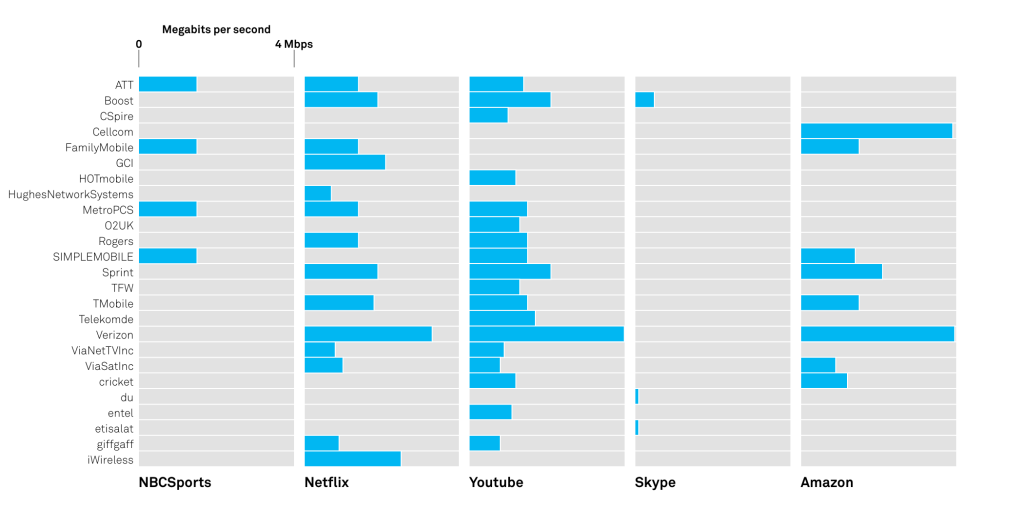
Since 2017 most ISPs across the USA have been named and shamed for throttling users’ connections. Below is a brief insight into the service providers that mostly throttle the internet:
CenturyLink
CenturyLink ranks as a top ISP provider in the USA. The company, since 1968, has been providing various broadband subscription plans to users and promises fast connection speeds. However, CenturyLink throttles the internet connection during peak hours, i.e., from 7 pm onwards. It is when most users are browsing the web, either streaming or playing online games or downloading torrents which results in more significant network congestion.
Spectrum
Charter Communications acquired Time Warner Cables in 2016 and was named Spectrum Internet Service. It was the second largest service provider across the US, with over 30 million subscribers. Though the company promises to provide the fastest internet speed for all activities, the speed users get extremely slow and ruin their experience.
Spectrum throttles the connection of all users involved in high-bandwidth consumption activities such as torrenting and streaming. Even users on Reddit complained about it. However, the ISP cannot impose data caps because of the conditions applied to its 2016 purchase. Under these conditions, the FCC prohibits Charter Communications from imposing data caps.
Currently, Spectrum doesn’t enforce data caps, but it’s more likely to change its terms of service in the future. The agreement clause will end in June 2023, so the company might again start imposing data caps.
Comcast Xfinity
Despite promising fast speeds, Comcast is among the top internet service providers that throttle the connection on various occasions. In 2007, Comcast violated the net neutrality rules and throttled users’ connection to the popular BitTorrent file-sharing software. But, in 2009, Comcast faced a $160 million fine for throttling the users’ traffic on BitTorrent. Soon after this incident, the service provider announced they would use a congestion management system to stop people from engaging in high bandwidth activities.
In addition, Comcast introduced paid prioritization charges under which they throttle users’ bandwidth on Netflix. But what was more concerning was that the company decided to impose access charges of $10 or more each month if Netflix disagreed with its terms. Besides this, Comcast announced the network optimization practice that will affect the 3G and 4G LTE users by throttling their connections.
Verizon
Verizon is famous for providing 4G internet coverage to 70% of US citizens but still throttles their connection. The telecom provider has a long history of throttling users’ connections and stopping them from doing what they want. In 2012, it was the first occasion when the FCC caught the ISP for blocking users from using tethering apps.
Later after five years, in 2017, Verizon accepted that they throttle the data on YouTube as part of their video optimization program. After this incident, though the company promised not to be involved in any unfair practice, users still complained about slow speeds while streaming. Additionally, a report finds that Verizon throttles 66% of users while streaming on Netflix, 49% on YouTube, and 38% on Amazon Prime.
Apart from this, in 2018, the most shameful incident was the Santa Clara Fire Department incident. Verizon throttled the connection of the fire department by enforcing data caps when it exceeds over 25GB of bandwidth while combating a wildfire. It was a highly unethical act, and the fire department filed a complaint against Verizon.
AT&T
Despite being a top internet service provider, AT&T follows a shady practice of throttling users’ internet connection without consent. The telecom provider on its website justified its act of limiting internet speed. Besides this, in 2014, they breached the net neutrality laws and throttled users’ bandwidth. However, in response, the FCC filed a penalty against them.
Later, in July 2021, AT&T announced not to throttle data on an unlimited plan. Also, they introduced a Sponsored Data Program that rewards the users for using the third-party service without throttling the bandwidth. In other words, it won’t benefit the non-sponsored companies, which was another occasion when AT&T violated net neutrality.
Cox communications
Cox Communications is the third largest broadband provider in the USA. In June 2020, users complained that Cox was reducing internet speed throughout the USA. Like other ISPs, Comcast also throttles the connection. The company took this initiative to keep a balance between the average and heavy bandwidth users. In this regard, the ISP also sends warning letters to the users who use a lot of bandwidth and warns them to control their data usage.
How to stop mobile data throttling
Mobile networks often impose limitations, making it more probable to encounter internet throttling on your mobile data plan than on your home broadband connection. The inherent constraints of mobile networks contribute to this discrepancy, highlighting the increased likelihood of experiencing reduced internet speeds and restricted data usage on mobile devices.
Mobile networks face various limitations that impact their performance:
- Latency: Mobile networks often experience fluctuations in latency, leading to lags in online games and video calls, unlike more stable broadband connections.
- Soft Caps: Mobile network providers impose ‘soft caps’ targeting high-bandwidth activities. For instance, your contract might allow unlimited streaming speeds for the initial 10GB of data but then throttle your speed to 10Mbps for the remaining data usage.
- Infrastructure: Cell towers have limited bandwidth and slower speeds than broadband connections. However, the advent of 5G mobile networks shows promise in bridging the gap and improving connection speeds.
Unlike wired broadband packages, wireless mobile deals frequently impose data caps, restricting data usage. Even so-called ‘unlimited’ mobile data plans often have hidden data caps that can lead to speed throttling if you surpass them.
While a VPN cannot eliminate data caps on mobile devices and potentially increase data consumption, it can bypass ‘soft caps’ on your data plan, such as streaming speed limitations after reaching a specific data limit.
By encrypting your device’s traffic and concealing it from your mobile network provider, a VPN prevents them from slowing down or restricting your traffic based on your online activities. Installing a VPN is, therefore, the most efficient method to counter mobile data throttling.
Best VPNs to bypass ISP Throttling
With a reliable VPN provider, it’s easy to prevent ISPs from detecting internet traffic and surf the web with the fastest connection speed. Here’s an insight into the six best VPNs that help users bypass ISP throttling:
1. NordVPN
The Panama-based NordVPN is an excellent option to use for bypassing ISP throttling. It offers top-notch security and uses obfuscated technology that disguises the VPN traffic as regular internet traffic and escapes quickly from the eyes of the service providers. Besides this, the VPN provider has unique features that hide the IP address and guarantee maximum protection from the ISPs like:
- Kill switch
- DNS and IP leak protection
- Double VPN
Another thing that makes NordVPN stand out as the best VPN to bypass bandwidth throttling is its extensive server network. It offers over 5000 servers in 59+ countries, ensuring a fast connection with less ping time. In addition, the VPN uses the NordLynx protocol, enhancing speed while browsing, streaming, and downloading.
The service provider follows a strict no-log policy and frowns upon collecting and sharing users’ information. Also, it has undergone a log audit process to prove that it’s honest with its claims and that people can trust it for its digital privacy. For all these reasons, NordVPN is the perfect choice for preventing throttling.
2. ExpressVPN
5. ExpressVPN
ExpressVPN is another best VPN to bypass ISP throttling and enjoy super-fast speeds. It uses the proprietary Light Way protocol and offers an extensive server network in 94 countries, enabling users to get maximum speed while streaming, gaming, and downloading. One of the best things about ExpressVPN is when you choose a server; it allows users to perform a speed test to ensure that the server offers the desired speed for any activity.
The VPN provider uses strong encryption that hides and protects the internet traffic from the ISPs and ensures anonymity on the web. Additionally, it also has various other features that provide robust online security and privacy and help prevent ISP throttling, such as:
- IP leak protection
- Split tunneling
- Trusted Server Technology
- SmartPlay
- Private DNS servers
Moreover, ExpressVPN is a no-log VPN that guarantees not to log or share your data with anyone, including the ISPs, so you can trust this VPN as it promises to keep your activities private. As a whole, ExpressVPN completely hides the VPN traffic and stops ISPs from throttling your connections.
3. CyberGhost

CyberGhost is among the best VPNs for bypassing throttling issues. The VPN offers blazing-fast speed and the highest level of security to protect online activities from ISPs. The best thing about CyberGhost VPN is that it provides dedicated servers for streaming, torrenting, and gaming. All these servers offer unlimited bandwidth and a vast server network of 6000+ servers in 88 countries that help ensure that the users don’t face connection lags.
The VPN provider offers NoSpy servers, which is a great feature that helps ensure reliable streaming. Besides this, CyberGhost offers impressive features that grant anonymity on the web and make it nearly impossible for the ISP to detect your network traffic. Some of these features include:
- Dedicated IP address
- Kill switch
- IP and DNS leak protection
Above all, CyberGhost is a secure VPN provider that uses the industry’s highest encryption and security protocols to prevent ISPs from monitoring online activity. In addition, it is a no-log VPN provider that ensures not to log your data or activities that can expose your identity. Therefore, try out CyberGhost VPN for maximum speed and security while surfing the web.
4. Surfshark
Surfshark VPN is another reliable VPN to use for bypassing bandwidth throttling. It is feature-packed with various impressive features for keeping your identity hidden from ISPs. Some of its distinctive features that prevent throttling are as follows:
- No Borders mode
- Camouflage mode
- Kill switch
- IP and DNS leak protection
- GPS spoofing
- Device invisibility
The service provider’s speed also makes it the most preferred choice of the users. It has a decent server network comprising 3200+ servers in over 100 countries; the best part is that it continuously adds more servers. Moreover, the VPN provides consistent and fast connection speed sufficient for high-bandwidth activities like streaming and downloading. Since Surfshark VPN uses WireGuard protocol, it’s another reason that you’ll get a stable internet connection.
Besides this, Surfshark’s security and privacy standards also make it difficult for the ISP to intercept users’ privacy. It deploys AES-256-bit encryption and follows a verified no-log policy that guarantees ultimate privacy on the web. Overall, Surfshark is a great VPN that is affordable, so do try it out once.
5. Proton VPN

Proton VPN is among the best top-rated VPN providers that use strong encryption to hide the data traffic from the prying eyes of the ISPs. The VPN deploys virtually uncrackable AES-256-bit encryption and secures tunneling protocols like OpenVPN and WireGuard to safeguard the internet traffic from the ISPs. In addition, Proton VPN protects against IP leaks and ensures that the ISP cannot get to know about your online activities.
The VPN provider has recently introduced a stealth protocol that helps bypass the detection filters used by ISPs and browse the web freely. Besides this, it offers a few impressive security and privacy-centric features that keep them more private on the web, like:
- Kill switch
- Alternate routing technology
- Secure core servers
Proton VPN also follows a verified no-log policy that prevents recording or sharing data with prying eyes. Another impressive Proton VPN feature is the VPN accelerator. It is a speed-centric feature that increases the VPN speed to its fullest. Also, it has 1600+ servers in over 60 countries. All the server offers unlimited bandwidth and quickly establishes the connection, leaving room for the ISP to identify the network traffic.
6. VyprVPN

VyprVPN, due to its security standards and fast speed, emerges as the best VPN for bypassing ISP throttling. Though it offers a limited server network spread, speeds are stable enough for browsing, streaming, and downloading. It uses the proprietary Chameleon protocol that helps get around censorship or filters to detect your activities and improves speed. This way, VyprVPN ensures a seamless downloading and streaming experience.
The service provider is a private VPN that follows a verified no-log policy and guarantees not to share your data with anyone. However, unlike most other VPN providers, VyprVPN lacks advanced features, but it does include all essential features that are needed to hide your identity from the ISPs, such as:
- Kill switch
- Connection per app
- VyprDNS
- Public Wi-Fi protection
Besides this, VyprVPN also uses a NAT firewall feature that doesn’t show your IP address and prevents the network from identifying you. Also, it uses military-grade solid encryption to hide the data from the ISPs and ensures an interrupted user experience.
Can a Free VPN help bypass ISP throttling?
Besides enhancing your data security, a VPN can prevent ISP throttling, which helps to improve your internet speeds. So, you can bid farewell to the frustrating buffering wheel and eliminate those agonizing seconds spent waiting for web pages to load.
When considering using a free VPN provider to bypass ISP throttling, it’s crucial to understand that the effectiveness of your connections depends on your choice of VPN. However, most free providers impose monthly data limits, which might not be sufficient for your browsing needs. Moreover, free VPNs usually offer limited server network access, which is usually congested leading to slow speeds. Also, they lack essential features to safeguard your data and ensure complete privacy from ISPs and other third parties. So, you should be wary of free VPNs and avoid them at all costs.
How do VPNs help bypass ISP Throttling?
ISP throttling is not something that a user can’t control or stop. But there are various ways by which bypassing ISP throttling becomes easy, and connecting to a VPN is the best and easiest method to overcome this issue.

A reliable VPN provider encrypts the data traffic using strong encryption. It sends the internet traffic via an encrypted tunnel preventing the ISPs from viewing the websites you’re trying to access. Also, connecting you to a remote VPN server masks your IP address and assigns the IP address of the VPN, making you more anonymous. Hence, you can easily bypass the ISP filters and the system that detects high bandwidth activities.
Besides this, certain features in a VPN provider also help bypass ISP throttling. Hence, when you choose a VPN so, don’t overlook the following features:
- Server Network: A VPN with a vast server network means it has servers across every country. This results in less ping time and establishes a quick connection.
- Fast Speed: The best VPN for throttling offers super-fast speed without significant connection drops across all servers.
- Privacy Aspect: Ensure the VPN follows a strict no-log policy and neither logs nor shares users’ activities with anyone.
- Extra Features: A VPN offering additional features like a kill switch, private DNS, IP leak protection, and obfuscated technology further makes you anonymous over the web.
It is a common myth that VPNs might slow internet speed and must not be used. However, this is not completely true. While connecting to a remote server and establishing a connection takes time, the best VPN for throttling ensures that the slowed-down time doesn’t impact your online activity. Therefore, using a VPN the fastest VPN for speed is crucial.
Is it possible to evade throttling without a VPN?
Dealing with ISP throttling can be a frustrating experience. Thankfully, there are effective measures you can take to counteract it and regain control over your internet connection without relying solely on a VPN.
Using a proxy
A proxy effectively substitutes your IP address with the proxy’s server by serving as an intermediary between your device and the internet. This allows you to mask your location and potentially experience improved speed without detection by your ISP.
Nevertheless, it’s important to note that proxies lack data encryption, meaning they don’t safeguard your data.
Upgrading your data plan
If you find your current contract with your ISP or mobile provider overly restrictive, upgrading to a more flexible data plan might be worth considering. The risk of bandwidth throttling arises when you exceed your allocated data limit, and subscribing to a lower-tier plan can deprioritize your data compared to other users.
Opting for an unlimited data plan allows you to easily circumvent data caps, enjoy access to fast lanes, and stream high-resolution videos. However, it’s important to note that upgrading your data plan often comes with a higher subscription fee than you’re currently paying, making it a potentially costly decision.
Switching to a new ISP
If you have exhausted all the previously mentioned methods and cannot prevent your ISP from throttling your internet, switching to a different ISP is the ultimate solution. You can enjoy unrestricted connection speeds and internet access without limitations by transitioning to a new provider that implements superior network management policies. However, it’s important to note that changing ISPs can be costly and disruptive, involving potential exit fees and additional hardware installation. Furthermore, there is no guarantee that your new ISP won’t use internet throttling, especially during network congestion.
Conclusion
ISP throttling is a deliberate act by service providers to slow down their internet speed overall or while using specific sites and services.
According to the ISPs, there are legitimate reasons for throttling, like network decongestion and optimizing the network traffic. However, the ISP also throttles the connection for other reasons, like paid prioritization. No matter the reason, ISP throttling from the users’ perspective is wrong.
There are various ways that you can adopt to bypass ISP throttling. You can switch to a new broadband provider or increase the data plan of your current one. But the best method is using a VPN.
A trusted VPN provider hides your IP address by connecting to a remote server and encrypts the internet traffic using strong encryption. Thus, it ensures that none of your activities are visible to the ISPs and allows you to browse the web as you want.
FAQs
The post How To Stop ISP Internet Throttling With A VPN In 2024 appeared first on BeEncrypted.
]]>Deprecated: Using null as an array offset is deprecated, use an empty string instead in /var/www/staging.beencrypted.com/site/web/wp/wp-includes/class-wp-block-type-registry.php on line 168
Deprecated: Using null as an array offset is deprecated, use an empty string instead in /var/www/staging.beencrypted.com/site/web/wp/wp-includes/class-wp-block-type-registry.php on line 168
Deprecated: Using null as an array offset is deprecated, use an empty string instead in /var/www/staging.beencrypted.com/site/web/wp/wp-includes/class-wp-block-type-registry.php on line 168
Deprecated: Using null as an array offset is deprecated, use an empty string instead in /var/www/staging.beencrypted.com/site/web/wp/wp-includes/class-wp-block-type-registry.php on line 168
Deprecated: Using null as an array offset is deprecated, use an empty string instead in /var/www/staging.beencrypted.com/site/web/wp/wp-includes/class-wp-block-type-registry.php on line 168
Deprecated: Using null as an array offset is deprecated, use an empty string instead in /var/www/staging.beencrypted.com/site/web/wp/wp-includes/class-wp-block-type-registry.php on line 168
Deprecated: Using null as an array offset is deprecated, use an empty string instead in /var/www/staging.beencrypted.com/site/web/wp/wp-includes/class-wp-block-type-registry.php on line 168
Deprecated: Using null as an array offset is deprecated, use an empty string instead in /var/www/staging.beencrypted.com/site/web/wp/wp-includes/class-wp-block-type-registry.php on line 168
Deprecated: Using null as an array offset is deprecated, use an empty string instead in /var/www/staging.beencrypted.com/site/web/wp/wp-includes/class-wp-block-type-registry.php on line 168
Deprecated: Using null as an array offset is deprecated, use an empty string instead in /var/www/staging.beencrypted.com/site/web/wp/wp-includes/class-wp-block-type-registry.php on line 168
Deprecated: Using null as an array offset is deprecated, use an empty string instead in /var/www/staging.beencrypted.com/site/web/wp/wp-includes/class-wp-block-type-registry.php on line 168
Deprecated: Using null as an array offset is deprecated, use an empty string instead in /var/www/staging.beencrypted.com/site/web/wp/wp-includes/class-wp-block-type-registry.php on line 168
Deprecated: Using null as an array offset is deprecated, use an empty string instead in /var/www/staging.beencrypted.com/site/web/wp/wp-includes/class-wp-block-type-registry.php on line 168
Deprecated: Using null as an array offset is deprecated, use an empty string instead in /var/www/staging.beencrypted.com/site/web/wp/wp-includes/class-wp-block-type-registry.php on line 168
Deprecated: Using null as an array offset is deprecated, use an empty string instead in /var/www/staging.beencrypted.com/site/web/wp/wp-includes/class-wp-block-type-registry.php on line 168
Deprecated: Using null as an array offset is deprecated, use an empty string instead in /var/www/staging.beencrypted.com/site/web/wp/wp-includes/class-wp-block-type-registry.php on line 168
Deprecated: Using null as an array offset is deprecated, use an empty string instead in /var/www/staging.beencrypted.com/site/web/wp/wp-includes/class-wp-block-type-registry.php on line 168
Deprecated: Using null as an array offset is deprecated, use an empty string instead in /var/www/staging.beencrypted.com/site/web/wp/wp-includes/class-wp-block-type-registry.php on line 168
Deprecated: Using null as an array offset is deprecated, use an empty string instead in /var/www/staging.beencrypted.com/site/web/wp/wp-includes/class-wp-block-type-registry.php on line 168
Deprecated: Using null as an array offset is deprecated, use an empty string instead in /var/www/staging.beencrypted.com/site/web/wp/wp-includes/class-wp-block-type-registry.php on line 168
Deprecated: Using null as an array offset is deprecated, use an empty string instead in /var/www/staging.beencrypted.com/site/web/wp/wp-includes/class-wp-block-type-registry.php on line 168
Deprecated: Using null as an array offset is deprecated, use an empty string instead in /var/www/staging.beencrypted.com/site/web/wp/wp-includes/class-wp-block-type-registry.php on line 168
Deprecated: Using null as an array offset is deprecated, use an empty string instead in /var/www/staging.beencrypted.com/site/web/wp/wp-includes/class-wp-block-type-registry.php on line 168
Deprecated: Using null as an array offset is deprecated, use an empty string instead in /var/www/staging.beencrypted.com/site/web/wp/wp-includes/class-wp-block-type-registry.php on line 168
Deprecated: Using null as an array offset is deprecated, use an empty string instead in /var/www/staging.beencrypted.com/site/web/wp/wp-includes/class-wp-block-type-registry.php on line 168
Deprecated: Using null as an array offset is deprecated, use an empty string instead in /var/www/staging.beencrypted.com/site/web/wp/wp-includes/class-wp-block-type-registry.php on line 168
Deprecated: Using null as an array offset is deprecated, use an empty string instead in /var/www/staging.beencrypted.com/site/web/wp/wp-includes/class-wp-block-type-registry.php on line 168
Deprecated: Using null as an array offset is deprecated, use an empty string instead in /var/www/staging.beencrypted.com/site/web/wp/wp-includes/class-wp-block-type-registry.php on line 168
Deprecated: Using null as an array offset is deprecated, use an empty string instead in /var/www/staging.beencrypted.com/site/web/wp/wp-includes/class-wp-block-type-registry.php on line 168
Deprecated: Using null as an array offset is deprecated, use an empty string instead in /var/www/staging.beencrypted.com/site/web/wp/wp-includes/class-wp-block-type-registry.php on line 168
Deprecated: Using null as an array offset is deprecated, use an empty string instead in /var/www/staging.beencrypted.com/site/web/wp/wp-includes/class-wp-block-type-registry.php on line 168
Deprecated: Using null as an array offset is deprecated, use an empty string instead in /var/www/staging.beencrypted.com/site/web/wp/wp-includes/class-wp-block-type-registry.php on line 168
Deprecated: Using null as an array offset is deprecated, use an empty string instead in /var/www/staging.beencrypted.com/site/web/wp/wp-includes/class-wp-block-type-registry.php on line 168
Deprecated: Using null as an array offset is deprecated, use an empty string instead in /var/www/staging.beencrypted.com/site/web/wp/wp-includes/class-wp-block-type-registry.php on line 168
Deprecated: Using null as an array offset is deprecated, use an empty string instead in /var/www/staging.beencrypted.com/site/web/wp/wp-includes/class-wp-block-type-registry.php on line 168
Deprecated: Using null as an array offset is deprecated, use an empty string instead in /var/www/staging.beencrypted.com/site/web/wp/wp-includes/class-wp-block-type-registry.php on line 168
Deprecated: Using null as an array offset is deprecated, use an empty string instead in /var/www/staging.beencrypted.com/site/web/wp/wp-includes/class-wp-block-type-registry.php on line 168
Deprecated: Using null as an array offset is deprecated, use an empty string instead in /var/www/staging.beencrypted.com/site/web/wp/wp-includes/class-wp-block-type-registry.php on line 168
Deprecated: Using null as an array offset is deprecated, use an empty string instead in /var/www/staging.beencrypted.com/site/web/wp/wp-includes/class-wp-block-type-registry.php on line 168
Deprecated: Using null as an array offset is deprecated, use an empty string instead in /var/www/staging.beencrypted.com/site/web/wp/wp-includes/class-wp-block-type-registry.php on line 168
Deprecated: Using null as an array offset is deprecated, use an empty string instead in /var/www/staging.beencrypted.com/site/web/wp/wp-includes/class-wp-block-type-registry.php on line 168
Deprecated: Using null as an array offset is deprecated, use an empty string instead in /var/www/staging.beencrypted.com/site/web/wp/wp-includes/class-wp-block-type-registry.php on line 168
Deprecated: Using null as an array offset is deprecated, use an empty string instead in /var/www/staging.beencrypted.com/site/web/wp/wp-includes/class-wp-block-type-registry.php on line 168
Deprecated: Using null as an array offset is deprecated, use an empty string instead in /var/www/staging.beencrypted.com/site/web/wp/wp-includes/class-wp-block-type-registry.php on line 168
Deprecated: Using null as an array offset is deprecated, use an empty string instead in /var/www/staging.beencrypted.com/site/web/wp/wp-includes/class-wp-block-type-registry.php on line 168
Deprecated: Using null as an array offset is deprecated, use an empty string instead in /var/www/staging.beencrypted.com/site/web/wp/wp-includes/class-wp-block-type-registry.php on line 168
Deprecated: Using null as an array offset is deprecated, use an empty string instead in /var/www/staging.beencrypted.com/site/web/wp/wp-includes/class-wp-block-type-registry.php on line 168
Deprecated: Using null as an array offset is deprecated, use an empty string instead in /var/www/staging.beencrypted.com/site/web/wp/wp-includes/class-wp-block-type-registry.php on line 168
Deprecated: Using null as an array offset is deprecated, use an empty string instead in /var/www/staging.beencrypted.com/site/web/wp/wp-includes/class-wp-block-type-registry.php on line 168
Deprecated: Using null as an array offset is deprecated, use an empty string instead in /var/www/staging.beencrypted.com/site/web/wp/wp-includes/class-wp-block-type-registry.php on line 168
Deprecated: Using null as an array offset is deprecated, use an empty string instead in /var/www/staging.beencrypted.com/site/web/wp/wp-includes/class-wp-block-type-registry.php on line 168
Deprecated: Using null as an array offset is deprecated, use an empty string instead in /var/www/staging.beencrypted.com/site/web/wp/wp-includes/class-wp-block-type-registry.php on line 168
Deprecated: Using null as an array offset is deprecated, use an empty string instead in /var/www/staging.beencrypted.com/site/web/wp/wp-includes/class-wp-block-type-registry.php on line 168
Deprecated: Using null as an array offset is deprecated, use an empty string instead in /var/www/staging.beencrypted.com/site/web/wp/wp-includes/class-wp-block-type-registry.php on line 168
Deprecated: Using null as an array offset is deprecated, use an empty string instead in /var/www/staging.beencrypted.com/site/web/wp/wp-includes/class-wp-block-type-registry.php on line 168
Deprecated: Using null as an array offset is deprecated, use an empty string instead in /var/www/staging.beencrypted.com/site/web/wp/wp-includes/class-wp-block-type-registry.php on line 168
Deprecated: Using null as an array offset is deprecated, use an empty string instead in /var/www/staging.beencrypted.com/site/web/wp/wp-includes/class-wp-block-type-registry.php on line 168
Deprecated: Using null as an array offset is deprecated, use an empty string instead in /var/www/staging.beencrypted.com/site/web/wp/wp-includes/class-wp-block-type-registry.php on line 168
Deprecated: Using null as an array offset is deprecated, use an empty string instead in /var/www/staging.beencrypted.com/site/web/wp/wp-includes/class-wp-block-type-registry.php on line 168
Deprecated: Using null as an array offset is deprecated, use an empty string instead in /var/www/staging.beencrypted.com/site/web/wp/wp-includes/class-wp-block-type-registry.php on line 168
Deprecated: Using null as an array offset is deprecated, use an empty string instead in /var/www/staging.beencrypted.com/site/web/wp/wp-includes/class-wp-block-type-registry.php on line 168
Deprecated: Using null as an array offset is deprecated, use an empty string instead in /var/www/staging.beencrypted.com/site/web/wp/wp-includes/class-wp-block-type-registry.php on line 168
Deprecated: Using null as an array offset is deprecated, use an empty string instead in /var/www/staging.beencrypted.com/site/web/wp/wp-includes/class-wp-block-type-registry.php on line 168
Deprecated: Using null as an array offset is deprecated, use an empty string instead in /var/www/staging.beencrypted.com/site/web/wp/wp-includes/class-wp-block-type-registry.php on line 168
Deprecated: Using null as an array offset is deprecated, use an empty string instead in /var/www/staging.beencrypted.com/site/web/wp/wp-includes/class-wp-block-type-registry.php on line 168
Deprecated: Using null as an array offset is deprecated, use an empty string instead in /var/www/staging.beencrypted.com/site/web/wp/wp-includes/class-wp-block-type-registry.php on line 168
Deprecated: Using null as an array offset is deprecated, use an empty string instead in /var/www/staging.beencrypted.com/site/web/wp/wp-includes/class-wp-block-type-registry.php on line 168
Deprecated: Using null as an array offset is deprecated, use an empty string instead in /var/www/staging.beencrypted.com/site/web/wp/wp-includes/class-wp-block-type-registry.php on line 168
Deprecated: Using null as an array offset is deprecated, use an empty string instead in /var/www/staging.beencrypted.com/site/web/wp/wp-includes/class-wp-block-type-registry.php on line 168
Deprecated: Using null as an array offset is deprecated, use an empty string instead in /var/www/staging.beencrypted.com/site/web/wp/wp-includes/class-wp-block-type-registry.php on line 168
Deprecated: Using null as an array offset is deprecated, use an empty string instead in /var/www/staging.beencrypted.com/site/web/wp/wp-includes/class-wp-block-type-registry.php on line 168
Deprecated: Using null as an array offset is deprecated, use an empty string instead in /var/www/staging.beencrypted.com/site/web/wp/wp-includes/class-wp-block-type-registry.php on line 168
Deprecated: Using null as an array offset is deprecated, use an empty string instead in /var/www/staging.beencrypted.com/site/web/wp/wp-includes/class-wp-block-type-registry.php on line 168
Deprecated: Using null as an array offset is deprecated, use an empty string instead in /var/www/staging.beencrypted.com/site/web/wp/wp-includes/class-wp-block-type-registry.php on line 168
Deprecated: Using null as an array offset is deprecated, use an empty string instead in /var/www/staging.beencrypted.com/site/web/wp/wp-includes/class-wp-block-type-registry.php on line 168
Deprecated: Using null as an array offset is deprecated, use an empty string instead in /var/www/staging.beencrypted.com/site/web/wp/wp-includes/class-wp-block-type-registry.php on line 168
Deprecated: Using null as an array offset is deprecated, use an empty string instead in /var/www/staging.beencrypted.com/site/web/wp/wp-includes/class-wp-block-type-registry.php on line 168
Deprecated: Using null as an array offset is deprecated, use an empty string instead in /var/www/staging.beencrypted.com/site/web/wp/wp-includes/class-wp-block-type-registry.php on line 168
Deprecated: Using null as an array offset is deprecated, use an empty string instead in /var/www/staging.beencrypted.com/site/web/wp/wp-includes/class-wp-block-type-registry.php on line 168
Deprecated: Using null as an array offset is deprecated, use an empty string instead in /var/www/staging.beencrypted.com/site/web/wp/wp-includes/class-wp-block-type-registry.php on line 168
Deprecated: Using null as an array offset is deprecated, use an empty string instead in /var/www/staging.beencrypted.com/site/web/wp/wp-includes/class-wp-block-type-registry.php on line 168
Deprecated: Using null as an array offset is deprecated, use an empty string instead in /var/www/staging.beencrypted.com/site/web/wp/wp-includes/class-wp-block-type-registry.php on line 168
Deprecated: Using null as an array offset is deprecated, use an empty string instead in /var/www/staging.beencrypted.com/site/web/wp/wp-includes/class-wp-block-type-registry.php on line 168
Deprecated: Using null as an array offset is deprecated, use an empty string instead in /var/www/staging.beencrypted.com/site/web/wp/wp-includes/class-wp-block-type-registry.php on line 168
Deprecated: Using null as an array offset is deprecated, use an empty string instead in /var/www/staging.beencrypted.com/site/web/wp/wp-includes/class-wp-block-type-registry.php on line 168
Deprecated: Using null as an array offset is deprecated, use an empty string instead in /var/www/staging.beencrypted.com/site/web/wp/wp-includes/class-wp-block-type-registry.php on line 168
Deprecated: Using null as an array offset is deprecated, use an empty string instead in /var/www/staging.beencrypted.com/site/web/wp/wp-includes/class-wp-block-type-registry.php on line 168
Deprecated: Using null as an array offset is deprecated, use an empty string instead in /var/www/staging.beencrypted.com/site/web/wp/wp-includes/class-wp-block-type-registry.php on line 168
Deprecated: Using null as an array offset is deprecated, use an empty string instead in /var/www/staging.beencrypted.com/site/web/wp/wp-includes/class-wp-block-type-registry.php on line 168
Deprecated: Using null as an array offset is deprecated, use an empty string instead in /var/www/staging.beencrypted.com/site/web/wp/wp-includes/class-wp-block-type-registry.php on line 168
Deprecated: Using null as an array offset is deprecated, use an empty string instead in /var/www/staging.beencrypted.com/site/web/wp/wp-includes/class-wp-block-type-registry.php on line 168
Deprecated: Using null as an array offset is deprecated, use an empty string instead in /var/www/staging.beencrypted.com/site/web/wp/wp-includes/class-wp-block-type-registry.php on line 168
Deprecated: Using null as an array offset is deprecated, use an empty string instead in /var/www/staging.beencrypted.com/site/web/wp/wp-includes/class-wp-block-type-registry.php on line 168
Deprecated: Using null as an array offset is deprecated, use an empty string instead in /var/www/staging.beencrypted.com/site/web/wp/wp-includes/class-wp-block-type-registry.php on line 168
Deprecated: Using null as an array offset is deprecated, use an empty string instead in /var/www/staging.beencrypted.com/site/web/wp/wp-includes/class-wp-block-type-registry.php on line 168
Deprecated: Using null as an array offset is deprecated, use an empty string instead in /var/www/staging.beencrypted.com/site/web/wp/wp-includes/class-wp-block-type-registry.php on line 168
Deprecated: Using null as an array offset is deprecated, use an empty string instead in /var/www/staging.beencrypted.com/site/web/wp/wp-includes/class-wp-block-type-registry.php on line 168
Deprecated: Using null as an array offset is deprecated, use an empty string instead in /var/www/staging.beencrypted.com/site/web/wp/wp-includes/class-wp-block-type-registry.php on line 168
Deprecated: Using null as an array offset is deprecated, use an empty string instead in /var/www/staging.beencrypted.com/site/web/wp/wp-includes/class-wp-block-type-registry.php on line 168
Deprecated: Using null as an array offset is deprecated, use an empty string instead in /var/www/staging.beencrypted.com/site/web/wp/wp-includes/class-wp-block-type-registry.php on line 168
Deprecated: Using null as an array offset is deprecated, use an empty string instead in /var/www/staging.beencrypted.com/site/web/wp/wp-includes/class-wp-block-type-registry.php on line 168
Deprecated: Using null as an array offset is deprecated, use an empty string instead in /var/www/staging.beencrypted.com/site/web/wp/wp-includes/class-wp-block-type-registry.php on line 168
Deprecated: Using null as an array offset is deprecated, use an empty string instead in /var/www/staging.beencrypted.com/site/web/wp/wp-includes/class-wp-block-type-registry.php on line 168
Deprecated: Using null as an array offset is deprecated, use an empty string instead in /var/www/staging.beencrypted.com/site/web/wp/wp-includes/class-wp-block-type-registry.php on line 168
Deprecated: Using null as an array offset is deprecated, use an empty string instead in /var/www/staging.beencrypted.com/site/web/wp/wp-includes/class-wp-block-type-registry.php on line 168
Deprecated: Using null as an array offset is deprecated, use an empty string instead in /var/www/staging.beencrypted.com/site/web/wp/wp-includes/class-wp-block-type-registry.php on line 168
Deprecated: Using null as an array offset is deprecated, use an empty string instead in /var/www/staging.beencrypted.com/site/web/wp/wp-includes/class-wp-block-type-registry.php on line 168
Deprecated: Using null as an array offset is deprecated, use an empty string instead in /var/www/staging.beencrypted.com/site/web/wp/wp-includes/class-wp-block-type-registry.php on line 168
Deprecated: Using null as an array offset is deprecated, use an empty string instead in /var/www/staging.beencrypted.com/site/web/wp/wp-includes/class-wp-block-type-registry.php on line 168
Deprecated: Using null as an array offset is deprecated, use an empty string instead in /var/www/staging.beencrypted.com/site/web/wp/wp-includes/class-wp-block-type-registry.php on line 168
Deprecated: Using null as an array offset is deprecated, use an empty string instead in /var/www/staging.beencrypted.com/site/web/wp/wp-includes/class-wp-block-type-registry.php on line 168
Deprecated: Using null as an array offset is deprecated, use an empty string instead in /var/www/staging.beencrypted.com/site/web/wp/wp-includes/class-wp-block-type-registry.php on line 168
Deprecated: Using null as an array offset is deprecated, use an empty string instead in /var/www/staging.beencrypted.com/site/web/wp/wp-includes/class-wp-block-type-registry.php on line 168
Deprecated: Using null as an array offset is deprecated, use an empty string instead in /var/www/staging.beencrypted.com/site/web/wp/wp-includes/class-wp-block-type-registry.php on line 168
Deprecated: Using null as an array offset is deprecated, use an empty string instead in /var/www/staging.beencrypted.com/site/web/wp/wp-includes/class-wp-block-type-registry.php on line 168
Deprecated: Using null as an array offset is deprecated, use an empty string instead in /var/www/staging.beencrypted.com/site/web/wp/wp-includes/class-wp-block-type-registry.php on line 168
Deprecated: Using null as an array offset is deprecated, use an empty string instead in /var/www/staging.beencrypted.com/site/web/wp/wp-includes/class-wp-block-type-registry.php on line 168
Deprecated: Using null as an array offset is deprecated, use an empty string instead in /var/www/staging.beencrypted.com/site/web/wp/wp-includes/class-wp-block-type-registry.php on line 168
Deprecated: Using null as an array offset is deprecated, use an empty string instead in /var/www/staging.beencrypted.com/site/web/wp/wp-includes/class-wp-block-type-registry.php on line 168
Deprecated: Using null as an array offset is deprecated, use an empty string instead in /var/www/staging.beencrypted.com/site/web/wp/wp-includes/class-wp-block-type-registry.php on line 168
Deprecated: Using null as an array offset is deprecated, use an empty string instead in /var/www/staging.beencrypted.com/site/web/wp/wp-includes/class-wp-block-type-registry.php on line 168
Deprecated: Using null as an array offset is deprecated, use an empty string instead in /var/www/staging.beencrypted.com/site/web/wp/wp-includes/class-wp-block-type-registry.php on line 168
Deprecated: Using null as an array offset is deprecated, use an empty string instead in /var/www/staging.beencrypted.com/site/web/wp/wp-includes/class-wp-block-type-registry.php on line 168
Deprecated: Using null as an array offset is deprecated, use an empty string instead in /var/www/staging.beencrypted.com/site/web/wp/wp-includes/class-wp-block-type-registry.php on line 168
Deprecated: Using null as an array offset is deprecated, use an empty string instead in /var/www/staging.beencrypted.com/site/web/wp/wp-includes/class-wp-block-type-registry.php on line 168
Deprecated: Using null as an array offset is deprecated, use an empty string instead in /var/www/staging.beencrypted.com/site/web/wp/wp-includes/class-wp-block-type-registry.php on line 168
Deprecated: Using null as an array offset is deprecated, use an empty string instead in /var/www/staging.beencrypted.com/site/web/wp/wp-includes/class-wp-block-type-registry.php on line 168
Deprecated: Using null as an array offset is deprecated, use an empty string instead in /var/www/staging.beencrypted.com/site/web/wp/wp-includes/class-wp-block-type-registry.php on line 168
Deprecated: Using null as an array offset is deprecated, use an empty string instead in /var/www/staging.beencrypted.com/site/web/wp/wp-includes/class-wp-block-type-registry.php on line 168
Deprecated: Using null as an array offset is deprecated, use an empty string instead in /var/www/staging.beencrypted.com/site/web/wp/wp-includes/class-wp-block-type-registry.php on line 168
Deprecated: Using null as an array offset is deprecated, use an empty string instead in /var/www/staging.beencrypted.com/site/web/wp/wp-includes/class-wp-block-type-registry.php on line 168
Deprecated: Using null as an array offset is deprecated, use an empty string instead in /var/www/staging.beencrypted.com/site/web/wp/wp-includes/class-wp-block-type-registry.php on line 168
Deprecated: Using null as an array offset is deprecated, use an empty string instead in /var/www/staging.beencrypted.com/site/web/wp/wp-includes/class-wp-block-type-registry.php on line 168
Deprecated: Using null as an array offset is deprecated, use an empty string instead in /var/www/staging.beencrypted.com/site/web/wp/wp-includes/class-wp-block-type-registry.php on line 168
Deprecated: Using null as an array offset is deprecated, use an empty string instead in /var/www/staging.beencrypted.com/site/web/wp/wp-includes/class-wp-block-type-registry.php on line 168
Deprecated: Using null as an array offset is deprecated, use an empty string instead in /var/www/staging.beencrypted.com/site/web/wp/wp-includes/class-wp-block-type-registry.php on line 168
Deprecated: Using null as an array offset is deprecated, use an empty string instead in /var/www/staging.beencrypted.com/site/web/wp/wp-includes/class-wp-block-type-registry.php on line 168
Deprecated: Using null as an array offset is deprecated, use an empty string instead in /var/www/staging.beencrypted.com/site/web/wp/wp-includes/class-wp-block-type-registry.php on line 168
Deprecated: Using null as an array offset is deprecated, use an empty string instead in /var/www/staging.beencrypted.com/site/web/wp/wp-includes/class-wp-block-type-registry.php on line 168
Deprecated: Using null as an array offset is deprecated, use an empty string instead in /var/www/staging.beencrypted.com/site/web/wp/wp-includes/class-wp-block-type-registry.php on line 168
Deprecated: Using null as an array offset is deprecated, use an empty string instead in /var/www/staging.beencrypted.com/site/web/wp/wp-includes/class-wp-block-type-registry.php on line 168
Deprecated: Using null as an array offset is deprecated, use an empty string instead in /var/www/staging.beencrypted.com/site/web/wp/wp-includes/class-wp-block-type-registry.php on line 168
Deprecated: Using null as an array offset is deprecated, use an empty string instead in /var/www/staging.beencrypted.com/site/web/wp/wp-includes/class-wp-block-type-registry.php on line 168
Deprecated: Using null as an array offset is deprecated, use an empty string instead in /var/www/staging.beencrypted.com/site/web/wp/wp-includes/class-wp-block-type-registry.php on line 168
Deprecated: Using null as an array offset is deprecated, use an empty string instead in /var/www/staging.beencrypted.com/site/web/wp/wp-includes/class-wp-block-type-registry.php on line 168
Deprecated: Using null as an array offset is deprecated, use an empty string instead in /var/www/staging.beencrypted.com/site/web/wp/wp-includes/class-wp-block-type-registry.php on line 168
Deprecated: Using null as an array offset is deprecated, use an empty string instead in /var/www/staging.beencrypted.com/site/web/wp/wp-includes/class-wp-block-type-registry.php on line 168
Deprecated: Using null as an array offset is deprecated, use an empty string instead in /var/www/staging.beencrypted.com/site/web/wp/wp-includes/class-wp-block-type-registry.php on line 168
Deprecated: Using null as an array offset is deprecated, use an empty string instead in /var/www/staging.beencrypted.com/site/web/wp/wp-includes/class-wp-block-type-registry.php on line 168
Deprecated: Using null as an array offset is deprecated, use an empty string instead in /var/www/staging.beencrypted.com/site/web/wp/wp-includes/class-wp-block-type-registry.php on line 168
Deprecated: Using null as an array offset is deprecated, use an empty string instead in /var/www/staging.beencrypted.com/site/web/wp/wp-includes/class-wp-block-type-registry.php on line 168
Deprecated: Using null as an array offset is deprecated, use an empty string instead in /var/www/staging.beencrypted.com/site/web/wp/wp-includes/class-wp-block-type-registry.php on line 168
Deprecated: Using null as an array offset is deprecated, use an empty string instead in /var/www/staging.beencrypted.com/site/web/wp/wp-includes/class-wp-block-type-registry.php on line 168
Deprecated: Using null as an array offset is deprecated, use an empty string instead in /var/www/staging.beencrypted.com/site/web/wp/wp-includes/class-wp-block-type-registry.php on line 168
Deprecated: Using null as an array offset is deprecated, use an empty string instead in /var/www/staging.beencrypted.com/site/web/wp/wp-includes/class-wp-block-type-registry.php on line 168
Deprecated: Using null as an array offset is deprecated, use an empty string instead in /var/www/staging.beencrypted.com/site/web/wp/wp-includes/class-wp-block-type-registry.php on line 168
Deprecated: Using null as an array offset is deprecated, use an empty string instead in /var/www/staging.beencrypted.com/site/web/wp/wp-includes/class-wp-block-type-registry.php on line 168
Deprecated: Using null as an array offset is deprecated, use an empty string instead in /var/www/staging.beencrypted.com/site/web/wp/wp-includes/class-wp-block-type-registry.php on line 168
Deprecated: Using null as an array offset is deprecated, use an empty string instead in /var/www/staging.beencrypted.com/site/web/wp/wp-includes/class-wp-block-type-registry.php on line 168
Deprecated: Using null as an array offset is deprecated, use an empty string instead in /var/www/staging.beencrypted.com/site/web/wp/wp-includes/class-wp-block-type-registry.php on line 168
Deprecated: Using null as an array offset is deprecated, use an empty string instead in /var/www/staging.beencrypted.com/site/web/wp/wp-includes/class-wp-block-type-registry.php on line 168
Deprecated: Using null as an array offset is deprecated, use an empty string instead in /var/www/staging.beencrypted.com/site/web/wp/wp-includes/class-wp-block-type-registry.php on line 168
Deprecated: Using null as an array offset is deprecated, use an empty string instead in /var/www/staging.beencrypted.com/site/web/wp/wp-includes/class-wp-block-type-registry.php on line 168
Deprecated: Using null as an array offset is deprecated, use an empty string instead in /var/www/staging.beencrypted.com/site/web/wp/wp-includes/class-wp-block-type-registry.php on line 168
Deprecated: Using null as an array offset is deprecated, use an empty string instead in /var/www/staging.beencrypted.com/site/web/wp/wp-includes/class-wp-block-type-registry.php on line 168
Deprecated: Using null as an array offset is deprecated, use an empty string instead in /var/www/staging.beencrypted.com/site/web/wp/wp-includes/class-wp-block-type-registry.php on line 168
Deprecated: Using null as an array offset is deprecated, use an empty string instead in /var/www/staging.beencrypted.com/site/web/wp/wp-includes/class-wp-block-type-registry.php on line 168
Deprecated: Using null as an array offset is deprecated, use an empty string instead in /var/www/staging.beencrypted.com/site/web/wp/wp-includes/class-wp-block-type-registry.php on line 168
Deprecated: Using null as an array offset is deprecated, use an empty string instead in /var/www/staging.beencrypted.com/site/web/wp/wp-includes/class-wp-block-type-registry.php on line 168
Deprecated: Using null as an array offset is deprecated, use an empty string instead in /var/www/staging.beencrypted.com/site/web/wp/wp-includes/class-wp-block-type-registry.php on line 168
Deprecated: Using null as an array offset is deprecated, use an empty string instead in /var/www/staging.beencrypted.com/site/web/wp/wp-includes/class-wp-block-type-registry.php on line 168
Deprecated: Using null as an array offset is deprecated, use an empty string instead in /var/www/staging.beencrypted.com/site/web/wp/wp-includes/class-wp-block-type-registry.php on line 168
Deprecated: Using null as an array offset is deprecated, use an empty string instead in /var/www/staging.beencrypted.com/site/web/wp/wp-includes/class-wp-block-type-registry.php on line 168
Deprecated: Using null as an array offset is deprecated, use an empty string instead in /var/www/staging.beencrypted.com/site/web/wp/wp-includes/class-wp-block-type-registry.php on line 168
Deprecated: Using null as an array offset is deprecated, use an empty string instead in /var/www/staging.beencrypted.com/site/web/wp/wp-includes/class-wp-block-type-registry.php on line 168
Deprecated: Using null as an array offset is deprecated, use an empty string instead in /var/www/staging.beencrypted.com/site/web/wp/wp-includes/class-wp-block-type-registry.php on line 168
Deprecated: Using null as an array offset is deprecated, use an empty string instead in /var/www/staging.beencrypted.com/site/web/wp/wp-includes/class-wp-block-type-registry.php on line 168
Deprecated: Using null as an array offset is deprecated, use an empty string instead in /var/www/staging.beencrypted.com/site/web/wp/wp-includes/class-wp-block-type-registry.php on line 168
Deprecated: Using null as an array offset is deprecated, use an empty string instead in /var/www/staging.beencrypted.com/site/web/wp/wp-includes/class-wp-block-type-registry.php on line 168
Deprecated: Using null as an array offset is deprecated, use an empty string instead in /var/www/staging.beencrypted.com/site/web/wp/wp-includes/class-wp-block-type-registry.php on line 168
Deprecated: Using null as an array offset is deprecated, use an empty string instead in /var/www/staging.beencrypted.com/site/web/wp/wp-includes/class-wp-block-type-registry.php on line 168
Deprecated: Using null as an array offset is deprecated, use an empty string instead in /var/www/staging.beencrypted.com/site/web/wp/wp-includes/class-wp-block-type-registry.php on line 168
Deprecated: Using null as an array offset is deprecated, use an empty string instead in /var/www/staging.beencrypted.com/site/web/wp/wp-includes/class-wp-block-type-registry.php on line 168
Deprecated: Using null as an array offset is deprecated, use an empty string instead in /var/www/staging.beencrypted.com/site/web/wp/wp-includes/class-wp-block-type-registry.php on line 168
Deprecated: Using null as an array offset is deprecated, use an empty string instead in /var/www/staging.beencrypted.com/site/web/wp/wp-includes/class-wp-block-type-registry.php on line 168
Deprecated: Using null as an array offset is deprecated, use an empty string instead in /var/www/staging.beencrypted.com/site/web/wp/wp-includes/class-wp-block-type-registry.php on line 168
Deprecated: Using null as an array offset is deprecated, use an empty string instead in /var/www/staging.beencrypted.com/site/web/wp/wp-includes/class-wp-block-type-registry.php on line 168
Deprecated: Using null as an array offset is deprecated, use an empty string instead in /var/www/staging.beencrypted.com/site/web/wp/wp-includes/class-wp-block-type-registry.php on line 168
Deprecated: Using null as an array offset is deprecated, use an empty string instead in /var/www/staging.beencrypted.com/site/web/wp/wp-includes/class-wp-block-type-registry.php on line 168
Deprecated: Using null as an array offset is deprecated, use an empty string instead in /var/www/staging.beencrypted.com/site/web/wp/wp-includes/class-wp-block-type-registry.php on line 168
Deprecated: Using null as an array offset is deprecated, use an empty string instead in /var/www/staging.beencrypted.com/site/web/wp/wp-includes/class-wp-block-type-registry.php on line 168
Deprecated: Using null as an array offset is deprecated, use an empty string instead in /var/www/staging.beencrypted.com/site/web/wp/wp-includes/class-wp-block-type-registry.php on line 168
Deprecated: Using null as an array offset is deprecated, use an empty string instead in /var/www/staging.beencrypted.com/site/web/wp/wp-includes/class-wp-block-type-registry.php on line 168
Deprecated: Using null as an array offset is deprecated, use an empty string instead in /var/www/staging.beencrypted.com/site/web/wp/wp-includes/class-wp-block-type-registry.php on line 168
Deprecated: Using null as an array offset is deprecated, use an empty string instead in /var/www/staging.beencrypted.com/site/web/wp/wp-includes/class-wp-block-type-registry.php on line 168
Deprecated: Using null as an array offset is deprecated, use an empty string instead in /var/www/staging.beencrypted.com/site/web/wp/wp-includes/class-wp-block-type-registry.php on line 168
Deprecated: Using null as an array offset is deprecated, use an empty string instead in /var/www/staging.beencrypted.com/site/web/wp/wp-includes/class-wp-block-type-registry.php on line 168
Deprecated: Using null as an array offset is deprecated, use an empty string instead in /var/www/staging.beencrypted.com/site/web/wp/wp-includes/class-wp-block-type-registry.php on line 168
Deprecated: Using null as an array offset is deprecated, use an empty string instead in /var/www/staging.beencrypted.com/site/web/wp/wp-includes/class-wp-block-type-registry.php on line 168
Deprecated: Using null as an array offset is deprecated, use an empty string instead in /var/www/staging.beencrypted.com/site/web/wp/wp-includes/class-wp-block-type-registry.php on line 168
Deprecated: Using null as an array offset is deprecated, use an empty string instead in /var/www/staging.beencrypted.com/site/web/wp/wp-includes/class-wp-block-type-registry.php on line 168
Deprecated: Using null as an array offset is deprecated, use an empty string instead in /var/www/staging.beencrypted.com/site/web/wp/wp-includes/class-wp-block-type-registry.php on line 168
Deprecated: Using null as an array offset is deprecated, use an empty string instead in /var/www/staging.beencrypted.com/site/web/wp/wp-includes/class-wp-block-type-registry.php on line 168
Deprecated: Using null as an array offset is deprecated, use an empty string instead in /var/www/staging.beencrypted.com/site/web/wp/wp-includes/class-wp-block-type-registry.php on line 168
Deprecated: Using null as an array offset is deprecated, use an empty string instead in /var/www/staging.beencrypted.com/site/web/wp/wp-includes/class-wp-block-type-registry.php on line 168
Deprecated: Using null as an array offset is deprecated, use an empty string instead in /var/www/staging.beencrypted.com/site/web/wp/wp-includes/class-wp-block-type-registry.php on line 168
Deprecated: Using null as an array offset is deprecated, use an empty string instead in /var/www/staging.beencrypted.com/site/web/wp/wp-includes/class-wp-block-type-registry.php on line 168
Deprecated: Using null as an array offset is deprecated, use an empty string instead in /var/www/staging.beencrypted.com/site/web/wp/wp-includes/class-wp-block-type-registry.php on line 168
Deprecated: Using null as an array offset is deprecated, use an empty string instead in /var/www/staging.beencrypted.com/site/web/wp/wp-includes/class-wp-block-type-registry.php on line 168
Deprecated: Using null as an array offset is deprecated, use an empty string instead in /var/www/staging.beencrypted.com/site/web/wp/wp-includes/class-wp-block-type-registry.php on line 168
Deprecated: Using null as an array offset is deprecated, use an empty string instead in /var/www/staging.beencrypted.com/site/web/wp/wp-includes/class-wp-block-type-registry.php on line 168
Deprecated: Using null as an array offset is deprecated, use an empty string instead in /var/www/staging.beencrypted.com/site/web/wp/wp-includes/class-wp-block-type-registry.php on line 168
Deprecated: Using null as an array offset is deprecated, use an empty string instead in /var/www/staging.beencrypted.com/site/web/wp/wp-includes/class-wp-block-type-registry.php on line 168
Deprecated: Using null as an array offset is deprecated, use an empty string instead in /var/www/staging.beencrypted.com/site/web/wp/wp-includes/class-wp-block-type-registry.php on line 168
Deprecated: Using null as an array offset is deprecated, use an empty string instead in /var/www/staging.beencrypted.com/site/web/wp/wp-includes/class-wp-block-type-registry.php on line 168
Deprecated: Using null as an array offset is deprecated, use an empty string instead in /var/www/staging.beencrypted.com/site/web/wp/wp-includes/class-wp-block-type-registry.php on line 168
Deprecated: Using null as an array offset is deprecated, use an empty string instead in /var/www/staging.beencrypted.com/site/web/wp/wp-includes/class-wp-block-type-registry.php on line 168
Deprecated: Using null as an array offset is deprecated, use an empty string instead in /var/www/staging.beencrypted.com/site/web/wp/wp-includes/class-wp-block-type-registry.php on line 168
Deprecated: Using null as an array offset is deprecated, use an empty string instead in /var/www/staging.beencrypted.com/site/web/wp/wp-includes/class-wp-block-type-registry.php on line 168
Deprecated: Using null as an array offset is deprecated, use an empty string instead in /var/www/staging.beencrypted.com/site/web/wp/wp-includes/class-wp-block-type-registry.php on line 168
Deprecated: Using null as an array offset is deprecated, use an empty string instead in /var/www/staging.beencrypted.com/site/web/wp/wp-includes/class-wp-block-type-registry.php on line 168
Deprecated: Using null as an array offset is deprecated, use an empty string instead in /var/www/staging.beencrypted.com/site/web/wp/wp-includes/class-wp-block-type-registry.php on line 168
Deprecated: Using null as an array offset is deprecated, use an empty string instead in /var/www/staging.beencrypted.com/site/web/wp/wp-includes/class-wp-block-type-registry.php on line 168
Deprecated: Using null as an array offset is deprecated, use an empty string instead in /var/www/staging.beencrypted.com/site/web/wp/wp-includes/class-wp-block-type-registry.php on line 168
Deprecated: Using null as an array offset is deprecated, use an empty string instead in /var/www/staging.beencrypted.com/site/web/wp/wp-includes/class-wp-block-type-registry.php on line 168
Deprecated: Using null as an array offset is deprecated, use an empty string instead in /var/www/staging.beencrypted.com/site/web/wp/wp-includes/class-wp-block-type-registry.php on line 168
Deprecated: Using null as an array offset is deprecated, use an empty string instead in /var/www/staging.beencrypted.com/site/web/wp/wp-includes/class-wp-block-type-registry.php on line 168
Deprecated: Using null as an array offset is deprecated, use an empty string instead in /var/www/staging.beencrypted.com/site/web/wp/wp-includes/class-wp-block-type-registry.php on line 168
Deprecated: Using null as an array offset is deprecated, use an empty string instead in /var/www/staging.beencrypted.com/site/web/wp/wp-includes/class-wp-block-type-registry.php on line 168
Deprecated: Using null as an array offset is deprecated, use an empty string instead in /var/www/staging.beencrypted.com/site/web/wp/wp-includes/class-wp-block-type-registry.php on line 168
Deprecated: Using null as an array offset is deprecated, use an empty string instead in /var/www/staging.beencrypted.com/site/web/wp/wp-includes/class-wp-block-type-registry.php on line 168
Deprecated: Using null as an array offset is deprecated, use an empty string instead in /var/www/staging.beencrypted.com/site/web/wp/wp-includes/class-wp-block-type-registry.php on line 168
Deprecated: Using null as an array offset is deprecated, use an empty string instead in /var/www/staging.beencrypted.com/site/web/wp/wp-includes/class-wp-block-type-registry.php on line 168
Deprecated: Using null as an array offset is deprecated, use an empty string instead in /var/www/staging.beencrypted.com/site/web/wp/wp-includes/class-wp-block-type-registry.php on line 168
Deprecated: Using null as an array offset is deprecated, use an empty string instead in /var/www/staging.beencrypted.com/site/web/wp/wp-includes/class-wp-block-type-registry.php on line 168
Deprecated: Using null as an array offset is deprecated, use an empty string instead in /var/www/staging.beencrypted.com/site/web/wp/wp-includes/class-wp-block-type-registry.php on line 168
Deprecated: Using null as an array offset is deprecated, use an empty string instead in /var/www/staging.beencrypted.com/site/web/wp/wp-includes/class-wp-block-type-registry.php on line 168
Deprecated: Using null as an array offset is deprecated, use an empty string instead in /var/www/staging.beencrypted.com/site/web/wp/wp-includes/class-wp-block-type-registry.php on line 168
Deprecated: Using null as an array offset is deprecated, use an empty string instead in /var/www/staging.beencrypted.com/site/web/wp/wp-includes/class-wp-block-type-registry.php on line 168
Deprecated: Using null as an array offset is deprecated, use an empty string instead in /var/www/staging.beencrypted.com/site/web/wp/wp-includes/class-wp-block-type-registry.php on line 168
Deprecated: Using null as an array offset is deprecated, use an empty string instead in /var/www/staging.beencrypted.com/site/web/wp/wp-includes/class-wp-block-type-registry.php on line 168
Deprecated: Using null as an array offset is deprecated, use an empty string instead in /var/www/staging.beencrypted.com/site/web/wp/wp-includes/class-wp-block-type-registry.php on line 168
Deprecated: Using null as an array offset is deprecated, use an empty string instead in /var/www/staging.beencrypted.com/site/web/wp/wp-includes/class-wp-block-type-registry.php on line 168
Deprecated: Using null as an array offset is deprecated, use an empty string instead in /var/www/staging.beencrypted.com/site/web/wp/wp-includes/class-wp-block-type-registry.php on line 168
Deprecated: Using null as an array offset is deprecated, use an empty string instead in /var/www/staging.beencrypted.com/site/web/wp/wp-includes/class-wp-block-type-registry.php on line 168
Deprecated: Using null as an array offset is deprecated, use an empty string instead in /var/www/staging.beencrypted.com/site/web/wp/wp-includes/class-wp-block-type-registry.php on line 168
Deprecated: Using null as an array offset is deprecated, use an empty string instead in /var/www/staging.beencrypted.com/site/web/wp/wp-includes/class-wp-block-type-registry.php on line 168
Deprecated: Using null as an array offset is deprecated, use an empty string instead in /var/www/staging.beencrypted.com/site/web/wp/wp-includes/class-wp-block-type-registry.php on line 168
Deprecated: Using null as an array offset is deprecated, use an empty string instead in /var/www/staging.beencrypted.com/site/web/wp/wp-includes/class-wp-block-type-registry.php on line 168
Deprecated: Using null as an array offset is deprecated, use an empty string instead in /var/www/staging.beencrypted.com/site/web/wp/wp-includes/class-wp-block-type-registry.php on line 168
Deprecated: Using null as an array offset is deprecated, use an empty string instead in /var/www/staging.beencrypted.com/site/web/wp/wp-includes/class-wp-block-type-registry.php on line 168
Deprecated: Using null as an array offset is deprecated, use an empty string instead in /var/www/staging.beencrypted.com/site/web/wp/wp-includes/class-wp-block-type-registry.php on line 168
Deprecated: Using null as an array offset is deprecated, use an empty string instead in /var/www/staging.beencrypted.com/site/web/wp/wp-includes/class-wp-block-type-registry.php on line 168
Deprecated: Using null as an array offset is deprecated, use an empty string instead in /var/www/staging.beencrypted.com/site/web/wp/wp-includes/class-wp-block-type-registry.php on line 168
Deprecated: Using null as an array offset is deprecated, use an empty string instead in /var/www/staging.beencrypted.com/site/web/wp/wp-includes/class-wp-block-type-registry.php on line 168
Deprecated: Using null as an array offset is deprecated, use an empty string instead in /var/www/staging.beencrypted.com/site/web/wp/wp-includes/class-wp-block-type-registry.php on line 168
Deprecated: Using null as an array offset is deprecated, use an empty string instead in /var/www/staging.beencrypted.com/site/web/wp/wp-includes/class-wp-block-type-registry.php on line 168
Deprecated: Using null as an array offset is deprecated, use an empty string instead in /var/www/staging.beencrypted.com/site/web/wp/wp-includes/class-wp-block-type-registry.php on line 168
Deprecated: Using null as an array offset is deprecated, use an empty string instead in /var/www/staging.beencrypted.com/site/web/wp/wp-includes/class-wp-block-type-registry.php on line 168
Deprecated: Using null as an array offset is deprecated, use an empty string instead in /var/www/staging.beencrypted.com/site/web/wp/wp-includes/class-wp-block-type-registry.php on line 168
Deprecated: Using null as an array offset is deprecated, use an empty string instead in /var/www/staging.beencrypted.com/site/web/wp/wp-includes/class-wp-block-type-registry.php on line 168
Deprecated: Using null as an array offset is deprecated, use an empty string instead in /var/www/staging.beencrypted.com/site/web/wp/wp-includes/class-wp-block-type-registry.php on line 168
Deprecated: Using null as an array offset is deprecated, use an empty string instead in /var/www/staging.beencrypted.com/site/web/wp/wp-includes/class-wp-block-type-registry.php on line 168
Deprecated: Using null as an array offset is deprecated, use an empty string instead in /var/www/staging.beencrypted.com/site/web/wp/wp-includes/class-wp-block-type-registry.php on line 168
Deprecated: Using null as an array offset is deprecated, use an empty string instead in /var/www/staging.beencrypted.com/site/web/wp/wp-includes/class-wp-block-type-registry.php on line 168
Deprecated: Using null as an array offset is deprecated, use an empty string instead in /var/www/staging.beencrypted.com/site/web/wp/wp-includes/class-wp-block-type-registry.php on line 168
Deprecated: Using null as an array offset is deprecated, use an empty string instead in /var/www/staging.beencrypted.com/site/web/wp/wp-includes/class-wp-block-type-registry.php on line 168
Deprecated: Using null as an array offset is deprecated, use an empty string instead in /var/www/staging.beencrypted.com/site/web/wp/wp-includes/class-wp-block-type-registry.php on line 168
Deprecated: Using null as an array offset is deprecated, use an empty string instead in /var/www/staging.beencrypted.com/site/web/wp/wp-includes/class-wp-block-type-registry.php on line 168
Deprecated: Using null as an array offset is deprecated, use an empty string instead in /var/www/staging.beencrypted.com/site/web/wp/wp-includes/class-wp-block-type-registry.php on line 168
Deprecated: Using null as an array offset is deprecated, use an empty string instead in /var/www/staging.beencrypted.com/site/web/wp/wp-includes/class-wp-block-type-registry.php on line 168
Deprecated: Using null as an array offset is deprecated, use an empty string instead in /var/www/staging.beencrypted.com/site/web/wp/wp-includes/class-wp-block-type-registry.php on line 168
Deprecated: Using null as an array offset is deprecated, use an empty string instead in /var/www/staging.beencrypted.com/site/web/wp/wp-includes/class-wp-block-type-registry.php on line 168
Deprecated: Using null as an array offset is deprecated, use an empty string instead in /var/www/staging.beencrypted.com/site/web/wp/wp-includes/class-wp-block-type-registry.php on line 168
Deprecated: Using null as an array offset is deprecated, use an empty string instead in /var/www/staging.beencrypted.com/site/web/wp/wp-includes/class-wp-block-type-registry.php on line 168
Deprecated: Using null as an array offset is deprecated, use an empty string instead in /var/www/staging.beencrypted.com/site/web/wp/wp-includes/class-wp-block-type-registry.php on line 168
Deprecated: Using null as an array offset is deprecated, use an empty string instead in /var/www/staging.beencrypted.com/site/web/wp/wp-includes/class-wp-block-type-registry.php on line 168
Deprecated: Using null as an array offset is deprecated, use an empty string instead in /var/www/staging.beencrypted.com/site/web/wp/wp-includes/class-wp-block-type-registry.php on line 168
Deprecated: Using null as an array offset is deprecated, use an empty string instead in /var/www/staging.beencrypted.com/site/web/wp/wp-includes/class-wp-block-type-registry.php on line 168
Deprecated: Using null as an array offset is deprecated, use an empty string instead in /var/www/staging.beencrypted.com/site/web/wp/wp-includes/class-wp-block-type-registry.php on line 168
Deprecated: Using null as an array offset is deprecated, use an empty string instead in /var/www/staging.beencrypted.com/site/web/wp/wp-includes/class-wp-block-type-registry.php on line 168
Deprecated: Using null as an array offset is deprecated, use an empty string instead in /var/www/staging.beencrypted.com/site/web/wp/wp-includes/class-wp-block-type-registry.php on line 168
Deprecated: Using null as an array offset is deprecated, use an empty string instead in /var/www/staging.beencrypted.com/site/web/wp/wp-includes/class-wp-block-type-registry.php on line 168
Deprecated: Using null as an array offset is deprecated, use an empty string instead in /var/www/staging.beencrypted.com/site/web/wp/wp-includes/class-wp-block-type-registry.php on line 168
Deprecated: Using null as an array offset is deprecated, use an empty string instead in /var/www/staging.beencrypted.com/site/web/wp/wp-includes/class-wp-block-type-registry.php on line 168
Deprecated: Using null as an array offset is deprecated, use an empty string instead in /var/www/staging.beencrypted.com/site/web/wp/wp-includes/class-wp-block-type-registry.php on line 168
Deprecated: Using null as an array offset is deprecated, use an empty string instead in /var/www/staging.beencrypted.com/site/web/wp/wp-includes/class-wp-block-type-registry.php on line 168
Deprecated: Using null as an array offset is deprecated, use an empty string instead in /var/www/staging.beencrypted.com/site/web/wp/wp-includes/class-wp-block-type-registry.php on line 168
Deprecated: Using null as an array offset is deprecated, use an empty string instead in /var/www/staging.beencrypted.com/site/web/wp/wp-includes/class-wp-block-type-registry.php on line 168
Deprecated: Using null as an array offset is deprecated, use an empty string instead in /var/www/staging.beencrypted.com/site/web/wp/wp-includes/class-wp-block-type-registry.php on line 168
Deprecated: Using null as an array offset is deprecated, use an empty string instead in /var/www/staging.beencrypted.com/site/web/wp/wp-includes/class-wp-block-type-registry.php on line 168
Deprecated: Using null as an array offset is deprecated, use an empty string instead in /var/www/staging.beencrypted.com/site/web/wp/wp-includes/class-wp-block-type-registry.php on line 168
Deprecated: Using null as an array offset is deprecated, use an empty string instead in /var/www/staging.beencrypted.com/site/web/wp/wp-includes/class-wp-block-type-registry.php on line 168
Deprecated: Using null as an array offset is deprecated, use an empty string instead in /var/www/staging.beencrypted.com/site/web/wp/wp-includes/class-wp-block-type-registry.php on line 168
Deprecated: Using null as an array offset is deprecated, use an empty string instead in /var/www/staging.beencrypted.com/site/web/wp/wp-includes/class-wp-block-type-registry.php on line 168
Deprecated: Using null as an array offset is deprecated, use an empty string instead in /var/www/staging.beencrypted.com/site/web/wp/wp-includes/class-wp-block-type-registry.php on line 168
Deprecated: Using null as an array offset is deprecated, use an empty string instead in /var/www/staging.beencrypted.com/site/web/wp/wp-includes/class-wp-block-type-registry.php on line 168
Deprecated: Using null as an array offset is deprecated, use an empty string instead in /var/www/staging.beencrypted.com/site/web/wp/wp-includes/class-wp-block-type-registry.php on line 168
Deprecated: Using null as an array offset is deprecated, use an empty string instead in /var/www/staging.beencrypted.com/site/web/wp/wp-includes/class-wp-block-type-registry.php on line 168
Deprecated: Using null as an array offset is deprecated, use an empty string instead in /var/www/staging.beencrypted.com/site/web/wp/wp-includes/class-wp-block-type-registry.php on line 168
Deprecated: Using null as an array offset is deprecated, use an empty string instead in /var/www/staging.beencrypted.com/site/web/wp/wp-includes/class-wp-block-type-registry.php on line 168
Deprecated: Using null as an array offset is deprecated, use an empty string instead in /var/www/staging.beencrypted.com/site/web/wp/wp-includes/class-wp-block-type-registry.php on line 168
Deprecated: Using null as an array offset is deprecated, use an empty string instead in /var/www/staging.beencrypted.com/site/web/wp/wp-includes/class-wp-block-type-registry.php on line 168
Deprecated: Using null as an array offset is deprecated, use an empty string instead in /var/www/staging.beencrypted.com/site/web/wp/wp-includes/class-wp-block-type-registry.php on line 168
Deprecated: Using null as an array offset is deprecated, use an empty string instead in /var/www/staging.beencrypted.com/site/web/wp/wp-includes/class-wp-block-type-registry.php on line 168
Deprecated: Using null as an array offset is deprecated, use an empty string instead in /var/www/staging.beencrypted.com/site/web/wp/wp-includes/class-wp-block-type-registry.php on line 168
Deprecated: Using null as an array offset is deprecated, use an empty string instead in /var/www/staging.beencrypted.com/site/web/wp/wp-includes/class-wp-block-type-registry.php on line 168
Deprecated: Using null as an array offset is deprecated, use an empty string instead in /var/www/staging.beencrypted.com/site/web/wp/wp-includes/class-wp-block-type-registry.php on line 168
Deprecated: Using null as an array offset is deprecated, use an empty string instead in /var/www/staging.beencrypted.com/site/web/wp/wp-includes/class-wp-block-type-registry.php on line 168
Deprecated: Using null as an array offset is deprecated, use an empty string instead in /var/www/staging.beencrypted.com/site/web/wp/wp-includes/class-wp-block-type-registry.php on line 168
Deprecated: Using null as an array offset is deprecated, use an empty string instead in /var/www/staging.beencrypted.com/site/web/wp/wp-includes/class-wp-block-type-registry.php on line 168
Deprecated: Using null as an array offset is deprecated, use an empty string instead in /var/www/staging.beencrypted.com/site/web/wp/wp-includes/class-wp-block-type-registry.php on line 168
Deprecated: Using null as an array offset is deprecated, use an empty string instead in /var/www/staging.beencrypted.com/site/web/wp/wp-includes/class-wp-block-type-registry.php on line 168
Deprecated: Using null as an array offset is deprecated, use an empty string instead in /var/www/staging.beencrypted.com/site/web/wp/wp-includes/class-wp-block-type-registry.php on line 168
Deprecated: Using null as an array offset is deprecated, use an empty string instead in /var/www/staging.beencrypted.com/site/web/wp/wp-includes/class-wp-block-type-registry.php on line 168
Deprecated: Using null as an array offset is deprecated, use an empty string instead in /var/www/staging.beencrypted.com/site/web/wp/wp-includes/class-wp-block-type-registry.php on line 168
Deprecated: Using null as an array offset is deprecated, use an empty string instead in /var/www/staging.beencrypted.com/site/web/wp/wp-includes/class-wp-block-type-registry.php on line 168
Deprecated: Using null as an array offset is deprecated, use an empty string instead in /var/www/staging.beencrypted.com/site/web/wp/wp-includes/class-wp-block-type-registry.php on line 168
Deprecated: Using null as an array offset is deprecated, use an empty string instead in /var/www/staging.beencrypted.com/site/web/wp/wp-includes/class-wp-block-type-registry.php on line 168
Deprecated: Using null as an array offset is deprecated, use an empty string instead in /var/www/staging.beencrypted.com/site/web/wp/wp-includes/class-wp-block-type-registry.php on line 168
Deprecated: Using null as an array offset is deprecated, use an empty string instead in /var/www/staging.beencrypted.com/site/web/wp/wp-includes/class-wp-block-type-registry.php on line 168
Deprecated: Using null as an array offset is deprecated, use an empty string instead in /var/www/staging.beencrypted.com/site/web/wp/wp-includes/class-wp-block-type-registry.php on line 168
Deprecated: Using null as an array offset is deprecated, use an empty string instead in /var/www/staging.beencrypted.com/site/web/wp/wp-includes/class-wp-block-type-registry.php on line 168
Deprecated: Using null as an array offset is deprecated, use an empty string instead in /var/www/staging.beencrypted.com/site/web/wp/wp-includes/class-wp-block-type-registry.php on line 168
Deprecated: Using null as an array offset is deprecated, use an empty string instead in /var/www/staging.beencrypted.com/site/web/wp/wp-includes/class-wp-block-type-registry.php on line 168
Deprecated: Using null as an array offset is deprecated, use an empty string instead in /var/www/staging.beencrypted.com/site/web/wp/wp-includes/class-wp-block-type-registry.php on line 168
Deprecated: Using null as an array offset is deprecated, use an empty string instead in /var/www/staging.beencrypted.com/site/web/wp/wp-includes/class-wp-block-type-registry.php on line 168
Deprecated: Using null as an array offset is deprecated, use an empty string instead in /var/www/staging.beencrypted.com/site/web/wp/wp-includes/class-wp-block-type-registry.php on line 168
Deprecated: Using null as an array offset is deprecated, use an empty string instead in /var/www/staging.beencrypted.com/site/web/wp/wp-includes/class-wp-block-type-registry.php on line 168
Deprecated: Using null as an array offset is deprecated, use an empty string instead in /var/www/staging.beencrypted.com/site/web/wp/wp-includes/class-wp-block-type-registry.php on line 168
Deprecated: Using null as an array offset is deprecated, use an empty string instead in /var/www/staging.beencrypted.com/site/web/wp/wp-includes/class-wp-block-type-registry.php on line 168
Deprecated: Using null as an array offset is deprecated, use an empty string instead in /var/www/staging.beencrypted.com/site/web/wp/wp-includes/class-wp-block-type-registry.php on line 168
Deprecated: Using null as an array offset is deprecated, use an empty string instead in /var/www/staging.beencrypted.com/site/web/wp/wp-includes/class-wp-block-type-registry.php on line 168
Deprecated: Using null as an array offset is deprecated, use an empty string instead in /var/www/staging.beencrypted.com/site/web/wp/wp-includes/class-wp-block-type-registry.php on line 168
Deprecated: Using null as an array offset is deprecated, use an empty string instead in /var/www/staging.beencrypted.com/site/web/wp/wp-includes/class-wp-block-type-registry.php on line 168
Deprecated: Using null as an array offset is deprecated, use an empty string instead in /var/www/staging.beencrypted.com/site/web/wp/wp-includes/class-wp-block-type-registry.php on line 168
Deprecated: Using null as an array offset is deprecated, use an empty string instead in /var/www/staging.beencrypted.com/site/web/wp/wp-includes/class-wp-block-type-registry.php on line 168
Deprecated: Using null as an array offset is deprecated, use an empty string instead in /var/www/staging.beencrypted.com/site/web/wp/wp-includes/class-wp-block-type-registry.php on line 168
Deprecated: Using null as an array offset is deprecated, use an empty string instead in /var/www/staging.beencrypted.com/site/web/wp/wp-includes/class-wp-block-type-registry.php on line 168
Deprecated: Using null as an array offset is deprecated, use an empty string instead in /var/www/staging.beencrypted.com/site/web/wp/wp-includes/class-wp-block-type-registry.php on line 168
Deprecated: Using null as an array offset is deprecated, use an empty string instead in /var/www/staging.beencrypted.com/site/web/wp/wp-includes/class-wp-block-type-registry.php on line 168
Deprecated: Using null as an array offset is deprecated, use an empty string instead in /var/www/staging.beencrypted.com/site/web/wp/wp-includes/class-wp-block-type-registry.php on line 168
Deprecated: Using null as an array offset is deprecated, use an empty string instead in /var/www/staging.beencrypted.com/site/web/wp/wp-includes/class-wp-block-type-registry.php on line 168
Deprecated: Using null as an array offset is deprecated, use an empty string instead in /var/www/staging.beencrypted.com/site/web/wp/wp-includes/class-wp-block-type-registry.php on line 168
Deprecated: Using null as an array offset is deprecated, use an empty string instead in /var/www/staging.beencrypted.com/site/web/wp/wp-includes/class-wp-block-type-registry.php on line 168
Deprecated: Using null as an array offset is deprecated, use an empty string instead in /var/www/staging.beencrypted.com/site/web/wp/wp-includes/class-wp-block-type-registry.php on line 168
Deprecated: Using null as an array offset is deprecated, use an empty string instead in /var/www/staging.beencrypted.com/site/web/wp/wp-includes/class-wp-block-type-registry.php on line 168
Deprecated: Using null as an array offset is deprecated, use an empty string instead in /var/www/staging.beencrypted.com/site/web/wp/wp-includes/class-wp-block-type-registry.php on line 168
Deprecated: Using null as an array offset is deprecated, use an empty string instead in /var/www/staging.beencrypted.com/site/web/wp/wp-includes/class-wp-block-type-registry.php on line 168
Deprecated: Using null as an array offset is deprecated, use an empty string instead in /var/www/staging.beencrypted.com/site/web/wp/wp-includes/class-wp-block-type-registry.php on line 168
Deprecated: Using null as an array offset is deprecated, use an empty string instead in /var/www/staging.beencrypted.com/site/web/wp/wp-includes/class-wp-block-type-registry.php on line 168
Deprecated: Using null as an array offset is deprecated, use an empty string instead in /var/www/staging.beencrypted.com/site/web/wp/wp-includes/class-wp-block-type-registry.php on line 168
Deprecated: Using null as an array offset is deprecated, use an empty string instead in /var/www/staging.beencrypted.com/site/web/wp/wp-includes/class-wp-block-type-registry.php on line 168
Deprecated: Using null as an array offset is deprecated, use an empty string instead in /var/www/staging.beencrypted.com/site/web/wp/wp-includes/class-wp-block-type-registry.php on line 168
Deprecated: Using null as an array offset is deprecated, use an empty string instead in /var/www/staging.beencrypted.com/site/web/wp/wp-includes/class-wp-block-type-registry.php on line 168
Deprecated: Using null as an array offset is deprecated, use an empty string instead in /var/www/staging.beencrypted.com/site/web/wp/wp-includes/class-wp-block-type-registry.php on line 168
Deprecated: Using null as an array offset is deprecated, use an empty string instead in /var/www/staging.beencrypted.com/site/web/wp/wp-includes/class-wp-block-type-registry.php on line 168
Deprecated: Using null as an array offset is deprecated, use an empty string instead in /var/www/staging.beencrypted.com/site/web/wp/wp-includes/class-wp-block-type-registry.php on line 168
Deprecated: Using null as an array offset is deprecated, use an empty string instead in /var/www/staging.beencrypted.com/site/web/wp/wp-includes/class-wp-block-type-registry.php on line 168
Deprecated: Using null as an array offset is deprecated, use an empty string instead in /var/www/staging.beencrypted.com/site/web/wp/wp-includes/class-wp-block-type-registry.php on line 168
Deprecated: Using null as an array offset is deprecated, use an empty string instead in /var/www/staging.beencrypted.com/site/web/wp/wp-includes/class-wp-block-type-registry.php on line 168
Deprecated: Using null as an array offset is deprecated, use an empty string instead in /var/www/staging.beencrypted.com/site/web/wp/wp-includes/class-wp-block-type-registry.php on line 168
Deprecated: Using null as an array offset is deprecated, use an empty string instead in /var/www/staging.beencrypted.com/site/web/wp/wp-includes/class-wp-block-type-registry.php on line 168
Deprecated: Using null as an array offset is deprecated, use an empty string instead in /var/www/staging.beencrypted.com/site/web/wp/wp-includes/class-wp-block-type-registry.php on line 168
Deprecated: Using null as an array offset is deprecated, use an empty string instead in /var/www/staging.beencrypted.com/site/web/wp/wp-includes/class-wp-block-type-registry.php on line 168
Deprecated: Using null as an array offset is deprecated, use an empty string instead in /var/www/staging.beencrypted.com/site/web/wp/wp-includes/class-wp-block-type-registry.php on line 168
Deprecated: Using null as an array offset is deprecated, use an empty string instead in /var/www/staging.beencrypted.com/site/web/wp/wp-includes/class-wp-block-type-registry.php on line 168
Deprecated: Using null as an array offset is deprecated, use an empty string instead in /var/www/staging.beencrypted.com/site/web/wp/wp-includes/class-wp-block-type-registry.php on line 168
Deprecated: Using null as an array offset is deprecated, use an empty string instead in /var/www/staging.beencrypted.com/site/web/wp/wp-includes/class-wp-block-type-registry.php on line 168
Deprecated: Using null as an array offset is deprecated, use an empty string instead in /var/www/staging.beencrypted.com/site/web/wp/wp-includes/class-wp-block-type-registry.php on line 168
Deprecated: Using null as an array offset is deprecated, use an empty string instead in /var/www/staging.beencrypted.com/site/web/wp/wp-includes/class-wp-block-type-registry.php on line 168
Deprecated: Using null as an array offset is deprecated, use an empty string instead in /var/www/staging.beencrypted.com/site/web/wp/wp-includes/class-wp-block-type-registry.php on line 168
Deprecated: Using null as an array offset is deprecated, use an empty string instead in /var/www/staging.beencrypted.com/site/web/wp/wp-includes/class-wp-block-type-registry.php on line 168
Deprecated: Using null as an array offset is deprecated, use an empty string instead in /var/www/staging.beencrypted.com/site/web/wp/wp-includes/class-wp-block-type-registry.php on line 168
Deprecated: Using null as an array offset is deprecated, use an empty string instead in /var/www/staging.beencrypted.com/site/web/wp/wp-includes/class-wp-block-type-registry.php on line 168
Deprecated: Using null as an array offset is deprecated, use an empty string instead in /var/www/staging.beencrypted.com/site/web/wp/wp-includes/class-wp-block-type-registry.php on line 168
Deprecated: Using null as an array offset is deprecated, use an empty string instead in /var/www/staging.beencrypted.com/site/web/wp/wp-includes/class-wp-block-type-registry.php on line 168
Deprecated: Using null as an array offset is deprecated, use an empty string instead in /var/www/staging.beencrypted.com/site/web/wp/wp-includes/class-wp-block-type-registry.php on line 168
Deprecated: Using null as an array offset is deprecated, use an empty string instead in /var/www/staging.beencrypted.com/site/web/wp/wp-includes/class-wp-block-type-registry.php on line 168
Deprecated: Using null as an array offset is deprecated, use an empty string instead in /var/www/staging.beencrypted.com/site/web/wp/wp-includes/class-wp-block-type-registry.php on line 168
Deprecated: Using null as an array offset is deprecated, use an empty string instead in /var/www/staging.beencrypted.com/site/web/wp/wp-includes/class-wp-block-type-registry.php on line 168
Deprecated: Using null as an array offset is deprecated, use an empty string instead in /var/www/staging.beencrypted.com/site/web/wp/wp-includes/class-wp-block-type-registry.php on line 168
Deprecated: Using null as an array offset is deprecated, use an empty string instead in /var/www/staging.beencrypted.com/site/web/wp/wp-includes/class-wp-block-type-registry.php on line 168
Deprecated: Using null as an array offset is deprecated, use an empty string instead in /var/www/staging.beencrypted.com/site/web/wp/wp-includes/class-wp-block-type-registry.php on line 168
Deprecated: Using null as an array offset is deprecated, use an empty string instead in /var/www/staging.beencrypted.com/site/web/wp/wp-includes/class-wp-block-type-registry.php on line 168
Deprecated: Using null as an array offset is deprecated, use an empty string instead in /var/www/staging.beencrypted.com/site/web/wp/wp-includes/class-wp-block-type-registry.php on line 168
Deprecated: Using null as an array offset is deprecated, use an empty string instead in /var/www/staging.beencrypted.com/site/web/wp/wp-includes/class-wp-block-type-registry.php on line 168
Deprecated: Using null as an array offset is deprecated, use an empty string instead in /var/www/staging.beencrypted.com/site/web/wp/wp-includes/class-wp-block-type-registry.php on line 168
Deprecated: Using null as an array offset is deprecated, use an empty string instead in /var/www/staging.beencrypted.com/site/web/wp/wp-includes/class-wp-block-type-registry.php on line 168
Deprecated: Using null as an array offset is deprecated, use an empty string instead in /var/www/staging.beencrypted.com/site/web/wp/wp-includes/class-wp-block-type-registry.php on line 168
Deprecated: Using null as an array offset is deprecated, use an empty string instead in /var/www/staging.beencrypted.com/site/web/wp/wp-includes/class-wp-block-type-registry.php on line 168
Deprecated: Using null as an array offset is deprecated, use an empty string instead in /var/www/staging.beencrypted.com/site/web/wp/wp-includes/class-wp-block-type-registry.php on line 168
Deprecated: Using null as an array offset is deprecated, use an empty string instead in /var/www/staging.beencrypted.com/site/web/wp/wp-includes/class-wp-block-type-registry.php on line 168
Deprecated: Using null as an array offset is deprecated, use an empty string instead in /var/www/staging.beencrypted.com/site/web/wp/wp-includes/class-wp-block-type-registry.php on line 168
Deprecated: Using null as an array offset is deprecated, use an empty string instead in /var/www/staging.beencrypted.com/site/web/wp/wp-includes/class-wp-block-type-registry.php on line 168
Deprecated: Using null as an array offset is deprecated, use an empty string instead in /var/www/staging.beencrypted.com/site/web/wp/wp-includes/class-wp-block-type-registry.php on line 168
Deprecated: Using null as an array offset is deprecated, use an empty string instead in /var/www/staging.beencrypted.com/site/web/wp/wp-includes/class-wp-block-type-registry.php on line 168
Deprecated: Using null as an array offset is deprecated, use an empty string instead in /var/www/staging.beencrypted.com/site/web/wp/wp-includes/class-wp-block-type-registry.php on line 168
Deprecated: Using null as an array offset is deprecated, use an empty string instead in /var/www/staging.beencrypted.com/site/web/wp/wp-includes/class-wp-block-type-registry.php on line 168
Deprecated: Using null as an array offset is deprecated, use an empty string instead in /var/www/staging.beencrypted.com/site/web/wp/wp-includes/class-wp-block-type-registry.php on line 168
Deprecated: Using null as an array offset is deprecated, use an empty string instead in /var/www/staging.beencrypted.com/site/web/wp/wp-includes/class-wp-block-type-registry.php on line 168
Deprecated: Using null as an array offset is deprecated, use an empty string instead in /var/www/staging.beencrypted.com/site/web/wp/wp-includes/class-wp-block-type-registry.php on line 168
Deprecated: Using null as an array offset is deprecated, use an empty string instead in /var/www/staging.beencrypted.com/site/web/wp/wp-includes/class-wp-block-type-registry.php on line 168
Deprecated: Using null as an array offset is deprecated, use an empty string instead in /var/www/staging.beencrypted.com/site/web/wp/wp-includes/class-wp-block-type-registry.php on line 168
Deprecated: Using null as an array offset is deprecated, use an empty string instead in /var/www/staging.beencrypted.com/site/web/wp/wp-includes/class-wp-block-type-registry.php on line 168
PeerBlock was one of the popular choices when it came to torrenting. Peerblock’s work is different and is not what it shows its users. It is highly risky to use PeerBlock, which takes control over users’ activities and a chance to monitor their P2P activities. PeerBlocks have a much darker side. Firstly, PeerBlock is now […]
The post 11 PeerBlock Alternatives For Blocking Malicious IP Address appeared first on BeEncrypted.
]]>Deprecated: Using null as an array offset is deprecated, use an empty string instead in /var/www/staging.beencrypted.com/site/web/wp/wp-includes/class-wp-block-type-registry.php on line 168
Deprecated: Using null as an array offset is deprecated, use an empty string instead in /var/www/staging.beencrypted.com/site/web/wp/wp-includes/class-wp-block-type-registry.php on line 168
Deprecated: Using null as an array offset is deprecated, use an empty string instead in /var/www/staging.beencrypted.com/site/web/wp/wp-includes/class-wp-block-type-registry.php on line 168
Deprecated: Using null as an array offset is deprecated, use an empty string instead in /var/www/staging.beencrypted.com/site/web/wp/wp-includes/class-wp-block-type-registry.php on line 168
Deprecated: Using null as an array offset is deprecated, use an empty string instead in /var/www/staging.beencrypted.com/site/web/wp/wp-includes/class-wp-block-type-registry.php on line 168
Deprecated: Using null as an array offset is deprecated, use an empty string instead in /var/www/staging.beencrypted.com/site/web/wp/wp-includes/class-wp-block-type-registry.php on line 168
Deprecated: Using null as an array offset is deprecated, use an empty string instead in /var/www/staging.beencrypted.com/site/web/wp/wp-includes/class-wp-block-type-registry.php on line 168
Deprecated: Using null as an array offset is deprecated, use an empty string instead in /var/www/staging.beencrypted.com/site/web/wp/wp-includes/class-wp-block-type-registry.php on line 168
Deprecated: Using null as an array offset is deprecated, use an empty string instead in /var/www/staging.beencrypted.com/site/web/wp/wp-includes/class-wp-block-type-registry.php on line 168
Deprecated: Using null as an array offset is deprecated, use an empty string instead in /var/www/staging.beencrypted.com/site/web/wp/wp-includes/class-wp-block-type-registry.php on line 168
Deprecated: Using null as an array offset is deprecated, use an empty string instead in /var/www/staging.beencrypted.com/site/web/wp/wp-includes/class-wp-block-type-registry.php on line 168
Deprecated: Using null as an array offset is deprecated, use an empty string instead in /var/www/staging.beencrypted.com/site/web/wp/wp-includes/class-wp-block-type-registry.php on line 168
Deprecated: Using null as an array offset is deprecated, use an empty string instead in /var/www/staging.beencrypted.com/site/web/wp/wp-includes/class-wp-block-type-registry.php on line 168
Deprecated: Using null as an array offset is deprecated, use an empty string instead in /var/www/staging.beencrypted.com/site/web/wp/wp-includes/class-wp-block-type-registry.php on line 168
Deprecated: Using null as an array offset is deprecated, use an empty string instead in /var/www/staging.beencrypted.com/site/web/wp/wp-includes/class-wp-block-type-registry.php on line 168
Deprecated: Using null as an array offset is deprecated, use an empty string instead in /var/www/staging.beencrypted.com/site/web/wp/wp-includes/class-wp-block-type-registry.php on line 168
Deprecated: Using null as an array offset is deprecated, use an empty string instead in /var/www/staging.beencrypted.com/site/web/wp/wp-includes/class-wp-block-type-registry.php on line 168
Deprecated: Using null as an array offset is deprecated, use an empty string instead in /var/www/staging.beencrypted.com/site/web/wp/wp-includes/class-wp-block-type-registry.php on line 168
Deprecated: Using null as an array offset is deprecated, use an empty string instead in /var/www/staging.beencrypted.com/site/web/wp/wp-includes/class-wp-block-type-registry.php on line 168
Deprecated: Using null as an array offset is deprecated, use an empty string instead in /var/www/staging.beencrypted.com/site/web/wp/wp-includes/class-wp-block-type-registry.php on line 168
Deprecated: Using null as an array offset is deprecated, use an empty string instead in /var/www/staging.beencrypted.com/site/web/wp/wp-includes/class-wp-block-type-registry.php on line 168
Deprecated: Using null as an array offset is deprecated, use an empty string instead in /var/www/staging.beencrypted.com/site/web/wp/wp-includes/class-wp-block-type-registry.php on line 168
Deprecated: Using null as an array offset is deprecated, use an empty string instead in /var/www/staging.beencrypted.com/site/web/wp/wp-includes/class-wp-block-type-registry.php on line 168
Deprecated: Using null as an array offset is deprecated, use an empty string instead in /var/www/staging.beencrypted.com/site/web/wp/wp-includes/class-wp-block-type-registry.php on line 168
Deprecated: Using null as an array offset is deprecated, use an empty string instead in /var/www/staging.beencrypted.com/site/web/wp/wp-includes/class-wp-block-type-registry.php on line 168
Deprecated: Using null as an array offset is deprecated, use an empty string instead in /var/www/staging.beencrypted.com/site/web/wp/wp-includes/class-wp-block-type-registry.php on line 168
Deprecated: Using null as an array offset is deprecated, use an empty string instead in /var/www/staging.beencrypted.com/site/web/wp/wp-includes/class-wp-block-type-registry.php on line 168
Deprecated: Using null as an array offset is deprecated, use an empty string instead in /var/www/staging.beencrypted.com/site/web/wp/wp-includes/class-wp-block-type-registry.php on line 168
Deprecated: Using null as an array offset is deprecated, use an empty string instead in /var/www/staging.beencrypted.com/site/web/wp/wp-includes/class-wp-block-type-registry.php on line 168
Deprecated: Using null as an array offset is deprecated, use an empty string instead in /var/www/staging.beencrypted.com/site/web/wp/wp-includes/class-wp-block-type-registry.php on line 168
Deprecated: Using null as an array offset is deprecated, use an empty string instead in /var/www/staging.beencrypted.com/site/web/wp/wp-includes/class-wp-block-type-registry.php on line 168
Deprecated: Using null as an array offset is deprecated, use an empty string instead in /var/www/staging.beencrypted.com/site/web/wp/wp-includes/class-wp-block-type-registry.php on line 168
Deprecated: Using null as an array offset is deprecated, use an empty string instead in /var/www/staging.beencrypted.com/site/web/wp/wp-includes/class-wp-block-type-registry.php on line 168
Deprecated: Using null as an array offset is deprecated, use an empty string instead in /var/www/staging.beencrypted.com/site/web/wp/wp-includes/class-wp-block-type-registry.php on line 168
Deprecated: Using null as an array offset is deprecated, use an empty string instead in /var/www/staging.beencrypted.com/site/web/wp/wp-includes/class-wp-block-type-registry.php on line 168
Deprecated: Using null as an array offset is deprecated, use an empty string instead in /var/www/staging.beencrypted.com/site/web/wp/wp-includes/class-wp-block-type-registry.php on line 168
Deprecated: Using null as an array offset is deprecated, use an empty string instead in /var/www/staging.beencrypted.com/site/web/wp/wp-includes/class-wp-block-type-registry.php on line 168
Deprecated: Using null as an array offset is deprecated, use an empty string instead in /var/www/staging.beencrypted.com/site/web/wp/wp-includes/class-wp-block-type-registry.php on line 168
Deprecated: Using null as an array offset is deprecated, use an empty string instead in /var/www/staging.beencrypted.com/site/web/wp/wp-includes/class-wp-block-type-registry.php on line 168
Deprecated: Using null as an array offset is deprecated, use an empty string instead in /var/www/staging.beencrypted.com/site/web/wp/wp-includes/class-wp-block-type-registry.php on line 168
Deprecated: Using null as an array offset is deprecated, use an empty string instead in /var/www/staging.beencrypted.com/site/web/wp/wp-includes/class-wp-block-type-registry.php on line 168
Deprecated: Using null as an array offset is deprecated, use an empty string instead in /var/www/staging.beencrypted.com/site/web/wp/wp-includes/class-wp-block-type-registry.php on line 168
Deprecated: Using null as an array offset is deprecated, use an empty string instead in /var/www/staging.beencrypted.com/site/web/wp/wp-includes/class-wp-block-type-registry.php on line 168
Deprecated: Using null as an array offset is deprecated, use an empty string instead in /var/www/staging.beencrypted.com/site/web/wp/wp-includes/class-wp-block-type-registry.php on line 168
Deprecated: Using null as an array offset is deprecated, use an empty string instead in /var/www/staging.beencrypted.com/site/web/wp/wp-includes/class-wp-block-type-registry.php on line 168
Deprecated: Using null as an array offset is deprecated, use an empty string instead in /var/www/staging.beencrypted.com/site/web/wp/wp-includes/class-wp-block-type-registry.php on line 168
Deprecated: Using null as an array offset is deprecated, use an empty string instead in /var/www/staging.beencrypted.com/site/web/wp/wp-includes/class-wp-block-type-registry.php on line 168
Deprecated: Using null as an array offset is deprecated, use an empty string instead in /var/www/staging.beencrypted.com/site/web/wp/wp-includes/class-wp-block-type-registry.php on line 168
Deprecated: Using null as an array offset is deprecated, use an empty string instead in /var/www/staging.beencrypted.com/site/web/wp/wp-includes/class-wp-block-type-registry.php on line 168
Deprecated: Using null as an array offset is deprecated, use an empty string instead in /var/www/staging.beencrypted.com/site/web/wp/wp-includes/class-wp-block-type-registry.php on line 168
Deprecated: Using null as an array offset is deprecated, use an empty string instead in /var/www/staging.beencrypted.com/site/web/wp/wp-includes/class-wp-block-type-registry.php on line 168
Deprecated: Using null as an array offset is deprecated, use an empty string instead in /var/www/staging.beencrypted.com/site/web/wp/wp-includes/class-wp-block-type-registry.php on line 168
Deprecated: Using null as an array offset is deprecated, use an empty string instead in /var/www/staging.beencrypted.com/site/web/wp/wp-includes/class-wp-block-type-registry.php on line 168
Deprecated: Using null as an array offset is deprecated, use an empty string instead in /var/www/staging.beencrypted.com/site/web/wp/wp-includes/class-wp-block-type-registry.php on line 168
Deprecated: Using null as an array offset is deprecated, use an empty string instead in /var/www/staging.beencrypted.com/site/web/wp/wp-includes/class-wp-block-type-registry.php on line 168
Deprecated: Using null as an array offset is deprecated, use an empty string instead in /var/www/staging.beencrypted.com/site/web/wp/wp-includes/class-wp-block-type-registry.php on line 168
Deprecated: Using null as an array offset is deprecated, use an empty string instead in /var/www/staging.beencrypted.com/site/web/wp/wp-includes/class-wp-block-type-registry.php on line 168
Deprecated: Using null as an array offset is deprecated, use an empty string instead in /var/www/staging.beencrypted.com/site/web/wp/wp-includes/class-wp-block-type-registry.php on line 168
Deprecated: Using null as an array offset is deprecated, use an empty string instead in /var/www/staging.beencrypted.com/site/web/wp/wp-includes/class-wp-block-type-registry.php on line 168
Deprecated: Using null as an array offset is deprecated, use an empty string instead in /var/www/staging.beencrypted.com/site/web/wp/wp-includes/class-wp-block-type-registry.php on line 168
Deprecated: Using null as an array offset is deprecated, use an empty string instead in /var/www/staging.beencrypted.com/site/web/wp/wp-includes/class-wp-block-type-registry.php on line 168
Deprecated: Using null as an array offset is deprecated, use an empty string instead in /var/www/staging.beencrypted.com/site/web/wp/wp-includes/class-wp-block-type-registry.php on line 168
Deprecated: Using null as an array offset is deprecated, use an empty string instead in /var/www/staging.beencrypted.com/site/web/wp/wp-includes/class-wp-block-type-registry.php on line 168
Deprecated: Using null as an array offset is deprecated, use an empty string instead in /var/www/staging.beencrypted.com/site/web/wp/wp-includes/class-wp-block-type-registry.php on line 168
Deprecated: Using null as an array offset is deprecated, use an empty string instead in /var/www/staging.beencrypted.com/site/web/wp/wp-includes/class-wp-block-type-registry.php on line 168
Deprecated: Using null as an array offset is deprecated, use an empty string instead in /var/www/staging.beencrypted.com/site/web/wp/wp-includes/class-wp-block-type-registry.php on line 168
Deprecated: Using null as an array offset is deprecated, use an empty string instead in /var/www/staging.beencrypted.com/site/web/wp/wp-includes/class-wp-block-type-registry.php on line 168
Deprecated: Using null as an array offset is deprecated, use an empty string instead in /var/www/staging.beencrypted.com/site/web/wp/wp-includes/class-wp-block-type-registry.php on line 168
Deprecated: Using null as an array offset is deprecated, use an empty string instead in /var/www/staging.beencrypted.com/site/web/wp/wp-includes/class-wp-block-type-registry.php on line 168
Deprecated: Using null as an array offset is deprecated, use an empty string instead in /var/www/staging.beencrypted.com/site/web/wp/wp-includes/class-wp-block-type-registry.php on line 168
Deprecated: Using null as an array offset is deprecated, use an empty string instead in /var/www/staging.beencrypted.com/site/web/wp/wp-includes/class-wp-block-type-registry.php on line 168
Deprecated: Using null as an array offset is deprecated, use an empty string instead in /var/www/staging.beencrypted.com/site/web/wp/wp-includes/class-wp-block-type-registry.php on line 168
Deprecated: Using null as an array offset is deprecated, use an empty string instead in /var/www/staging.beencrypted.com/site/web/wp/wp-includes/class-wp-block-type-registry.php on line 168
Deprecated: Using null as an array offset is deprecated, use an empty string instead in /var/www/staging.beencrypted.com/site/web/wp/wp-includes/class-wp-block-type-registry.php on line 168
Deprecated: Using null as an array offset is deprecated, use an empty string instead in /var/www/staging.beencrypted.com/site/web/wp/wp-includes/class-wp-block-type-registry.php on line 168
Deprecated: Using null as an array offset is deprecated, use an empty string instead in /var/www/staging.beencrypted.com/site/web/wp/wp-includes/class-wp-block-type-registry.php on line 168
Deprecated: Using null as an array offset is deprecated, use an empty string instead in /var/www/staging.beencrypted.com/site/web/wp/wp-includes/class-wp-block-type-registry.php on line 168
Deprecated: Using null as an array offset is deprecated, use an empty string instead in /var/www/staging.beencrypted.com/site/web/wp/wp-includes/class-wp-block-type-registry.php on line 168
Deprecated: Using null as an array offset is deprecated, use an empty string instead in /var/www/staging.beencrypted.com/site/web/wp/wp-includes/class-wp-block-type-registry.php on line 168
Deprecated: Using null as an array offset is deprecated, use an empty string instead in /var/www/staging.beencrypted.com/site/web/wp/wp-includes/class-wp-block-type-registry.php on line 168
Deprecated: Using null as an array offset is deprecated, use an empty string instead in /var/www/staging.beencrypted.com/site/web/wp/wp-includes/class-wp-block-type-registry.php on line 168
Deprecated: Using null as an array offset is deprecated, use an empty string instead in /var/www/staging.beencrypted.com/site/web/wp/wp-includes/class-wp-block-type-registry.php on line 168
Deprecated: Using null as an array offset is deprecated, use an empty string instead in /var/www/staging.beencrypted.com/site/web/wp/wp-includes/class-wp-block-type-registry.php on line 168
Deprecated: Using null as an array offset is deprecated, use an empty string instead in /var/www/staging.beencrypted.com/site/web/wp/wp-includes/class-wp-block-type-registry.php on line 168
Deprecated: Using null as an array offset is deprecated, use an empty string instead in /var/www/staging.beencrypted.com/site/web/wp/wp-includes/class-wp-block-type-registry.php on line 168
Deprecated: Using null as an array offset is deprecated, use an empty string instead in /var/www/staging.beencrypted.com/site/web/wp/wp-includes/class-wp-block-type-registry.php on line 168
Deprecated: Using null as an array offset is deprecated, use an empty string instead in /var/www/staging.beencrypted.com/site/web/wp/wp-includes/class-wp-block-type-registry.php on line 168
Deprecated: Using null as an array offset is deprecated, use an empty string instead in /var/www/staging.beencrypted.com/site/web/wp/wp-includes/class-wp-block-type-registry.php on line 168
Deprecated: Using null as an array offset is deprecated, use an empty string instead in /var/www/staging.beencrypted.com/site/web/wp/wp-includes/class-wp-block-type-registry.php on line 168
Deprecated: Using null as an array offset is deprecated, use an empty string instead in /var/www/staging.beencrypted.com/site/web/wp/wp-includes/class-wp-block-type-registry.php on line 168
Deprecated: Using null as an array offset is deprecated, use an empty string instead in /var/www/staging.beencrypted.com/site/web/wp/wp-includes/class-wp-block-type-registry.php on line 168
Deprecated: Using null as an array offset is deprecated, use an empty string instead in /var/www/staging.beencrypted.com/site/web/wp/wp-includes/class-wp-block-type-registry.php on line 168
Deprecated: Using null as an array offset is deprecated, use an empty string instead in /var/www/staging.beencrypted.com/site/web/wp/wp-includes/class-wp-block-type-registry.php on line 168
Deprecated: Using null as an array offset is deprecated, use an empty string instead in /var/www/staging.beencrypted.com/site/web/wp/wp-includes/class-wp-block-type-registry.php on line 168
Deprecated: Using null as an array offset is deprecated, use an empty string instead in /var/www/staging.beencrypted.com/site/web/wp/wp-includes/class-wp-block-type-registry.php on line 168
Deprecated: Using null as an array offset is deprecated, use an empty string instead in /var/www/staging.beencrypted.com/site/web/wp/wp-includes/class-wp-block-type-registry.php on line 168
Deprecated: Using null as an array offset is deprecated, use an empty string instead in /var/www/staging.beencrypted.com/site/web/wp/wp-includes/class-wp-block-type-registry.php on line 168
Deprecated: Using null as an array offset is deprecated, use an empty string instead in /var/www/staging.beencrypted.com/site/web/wp/wp-includes/class-wp-block-type-registry.php on line 168
Deprecated: Using null as an array offset is deprecated, use an empty string instead in /var/www/staging.beencrypted.com/site/web/wp/wp-includes/class-wp-block-type-registry.php on line 168
Deprecated: Using null as an array offset is deprecated, use an empty string instead in /var/www/staging.beencrypted.com/site/web/wp/wp-includes/class-wp-block-type-registry.php on line 168
Deprecated: Using null as an array offset is deprecated, use an empty string instead in /var/www/staging.beencrypted.com/site/web/wp/wp-includes/class-wp-block-type-registry.php on line 168
Deprecated: Using null as an array offset is deprecated, use an empty string instead in /var/www/staging.beencrypted.com/site/web/wp/wp-includes/class-wp-block-type-registry.php on line 168
Deprecated: Using null as an array offset is deprecated, use an empty string instead in /var/www/staging.beencrypted.com/site/web/wp/wp-includes/class-wp-block-type-registry.php on line 168
Deprecated: Using null as an array offset is deprecated, use an empty string instead in /var/www/staging.beencrypted.com/site/web/wp/wp-includes/class-wp-block-type-registry.php on line 168
Deprecated: Using null as an array offset is deprecated, use an empty string instead in /var/www/staging.beencrypted.com/site/web/wp/wp-includes/class-wp-block-type-registry.php on line 168
Deprecated: Using null as an array offset is deprecated, use an empty string instead in /var/www/staging.beencrypted.com/site/web/wp/wp-includes/class-wp-block-type-registry.php on line 168
Deprecated: Using null as an array offset is deprecated, use an empty string instead in /var/www/staging.beencrypted.com/site/web/wp/wp-includes/class-wp-block-type-registry.php on line 168
Deprecated: Using null as an array offset is deprecated, use an empty string instead in /var/www/staging.beencrypted.com/site/web/wp/wp-includes/class-wp-block-type-registry.php on line 168
Deprecated: Using null as an array offset is deprecated, use an empty string instead in /var/www/staging.beencrypted.com/site/web/wp/wp-includes/class-wp-block-type-registry.php on line 168
Deprecated: Using null as an array offset is deprecated, use an empty string instead in /var/www/staging.beencrypted.com/site/web/wp/wp-includes/class-wp-block-type-registry.php on line 168
Deprecated: Using null as an array offset is deprecated, use an empty string instead in /var/www/staging.beencrypted.com/site/web/wp/wp-includes/class-wp-block-type-registry.php on line 168
Deprecated: Using null as an array offset is deprecated, use an empty string instead in /var/www/staging.beencrypted.com/site/web/wp/wp-includes/class-wp-block-type-registry.php on line 168
Deprecated: Using null as an array offset is deprecated, use an empty string instead in /var/www/staging.beencrypted.com/site/web/wp/wp-includes/class-wp-block-type-registry.php on line 168
Deprecated: Using null as an array offset is deprecated, use an empty string instead in /var/www/staging.beencrypted.com/site/web/wp/wp-includes/class-wp-block-type-registry.php on line 168
Deprecated: Using null as an array offset is deprecated, use an empty string instead in /var/www/staging.beencrypted.com/site/web/wp/wp-includes/class-wp-block-type-registry.php on line 168
Deprecated: Using null as an array offset is deprecated, use an empty string instead in /var/www/staging.beencrypted.com/site/web/wp/wp-includes/class-wp-block-type-registry.php on line 168
Deprecated: Using null as an array offset is deprecated, use an empty string instead in /var/www/staging.beencrypted.com/site/web/wp/wp-includes/class-wp-block-type-registry.php on line 168
Deprecated: Using null as an array offset is deprecated, use an empty string instead in /var/www/staging.beencrypted.com/site/web/wp/wp-includes/class-wp-block-type-registry.php on line 168
Deprecated: Using null as an array offset is deprecated, use an empty string instead in /var/www/staging.beencrypted.com/site/web/wp/wp-includes/class-wp-block-type-registry.php on line 168
Deprecated: Using null as an array offset is deprecated, use an empty string instead in /var/www/staging.beencrypted.com/site/web/wp/wp-includes/class-wp-block-type-registry.php on line 168
Deprecated: Using null as an array offset is deprecated, use an empty string instead in /var/www/staging.beencrypted.com/site/web/wp/wp-includes/class-wp-block-type-registry.php on line 168
Deprecated: Using null as an array offset is deprecated, use an empty string instead in /var/www/staging.beencrypted.com/site/web/wp/wp-includes/class-wp-block-type-registry.php on line 168
Deprecated: Using null as an array offset is deprecated, use an empty string instead in /var/www/staging.beencrypted.com/site/web/wp/wp-includes/class-wp-block-type-registry.php on line 168
Deprecated: Using null as an array offset is deprecated, use an empty string instead in /var/www/staging.beencrypted.com/site/web/wp/wp-includes/class-wp-block-type-registry.php on line 168
Deprecated: Using null as an array offset is deprecated, use an empty string instead in /var/www/staging.beencrypted.com/site/web/wp/wp-includes/class-wp-block-type-registry.php on line 168
Deprecated: Using null as an array offset is deprecated, use an empty string instead in /var/www/staging.beencrypted.com/site/web/wp/wp-includes/class-wp-block-type-registry.php on line 168
Deprecated: Using null as an array offset is deprecated, use an empty string instead in /var/www/staging.beencrypted.com/site/web/wp/wp-includes/class-wp-block-type-registry.php on line 168
Deprecated: Using null as an array offset is deprecated, use an empty string instead in /var/www/staging.beencrypted.com/site/web/wp/wp-includes/class-wp-block-type-registry.php on line 168
Deprecated: Using null as an array offset is deprecated, use an empty string instead in /var/www/staging.beencrypted.com/site/web/wp/wp-includes/class-wp-block-type-registry.php on line 168
Deprecated: Using null as an array offset is deprecated, use an empty string instead in /var/www/staging.beencrypted.com/site/web/wp/wp-includes/class-wp-block-type-registry.php on line 168
Deprecated: Using null as an array offset is deprecated, use an empty string instead in /var/www/staging.beencrypted.com/site/web/wp/wp-includes/class-wp-block-type-registry.php on line 168
Deprecated: Using null as an array offset is deprecated, use an empty string instead in /var/www/staging.beencrypted.com/site/web/wp/wp-includes/class-wp-block-type-registry.php on line 168
Deprecated: Using null as an array offset is deprecated, use an empty string instead in /var/www/staging.beencrypted.com/site/web/wp/wp-includes/class-wp-block-type-registry.php on line 168
Deprecated: Using null as an array offset is deprecated, use an empty string instead in /var/www/staging.beencrypted.com/site/web/wp/wp-includes/class-wp-block-type-registry.php on line 168
Deprecated: Using null as an array offset is deprecated, use an empty string instead in /var/www/staging.beencrypted.com/site/web/wp/wp-includes/class-wp-block-type-registry.php on line 168
Deprecated: Using null as an array offset is deprecated, use an empty string instead in /var/www/staging.beencrypted.com/site/web/wp/wp-includes/class-wp-block-type-registry.php on line 168
Deprecated: Using null as an array offset is deprecated, use an empty string instead in /var/www/staging.beencrypted.com/site/web/wp/wp-includes/class-wp-block-type-registry.php on line 168
Deprecated: Using null as an array offset is deprecated, use an empty string instead in /var/www/staging.beencrypted.com/site/web/wp/wp-includes/class-wp-block-type-registry.php on line 168
Deprecated: Using null as an array offset is deprecated, use an empty string instead in /var/www/staging.beencrypted.com/site/web/wp/wp-includes/class-wp-block-type-registry.php on line 168
Deprecated: Using null as an array offset is deprecated, use an empty string instead in /var/www/staging.beencrypted.com/site/web/wp/wp-includes/class-wp-block-type-registry.php on line 168
Deprecated: Using null as an array offset is deprecated, use an empty string instead in /var/www/staging.beencrypted.com/site/web/wp/wp-includes/class-wp-block-type-registry.php on line 168
Deprecated: Using null as an array offset is deprecated, use an empty string instead in /var/www/staging.beencrypted.com/site/web/wp/wp-includes/class-wp-block-type-registry.php on line 168
Deprecated: Using null as an array offset is deprecated, use an empty string instead in /var/www/staging.beencrypted.com/site/web/wp/wp-includes/class-wp-block-type-registry.php on line 168
Deprecated: Using null as an array offset is deprecated, use an empty string instead in /var/www/staging.beencrypted.com/site/web/wp/wp-includes/class-wp-block-type-registry.php on line 168
Deprecated: Using null as an array offset is deprecated, use an empty string instead in /var/www/staging.beencrypted.com/site/web/wp/wp-includes/class-wp-block-type-registry.php on line 168
Deprecated: Using null as an array offset is deprecated, use an empty string instead in /var/www/staging.beencrypted.com/site/web/wp/wp-includes/class-wp-block-type-registry.php on line 168
Deprecated: Using null as an array offset is deprecated, use an empty string instead in /var/www/staging.beencrypted.com/site/web/wp/wp-includes/class-wp-block-type-registry.php on line 168
Deprecated: Using null as an array offset is deprecated, use an empty string instead in /var/www/staging.beencrypted.com/site/web/wp/wp-includes/class-wp-block-type-registry.php on line 168
Deprecated: Using null as an array offset is deprecated, use an empty string instead in /var/www/staging.beencrypted.com/site/web/wp/wp-includes/class-wp-block-type-registry.php on line 168
Deprecated: Using null as an array offset is deprecated, use an empty string instead in /var/www/staging.beencrypted.com/site/web/wp/wp-includes/class-wp-block-type-registry.php on line 168
Deprecated: Using null as an array offset is deprecated, use an empty string instead in /var/www/staging.beencrypted.com/site/web/wp/wp-includes/class-wp-block-type-registry.php on line 168
Deprecated: Using null as an array offset is deprecated, use an empty string instead in /var/www/staging.beencrypted.com/site/web/wp/wp-includes/class-wp-block-type-registry.php on line 168
Deprecated: Using null as an array offset is deprecated, use an empty string instead in /var/www/staging.beencrypted.com/site/web/wp/wp-includes/class-wp-block-type-registry.php on line 168
Deprecated: Using null as an array offset is deprecated, use an empty string instead in /var/www/staging.beencrypted.com/site/web/wp/wp-includes/class-wp-block-type-registry.php on line 168
Deprecated: Using null as an array offset is deprecated, use an empty string instead in /var/www/staging.beencrypted.com/site/web/wp/wp-includes/class-wp-block-type-registry.php on line 168
Deprecated: Using null as an array offset is deprecated, use an empty string instead in /var/www/staging.beencrypted.com/site/web/wp/wp-includes/class-wp-block-type-registry.php on line 168
Deprecated: Using null as an array offset is deprecated, use an empty string instead in /var/www/staging.beencrypted.com/site/web/wp/wp-includes/class-wp-block-type-registry.php on line 168
Deprecated: Using null as an array offset is deprecated, use an empty string instead in /var/www/staging.beencrypted.com/site/web/wp/wp-includes/class-wp-block-type-registry.php on line 168
Deprecated: Using null as an array offset is deprecated, use an empty string instead in /var/www/staging.beencrypted.com/site/web/wp/wp-includes/class-wp-block-type-registry.php on line 168
Deprecated: Using null as an array offset is deprecated, use an empty string instead in /var/www/staging.beencrypted.com/site/web/wp/wp-includes/class-wp-block-type-registry.php on line 168
Deprecated: Using null as an array offset is deprecated, use an empty string instead in /var/www/staging.beencrypted.com/site/web/wp/wp-includes/class-wp-block-type-registry.php on line 168
Deprecated: Using null as an array offset is deprecated, use an empty string instead in /var/www/staging.beencrypted.com/site/web/wp/wp-includes/class-wp-block-type-registry.php on line 168
Deprecated: Using null as an array offset is deprecated, use an empty string instead in /var/www/staging.beencrypted.com/site/web/wp/wp-includes/class-wp-block-type-registry.php on line 168
Deprecated: Using null as an array offset is deprecated, use an empty string instead in /var/www/staging.beencrypted.com/site/web/wp/wp-includes/class-wp-block-type-registry.php on line 168
Deprecated: Using null as an array offset is deprecated, use an empty string instead in /var/www/staging.beencrypted.com/site/web/wp/wp-includes/class-wp-block-type-registry.php on line 168
Deprecated: Using null as an array offset is deprecated, use an empty string instead in /var/www/staging.beencrypted.com/site/web/wp/wp-includes/class-wp-block-type-registry.php on line 168
Deprecated: Using null as an array offset is deprecated, use an empty string instead in /var/www/staging.beencrypted.com/site/web/wp/wp-includes/class-wp-block-type-registry.php on line 168
Deprecated: Using null as an array offset is deprecated, use an empty string instead in /var/www/staging.beencrypted.com/site/web/wp/wp-includes/class-wp-block-type-registry.php on line 168
Deprecated: Using null as an array offset is deprecated, use an empty string instead in /var/www/staging.beencrypted.com/site/web/wp/wp-includes/class-wp-block-type-registry.php on line 168
Deprecated: Using null as an array offset is deprecated, use an empty string instead in /var/www/staging.beencrypted.com/site/web/wp/wp-includes/class-wp-block-type-registry.php on line 168
Deprecated: Using null as an array offset is deprecated, use an empty string instead in /var/www/staging.beencrypted.com/site/web/wp/wp-includes/class-wp-block-type-registry.php on line 168
Deprecated: Using null as an array offset is deprecated, use an empty string instead in /var/www/staging.beencrypted.com/site/web/wp/wp-includes/class-wp-block-type-registry.php on line 168
Deprecated: Using null as an array offset is deprecated, use an empty string instead in /var/www/staging.beencrypted.com/site/web/wp/wp-includes/class-wp-block-type-registry.php on line 168
Deprecated: Using null as an array offset is deprecated, use an empty string instead in /var/www/staging.beencrypted.com/site/web/wp/wp-includes/class-wp-block-type-registry.php on line 168
Deprecated: Using null as an array offset is deprecated, use an empty string instead in /var/www/staging.beencrypted.com/site/web/wp/wp-includes/class-wp-block-type-registry.php on line 168
Deprecated: Using null as an array offset is deprecated, use an empty string instead in /var/www/staging.beencrypted.com/site/web/wp/wp-includes/class-wp-block-type-registry.php on line 168
Deprecated: Using null as an array offset is deprecated, use an empty string instead in /var/www/staging.beencrypted.com/site/web/wp/wp-includes/class-wp-block-type-registry.php on line 168
Deprecated: Using null as an array offset is deprecated, use an empty string instead in /var/www/staging.beencrypted.com/site/web/wp/wp-includes/class-wp-block-type-registry.php on line 168
Deprecated: Using null as an array offset is deprecated, use an empty string instead in /var/www/staging.beencrypted.com/site/web/wp/wp-includes/class-wp-block-type-registry.php on line 168
Deprecated: Using null as an array offset is deprecated, use an empty string instead in /var/www/staging.beencrypted.com/site/web/wp/wp-includes/class-wp-block-type-registry.php on line 168
Deprecated: Using null as an array offset is deprecated, use an empty string instead in /var/www/staging.beencrypted.com/site/web/wp/wp-includes/class-wp-block-type-registry.php on line 168
Deprecated: Using null as an array offset is deprecated, use an empty string instead in /var/www/staging.beencrypted.com/site/web/wp/wp-includes/class-wp-block-type-registry.php on line 168
Deprecated: Using null as an array offset is deprecated, use an empty string instead in /var/www/staging.beencrypted.com/site/web/wp/wp-includes/class-wp-block-type-registry.php on line 168
Deprecated: Using null as an array offset is deprecated, use an empty string instead in /var/www/staging.beencrypted.com/site/web/wp/wp-includes/class-wp-block-type-registry.php on line 168
Deprecated: Using null as an array offset is deprecated, use an empty string instead in /var/www/staging.beencrypted.com/site/web/wp/wp-includes/class-wp-block-type-registry.php on line 168
Deprecated: Using null as an array offset is deprecated, use an empty string instead in /var/www/staging.beencrypted.com/site/web/wp/wp-includes/class-wp-block-type-registry.php on line 168
Deprecated: Using null as an array offset is deprecated, use an empty string instead in /var/www/staging.beencrypted.com/site/web/wp/wp-includes/class-wp-block-type-registry.php on line 168
Deprecated: Using null as an array offset is deprecated, use an empty string instead in /var/www/staging.beencrypted.com/site/web/wp/wp-includes/class-wp-block-type-registry.php on line 168
Deprecated: Using null as an array offset is deprecated, use an empty string instead in /var/www/staging.beencrypted.com/site/web/wp/wp-includes/class-wp-block-type-registry.php on line 168
Deprecated: Using null as an array offset is deprecated, use an empty string instead in /var/www/staging.beencrypted.com/site/web/wp/wp-includes/class-wp-block-type-registry.php on line 168
Deprecated: Using null as an array offset is deprecated, use an empty string instead in /var/www/staging.beencrypted.com/site/web/wp/wp-includes/class-wp-block-type-registry.php on line 168
Deprecated: Using null as an array offset is deprecated, use an empty string instead in /var/www/staging.beencrypted.com/site/web/wp/wp-includes/class-wp-block-type-registry.php on line 168
Deprecated: Using null as an array offset is deprecated, use an empty string instead in /var/www/staging.beencrypted.com/site/web/wp/wp-includes/class-wp-block-type-registry.php on line 168
Deprecated: Using null as an array offset is deprecated, use an empty string instead in /var/www/staging.beencrypted.com/site/web/wp/wp-includes/class-wp-block-type-registry.php on line 168
Deprecated: Using null as an array offset is deprecated, use an empty string instead in /var/www/staging.beencrypted.com/site/web/wp/wp-includes/class-wp-block-type-registry.php on line 168
Deprecated: Using null as an array offset is deprecated, use an empty string instead in /var/www/staging.beencrypted.com/site/web/wp/wp-includes/class-wp-block-type-registry.php on line 168
Deprecated: Using null as an array offset is deprecated, use an empty string instead in /var/www/staging.beencrypted.com/site/web/wp/wp-includes/class-wp-block-type-registry.php on line 168
Deprecated: Using null as an array offset is deprecated, use an empty string instead in /var/www/staging.beencrypted.com/site/web/wp/wp-includes/class-wp-block-type-registry.php on line 168
Deprecated: Using null as an array offset is deprecated, use an empty string instead in /var/www/staging.beencrypted.com/site/web/wp/wp-includes/class-wp-block-type-registry.php on line 168
Deprecated: Using null as an array offset is deprecated, use an empty string instead in /var/www/staging.beencrypted.com/site/web/wp/wp-includes/class-wp-block-type-registry.php on line 168
Deprecated: Using null as an array offset is deprecated, use an empty string instead in /var/www/staging.beencrypted.com/site/web/wp/wp-includes/class-wp-block-type-registry.php on line 168
Deprecated: Using null as an array offset is deprecated, use an empty string instead in /var/www/staging.beencrypted.com/site/web/wp/wp-includes/class-wp-block-type-registry.php on line 168
Deprecated: Using null as an array offset is deprecated, use an empty string instead in /var/www/staging.beencrypted.com/site/web/wp/wp-includes/class-wp-block-type-registry.php on line 168
Deprecated: Using null as an array offset is deprecated, use an empty string instead in /var/www/staging.beencrypted.com/site/web/wp/wp-includes/class-wp-block-type-registry.php on line 168
Deprecated: Using null as an array offset is deprecated, use an empty string instead in /var/www/staging.beencrypted.com/site/web/wp/wp-includes/class-wp-block-type-registry.php on line 168
Deprecated: Using null as an array offset is deprecated, use an empty string instead in /var/www/staging.beencrypted.com/site/web/wp/wp-includes/class-wp-block-type-registry.php on line 168
Deprecated: Using null as an array offset is deprecated, use an empty string instead in /var/www/staging.beencrypted.com/site/web/wp/wp-includes/class-wp-block-type-registry.php on line 168
Deprecated: Using null as an array offset is deprecated, use an empty string instead in /var/www/staging.beencrypted.com/site/web/wp/wp-includes/class-wp-block-type-registry.php on line 168
Deprecated: Using null as an array offset is deprecated, use an empty string instead in /var/www/staging.beencrypted.com/site/web/wp/wp-includes/class-wp-block-type-registry.php on line 168
Deprecated: Using null as an array offset is deprecated, use an empty string instead in /var/www/staging.beencrypted.com/site/web/wp/wp-includes/class-wp-block-type-registry.php on line 168
Deprecated: Using null as an array offset is deprecated, use an empty string instead in /var/www/staging.beencrypted.com/site/web/wp/wp-includes/class-wp-block-type-registry.php on line 168
Deprecated: Using null as an array offset is deprecated, use an empty string instead in /var/www/staging.beencrypted.com/site/web/wp/wp-includes/class-wp-block-type-registry.php on line 168
Deprecated: Using null as an array offset is deprecated, use an empty string instead in /var/www/staging.beencrypted.com/site/web/wp/wp-includes/class-wp-block-type-registry.php on line 168
Deprecated: Using null as an array offset is deprecated, use an empty string instead in /var/www/staging.beencrypted.com/site/web/wp/wp-includes/class-wp-block-type-registry.php on line 168
Deprecated: Using null as an array offset is deprecated, use an empty string instead in /var/www/staging.beencrypted.com/site/web/wp/wp-includes/class-wp-block-type-registry.php on line 168
Deprecated: Using null as an array offset is deprecated, use an empty string instead in /var/www/staging.beencrypted.com/site/web/wp/wp-includes/class-wp-block-type-registry.php on line 168
Deprecated: Using null as an array offset is deprecated, use an empty string instead in /var/www/staging.beencrypted.com/site/web/wp/wp-includes/class-wp-block-type-registry.php on line 168
Deprecated: Using null as an array offset is deprecated, use an empty string instead in /var/www/staging.beencrypted.com/site/web/wp/wp-includes/class-wp-block-type-registry.php on line 168
Deprecated: Using null as an array offset is deprecated, use an empty string instead in /var/www/staging.beencrypted.com/site/web/wp/wp-includes/class-wp-block-type-registry.php on line 168
Deprecated: Using null as an array offset is deprecated, use an empty string instead in /var/www/staging.beencrypted.com/site/web/wp/wp-includes/class-wp-block-type-registry.php on line 168
Deprecated: Using null as an array offset is deprecated, use an empty string instead in /var/www/staging.beencrypted.com/site/web/wp/wp-includes/class-wp-block-type-registry.php on line 168
Deprecated: Using null as an array offset is deprecated, use an empty string instead in /var/www/staging.beencrypted.com/site/web/wp/wp-includes/class-wp-block-type-registry.php on line 168
Deprecated: Using null as an array offset is deprecated, use an empty string instead in /var/www/staging.beencrypted.com/site/web/wp/wp-includes/class-wp-block-type-registry.php on line 168
Deprecated: Using null as an array offset is deprecated, use an empty string instead in /var/www/staging.beencrypted.com/site/web/wp/wp-includes/class-wp-block-type-registry.php on line 168
Deprecated: Using null as an array offset is deprecated, use an empty string instead in /var/www/staging.beencrypted.com/site/web/wp/wp-includes/class-wp-block-type-registry.php on line 168
Deprecated: Using null as an array offset is deprecated, use an empty string instead in /var/www/staging.beencrypted.com/site/web/wp/wp-includes/class-wp-block-type-registry.php on line 168
Deprecated: Using null as an array offset is deprecated, use an empty string instead in /var/www/staging.beencrypted.com/site/web/wp/wp-includes/class-wp-block-type-registry.php on line 168
Deprecated: Using null as an array offset is deprecated, use an empty string instead in /var/www/staging.beencrypted.com/site/web/wp/wp-includes/class-wp-block-type-registry.php on line 168
Deprecated: Using null as an array offset is deprecated, use an empty string instead in /var/www/staging.beencrypted.com/site/web/wp/wp-includes/class-wp-block-type-registry.php on line 168
Deprecated: Using null as an array offset is deprecated, use an empty string instead in /var/www/staging.beencrypted.com/site/web/wp/wp-includes/class-wp-block-type-registry.php on line 168
Deprecated: Using null as an array offset is deprecated, use an empty string instead in /var/www/staging.beencrypted.com/site/web/wp/wp-includes/class-wp-block-type-registry.php on line 168
Deprecated: Using null as an array offset is deprecated, use an empty string instead in /var/www/staging.beencrypted.com/site/web/wp/wp-includes/class-wp-block-type-registry.php on line 168
Deprecated: Using null as an array offset is deprecated, use an empty string instead in /var/www/staging.beencrypted.com/site/web/wp/wp-includes/class-wp-block-type-registry.php on line 168
Deprecated: Using null as an array offset is deprecated, use an empty string instead in /var/www/staging.beencrypted.com/site/web/wp/wp-includes/class-wp-block-type-registry.php on line 168
Deprecated: Using null as an array offset is deprecated, use an empty string instead in /var/www/staging.beencrypted.com/site/web/wp/wp-includes/class-wp-block-type-registry.php on line 168
Deprecated: Using null as an array offset is deprecated, use an empty string instead in /var/www/staging.beencrypted.com/site/web/wp/wp-includes/class-wp-block-type-registry.php on line 168
Deprecated: Using null as an array offset is deprecated, use an empty string instead in /var/www/staging.beencrypted.com/site/web/wp/wp-includes/class-wp-block-type-registry.php on line 168
Deprecated: Using null as an array offset is deprecated, use an empty string instead in /var/www/staging.beencrypted.com/site/web/wp/wp-includes/class-wp-block-type-registry.php on line 168
Deprecated: Using null as an array offset is deprecated, use an empty string instead in /var/www/staging.beencrypted.com/site/web/wp/wp-includes/class-wp-block-type-registry.php on line 168
Deprecated: Using null as an array offset is deprecated, use an empty string instead in /var/www/staging.beencrypted.com/site/web/wp/wp-includes/class-wp-block-type-registry.php on line 168
Deprecated: Using null as an array offset is deprecated, use an empty string instead in /var/www/staging.beencrypted.com/site/web/wp/wp-includes/class-wp-block-type-registry.php on line 168
Deprecated: Using null as an array offset is deprecated, use an empty string instead in /var/www/staging.beencrypted.com/site/web/wp/wp-includes/class-wp-block-type-registry.php on line 168
Deprecated: Using null as an array offset is deprecated, use an empty string instead in /var/www/staging.beencrypted.com/site/web/wp/wp-includes/class-wp-block-type-registry.php on line 168
Deprecated: Using null as an array offset is deprecated, use an empty string instead in /var/www/staging.beencrypted.com/site/web/wp/wp-includes/class-wp-block-type-registry.php on line 168
Deprecated: Using null as an array offset is deprecated, use an empty string instead in /var/www/staging.beencrypted.com/site/web/wp/wp-includes/class-wp-block-type-registry.php on line 168
Deprecated: Using null as an array offset is deprecated, use an empty string instead in /var/www/staging.beencrypted.com/site/web/wp/wp-includes/class-wp-block-type-registry.php on line 168
Deprecated: Using null as an array offset is deprecated, use an empty string instead in /var/www/staging.beencrypted.com/site/web/wp/wp-includes/class-wp-block-type-registry.php on line 168
Deprecated: Using null as an array offset is deprecated, use an empty string instead in /var/www/staging.beencrypted.com/site/web/wp/wp-includes/class-wp-block-type-registry.php on line 168
Deprecated: Using null as an array offset is deprecated, use an empty string instead in /var/www/staging.beencrypted.com/site/web/wp/wp-includes/class-wp-block-type-registry.php on line 168
Deprecated: Using null as an array offset is deprecated, use an empty string instead in /var/www/staging.beencrypted.com/site/web/wp/wp-includes/class-wp-block-type-registry.php on line 168
Deprecated: Using null as an array offset is deprecated, use an empty string instead in /var/www/staging.beencrypted.com/site/web/wp/wp-includes/class-wp-block-type-registry.php on line 168
Deprecated: Using null as an array offset is deprecated, use an empty string instead in /var/www/staging.beencrypted.com/site/web/wp/wp-includes/class-wp-block-type-registry.php on line 168
Deprecated: Using null as an array offset is deprecated, use an empty string instead in /var/www/staging.beencrypted.com/site/web/wp/wp-includes/class-wp-block-type-registry.php on line 168
Deprecated: Using null as an array offset is deprecated, use an empty string instead in /var/www/staging.beencrypted.com/site/web/wp/wp-includes/class-wp-block-type-registry.php on line 168
Deprecated: Using null as an array offset is deprecated, use an empty string instead in /var/www/staging.beencrypted.com/site/web/wp/wp-includes/class-wp-block-type-registry.php on line 168
Deprecated: Using null as an array offset is deprecated, use an empty string instead in /var/www/staging.beencrypted.com/site/web/wp/wp-includes/class-wp-block-type-registry.php on line 168
Deprecated: Using null as an array offset is deprecated, use an empty string instead in /var/www/staging.beencrypted.com/site/web/wp/wp-includes/class-wp-block-type-registry.php on line 168
Deprecated: Using null as an array offset is deprecated, use an empty string instead in /var/www/staging.beencrypted.com/site/web/wp/wp-includes/class-wp-block-type-registry.php on line 168
Deprecated: Using null as an array offset is deprecated, use an empty string instead in /var/www/staging.beencrypted.com/site/web/wp/wp-includes/class-wp-block-type-registry.php on line 168
Deprecated: Using null as an array offset is deprecated, use an empty string instead in /var/www/staging.beencrypted.com/site/web/wp/wp-includes/class-wp-block-type-registry.php on line 168
Deprecated: Using null as an array offset is deprecated, use an empty string instead in /var/www/staging.beencrypted.com/site/web/wp/wp-includes/class-wp-block-type-registry.php on line 168
Deprecated: Using null as an array offset is deprecated, use an empty string instead in /var/www/staging.beencrypted.com/site/web/wp/wp-includes/class-wp-block-type-registry.php on line 168
Deprecated: Using null as an array offset is deprecated, use an empty string instead in /var/www/staging.beencrypted.com/site/web/wp/wp-includes/class-wp-block-type-registry.php on line 168
Deprecated: Using null as an array offset is deprecated, use an empty string instead in /var/www/staging.beencrypted.com/site/web/wp/wp-includes/class-wp-block-type-registry.php on line 168
Deprecated: Using null as an array offset is deprecated, use an empty string instead in /var/www/staging.beencrypted.com/site/web/wp/wp-includes/class-wp-block-type-registry.php on line 168
Deprecated: Using null as an array offset is deprecated, use an empty string instead in /var/www/staging.beencrypted.com/site/web/wp/wp-includes/class-wp-block-type-registry.php on line 168
Deprecated: Using null as an array offset is deprecated, use an empty string instead in /var/www/staging.beencrypted.com/site/web/wp/wp-includes/class-wp-block-type-registry.php on line 168
Deprecated: Using null as an array offset is deprecated, use an empty string instead in /var/www/staging.beencrypted.com/site/web/wp/wp-includes/class-wp-block-type-registry.php on line 168
Deprecated: Using null as an array offset is deprecated, use an empty string instead in /var/www/staging.beencrypted.com/site/web/wp/wp-includes/class-wp-block-type-registry.php on line 168
Deprecated: Using null as an array offset is deprecated, use an empty string instead in /var/www/staging.beencrypted.com/site/web/wp/wp-includes/class-wp-block-type-registry.php on line 168
Deprecated: Using null as an array offset is deprecated, use an empty string instead in /var/www/staging.beencrypted.com/site/web/wp/wp-includes/class-wp-block-type-registry.php on line 168
Deprecated: Using null as an array offset is deprecated, use an empty string instead in /var/www/staging.beencrypted.com/site/web/wp/wp-includes/class-wp-block-type-registry.php on line 168
Deprecated: Using null as an array offset is deprecated, use an empty string instead in /var/www/staging.beencrypted.com/site/web/wp/wp-includes/class-wp-block-type-registry.php on line 168
Deprecated: Using null as an array offset is deprecated, use an empty string instead in /var/www/staging.beencrypted.com/site/web/wp/wp-includes/class-wp-block-type-registry.php on line 168
Deprecated: Using null as an array offset is deprecated, use an empty string instead in /var/www/staging.beencrypted.com/site/web/wp/wp-includes/class-wp-block-type-registry.php on line 168
Deprecated: Using null as an array offset is deprecated, use an empty string instead in /var/www/staging.beencrypted.com/site/web/wp/wp-includes/class-wp-block-type-registry.php on line 168
Deprecated: Using null as an array offset is deprecated, use an empty string instead in /var/www/staging.beencrypted.com/site/web/wp/wp-includes/class-wp-block-type-registry.php on line 168
Deprecated: Using null as an array offset is deprecated, use an empty string instead in /var/www/staging.beencrypted.com/site/web/wp/wp-includes/class-wp-block-type-registry.php on line 168
Deprecated: Using null as an array offset is deprecated, use an empty string instead in /var/www/staging.beencrypted.com/site/web/wp/wp-includes/class-wp-block-type-registry.php on line 168
Deprecated: Using null as an array offset is deprecated, use an empty string instead in /var/www/staging.beencrypted.com/site/web/wp/wp-includes/class-wp-block-type-registry.php on line 168
Deprecated: Using null as an array offset is deprecated, use an empty string instead in /var/www/staging.beencrypted.com/site/web/wp/wp-includes/class-wp-block-type-registry.php on line 168
Deprecated: Using null as an array offset is deprecated, use an empty string instead in /var/www/staging.beencrypted.com/site/web/wp/wp-includes/class-wp-block-type-registry.php on line 168
Deprecated: Using null as an array offset is deprecated, use an empty string instead in /var/www/staging.beencrypted.com/site/web/wp/wp-includes/class-wp-block-type-registry.php on line 168
Deprecated: Using null as an array offset is deprecated, use an empty string instead in /var/www/staging.beencrypted.com/site/web/wp/wp-includes/class-wp-block-type-registry.php on line 168
Deprecated: Using null as an array offset is deprecated, use an empty string instead in /var/www/staging.beencrypted.com/site/web/wp/wp-includes/class-wp-block-type-registry.php on line 168
Deprecated: Using null as an array offset is deprecated, use an empty string instead in /var/www/staging.beencrypted.com/site/web/wp/wp-includes/class-wp-block-type-registry.php on line 168
Deprecated: Using null as an array offset is deprecated, use an empty string instead in /var/www/staging.beencrypted.com/site/web/wp/wp-includes/class-wp-block-type-registry.php on line 168
Deprecated: Using null as an array offset is deprecated, use an empty string instead in /var/www/staging.beencrypted.com/site/web/wp/wp-includes/class-wp-block-type-registry.php on line 168
Deprecated: Using null as an array offset is deprecated, use an empty string instead in /var/www/staging.beencrypted.com/site/web/wp/wp-includes/class-wp-block-type-registry.php on line 168
Deprecated: Using null as an array offset is deprecated, use an empty string instead in /var/www/staging.beencrypted.com/site/web/wp/wp-includes/class-wp-block-type-registry.php on line 168
Deprecated: Using null as an array offset is deprecated, use an empty string instead in /var/www/staging.beencrypted.com/site/web/wp/wp-includes/class-wp-block-type-registry.php on line 168
Deprecated: Using null as an array offset is deprecated, use an empty string instead in /var/www/staging.beencrypted.com/site/web/wp/wp-includes/class-wp-block-type-registry.php on line 168
Deprecated: Using null as an array offset is deprecated, use an empty string instead in /var/www/staging.beencrypted.com/site/web/wp/wp-includes/class-wp-block-type-registry.php on line 168
Deprecated: Using null as an array offset is deprecated, use an empty string instead in /var/www/staging.beencrypted.com/site/web/wp/wp-includes/class-wp-block-type-registry.php on line 168
Deprecated: Using null as an array offset is deprecated, use an empty string instead in /var/www/staging.beencrypted.com/site/web/wp/wp-includes/class-wp-block-type-registry.php on line 168
Deprecated: Using null as an array offset is deprecated, use an empty string instead in /var/www/staging.beencrypted.com/site/web/wp/wp-includes/class-wp-block-type-registry.php on line 168
Deprecated: Using null as an array offset is deprecated, use an empty string instead in /var/www/staging.beencrypted.com/site/web/wp/wp-includes/class-wp-block-type-registry.php on line 168
Deprecated: Using null as an array offset is deprecated, use an empty string instead in /var/www/staging.beencrypted.com/site/web/wp/wp-includes/class-wp-block-type-registry.php on line 168
Deprecated: Using null as an array offset is deprecated, use an empty string instead in /var/www/staging.beencrypted.com/site/web/wp/wp-includes/class-wp-block-type-registry.php on line 168
Deprecated: Using null as an array offset is deprecated, use an empty string instead in /var/www/staging.beencrypted.com/site/web/wp/wp-includes/class-wp-block-type-registry.php on line 168
Deprecated: Using null as an array offset is deprecated, use an empty string instead in /var/www/staging.beencrypted.com/site/web/wp/wp-includes/class-wp-block-type-registry.php on line 168
Deprecated: Using null as an array offset is deprecated, use an empty string instead in /var/www/staging.beencrypted.com/site/web/wp/wp-includes/class-wp-block-type-registry.php on line 168
Deprecated: Using null as an array offset is deprecated, use an empty string instead in /var/www/staging.beencrypted.com/site/web/wp/wp-includes/class-wp-block-type-registry.php on line 168
Deprecated: Using null as an array offset is deprecated, use an empty string instead in /var/www/staging.beencrypted.com/site/web/wp/wp-includes/class-wp-block-type-registry.php on line 168
Deprecated: Using null as an array offset is deprecated, use an empty string instead in /var/www/staging.beencrypted.com/site/web/wp/wp-includes/class-wp-block-type-registry.php on line 168
Deprecated: Using null as an array offset is deprecated, use an empty string instead in /var/www/staging.beencrypted.com/site/web/wp/wp-includes/class-wp-block-type-registry.php on line 168
Deprecated: Using null as an array offset is deprecated, use an empty string instead in /var/www/staging.beencrypted.com/site/web/wp/wp-includes/class-wp-block-type-registry.php on line 168
Deprecated: Using null as an array offset is deprecated, use an empty string instead in /var/www/staging.beencrypted.com/site/web/wp/wp-includes/class-wp-block-type-registry.php on line 168
Deprecated: Using null as an array offset is deprecated, use an empty string instead in /var/www/staging.beencrypted.com/site/web/wp/wp-includes/class-wp-block-type-registry.php on line 168
Deprecated: Using null as an array offset is deprecated, use an empty string instead in /var/www/staging.beencrypted.com/site/web/wp/wp-includes/class-wp-block-type-registry.php on line 168
Deprecated: Using null as an array offset is deprecated, use an empty string instead in /var/www/staging.beencrypted.com/site/web/wp/wp-includes/class-wp-block-type-registry.php on line 168
Deprecated: Using null as an array offset is deprecated, use an empty string instead in /var/www/staging.beencrypted.com/site/web/wp/wp-includes/class-wp-block-type-registry.php on line 168
Deprecated: Using null as an array offset is deprecated, use an empty string instead in /var/www/staging.beencrypted.com/site/web/wp/wp-includes/class-wp-block-type-registry.php on line 168
Deprecated: Using null as an array offset is deprecated, use an empty string instead in /var/www/staging.beencrypted.com/site/web/wp/wp-includes/class-wp-block-type-registry.php on line 168
Deprecated: Using null as an array offset is deprecated, use an empty string instead in /var/www/staging.beencrypted.com/site/web/wp/wp-includes/class-wp-block-type-registry.php on line 168
Deprecated: Using null as an array offset is deprecated, use an empty string instead in /var/www/staging.beencrypted.com/site/web/wp/wp-includes/class-wp-block-type-registry.php on line 168
Deprecated: Using null as an array offset is deprecated, use an empty string instead in /var/www/staging.beencrypted.com/site/web/wp/wp-includes/class-wp-block-type-registry.php on line 168
Deprecated: Using null as an array offset is deprecated, use an empty string instead in /var/www/staging.beencrypted.com/site/web/wp/wp-includes/class-wp-block-type-registry.php on line 168
Deprecated: Using null as an array offset is deprecated, use an empty string instead in /var/www/staging.beencrypted.com/site/web/wp/wp-includes/class-wp-block-type-registry.php on line 168
Deprecated: Using null as an array offset is deprecated, use an empty string instead in /var/www/staging.beencrypted.com/site/web/wp/wp-includes/class-wp-block-type-registry.php on line 168
Deprecated: Using null as an array offset is deprecated, use an empty string instead in /var/www/staging.beencrypted.com/site/web/wp/wp-includes/class-wp-block-type-registry.php on line 168
Deprecated: Using null as an array offset is deprecated, use an empty string instead in /var/www/staging.beencrypted.com/site/web/wp/wp-includes/class-wp-block-type-registry.php on line 168
Deprecated: Using null as an array offset is deprecated, use an empty string instead in /var/www/staging.beencrypted.com/site/web/wp/wp-includes/class-wp-block-type-registry.php on line 168
Deprecated: Using null as an array offset is deprecated, use an empty string instead in /var/www/staging.beencrypted.com/site/web/wp/wp-includes/class-wp-block-type-registry.php on line 168
Deprecated: Using null as an array offset is deprecated, use an empty string instead in /var/www/staging.beencrypted.com/site/web/wp/wp-includes/class-wp-block-type-registry.php on line 168
Deprecated: Using null as an array offset is deprecated, use an empty string instead in /var/www/staging.beencrypted.com/site/web/wp/wp-includes/class-wp-block-type-registry.php on line 168
Deprecated: Using null as an array offset is deprecated, use an empty string instead in /var/www/staging.beencrypted.com/site/web/wp/wp-includes/class-wp-block-type-registry.php on line 168
Deprecated: Using null as an array offset is deprecated, use an empty string instead in /var/www/staging.beencrypted.com/site/web/wp/wp-includes/class-wp-block-type-registry.php on line 168
Deprecated: Using null as an array offset is deprecated, use an empty string instead in /var/www/staging.beencrypted.com/site/web/wp/wp-includes/class-wp-block-type-registry.php on line 168
Deprecated: Using null as an array offset is deprecated, use an empty string instead in /var/www/staging.beencrypted.com/site/web/wp/wp-includes/class-wp-block-type-registry.php on line 168
Deprecated: Using null as an array offset is deprecated, use an empty string instead in /var/www/staging.beencrypted.com/site/web/wp/wp-includes/class-wp-block-type-registry.php on line 168
Deprecated: Using null as an array offset is deprecated, use an empty string instead in /var/www/staging.beencrypted.com/site/web/wp/wp-includes/class-wp-block-type-registry.php on line 168
Deprecated: Using null as an array offset is deprecated, use an empty string instead in /var/www/staging.beencrypted.com/site/web/wp/wp-includes/class-wp-block-type-registry.php on line 168
Deprecated: Using null as an array offset is deprecated, use an empty string instead in /var/www/staging.beencrypted.com/site/web/wp/wp-includes/class-wp-block-type-registry.php on line 168
Deprecated: Using null as an array offset is deprecated, use an empty string instead in /var/www/staging.beencrypted.com/site/web/wp/wp-includes/class-wp-block-type-registry.php on line 168
Deprecated: Using null as an array offset is deprecated, use an empty string instead in /var/www/staging.beencrypted.com/site/web/wp/wp-includes/class-wp-block-type-registry.php on line 168
Deprecated: Using null as an array offset is deprecated, use an empty string instead in /var/www/staging.beencrypted.com/site/web/wp/wp-includes/class-wp-block-type-registry.php on line 168
Deprecated: Using null as an array offset is deprecated, use an empty string instead in /var/www/staging.beencrypted.com/site/web/wp/wp-includes/class-wp-block-type-registry.php on line 168
Deprecated: Using null as an array offset is deprecated, use an empty string instead in /var/www/staging.beencrypted.com/site/web/wp/wp-includes/class-wp-block-type-registry.php on line 168
Deprecated: Using null as an array offset is deprecated, use an empty string instead in /var/www/staging.beencrypted.com/site/web/wp/wp-includes/class-wp-block-type-registry.php on line 168
Deprecated: Using null as an array offset is deprecated, use an empty string instead in /var/www/staging.beencrypted.com/site/web/wp/wp-includes/class-wp-block-type-registry.php on line 168
Deprecated: Using null as an array offset is deprecated, use an empty string instead in /var/www/staging.beencrypted.com/site/web/wp/wp-includes/class-wp-block-type-registry.php on line 168
Deprecated: Using null as an array offset is deprecated, use an empty string instead in /var/www/staging.beencrypted.com/site/web/wp/wp-includes/class-wp-block-type-registry.php on line 168
Deprecated: Using null as an array offset is deprecated, use an empty string instead in /var/www/staging.beencrypted.com/site/web/wp/wp-includes/class-wp-block-type-registry.php on line 168
Deprecated: Using null as an array offset is deprecated, use an empty string instead in /var/www/staging.beencrypted.com/site/web/wp/wp-includes/class-wp-block-type-registry.php on line 168
Deprecated: Using null as an array offset is deprecated, use an empty string instead in /var/www/staging.beencrypted.com/site/web/wp/wp-includes/class-wp-block-type-registry.php on line 168
Deprecated: Using null as an array offset is deprecated, use an empty string instead in /var/www/staging.beencrypted.com/site/web/wp/wp-includes/class-wp-block-type-registry.php on line 168
Deprecated: Using null as an array offset is deprecated, use an empty string instead in /var/www/staging.beencrypted.com/site/web/wp/wp-includes/class-wp-block-type-registry.php on line 168
Deprecated: Using null as an array offset is deprecated, use an empty string instead in /var/www/staging.beencrypted.com/site/web/wp/wp-includes/class-wp-block-type-registry.php on line 168
Deprecated: Using null as an array offset is deprecated, use an empty string instead in /var/www/staging.beencrypted.com/site/web/wp/wp-includes/class-wp-block-type-registry.php on line 168
Deprecated: Using null as an array offset is deprecated, use an empty string instead in /var/www/staging.beencrypted.com/site/web/wp/wp-includes/class-wp-block-type-registry.php on line 168
Deprecated: Using null as an array offset is deprecated, use an empty string instead in /var/www/staging.beencrypted.com/site/web/wp/wp-includes/class-wp-block-type-registry.php on line 168
Deprecated: Using null as an array offset is deprecated, use an empty string instead in /var/www/staging.beencrypted.com/site/web/wp/wp-includes/class-wp-block-type-registry.php on line 168
Deprecated: Using null as an array offset is deprecated, use an empty string instead in /var/www/staging.beencrypted.com/site/web/wp/wp-includes/class-wp-block-type-registry.php on line 168
Deprecated: Using null as an array offset is deprecated, use an empty string instead in /var/www/staging.beencrypted.com/site/web/wp/wp-includes/class-wp-block-type-registry.php on line 168
Deprecated: Using null as an array offset is deprecated, use an empty string instead in /var/www/staging.beencrypted.com/site/web/wp/wp-includes/class-wp-block-type-registry.php on line 168
Deprecated: Using null as an array offset is deprecated, use an empty string instead in /var/www/staging.beencrypted.com/site/web/wp/wp-includes/class-wp-block-type-registry.php on line 168
Deprecated: Using null as an array offset is deprecated, use an empty string instead in /var/www/staging.beencrypted.com/site/web/wp/wp-includes/class-wp-block-type-registry.php on line 168
Deprecated: Using null as an array offset is deprecated, use an empty string instead in /var/www/staging.beencrypted.com/site/web/wp/wp-includes/class-wp-block-type-registry.php on line 168
Deprecated: Using null as an array offset is deprecated, use an empty string instead in /var/www/staging.beencrypted.com/site/web/wp/wp-includes/class-wp-block-type-registry.php on line 168
Deprecated: Using null as an array offset is deprecated, use an empty string instead in /var/www/staging.beencrypted.com/site/web/wp/wp-includes/class-wp-block-type-registry.php on line 168
Deprecated: Using null as an array offset is deprecated, use an empty string instead in /var/www/staging.beencrypted.com/site/web/wp/wp-includes/class-wp-block-type-registry.php on line 168
Deprecated: Using null as an array offset is deprecated, use an empty string instead in /var/www/staging.beencrypted.com/site/web/wp/wp-includes/class-wp-block-type-registry.php on line 168
Deprecated: Using null as an array offset is deprecated, use an empty string instead in /var/www/staging.beencrypted.com/site/web/wp/wp-includes/class-wp-block-type-registry.php on line 168
Deprecated: Using null as an array offset is deprecated, use an empty string instead in /var/www/staging.beencrypted.com/site/web/wp/wp-includes/class-wp-block-type-registry.php on line 168
Deprecated: Using null as an array offset is deprecated, use an empty string instead in /var/www/staging.beencrypted.com/site/web/wp/wp-includes/class-wp-block-type-registry.php on line 168
Deprecated: Using null as an array offset is deprecated, use an empty string instead in /var/www/staging.beencrypted.com/site/web/wp/wp-includes/class-wp-block-type-registry.php on line 168
Deprecated: Using null as an array offset is deprecated, use an empty string instead in /var/www/staging.beencrypted.com/site/web/wp/wp-includes/class-wp-block-type-registry.php on line 168
Deprecated: Using null as an array offset is deprecated, use an empty string instead in /var/www/staging.beencrypted.com/site/web/wp/wp-includes/class-wp-block-type-registry.php on line 168
Deprecated: Using null as an array offset is deprecated, use an empty string instead in /var/www/staging.beencrypted.com/site/web/wp/wp-includes/class-wp-block-type-registry.php on line 168
Deprecated: Using null as an array offset is deprecated, use an empty string instead in /var/www/staging.beencrypted.com/site/web/wp/wp-includes/class-wp-block-type-registry.php on line 168
Deprecated: Using null as an array offset is deprecated, use an empty string instead in /var/www/staging.beencrypted.com/site/web/wp/wp-includes/class-wp-block-type-registry.php on line 168
Deprecated: Using null as an array offset is deprecated, use an empty string instead in /var/www/staging.beencrypted.com/site/web/wp/wp-includes/class-wp-block-type-registry.php on line 168
Deprecated: Using null as an array offset is deprecated, use an empty string instead in /var/www/staging.beencrypted.com/site/web/wp/wp-includes/class-wp-block-type-registry.php on line 168
Deprecated: Using null as an array offset is deprecated, use an empty string instead in /var/www/staging.beencrypted.com/site/web/wp/wp-includes/class-wp-block-type-registry.php on line 168
Deprecated: Using null as an array offset is deprecated, use an empty string instead in /var/www/staging.beencrypted.com/site/web/wp/wp-includes/class-wp-block-type-registry.php on line 168
Deprecated: Using null as an array offset is deprecated, use an empty string instead in /var/www/staging.beencrypted.com/site/web/wp/wp-includes/class-wp-block-type-registry.php on line 168
Deprecated: Using null as an array offset is deprecated, use an empty string instead in /var/www/staging.beencrypted.com/site/web/wp/wp-includes/class-wp-block-type-registry.php on line 168
Deprecated: Using null as an array offset is deprecated, use an empty string instead in /var/www/staging.beencrypted.com/site/web/wp/wp-includes/class-wp-block-type-registry.php on line 168
Deprecated: Using null as an array offset is deprecated, use an empty string instead in /var/www/staging.beencrypted.com/site/web/wp/wp-includes/class-wp-block-type-registry.php on line 168
Deprecated: Using null as an array offset is deprecated, use an empty string instead in /var/www/staging.beencrypted.com/site/web/wp/wp-includes/class-wp-block-type-registry.php on line 168
Deprecated: Using null as an array offset is deprecated, use an empty string instead in /var/www/staging.beencrypted.com/site/web/wp/wp-includes/class-wp-block-type-registry.php on line 168
Deprecated: Using null as an array offset is deprecated, use an empty string instead in /var/www/staging.beencrypted.com/site/web/wp/wp-includes/class-wp-block-type-registry.php on line 168
Deprecated: Using null as an array offset is deprecated, use an empty string instead in /var/www/staging.beencrypted.com/site/web/wp/wp-includes/class-wp-block-type-registry.php on line 168
Deprecated: Using null as an array offset is deprecated, use an empty string instead in /var/www/staging.beencrypted.com/site/web/wp/wp-includes/class-wp-block-type-registry.php on line 168
Deprecated: Using null as an array offset is deprecated, use an empty string instead in /var/www/staging.beencrypted.com/site/web/wp/wp-includes/class-wp-block-type-registry.php on line 168
Deprecated: Using null as an array offset is deprecated, use an empty string instead in /var/www/staging.beencrypted.com/site/web/wp/wp-includes/class-wp-block-type-registry.php on line 168
Deprecated: Using null as an array offset is deprecated, use an empty string instead in /var/www/staging.beencrypted.com/site/web/wp/wp-includes/class-wp-block-type-registry.php on line 168
Deprecated: Using null as an array offset is deprecated, use an empty string instead in /var/www/staging.beencrypted.com/site/web/wp/wp-includes/class-wp-block-type-registry.php on line 168
Deprecated: Using null as an array offset is deprecated, use an empty string instead in /var/www/staging.beencrypted.com/site/web/wp/wp-includes/class-wp-block-type-registry.php on line 168
Deprecated: Using null as an array offset is deprecated, use an empty string instead in /var/www/staging.beencrypted.com/site/web/wp/wp-includes/class-wp-block-type-registry.php on line 168
Deprecated: Using null as an array offset is deprecated, use an empty string instead in /var/www/staging.beencrypted.com/site/web/wp/wp-includes/class-wp-block-type-registry.php on line 168
Deprecated: Using null as an array offset is deprecated, use an empty string instead in /var/www/staging.beencrypted.com/site/web/wp/wp-includes/class-wp-block-type-registry.php on line 168
Deprecated: Using null as an array offset is deprecated, use an empty string instead in /var/www/staging.beencrypted.com/site/web/wp/wp-includes/class-wp-block-type-registry.php on line 168
Deprecated: Using null as an array offset is deprecated, use an empty string instead in /var/www/staging.beencrypted.com/site/web/wp/wp-includes/class-wp-block-type-registry.php on line 168
Deprecated: Using null as an array offset is deprecated, use an empty string instead in /var/www/staging.beencrypted.com/site/web/wp/wp-includes/class-wp-block-type-registry.php on line 168
Deprecated: Using null as an array offset is deprecated, use an empty string instead in /var/www/staging.beencrypted.com/site/web/wp/wp-includes/class-wp-block-type-registry.php on line 168
Deprecated: Using null as an array offset is deprecated, use an empty string instead in /var/www/staging.beencrypted.com/site/web/wp/wp-includes/class-wp-block-type-registry.php on line 168
Deprecated: Using null as an array offset is deprecated, use an empty string instead in /var/www/staging.beencrypted.com/site/web/wp/wp-includes/class-wp-block-type-registry.php on line 168
Deprecated: Using null as an array offset is deprecated, use an empty string instead in /var/www/staging.beencrypted.com/site/web/wp/wp-includes/class-wp-block-type-registry.php on line 168
Deprecated: Using null as an array offset is deprecated, use an empty string instead in /var/www/staging.beencrypted.com/site/web/wp/wp-includes/class-wp-block-type-registry.php on line 168
Deprecated: Using null as an array offset is deprecated, use an empty string instead in /var/www/staging.beencrypted.com/site/web/wp/wp-includes/class-wp-block-type-registry.php on line 168
Deprecated: Using null as an array offset is deprecated, use an empty string instead in /var/www/staging.beencrypted.com/site/web/wp/wp-includes/class-wp-block-type-registry.php on line 168
Deprecated: Using null as an array offset is deprecated, use an empty string instead in /var/www/staging.beencrypted.com/site/web/wp/wp-includes/class-wp-block-type-registry.php on line 168
Deprecated: Using null as an array offset is deprecated, use an empty string instead in /var/www/staging.beencrypted.com/site/web/wp/wp-includes/class-wp-block-type-registry.php on line 168
Deprecated: Using null as an array offset is deprecated, use an empty string instead in /var/www/staging.beencrypted.com/site/web/wp/wp-includes/class-wp-block-type-registry.php on line 168
PeerBlock was one of the popular choices when it came to torrenting. Peerblock’s work is different and is not what it shows its users. It is highly risky to use PeerBlock, which takes control over users’ activities and a chance to monitor their P2P activities.
PeerBlocks have a much darker side. Firstly, PeerBlock is now regarded as an old tech school used for torrenting that didn’t come up with innovations. Moreover, it doesn’t notify users of specific issues while downloading torrents. Because of its inability to hide the IP address, encrypt users’ data, and allow anonymous browsing, PeerBlocks are unreliable. There are several other drawbacks to using PeerBlock.
The downsides of a PeerBlock are as follows:
- Do not hide your IP address
- Won’t bypass ISP throttling
- Monitors all your P2P activities
- Do not provide encryption
- Slow downloading speed
Because of all such reasons, users are searching for legitimate online privacy tools that not just help them torrent but also secure their internet experience. Well! To date, VPN proves to be an exceptional tool that provides a strong online browsing experience.
Why use VPN over Peerblock
Over time, people have shown extreme concerns about online privacy. For this reason, they’ve shifted towards using a reliable VPN service provider that fits perfectly in the privacy situation. A VPN works efficiently for hiding the IP address to encrypt the traffic, allowing torrenting without any hindrance to providing top-notch security from the snooping eyes. Moreover, when you will use a VPN for torrenting so:
- Your service provider won’t be able to forward your information to any surveillance or copyright agencies that might file a complaint against you for downloading torrents.
- Your ISP won’t terminate your subscription plan even if you are violating their term of services
- ISP won’t throttle your internet speed.
- You’ll be safe from the threats, and DMCA notices torrent monitoring agencies send.
VPN allows you to get the best downloading speed with the best data encryption.
Best Peerblock Alternatives in 2024
I am sure that by now, you’ll be thinking of an alternative to PeerBlocks. In this case, let me inform you that VPNs are the most popular choice over PeerBlock. VPN apps are now regarded as the best alternative for PeerBlock. So, let’s explore the best option for torrenting or P2P.
1. NordVPN

NordVPN is among the most reliable and secure VPN providers. It also promises to follow a strict no-logs policy verified by a third-party audit log report. This ensures that it provides essential privacy to its customers. It also gives super-fast speeds while protecting your DNS from any leaks. Moreover, it offers numerous features such as AES-256 bit encryption and double VPN, making security tougher with NordVPN. The presence of a kill switch assists in torrenting.
Being the best PeerBlock alternative, NordVPN has a unique IP obfuscating and a dedicated P2P server that guarantees an entirely safe torrenting experience. The Panama-based VPN is quite affordable as compared to its counterpart ExpressVPN. NordVPN has a friendly user interface, prevents bandwidth throttling, bypasses geographical restrictions, and allows you to stream unrestricted Netflix.
2. Private Internet Access (PIA)
Private Internet Access (PIA) is one of the most popular services, mainly because of its massive server network and customizable security features. Also, it has applications for all major devices and supports unlimited simultaneous connections in one account.
This VPN secures your traffic against eavesdropping and interception through military-grade AES-256 encryption. Furthermore, it has an automatic kill switch and DNS/IPv6 leak protection feature that prevents sensitive information, such as your IP address, from leaking.PIA’s strict no-logs policy means they don’t store your browsing data in their servers, so it cannot be used against you in the future. The massive server network also ensures you can connect faster and effectively unblock restrictions.
3. Surfshark
Surfshark VPN is a British Virgin Island-based VPN that claims many torrenting-friendly features like several dedicated P2P servers, robust encryption, and kill switch protection. Moreover, it also provides a SockS5 proxy, which is mainly designed for torrenting purposes.
The recently emerged Surfshark VPN offers private DNS protection and unique privacy features like protection from malware and spyware. Like NordVPN, Surfshark falls within everyone’s budget, and users can also enjoy unlimited access to their favorite streaming sites and no throttling issues.
4. ExpressVPN
ExpressVPN is a premium VPN service headquartered in the British Virgin Islands, a privacy-friendly country. It is easy to use and has applications for all major devices, and a single subscription plan supports up to five simultaneous connections. Alternatively, you can use the VPN’s Aircove router with preinstalled ExpressVPN software.
The VPN has top-notch security features, including AES-256 encryption and a reliable kill switch that disconnects your device from the internet when your VPN connection drops. Also, it has robust leak protection features to protect your identity from leaking. One of the reasons why ExpressVPN is popular is its super-fast connection speeds aided by the Smart location feature that automatically connects you to the fastest server. Additionally, it enforces a strict no-logs policy to ensure no one can trace your internet activity back to your device.
5. CyberGhost
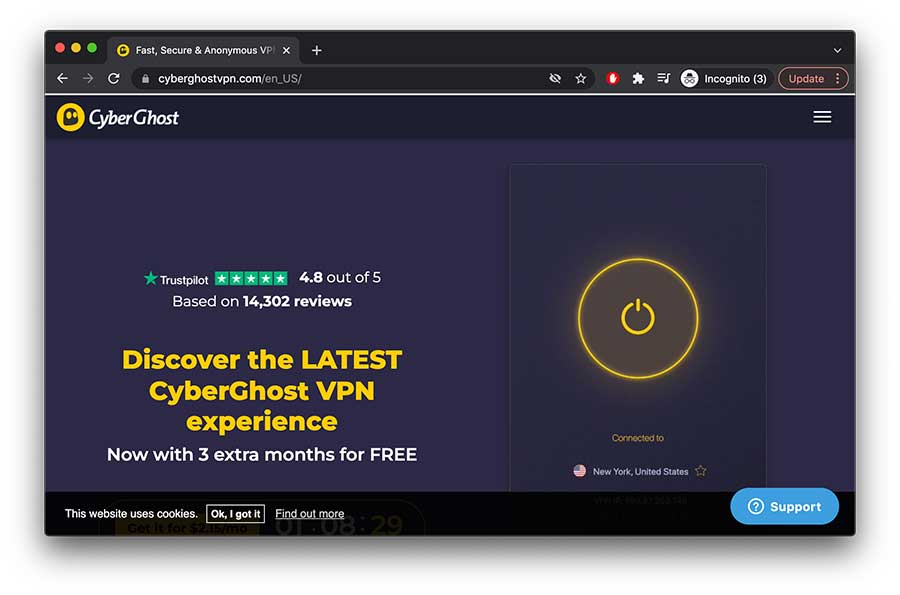
CyberGhost VPN is a program that provides online security and privacy. It encrypts your internet traffic, making it impossible for hackers or other third parties to spy on your online activity. CyberGhost VPN also allows you to circumvent censorship and access blocked websites.
Alternatives other than VPNs
Besides VPNs, there are other PeerBlock alternatives too. Here we’ve discussed three of the best options that work like PeerBlock. Let’s have a look.
6. Simplewall
Simplewall is somehow similar to PeerBlock. It is an open-source firewall that blocks the traffic as per the users’ specifications. It is one of the best starters, as it is lightweight and provides excellent network monitoring capabilities.
The only difference between PeerBlock and Simplewall is that it supports IPv6, which PeerBlock doesn’t. In other words, you aren’t limited to IPv4 addresses and can block IPv6 addresses too. Moreover, you don’t need to create your IP block list. You can simply set up user-specific rules for when the firewall blocks specific traffic.
7. IPList
IPList is another great PeerBlock alternative, especially when you are not a Windows user and want to perform torrenting on Linux. There are not many features that IPList offers other than PeerBlock. However, the only difference is that IPList receives regular updates, unlike PeerBlock, which has remained outdated since 2014.
8. BeeThink IP blocker
BeeThink is a user-friendly firewall that provides much more control over the IP addresses you block than PeerBlock. It does not just allow you to block a wide range of IP addresses and country IP addresses, ban particular IP addresses, blacklist, and whitelist addresses. Moreover, you can easily use IP addresses, ports, and protocols to filter network packets. All these qualities make it one of the best PeerBlock replacements.
9. PeerGuardian
Unlike Peerblock, PeerGuardian is the best privacy firewall app with a vast blocklist that detects tons of dangerous and risky IP addresses and ensures your safety and security.
It simply blocks all the stated IP addresses in the block list. Their main goal is to prevent the dangerous IP address from getting any information while you download a torrent.
10. iBlocklist
iBlocklist is a program that is very similar to Peerblocker. It offers essential protection from malware, worms, trojans, spyware, etc., but with more outstanding customization options. IBlocklist allows for customizing filters that detect and block known malicious websites. It has a built-in firewall but can be turned off using a third-party firewall.
11. Protowall IP blocker
Protowall is a program similar to Trusteel and My Firewall. It allows the user to block specific IP addresses from accessing their computer. While it does not offer the most protection against malware, it does provide basic filtering of known malicious websites.
PeerBlock Vs. VPN – Who wins!
To summarize the above discussion, it can be said that VPNs are much superior to PeerBlock. Instead of acting like a firewall that only blocks the IP addresses, a VPN encrypts the internet traffic, safeguards your data, and hides your IP address from snooping eyes. Using a VPN protects you from law enforcement firms and media companies who are in your search for copyright violations while uploading or downloading sensitive content.
Hence, it is clear that VPNs are the best PeerBlock alternatives. Do pick up your VPN wisely and see the wonders it does. Enjoy anonymous browsing!
Why not PeerBlock a reliable option
PeerBlocks are entirely different from the VPN. Their work also differs. I think this is one of the fundamental reasons people prefer VPNs over PeerBlock. There are several other reasons for using VPN over PeerBlock. Some of them are discussed as follows:
- In reality, PeerBlock does not hide your IP address. It is a significant problem because leechers and seeders can easily see it and search for your country, Zip code, and service provider’s name. This shows that if any other swarm member can see your IP address, so can the surveillance agencies, too, if they avoid the PeerBlock ban and know the IP address on the peers’ list.
- PeerBlock doesn’t encrypt your traffic correctly, and your ISP can view your online traffic, including your torrent activity. With this, the ISP can throttle your speed; or cancel your service because torrent is strictly against their policy. They can even pass your information to law enforcement agencies.
- There is also a possibility that PeerBlock blocks the incorrect IP address. They do so to prevent you from connecting to your peers. But in reality, they lower your upload and download speed. The firewall may also block websites that make them load even more slowly.
- It is not possible to block every monitoring agency or malicious user. All the third parties that manage the block list cannot track every spying group.
- PeerBlock hasn’t been updated since 2014. Thus, the firewall is outdated and can pose significant security risks.
- The slower torrent downloading speed: Torrenting works like a peer-to-peer system. When you seed a download, then someone else downloads it from your seed. Every single BitTorrent download consists of hundreds and thousands of users sharing files and having their IP addresses. The number of seeders, the faster the download rate would be. Peerblocks work by incorporating the customer’s block list into your torrenting. In this way, you get connected to the torrent program and end up blocking a lot of IPs. The fewer IPs you connect, the slower speed of downloading files you will get. Therefore, when you use peer block, your downloading speeds get low.
Conclusion
Peerblock and its successors offer a great degree of protection against malware and other online threats, despite some downsides like difficulty in the installation or lack of customization features. However, many other programs offer this same level of protection without the hassle.
These alternatives are accessible to people looking for an affordable option. They can also be helpful in school or work settings when multiple computers need internet access, but the network blocks websites like Facebook.
FAQs
The post 11 PeerBlock Alternatives For Blocking Malicious IP Address appeared first on BeEncrypted.
]]>Deprecated: Using null as an array offset is deprecated, use an empty string instead in /var/www/staging.beencrypted.com/site/web/wp/wp-includes/class-wp-block-type-registry.php on line 168
Deprecated: Using null as an array offset is deprecated, use an empty string instead in /var/www/staging.beencrypted.com/site/web/wp/wp-includes/class-wp-block-type-registry.php on line 168
Deprecated: Using null as an array offset is deprecated, use an empty string instead in /var/www/staging.beencrypted.com/site/web/wp/wp-includes/class-wp-block-type-registry.php on line 168
Deprecated: Using null as an array offset is deprecated, use an empty string instead in /var/www/staging.beencrypted.com/site/web/wp/wp-includes/class-wp-block-type-registry.php on line 168
Deprecated: Using null as an array offset is deprecated, use an empty string instead in /var/www/staging.beencrypted.com/site/web/wp/wp-includes/class-wp-block-type-registry.php on line 168
Deprecated: Using null as an array offset is deprecated, use an empty string instead in /var/www/staging.beencrypted.com/site/web/wp/wp-includes/class-wp-block-type-registry.php on line 168
Deprecated: Using null as an array offset is deprecated, use an empty string instead in /var/www/staging.beencrypted.com/site/web/wp/wp-includes/class-wp-block-type-registry.php on line 168
Deprecated: Using null as an array offset is deprecated, use an empty string instead in /var/www/staging.beencrypted.com/site/web/wp/wp-includes/class-wp-block-type-registry.php on line 168
Deprecated: Using null as an array offset is deprecated, use an empty string instead in /var/www/staging.beencrypted.com/site/web/wp/wp-includes/class-wp-block-type-registry.php on line 168
Deprecated: Using null as an array offset is deprecated, use an empty string instead in /var/www/staging.beencrypted.com/site/web/wp/wp-includes/class-wp-block-type-registry.php on line 168
Deprecated: Using null as an array offset is deprecated, use an empty string instead in /var/www/staging.beencrypted.com/site/web/wp/wp-includes/class-wp-block-type-registry.php on line 168
Deprecated: Using null as an array offset is deprecated, use an empty string instead in /var/www/staging.beencrypted.com/site/web/wp/wp-includes/class-wp-block-type-registry.php on line 168
Deprecated: Using null as an array offset is deprecated, use an empty string instead in /var/www/staging.beencrypted.com/site/web/wp/wp-includes/class-wp-block-type-registry.php on line 168
Deprecated: Using null as an array offset is deprecated, use an empty string instead in /var/www/staging.beencrypted.com/site/web/wp/wp-includes/class-wp-block-type-registry.php on line 168
Deprecated: Using null as an array offset is deprecated, use an empty string instead in /var/www/staging.beencrypted.com/site/web/wp/wp-includes/class-wp-block-type-registry.php on line 168
Deprecated: Using null as an array offset is deprecated, use an empty string instead in /var/www/staging.beencrypted.com/site/web/wp/wp-includes/class-wp-block-type-registry.php on line 168
Deprecated: Using null as an array offset is deprecated, use an empty string instead in /var/www/staging.beencrypted.com/site/web/wp/wp-includes/class-wp-block-type-registry.php on line 168
Deprecated: Using null as an array offset is deprecated, use an empty string instead in /var/www/staging.beencrypted.com/site/web/wp/wp-includes/class-wp-block-type-registry.php on line 168
Deprecated: Using null as an array offset is deprecated, use an empty string instead in /var/www/staging.beencrypted.com/site/web/wp/wp-includes/class-wp-block-type-registry.php on line 168
Deprecated: Using null as an array offset is deprecated, use an empty string instead in /var/www/staging.beencrypted.com/site/web/wp/wp-includes/class-wp-block-type-registry.php on line 168
Deprecated: Using null as an array offset is deprecated, use an empty string instead in /var/www/staging.beencrypted.com/site/web/wp/wp-includes/class-wp-block-type-registry.php on line 168
Deprecated: Using null as an array offset is deprecated, use an empty string instead in /var/www/staging.beencrypted.com/site/web/wp/wp-includes/class-wp-block-type-registry.php on line 168
Deprecated: Using null as an array offset is deprecated, use an empty string instead in /var/www/staging.beencrypted.com/site/web/wp/wp-includes/class-wp-block-type-registry.php on line 168
Deprecated: Using null as an array offset is deprecated, use an empty string instead in /var/www/staging.beencrypted.com/site/web/wp/wp-includes/class-wp-block-type-registry.php on line 168
Deprecated: Using null as an array offset is deprecated, use an empty string instead in /var/www/staging.beencrypted.com/site/web/wp/wp-includes/class-wp-block-type-registry.php on line 168
Deprecated: Using null as an array offset is deprecated, use an empty string instead in /var/www/staging.beencrypted.com/site/web/wp/wp-includes/class-wp-block-type-registry.php on line 168
Deprecated: Using null as an array offset is deprecated, use an empty string instead in /var/www/staging.beencrypted.com/site/web/wp/wp-includes/class-wp-block-type-registry.php on line 168
Deprecated: Using null as an array offset is deprecated, use an empty string instead in /var/www/staging.beencrypted.com/site/web/wp/wp-includes/class-wp-block-type-registry.php on line 168
Deprecated: Using null as an array offset is deprecated, use an empty string instead in /var/www/staging.beencrypted.com/site/web/wp/wp-includes/class-wp-block-type-registry.php on line 168
Deprecated: Using null as an array offset is deprecated, use an empty string instead in /var/www/staging.beencrypted.com/site/web/wp/wp-includes/class-wp-block-type-registry.php on line 168
Deprecated: Using null as an array offset is deprecated, use an empty string instead in /var/www/staging.beencrypted.com/site/web/wp/wp-includes/class-wp-block-type-registry.php on line 168
Deprecated: Using null as an array offset is deprecated, use an empty string instead in /var/www/staging.beencrypted.com/site/web/wp/wp-includes/class-wp-block-type-registry.php on line 168
Deprecated: Using null as an array offset is deprecated, use an empty string instead in /var/www/staging.beencrypted.com/site/web/wp/wp-includes/class-wp-block-type-registry.php on line 168
Deprecated: Using null as an array offset is deprecated, use an empty string instead in /var/www/staging.beencrypted.com/site/web/wp/wp-includes/class-wp-block-type-registry.php on line 168
Deprecated: Using null as an array offset is deprecated, use an empty string instead in /var/www/staging.beencrypted.com/site/web/wp/wp-includes/class-wp-block-type-registry.php on line 168
Deprecated: Using null as an array offset is deprecated, use an empty string instead in /var/www/staging.beencrypted.com/site/web/wp/wp-includes/class-wp-block-type-registry.php on line 168
Deprecated: Using null as an array offset is deprecated, use an empty string instead in /var/www/staging.beencrypted.com/site/web/wp/wp-includes/class-wp-block-type-registry.php on line 168
Deprecated: Using null as an array offset is deprecated, use an empty string instead in /var/www/staging.beencrypted.com/site/web/wp/wp-includes/class-wp-block-type-registry.php on line 168
Deprecated: Using null as an array offset is deprecated, use an empty string instead in /var/www/staging.beencrypted.com/site/web/wp/wp-includes/class-wp-block-type-registry.php on line 168
Deprecated: Using null as an array offset is deprecated, use an empty string instead in /var/www/staging.beencrypted.com/site/web/wp/wp-includes/class-wp-block-type-registry.php on line 168
Deprecated: Using null as an array offset is deprecated, use an empty string instead in /var/www/staging.beencrypted.com/site/web/wp/wp-includes/class-wp-block-type-registry.php on line 168
Deprecated: Using null as an array offset is deprecated, use an empty string instead in /var/www/staging.beencrypted.com/site/web/wp/wp-includes/class-wp-block-type-registry.php on line 168
Deprecated: Using null as an array offset is deprecated, use an empty string instead in /var/www/staging.beencrypted.com/site/web/wp/wp-includes/class-wp-block-type-registry.php on line 168
Deprecated: Using null as an array offset is deprecated, use an empty string instead in /var/www/staging.beencrypted.com/site/web/wp/wp-includes/class-wp-block-type-registry.php on line 168
Deprecated: Using null as an array offset is deprecated, use an empty string instead in /var/www/staging.beencrypted.com/site/web/wp/wp-includes/class-wp-block-type-registry.php on line 168
Deprecated: Using null as an array offset is deprecated, use an empty string instead in /var/www/staging.beencrypted.com/site/web/wp/wp-includes/class-wp-block-type-registry.php on line 168
Deprecated: Using null as an array offset is deprecated, use an empty string instead in /var/www/staging.beencrypted.com/site/web/wp/wp-includes/class-wp-block-type-registry.php on line 168
Deprecated: Using null as an array offset is deprecated, use an empty string instead in /var/www/staging.beencrypted.com/site/web/wp/wp-includes/class-wp-block-type-registry.php on line 168
Deprecated: Using null as an array offset is deprecated, use an empty string instead in /var/www/staging.beencrypted.com/site/web/wp/wp-includes/class-wp-block-type-registry.php on line 168
Deprecated: Using null as an array offset is deprecated, use an empty string instead in /var/www/staging.beencrypted.com/site/web/wp/wp-includes/class-wp-block-type-registry.php on line 168
Deprecated: Using null as an array offset is deprecated, use an empty string instead in /var/www/staging.beencrypted.com/site/web/wp/wp-includes/class-wp-block-type-registry.php on line 168
Deprecated: Using null as an array offset is deprecated, use an empty string instead in /var/www/staging.beencrypted.com/site/web/wp/wp-includes/class-wp-block-type-registry.php on line 168
Deprecated: Using null as an array offset is deprecated, use an empty string instead in /var/www/staging.beencrypted.com/site/web/wp/wp-includes/class-wp-block-type-registry.php on line 168
Deprecated: Using null as an array offset is deprecated, use an empty string instead in /var/www/staging.beencrypted.com/site/web/wp/wp-includes/class-wp-block-type-registry.php on line 168
Deprecated: Using null as an array offset is deprecated, use an empty string instead in /var/www/staging.beencrypted.com/site/web/wp/wp-includes/class-wp-block-type-registry.php on line 168
Deprecated: Using null as an array offset is deprecated, use an empty string instead in /var/www/staging.beencrypted.com/site/web/wp/wp-includes/class-wp-block-type-registry.php on line 168
Deprecated: Using null as an array offset is deprecated, use an empty string instead in /var/www/staging.beencrypted.com/site/web/wp/wp-includes/class-wp-block-type-registry.php on line 168
Deprecated: Using null as an array offset is deprecated, use an empty string instead in /var/www/staging.beencrypted.com/site/web/wp/wp-includes/class-wp-block-type-registry.php on line 168
Deprecated: Using null as an array offset is deprecated, use an empty string instead in /var/www/staging.beencrypted.com/site/web/wp/wp-includes/class-wp-block-type-registry.php on line 168
Deprecated: Using null as an array offset is deprecated, use an empty string instead in /var/www/staging.beencrypted.com/site/web/wp/wp-includes/class-wp-block-type-registry.php on line 168
Deprecated: Using null as an array offset is deprecated, use an empty string instead in /var/www/staging.beencrypted.com/site/web/wp/wp-includes/class-wp-block-type-registry.php on line 168
Deprecated: Using null as an array offset is deprecated, use an empty string instead in /var/www/staging.beencrypted.com/site/web/wp/wp-includes/class-wp-block-type-registry.php on line 168
Deprecated: Using null as an array offset is deprecated, use an empty string instead in /var/www/staging.beencrypted.com/site/web/wp/wp-includes/class-wp-block-type-registry.php on line 168
Deprecated: Using null as an array offset is deprecated, use an empty string instead in /var/www/staging.beencrypted.com/site/web/wp/wp-includes/class-wp-block-type-registry.php on line 168
Deprecated: Using null as an array offset is deprecated, use an empty string instead in /var/www/staging.beencrypted.com/site/web/wp/wp-includes/class-wp-block-type-registry.php on line 168
Deprecated: Using null as an array offset is deprecated, use an empty string instead in /var/www/staging.beencrypted.com/site/web/wp/wp-includes/class-wp-block-type-registry.php on line 168
Deprecated: Using null as an array offset is deprecated, use an empty string instead in /var/www/staging.beencrypted.com/site/web/wp/wp-includes/class-wp-block-type-registry.php on line 168
Deprecated: Using null as an array offset is deprecated, use an empty string instead in /var/www/staging.beencrypted.com/site/web/wp/wp-includes/class-wp-block-type-registry.php on line 168
Deprecated: Using null as an array offset is deprecated, use an empty string instead in /var/www/staging.beencrypted.com/site/web/wp/wp-includes/class-wp-block-type-registry.php on line 168
Deprecated: Using null as an array offset is deprecated, use an empty string instead in /var/www/staging.beencrypted.com/site/web/wp/wp-includes/class-wp-block-type-registry.php on line 168
Deprecated: Using null as an array offset is deprecated, use an empty string instead in /var/www/staging.beencrypted.com/site/web/wp/wp-includes/class-wp-block-type-registry.php on line 168
Deprecated: Using null as an array offset is deprecated, use an empty string instead in /var/www/staging.beencrypted.com/site/web/wp/wp-includes/class-wp-block-type-registry.php on line 168
Deprecated: Using null as an array offset is deprecated, use an empty string instead in /var/www/staging.beencrypted.com/site/web/wp/wp-includes/class-wp-block-type-registry.php on line 168
Deprecated: Using null as an array offset is deprecated, use an empty string instead in /var/www/staging.beencrypted.com/site/web/wp/wp-includes/class-wp-block-type-registry.php on line 168
Deprecated: Using null as an array offset is deprecated, use an empty string instead in /var/www/staging.beencrypted.com/site/web/wp/wp-includes/class-wp-block-type-registry.php on line 168
Deprecated: Using null as an array offset is deprecated, use an empty string instead in /var/www/staging.beencrypted.com/site/web/wp/wp-includes/class-wp-block-type-registry.php on line 168
Deprecated: Using null as an array offset is deprecated, use an empty string instead in /var/www/staging.beencrypted.com/site/web/wp/wp-includes/class-wp-block-type-registry.php on line 168
Deprecated: Using null as an array offset is deprecated, use an empty string instead in /var/www/staging.beencrypted.com/site/web/wp/wp-includes/class-wp-block-type-registry.php on line 168
Deprecated: Using null as an array offset is deprecated, use an empty string instead in /var/www/staging.beencrypted.com/site/web/wp/wp-includes/class-wp-block-type-registry.php on line 168
Deprecated: Using null as an array offset is deprecated, use an empty string instead in /var/www/staging.beencrypted.com/site/web/wp/wp-includes/class-wp-block-type-registry.php on line 168
Deprecated: Using null as an array offset is deprecated, use an empty string instead in /var/www/staging.beencrypted.com/site/web/wp/wp-includes/class-wp-block-type-registry.php on line 168
Deprecated: Using null as an array offset is deprecated, use an empty string instead in /var/www/staging.beencrypted.com/site/web/wp/wp-includes/class-wp-block-type-registry.php on line 168
Deprecated: Using null as an array offset is deprecated, use an empty string instead in /var/www/staging.beencrypted.com/site/web/wp/wp-includes/class-wp-block-type-registry.php on line 168
Deprecated: Using null as an array offset is deprecated, use an empty string instead in /var/www/staging.beencrypted.com/site/web/wp/wp-includes/class-wp-block-type-registry.php on line 168
Deprecated: Using null as an array offset is deprecated, use an empty string instead in /var/www/staging.beencrypted.com/site/web/wp/wp-includes/class-wp-block-type-registry.php on line 168
Deprecated: Using null as an array offset is deprecated, use an empty string instead in /var/www/staging.beencrypted.com/site/web/wp/wp-includes/class-wp-block-type-registry.php on line 168
Deprecated: Using null as an array offset is deprecated, use an empty string instead in /var/www/staging.beencrypted.com/site/web/wp/wp-includes/class-wp-block-type-registry.php on line 168
Deprecated: Using null as an array offset is deprecated, use an empty string instead in /var/www/staging.beencrypted.com/site/web/wp/wp-includes/class-wp-block-type-registry.php on line 168
Deprecated: Using null as an array offset is deprecated, use an empty string instead in /var/www/staging.beencrypted.com/site/web/wp/wp-includes/class-wp-block-type-registry.php on line 168
Deprecated: Using null as an array offset is deprecated, use an empty string instead in /var/www/staging.beencrypted.com/site/web/wp/wp-includes/class-wp-block-type-registry.php on line 168
Deprecated: Using null as an array offset is deprecated, use an empty string instead in /var/www/staging.beencrypted.com/site/web/wp/wp-includes/class-wp-block-type-registry.php on line 168
Deprecated: Using null as an array offset is deprecated, use an empty string instead in /var/www/staging.beencrypted.com/site/web/wp/wp-includes/class-wp-block-type-registry.php on line 168
Deprecated: Using null as an array offset is deprecated, use an empty string instead in /var/www/staging.beencrypted.com/site/web/wp/wp-includes/class-wp-block-type-registry.php on line 168
Deprecated: Using null as an array offset is deprecated, use an empty string instead in /var/www/staging.beencrypted.com/site/web/wp/wp-includes/class-wp-block-type-registry.php on line 168
Deprecated: Using null as an array offset is deprecated, use an empty string instead in /var/www/staging.beencrypted.com/site/web/wp/wp-includes/class-wp-block-type-registry.php on line 168
Deprecated: Using null as an array offset is deprecated, use an empty string instead in /var/www/staging.beencrypted.com/site/web/wp/wp-includes/class-wp-block-type-registry.php on line 168
Deprecated: Using null as an array offset is deprecated, use an empty string instead in /var/www/staging.beencrypted.com/site/web/wp/wp-includes/class-wp-block-type-registry.php on line 168
Deprecated: Using null as an array offset is deprecated, use an empty string instead in /var/www/staging.beencrypted.com/site/web/wp/wp-includes/class-wp-block-type-registry.php on line 168
Deprecated: Using null as an array offset is deprecated, use an empty string instead in /var/www/staging.beencrypted.com/site/web/wp/wp-includes/class-wp-block-type-registry.php on line 168
Deprecated: Using null as an array offset is deprecated, use an empty string instead in /var/www/staging.beencrypted.com/site/web/wp/wp-includes/class-wp-block-type-registry.php on line 168
Deprecated: Using null as an array offset is deprecated, use an empty string instead in /var/www/staging.beencrypted.com/site/web/wp/wp-includes/class-wp-block-type-registry.php on line 168
Deprecated: Using null as an array offset is deprecated, use an empty string instead in /var/www/staging.beencrypted.com/site/web/wp/wp-includes/class-wp-block-type-registry.php on line 168
Deprecated: Using null as an array offset is deprecated, use an empty string instead in /var/www/staging.beencrypted.com/site/web/wp/wp-includes/class-wp-block-type-registry.php on line 168
Deprecated: Using null as an array offset is deprecated, use an empty string instead in /var/www/staging.beencrypted.com/site/web/wp/wp-includes/class-wp-block-type-registry.php on line 168
Deprecated: Using null as an array offset is deprecated, use an empty string instead in /var/www/staging.beencrypted.com/site/web/wp/wp-includes/class-wp-block-type-registry.php on line 168
Deprecated: Using null as an array offset is deprecated, use an empty string instead in /var/www/staging.beencrypted.com/site/web/wp/wp-includes/class-wp-block-type-registry.php on line 168
Deprecated: Using null as an array offset is deprecated, use an empty string instead in /var/www/staging.beencrypted.com/site/web/wp/wp-includes/class-wp-block-type-registry.php on line 168
Deprecated: Using null as an array offset is deprecated, use an empty string instead in /var/www/staging.beencrypted.com/site/web/wp/wp-includes/class-wp-block-type-registry.php on line 168
Deprecated: Using null as an array offset is deprecated, use an empty string instead in /var/www/staging.beencrypted.com/site/web/wp/wp-includes/class-wp-block-type-registry.php on line 168
Deprecated: Using null as an array offset is deprecated, use an empty string instead in /var/www/staging.beencrypted.com/site/web/wp/wp-includes/class-wp-block-type-registry.php on line 168
Deprecated: Using null as an array offset is deprecated, use an empty string instead in /var/www/staging.beencrypted.com/site/web/wp/wp-includes/class-wp-block-type-registry.php on line 168
Deprecated: Using null as an array offset is deprecated, use an empty string instead in /var/www/staging.beencrypted.com/site/web/wp/wp-includes/class-wp-block-type-registry.php on line 168
Deprecated: Using null as an array offset is deprecated, use an empty string instead in /var/www/staging.beencrypted.com/site/web/wp/wp-includes/class-wp-block-type-registry.php on line 168
Deprecated: Using null as an array offset is deprecated, use an empty string instead in /var/www/staging.beencrypted.com/site/web/wp/wp-includes/class-wp-block-type-registry.php on line 168
Deprecated: Using null as an array offset is deprecated, use an empty string instead in /var/www/staging.beencrypted.com/site/web/wp/wp-includes/class-wp-block-type-registry.php on line 168
Deprecated: Using null as an array offset is deprecated, use an empty string instead in /var/www/staging.beencrypted.com/site/web/wp/wp-includes/class-wp-block-type-registry.php on line 168
Deprecated: Using null as an array offset is deprecated, use an empty string instead in /var/www/staging.beencrypted.com/site/web/wp/wp-includes/class-wp-block-type-registry.php on line 168
Deprecated: Using null as an array offset is deprecated, use an empty string instead in /var/www/staging.beencrypted.com/site/web/wp/wp-includes/class-wp-block-type-registry.php on line 168
Deprecated: Using null as an array offset is deprecated, use an empty string instead in /var/www/staging.beencrypted.com/site/web/wp/wp-includes/class-wp-block-type-registry.php on line 168
Deprecated: Using null as an array offset is deprecated, use an empty string instead in /var/www/staging.beencrypted.com/site/web/wp/wp-includes/class-wp-block-type-registry.php on line 168
Deprecated: Using null as an array offset is deprecated, use an empty string instead in /var/www/staging.beencrypted.com/site/web/wp/wp-includes/class-wp-block-type-registry.php on line 168
Deprecated: Using null as an array offset is deprecated, use an empty string instead in /var/www/staging.beencrypted.com/site/web/wp/wp-includes/class-wp-block-type-registry.php on line 168
Deprecated: Using null as an array offset is deprecated, use an empty string instead in /var/www/staging.beencrypted.com/site/web/wp/wp-includes/class-wp-block-type-registry.php on line 168
Deprecated: Using null as an array offset is deprecated, use an empty string instead in /var/www/staging.beencrypted.com/site/web/wp/wp-includes/class-wp-block-type-registry.php on line 168
Deprecated: Using null as an array offset is deprecated, use an empty string instead in /var/www/staging.beencrypted.com/site/web/wp/wp-includes/class-wp-block-type-registry.php on line 168
Deprecated: Using null as an array offset is deprecated, use an empty string instead in /var/www/staging.beencrypted.com/site/web/wp/wp-includes/class-wp-block-type-registry.php on line 168
Deprecated: Using null as an array offset is deprecated, use an empty string instead in /var/www/staging.beencrypted.com/site/web/wp/wp-includes/class-wp-block-type-registry.php on line 168
Deprecated: Using null as an array offset is deprecated, use an empty string instead in /var/www/staging.beencrypted.com/site/web/wp/wp-includes/class-wp-block-type-registry.php on line 168
Deprecated: Using null as an array offset is deprecated, use an empty string instead in /var/www/staging.beencrypted.com/site/web/wp/wp-includes/class-wp-block-type-registry.php on line 168
Deprecated: Using null as an array offset is deprecated, use an empty string instead in /var/www/staging.beencrypted.com/site/web/wp/wp-includes/class-wp-block-type-registry.php on line 168
Deprecated: Using null as an array offset is deprecated, use an empty string instead in /var/www/staging.beencrypted.com/site/web/wp/wp-includes/class-wp-block-type-registry.php on line 168
Deprecated: Using null as an array offset is deprecated, use an empty string instead in /var/www/staging.beencrypted.com/site/web/wp/wp-includes/class-wp-block-type-registry.php on line 168
Deprecated: Using null as an array offset is deprecated, use an empty string instead in /var/www/staging.beencrypted.com/site/web/wp/wp-includes/class-wp-block-type-registry.php on line 168
Deprecated: Using null as an array offset is deprecated, use an empty string instead in /var/www/staging.beencrypted.com/site/web/wp/wp-includes/class-wp-block-type-registry.php on line 168
Deprecated: Using null as an array offset is deprecated, use an empty string instead in /var/www/staging.beencrypted.com/site/web/wp/wp-includes/class-wp-block-type-registry.php on line 168
Deprecated: Using null as an array offset is deprecated, use an empty string instead in /var/www/staging.beencrypted.com/site/web/wp/wp-includes/class-wp-block-type-registry.php on line 168
Deprecated: Using null as an array offset is deprecated, use an empty string instead in /var/www/staging.beencrypted.com/site/web/wp/wp-includes/class-wp-block-type-registry.php on line 168
Deprecated: Using null as an array offset is deprecated, use an empty string instead in /var/www/staging.beencrypted.com/site/web/wp/wp-includes/class-wp-block-type-registry.php on line 168
Deprecated: Using null as an array offset is deprecated, use an empty string instead in /var/www/staging.beencrypted.com/site/web/wp/wp-includes/class-wp-block-type-registry.php on line 168
Deprecated: Using null as an array offset is deprecated, use an empty string instead in /var/www/staging.beencrypted.com/site/web/wp/wp-includes/class-wp-block-type-registry.php on line 168
Deprecated: Using null as an array offset is deprecated, use an empty string instead in /var/www/staging.beencrypted.com/site/web/wp/wp-includes/class-wp-block-type-registry.php on line 168
Deprecated: Using null as an array offset is deprecated, use an empty string instead in /var/www/staging.beencrypted.com/site/web/wp/wp-includes/class-wp-block-type-registry.php on line 168
Deprecated: Using null as an array offset is deprecated, use an empty string instead in /var/www/staging.beencrypted.com/site/web/wp/wp-includes/class-wp-block-type-registry.php on line 168
Deprecated: Using null as an array offset is deprecated, use an empty string instead in /var/www/staging.beencrypted.com/site/web/wp/wp-includes/class-wp-block-type-registry.php on line 168
Deprecated: Using null as an array offset is deprecated, use an empty string instead in /var/www/staging.beencrypted.com/site/web/wp/wp-includes/class-wp-block-type-registry.php on line 168
Deprecated: Using null as an array offset is deprecated, use an empty string instead in /var/www/staging.beencrypted.com/site/web/wp/wp-includes/class-wp-block-type-registry.php on line 168
Deprecated: Using null as an array offset is deprecated, use an empty string instead in /var/www/staging.beencrypted.com/site/web/wp/wp-includes/class-wp-block-type-registry.php on line 168
Deprecated: Using null as an array offset is deprecated, use an empty string instead in /var/www/staging.beencrypted.com/site/web/wp/wp-includes/class-wp-block-type-registry.php on line 168
Deprecated: Using null as an array offset is deprecated, use an empty string instead in /var/www/staging.beencrypted.com/site/web/wp/wp-includes/class-wp-block-type-registry.php on line 168
Deprecated: Using null as an array offset is deprecated, use an empty string instead in /var/www/staging.beencrypted.com/site/web/wp/wp-includes/class-wp-block-type-registry.php on line 168
Deprecated: Using null as an array offset is deprecated, use an empty string instead in /var/www/staging.beencrypted.com/site/web/wp/wp-includes/class-wp-block-type-registry.php on line 168
Deprecated: Using null as an array offset is deprecated, use an empty string instead in /var/www/staging.beencrypted.com/site/web/wp/wp-includes/class-wp-block-type-registry.php on line 168
Deprecated: Using null as an array offset is deprecated, use an empty string instead in /var/www/staging.beencrypted.com/site/web/wp/wp-includes/class-wp-block-type-registry.php on line 168
Deprecated: Using null as an array offset is deprecated, use an empty string instead in /var/www/staging.beencrypted.com/site/web/wp/wp-includes/class-wp-block-type-registry.php on line 168
Deprecated: Using null as an array offset is deprecated, use an empty string instead in /var/www/staging.beencrypted.com/site/web/wp/wp-includes/class-wp-block-type-registry.php on line 168
Deprecated: Using null as an array offset is deprecated, use an empty string instead in /var/www/staging.beencrypted.com/site/web/wp/wp-includes/class-wp-block-type-registry.php on line 168
Deprecated: Using null as an array offset is deprecated, use an empty string instead in /var/www/staging.beencrypted.com/site/web/wp/wp-includes/class-wp-block-type-registry.php on line 168
Deprecated: Using null as an array offset is deprecated, use an empty string instead in /var/www/staging.beencrypted.com/site/web/wp/wp-includes/class-wp-block-type-registry.php on line 168
Deprecated: Using null as an array offset is deprecated, use an empty string instead in /var/www/staging.beencrypted.com/site/web/wp/wp-includes/class-wp-block-type-registry.php on line 168
Deprecated: Using null as an array offset is deprecated, use an empty string instead in /var/www/staging.beencrypted.com/site/web/wp/wp-includes/class-wp-block-type-registry.php on line 168
Deprecated: Using null as an array offset is deprecated, use an empty string instead in /var/www/staging.beencrypted.com/site/web/wp/wp-includes/class-wp-block-type-registry.php on line 168
Deprecated: Using null as an array offset is deprecated, use an empty string instead in /var/www/staging.beencrypted.com/site/web/wp/wp-includes/class-wp-block-type-registry.php on line 168
Deprecated: Using null as an array offset is deprecated, use an empty string instead in /var/www/staging.beencrypted.com/site/web/wp/wp-includes/class-wp-block-type-registry.php on line 168
Deprecated: Using null as an array offset is deprecated, use an empty string instead in /var/www/staging.beencrypted.com/site/web/wp/wp-includes/class-wp-block-type-registry.php on line 168
Deprecated: Using null as an array offset is deprecated, use an empty string instead in /var/www/staging.beencrypted.com/site/web/wp/wp-includes/class-wp-block-type-registry.php on line 168
Deprecated: Using null as an array offset is deprecated, use an empty string instead in /var/www/staging.beencrypted.com/site/web/wp/wp-includes/class-wp-block-type-registry.php on line 168
Deprecated: Using null as an array offset is deprecated, use an empty string instead in /var/www/staging.beencrypted.com/site/web/wp/wp-includes/class-wp-block-type-registry.php on line 168
Deprecated: Using null as an array offset is deprecated, use an empty string instead in /var/www/staging.beencrypted.com/site/web/wp/wp-includes/class-wp-block-type-registry.php on line 168
Deprecated: Using null as an array offset is deprecated, use an empty string instead in /var/www/staging.beencrypted.com/site/web/wp/wp-includes/class-wp-block-type-registry.php on line 168
Deprecated: Using null as an array offset is deprecated, use an empty string instead in /var/www/staging.beencrypted.com/site/web/wp/wp-includes/class-wp-block-type-registry.php on line 168
Deprecated: Using null as an array offset is deprecated, use an empty string instead in /var/www/staging.beencrypted.com/site/web/wp/wp-includes/class-wp-block-type-registry.php on line 168
Deprecated: Using null as an array offset is deprecated, use an empty string instead in /var/www/staging.beencrypted.com/site/web/wp/wp-includes/class-wp-block-type-registry.php on line 168
Deprecated: Using null as an array offset is deprecated, use an empty string instead in /var/www/staging.beencrypted.com/site/web/wp/wp-includes/class-wp-block-type-registry.php on line 168
Deprecated: Using null as an array offset is deprecated, use an empty string instead in /var/www/staging.beencrypted.com/site/web/wp/wp-includes/class-wp-block-type-registry.php on line 168
Deprecated: Using null as an array offset is deprecated, use an empty string instead in /var/www/staging.beencrypted.com/site/web/wp/wp-includes/class-wp-block-type-registry.php on line 168
Deprecated: Using null as an array offset is deprecated, use an empty string instead in /var/www/staging.beencrypted.com/site/web/wp/wp-includes/class-wp-block-type-registry.php on line 168
Deprecated: Using null as an array offset is deprecated, use an empty string instead in /var/www/staging.beencrypted.com/site/web/wp/wp-includes/class-wp-block-type-registry.php on line 168
Deprecated: Using null as an array offset is deprecated, use an empty string instead in /var/www/staging.beencrypted.com/site/web/wp/wp-includes/class-wp-block-type-registry.php on line 168
Deprecated: Using null as an array offset is deprecated, use an empty string instead in /var/www/staging.beencrypted.com/site/web/wp/wp-includes/class-wp-block-type-registry.php on line 168
Deprecated: Using null as an array offset is deprecated, use an empty string instead in /var/www/staging.beencrypted.com/site/web/wp/wp-includes/class-wp-block-type-registry.php on line 168
Deprecated: Using null as an array offset is deprecated, use an empty string instead in /var/www/staging.beencrypted.com/site/web/wp/wp-includes/class-wp-block-type-registry.php on line 168
Deprecated: Using null as an array offset is deprecated, use an empty string instead in /var/www/staging.beencrypted.com/site/web/wp/wp-includes/class-wp-block-type-registry.php on line 168
Deprecated: Using null as an array offset is deprecated, use an empty string instead in /var/www/staging.beencrypted.com/site/web/wp/wp-includes/class-wp-block-type-registry.php on line 168
Deprecated: Using null as an array offset is deprecated, use an empty string instead in /var/www/staging.beencrypted.com/site/web/wp/wp-includes/class-wp-block-type-registry.php on line 168
Deprecated: Using null as an array offset is deprecated, use an empty string instead in /var/www/staging.beencrypted.com/site/web/wp/wp-includes/class-wp-block-type-registry.php on line 168
Deprecated: Using null as an array offset is deprecated, use an empty string instead in /var/www/staging.beencrypted.com/site/web/wp/wp-includes/class-wp-block-type-registry.php on line 168
Deprecated: Using null as an array offset is deprecated, use an empty string instead in /var/www/staging.beencrypted.com/site/web/wp/wp-includes/class-wp-block-type-registry.php on line 168
Deprecated: Using null as an array offset is deprecated, use an empty string instead in /var/www/staging.beencrypted.com/site/web/wp/wp-includes/class-wp-block-type-registry.php on line 168
Deprecated: Using null as an array offset is deprecated, use an empty string instead in /var/www/staging.beencrypted.com/site/web/wp/wp-includes/class-wp-block-type-registry.php on line 168
Deprecated: Using null as an array offset is deprecated, use an empty string instead in /var/www/staging.beencrypted.com/site/web/wp/wp-includes/class-wp-block-type-registry.php on line 168
Deprecated: Using null as an array offset is deprecated, use an empty string instead in /var/www/staging.beencrypted.com/site/web/wp/wp-includes/class-wp-block-type-registry.php on line 168
Deprecated: Using null as an array offset is deprecated, use an empty string instead in /var/www/staging.beencrypted.com/site/web/wp/wp-includes/class-wp-block-type-registry.php on line 168
Deprecated: Using null as an array offset is deprecated, use an empty string instead in /var/www/staging.beencrypted.com/site/web/wp/wp-includes/class-wp-block-type-registry.php on line 168
Deprecated: Using null as an array offset is deprecated, use an empty string instead in /var/www/staging.beencrypted.com/site/web/wp/wp-includes/class-wp-block-type-registry.php on line 168
Deprecated: Using null as an array offset is deprecated, use an empty string instead in /var/www/staging.beencrypted.com/site/web/wp/wp-includes/class-wp-block-type-registry.php on line 168
Deprecated: Using null as an array offset is deprecated, use an empty string instead in /var/www/staging.beencrypted.com/site/web/wp/wp-includes/class-wp-block-type-registry.php on line 168
Deprecated: Using null as an array offset is deprecated, use an empty string instead in /var/www/staging.beencrypted.com/site/web/wp/wp-includes/class-wp-block-type-registry.php on line 168
Deprecated: Using null as an array offset is deprecated, use an empty string instead in /var/www/staging.beencrypted.com/site/web/wp/wp-includes/class-wp-block-type-registry.php on line 168
Deprecated: Using null as an array offset is deprecated, use an empty string instead in /var/www/staging.beencrypted.com/site/web/wp/wp-includes/class-wp-block-type-registry.php on line 168
Deprecated: Using null as an array offset is deprecated, use an empty string instead in /var/www/staging.beencrypted.com/site/web/wp/wp-includes/class-wp-block-type-registry.php on line 168
Deprecated: Using null as an array offset is deprecated, use an empty string instead in /var/www/staging.beencrypted.com/site/web/wp/wp-includes/class-wp-block-type-registry.php on line 168
Deprecated: Using null as an array offset is deprecated, use an empty string instead in /var/www/staging.beencrypted.com/site/web/wp/wp-includes/class-wp-block-type-registry.php on line 168
Deprecated: Using null as an array offset is deprecated, use an empty string instead in /var/www/staging.beencrypted.com/site/web/wp/wp-includes/class-wp-block-type-registry.php on line 168
Deprecated: Using null as an array offset is deprecated, use an empty string instead in /var/www/staging.beencrypted.com/site/web/wp/wp-includes/class-wp-block-type-registry.php on line 168
Deprecated: Using null as an array offset is deprecated, use an empty string instead in /var/www/staging.beencrypted.com/site/web/wp/wp-includes/class-wp-block-type-registry.php on line 168
Deprecated: Using null as an array offset is deprecated, use an empty string instead in /var/www/staging.beencrypted.com/site/web/wp/wp-includes/class-wp-block-type-registry.php on line 168
Deprecated: Using null as an array offset is deprecated, use an empty string instead in /var/www/staging.beencrypted.com/site/web/wp/wp-includes/class-wp-block-type-registry.php on line 168
Deprecated: Using null as an array offset is deprecated, use an empty string instead in /var/www/staging.beencrypted.com/site/web/wp/wp-includes/class-wp-block-type-registry.php on line 168
Deprecated: Using null as an array offset is deprecated, use an empty string instead in /var/www/staging.beencrypted.com/site/web/wp/wp-includes/class-wp-block-type-registry.php on line 168
Deprecated: Using null as an array offset is deprecated, use an empty string instead in /var/www/staging.beencrypted.com/site/web/wp/wp-includes/class-wp-block-type-registry.php on line 168
Deprecated: Using null as an array offset is deprecated, use an empty string instead in /var/www/staging.beencrypted.com/site/web/wp/wp-includes/class-wp-block-type-registry.php on line 168
Deprecated: Using null as an array offset is deprecated, use an empty string instead in /var/www/staging.beencrypted.com/site/web/wp/wp-includes/class-wp-block-type-registry.php on line 168
Deprecated: Using null as an array offset is deprecated, use an empty string instead in /var/www/staging.beencrypted.com/site/web/wp/wp-includes/class-wp-block-type-registry.php on line 168
Deprecated: Using null as an array offset is deprecated, use an empty string instead in /var/www/staging.beencrypted.com/site/web/wp/wp-includes/class-wp-block-type-registry.php on line 168
Deprecated: Using null as an array offset is deprecated, use an empty string instead in /var/www/staging.beencrypted.com/site/web/wp/wp-includes/class-wp-block-type-registry.php on line 168
Deprecated: Using null as an array offset is deprecated, use an empty string instead in /var/www/staging.beencrypted.com/site/web/wp/wp-includes/class-wp-block-type-registry.php on line 168
Deprecated: Using null as an array offset is deprecated, use an empty string instead in /var/www/staging.beencrypted.com/site/web/wp/wp-includes/class-wp-block-type-registry.php on line 168
Deprecated: Using null as an array offset is deprecated, use an empty string instead in /var/www/staging.beencrypted.com/site/web/wp/wp-includes/class-wp-block-type-registry.php on line 168
Deprecated: Using null as an array offset is deprecated, use an empty string instead in /var/www/staging.beencrypted.com/site/web/wp/wp-includes/class-wp-block-type-registry.php on line 168
Deprecated: Using null as an array offset is deprecated, use an empty string instead in /var/www/staging.beencrypted.com/site/web/wp/wp-includes/class-wp-block-type-registry.php on line 168
Deprecated: Using null as an array offset is deprecated, use an empty string instead in /var/www/staging.beencrypted.com/site/web/wp/wp-includes/class-wp-block-type-registry.php on line 168
Deprecated: Using null as an array offset is deprecated, use an empty string instead in /var/www/staging.beencrypted.com/site/web/wp/wp-includes/class-wp-block-type-registry.php on line 168
Deprecated: Using null as an array offset is deprecated, use an empty string instead in /var/www/staging.beencrypted.com/site/web/wp/wp-includes/class-wp-block-type-registry.php on line 168
Deprecated: Using null as an array offset is deprecated, use an empty string instead in /var/www/staging.beencrypted.com/site/web/wp/wp-includes/class-wp-block-type-registry.php on line 168
Deprecated: Using null as an array offset is deprecated, use an empty string instead in /var/www/staging.beencrypted.com/site/web/wp/wp-includes/class-wp-block-type-registry.php on line 168
Deprecated: Using null as an array offset is deprecated, use an empty string instead in /var/www/staging.beencrypted.com/site/web/wp/wp-includes/class-wp-block-type-registry.php on line 168
Deprecated: Using null as an array offset is deprecated, use an empty string instead in /var/www/staging.beencrypted.com/site/web/wp/wp-includes/class-wp-block-type-registry.php on line 168
Deprecated: Using null as an array offset is deprecated, use an empty string instead in /var/www/staging.beencrypted.com/site/web/wp/wp-includes/class-wp-block-type-registry.php on line 168
Deprecated: Using null as an array offset is deprecated, use an empty string instead in /var/www/staging.beencrypted.com/site/web/wp/wp-includes/class-wp-block-type-registry.php on line 168
Deprecated: Using null as an array offset is deprecated, use an empty string instead in /var/www/staging.beencrypted.com/site/web/wp/wp-includes/class-wp-block-type-registry.php on line 168
Deprecated: Using null as an array offset is deprecated, use an empty string instead in /var/www/staging.beencrypted.com/site/web/wp/wp-includes/class-wp-block-type-registry.php on line 168
Deprecated: Using null as an array offset is deprecated, use an empty string instead in /var/www/staging.beencrypted.com/site/web/wp/wp-includes/class-wp-block-type-registry.php on line 168
Deprecated: Using null as an array offset is deprecated, use an empty string instead in /var/www/staging.beencrypted.com/site/web/wp/wp-includes/class-wp-block-type-registry.php on line 168
Deprecated: Using null as an array offset is deprecated, use an empty string instead in /var/www/staging.beencrypted.com/site/web/wp/wp-includes/class-wp-block-type-registry.php on line 168
Deprecated: Using null as an array offset is deprecated, use an empty string instead in /var/www/staging.beencrypted.com/site/web/wp/wp-includes/class-wp-block-type-registry.php on line 168
Deprecated: Using null as an array offset is deprecated, use an empty string instead in /var/www/staging.beencrypted.com/site/web/wp/wp-includes/class-wp-block-type-registry.php on line 168
Deprecated: Using null as an array offset is deprecated, use an empty string instead in /var/www/staging.beencrypted.com/site/web/wp/wp-includes/class-wp-block-type-registry.php on line 168
Deprecated: Using null as an array offset is deprecated, use an empty string instead in /var/www/staging.beencrypted.com/site/web/wp/wp-includes/class-wp-block-type-registry.php on line 168
Deprecated: Using null as an array offset is deprecated, use an empty string instead in /var/www/staging.beencrypted.com/site/web/wp/wp-includes/class-wp-block-type-registry.php on line 168
Deprecated: Using null as an array offset is deprecated, use an empty string instead in /var/www/staging.beencrypted.com/site/web/wp/wp-includes/class-wp-block-type-registry.php on line 168
Deprecated: Using null as an array offset is deprecated, use an empty string instead in /var/www/staging.beencrypted.com/site/web/wp/wp-includes/class-wp-block-type-registry.php on line 168
Deprecated: Using null as an array offset is deprecated, use an empty string instead in /var/www/staging.beencrypted.com/site/web/wp/wp-includes/class-wp-block-type-registry.php on line 168
Deprecated: Using null as an array offset is deprecated, use an empty string instead in /var/www/staging.beencrypted.com/site/web/wp/wp-includes/class-wp-block-type-registry.php on line 168
Deprecated: Using null as an array offset is deprecated, use an empty string instead in /var/www/staging.beencrypted.com/site/web/wp/wp-includes/class-wp-block-type-registry.php on line 168
Deprecated: Using null as an array offset is deprecated, use an empty string instead in /var/www/staging.beencrypted.com/site/web/wp/wp-includes/class-wp-block-type-registry.php on line 168
Deprecated: Using null as an array offset is deprecated, use an empty string instead in /var/www/staging.beencrypted.com/site/web/wp/wp-includes/class-wp-block-type-registry.php on line 168
Deprecated: Using null as an array offset is deprecated, use an empty string instead in /var/www/staging.beencrypted.com/site/web/wp/wp-includes/class-wp-block-type-registry.php on line 168
Deprecated: Using null as an array offset is deprecated, use an empty string instead in /var/www/staging.beencrypted.com/site/web/wp/wp-includes/class-wp-block-type-registry.php on line 168
Deprecated: Using null as an array offset is deprecated, use an empty string instead in /var/www/staging.beencrypted.com/site/web/wp/wp-includes/class-wp-block-type-registry.php on line 168
Deprecated: Using null as an array offset is deprecated, use an empty string instead in /var/www/staging.beencrypted.com/site/web/wp/wp-includes/class-wp-block-type-registry.php on line 168
Deprecated: Using null as an array offset is deprecated, use an empty string instead in /var/www/staging.beencrypted.com/site/web/wp/wp-includes/class-wp-block-type-registry.php on line 168
Deprecated: Using null as an array offset is deprecated, use an empty string instead in /var/www/staging.beencrypted.com/site/web/wp/wp-includes/class-wp-block-type-registry.php on line 168
Deprecated: Using null as an array offset is deprecated, use an empty string instead in /var/www/staging.beencrypted.com/site/web/wp/wp-includes/class-wp-block-type-registry.php on line 168
Deprecated: Using null as an array offset is deprecated, use an empty string instead in /var/www/staging.beencrypted.com/site/web/wp/wp-includes/class-wp-block-type-registry.php on line 168
Deprecated: Using null as an array offset is deprecated, use an empty string instead in /var/www/staging.beencrypted.com/site/web/wp/wp-includes/class-wp-block-type-registry.php on line 168
Deprecated: Using null as an array offset is deprecated, use an empty string instead in /var/www/staging.beencrypted.com/site/web/wp/wp-includes/class-wp-block-type-registry.php on line 168
Deprecated: Using null as an array offset is deprecated, use an empty string instead in /var/www/staging.beencrypted.com/site/web/wp/wp-includes/class-wp-block-type-registry.php on line 168
Deprecated: Using null as an array offset is deprecated, use an empty string instead in /var/www/staging.beencrypted.com/site/web/wp/wp-includes/class-wp-block-type-registry.php on line 168
Deprecated: Using null as an array offset is deprecated, use an empty string instead in /var/www/staging.beencrypted.com/site/web/wp/wp-includes/class-wp-block-type-registry.php on line 168
Deprecated: Using null as an array offset is deprecated, use an empty string instead in /var/www/staging.beencrypted.com/site/web/wp/wp-includes/class-wp-block-type-registry.php on line 168
Deprecated: Using null as an array offset is deprecated, use an empty string instead in /var/www/staging.beencrypted.com/site/web/wp/wp-includes/class-wp-block-type-registry.php on line 168
Deprecated: Using null as an array offset is deprecated, use an empty string instead in /var/www/staging.beencrypted.com/site/web/wp/wp-includes/class-wp-block-type-registry.php on line 168
Deprecated: Using null as an array offset is deprecated, use an empty string instead in /var/www/staging.beencrypted.com/site/web/wp/wp-includes/class-wp-block-type-registry.php on line 168
Deprecated: Using null as an array offset is deprecated, use an empty string instead in /var/www/staging.beencrypted.com/site/web/wp/wp-includes/class-wp-block-type-registry.php on line 168
Deprecated: Using null as an array offset is deprecated, use an empty string instead in /var/www/staging.beencrypted.com/site/web/wp/wp-includes/class-wp-block-type-registry.php on line 168
Deprecated: Using null as an array offset is deprecated, use an empty string instead in /var/www/staging.beencrypted.com/site/web/wp/wp-includes/class-wp-block-type-registry.php on line 168
Deprecated: Using null as an array offset is deprecated, use an empty string instead in /var/www/staging.beencrypted.com/site/web/wp/wp-includes/class-wp-block-type-registry.php on line 168
Deprecated: Using null as an array offset is deprecated, use an empty string instead in /var/www/staging.beencrypted.com/site/web/wp/wp-includes/class-wp-block-type-registry.php on line 168
Deprecated: Using null as an array offset is deprecated, use an empty string instead in /var/www/staging.beencrypted.com/site/web/wp/wp-includes/class-wp-block-type-registry.php on line 168
Deprecated: Using null as an array offset is deprecated, use an empty string instead in /var/www/staging.beencrypted.com/site/web/wp/wp-includes/class-wp-block-type-registry.php on line 168
Deprecated: Using null as an array offset is deprecated, use an empty string instead in /var/www/staging.beencrypted.com/site/web/wp/wp-includes/class-wp-block-type-registry.php on line 168
Deprecated: Using null as an array offset is deprecated, use an empty string instead in /var/www/staging.beencrypted.com/site/web/wp/wp-includes/class-wp-block-type-registry.php on line 168
Deprecated: Using null as an array offset is deprecated, use an empty string instead in /var/www/staging.beencrypted.com/site/web/wp/wp-includes/class-wp-block-type-registry.php on line 168
Deprecated: Using null as an array offset is deprecated, use an empty string instead in /var/www/staging.beencrypted.com/site/web/wp/wp-includes/class-wp-block-type-registry.php on line 168
Deprecated: Using null as an array offset is deprecated, use an empty string instead in /var/www/staging.beencrypted.com/site/web/wp/wp-includes/class-wp-block-type-registry.php on line 168
Deprecated: Using null as an array offset is deprecated, use an empty string instead in /var/www/staging.beencrypted.com/site/web/wp/wp-includes/class-wp-block-type-registry.php on line 168
Deprecated: Using null as an array offset is deprecated, use an empty string instead in /var/www/staging.beencrypted.com/site/web/wp/wp-includes/class-wp-block-type-registry.php on line 168
Deprecated: Using null as an array offset is deprecated, use an empty string instead in /var/www/staging.beencrypted.com/site/web/wp/wp-includes/class-wp-block-type-registry.php on line 168
Deprecated: Using null as an array offset is deprecated, use an empty string instead in /var/www/staging.beencrypted.com/site/web/wp/wp-includes/class-wp-block-type-registry.php on line 168
Deprecated: Using null as an array offset is deprecated, use an empty string instead in /var/www/staging.beencrypted.com/site/web/wp/wp-includes/class-wp-block-type-registry.php on line 168
Deprecated: Using null as an array offset is deprecated, use an empty string instead in /var/www/staging.beencrypted.com/site/web/wp/wp-includes/class-wp-block-type-registry.php on line 168
Deprecated: Using null as an array offset is deprecated, use an empty string instead in /var/www/staging.beencrypted.com/site/web/wp/wp-includes/class-wp-block-type-registry.php on line 168
Deprecated: Using null as an array offset is deprecated, use an empty string instead in /var/www/staging.beencrypted.com/site/web/wp/wp-includes/class-wp-block-type-registry.php on line 168
Deprecated: Using null as an array offset is deprecated, use an empty string instead in /var/www/staging.beencrypted.com/site/web/wp/wp-includes/class-wp-block-type-registry.php on line 168
Deprecated: Using null as an array offset is deprecated, use an empty string instead in /var/www/staging.beencrypted.com/site/web/wp/wp-includes/class-wp-block-type-registry.php on line 168
Deprecated: Using null as an array offset is deprecated, use an empty string instead in /var/www/staging.beencrypted.com/site/web/wp/wp-includes/class-wp-block-type-registry.php on line 168
Deprecated: Using null as an array offset is deprecated, use an empty string instead in /var/www/staging.beencrypted.com/site/web/wp/wp-includes/class-wp-block-type-registry.php on line 168
Deprecated: Using null as an array offset is deprecated, use an empty string instead in /var/www/staging.beencrypted.com/site/web/wp/wp-includes/class-wp-block-type-registry.php on line 168
Deprecated: Using null as an array offset is deprecated, use an empty string instead in /var/www/staging.beencrypted.com/site/web/wp/wp-includes/class-wp-block-type-registry.php on line 168
Deprecated: Using null as an array offset is deprecated, use an empty string instead in /var/www/staging.beencrypted.com/site/web/wp/wp-includes/class-wp-block-type-registry.php on line 168
Deprecated: Using null as an array offset is deprecated, use an empty string instead in /var/www/staging.beencrypted.com/site/web/wp/wp-includes/class-wp-block-type-registry.php on line 168
Deprecated: Using null as an array offset is deprecated, use an empty string instead in /var/www/staging.beencrypted.com/site/web/wp/wp-includes/class-wp-block-type-registry.php on line 168
Deprecated: Using null as an array offset is deprecated, use an empty string instead in /var/www/staging.beencrypted.com/site/web/wp/wp-includes/class-wp-block-type-registry.php on line 168
Deprecated: Using null as an array offset is deprecated, use an empty string instead in /var/www/staging.beencrypted.com/site/web/wp/wp-includes/class-wp-block-type-registry.php on line 168
Deprecated: Using null as an array offset is deprecated, use an empty string instead in /var/www/staging.beencrypted.com/site/web/wp/wp-includes/class-wp-block-type-registry.php on line 168
Deprecated: Using null as an array offset is deprecated, use an empty string instead in /var/www/staging.beencrypted.com/site/web/wp/wp-includes/class-wp-block-type-registry.php on line 168
Deprecated: Using null as an array offset is deprecated, use an empty string instead in /var/www/staging.beencrypted.com/site/web/wp/wp-includes/class-wp-block-type-registry.php on line 168
Deprecated: Using null as an array offset is deprecated, use an empty string instead in /var/www/staging.beencrypted.com/site/web/wp/wp-includes/class-wp-block-type-registry.php on line 168
Deprecated: Using null as an array offset is deprecated, use an empty string instead in /var/www/staging.beencrypted.com/site/web/wp/wp-includes/class-wp-block-type-registry.php on line 168
Deprecated: Using null as an array offset is deprecated, use an empty string instead in /var/www/staging.beencrypted.com/site/web/wp/wp-includes/class-wp-block-type-registry.php on line 168
Deprecated: Using null as an array offset is deprecated, use an empty string instead in /var/www/staging.beencrypted.com/site/web/wp/wp-includes/class-wp-block-type-registry.php on line 168
Deprecated: Using null as an array offset is deprecated, use an empty string instead in /var/www/staging.beencrypted.com/site/web/wp/wp-includes/class-wp-block-type-registry.php on line 168
Deprecated: Using null as an array offset is deprecated, use an empty string instead in /var/www/staging.beencrypted.com/site/web/wp/wp-includes/class-wp-block-type-registry.php on line 168
Deprecated: Using null as an array offset is deprecated, use an empty string instead in /var/www/staging.beencrypted.com/site/web/wp/wp-includes/class-wp-block-type-registry.php on line 168
Deprecated: Using null as an array offset is deprecated, use an empty string instead in /var/www/staging.beencrypted.com/site/web/wp/wp-includes/class-wp-block-type-registry.php on line 168
Deprecated: Using null as an array offset is deprecated, use an empty string instead in /var/www/staging.beencrypted.com/site/web/wp/wp-includes/class-wp-block-type-registry.php on line 168
Deprecated: Using null as an array offset is deprecated, use an empty string instead in /var/www/staging.beencrypted.com/site/web/wp/wp-includes/class-wp-block-type-registry.php on line 168
Deprecated: Using null as an array offset is deprecated, use an empty string instead in /var/www/staging.beencrypted.com/site/web/wp/wp-includes/class-wp-block-type-registry.php on line 168
Deprecated: Using null as an array offset is deprecated, use an empty string instead in /var/www/staging.beencrypted.com/site/web/wp/wp-includes/class-wp-block-type-registry.php on line 168
Deprecated: Using null as an array offset is deprecated, use an empty string instead in /var/www/staging.beencrypted.com/site/web/wp/wp-includes/class-wp-block-type-registry.php on line 168
Deprecated: Using null as an array offset is deprecated, use an empty string instead in /var/www/staging.beencrypted.com/site/web/wp/wp-includes/class-wp-block-type-registry.php on line 168
Deprecated: Using null as an array offset is deprecated, use an empty string instead in /var/www/staging.beencrypted.com/site/web/wp/wp-includes/class-wp-block-type-registry.php on line 168
Deprecated: Using null as an array offset is deprecated, use an empty string instead in /var/www/staging.beencrypted.com/site/web/wp/wp-includes/class-wp-block-type-registry.php on line 168
Deprecated: Using null as an array offset is deprecated, use an empty string instead in /var/www/staging.beencrypted.com/site/web/wp/wp-includes/class-wp-block-type-registry.php on line 168
Deprecated: Using null as an array offset is deprecated, use an empty string instead in /var/www/staging.beencrypted.com/site/web/wp/wp-includes/class-wp-block-type-registry.php on line 168
Deprecated: Using null as an array offset is deprecated, use an empty string instead in /var/www/staging.beencrypted.com/site/web/wp/wp-includes/class-wp-block-type-registry.php on line 168
Deprecated: Using null as an array offset is deprecated, use an empty string instead in /var/www/staging.beencrypted.com/site/web/wp/wp-includes/class-wp-block-type-registry.php on line 168
Deprecated: Using null as an array offset is deprecated, use an empty string instead in /var/www/staging.beencrypted.com/site/web/wp/wp-includes/class-wp-block-type-registry.php on line 168
Deprecated: Using null as an array offset is deprecated, use an empty string instead in /var/www/staging.beencrypted.com/site/web/wp/wp-includes/class-wp-block-type-registry.php on line 168
Deprecated: Using null as an array offset is deprecated, use an empty string instead in /var/www/staging.beencrypted.com/site/web/wp/wp-includes/class-wp-block-type-registry.php on line 168
Deprecated: Using null as an array offset is deprecated, use an empty string instead in /var/www/staging.beencrypted.com/site/web/wp/wp-includes/class-wp-block-type-registry.php on line 168
Deprecated: Using null as an array offset is deprecated, use an empty string instead in /var/www/staging.beencrypted.com/site/web/wp/wp-includes/class-wp-block-type-registry.php on line 168
Deprecated: Using null as an array offset is deprecated, use an empty string instead in /var/www/staging.beencrypted.com/site/web/wp/wp-includes/class-wp-block-type-registry.php on line 168
Deprecated: Using null as an array offset is deprecated, use an empty string instead in /var/www/staging.beencrypted.com/site/web/wp/wp-includes/class-wp-block-type-registry.php on line 168
Deprecated: Using null as an array offset is deprecated, use an empty string instead in /var/www/staging.beencrypted.com/site/web/wp/wp-includes/class-wp-block-type-registry.php on line 168
Deprecated: Using null as an array offset is deprecated, use an empty string instead in /var/www/staging.beencrypted.com/site/web/wp/wp-includes/class-wp-block-type-registry.php on line 168
Deprecated: Using null as an array offset is deprecated, use an empty string instead in /var/www/staging.beencrypted.com/site/web/wp/wp-includes/class-wp-block-type-registry.php on line 168
Deprecated: Using null as an array offset is deprecated, use an empty string instead in /var/www/staging.beencrypted.com/site/web/wp/wp-includes/class-wp-block-type-registry.php on line 168
Deprecated: Using null as an array offset is deprecated, use an empty string instead in /var/www/staging.beencrypted.com/site/web/wp/wp-includes/class-wp-block-type-registry.php on line 168
Deprecated: Using null as an array offset is deprecated, use an empty string instead in /var/www/staging.beencrypted.com/site/web/wp/wp-includes/class-wp-block-type-registry.php on line 168
Deprecated: Using null as an array offset is deprecated, use an empty string instead in /var/www/staging.beencrypted.com/site/web/wp/wp-includes/class-wp-block-type-registry.php on line 168
Deprecated: Using null as an array offset is deprecated, use an empty string instead in /var/www/staging.beencrypted.com/site/web/wp/wp-includes/class-wp-block-type-registry.php on line 168
Deprecated: Using null as an array offset is deprecated, use an empty string instead in /var/www/staging.beencrypted.com/site/web/wp/wp-includes/class-wp-block-type-registry.php on line 168
Deprecated: Using null as an array offset is deprecated, use an empty string instead in /var/www/staging.beencrypted.com/site/web/wp/wp-includes/class-wp-block-type-registry.php on line 168
Deprecated: Using null as an array offset is deprecated, use an empty string instead in /var/www/staging.beencrypted.com/site/web/wp/wp-includes/class-wp-block-type-registry.php on line 168
Deprecated: Using null as an array offset is deprecated, use an empty string instead in /var/www/staging.beencrypted.com/site/web/wp/wp-includes/class-wp-block-type-registry.php on line 168
Deprecated: Using null as an array offset is deprecated, use an empty string instead in /var/www/staging.beencrypted.com/site/web/wp/wp-includes/class-wp-block-type-registry.php on line 168
Deprecated: Using null as an array offset is deprecated, use an empty string instead in /var/www/staging.beencrypted.com/site/web/wp/wp-includes/class-wp-block-type-registry.php on line 168
Deprecated: Using null as an array offset is deprecated, use an empty string instead in /var/www/staging.beencrypted.com/site/web/wp/wp-includes/class-wp-block-type-registry.php on line 168
Deprecated: Using null as an array offset is deprecated, use an empty string instead in /var/www/staging.beencrypted.com/site/web/wp/wp-includes/class-wp-block-type-registry.php on line 168
Deprecated: Using null as an array offset is deprecated, use an empty string instead in /var/www/staging.beencrypted.com/site/web/wp/wp-includes/class-wp-block-type-registry.php on line 168
Deprecated: Using null as an array offset is deprecated, use an empty string instead in /var/www/staging.beencrypted.com/site/web/wp/wp-includes/class-wp-block-type-registry.php on line 168
Deprecated: Using null as an array offset is deprecated, use an empty string instead in /var/www/staging.beencrypted.com/site/web/wp/wp-includes/class-wp-block-type-registry.php on line 168
Deprecated: Using null as an array offset is deprecated, use an empty string instead in /var/www/staging.beencrypted.com/site/web/wp/wp-includes/class-wp-block-type-registry.php on line 168
Deprecated: Using null as an array offset is deprecated, use an empty string instead in /var/www/staging.beencrypted.com/site/web/wp/wp-includes/class-wp-block-type-registry.php on line 168
Deprecated: Using null as an array offset is deprecated, use an empty string instead in /var/www/staging.beencrypted.com/site/web/wp/wp-includes/class-wp-block-type-registry.php on line 168
Deprecated: Using null as an array offset is deprecated, use an empty string instead in /var/www/staging.beencrypted.com/site/web/wp/wp-includes/class-wp-block-type-registry.php on line 168
Deprecated: Using null as an array offset is deprecated, use an empty string instead in /var/www/staging.beencrypted.com/site/web/wp/wp-includes/class-wp-block-type-registry.php on line 168
Deprecated: Using null as an array offset is deprecated, use an empty string instead in /var/www/staging.beencrypted.com/site/web/wp/wp-includes/class-wp-block-type-registry.php on line 168
Deprecated: Using null as an array offset is deprecated, use an empty string instead in /var/www/staging.beencrypted.com/site/web/wp/wp-includes/class-wp-block-type-registry.php on line 168
Deprecated: Using null as an array offset is deprecated, use an empty string instead in /var/www/staging.beencrypted.com/site/web/wp/wp-includes/class-wp-block-type-registry.php on line 168
Deprecated: Using null as an array offset is deprecated, use an empty string instead in /var/www/staging.beencrypted.com/site/web/wp/wp-includes/class-wp-block-type-registry.php on line 168
Deprecated: Using null as an array offset is deprecated, use an empty string instead in /var/www/staging.beencrypted.com/site/web/wp/wp-includes/class-wp-block-type-registry.php on line 168
Deprecated: Using null as an array offset is deprecated, use an empty string instead in /var/www/staging.beencrypted.com/site/web/wp/wp-includes/class-wp-block-type-registry.php on line 168
Deprecated: Using null as an array offset is deprecated, use an empty string instead in /var/www/staging.beencrypted.com/site/web/wp/wp-includes/class-wp-block-type-registry.php on line 168
Deprecated: Using null as an array offset is deprecated, use an empty string instead in /var/www/staging.beencrypted.com/site/web/wp/wp-includes/class-wp-block-type-registry.php on line 168
Deprecated: Using null as an array offset is deprecated, use an empty string instead in /var/www/staging.beencrypted.com/site/web/wp/wp-includes/class-wp-block-type-registry.php on line 168
Deprecated: Using null as an array offset is deprecated, use an empty string instead in /var/www/staging.beencrypted.com/site/web/wp/wp-includes/class-wp-block-type-registry.php on line 168
Deprecated: Using null as an array offset is deprecated, use an empty string instead in /var/www/staging.beencrypted.com/site/web/wp/wp-includes/class-wp-block-type-registry.php on line 168
Deprecated: Using null as an array offset is deprecated, use an empty string instead in /var/www/staging.beencrypted.com/site/web/wp/wp-includes/class-wp-block-type-registry.php on line 168
Deprecated: Using null as an array offset is deprecated, use an empty string instead in /var/www/staging.beencrypted.com/site/web/wp/wp-includes/class-wp-block-type-registry.php on line 168
Deprecated: Using null as an array offset is deprecated, use an empty string instead in /var/www/staging.beencrypted.com/site/web/wp/wp-includes/class-wp-block-type-registry.php on line 168
Deprecated: Using null as an array offset is deprecated, use an empty string instead in /var/www/staging.beencrypted.com/site/web/wp/wp-includes/class-wp-block-type-registry.php on line 168
Deprecated: Using null as an array offset is deprecated, use an empty string instead in /var/www/staging.beencrypted.com/site/web/wp/wp-includes/class-wp-block-type-registry.php on line 168
Deprecated: Using null as an array offset is deprecated, use an empty string instead in /var/www/staging.beencrypted.com/site/web/wp/wp-includes/class-wp-block-type-registry.php on line 168
Deprecated: Using null as an array offset is deprecated, use an empty string instead in /var/www/staging.beencrypted.com/site/web/wp/wp-includes/class-wp-block-type-registry.php on line 168
Deprecated: Using null as an array offset is deprecated, use an empty string instead in /var/www/staging.beencrypted.com/site/web/wp/wp-includes/class-wp-block-type-registry.php on line 168
Deprecated: Using null as an array offset is deprecated, use an empty string instead in /var/www/staging.beencrypted.com/site/web/wp/wp-includes/class-wp-block-type-registry.php on line 168
Deprecated: Using null as an array offset is deprecated, use an empty string instead in /var/www/staging.beencrypted.com/site/web/wp/wp-includes/class-wp-block-type-registry.php on line 168
Deprecated: Using null as an array offset is deprecated, use an empty string instead in /var/www/staging.beencrypted.com/site/web/wp/wp-includes/class-wp-block-type-registry.php on line 168
Deprecated: Using null as an array offset is deprecated, use an empty string instead in /var/www/staging.beencrypted.com/site/web/wp/wp-includes/class-wp-block-type-registry.php on line 168
Deprecated: Using null as an array offset is deprecated, use an empty string instead in /var/www/staging.beencrypted.com/site/web/wp/wp-includes/class-wp-block-type-registry.php on line 168
Deprecated: Using null as an array offset is deprecated, use an empty string instead in /var/www/staging.beencrypted.com/site/web/wp/wp-includes/class-wp-block-type-registry.php on line 168
Deprecated: Using null as an array offset is deprecated, use an empty string instead in /var/www/staging.beencrypted.com/site/web/wp/wp-includes/class-wp-block-type-registry.php on line 168
Deprecated: Using null as an array offset is deprecated, use an empty string instead in /var/www/staging.beencrypted.com/site/web/wp/wp-includes/class-wp-block-type-registry.php on line 168
Deprecated: Using null as an array offset is deprecated, use an empty string instead in /var/www/staging.beencrypted.com/site/web/wp/wp-includes/class-wp-block-type-registry.php on line 168
Deprecated: Using null as an array offset is deprecated, use an empty string instead in /var/www/staging.beencrypted.com/site/web/wp/wp-includes/class-wp-block-type-registry.php on line 168
Deprecated: Using null as an array offset is deprecated, use an empty string instead in /var/www/staging.beencrypted.com/site/web/wp/wp-includes/class-wp-block-type-registry.php on line 168
Deprecated: Using null as an array offset is deprecated, use an empty string instead in /var/www/staging.beencrypted.com/site/web/wp/wp-includes/class-wp-block-type-registry.php on line 168
Deprecated: Using null as an array offset is deprecated, use an empty string instead in /var/www/staging.beencrypted.com/site/web/wp/wp-includes/class-wp-block-type-registry.php on line 168
Deprecated: Using null as an array offset is deprecated, use an empty string instead in /var/www/staging.beencrypted.com/site/web/wp/wp-includes/class-wp-block-type-registry.php on line 168
Deprecated: Using null as an array offset is deprecated, use an empty string instead in /var/www/staging.beencrypted.com/site/web/wp/wp-includes/class-wp-block-type-registry.php on line 168
Deprecated: Using null as an array offset is deprecated, use an empty string instead in /var/www/staging.beencrypted.com/site/web/wp/wp-includes/class-wp-block-type-registry.php on line 168
Deprecated: Using null as an array offset is deprecated, use an empty string instead in /var/www/staging.beencrypted.com/site/web/wp/wp-includes/class-wp-block-type-registry.php on line 168
Deprecated: Using null as an array offset is deprecated, use an empty string instead in /var/www/staging.beencrypted.com/site/web/wp/wp-includes/class-wp-block-type-registry.php on line 168
Deprecated: Using null as an array offset is deprecated, use an empty string instead in /var/www/staging.beencrypted.com/site/web/wp/wp-includes/class-wp-block-type-registry.php on line 168
Deprecated: Using null as an array offset is deprecated, use an empty string instead in /var/www/staging.beencrypted.com/site/web/wp/wp-includes/class-wp-block-type-registry.php on line 168
Deprecated: Using null as an array offset is deprecated, use an empty string instead in /var/www/staging.beencrypted.com/site/web/wp/wp-includes/class-wp-block-type-registry.php on line 168
Deprecated: Using null as an array offset is deprecated, use an empty string instead in /var/www/staging.beencrypted.com/site/web/wp/wp-includes/class-wp-block-type-registry.php on line 168
Deprecated: Using null as an array offset is deprecated, use an empty string instead in /var/www/staging.beencrypted.com/site/web/wp/wp-includes/class-wp-block-type-registry.php on line 168
Deprecated: Using null as an array offset is deprecated, use an empty string instead in /var/www/staging.beencrypted.com/site/web/wp/wp-includes/class-wp-block-type-registry.php on line 168
Deprecated: Using null as an array offset is deprecated, use an empty string instead in /var/www/staging.beencrypted.com/site/web/wp/wp-includes/class-wp-block-type-registry.php on line 168
Deprecated: Using null as an array offset is deprecated, use an empty string instead in /var/www/staging.beencrypted.com/site/web/wp/wp-includes/class-wp-block-type-registry.php on line 168
Deprecated: Using null as an array offset is deprecated, use an empty string instead in /var/www/staging.beencrypted.com/site/web/wp/wp-includes/class-wp-block-type-registry.php on line 168
Deprecated: Using null as an array offset is deprecated, use an empty string instead in /var/www/staging.beencrypted.com/site/web/wp/wp-includes/class-wp-block-type-registry.php on line 168
Deprecated: Using null as an array offset is deprecated, use an empty string instead in /var/www/staging.beencrypted.com/site/web/wp/wp-includes/class-wp-block-type-registry.php on line 168
Deprecated: Using null as an array offset is deprecated, use an empty string instead in /var/www/staging.beencrypted.com/site/web/wp/wp-includes/class-wp-block-type-registry.php on line 168
Deprecated: Using null as an array offset is deprecated, use an empty string instead in /var/www/staging.beencrypted.com/site/web/wp/wp-includes/class-wp-block-type-registry.php on line 168
Deprecated: Using null as an array offset is deprecated, use an empty string instead in /var/www/staging.beencrypted.com/site/web/wp/wp-includes/class-wp-block-type-registry.php on line 168
Deprecated: Using null as an array offset is deprecated, use an empty string instead in /var/www/staging.beencrypted.com/site/web/wp/wp-includes/class-wp-block-type-registry.php on line 168
Deprecated: Using null as an array offset is deprecated, use an empty string instead in /var/www/staging.beencrypted.com/site/web/wp/wp-includes/class-wp-block-type-registry.php on line 168
Deprecated: Using null as an array offset is deprecated, use an empty string instead in /var/www/staging.beencrypted.com/site/web/wp/wp-includes/class-wp-block-type-registry.php on line 168
Deprecated: Using null as an array offset is deprecated, use an empty string instead in /var/www/staging.beencrypted.com/site/web/wp/wp-includes/class-wp-block-type-registry.php on line 168
Deprecated: Using null as an array offset is deprecated, use an empty string instead in /var/www/staging.beencrypted.com/site/web/wp/wp-includes/class-wp-block-type-registry.php on line 168
Deprecated: Using null as an array offset is deprecated, use an empty string instead in /var/www/staging.beencrypted.com/site/web/wp/wp-includes/class-wp-block-type-registry.php on line 168
Deprecated: Using null as an array offset is deprecated, use an empty string instead in /var/www/staging.beencrypted.com/site/web/wp/wp-includes/class-wp-block-type-registry.php on line 168
Deprecated: Using null as an array offset is deprecated, use an empty string instead in /var/www/staging.beencrypted.com/site/web/wp/wp-includes/class-wp-block-type-registry.php on line 168
Deprecated: Using null as an array offset is deprecated, use an empty string instead in /var/www/staging.beencrypted.com/site/web/wp/wp-includes/class-wp-block-type-registry.php on line 168
Deprecated: Using null as an array offset is deprecated, use an empty string instead in /var/www/staging.beencrypted.com/site/web/wp/wp-includes/class-wp-block-type-registry.php on line 168
Deprecated: Using null as an array offset is deprecated, use an empty string instead in /var/www/staging.beencrypted.com/site/web/wp/wp-includes/class-wp-block-type-registry.php on line 168
Deprecated: Using null as an array offset is deprecated, use an empty string instead in /var/www/staging.beencrypted.com/site/web/wp/wp-includes/class-wp-block-type-registry.php on line 168
Deprecated: Using null as an array offset is deprecated, use an empty string instead in /var/www/staging.beencrypted.com/site/web/wp/wp-includes/class-wp-block-type-registry.php on line 168
Deprecated: Using null as an array offset is deprecated, use an empty string instead in /var/www/staging.beencrypted.com/site/web/wp/wp-includes/class-wp-block-type-registry.php on line 168
Deprecated: Using null as an array offset is deprecated, use an empty string instead in /var/www/staging.beencrypted.com/site/web/wp/wp-includes/class-wp-block-type-registry.php on line 168
Deprecated: Using null as an array offset is deprecated, use an empty string instead in /var/www/staging.beencrypted.com/site/web/wp/wp-includes/class-wp-block-type-registry.php on line 168
Deprecated: Using null as an array offset is deprecated, use an empty string instead in /var/www/staging.beencrypted.com/site/web/wp/wp-includes/class-wp-block-type-registry.php on line 168
Deprecated: Using null as an array offset is deprecated, use an empty string instead in /var/www/staging.beencrypted.com/site/web/wp/wp-includes/class-wp-block-type-registry.php on line 168
Deprecated: Using null as an array offset is deprecated, use an empty string instead in /var/www/staging.beencrypted.com/site/web/wp/wp-includes/class-wp-block-type-registry.php on line 168
Deprecated: Using null as an array offset is deprecated, use an empty string instead in /var/www/staging.beencrypted.com/site/web/wp/wp-includes/class-wp-block-type-registry.php on line 168
Deprecated: Using null as an array offset is deprecated, use an empty string instead in /var/www/staging.beencrypted.com/site/web/wp/wp-includes/class-wp-block-type-registry.php on line 168
Deprecated: Using null as an array offset is deprecated, use an empty string instead in /var/www/staging.beencrypted.com/site/web/wp/wp-includes/class-wp-block-type-registry.php on line 168
Deprecated: Using null as an array offset is deprecated, use an empty string instead in /var/www/staging.beencrypted.com/site/web/wp/wp-includes/class-wp-block-type-registry.php on line 168
Deprecated: Using null as an array offset is deprecated, use an empty string instead in /var/www/staging.beencrypted.com/site/web/wp/wp-includes/class-wp-block-type-registry.php on line 168
Deprecated: Using null as an array offset is deprecated, use an empty string instead in /var/www/staging.beencrypted.com/site/web/wp/wp-includes/class-wp-block-type-registry.php on line 168
Deprecated: Using null as an array offset is deprecated, use an empty string instead in /var/www/staging.beencrypted.com/site/web/wp/wp-includes/class-wp-block-type-registry.php on line 168
Deprecated: Using null as an array offset is deprecated, use an empty string instead in /var/www/staging.beencrypted.com/site/web/wp/wp-includes/class-wp-block-type-registry.php on line 168
Deprecated: Using null as an array offset is deprecated, use an empty string instead in /var/www/staging.beencrypted.com/site/web/wp/wp-includes/class-wp-block-type-registry.php on line 168
Deprecated: Using null as an array offset is deprecated, use an empty string instead in /var/www/staging.beencrypted.com/site/web/wp/wp-includes/class-wp-block-type-registry.php on line 168
Deprecated: Using null as an array offset is deprecated, use an empty string instead in /var/www/staging.beencrypted.com/site/web/wp/wp-includes/class-wp-block-type-registry.php on line 168
Deprecated: Using null as an array offset is deprecated, use an empty string instead in /var/www/staging.beencrypted.com/site/web/wp/wp-includes/class-wp-block-type-registry.php on line 168
Deprecated: Using null as an array offset is deprecated, use an empty string instead in /var/www/staging.beencrypted.com/site/web/wp/wp-includes/class-wp-block-type-registry.php on line 168
Deprecated: Using null as an array offset is deprecated, use an empty string instead in /var/www/staging.beencrypted.com/site/web/wp/wp-includes/class-wp-block-type-registry.php on line 168
Deprecated: Using null as an array offset is deprecated, use an empty string instead in /var/www/staging.beencrypted.com/site/web/wp/wp-includes/class-wp-block-type-registry.php on line 168
Deprecated: Using null as an array offset is deprecated, use an empty string instead in /var/www/staging.beencrypted.com/site/web/wp/wp-includes/class-wp-block-type-registry.php on line 168
Deprecated: Using null as an array offset is deprecated, use an empty string instead in /var/www/staging.beencrypted.com/site/web/wp/wp-includes/class-wp-block-type-registry.php on line 168
Deprecated: Using null as an array offset is deprecated, use an empty string instead in /var/www/staging.beencrypted.com/site/web/wp/wp-includes/class-wp-block-type-registry.php on line 168
Deprecated: Using null as an array offset is deprecated, use an empty string instead in /var/www/staging.beencrypted.com/site/web/wp/wp-includes/class-wp-block-type-registry.php on line 168
Deprecated: Using null as an array offset is deprecated, use an empty string instead in /var/www/staging.beencrypted.com/site/web/wp/wp-includes/class-wp-block-type-registry.php on line 168
Deprecated: Using null as an array offset is deprecated, use an empty string instead in /var/www/staging.beencrypted.com/site/web/wp/wp-includes/class-wp-block-type-registry.php on line 168
Deprecated: Using null as an array offset is deprecated, use an empty string instead in /var/www/staging.beencrypted.com/site/web/wp/wp-includes/class-wp-block-type-registry.php on line 168
In today’s world, how you use the internet can be important for your security and how people perceive you. Sometimes, it is necessary to hide your IP address to do this. This guide will teach you how to hide your IP address to be more secure when using the internet. By hiding your IP address, […]
The post 7 Best Ways To Hide Your IP Address Quickly and Easily In 2024 appeared first on BeEncrypted.
]]>Deprecated: Using null as an array offset is deprecated, use an empty string instead in /var/www/staging.beencrypted.com/site/web/wp/wp-includes/class-wp-block-type-registry.php on line 168
Deprecated: Using null as an array offset is deprecated, use an empty string instead in /var/www/staging.beencrypted.com/site/web/wp/wp-includes/class-wp-block-type-registry.php on line 168
Deprecated: Using null as an array offset is deprecated, use an empty string instead in /var/www/staging.beencrypted.com/site/web/wp/wp-includes/class-wp-block-type-registry.php on line 168
Deprecated: Using null as an array offset is deprecated, use an empty string instead in /var/www/staging.beencrypted.com/site/web/wp/wp-includes/class-wp-block-type-registry.php on line 168
Deprecated: Using null as an array offset is deprecated, use an empty string instead in /var/www/staging.beencrypted.com/site/web/wp/wp-includes/class-wp-block-type-registry.php on line 168
Deprecated: Using null as an array offset is deprecated, use an empty string instead in /var/www/staging.beencrypted.com/site/web/wp/wp-includes/class-wp-block-type-registry.php on line 168
Deprecated: Using null as an array offset is deprecated, use an empty string instead in /var/www/staging.beencrypted.com/site/web/wp/wp-includes/class-wp-block-type-registry.php on line 168
Deprecated: Using null as an array offset is deprecated, use an empty string instead in /var/www/staging.beencrypted.com/site/web/wp/wp-includes/class-wp-block-type-registry.php on line 168
Deprecated: Using null as an array offset is deprecated, use an empty string instead in /var/www/staging.beencrypted.com/site/web/wp/wp-includes/class-wp-block-type-registry.php on line 168
Deprecated: Using null as an array offset is deprecated, use an empty string instead in /var/www/staging.beencrypted.com/site/web/wp/wp-includes/class-wp-block-type-registry.php on line 168
Deprecated: Using null as an array offset is deprecated, use an empty string instead in /var/www/staging.beencrypted.com/site/web/wp/wp-includes/class-wp-block-type-registry.php on line 168
Deprecated: Using null as an array offset is deprecated, use an empty string instead in /var/www/staging.beencrypted.com/site/web/wp/wp-includes/class-wp-block-type-registry.php on line 168
Deprecated: Using null as an array offset is deprecated, use an empty string instead in /var/www/staging.beencrypted.com/site/web/wp/wp-includes/class-wp-block-type-registry.php on line 168
Deprecated: Using null as an array offset is deprecated, use an empty string instead in /var/www/staging.beencrypted.com/site/web/wp/wp-includes/class-wp-block-type-registry.php on line 168
Deprecated: Using null as an array offset is deprecated, use an empty string instead in /var/www/staging.beencrypted.com/site/web/wp/wp-includes/class-wp-block-type-registry.php on line 168
Deprecated: Using null as an array offset is deprecated, use an empty string instead in /var/www/staging.beencrypted.com/site/web/wp/wp-includes/class-wp-block-type-registry.php on line 168
Deprecated: Using null as an array offset is deprecated, use an empty string instead in /var/www/staging.beencrypted.com/site/web/wp/wp-includes/class-wp-block-type-registry.php on line 168
Deprecated: Using null as an array offset is deprecated, use an empty string instead in /var/www/staging.beencrypted.com/site/web/wp/wp-includes/class-wp-block-type-registry.php on line 168
Deprecated: Using null as an array offset is deprecated, use an empty string instead in /var/www/staging.beencrypted.com/site/web/wp/wp-includes/class-wp-block-type-registry.php on line 168
Deprecated: Using null as an array offset is deprecated, use an empty string instead in /var/www/staging.beencrypted.com/site/web/wp/wp-includes/class-wp-block-type-registry.php on line 168
Deprecated: Using null as an array offset is deprecated, use an empty string instead in /var/www/staging.beencrypted.com/site/web/wp/wp-includes/class-wp-block-type-registry.php on line 168
Deprecated: Using null as an array offset is deprecated, use an empty string instead in /var/www/staging.beencrypted.com/site/web/wp/wp-includes/class-wp-block-type-registry.php on line 168
Deprecated: Using null as an array offset is deprecated, use an empty string instead in /var/www/staging.beencrypted.com/site/web/wp/wp-includes/class-wp-block-type-registry.php on line 168
Deprecated: Using null as an array offset is deprecated, use an empty string instead in /var/www/staging.beencrypted.com/site/web/wp/wp-includes/class-wp-block-type-registry.php on line 168
Deprecated: Using null as an array offset is deprecated, use an empty string instead in /var/www/staging.beencrypted.com/site/web/wp/wp-includes/class-wp-block-type-registry.php on line 168
Deprecated: Using null as an array offset is deprecated, use an empty string instead in /var/www/staging.beencrypted.com/site/web/wp/wp-includes/class-wp-block-type-registry.php on line 168
Deprecated: Using null as an array offset is deprecated, use an empty string instead in /var/www/staging.beencrypted.com/site/web/wp/wp-includes/class-wp-block-type-registry.php on line 168
Deprecated: Using null as an array offset is deprecated, use an empty string instead in /var/www/staging.beencrypted.com/site/web/wp/wp-includes/class-wp-block-type-registry.php on line 168
Deprecated: Using null as an array offset is deprecated, use an empty string instead in /var/www/staging.beencrypted.com/site/web/wp/wp-includes/class-wp-block-type-registry.php on line 168
Deprecated: Using null as an array offset is deprecated, use an empty string instead in /var/www/staging.beencrypted.com/site/web/wp/wp-includes/class-wp-block-type-registry.php on line 168
Deprecated: Using null as an array offset is deprecated, use an empty string instead in /var/www/staging.beencrypted.com/site/web/wp/wp-includes/class-wp-block-type-registry.php on line 168
Deprecated: Using null as an array offset is deprecated, use an empty string instead in /var/www/staging.beencrypted.com/site/web/wp/wp-includes/class-wp-block-type-registry.php on line 168
Deprecated: Using null as an array offset is deprecated, use an empty string instead in /var/www/staging.beencrypted.com/site/web/wp/wp-includes/class-wp-block-type-registry.php on line 168
Deprecated: Using null as an array offset is deprecated, use an empty string instead in /var/www/staging.beencrypted.com/site/web/wp/wp-includes/class-wp-block-type-registry.php on line 168
Deprecated: Using null as an array offset is deprecated, use an empty string instead in /var/www/staging.beencrypted.com/site/web/wp/wp-includes/class-wp-block-type-registry.php on line 168
Deprecated: Using null as an array offset is deprecated, use an empty string instead in /var/www/staging.beencrypted.com/site/web/wp/wp-includes/class-wp-block-type-registry.php on line 168
Deprecated: Using null as an array offset is deprecated, use an empty string instead in /var/www/staging.beencrypted.com/site/web/wp/wp-includes/class-wp-block-type-registry.php on line 168
Deprecated: Using null as an array offset is deprecated, use an empty string instead in /var/www/staging.beencrypted.com/site/web/wp/wp-includes/class-wp-block-type-registry.php on line 168
Deprecated: Using null as an array offset is deprecated, use an empty string instead in /var/www/staging.beencrypted.com/site/web/wp/wp-includes/class-wp-block-type-registry.php on line 168
Deprecated: Using null as an array offset is deprecated, use an empty string instead in /var/www/staging.beencrypted.com/site/web/wp/wp-includes/class-wp-block-type-registry.php on line 168
Deprecated: Using null as an array offset is deprecated, use an empty string instead in /var/www/staging.beencrypted.com/site/web/wp/wp-includes/class-wp-block-type-registry.php on line 168
Deprecated: Using null as an array offset is deprecated, use an empty string instead in /var/www/staging.beencrypted.com/site/web/wp/wp-includes/class-wp-block-type-registry.php on line 168
Deprecated: Using null as an array offset is deprecated, use an empty string instead in /var/www/staging.beencrypted.com/site/web/wp/wp-includes/class-wp-block-type-registry.php on line 168
Deprecated: Using null as an array offset is deprecated, use an empty string instead in /var/www/staging.beencrypted.com/site/web/wp/wp-includes/class-wp-block-type-registry.php on line 168
Deprecated: Using null as an array offset is deprecated, use an empty string instead in /var/www/staging.beencrypted.com/site/web/wp/wp-includes/class-wp-block-type-registry.php on line 168
Deprecated: Using null as an array offset is deprecated, use an empty string instead in /var/www/staging.beencrypted.com/site/web/wp/wp-includes/class-wp-block-type-registry.php on line 168
Deprecated: Using null as an array offset is deprecated, use an empty string instead in /var/www/staging.beencrypted.com/site/web/wp/wp-includes/class-wp-block-type-registry.php on line 168
Deprecated: Using null as an array offset is deprecated, use an empty string instead in /var/www/staging.beencrypted.com/site/web/wp/wp-includes/class-wp-block-type-registry.php on line 168
Deprecated: Using null as an array offset is deprecated, use an empty string instead in /var/www/staging.beencrypted.com/site/web/wp/wp-includes/class-wp-block-type-registry.php on line 168
Deprecated: Using null as an array offset is deprecated, use an empty string instead in /var/www/staging.beencrypted.com/site/web/wp/wp-includes/class-wp-block-type-registry.php on line 168
Deprecated: Using null as an array offset is deprecated, use an empty string instead in /var/www/staging.beencrypted.com/site/web/wp/wp-includes/class-wp-block-type-registry.php on line 168
Deprecated: Using null as an array offset is deprecated, use an empty string instead in /var/www/staging.beencrypted.com/site/web/wp/wp-includes/class-wp-block-type-registry.php on line 168
Deprecated: Using null as an array offset is deprecated, use an empty string instead in /var/www/staging.beencrypted.com/site/web/wp/wp-includes/class-wp-block-type-registry.php on line 168
Deprecated: Using null as an array offset is deprecated, use an empty string instead in /var/www/staging.beencrypted.com/site/web/wp/wp-includes/class-wp-block-type-registry.php on line 168
Deprecated: Using null as an array offset is deprecated, use an empty string instead in /var/www/staging.beencrypted.com/site/web/wp/wp-includes/class-wp-block-type-registry.php on line 168
Deprecated: Using null as an array offset is deprecated, use an empty string instead in /var/www/staging.beencrypted.com/site/web/wp/wp-includes/class-wp-block-type-registry.php on line 168
Deprecated: Using null as an array offset is deprecated, use an empty string instead in /var/www/staging.beencrypted.com/site/web/wp/wp-includes/class-wp-block-type-registry.php on line 168
Deprecated: Using null as an array offset is deprecated, use an empty string instead in /var/www/staging.beencrypted.com/site/web/wp/wp-includes/class-wp-block-type-registry.php on line 168
Deprecated: Using null as an array offset is deprecated, use an empty string instead in /var/www/staging.beencrypted.com/site/web/wp/wp-includes/class-wp-block-type-registry.php on line 168
Deprecated: Using null as an array offset is deprecated, use an empty string instead in /var/www/staging.beencrypted.com/site/web/wp/wp-includes/class-wp-block-type-registry.php on line 168
Deprecated: Using null as an array offset is deprecated, use an empty string instead in /var/www/staging.beencrypted.com/site/web/wp/wp-includes/class-wp-block-type-registry.php on line 168
Deprecated: Using null as an array offset is deprecated, use an empty string instead in /var/www/staging.beencrypted.com/site/web/wp/wp-includes/class-wp-block-type-registry.php on line 168
Deprecated: Using null as an array offset is deprecated, use an empty string instead in /var/www/staging.beencrypted.com/site/web/wp/wp-includes/class-wp-block-type-registry.php on line 168
Deprecated: Using null as an array offset is deprecated, use an empty string instead in /var/www/staging.beencrypted.com/site/web/wp/wp-includes/class-wp-block-type-registry.php on line 168
Deprecated: Using null as an array offset is deprecated, use an empty string instead in /var/www/staging.beencrypted.com/site/web/wp/wp-includes/class-wp-block-type-registry.php on line 168
Deprecated: Using null as an array offset is deprecated, use an empty string instead in /var/www/staging.beencrypted.com/site/web/wp/wp-includes/class-wp-block-type-registry.php on line 168
Deprecated: Using null as an array offset is deprecated, use an empty string instead in /var/www/staging.beencrypted.com/site/web/wp/wp-includes/class-wp-block-type-registry.php on line 168
Deprecated: Using null as an array offset is deprecated, use an empty string instead in /var/www/staging.beencrypted.com/site/web/wp/wp-includes/class-wp-block-type-registry.php on line 168
Deprecated: Using null as an array offset is deprecated, use an empty string instead in /var/www/staging.beencrypted.com/site/web/wp/wp-includes/class-wp-block-type-registry.php on line 168
Deprecated: Using null as an array offset is deprecated, use an empty string instead in /var/www/staging.beencrypted.com/site/web/wp/wp-includes/class-wp-block-type-registry.php on line 168
Deprecated: Using null as an array offset is deprecated, use an empty string instead in /var/www/staging.beencrypted.com/site/web/wp/wp-includes/class-wp-block-type-registry.php on line 168
Deprecated: Using null as an array offset is deprecated, use an empty string instead in /var/www/staging.beencrypted.com/site/web/wp/wp-includes/class-wp-block-type-registry.php on line 168
Deprecated: Using null as an array offset is deprecated, use an empty string instead in /var/www/staging.beencrypted.com/site/web/wp/wp-includes/class-wp-block-type-registry.php on line 168
Deprecated: Using null as an array offset is deprecated, use an empty string instead in /var/www/staging.beencrypted.com/site/web/wp/wp-includes/class-wp-block-type-registry.php on line 168
Deprecated: Using null as an array offset is deprecated, use an empty string instead in /var/www/staging.beencrypted.com/site/web/wp/wp-includes/class-wp-block-type-registry.php on line 168
Deprecated: Using null as an array offset is deprecated, use an empty string instead in /var/www/staging.beencrypted.com/site/web/wp/wp-includes/class-wp-block-type-registry.php on line 168
Deprecated: Using null as an array offset is deprecated, use an empty string instead in /var/www/staging.beencrypted.com/site/web/wp/wp-includes/class-wp-block-type-registry.php on line 168
Deprecated: Using null as an array offset is deprecated, use an empty string instead in /var/www/staging.beencrypted.com/site/web/wp/wp-includes/class-wp-block-type-registry.php on line 168
Deprecated: Using null as an array offset is deprecated, use an empty string instead in /var/www/staging.beencrypted.com/site/web/wp/wp-includes/class-wp-block-type-registry.php on line 168
Deprecated: Using null as an array offset is deprecated, use an empty string instead in /var/www/staging.beencrypted.com/site/web/wp/wp-includes/class-wp-block-type-registry.php on line 168
Deprecated: Using null as an array offset is deprecated, use an empty string instead in /var/www/staging.beencrypted.com/site/web/wp/wp-includes/class-wp-block-type-registry.php on line 168
Deprecated: Using null as an array offset is deprecated, use an empty string instead in /var/www/staging.beencrypted.com/site/web/wp/wp-includes/class-wp-block-type-registry.php on line 168
Deprecated: Using null as an array offset is deprecated, use an empty string instead in /var/www/staging.beencrypted.com/site/web/wp/wp-includes/class-wp-block-type-registry.php on line 168
Deprecated: Using null as an array offset is deprecated, use an empty string instead in /var/www/staging.beencrypted.com/site/web/wp/wp-includes/class-wp-block-type-registry.php on line 168
Deprecated: Using null as an array offset is deprecated, use an empty string instead in /var/www/staging.beencrypted.com/site/web/wp/wp-includes/class-wp-block-type-registry.php on line 168
Deprecated: Using null as an array offset is deprecated, use an empty string instead in /var/www/staging.beencrypted.com/site/web/wp/wp-includes/class-wp-block-type-registry.php on line 168
Deprecated: Using null as an array offset is deprecated, use an empty string instead in /var/www/staging.beencrypted.com/site/web/wp/wp-includes/class-wp-block-type-registry.php on line 168
Deprecated: Using null as an array offset is deprecated, use an empty string instead in /var/www/staging.beencrypted.com/site/web/wp/wp-includes/class-wp-block-type-registry.php on line 168
Deprecated: Using null as an array offset is deprecated, use an empty string instead in /var/www/staging.beencrypted.com/site/web/wp/wp-includes/class-wp-block-type-registry.php on line 168
Deprecated: Using null as an array offset is deprecated, use an empty string instead in /var/www/staging.beencrypted.com/site/web/wp/wp-includes/class-wp-block-type-registry.php on line 168
Deprecated: Using null as an array offset is deprecated, use an empty string instead in /var/www/staging.beencrypted.com/site/web/wp/wp-includes/class-wp-block-type-registry.php on line 168
Deprecated: Using null as an array offset is deprecated, use an empty string instead in /var/www/staging.beencrypted.com/site/web/wp/wp-includes/class-wp-block-type-registry.php on line 168
Deprecated: Using null as an array offset is deprecated, use an empty string instead in /var/www/staging.beencrypted.com/site/web/wp/wp-includes/class-wp-block-type-registry.php on line 168
Deprecated: Using null as an array offset is deprecated, use an empty string instead in /var/www/staging.beencrypted.com/site/web/wp/wp-includes/class-wp-block-type-registry.php on line 168
Deprecated: Using null as an array offset is deprecated, use an empty string instead in /var/www/staging.beencrypted.com/site/web/wp/wp-includes/class-wp-block-type-registry.php on line 168
Deprecated: Using null as an array offset is deprecated, use an empty string instead in /var/www/staging.beencrypted.com/site/web/wp/wp-includes/class-wp-block-type-registry.php on line 168
Deprecated: Using null as an array offset is deprecated, use an empty string instead in /var/www/staging.beencrypted.com/site/web/wp/wp-includes/class-wp-block-type-registry.php on line 168
Deprecated: Using null as an array offset is deprecated, use an empty string instead in /var/www/staging.beencrypted.com/site/web/wp/wp-includes/class-wp-block-type-registry.php on line 168
Deprecated: Using null as an array offset is deprecated, use an empty string instead in /var/www/staging.beencrypted.com/site/web/wp/wp-includes/class-wp-block-type-registry.php on line 168
Deprecated: Using null as an array offset is deprecated, use an empty string instead in /var/www/staging.beencrypted.com/site/web/wp/wp-includes/class-wp-block-type-registry.php on line 168
Deprecated: Using null as an array offset is deprecated, use an empty string instead in /var/www/staging.beencrypted.com/site/web/wp/wp-includes/class-wp-block-type-registry.php on line 168
Deprecated: Using null as an array offset is deprecated, use an empty string instead in /var/www/staging.beencrypted.com/site/web/wp/wp-includes/class-wp-block-type-registry.php on line 168
Deprecated: Using null as an array offset is deprecated, use an empty string instead in /var/www/staging.beencrypted.com/site/web/wp/wp-includes/class-wp-block-type-registry.php on line 168
Deprecated: Using null as an array offset is deprecated, use an empty string instead in /var/www/staging.beencrypted.com/site/web/wp/wp-includes/class-wp-block-type-registry.php on line 168
Deprecated: Using null as an array offset is deprecated, use an empty string instead in /var/www/staging.beencrypted.com/site/web/wp/wp-includes/class-wp-block-type-registry.php on line 168
Deprecated: Using null as an array offset is deprecated, use an empty string instead in /var/www/staging.beencrypted.com/site/web/wp/wp-includes/class-wp-block-type-registry.php on line 168
Deprecated: Using null as an array offset is deprecated, use an empty string instead in /var/www/staging.beencrypted.com/site/web/wp/wp-includes/class-wp-block-type-registry.php on line 168
Deprecated: Using null as an array offset is deprecated, use an empty string instead in /var/www/staging.beencrypted.com/site/web/wp/wp-includes/class-wp-block-type-registry.php on line 168
Deprecated: Using null as an array offset is deprecated, use an empty string instead in /var/www/staging.beencrypted.com/site/web/wp/wp-includes/class-wp-block-type-registry.php on line 168
Deprecated: Using null as an array offset is deprecated, use an empty string instead in /var/www/staging.beencrypted.com/site/web/wp/wp-includes/class-wp-block-type-registry.php on line 168
Deprecated: Using null as an array offset is deprecated, use an empty string instead in /var/www/staging.beencrypted.com/site/web/wp/wp-includes/class-wp-block-type-registry.php on line 168
Deprecated: Using null as an array offset is deprecated, use an empty string instead in /var/www/staging.beencrypted.com/site/web/wp/wp-includes/class-wp-block-type-registry.php on line 168
Deprecated: Using null as an array offset is deprecated, use an empty string instead in /var/www/staging.beencrypted.com/site/web/wp/wp-includes/class-wp-block-type-registry.php on line 168
Deprecated: Using null as an array offset is deprecated, use an empty string instead in /var/www/staging.beencrypted.com/site/web/wp/wp-includes/class-wp-block-type-registry.php on line 168
Deprecated: Using null as an array offset is deprecated, use an empty string instead in /var/www/staging.beencrypted.com/site/web/wp/wp-includes/class-wp-block-type-registry.php on line 168
Deprecated: Using null as an array offset is deprecated, use an empty string instead in /var/www/staging.beencrypted.com/site/web/wp/wp-includes/class-wp-block-type-registry.php on line 168
Deprecated: Using null as an array offset is deprecated, use an empty string instead in /var/www/staging.beencrypted.com/site/web/wp/wp-includes/class-wp-block-type-registry.php on line 168
Deprecated: Using null as an array offset is deprecated, use an empty string instead in /var/www/staging.beencrypted.com/site/web/wp/wp-includes/class-wp-block-type-registry.php on line 168
Deprecated: Using null as an array offset is deprecated, use an empty string instead in /var/www/staging.beencrypted.com/site/web/wp/wp-includes/class-wp-block-type-registry.php on line 168
Deprecated: Using null as an array offset is deprecated, use an empty string instead in /var/www/staging.beencrypted.com/site/web/wp/wp-includes/class-wp-block-type-registry.php on line 168
Deprecated: Using null as an array offset is deprecated, use an empty string instead in /var/www/staging.beencrypted.com/site/web/wp/wp-includes/class-wp-block-type-registry.php on line 168
Deprecated: Using null as an array offset is deprecated, use an empty string instead in /var/www/staging.beencrypted.com/site/web/wp/wp-includes/class-wp-block-type-registry.php on line 168
Deprecated: Using null as an array offset is deprecated, use an empty string instead in /var/www/staging.beencrypted.com/site/web/wp/wp-includes/class-wp-block-type-registry.php on line 168
Deprecated: Using null as an array offset is deprecated, use an empty string instead in /var/www/staging.beencrypted.com/site/web/wp/wp-includes/class-wp-block-type-registry.php on line 168
Deprecated: Using null as an array offset is deprecated, use an empty string instead in /var/www/staging.beencrypted.com/site/web/wp/wp-includes/class-wp-block-type-registry.php on line 168
Deprecated: Using null as an array offset is deprecated, use an empty string instead in /var/www/staging.beencrypted.com/site/web/wp/wp-includes/class-wp-block-type-registry.php on line 168
Deprecated: Using null as an array offset is deprecated, use an empty string instead in /var/www/staging.beencrypted.com/site/web/wp/wp-includes/class-wp-block-type-registry.php on line 168
Deprecated: Using null as an array offset is deprecated, use an empty string instead in /var/www/staging.beencrypted.com/site/web/wp/wp-includes/class-wp-block-type-registry.php on line 168
Deprecated: Using null as an array offset is deprecated, use an empty string instead in /var/www/staging.beencrypted.com/site/web/wp/wp-includes/class-wp-block-type-registry.php on line 168
Deprecated: Using null as an array offset is deprecated, use an empty string instead in /var/www/staging.beencrypted.com/site/web/wp/wp-includes/class-wp-block-type-registry.php on line 168
Deprecated: Using null as an array offset is deprecated, use an empty string instead in /var/www/staging.beencrypted.com/site/web/wp/wp-includes/class-wp-block-type-registry.php on line 168
Deprecated: Using null as an array offset is deprecated, use an empty string instead in /var/www/staging.beencrypted.com/site/web/wp/wp-includes/class-wp-block-type-registry.php on line 168
Deprecated: Using null as an array offset is deprecated, use an empty string instead in /var/www/staging.beencrypted.com/site/web/wp/wp-includes/class-wp-block-type-registry.php on line 168
Deprecated: Using null as an array offset is deprecated, use an empty string instead in /var/www/staging.beencrypted.com/site/web/wp/wp-includes/class-wp-block-type-registry.php on line 168
Deprecated: Using null as an array offset is deprecated, use an empty string instead in /var/www/staging.beencrypted.com/site/web/wp/wp-includes/class-wp-block-type-registry.php on line 168
Deprecated: Using null as an array offset is deprecated, use an empty string instead in /var/www/staging.beencrypted.com/site/web/wp/wp-includes/class-wp-block-type-registry.php on line 168
Deprecated: Using null as an array offset is deprecated, use an empty string instead in /var/www/staging.beencrypted.com/site/web/wp/wp-includes/class-wp-block-type-registry.php on line 168
Deprecated: Using null as an array offset is deprecated, use an empty string instead in /var/www/staging.beencrypted.com/site/web/wp/wp-includes/class-wp-block-type-registry.php on line 168
Deprecated: Using null as an array offset is deprecated, use an empty string instead in /var/www/staging.beencrypted.com/site/web/wp/wp-includes/class-wp-block-type-registry.php on line 168
Deprecated: Using null as an array offset is deprecated, use an empty string instead in /var/www/staging.beencrypted.com/site/web/wp/wp-includes/class-wp-block-type-registry.php on line 168
Deprecated: Using null as an array offset is deprecated, use an empty string instead in /var/www/staging.beencrypted.com/site/web/wp/wp-includes/class-wp-block-type-registry.php on line 168
Deprecated: Using null as an array offset is deprecated, use an empty string instead in /var/www/staging.beencrypted.com/site/web/wp/wp-includes/class-wp-block-type-registry.php on line 168
Deprecated: Using null as an array offset is deprecated, use an empty string instead in /var/www/staging.beencrypted.com/site/web/wp/wp-includes/class-wp-block-type-registry.php on line 168
Deprecated: Using null as an array offset is deprecated, use an empty string instead in /var/www/staging.beencrypted.com/site/web/wp/wp-includes/class-wp-block-type-registry.php on line 168
Deprecated: Using null as an array offset is deprecated, use an empty string instead in /var/www/staging.beencrypted.com/site/web/wp/wp-includes/class-wp-block-type-registry.php on line 168
Deprecated: Using null as an array offset is deprecated, use an empty string instead in /var/www/staging.beencrypted.com/site/web/wp/wp-includes/class-wp-block-type-registry.php on line 168
Deprecated: Using null as an array offset is deprecated, use an empty string instead in /var/www/staging.beencrypted.com/site/web/wp/wp-includes/class-wp-block-type-registry.php on line 168
Deprecated: Using null as an array offset is deprecated, use an empty string instead in /var/www/staging.beencrypted.com/site/web/wp/wp-includes/class-wp-block-type-registry.php on line 168
Deprecated: Using null as an array offset is deprecated, use an empty string instead in /var/www/staging.beencrypted.com/site/web/wp/wp-includes/class-wp-block-type-registry.php on line 168
Deprecated: Using null as an array offset is deprecated, use an empty string instead in /var/www/staging.beencrypted.com/site/web/wp/wp-includes/class-wp-block-type-registry.php on line 168
Deprecated: Using null as an array offset is deprecated, use an empty string instead in /var/www/staging.beencrypted.com/site/web/wp/wp-includes/class-wp-block-type-registry.php on line 168
Deprecated: Using null as an array offset is deprecated, use an empty string instead in /var/www/staging.beencrypted.com/site/web/wp/wp-includes/class-wp-block-type-registry.php on line 168
Deprecated: Using null as an array offset is deprecated, use an empty string instead in /var/www/staging.beencrypted.com/site/web/wp/wp-includes/class-wp-block-type-registry.php on line 168
Deprecated: Using null as an array offset is deprecated, use an empty string instead in /var/www/staging.beencrypted.com/site/web/wp/wp-includes/class-wp-block-type-registry.php on line 168
Deprecated: Using null as an array offset is deprecated, use an empty string instead in /var/www/staging.beencrypted.com/site/web/wp/wp-includes/class-wp-block-type-registry.php on line 168
Deprecated: Using null as an array offset is deprecated, use an empty string instead in /var/www/staging.beencrypted.com/site/web/wp/wp-includes/class-wp-block-type-registry.php on line 168
Deprecated: Using null as an array offset is deprecated, use an empty string instead in /var/www/staging.beencrypted.com/site/web/wp/wp-includes/class-wp-block-type-registry.php on line 168
Deprecated: Using null as an array offset is deprecated, use an empty string instead in /var/www/staging.beencrypted.com/site/web/wp/wp-includes/class-wp-block-type-registry.php on line 168
Deprecated: Using null as an array offset is deprecated, use an empty string instead in /var/www/staging.beencrypted.com/site/web/wp/wp-includes/class-wp-block-type-registry.php on line 168
Deprecated: Using null as an array offset is deprecated, use an empty string instead in /var/www/staging.beencrypted.com/site/web/wp/wp-includes/class-wp-block-type-registry.php on line 168
Deprecated: Using null as an array offset is deprecated, use an empty string instead in /var/www/staging.beencrypted.com/site/web/wp/wp-includes/class-wp-block-type-registry.php on line 168
Deprecated: Using null as an array offset is deprecated, use an empty string instead in /var/www/staging.beencrypted.com/site/web/wp/wp-includes/class-wp-block-type-registry.php on line 168
Deprecated: Using null as an array offset is deprecated, use an empty string instead in /var/www/staging.beencrypted.com/site/web/wp/wp-includes/class-wp-block-type-registry.php on line 168
Deprecated: Using null as an array offset is deprecated, use an empty string instead in /var/www/staging.beencrypted.com/site/web/wp/wp-includes/class-wp-block-type-registry.php on line 168
Deprecated: Using null as an array offset is deprecated, use an empty string instead in /var/www/staging.beencrypted.com/site/web/wp/wp-includes/class-wp-block-type-registry.php on line 168
Deprecated: Using null as an array offset is deprecated, use an empty string instead in /var/www/staging.beencrypted.com/site/web/wp/wp-includes/class-wp-block-type-registry.php on line 168
Deprecated: Using null as an array offset is deprecated, use an empty string instead in /var/www/staging.beencrypted.com/site/web/wp/wp-includes/class-wp-block-type-registry.php on line 168
Deprecated: Using null as an array offset is deprecated, use an empty string instead in /var/www/staging.beencrypted.com/site/web/wp/wp-includes/class-wp-block-type-registry.php on line 168
Deprecated: Using null as an array offset is deprecated, use an empty string instead in /var/www/staging.beencrypted.com/site/web/wp/wp-includes/class-wp-block-type-registry.php on line 168
Deprecated: Using null as an array offset is deprecated, use an empty string instead in /var/www/staging.beencrypted.com/site/web/wp/wp-includes/class-wp-block-type-registry.php on line 168
Deprecated: Using null as an array offset is deprecated, use an empty string instead in /var/www/staging.beencrypted.com/site/web/wp/wp-includes/class-wp-block-type-registry.php on line 168
Deprecated: Using null as an array offset is deprecated, use an empty string instead in /var/www/staging.beencrypted.com/site/web/wp/wp-includes/class-wp-block-type-registry.php on line 168
Deprecated: Using null as an array offset is deprecated, use an empty string instead in /var/www/staging.beencrypted.com/site/web/wp/wp-includes/class-wp-block-type-registry.php on line 168
Deprecated: Using null as an array offset is deprecated, use an empty string instead in /var/www/staging.beencrypted.com/site/web/wp/wp-includes/class-wp-block-type-registry.php on line 168
Deprecated: Using null as an array offset is deprecated, use an empty string instead in /var/www/staging.beencrypted.com/site/web/wp/wp-includes/class-wp-block-type-registry.php on line 168
Deprecated: Using null as an array offset is deprecated, use an empty string instead in /var/www/staging.beencrypted.com/site/web/wp/wp-includes/class-wp-block-type-registry.php on line 168
Deprecated: Using null as an array offset is deprecated, use an empty string instead in /var/www/staging.beencrypted.com/site/web/wp/wp-includes/class-wp-block-type-registry.php on line 168
Deprecated: Using null as an array offset is deprecated, use an empty string instead in /var/www/staging.beencrypted.com/site/web/wp/wp-includes/class-wp-block-type-registry.php on line 168
Deprecated: Using null as an array offset is deprecated, use an empty string instead in /var/www/staging.beencrypted.com/site/web/wp/wp-includes/class-wp-block-type-registry.php on line 168
Deprecated: Using null as an array offset is deprecated, use an empty string instead in /var/www/staging.beencrypted.com/site/web/wp/wp-includes/class-wp-block-type-registry.php on line 168
Deprecated: Using null as an array offset is deprecated, use an empty string instead in /var/www/staging.beencrypted.com/site/web/wp/wp-includes/class-wp-block-type-registry.php on line 168
Deprecated: Using null as an array offset is deprecated, use an empty string instead in /var/www/staging.beencrypted.com/site/web/wp/wp-includes/class-wp-block-type-registry.php on line 168
Deprecated: Using null as an array offset is deprecated, use an empty string instead in /var/www/staging.beencrypted.com/site/web/wp/wp-includes/class-wp-block-type-registry.php on line 168
Deprecated: Using null as an array offset is deprecated, use an empty string instead in /var/www/staging.beencrypted.com/site/web/wp/wp-includes/class-wp-block-type-registry.php on line 168
Deprecated: Using null as an array offset is deprecated, use an empty string instead in /var/www/staging.beencrypted.com/site/web/wp/wp-includes/class-wp-block-type-registry.php on line 168
Deprecated: Using null as an array offset is deprecated, use an empty string instead in /var/www/staging.beencrypted.com/site/web/wp/wp-includes/class-wp-block-type-registry.php on line 168
Deprecated: Using null as an array offset is deprecated, use an empty string instead in /var/www/staging.beencrypted.com/site/web/wp/wp-includes/class-wp-block-type-registry.php on line 168
Deprecated: Using null as an array offset is deprecated, use an empty string instead in /var/www/staging.beencrypted.com/site/web/wp/wp-includes/class-wp-block-type-registry.php on line 168
Deprecated: Using null as an array offset is deprecated, use an empty string instead in /var/www/staging.beencrypted.com/site/web/wp/wp-includes/class-wp-block-type-registry.php on line 168
Deprecated: Using null as an array offset is deprecated, use an empty string instead in /var/www/staging.beencrypted.com/site/web/wp/wp-includes/class-wp-block-type-registry.php on line 168
Deprecated: Using null as an array offset is deprecated, use an empty string instead in /var/www/staging.beencrypted.com/site/web/wp/wp-includes/class-wp-block-type-registry.php on line 168
Deprecated: Using null as an array offset is deprecated, use an empty string instead in /var/www/staging.beencrypted.com/site/web/wp/wp-includes/class-wp-block-type-registry.php on line 168
Deprecated: Using null as an array offset is deprecated, use an empty string instead in /var/www/staging.beencrypted.com/site/web/wp/wp-includes/class-wp-block-type-registry.php on line 168
Deprecated: Using null as an array offset is deprecated, use an empty string instead in /var/www/staging.beencrypted.com/site/web/wp/wp-includes/class-wp-block-type-registry.php on line 168
Deprecated: Using null as an array offset is deprecated, use an empty string instead in /var/www/staging.beencrypted.com/site/web/wp/wp-includes/class-wp-block-type-registry.php on line 168
Deprecated: Using null as an array offset is deprecated, use an empty string instead in /var/www/staging.beencrypted.com/site/web/wp/wp-includes/class-wp-block-type-registry.php on line 168
Deprecated: Using null as an array offset is deprecated, use an empty string instead in /var/www/staging.beencrypted.com/site/web/wp/wp-includes/class-wp-block-type-registry.php on line 168
Deprecated: Using null as an array offset is deprecated, use an empty string instead in /var/www/staging.beencrypted.com/site/web/wp/wp-includes/class-wp-block-type-registry.php on line 168
Deprecated: Using null as an array offset is deprecated, use an empty string instead in /var/www/staging.beencrypted.com/site/web/wp/wp-includes/class-wp-block-type-registry.php on line 168
Deprecated: Using null as an array offset is deprecated, use an empty string instead in /var/www/staging.beencrypted.com/site/web/wp/wp-includes/class-wp-block-type-registry.php on line 168
Deprecated: Using null as an array offset is deprecated, use an empty string instead in /var/www/staging.beencrypted.com/site/web/wp/wp-includes/class-wp-block-type-registry.php on line 168
Deprecated: Using null as an array offset is deprecated, use an empty string instead in /var/www/staging.beencrypted.com/site/web/wp/wp-includes/class-wp-block-type-registry.php on line 168
Deprecated: Using null as an array offset is deprecated, use an empty string instead in /var/www/staging.beencrypted.com/site/web/wp/wp-includes/class-wp-block-type-registry.php on line 168
Deprecated: Using null as an array offset is deprecated, use an empty string instead in /var/www/staging.beencrypted.com/site/web/wp/wp-includes/class-wp-block-type-registry.php on line 168
Deprecated: Using null as an array offset is deprecated, use an empty string instead in /var/www/staging.beencrypted.com/site/web/wp/wp-includes/class-wp-block-type-registry.php on line 168
Deprecated: Using null as an array offset is deprecated, use an empty string instead in /var/www/staging.beencrypted.com/site/web/wp/wp-includes/class-wp-block-type-registry.php on line 168
Deprecated: Using null as an array offset is deprecated, use an empty string instead in /var/www/staging.beencrypted.com/site/web/wp/wp-includes/class-wp-block-type-registry.php on line 168
Deprecated: Using null as an array offset is deprecated, use an empty string instead in /var/www/staging.beencrypted.com/site/web/wp/wp-includes/class-wp-block-type-registry.php on line 168
Deprecated: Using null as an array offset is deprecated, use an empty string instead in /var/www/staging.beencrypted.com/site/web/wp/wp-includes/class-wp-block-type-registry.php on line 168
Deprecated: Using null as an array offset is deprecated, use an empty string instead in /var/www/staging.beencrypted.com/site/web/wp/wp-includes/class-wp-block-type-registry.php on line 168
Deprecated: Using null as an array offset is deprecated, use an empty string instead in /var/www/staging.beencrypted.com/site/web/wp/wp-includes/class-wp-block-type-registry.php on line 168
Deprecated: Using null as an array offset is deprecated, use an empty string instead in /var/www/staging.beencrypted.com/site/web/wp/wp-includes/class-wp-block-type-registry.php on line 168
Deprecated: Using null as an array offset is deprecated, use an empty string instead in /var/www/staging.beencrypted.com/site/web/wp/wp-includes/class-wp-block-type-registry.php on line 168
Deprecated: Using null as an array offset is deprecated, use an empty string instead in /var/www/staging.beencrypted.com/site/web/wp/wp-includes/class-wp-block-type-registry.php on line 168
Deprecated: Using null as an array offset is deprecated, use an empty string instead in /var/www/staging.beencrypted.com/site/web/wp/wp-includes/class-wp-block-type-registry.php on line 168
Deprecated: Using null as an array offset is deprecated, use an empty string instead in /var/www/staging.beencrypted.com/site/web/wp/wp-includes/class-wp-block-type-registry.php on line 168
Deprecated: Using null as an array offset is deprecated, use an empty string instead in /var/www/staging.beencrypted.com/site/web/wp/wp-includes/class-wp-block-type-registry.php on line 168
Deprecated: Using null as an array offset is deprecated, use an empty string instead in /var/www/staging.beencrypted.com/site/web/wp/wp-includes/class-wp-block-type-registry.php on line 168
Deprecated: Using null as an array offset is deprecated, use an empty string instead in /var/www/staging.beencrypted.com/site/web/wp/wp-includes/class-wp-block-type-registry.php on line 168
Deprecated: Using null as an array offset is deprecated, use an empty string instead in /var/www/staging.beencrypted.com/site/web/wp/wp-includes/class-wp-block-type-registry.php on line 168
Deprecated: Using null as an array offset is deprecated, use an empty string instead in /var/www/staging.beencrypted.com/site/web/wp/wp-includes/class-wp-block-type-registry.php on line 168
Deprecated: Using null as an array offset is deprecated, use an empty string instead in /var/www/staging.beencrypted.com/site/web/wp/wp-includes/class-wp-block-type-registry.php on line 168
Deprecated: Using null as an array offset is deprecated, use an empty string instead in /var/www/staging.beencrypted.com/site/web/wp/wp-includes/class-wp-block-type-registry.php on line 168
Deprecated: Using null as an array offset is deprecated, use an empty string instead in /var/www/staging.beencrypted.com/site/web/wp/wp-includes/class-wp-block-type-registry.php on line 168
Deprecated: Using null as an array offset is deprecated, use an empty string instead in /var/www/staging.beencrypted.com/site/web/wp/wp-includes/class-wp-block-type-registry.php on line 168
Deprecated: Using null as an array offset is deprecated, use an empty string instead in /var/www/staging.beencrypted.com/site/web/wp/wp-includes/class-wp-block-type-registry.php on line 168
Deprecated: Using null as an array offset is deprecated, use an empty string instead in /var/www/staging.beencrypted.com/site/web/wp/wp-includes/class-wp-block-type-registry.php on line 168
Deprecated: Using null as an array offset is deprecated, use an empty string instead in /var/www/staging.beencrypted.com/site/web/wp/wp-includes/class-wp-block-type-registry.php on line 168
Deprecated: Using null as an array offset is deprecated, use an empty string instead in /var/www/staging.beencrypted.com/site/web/wp/wp-includes/class-wp-block-type-registry.php on line 168
Deprecated: Using null as an array offset is deprecated, use an empty string instead in /var/www/staging.beencrypted.com/site/web/wp/wp-includes/class-wp-block-type-registry.php on line 168
Deprecated: Using null as an array offset is deprecated, use an empty string instead in /var/www/staging.beencrypted.com/site/web/wp/wp-includes/class-wp-block-type-registry.php on line 168
Deprecated: Using null as an array offset is deprecated, use an empty string instead in /var/www/staging.beencrypted.com/site/web/wp/wp-includes/class-wp-block-type-registry.php on line 168
Deprecated: Using null as an array offset is deprecated, use an empty string instead in /var/www/staging.beencrypted.com/site/web/wp/wp-includes/class-wp-block-type-registry.php on line 168
Deprecated: Using null as an array offset is deprecated, use an empty string instead in /var/www/staging.beencrypted.com/site/web/wp/wp-includes/class-wp-block-type-registry.php on line 168
Deprecated: Using null as an array offset is deprecated, use an empty string instead in /var/www/staging.beencrypted.com/site/web/wp/wp-includes/class-wp-block-type-registry.php on line 168
Deprecated: Using null as an array offset is deprecated, use an empty string instead in /var/www/staging.beencrypted.com/site/web/wp/wp-includes/class-wp-block-type-registry.php on line 168
Deprecated: Using null as an array offset is deprecated, use an empty string instead in /var/www/staging.beencrypted.com/site/web/wp/wp-includes/class-wp-block-type-registry.php on line 168
Deprecated: Using null as an array offset is deprecated, use an empty string instead in /var/www/staging.beencrypted.com/site/web/wp/wp-includes/class-wp-block-type-registry.php on line 168
Deprecated: Using null as an array offset is deprecated, use an empty string instead in /var/www/staging.beencrypted.com/site/web/wp/wp-includes/class-wp-block-type-registry.php on line 168
Deprecated: Using null as an array offset is deprecated, use an empty string instead in /var/www/staging.beencrypted.com/site/web/wp/wp-includes/class-wp-block-type-registry.php on line 168
Deprecated: Using null as an array offset is deprecated, use an empty string instead in /var/www/staging.beencrypted.com/site/web/wp/wp-includes/class-wp-block-type-registry.php on line 168
Deprecated: Using null as an array offset is deprecated, use an empty string instead in /var/www/staging.beencrypted.com/site/web/wp/wp-includes/class-wp-block-type-registry.php on line 168
Deprecated: Using null as an array offset is deprecated, use an empty string instead in /var/www/staging.beencrypted.com/site/web/wp/wp-includes/class-wp-block-type-registry.php on line 168
Deprecated: Using null as an array offset is deprecated, use an empty string instead in /var/www/staging.beencrypted.com/site/web/wp/wp-includes/class-wp-block-type-registry.php on line 168
Deprecated: Using null as an array offset is deprecated, use an empty string instead in /var/www/staging.beencrypted.com/site/web/wp/wp-includes/class-wp-block-type-registry.php on line 168
Deprecated: Using null as an array offset is deprecated, use an empty string instead in /var/www/staging.beencrypted.com/site/web/wp/wp-includes/class-wp-block-type-registry.php on line 168
Deprecated: Using null as an array offset is deprecated, use an empty string instead in /var/www/staging.beencrypted.com/site/web/wp/wp-includes/class-wp-block-type-registry.php on line 168
Deprecated: Using null as an array offset is deprecated, use an empty string instead in /var/www/staging.beencrypted.com/site/web/wp/wp-includes/class-wp-block-type-registry.php on line 168
Deprecated: Using null as an array offset is deprecated, use an empty string instead in /var/www/staging.beencrypted.com/site/web/wp/wp-includes/class-wp-block-type-registry.php on line 168
Deprecated: Using null as an array offset is deprecated, use an empty string instead in /var/www/staging.beencrypted.com/site/web/wp/wp-includes/class-wp-block-type-registry.php on line 168
Deprecated: Using null as an array offset is deprecated, use an empty string instead in /var/www/staging.beencrypted.com/site/web/wp/wp-includes/class-wp-block-type-registry.php on line 168
Deprecated: Using null as an array offset is deprecated, use an empty string instead in /var/www/staging.beencrypted.com/site/web/wp/wp-includes/class-wp-block-type-registry.php on line 168
Deprecated: Using null as an array offset is deprecated, use an empty string instead in /var/www/staging.beencrypted.com/site/web/wp/wp-includes/class-wp-block-type-registry.php on line 168
Deprecated: Using null as an array offset is deprecated, use an empty string instead in /var/www/staging.beencrypted.com/site/web/wp/wp-includes/class-wp-block-type-registry.php on line 168
Deprecated: Using null as an array offset is deprecated, use an empty string instead in /var/www/staging.beencrypted.com/site/web/wp/wp-includes/class-wp-block-type-registry.php on line 168
Deprecated: Using null as an array offset is deprecated, use an empty string instead in /var/www/staging.beencrypted.com/site/web/wp/wp-includes/class-wp-block-type-registry.php on line 168
Deprecated: Using null as an array offset is deprecated, use an empty string instead in /var/www/staging.beencrypted.com/site/web/wp/wp-includes/class-wp-block-type-registry.php on line 168
Deprecated: Using null as an array offset is deprecated, use an empty string instead in /var/www/staging.beencrypted.com/site/web/wp/wp-includes/class-wp-block-type-registry.php on line 168
Deprecated: Using null as an array offset is deprecated, use an empty string instead in /var/www/staging.beencrypted.com/site/web/wp/wp-includes/class-wp-block-type-registry.php on line 168
Deprecated: Using null as an array offset is deprecated, use an empty string instead in /var/www/staging.beencrypted.com/site/web/wp/wp-includes/class-wp-block-type-registry.php on line 168
Deprecated: Using null as an array offset is deprecated, use an empty string instead in /var/www/staging.beencrypted.com/site/web/wp/wp-includes/class-wp-block-type-registry.php on line 168
Deprecated: Using null as an array offset is deprecated, use an empty string instead in /var/www/staging.beencrypted.com/site/web/wp/wp-includes/class-wp-block-type-registry.php on line 168
Deprecated: Using null as an array offset is deprecated, use an empty string instead in /var/www/staging.beencrypted.com/site/web/wp/wp-includes/class-wp-block-type-registry.php on line 168
Deprecated: Using null as an array offset is deprecated, use an empty string instead in /var/www/staging.beencrypted.com/site/web/wp/wp-includes/class-wp-block-type-registry.php on line 168
Deprecated: Using null as an array offset is deprecated, use an empty string instead in /var/www/staging.beencrypted.com/site/web/wp/wp-includes/class-wp-block-type-registry.php on line 168
Deprecated: Using null as an array offset is deprecated, use an empty string instead in /var/www/staging.beencrypted.com/site/web/wp/wp-includes/class-wp-block-type-registry.php on line 168
Deprecated: Using null as an array offset is deprecated, use an empty string instead in /var/www/staging.beencrypted.com/site/web/wp/wp-includes/class-wp-block-type-registry.php on line 168
Deprecated: Using null as an array offset is deprecated, use an empty string instead in /var/www/staging.beencrypted.com/site/web/wp/wp-includes/class-wp-block-type-registry.php on line 168
Deprecated: Using null as an array offset is deprecated, use an empty string instead in /var/www/staging.beencrypted.com/site/web/wp/wp-includes/class-wp-block-type-registry.php on line 168
Deprecated: Using null as an array offset is deprecated, use an empty string instead in /var/www/staging.beencrypted.com/site/web/wp/wp-includes/class-wp-block-type-registry.php on line 168
Deprecated: Using null as an array offset is deprecated, use an empty string instead in /var/www/staging.beencrypted.com/site/web/wp/wp-includes/class-wp-block-type-registry.php on line 168
Deprecated: Using null as an array offset is deprecated, use an empty string instead in /var/www/staging.beencrypted.com/site/web/wp/wp-includes/class-wp-block-type-registry.php on line 168
Deprecated: Using null as an array offset is deprecated, use an empty string instead in /var/www/staging.beencrypted.com/site/web/wp/wp-includes/class-wp-block-type-registry.php on line 168
Deprecated: Using null as an array offset is deprecated, use an empty string instead in /var/www/staging.beencrypted.com/site/web/wp/wp-includes/class-wp-block-type-registry.php on line 168
Deprecated: Using null as an array offset is deprecated, use an empty string instead in /var/www/staging.beencrypted.com/site/web/wp/wp-includes/class-wp-block-type-registry.php on line 168
Deprecated: Using null as an array offset is deprecated, use an empty string instead in /var/www/staging.beencrypted.com/site/web/wp/wp-includes/class-wp-block-type-registry.php on line 168
Deprecated: Using null as an array offset is deprecated, use an empty string instead in /var/www/staging.beencrypted.com/site/web/wp/wp-includes/class-wp-block-type-registry.php on line 168
Deprecated: Using null as an array offset is deprecated, use an empty string instead in /var/www/staging.beencrypted.com/site/web/wp/wp-includes/class-wp-block-type-registry.php on line 168
Deprecated: Using null as an array offset is deprecated, use an empty string instead in /var/www/staging.beencrypted.com/site/web/wp/wp-includes/class-wp-block-type-registry.php on line 168
Deprecated: Using null as an array offset is deprecated, use an empty string instead in /var/www/staging.beencrypted.com/site/web/wp/wp-includes/class-wp-block-type-registry.php on line 168
Deprecated: Using null as an array offset is deprecated, use an empty string instead in /var/www/staging.beencrypted.com/site/web/wp/wp-includes/class-wp-block-type-registry.php on line 168
Deprecated: Using null as an array offset is deprecated, use an empty string instead in /var/www/staging.beencrypted.com/site/web/wp/wp-includes/class-wp-block-type-registry.php on line 168
Deprecated: Using null as an array offset is deprecated, use an empty string instead in /var/www/staging.beencrypted.com/site/web/wp/wp-includes/class-wp-block-type-registry.php on line 168
Deprecated: Using null as an array offset is deprecated, use an empty string instead in /var/www/staging.beencrypted.com/site/web/wp/wp-includes/class-wp-block-type-registry.php on line 168
Deprecated: Using null as an array offset is deprecated, use an empty string instead in /var/www/staging.beencrypted.com/site/web/wp/wp-includes/class-wp-block-type-registry.php on line 168
Deprecated: Using null as an array offset is deprecated, use an empty string instead in /var/www/staging.beencrypted.com/site/web/wp/wp-includes/class-wp-block-type-registry.php on line 168
Deprecated: Using null as an array offset is deprecated, use an empty string instead in /var/www/staging.beencrypted.com/site/web/wp/wp-includes/class-wp-block-type-registry.php on line 168
Deprecated: Using null as an array offset is deprecated, use an empty string instead in /var/www/staging.beencrypted.com/site/web/wp/wp-includes/class-wp-block-type-registry.php on line 168
Deprecated: Using null as an array offset is deprecated, use an empty string instead in /var/www/staging.beencrypted.com/site/web/wp/wp-includes/class-wp-block-type-registry.php on line 168
Deprecated: Using null as an array offset is deprecated, use an empty string instead in /var/www/staging.beencrypted.com/site/web/wp/wp-includes/class-wp-block-type-registry.php on line 168
Deprecated: Using null as an array offset is deprecated, use an empty string instead in /var/www/staging.beencrypted.com/site/web/wp/wp-includes/class-wp-block-type-registry.php on line 168
Deprecated: Using null as an array offset is deprecated, use an empty string instead in /var/www/staging.beencrypted.com/site/web/wp/wp-includes/class-wp-block-type-registry.php on line 168
Deprecated: Using null as an array offset is deprecated, use an empty string instead in /var/www/staging.beencrypted.com/site/web/wp/wp-includes/class-wp-block-type-registry.php on line 168
Deprecated: Using null as an array offset is deprecated, use an empty string instead in /var/www/staging.beencrypted.com/site/web/wp/wp-includes/class-wp-block-type-registry.php on line 168
Deprecated: Using null as an array offset is deprecated, use an empty string instead in /var/www/staging.beencrypted.com/site/web/wp/wp-includes/class-wp-block-type-registry.php on line 168
Deprecated: Using null as an array offset is deprecated, use an empty string instead in /var/www/staging.beencrypted.com/site/web/wp/wp-includes/class-wp-block-type-registry.php on line 168
Deprecated: Using null as an array offset is deprecated, use an empty string instead in /var/www/staging.beencrypted.com/site/web/wp/wp-includes/class-wp-block-type-registry.php on line 168
Deprecated: Using null as an array offset is deprecated, use an empty string instead in /var/www/staging.beencrypted.com/site/web/wp/wp-includes/class-wp-block-type-registry.php on line 168
Deprecated: Using null as an array offset is deprecated, use an empty string instead in /var/www/staging.beencrypted.com/site/web/wp/wp-includes/class-wp-block-type-registry.php on line 168
Deprecated: Using null as an array offset is deprecated, use an empty string instead in /var/www/staging.beencrypted.com/site/web/wp/wp-includes/class-wp-block-type-registry.php on line 168
Deprecated: Using null as an array offset is deprecated, use an empty string instead in /var/www/staging.beencrypted.com/site/web/wp/wp-includes/class-wp-block-type-registry.php on line 168
Deprecated: Using null as an array offset is deprecated, use an empty string instead in /var/www/staging.beencrypted.com/site/web/wp/wp-includes/class-wp-block-type-registry.php on line 168
Deprecated: Using null as an array offset is deprecated, use an empty string instead in /var/www/staging.beencrypted.com/site/web/wp/wp-includes/class-wp-block-type-registry.php on line 168
Deprecated: Using null as an array offset is deprecated, use an empty string instead in /var/www/staging.beencrypted.com/site/web/wp/wp-includes/class-wp-block-type-registry.php on line 168
Deprecated: Using null as an array offset is deprecated, use an empty string instead in /var/www/staging.beencrypted.com/site/web/wp/wp-includes/class-wp-block-type-registry.php on line 168
Deprecated: Using null as an array offset is deprecated, use an empty string instead in /var/www/staging.beencrypted.com/site/web/wp/wp-includes/class-wp-block-type-registry.php on line 168
Deprecated: Using null as an array offset is deprecated, use an empty string instead in /var/www/staging.beencrypted.com/site/web/wp/wp-includes/class-wp-block-type-registry.php on line 168
Deprecated: Using null as an array offset is deprecated, use an empty string instead in /var/www/staging.beencrypted.com/site/web/wp/wp-includes/class-wp-block-type-registry.php on line 168
Deprecated: Using null as an array offset is deprecated, use an empty string instead in /var/www/staging.beencrypted.com/site/web/wp/wp-includes/class-wp-block-type-registry.php on line 168
Deprecated: Using null as an array offset is deprecated, use an empty string instead in /var/www/staging.beencrypted.com/site/web/wp/wp-includes/class-wp-block-type-registry.php on line 168
Deprecated: Using null as an array offset is deprecated, use an empty string instead in /var/www/staging.beencrypted.com/site/web/wp/wp-includes/class-wp-block-type-registry.php on line 168
Deprecated: Using null as an array offset is deprecated, use an empty string instead in /var/www/staging.beencrypted.com/site/web/wp/wp-includes/class-wp-block-type-registry.php on line 168
Deprecated: Using null as an array offset is deprecated, use an empty string instead in /var/www/staging.beencrypted.com/site/web/wp/wp-includes/class-wp-block-type-registry.php on line 168
Deprecated: Using null as an array offset is deprecated, use an empty string instead in /var/www/staging.beencrypted.com/site/web/wp/wp-includes/class-wp-block-type-registry.php on line 168
Deprecated: Using null as an array offset is deprecated, use an empty string instead in /var/www/staging.beencrypted.com/site/web/wp/wp-includes/class-wp-block-type-registry.php on line 168
Deprecated: Using null as an array offset is deprecated, use an empty string instead in /var/www/staging.beencrypted.com/site/web/wp/wp-includes/class-wp-block-type-registry.php on line 168
Deprecated: Using null as an array offset is deprecated, use an empty string instead in /var/www/staging.beencrypted.com/site/web/wp/wp-includes/class-wp-block-type-registry.php on line 168
Deprecated: Using null as an array offset is deprecated, use an empty string instead in /var/www/staging.beencrypted.com/site/web/wp/wp-includes/class-wp-block-type-registry.php on line 168
Deprecated: Using null as an array offset is deprecated, use an empty string instead in /var/www/staging.beencrypted.com/site/web/wp/wp-includes/class-wp-block-type-registry.php on line 168
Deprecated: Using null as an array offset is deprecated, use an empty string instead in /var/www/staging.beencrypted.com/site/web/wp/wp-includes/class-wp-block-type-registry.php on line 168
Deprecated: Using null as an array offset is deprecated, use an empty string instead in /var/www/staging.beencrypted.com/site/web/wp/wp-includes/class-wp-block-type-registry.php on line 168
Deprecated: Using null as an array offset is deprecated, use an empty string instead in /var/www/staging.beencrypted.com/site/web/wp/wp-includes/class-wp-block-type-registry.php on line 168
Deprecated: Using null as an array offset is deprecated, use an empty string instead in /var/www/staging.beencrypted.com/site/web/wp/wp-includes/class-wp-block-type-registry.php on line 168
Deprecated: Using null as an array offset is deprecated, use an empty string instead in /var/www/staging.beencrypted.com/site/web/wp/wp-includes/class-wp-block-type-registry.php on line 168
Deprecated: Using null as an array offset is deprecated, use an empty string instead in /var/www/staging.beencrypted.com/site/web/wp/wp-includes/class-wp-block-type-registry.php on line 168
Deprecated: Using null as an array offset is deprecated, use an empty string instead in /var/www/staging.beencrypted.com/site/web/wp/wp-includes/class-wp-block-type-registry.php on line 168
Deprecated: Using null as an array offset is deprecated, use an empty string instead in /var/www/staging.beencrypted.com/site/web/wp/wp-includes/class-wp-block-type-registry.php on line 168
Deprecated: Using null as an array offset is deprecated, use an empty string instead in /var/www/staging.beencrypted.com/site/web/wp/wp-includes/class-wp-block-type-registry.php on line 168
Deprecated: Using null as an array offset is deprecated, use an empty string instead in /var/www/staging.beencrypted.com/site/web/wp/wp-includes/class-wp-block-type-registry.php on line 168
Deprecated: Using null as an array offset is deprecated, use an empty string instead in /var/www/staging.beencrypted.com/site/web/wp/wp-includes/class-wp-block-type-registry.php on line 168
Deprecated: Using null as an array offset is deprecated, use an empty string instead in /var/www/staging.beencrypted.com/site/web/wp/wp-includes/class-wp-block-type-registry.php on line 168
Deprecated: Using null as an array offset is deprecated, use an empty string instead in /var/www/staging.beencrypted.com/site/web/wp/wp-includes/class-wp-block-type-registry.php on line 168
Deprecated: Using null as an array offset is deprecated, use an empty string instead in /var/www/staging.beencrypted.com/site/web/wp/wp-includes/class-wp-block-type-registry.php on line 168
Deprecated: Using null as an array offset is deprecated, use an empty string instead in /var/www/staging.beencrypted.com/site/web/wp/wp-includes/class-wp-block-type-registry.php on line 168
Deprecated: Using null as an array offset is deprecated, use an empty string instead in /var/www/staging.beencrypted.com/site/web/wp/wp-includes/class-wp-block-type-registry.php on line 168
Deprecated: Using null as an array offset is deprecated, use an empty string instead in /var/www/staging.beencrypted.com/site/web/wp/wp-includes/class-wp-block-type-registry.php on line 168
Deprecated: Using null as an array offset is deprecated, use an empty string instead in /var/www/staging.beencrypted.com/site/web/wp/wp-includes/class-wp-block-type-registry.php on line 168
Deprecated: Using null as an array offset is deprecated, use an empty string instead in /var/www/staging.beencrypted.com/site/web/wp/wp-includes/class-wp-block-type-registry.php on line 168
Deprecated: Using null as an array offset is deprecated, use an empty string instead in /var/www/staging.beencrypted.com/site/web/wp/wp-includes/class-wp-block-type-registry.php on line 168
Deprecated: Using null as an array offset is deprecated, use an empty string instead in /var/www/staging.beencrypted.com/site/web/wp/wp-includes/class-wp-block-type-registry.php on line 168
Deprecated: Using null as an array offset is deprecated, use an empty string instead in /var/www/staging.beencrypted.com/site/web/wp/wp-includes/class-wp-block-type-registry.php on line 168
Deprecated: Using null as an array offset is deprecated, use an empty string instead in /var/www/staging.beencrypted.com/site/web/wp/wp-includes/class-wp-block-type-registry.php on line 168
Deprecated: Using null as an array offset is deprecated, use an empty string instead in /var/www/staging.beencrypted.com/site/web/wp/wp-includes/class-wp-block-type-registry.php on line 168
Deprecated: Using null as an array offset is deprecated, use an empty string instead in /var/www/staging.beencrypted.com/site/web/wp/wp-includes/class-wp-block-type-registry.php on line 168
Deprecated: Using null as an array offset is deprecated, use an empty string instead in /var/www/staging.beencrypted.com/site/web/wp/wp-includes/class-wp-block-type-registry.php on line 168
Deprecated: Using null as an array offset is deprecated, use an empty string instead in /var/www/staging.beencrypted.com/site/web/wp/wp-includes/class-wp-block-type-registry.php on line 168
Deprecated: Using null as an array offset is deprecated, use an empty string instead in /var/www/staging.beencrypted.com/site/web/wp/wp-includes/class-wp-block-type-registry.php on line 168
Deprecated: Using null as an array offset is deprecated, use an empty string instead in /var/www/staging.beencrypted.com/site/web/wp/wp-includes/class-wp-block-type-registry.php on line 168
Deprecated: Using null as an array offset is deprecated, use an empty string instead in /var/www/staging.beencrypted.com/site/web/wp/wp-includes/class-wp-block-type-registry.php on line 168
Deprecated: Using null as an array offset is deprecated, use an empty string instead in /var/www/staging.beencrypted.com/site/web/wp/wp-includes/class-wp-block-type-registry.php on line 168
Deprecated: Using null as an array offset is deprecated, use an empty string instead in /var/www/staging.beencrypted.com/site/web/wp/wp-includes/class-wp-block-type-registry.php on line 168
Deprecated: Using null as an array offset is deprecated, use an empty string instead in /var/www/staging.beencrypted.com/site/web/wp/wp-includes/class-wp-block-type-registry.php on line 168
Deprecated: Using null as an array offset is deprecated, use an empty string instead in /var/www/staging.beencrypted.com/site/web/wp/wp-includes/class-wp-block-type-registry.php on line 168
Deprecated: Using null as an array offset is deprecated, use an empty string instead in /var/www/staging.beencrypted.com/site/web/wp/wp-includes/class-wp-block-type-registry.php on line 168
Deprecated: Using null as an array offset is deprecated, use an empty string instead in /var/www/staging.beencrypted.com/site/web/wp/wp-includes/class-wp-block-type-registry.php on line 168
Deprecated: Using null as an array offset is deprecated, use an empty string instead in /var/www/staging.beencrypted.com/site/web/wp/wp-includes/class-wp-block-type-registry.php on line 168
Deprecated: Using null as an array offset is deprecated, use an empty string instead in /var/www/staging.beencrypted.com/site/web/wp/wp-includes/class-wp-block-type-registry.php on line 168
Deprecated: Using null as an array offset is deprecated, use an empty string instead in /var/www/staging.beencrypted.com/site/web/wp/wp-includes/class-wp-block-type-registry.php on line 168
Deprecated: Using null as an array offset is deprecated, use an empty string instead in /var/www/staging.beencrypted.com/site/web/wp/wp-includes/class-wp-block-type-registry.php on line 168
Deprecated: Using null as an array offset is deprecated, use an empty string instead in /var/www/staging.beencrypted.com/site/web/wp/wp-includes/class-wp-block-type-registry.php on line 168
Deprecated: Using null as an array offset is deprecated, use an empty string instead in /var/www/staging.beencrypted.com/site/web/wp/wp-includes/class-wp-block-type-registry.php on line 168
Deprecated: Using null as an array offset is deprecated, use an empty string instead in /var/www/staging.beencrypted.com/site/web/wp/wp-includes/class-wp-block-type-registry.php on line 168
Deprecated: Using null as an array offset is deprecated, use an empty string instead in /var/www/staging.beencrypted.com/site/web/wp/wp-includes/class-wp-block-type-registry.php on line 168
Deprecated: Using null as an array offset is deprecated, use an empty string instead in /var/www/staging.beencrypted.com/site/web/wp/wp-includes/class-wp-block-type-registry.php on line 168
Deprecated: Using null as an array offset is deprecated, use an empty string instead in /var/www/staging.beencrypted.com/site/web/wp/wp-includes/class-wp-block-type-registry.php on line 168
Deprecated: Using null as an array offset is deprecated, use an empty string instead in /var/www/staging.beencrypted.com/site/web/wp/wp-includes/class-wp-block-type-registry.php on line 168
Deprecated: Using null as an array offset is deprecated, use an empty string instead in /var/www/staging.beencrypted.com/site/web/wp/wp-includes/class-wp-block-type-registry.php on line 168
Deprecated: Using null as an array offset is deprecated, use an empty string instead in /var/www/staging.beencrypted.com/site/web/wp/wp-includes/class-wp-block-type-registry.php on line 168
Deprecated: Using null as an array offset is deprecated, use an empty string instead in /var/www/staging.beencrypted.com/site/web/wp/wp-includes/class-wp-block-type-registry.php on line 168
Deprecated: Using null as an array offset is deprecated, use an empty string instead in /var/www/staging.beencrypted.com/site/web/wp/wp-includes/class-wp-block-type-registry.php on line 168
Deprecated: Using null as an array offset is deprecated, use an empty string instead in /var/www/staging.beencrypted.com/site/web/wp/wp-includes/class-wp-block-type-registry.php on line 168
Deprecated: Using null as an array offset is deprecated, use an empty string instead in /var/www/staging.beencrypted.com/site/web/wp/wp-includes/class-wp-block-type-registry.php on line 168
Deprecated: Using null as an array offset is deprecated, use an empty string instead in /var/www/staging.beencrypted.com/site/web/wp/wp-includes/class-wp-block-type-registry.php on line 168
Deprecated: Using null as an array offset is deprecated, use an empty string instead in /var/www/staging.beencrypted.com/site/web/wp/wp-includes/class-wp-block-type-registry.php on line 168
Deprecated: Using null as an array offset is deprecated, use an empty string instead in /var/www/staging.beencrypted.com/site/web/wp/wp-includes/class-wp-block-type-registry.php on line 168
Deprecated: Using null as an array offset is deprecated, use an empty string instead in /var/www/staging.beencrypted.com/site/web/wp/wp-includes/class-wp-block-type-registry.php on line 168
Deprecated: Using null as an array offset is deprecated, use an empty string instead in /var/www/staging.beencrypted.com/site/web/wp/wp-includes/class-wp-block-type-registry.php on line 168
Deprecated: Using null as an array offset is deprecated, use an empty string instead in /var/www/staging.beencrypted.com/site/web/wp/wp-includes/class-wp-block-type-registry.php on line 168
Deprecated: Using null as an array offset is deprecated, use an empty string instead in /var/www/staging.beencrypted.com/site/web/wp/wp-includes/class-wp-block-type-registry.php on line 168
Deprecated: Using null as an array offset is deprecated, use an empty string instead in /var/www/staging.beencrypted.com/site/web/wp/wp-includes/class-wp-block-type-registry.php on line 168
Deprecated: Using null as an array offset is deprecated, use an empty string instead in /var/www/staging.beencrypted.com/site/web/wp/wp-includes/class-wp-block-type-registry.php on line 168
Deprecated: Using null as an array offset is deprecated, use an empty string instead in /var/www/staging.beencrypted.com/site/web/wp/wp-includes/class-wp-block-type-registry.php on line 168
Deprecated: Using null as an array offset is deprecated, use an empty string instead in /var/www/staging.beencrypted.com/site/web/wp/wp-includes/class-wp-block-type-registry.php on line 168
Deprecated: Using null as an array offset is deprecated, use an empty string instead in /var/www/staging.beencrypted.com/site/web/wp/wp-includes/class-wp-block-type-registry.php on line 168
Deprecated: Using null as an array offset is deprecated, use an empty string instead in /var/www/staging.beencrypted.com/site/web/wp/wp-includes/class-wp-block-type-registry.php on line 168
Deprecated: Using null as an array offset is deprecated, use an empty string instead in /var/www/staging.beencrypted.com/site/web/wp/wp-includes/class-wp-block-type-registry.php on line 168
Deprecated: Using null as an array offset is deprecated, use an empty string instead in /var/www/staging.beencrypted.com/site/web/wp/wp-includes/class-wp-block-type-registry.php on line 168
Deprecated: Using null as an array offset is deprecated, use an empty string instead in /var/www/staging.beencrypted.com/site/web/wp/wp-includes/class-wp-block-type-registry.php on line 168
Deprecated: Using null as an array offset is deprecated, use an empty string instead in /var/www/staging.beencrypted.com/site/web/wp/wp-includes/class-wp-block-type-registry.php on line 168
Deprecated: Using null as an array offset is deprecated, use an empty string instead in /var/www/staging.beencrypted.com/site/web/wp/wp-includes/class-wp-block-type-registry.php on line 168
Deprecated: Using null as an array offset is deprecated, use an empty string instead in /var/www/staging.beencrypted.com/site/web/wp/wp-includes/class-wp-block-type-registry.php on line 168
Deprecated: Using null as an array offset is deprecated, use an empty string instead in /var/www/staging.beencrypted.com/site/web/wp/wp-includes/class-wp-block-type-registry.php on line 168
Deprecated: Using null as an array offset is deprecated, use an empty string instead in /var/www/staging.beencrypted.com/site/web/wp/wp-includes/class-wp-block-type-registry.php on line 168
Deprecated: Using null as an array offset is deprecated, use an empty string instead in /var/www/staging.beencrypted.com/site/web/wp/wp-includes/class-wp-block-type-registry.php on line 168
Deprecated: Using null as an array offset is deprecated, use an empty string instead in /var/www/staging.beencrypted.com/site/web/wp/wp-includes/class-wp-block-type-registry.php on line 168
Deprecated: Using null as an array offset is deprecated, use an empty string instead in /var/www/staging.beencrypted.com/site/web/wp/wp-includes/class-wp-block-type-registry.php on line 168
Deprecated: Using null as an array offset is deprecated, use an empty string instead in /var/www/staging.beencrypted.com/site/web/wp/wp-includes/class-wp-block-type-registry.php on line 168
Deprecated: Using null as an array offset is deprecated, use an empty string instead in /var/www/staging.beencrypted.com/site/web/wp/wp-includes/class-wp-block-type-registry.php on line 168
Deprecated: Using null as an array offset is deprecated, use an empty string instead in /var/www/staging.beencrypted.com/site/web/wp/wp-includes/class-wp-block-type-registry.php on line 168
Deprecated: Using null as an array offset is deprecated, use an empty string instead in /var/www/staging.beencrypted.com/site/web/wp/wp-includes/class-wp-block-type-registry.php on line 168
Deprecated: Using null as an array offset is deprecated, use an empty string instead in /var/www/staging.beencrypted.com/site/web/wp/wp-includes/class-wp-block-type-registry.php on line 168
Deprecated: Using null as an array offset is deprecated, use an empty string instead in /var/www/staging.beencrypted.com/site/web/wp/wp-includes/class-wp-block-type-registry.php on line 168
Deprecated: Using null as an array offset is deprecated, use an empty string instead in /var/www/staging.beencrypted.com/site/web/wp/wp-includes/class-wp-block-type-registry.php on line 168
Deprecated: Using null as an array offset is deprecated, use an empty string instead in /var/www/staging.beencrypted.com/site/web/wp/wp-includes/class-wp-block-type-registry.php on line 168
Deprecated: Using null as an array offset is deprecated, use an empty string instead in /var/www/staging.beencrypted.com/site/web/wp/wp-includes/class-wp-block-type-registry.php on line 168
Deprecated: Using null as an array offset is deprecated, use an empty string instead in /var/www/staging.beencrypted.com/site/web/wp/wp-includes/class-wp-block-type-registry.php on line 168
Deprecated: Using null as an array offset is deprecated, use an empty string instead in /var/www/staging.beencrypted.com/site/web/wp/wp-includes/class-wp-block-type-registry.php on line 168
Deprecated: Using null as an array offset is deprecated, use an empty string instead in /var/www/staging.beencrypted.com/site/web/wp/wp-includes/class-wp-block-type-registry.php on line 168
Deprecated: Using null as an array offset is deprecated, use an empty string instead in /var/www/staging.beencrypted.com/site/web/wp/wp-includes/class-wp-block-type-registry.php on line 168
Deprecated: Using null as an array offset is deprecated, use an empty string instead in /var/www/staging.beencrypted.com/site/web/wp/wp-includes/class-wp-block-type-registry.php on line 168
Deprecated: Using null as an array offset is deprecated, use an empty string instead in /var/www/staging.beencrypted.com/site/web/wp/wp-includes/class-wp-block-type-registry.php on line 168
Deprecated: Using null as an array offset is deprecated, use an empty string instead in /var/www/staging.beencrypted.com/site/web/wp/wp-includes/class-wp-block-type-registry.php on line 168
Deprecated: Using null as an array offset is deprecated, use an empty string instead in /var/www/staging.beencrypted.com/site/web/wp/wp-includes/class-wp-block-type-registry.php on line 168
Deprecated: Using null as an array offset is deprecated, use an empty string instead in /var/www/staging.beencrypted.com/site/web/wp/wp-includes/class-wp-block-type-registry.php on line 168
Deprecated: Using null as an array offset is deprecated, use an empty string instead in /var/www/staging.beencrypted.com/site/web/wp/wp-includes/class-wp-block-type-registry.php on line 168
Deprecated: Using null as an array offset is deprecated, use an empty string instead in /var/www/staging.beencrypted.com/site/web/wp/wp-includes/class-wp-block-type-registry.php on line 168
Deprecated: Using null as an array offset is deprecated, use an empty string instead in /var/www/staging.beencrypted.com/site/web/wp/wp-includes/class-wp-block-type-registry.php on line 168
Deprecated: Using null as an array offset is deprecated, use an empty string instead in /var/www/staging.beencrypted.com/site/web/wp/wp-includes/class-wp-block-type-registry.php on line 168
Deprecated: Using null as an array offset is deprecated, use an empty string instead in /var/www/staging.beencrypted.com/site/web/wp/wp-includes/class-wp-block-type-registry.php on line 168
Deprecated: Using null as an array offset is deprecated, use an empty string instead in /var/www/staging.beencrypted.com/site/web/wp/wp-includes/class-wp-block-type-registry.php on line 168
Deprecated: Using null as an array offset is deprecated, use an empty string instead in /var/www/staging.beencrypted.com/site/web/wp/wp-includes/class-wp-block-type-registry.php on line 168
Deprecated: Using null as an array offset is deprecated, use an empty string instead in /var/www/staging.beencrypted.com/site/web/wp/wp-includes/class-wp-block-type-registry.php on line 168
Deprecated: Using null as an array offset is deprecated, use an empty string instead in /var/www/staging.beencrypted.com/site/web/wp/wp-includes/class-wp-block-type-registry.php on line 168
Deprecated: Using null as an array offset is deprecated, use an empty string instead in /var/www/staging.beencrypted.com/site/web/wp/wp-includes/class-wp-block-type-registry.php on line 168
Deprecated: Using null as an array offset is deprecated, use an empty string instead in /var/www/staging.beencrypted.com/site/web/wp/wp-includes/class-wp-block-type-registry.php on line 168
Deprecated: Using null as an array offset is deprecated, use an empty string instead in /var/www/staging.beencrypted.com/site/web/wp/wp-includes/class-wp-block-type-registry.php on line 168
Deprecated: Using null as an array offset is deprecated, use an empty string instead in /var/www/staging.beencrypted.com/site/web/wp/wp-includes/class-wp-block-type-registry.php on line 168
Deprecated: Using null as an array offset is deprecated, use an empty string instead in /var/www/staging.beencrypted.com/site/web/wp/wp-includes/class-wp-block-type-registry.php on line 168
Deprecated: Using null as an array offset is deprecated, use an empty string instead in /var/www/staging.beencrypted.com/site/web/wp/wp-includes/class-wp-block-type-registry.php on line 168
Deprecated: Using null as an array offset is deprecated, use an empty string instead in /var/www/staging.beencrypted.com/site/web/wp/wp-includes/class-wp-block-type-registry.php on line 168
Deprecated: Using null as an array offset is deprecated, use an empty string instead in /var/www/staging.beencrypted.com/site/web/wp/wp-includes/class-wp-block-type-registry.php on line 168
Deprecated: Using null as an array offset is deprecated, use an empty string instead in /var/www/staging.beencrypted.com/site/web/wp/wp-includes/class-wp-block-type-registry.php on line 168
Deprecated: Using null as an array offset is deprecated, use an empty string instead in /var/www/staging.beencrypted.com/site/web/wp/wp-includes/class-wp-block-type-registry.php on line 168
Deprecated: Using null as an array offset is deprecated, use an empty string instead in /var/www/staging.beencrypted.com/site/web/wp/wp-includes/class-wp-block-type-registry.php on line 168
Deprecated: Using null as an array offset is deprecated, use an empty string instead in /var/www/staging.beencrypted.com/site/web/wp/wp-includes/class-wp-block-type-registry.php on line 168
Deprecated: Using null as an array offset is deprecated, use an empty string instead in /var/www/staging.beencrypted.com/site/web/wp/wp-includes/class-wp-block-type-registry.php on line 168
Deprecated: Using null as an array offset is deprecated, use an empty string instead in /var/www/staging.beencrypted.com/site/web/wp/wp-includes/class-wp-block-type-registry.php on line 168
Deprecated: Using null as an array offset is deprecated, use an empty string instead in /var/www/staging.beencrypted.com/site/web/wp/wp-includes/class-wp-block-type-registry.php on line 168
Deprecated: Using null as an array offset is deprecated, use an empty string instead in /var/www/staging.beencrypted.com/site/web/wp/wp-includes/class-wp-block-type-registry.php on line 168
Deprecated: Using null as an array offset is deprecated, use an empty string instead in /var/www/staging.beencrypted.com/site/web/wp/wp-includes/class-wp-block-type-registry.php on line 168
Deprecated: Using null as an array offset is deprecated, use an empty string instead in /var/www/staging.beencrypted.com/site/web/wp/wp-includes/class-wp-block-type-registry.php on line 168
Deprecated: Using null as an array offset is deprecated, use an empty string instead in /var/www/staging.beencrypted.com/site/web/wp/wp-includes/class-wp-block-type-registry.php on line 168
Deprecated: Using null as an array offset is deprecated, use an empty string instead in /var/www/staging.beencrypted.com/site/web/wp/wp-includes/class-wp-block-type-registry.php on line 168
Deprecated: Using null as an array offset is deprecated, use an empty string instead in /var/www/staging.beencrypted.com/site/web/wp/wp-includes/class-wp-block-type-registry.php on line 168
Deprecated: Using null as an array offset is deprecated, use an empty string instead in /var/www/staging.beencrypted.com/site/web/wp/wp-includes/class-wp-block-type-registry.php on line 168
Deprecated: Using null as an array offset is deprecated, use an empty string instead in /var/www/staging.beencrypted.com/site/web/wp/wp-includes/class-wp-block-type-registry.php on line 168
Deprecated: Using null as an array offset is deprecated, use an empty string instead in /var/www/staging.beencrypted.com/site/web/wp/wp-includes/class-wp-block-type-registry.php on line 168
Deprecated: Using null as an array offset is deprecated, use an empty string instead in /var/www/staging.beencrypted.com/site/web/wp/wp-includes/class-wp-block-type-registry.php on line 168
Deprecated: Using null as an array offset is deprecated, use an empty string instead in /var/www/staging.beencrypted.com/site/web/wp/wp-includes/class-wp-block-type-registry.php on line 168
Deprecated: Using null as an array offset is deprecated, use an empty string instead in /var/www/staging.beencrypted.com/site/web/wp/wp-includes/class-wp-block-type-registry.php on line 168
Deprecated: Using null as an array offset is deprecated, use an empty string instead in /var/www/staging.beencrypted.com/site/web/wp/wp-includes/class-wp-block-type-registry.php on line 168
Deprecated: Using null as an array offset is deprecated, use an empty string instead in /var/www/staging.beencrypted.com/site/web/wp/wp-includes/class-wp-block-type-registry.php on line 168
Deprecated: Using null as an array offset is deprecated, use an empty string instead in /var/www/staging.beencrypted.com/site/web/wp/wp-includes/class-wp-block-type-registry.php on line 168
Deprecated: Using null as an array offset is deprecated, use an empty string instead in /var/www/staging.beencrypted.com/site/web/wp/wp-includes/class-wp-block-type-registry.php on line 168
Deprecated: Using null as an array offset is deprecated, use an empty string instead in /var/www/staging.beencrypted.com/site/web/wp/wp-includes/class-wp-block-type-registry.php on line 168
Deprecated: Using null as an array offset is deprecated, use an empty string instead in /var/www/staging.beencrypted.com/site/web/wp/wp-includes/class-wp-block-type-registry.php on line 168
Deprecated: Using null as an array offset is deprecated, use an empty string instead in /var/www/staging.beencrypted.com/site/web/wp/wp-includes/class-wp-block-type-registry.php on line 168
Deprecated: Using null as an array offset is deprecated, use an empty string instead in /var/www/staging.beencrypted.com/site/web/wp/wp-includes/class-wp-block-type-registry.php on line 168
Deprecated: Using null as an array offset is deprecated, use an empty string instead in /var/www/staging.beencrypted.com/site/web/wp/wp-includes/class-wp-block-type-registry.php on line 168
Deprecated: Using null as an array offset is deprecated, use an empty string instead in /var/www/staging.beencrypted.com/site/web/wp/wp-includes/class-wp-block-type-registry.php on line 168
Deprecated: Using null as an array offset is deprecated, use an empty string instead in /var/www/staging.beencrypted.com/site/web/wp/wp-includes/class-wp-block-type-registry.php on line 168
Deprecated: Using null as an array offset is deprecated, use an empty string instead in /var/www/staging.beencrypted.com/site/web/wp/wp-includes/class-wp-block-type-registry.php on line 168
Deprecated: Using null as an array offset is deprecated, use an empty string instead in /var/www/staging.beencrypted.com/site/web/wp/wp-includes/class-wp-block-type-registry.php on line 168
Deprecated: Using null as an array offset is deprecated, use an empty string instead in /var/www/staging.beencrypted.com/site/web/wp/wp-includes/class-wp-block-type-registry.php on line 168
Deprecated: Using null as an array offset is deprecated, use an empty string instead in /var/www/staging.beencrypted.com/site/web/wp/wp-includes/class-wp-block-type-registry.php on line 168
Deprecated: Using null as an array offset is deprecated, use an empty string instead in /var/www/staging.beencrypted.com/site/web/wp/wp-includes/class-wp-block-type-registry.php on line 168
Deprecated: Using null as an array offset is deprecated, use an empty string instead in /var/www/staging.beencrypted.com/site/web/wp/wp-includes/class-wp-block-type-registry.php on line 168
Deprecated: Using null as an array offset is deprecated, use an empty string instead in /var/www/staging.beencrypted.com/site/web/wp/wp-includes/class-wp-block-type-registry.php on line 168
Deprecated: Using null as an array offset is deprecated, use an empty string instead in /var/www/staging.beencrypted.com/site/web/wp/wp-includes/class-wp-block-type-registry.php on line 168
Deprecated: Using null as an array offset is deprecated, use an empty string instead in /var/www/staging.beencrypted.com/site/web/wp/wp-includes/class-wp-block-type-registry.php on line 168
Deprecated: Using null as an array offset is deprecated, use an empty string instead in /var/www/staging.beencrypted.com/site/web/wp/wp-includes/class-wp-block-type-registry.php on line 168
Deprecated: Using null as an array offset is deprecated, use an empty string instead in /var/www/staging.beencrypted.com/site/web/wp/wp-includes/class-wp-block-type-registry.php on line 168
Deprecated: Using null as an array offset is deprecated, use an empty string instead in /var/www/staging.beencrypted.com/site/web/wp/wp-includes/class-wp-block-type-registry.php on line 168
Deprecated: Using null as an array offset is deprecated, use an empty string instead in /var/www/staging.beencrypted.com/site/web/wp/wp-includes/class-wp-block-type-registry.php on line 168
Deprecated: Using null as an array offset is deprecated, use an empty string instead in /var/www/staging.beencrypted.com/site/web/wp/wp-includes/class-wp-block-type-registry.php on line 168
Deprecated: Using null as an array offset is deprecated, use an empty string instead in /var/www/staging.beencrypted.com/site/web/wp/wp-includes/class-wp-block-type-registry.php on line 168
Deprecated: Using null as an array offset is deprecated, use an empty string instead in /var/www/staging.beencrypted.com/site/web/wp/wp-includes/class-wp-block-type-registry.php on line 168
Deprecated: Using null as an array offset is deprecated, use an empty string instead in /var/www/staging.beencrypted.com/site/web/wp/wp-includes/class-wp-block-type-registry.php on line 168
Deprecated: Using null as an array offset is deprecated, use an empty string instead in /var/www/staging.beencrypted.com/site/web/wp/wp-includes/class-wp-block-type-registry.php on line 168
Deprecated: Using null as an array offset is deprecated, use an empty string instead in /var/www/staging.beencrypted.com/site/web/wp/wp-includes/class-wp-block-type-registry.php on line 168
Deprecated: Using null as an array offset is deprecated, use an empty string instead in /var/www/staging.beencrypted.com/site/web/wp/wp-includes/class-wp-block-type-registry.php on line 168
Deprecated: Using null as an array offset is deprecated, use an empty string instead in /var/www/staging.beencrypted.com/site/web/wp/wp-includes/class-wp-block-type-registry.php on line 168
Deprecated: Using null as an array offset is deprecated, use an empty string instead in /var/www/staging.beencrypted.com/site/web/wp/wp-includes/class-wp-block-type-registry.php on line 168
By hiding your IP address, you can prevent somebody watching your Internet connection from learning what sites you visit and preventing the sites you visit from learning your physical location.
Also, by changing your IP, you can bypass the geo-restrictions that limit access to streaming media. For example, many sites like Netflix and Hulu prevent users from outside the US from accessing their sites.
Did you know that you can hide your IP address? It’s a good idea to do this for various reasons, including privacy and security. In this article, we’ll explore how to hide your IP address and the different methods you can use.
What is an IP Address
An IP address is like a digital address with numbers and decimals identifying your device and location. The internet service provider assigns you an IP address for connecting to the internet world. You can’t connect or communicate with the internet without an IP address.
The prime purpose of the IP address is to enable the computing devices to communicate with the destined service or website. What happens is that when you connect to the internet, it sends the information to your IP address. The IP address then allows you to view that particular site.
There are four types of IP addresses:
- Public IP Address: The ISP provides you with the public IP address. With a public IP address, whatever you do online is visible to your ISP, and they can also track you.
- Private IP Address: This IP address is the one that your network router assigns to your device. In other words, the IP address is used to communicate within the same network.
- Dynamic IP Address: It is a temporary IP address assigned by the ISP. But, it expires when you reboot the device, a new device adds up in the network, or you configure your network settings.
- Static IP Address: It is a fixed IP address provided by the Dynamic Host Configuration Protocol server.
Besides this, there are two types of website IP addresses, i.e., Dedicated IP addresses and shared IP addresses, which a VPN assigns. Also, there are two main versions of IP address; IPv4 and IPv6.
Best seven ways to Hide Your IP Address
With the gaping absence of net neutrality, cybersecurity experts and privacy advocates have devised several ways to attain online anonymity. Since hiding your IP address is one major aspect of online anonymity, several methods are available for you to opt for. Some of the best methods of hiding your IP address are as follows:
1. Using a VPN – this is the best way!
VPN is the most secure and reliable method to hide your IP address. When you connect to a VPN, it masks your actual IP address and replaces it with the IP address allocated by the VPN server. The VPN acts like a protective shield to protect your IP address from getting exposed.
6 best VPNs Quick list

NordVPN: its top-ranked VPN provider, 5000+ servers, all security features, works with Netflix, Torrenting, Tor, and ISP throttling – 30-day Free trial www.nordvpn.com

CyberGhost: it offers 7500+ servers worldwide, works with torrenting and Netflix, and provides excellent privacy features. 30-day Free trial available www.cyberghost.com

Surfhark: It’s excellent with Netflix and torrenting, can bypass ISP throttling, and has great privacy features. 3500+ servers and come with a 30-day free trial www.surfshark.com

Proton VPN: It has 1400+ servers and is loaded with all privacy features. Works with Netflix, Torrenting, Tor, and bypassing ISP throttling. Free Version available www.protonvpn.com

ExpressVPN: it has 3000 servers worldwide and works excellently with Torrenting, Netflix, and special features for Tor. Offer 30-day Free trial available www.expressvpn.com

VyprVPN: it has 700+ servers in over 70 Countries and works great with Torrenting, Netflix, and special features for Tor. Offer 30-day Free trial available www.vyprvpn.com
Besides this, a VPN also encrypts the data into encrypted packets and routes it via an external server. This way, no one can track your online activities, including your ISP. They can only view that you’re connected to a VPN server.
A VPN’s ability to data encryption makes it better than other methods of hiding the IP address. Other than this, a VPN also offers several other benefits. They would bypass ISP throttling while you download torrents or play games. Even with a reliable VPN, you can bypass geo-blocked restrictions and access streaming content from anywhere.
NordVPN, ExpressVPN, and Surfshark VPN are the most recommended VPNs for hiding IP addresses. Their IP and DNS leak protection, an active kill switch, and a zero-log policy make them the best VPN for masking the IP address.
2. Use a Tor Browser
Using a Tor browser is another effective way to hide your IP address. Although it is a browser, it allows an anonymous web browsing experience with no trackbacks. There are several uses to Tor Browse such as:
- Attain online anonimity
- Securely access the deep and the dark web.
- Bypass censorship
- Prevent spying
Tor browser has its proxy servers and relays circuit routes to hide the IP address by routing it through multiple nodes and thus making it difficult for anyone to trace you back.
Slow speed while browsing is the biggest concern for Tor users. The data travels through multiple nodes to prevent network congestion, resulting in slow speed. Moreover, when you use the Tor browser, it first establishes a connection with the ISP. Your ISP can view that you are connected to the Tor browser and might start throttling your connection. They do it because people use it to access the dark web, which is a hub for criminal activities despite having legitimate use.
Besides this, some serious security flaws are associated with the Tor browser. Though it hides your IP address, it doesn’t encrypt your data like a VPN, and the data gets decrypted before reaching its destination. Also, it is vulnerable to hackers and malware attacks. But you can always use a Tor over VPN or practice tips to safely use the Tor browser.
3. Use a Proxy service
Another less effective way to hide your IP address is to use a proxy. It acts as an intermediary between your device and the internet. When you connect to the web using a proxy, the websites you visit see the proxy server’s IP address instead of your actual IP address.
A proxy server hides your IP but won’t offer a data encryption feature. Also, they offer DNS leak protection, meaning your IP address can be exposed. Like a VPN, a proxy allows users to bypass censorship and access the blocked content.
There are two types of proxies, i.e., public and private, and their qualities vary. Some offer decent security, while others offer outdated or no encryption and even collect your personal information.
4. Unplug your modem
Sometimes, unplugging your modem for some time can change your IP address. When you disconnect from your ISP, the link with your current IP address gets broken. It would help to leave your modem unplugged for a long time because this tactic is more effective. When you plug it back in, you receive a new IP address.
Also, ensure that your ISP uses a dynamic IP address for this to work. Although this isn’t a reliable or effective method to hide your IP address, it shouldn’t be your priority.
5. Request your ISP for a new IP Address
You can also directly request your ISP to change your IP address. Most service providers assign a dynamic IP address to their customers. You can ask them to allocate you a new or static IP address.
They might charge you extra money for this, but it is a much safer option than a dynamic IP address.
6. Renew Your IP Address
By renewing your IP address, you can also have a new IP address and hide the actual one. You can have a private IP address using a public WiFi network or an ethernet cable.
You must enter some commands on your system to renew your IP address. The steps are as follows:
For Windows Users
- Open the main menu bar and enter Command Prompt.
- Right-click on it and then tap on Run as Administrator.
- Type ipconfig/release.
- Type ipconfig/renew.
For macOS Users
- Open System Preferences from the Apple menu.
- Open Network settings.
- Tap on the network you are using.
- Click on Advanced
- Select the TCP/IP tab.
- Click Renew DHCP Lease.
You will have a new private IP address as soon as you finish these steps.
7. Use a mobile internet network
Using a mobile internet network is the easiest way to hide your IP address. If you are simply an Android or iPhone user, turn off your WiFi network and turn on your mobile data. By toggling buttons on your phone, you can get a new IP address that is untraceable by your ISP.
But using mobile data won’t keep you completely anonymous over the web. Although your ISP won’t know about your IP address or browsing activities, your mobile network provider does. This method costs you more because your data package will consume more than the regular data and slow connection speed. If you want to mask your IP address from your home network, you should opt for this method, but it won’t make you safer.
How to check your IP Address is working properly
The most reliable way to hide your IP address is to use a VPN. It masks the IP address and prevents all the snooping eyes from viewing your online activities.
Despite that, since VPNs are mere machines, it is best to check for any VPN Leaks that might disrupt your online anonymity. Simply conduct an IP leak test at whatismyipaddress.com, ensure you are connected to a VPN, and then compare the results.
The displayed IP address should be given by the VPN provider, different from your actual IP address. The same IP leak test results mean the VPN leaks your IP address.
Can my IP Address reveal my true identity?
Yes, your IP address can reveal you’re true identity. When buying an internet package, you first register with the ISP. Your ISP has your complete profile, including your name, address, and location. When you browse the web, your ISP can learn who you are and from where you’re surfing the web by tracking your IP address.
Moreover, browsers and websites monitor your online activity, such as Google or any other website that stores information through cookies, ad trackers, and browser fingerprinting. Any website that faces a hack attack can lose your information to hackers. Moreover, hackers can track your IP address using cookies and browser-stored information, revealing your identity.
Some Other Ways to Protect Your Privacy
Below are some other tips that you should follow to protect your online privacy:
- Stay updated with the latest threats and ways to avoid them.
- Check your privacy settings on all your accounts. Make sure that you share limited information with your friends on social media.
- Install comprehensive antivirus software on your device. You can protect against malware, virus, and other potential threats by doing so.
- Please turn off your location on apps and websites except for using it for some location-critical functions.
- When using a public WiFi network, always connect to a VPN to secure your online identity and activities.
- Always use strong and complex passwords on all your accounts. If you find it hard to create one, use the best password managers to make things easier for you.
Conclusion
The ISP is the main body that assigns you an IP address to know about your every online move. They are constantly monitoring and tracking your online behavior. If you want to maintain your online presence, then hiding your IP address is a must to do a thing.
There are various methods to mask your IP address, like using a proxy service, mobile data, or the Tor browser. But among all, in the long term, using a compatible VPN is the best and safest way to hide your IP address. Unlike Tor and proxy, it masks the IP address and encrypts the data, increasing security and online protection.
The post 7 Best Ways To Hide Your IP Address Quickly and Easily In 2024 appeared first on BeEncrypted.
]]>Deprecated: Using null as an array offset is deprecated, use an empty string instead in /var/www/staging.beencrypted.com/site/web/wp/wp-includes/class-wp-block-type-registry.php on line 168
Deprecated: Using null as an array offset is deprecated, use an empty string instead in /var/www/staging.beencrypted.com/site/web/wp/wp-includes/class-wp-block-type-registry.php on line 168
Deprecated: Using null as an array offset is deprecated, use an empty string instead in /var/www/staging.beencrypted.com/site/web/wp/wp-includes/class-wp-block-type-registry.php on line 168
Deprecated: Using null as an array offset is deprecated, use an empty string instead in /var/www/staging.beencrypted.com/site/web/wp/wp-includes/class-wp-block-type-registry.php on line 168
Deprecated: Using null as an array offset is deprecated, use an empty string instead in /var/www/staging.beencrypted.com/site/web/wp/wp-includes/class-wp-block-type-registry.php on line 168
Deprecated: Using null as an array offset is deprecated, use an empty string instead in /var/www/staging.beencrypted.com/site/web/wp/wp-includes/class-wp-block-type-registry.php on line 168
Deprecated: Using null as an array offset is deprecated, use an empty string instead in /var/www/staging.beencrypted.com/site/web/wp/wp-includes/class-wp-block-type-registry.php on line 168
Deprecated: Using null as an array offset is deprecated, use an empty string instead in /var/www/staging.beencrypted.com/site/web/wp/wp-includes/class-wp-block-type-registry.php on line 168
Deprecated: Using null as an array offset is deprecated, use an empty string instead in /var/www/staging.beencrypted.com/site/web/wp/wp-includes/class-wp-block-type-registry.php on line 168
Deprecated: Using null as an array offset is deprecated, use an empty string instead in /var/www/staging.beencrypted.com/site/web/wp/wp-includes/class-wp-block-type-registry.php on line 168
Deprecated: Using null as an array offset is deprecated, use an empty string instead in /var/www/staging.beencrypted.com/site/web/wp/wp-includes/class-wp-block-type-registry.php on line 168
Deprecated: Using null as an array offset is deprecated, use an empty string instead in /var/www/staging.beencrypted.com/site/web/wp/wp-includes/class-wp-block-type-registry.php on line 168
Deprecated: Using null as an array offset is deprecated, use an empty string instead in /var/www/staging.beencrypted.com/site/web/wp/wp-includes/class-wp-block-type-registry.php on line 168
Deprecated: Using null as an array offset is deprecated, use an empty string instead in /var/www/staging.beencrypted.com/site/web/wp/wp-includes/class-wp-block-type-registry.php on line 168
Deprecated: Using null as an array offset is deprecated, use an empty string instead in /var/www/staging.beencrypted.com/site/web/wp/wp-includes/class-wp-block-type-registry.php on line 168
Deprecated: Using null as an array offset is deprecated, use an empty string instead in /var/www/staging.beencrypted.com/site/web/wp/wp-includes/class-wp-block-type-registry.php on line 168
Deprecated: Using null as an array offset is deprecated, use an empty string instead in /var/www/staging.beencrypted.com/site/web/wp/wp-includes/class-wp-block-type-registry.php on line 168
Deprecated: Using null as an array offset is deprecated, use an empty string instead in /var/www/staging.beencrypted.com/site/web/wp/wp-includes/class-wp-block-type-registry.php on line 168
Deprecated: Using null as an array offset is deprecated, use an empty string instead in /var/www/staging.beencrypted.com/site/web/wp/wp-includes/class-wp-block-type-registry.php on line 168
Deprecated: Using null as an array offset is deprecated, use an empty string instead in /var/www/staging.beencrypted.com/site/web/wp/wp-includes/class-wp-block-type-registry.php on line 168
Deprecated: Using null as an array offset is deprecated, use an empty string instead in /var/www/staging.beencrypted.com/site/web/wp/wp-includes/class-wp-block-type-registry.php on line 168
Deprecated: Using null as an array offset is deprecated, use an empty string instead in /var/www/staging.beencrypted.com/site/web/wp/wp-includes/class-wp-block-type-registry.php on line 168
Deprecated: Using null as an array offset is deprecated, use an empty string instead in /var/www/staging.beencrypted.com/site/web/wp/wp-includes/class-wp-block-type-registry.php on line 168
Deprecated: Using null as an array offset is deprecated, use an empty string instead in /var/www/staging.beencrypted.com/site/web/wp/wp-includes/class-wp-block-type-registry.php on line 168
Deprecated: Using null as an array offset is deprecated, use an empty string instead in /var/www/staging.beencrypted.com/site/web/wp/wp-includes/class-wp-block-type-registry.php on line 168
Deprecated: Using null as an array offset is deprecated, use an empty string instead in /var/www/staging.beencrypted.com/site/web/wp/wp-includes/class-wp-block-type-registry.php on line 168
Deprecated: Using null as an array offset is deprecated, use an empty string instead in /var/www/staging.beencrypted.com/site/web/wp/wp-includes/class-wp-block-type-registry.php on line 168
Deprecated: Using null as an array offset is deprecated, use an empty string instead in /var/www/staging.beencrypted.com/site/web/wp/wp-includes/class-wp-block-type-registry.php on line 168
Deprecated: Using null as an array offset is deprecated, use an empty string instead in /var/www/staging.beencrypted.com/site/web/wp/wp-includes/class-wp-block-type-registry.php on line 168
Deprecated: Using null as an array offset is deprecated, use an empty string instead in /var/www/staging.beencrypted.com/site/web/wp/wp-includes/class-wp-block-type-registry.php on line 168
Deprecated: Using null as an array offset is deprecated, use an empty string instead in /var/www/staging.beencrypted.com/site/web/wp/wp-includes/class-wp-block-type-registry.php on line 168
Deprecated: Using null as an array offset is deprecated, use an empty string instead in /var/www/staging.beencrypted.com/site/web/wp/wp-includes/class-wp-block-type-registry.php on line 168
Deprecated: Using null as an array offset is deprecated, use an empty string instead in /var/www/staging.beencrypted.com/site/web/wp/wp-includes/class-wp-block-type-registry.php on line 168
Deprecated: Using null as an array offset is deprecated, use an empty string instead in /var/www/staging.beencrypted.com/site/web/wp/wp-includes/class-wp-block-type-registry.php on line 168
Deprecated: Using null as an array offset is deprecated, use an empty string instead in /var/www/staging.beencrypted.com/site/web/wp/wp-includes/class-wp-block-type-registry.php on line 168
Deprecated: Using null as an array offset is deprecated, use an empty string instead in /var/www/staging.beencrypted.com/site/web/wp/wp-includes/class-wp-block-type-registry.php on line 168
Deprecated: Using null as an array offset is deprecated, use an empty string instead in /var/www/staging.beencrypted.com/site/web/wp/wp-includes/class-wp-block-type-registry.php on line 168
Deprecated: Using null as an array offset is deprecated, use an empty string instead in /var/www/staging.beencrypted.com/site/web/wp/wp-includes/class-wp-block-type-registry.php on line 168
Deprecated: Using null as an array offset is deprecated, use an empty string instead in /var/www/staging.beencrypted.com/site/web/wp/wp-includes/class-wp-block-type-registry.php on line 168
Deprecated: Using null as an array offset is deprecated, use an empty string instead in /var/www/staging.beencrypted.com/site/web/wp/wp-includes/class-wp-block-type-registry.php on line 168
Deprecated: Using null as an array offset is deprecated, use an empty string instead in /var/www/staging.beencrypted.com/site/web/wp/wp-includes/class-wp-block-type-registry.php on line 168
Deprecated: Using null as an array offset is deprecated, use an empty string instead in /var/www/staging.beencrypted.com/site/web/wp/wp-includes/class-wp-block-type-registry.php on line 168
Deprecated: Using null as an array offset is deprecated, use an empty string instead in /var/www/staging.beencrypted.com/site/web/wp/wp-includes/class-wp-block-type-registry.php on line 168
Deprecated: Using null as an array offset is deprecated, use an empty string instead in /var/www/staging.beencrypted.com/site/web/wp/wp-includes/class-wp-block-type-registry.php on line 168
Deprecated: Using null as an array offset is deprecated, use an empty string instead in /var/www/staging.beencrypted.com/site/web/wp/wp-includes/class-wp-block-type-registry.php on line 168
Deprecated: Using null as an array offset is deprecated, use an empty string instead in /var/www/staging.beencrypted.com/site/web/wp/wp-includes/class-wp-block-type-registry.php on line 168
Deprecated: Using null as an array offset is deprecated, use an empty string instead in /var/www/staging.beencrypted.com/site/web/wp/wp-includes/class-wp-block-type-registry.php on line 168
Deprecated: Using null as an array offset is deprecated, use an empty string instead in /var/www/staging.beencrypted.com/site/web/wp/wp-includes/class-wp-block-type-registry.php on line 168
Deprecated: Using null as an array offset is deprecated, use an empty string instead in /var/www/staging.beencrypted.com/site/web/wp/wp-includes/class-wp-block-type-registry.php on line 168
Deprecated: Using null as an array offset is deprecated, use an empty string instead in /var/www/staging.beencrypted.com/site/web/wp/wp-includes/class-wp-block-type-registry.php on line 168
Deprecated: Using null as an array offset is deprecated, use an empty string instead in /var/www/staging.beencrypted.com/site/web/wp/wp-includes/class-wp-block-type-registry.php on line 168
Deprecated: Using null as an array offset is deprecated, use an empty string instead in /var/www/staging.beencrypted.com/site/web/wp/wp-includes/class-wp-block-type-registry.php on line 168
Deprecated: Using null as an array offset is deprecated, use an empty string instead in /var/www/staging.beencrypted.com/site/web/wp/wp-includes/class-wp-block-type-registry.php on line 168
Deprecated: Using null as an array offset is deprecated, use an empty string instead in /var/www/staging.beencrypted.com/site/web/wp/wp-includes/class-wp-block-type-registry.php on line 168
Deprecated: Using null as an array offset is deprecated, use an empty string instead in /var/www/staging.beencrypted.com/site/web/wp/wp-includes/class-wp-block-type-registry.php on line 168
Deprecated: Using null as an array offset is deprecated, use an empty string instead in /var/www/staging.beencrypted.com/site/web/wp/wp-includes/class-wp-block-type-registry.php on line 168
Deprecated: Using null as an array offset is deprecated, use an empty string instead in /var/www/staging.beencrypted.com/site/web/wp/wp-includes/class-wp-block-type-registry.php on line 168
Deprecated: Using null as an array offset is deprecated, use an empty string instead in /var/www/staging.beencrypted.com/site/web/wp/wp-includes/class-wp-block-type-registry.php on line 168
Deprecated: Using null as an array offset is deprecated, use an empty string instead in /var/www/staging.beencrypted.com/site/web/wp/wp-includes/class-wp-block-type-registry.php on line 168
Deprecated: Using null as an array offset is deprecated, use an empty string instead in /var/www/staging.beencrypted.com/site/web/wp/wp-includes/class-wp-block-type-registry.php on line 168
Deprecated: Using null as an array offset is deprecated, use an empty string instead in /var/www/staging.beencrypted.com/site/web/wp/wp-includes/class-wp-block-type-registry.php on line 168
Deprecated: Using null as an array offset is deprecated, use an empty string instead in /var/www/staging.beencrypted.com/site/web/wp/wp-includes/class-wp-block-type-registry.php on line 168
Deprecated: Using null as an array offset is deprecated, use an empty string instead in /var/www/staging.beencrypted.com/site/web/wp/wp-includes/class-wp-block-type-registry.php on line 168
Deprecated: Using null as an array offset is deprecated, use an empty string instead in /var/www/staging.beencrypted.com/site/web/wp/wp-includes/class-wp-block-type-registry.php on line 168
Deprecated: Using null as an array offset is deprecated, use an empty string instead in /var/www/staging.beencrypted.com/site/web/wp/wp-includes/class-wp-block-type-registry.php on line 168
Deprecated: Using null as an array offset is deprecated, use an empty string instead in /var/www/staging.beencrypted.com/site/web/wp/wp-includes/class-wp-block-type-registry.php on line 168
Deprecated: Using null as an array offset is deprecated, use an empty string instead in /var/www/staging.beencrypted.com/site/web/wp/wp-includes/class-wp-block-type-registry.php on line 168
Deprecated: Using null as an array offset is deprecated, use an empty string instead in /var/www/staging.beencrypted.com/site/web/wp/wp-includes/class-wp-block-type-registry.php on line 168
Deprecated: Using null as an array offset is deprecated, use an empty string instead in /var/www/staging.beencrypted.com/site/web/wp/wp-includes/class-wp-block-type-registry.php on line 168
Deprecated: Using null as an array offset is deprecated, use an empty string instead in /var/www/staging.beencrypted.com/site/web/wp/wp-includes/class-wp-block-type-registry.php on line 168
Deprecated: Using null as an array offset is deprecated, use an empty string instead in /var/www/staging.beencrypted.com/site/web/wp/wp-includes/class-wp-block-type-registry.php on line 168
Deprecated: Using null as an array offset is deprecated, use an empty string instead in /var/www/staging.beencrypted.com/site/web/wp/wp-includes/class-wp-block-type-registry.php on line 168
Deprecated: Using null as an array offset is deprecated, use an empty string instead in /var/www/staging.beencrypted.com/site/web/wp/wp-includes/class-wp-block-type-registry.php on line 168
Deprecated: Using null as an array offset is deprecated, use an empty string instead in /var/www/staging.beencrypted.com/site/web/wp/wp-includes/class-wp-block-type-registry.php on line 168
Deprecated: Using null as an array offset is deprecated, use an empty string instead in /var/www/staging.beencrypted.com/site/web/wp/wp-includes/class-wp-block-type-registry.php on line 168
Deprecated: Using null as an array offset is deprecated, use an empty string instead in /var/www/staging.beencrypted.com/site/web/wp/wp-includes/class-wp-block-type-registry.php on line 168
Deprecated: Using null as an array offset is deprecated, use an empty string instead in /var/www/staging.beencrypted.com/site/web/wp/wp-includes/class-wp-block-type-registry.php on line 168
Deprecated: Using null as an array offset is deprecated, use an empty string instead in /var/www/staging.beencrypted.com/site/web/wp/wp-includes/class-wp-block-type-registry.php on line 168
Deprecated: Using null as an array offset is deprecated, use an empty string instead in /var/www/staging.beencrypted.com/site/web/wp/wp-includes/class-wp-block-type-registry.php on line 168
Deprecated: Using null as an array offset is deprecated, use an empty string instead in /var/www/staging.beencrypted.com/site/web/wp/wp-includes/class-wp-block-type-registry.php on line 168
Deprecated: Using null as an array offset is deprecated, use an empty string instead in /var/www/staging.beencrypted.com/site/web/wp/wp-includes/class-wp-block-type-registry.php on line 168
Deprecated: Using null as an array offset is deprecated, use an empty string instead in /var/www/staging.beencrypted.com/site/web/wp/wp-includes/class-wp-block-type-registry.php on line 168
Deprecated: Using null as an array offset is deprecated, use an empty string instead in /var/www/staging.beencrypted.com/site/web/wp/wp-includes/class-wp-block-type-registry.php on line 168
Deprecated: Using null as an array offset is deprecated, use an empty string instead in /var/www/staging.beencrypted.com/site/web/wp/wp-includes/class-wp-block-type-registry.php on line 168
Deprecated: Using null as an array offset is deprecated, use an empty string instead in /var/www/staging.beencrypted.com/site/web/wp/wp-includes/class-wp-block-type-registry.php on line 168
Deprecated: Using null as an array offset is deprecated, use an empty string instead in /var/www/staging.beencrypted.com/site/web/wp/wp-includes/class-wp-block-type-registry.php on line 168
Deprecated: Using null as an array offset is deprecated, use an empty string instead in /var/www/staging.beencrypted.com/site/web/wp/wp-includes/class-wp-block-type-registry.php on line 168
Deprecated: Using null as an array offset is deprecated, use an empty string instead in /var/www/staging.beencrypted.com/site/web/wp/wp-includes/class-wp-block-type-registry.php on line 168
Deprecated: Using null as an array offset is deprecated, use an empty string instead in /var/www/staging.beencrypted.com/site/web/wp/wp-includes/class-wp-block-type-registry.php on line 168
Deprecated: Using null as an array offset is deprecated, use an empty string instead in /var/www/staging.beencrypted.com/site/web/wp/wp-includes/class-wp-block-type-registry.php on line 168
Deprecated: Using null as an array offset is deprecated, use an empty string instead in /var/www/staging.beencrypted.com/site/web/wp/wp-includes/class-wp-block-type-registry.php on line 168
Deprecated: Using null as an array offset is deprecated, use an empty string instead in /var/www/staging.beencrypted.com/site/web/wp/wp-includes/class-wp-block-type-registry.php on line 168
Deprecated: Using null as an array offset is deprecated, use an empty string instead in /var/www/staging.beencrypted.com/site/web/wp/wp-includes/class-wp-block-type-registry.php on line 168
Deprecated: Using null as an array offset is deprecated, use an empty string instead in /var/www/staging.beencrypted.com/site/web/wp/wp-includes/class-wp-block-type-registry.php on line 168
Deprecated: Using null as an array offset is deprecated, use an empty string instead in /var/www/staging.beencrypted.com/site/web/wp/wp-includes/class-wp-block-type-registry.php on line 168
Deprecated: Using null as an array offset is deprecated, use an empty string instead in /var/www/staging.beencrypted.com/site/web/wp/wp-includes/class-wp-block-type-registry.php on line 168
Deprecated: Using null as an array offset is deprecated, use an empty string instead in /var/www/staging.beencrypted.com/site/web/wp/wp-includes/class-wp-block-type-registry.php on line 168
Deprecated: Using null as an array offset is deprecated, use an empty string instead in /var/www/staging.beencrypted.com/site/web/wp/wp-includes/class-wp-block-type-registry.php on line 168
Deprecated: Using null as an array offset is deprecated, use an empty string instead in /var/www/staging.beencrypted.com/site/web/wp/wp-includes/class-wp-block-type-registry.php on line 168
Deprecated: Using null as an array offset is deprecated, use an empty string instead in /var/www/staging.beencrypted.com/site/web/wp/wp-includes/class-wp-block-type-registry.php on line 168
Deprecated: Using null as an array offset is deprecated, use an empty string instead in /var/www/staging.beencrypted.com/site/web/wp/wp-includes/class-wp-block-type-registry.php on line 168
Deprecated: Using null as an array offset is deprecated, use an empty string instead in /var/www/staging.beencrypted.com/site/web/wp/wp-includes/class-wp-block-type-registry.php on line 168
Deprecated: Using null as an array offset is deprecated, use an empty string instead in /var/www/staging.beencrypted.com/site/web/wp/wp-includes/class-wp-block-type-registry.php on line 168
Deprecated: Using null as an array offset is deprecated, use an empty string instead in /var/www/staging.beencrypted.com/site/web/wp/wp-includes/class-wp-block-type-registry.php on line 168
Deprecated: Using null as an array offset is deprecated, use an empty string instead in /var/www/staging.beencrypted.com/site/web/wp/wp-includes/class-wp-block-type-registry.php on line 168
Deprecated: Using null as an array offset is deprecated, use an empty string instead in /var/www/staging.beencrypted.com/site/web/wp/wp-includes/class-wp-block-type-registry.php on line 168
Deprecated: Using null as an array offset is deprecated, use an empty string instead in /var/www/staging.beencrypted.com/site/web/wp/wp-includes/class-wp-block-type-registry.php on line 168
Deprecated: Using null as an array offset is deprecated, use an empty string instead in /var/www/staging.beencrypted.com/site/web/wp/wp-includes/class-wp-block-type-registry.php on line 168
Deprecated: Using null as an array offset is deprecated, use an empty string instead in /var/www/staging.beencrypted.com/site/web/wp/wp-includes/class-wp-block-type-registry.php on line 168
Deprecated: Using null as an array offset is deprecated, use an empty string instead in /var/www/staging.beencrypted.com/site/web/wp/wp-includes/class-wp-block-type-registry.php on line 168
Deprecated: Using null as an array offset is deprecated, use an empty string instead in /var/www/staging.beencrypted.com/site/web/wp/wp-includes/class-wp-block-type-registry.php on line 168
Deprecated: Using null as an array offset is deprecated, use an empty string instead in /var/www/staging.beencrypted.com/site/web/wp/wp-includes/class-wp-block-type-registry.php on line 168
Deprecated: Using null as an array offset is deprecated, use an empty string instead in /var/www/staging.beencrypted.com/site/web/wp/wp-includes/class-wp-block-type-registry.php on line 168
Deprecated: Using null as an array offset is deprecated, use an empty string instead in /var/www/staging.beencrypted.com/site/web/wp/wp-includes/class-wp-block-type-registry.php on line 168
Deprecated: Using null as an array offset is deprecated, use an empty string instead in /var/www/staging.beencrypted.com/site/web/wp/wp-includes/class-wp-block-type-registry.php on line 168
Deprecated: Using null as an array offset is deprecated, use an empty string instead in /var/www/staging.beencrypted.com/site/web/wp/wp-includes/class-wp-block-type-registry.php on line 168
Deprecated: Using null as an array offset is deprecated, use an empty string instead in /var/www/staging.beencrypted.com/site/web/wp/wp-includes/class-wp-block-type-registry.php on line 168
Deprecated: Using null as an array offset is deprecated, use an empty string instead in /var/www/staging.beencrypted.com/site/web/wp/wp-includes/class-wp-block-type-registry.php on line 168
Deprecated: Using null as an array offset is deprecated, use an empty string instead in /var/www/staging.beencrypted.com/site/web/wp/wp-includes/class-wp-block-type-registry.php on line 168
Deprecated: Using null as an array offset is deprecated, use an empty string instead in /var/www/staging.beencrypted.com/site/web/wp/wp-includes/class-wp-block-type-registry.php on line 168
Deprecated: Using null as an array offset is deprecated, use an empty string instead in /var/www/staging.beencrypted.com/site/web/wp/wp-includes/class-wp-block-type-registry.php on line 168
Deprecated: Using null as an array offset is deprecated, use an empty string instead in /var/www/staging.beencrypted.com/site/web/wp/wp-includes/class-wp-block-type-registry.php on line 168
Deprecated: Using null as an array offset is deprecated, use an empty string instead in /var/www/staging.beencrypted.com/site/web/wp/wp-includes/class-wp-block-type-registry.php on line 168
Deprecated: Using null as an array offset is deprecated, use an empty string instead in /var/www/staging.beencrypted.com/site/web/wp/wp-includes/class-wp-block-type-registry.php on line 168
Deprecated: Using null as an array offset is deprecated, use an empty string instead in /var/www/staging.beencrypted.com/site/web/wp/wp-includes/class-wp-block-type-registry.php on line 168
Deprecated: Using null as an array offset is deprecated, use an empty string instead in /var/www/staging.beencrypted.com/site/web/wp/wp-includes/class-wp-block-type-registry.php on line 168
Deprecated: Using null as an array offset is deprecated, use an empty string instead in /var/www/staging.beencrypted.com/site/web/wp/wp-includes/class-wp-block-type-registry.php on line 168
Deprecated: Using null as an array offset is deprecated, use an empty string instead in /var/www/staging.beencrypted.com/site/web/wp/wp-includes/class-wp-block-type-registry.php on line 168
Deprecated: Using null as an array offset is deprecated, use an empty string instead in /var/www/staging.beencrypted.com/site/web/wp/wp-includes/class-wp-block-type-registry.php on line 168
Deprecated: Using null as an array offset is deprecated, use an empty string instead in /var/www/staging.beencrypted.com/site/web/wp/wp-includes/class-wp-block-type-registry.php on line 168
Deprecated: Using null as an array offset is deprecated, use an empty string instead in /var/www/staging.beencrypted.com/site/web/wp/wp-includes/class-wp-block-type-registry.php on line 168
Deprecated: Using null as an array offset is deprecated, use an empty string instead in /var/www/staging.beencrypted.com/site/web/wp/wp-includes/class-wp-block-type-registry.php on line 168
Deprecated: Using null as an array offset is deprecated, use an empty string instead in /var/www/staging.beencrypted.com/site/web/wp/wp-includes/class-wp-block-type-registry.php on line 168
Deprecated: Using null as an array offset is deprecated, use an empty string instead in /var/www/staging.beencrypted.com/site/web/wp/wp-includes/class-wp-block-type-registry.php on line 168
Deprecated: Using null as an array offset is deprecated, use an empty string instead in /var/www/staging.beencrypted.com/site/web/wp/wp-includes/class-wp-block-type-registry.php on line 168
Deprecated: Using null as an array offset is deprecated, use an empty string instead in /var/www/staging.beencrypted.com/site/web/wp/wp-includes/class-wp-block-type-registry.php on line 168
Deprecated: Using null as an array offset is deprecated, use an empty string instead in /var/www/staging.beencrypted.com/site/web/wp/wp-includes/class-wp-block-type-registry.php on line 168
Deprecated: Using null as an array offset is deprecated, use an empty string instead in /var/www/staging.beencrypted.com/site/web/wp/wp-includes/class-wp-block-type-registry.php on line 168
Deprecated: Using null as an array offset is deprecated, use an empty string instead in /var/www/staging.beencrypted.com/site/web/wp/wp-includes/class-wp-block-type-registry.php on line 168
Numerous internet users have now observed the possible risk of online data exposure to ISPs or cybercriminals. Thus, a VPN service is a solution for those worried about online security and privacy. Unfortunately, the most steady and consistent VPN connections can sometimes halt. When this problem arises, the user is, by default, connected to the […]
The post What Is VPN Kill Switch And How Does It Work? Complete Guide appeared first on BeEncrypted.
]]>Deprecated: Using null as an array offset is deprecated, use an empty string instead in /var/www/staging.beencrypted.com/site/web/wp/wp-includes/class-wp-block-type-registry.php on line 168
Deprecated: Using null as an array offset is deprecated, use an empty string instead in /var/www/staging.beencrypted.com/site/web/wp/wp-includes/class-wp-block-type-registry.php on line 168
Deprecated: Using null as an array offset is deprecated, use an empty string instead in /var/www/staging.beencrypted.com/site/web/wp/wp-includes/class-wp-block-type-registry.php on line 168
Deprecated: Using null as an array offset is deprecated, use an empty string instead in /var/www/staging.beencrypted.com/site/web/wp/wp-includes/class-wp-block-type-registry.php on line 168
Deprecated: Using null as an array offset is deprecated, use an empty string instead in /var/www/staging.beencrypted.com/site/web/wp/wp-includes/class-wp-block-type-registry.php on line 168
Deprecated: Using null as an array offset is deprecated, use an empty string instead in /var/www/staging.beencrypted.com/site/web/wp/wp-includes/class-wp-block-type-registry.php on line 168
Deprecated: Using null as an array offset is deprecated, use an empty string instead in /var/www/staging.beencrypted.com/site/web/wp/wp-includes/class-wp-block-type-registry.php on line 168
Deprecated: Using null as an array offset is deprecated, use an empty string instead in /var/www/staging.beencrypted.com/site/web/wp/wp-includes/class-wp-block-type-registry.php on line 168
Deprecated: Using null as an array offset is deprecated, use an empty string instead in /var/www/staging.beencrypted.com/site/web/wp/wp-includes/class-wp-block-type-registry.php on line 168
Deprecated: Using null as an array offset is deprecated, use an empty string instead in /var/www/staging.beencrypted.com/site/web/wp/wp-includes/class-wp-block-type-registry.php on line 168
Deprecated: Using null as an array offset is deprecated, use an empty string instead in /var/www/staging.beencrypted.com/site/web/wp/wp-includes/class-wp-block-type-registry.php on line 168
Deprecated: Using null as an array offset is deprecated, use an empty string instead in /var/www/staging.beencrypted.com/site/web/wp/wp-includes/class-wp-block-type-registry.php on line 168
Deprecated: Using null as an array offset is deprecated, use an empty string instead in /var/www/staging.beencrypted.com/site/web/wp/wp-includes/class-wp-block-type-registry.php on line 168
Deprecated: Using null as an array offset is deprecated, use an empty string instead in /var/www/staging.beencrypted.com/site/web/wp/wp-includes/class-wp-block-type-registry.php on line 168
Deprecated: Using null as an array offset is deprecated, use an empty string instead in /var/www/staging.beencrypted.com/site/web/wp/wp-includes/class-wp-block-type-registry.php on line 168
Deprecated: Using null as an array offset is deprecated, use an empty string instead in /var/www/staging.beencrypted.com/site/web/wp/wp-includes/class-wp-block-type-registry.php on line 168
Deprecated: Using null as an array offset is deprecated, use an empty string instead in /var/www/staging.beencrypted.com/site/web/wp/wp-includes/class-wp-block-type-registry.php on line 168
Deprecated: Using null as an array offset is deprecated, use an empty string instead in /var/www/staging.beencrypted.com/site/web/wp/wp-includes/class-wp-block-type-registry.php on line 168
Deprecated: Using null as an array offset is deprecated, use an empty string instead in /var/www/staging.beencrypted.com/site/web/wp/wp-includes/class-wp-block-type-registry.php on line 168
Deprecated: Using null as an array offset is deprecated, use an empty string instead in /var/www/staging.beencrypted.com/site/web/wp/wp-includes/class-wp-block-type-registry.php on line 168
Deprecated: Using null as an array offset is deprecated, use an empty string instead in /var/www/staging.beencrypted.com/site/web/wp/wp-includes/class-wp-block-type-registry.php on line 168
Deprecated: Using null as an array offset is deprecated, use an empty string instead in /var/www/staging.beencrypted.com/site/web/wp/wp-includes/class-wp-block-type-registry.php on line 168
Deprecated: Using null as an array offset is deprecated, use an empty string instead in /var/www/staging.beencrypted.com/site/web/wp/wp-includes/class-wp-block-type-registry.php on line 168
Deprecated: Using null as an array offset is deprecated, use an empty string instead in /var/www/staging.beencrypted.com/site/web/wp/wp-includes/class-wp-block-type-registry.php on line 168
Deprecated: Using null as an array offset is deprecated, use an empty string instead in /var/www/staging.beencrypted.com/site/web/wp/wp-includes/class-wp-block-type-registry.php on line 168
Deprecated: Using null as an array offset is deprecated, use an empty string instead in /var/www/staging.beencrypted.com/site/web/wp/wp-includes/class-wp-block-type-registry.php on line 168
Deprecated: Using null as an array offset is deprecated, use an empty string instead in /var/www/staging.beencrypted.com/site/web/wp/wp-includes/class-wp-block-type-registry.php on line 168
Deprecated: Using null as an array offset is deprecated, use an empty string instead in /var/www/staging.beencrypted.com/site/web/wp/wp-includes/class-wp-block-type-registry.php on line 168
Deprecated: Using null as an array offset is deprecated, use an empty string instead in /var/www/staging.beencrypted.com/site/web/wp/wp-includes/class-wp-block-type-registry.php on line 168
Deprecated: Using null as an array offset is deprecated, use an empty string instead in /var/www/staging.beencrypted.com/site/web/wp/wp-includes/class-wp-block-type-registry.php on line 168
Deprecated: Using null as an array offset is deprecated, use an empty string instead in /var/www/staging.beencrypted.com/site/web/wp/wp-includes/class-wp-block-type-registry.php on line 168
Deprecated: Using null as an array offset is deprecated, use an empty string instead in /var/www/staging.beencrypted.com/site/web/wp/wp-includes/class-wp-block-type-registry.php on line 168
Deprecated: Using null as an array offset is deprecated, use an empty string instead in /var/www/staging.beencrypted.com/site/web/wp/wp-includes/class-wp-block-type-registry.php on line 168
Deprecated: Using null as an array offset is deprecated, use an empty string instead in /var/www/staging.beencrypted.com/site/web/wp/wp-includes/class-wp-block-type-registry.php on line 168
Deprecated: Using null as an array offset is deprecated, use an empty string instead in /var/www/staging.beencrypted.com/site/web/wp/wp-includes/class-wp-block-type-registry.php on line 168
Deprecated: Using null as an array offset is deprecated, use an empty string instead in /var/www/staging.beencrypted.com/site/web/wp/wp-includes/class-wp-block-type-registry.php on line 168
Deprecated: Using null as an array offset is deprecated, use an empty string instead in /var/www/staging.beencrypted.com/site/web/wp/wp-includes/class-wp-block-type-registry.php on line 168
Deprecated: Using null as an array offset is deprecated, use an empty string instead in /var/www/staging.beencrypted.com/site/web/wp/wp-includes/class-wp-block-type-registry.php on line 168
Deprecated: Using null as an array offset is deprecated, use an empty string instead in /var/www/staging.beencrypted.com/site/web/wp/wp-includes/class-wp-block-type-registry.php on line 168
Deprecated: Using null as an array offset is deprecated, use an empty string instead in /var/www/staging.beencrypted.com/site/web/wp/wp-includes/class-wp-block-type-registry.php on line 168
Deprecated: Using null as an array offset is deprecated, use an empty string instead in /var/www/staging.beencrypted.com/site/web/wp/wp-includes/class-wp-block-type-registry.php on line 168
Deprecated: Using null as an array offset is deprecated, use an empty string instead in /var/www/staging.beencrypted.com/site/web/wp/wp-includes/class-wp-block-type-registry.php on line 168
Deprecated: Using null as an array offset is deprecated, use an empty string instead in /var/www/staging.beencrypted.com/site/web/wp/wp-includes/class-wp-block-type-registry.php on line 168
Deprecated: Using null as an array offset is deprecated, use an empty string instead in /var/www/staging.beencrypted.com/site/web/wp/wp-includes/class-wp-block-type-registry.php on line 168
Deprecated: Using null as an array offset is deprecated, use an empty string instead in /var/www/staging.beencrypted.com/site/web/wp/wp-includes/class-wp-block-type-registry.php on line 168
Deprecated: Using null as an array offset is deprecated, use an empty string instead in /var/www/staging.beencrypted.com/site/web/wp/wp-includes/class-wp-block-type-registry.php on line 168
Deprecated: Using null as an array offset is deprecated, use an empty string instead in /var/www/staging.beencrypted.com/site/web/wp/wp-includes/class-wp-block-type-registry.php on line 168
Deprecated: Using null as an array offset is deprecated, use an empty string instead in /var/www/staging.beencrypted.com/site/web/wp/wp-includes/class-wp-block-type-registry.php on line 168
Deprecated: Using null as an array offset is deprecated, use an empty string instead in /var/www/staging.beencrypted.com/site/web/wp/wp-includes/class-wp-block-type-registry.php on line 168
Deprecated: Using null as an array offset is deprecated, use an empty string instead in /var/www/staging.beencrypted.com/site/web/wp/wp-includes/class-wp-block-type-registry.php on line 168
Deprecated: Using null as an array offset is deprecated, use an empty string instead in /var/www/staging.beencrypted.com/site/web/wp/wp-includes/class-wp-block-type-registry.php on line 168
Deprecated: Using null as an array offset is deprecated, use an empty string instead in /var/www/staging.beencrypted.com/site/web/wp/wp-includes/class-wp-block-type-registry.php on line 168
Deprecated: Using null as an array offset is deprecated, use an empty string instead in /var/www/staging.beencrypted.com/site/web/wp/wp-includes/class-wp-block-type-registry.php on line 168
Deprecated: Using null as an array offset is deprecated, use an empty string instead in /var/www/staging.beencrypted.com/site/web/wp/wp-includes/class-wp-block-type-registry.php on line 168
Deprecated: Using null as an array offset is deprecated, use an empty string instead in /var/www/staging.beencrypted.com/site/web/wp/wp-includes/class-wp-block-type-registry.php on line 168
Deprecated: Using null as an array offset is deprecated, use an empty string instead in /var/www/staging.beencrypted.com/site/web/wp/wp-includes/class-wp-block-type-registry.php on line 168
Deprecated: Using null as an array offset is deprecated, use an empty string instead in /var/www/staging.beencrypted.com/site/web/wp/wp-includes/class-wp-block-type-registry.php on line 168
Deprecated: Using null as an array offset is deprecated, use an empty string instead in /var/www/staging.beencrypted.com/site/web/wp/wp-includes/class-wp-block-type-registry.php on line 168
Deprecated: Using null as an array offset is deprecated, use an empty string instead in /var/www/staging.beencrypted.com/site/web/wp/wp-includes/class-wp-block-type-registry.php on line 168
Deprecated: Using null as an array offset is deprecated, use an empty string instead in /var/www/staging.beencrypted.com/site/web/wp/wp-includes/class-wp-block-type-registry.php on line 168
Deprecated: Using null as an array offset is deprecated, use an empty string instead in /var/www/staging.beencrypted.com/site/web/wp/wp-includes/class-wp-block-type-registry.php on line 168
Deprecated: Using null as an array offset is deprecated, use an empty string instead in /var/www/staging.beencrypted.com/site/web/wp/wp-includes/class-wp-block-type-registry.php on line 168
Deprecated: Using null as an array offset is deprecated, use an empty string instead in /var/www/staging.beencrypted.com/site/web/wp/wp-includes/class-wp-block-type-registry.php on line 168
Deprecated: Using null as an array offset is deprecated, use an empty string instead in /var/www/staging.beencrypted.com/site/web/wp/wp-includes/class-wp-block-type-registry.php on line 168
Deprecated: Using null as an array offset is deprecated, use an empty string instead in /var/www/staging.beencrypted.com/site/web/wp/wp-includes/class-wp-block-type-registry.php on line 168
Deprecated: Using null as an array offset is deprecated, use an empty string instead in /var/www/staging.beencrypted.com/site/web/wp/wp-includes/class-wp-block-type-registry.php on line 168
Deprecated: Using null as an array offset is deprecated, use an empty string instead in /var/www/staging.beencrypted.com/site/web/wp/wp-includes/class-wp-block-type-registry.php on line 168
Deprecated: Using null as an array offset is deprecated, use an empty string instead in /var/www/staging.beencrypted.com/site/web/wp/wp-includes/class-wp-block-type-registry.php on line 168
Deprecated: Using null as an array offset is deprecated, use an empty string instead in /var/www/staging.beencrypted.com/site/web/wp/wp-includes/class-wp-block-type-registry.php on line 168
Deprecated: Using null as an array offset is deprecated, use an empty string instead in /var/www/staging.beencrypted.com/site/web/wp/wp-includes/class-wp-block-type-registry.php on line 168
Deprecated: Using null as an array offset is deprecated, use an empty string instead in /var/www/staging.beencrypted.com/site/web/wp/wp-includes/class-wp-block-type-registry.php on line 168
Deprecated: Using null as an array offset is deprecated, use an empty string instead in /var/www/staging.beencrypted.com/site/web/wp/wp-includes/class-wp-block-type-registry.php on line 168
Deprecated: Using null as an array offset is deprecated, use an empty string instead in /var/www/staging.beencrypted.com/site/web/wp/wp-includes/class-wp-block-type-registry.php on line 168
Deprecated: Using null as an array offset is deprecated, use an empty string instead in /var/www/staging.beencrypted.com/site/web/wp/wp-includes/class-wp-block-type-registry.php on line 168
Deprecated: Using null as an array offset is deprecated, use an empty string instead in /var/www/staging.beencrypted.com/site/web/wp/wp-includes/class-wp-block-type-registry.php on line 168
Deprecated: Using null as an array offset is deprecated, use an empty string instead in /var/www/staging.beencrypted.com/site/web/wp/wp-includes/class-wp-block-type-registry.php on line 168
Deprecated: Using null as an array offset is deprecated, use an empty string instead in /var/www/staging.beencrypted.com/site/web/wp/wp-includes/class-wp-block-type-registry.php on line 168
Deprecated: Using null as an array offset is deprecated, use an empty string instead in /var/www/staging.beencrypted.com/site/web/wp/wp-includes/class-wp-block-type-registry.php on line 168
Deprecated: Using null as an array offset is deprecated, use an empty string instead in /var/www/staging.beencrypted.com/site/web/wp/wp-includes/class-wp-block-type-registry.php on line 168
Deprecated: Using null as an array offset is deprecated, use an empty string instead in /var/www/staging.beencrypted.com/site/web/wp/wp-includes/class-wp-block-type-registry.php on line 168
Deprecated: Using null as an array offset is deprecated, use an empty string instead in /var/www/staging.beencrypted.com/site/web/wp/wp-includes/class-wp-block-type-registry.php on line 168
Deprecated: Using null as an array offset is deprecated, use an empty string instead in /var/www/staging.beencrypted.com/site/web/wp/wp-includes/class-wp-block-type-registry.php on line 168
Deprecated: Using null as an array offset is deprecated, use an empty string instead in /var/www/staging.beencrypted.com/site/web/wp/wp-includes/class-wp-block-type-registry.php on line 168
Deprecated: Using null as an array offset is deprecated, use an empty string instead in /var/www/staging.beencrypted.com/site/web/wp/wp-includes/class-wp-block-type-registry.php on line 168
Deprecated: Using null as an array offset is deprecated, use an empty string instead in /var/www/staging.beencrypted.com/site/web/wp/wp-includes/class-wp-block-type-registry.php on line 168
Deprecated: Using null as an array offset is deprecated, use an empty string instead in /var/www/staging.beencrypted.com/site/web/wp/wp-includes/class-wp-block-type-registry.php on line 168
Deprecated: Using null as an array offset is deprecated, use an empty string instead in /var/www/staging.beencrypted.com/site/web/wp/wp-includes/class-wp-block-type-registry.php on line 168
Deprecated: Using null as an array offset is deprecated, use an empty string instead in /var/www/staging.beencrypted.com/site/web/wp/wp-includes/class-wp-block-type-registry.php on line 168
Deprecated: Using null as an array offset is deprecated, use an empty string instead in /var/www/staging.beencrypted.com/site/web/wp/wp-includes/class-wp-block-type-registry.php on line 168
Deprecated: Using null as an array offset is deprecated, use an empty string instead in /var/www/staging.beencrypted.com/site/web/wp/wp-includes/class-wp-block-type-registry.php on line 168
Deprecated: Using null as an array offset is deprecated, use an empty string instead in /var/www/staging.beencrypted.com/site/web/wp/wp-includes/class-wp-block-type-registry.php on line 168
Deprecated: Using null as an array offset is deprecated, use an empty string instead in /var/www/staging.beencrypted.com/site/web/wp/wp-includes/class-wp-block-type-registry.php on line 168
Deprecated: Using null as an array offset is deprecated, use an empty string instead in /var/www/staging.beencrypted.com/site/web/wp/wp-includes/class-wp-block-type-registry.php on line 168
Deprecated: Using null as an array offset is deprecated, use an empty string instead in /var/www/staging.beencrypted.com/site/web/wp/wp-includes/class-wp-block-type-registry.php on line 168
Deprecated: Using null as an array offset is deprecated, use an empty string instead in /var/www/staging.beencrypted.com/site/web/wp/wp-includes/class-wp-block-type-registry.php on line 168
Deprecated: Using null as an array offset is deprecated, use an empty string instead in /var/www/staging.beencrypted.com/site/web/wp/wp-includes/class-wp-block-type-registry.php on line 168
Deprecated: Using null as an array offset is deprecated, use an empty string instead in /var/www/staging.beencrypted.com/site/web/wp/wp-includes/class-wp-block-type-registry.php on line 168
Deprecated: Using null as an array offset is deprecated, use an empty string instead in /var/www/staging.beencrypted.com/site/web/wp/wp-includes/class-wp-block-type-registry.php on line 168
Deprecated: Using null as an array offset is deprecated, use an empty string instead in /var/www/staging.beencrypted.com/site/web/wp/wp-includes/class-wp-block-type-registry.php on line 168
Deprecated: Using null as an array offset is deprecated, use an empty string instead in /var/www/staging.beencrypted.com/site/web/wp/wp-includes/class-wp-block-type-registry.php on line 168
Deprecated: Using null as an array offset is deprecated, use an empty string instead in /var/www/staging.beencrypted.com/site/web/wp/wp-includes/class-wp-block-type-registry.php on line 168
Deprecated: Using null as an array offset is deprecated, use an empty string instead in /var/www/staging.beencrypted.com/site/web/wp/wp-includes/class-wp-block-type-registry.php on line 168
Deprecated: Using null as an array offset is deprecated, use an empty string instead in /var/www/staging.beencrypted.com/site/web/wp/wp-includes/class-wp-block-type-registry.php on line 168
Deprecated: Using null as an array offset is deprecated, use an empty string instead in /var/www/staging.beencrypted.com/site/web/wp/wp-includes/class-wp-block-type-registry.php on line 168
Deprecated: Using null as an array offset is deprecated, use an empty string instead in /var/www/staging.beencrypted.com/site/web/wp/wp-includes/class-wp-block-type-registry.php on line 168
Deprecated: Using null as an array offset is deprecated, use an empty string instead in /var/www/staging.beencrypted.com/site/web/wp/wp-includes/class-wp-block-type-registry.php on line 168
Deprecated: Using null as an array offset is deprecated, use an empty string instead in /var/www/staging.beencrypted.com/site/web/wp/wp-includes/class-wp-block-type-registry.php on line 168
Deprecated: Using null as an array offset is deprecated, use an empty string instead in /var/www/staging.beencrypted.com/site/web/wp/wp-includes/class-wp-block-type-registry.php on line 168
Deprecated: Using null as an array offset is deprecated, use an empty string instead in /var/www/staging.beencrypted.com/site/web/wp/wp-includes/class-wp-block-type-registry.php on line 168
Deprecated: Using null as an array offset is deprecated, use an empty string instead in /var/www/staging.beencrypted.com/site/web/wp/wp-includes/class-wp-block-type-registry.php on line 168
Deprecated: Using null as an array offset is deprecated, use an empty string instead in /var/www/staging.beencrypted.com/site/web/wp/wp-includes/class-wp-block-type-registry.php on line 168
Deprecated: Using null as an array offset is deprecated, use an empty string instead in /var/www/staging.beencrypted.com/site/web/wp/wp-includes/class-wp-block-type-registry.php on line 168
Deprecated: Using null as an array offset is deprecated, use an empty string instead in /var/www/staging.beencrypted.com/site/web/wp/wp-includes/class-wp-block-type-registry.php on line 168
Deprecated: Using null as an array offset is deprecated, use an empty string instead in /var/www/staging.beencrypted.com/site/web/wp/wp-includes/class-wp-block-type-registry.php on line 168
Deprecated: Using null as an array offset is deprecated, use an empty string instead in /var/www/staging.beencrypted.com/site/web/wp/wp-includes/class-wp-block-type-registry.php on line 168
Deprecated: Using null as an array offset is deprecated, use an empty string instead in /var/www/staging.beencrypted.com/site/web/wp/wp-includes/class-wp-block-type-registry.php on line 168
Deprecated: Using null as an array offset is deprecated, use an empty string instead in /var/www/staging.beencrypted.com/site/web/wp/wp-includes/class-wp-block-type-registry.php on line 168
Deprecated: Using null as an array offset is deprecated, use an empty string instead in /var/www/staging.beencrypted.com/site/web/wp/wp-includes/class-wp-block-type-registry.php on line 168
Deprecated: Using null as an array offset is deprecated, use an empty string instead in /var/www/staging.beencrypted.com/site/web/wp/wp-includes/class-wp-block-type-registry.php on line 168
Deprecated: Using null as an array offset is deprecated, use an empty string instead in /var/www/staging.beencrypted.com/site/web/wp/wp-includes/class-wp-block-type-registry.php on line 168
Deprecated: Using null as an array offset is deprecated, use an empty string instead in /var/www/staging.beencrypted.com/site/web/wp/wp-includes/class-wp-block-type-registry.php on line 168
Deprecated: Using null as an array offset is deprecated, use an empty string instead in /var/www/staging.beencrypted.com/site/web/wp/wp-includes/class-wp-block-type-registry.php on line 168
Deprecated: Using null as an array offset is deprecated, use an empty string instead in /var/www/staging.beencrypted.com/site/web/wp/wp-includes/class-wp-block-type-registry.php on line 168
Deprecated: Using null as an array offset is deprecated, use an empty string instead in /var/www/staging.beencrypted.com/site/web/wp/wp-includes/class-wp-block-type-registry.php on line 168
Deprecated: Using null as an array offset is deprecated, use an empty string instead in /var/www/staging.beencrypted.com/site/web/wp/wp-includes/class-wp-block-type-registry.php on line 168
Deprecated: Using null as an array offset is deprecated, use an empty string instead in /var/www/staging.beencrypted.com/site/web/wp/wp-includes/class-wp-block-type-registry.php on line 168
Deprecated: Using null as an array offset is deprecated, use an empty string instead in /var/www/staging.beencrypted.com/site/web/wp/wp-includes/class-wp-block-type-registry.php on line 168
Deprecated: Using null as an array offset is deprecated, use an empty string instead in /var/www/staging.beencrypted.com/site/web/wp/wp-includes/class-wp-block-type-registry.php on line 168
Deprecated: Using null as an array offset is deprecated, use an empty string instead in /var/www/staging.beencrypted.com/site/web/wp/wp-includes/class-wp-block-type-registry.php on line 168
Deprecated: Using null as an array offset is deprecated, use an empty string instead in /var/www/staging.beencrypted.com/site/web/wp/wp-includes/class-wp-block-type-registry.php on line 168
Deprecated: Using null as an array offset is deprecated, use an empty string instead in /var/www/staging.beencrypted.com/site/web/wp/wp-includes/class-wp-block-type-registry.php on line 168
Deprecated: Using null as an array offset is deprecated, use an empty string instead in /var/www/staging.beencrypted.com/site/web/wp/wp-includes/class-wp-block-type-registry.php on line 168
Deprecated: Using null as an array offset is deprecated, use an empty string instead in /var/www/staging.beencrypted.com/site/web/wp/wp-includes/class-wp-block-type-registry.php on line 168
Deprecated: Using null as an array offset is deprecated, use an empty string instead in /var/www/staging.beencrypted.com/site/web/wp/wp-includes/class-wp-block-type-registry.php on line 168
Deprecated: Using null as an array offset is deprecated, use an empty string instead in /var/www/staging.beencrypted.com/site/web/wp/wp-includes/class-wp-block-type-registry.php on line 168
Deprecated: Using null as an array offset is deprecated, use an empty string instead in /var/www/staging.beencrypted.com/site/web/wp/wp-includes/class-wp-block-type-registry.php on line 168
Deprecated: Using null as an array offset is deprecated, use an empty string instead in /var/www/staging.beencrypted.com/site/web/wp/wp-includes/class-wp-block-type-registry.php on line 168
Deprecated: Using null as an array offset is deprecated, use an empty string instead in /var/www/staging.beencrypted.com/site/web/wp/wp-includes/class-wp-block-type-registry.php on line 168
Deprecated: Using null as an array offset is deprecated, use an empty string instead in /var/www/staging.beencrypted.com/site/web/wp/wp-includes/class-wp-block-type-registry.php on line 168
Deprecated: Using null as an array offset is deprecated, use an empty string instead in /var/www/staging.beencrypted.com/site/web/wp/wp-includes/class-wp-block-type-registry.php on line 168
Unfortunately, the most steady and consistent VPN connections can sometimes halt. When this problem arises, the user is, by default, connected to the network. The user is secured by the usual regular connection provided by the ISP.
It could be unsafe and uncertain for various bloggers, political activists, and journalists who live and work in countries with totalitarian governments. Also, those countries have the highest levels of internet surveillance and control. This scenario can be recognized and checked without knowing that a VPN connection has to the dropdown.
To avoid this situation, the IT specialist has introduced a feature. It directly turns off the internet connection if it senses disruptions in a VPN connection. This advanced VPN feature is known as a VPN kill switch.
Let’s look at this advanced feature in-depth, ensuring more internet security and privacy.
What is a VPN Kill switch?
A VPN Kill Switch is a significant part of the VPN security solution. It should be ranked as a top feature when you search for the best torrent VPN. This innovative feature is also known as the “Internet Kill Switch.” This feature assures users that their IP address will never be exposed, even if the VPN connection fails.
This feature is for both torrent downloaders and BitTorrent users. No one wants their IP address and location to be exposed to the torrent group.
Kill Switch is the following VPN feature. It prevents you from accessing an unsecured and unsafe internet connection, especially when a VPN does not forward online traffic data.
This feature’s main aim and goal are to protect the users’ online activity and IP address from getting exposed when the VPN connection gets dropped.
Users with increased demand for stable internet privacy protection value and appreciate the Kill Switch feature. That comprises journalists, bloggers, activists, and business holders keeping business secrets that usually live in authoritarian states. Regular torrent users are concerned about their internet privacy and want to hide their real identities.
How Does it work
The VPN Kill Switch works like a tripwire. It continuously observes the internet connection for any change in the status or IP address. Suppose the Switch identifies and becomes aware of any change. For instance, VPN connections get failed so, and it will block your system from connecting to the internet while waiting for the VPN connection to resorts again.
It reacts so quickly to block the internet connection and doesn’t allow the computer system to reconnect to the internet again.
How to find if VPN has a Kill Switch
If you want to know whether your VPN has a Kill Switch built-in, you can carefully read the VPN FAQs. You can also go through their features. However, some VPNs advertise Kill Switch more profoundly than others.
Advantages of VPN Kill Switch
The internet speed was relatively low when the idea of a VPN was fresh and first-hand. Moreover, also the connections were unstable. To have a Kill Switch means you remain disconnected from the internet for several hours too.
These problems are now less existent. If you use an accessible VPN/proxy server, you may have issues connecting to the internet. If you use an excellent VPN service, then it will be a small hick-up in browsing.
The essential advantage of using VPN Kill Switch is it provides additional security and protection to the users while torrenting. Also, when the VPN connection gets drops. When a VPN Kill Switch gets integrated into the application, there is no chance of your IP address getting exposed.
VPN Killswitch is a valuable feature. It increases your privacy and security by protecting DNS Leak as well as your IP from being exposed.
The post What Is VPN Kill Switch And How Does It Work? Complete Guide appeared first on BeEncrypted.
]]>Deprecated: Using null as an array offset is deprecated, use an empty string instead in /var/www/staging.beencrypted.com/site/web/wp/wp-includes/class-wp-block-type-registry.php on line 168
Deprecated: Using null as an array offset is deprecated, use an empty string instead in /var/www/staging.beencrypted.com/site/web/wp/wp-includes/class-wp-block-type-registry.php on line 168
Deprecated: Using null as an array offset is deprecated, use an empty string instead in /var/www/staging.beencrypted.com/site/web/wp/wp-includes/class-wp-block-type-registry.php on line 168
Deprecated: Using null as an array offset is deprecated, use an empty string instead in /var/www/staging.beencrypted.com/site/web/wp/wp-includes/class-wp-block-type-registry.php on line 168
Deprecated: Using null as an array offset is deprecated, use an empty string instead in /var/www/staging.beencrypted.com/site/web/wp/wp-includes/class-wp-block-type-registry.php on line 168
Deprecated: Using null as an array offset is deprecated, use an empty string instead in /var/www/staging.beencrypted.com/site/web/wp/wp-includes/class-wp-block-type-registry.php on line 168
Deprecated: Using null as an array offset is deprecated, use an empty string instead in /var/www/staging.beencrypted.com/site/web/wp/wp-includes/class-wp-block-type-registry.php on line 168
Deprecated: Using null as an array offset is deprecated, use an empty string instead in /var/www/staging.beencrypted.com/site/web/wp/wp-includes/class-wp-block-type-registry.php on line 168
Deprecated: Using null as an array offset is deprecated, use an empty string instead in /var/www/staging.beencrypted.com/site/web/wp/wp-includes/class-wp-block-type-registry.php on line 168
Deprecated: Using null as an array offset is deprecated, use an empty string instead in /var/www/staging.beencrypted.com/site/web/wp/wp-includes/class-wp-block-type-registry.php on line 168
Deprecated: Using null as an array offset is deprecated, use an empty string instead in /var/www/staging.beencrypted.com/site/web/wp/wp-includes/class-wp-block-type-registry.php on line 168
Deprecated: Using null as an array offset is deprecated, use an empty string instead in /var/www/staging.beencrypted.com/site/web/wp/wp-includes/class-wp-block-type-registry.php on line 168
Deprecated: Using null as an array offset is deprecated, use an empty string instead in /var/www/staging.beencrypted.com/site/web/wp/wp-includes/class-wp-block-type-registry.php on line 168
Deprecated: Using null as an array offset is deprecated, use an empty string instead in /var/www/staging.beencrypted.com/site/web/wp/wp-includes/class-wp-block-type-registry.php on line 168
Deprecated: Using null as an array offset is deprecated, use an empty string instead in /var/www/staging.beencrypted.com/site/web/wp/wp-includes/class-wp-block-type-registry.php on line 168
Deprecated: Using null as an array offset is deprecated, use an empty string instead in /var/www/staging.beencrypted.com/site/web/wp/wp-includes/class-wp-block-type-registry.php on line 168
Deprecated: Using null as an array offset is deprecated, use an empty string instead in /var/www/staging.beencrypted.com/site/web/wp/wp-includes/class-wp-block-type-registry.php on line 168
Deprecated: Using null as an array offset is deprecated, use an empty string instead in /var/www/staging.beencrypted.com/site/web/wp/wp-includes/class-wp-block-type-registry.php on line 168
Deprecated: Using null as an array offset is deprecated, use an empty string instead in /var/www/staging.beencrypted.com/site/web/wp/wp-includes/class-wp-block-type-registry.php on line 168
Deprecated: Using null as an array offset is deprecated, use an empty string instead in /var/www/staging.beencrypted.com/site/web/wp/wp-includes/class-wp-block-type-registry.php on line 168
Deprecated: Using null as an array offset is deprecated, use an empty string instead in /var/www/staging.beencrypted.com/site/web/wp/wp-includes/class-wp-block-type-registry.php on line 168
Deprecated: Using null as an array offset is deprecated, use an empty string instead in /var/www/staging.beencrypted.com/site/web/wp/wp-includes/class-wp-block-type-registry.php on line 168
Deprecated: Using null as an array offset is deprecated, use an empty string instead in /var/www/staging.beencrypted.com/site/web/wp/wp-includes/class-wp-block-type-registry.php on line 168
Deprecated: Using null as an array offset is deprecated, use an empty string instead in /var/www/staging.beencrypted.com/site/web/wp/wp-includes/class-wp-block-type-registry.php on line 168
Deprecated: Using null as an array offset is deprecated, use an empty string instead in /var/www/staging.beencrypted.com/site/web/wp/wp-includes/class-wp-block-type-registry.php on line 168
Deprecated: Using null as an array offset is deprecated, use an empty string instead in /var/www/staging.beencrypted.com/site/web/wp/wp-includes/class-wp-block-type-registry.php on line 168
Deprecated: Using null as an array offset is deprecated, use an empty string instead in /var/www/staging.beencrypted.com/site/web/wp/wp-includes/class-wp-block-type-registry.php on line 168
Deprecated: Using null as an array offset is deprecated, use an empty string instead in /var/www/staging.beencrypted.com/site/web/wp/wp-includes/class-wp-block-type-registry.php on line 168
Deprecated: Using null as an array offset is deprecated, use an empty string instead in /var/www/staging.beencrypted.com/site/web/wp/wp-includes/class-wp-block-type-registry.php on line 168
Deprecated: Using null as an array offset is deprecated, use an empty string instead in /var/www/staging.beencrypted.com/site/web/wp/wp-includes/class-wp-block-type-registry.php on line 168
Deprecated: Using null as an array offset is deprecated, use an empty string instead in /var/www/staging.beencrypted.com/site/web/wp/wp-includes/class-wp-block-type-registry.php on line 168
Deprecated: Using null as an array offset is deprecated, use an empty string instead in /var/www/staging.beencrypted.com/site/web/wp/wp-includes/class-wp-block-type-registry.php on line 168
Deprecated: Using null as an array offset is deprecated, use an empty string instead in /var/www/staging.beencrypted.com/site/web/wp/wp-includes/class-wp-block-type-registry.php on line 168
Deprecated: Using null as an array offset is deprecated, use an empty string instead in /var/www/staging.beencrypted.com/site/web/wp/wp-includes/class-wp-block-type-registry.php on line 168
Deprecated: Using null as an array offset is deprecated, use an empty string instead in /var/www/staging.beencrypted.com/site/web/wp/wp-includes/class-wp-block-type-registry.php on line 168
Deprecated: Using null as an array offset is deprecated, use an empty string instead in /var/www/staging.beencrypted.com/site/web/wp/wp-includes/class-wp-block-type-registry.php on line 168
Deprecated: Using null as an array offset is deprecated, use an empty string instead in /var/www/staging.beencrypted.com/site/web/wp/wp-includes/class-wp-block-type-registry.php on line 168
Deprecated: Using null as an array offset is deprecated, use an empty string instead in /var/www/staging.beencrypted.com/site/web/wp/wp-includes/class-wp-block-type-registry.php on line 168
Deprecated: Using null as an array offset is deprecated, use an empty string instead in /var/www/staging.beencrypted.com/site/web/wp/wp-includes/class-wp-block-type-registry.php on line 168
Deprecated: Using null as an array offset is deprecated, use an empty string instead in /var/www/staging.beencrypted.com/site/web/wp/wp-includes/class-wp-block-type-registry.php on line 168
Deprecated: Using null as an array offset is deprecated, use an empty string instead in /var/www/staging.beencrypted.com/site/web/wp/wp-includes/class-wp-block-type-registry.php on line 168
Deprecated: Using null as an array offset is deprecated, use an empty string instead in /var/www/staging.beencrypted.com/site/web/wp/wp-includes/class-wp-block-type-registry.php on line 168
Deprecated: Using null as an array offset is deprecated, use an empty string instead in /var/www/staging.beencrypted.com/site/web/wp/wp-includes/class-wp-block-type-registry.php on line 168
Deprecated: Using null as an array offset is deprecated, use an empty string instead in /var/www/staging.beencrypted.com/site/web/wp/wp-includes/class-wp-block-type-registry.php on line 168
Deprecated: Using null as an array offset is deprecated, use an empty string instead in /var/www/staging.beencrypted.com/site/web/wp/wp-includes/class-wp-block-type-registry.php on line 168
Deprecated: Using null as an array offset is deprecated, use an empty string instead in /var/www/staging.beencrypted.com/site/web/wp/wp-includes/class-wp-block-type-registry.php on line 168
Deprecated: Using null as an array offset is deprecated, use an empty string instead in /var/www/staging.beencrypted.com/site/web/wp/wp-includes/class-wp-block-type-registry.php on line 168
Deprecated: Using null as an array offset is deprecated, use an empty string instead in /var/www/staging.beencrypted.com/site/web/wp/wp-includes/class-wp-block-type-registry.php on line 168
Deprecated: Using null as an array offset is deprecated, use an empty string instead in /var/www/staging.beencrypted.com/site/web/wp/wp-includes/class-wp-block-type-registry.php on line 168
Deprecated: Using null as an array offset is deprecated, use an empty string instead in /var/www/staging.beencrypted.com/site/web/wp/wp-includes/class-wp-block-type-registry.php on line 168
Deprecated: Using null as an array offset is deprecated, use an empty string instead in /var/www/staging.beencrypted.com/site/web/wp/wp-includes/class-wp-block-type-registry.php on line 168
Deprecated: Using null as an array offset is deprecated, use an empty string instead in /var/www/staging.beencrypted.com/site/web/wp/wp-includes/class-wp-block-type-registry.php on line 168
Deprecated: Using null as an array offset is deprecated, use an empty string instead in /var/www/staging.beencrypted.com/site/web/wp/wp-includes/class-wp-block-type-registry.php on line 168
Deprecated: Using null as an array offset is deprecated, use an empty string instead in /var/www/staging.beencrypted.com/site/web/wp/wp-includes/class-wp-block-type-registry.php on line 168
Deprecated: Using null as an array offset is deprecated, use an empty string instead in /var/www/staging.beencrypted.com/site/web/wp/wp-includes/class-wp-block-type-registry.php on line 168
Deprecated: Using null as an array offset is deprecated, use an empty string instead in /var/www/staging.beencrypted.com/site/web/wp/wp-includes/class-wp-block-type-registry.php on line 168
Deprecated: Using null as an array offset is deprecated, use an empty string instead in /var/www/staging.beencrypted.com/site/web/wp/wp-includes/class-wp-block-type-registry.php on line 168
Deprecated: Using null as an array offset is deprecated, use an empty string instead in /var/www/staging.beencrypted.com/site/web/wp/wp-includes/class-wp-block-type-registry.php on line 168
Deprecated: Using null as an array offset is deprecated, use an empty string instead in /var/www/staging.beencrypted.com/site/web/wp/wp-includes/class-wp-block-type-registry.php on line 168
Deprecated: Using null as an array offset is deprecated, use an empty string instead in /var/www/staging.beencrypted.com/site/web/wp/wp-includes/class-wp-block-type-registry.php on line 168
Deprecated: Using null as an array offset is deprecated, use an empty string instead in /var/www/staging.beencrypted.com/site/web/wp/wp-includes/class-wp-block-type-registry.php on line 168
Deprecated: Using null as an array offset is deprecated, use an empty string instead in /var/www/staging.beencrypted.com/site/web/wp/wp-includes/class-wp-block-type-registry.php on line 168
Deprecated: Using null as an array offset is deprecated, use an empty string instead in /var/www/staging.beencrypted.com/site/web/wp/wp-includes/class-wp-block-type-registry.php on line 168
Deprecated: Using null as an array offset is deprecated, use an empty string instead in /var/www/staging.beencrypted.com/site/web/wp/wp-includes/class-wp-block-type-registry.php on line 168
Deprecated: Using null as an array offset is deprecated, use an empty string instead in /var/www/staging.beencrypted.com/site/web/wp/wp-includes/class-wp-block-type-registry.php on line 168
Deprecated: Using null as an array offset is deprecated, use an empty string instead in /var/www/staging.beencrypted.com/site/web/wp/wp-includes/class-wp-block-type-registry.php on line 168
Deprecated: Using null as an array offset is deprecated, use an empty string instead in /var/www/staging.beencrypted.com/site/web/wp/wp-includes/class-wp-block-type-registry.php on line 168
Deprecated: Using null as an array offset is deprecated, use an empty string instead in /var/www/staging.beencrypted.com/site/web/wp/wp-includes/class-wp-block-type-registry.php on line 168
Deprecated: Using null as an array offset is deprecated, use an empty string instead in /var/www/staging.beencrypted.com/site/web/wp/wp-includes/class-wp-block-type-registry.php on line 168
Deprecated: Using null as an array offset is deprecated, use an empty string instead in /var/www/staging.beencrypted.com/site/web/wp/wp-includes/class-wp-block-type-registry.php on line 168
Deprecated: Using null as an array offset is deprecated, use an empty string instead in /var/www/staging.beencrypted.com/site/web/wp/wp-includes/class-wp-block-type-registry.php on line 168
Deprecated: Using null as an array offset is deprecated, use an empty string instead in /var/www/staging.beencrypted.com/site/web/wp/wp-includes/class-wp-block-type-registry.php on line 168
Deprecated: Using null as an array offset is deprecated, use an empty string instead in /var/www/staging.beencrypted.com/site/web/wp/wp-includes/class-wp-block-type-registry.php on line 168
Deprecated: Using null as an array offset is deprecated, use an empty string instead in /var/www/staging.beencrypted.com/site/web/wp/wp-includes/class-wp-block-type-registry.php on line 168
Deprecated: Using null as an array offset is deprecated, use an empty string instead in /var/www/staging.beencrypted.com/site/web/wp/wp-includes/class-wp-block-type-registry.php on line 168
Deprecated: Using null as an array offset is deprecated, use an empty string instead in /var/www/staging.beencrypted.com/site/web/wp/wp-includes/class-wp-block-type-registry.php on line 168
Deprecated: Using null as an array offset is deprecated, use an empty string instead in /var/www/staging.beencrypted.com/site/web/wp/wp-includes/class-wp-block-type-registry.php on line 168
Deprecated: Using null as an array offset is deprecated, use an empty string instead in /var/www/staging.beencrypted.com/site/web/wp/wp-includes/class-wp-block-type-registry.php on line 168
Deprecated: Using null as an array offset is deprecated, use an empty string instead in /var/www/staging.beencrypted.com/site/web/wp/wp-includes/class-wp-block-type-registry.php on line 168
Deprecated: Using null as an array offset is deprecated, use an empty string instead in /var/www/staging.beencrypted.com/site/web/wp/wp-includes/class-wp-block-type-registry.php on line 168
Deprecated: Using null as an array offset is deprecated, use an empty string instead in /var/www/staging.beencrypted.com/site/web/wp/wp-includes/class-wp-block-type-registry.php on line 168
Deprecated: Using null as an array offset is deprecated, use an empty string instead in /var/www/staging.beencrypted.com/site/web/wp/wp-includes/class-wp-block-type-registry.php on line 168
Deprecated: Using null as an array offset is deprecated, use an empty string instead in /var/www/staging.beencrypted.com/site/web/wp/wp-includes/class-wp-block-type-registry.php on line 168
Deprecated: Using null as an array offset is deprecated, use an empty string instead in /var/www/staging.beencrypted.com/site/web/wp/wp-includes/class-wp-block-type-registry.php on line 168
Deprecated: Using null as an array offset is deprecated, use an empty string instead in /var/www/staging.beencrypted.com/site/web/wp/wp-includes/class-wp-block-type-registry.php on line 168
Deprecated: Using null as an array offset is deprecated, use an empty string instead in /var/www/staging.beencrypted.com/site/web/wp/wp-includes/class-wp-block-type-registry.php on line 168
Deprecated: Using null as an array offset is deprecated, use an empty string instead in /var/www/staging.beencrypted.com/site/web/wp/wp-includes/class-wp-block-type-registry.php on line 168
Deprecated: Using null as an array offset is deprecated, use an empty string instead in /var/www/staging.beencrypted.com/site/web/wp/wp-includes/class-wp-block-type-registry.php on line 168
Deprecated: Using null as an array offset is deprecated, use an empty string instead in /var/www/staging.beencrypted.com/site/web/wp/wp-includes/class-wp-block-type-registry.php on line 168
Deprecated: Using null as an array offset is deprecated, use an empty string instead in /var/www/staging.beencrypted.com/site/web/wp/wp-includes/class-wp-block-type-registry.php on line 168
Deprecated: Using null as an array offset is deprecated, use an empty string instead in /var/www/staging.beencrypted.com/site/web/wp/wp-includes/class-wp-block-type-registry.php on line 168
Deprecated: Using null as an array offset is deprecated, use an empty string instead in /var/www/staging.beencrypted.com/site/web/wp/wp-includes/class-wp-block-type-registry.php on line 168
Deprecated: Using null as an array offset is deprecated, use an empty string instead in /var/www/staging.beencrypted.com/site/web/wp/wp-includes/class-wp-block-type-registry.php on line 168
Deprecated: Using null as an array offset is deprecated, use an empty string instead in /var/www/staging.beencrypted.com/site/web/wp/wp-includes/class-wp-block-type-registry.php on line 168
Deprecated: Using null as an array offset is deprecated, use an empty string instead in /var/www/staging.beencrypted.com/site/web/wp/wp-includes/class-wp-block-type-registry.php on line 168
Deprecated: Using null as an array offset is deprecated, use an empty string instead in /var/www/staging.beencrypted.com/site/web/wp/wp-includes/class-wp-block-type-registry.php on line 168
Deprecated: Using null as an array offset is deprecated, use an empty string instead in /var/www/staging.beencrypted.com/site/web/wp/wp-includes/class-wp-block-type-registry.php on line 168
Deprecated: Using null as an array offset is deprecated, use an empty string instead in /var/www/staging.beencrypted.com/site/web/wp/wp-includes/class-wp-block-type-registry.php on line 168
Deprecated: Using null as an array offset is deprecated, use an empty string instead in /var/www/staging.beencrypted.com/site/web/wp/wp-includes/class-wp-block-type-registry.php on line 168
Deprecated: Using null as an array offset is deprecated, use an empty string instead in /var/www/staging.beencrypted.com/site/web/wp/wp-includes/class-wp-block-type-registry.php on line 168
Deprecated: Using null as an array offset is deprecated, use an empty string instead in /var/www/staging.beencrypted.com/site/web/wp/wp-includes/class-wp-block-type-registry.php on line 168
Deprecated: Using null as an array offset is deprecated, use an empty string instead in /var/www/staging.beencrypted.com/site/web/wp/wp-includes/class-wp-block-type-registry.php on line 168
Deprecated: Using null as an array offset is deprecated, use an empty string instead in /var/www/staging.beencrypted.com/site/web/wp/wp-includes/class-wp-block-type-registry.php on line 168
Deprecated: Using null as an array offset is deprecated, use an empty string instead in /var/www/staging.beencrypted.com/site/web/wp/wp-includes/class-wp-block-type-registry.php on line 168
Deprecated: Using null as an array offset is deprecated, use an empty string instead in /var/www/staging.beencrypted.com/site/web/wp/wp-includes/class-wp-block-type-registry.php on line 168
Deprecated: Using null as an array offset is deprecated, use an empty string instead in /var/www/staging.beencrypted.com/site/web/wp/wp-includes/class-wp-block-type-registry.php on line 168
Deprecated: Using null as an array offset is deprecated, use an empty string instead in /var/www/staging.beencrypted.com/site/web/wp/wp-includes/class-wp-block-type-registry.php on line 168
Deprecated: Using null as an array offset is deprecated, use an empty string instead in /var/www/staging.beencrypted.com/site/web/wp/wp-includes/class-wp-block-type-registry.php on line 168
Deprecated: Using null as an array offset is deprecated, use an empty string instead in /var/www/staging.beencrypted.com/site/web/wp/wp-includes/class-wp-block-type-registry.php on line 168
Deprecated: Using null as an array offset is deprecated, use an empty string instead in /var/www/staging.beencrypted.com/site/web/wp/wp-includes/class-wp-block-type-registry.php on line 168
Deprecated: Using null as an array offset is deprecated, use an empty string instead in /var/www/staging.beencrypted.com/site/web/wp/wp-includes/class-wp-block-type-registry.php on line 168
Deprecated: Using null as an array offset is deprecated, use an empty string instead in /var/www/staging.beencrypted.com/site/web/wp/wp-includes/class-wp-block-type-registry.php on line 168
Deprecated: Using null as an array offset is deprecated, use an empty string instead in /var/www/staging.beencrypted.com/site/web/wp/wp-includes/class-wp-block-type-registry.php on line 168
Deprecated: Using null as an array offset is deprecated, use an empty string instead in /var/www/staging.beencrypted.com/site/web/wp/wp-includes/class-wp-block-type-registry.php on line 168
Deprecated: Using null as an array offset is deprecated, use an empty string instead in /var/www/staging.beencrypted.com/site/web/wp/wp-includes/class-wp-block-type-registry.php on line 168
Deprecated: Using null as an array offset is deprecated, use an empty string instead in /var/www/staging.beencrypted.com/site/web/wp/wp-includes/class-wp-block-type-registry.php on line 168
Deprecated: Using null as an array offset is deprecated, use an empty string instead in /var/www/staging.beencrypted.com/site/web/wp/wp-includes/class-wp-block-type-registry.php on line 168
Deprecated: Using null as an array offset is deprecated, use an empty string instead in /var/www/staging.beencrypted.com/site/web/wp/wp-includes/class-wp-block-type-registry.php on line 168
Deprecated: Using null as an array offset is deprecated, use an empty string instead in /var/www/staging.beencrypted.com/site/web/wp/wp-includes/class-wp-block-type-registry.php on line 168
Deprecated: Using null as an array offset is deprecated, use an empty string instead in /var/www/staging.beencrypted.com/site/web/wp/wp-includes/class-wp-block-type-registry.php on line 168
Deprecated: Using null as an array offset is deprecated, use an empty string instead in /var/www/staging.beencrypted.com/site/web/wp/wp-includes/class-wp-block-type-registry.php on line 168
Deprecated: Using null as an array offset is deprecated, use an empty string instead in /var/www/staging.beencrypted.com/site/web/wp/wp-includes/class-wp-block-type-registry.php on line 168
Deprecated: Using null as an array offset is deprecated, use an empty string instead in /var/www/staging.beencrypted.com/site/web/wp/wp-includes/class-wp-block-type-registry.php on line 168
Deprecated: Using null as an array offset is deprecated, use an empty string instead in /var/www/staging.beencrypted.com/site/web/wp/wp-includes/class-wp-block-type-registry.php on line 168
Deprecated: Using null as an array offset is deprecated, use an empty string instead in /var/www/staging.beencrypted.com/site/web/wp/wp-includes/class-wp-block-type-registry.php on line 168
Deprecated: Using null as an array offset is deprecated, use an empty string instead in /var/www/staging.beencrypted.com/site/web/wp/wp-includes/class-wp-block-type-registry.php on line 168
Deprecated: Using null as an array offset is deprecated, use an empty string instead in /var/www/staging.beencrypted.com/site/web/wp/wp-includes/class-wp-block-type-registry.php on line 168
Deprecated: Using null as an array offset is deprecated, use an empty string instead in /var/www/staging.beencrypted.com/site/web/wp/wp-includes/class-wp-block-type-registry.php on line 168
Deprecated: Using null as an array offset is deprecated, use an empty string instead in /var/www/staging.beencrypted.com/site/web/wp/wp-includes/class-wp-block-type-registry.php on line 168
Deprecated: Using null as an array offset is deprecated, use an empty string instead in /var/www/staging.beencrypted.com/site/web/wp/wp-includes/class-wp-block-type-registry.php on line 168
Deprecated: Using null as an array offset is deprecated, use an empty string instead in /var/www/staging.beencrypted.com/site/web/wp/wp-includes/class-wp-block-type-registry.php on line 168
Deprecated: Using null as an array offset is deprecated, use an empty string instead in /var/www/staging.beencrypted.com/site/web/wp/wp-includes/class-wp-block-type-registry.php on line 168
Deprecated: Using null as an array offset is deprecated, use an empty string instead in /var/www/staging.beencrypted.com/site/web/wp/wp-includes/class-wp-block-type-registry.php on line 168
Deprecated: Using null as an array offset is deprecated, use an empty string instead in /var/www/staging.beencrypted.com/site/web/wp/wp-includes/class-wp-block-type-registry.php on line 168
Deprecated: Using null as an array offset is deprecated, use an empty string instead in /var/www/staging.beencrypted.com/site/web/wp/wp-includes/class-wp-block-type-registry.php on line 168
Deprecated: Using null as an array offset is deprecated, use an empty string instead in /var/www/staging.beencrypted.com/site/web/wp/wp-includes/class-wp-block-type-registry.php on line 168
Deprecated: Using null as an array offset is deprecated, use an empty string instead in /var/www/staging.beencrypted.com/site/web/wp/wp-includes/class-wp-block-type-registry.php on line 168
Deprecated: Using null as an array offset is deprecated, use an empty string instead in /var/www/staging.beencrypted.com/site/web/wp/wp-includes/class-wp-block-type-registry.php on line 168
Deprecated: Using null as an array offset is deprecated, use an empty string instead in /var/www/staging.beencrypted.com/site/web/wp/wp-includes/class-wp-block-type-registry.php on line 168
Deprecated: Using null as an array offset is deprecated, use an empty string instead in /var/www/staging.beencrypted.com/site/web/wp/wp-includes/class-wp-block-type-registry.php on line 168
Deprecated: Using null as an array offset is deprecated, use an empty string instead in /var/www/staging.beencrypted.com/site/web/wp/wp-includes/class-wp-block-type-registry.php on line 168
Deprecated: Using null as an array offset is deprecated, use an empty string instead in /var/www/staging.beencrypted.com/site/web/wp/wp-includes/class-wp-block-type-registry.php on line 168
Deprecated: Using null as an array offset is deprecated, use an empty string instead in /var/www/staging.beencrypted.com/site/web/wp/wp-includes/class-wp-block-type-registry.php on line 168
Deprecated: Using null as an array offset is deprecated, use an empty string instead in /var/www/staging.beencrypted.com/site/web/wp/wp-includes/class-wp-block-type-registry.php on line 168
Deprecated: Using null as an array offset is deprecated, use an empty string instead in /var/www/staging.beencrypted.com/site/web/wp/wp-includes/class-wp-block-type-registry.php on line 168
Deprecated: Using null as an array offset is deprecated, use an empty string instead in /var/www/staging.beencrypted.com/site/web/wp/wp-includes/class-wp-block-type-registry.php on line 168
Deprecated: Using null as an array offset is deprecated, use an empty string instead in /var/www/staging.beencrypted.com/site/web/wp/wp-includes/class-wp-block-type-registry.php on line 168
Deprecated: Using null as an array offset is deprecated, use an empty string instead in /var/www/staging.beencrypted.com/site/web/wp/wp-includes/class-wp-block-type-registry.php on line 168
Deprecated: Using null as an array offset is deprecated, use an empty string instead in /var/www/staging.beencrypted.com/site/web/wp/wp-includes/class-wp-block-type-registry.php on line 168
Deprecated: Using null as an array offset is deprecated, use an empty string instead in /var/www/staging.beencrypted.com/site/web/wp/wp-includes/class-wp-block-type-registry.php on line 168
Deprecated: Using null as an array offset is deprecated, use an empty string instead in /var/www/staging.beencrypted.com/site/web/wp/wp-includes/class-wp-block-type-registry.php on line 168
Deprecated: Using null as an array offset is deprecated, use an empty string instead in /var/www/staging.beencrypted.com/site/web/wp/wp-includes/class-wp-block-type-registry.php on line 168
Deprecated: Using null as an array offset is deprecated, use an empty string instead in /var/www/staging.beencrypted.com/site/web/wp/wp-includes/class-wp-block-type-registry.php on line 168
Deprecated: Using null as an array offset is deprecated, use an empty string instead in /var/www/staging.beencrypted.com/site/web/wp/wp-includes/class-wp-block-type-registry.php on line 168
Deprecated: Using null as an array offset is deprecated, use an empty string instead in /var/www/staging.beencrypted.com/site/web/wp/wp-includes/class-wp-block-type-registry.php on line 168
Deprecated: Using null as an array offset is deprecated, use an empty string instead in /var/www/staging.beencrypted.com/site/web/wp/wp-includes/class-wp-block-type-registry.php on line 168
Deprecated: Using null as an array offset is deprecated, use an empty string instead in /var/www/staging.beencrypted.com/site/web/wp/wp-includes/class-wp-block-type-registry.php on line 168
Deprecated: Using null as an array offset is deprecated, use an empty string instead in /var/www/staging.beencrypted.com/site/web/wp/wp-includes/class-wp-block-type-registry.php on line 168
Deprecated: Using null as an array offset is deprecated, use an empty string instead in /var/www/staging.beencrypted.com/site/web/wp/wp-includes/class-wp-block-type-registry.php on line 168
Deprecated: Using null as an array offset is deprecated, use an empty string instead in /var/www/staging.beencrypted.com/site/web/wp/wp-includes/class-wp-block-type-registry.php on line 168
Deprecated: Using null as an array offset is deprecated, use an empty string instead in /var/www/staging.beencrypted.com/site/web/wp/wp-includes/class-wp-block-type-registry.php on line 168
Deprecated: Using null as an array offset is deprecated, use an empty string instead in /var/www/staging.beencrypted.com/site/web/wp/wp-includes/class-wp-block-type-registry.php on line 168
Deprecated: Using null as an array offset is deprecated, use an empty string instead in /var/www/staging.beencrypted.com/site/web/wp/wp-includes/class-wp-block-type-registry.php on line 168
Deprecated: Using null as an array offset is deprecated, use an empty string instead in /var/www/staging.beencrypted.com/site/web/wp/wp-includes/class-wp-block-type-registry.php on line 168
Deprecated: Using null as an array offset is deprecated, use an empty string instead in /var/www/staging.beencrypted.com/site/web/wp/wp-includes/class-wp-block-type-registry.php on line 168
Deprecated: Using null as an array offset is deprecated, use an empty string instead in /var/www/staging.beencrypted.com/site/web/wp/wp-includes/class-wp-block-type-registry.php on line 168
Deprecated: Using null as an array offset is deprecated, use an empty string instead in /var/www/staging.beencrypted.com/site/web/wp/wp-includes/class-wp-block-type-registry.php on line 168
Deprecated: Using null as an array offset is deprecated, use an empty string instead in /var/www/staging.beencrypted.com/site/web/wp/wp-includes/class-wp-block-type-registry.php on line 168
Deprecated: Using null as an array offset is deprecated, use an empty string instead in /var/www/staging.beencrypted.com/site/web/wp/wp-includes/class-wp-block-type-registry.php on line 168
Deprecated: Using null as an array offset is deprecated, use an empty string instead in /var/www/staging.beencrypted.com/site/web/wp/wp-includes/class-wp-block-type-registry.php on line 168
Deprecated: Using null as an array offset is deprecated, use an empty string instead in /var/www/staging.beencrypted.com/site/web/wp/wp-includes/class-wp-block-type-registry.php on line 168
Deprecated: Using null as an array offset is deprecated, use an empty string instead in /var/www/staging.beencrypted.com/site/web/wp/wp-includes/class-wp-block-type-registry.php on line 168
Deprecated: Using null as an array offset is deprecated, use an empty string instead in /var/www/staging.beencrypted.com/site/web/wp/wp-includes/class-wp-block-type-registry.php on line 168
Deprecated: Using null as an array offset is deprecated, use an empty string instead in /var/www/staging.beencrypted.com/site/web/wp/wp-includes/class-wp-block-type-registry.php on line 168
Deprecated: Using null as an array offset is deprecated, use an empty string instead in /var/www/staging.beencrypted.com/site/web/wp/wp-includes/class-wp-block-type-registry.php on line 168
Deprecated: Using null as an array offset is deprecated, use an empty string instead in /var/www/staging.beencrypted.com/site/web/wp/wp-includes/class-wp-block-type-registry.php on line 168
Deprecated: Using null as an array offset is deprecated, use an empty string instead in /var/www/staging.beencrypted.com/site/web/wp/wp-includes/class-wp-block-type-registry.php on line 168
Deprecated: Using null as an array offset is deprecated, use an empty string instead in /var/www/staging.beencrypted.com/site/web/wp/wp-includes/class-wp-block-type-registry.php on line 168
Deprecated: Using null as an array offset is deprecated, use an empty string instead in /var/www/staging.beencrypted.com/site/web/wp/wp-includes/class-wp-block-type-registry.php on line 168
Deprecated: Using null as an array offset is deprecated, use an empty string instead in /var/www/staging.beencrypted.com/site/web/wp/wp-includes/class-wp-block-type-registry.php on line 168
Deprecated: Using null as an array offset is deprecated, use an empty string instead in /var/www/staging.beencrypted.com/site/web/wp/wp-includes/class-wp-block-type-registry.php on line 168
Deprecated: Using null as an array offset is deprecated, use an empty string instead in /var/www/staging.beencrypted.com/site/web/wp/wp-includes/class-wp-block-type-registry.php on line 168
Deprecated: Using null as an array offset is deprecated, use an empty string instead in /var/www/staging.beencrypted.com/site/web/wp/wp-includes/class-wp-block-type-registry.php on line 168
Deprecated: Using null as an array offset is deprecated, use an empty string instead in /var/www/staging.beencrypted.com/site/web/wp/wp-includes/class-wp-block-type-registry.php on line 168
Deprecated: Using null as an array offset is deprecated, use an empty string instead in /var/www/staging.beencrypted.com/site/web/wp/wp-includes/class-wp-block-type-registry.php on line 168
Deprecated: Using null as an array offset is deprecated, use an empty string instead in /var/www/staging.beencrypted.com/site/web/wp/wp-includes/class-wp-block-type-registry.php on line 168
Deprecated: Using null as an array offset is deprecated, use an empty string instead in /var/www/staging.beencrypted.com/site/web/wp/wp-includes/class-wp-block-type-registry.php on line 168
Deprecated: Using null as an array offset is deprecated, use an empty string instead in /var/www/staging.beencrypted.com/site/web/wp/wp-includes/class-wp-block-type-registry.php on line 168
Deprecated: Using null as an array offset is deprecated, use an empty string instead in /var/www/staging.beencrypted.com/site/web/wp/wp-includes/class-wp-block-type-registry.php on line 168
Deprecated: Using null as an array offset is deprecated, use an empty string instead in /var/www/staging.beencrypted.com/site/web/wp/wp-includes/class-wp-block-type-registry.php on line 168
Deprecated: Using null as an array offset is deprecated, use an empty string instead in /var/www/staging.beencrypted.com/site/web/wp/wp-includes/class-wp-block-type-registry.php on line 168
Deprecated: Using null as an array offset is deprecated, use an empty string instead in /var/www/staging.beencrypted.com/site/web/wp/wp-includes/class-wp-block-type-registry.php on line 168
Deprecated: Using null as an array offset is deprecated, use an empty string instead in /var/www/staging.beencrypted.com/site/web/wp/wp-includes/class-wp-block-type-registry.php on line 168
Deprecated: Using null as an array offset is deprecated, use an empty string instead in /var/www/staging.beencrypted.com/site/web/wp/wp-includes/class-wp-block-type-registry.php on line 168
Deprecated: Using null as an array offset is deprecated, use an empty string instead in /var/www/staging.beencrypted.com/site/web/wp/wp-includes/class-wp-block-type-registry.php on line 168
Deprecated: Using null as an array offset is deprecated, use an empty string instead in /var/www/staging.beencrypted.com/site/web/wp/wp-includes/class-wp-block-type-registry.php on line 168
Deprecated: Using null as an array offset is deprecated, use an empty string instead in /var/www/staging.beencrypted.com/site/web/wp/wp-includes/class-wp-block-type-registry.php on line 168
Deprecated: Using null as an array offset is deprecated, use an empty string instead in /var/www/staging.beencrypted.com/site/web/wp/wp-includes/class-wp-block-type-registry.php on line 168
Deprecated: Using null as an array offset is deprecated, use an empty string instead in /var/www/staging.beencrypted.com/site/web/wp/wp-includes/class-wp-block-type-registry.php on line 168
Deprecated: Using null as an array offset is deprecated, use an empty string instead in /var/www/staging.beencrypted.com/site/web/wp/wp-includes/class-wp-block-type-registry.php on line 168
Deprecated: Using null as an array offset is deprecated, use an empty string instead in /var/www/staging.beencrypted.com/site/web/wp/wp-includes/class-wp-block-type-registry.php on line 168
Deprecated: Using null as an array offset is deprecated, use an empty string instead in /var/www/staging.beencrypted.com/site/web/wp/wp-includes/class-wp-block-type-registry.php on line 168
Deprecated: Using null as an array offset is deprecated, use an empty string instead in /var/www/staging.beencrypted.com/site/web/wp/wp-includes/class-wp-block-type-registry.php on line 168
Deprecated: Using null as an array offset is deprecated, use an empty string instead in /var/www/staging.beencrypted.com/site/web/wp/wp-includes/class-wp-block-type-registry.php on line 168
Deprecated: Using null as an array offset is deprecated, use an empty string instead in /var/www/staging.beencrypted.com/site/web/wp/wp-includes/class-wp-block-type-registry.php on line 168
Deprecated: Using null as an array offset is deprecated, use an empty string instead in /var/www/staging.beencrypted.com/site/web/wp/wp-includes/class-wp-block-type-registry.php on line 168
Deprecated: Using null as an array offset is deprecated, use an empty string instead in /var/www/staging.beencrypted.com/site/web/wp/wp-includes/class-wp-block-type-registry.php on line 168
Deprecated: Using null as an array offset is deprecated, use an empty string instead in /var/www/staging.beencrypted.com/site/web/wp/wp-includes/class-wp-block-type-registry.php on line 168
Deprecated: Using null as an array offset is deprecated, use an empty string instead in /var/www/staging.beencrypted.com/site/web/wp/wp-includes/class-wp-block-type-registry.php on line 168
Deprecated: Using null as an array offset is deprecated, use an empty string instead in /var/www/staging.beencrypted.com/site/web/wp/wp-includes/class-wp-block-type-registry.php on line 168
Deprecated: Using null as an array offset is deprecated, use an empty string instead in /var/www/staging.beencrypted.com/site/web/wp/wp-includes/class-wp-block-type-registry.php on line 168
Deprecated: Using null as an array offset is deprecated, use an empty string instead in /var/www/staging.beencrypted.com/site/web/wp/wp-includes/class-wp-block-type-registry.php on line 168
Deprecated: Using null as an array offset is deprecated, use an empty string instead in /var/www/staging.beencrypted.com/site/web/wp/wp-includes/class-wp-block-type-registry.php on line 168
Deprecated: Using null as an array offset is deprecated, use an empty string instead in /var/www/staging.beencrypted.com/site/web/wp/wp-includes/class-wp-block-type-registry.php on line 168
Deprecated: Using null as an array offset is deprecated, use an empty string instead in /var/www/staging.beencrypted.com/site/web/wp/wp-includes/class-wp-block-type-registry.php on line 168
Deprecated: Using null as an array offset is deprecated, use an empty string instead in /var/www/staging.beencrypted.com/site/web/wp/wp-includes/class-wp-block-type-registry.php on line 168
Deprecated: Using null as an array offset is deprecated, use an empty string instead in /var/www/staging.beencrypted.com/site/web/wp/wp-includes/class-wp-block-type-registry.php on line 168
Deprecated: Using null as an array offset is deprecated, use an empty string instead in /var/www/staging.beencrypted.com/site/web/wp/wp-includes/class-wp-block-type-registry.php on line 168
Deprecated: Using null as an array offset is deprecated, use an empty string instead in /var/www/staging.beencrypted.com/site/web/wp/wp-includes/class-wp-block-type-registry.php on line 168
Deprecated: Using null as an array offset is deprecated, use an empty string instead in /var/www/staging.beencrypted.com/site/web/wp/wp-includes/class-wp-block-type-registry.php on line 168
Deprecated: Using null as an array offset is deprecated, use an empty string instead in /var/www/staging.beencrypted.com/site/web/wp/wp-includes/class-wp-block-type-registry.php on line 168
Deprecated: Using null as an array offset is deprecated, use an empty string instead in /var/www/staging.beencrypted.com/site/web/wp/wp-includes/class-wp-block-type-registry.php on line 168
Deprecated: Using null as an array offset is deprecated, use an empty string instead in /var/www/staging.beencrypted.com/site/web/wp/wp-includes/class-wp-block-type-registry.php on line 168
Deprecated: Using null as an array offset is deprecated, use an empty string instead in /var/www/staging.beencrypted.com/site/web/wp/wp-includes/class-wp-block-type-registry.php on line 168
Deprecated: Using null as an array offset is deprecated, use an empty string instead in /var/www/staging.beencrypted.com/site/web/wp/wp-includes/class-wp-block-type-registry.php on line 168
Deprecated: Using null as an array offset is deprecated, use an empty string instead in /var/www/staging.beencrypted.com/site/web/wp/wp-includes/class-wp-block-type-registry.php on line 168
Deprecated: Using null as an array offset is deprecated, use an empty string instead in /var/www/staging.beencrypted.com/site/web/wp/wp-includes/class-wp-block-type-registry.php on line 168
Deprecated: Using null as an array offset is deprecated, use an empty string instead in /var/www/staging.beencrypted.com/site/web/wp/wp-includes/class-wp-block-type-registry.php on line 168
Deprecated: Using null as an array offset is deprecated, use an empty string instead in /var/www/staging.beencrypted.com/site/web/wp/wp-includes/class-wp-block-type-registry.php on line 168
Deprecated: Using null as an array offset is deprecated, use an empty string instead in /var/www/staging.beencrypted.com/site/web/wp/wp-includes/class-wp-block-type-registry.php on line 168
Deprecated: Using null as an array offset is deprecated, use an empty string instead in /var/www/staging.beencrypted.com/site/web/wp/wp-includes/class-wp-block-type-registry.php on line 168
Deprecated: Using null as an array offset is deprecated, use an empty string instead in /var/www/staging.beencrypted.com/site/web/wp/wp-includes/class-wp-block-type-registry.php on line 168
Deprecated: Using null as an array offset is deprecated, use an empty string instead in /var/www/staging.beencrypted.com/site/web/wp/wp-includes/class-wp-block-type-registry.php on line 168
Deprecated: Using null as an array offset is deprecated, use an empty string instead in /var/www/staging.beencrypted.com/site/web/wp/wp-includes/class-wp-block-type-registry.php on line 168
Deprecated: Using null as an array offset is deprecated, use an empty string instead in /var/www/staging.beencrypted.com/site/web/wp/wp-includes/class-wp-block-type-registry.php on line 168
Deprecated: Using null as an array offset is deprecated, use an empty string instead in /var/www/staging.beencrypted.com/site/web/wp/wp-includes/class-wp-block-type-registry.php on line 168
Deprecated: Using null as an array offset is deprecated, use an empty string instead in /var/www/staging.beencrypted.com/site/web/wp/wp-includes/class-wp-block-type-registry.php on line 168
Deprecated: Using null as an array offset is deprecated, use an empty string instead in /var/www/staging.beencrypted.com/site/web/wp/wp-includes/class-wp-block-type-registry.php on line 168
Deprecated: Using null as an array offset is deprecated, use an empty string instead in /var/www/staging.beencrypted.com/site/web/wp/wp-includes/class-wp-block-type-registry.php on line 168
Deprecated: Using null as an array offset is deprecated, use an empty string instead in /var/www/staging.beencrypted.com/site/web/wp/wp-includes/class-wp-block-type-registry.php on line 168
Deprecated: Using null as an array offset is deprecated, use an empty string instead in /var/www/staging.beencrypted.com/site/web/wp/wp-includes/class-wp-block-type-registry.php on line 168
Deprecated: Using null as an array offset is deprecated, use an empty string instead in /var/www/staging.beencrypted.com/site/web/wp/wp-includes/class-wp-block-type-registry.php on line 168
Deprecated: Using null as an array offset is deprecated, use an empty string instead in /var/www/staging.beencrypted.com/site/web/wp/wp-includes/class-wp-block-type-registry.php on line 168
Deprecated: Using null as an array offset is deprecated, use an empty string instead in /var/www/staging.beencrypted.com/site/web/wp/wp-includes/class-wp-block-type-registry.php on line 168
Deprecated: Using null as an array offset is deprecated, use an empty string instead in /var/www/staging.beencrypted.com/site/web/wp/wp-includes/class-wp-block-type-registry.php on line 168
Deprecated: Using null as an array offset is deprecated, use an empty string instead in /var/www/staging.beencrypted.com/site/web/wp/wp-includes/class-wp-block-type-registry.php on line 168
Deprecated: Using null as an array offset is deprecated, use an empty string instead in /var/www/staging.beencrypted.com/site/web/wp/wp-includes/class-wp-block-type-registry.php on line 168
Deprecated: Using null as an array offset is deprecated, use an empty string instead in /var/www/staging.beencrypted.com/site/web/wp/wp-includes/class-wp-block-type-registry.php on line 168
Deprecated: Using null as an array offset is deprecated, use an empty string instead in /var/www/staging.beencrypted.com/site/web/wp/wp-includes/class-wp-block-type-registry.php on line 168
Deprecated: Using null as an array offset is deprecated, use an empty string instead in /var/www/staging.beencrypted.com/site/web/wp/wp-includes/class-wp-block-type-registry.php on line 168
Deprecated: Using null as an array offset is deprecated, use an empty string instead in /var/www/staging.beencrypted.com/site/web/wp/wp-includes/class-wp-block-type-registry.php on line 168
A short answer to this question: VPN connection suppose to reduce your speed because of encryption protocols. VPN will route your Internet traffic through a highly encrypted tunnel, which is why you always feel a choked connection while browsing. So, Yes, VPN does slow your regular internet speed. However, if you are using the best and […]
The post Does VPN Slow Down Internet Speed? [Resolved] appeared first on BeEncrypted.
]]>Deprecated: Using null as an array offset is deprecated, use an empty string instead in /var/www/staging.beencrypted.com/site/web/wp/wp-includes/class-wp-block-type-registry.php on line 168
Deprecated: Using null as an array offset is deprecated, use an empty string instead in /var/www/staging.beencrypted.com/site/web/wp/wp-includes/class-wp-block-type-registry.php on line 168
Deprecated: Using null as an array offset is deprecated, use an empty string instead in /var/www/staging.beencrypted.com/site/web/wp/wp-includes/class-wp-block-type-registry.php on line 168
Deprecated: Using null as an array offset is deprecated, use an empty string instead in /var/www/staging.beencrypted.com/site/web/wp/wp-includes/class-wp-block-type-registry.php on line 168
Deprecated: Using null as an array offset is deprecated, use an empty string instead in /var/www/staging.beencrypted.com/site/web/wp/wp-includes/class-wp-block-type-registry.php on line 168
Deprecated: Using null as an array offset is deprecated, use an empty string instead in /var/www/staging.beencrypted.com/site/web/wp/wp-includes/class-wp-block-type-registry.php on line 168
Deprecated: Using null as an array offset is deprecated, use an empty string instead in /var/www/staging.beencrypted.com/site/web/wp/wp-includes/class-wp-block-type-registry.php on line 168
Deprecated: Using null as an array offset is deprecated, use an empty string instead in /var/www/staging.beencrypted.com/site/web/wp/wp-includes/class-wp-block-type-registry.php on line 168
Deprecated: Using null as an array offset is deprecated, use an empty string instead in /var/www/staging.beencrypted.com/site/web/wp/wp-includes/class-wp-block-type-registry.php on line 168
Deprecated: Using null as an array offset is deprecated, use an empty string instead in /var/www/staging.beencrypted.com/site/web/wp/wp-includes/class-wp-block-type-registry.php on line 168
Deprecated: Using null as an array offset is deprecated, use an empty string instead in /var/www/staging.beencrypted.com/site/web/wp/wp-includes/class-wp-block-type-registry.php on line 168
Deprecated: Using null as an array offset is deprecated, use an empty string instead in /var/www/staging.beencrypted.com/site/web/wp/wp-includes/class-wp-block-type-registry.php on line 168
Deprecated: Using null as an array offset is deprecated, use an empty string instead in /var/www/staging.beencrypted.com/site/web/wp/wp-includes/class-wp-block-type-registry.php on line 168
Deprecated: Using null as an array offset is deprecated, use an empty string instead in /var/www/staging.beencrypted.com/site/web/wp/wp-includes/class-wp-block-type-registry.php on line 168
Deprecated: Using null as an array offset is deprecated, use an empty string instead in /var/www/staging.beencrypted.com/site/web/wp/wp-includes/class-wp-block-type-registry.php on line 168
Deprecated: Using null as an array offset is deprecated, use an empty string instead in /var/www/staging.beencrypted.com/site/web/wp/wp-includes/class-wp-block-type-registry.php on line 168
Deprecated: Using null as an array offset is deprecated, use an empty string instead in /var/www/staging.beencrypted.com/site/web/wp/wp-includes/class-wp-block-type-registry.php on line 168
Deprecated: Using null as an array offset is deprecated, use an empty string instead in /var/www/staging.beencrypted.com/site/web/wp/wp-includes/class-wp-block-type-registry.php on line 168
Deprecated: Using null as an array offset is deprecated, use an empty string instead in /var/www/staging.beencrypted.com/site/web/wp/wp-includes/class-wp-block-type-registry.php on line 168
Deprecated: Using null as an array offset is deprecated, use an empty string instead in /var/www/staging.beencrypted.com/site/web/wp/wp-includes/class-wp-block-type-registry.php on line 168
Deprecated: Using null as an array offset is deprecated, use an empty string instead in /var/www/staging.beencrypted.com/site/web/wp/wp-includes/class-wp-block-type-registry.php on line 168
Deprecated: Using null as an array offset is deprecated, use an empty string instead in /var/www/staging.beencrypted.com/site/web/wp/wp-includes/class-wp-block-type-registry.php on line 168
Deprecated: Using null as an array offset is deprecated, use an empty string instead in /var/www/staging.beencrypted.com/site/web/wp/wp-includes/class-wp-block-type-registry.php on line 168
Deprecated: Using null as an array offset is deprecated, use an empty string instead in /var/www/staging.beencrypted.com/site/web/wp/wp-includes/class-wp-block-type-registry.php on line 168
Deprecated: Using null as an array offset is deprecated, use an empty string instead in /var/www/staging.beencrypted.com/site/web/wp/wp-includes/class-wp-block-type-registry.php on line 168
Deprecated: Using null as an array offset is deprecated, use an empty string instead in /var/www/staging.beencrypted.com/site/web/wp/wp-includes/class-wp-block-type-registry.php on line 168
Deprecated: Using null as an array offset is deprecated, use an empty string instead in /var/www/staging.beencrypted.com/site/web/wp/wp-includes/class-wp-block-type-registry.php on line 168
Deprecated: Using null as an array offset is deprecated, use an empty string instead in /var/www/staging.beencrypted.com/site/web/wp/wp-includes/class-wp-block-type-registry.php on line 168
Deprecated: Using null as an array offset is deprecated, use an empty string instead in /var/www/staging.beencrypted.com/site/web/wp/wp-includes/class-wp-block-type-registry.php on line 168
Deprecated: Using null as an array offset is deprecated, use an empty string instead in /var/www/staging.beencrypted.com/site/web/wp/wp-includes/class-wp-block-type-registry.php on line 168
Deprecated: Using null as an array offset is deprecated, use an empty string instead in /var/www/staging.beencrypted.com/site/web/wp/wp-includes/class-wp-block-type-registry.php on line 168
Deprecated: Using null as an array offset is deprecated, use an empty string instead in /var/www/staging.beencrypted.com/site/web/wp/wp-includes/class-wp-block-type-registry.php on line 168
Deprecated: Using null as an array offset is deprecated, use an empty string instead in /var/www/staging.beencrypted.com/site/web/wp/wp-includes/class-wp-block-type-registry.php on line 168
Deprecated: Using null as an array offset is deprecated, use an empty string instead in /var/www/staging.beencrypted.com/site/web/wp/wp-includes/class-wp-block-type-registry.php on line 168
Deprecated: Using null as an array offset is deprecated, use an empty string instead in /var/www/staging.beencrypted.com/site/web/wp/wp-includes/class-wp-block-type-registry.php on line 168
Deprecated: Using null as an array offset is deprecated, use an empty string instead in /var/www/staging.beencrypted.com/site/web/wp/wp-includes/class-wp-block-type-registry.php on line 168
Deprecated: Using null as an array offset is deprecated, use an empty string instead in /var/www/staging.beencrypted.com/site/web/wp/wp-includes/class-wp-block-type-registry.php on line 168
Deprecated: Using null as an array offset is deprecated, use an empty string instead in /var/www/staging.beencrypted.com/site/web/wp/wp-includes/class-wp-block-type-registry.php on line 168
Deprecated: Using null as an array offset is deprecated, use an empty string instead in /var/www/staging.beencrypted.com/site/web/wp/wp-includes/class-wp-block-type-registry.php on line 168
Deprecated: Using null as an array offset is deprecated, use an empty string instead in /var/www/staging.beencrypted.com/site/web/wp/wp-includes/class-wp-block-type-registry.php on line 168
Deprecated: Using null as an array offset is deprecated, use an empty string instead in /var/www/staging.beencrypted.com/site/web/wp/wp-includes/class-wp-block-type-registry.php on line 168
Deprecated: Using null as an array offset is deprecated, use an empty string instead in /var/www/staging.beencrypted.com/site/web/wp/wp-includes/class-wp-block-type-registry.php on line 168
Deprecated: Using null as an array offset is deprecated, use an empty string instead in /var/www/staging.beencrypted.com/site/web/wp/wp-includes/class-wp-block-type-registry.php on line 168
Deprecated: Using null as an array offset is deprecated, use an empty string instead in /var/www/staging.beencrypted.com/site/web/wp/wp-includes/class-wp-block-type-registry.php on line 168
Deprecated: Using null as an array offset is deprecated, use an empty string instead in /var/www/staging.beencrypted.com/site/web/wp/wp-includes/class-wp-block-type-registry.php on line 168
Deprecated: Using null as an array offset is deprecated, use an empty string instead in /var/www/staging.beencrypted.com/site/web/wp/wp-includes/class-wp-block-type-registry.php on line 168
Deprecated: Using null as an array offset is deprecated, use an empty string instead in /var/www/staging.beencrypted.com/site/web/wp/wp-includes/class-wp-block-type-registry.php on line 168
Deprecated: Using null as an array offset is deprecated, use an empty string instead in /var/www/staging.beencrypted.com/site/web/wp/wp-includes/class-wp-block-type-registry.php on line 168
Deprecated: Using null as an array offset is deprecated, use an empty string instead in /var/www/staging.beencrypted.com/site/web/wp/wp-includes/class-wp-block-type-registry.php on line 168
Deprecated: Using null as an array offset is deprecated, use an empty string instead in /var/www/staging.beencrypted.com/site/web/wp/wp-includes/class-wp-block-type-registry.php on line 168
Deprecated: Using null as an array offset is deprecated, use an empty string instead in /var/www/staging.beencrypted.com/site/web/wp/wp-includes/class-wp-block-type-registry.php on line 168
Deprecated: Using null as an array offset is deprecated, use an empty string instead in /var/www/staging.beencrypted.com/site/web/wp/wp-includes/class-wp-block-type-registry.php on line 168
Deprecated: Using null as an array offset is deprecated, use an empty string instead in /var/www/staging.beencrypted.com/site/web/wp/wp-includes/class-wp-block-type-registry.php on line 168
Deprecated: Using null as an array offset is deprecated, use an empty string instead in /var/www/staging.beencrypted.com/site/web/wp/wp-includes/class-wp-block-type-registry.php on line 168
Deprecated: Using null as an array offset is deprecated, use an empty string instead in /var/www/staging.beencrypted.com/site/web/wp/wp-includes/class-wp-block-type-registry.php on line 168
Deprecated: Using null as an array offset is deprecated, use an empty string instead in /var/www/staging.beencrypted.com/site/web/wp/wp-includes/class-wp-block-type-registry.php on line 168
Deprecated: Using null as an array offset is deprecated, use an empty string instead in /var/www/staging.beencrypted.com/site/web/wp/wp-includes/class-wp-block-type-registry.php on line 168
Deprecated: Using null as an array offset is deprecated, use an empty string instead in /var/www/staging.beencrypted.com/site/web/wp/wp-includes/class-wp-block-type-registry.php on line 168
Deprecated: Using null as an array offset is deprecated, use an empty string instead in /var/www/staging.beencrypted.com/site/web/wp/wp-includes/class-wp-block-type-registry.php on line 168
Deprecated: Using null as an array offset is deprecated, use an empty string instead in /var/www/staging.beencrypted.com/site/web/wp/wp-includes/class-wp-block-type-registry.php on line 168
Deprecated: Using null as an array offset is deprecated, use an empty string instead in /var/www/staging.beencrypted.com/site/web/wp/wp-includes/class-wp-block-type-registry.php on line 168
Deprecated: Using null as an array offset is deprecated, use an empty string instead in /var/www/staging.beencrypted.com/site/web/wp/wp-includes/class-wp-block-type-registry.php on line 168
Deprecated: Using null as an array offset is deprecated, use an empty string instead in /var/www/staging.beencrypted.com/site/web/wp/wp-includes/class-wp-block-type-registry.php on line 168
Deprecated: Using null as an array offset is deprecated, use an empty string instead in /var/www/staging.beencrypted.com/site/web/wp/wp-includes/class-wp-block-type-registry.php on line 168
Deprecated: Using null as an array offset is deprecated, use an empty string instead in /var/www/staging.beencrypted.com/site/web/wp/wp-includes/class-wp-block-type-registry.php on line 168
Deprecated: Using null as an array offset is deprecated, use an empty string instead in /var/www/staging.beencrypted.com/site/web/wp/wp-includes/class-wp-block-type-registry.php on line 168
Deprecated: Using null as an array offset is deprecated, use an empty string instead in /var/www/staging.beencrypted.com/site/web/wp/wp-includes/class-wp-block-type-registry.php on line 168
Deprecated: Using null as an array offset is deprecated, use an empty string instead in /var/www/staging.beencrypted.com/site/web/wp/wp-includes/class-wp-block-type-registry.php on line 168
Deprecated: Using null as an array offset is deprecated, use an empty string instead in /var/www/staging.beencrypted.com/site/web/wp/wp-includes/class-wp-block-type-registry.php on line 168
Deprecated: Using null as an array offset is deprecated, use an empty string instead in /var/www/staging.beencrypted.com/site/web/wp/wp-includes/class-wp-block-type-registry.php on line 168
Deprecated: Using null as an array offset is deprecated, use an empty string instead in /var/www/staging.beencrypted.com/site/web/wp/wp-includes/class-wp-block-type-registry.php on line 168
Deprecated: Using null as an array offset is deprecated, use an empty string instead in /var/www/staging.beencrypted.com/site/web/wp/wp-includes/class-wp-block-type-registry.php on line 168
Deprecated: Using null as an array offset is deprecated, use an empty string instead in /var/www/staging.beencrypted.com/site/web/wp/wp-includes/class-wp-block-type-registry.php on line 168
Deprecated: Using null as an array offset is deprecated, use an empty string instead in /var/www/staging.beencrypted.com/site/web/wp/wp-includes/class-wp-block-type-registry.php on line 168
Deprecated: Using null as an array offset is deprecated, use an empty string instead in /var/www/staging.beencrypted.com/site/web/wp/wp-includes/class-wp-block-type-registry.php on line 168
Deprecated: Using null as an array offset is deprecated, use an empty string instead in /var/www/staging.beencrypted.com/site/web/wp/wp-includes/class-wp-block-type-registry.php on line 168
Deprecated: Using null as an array offset is deprecated, use an empty string instead in /var/www/staging.beencrypted.com/site/web/wp/wp-includes/class-wp-block-type-registry.php on line 168
Deprecated: Using null as an array offset is deprecated, use an empty string instead in /var/www/staging.beencrypted.com/site/web/wp/wp-includes/class-wp-block-type-registry.php on line 168
Deprecated: Using null as an array offset is deprecated, use an empty string instead in /var/www/staging.beencrypted.com/site/web/wp/wp-includes/class-wp-block-type-registry.php on line 168
Deprecated: Using null as an array offset is deprecated, use an empty string instead in /var/www/staging.beencrypted.com/site/web/wp/wp-includes/class-wp-block-type-registry.php on line 168
Deprecated: Using null as an array offset is deprecated, use an empty string instead in /var/www/staging.beencrypted.com/site/web/wp/wp-includes/class-wp-block-type-registry.php on line 168
Deprecated: Using null as an array offset is deprecated, use an empty string instead in /var/www/staging.beencrypted.com/site/web/wp/wp-includes/class-wp-block-type-registry.php on line 168
Deprecated: Using null as an array offset is deprecated, use an empty string instead in /var/www/staging.beencrypted.com/site/web/wp/wp-includes/class-wp-block-type-registry.php on line 168
Deprecated: Using null as an array offset is deprecated, use an empty string instead in /var/www/staging.beencrypted.com/site/web/wp/wp-includes/class-wp-block-type-registry.php on line 168
Deprecated: Using null as an array offset is deprecated, use an empty string instead in /var/www/staging.beencrypted.com/site/web/wp/wp-includes/class-wp-block-type-registry.php on line 168
Deprecated: Using null as an array offset is deprecated, use an empty string instead in /var/www/staging.beencrypted.com/site/web/wp/wp-includes/class-wp-block-type-registry.php on line 168
Deprecated: Using null as an array offset is deprecated, use an empty string instead in /var/www/staging.beencrypted.com/site/web/wp/wp-includes/class-wp-block-type-registry.php on line 168
Deprecated: Using null as an array offset is deprecated, use an empty string instead in /var/www/staging.beencrypted.com/site/web/wp/wp-includes/class-wp-block-type-registry.php on line 168
Deprecated: Using null as an array offset is deprecated, use an empty string instead in /var/www/staging.beencrypted.com/site/web/wp/wp-includes/class-wp-block-type-registry.php on line 168
Deprecated: Using null as an array offset is deprecated, use an empty string instead in /var/www/staging.beencrypted.com/site/web/wp/wp-includes/class-wp-block-type-registry.php on line 168
Deprecated: Using null as an array offset is deprecated, use an empty string instead in /var/www/staging.beencrypted.com/site/web/wp/wp-includes/class-wp-block-type-registry.php on line 168
Deprecated: Using null as an array offset is deprecated, use an empty string instead in /var/www/staging.beencrypted.com/site/web/wp/wp-includes/class-wp-block-type-registry.php on line 168
Deprecated: Using null as an array offset is deprecated, use an empty string instead in /var/www/staging.beencrypted.com/site/web/wp/wp-includes/class-wp-block-type-registry.php on line 168
Deprecated: Using null as an array offset is deprecated, use an empty string instead in /var/www/staging.beencrypted.com/site/web/wp/wp-includes/class-wp-block-type-registry.php on line 168
Deprecated: Using null as an array offset is deprecated, use an empty string instead in /var/www/staging.beencrypted.com/site/web/wp/wp-includes/class-wp-block-type-registry.php on line 168
Deprecated: Using null as an array offset is deprecated, use an empty string instead in /var/www/staging.beencrypted.com/site/web/wp/wp-includes/class-wp-block-type-registry.php on line 168
Deprecated: Using null as an array offset is deprecated, use an empty string instead in /var/www/staging.beencrypted.com/site/web/wp/wp-includes/class-wp-block-type-registry.php on line 168
Deprecated: Using null as an array offset is deprecated, use an empty string instead in /var/www/staging.beencrypted.com/site/web/wp/wp-includes/class-wp-block-type-registry.php on line 168
Deprecated: Using null as an array offset is deprecated, use an empty string instead in /var/www/staging.beencrypted.com/site/web/wp/wp-includes/class-wp-block-type-registry.php on line 168
Deprecated: Using null as an array offset is deprecated, use an empty string instead in /var/www/staging.beencrypted.com/site/web/wp/wp-includes/class-wp-block-type-registry.php on line 168
Deprecated: Using null as an array offset is deprecated, use an empty string instead in /var/www/staging.beencrypted.com/site/web/wp/wp-includes/class-wp-block-type-registry.php on line 168
Deprecated: Using null as an array offset is deprecated, use an empty string instead in /var/www/staging.beencrypted.com/site/web/wp/wp-includes/class-wp-block-type-registry.php on line 168
Deprecated: Using null as an array offset is deprecated, use an empty string instead in /var/www/staging.beencrypted.com/site/web/wp/wp-includes/class-wp-block-type-registry.php on line 168
Deprecated: Using null as an array offset is deprecated, use an empty string instead in /var/www/staging.beencrypted.com/site/web/wp/wp-includes/class-wp-block-type-registry.php on line 168
Deprecated: Using null as an array offset is deprecated, use an empty string instead in /var/www/staging.beencrypted.com/site/web/wp/wp-includes/class-wp-block-type-registry.php on line 168
Deprecated: Using null as an array offset is deprecated, use an empty string instead in /var/www/staging.beencrypted.com/site/web/wp/wp-includes/class-wp-block-type-registry.php on line 168
Deprecated: Using null as an array offset is deprecated, use an empty string instead in /var/www/staging.beencrypted.com/site/web/wp/wp-includes/class-wp-block-type-registry.php on line 168
Deprecated: Using null as an array offset is deprecated, use an empty string instead in /var/www/staging.beencrypted.com/site/web/wp/wp-includes/class-wp-block-type-registry.php on line 168
Deprecated: Using null as an array offset is deprecated, use an empty string instead in /var/www/staging.beencrypted.com/site/web/wp/wp-includes/class-wp-block-type-registry.php on line 168
Deprecated: Using null as an array offset is deprecated, use an empty string instead in /var/www/staging.beencrypted.com/site/web/wp/wp-includes/class-wp-block-type-registry.php on line 168
Deprecated: Using null as an array offset is deprecated, use an empty string instead in /var/www/staging.beencrypted.com/site/web/wp/wp-includes/class-wp-block-type-registry.php on line 168
Deprecated: Using null as an array offset is deprecated, use an empty string instead in /var/www/staging.beencrypted.com/site/web/wp/wp-includes/class-wp-block-type-registry.php on line 168
Deprecated: Using null as an array offset is deprecated, use an empty string instead in /var/www/staging.beencrypted.com/site/web/wp/wp-includes/class-wp-block-type-registry.php on line 168
Deprecated: Using null as an array offset is deprecated, use an empty string instead in /var/www/staging.beencrypted.com/site/web/wp/wp-includes/class-wp-block-type-registry.php on line 168
Deprecated: Using null as an array offset is deprecated, use an empty string instead in /var/www/staging.beencrypted.com/site/web/wp/wp-includes/class-wp-block-type-registry.php on line 168
Deprecated: Using null as an array offset is deprecated, use an empty string instead in /var/www/staging.beencrypted.com/site/web/wp/wp-includes/class-wp-block-type-registry.php on line 168
Deprecated: Using null as an array offset is deprecated, use an empty string instead in /var/www/staging.beencrypted.com/site/web/wp/wp-includes/class-wp-block-type-registry.php on line 168
Deprecated: Using null as an array offset is deprecated, use an empty string instead in /var/www/staging.beencrypted.com/site/web/wp/wp-includes/class-wp-block-type-registry.php on line 168
Deprecated: Using null as an array offset is deprecated, use an empty string instead in /var/www/staging.beencrypted.com/site/web/wp/wp-includes/class-wp-block-type-registry.php on line 168
Deprecated: Using null as an array offset is deprecated, use an empty string instead in /var/www/staging.beencrypted.com/site/web/wp/wp-includes/class-wp-block-type-registry.php on line 168
Deprecated: Using null as an array offset is deprecated, use an empty string instead in /var/www/staging.beencrypted.com/site/web/wp/wp-includes/class-wp-block-type-registry.php on line 168
Deprecated: Using null as an array offset is deprecated, use an empty string instead in /var/www/staging.beencrypted.com/site/web/wp/wp-includes/class-wp-block-type-registry.php on line 168
Deprecated: Using null as an array offset is deprecated, use an empty string instead in /var/www/staging.beencrypted.com/site/web/wp/wp-includes/class-wp-block-type-registry.php on line 168
Deprecated: Using null as an array offset is deprecated, use an empty string instead in /var/www/staging.beencrypted.com/site/web/wp/wp-includes/class-wp-block-type-registry.php on line 168
Deprecated: Using null as an array offset is deprecated, use an empty string instead in /var/www/staging.beencrypted.com/site/web/wp/wp-includes/class-wp-block-type-registry.php on line 168
Deprecated: Using null as an array offset is deprecated, use an empty string instead in /var/www/staging.beencrypted.com/site/web/wp/wp-includes/class-wp-block-type-registry.php on line 168
Deprecated: Using null as an array offset is deprecated, use an empty string instead in /var/www/staging.beencrypted.com/site/web/wp/wp-includes/class-wp-block-type-registry.php on line 168
Deprecated: Using null as an array offset is deprecated, use an empty string instead in /var/www/staging.beencrypted.com/site/web/wp/wp-includes/class-wp-block-type-registry.php on line 168
Deprecated: Using null as an array offset is deprecated, use an empty string instead in /var/www/staging.beencrypted.com/site/web/wp/wp-includes/class-wp-block-type-registry.php on line 168
Deprecated: Using null as an array offset is deprecated, use an empty string instead in /var/www/staging.beencrypted.com/site/web/wp/wp-includes/class-wp-block-type-registry.php on line 168
Deprecated: Using null as an array offset is deprecated, use an empty string instead in /var/www/staging.beencrypted.com/site/web/wp/wp-includes/class-wp-block-type-registry.php on line 168
Deprecated: Using null as an array offset is deprecated, use an empty string instead in /var/www/staging.beencrypted.com/site/web/wp/wp-includes/class-wp-block-type-registry.php on line 168
Deprecated: Using null as an array offset is deprecated, use an empty string instead in /var/www/staging.beencrypted.com/site/web/wp/wp-includes/class-wp-block-type-registry.php on line 168
Deprecated: Using null as an array offset is deprecated, use an empty string instead in /var/www/staging.beencrypted.com/site/web/wp/wp-includes/class-wp-block-type-registry.php on line 168
Deprecated: Using null as an array offset is deprecated, use an empty string instead in /var/www/staging.beencrypted.com/site/web/wp/wp-includes/class-wp-block-type-registry.php on line 168
Deprecated: Using null as an array offset is deprecated, use an empty string instead in /var/www/staging.beencrypted.com/site/web/wp/wp-includes/class-wp-block-type-registry.php on line 168
Deprecated: Using null as an array offset is deprecated, use an empty string instead in /var/www/staging.beencrypted.com/site/web/wp/wp-includes/class-wp-block-type-registry.php on line 168
Deprecated: Using null as an array offset is deprecated, use an empty string instead in /var/www/staging.beencrypted.com/site/web/wp/wp-includes/class-wp-block-type-registry.php on line 168
Deprecated: Using null as an array offset is deprecated, use an empty string instead in /var/www/staging.beencrypted.com/site/web/wp/wp-includes/class-wp-block-type-registry.php on line 168
Deprecated: Using null as an array offset is deprecated, use an empty string instead in /var/www/staging.beencrypted.com/site/web/wp/wp-includes/class-wp-block-type-registry.php on line 168
Deprecated: Using null as an array offset is deprecated, use an empty string instead in /var/www/staging.beencrypted.com/site/web/wp/wp-includes/class-wp-block-type-registry.php on line 168
Deprecated: Using null as an array offset is deprecated, use an empty string instead in /var/www/staging.beencrypted.com/site/web/wp/wp-includes/class-wp-block-type-registry.php on line 168
Deprecated: Using null as an array offset is deprecated, use an empty string instead in /var/www/staging.beencrypted.com/site/web/wp/wp-includes/class-wp-block-type-registry.php on line 168
Deprecated: Using null as an array offset is deprecated, use an empty string instead in /var/www/staging.beencrypted.com/site/web/wp/wp-includes/class-wp-block-type-registry.php on line 168
Deprecated: Using null as an array offset is deprecated, use an empty string instead in /var/www/staging.beencrypted.com/site/web/wp/wp-includes/class-wp-block-type-registry.php on line 168
Deprecated: Using null as an array offset is deprecated, use an empty string instead in /var/www/staging.beencrypted.com/site/web/wp/wp-includes/class-wp-block-type-registry.php on line 168
Deprecated: Using null as an array offset is deprecated, use an empty string instead in /var/www/staging.beencrypted.com/site/web/wp/wp-includes/class-wp-block-type-registry.php on line 168
Deprecated: Using null as an array offset is deprecated, use an empty string instead in /var/www/staging.beencrypted.com/site/web/wp/wp-includes/class-wp-block-type-registry.php on line 168
Deprecated: Using null as an array offset is deprecated, use an empty string instead in /var/www/staging.beencrypted.com/site/web/wp/wp-includes/class-wp-block-type-registry.php on line 168
Deprecated: Using null as an array offset is deprecated, use an empty string instead in /var/www/staging.beencrypted.com/site/web/wp/wp-includes/class-wp-block-type-registry.php on line 168
Deprecated: Using null as an array offset is deprecated, use an empty string instead in /var/www/staging.beencrypted.com/site/web/wp/wp-includes/class-wp-block-type-registry.php on line 168
Deprecated: Using null as an array offset is deprecated, use an empty string instead in /var/www/staging.beencrypted.com/site/web/wp/wp-includes/class-wp-block-type-registry.php on line 168
Deprecated: Using null as an array offset is deprecated, use an empty string instead in /var/www/staging.beencrypted.com/site/web/wp/wp-includes/class-wp-block-type-registry.php on line 168
Deprecated: Using null as an array offset is deprecated, use an empty string instead in /var/www/staging.beencrypted.com/site/web/wp/wp-includes/class-wp-block-type-registry.php on line 168
Deprecated: Using null as an array offset is deprecated, use an empty string instead in /var/www/staging.beencrypted.com/site/web/wp/wp-includes/class-wp-block-type-registry.php on line 168
Deprecated: Using null as an array offset is deprecated, use an empty string instead in /var/www/staging.beencrypted.com/site/web/wp/wp-includes/class-wp-block-type-registry.php on line 168
Deprecated: Using null as an array offset is deprecated, use an empty string instead in /var/www/staging.beencrypted.com/site/web/wp/wp-includes/class-wp-block-type-registry.php on line 168
Deprecated: Using null as an array offset is deprecated, use an empty string instead in /var/www/staging.beencrypted.com/site/web/wp/wp-includes/class-wp-block-type-registry.php on line 168
Deprecated: Using null as an array offset is deprecated, use an empty string instead in /var/www/staging.beencrypted.com/site/web/wp/wp-includes/class-wp-block-type-registry.php on line 168
Deprecated: Using null as an array offset is deprecated, use an empty string instead in /var/www/staging.beencrypted.com/site/web/wp/wp-includes/class-wp-block-type-registry.php on line 168
Deprecated: Using null as an array offset is deprecated, use an empty string instead in /var/www/staging.beencrypted.com/site/web/wp/wp-includes/class-wp-block-type-registry.php on line 168
Deprecated: Using null as an array offset is deprecated, use an empty string instead in /var/www/staging.beencrypted.com/site/web/wp/wp-includes/class-wp-block-type-registry.php on line 168
Deprecated: Using null as an array offset is deprecated, use an empty string instead in /var/www/staging.beencrypted.com/site/web/wp/wp-includes/class-wp-block-type-registry.php on line 168
Deprecated: Using null as an array offset is deprecated, use an empty string instead in /var/www/staging.beencrypted.com/site/web/wp/wp-includes/class-wp-block-type-registry.php on line 168
Deprecated: Using null as an array offset is deprecated, use an empty string instead in /var/www/staging.beencrypted.com/site/web/wp/wp-includes/class-wp-block-type-registry.php on line 168
Deprecated: Using null as an array offset is deprecated, use an empty string instead in /var/www/staging.beencrypted.com/site/web/wp/wp-includes/class-wp-block-type-registry.php on line 168
Deprecated: Using null as an array offset is deprecated, use an empty string instead in /var/www/staging.beencrypted.com/site/web/wp/wp-includes/class-wp-block-type-registry.php on line 168
Deprecated: Using null as an array offset is deprecated, use an empty string instead in /var/www/staging.beencrypted.com/site/web/wp/wp-includes/class-wp-block-type-registry.php on line 168
Deprecated: Using null as an array offset is deprecated, use an empty string instead in /var/www/staging.beencrypted.com/site/web/wp/wp-includes/class-wp-block-type-registry.php on line 168
Deprecated: Using null as an array offset is deprecated, use an empty string instead in /var/www/staging.beencrypted.com/site/web/wp/wp-includes/class-wp-block-type-registry.php on line 168
Deprecated: Using null as an array offset is deprecated, use an empty string instead in /var/www/staging.beencrypted.com/site/web/wp/wp-includes/class-wp-block-type-registry.php on line 168
Deprecated: Using null as an array offset is deprecated, use an empty string instead in /var/www/staging.beencrypted.com/site/web/wp/wp-includes/class-wp-block-type-registry.php on line 168
Deprecated: Using null as an array offset is deprecated, use an empty string instead in /var/www/staging.beencrypted.com/site/web/wp/wp-includes/class-wp-block-type-registry.php on line 168
Deprecated: Using null as an array offset is deprecated, use an empty string instead in /var/www/staging.beencrypted.com/site/web/wp/wp-includes/class-wp-block-type-registry.php on line 168
Deprecated: Using null as an array offset is deprecated, use an empty string instead in /var/www/staging.beencrypted.com/site/web/wp/wp-includes/class-wp-block-type-registry.php on line 168
Deprecated: Using null as an array offset is deprecated, use an empty string instead in /var/www/staging.beencrypted.com/site/web/wp/wp-includes/class-wp-block-type-registry.php on line 168
Deprecated: Using null as an array offset is deprecated, use an empty string instead in /var/www/staging.beencrypted.com/site/web/wp/wp-includes/class-wp-block-type-registry.php on line 168
Deprecated: Using null as an array offset is deprecated, use an empty string instead in /var/www/staging.beencrypted.com/site/web/wp/wp-includes/class-wp-block-type-registry.php on line 168
Deprecated: Using null as an array offset is deprecated, use an empty string instead in /var/www/staging.beencrypted.com/site/web/wp/wp-includes/class-wp-block-type-registry.php on line 168
Deprecated: Using null as an array offset is deprecated, use an empty string instead in /var/www/staging.beencrypted.com/site/web/wp/wp-includes/class-wp-block-type-registry.php on line 168
Deprecated: Using null as an array offset is deprecated, use an empty string instead in /var/www/staging.beencrypted.com/site/web/wp/wp-includes/class-wp-block-type-registry.php on line 168
Deprecated: Using null as an array offset is deprecated, use an empty string instead in /var/www/staging.beencrypted.com/site/web/wp/wp-includes/class-wp-block-type-registry.php on line 168
Deprecated: Using null as an array offset is deprecated, use an empty string instead in /var/www/staging.beencrypted.com/site/web/wp/wp-includes/class-wp-block-type-registry.php on line 168
Deprecated: Using null as an array offset is deprecated, use an empty string instead in /var/www/staging.beencrypted.com/site/web/wp/wp-includes/class-wp-block-type-registry.php on line 168
Deprecated: Using null as an array offset is deprecated, use an empty string instead in /var/www/staging.beencrypted.com/site/web/wp/wp-includes/class-wp-block-type-registry.php on line 168
Deprecated: Using null as an array offset is deprecated, use an empty string instead in /var/www/staging.beencrypted.com/site/web/wp/wp-includes/class-wp-block-type-registry.php on line 168
Deprecated: Using null as an array offset is deprecated, use an empty string instead in /var/www/staging.beencrypted.com/site/web/wp/wp-includes/class-wp-block-type-registry.php on line 168
Deprecated: Using null as an array offset is deprecated, use an empty string instead in /var/www/staging.beencrypted.com/site/web/wp/wp-includes/class-wp-block-type-registry.php on line 168
Deprecated: Using null as an array offset is deprecated, use an empty string instead in /var/www/staging.beencrypted.com/site/web/wp/wp-includes/class-wp-block-type-registry.php on line 168
Deprecated: Using null as an array offset is deprecated, use an empty string instead in /var/www/staging.beencrypted.com/site/web/wp/wp-includes/class-wp-block-type-registry.php on line 168
Deprecated: Using null as an array offset is deprecated, use an empty string instead in /var/www/staging.beencrypted.com/site/web/wp/wp-includes/class-wp-block-type-registry.php on line 168
Deprecated: Using null as an array offset is deprecated, use an empty string instead in /var/www/staging.beencrypted.com/site/web/wp/wp-includes/class-wp-block-type-registry.php on line 168
Deprecated: Using null as an array offset is deprecated, use an empty string instead in /var/www/staging.beencrypted.com/site/web/wp/wp-includes/class-wp-block-type-registry.php on line 168
Deprecated: Using null as an array offset is deprecated, use an empty string instead in /var/www/staging.beencrypted.com/site/web/wp/wp-includes/class-wp-block-type-registry.php on line 168
Deprecated: Using null as an array offset is deprecated, use an empty string instead in /var/www/staging.beencrypted.com/site/web/wp/wp-includes/class-wp-block-type-registry.php on line 168
Deprecated: Using null as an array offset is deprecated, use an empty string instead in /var/www/staging.beencrypted.com/site/web/wp/wp-includes/class-wp-block-type-registry.php on line 168
Deprecated: Using null as an array offset is deprecated, use an empty string instead in /var/www/staging.beencrypted.com/site/web/wp/wp-includes/class-wp-block-type-registry.php on line 168
Deprecated: Using null as an array offset is deprecated, use an empty string instead in /var/www/staging.beencrypted.com/site/web/wp/wp-includes/class-wp-block-type-registry.php on line 168
Deprecated: Using null as an array offset is deprecated, use an empty string instead in /var/www/staging.beencrypted.com/site/web/wp/wp-includes/class-wp-block-type-registry.php on line 168
Deprecated: Using null as an array offset is deprecated, use an empty string instead in /var/www/staging.beencrypted.com/site/web/wp/wp-includes/class-wp-block-type-registry.php on line 168
Deprecated: Using null as an array offset is deprecated, use an empty string instead in /var/www/staging.beencrypted.com/site/web/wp/wp-includes/class-wp-block-type-registry.php on line 168
Deprecated: Using null as an array offset is deprecated, use an empty string instead in /var/www/staging.beencrypted.com/site/web/wp/wp-includes/class-wp-block-type-registry.php on line 168
Deprecated: Using null as an array offset is deprecated, use an empty string instead in /var/www/staging.beencrypted.com/site/web/wp/wp-includes/class-wp-block-type-registry.php on line 168
Deprecated: Using null as an array offset is deprecated, use an empty string instead in /var/www/staging.beencrypted.com/site/web/wp/wp-includes/class-wp-block-type-registry.php on line 168
Deprecated: Using null as an array offset is deprecated, use an empty string instead in /var/www/staging.beencrypted.com/site/web/wp/wp-includes/class-wp-block-type-registry.php on line 168
Deprecated: Using null as an array offset is deprecated, use an empty string instead in /var/www/staging.beencrypted.com/site/web/wp/wp-includes/class-wp-block-type-registry.php on line 168
Deprecated: Using null as an array offset is deprecated, use an empty string instead in /var/www/staging.beencrypted.com/site/web/wp/wp-includes/class-wp-block-type-registry.php on line 168
Deprecated: Using null as an array offset is deprecated, use an empty string instead in /var/www/staging.beencrypted.com/site/web/wp/wp-includes/class-wp-block-type-registry.php on line 168
Deprecated: Using null as an array offset is deprecated, use an empty string instead in /var/www/staging.beencrypted.com/site/web/wp/wp-includes/class-wp-block-type-registry.php on line 168
Deprecated: Using null as an array offset is deprecated, use an empty string instead in /var/www/staging.beencrypted.com/site/web/wp/wp-includes/class-wp-block-type-registry.php on line 168
Deprecated: Using null as an array offset is deprecated, use an empty string instead in /var/www/staging.beencrypted.com/site/web/wp/wp-includes/class-wp-block-type-registry.php on line 168
Deprecated: Using null as an array offset is deprecated, use an empty string instead in /var/www/staging.beencrypted.com/site/web/wp/wp-includes/class-wp-block-type-registry.php on line 168
Deprecated: Using null as an array offset is deprecated, use an empty string instead in /var/www/staging.beencrypted.com/site/web/wp/wp-includes/class-wp-block-type-registry.php on line 168
Deprecated: Using null as an array offset is deprecated, use an empty string instead in /var/www/staging.beencrypted.com/site/web/wp/wp-includes/class-wp-block-type-registry.php on line 168
Deprecated: Using null as an array offset is deprecated, use an empty string instead in /var/www/staging.beencrypted.com/site/web/wp/wp-includes/class-wp-block-type-registry.php on line 168
Deprecated: Using null as an array offset is deprecated, use an empty string instead in /var/www/staging.beencrypted.com/site/web/wp/wp-includes/class-wp-block-type-registry.php on line 168
Deprecated: Using null as an array offset is deprecated, use an empty string instead in /var/www/staging.beencrypted.com/site/web/wp/wp-includes/class-wp-block-type-registry.php on line 168
Deprecated: Using null as an array offset is deprecated, use an empty string instead in /var/www/staging.beencrypted.com/site/web/wp/wp-includes/class-wp-block-type-registry.php on line 168
Deprecated: Using null as an array offset is deprecated, use an empty string instead in /var/www/staging.beencrypted.com/site/web/wp/wp-includes/class-wp-block-type-registry.php on line 168
Deprecated: Using null as an array offset is deprecated, use an empty string instead in /var/www/staging.beencrypted.com/site/web/wp/wp-includes/class-wp-block-type-registry.php on line 168
Deprecated: Using null as an array offset is deprecated, use an empty string instead in /var/www/staging.beencrypted.com/site/web/wp/wp-includes/class-wp-block-type-registry.php on line 168
Deprecated: Using null as an array offset is deprecated, use an empty string instead in /var/www/staging.beencrypted.com/site/web/wp/wp-includes/class-wp-block-type-registry.php on line 168
Deprecated: Using null as an array offset is deprecated, use an empty string instead in /var/www/staging.beencrypted.com/site/web/wp/wp-includes/class-wp-block-type-registry.php on line 168
Deprecated: Using null as an array offset is deprecated, use an empty string instead in /var/www/staging.beencrypted.com/site/web/wp/wp-includes/class-wp-block-type-registry.php on line 168
Deprecated: Using null as an array offset is deprecated, use an empty string instead in /var/www/staging.beencrypted.com/site/web/wp/wp-includes/class-wp-block-type-registry.php on line 168
Deprecated: Using null as an array offset is deprecated, use an empty string instead in /var/www/staging.beencrypted.com/site/web/wp/wp-includes/class-wp-block-type-registry.php on line 168
Deprecated: Using null as an array offset is deprecated, use an empty string instead in /var/www/staging.beencrypted.com/site/web/wp/wp-includes/class-wp-block-type-registry.php on line 168
Deprecated: Using null as an array offset is deprecated, use an empty string instead in /var/www/staging.beencrypted.com/site/web/wp/wp-includes/class-wp-block-type-registry.php on line 168
Deprecated: Using null as an array offset is deprecated, use an empty string instead in /var/www/staging.beencrypted.com/site/web/wp/wp-includes/class-wp-block-type-registry.php on line 168
Deprecated: Using null as an array offset is deprecated, use an empty string instead in /var/www/staging.beencrypted.com/site/web/wp/wp-includes/class-wp-block-type-registry.php on line 168
Deprecated: Using null as an array offset is deprecated, use an empty string instead in /var/www/staging.beencrypted.com/site/web/wp/wp-includes/class-wp-block-type-registry.php on line 168
Deprecated: Using null as an array offset is deprecated, use an empty string instead in /var/www/staging.beencrypted.com/site/web/wp/wp-includes/class-wp-block-type-registry.php on line 168
Deprecated: Using null as an array offset is deprecated, use an empty string instead in /var/www/staging.beencrypted.com/site/web/wp/wp-includes/class-wp-block-type-registry.php on line 168
Deprecated: Using null as an array offset is deprecated, use an empty string instead in /var/www/staging.beencrypted.com/site/web/wp/wp-includes/class-wp-block-type-registry.php on line 168
Deprecated: Using null as an array offset is deprecated, use an empty string instead in /var/www/staging.beencrypted.com/site/web/wp/wp-includes/class-wp-block-type-registry.php on line 168
Deprecated: Using null as an array offset is deprecated, use an empty string instead in /var/www/staging.beencrypted.com/site/web/wp/wp-includes/class-wp-block-type-registry.php on line 168
Deprecated: Using null as an array offset is deprecated, use an empty string instead in /var/www/staging.beencrypted.com/site/web/wp/wp-includes/class-wp-block-type-registry.php on line 168
Deprecated: Using null as an array offset is deprecated, use an empty string instead in /var/www/staging.beencrypted.com/site/web/wp/wp-includes/class-wp-block-type-registry.php on line 168
Deprecated: Using null as an array offset is deprecated, use an empty string instead in /var/www/staging.beencrypted.com/site/web/wp/wp-includes/class-wp-block-type-registry.php on line 168
Deprecated: Using null as an array offset is deprecated, use an empty string instead in /var/www/staging.beencrypted.com/site/web/wp/wp-includes/class-wp-block-type-registry.php on line 168
Deprecated: Using null as an array offset is deprecated, use an empty string instead in /var/www/staging.beencrypted.com/site/web/wp/wp-includes/class-wp-block-type-registry.php on line 168
Deprecated: Using null as an array offset is deprecated, use an empty string instead in /var/www/staging.beencrypted.com/site/web/wp/wp-includes/class-wp-block-type-registry.php on line 168
Deprecated: Using null as an array offset is deprecated, use an empty string instead in /var/www/staging.beencrypted.com/site/web/wp/wp-includes/class-wp-block-type-registry.php on line 168
Deprecated: Using null as an array offset is deprecated, use an empty string instead in /var/www/staging.beencrypted.com/site/web/wp/wp-includes/class-wp-block-type-registry.php on line 168
Deprecated: Using null as an array offset is deprecated, use an empty string instead in /var/www/staging.beencrypted.com/site/web/wp/wp-includes/class-wp-block-type-registry.php on line 168
Deprecated: Using null as an array offset is deprecated, use an empty string instead in /var/www/staging.beencrypted.com/site/web/wp/wp-includes/class-wp-block-type-registry.php on line 168
Deprecated: Using null as an array offset is deprecated, use an empty string instead in /var/www/staging.beencrypted.com/site/web/wp/wp-includes/class-wp-block-type-registry.php on line 168
Deprecated: Using null as an array offset is deprecated, use an empty string instead in /var/www/staging.beencrypted.com/site/web/wp/wp-includes/class-wp-block-type-registry.php on line 168
Deprecated: Using null as an array offset is deprecated, use an empty string instead in /var/www/staging.beencrypted.com/site/web/wp/wp-includes/class-wp-block-type-registry.php on line 168
Deprecated: Using null as an array offset is deprecated, use an empty string instead in /var/www/staging.beencrypted.com/site/web/wp/wp-includes/class-wp-block-type-registry.php on line 168
Deprecated: Using null as an array offset is deprecated, use an empty string instead in /var/www/staging.beencrypted.com/site/web/wp/wp-includes/class-wp-block-type-registry.php on line 168
Deprecated: Using null as an array offset is deprecated, use an empty string instead in /var/www/staging.beencrypted.com/site/web/wp/wp-includes/class-wp-block-type-registry.php on line 168
However, if you are using the best and most legitimate VPN service, it will not reduce your connection speed by more than 5% to 6% of your regular internet speed.
In some cases, VPN is a helpful tool when your ISP throttles your connection; there are many reasons why ISP is throttling your bandwidth; well, we will discuss this further in this article. Another benefit is VPN encryption which enhances your Internet connection by providing privacy and security to your Internet connection.
Despite the benefits of VPN, many VPN users are concerned with how VPN distresses Internet speed. So, does a VPN slow down the Internet? Essentially, there are more than a few issues that could affect the speed of your Internet, whether you are behind a VPN server or not.
The “Does VPN make the internet slower?” question is not a simple yes or no answer; it can be explained in the given steps:
Why VPNs slow down the Internet speed
Certain VPN providers may claim to increase the Internet connection speed by using a VPN or even assert that they help bypass ISP throttling.
Whereas we are not able to answer that question. But if you use a VPN, it’s not sure it will or will not slow down your Internet speeds. However, a couple of factors appear in your connection while on a VPN. You need to be aware of the following:
1. Server Locations
It’s observed and tested that connecting to a VPN server far from your physical location could result in low-speed connectivity. To resolve this issue, you can select other nearby servers to enhance the response time. You could choose between vast numbers of servers by using some best-recommended VPN providers.
2. The Quality Of The Encryption
The type of encryption is also the cause of slow internet connectivity while connecting through a VPN client. A VPN provider offers different protocols for handling different types of requests. You can optimize speed by decreasing your privacy and encryption, which means other trying protocols that allow you additional features.
3. Protocols Types
Different Internet Service Providers support various protocols. If you are suffering from slow speed, tune between the protocols, i.e., PPTP, L2TP, and OpenVPN. Removing from the protocols also resolves the disconnection issue.
Most commonly, VPNs offer three types of Protocols, PPTP, L2TP/IPsec, and OpenVPN, designed to handle various kinds of needs by various devices. It would help if you always tried to figure out a suitable protocol.
Let’s have a look at which protocol is best for you!
- PPTP (Point-to-Point Tunneling Protocol): Using the 128-bit encryption method, this protocol offers the best speed but a less secure environment. Also, you can configure this protocol with OpenVPN, which is a plus point.
- L2TP-IPsec: In this protocol, you will get high-end security compared to PPTP. It will slow down your internet speed because of its encrypted tunnel or VPN tunneling, but it will ensure you provide an anonymous connection. The downside would be “hard to figure out with OpenVPN.”
- OpenVPN: It’s the best option for all, speed, privacy, and security. You may face difficulties setting things up with Open VPN and need another software to configure this setup. However, OpenVPN is handy to use and deal with speed and security well.
4. Load on Servers
That is the standard issue when using any VPN service provider’s Free or Trial version. In addition, it will not allow you to choose or shuffle between the server’s list. Therefore, many people remain connected to the same server, and in these circumstances, you could undoubtedly face slow connectivity or a low browsing experience.
Even paid VPNs in the market don’t have sufficient servers to spread the load among them, creating the same issue.
5. P2P File Sharing
That is the fact that P2P (Peer-to-Peer) file-sharing is the biggest reason for ISP throttling. Mass downloading through torrent sites makes ISP trackers attentive, limiting your bandwidth.
You can bypass ISP throttling by using a VPN service, but you need to ask your VPN provider whether they are allowing P2P or not. Otherwise, you will face the same situation before the VPN connection.
6. ISP Speed Limitations
ISP speed limitations could be from your broadband or direct from ISP. I have mentioned why and when you could experience such an issue. A large amount of downloading torrents is the most common cause of this.
Sometimes broadband managers or network managers put some restrictions on your regular Internet connection behind the wall, which put-ons the same situation, and you feel a slow connection.
7. Interconnection between the VPN provider & your ISP
Both of them: your ISP and Your VPN, are interconnected with each other; they both are involved in limiting your speed.
Testing ISP Throttling
If your ISP is involved in limiting your bandwidth, you need to check it before connecting to the VPN service.
Follow the following steps to check your speed:
- Disconnect VPN
- Visit www.speedtest.net
- Connect VPN
In this process, you will have a clear result if your ISP implements such speed limits.
Firewall Settings
Particular Routers and 3rd party firewalls also cause speed and disconnection problems. Disable the Router / 3rdparty or Windows Firewall and check the connection consistency and speed. When you set up a VPN connection, ensure your computer’s firewall setting is set; then only a VPN can run reliably. Frequently firewall settings do not affect the VPN but affect the CPU speed, making VPN slow down your Internet connection.
Conclusion
Generally, you may not see such a severe internet connection speed change when using a VPN. That is because the overall rate of your VPN entirely depends on your current internet connection speed. So, any slowdown will only be a small segment that may not even be noticeable as long as that is stable.
The post Does VPN Slow Down Internet Speed? [Resolved] appeared first on BeEncrypted.
]]>Deprecated: Using null as an array offset is deprecated, use an empty string instead in /var/www/staging.beencrypted.com/site/web/wp/wp-includes/class-wp-block-type-registry.php on line 168
Deprecated: Using null as an array offset is deprecated, use an empty string instead in /var/www/staging.beencrypted.com/site/web/wp/wp-includes/class-wp-block-type-registry.php on line 168
Deprecated: Using null as an array offset is deprecated, use an empty string instead in /var/www/staging.beencrypted.com/site/web/wp/wp-includes/class-wp-block-type-registry.php on line 168
Deprecated: Using null as an array offset is deprecated, use an empty string instead in /var/www/staging.beencrypted.com/site/web/wp/wp-includes/class-wp-block-type-registry.php on line 168
Deprecated: Using null as an array offset is deprecated, use an empty string instead in /var/www/staging.beencrypted.com/site/web/wp/wp-includes/class-wp-block-type-registry.php on line 168
Deprecated: Using null as an array offset is deprecated, use an empty string instead in /var/www/staging.beencrypted.com/site/web/wp/wp-includes/class-wp-block-type-registry.php on line 168
Deprecated: Using null as an array offset is deprecated, use an empty string instead in /var/www/staging.beencrypted.com/site/web/wp/wp-includes/class-wp-block-type-registry.php on line 168
Deprecated: Using null as an array offset is deprecated, use an empty string instead in /var/www/staging.beencrypted.com/site/web/wp/wp-includes/class-wp-block-type-registry.php on line 168
Deprecated: Using null as an array offset is deprecated, use an empty string instead in /var/www/staging.beencrypted.com/site/web/wp/wp-includes/class-wp-block-type-registry.php on line 168
Deprecated: Using null as an array offset is deprecated, use an empty string instead in /var/www/staging.beencrypted.com/site/web/wp/wp-includes/class-wp-block-type-registry.php on line 168
Deprecated: Using null as an array offset is deprecated, use an empty string instead in /var/www/staging.beencrypted.com/site/web/wp/wp-includes/class-wp-block-type-registry.php on line 168
Deprecated: Using null as an array offset is deprecated, use an empty string instead in /var/www/staging.beencrypted.com/site/web/wp/wp-includes/class-wp-block-type-registry.php on line 168
Deprecated: Using null as an array offset is deprecated, use an empty string instead in /var/www/staging.beencrypted.com/site/web/wp/wp-includes/class-wp-block-type-registry.php on line 168
Deprecated: Using null as an array offset is deprecated, use an empty string instead in /var/www/staging.beencrypted.com/site/web/wp/wp-includes/class-wp-block-type-registry.php on line 168
Deprecated: Using null as an array offset is deprecated, use an empty string instead in /var/www/staging.beencrypted.com/site/web/wp/wp-includes/class-wp-block-type-registry.php on line 168
Deprecated: Using null as an array offset is deprecated, use an empty string instead in /var/www/staging.beencrypted.com/site/web/wp/wp-includes/class-wp-block-type-registry.php on line 168
Deprecated: Using null as an array offset is deprecated, use an empty string instead in /var/www/staging.beencrypted.com/site/web/wp/wp-includes/class-wp-block-type-registry.php on line 168
Deprecated: Using null as an array offset is deprecated, use an empty string instead in /var/www/staging.beencrypted.com/site/web/wp/wp-includes/class-wp-block-type-registry.php on line 168
Deprecated: Using null as an array offset is deprecated, use an empty string instead in /var/www/staging.beencrypted.com/site/web/wp/wp-includes/class-wp-block-type-registry.php on line 168
Deprecated: Using null as an array offset is deprecated, use an empty string instead in /var/www/staging.beencrypted.com/site/web/wp/wp-includes/class-wp-block-type-registry.php on line 168
Deprecated: Using null as an array offset is deprecated, use an empty string instead in /var/www/staging.beencrypted.com/site/web/wp/wp-includes/class-wp-block-type-registry.php on line 168
Deprecated: Using null as an array offset is deprecated, use an empty string instead in /var/www/staging.beencrypted.com/site/web/wp/wp-includes/class-wp-block-type-registry.php on line 168
Deprecated: Using null as an array offset is deprecated, use an empty string instead in /var/www/staging.beencrypted.com/site/web/wp/wp-includes/class-wp-block-type-registry.php on line 168
Deprecated: Using null as an array offset is deprecated, use an empty string instead in /var/www/staging.beencrypted.com/site/web/wp/wp-includes/class-wp-block-type-registry.php on line 168
Deprecated: Using null as an array offset is deprecated, use an empty string instead in /var/www/staging.beencrypted.com/site/web/wp/wp-includes/class-wp-block-type-registry.php on line 168
Deprecated: Using null as an array offset is deprecated, use an empty string instead in /var/www/staging.beencrypted.com/site/web/wp/wp-includes/class-wp-block-type-registry.php on line 168
Deprecated: Using null as an array offset is deprecated, use an empty string instead in /var/www/staging.beencrypted.com/site/web/wp/wp-includes/class-wp-block-type-registry.php on line 168
Deprecated: Using null as an array offset is deprecated, use an empty string instead in /var/www/staging.beencrypted.com/site/web/wp/wp-includes/class-wp-block-type-registry.php on line 168
Deprecated: Using null as an array offset is deprecated, use an empty string instead in /var/www/staging.beencrypted.com/site/web/wp/wp-includes/class-wp-block-type-registry.php on line 168
Deprecated: Using null as an array offset is deprecated, use an empty string instead in /var/www/staging.beencrypted.com/site/web/wp/wp-includes/class-wp-block-type-registry.php on line 168
Deprecated: Using null as an array offset is deprecated, use an empty string instead in /var/www/staging.beencrypted.com/site/web/wp/wp-includes/class-wp-block-type-registry.php on line 168
Deprecated: Using null as an array offset is deprecated, use an empty string instead in /var/www/staging.beencrypted.com/site/web/wp/wp-includes/class-wp-block-type-registry.php on line 168
Deprecated: Using null as an array offset is deprecated, use an empty string instead in /var/www/staging.beencrypted.com/site/web/wp/wp-includes/class-wp-block-type-registry.php on line 168
Deprecated: Using null as an array offset is deprecated, use an empty string instead in /var/www/staging.beencrypted.com/site/web/wp/wp-includes/class-wp-block-type-registry.php on line 168
Deprecated: Using null as an array offset is deprecated, use an empty string instead in /var/www/staging.beencrypted.com/site/web/wp/wp-includes/class-wp-block-type-registry.php on line 168
Deprecated: Using null as an array offset is deprecated, use an empty string instead in /var/www/staging.beencrypted.com/site/web/wp/wp-includes/class-wp-block-type-registry.php on line 168
Deprecated: Using null as an array offset is deprecated, use an empty string instead in /var/www/staging.beencrypted.com/site/web/wp/wp-includes/class-wp-block-type-registry.php on line 168
Deprecated: Using null as an array offset is deprecated, use an empty string instead in /var/www/staging.beencrypted.com/site/web/wp/wp-includes/class-wp-block-type-registry.php on line 168
Deprecated: Using null as an array offset is deprecated, use an empty string instead in /var/www/staging.beencrypted.com/site/web/wp/wp-includes/class-wp-block-type-registry.php on line 168
Deprecated: Using null as an array offset is deprecated, use an empty string instead in /var/www/staging.beencrypted.com/site/web/wp/wp-includes/class-wp-block-type-registry.php on line 168
Deprecated: Using null as an array offset is deprecated, use an empty string instead in /var/www/staging.beencrypted.com/site/web/wp/wp-includes/class-wp-block-type-registry.php on line 168
Deprecated: Using null as an array offset is deprecated, use an empty string instead in /var/www/staging.beencrypted.com/site/web/wp/wp-includes/class-wp-block-type-registry.php on line 168
Deprecated: Using null as an array offset is deprecated, use an empty string instead in /var/www/staging.beencrypted.com/site/web/wp/wp-includes/class-wp-block-type-registry.php on line 168
Deprecated: Using null as an array offset is deprecated, use an empty string instead in /var/www/staging.beencrypted.com/site/web/wp/wp-includes/class-wp-block-type-registry.php on line 168
Deprecated: Using null as an array offset is deprecated, use an empty string instead in /var/www/staging.beencrypted.com/site/web/wp/wp-includes/class-wp-block-type-registry.php on line 168
Deprecated: Using null as an array offset is deprecated, use an empty string instead in /var/www/staging.beencrypted.com/site/web/wp/wp-includes/class-wp-block-type-registry.php on line 168
Deprecated: Using null as an array offset is deprecated, use an empty string instead in /var/www/staging.beencrypted.com/site/web/wp/wp-includes/class-wp-block-type-registry.php on line 168
Deprecated: Using null as an array offset is deprecated, use an empty string instead in /var/www/staging.beencrypted.com/site/web/wp/wp-includes/class-wp-block-type-registry.php on line 168
Deprecated: Using null as an array offset is deprecated, use an empty string instead in /var/www/staging.beencrypted.com/site/web/wp/wp-includes/class-wp-block-type-registry.php on line 168
Deprecated: Using null as an array offset is deprecated, use an empty string instead in /var/www/staging.beencrypted.com/site/web/wp/wp-includes/class-wp-block-type-registry.php on line 168
Deprecated: Using null as an array offset is deprecated, use an empty string instead in /var/www/staging.beencrypted.com/site/web/wp/wp-includes/class-wp-block-type-registry.php on line 168
Deprecated: Using null as an array offset is deprecated, use an empty string instead in /var/www/staging.beencrypted.com/site/web/wp/wp-includes/class-wp-block-type-registry.php on line 168
Deprecated: Using null as an array offset is deprecated, use an empty string instead in /var/www/staging.beencrypted.com/site/web/wp/wp-includes/class-wp-block-type-registry.php on line 168
Deprecated: Using null as an array offset is deprecated, use an empty string instead in /var/www/staging.beencrypted.com/site/web/wp/wp-includes/class-wp-block-type-registry.php on line 168
Deprecated: Using null as an array offset is deprecated, use an empty string instead in /var/www/staging.beencrypted.com/site/web/wp/wp-includes/class-wp-block-type-registry.php on line 168
Deprecated: Using null as an array offset is deprecated, use an empty string instead in /var/www/staging.beencrypted.com/site/web/wp/wp-includes/class-wp-block-type-registry.php on line 168
Deprecated: Using null as an array offset is deprecated, use an empty string instead in /var/www/staging.beencrypted.com/site/web/wp/wp-includes/class-wp-block-type-registry.php on line 168
Deprecated: Using null as an array offset is deprecated, use an empty string instead in /var/www/staging.beencrypted.com/site/web/wp/wp-includes/class-wp-block-type-registry.php on line 168
Deprecated: Using null as an array offset is deprecated, use an empty string instead in /var/www/staging.beencrypted.com/site/web/wp/wp-includes/class-wp-block-type-registry.php on line 168
Deprecated: Using null as an array offset is deprecated, use an empty string instead in /var/www/staging.beencrypted.com/site/web/wp/wp-includes/class-wp-block-type-registry.php on line 168
Deprecated: Using null as an array offset is deprecated, use an empty string instead in /var/www/staging.beencrypted.com/site/web/wp/wp-includes/class-wp-block-type-registry.php on line 168
Deprecated: Using null as an array offset is deprecated, use an empty string instead in /var/www/staging.beencrypted.com/site/web/wp/wp-includes/class-wp-block-type-registry.php on line 168
Deprecated: Using null as an array offset is deprecated, use an empty string instead in /var/www/staging.beencrypted.com/site/web/wp/wp-includes/class-wp-block-type-registry.php on line 168
Deprecated: Using null as an array offset is deprecated, use an empty string instead in /var/www/staging.beencrypted.com/site/web/wp/wp-includes/class-wp-block-type-registry.php on line 168
Deprecated: Using null as an array offset is deprecated, use an empty string instead in /var/www/staging.beencrypted.com/site/web/wp/wp-includes/class-wp-block-type-registry.php on line 168
Deprecated: Using null as an array offset is deprecated, use an empty string instead in /var/www/staging.beencrypted.com/site/web/wp/wp-includes/class-wp-block-type-registry.php on line 168
Deprecated: Using null as an array offset is deprecated, use an empty string instead in /var/www/staging.beencrypted.com/site/web/wp/wp-includes/class-wp-block-type-registry.php on line 168
Deprecated: Using null as an array offset is deprecated, use an empty string instead in /var/www/staging.beencrypted.com/site/web/wp/wp-includes/class-wp-block-type-registry.php on line 168
Deprecated: Using null as an array offset is deprecated, use an empty string instead in /var/www/staging.beencrypted.com/site/web/wp/wp-includes/class-wp-block-type-registry.php on line 168
Deprecated: Using null as an array offset is deprecated, use an empty string instead in /var/www/staging.beencrypted.com/site/web/wp/wp-includes/class-wp-block-type-registry.php on line 168
Deprecated: Using null as an array offset is deprecated, use an empty string instead in /var/www/staging.beencrypted.com/site/web/wp/wp-includes/class-wp-block-type-registry.php on line 168
Deprecated: Using null as an array offset is deprecated, use an empty string instead in /var/www/staging.beencrypted.com/site/web/wp/wp-includes/class-wp-block-type-registry.php on line 168
Deprecated: Using null as an array offset is deprecated, use an empty string instead in /var/www/staging.beencrypted.com/site/web/wp/wp-includes/class-wp-block-type-registry.php on line 168
Deprecated: Using null as an array offset is deprecated, use an empty string instead in /var/www/staging.beencrypted.com/site/web/wp/wp-includes/class-wp-block-type-registry.php on line 168
Deprecated: Using null as an array offset is deprecated, use an empty string instead in /var/www/staging.beencrypted.com/site/web/wp/wp-includes/class-wp-block-type-registry.php on line 168
Deprecated: Using null as an array offset is deprecated, use an empty string instead in /var/www/staging.beencrypted.com/site/web/wp/wp-includes/class-wp-block-type-registry.php on line 168
Deprecated: Using null as an array offset is deprecated, use an empty string instead in /var/www/staging.beencrypted.com/site/web/wp/wp-includes/class-wp-block-type-registry.php on line 168
Deprecated: Using null as an array offset is deprecated, use an empty string instead in /var/www/staging.beencrypted.com/site/web/wp/wp-includes/class-wp-block-type-registry.php on line 168
Deprecated: Using null as an array offset is deprecated, use an empty string instead in /var/www/staging.beencrypted.com/site/web/wp/wp-includes/class-wp-block-type-registry.php on line 168
Deprecated: Using null as an array offset is deprecated, use an empty string instead in /var/www/staging.beencrypted.com/site/web/wp/wp-includes/class-wp-block-type-registry.php on line 168
Deprecated: Using null as an array offset is deprecated, use an empty string instead in /var/www/staging.beencrypted.com/site/web/wp/wp-includes/class-wp-block-type-registry.php on line 168
Deprecated: Using null as an array offset is deprecated, use an empty string instead in /var/www/staging.beencrypted.com/site/web/wp/wp-includes/class-wp-block-type-registry.php on line 168
Deprecated: Using null as an array offset is deprecated, use an empty string instead in /var/www/staging.beencrypted.com/site/web/wp/wp-includes/class-wp-block-type-registry.php on line 168
Deprecated: Using null as an array offset is deprecated, use an empty string instead in /var/www/staging.beencrypted.com/site/web/wp/wp-includes/class-wp-block-type-registry.php on line 168
Deprecated: Using null as an array offset is deprecated, use an empty string instead in /var/www/staging.beencrypted.com/site/web/wp/wp-includes/class-wp-block-type-registry.php on line 168
Deprecated: Using null as an array offset is deprecated, use an empty string instead in /var/www/staging.beencrypted.com/site/web/wp/wp-includes/class-wp-block-type-registry.php on line 168
Deprecated: Using null as an array offset is deprecated, use an empty string instead in /var/www/staging.beencrypted.com/site/web/wp/wp-includes/class-wp-block-type-registry.php on line 168
Deprecated: Using null as an array offset is deprecated, use an empty string instead in /var/www/staging.beencrypted.com/site/web/wp/wp-includes/class-wp-block-type-registry.php on line 168
Deprecated: Using null as an array offset is deprecated, use an empty string instead in /var/www/staging.beencrypted.com/site/web/wp/wp-includes/class-wp-block-type-registry.php on line 168
Deprecated: Using null as an array offset is deprecated, use an empty string instead in /var/www/staging.beencrypted.com/site/web/wp/wp-includes/class-wp-block-type-registry.php on line 168
Deprecated: Using null as an array offset is deprecated, use an empty string instead in /var/www/staging.beencrypted.com/site/web/wp/wp-includes/class-wp-block-type-registry.php on line 168
Deprecated: Using null as an array offset is deprecated, use an empty string instead in /var/www/staging.beencrypted.com/site/web/wp/wp-includes/class-wp-block-type-registry.php on line 168
Deprecated: Using null as an array offset is deprecated, use an empty string instead in /var/www/staging.beencrypted.com/site/web/wp/wp-includes/class-wp-block-type-registry.php on line 168
Deprecated: Using null as an array offset is deprecated, use an empty string instead in /var/www/staging.beencrypted.com/site/web/wp/wp-includes/class-wp-block-type-registry.php on line 168
Deprecated: Using null as an array offset is deprecated, use an empty string instead in /var/www/staging.beencrypted.com/site/web/wp/wp-includes/class-wp-block-type-registry.php on line 168
Deprecated: Using null as an array offset is deprecated, use an empty string instead in /var/www/staging.beencrypted.com/site/web/wp/wp-includes/class-wp-block-type-registry.php on line 168
Deprecated: Using null as an array offset is deprecated, use an empty string instead in /var/www/staging.beencrypted.com/site/web/wp/wp-includes/class-wp-block-type-registry.php on line 168
Deprecated: Using null as an array offset is deprecated, use an empty string instead in /var/www/staging.beencrypted.com/site/web/wp/wp-includes/class-wp-block-type-registry.php on line 168
Deprecated: Using null as an array offset is deprecated, use an empty string instead in /var/www/staging.beencrypted.com/site/web/wp/wp-includes/class-wp-block-type-registry.php on line 168
Deprecated: Using null as an array offset is deprecated, use an empty string instead in /var/www/staging.beencrypted.com/site/web/wp/wp-includes/class-wp-block-type-registry.php on line 168
Deprecated: Using null as an array offset is deprecated, use an empty string instead in /var/www/staging.beencrypted.com/site/web/wp/wp-includes/class-wp-block-type-registry.php on line 168
Deprecated: Using null as an array offset is deprecated, use an empty string instead in /var/www/staging.beencrypted.com/site/web/wp/wp-includes/class-wp-block-type-registry.php on line 168
Deprecated: Using null as an array offset is deprecated, use an empty string instead in /var/www/staging.beencrypted.com/site/web/wp/wp-includes/class-wp-block-type-registry.php on line 168
Deprecated: Using null as an array offset is deprecated, use an empty string instead in /var/www/staging.beencrypted.com/site/web/wp/wp-includes/class-wp-block-type-registry.php on line 168
Deprecated: Using null as an array offset is deprecated, use an empty string instead in /var/www/staging.beencrypted.com/site/web/wp/wp-includes/class-wp-block-type-registry.php on line 168
Deprecated: Using null as an array offset is deprecated, use an empty string instead in /var/www/staging.beencrypted.com/site/web/wp/wp-includes/class-wp-block-type-registry.php on line 168
Deprecated: Using null as an array offset is deprecated, use an empty string instead in /var/www/staging.beencrypted.com/site/web/wp/wp-includes/class-wp-block-type-registry.php on line 168
Deprecated: Using null as an array offset is deprecated, use an empty string instead in /var/www/staging.beencrypted.com/site/web/wp/wp-includes/class-wp-block-type-registry.php on line 168
Deprecated: Using null as an array offset is deprecated, use an empty string instead in /var/www/staging.beencrypted.com/site/web/wp/wp-includes/class-wp-block-type-registry.php on line 168
Deprecated: Using null as an array offset is deprecated, use an empty string instead in /var/www/staging.beencrypted.com/site/web/wp/wp-includes/class-wp-block-type-registry.php on line 168
Deprecated: Using null as an array offset is deprecated, use an empty string instead in /var/www/staging.beencrypted.com/site/web/wp/wp-includes/class-wp-block-type-registry.php on line 168
Deprecated: Using null as an array offset is deprecated, use an empty string instead in /var/www/staging.beencrypted.com/site/web/wp/wp-includes/class-wp-block-type-registry.php on line 168
Deprecated: Using null as an array offset is deprecated, use an empty string instead in /var/www/staging.beencrypted.com/site/web/wp/wp-includes/class-wp-block-type-registry.php on line 168
Deprecated: Using null as an array offset is deprecated, use an empty string instead in /var/www/staging.beencrypted.com/site/web/wp/wp-includes/class-wp-block-type-registry.php on line 168
Deprecated: Using null as an array offset is deprecated, use an empty string instead in /var/www/staging.beencrypted.com/site/web/wp/wp-includes/class-wp-block-type-registry.php on line 168
Deprecated: Using null as an array offset is deprecated, use an empty string instead in /var/www/staging.beencrypted.com/site/web/wp/wp-includes/class-wp-block-type-registry.php on line 168
Deprecated: Using null as an array offset is deprecated, use an empty string instead in /var/www/staging.beencrypted.com/site/web/wp/wp-includes/class-wp-block-type-registry.php on line 168
Deprecated: Using null as an array offset is deprecated, use an empty string instead in /var/www/staging.beencrypted.com/site/web/wp/wp-includes/class-wp-block-type-registry.php on line 168
Deprecated: Using null as an array offset is deprecated, use an empty string instead in /var/www/staging.beencrypted.com/site/web/wp/wp-includes/class-wp-block-type-registry.php on line 168
Deprecated: Using null as an array offset is deprecated, use an empty string instead in /var/www/staging.beencrypted.com/site/web/wp/wp-includes/class-wp-block-type-registry.php on line 168
Deprecated: Using null as an array offset is deprecated, use an empty string instead in /var/www/staging.beencrypted.com/site/web/wp/wp-includes/class-wp-block-type-registry.php on line 168
Deprecated: Using null as an array offset is deprecated, use an empty string instead in /var/www/staging.beencrypted.com/site/web/wp/wp-includes/class-wp-block-type-registry.php on line 168
Deprecated: Using null as an array offset is deprecated, use an empty string instead in /var/www/staging.beencrypted.com/site/web/wp/wp-includes/class-wp-block-type-registry.php on line 168
Deprecated: Using null as an array offset is deprecated, use an empty string instead in /var/www/staging.beencrypted.com/site/web/wp/wp-includes/class-wp-block-type-registry.php on line 168
Deprecated: Using null as an array offset is deprecated, use an empty string instead in /var/www/staging.beencrypted.com/site/web/wp/wp-includes/class-wp-block-type-registry.php on line 168
Deprecated: Using null as an array offset is deprecated, use an empty string instead in /var/www/staging.beencrypted.com/site/web/wp/wp-includes/class-wp-block-type-registry.php on line 168
Deprecated: Using null as an array offset is deprecated, use an empty string instead in /var/www/staging.beencrypted.com/site/web/wp/wp-includes/class-wp-block-type-registry.php on line 168
Deprecated: Using null as an array offset is deprecated, use an empty string instead in /var/www/staging.beencrypted.com/site/web/wp/wp-includes/class-wp-block-type-registry.php on line 168
Deprecated: Using null as an array offset is deprecated, use an empty string instead in /var/www/staging.beencrypted.com/site/web/wp/wp-includes/class-wp-block-type-registry.php on line 168
Deprecated: Using null as an array offset is deprecated, use an empty string instead in /var/www/staging.beencrypted.com/site/web/wp/wp-includes/class-wp-block-type-registry.php on line 168
Deprecated: Using null as an array offset is deprecated, use an empty string instead in /var/www/staging.beencrypted.com/site/web/wp/wp-includes/class-wp-block-type-registry.php on line 168
Deprecated: Using null as an array offset is deprecated, use an empty string instead in /var/www/staging.beencrypted.com/site/web/wp/wp-includes/class-wp-block-type-registry.php on line 168
Deprecated: Using null as an array offset is deprecated, use an empty string instead in /var/www/staging.beencrypted.com/site/web/wp/wp-includes/class-wp-block-type-registry.php on line 168
Deprecated: Using null as an array offset is deprecated, use an empty string instead in /var/www/staging.beencrypted.com/site/web/wp/wp-includes/class-wp-block-type-registry.php on line 168
Deprecated: Using null as an array offset is deprecated, use an empty string instead in /var/www/staging.beencrypted.com/site/web/wp/wp-includes/class-wp-block-type-registry.php on line 168
Deprecated: Using null as an array offset is deprecated, use an empty string instead in /var/www/staging.beencrypted.com/site/web/wp/wp-includes/class-wp-block-type-registry.php on line 168
Deprecated: Using null as an array offset is deprecated, use an empty string instead in /var/www/staging.beencrypted.com/site/web/wp/wp-includes/class-wp-block-type-registry.php on line 168
Deprecated: Using null as an array offset is deprecated, use an empty string instead in /var/www/staging.beencrypted.com/site/web/wp/wp-includes/class-wp-block-type-registry.php on line 168
Deprecated: Using null as an array offset is deprecated, use an empty string instead in /var/www/staging.beencrypted.com/site/web/wp/wp-includes/class-wp-block-type-registry.php on line 168
Deprecated: Using null as an array offset is deprecated, use an empty string instead in /var/www/staging.beencrypted.com/site/web/wp/wp-includes/class-wp-block-type-registry.php on line 168
Deprecated: Using null as an array offset is deprecated, use an empty string instead in /var/www/staging.beencrypted.com/site/web/wp/wp-includes/class-wp-block-type-registry.php on line 168
Deprecated: Using null as an array offset is deprecated, use an empty string instead in /var/www/staging.beencrypted.com/site/web/wp/wp-includes/class-wp-block-type-registry.php on line 168
Deprecated: Using null as an array offset is deprecated, use an empty string instead in /var/www/staging.beencrypted.com/site/web/wp/wp-includes/class-wp-block-type-registry.php on line 168
Deprecated: Using null as an array offset is deprecated, use an empty string instead in /var/www/staging.beencrypted.com/site/web/wp/wp-includes/class-wp-block-type-registry.php on line 168
Deprecated: Using null as an array offset is deprecated, use an empty string instead in /var/www/staging.beencrypted.com/site/web/wp/wp-includes/class-wp-block-type-registry.php on line 168
Deprecated: Using null as an array offset is deprecated, use an empty string instead in /var/www/staging.beencrypted.com/site/web/wp/wp-includes/class-wp-block-type-registry.php on line 168
Deprecated: Using null as an array offset is deprecated, use an empty string instead in /var/www/staging.beencrypted.com/site/web/wp/wp-includes/class-wp-block-type-registry.php on line 168
Deprecated: Using null as an array offset is deprecated, use an empty string instead in /var/www/staging.beencrypted.com/site/web/wp/wp-includes/class-wp-block-type-registry.php on line 168
Deprecated: Using null as an array offset is deprecated, use an empty string instead in /var/www/staging.beencrypted.com/site/web/wp/wp-includes/class-wp-block-type-registry.php on line 168
Deprecated: Using null as an array offset is deprecated, use an empty string instead in /var/www/staging.beencrypted.com/site/web/wp/wp-includes/class-wp-block-type-registry.php on line 168
Deprecated: Using null as an array offset is deprecated, use an empty string instead in /var/www/staging.beencrypted.com/site/web/wp/wp-includes/class-wp-block-type-registry.php on line 168
Deprecated: Using null as an array offset is deprecated, use an empty string instead in /var/www/staging.beencrypted.com/site/web/wp/wp-includes/class-wp-block-type-registry.php on line 168
Deprecated: Using null as an array offset is deprecated, use an empty string instead in /var/www/staging.beencrypted.com/site/web/wp/wp-includes/class-wp-block-type-registry.php on line 168
Deprecated: Using null as an array offset is deprecated, use an empty string instead in /var/www/staging.beencrypted.com/site/web/wp/wp-includes/class-wp-block-type-registry.php on line 168
Deprecated: Using null as an array offset is deprecated, use an empty string instead in /var/www/staging.beencrypted.com/site/web/wp/wp-includes/class-wp-block-type-registry.php on line 168
Deprecated: Using null as an array offset is deprecated, use an empty string instead in /var/www/staging.beencrypted.com/site/web/wp/wp-includes/class-wp-block-type-registry.php on line 168
Deprecated: Using null as an array offset is deprecated, use an empty string instead in /var/www/staging.beencrypted.com/site/web/wp/wp-includes/class-wp-block-type-registry.php on line 168
Deprecated: Using null as an array offset is deprecated, use an empty string instead in /var/www/staging.beencrypted.com/site/web/wp/wp-includes/class-wp-block-type-registry.php on line 168
Deprecated: Using null as an array offset is deprecated, use an empty string instead in /var/www/staging.beencrypted.com/site/web/wp/wp-includes/class-wp-block-type-registry.php on line 168
Deprecated: Using null as an array offset is deprecated, use an empty string instead in /var/www/staging.beencrypted.com/site/web/wp/wp-includes/class-wp-block-type-registry.php on line 168
Deprecated: Using null as an array offset is deprecated, use an empty string instead in /var/www/staging.beencrypted.com/site/web/wp/wp-includes/class-wp-block-type-registry.php on line 168
Deprecated: Using null as an array offset is deprecated, use an empty string instead in /var/www/staging.beencrypted.com/site/web/wp/wp-includes/class-wp-block-type-registry.php on line 168
Deprecated: Using null as an array offset is deprecated, use an empty string instead in /var/www/staging.beencrypted.com/site/web/wp/wp-includes/class-wp-block-type-registry.php on line 168
Deprecated: Using null as an array offset is deprecated, use an empty string instead in /var/www/staging.beencrypted.com/site/web/wp/wp-includes/class-wp-block-type-registry.php on line 168
Deprecated: Using null as an array offset is deprecated, use an empty string instead in /var/www/staging.beencrypted.com/site/web/wp/wp-includes/class-wp-block-type-registry.php on line 168
Deprecated: Using null as an array offset is deprecated, use an empty string instead in /var/www/staging.beencrypted.com/site/web/wp/wp-includes/class-wp-block-type-registry.php on line 168
Deprecated: Using null as an array offset is deprecated, use an empty string instead in /var/www/staging.beencrypted.com/site/web/wp/wp-includes/class-wp-block-type-registry.php on line 168
Deprecated: Using null as an array offset is deprecated, use an empty string instead in /var/www/staging.beencrypted.com/site/web/wp/wp-includes/class-wp-block-type-registry.php on line 168
Deprecated: Using null as an array offset is deprecated, use an empty string instead in /var/www/staging.beencrypted.com/site/web/wp/wp-includes/class-wp-block-type-registry.php on line 168
Deprecated: Using null as an array offset is deprecated, use an empty string instead in /var/www/staging.beencrypted.com/site/web/wp/wp-includes/class-wp-block-type-registry.php on line 168
Deprecated: Using null as an array offset is deprecated, use an empty string instead in /var/www/staging.beencrypted.com/site/web/wp/wp-includes/class-wp-block-type-registry.php on line 168
Deprecated: Using null as an array offset is deprecated, use an empty string instead in /var/www/staging.beencrypted.com/site/web/wp/wp-includes/class-wp-block-type-registry.php on line 168
Deprecated: Using null as an array offset is deprecated, use an empty string instead in /var/www/staging.beencrypted.com/site/web/wp/wp-includes/class-wp-block-type-registry.php on line 168
Deprecated: Using null as an array offset is deprecated, use an empty string instead in /var/www/staging.beencrypted.com/site/web/wp/wp-includes/class-wp-block-type-registry.php on line 168
Deprecated: Using null as an array offset is deprecated, use an empty string instead in /var/www/staging.beencrypted.com/site/web/wp/wp-includes/class-wp-block-type-registry.php on line 168
Deprecated: Using null as an array offset is deprecated, use an empty string instead in /var/www/staging.beencrypted.com/site/web/wp/wp-includes/class-wp-block-type-registry.php on line 168
Deprecated: Using null as an array offset is deprecated, use an empty string instead in /var/www/staging.beencrypted.com/site/web/wp/wp-includes/class-wp-block-type-registry.php on line 168
Deprecated: Using null as an array offset is deprecated, use an empty string instead in /var/www/staging.beencrypted.com/site/web/wp/wp-includes/class-wp-block-type-registry.php on line 168
Deprecated: Using null as an array offset is deprecated, use an empty string instead in /var/www/staging.beencrypted.com/site/web/wp/wp-includes/class-wp-block-type-registry.php on line 168
Deprecated: Using null as an array offset is deprecated, use an empty string instead in /var/www/staging.beencrypted.com/site/web/wp/wp-includes/class-wp-block-type-registry.php on line 168
Deprecated: Using null as an array offset is deprecated, use an empty string instead in /var/www/staging.beencrypted.com/site/web/wp/wp-includes/class-wp-block-type-registry.php on line 168
Deprecated: Using null as an array offset is deprecated, use an empty string instead in /var/www/staging.beencrypted.com/site/web/wp/wp-includes/class-wp-block-type-registry.php on line 168
Deprecated: Using null as an array offset is deprecated, use an empty string instead in /var/www/staging.beencrypted.com/site/web/wp/wp-includes/class-wp-block-type-registry.php on line 168
Deprecated: Using null as an array offset is deprecated, use an empty string instead in /var/www/staging.beencrypted.com/site/web/wp/wp-includes/class-wp-block-type-registry.php on line 168
Deprecated: Using null as an array offset is deprecated, use an empty string instead in /var/www/staging.beencrypted.com/site/web/wp/wp-includes/class-wp-block-type-registry.php on line 168
Deprecated: Using null as an array offset is deprecated, use an empty string instead in /var/www/staging.beencrypted.com/site/web/wp/wp-includes/class-wp-block-type-registry.php on line 168
Deprecated: Using null as an array offset is deprecated, use an empty string instead in /var/www/staging.beencrypted.com/site/web/wp/wp-includes/class-wp-block-type-registry.php on line 168
Deprecated: Using null as an array offset is deprecated, use an empty string instead in /var/www/staging.beencrypted.com/site/web/wp/wp-includes/class-wp-block-type-registry.php on line 168
Deprecated: Using null as an array offset is deprecated, use an empty string instead in /var/www/staging.beencrypted.com/site/web/wp/wp-includes/class-wp-block-type-registry.php on line 168
Deprecated: Using null as an array offset is deprecated, use an empty string instead in /var/www/staging.beencrypted.com/site/web/wp/wp-includes/class-wp-block-type-registry.php on line 168
Deprecated: Using null as an array offset is deprecated, use an empty string instead in /var/www/staging.beencrypted.com/site/web/wp/wp-includes/class-wp-block-type-registry.php on line 168
Deprecated: Using null as an array offset is deprecated, use an empty string instead in /var/www/staging.beencrypted.com/site/web/wp/wp-includes/class-wp-block-type-registry.php on line 168
Deprecated: Using null as an array offset is deprecated, use an empty string instead in /var/www/staging.beencrypted.com/site/web/wp/wp-includes/class-wp-block-type-registry.php on line 168
Deprecated: Using null as an array offset is deprecated, use an empty string instead in /var/www/staging.beencrypted.com/site/web/wp/wp-includes/class-wp-block-type-registry.php on line 168
Deprecated: Using null as an array offset is deprecated, use an empty string instead in /var/www/staging.beencrypted.com/site/web/wp/wp-includes/class-wp-block-type-registry.php on line 168
Deprecated: Using null as an array offset is deprecated, use an empty string instead in /var/www/staging.beencrypted.com/site/web/wp/wp-includes/class-wp-block-type-registry.php on line 168
Deprecated: Using null as an array offset is deprecated, use an empty string instead in /var/www/staging.beencrypted.com/site/web/wp/wp-includes/class-wp-block-type-registry.php on line 168
Deprecated: Using null as an array offset is deprecated, use an empty string instead in /var/www/staging.beencrypted.com/site/web/wp/wp-includes/class-wp-block-type-registry.php on line 168
Deprecated: Using null as an array offset is deprecated, use an empty string instead in /var/www/staging.beencrypted.com/site/web/wp/wp-includes/class-wp-block-type-registry.php on line 168
Deprecated: Using null as an array offset is deprecated, use an empty string instead in /var/www/staging.beencrypted.com/site/web/wp/wp-includes/class-wp-block-type-registry.php on line 168
Deprecated: Using null as an array offset is deprecated, use an empty string instead in /var/www/staging.beencrypted.com/site/web/wp/wp-includes/class-wp-block-type-registry.php on line 168
Deprecated: Using null as an array offset is deprecated, use an empty string instead in /var/www/staging.beencrypted.com/site/web/wp/wp-includes/class-wp-block-type-registry.php on line 168
Deprecated: Using null as an array offset is deprecated, use an empty string instead in /var/www/staging.beencrypted.com/site/web/wp/wp-includes/class-wp-block-type-registry.php on line 168
Deprecated: Using null as an array offset is deprecated, use an empty string instead in /var/www/staging.beencrypted.com/site/web/wp/wp-includes/class-wp-block-type-registry.php on line 168
Deprecated: Using null as an array offset is deprecated, use an empty string instead in /var/www/staging.beencrypted.com/site/web/wp/wp-includes/class-wp-block-type-registry.php on line 168
Deprecated: Using null as an array offset is deprecated, use an empty string instead in /var/www/staging.beencrypted.com/site/web/wp/wp-includes/class-wp-block-type-registry.php on line 168
Deprecated: Using null as an array offset is deprecated, use an empty string instead in /var/www/staging.beencrypted.com/site/web/wp/wp-includes/class-wp-block-type-registry.php on line 168
Deprecated: Using null as an array offset is deprecated, use an empty string instead in /var/www/staging.beencrypted.com/site/web/wp/wp-includes/class-wp-block-type-registry.php on line 168
Deprecated: Using null as an array offset is deprecated, use an empty string instead in /var/www/staging.beencrypted.com/site/web/wp/wp-includes/class-wp-block-type-registry.php on line 168
Deprecated: Using null as an array offset is deprecated, use an empty string instead in /var/www/staging.beencrypted.com/site/web/wp/wp-includes/class-wp-block-type-registry.php on line 168
Deprecated: Using null as an array offset is deprecated, use an empty string instead in /var/www/staging.beencrypted.com/site/web/wp/wp-includes/class-wp-block-type-registry.php on line 168
Deprecated: Using null as an array offset is deprecated, use an empty string instead in /var/www/staging.beencrypted.com/site/web/wp/wp-includes/class-wp-block-type-registry.php on line 168
Deprecated: Using null as an array offset is deprecated, use an empty string instead in /var/www/staging.beencrypted.com/site/web/wp/wp-includes/class-wp-block-type-registry.php on line 168
Deprecated: Using null as an array offset is deprecated, use an empty string instead in /var/www/staging.beencrypted.com/site/web/wp/wp-includes/class-wp-block-type-registry.php on line 168
Deprecated: Using null as an array offset is deprecated, use an empty string instead in /var/www/staging.beencrypted.com/site/web/wp/wp-includes/class-wp-block-type-registry.php on line 168
Deprecated: Using null as an array offset is deprecated, use an empty string instead in /var/www/staging.beencrypted.com/site/web/wp/wp-includes/class-wp-block-type-registry.php on line 168
Deprecated: Using null as an array offset is deprecated, use an empty string instead in /var/www/staging.beencrypted.com/site/web/wp/wp-includes/class-wp-block-type-registry.php on line 168
Deprecated: Using null as an array offset is deprecated, use an empty string instead in /var/www/staging.beencrypted.com/site/web/wp/wp-includes/class-wp-block-type-registry.php on line 168
Deprecated: Using null as an array offset is deprecated, use an empty string instead in /var/www/staging.beencrypted.com/site/web/wp/wp-includes/class-wp-block-type-registry.php on line 168
Deprecated: Using null as an array offset is deprecated, use an empty string instead in /var/www/staging.beencrypted.com/site/web/wp/wp-includes/class-wp-block-type-registry.php on line 168
Deprecated: Using null as an array offset is deprecated, use an empty string instead in /var/www/staging.beencrypted.com/site/web/wp/wp-includes/class-wp-block-type-registry.php on line 168
Deprecated: Using null as an array offset is deprecated, use an empty string instead in /var/www/staging.beencrypted.com/site/web/wp/wp-includes/class-wp-block-type-registry.php on line 168
Deprecated: Using null as an array offset is deprecated, use an empty string instead in /var/www/staging.beencrypted.com/site/web/wp/wp-includes/class-wp-block-type-registry.php on line 168
Deprecated: Using null as an array offset is deprecated, use an empty string instead in /var/www/staging.beencrypted.com/site/web/wp/wp-includes/class-wp-block-type-registry.php on line 168
Deprecated: Using null as an array offset is deprecated, use an empty string instead in /var/www/staging.beencrypted.com/site/web/wp/wp-includes/class-wp-block-type-registry.php on line 168
Deprecated: Using null as an array offset is deprecated, use an empty string instead in /var/www/staging.beencrypted.com/site/web/wp/wp-includes/class-wp-block-type-registry.php on line 168
Deprecated: Using null as an array offset is deprecated, use an empty string instead in /var/www/staging.beencrypted.com/site/web/wp/wp-includes/class-wp-block-type-registry.php on line 168
Deprecated: Using null as an array offset is deprecated, use an empty string instead in /var/www/staging.beencrypted.com/site/web/wp/wp-includes/class-wp-block-type-registry.php on line 168
Deprecated: Using null as an array offset is deprecated, use an empty string instead in /var/www/staging.beencrypted.com/site/web/wp/wp-includes/class-wp-block-type-registry.php on line 168
Deprecated: Using null as an array offset is deprecated, use an empty string instead in /var/www/staging.beencrypted.com/site/web/wp/wp-includes/class-wp-block-type-registry.php on line 168
Deprecated: Using null as an array offset is deprecated, use an empty string instead in /var/www/staging.beencrypted.com/site/web/wp/wp-includes/class-wp-block-type-registry.php on line 168
Deprecated: Using null as an array offset is deprecated, use an empty string instead in /var/www/staging.beencrypted.com/site/web/wp/wp-includes/class-wp-block-type-registry.php on line 168
Deprecated: Using null as an array offset is deprecated, use an empty string instead in /var/www/staging.beencrypted.com/site/web/wp/wp-includes/class-wp-block-type-registry.php on line 168
Deprecated: Using null as an array offset is deprecated, use an empty string instead in /var/www/staging.beencrypted.com/site/web/wp/wp-includes/class-wp-block-type-registry.php on line 168
Deprecated: Using null as an array offset is deprecated, use an empty string instead in /var/www/staging.beencrypted.com/site/web/wp/wp-includes/class-wp-block-type-registry.php on line 168
Deprecated: Using null as an array offset is deprecated, use an empty string instead in /var/www/staging.beencrypted.com/site/web/wp/wp-includes/class-wp-block-type-registry.php on line 168
Deprecated: Using null as an array offset is deprecated, use an empty string instead in /var/www/staging.beencrypted.com/site/web/wp/wp-includes/class-wp-block-type-registry.php on line 168
Deprecated: Using null as an array offset is deprecated, use an empty string instead in /var/www/staging.beencrypted.com/site/web/wp/wp-includes/class-wp-block-type-registry.php on line 168
Deprecated: Using null as an array offset is deprecated, use an empty string instead in /var/www/staging.beencrypted.com/site/web/wp/wp-includes/class-wp-block-type-registry.php on line 168
Deprecated: Using null as an array offset is deprecated, use an empty string instead in /var/www/staging.beencrypted.com/site/web/wp/wp-includes/class-wp-block-type-registry.php on line 168
Deprecated: Using null as an array offset is deprecated, use an empty string instead in /var/www/staging.beencrypted.com/site/web/wp/wp-includes/class-wp-block-type-registry.php on line 168
Deprecated: Using null as an array offset is deprecated, use an empty string instead in /var/www/staging.beencrypted.com/site/web/wp/wp-includes/class-wp-block-type-registry.php on line 168
Deprecated: Using null as an array offset is deprecated, use an empty string instead in /var/www/staging.beencrypted.com/site/web/wp/wp-includes/class-wp-block-type-registry.php on line 168
Deprecated: Using null as an array offset is deprecated, use an empty string instead in /var/www/staging.beencrypted.com/site/web/wp/wp-includes/class-wp-block-type-registry.php on line 168
Deprecated: Using null as an array offset is deprecated, use an empty string instead in /var/www/staging.beencrypted.com/site/web/wp/wp-includes/class-wp-block-type-registry.php on line 168
Deprecated: Using null as an array offset is deprecated, use an empty string instead in /var/www/staging.beencrypted.com/site/web/wp/wp-includes/class-wp-block-type-registry.php on line 168
Deprecated: Using null as an array offset is deprecated, use an empty string instead in /var/www/staging.beencrypted.com/site/web/wp/wp-includes/class-wp-block-type-registry.php on line 168
Deprecated: Using null as an array offset is deprecated, use an empty string instead in /var/www/staging.beencrypted.com/site/web/wp/wp-includes/class-wp-block-type-registry.php on line 168
Deprecated: Using null as an array offset is deprecated, use an empty string instead in /var/www/staging.beencrypted.com/site/web/wp/wp-includes/class-wp-block-type-registry.php on line 168
Deprecated: Using null as an array offset is deprecated, use an empty string instead in /var/www/staging.beencrypted.com/site/web/wp/wp-includes/class-wp-block-type-registry.php on line 168
Deprecated: Using null as an array offset is deprecated, use an empty string instead in /var/www/staging.beencrypted.com/site/web/wp/wp-includes/class-wp-block-type-registry.php on line 168
Deprecated: Using null as an array offset is deprecated, use an empty string instead in /var/www/staging.beencrypted.com/site/web/wp/wp-includes/class-wp-block-type-registry.php on line 168
Deprecated: Using null as an array offset is deprecated, use an empty string instead in /var/www/staging.beencrypted.com/site/web/wp/wp-includes/class-wp-block-type-registry.php on line 168
Deprecated: Using null as an array offset is deprecated, use an empty string instead in /var/www/staging.beencrypted.com/site/web/wp/wp-includes/class-wp-block-type-registry.php on line 168
Deprecated: Using null as an array offset is deprecated, use an empty string instead in /var/www/staging.beencrypted.com/site/web/wp/wp-includes/class-wp-block-type-registry.php on line 168
Deprecated: Using null as an array offset is deprecated, use an empty string instead in /var/www/staging.beencrypted.com/site/web/wp/wp-includes/class-wp-block-type-registry.php on line 168
Deprecated: Using null as an array offset is deprecated, use an empty string instead in /var/www/staging.beencrypted.com/site/web/wp/wp-includes/class-wp-block-type-registry.php on line 168
Deprecated: Using null as an array offset is deprecated, use an empty string instead in /var/www/staging.beencrypted.com/site/web/wp/wp-includes/class-wp-block-type-registry.php on line 168
Deprecated: Using null as an array offset is deprecated, use an empty string instead in /var/www/staging.beencrypted.com/site/web/wp/wp-includes/class-wp-block-type-registry.php on line 168
Deprecated: Using null as an array offset is deprecated, use an empty string instead in /var/www/staging.beencrypted.com/site/web/wp/wp-includes/class-wp-block-type-registry.php on line 168
Deprecated: Using null as an array offset is deprecated, use an empty string instead in /var/www/staging.beencrypted.com/site/web/wp/wp-includes/class-wp-block-type-registry.php on line 168
Deprecated: Using null as an array offset is deprecated, use an empty string instead in /var/www/staging.beencrypted.com/site/web/wp/wp-includes/class-wp-block-type-registry.php on line 168
Deprecated: Using null as an array offset is deprecated, use an empty string instead in /var/www/staging.beencrypted.com/site/web/wp/wp-includes/class-wp-block-type-registry.php on line 168
Deprecated: Using null as an array offset is deprecated, use an empty string instead in /var/www/staging.beencrypted.com/site/web/wp/wp-includes/class-wp-block-type-registry.php on line 168
Deprecated: Using null as an array offset is deprecated, use an empty string instead in /var/www/staging.beencrypted.com/site/web/wp/wp-includes/class-wp-block-type-registry.php on line 168
Deprecated: Using null as an array offset is deprecated, use an empty string instead in /var/www/staging.beencrypted.com/site/web/wp/wp-includes/class-wp-block-type-registry.php on line 168
Deprecated: Using null as an array offset is deprecated, use an empty string instead in /var/www/staging.beencrypted.com/site/web/wp/wp-includes/class-wp-block-type-registry.php on line 168
Deprecated: Using null as an array offset is deprecated, use an empty string instead in /var/www/staging.beencrypted.com/site/web/wp/wp-includes/class-wp-block-type-registry.php on line 168
Deprecated: Using null as an array offset is deprecated, use an empty string instead in /var/www/staging.beencrypted.com/site/web/wp/wp-includes/class-wp-block-type-registry.php on line 168
Deprecated: Using null as an array offset is deprecated, use an empty string instead in /var/www/staging.beencrypted.com/site/web/wp/wp-includes/class-wp-block-type-registry.php on line 168
Deprecated: Using null as an array offset is deprecated, use an empty string instead in /var/www/staging.beencrypted.com/site/web/wp/wp-includes/class-wp-block-type-registry.php on line 168
Deprecated: Using null as an array offset is deprecated, use an empty string instead in /var/www/staging.beencrypted.com/site/web/wp/wp-includes/class-wp-block-type-registry.php on line 168
Deprecated: Using null as an array offset is deprecated, use an empty string instead in /var/www/staging.beencrypted.com/site/web/wp/wp-includes/class-wp-block-type-registry.php on line 168
Deprecated: Using null as an array offset is deprecated, use an empty string instead in /var/www/staging.beencrypted.com/site/web/wp/wp-includes/class-wp-block-type-registry.php on line 168
Deprecated: Using null as an array offset is deprecated, use an empty string instead in /var/www/staging.beencrypted.com/site/web/wp/wp-includes/class-wp-block-type-registry.php on line 168
Deprecated: Using null as an array offset is deprecated, use an empty string instead in /var/www/staging.beencrypted.com/site/web/wp/wp-includes/class-wp-block-type-registry.php on line 168
Deprecated: Using null as an array offset is deprecated, use an empty string instead in /var/www/staging.beencrypted.com/site/web/wp/wp-includes/class-wp-block-type-registry.php on line 168
Deprecated: Using null as an array offset is deprecated, use an empty string instead in /var/www/staging.beencrypted.com/site/web/wp/wp-includes/class-wp-block-type-registry.php on line 168
Deprecated: Using null as an array offset is deprecated, use an empty string instead in /var/www/staging.beencrypted.com/site/web/wp/wp-includes/class-wp-block-type-registry.php on line 168
Deprecated: Using null as an array offset is deprecated, use an empty string instead in /var/www/staging.beencrypted.com/site/web/wp/wp-includes/class-wp-block-type-registry.php on line 168
Deprecated: Using null as an array offset is deprecated, use an empty string instead in /var/www/staging.beencrypted.com/site/web/wp/wp-includes/class-wp-block-type-registry.php on line 168
Deprecated: Using null as an array offset is deprecated, use an empty string instead in /var/www/staging.beencrypted.com/site/web/wp/wp-includes/class-wp-block-type-registry.php on line 168
Deprecated: Using null as an array offset is deprecated, use an empty string instead in /var/www/staging.beencrypted.com/site/web/wp/wp-includes/class-wp-block-type-registry.php on line 168
Deprecated: Using null as an array offset is deprecated, use an empty string instead in /var/www/staging.beencrypted.com/site/web/wp/wp-includes/class-wp-block-type-registry.php on line 168
Deprecated: Using null as an array offset is deprecated, use an empty string instead in /var/www/staging.beencrypted.com/site/web/wp/wp-includes/class-wp-block-type-registry.php on line 168
Deprecated: Using null as an array offset is deprecated, use an empty string instead in /var/www/staging.beencrypted.com/site/web/wp/wp-includes/class-wp-block-type-registry.php on line 168
Deprecated: Using null as an array offset is deprecated, use an empty string instead in /var/www/staging.beencrypted.com/site/web/wp/wp-includes/class-wp-block-type-registry.php on line 168
Deprecated: Using null as an array offset is deprecated, use an empty string instead in /var/www/staging.beencrypted.com/site/web/wp/wp-includes/class-wp-block-type-registry.php on line 168
Deprecated: Using null as an array offset is deprecated, use an empty string instead in /var/www/staging.beencrypted.com/site/web/wp/wp-includes/class-wp-block-type-registry.php on line 168
Deprecated: Using null as an array offset is deprecated, use an empty string instead in /var/www/staging.beencrypted.com/site/web/wp/wp-includes/class-wp-block-type-registry.php on line 168
Deprecated: Using null as an array offset is deprecated, use an empty string instead in /var/www/staging.beencrypted.com/site/web/wp/wp-includes/class-wp-block-type-registry.php on line 168
Deprecated: Using null as an array offset is deprecated, use an empty string instead in /var/www/staging.beencrypted.com/site/web/wp/wp-includes/class-wp-block-type-registry.php on line 168
Deprecated: Using null as an array offset is deprecated, use an empty string instead in /var/www/staging.beencrypted.com/site/web/wp/wp-includes/class-wp-block-type-registry.php on line 168
Deprecated: Using null as an array offset is deprecated, use an empty string instead in /var/www/staging.beencrypted.com/site/web/wp/wp-includes/class-wp-block-type-registry.php on line 168
Deprecated: Using null as an array offset is deprecated, use an empty string instead in /var/www/staging.beencrypted.com/site/web/wp/wp-includes/class-wp-block-type-registry.php on line 168
Deprecated: Using null as an array offset is deprecated, use an empty string instead in /var/www/staging.beencrypted.com/site/web/wp/wp-includes/class-wp-block-type-registry.php on line 168
Deprecated: Using null as an array offset is deprecated, use an empty string instead in /var/www/staging.beencrypted.com/site/web/wp/wp-includes/class-wp-block-type-registry.php on line 168
Deprecated: Using null as an array offset is deprecated, use an empty string instead in /var/www/staging.beencrypted.com/site/web/wp/wp-includes/class-wp-block-type-registry.php on line 168
Deprecated: Using null as an array offset is deprecated, use an empty string instead in /var/www/staging.beencrypted.com/site/web/wp/wp-includes/class-wp-block-type-registry.php on line 168
Deprecated: Using null as an array offset is deprecated, use an empty string instead in /var/www/staging.beencrypted.com/site/web/wp/wp-includes/class-wp-block-type-registry.php on line 168
Deprecated: Using null as an array offset is deprecated, use an empty string instead in /var/www/staging.beencrypted.com/site/web/wp/wp-includes/class-wp-block-type-registry.php on line 168
Deprecated: Using null as an array offset is deprecated, use an empty string instead in /var/www/staging.beencrypted.com/site/web/wp/wp-includes/class-wp-block-type-registry.php on line 168
Deprecated: Using null as an array offset is deprecated, use an empty string instead in /var/www/staging.beencrypted.com/site/web/wp/wp-includes/class-wp-block-type-registry.php on line 168
Deprecated: Using null as an array offset is deprecated, use an empty string instead in /var/www/staging.beencrypted.com/site/web/wp/wp-includes/class-wp-block-type-registry.php on line 168
Deprecated: Using null as an array offset is deprecated, use an empty string instead in /var/www/staging.beencrypted.com/site/web/wp/wp-includes/class-wp-block-type-registry.php on line 168
Deprecated: Using null as an array offset is deprecated, use an empty string instead in /var/www/staging.beencrypted.com/site/web/wp/wp-includes/class-wp-block-type-registry.php on line 168
Deprecated: Using null as an array offset is deprecated, use an empty string instead in /var/www/staging.beencrypted.com/site/web/wp/wp-includes/class-wp-block-type-registry.php on line 168
Deprecated: Using null as an array offset is deprecated, use an empty string instead in /var/www/staging.beencrypted.com/site/web/wp/wp-includes/class-wp-block-type-registry.php on line 168
Deprecated: Using null as an array offset is deprecated, use an empty string instead in /var/www/staging.beencrypted.com/site/web/wp/wp-includes/class-wp-block-type-registry.php on line 168
Deprecated: Using null as an array offset is deprecated, use an empty string instead in /var/www/staging.beencrypted.com/site/web/wp/wp-includes/class-wp-block-type-registry.php on line 168
Deprecated: Using null as an array offset is deprecated, use an empty string instead in /var/www/staging.beencrypted.com/site/web/wp/wp-includes/class-wp-block-type-registry.php on line 168
Deprecated: Using null as an array offset is deprecated, use an empty string instead in /var/www/staging.beencrypted.com/site/web/wp/wp-includes/class-wp-block-type-registry.php on line 168
Deprecated: Using null as an array offset is deprecated, use an empty string instead in /var/www/staging.beencrypted.com/site/web/wp/wp-includes/class-wp-block-type-registry.php on line 168
Deprecated: Using null as an array offset is deprecated, use an empty string instead in /var/www/staging.beencrypted.com/site/web/wp/wp-includes/class-wp-block-type-registry.php on line 168
Deprecated: Using null as an array offset is deprecated, use an empty string instead in /var/www/staging.beencrypted.com/site/web/wp/wp-includes/class-wp-block-type-registry.php on line 168
Deprecated: Using null as an array offset is deprecated, use an empty string instead in /var/www/staging.beencrypted.com/site/web/wp/wp-includes/class-wp-block-type-registry.php on line 168
Deprecated: Using null as an array offset is deprecated, use an empty string instead in /var/www/staging.beencrypted.com/site/web/wp/wp-includes/class-wp-block-type-registry.php on line 168
Deprecated: Using null as an array offset is deprecated, use an empty string instead in /var/www/staging.beencrypted.com/site/web/wp/wp-includes/class-wp-block-type-registry.php on line 168
Deprecated: Using null as an array offset is deprecated, use an empty string instead in /var/www/staging.beencrypted.com/site/web/wp/wp-includes/class-wp-block-type-registry.php on line 168
Deprecated: Using null as an array offset is deprecated, use an empty string instead in /var/www/staging.beencrypted.com/site/web/wp/wp-includes/class-wp-block-type-registry.php on line 168
Deprecated: Using null as an array offset is deprecated, use an empty string instead in /var/www/staging.beencrypted.com/site/web/wp/wp-includes/class-wp-block-type-registry.php on line 168
Deprecated: Using null as an array offset is deprecated, use an empty string instead in /var/www/staging.beencrypted.com/site/web/wp/wp-includes/class-wp-block-type-registry.php on line 168
Deprecated: Using null as an array offset is deprecated, use an empty string instead in /var/www/staging.beencrypted.com/site/web/wp/wp-includes/class-wp-block-type-registry.php on line 168
Deprecated: Using null as an array offset is deprecated, use an empty string instead in /var/www/staging.beencrypted.com/site/web/wp/wp-includes/class-wp-block-type-registry.php on line 168
Deprecated: Using null as an array offset is deprecated, use an empty string instead in /var/www/staging.beencrypted.com/site/web/wp/wp-includes/class-wp-block-type-registry.php on line 168
Deprecated: Using null as an array offset is deprecated, use an empty string instead in /var/www/staging.beencrypted.com/site/web/wp/wp-includes/class-wp-block-type-registry.php on line 168
Deprecated: Using null as an array offset is deprecated, use an empty string instead in /var/www/staging.beencrypted.com/site/web/wp/wp-includes/class-wp-block-type-registry.php on line 168
Deprecated: Using null as an array offset is deprecated, use an empty string instead in /var/www/staging.beencrypted.com/site/web/wp/wp-includes/class-wp-block-type-registry.php on line 168
Deprecated: Using null as an array offset is deprecated, use an empty string instead in /var/www/staging.beencrypted.com/site/web/wp/wp-includes/class-wp-block-type-registry.php on line 168
Deprecated: Using null as an array offset is deprecated, use an empty string instead in /var/www/staging.beencrypted.com/site/web/wp/wp-includes/class-wp-block-type-registry.php on line 168
Deprecated: Using null as an array offset is deprecated, use an empty string instead in /var/www/staging.beencrypted.com/site/web/wp/wp-includes/class-wp-block-type-registry.php on line 168
Deprecated: Using null as an array offset is deprecated, use an empty string instead in /var/www/staging.beencrypted.com/site/web/wp/wp-includes/class-wp-block-type-registry.php on line 168
Deprecated: Using null as an array offset is deprecated, use an empty string instead in /var/www/staging.beencrypted.com/site/web/wp/wp-includes/class-wp-block-type-registry.php on line 168
Deprecated: Using null as an array offset is deprecated, use an empty string instead in /var/www/staging.beencrypted.com/site/web/wp/wp-includes/class-wp-block-type-registry.php on line 168
Deprecated: Using null as an array offset is deprecated, use an empty string instead in /var/www/staging.beencrypted.com/site/web/wp/wp-includes/class-wp-block-type-registry.php on line 168
Deprecated: Using null as an array offset is deprecated, use an empty string instead in /var/www/staging.beencrypted.com/site/web/wp/wp-includes/class-wp-block-type-registry.php on line 168
Deprecated: Using null as an array offset is deprecated, use an empty string instead in /var/www/staging.beencrypted.com/site/web/wp/wp-includes/class-wp-block-type-registry.php on line 168
Deprecated: Using null as an array offset is deprecated, use an empty string instead in /var/www/staging.beencrypted.com/site/web/wp/wp-includes/class-wp-block-type-registry.php on line 168
Deprecated: Using null as an array offset is deprecated, use an empty string instead in /var/www/staging.beencrypted.com/site/web/wp/wp-includes/class-wp-block-type-registry.php on line 168
Deprecated: Using null as an array offset is deprecated, use an empty string instead in /var/www/staging.beencrypted.com/site/web/wp/wp-includes/class-wp-block-type-registry.php on line 168
Deprecated: Using null as an array offset is deprecated, use an empty string instead in /var/www/staging.beencrypted.com/site/web/wp/wp-includes/class-wp-block-type-registry.php on line 168
Deprecated: Using null as an array offset is deprecated, use an empty string instead in /var/www/staging.beencrypted.com/site/web/wp/wp-includes/class-wp-block-type-registry.php on line 168
Did you know you’re not alone when you browse the web? Everything you do online is being monitored and recorded without your knowledge. This all risks your online security and security. To keep your activities hidden and enhance your online security and privacy, you should use a VPN. A VPN is a blessing for the […]
The post Why Should You Use a VPN? There are 12 Best Reasons Way appeared first on BeEncrypted.
]]>Deprecated: Using null as an array offset is deprecated, use an empty string instead in /var/www/staging.beencrypted.com/site/web/wp/wp-includes/class-wp-block-type-registry.php on line 168
Deprecated: Using null as an array offset is deprecated, use an empty string instead in /var/www/staging.beencrypted.com/site/web/wp/wp-includes/class-wp-block-type-registry.php on line 168
Deprecated: Using null as an array offset is deprecated, use an empty string instead in /var/www/staging.beencrypted.com/site/web/wp/wp-includes/class-wp-block-type-registry.php on line 168
Deprecated: Using null as an array offset is deprecated, use an empty string instead in /var/www/staging.beencrypted.com/site/web/wp/wp-includes/class-wp-block-type-registry.php on line 168
Deprecated: Using null as an array offset is deprecated, use an empty string instead in /var/www/staging.beencrypted.com/site/web/wp/wp-includes/class-wp-block-type-registry.php on line 168
Deprecated: Using null as an array offset is deprecated, use an empty string instead in /var/www/staging.beencrypted.com/site/web/wp/wp-includes/class-wp-block-type-registry.php on line 168
Deprecated: Using null as an array offset is deprecated, use an empty string instead in /var/www/staging.beencrypted.com/site/web/wp/wp-includes/class-wp-block-type-registry.php on line 168
Deprecated: Using null as an array offset is deprecated, use an empty string instead in /var/www/staging.beencrypted.com/site/web/wp/wp-includes/class-wp-block-type-registry.php on line 168
Deprecated: Using null as an array offset is deprecated, use an empty string instead in /var/www/staging.beencrypted.com/site/web/wp/wp-includes/class-wp-block-type-registry.php on line 168
Deprecated: Using null as an array offset is deprecated, use an empty string instead in /var/www/staging.beencrypted.com/site/web/wp/wp-includes/class-wp-block-type-registry.php on line 168
Deprecated: Using null as an array offset is deprecated, use an empty string instead in /var/www/staging.beencrypted.com/site/web/wp/wp-includes/class-wp-block-type-registry.php on line 168
Deprecated: Using null as an array offset is deprecated, use an empty string instead in /var/www/staging.beencrypted.com/site/web/wp/wp-includes/class-wp-block-type-registry.php on line 168
Deprecated: Using null as an array offset is deprecated, use an empty string instead in /var/www/staging.beencrypted.com/site/web/wp/wp-includes/class-wp-block-type-registry.php on line 168
Deprecated: Using null as an array offset is deprecated, use an empty string instead in /var/www/staging.beencrypted.com/site/web/wp/wp-includes/class-wp-block-type-registry.php on line 168
Deprecated: Using null as an array offset is deprecated, use an empty string instead in /var/www/staging.beencrypted.com/site/web/wp/wp-includes/class-wp-block-type-registry.php on line 168
Deprecated: Using null as an array offset is deprecated, use an empty string instead in /var/www/staging.beencrypted.com/site/web/wp/wp-includes/class-wp-block-type-registry.php on line 168
Deprecated: Using null as an array offset is deprecated, use an empty string instead in /var/www/staging.beencrypted.com/site/web/wp/wp-includes/class-wp-block-type-registry.php on line 168
Deprecated: Using null as an array offset is deprecated, use an empty string instead in /var/www/staging.beencrypted.com/site/web/wp/wp-includes/class-wp-block-type-registry.php on line 168
Deprecated: Using null as an array offset is deprecated, use an empty string instead in /var/www/staging.beencrypted.com/site/web/wp/wp-includes/class-wp-block-type-registry.php on line 168
Deprecated: Using null as an array offset is deprecated, use an empty string instead in /var/www/staging.beencrypted.com/site/web/wp/wp-includes/class-wp-block-type-registry.php on line 168
Deprecated: Using null as an array offset is deprecated, use an empty string instead in /var/www/staging.beencrypted.com/site/web/wp/wp-includes/class-wp-block-type-registry.php on line 168
Deprecated: Using null as an array offset is deprecated, use an empty string instead in /var/www/staging.beencrypted.com/site/web/wp/wp-includes/class-wp-block-type-registry.php on line 168
Deprecated: Using null as an array offset is deprecated, use an empty string instead in /var/www/staging.beencrypted.com/site/web/wp/wp-includes/class-wp-block-type-registry.php on line 168
Deprecated: Using null as an array offset is deprecated, use an empty string instead in /var/www/staging.beencrypted.com/site/web/wp/wp-includes/class-wp-block-type-registry.php on line 168
Deprecated: Using null as an array offset is deprecated, use an empty string instead in /var/www/staging.beencrypted.com/site/web/wp/wp-includes/class-wp-block-type-registry.php on line 168
Deprecated: Using null as an array offset is deprecated, use an empty string instead in /var/www/staging.beencrypted.com/site/web/wp/wp-includes/class-wp-block-type-registry.php on line 168
Deprecated: Using null as an array offset is deprecated, use an empty string instead in /var/www/staging.beencrypted.com/site/web/wp/wp-includes/class-wp-block-type-registry.php on line 168
Deprecated: Using null as an array offset is deprecated, use an empty string instead in /var/www/staging.beencrypted.com/site/web/wp/wp-includes/class-wp-block-type-registry.php on line 168
Deprecated: Using null as an array offset is deprecated, use an empty string instead in /var/www/staging.beencrypted.com/site/web/wp/wp-includes/class-wp-block-type-registry.php on line 168
Deprecated: Using null as an array offset is deprecated, use an empty string instead in /var/www/staging.beencrypted.com/site/web/wp/wp-includes/class-wp-block-type-registry.php on line 168
Deprecated: Using null as an array offset is deprecated, use an empty string instead in /var/www/staging.beencrypted.com/site/web/wp/wp-includes/class-wp-block-type-registry.php on line 168
Deprecated: Using null as an array offset is deprecated, use an empty string instead in /var/www/staging.beencrypted.com/site/web/wp/wp-includes/class-wp-block-type-registry.php on line 168
Deprecated: Using null as an array offset is deprecated, use an empty string instead in /var/www/staging.beencrypted.com/site/web/wp/wp-includes/class-wp-block-type-registry.php on line 168
Deprecated: Using null as an array offset is deprecated, use an empty string instead in /var/www/staging.beencrypted.com/site/web/wp/wp-includes/class-wp-block-type-registry.php on line 168
Deprecated: Using null as an array offset is deprecated, use an empty string instead in /var/www/staging.beencrypted.com/site/web/wp/wp-includes/class-wp-block-type-registry.php on line 168
Deprecated: Using null as an array offset is deprecated, use an empty string instead in /var/www/staging.beencrypted.com/site/web/wp/wp-includes/class-wp-block-type-registry.php on line 168
Deprecated: Using null as an array offset is deprecated, use an empty string instead in /var/www/staging.beencrypted.com/site/web/wp/wp-includes/class-wp-block-type-registry.php on line 168
Deprecated: Using null as an array offset is deprecated, use an empty string instead in /var/www/staging.beencrypted.com/site/web/wp/wp-includes/class-wp-block-type-registry.php on line 168
Deprecated: Using null as an array offset is deprecated, use an empty string instead in /var/www/staging.beencrypted.com/site/web/wp/wp-includes/class-wp-block-type-registry.php on line 168
Deprecated: Using null as an array offset is deprecated, use an empty string instead in /var/www/staging.beencrypted.com/site/web/wp/wp-includes/class-wp-block-type-registry.php on line 168
Deprecated: Using null as an array offset is deprecated, use an empty string instead in /var/www/staging.beencrypted.com/site/web/wp/wp-includes/class-wp-block-type-registry.php on line 168
Deprecated: Using null as an array offset is deprecated, use an empty string instead in /var/www/staging.beencrypted.com/site/web/wp/wp-includes/class-wp-block-type-registry.php on line 168
Deprecated: Using null as an array offset is deprecated, use an empty string instead in /var/www/staging.beencrypted.com/site/web/wp/wp-includes/class-wp-block-type-registry.php on line 168
Deprecated: Using null as an array offset is deprecated, use an empty string instead in /var/www/staging.beencrypted.com/site/web/wp/wp-includes/class-wp-block-type-registry.php on line 168
Deprecated: Using null as an array offset is deprecated, use an empty string instead in /var/www/staging.beencrypted.com/site/web/wp/wp-includes/class-wp-block-type-registry.php on line 168
Deprecated: Using null as an array offset is deprecated, use an empty string instead in /var/www/staging.beencrypted.com/site/web/wp/wp-includes/class-wp-block-type-registry.php on line 168
Deprecated: Using null as an array offset is deprecated, use an empty string instead in /var/www/staging.beencrypted.com/site/web/wp/wp-includes/class-wp-block-type-registry.php on line 168
Deprecated: Using null as an array offset is deprecated, use an empty string instead in /var/www/staging.beencrypted.com/site/web/wp/wp-includes/class-wp-block-type-registry.php on line 168
Deprecated: Using null as an array offset is deprecated, use an empty string instead in /var/www/staging.beencrypted.com/site/web/wp/wp-includes/class-wp-block-type-registry.php on line 168
Deprecated: Using null as an array offset is deprecated, use an empty string instead in /var/www/staging.beencrypted.com/site/web/wp/wp-includes/class-wp-block-type-registry.php on line 168
Deprecated: Using null as an array offset is deprecated, use an empty string instead in /var/www/staging.beencrypted.com/site/web/wp/wp-includes/class-wp-block-type-registry.php on line 168
Deprecated: Using null as an array offset is deprecated, use an empty string instead in /var/www/staging.beencrypted.com/site/web/wp/wp-includes/class-wp-block-type-registry.php on line 168
Deprecated: Using null as an array offset is deprecated, use an empty string instead in /var/www/staging.beencrypted.com/site/web/wp/wp-includes/class-wp-block-type-registry.php on line 168
Deprecated: Using null as an array offset is deprecated, use an empty string instead in /var/www/staging.beencrypted.com/site/web/wp/wp-includes/class-wp-block-type-registry.php on line 168
Deprecated: Using null as an array offset is deprecated, use an empty string instead in /var/www/staging.beencrypted.com/site/web/wp/wp-includes/class-wp-block-type-registry.php on line 168
Deprecated: Using null as an array offset is deprecated, use an empty string instead in /var/www/staging.beencrypted.com/site/web/wp/wp-includes/class-wp-block-type-registry.php on line 168
Deprecated: Using null as an array offset is deprecated, use an empty string instead in /var/www/staging.beencrypted.com/site/web/wp/wp-includes/class-wp-block-type-registry.php on line 168
Deprecated: Using null as an array offset is deprecated, use an empty string instead in /var/www/staging.beencrypted.com/site/web/wp/wp-includes/class-wp-block-type-registry.php on line 168
Deprecated: Using null as an array offset is deprecated, use an empty string instead in /var/www/staging.beencrypted.com/site/web/wp/wp-includes/class-wp-block-type-registry.php on line 168
Deprecated: Using null as an array offset is deprecated, use an empty string instead in /var/www/staging.beencrypted.com/site/web/wp/wp-includes/class-wp-block-type-registry.php on line 168
Deprecated: Using null as an array offset is deprecated, use an empty string instead in /var/www/staging.beencrypted.com/site/web/wp/wp-includes/class-wp-block-type-registry.php on line 168
Deprecated: Using null as an array offset is deprecated, use an empty string instead in /var/www/staging.beencrypted.com/site/web/wp/wp-includes/class-wp-block-type-registry.php on line 168
Deprecated: Using null as an array offset is deprecated, use an empty string instead in /var/www/staging.beencrypted.com/site/web/wp/wp-includes/class-wp-block-type-registry.php on line 168
Deprecated: Using null as an array offset is deprecated, use an empty string instead in /var/www/staging.beencrypted.com/site/web/wp/wp-includes/class-wp-block-type-registry.php on line 168
Deprecated: Using null as an array offset is deprecated, use an empty string instead in /var/www/staging.beencrypted.com/site/web/wp/wp-includes/class-wp-block-type-registry.php on line 168
Deprecated: Using null as an array offset is deprecated, use an empty string instead in /var/www/staging.beencrypted.com/site/web/wp/wp-includes/class-wp-block-type-registry.php on line 168
Deprecated: Using null as an array offset is deprecated, use an empty string instead in /var/www/staging.beencrypted.com/site/web/wp/wp-includes/class-wp-block-type-registry.php on line 168
Deprecated: Using null as an array offset is deprecated, use an empty string instead in /var/www/staging.beencrypted.com/site/web/wp/wp-includes/class-wp-block-type-registry.php on line 168
Deprecated: Using null as an array offset is deprecated, use an empty string instead in /var/www/staging.beencrypted.com/site/web/wp/wp-includes/class-wp-block-type-registry.php on line 168
Deprecated: Using null as an array offset is deprecated, use an empty string instead in /var/www/staging.beencrypted.com/site/web/wp/wp-includes/class-wp-block-type-registry.php on line 168
Deprecated: Using null as an array offset is deprecated, use an empty string instead in /var/www/staging.beencrypted.com/site/web/wp/wp-includes/class-wp-block-type-registry.php on line 168
Deprecated: Using null as an array offset is deprecated, use an empty string instead in /var/www/staging.beencrypted.com/site/web/wp/wp-includes/class-wp-block-type-registry.php on line 168
Deprecated: Using null as an array offset is deprecated, use an empty string instead in /var/www/staging.beencrypted.com/site/web/wp/wp-includes/class-wp-block-type-registry.php on line 168
Deprecated: Using null as an array offset is deprecated, use an empty string instead in /var/www/staging.beencrypted.com/site/web/wp/wp-includes/class-wp-block-type-registry.php on line 168
Deprecated: Using null as an array offset is deprecated, use an empty string instead in /var/www/staging.beencrypted.com/site/web/wp/wp-includes/class-wp-block-type-registry.php on line 168
Deprecated: Using null as an array offset is deprecated, use an empty string instead in /var/www/staging.beencrypted.com/site/web/wp/wp-includes/class-wp-block-type-registry.php on line 168
Deprecated: Using null as an array offset is deprecated, use an empty string instead in /var/www/staging.beencrypted.com/site/web/wp/wp-includes/class-wp-block-type-registry.php on line 168
Deprecated: Using null as an array offset is deprecated, use an empty string instead in /var/www/staging.beencrypted.com/site/web/wp/wp-includes/class-wp-block-type-registry.php on line 168
Deprecated: Using null as an array offset is deprecated, use an empty string instead in /var/www/staging.beencrypted.com/site/web/wp/wp-includes/class-wp-block-type-registry.php on line 168
Deprecated: Using null as an array offset is deprecated, use an empty string instead in /var/www/staging.beencrypted.com/site/web/wp/wp-includes/class-wp-block-type-registry.php on line 168
Deprecated: Using null as an array offset is deprecated, use an empty string instead in /var/www/staging.beencrypted.com/site/web/wp/wp-includes/class-wp-block-type-registry.php on line 168
Deprecated: Using null as an array offset is deprecated, use an empty string instead in /var/www/staging.beencrypted.com/site/web/wp/wp-includes/class-wp-block-type-registry.php on line 168
Deprecated: Using null as an array offset is deprecated, use an empty string instead in /var/www/staging.beencrypted.com/site/web/wp/wp-includes/class-wp-block-type-registry.php on line 168
Deprecated: Using null as an array offset is deprecated, use an empty string instead in /var/www/staging.beencrypted.com/site/web/wp/wp-includes/class-wp-block-type-registry.php on line 168
Deprecated: Using null as an array offset is deprecated, use an empty string instead in /var/www/staging.beencrypted.com/site/web/wp/wp-includes/class-wp-block-type-registry.php on line 168
Deprecated: Using null as an array offset is deprecated, use an empty string instead in /var/www/staging.beencrypted.com/site/web/wp/wp-includes/class-wp-block-type-registry.php on line 168
Deprecated: Using null as an array offset is deprecated, use an empty string instead in /var/www/staging.beencrypted.com/site/web/wp/wp-includes/class-wp-block-type-registry.php on line 168
Deprecated: Using null as an array offset is deprecated, use an empty string instead in /var/www/staging.beencrypted.com/site/web/wp/wp-includes/class-wp-block-type-registry.php on line 168
Deprecated: Using null as an array offset is deprecated, use an empty string instead in /var/www/staging.beencrypted.com/site/web/wp/wp-includes/class-wp-block-type-registry.php on line 168
Deprecated: Using null as an array offset is deprecated, use an empty string instead in /var/www/staging.beencrypted.com/site/web/wp/wp-includes/class-wp-block-type-registry.php on line 168
Deprecated: Using null as an array offset is deprecated, use an empty string instead in /var/www/staging.beencrypted.com/site/web/wp/wp-includes/class-wp-block-type-registry.php on line 168
Deprecated: Using null as an array offset is deprecated, use an empty string instead in /var/www/staging.beencrypted.com/site/web/wp/wp-includes/class-wp-block-type-registry.php on line 168
Deprecated: Using null as an array offset is deprecated, use an empty string instead in /var/www/staging.beencrypted.com/site/web/wp/wp-includes/class-wp-block-type-registry.php on line 168
Deprecated: Using null as an array offset is deprecated, use an empty string instead in /var/www/staging.beencrypted.com/site/web/wp/wp-includes/class-wp-block-type-registry.php on line 168
Deprecated: Using null as an array offset is deprecated, use an empty string instead in /var/www/staging.beencrypted.com/site/web/wp/wp-includes/class-wp-block-type-registry.php on line 168
Deprecated: Using null as an array offset is deprecated, use an empty string instead in /var/www/staging.beencrypted.com/site/web/wp/wp-includes/class-wp-block-type-registry.php on line 168
Deprecated: Using null as an array offset is deprecated, use an empty string instead in /var/www/staging.beencrypted.com/site/web/wp/wp-includes/class-wp-block-type-registry.php on line 168
Deprecated: Using null as an array offset is deprecated, use an empty string instead in /var/www/staging.beencrypted.com/site/web/wp/wp-includes/class-wp-block-type-registry.php on line 168
Deprecated: Using null as an array offset is deprecated, use an empty string instead in /var/www/staging.beencrypted.com/site/web/wp/wp-includes/class-wp-block-type-registry.php on line 168
Deprecated: Using null as an array offset is deprecated, use an empty string instead in /var/www/staging.beencrypted.com/site/web/wp/wp-includes/class-wp-block-type-registry.php on line 168
Deprecated: Using null as an array offset is deprecated, use an empty string instead in /var/www/staging.beencrypted.com/site/web/wp/wp-includes/class-wp-block-type-registry.php on line 168
Deprecated: Using null as an array offset is deprecated, use an empty string instead in /var/www/staging.beencrypted.com/site/web/wp/wp-includes/class-wp-block-type-registry.php on line 168
Deprecated: Using null as an array offset is deprecated, use an empty string instead in /var/www/staging.beencrypted.com/site/web/wp/wp-includes/class-wp-block-type-registry.php on line 168
Deprecated: Using null as an array offset is deprecated, use an empty string instead in /var/www/staging.beencrypted.com/site/web/wp/wp-includes/class-wp-block-type-registry.php on line 168
Deprecated: Using null as an array offset is deprecated, use an empty string instead in /var/www/staging.beencrypted.com/site/web/wp/wp-includes/class-wp-block-type-registry.php on line 168
Deprecated: Using null as an array offset is deprecated, use an empty string instead in /var/www/staging.beencrypted.com/site/web/wp/wp-includes/class-wp-block-type-registry.php on line 168
Deprecated: Using null as an array offset is deprecated, use an empty string instead in /var/www/staging.beencrypted.com/site/web/wp/wp-includes/class-wp-block-type-registry.php on line 168
Deprecated: Using null as an array offset is deprecated, use an empty string instead in /var/www/staging.beencrypted.com/site/web/wp/wp-includes/class-wp-block-type-registry.php on line 168
Deprecated: Using null as an array offset is deprecated, use an empty string instead in /var/www/staging.beencrypted.com/site/web/wp/wp-includes/class-wp-block-type-registry.php on line 168
Deprecated: Using null as an array offset is deprecated, use an empty string instead in /var/www/staging.beencrypted.com/site/web/wp/wp-includes/class-wp-block-type-registry.php on line 168
Deprecated: Using null as an array offset is deprecated, use an empty string instead in /var/www/staging.beencrypted.com/site/web/wp/wp-includes/class-wp-block-type-registry.php on line 168
Deprecated: Using null as an array offset is deprecated, use an empty string instead in /var/www/staging.beencrypted.com/site/web/wp/wp-includes/class-wp-block-type-registry.php on line 168
Deprecated: Using null as an array offset is deprecated, use an empty string instead in /var/www/staging.beencrypted.com/site/web/wp/wp-includes/class-wp-block-type-registry.php on line 168
Deprecated: Using null as an array offset is deprecated, use an empty string instead in /var/www/staging.beencrypted.com/site/web/wp/wp-includes/class-wp-block-type-registry.php on line 168
Deprecated: Using null as an array offset is deprecated, use an empty string instead in /var/www/staging.beencrypted.com/site/web/wp/wp-includes/class-wp-block-type-registry.php on line 168
Deprecated: Using null as an array offset is deprecated, use an empty string instead in /var/www/staging.beencrypted.com/site/web/wp/wp-includes/class-wp-block-type-registry.php on line 168
Deprecated: Using null as an array offset is deprecated, use an empty string instead in /var/www/staging.beencrypted.com/site/web/wp/wp-includes/class-wp-block-type-registry.php on line 168
Deprecated: Using null as an array offset is deprecated, use an empty string instead in /var/www/staging.beencrypted.com/site/web/wp/wp-includes/class-wp-block-type-registry.php on line 168
Deprecated: Using null as an array offset is deprecated, use an empty string instead in /var/www/staging.beencrypted.com/site/web/wp/wp-includes/class-wp-block-type-registry.php on line 168
Deprecated: Using null as an array offset is deprecated, use an empty string instead in /var/www/staging.beencrypted.com/site/web/wp/wp-includes/class-wp-block-type-registry.php on line 168
Deprecated: Using null as an array offset is deprecated, use an empty string instead in /var/www/staging.beencrypted.com/site/web/wp/wp-includes/class-wp-block-type-registry.php on line 168
Deprecated: Using null as an array offset is deprecated, use an empty string instead in /var/www/staging.beencrypted.com/site/web/wp/wp-includes/class-wp-block-type-registry.php on line 168
Deprecated: Using null as an array offset is deprecated, use an empty string instead in /var/www/staging.beencrypted.com/site/web/wp/wp-includes/class-wp-block-type-registry.php on line 168
Deprecated: Using null as an array offset is deprecated, use an empty string instead in /var/www/staging.beencrypted.com/site/web/wp/wp-includes/class-wp-block-type-registry.php on line 168
Deprecated: Using null as an array offset is deprecated, use an empty string instead in /var/www/staging.beencrypted.com/site/web/wp/wp-includes/class-wp-block-type-registry.php on line 168
Deprecated: Using null as an array offset is deprecated, use an empty string instead in /var/www/staging.beencrypted.com/site/web/wp/wp-includes/class-wp-block-type-registry.php on line 168
Deprecated: Using null as an array offset is deprecated, use an empty string instead in /var/www/staging.beencrypted.com/site/web/wp/wp-includes/class-wp-block-type-registry.php on line 168
Deprecated: Using null as an array offset is deprecated, use an empty string instead in /var/www/staging.beencrypted.com/site/web/wp/wp-includes/class-wp-block-type-registry.php on line 168
Deprecated: Using null as an array offset is deprecated, use an empty string instead in /var/www/staging.beencrypted.com/site/web/wp/wp-includes/class-wp-block-type-registry.php on line 168
Deprecated: Using null as an array offset is deprecated, use an empty string instead in /var/www/staging.beencrypted.com/site/web/wp/wp-includes/class-wp-block-type-registry.php on line 168
Deprecated: Using null as an array offset is deprecated, use an empty string instead in /var/www/staging.beencrypted.com/site/web/wp/wp-includes/class-wp-block-type-registry.php on line 168
Deprecated: Using null as an array offset is deprecated, use an empty string instead in /var/www/staging.beencrypted.com/site/web/wp/wp-includes/class-wp-block-type-registry.php on line 168
Deprecated: Using null as an array offset is deprecated, use an empty string instead in /var/www/staging.beencrypted.com/site/web/wp/wp-includes/class-wp-block-type-registry.php on line 168
Deprecated: Using null as an array offset is deprecated, use an empty string instead in /var/www/staging.beencrypted.com/site/web/wp/wp-includes/class-wp-block-type-registry.php on line 168
Deprecated: Using null as an array offset is deprecated, use an empty string instead in /var/www/staging.beencrypted.com/site/web/wp/wp-includes/class-wp-block-type-registry.php on line 168
Deprecated: Using null as an array offset is deprecated, use an empty string instead in /var/www/staging.beencrypted.com/site/web/wp/wp-includes/class-wp-block-type-registry.php on line 168
Deprecated: Using null as an array offset is deprecated, use an empty string instead in /var/www/staging.beencrypted.com/site/web/wp/wp-includes/class-wp-block-type-registry.php on line 168
Deprecated: Using null as an array offset is deprecated, use an empty string instead in /var/www/staging.beencrypted.com/site/web/wp/wp-includes/class-wp-block-type-registry.php on line 168
Deprecated: Using null as an array offset is deprecated, use an empty string instead in /var/www/staging.beencrypted.com/site/web/wp/wp-includes/class-wp-block-type-registry.php on line 168
Deprecated: Using null as an array offset is deprecated, use an empty string instead in /var/www/staging.beencrypted.com/site/web/wp/wp-includes/class-wp-block-type-registry.php on line 168
Deprecated: Using null as an array offset is deprecated, use an empty string instead in /var/www/staging.beencrypted.com/site/web/wp/wp-includes/class-wp-block-type-registry.php on line 168
Deprecated: Using null as an array offset is deprecated, use an empty string instead in /var/www/staging.beencrypted.com/site/web/wp/wp-includes/class-wp-block-type-registry.php on line 168
Deprecated: Using null as an array offset is deprecated, use an empty string instead in /var/www/staging.beencrypted.com/site/web/wp/wp-includes/class-wp-block-type-registry.php on line 168
Deprecated: Using null as an array offset is deprecated, use an empty string instead in /var/www/staging.beencrypted.com/site/web/wp/wp-includes/class-wp-block-type-registry.php on line 168
Deprecated: Using null as an array offset is deprecated, use an empty string instead in /var/www/staging.beencrypted.com/site/web/wp/wp-includes/class-wp-block-type-registry.php on line 168
Deprecated: Using null as an array offset is deprecated, use an empty string instead in /var/www/staging.beencrypted.com/site/web/wp/wp-includes/class-wp-block-type-registry.php on line 168
Deprecated: Using null as an array offset is deprecated, use an empty string instead in /var/www/staging.beencrypted.com/site/web/wp/wp-includes/class-wp-block-type-registry.php on line 168
Deprecated: Using null as an array offset is deprecated, use an empty string instead in /var/www/staging.beencrypted.com/site/web/wp/wp-includes/class-wp-block-type-registry.php on line 168
Deprecated: Using null as an array offset is deprecated, use an empty string instead in /var/www/staging.beencrypted.com/site/web/wp/wp-includes/class-wp-block-type-registry.php on line 168
Deprecated: Using null as an array offset is deprecated, use an empty string instead in /var/www/staging.beencrypted.com/site/web/wp/wp-includes/class-wp-block-type-registry.php on line 168
Deprecated: Using null as an array offset is deprecated, use an empty string instead in /var/www/staging.beencrypted.com/site/web/wp/wp-includes/class-wp-block-type-registry.php on line 168
Deprecated: Using null as an array offset is deprecated, use an empty string instead in /var/www/staging.beencrypted.com/site/web/wp/wp-includes/class-wp-block-type-registry.php on line 168
Deprecated: Using null as an array offset is deprecated, use an empty string instead in /var/www/staging.beencrypted.com/site/web/wp/wp-includes/class-wp-block-type-registry.php on line 168
Deprecated: Using null as an array offset is deprecated, use an empty string instead in /var/www/staging.beencrypted.com/site/web/wp/wp-includes/class-wp-block-type-registry.php on line 168
Deprecated: Using null as an array offset is deprecated, use an empty string instead in /var/www/staging.beencrypted.com/site/web/wp/wp-includes/class-wp-block-type-registry.php on line 168
Deprecated: Using null as an array offset is deprecated, use an empty string instead in /var/www/staging.beencrypted.com/site/web/wp/wp-includes/class-wp-block-type-registry.php on line 168
Deprecated: Using null as an array offset is deprecated, use an empty string instead in /var/www/staging.beencrypted.com/site/web/wp/wp-includes/class-wp-block-type-registry.php on line 168
Deprecated: Using null as an array offset is deprecated, use an empty string instead in /var/www/staging.beencrypted.com/site/web/wp/wp-includes/class-wp-block-type-registry.php on line 168
Deprecated: Using null as an array offset is deprecated, use an empty string instead in /var/www/staging.beencrypted.com/site/web/wp/wp-includes/class-wp-block-type-registry.php on line 168
Deprecated: Using null as an array offset is deprecated, use an empty string instead in /var/www/staging.beencrypted.com/site/web/wp/wp-includes/class-wp-block-type-registry.php on line 168
Deprecated: Using null as an array offset is deprecated, use an empty string instead in /var/www/staging.beencrypted.com/site/web/wp/wp-includes/class-wp-block-type-registry.php on line 168
Deprecated: Using null as an array offset is deprecated, use an empty string instead in /var/www/staging.beencrypted.com/site/web/wp/wp-includes/class-wp-block-type-registry.php on line 168
Deprecated: Using null as an array offset is deprecated, use an empty string instead in /var/www/staging.beencrypted.com/site/web/wp/wp-includes/class-wp-block-type-registry.php on line 168
Deprecated: Using null as an array offset is deprecated, use an empty string instead in /var/www/staging.beencrypted.com/site/web/wp/wp-includes/class-wp-block-type-registry.php on line 168
Deprecated: Using null as an array offset is deprecated, use an empty string instead in /var/www/staging.beencrypted.com/site/web/wp/wp-includes/class-wp-block-type-registry.php on line 168
Deprecated: Using null as an array offset is deprecated, use an empty string instead in /var/www/staging.beencrypted.com/site/web/wp/wp-includes/class-wp-block-type-registry.php on line 168
Deprecated: Using null as an array offset is deprecated, use an empty string instead in /var/www/staging.beencrypted.com/site/web/wp/wp-includes/class-wp-block-type-registry.php on line 168
Deprecated: Using null as an array offset is deprecated, use an empty string instead in /var/www/staging.beencrypted.com/site/web/wp/wp-includes/class-wp-block-type-registry.php on line 168
Deprecated: Using null as an array offset is deprecated, use an empty string instead in /var/www/staging.beencrypted.com/site/web/wp/wp-includes/class-wp-block-type-registry.php on line 168
Deprecated: Using null as an array offset is deprecated, use an empty string instead in /var/www/staging.beencrypted.com/site/web/wp/wp-includes/class-wp-block-type-registry.php on line 168
Deprecated: Using null as an array offset is deprecated, use an empty string instead in /var/www/staging.beencrypted.com/site/web/wp/wp-includes/class-wp-block-type-registry.php on line 168
Deprecated: Using null as an array offset is deprecated, use an empty string instead in /var/www/staging.beencrypted.com/site/web/wp/wp-includes/class-wp-block-type-registry.php on line 168
Deprecated: Using null as an array offset is deprecated, use an empty string instead in /var/www/staging.beencrypted.com/site/web/wp/wp-includes/class-wp-block-type-registry.php on line 168
Deprecated: Using null as an array offset is deprecated, use an empty string instead in /var/www/staging.beencrypted.com/site/web/wp/wp-includes/class-wp-block-type-registry.php on line 168
Deprecated: Using null as an array offset is deprecated, use an empty string instead in /var/www/staging.beencrypted.com/site/web/wp/wp-includes/class-wp-block-type-registry.php on line 168
Deprecated: Using null as an array offset is deprecated, use an empty string instead in /var/www/staging.beencrypted.com/site/web/wp/wp-includes/class-wp-block-type-registry.php on line 168
Deprecated: Using null as an array offset is deprecated, use an empty string instead in /var/www/staging.beencrypted.com/site/web/wp/wp-includes/class-wp-block-type-registry.php on line 168
Deprecated: Using null as an array offset is deprecated, use an empty string instead in /var/www/staging.beencrypted.com/site/web/wp/wp-includes/class-wp-block-type-registry.php on line 168
Deprecated: Using null as an array offset is deprecated, use an empty string instead in /var/www/staging.beencrypted.com/site/web/wp/wp-includes/class-wp-block-type-registry.php on line 168
Deprecated: Using null as an array offset is deprecated, use an empty string instead in /var/www/staging.beencrypted.com/site/web/wp/wp-includes/class-wp-block-type-registry.php on line 168
Deprecated: Using null as an array offset is deprecated, use an empty string instead in /var/www/staging.beencrypted.com/site/web/wp/wp-includes/class-wp-block-type-registry.php on line 168
Deprecated: Using null as an array offset is deprecated, use an empty string instead in /var/www/staging.beencrypted.com/site/web/wp/wp-includes/class-wp-block-type-registry.php on line 168
Deprecated: Using null as an array offset is deprecated, use an empty string instead in /var/www/staging.beencrypted.com/site/web/wp/wp-includes/class-wp-block-type-registry.php on line 168
Deprecated: Using null as an array offset is deprecated, use an empty string instead in /var/www/staging.beencrypted.com/site/web/wp/wp-includes/class-wp-block-type-registry.php on line 168
Deprecated: Using null as an array offset is deprecated, use an empty string instead in /var/www/staging.beencrypted.com/site/web/wp/wp-includes/class-wp-block-type-registry.php on line 168
Deprecated: Using null as an array offset is deprecated, use an empty string instead in /var/www/staging.beencrypted.com/site/web/wp/wp-includes/class-wp-block-type-registry.php on line 168
Deprecated: Using null as an array offset is deprecated, use an empty string instead in /var/www/staging.beencrypted.com/site/web/wp/wp-includes/class-wp-block-type-registry.php on line 168
Deprecated: Using null as an array offset is deprecated, use an empty string instead in /var/www/staging.beencrypted.com/site/web/wp/wp-includes/class-wp-block-type-registry.php on line 168
Deprecated: Using null as an array offset is deprecated, use an empty string instead in /var/www/staging.beencrypted.com/site/web/wp/wp-includes/class-wp-block-type-registry.php on line 168
Deprecated: Using null as an array offset is deprecated, use an empty string instead in /var/www/staging.beencrypted.com/site/web/wp/wp-includes/class-wp-block-type-registry.php on line 168
Deprecated: Using null as an array offset is deprecated, use an empty string instead in /var/www/staging.beencrypted.com/site/web/wp/wp-includes/class-wp-block-type-registry.php on line 168
Deprecated: Using null as an array offset is deprecated, use an empty string instead in /var/www/staging.beencrypted.com/site/web/wp/wp-includes/class-wp-block-type-registry.php on line 168
Deprecated: Using null as an array offset is deprecated, use an empty string instead in /var/www/staging.beencrypted.com/site/web/wp/wp-includes/class-wp-block-type-registry.php on line 168
Deprecated: Using null as an array offset is deprecated, use an empty string instead in /var/www/staging.beencrypted.com/site/web/wp/wp-includes/class-wp-block-type-registry.php on line 168
Deprecated: Using null as an array offset is deprecated, use an empty string instead in /var/www/staging.beencrypted.com/site/web/wp/wp-includes/class-wp-block-type-registry.php on line 168
Deprecated: Using null as an array offset is deprecated, use an empty string instead in /var/www/staging.beencrypted.com/site/web/wp/wp-includes/class-wp-block-type-registry.php on line 168
Deprecated: Using null as an array offset is deprecated, use an empty string instead in /var/www/staging.beencrypted.com/site/web/wp/wp-includes/class-wp-block-type-registry.php on line 168
Deprecated: Using null as an array offset is deprecated, use an empty string instead in /var/www/staging.beencrypted.com/site/web/wp/wp-includes/class-wp-block-type-registry.php on line 168
Deprecated: Using null as an array offset is deprecated, use an empty string instead in /var/www/staging.beencrypted.com/site/web/wp/wp-includes/class-wp-block-type-registry.php on line 168
Deprecated: Using null as an array offset is deprecated, use an empty string instead in /var/www/staging.beencrypted.com/site/web/wp/wp-includes/class-wp-block-type-registry.php on line 168
Deprecated: Using null as an array offset is deprecated, use an empty string instead in /var/www/staging.beencrypted.com/site/web/wp/wp-includes/class-wp-block-type-registry.php on line 168
Deprecated: Using null as an array offset is deprecated, use an empty string instead in /var/www/staging.beencrypted.com/site/web/wp/wp-includes/class-wp-block-type-registry.php on line 168
Deprecated: Using null as an array offset is deprecated, use an empty string instead in /var/www/staging.beencrypted.com/site/web/wp/wp-includes/class-wp-block-type-registry.php on line 168
Deprecated: Using null as an array offset is deprecated, use an empty string instead in /var/www/staging.beencrypted.com/site/web/wp/wp-includes/class-wp-block-type-registry.php on line 168
Deprecated: Using null as an array offset is deprecated, use an empty string instead in /var/www/staging.beencrypted.com/site/web/wp/wp-includes/class-wp-block-type-registry.php on line 168
Deprecated: Using null as an array offset is deprecated, use an empty string instead in /var/www/staging.beencrypted.com/site/web/wp/wp-includes/class-wp-block-type-registry.php on line 168
Deprecated: Using null as an array offset is deprecated, use an empty string instead in /var/www/staging.beencrypted.com/site/web/wp/wp-includes/class-wp-block-type-registry.php on line 168
Deprecated: Using null as an array offset is deprecated, use an empty string instead in /var/www/staging.beencrypted.com/site/web/wp/wp-includes/class-wp-block-type-registry.php on line 168
Deprecated: Using null as an array offset is deprecated, use an empty string instead in /var/www/staging.beencrypted.com/site/web/wp/wp-includes/class-wp-block-type-registry.php on line 168
Deprecated: Using null as an array offset is deprecated, use an empty string instead in /var/www/staging.beencrypted.com/site/web/wp/wp-includes/class-wp-block-type-registry.php on line 168
Deprecated: Using null as an array offset is deprecated, use an empty string instead in /var/www/staging.beencrypted.com/site/web/wp/wp-includes/class-wp-block-type-registry.php on line 168
Deprecated: Using null as an array offset is deprecated, use an empty string instead in /var/www/staging.beencrypted.com/site/web/wp/wp-includes/class-wp-block-type-registry.php on line 168
Deprecated: Using null as an array offset is deprecated, use an empty string instead in /var/www/staging.beencrypted.com/site/web/wp/wp-includes/class-wp-block-type-registry.php on line 168
Deprecated: Using null as an array offset is deprecated, use an empty string instead in /var/www/staging.beencrypted.com/site/web/wp/wp-includes/class-wp-block-type-registry.php on line 168
Deprecated: Using null as an array offset is deprecated, use an empty string instead in /var/www/staging.beencrypted.com/site/web/wp/wp-includes/class-wp-block-type-registry.php on line 168
Deprecated: Using null as an array offset is deprecated, use an empty string instead in /var/www/staging.beencrypted.com/site/web/wp/wp-includes/class-wp-block-type-registry.php on line 168
Deprecated: Using null as an array offset is deprecated, use an empty string instead in /var/www/staging.beencrypted.com/site/web/wp/wp-includes/class-wp-block-type-registry.php on line 168
Deprecated: Using null as an array offset is deprecated, use an empty string instead in /var/www/staging.beencrypted.com/site/web/wp/wp-includes/class-wp-block-type-registry.php on line 168
Deprecated: Using null as an array offset is deprecated, use an empty string instead in /var/www/staging.beencrypted.com/site/web/wp/wp-includes/class-wp-block-type-registry.php on line 168
Deprecated: Using null as an array offset is deprecated, use an empty string instead in /var/www/staging.beencrypted.com/site/web/wp/wp-includes/class-wp-block-type-registry.php on line 168
Deprecated: Using null as an array offset is deprecated, use an empty string instead in /var/www/staging.beencrypted.com/site/web/wp/wp-includes/class-wp-block-type-registry.php on line 168
Deprecated: Using null as an array offset is deprecated, use an empty string instead in /var/www/staging.beencrypted.com/site/web/wp/wp-includes/class-wp-block-type-registry.php on line 168
Deprecated: Using null as an array offset is deprecated, use an empty string instead in /var/www/staging.beencrypted.com/site/web/wp/wp-includes/class-wp-block-type-registry.php on line 168
Deprecated: Using null as an array offset is deprecated, use an empty string instead in /var/www/staging.beencrypted.com/site/web/wp/wp-includes/class-wp-block-type-registry.php on line 168
Deprecated: Using null as an array offset is deprecated, use an empty string instead in /var/www/staging.beencrypted.com/site/web/wp/wp-includes/class-wp-block-type-registry.php on line 168
Deprecated: Using null as an array offset is deprecated, use an empty string instead in /var/www/staging.beencrypted.com/site/web/wp/wp-includes/class-wp-block-type-registry.php on line 168
Deprecated: Using null as an array offset is deprecated, use an empty string instead in /var/www/staging.beencrypted.com/site/web/wp/wp-includes/class-wp-block-type-registry.php on line 168
Deprecated: Using null as an array offset is deprecated, use an empty string instead in /var/www/staging.beencrypted.com/site/web/wp/wp-includes/class-wp-block-type-registry.php on line 168
Deprecated: Using null as an array offset is deprecated, use an empty string instead in /var/www/staging.beencrypted.com/site/web/wp/wp-includes/class-wp-block-type-registry.php on line 168
Deprecated: Using null as an array offset is deprecated, use an empty string instead in /var/www/staging.beencrypted.com/site/web/wp/wp-includes/class-wp-block-type-registry.php on line 168
Deprecated: Using null as an array offset is deprecated, use an empty string instead in /var/www/staging.beencrypted.com/site/web/wp/wp-includes/class-wp-block-type-registry.php on line 168
Deprecated: Using null as an array offset is deprecated, use an empty string instead in /var/www/staging.beencrypted.com/site/web/wp/wp-includes/class-wp-block-type-registry.php on line 168
Deprecated: Using null as an array offset is deprecated, use an empty string instead in /var/www/staging.beencrypted.com/site/web/wp/wp-includes/class-wp-block-type-registry.php on line 168
Deprecated: Using null as an array offset is deprecated, use an empty string instead in /var/www/staging.beencrypted.com/site/web/wp/wp-includes/class-wp-block-type-registry.php on line 168
Deprecated: Using null as an array offset is deprecated, use an empty string instead in /var/www/staging.beencrypted.com/site/web/wp/wp-includes/class-wp-block-type-registry.php on line 168
Deprecated: Using null as an array offset is deprecated, use an empty string instead in /var/www/staging.beencrypted.com/site/web/wp/wp-includes/class-wp-block-type-registry.php on line 168
Deprecated: Using null as an array offset is deprecated, use an empty string instead in /var/www/staging.beencrypted.com/site/web/wp/wp-includes/class-wp-block-type-registry.php on line 168
Deprecated: Using null as an array offset is deprecated, use an empty string instead in /var/www/staging.beencrypted.com/site/web/wp/wp-includes/class-wp-block-type-registry.php on line 168
Deprecated: Using null as an array offset is deprecated, use an empty string instead in /var/www/staging.beencrypted.com/site/web/wp/wp-includes/class-wp-block-type-registry.php on line 168
Deprecated: Using null as an array offset is deprecated, use an empty string instead in /var/www/staging.beencrypted.com/site/web/wp/wp-includes/class-wp-block-type-registry.php on line 168
Deprecated: Using null as an array offset is deprecated, use an empty string instead in /var/www/staging.beencrypted.com/site/web/wp/wp-includes/class-wp-block-type-registry.php on line 168
Deprecated: Using null as an array offset is deprecated, use an empty string instead in /var/www/staging.beencrypted.com/site/web/wp/wp-includes/class-wp-block-type-registry.php on line 168
Deprecated: Using null as an array offset is deprecated, use an empty string instead in /var/www/staging.beencrypted.com/site/web/wp/wp-includes/class-wp-block-type-registry.php on line 168
Deprecated: Using null as an array offset is deprecated, use an empty string instead in /var/www/staging.beencrypted.com/site/web/wp/wp-includes/class-wp-block-type-registry.php on line 168
Deprecated: Using null as an array offset is deprecated, use an empty string instead in /var/www/staging.beencrypted.com/site/web/wp/wp-includes/class-wp-block-type-registry.php on line 168
Deprecated: Using null as an array offset is deprecated, use an empty string instead in /var/www/staging.beencrypted.com/site/web/wp/wp-includes/class-wp-block-type-registry.php on line 168
Deprecated: Using null as an array offset is deprecated, use an empty string instead in /var/www/staging.beencrypted.com/site/web/wp/wp-includes/class-wp-block-type-registry.php on line 168
Deprecated: Using null as an array offset is deprecated, use an empty string instead in /var/www/staging.beencrypted.com/site/web/wp/wp-includes/class-wp-block-type-registry.php on line 168
Deprecated: Using null as an array offset is deprecated, use an empty string instead in /var/www/staging.beencrypted.com/site/web/wp/wp-includes/class-wp-block-type-registry.php on line 168
Deprecated: Using null as an array offset is deprecated, use an empty string instead in /var/www/staging.beencrypted.com/site/web/wp/wp-includes/class-wp-block-type-registry.php on line 168
Deprecated: Using null as an array offset is deprecated, use an empty string instead in /var/www/staging.beencrypted.com/site/web/wp/wp-includes/class-wp-block-type-registry.php on line 168
Deprecated: Using null as an array offset is deprecated, use an empty string instead in /var/www/staging.beencrypted.com/site/web/wp/wp-includes/class-wp-block-type-registry.php on line 168
Deprecated: Using null as an array offset is deprecated, use an empty string instead in /var/www/staging.beencrypted.com/site/web/wp/wp-includes/class-wp-block-type-registry.php on line 168
Deprecated: Using null as an array offset is deprecated, use an empty string instead in /var/www/staging.beencrypted.com/site/web/wp/wp-includes/class-wp-block-type-registry.php on line 168
Deprecated: Using null as an array offset is deprecated, use an empty string instead in /var/www/staging.beencrypted.com/site/web/wp/wp-includes/class-wp-block-type-registry.php on line 168
Deprecated: Using null as an array offset is deprecated, use an empty string instead in /var/www/staging.beencrypted.com/site/web/wp/wp-includes/class-wp-block-type-registry.php on line 168
Deprecated: Using null as an array offset is deprecated, use an empty string instead in /var/www/staging.beencrypted.com/site/web/wp/wp-includes/class-wp-block-type-registry.php on line 168
Deprecated: Using null as an array offset is deprecated, use an empty string instead in /var/www/staging.beencrypted.com/site/web/wp/wp-includes/class-wp-block-type-registry.php on line 168
Deprecated: Using null as an array offset is deprecated, use an empty string instead in /var/www/staging.beencrypted.com/site/web/wp/wp-includes/class-wp-block-type-registry.php on line 168
Deprecated: Using null as an array offset is deprecated, use an empty string instead in /var/www/staging.beencrypted.com/site/web/wp/wp-includes/class-wp-block-type-registry.php on line 168
Deprecated: Using null as an array offset is deprecated, use an empty string instead in /var/www/staging.beencrypted.com/site/web/wp/wp-includes/class-wp-block-type-registry.php on line 168
Deprecated: Using null as an array offset is deprecated, use an empty string instead in /var/www/staging.beencrypted.com/site/web/wp/wp-includes/class-wp-block-type-registry.php on line 168
Deprecated: Using null as an array offset is deprecated, use an empty string instead in /var/www/staging.beencrypted.com/site/web/wp/wp-includes/class-wp-block-type-registry.php on line 168
Deprecated: Using null as an array offset is deprecated, use an empty string instead in /var/www/staging.beencrypted.com/site/web/wp/wp-includes/class-wp-block-type-registry.php on line 168
Deprecated: Using null as an array offset is deprecated, use an empty string instead in /var/www/staging.beencrypted.com/site/web/wp/wp-includes/class-wp-block-type-registry.php on line 168
Deprecated: Using null as an array offset is deprecated, use an empty string instead in /var/www/staging.beencrypted.com/site/web/wp/wp-includes/class-wp-block-type-registry.php on line 168
Deprecated: Using null as an array offset is deprecated, use an empty string instead in /var/www/staging.beencrypted.com/site/web/wp/wp-includes/class-wp-block-type-registry.php on line 168
Deprecated: Using null as an array offset is deprecated, use an empty string instead in /var/www/staging.beencrypted.com/site/web/wp/wp-includes/class-wp-block-type-registry.php on line 168
Deprecated: Using null as an array offset is deprecated, use an empty string instead in /var/www/staging.beencrypted.com/site/web/wp/wp-includes/class-wp-block-type-registry.php on line 168
Deprecated: Using null as an array offset is deprecated, use an empty string instead in /var/www/staging.beencrypted.com/site/web/wp/wp-includes/class-wp-block-type-registry.php on line 168
Deprecated: Using null as an array offset is deprecated, use an empty string instead in /var/www/staging.beencrypted.com/site/web/wp/wp-includes/class-wp-block-type-registry.php on line 168
Deprecated: Using null as an array offset is deprecated, use an empty string instead in /var/www/staging.beencrypted.com/site/web/wp/wp-includes/class-wp-block-type-registry.php on line 168
Deprecated: Using null as an array offset is deprecated, use an empty string instead in /var/www/staging.beencrypted.com/site/web/wp/wp-includes/class-wp-block-type-registry.php on line 168
Deprecated: Using null as an array offset is deprecated, use an empty string instead in /var/www/staging.beencrypted.com/site/web/wp/wp-includes/class-wp-block-type-registry.php on line 168
Deprecated: Using null as an array offset is deprecated, use an empty string instead in /var/www/staging.beencrypted.com/site/web/wp/wp-includes/class-wp-block-type-registry.php on line 168
Deprecated: Using null as an array offset is deprecated, use an empty string instead in /var/www/staging.beencrypted.com/site/web/wp/wp-includes/class-wp-block-type-registry.php on line 168
Deprecated: Using null as an array offset is deprecated, use an empty string instead in /var/www/staging.beencrypted.com/site/web/wp/wp-includes/class-wp-block-type-registry.php on line 168
Deprecated: Using null as an array offset is deprecated, use an empty string instead in /var/www/staging.beencrypted.com/site/web/wp/wp-includes/class-wp-block-type-registry.php on line 168
Deprecated: Using null as an array offset is deprecated, use an empty string instead in /var/www/staging.beencrypted.com/site/web/wp/wp-includes/class-wp-block-type-registry.php on line 168
Deprecated: Using null as an array offset is deprecated, use an empty string instead in /var/www/staging.beencrypted.com/site/web/wp/wp-includes/class-wp-block-type-registry.php on line 168
Deprecated: Using null as an array offset is deprecated, use an empty string instead in /var/www/staging.beencrypted.com/site/web/wp/wp-includes/class-wp-block-type-registry.php on line 168
Deprecated: Using null as an array offset is deprecated, use an empty string instead in /var/www/staging.beencrypted.com/site/web/wp/wp-includes/class-wp-block-type-registry.php on line 168
Deprecated: Using null as an array offset is deprecated, use an empty string instead in /var/www/staging.beencrypted.com/site/web/wp/wp-includes/class-wp-block-type-registry.php on line 168
Deprecated: Using null as an array offset is deprecated, use an empty string instead in /var/www/staging.beencrypted.com/site/web/wp/wp-includes/class-wp-block-type-registry.php on line 168
Deprecated: Using null as an array offset is deprecated, use an empty string instead in /var/www/staging.beencrypted.com/site/web/wp/wp-includes/class-wp-block-type-registry.php on line 168
Deprecated: Using null as an array offset is deprecated, use an empty string instead in /var/www/staging.beencrypted.com/site/web/wp/wp-includes/class-wp-block-type-registry.php on line 168
Deprecated: Using null as an array offset is deprecated, use an empty string instead in /var/www/staging.beencrypted.com/site/web/wp/wp-includes/class-wp-block-type-registry.php on line 168
Deprecated: Using null as an array offset is deprecated, use an empty string instead in /var/www/staging.beencrypted.com/site/web/wp/wp-includes/class-wp-block-type-registry.php on line 168
Deprecated: Using null as an array offset is deprecated, use an empty string instead in /var/www/staging.beencrypted.com/site/web/wp/wp-includes/class-wp-block-type-registry.php on line 168
Deprecated: Using null as an array offset is deprecated, use an empty string instead in /var/www/staging.beencrypted.com/site/web/wp/wp-includes/class-wp-block-type-registry.php on line 168
Deprecated: Using null as an array offset is deprecated, use an empty string instead in /var/www/staging.beencrypted.com/site/web/wp/wp-includes/class-wp-block-type-registry.php on line 168
Deprecated: Using null as an array offset is deprecated, use an empty string instead in /var/www/staging.beencrypted.com/site/web/wp/wp-includes/class-wp-block-type-registry.php on line 168
Deprecated: Using null as an array offset is deprecated, use an empty string instead in /var/www/staging.beencrypted.com/site/web/wp/wp-includes/class-wp-block-type-registry.php on line 168
Deprecated: Using null as an array offset is deprecated, use an empty string instead in /var/www/staging.beencrypted.com/site/web/wp/wp-includes/class-wp-block-type-registry.php on line 168
Deprecated: Using null as an array offset is deprecated, use an empty string instead in /var/www/staging.beencrypted.com/site/web/wp/wp-includes/class-wp-block-type-registry.php on line 168
Deprecated: Using null as an array offset is deprecated, use an empty string instead in /var/www/staging.beencrypted.com/site/web/wp/wp-includes/class-wp-block-type-registry.php on line 168
Deprecated: Using null as an array offset is deprecated, use an empty string instead in /var/www/staging.beencrypted.com/site/web/wp/wp-includes/class-wp-block-type-registry.php on line 168
Deprecated: Using null as an array offset is deprecated, use an empty string instead in /var/www/staging.beencrypted.com/site/web/wp/wp-includes/class-wp-block-type-registry.php on line 168
Deprecated: Using null as an array offset is deprecated, use an empty string instead in /var/www/staging.beencrypted.com/site/web/wp/wp-includes/class-wp-block-type-registry.php on line 168
Deprecated: Using null as an array offset is deprecated, use an empty string instead in /var/www/staging.beencrypted.com/site/web/wp/wp-includes/class-wp-block-type-registry.php on line 168
Deprecated: Using null as an array offset is deprecated, use an empty string instead in /var/www/staging.beencrypted.com/site/web/wp/wp-includes/class-wp-block-type-registry.php on line 168
Deprecated: Using null as an array offset is deprecated, use an empty string instead in /var/www/staging.beencrypted.com/site/web/wp/wp-includes/class-wp-block-type-registry.php on line 168
Deprecated: Using null as an array offset is deprecated, use an empty string instead in /var/www/staging.beencrypted.com/site/web/wp/wp-includes/class-wp-block-type-registry.php on line 168
Deprecated: Using null as an array offset is deprecated, use an empty string instead in /var/www/staging.beencrypted.com/site/web/wp/wp-includes/class-wp-block-type-registry.php on line 168
Deprecated: Using null as an array offset is deprecated, use an empty string instead in /var/www/staging.beencrypted.com/site/web/wp/wp-includes/class-wp-block-type-registry.php on line 168
Deprecated: Using null as an array offset is deprecated, use an empty string instead in /var/www/staging.beencrypted.com/site/web/wp/wp-includes/class-wp-block-type-registry.php on line 168
Deprecated: Using null as an array offset is deprecated, use an empty string instead in /var/www/staging.beencrypted.com/site/web/wp/wp-includes/class-wp-block-type-registry.php on line 168
Deprecated: Using null as an array offset is deprecated, use an empty string instead in /var/www/staging.beencrypted.com/site/web/wp/wp-includes/class-wp-block-type-registry.php on line 168
Deprecated: Using null as an array offset is deprecated, use an empty string instead in /var/www/staging.beencrypted.com/site/web/wp/wp-includes/class-wp-block-type-registry.php on line 168
Deprecated: Using null as an array offset is deprecated, use an empty string instead in /var/www/staging.beencrypted.com/site/web/wp/wp-includes/class-wp-block-type-registry.php on line 168
Deprecated: Using null as an array offset is deprecated, use an empty string instead in /var/www/staging.beencrypted.com/site/web/wp/wp-includes/class-wp-block-type-registry.php on line 168
Deprecated: Using null as an array offset is deprecated, use an empty string instead in /var/www/staging.beencrypted.com/site/web/wp/wp-includes/class-wp-block-type-registry.php on line 168
Deprecated: Using null as an array offset is deprecated, use an empty string instead in /var/www/staging.beencrypted.com/site/web/wp/wp-includes/class-wp-block-type-registry.php on line 168
Deprecated: Using null as an array offset is deprecated, use an empty string instead in /var/www/staging.beencrypted.com/site/web/wp/wp-includes/class-wp-block-type-registry.php on line 168
Deprecated: Using null as an array offset is deprecated, use an empty string instead in /var/www/staging.beencrypted.com/site/web/wp/wp-includes/class-wp-block-type-registry.php on line 168
Deprecated: Using null as an array offset is deprecated, use an empty string instead in /var/www/staging.beencrypted.com/site/web/wp/wp-includes/class-wp-block-type-registry.php on line 168
Deprecated: Using null as an array offset is deprecated, use an empty string instead in /var/www/staging.beencrypted.com/site/web/wp/wp-includes/class-wp-block-type-registry.php on line 168
Deprecated: Using null as an array offset is deprecated, use an empty string instead in /var/www/staging.beencrypted.com/site/web/wp/wp-includes/class-wp-block-type-registry.php on line 168
Deprecated: Using null as an array offset is deprecated, use an empty string instead in /var/www/staging.beencrypted.com/site/web/wp/wp-includes/class-wp-block-type-registry.php on line 168
Deprecated: Using null as an array offset is deprecated, use an empty string instead in /var/www/staging.beencrypted.com/site/web/wp/wp-includes/class-wp-block-type-registry.php on line 168
Deprecated: Using null as an array offset is deprecated, use an empty string instead in /var/www/staging.beencrypted.com/site/web/wp/wp-includes/class-wp-block-type-registry.php on line 168
Deprecated: Using null as an array offset is deprecated, use an empty string instead in /var/www/staging.beencrypted.com/site/web/wp/wp-includes/class-wp-block-type-registry.php on line 168
Deprecated: Using null as an array offset is deprecated, use an empty string instead in /var/www/staging.beencrypted.com/site/web/wp/wp-includes/class-wp-block-type-registry.php on line 168
Deprecated: Using null as an array offset is deprecated, use an empty string instead in /var/www/staging.beencrypted.com/site/web/wp/wp-includes/class-wp-block-type-registry.php on line 168
Deprecated: Using null as an array offset is deprecated, use an empty string instead in /var/www/staging.beencrypted.com/site/web/wp/wp-includes/class-wp-block-type-registry.php on line 168
Deprecated: Using null as an array offset is deprecated, use an empty string instead in /var/www/staging.beencrypted.com/site/web/wp/wp-includes/class-wp-block-type-registry.php on line 168
Deprecated: Using null as an array offset is deprecated, use an empty string instead in /var/www/staging.beencrypted.com/site/web/wp/wp-includes/class-wp-block-type-registry.php on line 168
Deprecated: Using null as an array offset is deprecated, use an empty string instead in /var/www/staging.beencrypted.com/site/web/wp/wp-includes/class-wp-block-type-registry.php on line 168
Deprecated: Using null as an array offset is deprecated, use an empty string instead in /var/www/staging.beencrypted.com/site/web/wp/wp-includes/class-wp-block-type-registry.php on line 168
Deprecated: Using null as an array offset is deprecated, use an empty string instead in /var/www/staging.beencrypted.com/site/web/wp/wp-includes/class-wp-block-type-registry.php on line 168
Deprecated: Using null as an array offset is deprecated, use an empty string instead in /var/www/staging.beencrypted.com/site/web/wp/wp-includes/class-wp-block-type-registry.php on line 168
Deprecated: Using null as an array offset is deprecated, use an empty string instead in /var/www/staging.beencrypted.com/site/web/wp/wp-includes/class-wp-block-type-registry.php on line 168
Deprecated: Using null as an array offset is deprecated, use an empty string instead in /var/www/staging.beencrypted.com/site/web/wp/wp-includes/class-wp-block-type-registry.php on line 168
Deprecated: Using null as an array offset is deprecated, use an empty string instead in /var/www/staging.beencrypted.com/site/web/wp/wp-includes/class-wp-block-type-registry.php on line 168
Deprecated: Using null as an array offset is deprecated, use an empty string instead in /var/www/staging.beencrypted.com/site/web/wp/wp-includes/class-wp-block-type-registry.php on line 168
Deprecated: Using null as an array offset is deprecated, use an empty string instead in /var/www/staging.beencrypted.com/site/web/wp/wp-includes/class-wp-block-type-registry.php on line 168
Deprecated: Using null as an array offset is deprecated, use an empty string instead in /var/www/staging.beencrypted.com/site/web/wp/wp-includes/class-wp-block-type-registry.php on line 168
Deprecated: Using null as an array offset is deprecated, use an empty string instead in /var/www/staging.beencrypted.com/site/web/wp/wp-includes/class-wp-block-type-registry.php on line 168
Deprecated: Using null as an array offset is deprecated, use an empty string instead in /var/www/staging.beencrypted.com/site/web/wp/wp-includes/class-wp-block-type-registry.php on line 168
Deprecated: Using null as an array offset is deprecated, use an empty string instead in /var/www/staging.beencrypted.com/site/web/wp/wp-includes/class-wp-block-type-registry.php on line 168
Deprecated: Using null as an array offset is deprecated, use an empty string instead in /var/www/staging.beencrypted.com/site/web/wp/wp-includes/class-wp-block-type-registry.php on line 168
Deprecated: Using null as an array offset is deprecated, use an empty string instead in /var/www/staging.beencrypted.com/site/web/wp/wp-includes/class-wp-block-type-registry.php on line 168
Deprecated: Using null as an array offset is deprecated, use an empty string instead in /var/www/staging.beencrypted.com/site/web/wp/wp-includes/class-wp-block-type-registry.php on line 168
A VPN is a blessing for the netizens in today’s era that has no regard for their digital privacy. Undoubtedly, it is an innovative privacy-enhancing tool that offers endless benefits to users.
What is a VPN used for
A VPN is increasingly becoming popular among users for its end-to-end encryption features that ensure excellent protection over the web. Let’s take a deep look into why one should use a VPN. So, let’s jump into it.
1. Gain online Privacy and Anonymity
One of the most significant advantages of using a VPN is enjoying complete anonymity and online privacy. When you browse the web, various people can see your browsing activities. It can be your ISP, government surveillance agencies, network administrator, and hackers. They closely monitor and track your online behavior and even store your data logs without your consent. It is all a clear violation of an individual right to digital privacy.
Using a trusted VPN provider can retain maximum online protection while browsing the web. A VPN obfuscates your IP address and offers an encrypted tunnel for transferring data from your device to the intended site. Because a VPN uses strong encryption and secure tunneling protocols, online tracking and spying are impossible. No matter what you’re browsing the web, VPN will encrypt your data from both ends and give you great peace of mind.
2. Bypass Censorship
The internet world is profound; everyone wants to access this depth without restrictions. However, some governments have put strong censorship on accessing the free internet. It mainly goes to countries with restrictive regimes like China, North Korea, and Iran. The internet is restricted and heavily censored by the government. The ISPs, upon government requests, have blocked access to specific websites and services. For example, you won’t access Skype, WhatsApp, and other VOIP services in the UAE.
But with the emergence of VPNs, it is now easy to bypass censorship and surf the internet with complete freedom. The best VPN does come with special obfuscated servers that make your VPN traffic look like regular traffic and helps in bypassing the censorship filters. If you live in any restrictive regime, don’t worry; subscribe to a VPN.
3. Accessing Restricted Content
Another fundamental reason to use a VPN is to access restricted content on various streaming platforms. If you want to access foreign media content on Netflix, BBC iPlayer, or Amazon Prime, unfortunately, you can’t. Different streaming channels are bound under the copyright licensing agreement, under which they can’t broadcast content from one region in another country. If you’re an avid streamer, you can’t watch other countries’ content because of geographical restrictions. It might disappoint people but with a VPN nothing to worry about.
A VPN allows you to connect to remote servers of your choice and bypass geographical restrictions. You can access any entertainment site that might be blocked in your region and make your experience worth amazing.
4. Downloading Torrents
Torrenting is another favorite activity of netizens. But, due to legal issues, it is pretty risky to download torrents. Some countries like the US, UK, and Australia have strict laws regarding torrenting. You have to take protective measures before you download torrents, and the most effective one is to use a VPN.
The best VPN for torrenting obscures your IP address and encrypts the data traffic, making you anonymous in the P2P swarm. With your IP address hidden, neither your ISP nor the copyright owner can track you. Also, torrenting requires fast downloading speed, so the VPN uses several torrent-friendly features that ensure a secure and fast torrent downloading experience.
5. Secure online payments
In today’s era, everything is possible online, from banking work to shopping. People frequently use online banking options and other services like PayPal and Venmo that you don’t want anyone else to access. You can make transactions in the comfort of your home with a single tap. But, this has also increased the risks of getting scammed and becoming a victim of identity theft and phishing.
VPN secures your online communication by using encryption. It provides an extra layer of protection and guarantees secure online payments.
6. Protection on Public Wi-Fi Networks
Protection on public Wi-Fi networks while browsing the internet is one of the best benefits of using a VPN. You’re risking your online privacy if you’re using public or open Wi-Fi, like at a hotel, cafe, or airport. When you connect to a public network, these networks are always vulnerable to hackers and cyber-attacks. Cyber-crooks continuously monitor the network, snoop on your activities, and look for loopholes. Using multiple tactics, they exploit the vulnerabilities and enter the network to steal essential files and data without making you realize it.
To prevent such a situation, use a VPN that masks your actual IP address, and your data is protected with military-grade encryption against any possible threats and invaders.
7. Data Privacy from Snooping Eyes
The Internet and data privacy laws vary from country to country. Most countries abide by the mandatory data retention laws under which the ISPs retain users’ data logs for six months. The ISPs even track your online activities and gather and record your data without your consent. The collected data is later provided to government surveillance agencies and other higher authorities upon request. Moreover, if you reside in a country that is a member of the five eyes, nine eyes, and Eyes alliance, your data is shared with the intelligence agencies of other countries.
You must use a trusted VPN provider to maintain your data and online privacy. By changing your IP address and providing end-to-end encryption, a VPN makes it impossible for anyone to detect your online activities. As a result, you can prevent any snooping eye from keeping an eye on your online actions.
8. Enjoy Freedom of Speech
Freedom of speech is every individual’s fundamental right, but it is not given in several countries. There are several occasions when you need freedom of speech. For instance, if you’re a journalist or social activist, you might have been stopped or blackmailed to raise your voice or reveal the truth to the users.
A VPN can help you in this regard. It anonymizes your identity and allows you to say anything without worrying about your true identity getting revealed.
Other reasons for using a VPN
Apart from providing security and privacy to the users, a VPN offers several other benefits that make their service worth using. The following are other reasons people should start using a VPN at home or in their businesses. So, here you go:
9. Smart Savings
If you do detailed research, you’ll know that a VPN helps save money because of its geo-spoofing ability. When you connect to a VPN, it spoofs your virtual, and as a result, you can avail yourself of discount offers exclusively available in different parts of the world. There are shopping websites and online stores like Amazon that provide separate price lists for other countries.
It also goes when booking a hotel or buying an air ticket for your next vacation trip. The prices also differ because of extra charges in shipment, bank fees, and other transaction charges. Moreover, some websites have limited payment options and don’t accept payment via conventional methods. Using a reliable VPN provider is the best way to get around these location prejudices. It will change your location and help in availing of the best-discounted deals.
10. Easy to Use
The best VPN providers are easy to use. They come with dedicated apps for each platform. The apps are intuitive and can be downloaded with a single click. The interface is also clean, and you can easily navigate to different options and enjoy your browsing experience.
11. Multiple Device Support
Another added benefit of a VPN is its compatibility with all major devices and operating systems. The best premium secure VPN supports multiple devices and is operational on Android, iOS, macOS, Linux, and Windows. You can even enjoy various simultaneous connections with a single VPN subscription account when you connect to a VPN. In this way, you protect all your smartphones, smart TVs, tablets, and computers and enjoy other benefits like streaming, torrenting, and gaming. It is a great advantage to people working in an organization or living in an expanded family as they can protect different devices simultaneously and enjoy maximum online protection.
12. Fast Internet Speed
Several reasons contribute to a slow and sluggish internet connection. But your ISP is the main culprit behind slow internet speed most of the time. Your ISP knows your IP address and continuously monitors and tracks your activities. Since the repeal of net neutrality, they have become more empowered to control user data limits. They start throttling your connection if they see that you’re involved in any activities that consume much of the bandwidth, like torrenting, excessive streaming, or gaming.
Consequently, you experience slow internet speed that ruins your browsing experience. A trusted VPN provider offers unlimited bandwidth and an extensive server network. Connecting you to the nearest server helps bypass the ISP filters and ensures fast speed.
How to get a VPN on your device
A VPN is an excellent anonymity tool that one can’t ignore using. Because of its multi-device support, you can easily download it on your desktop computers, laptops, tablets, Macs, and smartphones. If you’re looking to set up a VPN on your device, then here are the quick steps:
- Look for the best secure VPN provider.
- Please select a payment method and subscribe to it.
- Create a new account on VPN’s official website.
- Complete the downloading and installation steps that appear on your screen.
- Open the VPN app and log in to your VPN account.
- Choose a server of your choice.
- Tap to connect.
Within a few seconds, you would be connected to a VPN, and then you can browse the web with complete anonymity and privacy.
Is VPN Necessary to Use?
With the increasing security risks and vulnerabilities, using a VPN and boosting your online privacy and security have become vital. A VPN efficiently hides your IP address and encrypts your online communication. As a result, no prying eyes can view who you’re and what you are doing on the web. Besides privacy and anonymity, a VPN also offers numerous other benefits, like streaming geo-blocked content, downloading torrents, and bypassing strict internet censorship. For an anonymous and private web browsing experience, you should consider using a reliable VPN provider.
Are VPNs Bad for your privacy?
If you use a free VPN provider, there isn’t any guarantee that it will protect your online privacy. Free VPNs are bad for online privacy and security, unlike premium VPN providers. It is because they are free, and by luring the users, they risk their privacy. They provide essential user protection and lack several advanced features to increase online privacy. So, not all VPNs are bad, but if you use a free VPN, it might not be suitable for your digital privacy.
Conclusion
To conclude, people seek the best ways to avoid being tracked online. Using a VPN is the best solution they can go with. It comes with various features and offers numerous benefits to its users. It won’t be wrong to say that VPNs are a complete package, and one won’t ever regret investing in a VPN service. However, use a premium version because free VPNs have several security issues.
The post Why Should You Use a VPN? There are 12 Best Reasons Way appeared first on BeEncrypted.
]]>Deprecated: Using null as an array offset is deprecated, use an empty string instead in /var/www/staging.beencrypted.com/site/web/wp/wp-includes/class-wp-block-type-registry.php on line 168
Deprecated: Using null as an array offset is deprecated, use an empty string instead in /var/www/staging.beencrypted.com/site/web/wp/wp-includes/class-wp-block-type-registry.php on line 168
Deprecated: Using null as an array offset is deprecated, use an empty string instead in /var/www/staging.beencrypted.com/site/web/wp/wp-includes/class-wp-block-type-registry.php on line 168
Deprecated: Using null as an array offset is deprecated, use an empty string instead in /var/www/staging.beencrypted.com/site/web/wp/wp-includes/class-wp-block-type-registry.php on line 168
Deprecated: Using null as an array offset is deprecated, use an empty string instead in /var/www/staging.beencrypted.com/site/web/wp/wp-includes/class-wp-block-type-registry.php on line 168
Deprecated: Using null as an array offset is deprecated, use an empty string instead in /var/www/staging.beencrypted.com/site/web/wp/wp-includes/class-wp-block-type-registry.php on line 168
Deprecated: Using null as an array offset is deprecated, use an empty string instead in /var/www/staging.beencrypted.com/site/web/wp/wp-includes/class-wp-block-type-registry.php on line 168
Deprecated: Using null as an array offset is deprecated, use an empty string instead in /var/www/staging.beencrypted.com/site/web/wp/wp-includes/class-wp-block-type-registry.php on line 168
Deprecated: Using null as an array offset is deprecated, use an empty string instead in /var/www/staging.beencrypted.com/site/web/wp/wp-includes/class-wp-block-type-registry.php on line 168
Deprecated: Using null as an array offset is deprecated, use an empty string instead in /var/www/staging.beencrypted.com/site/web/wp/wp-includes/class-wp-block-type-registry.php on line 168
Deprecated: Using null as an array offset is deprecated, use an empty string instead in /var/www/staging.beencrypted.com/site/web/wp/wp-includes/class-wp-block-type-registry.php on line 168
Deprecated: Using null as an array offset is deprecated, use an empty string instead in /var/www/staging.beencrypted.com/site/web/wp/wp-includes/class-wp-block-type-registry.php on line 168
Deprecated: Using null as an array offset is deprecated, use an empty string instead in /var/www/staging.beencrypted.com/site/web/wp/wp-includes/class-wp-block-type-registry.php on line 168
Deprecated: Using null as an array offset is deprecated, use an empty string instead in /var/www/staging.beencrypted.com/site/web/wp/wp-includes/class-wp-block-type-registry.php on line 168
Deprecated: Using null as an array offset is deprecated, use an empty string instead in /var/www/staging.beencrypted.com/site/web/wp/wp-includes/class-wp-block-type-registry.php on line 168
Deprecated: Using null as an array offset is deprecated, use an empty string instead in /var/www/staging.beencrypted.com/site/web/wp/wp-includes/class-wp-block-type-registry.php on line 168
Deprecated: Using null as an array offset is deprecated, use an empty string instead in /var/www/staging.beencrypted.com/site/web/wp/wp-includes/class-wp-block-type-registry.php on line 168
Deprecated: Using null as an array offset is deprecated, use an empty string instead in /var/www/staging.beencrypted.com/site/web/wp/wp-includes/class-wp-block-type-registry.php on line 168
Deprecated: Using null as an array offset is deprecated, use an empty string instead in /var/www/staging.beencrypted.com/site/web/wp/wp-includes/class-wp-block-type-registry.php on line 168
Deprecated: Using null as an array offset is deprecated, use an empty string instead in /var/www/staging.beencrypted.com/site/web/wp/wp-includes/class-wp-block-type-registry.php on line 168
Deprecated: Using null as an array offset is deprecated, use an empty string instead in /var/www/staging.beencrypted.com/site/web/wp/wp-includes/class-wp-block-type-registry.php on line 168
Deprecated: Using null as an array offset is deprecated, use an empty string instead in /var/www/staging.beencrypted.com/site/web/wp/wp-includes/class-wp-block-type-registry.php on line 168
Deprecated: Using null as an array offset is deprecated, use an empty string instead in /var/www/staging.beencrypted.com/site/web/wp/wp-includes/class-wp-block-type-registry.php on line 168
Deprecated: Using null as an array offset is deprecated, use an empty string instead in /var/www/staging.beencrypted.com/site/web/wp/wp-includes/class-wp-block-type-registry.php on line 168
Deprecated: Using null as an array offset is deprecated, use an empty string instead in /var/www/staging.beencrypted.com/site/web/wp/wp-includes/class-wp-block-type-registry.php on line 168
Deprecated: Using null as an array offset is deprecated, use an empty string instead in /var/www/staging.beencrypted.com/site/web/wp/wp-includes/class-wp-block-type-registry.php on line 168
Deprecated: Using null as an array offset is deprecated, use an empty string instead in /var/www/staging.beencrypted.com/site/web/wp/wp-includes/class-wp-block-type-registry.php on line 168
Deprecated: Using null as an array offset is deprecated, use an empty string instead in /var/www/staging.beencrypted.com/site/web/wp/wp-includes/class-wp-block-type-registry.php on line 168
Deprecated: Using null as an array offset is deprecated, use an empty string instead in /var/www/staging.beencrypted.com/site/web/wp/wp-includes/class-wp-block-type-registry.php on line 168
Deprecated: Using null as an array offset is deprecated, use an empty string instead in /var/www/staging.beencrypted.com/site/web/wp/wp-includes/class-wp-block-type-registry.php on line 168
Deprecated: Using null as an array offset is deprecated, use an empty string instead in /var/www/staging.beencrypted.com/site/web/wp/wp-includes/class-wp-block-type-registry.php on line 168
Deprecated: Using null as an array offset is deprecated, use an empty string instead in /var/www/staging.beencrypted.com/site/web/wp/wp-includes/class-wp-block-type-registry.php on line 168
Deprecated: Using null as an array offset is deprecated, use an empty string instead in /var/www/staging.beencrypted.com/site/web/wp/wp-includes/class-wp-block-type-registry.php on line 168
Deprecated: Using null as an array offset is deprecated, use an empty string instead in /var/www/staging.beencrypted.com/site/web/wp/wp-includes/class-wp-block-type-registry.php on line 168
Deprecated: Using null as an array offset is deprecated, use an empty string instead in /var/www/staging.beencrypted.com/site/web/wp/wp-includes/class-wp-block-type-registry.php on line 168
Deprecated: Using null as an array offset is deprecated, use an empty string instead in /var/www/staging.beencrypted.com/site/web/wp/wp-includes/class-wp-block-type-registry.php on line 168
Deprecated: Using null as an array offset is deprecated, use an empty string instead in /var/www/staging.beencrypted.com/site/web/wp/wp-includes/class-wp-block-type-registry.php on line 168
Deprecated: Using null as an array offset is deprecated, use an empty string instead in /var/www/staging.beencrypted.com/site/web/wp/wp-includes/class-wp-block-type-registry.php on line 168
Deprecated: Using null as an array offset is deprecated, use an empty string instead in /var/www/staging.beencrypted.com/site/web/wp/wp-includes/class-wp-block-type-registry.php on line 168
Deprecated: Using null as an array offset is deprecated, use an empty string instead in /var/www/staging.beencrypted.com/site/web/wp/wp-includes/class-wp-block-type-registry.php on line 168
Deprecated: Using null as an array offset is deprecated, use an empty string instead in /var/www/staging.beencrypted.com/site/web/wp/wp-includes/class-wp-block-type-registry.php on line 168
Deprecated: Using null as an array offset is deprecated, use an empty string instead in /var/www/staging.beencrypted.com/site/web/wp/wp-includes/class-wp-block-type-registry.php on line 168
Deprecated: Using null as an array offset is deprecated, use an empty string instead in /var/www/staging.beencrypted.com/site/web/wp/wp-includes/class-wp-block-type-registry.php on line 168
Deprecated: Using null as an array offset is deprecated, use an empty string instead in /var/www/staging.beencrypted.com/site/web/wp/wp-includes/class-wp-block-type-registry.php on line 168
Deprecated: Using null as an array offset is deprecated, use an empty string instead in /var/www/staging.beencrypted.com/site/web/wp/wp-includes/class-wp-block-type-registry.php on line 168
Deprecated: Using null as an array offset is deprecated, use an empty string instead in /var/www/staging.beencrypted.com/site/web/wp/wp-includes/class-wp-block-type-registry.php on line 168
Deprecated: Using null as an array offset is deprecated, use an empty string instead in /var/www/staging.beencrypted.com/site/web/wp/wp-includes/class-wp-block-type-registry.php on line 168
Deprecated: Using null as an array offset is deprecated, use an empty string instead in /var/www/staging.beencrypted.com/site/web/wp/wp-includes/class-wp-block-type-registry.php on line 168
Deprecated: Using null as an array offset is deprecated, use an empty string instead in /var/www/staging.beencrypted.com/site/web/wp/wp-includes/class-wp-block-type-registry.php on line 168
Deprecated: Using null as an array offset is deprecated, use an empty string instead in /var/www/staging.beencrypted.com/site/web/wp/wp-includes/class-wp-block-type-registry.php on line 168
Deprecated: Using null as an array offset is deprecated, use an empty string instead in /var/www/staging.beencrypted.com/site/web/wp/wp-includes/class-wp-block-type-registry.php on line 168
Deprecated: Using null as an array offset is deprecated, use an empty string instead in /var/www/staging.beencrypted.com/site/web/wp/wp-includes/class-wp-block-type-registry.php on line 168
Deprecated: Using null as an array offset is deprecated, use an empty string instead in /var/www/staging.beencrypted.com/site/web/wp/wp-includes/class-wp-block-type-registry.php on line 168
Deprecated: Using null as an array offset is deprecated, use an empty string instead in /var/www/staging.beencrypted.com/site/web/wp/wp-includes/class-wp-block-type-registry.php on line 168
Deprecated: Using null as an array offset is deprecated, use an empty string instead in /var/www/staging.beencrypted.com/site/web/wp/wp-includes/class-wp-block-type-registry.php on line 168
Deprecated: Using null as an array offset is deprecated, use an empty string instead in /var/www/staging.beencrypted.com/site/web/wp/wp-includes/class-wp-block-type-registry.php on line 168
Deprecated: Using null as an array offset is deprecated, use an empty string instead in /var/www/staging.beencrypted.com/site/web/wp/wp-includes/class-wp-block-type-registry.php on line 168
Deprecated: Using null as an array offset is deprecated, use an empty string instead in /var/www/staging.beencrypted.com/site/web/wp/wp-includes/class-wp-block-type-registry.php on line 168
Deprecated: Using null as an array offset is deprecated, use an empty string instead in /var/www/staging.beencrypted.com/site/web/wp/wp-includes/class-wp-block-type-registry.php on line 168
Deprecated: Using null as an array offset is deprecated, use an empty string instead in /var/www/staging.beencrypted.com/site/web/wp/wp-includes/class-wp-block-type-registry.php on line 168
Deprecated: Using null as an array offset is deprecated, use an empty string instead in /var/www/staging.beencrypted.com/site/web/wp/wp-includes/class-wp-block-type-registry.php on line 168
Deprecated: Using null as an array offset is deprecated, use an empty string instead in /var/www/staging.beencrypted.com/site/web/wp/wp-includes/class-wp-block-type-registry.php on line 168
Deprecated: Using null as an array offset is deprecated, use an empty string instead in /var/www/staging.beencrypted.com/site/web/wp/wp-includes/class-wp-block-type-registry.php on line 168
Deprecated: Using null as an array offset is deprecated, use an empty string instead in /var/www/staging.beencrypted.com/site/web/wp/wp-includes/class-wp-block-type-registry.php on line 168
Deprecated: Using null as an array offset is deprecated, use an empty string instead in /var/www/staging.beencrypted.com/site/web/wp/wp-includes/class-wp-block-type-registry.php on line 168
Deprecated: Using null as an array offset is deprecated, use an empty string instead in /var/www/staging.beencrypted.com/site/web/wp/wp-includes/class-wp-block-type-registry.php on line 168
Deprecated: Using null as an array offset is deprecated, use an empty string instead in /var/www/staging.beencrypted.com/site/web/wp/wp-includes/class-wp-block-type-registry.php on line 168
Deprecated: Using null as an array offset is deprecated, use an empty string instead in /var/www/staging.beencrypted.com/site/web/wp/wp-includes/class-wp-block-type-registry.php on line 168
Deprecated: Using null as an array offset is deprecated, use an empty string instead in /var/www/staging.beencrypted.com/site/web/wp/wp-includes/class-wp-block-type-registry.php on line 168
Deprecated: Using null as an array offset is deprecated, use an empty string instead in /var/www/staging.beencrypted.com/site/web/wp/wp-includes/class-wp-block-type-registry.php on line 168
Deprecated: Using null as an array offset is deprecated, use an empty string instead in /var/www/staging.beencrypted.com/site/web/wp/wp-includes/class-wp-block-type-registry.php on line 168
Deprecated: Using null as an array offset is deprecated, use an empty string instead in /var/www/staging.beencrypted.com/site/web/wp/wp-includes/class-wp-block-type-registry.php on line 168
Deprecated: Using null as an array offset is deprecated, use an empty string instead in /var/www/staging.beencrypted.com/site/web/wp/wp-includes/class-wp-block-type-registry.php on line 168
Deprecated: Using null as an array offset is deprecated, use an empty string instead in /var/www/staging.beencrypted.com/site/web/wp/wp-includes/class-wp-block-type-registry.php on line 168
Deprecated: Using null as an array offset is deprecated, use an empty string instead in /var/www/staging.beencrypted.com/site/web/wp/wp-includes/class-wp-block-type-registry.php on line 168
Deprecated: Using null as an array offset is deprecated, use an empty string instead in /var/www/staging.beencrypted.com/site/web/wp/wp-includes/class-wp-block-type-registry.php on line 168
Deprecated: Using null as an array offset is deprecated, use an empty string instead in /var/www/staging.beencrypted.com/site/web/wp/wp-includes/class-wp-block-type-registry.php on line 168
Deprecated: Using null as an array offset is deprecated, use an empty string instead in /var/www/staging.beencrypted.com/site/web/wp/wp-includes/class-wp-block-type-registry.php on line 168
Deprecated: Using null as an array offset is deprecated, use an empty string instead in /var/www/staging.beencrypted.com/site/web/wp/wp-includes/class-wp-block-type-registry.php on line 168
Deprecated: Using null as an array offset is deprecated, use an empty string instead in /var/www/staging.beencrypted.com/site/web/wp/wp-includes/class-wp-block-type-registry.php on line 168
Deprecated: Using null as an array offset is deprecated, use an empty string instead in /var/www/staging.beencrypted.com/site/web/wp/wp-includes/class-wp-block-type-registry.php on line 168
Deprecated: Using null as an array offset is deprecated, use an empty string instead in /var/www/staging.beencrypted.com/site/web/wp/wp-includes/class-wp-block-type-registry.php on line 168
Deprecated: Using null as an array offset is deprecated, use an empty string instead in /var/www/staging.beencrypted.com/site/web/wp/wp-includes/class-wp-block-type-registry.php on line 168
Deprecated: Using null as an array offset is deprecated, use an empty string instead in /var/www/staging.beencrypted.com/site/web/wp/wp-includes/class-wp-block-type-registry.php on line 168
Deprecated: Using null as an array offset is deprecated, use an empty string instead in /var/www/staging.beencrypted.com/site/web/wp/wp-includes/class-wp-block-type-registry.php on line 168
Deprecated: Using null as an array offset is deprecated, use an empty string instead in /var/www/staging.beencrypted.com/site/web/wp/wp-includes/class-wp-block-type-registry.php on line 168
Deprecated: Using null as an array offset is deprecated, use an empty string instead in /var/www/staging.beencrypted.com/site/web/wp/wp-includes/class-wp-block-type-registry.php on line 168
Deprecated: Using null as an array offset is deprecated, use an empty string instead in /var/www/staging.beencrypted.com/site/web/wp/wp-includes/class-wp-block-type-registry.php on line 168
Deprecated: Using null as an array offset is deprecated, use an empty string instead in /var/www/staging.beencrypted.com/site/web/wp/wp-includes/class-wp-block-type-registry.php on line 168
Deprecated: Using null as an array offset is deprecated, use an empty string instead in /var/www/staging.beencrypted.com/site/web/wp/wp-includes/class-wp-block-type-registry.php on line 168
Deprecated: Using null as an array offset is deprecated, use an empty string instead in /var/www/staging.beencrypted.com/site/web/wp/wp-includes/class-wp-block-type-registry.php on line 168
Deprecated: Using null as an array offset is deprecated, use an empty string instead in /var/www/staging.beencrypted.com/site/web/wp/wp-includes/class-wp-block-type-registry.php on line 168
Deprecated: Using null as an array offset is deprecated, use an empty string instead in /var/www/staging.beencrypted.com/site/web/wp/wp-includes/class-wp-block-type-registry.php on line 168
Deprecated: Using null as an array offset is deprecated, use an empty string instead in /var/www/staging.beencrypted.com/site/web/wp/wp-includes/class-wp-block-type-registry.php on line 168
Deprecated: Using null as an array offset is deprecated, use an empty string instead in /var/www/staging.beencrypted.com/site/web/wp/wp-includes/class-wp-block-type-registry.php on line 168
Deprecated: Using null as an array offset is deprecated, use an empty string instead in /var/www/staging.beencrypted.com/site/web/wp/wp-includes/class-wp-block-type-registry.php on line 168
Deprecated: Using null as an array offset is deprecated, use an empty string instead in /var/www/staging.beencrypted.com/site/web/wp/wp-includes/class-wp-block-type-registry.php on line 168
Deprecated: Using null as an array offset is deprecated, use an empty string instead in /var/www/staging.beencrypted.com/site/web/wp/wp-includes/class-wp-block-type-registry.php on line 168
Deprecated: Using null as an array offset is deprecated, use an empty string instead in /var/www/staging.beencrypted.com/site/web/wp/wp-includes/class-wp-block-type-registry.php on line 168
Deprecated: Using null as an array offset is deprecated, use an empty string instead in /var/www/staging.beencrypted.com/site/web/wp/wp-includes/class-wp-block-type-registry.php on line 168
Deprecated: Using null as an array offset is deprecated, use an empty string instead in /var/www/staging.beencrypted.com/site/web/wp/wp-includes/class-wp-block-type-registry.php on line 168
Deprecated: Using null as an array offset is deprecated, use an empty string instead in /var/www/staging.beencrypted.com/site/web/wp/wp-includes/class-wp-block-type-registry.php on line 168
Deprecated: Using null as an array offset is deprecated, use an empty string instead in /var/www/staging.beencrypted.com/site/web/wp/wp-includes/class-wp-block-type-registry.php on line 168
Deprecated: Using null as an array offset is deprecated, use an empty string instead in /var/www/staging.beencrypted.com/site/web/wp/wp-includes/class-wp-block-type-registry.php on line 168
Deprecated: Using null as an array offset is deprecated, use an empty string instead in /var/www/staging.beencrypted.com/site/web/wp/wp-includes/class-wp-block-type-registry.php on line 168
Deprecated: Using null as an array offset is deprecated, use an empty string instead in /var/www/staging.beencrypted.com/site/web/wp/wp-includes/class-wp-block-type-registry.php on line 168
Deprecated: Using null as an array offset is deprecated, use an empty string instead in /var/www/staging.beencrypted.com/site/web/wp/wp-includes/class-wp-block-type-registry.php on line 168
Deprecated: Using null as an array offset is deprecated, use an empty string instead in /var/www/staging.beencrypted.com/site/web/wp/wp-includes/class-wp-block-type-registry.php on line 168
Deprecated: Using null as an array offset is deprecated, use an empty string instead in /var/www/staging.beencrypted.com/site/web/wp/wp-includes/class-wp-block-type-registry.php on line 168
Deprecated: Using null as an array offset is deprecated, use an empty string instead in /var/www/staging.beencrypted.com/site/web/wp/wp-includes/class-wp-block-type-registry.php on line 168
Deprecated: Using null as an array offset is deprecated, use an empty string instead in /var/www/staging.beencrypted.com/site/web/wp/wp-includes/class-wp-block-type-registry.php on line 168
Deprecated: Using null as an array offset is deprecated, use an empty string instead in /var/www/staging.beencrypted.com/site/web/wp/wp-includes/class-wp-block-type-registry.php on line 168
Deprecated: Using null as an array offset is deprecated, use an empty string instead in /var/www/staging.beencrypted.com/site/web/wp/wp-includes/class-wp-block-type-registry.php on line 168
Deprecated: Using null as an array offset is deprecated, use an empty string instead in /var/www/staging.beencrypted.com/site/web/wp/wp-includes/class-wp-block-type-registry.php on line 168
Deprecated: Using null as an array offset is deprecated, use an empty string instead in /var/www/staging.beencrypted.com/site/web/wp/wp-includes/class-wp-block-type-registry.php on line 168
Deprecated: Using null as an array offset is deprecated, use an empty string instead in /var/www/staging.beencrypted.com/site/web/wp/wp-includes/class-wp-block-type-registry.php on line 168
Deprecated: Using null as an array offset is deprecated, use an empty string instead in /var/www/staging.beencrypted.com/site/web/wp/wp-includes/class-wp-block-type-registry.php on line 168
Deprecated: Using null as an array offset is deprecated, use an empty string instead in /var/www/staging.beencrypted.com/site/web/wp/wp-includes/class-wp-block-type-registry.php on line 168
Deprecated: Using null as an array offset is deprecated, use an empty string instead in /var/www/staging.beencrypted.com/site/web/wp/wp-includes/class-wp-block-type-registry.php on line 168
Deprecated: Using null as an array offset is deprecated, use an empty string instead in /var/www/staging.beencrypted.com/site/web/wp/wp-includes/class-wp-block-type-registry.php on line 168
Deprecated: Using null as an array offset is deprecated, use an empty string instead in /var/www/staging.beencrypted.com/site/web/wp/wp-includes/class-wp-block-type-registry.php on line 168
Deprecated: Using null as an array offset is deprecated, use an empty string instead in /var/www/staging.beencrypted.com/site/web/wp/wp-includes/class-wp-block-type-registry.php on line 168
Deprecated: Using null as an array offset is deprecated, use an empty string instead in /var/www/staging.beencrypted.com/site/web/wp/wp-includes/class-wp-block-type-registry.php on line 168
Deprecated: Using null as an array offset is deprecated, use an empty string instead in /var/www/staging.beencrypted.com/site/web/wp/wp-includes/class-wp-block-type-registry.php on line 168
Deprecated: Using null as an array offset is deprecated, use an empty string instead in /var/www/staging.beencrypted.com/site/web/wp/wp-includes/class-wp-block-type-registry.php on line 168
Deprecated: Using null as an array offset is deprecated, use an empty string instead in /var/www/staging.beencrypted.com/site/web/wp/wp-includes/class-wp-block-type-registry.php on line 168
Deprecated: Using null as an array offset is deprecated, use an empty string instead in /var/www/staging.beencrypted.com/site/web/wp/wp-includes/class-wp-block-type-registry.php on line 168
Deprecated: Using null as an array offset is deprecated, use an empty string instead in /var/www/staging.beencrypted.com/site/web/wp/wp-includes/class-wp-block-type-registry.php on line 168
Deprecated: Using null as an array offset is deprecated, use an empty string instead in /var/www/staging.beencrypted.com/site/web/wp/wp-includes/class-wp-block-type-registry.php on line 168
Deprecated: Using null as an array offset is deprecated, use an empty string instead in /var/www/staging.beencrypted.com/site/web/wp/wp-includes/class-wp-block-type-registry.php on line 168
Deprecated: Using null as an array offset is deprecated, use an empty string instead in /var/www/staging.beencrypted.com/site/web/wp/wp-includes/class-wp-block-type-registry.php on line 168
Deprecated: Using null as an array offset is deprecated, use an empty string instead in /var/www/staging.beencrypted.com/site/web/wp/wp-includes/class-wp-block-type-registry.php on line 168
Deprecated: Using null as an array offset is deprecated, use an empty string instead in /var/www/staging.beencrypted.com/site/web/wp/wp-includes/class-wp-block-type-registry.php on line 168
Deprecated: Using null as an array offset is deprecated, use an empty string instead in /var/www/staging.beencrypted.com/site/web/wp/wp-includes/class-wp-block-type-registry.php on line 168
Deprecated: Using null as an array offset is deprecated, use an empty string instead in /var/www/staging.beencrypted.com/site/web/wp/wp-includes/class-wp-block-type-registry.php on line 168
Deprecated: Using null as an array offset is deprecated, use an empty string instead in /var/www/staging.beencrypted.com/site/web/wp/wp-includes/class-wp-block-type-registry.php on line 168
Deprecated: Using null as an array offset is deprecated, use an empty string instead in /var/www/staging.beencrypted.com/site/web/wp/wp-includes/class-wp-block-type-registry.php on line 168
Deprecated: Using null as an array offset is deprecated, use an empty string instead in /var/www/staging.beencrypted.com/site/web/wp/wp-includes/class-wp-block-type-registry.php on line 168
Deprecated: Using null as an array offset is deprecated, use an empty string instead in /var/www/staging.beencrypted.com/site/web/wp/wp-includes/class-wp-block-type-registry.php on line 168
Deprecated: Using null as an array offset is deprecated, use an empty string instead in /var/www/staging.beencrypted.com/site/web/wp/wp-includes/class-wp-block-type-registry.php on line 168
Deprecated: Using null as an array offset is deprecated, use an empty string instead in /var/www/staging.beencrypted.com/site/web/wp/wp-includes/class-wp-block-type-registry.php on line 168
Deprecated: Using null as an array offset is deprecated, use an empty string instead in /var/www/staging.beencrypted.com/site/web/wp/wp-includes/class-wp-block-type-registry.php on line 168
Deprecated: Using null as an array offset is deprecated, use an empty string instead in /var/www/staging.beencrypted.com/site/web/wp/wp-includes/class-wp-block-type-registry.php on line 168
Deprecated: Using null as an array offset is deprecated, use an empty string instead in /var/www/staging.beencrypted.com/site/web/wp/wp-includes/class-wp-block-type-registry.php on line 168
Deprecated: Using null as an array offset is deprecated, use an empty string instead in /var/www/staging.beencrypted.com/site/web/wp/wp-includes/class-wp-block-type-registry.php on line 168
Deprecated: Using null as an array offset is deprecated, use an empty string instead in /var/www/staging.beencrypted.com/site/web/wp/wp-includes/class-wp-block-type-registry.php on line 168
Deprecated: Using null as an array offset is deprecated, use an empty string instead in /var/www/staging.beencrypted.com/site/web/wp/wp-includes/class-wp-block-type-registry.php on line 168
Deprecated: Using null as an array offset is deprecated, use an empty string instead in /var/www/staging.beencrypted.com/site/web/wp/wp-includes/class-wp-block-type-registry.php on line 168
Deprecated: Using null as an array offset is deprecated, use an empty string instead in /var/www/staging.beencrypted.com/site/web/wp/wp-includes/class-wp-block-type-registry.php on line 168
Deprecated: Using null as an array offset is deprecated, use an empty string instead in /var/www/staging.beencrypted.com/site/web/wp/wp-includes/class-wp-block-type-registry.php on line 168
Deprecated: Using null as an array offset is deprecated, use an empty string instead in /var/www/staging.beencrypted.com/site/web/wp/wp-includes/class-wp-block-type-registry.php on line 168
Deprecated: Using null as an array offset is deprecated, use an empty string instead in /var/www/staging.beencrypted.com/site/web/wp/wp-includes/class-wp-block-type-registry.php on line 168
Deprecated: Using null as an array offset is deprecated, use an empty string instead in /var/www/staging.beencrypted.com/site/web/wp/wp-includes/class-wp-block-type-registry.php on line 168
Deprecated: Using null as an array offset is deprecated, use an empty string instead in /var/www/staging.beencrypted.com/site/web/wp/wp-includes/class-wp-block-type-registry.php on line 168
Deprecated: Using null as an array offset is deprecated, use an empty string instead in /var/www/staging.beencrypted.com/site/web/wp/wp-includes/class-wp-block-type-registry.php on line 168
Deprecated: Using null as an array offset is deprecated, use an empty string instead in /var/www/staging.beencrypted.com/site/web/wp/wp-includes/class-wp-block-type-registry.php on line 168
Deprecated: Using null as an array offset is deprecated, use an empty string instead in /var/www/staging.beencrypted.com/site/web/wp/wp-includes/class-wp-block-type-registry.php on line 168
Deprecated: Using null as an array offset is deprecated, use an empty string instead in /var/www/staging.beencrypted.com/site/web/wp/wp-includes/class-wp-block-type-registry.php on line 168
Deprecated: Using null as an array offset is deprecated, use an empty string instead in /var/www/staging.beencrypted.com/site/web/wp/wp-includes/class-wp-block-type-registry.php on line 168
Deprecated: Using null as an array offset is deprecated, use an empty string instead in /var/www/staging.beencrypted.com/site/web/wp/wp-includes/class-wp-block-type-registry.php on line 168
Deprecated: Using null as an array offset is deprecated, use an empty string instead in /var/www/staging.beencrypted.com/site/web/wp/wp-includes/class-wp-block-type-registry.php on line 168
Deprecated: Using null as an array offset is deprecated, use an empty string instead in /var/www/staging.beencrypted.com/site/web/wp/wp-includes/class-wp-block-type-registry.php on line 168
Deprecated: Using null as an array offset is deprecated, use an empty string instead in /var/www/staging.beencrypted.com/site/web/wp/wp-includes/class-wp-block-type-registry.php on line 168
Deprecated: Using null as an array offset is deprecated, use an empty string instead in /var/www/staging.beencrypted.com/site/web/wp/wp-includes/class-wp-block-type-registry.php on line 168
Deprecated: Using null as an array offset is deprecated, use an empty string instead in /var/www/staging.beencrypted.com/site/web/wp/wp-includes/class-wp-block-type-registry.php on line 168
Deprecated: Using null as an array offset is deprecated, use an empty string instead in /var/www/staging.beencrypted.com/site/web/wp/wp-includes/class-wp-block-type-registry.php on line 168
Deprecated: Using null as an array offset is deprecated, use an empty string instead in /var/www/staging.beencrypted.com/site/web/wp/wp-includes/class-wp-block-type-registry.php on line 168
Deprecated: Using null as an array offset is deprecated, use an empty string instead in /var/www/staging.beencrypted.com/site/web/wp/wp-includes/class-wp-block-type-registry.php on line 168
Deprecated: Using null as an array offset is deprecated, use an empty string instead in /var/www/staging.beencrypted.com/site/web/wp/wp-includes/class-wp-block-type-registry.php on line 168
Deprecated: Using null as an array offset is deprecated, use an empty string instead in /var/www/staging.beencrypted.com/site/web/wp/wp-includes/class-wp-block-type-registry.php on line 168
Deprecated: Using null as an array offset is deprecated, use an empty string instead in /var/www/staging.beencrypted.com/site/web/wp/wp-includes/class-wp-block-type-registry.php on line 168
Deprecated: Using null as an array offset is deprecated, use an empty string instead in /var/www/staging.beencrypted.com/site/web/wp/wp-includes/class-wp-block-type-registry.php on line 168
Deprecated: Using null as an array offset is deprecated, use an empty string instead in /var/www/staging.beencrypted.com/site/web/wp/wp-includes/class-wp-block-type-registry.php on line 168
Deprecated: Using null as an array offset is deprecated, use an empty string instead in /var/www/staging.beencrypted.com/site/web/wp/wp-includes/class-wp-block-type-registry.php on line 168
Deprecated: Using null as an array offset is deprecated, use an empty string instead in /var/www/staging.beencrypted.com/site/web/wp/wp-includes/class-wp-block-type-registry.php on line 168
Deprecated: Using null as an array offset is deprecated, use an empty string instead in /var/www/staging.beencrypted.com/site/web/wp/wp-includes/class-wp-block-type-registry.php on line 168
Deprecated: Using null as an array offset is deprecated, use an empty string instead in /var/www/staging.beencrypted.com/site/web/wp/wp-includes/class-wp-block-type-registry.php on line 168
Deprecated: Using null as an array offset is deprecated, use an empty string instead in /var/www/staging.beencrypted.com/site/web/wp/wp-includes/class-wp-block-type-registry.php on line 168
Deprecated: Using null as an array offset is deprecated, use an empty string instead in /var/www/staging.beencrypted.com/site/web/wp/wp-includes/class-wp-block-type-registry.php on line 168
Deprecated: Using null as an array offset is deprecated, use an empty string instead in /var/www/staging.beencrypted.com/site/web/wp/wp-includes/class-wp-block-type-registry.php on line 168
Deprecated: Using null as an array offset is deprecated, use an empty string instead in /var/www/staging.beencrypted.com/site/web/wp/wp-includes/class-wp-block-type-registry.php on line 168
Deprecated: Using null as an array offset is deprecated, use an empty string instead in /var/www/staging.beencrypted.com/site/web/wp/wp-includes/class-wp-block-type-registry.php on line 168
Deprecated: Using null as an array offset is deprecated, use an empty string instead in /var/www/staging.beencrypted.com/site/web/wp/wp-includes/class-wp-block-type-registry.php on line 168
Deprecated: Using null as an array offset is deprecated, use an empty string instead in /var/www/staging.beencrypted.com/site/web/wp/wp-includes/class-wp-block-type-registry.php on line 168
Deprecated: Using null as an array offset is deprecated, use an empty string instead in /var/www/staging.beencrypted.com/site/web/wp/wp-includes/class-wp-block-type-registry.php on line 168
Deprecated: Using null as an array offset is deprecated, use an empty string instead in /var/www/staging.beencrypted.com/site/web/wp/wp-includes/class-wp-block-type-registry.php on line 168
Deprecated: Using null as an array offset is deprecated, use an empty string instead in /var/www/staging.beencrypted.com/site/web/wp/wp-includes/class-wp-block-type-registry.php on line 168
Deprecated: Using null as an array offset is deprecated, use an empty string instead in /var/www/staging.beencrypted.com/site/web/wp/wp-includes/class-wp-block-type-registry.php on line 168
Deprecated: Using null as an array offset is deprecated, use an empty string instead in /var/www/staging.beencrypted.com/site/web/wp/wp-includes/class-wp-block-type-registry.php on line 168
Deprecated: Using null as an array offset is deprecated, use an empty string instead in /var/www/staging.beencrypted.com/site/web/wp/wp-includes/class-wp-block-type-registry.php on line 168
Deprecated: Using null as an array offset is deprecated, use an empty string instead in /var/www/staging.beencrypted.com/site/web/wp/wp-includes/class-wp-block-type-registry.php on line 168
Deprecated: Using null as an array offset is deprecated, use an empty string instead in /var/www/staging.beencrypted.com/site/web/wp/wp-includes/class-wp-block-type-registry.php on line 168
Deprecated: Using null as an array offset is deprecated, use an empty string instead in /var/www/staging.beencrypted.com/site/web/wp/wp-includes/class-wp-block-type-registry.php on line 168
Deprecated: Using null as an array offset is deprecated, use an empty string instead in /var/www/staging.beencrypted.com/site/web/wp/wp-includes/class-wp-block-type-registry.php on line 168
Deprecated: Using null as an array offset is deprecated, use an empty string instead in /var/www/staging.beencrypted.com/site/web/wp/wp-includes/class-wp-block-type-registry.php on line 168
Deprecated: Using null as an array offset is deprecated, use an empty string instead in /var/www/staging.beencrypted.com/site/web/wp/wp-includes/class-wp-block-type-registry.php on line 168
Deprecated: Using null as an array offset is deprecated, use an empty string instead in /var/www/staging.beencrypted.com/site/web/wp/wp-includes/class-wp-block-type-registry.php on line 168
Deprecated: Using null as an array offset is deprecated, use an empty string instead in /var/www/staging.beencrypted.com/site/web/wp/wp-includes/class-wp-block-type-registry.php on line 168
Deprecated: Using null as an array offset is deprecated, use an empty string instead in /var/www/staging.beencrypted.com/site/web/wp/wp-includes/class-wp-block-type-registry.php on line 168
Deprecated: Using null as an array offset is deprecated, use an empty string instead in /var/www/staging.beencrypted.com/site/web/wp/wp-includes/class-wp-block-type-registry.php on line 168
Deprecated: Using null as an array offset is deprecated, use an empty string instead in /var/www/staging.beencrypted.com/site/web/wp/wp-includes/class-wp-block-type-registry.php on line 168
Deprecated: Using null as an array offset is deprecated, use an empty string instead in /var/www/staging.beencrypted.com/site/web/wp/wp-includes/class-wp-block-type-registry.php on line 168
Deprecated: Using null as an array offset is deprecated, use an empty string instead in /var/www/staging.beencrypted.com/site/web/wp/wp-includes/class-wp-block-type-registry.php on line 168
Deprecated: Using null as an array offset is deprecated, use an empty string instead in /var/www/staging.beencrypted.com/site/web/wp/wp-includes/class-wp-block-type-registry.php on line 168
Deprecated: Using null as an array offset is deprecated, use an empty string instead in /var/www/staging.beencrypted.com/site/web/wp/wp-includes/class-wp-block-type-registry.php on line 168
Deprecated: Using null as an array offset is deprecated, use an empty string instead in /var/www/staging.beencrypted.com/site/web/wp/wp-includes/class-wp-block-type-registry.php on line 168
Deprecated: Using null as an array offset is deprecated, use an empty string instead in /var/www/staging.beencrypted.com/site/web/wp/wp-includes/class-wp-block-type-registry.php on line 168
Deprecated: Using null as an array offset is deprecated, use an empty string instead in /var/www/staging.beencrypted.com/site/web/wp/wp-includes/class-wp-block-type-registry.php on line 168
Deprecated: Using null as an array offset is deprecated, use an empty string instead in /var/www/staging.beencrypted.com/site/web/wp/wp-includes/class-wp-block-type-registry.php on line 168
Deprecated: Using null as an array offset is deprecated, use an empty string instead in /var/www/staging.beencrypted.com/site/web/wp/wp-includes/class-wp-block-type-registry.php on line 168
Deprecated: Using null as an array offset is deprecated, use an empty string instead in /var/www/staging.beencrypted.com/site/web/wp/wp-includes/class-wp-block-type-registry.php on line 168
Deprecated: Using null as an array offset is deprecated, use an empty string instead in /var/www/staging.beencrypted.com/site/web/wp/wp-includes/class-wp-block-type-registry.php on line 168
Deprecated: Using null as an array offset is deprecated, use an empty string instead in /var/www/staging.beencrypted.com/site/web/wp/wp-includes/class-wp-block-type-registry.php on line 168
Deprecated: Using null as an array offset is deprecated, use an empty string instead in /var/www/staging.beencrypted.com/site/web/wp/wp-includes/class-wp-block-type-registry.php on line 168
Deprecated: Using null as an array offset is deprecated, use an empty string instead in /var/www/staging.beencrypted.com/site/web/wp/wp-includes/class-wp-block-type-registry.php on line 168
Deprecated: Using null as an array offset is deprecated, use an empty string instead in /var/www/staging.beencrypted.com/site/web/wp/wp-includes/class-wp-block-type-registry.php on line 168
Deprecated: Using null as an array offset is deprecated, use an empty string instead in /var/www/staging.beencrypted.com/site/web/wp/wp-includes/class-wp-block-type-registry.php on line 168
Deprecated: Using null as an array offset is deprecated, use an empty string instead in /var/www/staging.beencrypted.com/site/web/wp/wp-includes/class-wp-block-type-registry.php on line 168
Deprecated: Using null as an array offset is deprecated, use an empty string instead in /var/www/staging.beencrypted.com/site/web/wp/wp-includes/class-wp-block-type-registry.php on line 168
Deprecated: Using null as an array offset is deprecated, use an empty string instead in /var/www/staging.beencrypted.com/site/web/wp/wp-includes/class-wp-block-type-registry.php on line 168
Deprecated: Using null as an array offset is deprecated, use an empty string instead in /var/www/staging.beencrypted.com/site/web/wp/wp-includes/class-wp-block-type-registry.php on line 168
Deprecated: Using null as an array offset is deprecated, use an empty string instead in /var/www/staging.beencrypted.com/site/web/wp/wp-includes/class-wp-block-type-registry.php on line 168
Deprecated: Using null as an array offset is deprecated, use an empty string instead in /var/www/staging.beencrypted.com/site/web/wp/wp-includes/class-wp-block-type-registry.php on line 168
Deprecated: Using null as an array offset is deprecated, use an empty string instead in /var/www/staging.beencrypted.com/site/web/wp/wp-includes/class-wp-block-type-registry.php on line 168
Deprecated: Using null as an array offset is deprecated, use an empty string instead in /var/www/staging.beencrypted.com/site/web/wp/wp-includes/class-wp-block-type-registry.php on line 168
Deprecated: Using null as an array offset is deprecated, use an empty string instead in /var/www/staging.beencrypted.com/site/web/wp/wp-includes/class-wp-block-type-registry.php on line 168
Deprecated: Using null as an array offset is deprecated, use an empty string instead in /var/www/staging.beencrypted.com/site/web/wp/wp-includes/class-wp-block-type-registry.php on line 168
Deprecated: Using null as an array offset is deprecated, use an empty string instead in /var/www/staging.beencrypted.com/site/web/wp/wp-includes/class-wp-block-type-registry.php on line 168
Deprecated: Using null as an array offset is deprecated, use an empty string instead in /var/www/staging.beencrypted.com/site/web/wp/wp-includes/class-wp-block-type-registry.php on line 168
Deprecated: Using null as an array offset is deprecated, use an empty string instead in /var/www/staging.beencrypted.com/site/web/wp/wp-includes/class-wp-block-type-registry.php on line 168
Deprecated: Using null as an array offset is deprecated, use an empty string instead in /var/www/staging.beencrypted.com/site/web/wp/wp-includes/class-wp-block-type-registry.php on line 168
Deprecated: Using null as an array offset is deprecated, use an empty string instead in /var/www/staging.beencrypted.com/site/web/wp/wp-includes/class-wp-block-type-registry.php on line 168
Deprecated: Using null as an array offset is deprecated, use an empty string instead in /var/www/staging.beencrypted.com/site/web/wp/wp-includes/class-wp-block-type-registry.php on line 168
Deprecated: Using null as an array offset is deprecated, use an empty string instead in /var/www/staging.beencrypted.com/site/web/wp/wp-includes/class-wp-block-type-registry.php on line 168
Deprecated: Using null as an array offset is deprecated, use an empty string instead in /var/www/staging.beencrypted.com/site/web/wp/wp-includes/class-wp-block-type-registry.php on line 168
Deprecated: Using null as an array offset is deprecated, use an empty string instead in /var/www/staging.beencrypted.com/site/web/wp/wp-includes/class-wp-block-type-registry.php on line 168
Deprecated: Using null as an array offset is deprecated, use an empty string instead in /var/www/staging.beencrypted.com/site/web/wp/wp-includes/class-wp-block-type-registry.php on line 168
Deprecated: Using null as an array offset is deprecated, use an empty string instead in /var/www/staging.beencrypted.com/site/web/wp/wp-includes/class-wp-block-type-registry.php on line 168
Deprecated: Using null as an array offset is deprecated, use an empty string instead in /var/www/staging.beencrypted.com/site/web/wp/wp-includes/class-wp-block-type-registry.php on line 168
Deprecated: Using null as an array offset is deprecated, use an empty string instead in /var/www/staging.beencrypted.com/site/web/wp/wp-includes/class-wp-block-type-registry.php on line 168
Deprecated: Using null as an array offset is deprecated, use an empty string instead in /var/www/staging.beencrypted.com/site/web/wp/wp-includes/class-wp-block-type-registry.php on line 168
Deprecated: Using null as an array offset is deprecated, use an empty string instead in /var/www/staging.beencrypted.com/site/web/wp/wp-includes/class-wp-block-type-registry.php on line 168
Deprecated: Using null as an array offset is deprecated, use an empty string instead in /var/www/staging.beencrypted.com/site/web/wp/wp-includes/class-wp-block-type-registry.php on line 168
Deprecated: Using null as an array offset is deprecated, use an empty string instead in /var/www/staging.beencrypted.com/site/web/wp/wp-includes/class-wp-block-type-registry.php on line 168
Deprecated: Using null as an array offset is deprecated, use an empty string instead in /var/www/staging.beencrypted.com/site/web/wp/wp-includes/class-wp-block-type-registry.php on line 168
Deprecated: Using null as an array offset is deprecated, use an empty string instead in /var/www/staging.beencrypted.com/site/web/wp/wp-includes/class-wp-block-type-registry.php on line 168
Deprecated: Using null as an array offset is deprecated, use an empty string instead in /var/www/staging.beencrypted.com/site/web/wp/wp-includes/class-wp-block-type-registry.php on line 168
Deprecated: Using null as an array offset is deprecated, use an empty string instead in /var/www/staging.beencrypted.com/site/web/wp/wp-includes/class-wp-block-type-registry.php on line 168
Deprecated: Using null as an array offset is deprecated, use an empty string instead in /var/www/staging.beencrypted.com/site/web/wp/wp-includes/class-wp-block-type-registry.php on line 168
Deprecated: Using null as an array offset is deprecated, use an empty string instead in /var/www/staging.beencrypted.com/site/web/wp/wp-includes/class-wp-block-type-registry.php on line 168
Deprecated: Using null as an array offset is deprecated, use an empty string instead in /var/www/staging.beencrypted.com/site/web/wp/wp-includes/class-wp-block-type-registry.php on line 168
Virtual Private Network (VPN) is in itself a privacy tool that has a long list of features that are known to many. However, there are questions regarding the authenticity of a VPN and the concern whether a can VPN be traced or not. Trusting every VPN in the present era isn’t a good idea. This […]
The post Can You Be Tracked If Using VPN appeared first on BeEncrypted.
]]>Deprecated: Using null as an array offset is deprecated, use an empty string instead in /var/www/staging.beencrypted.com/site/web/wp/wp-includes/class-wp-block-type-registry.php on line 168
Deprecated: Using null as an array offset is deprecated, use an empty string instead in /var/www/staging.beencrypted.com/site/web/wp/wp-includes/class-wp-block-type-registry.php on line 168
Deprecated: Using null as an array offset is deprecated, use an empty string instead in /var/www/staging.beencrypted.com/site/web/wp/wp-includes/class-wp-block-type-registry.php on line 168
Deprecated: Using null as an array offset is deprecated, use an empty string instead in /var/www/staging.beencrypted.com/site/web/wp/wp-includes/class-wp-block-type-registry.php on line 168
Deprecated: Using null as an array offset is deprecated, use an empty string instead in /var/www/staging.beencrypted.com/site/web/wp/wp-includes/class-wp-block-type-registry.php on line 168
Deprecated: Using null as an array offset is deprecated, use an empty string instead in /var/www/staging.beencrypted.com/site/web/wp/wp-includes/class-wp-block-type-registry.php on line 168
Deprecated: Using null as an array offset is deprecated, use an empty string instead in /var/www/staging.beencrypted.com/site/web/wp/wp-includes/class-wp-block-type-registry.php on line 168
Deprecated: Using null as an array offset is deprecated, use an empty string instead in /var/www/staging.beencrypted.com/site/web/wp/wp-includes/class-wp-block-type-registry.php on line 168
Deprecated: Using null as an array offset is deprecated, use an empty string instead in /var/www/staging.beencrypted.com/site/web/wp/wp-includes/class-wp-block-type-registry.php on line 168
Deprecated: Using null as an array offset is deprecated, use an empty string instead in /var/www/staging.beencrypted.com/site/web/wp/wp-includes/class-wp-block-type-registry.php on line 168
Deprecated: Using null as an array offset is deprecated, use an empty string instead in /var/www/staging.beencrypted.com/site/web/wp/wp-includes/class-wp-block-type-registry.php on line 168
Deprecated: Using null as an array offset is deprecated, use an empty string instead in /var/www/staging.beencrypted.com/site/web/wp/wp-includes/class-wp-block-type-registry.php on line 168
Deprecated: Using null as an array offset is deprecated, use an empty string instead in /var/www/staging.beencrypted.com/site/web/wp/wp-includes/class-wp-block-type-registry.php on line 168
Deprecated: Using null as an array offset is deprecated, use an empty string instead in /var/www/staging.beencrypted.com/site/web/wp/wp-includes/class-wp-block-type-registry.php on line 168
Deprecated: Using null as an array offset is deprecated, use an empty string instead in /var/www/staging.beencrypted.com/site/web/wp/wp-includes/class-wp-block-type-registry.php on line 168
Deprecated: Using null as an array offset is deprecated, use an empty string instead in /var/www/staging.beencrypted.com/site/web/wp/wp-includes/class-wp-block-type-registry.php on line 168
Deprecated: Using null as an array offset is deprecated, use an empty string instead in /var/www/staging.beencrypted.com/site/web/wp/wp-includes/class-wp-block-type-registry.php on line 168
Deprecated: Using null as an array offset is deprecated, use an empty string instead in /var/www/staging.beencrypted.com/site/web/wp/wp-includes/class-wp-block-type-registry.php on line 168
Deprecated: Using null as an array offset is deprecated, use an empty string instead in /var/www/staging.beencrypted.com/site/web/wp/wp-includes/class-wp-block-type-registry.php on line 168
Deprecated: Using null as an array offset is deprecated, use an empty string instead in /var/www/staging.beencrypted.com/site/web/wp/wp-includes/class-wp-block-type-registry.php on line 168
Deprecated: Using null as an array offset is deprecated, use an empty string instead in /var/www/staging.beencrypted.com/site/web/wp/wp-includes/class-wp-block-type-registry.php on line 168
Deprecated: Using null as an array offset is deprecated, use an empty string instead in /var/www/staging.beencrypted.com/site/web/wp/wp-includes/class-wp-block-type-registry.php on line 168
Deprecated: Using null as an array offset is deprecated, use an empty string instead in /var/www/staging.beencrypted.com/site/web/wp/wp-includes/class-wp-block-type-registry.php on line 168
Deprecated: Using null as an array offset is deprecated, use an empty string instead in /var/www/staging.beencrypted.com/site/web/wp/wp-includes/class-wp-block-type-registry.php on line 168
Deprecated: Using null as an array offset is deprecated, use an empty string instead in /var/www/staging.beencrypted.com/site/web/wp/wp-includes/class-wp-block-type-registry.php on line 168
Deprecated: Using null as an array offset is deprecated, use an empty string instead in /var/www/staging.beencrypted.com/site/web/wp/wp-includes/class-wp-block-type-registry.php on line 168
Deprecated: Using null as an array offset is deprecated, use an empty string instead in /var/www/staging.beencrypted.com/site/web/wp/wp-includes/class-wp-block-type-registry.php on line 168
Deprecated: Using null as an array offset is deprecated, use an empty string instead in /var/www/staging.beencrypted.com/site/web/wp/wp-includes/class-wp-block-type-registry.php on line 168
Deprecated: Using null as an array offset is deprecated, use an empty string instead in /var/www/staging.beencrypted.com/site/web/wp/wp-includes/class-wp-block-type-registry.php on line 168
Deprecated: Using null as an array offset is deprecated, use an empty string instead in /var/www/staging.beencrypted.com/site/web/wp/wp-includes/class-wp-block-type-registry.php on line 168
Deprecated: Using null as an array offset is deprecated, use an empty string instead in /var/www/staging.beencrypted.com/site/web/wp/wp-includes/class-wp-block-type-registry.php on line 168
Deprecated: Using null as an array offset is deprecated, use an empty string instead in /var/www/staging.beencrypted.com/site/web/wp/wp-includes/class-wp-block-type-registry.php on line 168
Deprecated: Using null as an array offset is deprecated, use an empty string instead in /var/www/staging.beencrypted.com/site/web/wp/wp-includes/class-wp-block-type-registry.php on line 168
Deprecated: Using null as an array offset is deprecated, use an empty string instead in /var/www/staging.beencrypted.com/site/web/wp/wp-includes/class-wp-block-type-registry.php on line 168
Deprecated: Using null as an array offset is deprecated, use an empty string instead in /var/www/staging.beencrypted.com/site/web/wp/wp-includes/class-wp-block-type-registry.php on line 168
Deprecated: Using null as an array offset is deprecated, use an empty string instead in /var/www/staging.beencrypted.com/site/web/wp/wp-includes/class-wp-block-type-registry.php on line 168
Deprecated: Using null as an array offset is deprecated, use an empty string instead in /var/www/staging.beencrypted.com/site/web/wp/wp-includes/class-wp-block-type-registry.php on line 168
Deprecated: Using null as an array offset is deprecated, use an empty string instead in /var/www/staging.beencrypted.com/site/web/wp/wp-includes/class-wp-block-type-registry.php on line 168
Deprecated: Using null as an array offset is deprecated, use an empty string instead in /var/www/staging.beencrypted.com/site/web/wp/wp-includes/class-wp-block-type-registry.php on line 168
Deprecated: Using null as an array offset is deprecated, use an empty string instead in /var/www/staging.beencrypted.com/site/web/wp/wp-includes/class-wp-block-type-registry.php on line 168
Deprecated: Using null as an array offset is deprecated, use an empty string instead in /var/www/staging.beencrypted.com/site/web/wp/wp-includes/class-wp-block-type-registry.php on line 168
Deprecated: Using null as an array offset is deprecated, use an empty string instead in /var/www/staging.beencrypted.com/site/web/wp/wp-includes/class-wp-block-type-registry.php on line 168
Deprecated: Using null as an array offset is deprecated, use an empty string instead in /var/www/staging.beencrypted.com/site/web/wp/wp-includes/class-wp-block-type-registry.php on line 168
Deprecated: Using null as an array offset is deprecated, use an empty string instead in /var/www/staging.beencrypted.com/site/web/wp/wp-includes/class-wp-block-type-registry.php on line 168
Deprecated: Using null as an array offset is deprecated, use an empty string instead in /var/www/staging.beencrypted.com/site/web/wp/wp-includes/class-wp-block-type-registry.php on line 168
Deprecated: Using null as an array offset is deprecated, use an empty string instead in /var/www/staging.beencrypted.com/site/web/wp/wp-includes/class-wp-block-type-registry.php on line 168
Deprecated: Using null as an array offset is deprecated, use an empty string instead in /var/www/staging.beencrypted.com/site/web/wp/wp-includes/class-wp-block-type-registry.php on line 168
Deprecated: Using null as an array offset is deprecated, use an empty string instead in /var/www/staging.beencrypted.com/site/web/wp/wp-includes/class-wp-block-type-registry.php on line 168
Deprecated: Using null as an array offset is deprecated, use an empty string instead in /var/www/staging.beencrypted.com/site/web/wp/wp-includes/class-wp-block-type-registry.php on line 168
Deprecated: Using null as an array offset is deprecated, use an empty string instead in /var/www/staging.beencrypted.com/site/web/wp/wp-includes/class-wp-block-type-registry.php on line 168
Deprecated: Using null as an array offset is deprecated, use an empty string instead in /var/www/staging.beencrypted.com/site/web/wp/wp-includes/class-wp-block-type-registry.php on line 168
Deprecated: Using null as an array offset is deprecated, use an empty string instead in /var/www/staging.beencrypted.com/site/web/wp/wp-includes/class-wp-block-type-registry.php on line 168
Deprecated: Using null as an array offset is deprecated, use an empty string instead in /var/www/staging.beencrypted.com/site/web/wp/wp-includes/class-wp-block-type-registry.php on line 168
Deprecated: Using null as an array offset is deprecated, use an empty string instead in /var/www/staging.beencrypted.com/site/web/wp/wp-includes/class-wp-block-type-registry.php on line 168
Deprecated: Using null as an array offset is deprecated, use an empty string instead in /var/www/staging.beencrypted.com/site/web/wp/wp-includes/class-wp-block-type-registry.php on line 168
Deprecated: Using null as an array offset is deprecated, use an empty string instead in /var/www/staging.beencrypted.com/site/web/wp/wp-includes/class-wp-block-type-registry.php on line 168
Deprecated: Using null as an array offset is deprecated, use an empty string instead in /var/www/staging.beencrypted.com/site/web/wp/wp-includes/class-wp-block-type-registry.php on line 168
Deprecated: Using null as an array offset is deprecated, use an empty string instead in /var/www/staging.beencrypted.com/site/web/wp/wp-includes/class-wp-block-type-registry.php on line 168
Deprecated: Using null as an array offset is deprecated, use an empty string instead in /var/www/staging.beencrypted.com/site/web/wp/wp-includes/class-wp-block-type-registry.php on line 168
Deprecated: Using null as an array offset is deprecated, use an empty string instead in /var/www/staging.beencrypted.com/site/web/wp/wp-includes/class-wp-block-type-registry.php on line 168
Deprecated: Using null as an array offset is deprecated, use an empty string instead in /var/www/staging.beencrypted.com/site/web/wp/wp-includes/class-wp-block-type-registry.php on line 168
Deprecated: Using null as an array offset is deprecated, use an empty string instead in /var/www/staging.beencrypted.com/site/web/wp/wp-includes/class-wp-block-type-registry.php on line 168
Deprecated: Using null as an array offset is deprecated, use an empty string instead in /var/www/staging.beencrypted.com/site/web/wp/wp-includes/class-wp-block-type-registry.php on line 168
Deprecated: Using null as an array offset is deprecated, use an empty string instead in /var/www/staging.beencrypted.com/site/web/wp/wp-includes/class-wp-block-type-registry.php on line 168
Deprecated: Using null as an array offset is deprecated, use an empty string instead in /var/www/staging.beencrypted.com/site/web/wp/wp-includes/class-wp-block-type-registry.php on line 168
Deprecated: Using null as an array offset is deprecated, use an empty string instead in /var/www/staging.beencrypted.com/site/web/wp/wp-includes/class-wp-block-type-registry.php on line 168
Deprecated: Using null as an array offset is deprecated, use an empty string instead in /var/www/staging.beencrypted.com/site/web/wp/wp-includes/class-wp-block-type-registry.php on line 168
Deprecated: Using null as an array offset is deprecated, use an empty string instead in /var/www/staging.beencrypted.com/site/web/wp/wp-includes/class-wp-block-type-registry.php on line 168
Deprecated: Using null as an array offset is deprecated, use an empty string instead in /var/www/staging.beencrypted.com/site/web/wp/wp-includes/class-wp-block-type-registry.php on line 168
Deprecated: Using null as an array offset is deprecated, use an empty string instead in /var/www/staging.beencrypted.com/site/web/wp/wp-includes/class-wp-block-type-registry.php on line 168
Deprecated: Using null as an array offset is deprecated, use an empty string instead in /var/www/staging.beencrypted.com/site/web/wp/wp-includes/class-wp-block-type-registry.php on line 168
Deprecated: Using null as an array offset is deprecated, use an empty string instead in /var/www/staging.beencrypted.com/site/web/wp/wp-includes/class-wp-block-type-registry.php on line 168
Deprecated: Using null as an array offset is deprecated, use an empty string instead in /var/www/staging.beencrypted.com/site/web/wp/wp-includes/class-wp-block-type-registry.php on line 168
Deprecated: Using null as an array offset is deprecated, use an empty string instead in /var/www/staging.beencrypted.com/site/web/wp/wp-includes/class-wp-block-type-registry.php on line 168
Deprecated: Using null as an array offset is deprecated, use an empty string instead in /var/www/staging.beencrypted.com/site/web/wp/wp-includes/class-wp-block-type-registry.php on line 168
Deprecated: Using null as an array offset is deprecated, use an empty string instead in /var/www/staging.beencrypted.com/site/web/wp/wp-includes/class-wp-block-type-registry.php on line 168
Deprecated: Using null as an array offset is deprecated, use an empty string instead in /var/www/staging.beencrypted.com/site/web/wp/wp-includes/class-wp-block-type-registry.php on line 168
Deprecated: Using null as an array offset is deprecated, use an empty string instead in /var/www/staging.beencrypted.com/site/web/wp/wp-includes/class-wp-block-type-registry.php on line 168
Deprecated: Using null as an array offset is deprecated, use an empty string instead in /var/www/staging.beencrypted.com/site/web/wp/wp-includes/class-wp-block-type-registry.php on line 168
Deprecated: Using null as an array offset is deprecated, use an empty string instead in /var/www/staging.beencrypted.com/site/web/wp/wp-includes/class-wp-block-type-registry.php on line 168
Deprecated: Using null as an array offset is deprecated, use an empty string instead in /var/www/staging.beencrypted.com/site/web/wp/wp-includes/class-wp-block-type-registry.php on line 168
Deprecated: Using null as an array offset is deprecated, use an empty string instead in /var/www/staging.beencrypted.com/site/web/wp/wp-includes/class-wp-block-type-registry.php on line 168
Deprecated: Using null as an array offset is deprecated, use an empty string instead in /var/www/staging.beencrypted.com/site/web/wp/wp-includes/class-wp-block-type-registry.php on line 168
Deprecated: Using null as an array offset is deprecated, use an empty string instead in /var/www/staging.beencrypted.com/site/web/wp/wp-includes/class-wp-block-type-registry.php on line 168
Deprecated: Using null as an array offset is deprecated, use an empty string instead in /var/www/staging.beencrypted.com/site/web/wp/wp-includes/class-wp-block-type-registry.php on line 168
Deprecated: Using null as an array offset is deprecated, use an empty string instead in /var/www/staging.beencrypted.com/site/web/wp/wp-includes/class-wp-block-type-registry.php on line 168
Deprecated: Using null as an array offset is deprecated, use an empty string instead in /var/www/staging.beencrypted.com/site/web/wp/wp-includes/class-wp-block-type-registry.php on line 168
Deprecated: Using null as an array offset is deprecated, use an empty string instead in /var/www/staging.beencrypted.com/site/web/wp/wp-includes/class-wp-block-type-registry.php on line 168
Deprecated: Using null as an array offset is deprecated, use an empty string instead in /var/www/staging.beencrypted.com/site/web/wp/wp-includes/class-wp-block-type-registry.php on line 168
Deprecated: Using null as an array offset is deprecated, use an empty string instead in /var/www/staging.beencrypted.com/site/web/wp/wp-includes/class-wp-block-type-registry.php on line 168
Deprecated: Using null as an array offset is deprecated, use an empty string instead in /var/www/staging.beencrypted.com/site/web/wp/wp-includes/class-wp-block-type-registry.php on line 168
Deprecated: Using null as an array offset is deprecated, use an empty string instead in /var/www/staging.beencrypted.com/site/web/wp/wp-includes/class-wp-block-type-registry.php on line 168
Deprecated: Using null as an array offset is deprecated, use an empty string instead in /var/www/staging.beencrypted.com/site/web/wp/wp-includes/class-wp-block-type-registry.php on line 168
Deprecated: Using null as an array offset is deprecated, use an empty string instead in /var/www/staging.beencrypted.com/site/web/wp/wp-includes/class-wp-block-type-registry.php on line 168
Deprecated: Using null as an array offset is deprecated, use an empty string instead in /var/www/staging.beencrypted.com/site/web/wp/wp-includes/class-wp-block-type-registry.php on line 168
Deprecated: Using null as an array offset is deprecated, use an empty string instead in /var/www/staging.beencrypted.com/site/web/wp/wp-includes/class-wp-block-type-registry.php on line 168
Deprecated: Using null as an array offset is deprecated, use an empty string instead in /var/www/staging.beencrypted.com/site/web/wp/wp-includes/class-wp-block-type-registry.php on line 168
Deprecated: Using null as an array offset is deprecated, use an empty string instead in /var/www/staging.beencrypted.com/site/web/wp/wp-includes/class-wp-block-type-registry.php on line 168
Deprecated: Using null as an array offset is deprecated, use an empty string instead in /var/www/staging.beencrypted.com/site/web/wp/wp-includes/class-wp-block-type-registry.php on line 168
Deprecated: Using null as an array offset is deprecated, use an empty string instead in /var/www/staging.beencrypted.com/site/web/wp/wp-includes/class-wp-block-type-registry.php on line 168
Deprecated: Using null as an array offset is deprecated, use an empty string instead in /var/www/staging.beencrypted.com/site/web/wp/wp-includes/class-wp-block-type-registry.php on line 168
Deprecated: Using null as an array offset is deprecated, use an empty string instead in /var/www/staging.beencrypted.com/site/web/wp/wp-includes/class-wp-block-type-registry.php on line 168
Deprecated: Using null as an array offset is deprecated, use an empty string instead in /var/www/staging.beencrypted.com/site/web/wp/wp-includes/class-wp-block-type-registry.php on line 168
Deprecated: Using null as an array offset is deprecated, use an empty string instead in /var/www/staging.beencrypted.com/site/web/wp/wp-includes/class-wp-block-type-registry.php on line 168
Deprecated: Using null as an array offset is deprecated, use an empty string instead in /var/www/staging.beencrypted.com/site/web/wp/wp-includes/class-wp-block-type-registry.php on line 168
Deprecated: Using null as an array offset is deprecated, use an empty string instead in /var/www/staging.beencrypted.com/site/web/wp/wp-includes/class-wp-block-type-registry.php on line 168
Deprecated: Using null as an array offset is deprecated, use an empty string instead in /var/www/staging.beencrypted.com/site/web/wp/wp-includes/class-wp-block-type-registry.php on line 168
Deprecated: Using null as an array offset is deprecated, use an empty string instead in /var/www/staging.beencrypted.com/site/web/wp/wp-includes/class-wp-block-type-registry.php on line 168
Deprecated: Using null as an array offset is deprecated, use an empty string instead in /var/www/staging.beencrypted.com/site/web/wp/wp-includes/class-wp-block-type-registry.php on line 168
Deprecated: Using null as an array offset is deprecated, use an empty string instead in /var/www/staging.beencrypted.com/site/web/wp/wp-includes/class-wp-block-type-registry.php on line 168
Deprecated: Using null as an array offset is deprecated, use an empty string instead in /var/www/staging.beencrypted.com/site/web/wp/wp-includes/class-wp-block-type-registry.php on line 168
Deprecated: Using null as an array offset is deprecated, use an empty string instead in /var/www/staging.beencrypted.com/site/web/wp/wp-includes/class-wp-block-type-registry.php on line 168
Deprecated: Using null as an array offset is deprecated, use an empty string instead in /var/www/staging.beencrypted.com/site/web/wp/wp-includes/class-wp-block-type-registry.php on line 168
Deprecated: Using null as an array offset is deprecated, use an empty string instead in /var/www/staging.beencrypted.com/site/web/wp/wp-includes/class-wp-block-type-registry.php on line 168
Deprecated: Using null as an array offset is deprecated, use an empty string instead in /var/www/staging.beencrypted.com/site/web/wp/wp-includes/class-wp-block-type-registry.php on line 168
Deprecated: Using null as an array offset is deprecated, use an empty string instead in /var/www/staging.beencrypted.com/site/web/wp/wp-includes/class-wp-block-type-registry.php on line 168
Deprecated: Using null as an array offset is deprecated, use an empty string instead in /var/www/staging.beencrypted.com/site/web/wp/wp-includes/class-wp-block-type-registry.php on line 168
Deprecated: Using null as an array offset is deprecated, use an empty string instead in /var/www/staging.beencrypted.com/site/web/wp/wp-includes/class-wp-block-type-registry.php on line 168
Deprecated: Using null as an array offset is deprecated, use an empty string instead in /var/www/staging.beencrypted.com/site/web/wp/wp-includes/class-wp-block-type-registry.php on line 168
Deprecated: Using null as an array offset is deprecated, use an empty string instead in /var/www/staging.beencrypted.com/site/web/wp/wp-includes/class-wp-block-type-registry.php on line 168
Deprecated: Using null as an array offset is deprecated, use an empty string instead in /var/www/staging.beencrypted.com/site/web/wp/wp-includes/class-wp-block-type-registry.php on line 168
Deprecated: Using null as an array offset is deprecated, use an empty string instead in /var/www/staging.beencrypted.com/site/web/wp/wp-includes/class-wp-block-type-registry.php on line 168
Deprecated: Using null as an array offset is deprecated, use an empty string instead in /var/www/staging.beencrypted.com/site/web/wp/wp-includes/class-wp-block-type-registry.php on line 168
Deprecated: Using null as an array offset is deprecated, use an empty string instead in /var/www/staging.beencrypted.com/site/web/wp/wp-includes/class-wp-block-type-registry.php on line 168
Deprecated: Using null as an array offset is deprecated, use an empty string instead in /var/www/staging.beencrypted.com/site/web/wp/wp-includes/class-wp-block-type-registry.php on line 168
Deprecated: Using null as an array offset is deprecated, use an empty string instead in /var/www/staging.beencrypted.com/site/web/wp/wp-includes/class-wp-block-type-registry.php on line 168
Deprecated: Using null as an array offset is deprecated, use an empty string instead in /var/www/staging.beencrypted.com/site/web/wp/wp-includes/class-wp-block-type-registry.php on line 168
Deprecated: Using null as an array offset is deprecated, use an empty string instead in /var/www/staging.beencrypted.com/site/web/wp/wp-includes/class-wp-block-type-registry.php on line 168
Deprecated: Using null as an array offset is deprecated, use an empty string instead in /var/www/staging.beencrypted.com/site/web/wp/wp-includes/class-wp-block-type-registry.php on line 168
Deprecated: Using null as an array offset is deprecated, use an empty string instead in /var/www/staging.beencrypted.com/site/web/wp/wp-includes/class-wp-block-type-registry.php on line 168
Deprecated: Using null as an array offset is deprecated, use an empty string instead in /var/www/staging.beencrypted.com/site/web/wp/wp-includes/class-wp-block-type-registry.php on line 168
Deprecated: Using null as an array offset is deprecated, use an empty string instead in /var/www/staging.beencrypted.com/site/web/wp/wp-includes/class-wp-block-type-registry.php on line 168
Deprecated: Using null as an array offset is deprecated, use an empty string instead in /var/www/staging.beencrypted.com/site/web/wp/wp-includes/class-wp-block-type-registry.php on line 168
Deprecated: Using null as an array offset is deprecated, use an empty string instead in /var/www/staging.beencrypted.com/site/web/wp/wp-includes/class-wp-block-type-registry.php on line 168
Deprecated: Using null as an array offset is deprecated, use an empty string instead in /var/www/staging.beencrypted.com/site/web/wp/wp-includes/class-wp-block-type-registry.php on line 168
Deprecated: Using null as an array offset is deprecated, use an empty string instead in /var/www/staging.beencrypted.com/site/web/wp/wp-includes/class-wp-block-type-registry.php on line 168
Deprecated: Using null as an array offset is deprecated, use an empty string instead in /var/www/staging.beencrypted.com/site/web/wp/wp-includes/class-wp-block-type-registry.php on line 168
Deprecated: Using null as an array offset is deprecated, use an empty string instead in /var/www/staging.beencrypted.com/site/web/wp/wp-includes/class-wp-block-type-registry.php on line 168
Deprecated: Using null as an array offset is deprecated, use an empty string instead in /var/www/staging.beencrypted.com/site/web/wp/wp-includes/class-wp-block-type-registry.php on line 168
Deprecated: Using null as an array offset is deprecated, use an empty string instead in /var/www/staging.beencrypted.com/site/web/wp/wp-includes/class-wp-block-type-registry.php on line 168
Deprecated: Using null as an array offset is deprecated, use an empty string instead in /var/www/staging.beencrypted.com/site/web/wp/wp-includes/class-wp-block-type-registry.php on line 168
Deprecated: Using null as an array offset is deprecated, use an empty string instead in /var/www/staging.beencrypted.com/site/web/wp/wp-includes/class-wp-block-type-registry.php on line 168
Deprecated: Using null as an array offset is deprecated, use an empty string instead in /var/www/staging.beencrypted.com/site/web/wp/wp-includes/class-wp-block-type-registry.php on line 168
Deprecated: Using null as an array offset is deprecated, use an empty string instead in /var/www/staging.beencrypted.com/site/web/wp/wp-includes/class-wp-block-type-registry.php on line 168
Deprecated: Using null as an array offset is deprecated, use an empty string instead in /var/www/staging.beencrypted.com/site/web/wp/wp-includes/class-wp-block-type-registry.php on line 168
Deprecated: Using null as an array offset is deprecated, use an empty string instead in /var/www/staging.beencrypted.com/site/web/wp/wp-includes/class-wp-block-type-registry.php on line 168
Deprecated: Using null as an array offset is deprecated, use an empty string instead in /var/www/staging.beencrypted.com/site/web/wp/wp-includes/class-wp-block-type-registry.php on line 168
Deprecated: Using null as an array offset is deprecated, use an empty string instead in /var/www/staging.beencrypted.com/site/web/wp/wp-includes/class-wp-block-type-registry.php on line 168
Deprecated: Using null as an array offset is deprecated, use an empty string instead in /var/www/staging.beencrypted.com/site/web/wp/wp-includes/class-wp-block-type-registry.php on line 168
Deprecated: Using null as an array offset is deprecated, use an empty string instead in /var/www/staging.beencrypted.com/site/web/wp/wp-includes/class-wp-block-type-registry.php on line 168
Deprecated: Using null as an array offset is deprecated, use an empty string instead in /var/www/staging.beencrypted.com/site/web/wp/wp-includes/class-wp-block-type-registry.php on line 168
Deprecated: Using null as an array offset is deprecated, use an empty string instead in /var/www/staging.beencrypted.com/site/web/wp/wp-includes/class-wp-block-type-registry.php on line 168
Deprecated: Using null as an array offset is deprecated, use an empty string instead in /var/www/staging.beencrypted.com/site/web/wp/wp-includes/class-wp-block-type-registry.php on line 168
Deprecated: Using null as an array offset is deprecated, use an empty string instead in /var/www/staging.beencrypted.com/site/web/wp/wp-includes/class-wp-block-type-registry.php on line 168
Deprecated: Using null as an array offset is deprecated, use an empty string instead in /var/www/staging.beencrypted.com/site/web/wp/wp-includes/class-wp-block-type-registry.php on line 168
Deprecated: Using null as an array offset is deprecated, use an empty string instead in /var/www/staging.beencrypted.com/site/web/wp/wp-includes/class-wp-block-type-registry.php on line 168
Deprecated: Using null as an array offset is deprecated, use an empty string instead in /var/www/staging.beencrypted.com/site/web/wp/wp-includes/class-wp-block-type-registry.php on line 168
Deprecated: Using null as an array offset is deprecated, use an empty string instead in /var/www/staging.beencrypted.com/site/web/wp/wp-includes/class-wp-block-type-registry.php on line 168
Deprecated: Using null as an array offset is deprecated, use an empty string instead in /var/www/staging.beencrypted.com/site/web/wp/wp-includes/class-wp-block-type-registry.php on line 168
Deprecated: Using null as an array offset is deprecated, use an empty string instead in /var/www/staging.beencrypted.com/site/web/wp/wp-includes/class-wp-block-type-registry.php on line 168
Deprecated: Using null as an array offset is deprecated, use an empty string instead in /var/www/staging.beencrypted.com/site/web/wp/wp-includes/class-wp-block-type-registry.php on line 168
Deprecated: Using null as an array offset is deprecated, use an empty string instead in /var/www/staging.beencrypted.com/site/web/wp/wp-includes/class-wp-block-type-registry.php on line 168
Deprecated: Using null as an array offset is deprecated, use an empty string instead in /var/www/staging.beencrypted.com/site/web/wp/wp-includes/class-wp-block-type-registry.php on line 168
Deprecated: Using null as an array offset is deprecated, use an empty string instead in /var/www/staging.beencrypted.com/site/web/wp/wp-includes/class-wp-block-type-registry.php on line 168
Deprecated: Using null as an array offset is deprecated, use an empty string instead in /var/www/staging.beencrypted.com/site/web/wp/wp-includes/class-wp-block-type-registry.php on line 168
Deprecated: Using null as an array offset is deprecated, use an empty string instead in /var/www/staging.beencrypted.com/site/web/wp/wp-includes/class-wp-block-type-registry.php on line 168
Deprecated: Using null as an array offset is deprecated, use an empty string instead in /var/www/staging.beencrypted.com/site/web/wp/wp-includes/class-wp-block-type-registry.php on line 168
Deprecated: Using null as an array offset is deprecated, use an empty string instead in /var/www/staging.beencrypted.com/site/web/wp/wp-includes/class-wp-block-type-registry.php on line 168
Deprecated: Using null as an array offset is deprecated, use an empty string instead in /var/www/staging.beencrypted.com/site/web/wp/wp-includes/class-wp-block-type-registry.php on line 168
Deprecated: Using null as an array offset is deprecated, use an empty string instead in /var/www/staging.beencrypted.com/site/web/wp/wp-includes/class-wp-block-type-registry.php on line 168
Deprecated: Using null as an array offset is deprecated, use an empty string instead in /var/www/staging.beencrypted.com/site/web/wp/wp-includes/class-wp-block-type-registry.php on line 168
Deprecated: Using null as an array offset is deprecated, use an empty string instead in /var/www/staging.beencrypted.com/site/web/wp/wp-includes/class-wp-block-type-registry.php on line 168
Deprecated: Using null as an array offset is deprecated, use an empty string instead in /var/www/staging.beencrypted.com/site/web/wp/wp-includes/class-wp-block-type-registry.php on line 168
Deprecated: Using null as an array offset is deprecated, use an empty string instead in /var/www/staging.beencrypted.com/site/web/wp/wp-includes/class-wp-block-type-registry.php on line 168
Deprecated: Using null as an array offset is deprecated, use an empty string instead in /var/www/staging.beencrypted.com/site/web/wp/wp-includes/class-wp-block-type-registry.php on line 168
Deprecated: Using null as an array offset is deprecated, use an empty string instead in /var/www/staging.beencrypted.com/site/web/wp/wp-includes/class-wp-block-type-registry.php on line 168
Deprecated: Using null as an array offset is deprecated, use an empty string instead in /var/www/staging.beencrypted.com/site/web/wp/wp-includes/class-wp-block-type-registry.php on line 168
Deprecated: Using null as an array offset is deprecated, use an empty string instead in /var/www/staging.beencrypted.com/site/web/wp/wp-includes/class-wp-block-type-registry.php on line 168
Deprecated: Using null as an array offset is deprecated, use an empty string instead in /var/www/staging.beencrypted.com/site/web/wp/wp-includes/class-wp-block-type-registry.php on line 168
Deprecated: Using null as an array offset is deprecated, use an empty string instead in /var/www/staging.beencrypted.com/site/web/wp/wp-includes/class-wp-block-type-registry.php on line 168
Deprecated: Using null as an array offset is deprecated, use an empty string instead in /var/www/staging.beencrypted.com/site/web/wp/wp-includes/class-wp-block-type-registry.php on line 168
Deprecated: Using null as an array offset is deprecated, use an empty string instead in /var/www/staging.beencrypted.com/site/web/wp/wp-includes/class-wp-block-type-registry.php on line 168
Deprecated: Using null as an array offset is deprecated, use an empty string instead in /var/www/staging.beencrypted.com/site/web/wp/wp-includes/class-wp-block-type-registry.php on line 168
Deprecated: Using null as an array offset is deprecated, use an empty string instead in /var/www/staging.beencrypted.com/site/web/wp/wp-includes/class-wp-block-type-registry.php on line 168
Deprecated: Using null as an array offset is deprecated, use an empty string instead in /var/www/staging.beencrypted.com/site/web/wp/wp-includes/class-wp-block-type-registry.php on line 168
Deprecated: Using null as an array offset is deprecated, use an empty string instead in /var/www/staging.beencrypted.com/site/web/wp/wp-includes/class-wp-block-type-registry.php on line 168
Deprecated: Using null as an array offset is deprecated, use an empty string instead in /var/www/staging.beencrypted.com/site/web/wp/wp-includes/class-wp-block-type-registry.php on line 168
Deprecated: Using null as an array offset is deprecated, use an empty string instead in /var/www/staging.beencrypted.com/site/web/wp/wp-includes/class-wp-block-type-registry.php on line 168
Deprecated: Using null as an array offset is deprecated, use an empty string instead in /var/www/staging.beencrypted.com/site/web/wp/wp-includes/class-wp-block-type-registry.php on line 168
Deprecated: Using null as an array offset is deprecated, use an empty string instead in /var/www/staging.beencrypted.com/site/web/wp/wp-includes/class-wp-block-type-registry.php on line 168
Deprecated: Using null as an array offset is deprecated, use an empty string instead in /var/www/staging.beencrypted.com/site/web/wp/wp-includes/class-wp-block-type-registry.php on line 168
Deprecated: Using null as an array offset is deprecated, use an empty string instead in /var/www/staging.beencrypted.com/site/web/wp/wp-includes/class-wp-block-type-registry.php on line 168
Deprecated: Using null as an array offset is deprecated, use an empty string instead in /var/www/staging.beencrypted.com/site/web/wp/wp-includes/class-wp-block-type-registry.php on line 168
Deprecated: Using null as an array offset is deprecated, use an empty string instead in /var/www/staging.beencrypted.com/site/web/wp/wp-includes/class-wp-block-type-registry.php on line 168
Deprecated: Using null as an array offset is deprecated, use an empty string instead in /var/www/staging.beencrypted.com/site/web/wp/wp-includes/class-wp-block-type-registry.php on line 168
Deprecated: Using null as an array offset is deprecated, use an empty string instead in /var/www/staging.beencrypted.com/site/web/wp/wp-includes/class-wp-block-type-registry.php on line 168
Deprecated: Using null as an array offset is deprecated, use an empty string instead in /var/www/staging.beencrypted.com/site/web/wp/wp-includes/class-wp-block-type-registry.php on line 168
Deprecated: Using null as an array offset is deprecated, use an empty string instead in /var/www/staging.beencrypted.com/site/web/wp/wp-includes/class-wp-block-type-registry.php on line 168
Deprecated: Using null as an array offset is deprecated, use an empty string instead in /var/www/staging.beencrypted.com/site/web/wp/wp-includes/class-wp-block-type-registry.php on line 168
Deprecated: Using null as an array offset is deprecated, use an empty string instead in /var/www/staging.beencrypted.com/site/web/wp/wp-includes/class-wp-block-type-registry.php on line 168
Deprecated: Using null as an array offset is deprecated, use an empty string instead in /var/www/staging.beencrypted.com/site/web/wp/wp-includes/class-wp-block-type-registry.php on line 168
Deprecated: Using null as an array offset is deprecated, use an empty string instead in /var/www/staging.beencrypted.com/site/web/wp/wp-includes/class-wp-block-type-registry.php on line 168
Deprecated: Using null as an array offset is deprecated, use an empty string instead in /var/www/staging.beencrypted.com/site/web/wp/wp-includes/class-wp-block-type-registry.php on line 168
Deprecated: Using null as an array offset is deprecated, use an empty string instead in /var/www/staging.beencrypted.com/site/web/wp/wp-includes/class-wp-block-type-registry.php on line 168
Deprecated: Using null as an array offset is deprecated, use an empty string instead in /var/www/staging.beencrypted.com/site/web/wp/wp-includes/class-wp-block-type-registry.php on line 168
Deprecated: Using null as an array offset is deprecated, use an empty string instead in /var/www/staging.beencrypted.com/site/web/wp/wp-includes/class-wp-block-type-registry.php on line 168
Deprecated: Using null as an array offset is deprecated, use an empty string instead in /var/www/staging.beencrypted.com/site/web/wp/wp-includes/class-wp-block-type-registry.php on line 168
Deprecated: Using null as an array offset is deprecated, use an empty string instead in /var/www/staging.beencrypted.com/site/web/wp/wp-includes/class-wp-block-type-registry.php on line 168
Deprecated: Using null as an array offset is deprecated, use an empty string instead in /var/www/staging.beencrypted.com/site/web/wp/wp-includes/class-wp-block-type-registry.php on line 168
Deprecated: Using null as an array offset is deprecated, use an empty string instead in /var/www/staging.beencrypted.com/site/web/wp/wp-includes/class-wp-block-type-registry.php on line 168
Deprecated: Using null as an array offset is deprecated, use an empty string instead in /var/www/staging.beencrypted.com/site/web/wp/wp-includes/class-wp-block-type-registry.php on line 168
Deprecated: Using null as an array offset is deprecated, use an empty string instead in /var/www/staging.beencrypted.com/site/web/wp/wp-includes/class-wp-block-type-registry.php on line 168
Deprecated: Using null as an array offset is deprecated, use an empty string instead in /var/www/staging.beencrypted.com/site/web/wp/wp-includes/class-wp-block-type-registry.php on line 168
Deprecated: Using null as an array offset is deprecated, use an empty string instead in /var/www/staging.beencrypted.com/site/web/wp/wp-includes/class-wp-block-type-registry.php on line 168
Deprecated: Using null as an array offset is deprecated, use an empty string instead in /var/www/staging.beencrypted.com/site/web/wp/wp-includes/class-wp-block-type-registry.php on line 168
Deprecated: Using null as an array offset is deprecated, use an empty string instead in /var/www/staging.beencrypted.com/site/web/wp/wp-includes/class-wp-block-type-registry.php on line 168
Deprecated: Using null as an array offset is deprecated, use an empty string instead in /var/www/staging.beencrypted.com/site/web/wp/wp-includes/class-wp-block-type-registry.php on line 168
Deprecated: Using null as an array offset is deprecated, use an empty string instead in /var/www/staging.beencrypted.com/site/web/wp/wp-includes/class-wp-block-type-registry.php on line 168
Deprecated: Using null as an array offset is deprecated, use an empty string instead in /var/www/staging.beencrypted.com/site/web/wp/wp-includes/class-wp-block-type-registry.php on line 168
Deprecated: Using null as an array offset is deprecated, use an empty string instead in /var/www/staging.beencrypted.com/site/web/wp/wp-includes/class-wp-block-type-registry.php on line 168
Deprecated: Using null as an array offset is deprecated, use an empty string instead in /var/www/staging.beencrypted.com/site/web/wp/wp-includes/class-wp-block-type-registry.php on line 168
Deprecated: Using null as an array offset is deprecated, use an empty string instead in /var/www/staging.beencrypted.com/site/web/wp/wp-includes/class-wp-block-type-registry.php on line 168
Deprecated: Using null as an array offset is deprecated, use an empty string instead in /var/www/staging.beencrypted.com/site/web/wp/wp-includes/class-wp-block-type-registry.php on line 168
Deprecated: Using null as an array offset is deprecated, use an empty string instead in /var/www/staging.beencrypted.com/site/web/wp/wp-includes/class-wp-block-type-registry.php on line 168
Deprecated: Using null as an array offset is deprecated, use an empty string instead in /var/www/staging.beencrypted.com/site/web/wp/wp-includes/class-wp-block-type-registry.php on line 168
Deprecated: Using null as an array offset is deprecated, use an empty string instead in /var/www/staging.beencrypted.com/site/web/wp/wp-includes/class-wp-block-type-registry.php on line 168
Deprecated: Using null as an array offset is deprecated, use an empty string instead in /var/www/staging.beencrypted.com/site/web/wp/wp-includes/class-wp-block-type-registry.php on line 168
Deprecated: Using null as an array offset is deprecated, use an empty string instead in /var/www/staging.beencrypted.com/site/web/wp/wp-includes/class-wp-block-type-registry.php on line 168
Deprecated: Using null as an array offset is deprecated, use an empty string instead in /var/www/staging.beencrypted.com/site/web/wp/wp-includes/class-wp-block-type-registry.php on line 168
Deprecated: Using null as an array offset is deprecated, use an empty string instead in /var/www/staging.beencrypted.com/site/web/wp/wp-includes/class-wp-block-type-registry.php on line 168
Deprecated: Using null as an array offset is deprecated, use an empty string instead in /var/www/staging.beencrypted.com/site/web/wp/wp-includes/class-wp-block-type-registry.php on line 168
Deprecated: Using null as an array offset is deprecated, use an empty string instead in /var/www/staging.beencrypted.com/site/web/wp/wp-includes/class-wp-block-type-registry.php on line 168
Deprecated: Using null as an array offset is deprecated, use an empty string instead in /var/www/staging.beencrypted.com/site/web/wp/wp-includes/class-wp-block-type-registry.php on line 168
Deprecated: Using null as an array offset is deprecated, use an empty string instead in /var/www/staging.beencrypted.com/site/web/wp/wp-includes/class-wp-block-type-registry.php on line 168
Deprecated: Using null as an array offset is deprecated, use an empty string instead in /var/www/staging.beencrypted.com/site/web/wp/wp-includes/class-wp-block-type-registry.php on line 168
Deprecated: Using null as an array offset is deprecated, use an empty string instead in /var/www/staging.beencrypted.com/site/web/wp/wp-includes/class-wp-block-type-registry.php on line 168
Deprecated: Using null as an array offset is deprecated, use an empty string instead in /var/www/staging.beencrypted.com/site/web/wp/wp-includes/class-wp-block-type-registry.php on line 168
Deprecated: Using null as an array offset is deprecated, use an empty string instead in /var/www/staging.beencrypted.com/site/web/wp/wp-includes/class-wp-block-type-registry.php on line 168
Deprecated: Using null as an array offset is deprecated, use an empty string instead in /var/www/staging.beencrypted.com/site/web/wp/wp-includes/class-wp-block-type-registry.php on line 168
Deprecated: Using null as an array offset is deprecated, use an empty string instead in /var/www/staging.beencrypted.com/site/web/wp/wp-includes/class-wp-block-type-registry.php on line 168
Deprecated: Using null as an array offset is deprecated, use an empty string instead in /var/www/staging.beencrypted.com/site/web/wp/wp-includes/class-wp-block-type-registry.php on line 168
Deprecated: Using null as an array offset is deprecated, use an empty string instead in /var/www/staging.beencrypted.com/site/web/wp/wp-includes/class-wp-block-type-registry.php on line 168
Deprecated: Using null as an array offset is deprecated, use an empty string instead in /var/www/staging.beencrypted.com/site/web/wp/wp-includes/class-wp-block-type-registry.php on line 168
Deprecated: Using null as an array offset is deprecated, use an empty string instead in /var/www/staging.beencrypted.com/site/web/wp/wp-includes/class-wp-block-type-registry.php on line 168
Deprecated: Using null as an array offset is deprecated, use an empty string instead in /var/www/staging.beencrypted.com/site/web/wp/wp-includes/class-wp-block-type-registry.php on line 168
Deprecated: Using null as an array offset is deprecated, use an empty string instead in /var/www/staging.beencrypted.com/site/web/wp/wp-includes/class-wp-block-type-registry.php on line 168
Deprecated: Using null as an array offset is deprecated, use an empty string instead in /var/www/staging.beencrypted.com/site/web/wp/wp-includes/class-wp-block-type-registry.php on line 168
Deprecated: Using null as an array offset is deprecated, use an empty string instead in /var/www/staging.beencrypted.com/site/web/wp/wp-includes/class-wp-block-type-registry.php on line 168
Deprecated: Using null as an array offset is deprecated, use an empty string instead in /var/www/staging.beencrypted.com/site/web/wp/wp-includes/class-wp-block-type-registry.php on line 168
Deprecated: Using null as an array offset is deprecated, use an empty string instead in /var/www/staging.beencrypted.com/site/web/wp/wp-includes/class-wp-block-type-registry.php on line 168
Deprecated: Using null as an array offset is deprecated, use an empty string instead in /var/www/staging.beencrypted.com/site/web/wp/wp-includes/class-wp-block-type-registry.php on line 168
Deprecated: Using null as an array offset is deprecated, use an empty string instead in /var/www/staging.beencrypted.com/site/web/wp/wp-includes/class-wp-block-type-registry.php on line 168
Trusting every VPN in the present era isn’t a good idea. This is because; there are many malicious entities that could use the VPN popularity for a virulent purpose and also the snooping techniques are becoming advanced. In this article, we will discuss some of the major reasons which have.
Do VPNs work in every case?
A VPN uses the principle of encryption and IP obscuring to provide a secure connection between the device and the VPN server. All the user data is encrypted through VPN tunneling and is sent to the internet, which prevents malicious activity due to data snooping.
Due to these VPN features, it is used for many reasons such as website unblocking, secure torrenting, bypassing ISP throttling, remaining secure while being on public Wi-Fi, and other reasons.
Anonymity doesn’t mean your activity becomes invisible, yet it could not be traced back to you. For instance, your torrenting is visible to anyone, including your ISP, but they could see it with a false VPN IP address, and nobody could track back to your actual IP address if your VPN is working fine.
Unfortunately, certain flaws could make your actual IP address visible even with a VPN connection. If you have previously searched for VPN details then you might be aware of these flaws and if not, here is a quick glance at it.
IP Leak
IP leak occurs for many reasons but with a VPN, IP leaks are mainly due to DNS requests. Most devices have a default setting of ISP DNS server through which all the internet DNS requests are processed, and the internet provider can monitor all the user activity.
However, when a VPN is connected, it changes the device’s DNS settings to the anonymous VPN DNS servers. Through such settings, it is made sure that the website you are accessing and your internet provider remain unaware of your actual IP address.
Unfortunately, sometimes your device settings revert back to the default ISP DNS servers in the presence of a VPN, and it remains ignored. This makes your IP address visible to the internet provider and the online entities.
There are many reasons for reverting the default DNS settings. Yet, a VPN with DNS leak protection could avoid this issue by continuously monitoring whether the VPN DNS produces every DNS request.
This type of leak is also known as a DNS leak.
WebRTC Leak
WebRTC leak is not a VPN fault, but it could make your IP visible in the presence of a VPN provider, and you can be traced.
It is a relatively new browser feature that helps real-time communication without an added extension or plug-in. The WebRTC working and phenomenon is a bit complicated as well as deep, which you can get in detail here.
Yet, the main thing to know is that a website could take advantage of the WebRTC feature to access IP details from the STUN server using a simple script. VPN also uses the STUN server to translate a local IP address to a new public IP address and vice versa. Through this procedure, the STUN server creates a table containing VPN-based public IP and the user’s actual IP address in the presence of a VPN. Therefore, with the help of JavaScript, these requests could be used to get the user’s local and public IP address.
Also, this feature is default enabled in most popular browsers such as Chrome, Firefox, and Opera. That’s how you are unwittingly leaking your IP address in the presence of a VPN.
Who can Trace you while connected to a VPN?
The above examples of IP leak and tracing possibilities are when a VPN is lacking somewhere. However, we often neglect some aspects of VPN tracking as a VPN user.
Almost all VPN providers sell the point that they are entirely safe and secure with a zero-logging policy. Unfortunately, there isn’t a way to figure out or confirm such a claim from a VPN service. There is no VPN provider which doesn’t keep a single piece of data, but it is crucial to know the kind and the amount of data stored.
VPNs mainly state that they don’t keep logs; further, in their privacy policy, they state the details of the data they store. Also, they keep such clauses vague, so most users neglect them.
VPN providers log users’ web activity, login, and log-out times. They also keep IP addresses, and the duration of browsing could be more than what should be stored. However, according to them, logging user details enhances the customer experience. Also, to make sure that no illegal activities are being carried out. But is it definite that the information retained will remain with the VPN provider only?
The surveillance agencies such as NSA could force VPN management to provide them with user information. That’s why some reputable VPN services don’t keep logs to vanish the possibilities of such compelling.
How could you lessen the chances of VPN Tracing
The possibilities of VPN tracking could be reduced through some considerations before selecting a VP service.
Check out the VPN’s Home Country
Before selecting a VPN, you should check the “About Us” page for information regarding the VPN. Knowing the home country of the provider is essential. It is because the location determines privacy laws which could force the provider in the future.
Must read the VPN’s privacy policy carefully
It is important to read the details of a VPN’s privacy policy before selecting it. The VPN service, which cares about users’ privacy, keeps the policy clear and simple which is easily understood.
Legitimate VPN providers keep as fewer data as possible. For instance, they could only demand the name, email address, payment data, and billing address. They do this so that they can proceed with a VPN subscription. Also, they clearly mention in their privacy policy that they wouldn’t log the user’s IP address, connection times, and bandwidth usage.
Remember to use additional privacy tools to check VPN efficacy
With the other entire pre-to-do list, you should take the assistance of additional privacy tools. By doing so, you can check whether you are being tracked in the VPN presence. Tools such as DNS, IP leak, and WebRTC leak tests could provide details about VPN’s performance.
Conclusion
Anyone concerned for their privacy and VPN efficacy must have a question: can VPN be traced or not?
A loyal answer to this is yes, a VPN could be traced. There are numerous VPNs out there, and very few are authentic, along with reputable features. The VPN provider could anytime see the data and traffic of a user. Thus, you have to trust the promises made by a VPN.
VPNs are good in many ways, but nothing is perfect. Therefore, remember to check the earlier details before selecting a VPN provider.
The post Can You Be Tracked If Using VPN appeared first on BeEncrypted.
]]>Deprecated: Using null as an array offset is deprecated, use an empty string instead in /var/www/staging.beencrypted.com/site/web/wp/wp-includes/class-wp-block-type-registry.php on line 168
Deprecated: Using null as an array offset is deprecated, use an empty string instead in /var/www/staging.beencrypted.com/site/web/wp/wp-includes/class-wp-block-type-registry.php on line 168
Deprecated: Using null as an array offset is deprecated, use an empty string instead in /var/www/staging.beencrypted.com/site/web/wp/wp-includes/class-wp-block-type-registry.php on line 168
Deprecated: Using null as an array offset is deprecated, use an empty string instead in /var/www/staging.beencrypted.com/site/web/wp/wp-includes/class-wp-block-type-registry.php on line 168
Deprecated: Using null as an array offset is deprecated, use an empty string instead in /var/www/staging.beencrypted.com/site/web/wp/wp-includes/class-wp-block-type-registry.php on line 168
Deprecated: Using null as an array offset is deprecated, use an empty string instead in /var/www/staging.beencrypted.com/site/web/wp/wp-includes/class-wp-block-type-registry.php on line 168
Deprecated: Using null as an array offset is deprecated, use an empty string instead in /var/www/staging.beencrypted.com/site/web/wp/wp-includes/class-wp-block-type-registry.php on line 168
Deprecated: Using null as an array offset is deprecated, use an empty string instead in /var/www/staging.beencrypted.com/site/web/wp/wp-includes/class-wp-block-type-registry.php on line 168
Deprecated: Using null as an array offset is deprecated, use an empty string instead in /var/www/staging.beencrypted.com/site/web/wp/wp-includes/class-wp-block-type-registry.php on line 168
Deprecated: Using null as an array offset is deprecated, use an empty string instead in /var/www/staging.beencrypted.com/site/web/wp/wp-includes/class-wp-block-type-registry.php on line 168
Deprecated: Using null as an array offset is deprecated, use an empty string instead in /var/www/staging.beencrypted.com/site/web/wp/wp-includes/class-wp-block-type-registry.php on line 168
Deprecated: Using null as an array offset is deprecated, use an empty string instead in /var/www/staging.beencrypted.com/site/web/wp/wp-includes/class-wp-block-type-registry.php on line 168
Deprecated: Using null as an array offset is deprecated, use an empty string instead in /var/www/staging.beencrypted.com/site/web/wp/wp-includes/class-wp-block-type-registry.php on line 168
Deprecated: Using null as an array offset is deprecated, use an empty string instead in /var/www/staging.beencrypted.com/site/web/wp/wp-includes/class-wp-block-type-registry.php on line 168
Deprecated: Using null as an array offset is deprecated, use an empty string instead in /var/www/staging.beencrypted.com/site/web/wp/wp-includes/class-wp-block-type-registry.php on line 168
Deprecated: Using null as an array offset is deprecated, use an empty string instead in /var/www/staging.beencrypted.com/site/web/wp/wp-includes/class-wp-block-type-registry.php on line 168
Deprecated: Using null as an array offset is deprecated, use an empty string instead in /var/www/staging.beencrypted.com/site/web/wp/wp-includes/class-wp-block-type-registry.php on line 168
Deprecated: Using null as an array offset is deprecated, use an empty string instead in /var/www/staging.beencrypted.com/site/web/wp/wp-includes/class-wp-block-type-registry.php on line 168
Deprecated: Using null as an array offset is deprecated, use an empty string instead in /var/www/staging.beencrypted.com/site/web/wp/wp-includes/class-wp-block-type-registry.php on line 168
Deprecated: Using null as an array offset is deprecated, use an empty string instead in /var/www/staging.beencrypted.com/site/web/wp/wp-includes/class-wp-block-type-registry.php on line 168
Deprecated: Using null as an array offset is deprecated, use an empty string instead in /var/www/staging.beencrypted.com/site/web/wp/wp-includes/class-wp-block-type-registry.php on line 168
Deprecated: Using null as an array offset is deprecated, use an empty string instead in /var/www/staging.beencrypted.com/site/web/wp/wp-includes/class-wp-block-type-registry.php on line 168
Deprecated: Using null as an array offset is deprecated, use an empty string instead in /var/www/staging.beencrypted.com/site/web/wp/wp-includes/class-wp-block-type-registry.php on line 168
Deprecated: Using null as an array offset is deprecated, use an empty string instead in /var/www/staging.beencrypted.com/site/web/wp/wp-includes/class-wp-block-type-registry.php on line 168
Deprecated: Using null as an array offset is deprecated, use an empty string instead in /var/www/staging.beencrypted.com/site/web/wp/wp-includes/class-wp-block-type-registry.php on line 168
Deprecated: Using null as an array offset is deprecated, use an empty string instead in /var/www/staging.beencrypted.com/site/web/wp/wp-includes/class-wp-block-type-registry.php on line 168
Deprecated: Using null as an array offset is deprecated, use an empty string instead in /var/www/staging.beencrypted.com/site/web/wp/wp-includes/class-wp-block-type-registry.php on line 168
Deprecated: Using null as an array offset is deprecated, use an empty string instead in /var/www/staging.beencrypted.com/site/web/wp/wp-includes/class-wp-block-type-registry.php on line 168
Deprecated: Using null as an array offset is deprecated, use an empty string instead in /var/www/staging.beencrypted.com/site/web/wp/wp-includes/class-wp-block-type-registry.php on line 168
Deprecated: Using null as an array offset is deprecated, use an empty string instead in /var/www/staging.beencrypted.com/site/web/wp/wp-includes/class-wp-block-type-registry.php on line 168
Deprecated: Using null as an array offset is deprecated, use an empty string instead in /var/www/staging.beencrypted.com/site/web/wp/wp-includes/class-wp-block-type-registry.php on line 168
Deprecated: Using null as an array offset is deprecated, use an empty string instead in /var/www/staging.beencrypted.com/site/web/wp/wp-includes/class-wp-block-type-registry.php on line 168
Deprecated: Using null as an array offset is deprecated, use an empty string instead in /var/www/staging.beencrypted.com/site/web/wp/wp-includes/class-wp-block-type-registry.php on line 168
Deprecated: Using null as an array offset is deprecated, use an empty string instead in /var/www/staging.beencrypted.com/site/web/wp/wp-includes/class-wp-block-type-registry.php on line 168
Deprecated: Using null as an array offset is deprecated, use an empty string instead in /var/www/staging.beencrypted.com/site/web/wp/wp-includes/class-wp-block-type-registry.php on line 168
Deprecated: Using null as an array offset is deprecated, use an empty string instead in /var/www/staging.beencrypted.com/site/web/wp/wp-includes/class-wp-block-type-registry.php on line 168
Deprecated: Using null as an array offset is deprecated, use an empty string instead in /var/www/staging.beencrypted.com/site/web/wp/wp-includes/class-wp-block-type-registry.php on line 168
Deprecated: Using null as an array offset is deprecated, use an empty string instead in /var/www/staging.beencrypted.com/site/web/wp/wp-includes/class-wp-block-type-registry.php on line 168
Deprecated: Using null as an array offset is deprecated, use an empty string instead in /var/www/staging.beencrypted.com/site/web/wp/wp-includes/class-wp-block-type-registry.php on line 168
Deprecated: Using null as an array offset is deprecated, use an empty string instead in /var/www/staging.beencrypted.com/site/web/wp/wp-includes/class-wp-block-type-registry.php on line 168
Deprecated: Using null as an array offset is deprecated, use an empty string instead in /var/www/staging.beencrypted.com/site/web/wp/wp-includes/class-wp-block-type-registry.php on line 168
Deprecated: Using null as an array offset is deprecated, use an empty string instead in /var/www/staging.beencrypted.com/site/web/wp/wp-includes/class-wp-block-type-registry.php on line 168
Deprecated: Using null as an array offset is deprecated, use an empty string instead in /var/www/staging.beencrypted.com/site/web/wp/wp-includes/class-wp-block-type-registry.php on line 168
Deprecated: Using null as an array offset is deprecated, use an empty string instead in /var/www/staging.beencrypted.com/site/web/wp/wp-includes/class-wp-block-type-registry.php on line 168
Deprecated: Using null as an array offset is deprecated, use an empty string instead in /var/www/staging.beencrypted.com/site/web/wp/wp-includes/class-wp-block-type-registry.php on line 168
Deprecated: Using null as an array offset is deprecated, use an empty string instead in /var/www/staging.beencrypted.com/site/web/wp/wp-includes/class-wp-block-type-registry.php on line 168
Deprecated: Using null as an array offset is deprecated, use an empty string instead in /var/www/staging.beencrypted.com/site/web/wp/wp-includes/class-wp-block-type-registry.php on line 168
Deprecated: Using null as an array offset is deprecated, use an empty string instead in /var/www/staging.beencrypted.com/site/web/wp/wp-includes/class-wp-block-type-registry.php on line 168
Deprecated: Using null as an array offset is deprecated, use an empty string instead in /var/www/staging.beencrypted.com/site/web/wp/wp-includes/class-wp-block-type-registry.php on line 168
Deprecated: Using null as an array offset is deprecated, use an empty string instead in /var/www/staging.beencrypted.com/site/web/wp/wp-includes/class-wp-block-type-registry.php on line 168
Deprecated: Using null as an array offset is deprecated, use an empty string instead in /var/www/staging.beencrypted.com/site/web/wp/wp-includes/class-wp-block-type-registry.php on line 168
Deprecated: Using null as an array offset is deprecated, use an empty string instead in /var/www/staging.beencrypted.com/site/web/wp/wp-includes/class-wp-block-type-registry.php on line 168
Deprecated: Using null as an array offset is deprecated, use an empty string instead in /var/www/staging.beencrypted.com/site/web/wp/wp-includes/class-wp-block-type-registry.php on line 168
Deprecated: Using null as an array offset is deprecated, use an empty string instead in /var/www/staging.beencrypted.com/site/web/wp/wp-includes/class-wp-block-type-registry.php on line 168
Deprecated: Using null as an array offset is deprecated, use an empty string instead in /var/www/staging.beencrypted.com/site/web/wp/wp-includes/class-wp-block-type-registry.php on line 168
Deprecated: Using null as an array offset is deprecated, use an empty string instead in /var/www/staging.beencrypted.com/site/web/wp/wp-includes/class-wp-block-type-registry.php on line 168
Deprecated: Using null as an array offset is deprecated, use an empty string instead in /var/www/staging.beencrypted.com/site/web/wp/wp-includes/class-wp-block-type-registry.php on line 168
Deprecated: Using null as an array offset is deprecated, use an empty string instead in /var/www/staging.beencrypted.com/site/web/wp/wp-includes/class-wp-block-type-registry.php on line 168
Deprecated: Using null as an array offset is deprecated, use an empty string instead in /var/www/staging.beencrypted.com/site/web/wp/wp-includes/class-wp-block-type-registry.php on line 168
Deprecated: Using null as an array offset is deprecated, use an empty string instead in /var/www/staging.beencrypted.com/site/web/wp/wp-includes/class-wp-block-type-registry.php on line 168
Deprecated: Using null as an array offset is deprecated, use an empty string instead in /var/www/staging.beencrypted.com/site/web/wp/wp-includes/class-wp-block-type-registry.php on line 168
Deprecated: Using null as an array offset is deprecated, use an empty string instead in /var/www/staging.beencrypted.com/site/web/wp/wp-includes/class-wp-block-type-registry.php on line 168
Deprecated: Using null as an array offset is deprecated, use an empty string instead in /var/www/staging.beencrypted.com/site/web/wp/wp-includes/class-wp-block-type-registry.php on line 168
Deprecated: Using null as an array offset is deprecated, use an empty string instead in /var/www/staging.beencrypted.com/site/web/wp/wp-includes/class-wp-block-type-registry.php on line 168
Deprecated: Using null as an array offset is deprecated, use an empty string instead in /var/www/staging.beencrypted.com/site/web/wp/wp-includes/class-wp-block-type-registry.php on line 168
Deprecated: Using null as an array offset is deprecated, use an empty string instead in /var/www/staging.beencrypted.com/site/web/wp/wp-includes/class-wp-block-type-registry.php on line 168
Deprecated: Using null as an array offset is deprecated, use an empty string instead in /var/www/staging.beencrypted.com/site/web/wp/wp-includes/class-wp-block-type-registry.php on line 168
Deprecated: Using null as an array offset is deprecated, use an empty string instead in /var/www/staging.beencrypted.com/site/web/wp/wp-includes/class-wp-block-type-registry.php on line 168
Deprecated: Using null as an array offset is deprecated, use an empty string instead in /var/www/staging.beencrypted.com/site/web/wp/wp-includes/class-wp-block-type-registry.php on line 168
Deprecated: Using null as an array offset is deprecated, use an empty string instead in /var/www/staging.beencrypted.com/site/web/wp/wp-includes/class-wp-block-type-registry.php on line 168
Deprecated: Using null as an array offset is deprecated, use an empty string instead in /var/www/staging.beencrypted.com/site/web/wp/wp-includes/class-wp-block-type-registry.php on line 168
Deprecated: Using null as an array offset is deprecated, use an empty string instead in /var/www/staging.beencrypted.com/site/web/wp/wp-includes/class-wp-block-type-registry.php on line 168
Deprecated: Using null as an array offset is deprecated, use an empty string instead in /var/www/staging.beencrypted.com/site/web/wp/wp-includes/class-wp-block-type-registry.php on line 168
Deprecated: Using null as an array offset is deprecated, use an empty string instead in /var/www/staging.beencrypted.com/site/web/wp/wp-includes/class-wp-block-type-registry.php on line 168
Deprecated: Using null as an array offset is deprecated, use an empty string instead in /var/www/staging.beencrypted.com/site/web/wp/wp-includes/class-wp-block-type-registry.php on line 168
Deprecated: Using null as an array offset is deprecated, use an empty string instead in /var/www/staging.beencrypted.com/site/web/wp/wp-includes/class-wp-block-type-registry.php on line 168
Deprecated: Using null as an array offset is deprecated, use an empty string instead in /var/www/staging.beencrypted.com/site/web/wp/wp-includes/class-wp-block-type-registry.php on line 168
Deprecated: Using null as an array offset is deprecated, use an empty string instead in /var/www/staging.beencrypted.com/site/web/wp/wp-includes/class-wp-block-type-registry.php on line 168
Deprecated: Using null as an array offset is deprecated, use an empty string instead in /var/www/staging.beencrypted.com/site/web/wp/wp-includes/class-wp-block-type-registry.php on line 168
Deprecated: Using null as an array offset is deprecated, use an empty string instead in /var/www/staging.beencrypted.com/site/web/wp/wp-includes/class-wp-block-type-registry.php on line 168
Deprecated: Using null as an array offset is deprecated, use an empty string instead in /var/www/staging.beencrypted.com/site/web/wp/wp-includes/class-wp-block-type-registry.php on line 168
Deprecated: Using null as an array offset is deprecated, use an empty string instead in /var/www/staging.beencrypted.com/site/web/wp/wp-includes/class-wp-block-type-registry.php on line 168
Deprecated: Using null as an array offset is deprecated, use an empty string instead in /var/www/staging.beencrypted.com/site/web/wp/wp-includes/class-wp-block-type-registry.php on line 168
Deprecated: Using null as an array offset is deprecated, use an empty string instead in /var/www/staging.beencrypted.com/site/web/wp/wp-includes/class-wp-block-type-registry.php on line 168
Deprecated: Using null as an array offset is deprecated, use an empty string instead in /var/www/staging.beencrypted.com/site/web/wp/wp-includes/class-wp-block-type-registry.php on line 168
Deprecated: Using null as an array offset is deprecated, use an empty string instead in /var/www/staging.beencrypted.com/site/web/wp/wp-includes/class-wp-block-type-registry.php on line 168
Deprecated: Using null as an array offset is deprecated, use an empty string instead in /var/www/staging.beencrypted.com/site/web/wp/wp-includes/class-wp-block-type-registry.php on line 168
Deprecated: Using null as an array offset is deprecated, use an empty string instead in /var/www/staging.beencrypted.com/site/web/wp/wp-includes/class-wp-block-type-registry.php on line 168
Deprecated: Using null as an array offset is deprecated, use an empty string instead in /var/www/staging.beencrypted.com/site/web/wp/wp-includes/class-wp-block-type-registry.php on line 168
Deprecated: Using null as an array offset is deprecated, use an empty string instead in /var/www/staging.beencrypted.com/site/web/wp/wp-includes/class-wp-block-type-registry.php on line 168
Deprecated: Using null as an array offset is deprecated, use an empty string instead in /var/www/staging.beencrypted.com/site/web/wp/wp-includes/class-wp-block-type-registry.php on line 168
Deprecated: Using null as an array offset is deprecated, use an empty string instead in /var/www/staging.beencrypted.com/site/web/wp/wp-includes/class-wp-block-type-registry.php on line 168
Deprecated: Using null as an array offset is deprecated, use an empty string instead in /var/www/staging.beencrypted.com/site/web/wp/wp-includes/class-wp-block-type-registry.php on line 168
Deprecated: Using null as an array offset is deprecated, use an empty string instead in /var/www/staging.beencrypted.com/site/web/wp/wp-includes/class-wp-block-type-registry.php on line 168
Deprecated: Using null as an array offset is deprecated, use an empty string instead in /var/www/staging.beencrypted.com/site/web/wp/wp-includes/class-wp-block-type-registry.php on line 168
Deprecated: Using null as an array offset is deprecated, use an empty string instead in /var/www/staging.beencrypted.com/site/web/wp/wp-includes/class-wp-block-type-registry.php on line 168
Deprecated: Using null as an array offset is deprecated, use an empty string instead in /var/www/staging.beencrypted.com/site/web/wp/wp-includes/class-wp-block-type-registry.php on line 168
Deprecated: Using null as an array offset is deprecated, use an empty string instead in /var/www/staging.beencrypted.com/site/web/wp/wp-includes/class-wp-block-type-registry.php on line 168
Deprecated: Using null as an array offset is deprecated, use an empty string instead in /var/www/staging.beencrypted.com/site/web/wp/wp-includes/class-wp-block-type-registry.php on line 168
Deprecated: Using null as an array offset is deprecated, use an empty string instead in /var/www/staging.beencrypted.com/site/web/wp/wp-includes/class-wp-block-type-registry.php on line 168
Deprecated: Using null as an array offset is deprecated, use an empty string instead in /var/www/staging.beencrypted.com/site/web/wp/wp-includes/class-wp-block-type-registry.php on line 168
Deprecated: Using null as an array offset is deprecated, use an empty string instead in /var/www/staging.beencrypted.com/site/web/wp/wp-includes/class-wp-block-type-registry.php on line 168
Deprecated: Using null as an array offset is deprecated, use an empty string instead in /var/www/staging.beencrypted.com/site/web/wp/wp-includes/class-wp-block-type-registry.php on line 168
Deprecated: Using null as an array offset is deprecated, use an empty string instead in /var/www/staging.beencrypted.com/site/web/wp/wp-includes/class-wp-block-type-registry.php on line 168
Deprecated: Using null as an array offset is deprecated, use an empty string instead in /var/www/staging.beencrypted.com/site/web/wp/wp-includes/class-wp-block-type-registry.php on line 168
Deprecated: Using null as an array offset is deprecated, use an empty string instead in /var/www/staging.beencrypted.com/site/web/wp/wp-includes/class-wp-block-type-registry.php on line 168
Deprecated: Using null as an array offset is deprecated, use an empty string instead in /var/www/staging.beencrypted.com/site/web/wp/wp-includes/class-wp-block-type-registry.php on line 168
Deprecated: Using null as an array offset is deprecated, use an empty string instead in /var/www/staging.beencrypted.com/site/web/wp/wp-includes/class-wp-block-type-registry.php on line 168
Deprecated: Using null as an array offset is deprecated, use an empty string instead in /var/www/staging.beencrypted.com/site/web/wp/wp-includes/class-wp-block-type-registry.php on line 168
Deprecated: Using null as an array offset is deprecated, use an empty string instead in /var/www/staging.beencrypted.com/site/web/wp/wp-includes/class-wp-block-type-registry.php on line 168
Deprecated: Using null as an array offset is deprecated, use an empty string instead in /var/www/staging.beencrypted.com/site/web/wp/wp-includes/class-wp-block-type-registry.php on line 168
Deprecated: Using null as an array offset is deprecated, use an empty string instead in /var/www/staging.beencrypted.com/site/web/wp/wp-includes/class-wp-block-type-registry.php on line 168
Deprecated: Using null as an array offset is deprecated, use an empty string instead in /var/www/staging.beencrypted.com/site/web/wp/wp-includes/class-wp-block-type-registry.php on line 168
Deprecated: Using null as an array offset is deprecated, use an empty string instead in /var/www/staging.beencrypted.com/site/web/wp/wp-includes/class-wp-block-type-registry.php on line 168
Deprecated: Using null as an array offset is deprecated, use an empty string instead in /var/www/staging.beencrypted.com/site/web/wp/wp-includes/class-wp-block-type-registry.php on line 168
Deprecated: Using null as an array offset is deprecated, use an empty string instead in /var/www/staging.beencrypted.com/site/web/wp/wp-includes/class-wp-block-type-registry.php on line 168
Deprecated: Using null as an array offset is deprecated, use an empty string instead in /var/www/staging.beencrypted.com/site/web/wp/wp-includes/class-wp-block-type-registry.php on line 168
Deprecated: Using null as an array offset is deprecated, use an empty string instead in /var/www/staging.beencrypted.com/site/web/wp/wp-includes/class-wp-block-type-registry.php on line 168
Deprecated: Using null as an array offset is deprecated, use an empty string instead in /var/www/staging.beencrypted.com/site/web/wp/wp-includes/class-wp-block-type-registry.php on line 168
Deprecated: Using null as an array offset is deprecated, use an empty string instead in /var/www/staging.beencrypted.com/site/web/wp/wp-includes/class-wp-block-type-registry.php on line 168
Deprecated: Using null as an array offset is deprecated, use an empty string instead in /var/www/staging.beencrypted.com/site/web/wp/wp-includes/class-wp-block-type-registry.php on line 168
Deprecated: Using null as an array offset is deprecated, use an empty string instead in /var/www/staging.beencrypted.com/site/web/wp/wp-includes/class-wp-block-type-registry.php on line 168
Deprecated: Using null as an array offset is deprecated, use an empty string instead in /var/www/staging.beencrypted.com/site/web/wp/wp-includes/class-wp-block-type-registry.php on line 168
Deprecated: Using null as an array offset is deprecated, use an empty string instead in /var/www/staging.beencrypted.com/site/web/wp/wp-includes/class-wp-block-type-registry.php on line 168
Deprecated: Using null as an array offset is deprecated, use an empty string instead in /var/www/staging.beencrypted.com/site/web/wp/wp-includes/class-wp-block-type-registry.php on line 168
Deprecated: Using null as an array offset is deprecated, use an empty string instead in /var/www/staging.beencrypted.com/site/web/wp/wp-includes/class-wp-block-type-registry.php on line 168
Deprecated: Using null as an array offset is deprecated, use an empty string instead in /var/www/staging.beencrypted.com/site/web/wp/wp-includes/class-wp-block-type-registry.php on line 168
Deprecated: Using null as an array offset is deprecated, use an empty string instead in /var/www/staging.beencrypted.com/site/web/wp/wp-includes/class-wp-block-type-registry.php on line 168
Deprecated: Using null as an array offset is deprecated, use an empty string instead in /var/www/staging.beencrypted.com/site/web/wp/wp-includes/class-wp-block-type-registry.php on line 168
Deprecated: Using null as an array offset is deprecated, use an empty string instead in /var/www/staging.beencrypted.com/site/web/wp/wp-includes/class-wp-block-type-registry.php on line 168
Deprecated: Using null as an array offset is deprecated, use an empty string instead in /var/www/staging.beencrypted.com/site/web/wp/wp-includes/class-wp-block-type-registry.php on line 168
Deprecated: Using null as an array offset is deprecated, use an empty string instead in /var/www/staging.beencrypted.com/site/web/wp/wp-includes/class-wp-block-type-registry.php on line 168
Deprecated: Using null as an array offset is deprecated, use an empty string instead in /var/www/staging.beencrypted.com/site/web/wp/wp-includes/class-wp-block-type-registry.php on line 168
Deprecated: Using null as an array offset is deprecated, use an empty string instead in /var/www/staging.beencrypted.com/site/web/wp/wp-includes/class-wp-block-type-registry.php on line 168
Deprecated: Using null as an array offset is deprecated, use an empty string instead in /var/www/staging.beencrypted.com/site/web/wp/wp-includes/class-wp-block-type-registry.php on line 168
Deprecated: Using null as an array offset is deprecated, use an empty string instead in /var/www/staging.beencrypted.com/site/web/wp/wp-includes/class-wp-block-type-registry.php on line 168
Deprecated: Using null as an array offset is deprecated, use an empty string instead in /var/www/staging.beencrypted.com/site/web/wp/wp-includes/class-wp-block-type-registry.php on line 168
Deprecated: Using null as an array offset is deprecated, use an empty string instead in /var/www/staging.beencrypted.com/site/web/wp/wp-includes/class-wp-block-type-registry.php on line 168
Deprecated: Using null as an array offset is deprecated, use an empty string instead in /var/www/staging.beencrypted.com/site/web/wp/wp-includes/class-wp-block-type-registry.php on line 168
Deprecated: Using null as an array offset is deprecated, use an empty string instead in /var/www/staging.beencrypted.com/site/web/wp/wp-includes/class-wp-block-type-registry.php on line 168
Deprecated: Using null as an array offset is deprecated, use an empty string instead in /var/www/staging.beencrypted.com/site/web/wp/wp-includes/class-wp-block-type-registry.php on line 168
Deprecated: Using null as an array offset is deprecated, use an empty string instead in /var/www/staging.beencrypted.com/site/web/wp/wp-includes/class-wp-block-type-registry.php on line 168
Deprecated: Using null as an array offset is deprecated, use an empty string instead in /var/www/staging.beencrypted.com/site/web/wp/wp-includes/class-wp-block-type-registry.php on line 168
Deprecated: Using null as an array offset is deprecated, use an empty string instead in /var/www/staging.beencrypted.com/site/web/wp/wp-includes/class-wp-block-type-registry.php on line 168
Deprecated: Using null as an array offset is deprecated, use an empty string instead in /var/www/staging.beencrypted.com/site/web/wp/wp-includes/class-wp-block-type-registry.php on line 168
Deprecated: Using null as an array offset is deprecated, use an empty string instead in /var/www/staging.beencrypted.com/site/web/wp/wp-includes/class-wp-block-type-registry.php on line 168
Deprecated: Using null as an array offset is deprecated, use an empty string instead in /var/www/staging.beencrypted.com/site/web/wp/wp-includes/class-wp-block-type-registry.php on line 168
Deprecated: Using null as an array offset is deprecated, use an empty string instead in /var/www/staging.beencrypted.com/site/web/wp/wp-includes/class-wp-block-type-registry.php on line 168
Deprecated: Using null as an array offset is deprecated, use an empty string instead in /var/www/staging.beencrypted.com/site/web/wp/wp-includes/class-wp-block-type-registry.php on line 168
Deprecated: Using null as an array offset is deprecated, use an empty string instead in /var/www/staging.beencrypted.com/site/web/wp/wp-includes/class-wp-block-type-registry.php on line 168
Deprecated: Using null as an array offset is deprecated, use an empty string instead in /var/www/staging.beencrypted.com/site/web/wp/wp-includes/class-wp-block-type-registry.php on line 168
Deprecated: Using null as an array offset is deprecated, use an empty string instead in /var/www/staging.beencrypted.com/site/web/wp/wp-includes/class-wp-block-type-registry.php on line 168
Deprecated: Using null as an array offset is deprecated, use an empty string instead in /var/www/staging.beencrypted.com/site/web/wp/wp-includes/class-wp-block-type-registry.php on line 168
Deprecated: Using null as an array offset is deprecated, use an empty string instead in /var/www/staging.beencrypted.com/site/web/wp/wp-includes/class-wp-block-type-registry.php on line 168
Deprecated: Using null as an array offset is deprecated, use an empty string instead in /var/www/staging.beencrypted.com/site/web/wp/wp-includes/class-wp-block-type-registry.php on line 168
Deprecated: Using null as an array offset is deprecated, use an empty string instead in /var/www/staging.beencrypted.com/site/web/wp/wp-includes/class-wp-block-type-registry.php on line 168
Deprecated: Using null as an array offset is deprecated, use an empty string instead in /var/www/staging.beencrypted.com/site/web/wp/wp-includes/class-wp-block-type-registry.php on line 168
Deprecated: Using null as an array offset is deprecated, use an empty string instead in /var/www/staging.beencrypted.com/site/web/wp/wp-includes/class-wp-block-type-registry.php on line 168
Deprecated: Using null as an array offset is deprecated, use an empty string instead in /var/www/staging.beencrypted.com/site/web/wp/wp-includes/class-wp-block-type-registry.php on line 168
Deprecated: Using null as an array offset is deprecated, use an empty string instead in /var/www/staging.beencrypted.com/site/web/wp/wp-includes/class-wp-block-type-registry.php on line 168
Deprecated: Using null as an array offset is deprecated, use an empty string instead in /var/www/staging.beencrypted.com/site/web/wp/wp-includes/class-wp-block-type-registry.php on line 168
Deprecated: Using null as an array offset is deprecated, use an empty string instead in /var/www/staging.beencrypted.com/site/web/wp/wp-includes/class-wp-block-type-registry.php on line 168
Deprecated: Using null as an array offset is deprecated, use an empty string instead in /var/www/staging.beencrypted.com/site/web/wp/wp-includes/class-wp-block-type-registry.php on line 168
Deprecated: Using null as an array offset is deprecated, use an empty string instead in /var/www/staging.beencrypted.com/site/web/wp/wp-includes/class-wp-block-type-registry.php on line 168
Deprecated: Using null as an array offset is deprecated, use an empty string instead in /var/www/staging.beencrypted.com/site/web/wp/wp-includes/class-wp-block-type-registry.php on line 168
Deprecated: Using null as an array offset is deprecated, use an empty string instead in /var/www/staging.beencrypted.com/site/web/wp/wp-includes/class-wp-block-type-registry.php on line 168
Deprecated: Using null as an array offset is deprecated, use an empty string instead in /var/www/staging.beencrypted.com/site/web/wp/wp-includes/class-wp-block-type-registry.php on line 168
Deprecated: Using null as an array offset is deprecated, use an empty string instead in /var/www/staging.beencrypted.com/site/web/wp/wp-includes/class-wp-block-type-registry.php on line 168
Deprecated: Using null as an array offset is deprecated, use an empty string instead in /var/www/staging.beencrypted.com/site/web/wp/wp-includes/class-wp-block-type-registry.php on line 168
Deprecated: Using null as an array offset is deprecated, use an empty string instead in /var/www/staging.beencrypted.com/site/web/wp/wp-includes/class-wp-block-type-registry.php on line 168
Deprecated: Using null as an array offset is deprecated, use an empty string instead in /var/www/staging.beencrypted.com/site/web/wp/wp-includes/class-wp-block-type-registry.php on line 168
Deprecated: Using null as an array offset is deprecated, use an empty string instead in /var/www/staging.beencrypted.com/site/web/wp/wp-includes/class-wp-block-type-registry.php on line 168
Deprecated: Using null as an array offset is deprecated, use an empty string instead in /var/www/staging.beencrypted.com/site/web/wp/wp-includes/class-wp-block-type-registry.php on line 168
Deprecated: Using null as an array offset is deprecated, use an empty string instead in /var/www/staging.beencrypted.com/site/web/wp/wp-includes/class-wp-block-type-registry.php on line 168
Deprecated: Using null as an array offset is deprecated, use an empty string instead in /var/www/staging.beencrypted.com/site/web/wp/wp-includes/class-wp-block-type-registry.php on line 168
Deprecated: Using null as an array offset is deprecated, use an empty string instead in /var/www/staging.beencrypted.com/site/web/wp/wp-includes/class-wp-block-type-registry.php on line 168
Deprecated: Using null as an array offset is deprecated, use an empty string instead in /var/www/staging.beencrypted.com/site/web/wp/wp-includes/class-wp-block-type-registry.php on line 168
Deprecated: Using null as an array offset is deprecated, use an empty string instead in /var/www/staging.beencrypted.com/site/web/wp/wp-includes/class-wp-block-type-registry.php on line 168
Deprecated: Using null as an array offset is deprecated, use an empty string instead in /var/www/staging.beencrypted.com/site/web/wp/wp-includes/class-wp-block-type-registry.php on line 168
Deprecated: Using null as an array offset is deprecated, use an empty string instead in /var/www/staging.beencrypted.com/site/web/wp/wp-includes/class-wp-block-type-registry.php on line 168
Deprecated: Using null as an array offset is deprecated, use an empty string instead in /var/www/staging.beencrypted.com/site/web/wp/wp-includes/class-wp-block-type-registry.php on line 168
Deprecated: Using null as an array offset is deprecated, use an empty string instead in /var/www/staging.beencrypted.com/site/web/wp/wp-includes/class-wp-block-type-registry.php on line 168
Deprecated: Using null as an array offset is deprecated, use an empty string instead in /var/www/staging.beencrypted.com/site/web/wp/wp-includes/class-wp-block-type-registry.php on line 168
Deprecated: Using null as an array offset is deprecated, use an empty string instead in /var/www/staging.beencrypted.com/site/web/wp/wp-includes/class-wp-block-type-registry.php on line 168
Deprecated: Using null as an array offset is deprecated, use an empty string instead in /var/www/staging.beencrypted.com/site/web/wp/wp-includes/class-wp-block-type-registry.php on line 168
Deprecated: Using null as an array offset is deprecated, use an empty string instead in /var/www/staging.beencrypted.com/site/web/wp/wp-includes/class-wp-block-type-registry.php on line 168
Deprecated: Using null as an array offset is deprecated, use an empty string instead in /var/www/staging.beencrypted.com/site/web/wp/wp-includes/class-wp-block-type-registry.php on line 168
Deprecated: Using null as an array offset is deprecated, use an empty string instead in /var/www/staging.beencrypted.com/site/web/wp/wp-includes/class-wp-block-type-registry.php on line 168
Deprecated: Using null as an array offset is deprecated, use an empty string instead in /var/www/staging.beencrypted.com/site/web/wp/wp-includes/class-wp-block-type-registry.php on line 168
Deprecated: Using null as an array offset is deprecated, use an empty string instead in /var/www/staging.beencrypted.com/site/web/wp/wp-includes/class-wp-block-type-registry.php on line 168
Deprecated: Using null as an array offset is deprecated, use an empty string instead in /var/www/staging.beencrypted.com/site/web/wp/wp-includes/class-wp-block-type-registry.php on line 168
Deprecated: Using null as an array offset is deprecated, use an empty string instead in /var/www/staging.beencrypted.com/site/web/wp/wp-includes/class-wp-block-type-registry.php on line 168
Deprecated: Using null as an array offset is deprecated, use an empty string instead in /var/www/staging.beencrypted.com/site/web/wp/wp-includes/class-wp-block-type-registry.php on line 168
Deprecated: Using null as an array offset is deprecated, use an empty string instead in /var/www/staging.beencrypted.com/site/web/wp/wp-includes/class-wp-block-type-registry.php on line 168
Deprecated: Using null as an array offset is deprecated, use an empty string instead in /var/www/staging.beencrypted.com/site/web/wp/wp-includes/class-wp-block-type-registry.php on line 168
Deprecated: Using null as an array offset is deprecated, use an empty string instead in /var/www/staging.beencrypted.com/site/web/wp/wp-includes/class-wp-block-type-registry.php on line 168
Deprecated: Using null as an array offset is deprecated, use an empty string instead in /var/www/staging.beencrypted.com/site/web/wp/wp-includes/class-wp-block-type-registry.php on line 168
Deprecated: Using null as an array offset is deprecated, use an empty string instead in /var/www/staging.beencrypted.com/site/web/wp/wp-includes/class-wp-block-type-registry.php on line 168
Deprecated: Using null as an array offset is deprecated, use an empty string instead in /var/www/staging.beencrypted.com/site/web/wp/wp-includes/class-wp-block-type-registry.php on line 168
Deprecated: Using null as an array offset is deprecated, use an empty string instead in /var/www/staging.beencrypted.com/site/web/wp/wp-includes/class-wp-block-type-registry.php on line 168
Deprecated: Using null as an array offset is deprecated, use an empty string instead in /var/www/staging.beencrypted.com/site/web/wp/wp-includes/class-wp-block-type-registry.php on line 168
Deprecated: Using null as an array offset is deprecated, use an empty string instead in /var/www/staging.beencrypted.com/site/web/wp/wp-includes/class-wp-block-type-registry.php on line 168
Deprecated: Using null as an array offset is deprecated, use an empty string instead in /var/www/staging.beencrypted.com/site/web/wp/wp-includes/class-wp-block-type-registry.php on line 168
Deprecated: Using null as an array offset is deprecated, use an empty string instead in /var/www/staging.beencrypted.com/site/web/wp/wp-includes/class-wp-block-type-registry.php on line 168
Deprecated: Using null as an array offset is deprecated, use an empty string instead in /var/www/staging.beencrypted.com/site/web/wp/wp-includes/class-wp-block-type-registry.php on line 168
Deprecated: Using null as an array offset is deprecated, use an empty string instead in /var/www/staging.beencrypted.com/site/web/wp/wp-includes/class-wp-block-type-registry.php on line 168
Deprecated: Using null as an array offset is deprecated, use an empty string instead in /var/www/staging.beencrypted.com/site/web/wp/wp-includes/class-wp-block-type-registry.php on line 168
Deprecated: Using null as an array offset is deprecated, use an empty string instead in /var/www/staging.beencrypted.com/site/web/wp/wp-includes/class-wp-block-type-registry.php on line 168
Deprecated: Using null as an array offset is deprecated, use an empty string instead in /var/www/staging.beencrypted.com/site/web/wp/wp-includes/class-wp-block-type-registry.php on line 168
Deprecated: Using null as an array offset is deprecated, use an empty string instead in /var/www/staging.beencrypted.com/site/web/wp/wp-includes/class-wp-block-type-registry.php on line 168
Deprecated: Using null as an array offset is deprecated, use an empty string instead in /var/www/staging.beencrypted.com/site/web/wp/wp-includes/class-wp-block-type-registry.php on line 168
Deprecated: Using null as an array offset is deprecated, use an empty string instead in /var/www/staging.beencrypted.com/site/web/wp/wp-includes/class-wp-block-type-registry.php on line 168
Deprecated: Using null as an array offset is deprecated, use an empty string instead in /var/www/staging.beencrypted.com/site/web/wp/wp-includes/class-wp-block-type-registry.php on line 168
Deprecated: Using null as an array offset is deprecated, use an empty string instead in /var/www/staging.beencrypted.com/site/web/wp/wp-includes/class-wp-block-type-registry.php on line 168
Deprecated: Using null as an array offset is deprecated, use an empty string instead in /var/www/staging.beencrypted.com/site/web/wp/wp-includes/class-wp-block-type-registry.php on line 168
Deprecated: Using null as an array offset is deprecated, use an empty string instead in /var/www/staging.beencrypted.com/site/web/wp/wp-includes/class-wp-block-type-registry.php on line 168
Deprecated: Using null as an array offset is deprecated, use an empty string instead in /var/www/staging.beencrypted.com/site/web/wp/wp-includes/class-wp-block-type-registry.php on line 168
Deprecated: Using null as an array offset is deprecated, use an empty string instead in /var/www/staging.beencrypted.com/site/web/wp/wp-includes/class-wp-block-type-registry.php on line 168
Deprecated: Using null as an array offset is deprecated, use an empty string instead in /var/www/staging.beencrypted.com/site/web/wp/wp-includes/class-wp-block-type-registry.php on line 168
Deprecated: Using null as an array offset is deprecated, use an empty string instead in /var/www/staging.beencrypted.com/site/web/wp/wp-includes/class-wp-block-type-registry.php on line 168
Deprecated: Using null as an array offset is deprecated, use an empty string instead in /var/www/staging.beencrypted.com/site/web/wp/wp-includes/class-wp-block-type-registry.php on line 168
Deprecated: Using null as an array offset is deprecated, use an empty string instead in /var/www/staging.beencrypted.com/site/web/wp/wp-includes/class-wp-block-type-registry.php on line 168
Deprecated: Using null as an array offset is deprecated, use an empty string instead in /var/www/staging.beencrypted.com/site/web/wp/wp-includes/class-wp-block-type-registry.php on line 168
Deprecated: Using null as an array offset is deprecated, use an empty string instead in /var/www/staging.beencrypted.com/site/web/wp/wp-includes/class-wp-block-type-registry.php on line 168
Deprecated: Using null as an array offset is deprecated, use an empty string instead in /var/www/staging.beencrypted.com/site/web/wp/wp-includes/class-wp-block-type-registry.php on line 168
Deprecated: Using null as an array offset is deprecated, use an empty string instead in /var/www/staging.beencrypted.com/site/web/wp/wp-includes/class-wp-block-type-registry.php on line 168
Deprecated: Using null as an array offset is deprecated, use an empty string instead in /var/www/staging.beencrypted.com/site/web/wp/wp-includes/class-wp-block-type-registry.php on line 168
Deprecated: Using null as an array offset is deprecated, use an empty string instead in /var/www/staging.beencrypted.com/site/web/wp/wp-includes/class-wp-block-type-registry.php on line 168
Deprecated: Using null as an array offset is deprecated, use an empty string instead in /var/www/staging.beencrypted.com/site/web/wp/wp-includes/class-wp-block-type-registry.php on line 168
Deprecated: Using null as an array offset is deprecated, use an empty string instead in /var/www/staging.beencrypted.com/site/web/wp/wp-includes/class-wp-block-type-registry.php on line 168
Deprecated: Using null as an array offset is deprecated, use an empty string instead in /var/www/staging.beencrypted.com/site/web/wp/wp-includes/class-wp-block-type-registry.php on line 168
Deprecated: Using null as an array offset is deprecated, use an empty string instead in /var/www/staging.beencrypted.com/site/web/wp/wp-includes/class-wp-block-type-registry.php on line 168
Deprecated: Using null as an array offset is deprecated, use an empty string instead in /var/www/staging.beencrypted.com/site/web/wp/wp-includes/class-wp-block-type-registry.php on line 168
Deprecated: Using null as an array offset is deprecated, use an empty string instead in /var/www/staging.beencrypted.com/site/web/wp/wp-includes/class-wp-block-type-registry.php on line 168
Deprecated: Using null as an array offset is deprecated, use an empty string instead in /var/www/staging.beencrypted.com/site/web/wp/wp-includes/class-wp-block-type-registry.php on line 168
Deprecated: Using null as an array offset is deprecated, use an empty string instead in /var/www/staging.beencrypted.com/site/web/wp/wp-includes/class-wp-block-type-registry.php on line 168
Deprecated: Using null as an array offset is deprecated, use an empty string instead in /var/www/staging.beencrypted.com/site/web/wp/wp-includes/class-wp-block-type-registry.php on line 168
Deprecated: Using null as an array offset is deprecated, use an empty string instead in /var/www/staging.beencrypted.com/site/web/wp/wp-includes/class-wp-block-type-registry.php on line 168
Deprecated: Using null as an array offset is deprecated, use an empty string instead in /var/www/staging.beencrypted.com/site/web/wp/wp-includes/class-wp-block-type-registry.php on line 168
Deprecated: Using null as an array offset is deprecated, use an empty string instead in /var/www/staging.beencrypted.com/site/web/wp/wp-includes/class-wp-block-type-registry.php on line 168
Deprecated: Using null as an array offset is deprecated, use an empty string instead in /var/www/staging.beencrypted.com/site/web/wp/wp-includes/class-wp-block-type-registry.php on line 168
Deprecated: Using null as an array offset is deprecated, use an empty string instead in /var/www/staging.beencrypted.com/site/web/wp/wp-includes/class-wp-block-type-registry.php on line 168
Deprecated: Using null as an array offset is deprecated, use an empty string instead in /var/www/staging.beencrypted.com/site/web/wp/wp-includes/class-wp-block-type-registry.php on line 168
Deprecated: Using null as an array offset is deprecated, use an empty string instead in /var/www/staging.beencrypted.com/site/web/wp/wp-includes/class-wp-block-type-registry.php on line 168
Deprecated: Using null as an array offset is deprecated, use an empty string instead in /var/www/staging.beencrypted.com/site/web/wp/wp-includes/class-wp-block-type-registry.php on line 168
Deprecated: Using null as an array offset is deprecated, use an empty string instead in /var/www/staging.beencrypted.com/site/web/wp/wp-includes/class-wp-block-type-registry.php on line 168
Deprecated: Using null as an array offset is deprecated, use an empty string instead in /var/www/staging.beencrypted.com/site/web/wp/wp-includes/class-wp-block-type-registry.php on line 168
Deprecated: Using null as an array offset is deprecated, use an empty string instead in /var/www/staging.beencrypted.com/site/web/wp/wp-includes/class-wp-block-type-registry.php on line 168
Deprecated: Using null as an array offset is deprecated, use an empty string instead in /var/www/staging.beencrypted.com/site/web/wp/wp-includes/class-wp-block-type-registry.php on line 168
Deprecated: Using null as an array offset is deprecated, use an empty string instead in /var/www/staging.beencrypted.com/site/web/wp/wp-includes/class-wp-block-type-registry.php on line 168
Deprecated: Using null as an array offset is deprecated, use an empty string instead in /var/www/staging.beencrypted.com/site/web/wp/wp-includes/class-wp-block-type-registry.php on line 168
Deprecated: Using null as an array offset is deprecated, use an empty string instead in /var/www/staging.beencrypted.com/site/web/wp/wp-includes/class-wp-block-type-registry.php on line 168
Deprecated: Using null as an array offset is deprecated, use an empty string instead in /var/www/staging.beencrypted.com/site/web/wp/wp-includes/class-wp-block-type-registry.php on line 168
Deprecated: Using null as an array offset is deprecated, use an empty string instead in /var/www/staging.beencrypted.com/site/web/wp/wp-includes/class-wp-block-type-registry.php on line 168
Deprecated: Using null as an array offset is deprecated, use an empty string instead in /var/www/staging.beencrypted.com/site/web/wp/wp-includes/class-wp-block-type-registry.php on line 168
Deprecated: Using null as an array offset is deprecated, use an empty string instead in /var/www/staging.beencrypted.com/site/web/wp/wp-includes/class-wp-block-type-registry.php on line 168
Deprecated: Using null as an array offset is deprecated, use an empty string instead in /var/www/staging.beencrypted.com/site/web/wp/wp-includes/class-wp-block-type-registry.php on line 168
Deprecated: Using null as an array offset is deprecated, use an empty string instead in /var/www/staging.beencrypted.com/site/web/wp/wp-includes/class-wp-block-type-registry.php on line 168
Deprecated: Using null as an array offset is deprecated, use an empty string instead in /var/www/staging.beencrypted.com/site/web/wp/wp-includes/class-wp-block-type-registry.php on line 168
Deprecated: Using null as an array offset is deprecated, use an empty string instead in /var/www/staging.beencrypted.com/site/web/wp/wp-includes/class-wp-block-type-registry.php on line 168
Deprecated: Using null as an array offset is deprecated, use an empty string instead in /var/www/staging.beencrypted.com/site/web/wp/wp-includes/class-wp-block-type-registry.php on line 168
Deprecated: Using null as an array offset is deprecated, use an empty string instead in /var/www/staging.beencrypted.com/site/web/wp/wp-includes/class-wp-block-type-registry.php on line 168
Deprecated: Using null as an array offset is deprecated, use an empty string instead in /var/www/staging.beencrypted.com/site/web/wp/wp-includes/class-wp-block-type-registry.php on line 168
Deprecated: Using null as an array offset is deprecated, use an empty string instead in /var/www/staging.beencrypted.com/site/web/wp/wp-includes/class-wp-block-type-registry.php on line 168
Deprecated: Using null as an array offset is deprecated, use an empty string instead in /var/www/staging.beencrypted.com/site/web/wp/wp-includes/class-wp-block-type-registry.php on line 168
Deprecated: Using null as an array offset is deprecated, use an empty string instead in /var/www/staging.beencrypted.com/site/web/wp/wp-includes/class-wp-block-type-registry.php on line 168
Deprecated: Using null as an array offset is deprecated, use an empty string instead in /var/www/staging.beencrypted.com/site/web/wp/wp-includes/class-wp-block-type-registry.php on line 168
Deprecated: Using null as an array offset is deprecated, use an empty string instead in /var/www/staging.beencrypted.com/site/web/wp/wp-includes/class-wp-block-type-registry.php on line 168
Deprecated: Using null as an array offset is deprecated, use an empty string instead in /var/www/staging.beencrypted.com/site/web/wp/wp-includes/class-wp-block-type-registry.php on line 168
Deprecated: Using null as an array offset is deprecated, use an empty string instead in /var/www/staging.beencrypted.com/site/web/wp/wp-includes/class-wp-block-type-registry.php on line 168
Deprecated: Using null as an array offset is deprecated, use an empty string instead in /var/www/staging.beencrypted.com/site/web/wp/wp-includes/class-wp-block-type-registry.php on line 168
Deprecated: Using null as an array offset is deprecated, use an empty string instead in /var/www/staging.beencrypted.com/site/web/wp/wp-includes/class-wp-block-type-registry.php on line 168
Deprecated: Using null as an array offset is deprecated, use an empty string instead in /var/www/staging.beencrypted.com/site/web/wp/wp-includes/class-wp-block-type-registry.php on line 168
Deprecated: Using null as an array offset is deprecated, use an empty string instead in /var/www/staging.beencrypted.com/site/web/wp/wp-includes/class-wp-block-type-registry.php on line 168
Deprecated: Using null as an array offset is deprecated, use an empty string instead in /var/www/staging.beencrypted.com/site/web/wp/wp-includes/class-wp-block-type-registry.php on line 168
Deprecated: Using null as an array offset is deprecated, use an empty string instead in /var/www/staging.beencrypted.com/site/web/wp/wp-includes/class-wp-block-type-registry.php on line 168
Deprecated: Using null as an array offset is deprecated, use an empty string instead in /var/www/staging.beencrypted.com/site/web/wp/wp-includes/class-wp-block-type-registry.php on line 168
Deprecated: Using null as an array offset is deprecated, use an empty string instead in /var/www/staging.beencrypted.com/site/web/wp/wp-includes/class-wp-block-type-registry.php on line 168
Deprecated: Using null as an array offset is deprecated, use an empty string instead in /var/www/staging.beencrypted.com/site/web/wp/wp-includes/class-wp-block-type-registry.php on line 168
Deprecated: Using null as an array offset is deprecated, use an empty string instead in /var/www/staging.beencrypted.com/site/web/wp/wp-includes/class-wp-block-type-registry.php on line 168
Deprecated: Using null as an array offset is deprecated, use an empty string instead in /var/www/staging.beencrypted.com/site/web/wp/wp-includes/class-wp-block-type-registry.php on line 168
Deprecated: Using null as an array offset is deprecated, use an empty string instead in /var/www/staging.beencrypted.com/site/web/wp/wp-includes/class-wp-block-type-registry.php on line 168
Deprecated: Using null as an array offset is deprecated, use an empty string instead in /var/www/staging.beencrypted.com/site/web/wp/wp-includes/class-wp-block-type-registry.php on line 168
Deprecated: Using null as an array offset is deprecated, use an empty string instead in /var/www/staging.beencrypted.com/site/web/wp/wp-includes/class-wp-block-type-registry.php on line 168
Deprecated: Using null as an array offset is deprecated, use an empty string instead in /var/www/staging.beencrypted.com/site/web/wp/wp-includes/class-wp-block-type-registry.php on line 168
Deprecated: Using null as an array offset is deprecated, use an empty string instead in /var/www/staging.beencrypted.com/site/web/wp/wp-includes/class-wp-block-type-registry.php on line 168
Deprecated: Using null as an array offset is deprecated, use an empty string instead in /var/www/staging.beencrypted.com/site/web/wp/wp-includes/class-wp-block-type-registry.php on line 168
Deprecated: Using null as an array offset is deprecated, use an empty string instead in /var/www/staging.beencrypted.com/site/web/wp/wp-includes/class-wp-block-type-registry.php on line 168
Deprecated: Using null as an array offset is deprecated, use an empty string instead in /var/www/staging.beencrypted.com/site/web/wp/wp-includes/class-wp-block-type-registry.php on line 168
Deprecated: Using null as an array offset is deprecated, use an empty string instead in /var/www/staging.beencrypted.com/site/web/wp/wp-includes/class-wp-block-type-registry.php on line 168
Deprecated: Using null as an array offset is deprecated, use an empty string instead in /var/www/staging.beencrypted.com/site/web/wp/wp-includes/class-wp-block-type-registry.php on line 168
Deprecated: Using null as an array offset is deprecated, use an empty string instead in /var/www/staging.beencrypted.com/site/web/wp/wp-includes/class-wp-block-type-registry.php on line 168
Deprecated: Using null as an array offset is deprecated, use an empty string instead in /var/www/staging.beencrypted.com/site/web/wp/wp-includes/class-wp-block-type-registry.php on line 168
Deprecated: Using null as an array offset is deprecated, use an empty string instead in /var/www/staging.beencrypted.com/site/web/wp/wp-includes/class-wp-block-type-registry.php on line 168
Deprecated: Using null as an array offset is deprecated, use an empty string instead in /var/www/staging.beencrypted.com/site/web/wp/wp-includes/class-wp-block-type-registry.php on line 168
Deprecated: Using null as an array offset is deprecated, use an empty string instead in /var/www/staging.beencrypted.com/site/web/wp/wp-includes/class-wp-block-type-registry.php on line 168
Deprecated: Using null as an array offset is deprecated, use an empty string instead in /var/www/staging.beencrypted.com/site/web/wp/wp-includes/class-wp-block-type-registry.php on line 168
Deprecated: Using null as an array offset is deprecated, use an empty string instead in /var/www/staging.beencrypted.com/site/web/wp/wp-includes/class-wp-block-type-registry.php on line 168
Deprecated: Using null as an array offset is deprecated, use an empty string instead in /var/www/staging.beencrypted.com/site/web/wp/wp-includes/class-wp-block-type-registry.php on line 168
Deprecated: Using null as an array offset is deprecated, use an empty string instead in /var/www/staging.beencrypted.com/site/web/wp/wp-includes/class-wp-block-type-registry.php on line 168
Deprecated: Using null as an array offset is deprecated, use an empty string instead in /var/www/staging.beencrypted.com/site/web/wp/wp-includes/class-wp-block-type-registry.php on line 168
Deprecated: Using null as an array offset is deprecated, use an empty string instead in /var/www/staging.beencrypted.com/site/web/wp/wp-includes/class-wp-block-type-registry.php on line 168
Deprecated: Using null as an array offset is deprecated, use an empty string instead in /var/www/staging.beencrypted.com/site/web/wp/wp-includes/class-wp-block-type-registry.php on line 168
Deprecated: Using null as an array offset is deprecated, use an empty string instead in /var/www/staging.beencrypted.com/site/web/wp/wp-includes/class-wp-block-type-registry.php on line 168
Deprecated: Using null as an array offset is deprecated, use an empty string instead in /var/www/staging.beencrypted.com/site/web/wp/wp-includes/class-wp-block-type-registry.php on line 168
Deprecated: Using null as an array offset is deprecated, use an empty string instead in /var/www/staging.beencrypted.com/site/web/wp/wp-includes/class-wp-block-type-registry.php on line 168
Deprecated: Using null as an array offset is deprecated, use an empty string instead in /var/www/staging.beencrypted.com/site/web/wp/wp-includes/class-wp-block-type-registry.php on line 168
Deprecated: Using null as an array offset is deprecated, use an empty string instead in /var/www/staging.beencrypted.com/site/web/wp/wp-includes/class-wp-block-type-registry.php on line 168
Deprecated: Using null as an array offset is deprecated, use an empty string instead in /var/www/staging.beencrypted.com/site/web/wp/wp-includes/class-wp-block-type-registry.php on line 168
Deprecated: Using null as an array offset is deprecated, use an empty string instead in /var/www/staging.beencrypted.com/site/web/wp/wp-includes/class-wp-block-type-registry.php on line 168
Deprecated: Using null as an array offset is deprecated, use an empty string instead in /var/www/staging.beencrypted.com/site/web/wp/wp-includes/class-wp-block-type-registry.php on line 168
Deprecated: Using null as an array offset is deprecated, use an empty string instead in /var/www/staging.beencrypted.com/site/web/wp/wp-includes/class-wp-block-type-registry.php on line 168
Deprecated: Using null as an array offset is deprecated, use an empty string instead in /var/www/staging.beencrypted.com/site/web/wp/wp-includes/class-wp-block-type-registry.php on line 168
Deprecated: Using null as an array offset is deprecated, use an empty string instead in /var/www/staging.beencrypted.com/site/web/wp/wp-includes/class-wp-block-type-registry.php on line 168
Deprecated: Using null as an array offset is deprecated, use an empty string instead in /var/www/staging.beencrypted.com/site/web/wp/wp-includes/class-wp-block-type-registry.php on line 168
Deprecated: Using null as an array offset is deprecated, use an empty string instead in /var/www/staging.beencrypted.com/site/web/wp/wp-includes/class-wp-block-type-registry.php on line 168
Deprecated: Using null as an array offset is deprecated, use an empty string instead in /var/www/staging.beencrypted.com/site/web/wp/wp-includes/class-wp-block-type-registry.php on line 168
Deprecated: Using null as an array offset is deprecated, use an empty string instead in /var/www/staging.beencrypted.com/site/web/wp/wp-includes/class-wp-block-type-registry.php on line 168
Deprecated: Using null as an array offset is deprecated, use an empty string instead in /var/www/staging.beencrypted.com/site/web/wp/wp-includes/class-wp-block-type-registry.php on line 168
Deprecated: Using null as an array offset is deprecated, use an empty string instead in /var/www/staging.beencrypted.com/site/web/wp/wp-includes/class-wp-block-type-registry.php on line 168
Deprecated: Using null as an array offset is deprecated, use an empty string instead in /var/www/staging.beencrypted.com/site/web/wp/wp-includes/class-wp-block-type-registry.php on line 168
Deprecated: Using null as an array offset is deprecated, use an empty string instead in /var/www/staging.beencrypted.com/site/web/wp/wp-includes/class-wp-block-type-registry.php on line 168
Deprecated: Using null as an array offset is deprecated, use an empty string instead in /var/www/staging.beencrypted.com/site/web/wp/wp-includes/class-wp-block-type-registry.php on line 168
Deprecated: Using null as an array offset is deprecated, use an empty string instead in /var/www/staging.beencrypted.com/site/web/wp/wp-includes/class-wp-block-type-registry.php on line 168
Deprecated: Using null as an array offset is deprecated, use an empty string instead in /var/www/staging.beencrypted.com/site/web/wp/wp-includes/class-wp-block-type-registry.php on line 168
Deprecated: Using null as an array offset is deprecated, use an empty string instead in /var/www/staging.beencrypted.com/site/web/wp/wp-includes/class-wp-block-type-registry.php on line 168
Deprecated: Using null as an array offset is deprecated, use an empty string instead in /var/www/staging.beencrypted.com/site/web/wp/wp-includes/class-wp-block-type-registry.php on line 168
Deprecated: Using null as an array offset is deprecated, use an empty string instead in /var/www/staging.beencrypted.com/site/web/wp/wp-includes/class-wp-block-type-registry.php on line 168
Deprecated: Using null as an array offset is deprecated, use an empty string instead in /var/www/staging.beencrypted.com/site/web/wp/wp-includes/class-wp-block-type-registry.php on line 168
Deprecated: Using null as an array offset is deprecated, use an empty string instead in /var/www/staging.beencrypted.com/site/web/wp/wp-includes/class-wp-block-type-registry.php on line 168
Deprecated: Using null as an array offset is deprecated, use an empty string instead in /var/www/staging.beencrypted.com/site/web/wp/wp-includes/class-wp-block-type-registry.php on line 168
Deprecated: Using null as an array offset is deprecated, use an empty string instead in /var/www/staging.beencrypted.com/site/web/wp/wp-includes/class-wp-block-type-registry.php on line 168
Deprecated: Using null as an array offset is deprecated, use an empty string instead in /var/www/staging.beencrypted.com/site/web/wp/wp-includes/class-wp-block-type-registry.php on line 168
Deprecated: Using null as an array offset is deprecated, use an empty string instead in /var/www/staging.beencrypted.com/site/web/wp/wp-includes/class-wp-block-type-registry.php on line 168
Deprecated: Using null as an array offset is deprecated, use an empty string instead in /var/www/staging.beencrypted.com/site/web/wp/wp-includes/class-wp-block-type-registry.php on line 168
Deprecated: Using null as an array offset is deprecated, use an empty string instead in /var/www/staging.beencrypted.com/site/web/wp/wp-includes/class-wp-block-type-registry.php on line 168
Deprecated: Using null as an array offset is deprecated, use an empty string instead in /var/www/staging.beencrypted.com/site/web/wp/wp-includes/class-wp-block-type-registry.php on line 168
Deprecated: Using null as an array offset is deprecated, use an empty string instead in /var/www/staging.beencrypted.com/site/web/wp/wp-includes/class-wp-block-type-registry.php on line 168
Deprecated: Using null as an array offset is deprecated, use an empty string instead in /var/www/staging.beencrypted.com/site/web/wp/wp-includes/class-wp-block-type-registry.php on line 168
Deprecated: Using null as an array offset is deprecated, use an empty string instead in /var/www/staging.beencrypted.com/site/web/wp/wp-includes/class-wp-block-type-registry.php on line 168
Deprecated: Using null as an array offset is deprecated, use an empty string instead in /var/www/staging.beencrypted.com/site/web/wp/wp-includes/class-wp-block-type-registry.php on line 168
Deprecated: Using null as an array offset is deprecated, use an empty string instead in /var/www/staging.beencrypted.com/site/web/wp/wp-includes/class-wp-block-type-registry.php on line 168
Deprecated: Using null as an array offset is deprecated, use an empty string instead in /var/www/staging.beencrypted.com/site/web/wp/wp-includes/class-wp-block-type-registry.php on line 168
Deprecated: Using null as an array offset is deprecated, use an empty string instead in /var/www/staging.beencrypted.com/site/web/wp/wp-includes/class-wp-block-type-registry.php on line 168
Deprecated: Using null as an array offset is deprecated, use an empty string instead in /var/www/staging.beencrypted.com/site/web/wp/wp-includes/class-wp-block-type-registry.php on line 168
Deprecated: Using null as an array offset is deprecated, use an empty string instead in /var/www/staging.beencrypted.com/site/web/wp/wp-includes/class-wp-block-type-registry.php on line 168
Deprecated: Using null as an array offset is deprecated, use an empty string instead in /var/www/staging.beencrypted.com/site/web/wp/wp-includes/class-wp-block-type-registry.php on line 168
Deprecated: Using null as an array offset is deprecated, use an empty string instead in /var/www/staging.beencrypted.com/site/web/wp/wp-includes/class-wp-block-type-registry.php on line 168
Deprecated: Using null as an array offset is deprecated, use an empty string instead in /var/www/staging.beencrypted.com/site/web/wp/wp-includes/class-wp-block-type-registry.php on line 168
Deprecated: Using null as an array offset is deprecated, use an empty string instead in /var/www/staging.beencrypted.com/site/web/wp/wp-includes/class-wp-block-type-registry.php on line 168
Deprecated: Using null as an array offset is deprecated, use an empty string instead in /var/www/staging.beencrypted.com/site/web/wp/wp-includes/class-wp-block-type-registry.php on line 168
Deprecated: Using null as an array offset is deprecated, use an empty string instead in /var/www/staging.beencrypted.com/site/web/wp/wp-includes/class-wp-block-type-registry.php on line 168
Deprecated: Using null as an array offset is deprecated, use an empty string instead in /var/www/staging.beencrypted.com/site/web/wp/wp-includes/class-wp-block-type-registry.php on line 168
Deprecated: Using null as an array offset is deprecated, use an empty string instead in /var/www/staging.beencrypted.com/site/web/wp/wp-includes/class-wp-block-type-registry.php on line 168
Deprecated: Using null as an array offset is deprecated, use an empty string instead in /var/www/staging.beencrypted.com/site/web/wp/wp-includes/class-wp-block-type-registry.php on line 168
Deprecated: Using null as an array offset is deprecated, use an empty string instead in /var/www/staging.beencrypted.com/site/web/wp/wp-includes/class-wp-block-type-registry.php on line 168
Deprecated: Using null as an array offset is deprecated, use an empty string instead in /var/www/staging.beencrypted.com/site/web/wp/wp-includes/class-wp-block-type-registry.php on line 168
Deprecated: Using null as an array offset is deprecated, use an empty string instead in /var/www/staging.beencrypted.com/site/web/wp/wp-includes/class-wp-block-type-registry.php on line 168
Deprecated: Using null as an array offset is deprecated, use an empty string instead in /var/www/staging.beencrypted.com/site/web/wp/wp-includes/class-wp-block-type-registry.php on line 168
Deprecated: Using null as an array offset is deprecated, use an empty string instead in /var/www/staging.beencrypted.com/site/web/wp/wp-includes/class-wp-block-type-registry.php on line 168
Deprecated: Using null as an array offset is deprecated, use an empty string instead in /var/www/staging.beencrypted.com/site/web/wp/wp-includes/class-wp-block-type-registry.php on line 168
Deprecated: Using null as an array offset is deprecated, use an empty string instead in /var/www/staging.beencrypted.com/site/web/wp/wp-includes/class-wp-block-type-registry.php on line 168
Deprecated: Using null as an array offset is deprecated, use an empty string instead in /var/www/staging.beencrypted.com/site/web/wp/wp-includes/class-wp-block-type-registry.php on line 168
Deprecated: Using null as an array offset is deprecated, use an empty string instead in /var/www/staging.beencrypted.com/site/web/wp/wp-includes/class-wp-block-type-registry.php on line 168
Deprecated: Using null as an array offset is deprecated, use an empty string instead in /var/www/staging.beencrypted.com/site/web/wp/wp-includes/class-wp-block-type-registry.php on line 168
Deprecated: Using null as an array offset is deprecated, use an empty string instead in /var/www/staging.beencrypted.com/site/web/wp/wp-includes/class-wp-block-type-registry.php on line 168
Deprecated: Using null as an array offset is deprecated, use an empty string instead in /var/www/staging.beencrypted.com/site/web/wp/wp-includes/class-wp-block-type-registry.php on line 168
Deprecated: Using null as an array offset is deprecated, use an empty string instead in /var/www/staging.beencrypted.com/site/web/wp/wp-includes/class-wp-block-type-registry.php on line 168
Deprecated: Using null as an array offset is deprecated, use an empty string instead in /var/www/staging.beencrypted.com/site/web/wp/wp-includes/class-wp-block-type-registry.php on line 168
Deprecated: Using null as an array offset is deprecated, use an empty string instead in /var/www/staging.beencrypted.com/site/web/wp/wp-includes/class-wp-block-type-registry.php on line 168
Deprecated: Using null as an array offset is deprecated, use an empty string instead in /var/www/staging.beencrypted.com/site/web/wp/wp-includes/class-wp-block-type-registry.php on line 168
Deprecated: Using null as an array offset is deprecated, use an empty string instead in /var/www/staging.beencrypted.com/site/web/wp/wp-includes/class-wp-block-type-registry.php on line 168
Deprecated: Using null as an array offset is deprecated, use an empty string instead in /var/www/staging.beencrypted.com/site/web/wp/wp-includes/class-wp-block-type-registry.php on line 168
Deprecated: Using null as an array offset is deprecated, use an empty string instead in /var/www/staging.beencrypted.com/site/web/wp/wp-includes/class-wp-block-type-registry.php on line 168
Deprecated: Using null as an array offset is deprecated, use an empty string instead in /var/www/staging.beencrypted.com/site/web/wp/wp-includes/class-wp-block-type-registry.php on line 168
Deprecated: Using null as an array offset is deprecated, use an empty string instead in /var/www/staging.beencrypted.com/site/web/wp/wp-includes/class-wp-block-type-registry.php on line 168
Deprecated: Using null as an array offset is deprecated, use an empty string instead in /var/www/staging.beencrypted.com/site/web/wp/wp-includes/class-wp-block-type-registry.php on line 168
Deprecated: Using null as an array offset is deprecated, use an empty string instead in /var/www/staging.beencrypted.com/site/web/wp/wp-includes/class-wp-block-type-registry.php on line 168
Deprecated: Using null as an array offset is deprecated, use an empty string instead in /var/www/staging.beencrypted.com/site/web/wp/wp-includes/class-wp-block-type-registry.php on line 168
Deprecated: Using null as an array offset is deprecated, use an empty string instead in /var/www/staging.beencrypted.com/site/web/wp/wp-includes/class-wp-block-type-registry.php on line 168
Deprecated: Using null as an array offset is deprecated, use an empty string instead in /var/www/staging.beencrypted.com/site/web/wp/wp-includes/class-wp-block-type-registry.php on line 168
Deprecated: Using null as an array offset is deprecated, use an empty string instead in /var/www/staging.beencrypted.com/site/web/wp/wp-includes/class-wp-block-type-registry.php on line 168
Deprecated: Using null as an array offset is deprecated, use an empty string instead in /var/www/staging.beencrypted.com/site/web/wp/wp-includes/class-wp-block-type-registry.php on line 168
Deprecated: Using null as an array offset is deprecated, use an empty string instead in /var/www/staging.beencrypted.com/site/web/wp/wp-includes/class-wp-block-type-registry.php on line 168
Deprecated: Using null as an array offset is deprecated, use an empty string instead in /var/www/staging.beencrypted.com/site/web/wp/wp-includes/class-wp-block-type-registry.php on line 168
Deprecated: Using null as an array offset is deprecated, use an empty string instead in /var/www/staging.beencrypted.com/site/web/wp/wp-includes/class-wp-block-type-registry.php on line 168
Deprecated: Using null as an array offset is deprecated, use an empty string instead in /var/www/staging.beencrypted.com/site/web/wp/wp-includes/class-wp-block-type-registry.php on line 168
Deprecated: Using null as an array offset is deprecated, use an empty string instead in /var/www/staging.beencrypted.com/site/web/wp/wp-includes/class-wp-block-type-registry.php on line 168
Deprecated: Using null as an array offset is deprecated, use an empty string instead in /var/www/staging.beencrypted.com/site/web/wp/wp-includes/class-wp-block-type-registry.php on line 168
Deprecated: Using null as an array offset is deprecated, use an empty string instead in /var/www/staging.beencrypted.com/site/web/wp/wp-includes/class-wp-block-type-registry.php on line 168
Deprecated: Using null as an array offset is deprecated, use an empty string instead in /var/www/staging.beencrypted.com/site/web/wp/wp-includes/class-wp-block-type-registry.php on line 168
ISP (Internet service provider) keeps hold of everything on your bandwidth, no matter what they say in their privacy policy. They monitor, watch, and filter your traffic for several reasons. After the Net-Neutrality Bill passed a few years ago, not they can maintain your history data and are with advertisers to create your “buyer personas” […]
The post How To Stop ISP Tracking and Monitoring Completely in 2024 appeared first on BeEncrypted.
]]>Deprecated: Using null as an array offset is deprecated, use an empty string instead in /var/www/staging.beencrypted.com/site/web/wp/wp-includes/class-wp-block-type-registry.php on line 168
Deprecated: Using null as an array offset is deprecated, use an empty string instead in /var/www/staging.beencrypted.com/site/web/wp/wp-includes/class-wp-block-type-registry.php on line 168
Deprecated: Using null as an array offset is deprecated, use an empty string instead in /var/www/staging.beencrypted.com/site/web/wp/wp-includes/class-wp-block-type-registry.php on line 168
Deprecated: Using null as an array offset is deprecated, use an empty string instead in /var/www/staging.beencrypted.com/site/web/wp/wp-includes/class-wp-block-type-registry.php on line 168
Deprecated: Using null as an array offset is deprecated, use an empty string instead in /var/www/staging.beencrypted.com/site/web/wp/wp-includes/class-wp-block-type-registry.php on line 168
Deprecated: Using null as an array offset is deprecated, use an empty string instead in /var/www/staging.beencrypted.com/site/web/wp/wp-includes/class-wp-block-type-registry.php on line 168
Deprecated: Using null as an array offset is deprecated, use an empty string instead in /var/www/staging.beencrypted.com/site/web/wp/wp-includes/class-wp-block-type-registry.php on line 168
Deprecated: Using null as an array offset is deprecated, use an empty string instead in /var/www/staging.beencrypted.com/site/web/wp/wp-includes/class-wp-block-type-registry.php on line 168
Deprecated: Using null as an array offset is deprecated, use an empty string instead in /var/www/staging.beencrypted.com/site/web/wp/wp-includes/class-wp-block-type-registry.php on line 168
Deprecated: Using null as an array offset is deprecated, use an empty string instead in /var/www/staging.beencrypted.com/site/web/wp/wp-includes/class-wp-block-type-registry.php on line 168
Deprecated: Using null as an array offset is deprecated, use an empty string instead in /var/www/staging.beencrypted.com/site/web/wp/wp-includes/class-wp-block-type-registry.php on line 168
Deprecated: Using null as an array offset is deprecated, use an empty string instead in /var/www/staging.beencrypted.com/site/web/wp/wp-includes/class-wp-block-type-registry.php on line 168
Deprecated: Using null as an array offset is deprecated, use an empty string instead in /var/www/staging.beencrypted.com/site/web/wp/wp-includes/class-wp-block-type-registry.php on line 168
Deprecated: Using null as an array offset is deprecated, use an empty string instead in /var/www/staging.beencrypted.com/site/web/wp/wp-includes/class-wp-block-type-registry.php on line 168
Deprecated: Using null as an array offset is deprecated, use an empty string instead in /var/www/staging.beencrypted.com/site/web/wp/wp-includes/class-wp-block-type-registry.php on line 168
Deprecated: Using null as an array offset is deprecated, use an empty string instead in /var/www/staging.beencrypted.com/site/web/wp/wp-includes/class-wp-block-type-registry.php on line 168
Deprecated: Using null as an array offset is deprecated, use an empty string instead in /var/www/staging.beencrypted.com/site/web/wp/wp-includes/class-wp-block-type-registry.php on line 168
Deprecated: Using null as an array offset is deprecated, use an empty string instead in /var/www/staging.beencrypted.com/site/web/wp/wp-includes/class-wp-block-type-registry.php on line 168
Deprecated: Using null as an array offset is deprecated, use an empty string instead in /var/www/staging.beencrypted.com/site/web/wp/wp-includes/class-wp-block-type-registry.php on line 168
Deprecated: Using null as an array offset is deprecated, use an empty string instead in /var/www/staging.beencrypted.com/site/web/wp/wp-includes/class-wp-block-type-registry.php on line 168
Deprecated: Using null as an array offset is deprecated, use an empty string instead in /var/www/staging.beencrypted.com/site/web/wp/wp-includes/class-wp-block-type-registry.php on line 168
Deprecated: Using null as an array offset is deprecated, use an empty string instead in /var/www/staging.beencrypted.com/site/web/wp/wp-includes/class-wp-block-type-registry.php on line 168
Deprecated: Using null as an array offset is deprecated, use an empty string instead in /var/www/staging.beencrypted.com/site/web/wp/wp-includes/class-wp-block-type-registry.php on line 168
Deprecated: Using null as an array offset is deprecated, use an empty string instead in /var/www/staging.beencrypted.com/site/web/wp/wp-includes/class-wp-block-type-registry.php on line 168
Deprecated: Using null as an array offset is deprecated, use an empty string instead in /var/www/staging.beencrypted.com/site/web/wp/wp-includes/class-wp-block-type-registry.php on line 168
Deprecated: Using null as an array offset is deprecated, use an empty string instead in /var/www/staging.beencrypted.com/site/web/wp/wp-includes/class-wp-block-type-registry.php on line 168
Deprecated: Using null as an array offset is deprecated, use an empty string instead in /var/www/staging.beencrypted.com/site/web/wp/wp-includes/class-wp-block-type-registry.php on line 168
Deprecated: Using null as an array offset is deprecated, use an empty string instead in /var/www/staging.beencrypted.com/site/web/wp/wp-includes/class-wp-block-type-registry.php on line 168
Deprecated: Using null as an array offset is deprecated, use an empty string instead in /var/www/staging.beencrypted.com/site/web/wp/wp-includes/class-wp-block-type-registry.php on line 168
Deprecated: Using null as an array offset is deprecated, use an empty string instead in /var/www/staging.beencrypted.com/site/web/wp/wp-includes/class-wp-block-type-registry.php on line 168
Deprecated: Using null as an array offset is deprecated, use an empty string instead in /var/www/staging.beencrypted.com/site/web/wp/wp-includes/class-wp-block-type-registry.php on line 168
Deprecated: Using null as an array offset is deprecated, use an empty string instead in /var/www/staging.beencrypted.com/site/web/wp/wp-includes/class-wp-block-type-registry.php on line 168
Deprecated: Using null as an array offset is deprecated, use an empty string instead in /var/www/staging.beencrypted.com/site/web/wp/wp-includes/class-wp-block-type-registry.php on line 168
Deprecated: Using null as an array offset is deprecated, use an empty string instead in /var/www/staging.beencrypted.com/site/web/wp/wp-includes/class-wp-block-type-registry.php on line 168
Deprecated: Using null as an array offset is deprecated, use an empty string instead in /var/www/staging.beencrypted.com/site/web/wp/wp-includes/class-wp-block-type-registry.php on line 168
Deprecated: Using null as an array offset is deprecated, use an empty string instead in /var/www/staging.beencrypted.com/site/web/wp/wp-includes/class-wp-block-type-registry.php on line 168
Deprecated: Using null as an array offset is deprecated, use an empty string instead in /var/www/staging.beencrypted.com/site/web/wp/wp-includes/class-wp-block-type-registry.php on line 168
Deprecated: Using null as an array offset is deprecated, use an empty string instead in /var/www/staging.beencrypted.com/site/web/wp/wp-includes/class-wp-block-type-registry.php on line 168
Deprecated: Using null as an array offset is deprecated, use an empty string instead in /var/www/staging.beencrypted.com/site/web/wp/wp-includes/class-wp-block-type-registry.php on line 168
Deprecated: Using null as an array offset is deprecated, use an empty string instead in /var/www/staging.beencrypted.com/site/web/wp/wp-includes/class-wp-block-type-registry.php on line 168
Deprecated: Using null as an array offset is deprecated, use an empty string instead in /var/www/staging.beencrypted.com/site/web/wp/wp-includes/class-wp-block-type-registry.php on line 168
Deprecated: Using null as an array offset is deprecated, use an empty string instead in /var/www/staging.beencrypted.com/site/web/wp/wp-includes/class-wp-block-type-registry.php on line 168
Deprecated: Using null as an array offset is deprecated, use an empty string instead in /var/www/staging.beencrypted.com/site/web/wp/wp-includes/class-wp-block-type-registry.php on line 168
Deprecated: Using null as an array offset is deprecated, use an empty string instead in /var/www/staging.beencrypted.com/site/web/wp/wp-includes/class-wp-block-type-registry.php on line 168
Deprecated: Using null as an array offset is deprecated, use an empty string instead in /var/www/staging.beencrypted.com/site/web/wp/wp-includes/class-wp-block-type-registry.php on line 168
Deprecated: Using null as an array offset is deprecated, use an empty string instead in /var/www/staging.beencrypted.com/site/web/wp/wp-includes/class-wp-block-type-registry.php on line 168
Deprecated: Using null as an array offset is deprecated, use an empty string instead in /var/www/staging.beencrypted.com/site/web/wp/wp-includes/class-wp-block-type-registry.php on line 168
Deprecated: Using null as an array offset is deprecated, use an empty string instead in /var/www/staging.beencrypted.com/site/web/wp/wp-includes/class-wp-block-type-registry.php on line 168
Deprecated: Using null as an array offset is deprecated, use an empty string instead in /var/www/staging.beencrypted.com/site/web/wp/wp-includes/class-wp-block-type-registry.php on line 168
Deprecated: Using null as an array offset is deprecated, use an empty string instead in /var/www/staging.beencrypted.com/site/web/wp/wp-includes/class-wp-block-type-registry.php on line 168
Deprecated: Using null as an array offset is deprecated, use an empty string instead in /var/www/staging.beencrypted.com/site/web/wp/wp-includes/class-wp-block-type-registry.php on line 168
Deprecated: Using null as an array offset is deprecated, use an empty string instead in /var/www/staging.beencrypted.com/site/web/wp/wp-includes/class-wp-block-type-registry.php on line 168
Deprecated: Using null as an array offset is deprecated, use an empty string instead in /var/www/staging.beencrypted.com/site/web/wp/wp-includes/class-wp-block-type-registry.php on line 168
Deprecated: Using null as an array offset is deprecated, use an empty string instead in /var/www/staging.beencrypted.com/site/web/wp/wp-includes/class-wp-block-type-registry.php on line 168
Deprecated: Using null as an array offset is deprecated, use an empty string instead in /var/www/staging.beencrypted.com/site/web/wp/wp-includes/class-wp-block-type-registry.php on line 168
Deprecated: Using null as an array offset is deprecated, use an empty string instead in /var/www/staging.beencrypted.com/site/web/wp/wp-includes/class-wp-block-type-registry.php on line 168
Deprecated: Using null as an array offset is deprecated, use an empty string instead in /var/www/staging.beencrypted.com/site/web/wp/wp-includes/class-wp-block-type-registry.php on line 168
Deprecated: Using null as an array offset is deprecated, use an empty string instead in /var/www/staging.beencrypted.com/site/web/wp/wp-includes/class-wp-block-type-registry.php on line 168
Deprecated: Using null as an array offset is deprecated, use an empty string instead in /var/www/staging.beencrypted.com/site/web/wp/wp-includes/class-wp-block-type-registry.php on line 168
Deprecated: Using null as an array offset is deprecated, use an empty string instead in /var/www/staging.beencrypted.com/site/web/wp/wp-includes/class-wp-block-type-registry.php on line 168
Deprecated: Using null as an array offset is deprecated, use an empty string instead in /var/www/staging.beencrypted.com/site/web/wp/wp-includes/class-wp-block-type-registry.php on line 168
Deprecated: Using null as an array offset is deprecated, use an empty string instead in /var/www/staging.beencrypted.com/site/web/wp/wp-includes/class-wp-block-type-registry.php on line 168
Deprecated: Using null as an array offset is deprecated, use an empty string instead in /var/www/staging.beencrypted.com/site/web/wp/wp-includes/class-wp-block-type-registry.php on line 168
Deprecated: Using null as an array offset is deprecated, use an empty string instead in /var/www/staging.beencrypted.com/site/web/wp/wp-includes/class-wp-block-type-registry.php on line 168
Deprecated: Using null as an array offset is deprecated, use an empty string instead in /var/www/staging.beencrypted.com/site/web/wp/wp-includes/class-wp-block-type-registry.php on line 168
Deprecated: Using null as an array offset is deprecated, use an empty string instead in /var/www/staging.beencrypted.com/site/web/wp/wp-includes/class-wp-block-type-registry.php on line 168
Deprecated: Using null as an array offset is deprecated, use an empty string instead in /var/www/staging.beencrypted.com/site/web/wp/wp-includes/class-wp-block-type-registry.php on line 168
Deprecated: Using null as an array offset is deprecated, use an empty string instead in /var/www/staging.beencrypted.com/site/web/wp/wp-includes/class-wp-block-type-registry.php on line 168
Deprecated: Using null as an array offset is deprecated, use an empty string instead in /var/www/staging.beencrypted.com/site/web/wp/wp-includes/class-wp-block-type-registry.php on line 168
Deprecated: Using null as an array offset is deprecated, use an empty string instead in /var/www/staging.beencrypted.com/site/web/wp/wp-includes/class-wp-block-type-registry.php on line 168
Deprecated: Using null as an array offset is deprecated, use an empty string instead in /var/www/staging.beencrypted.com/site/web/wp/wp-includes/class-wp-block-type-registry.php on line 168
Deprecated: Using null as an array offset is deprecated, use an empty string instead in /var/www/staging.beencrypted.com/site/web/wp/wp-includes/class-wp-block-type-registry.php on line 168
Deprecated: Using null as an array offset is deprecated, use an empty string instead in /var/www/staging.beencrypted.com/site/web/wp/wp-includes/class-wp-block-type-registry.php on line 168
Deprecated: Using null as an array offset is deprecated, use an empty string instead in /var/www/staging.beencrypted.com/site/web/wp/wp-includes/class-wp-block-type-registry.php on line 168
Deprecated: Using null as an array offset is deprecated, use an empty string instead in /var/www/staging.beencrypted.com/site/web/wp/wp-includes/class-wp-block-type-registry.php on line 168
Deprecated: Using null as an array offset is deprecated, use an empty string instead in /var/www/staging.beencrypted.com/site/web/wp/wp-includes/class-wp-block-type-registry.php on line 168
Deprecated: Using null as an array offset is deprecated, use an empty string instead in /var/www/staging.beencrypted.com/site/web/wp/wp-includes/class-wp-block-type-registry.php on line 168
Deprecated: Using null as an array offset is deprecated, use an empty string instead in /var/www/staging.beencrypted.com/site/web/wp/wp-includes/class-wp-block-type-registry.php on line 168
Deprecated: Using null as an array offset is deprecated, use an empty string instead in /var/www/staging.beencrypted.com/site/web/wp/wp-includes/class-wp-block-type-registry.php on line 168
Deprecated: Using null as an array offset is deprecated, use an empty string instead in /var/www/staging.beencrypted.com/site/web/wp/wp-includes/class-wp-block-type-registry.php on line 168
Deprecated: Using null as an array offset is deprecated, use an empty string instead in /var/www/staging.beencrypted.com/site/web/wp/wp-includes/class-wp-block-type-registry.php on line 168
Deprecated: Using null as an array offset is deprecated, use an empty string instead in /var/www/staging.beencrypted.com/site/web/wp/wp-includes/class-wp-block-type-registry.php on line 168
Deprecated: Using null as an array offset is deprecated, use an empty string instead in /var/www/staging.beencrypted.com/site/web/wp/wp-includes/class-wp-block-type-registry.php on line 168
Deprecated: Using null as an array offset is deprecated, use an empty string instead in /var/www/staging.beencrypted.com/site/web/wp/wp-includes/class-wp-block-type-registry.php on line 168
Deprecated: Using null as an array offset is deprecated, use an empty string instead in /var/www/staging.beencrypted.com/site/web/wp/wp-includes/class-wp-block-type-registry.php on line 168
Deprecated: Using null as an array offset is deprecated, use an empty string instead in /var/www/staging.beencrypted.com/site/web/wp/wp-includes/class-wp-block-type-registry.php on line 168
Deprecated: Using null as an array offset is deprecated, use an empty string instead in /var/www/staging.beencrypted.com/site/web/wp/wp-includes/class-wp-block-type-registry.php on line 168
Deprecated: Using null as an array offset is deprecated, use an empty string instead in /var/www/staging.beencrypted.com/site/web/wp/wp-includes/class-wp-block-type-registry.php on line 168
Deprecated: Using null as an array offset is deprecated, use an empty string instead in /var/www/staging.beencrypted.com/site/web/wp/wp-includes/class-wp-block-type-registry.php on line 168
Deprecated: Using null as an array offset is deprecated, use an empty string instead in /var/www/staging.beencrypted.com/site/web/wp/wp-includes/class-wp-block-type-registry.php on line 168
Deprecated: Using null as an array offset is deprecated, use an empty string instead in /var/www/staging.beencrypted.com/site/web/wp/wp-includes/class-wp-block-type-registry.php on line 168
Deprecated: Using null as an array offset is deprecated, use an empty string instead in /var/www/staging.beencrypted.com/site/web/wp/wp-includes/class-wp-block-type-registry.php on line 168
Deprecated: Using null as an array offset is deprecated, use an empty string instead in /var/www/staging.beencrypted.com/site/web/wp/wp-includes/class-wp-block-type-registry.php on line 168
Deprecated: Using null as an array offset is deprecated, use an empty string instead in /var/www/staging.beencrypted.com/site/web/wp/wp-includes/class-wp-block-type-registry.php on line 168
Deprecated: Using null as an array offset is deprecated, use an empty string instead in /var/www/staging.beencrypted.com/site/web/wp/wp-includes/class-wp-block-type-registry.php on line 168
Deprecated: Using null as an array offset is deprecated, use an empty string instead in /var/www/staging.beencrypted.com/site/web/wp/wp-includes/class-wp-block-type-registry.php on line 168
Deprecated: Using null as an array offset is deprecated, use an empty string instead in /var/www/staging.beencrypted.com/site/web/wp/wp-includes/class-wp-block-type-registry.php on line 168
Deprecated: Using null as an array offset is deprecated, use an empty string instead in /var/www/staging.beencrypted.com/site/web/wp/wp-includes/class-wp-block-type-registry.php on line 168
Deprecated: Using null as an array offset is deprecated, use an empty string instead in /var/www/staging.beencrypted.com/site/web/wp/wp-includes/class-wp-block-type-registry.php on line 168
Deprecated: Using null as an array offset is deprecated, use an empty string instead in /var/www/staging.beencrypted.com/site/web/wp/wp-includes/class-wp-block-type-registry.php on line 168
Deprecated: Using null as an array offset is deprecated, use an empty string instead in /var/www/staging.beencrypted.com/site/web/wp/wp-includes/class-wp-block-type-registry.php on line 168
Deprecated: Using null as an array offset is deprecated, use an empty string instead in /var/www/staging.beencrypted.com/site/web/wp/wp-includes/class-wp-block-type-registry.php on line 168
Deprecated: Using null as an array offset is deprecated, use an empty string instead in /var/www/staging.beencrypted.com/site/web/wp/wp-includes/class-wp-block-type-registry.php on line 168
Deprecated: Using null as an array offset is deprecated, use an empty string instead in /var/www/staging.beencrypted.com/site/web/wp/wp-includes/class-wp-block-type-registry.php on line 168
Deprecated: Using null as an array offset is deprecated, use an empty string instead in /var/www/staging.beencrypted.com/site/web/wp/wp-includes/class-wp-block-type-registry.php on line 168
Deprecated: Using null as an array offset is deprecated, use an empty string instead in /var/www/staging.beencrypted.com/site/web/wp/wp-includes/class-wp-block-type-registry.php on line 168
Deprecated: Using null as an array offset is deprecated, use an empty string instead in /var/www/staging.beencrypted.com/site/web/wp/wp-includes/class-wp-block-type-registry.php on line 168
Deprecated: Using null as an array offset is deprecated, use an empty string instead in /var/www/staging.beencrypted.com/site/web/wp/wp-includes/class-wp-block-type-registry.php on line 168
Deprecated: Using null as an array offset is deprecated, use an empty string instead in /var/www/staging.beencrypted.com/site/web/wp/wp-includes/class-wp-block-type-registry.php on line 168
Deprecated: Using null as an array offset is deprecated, use an empty string instead in /var/www/staging.beencrypted.com/site/web/wp/wp-includes/class-wp-block-type-registry.php on line 168
Deprecated: Using null as an array offset is deprecated, use an empty string instead in /var/www/staging.beencrypted.com/site/web/wp/wp-includes/class-wp-block-type-registry.php on line 168
Deprecated: Using null as an array offset is deprecated, use an empty string instead in /var/www/staging.beencrypted.com/site/web/wp/wp-includes/class-wp-block-type-registry.php on line 168
Deprecated: Using null as an array offset is deprecated, use an empty string instead in /var/www/staging.beencrypted.com/site/web/wp/wp-includes/class-wp-block-type-registry.php on line 168
Deprecated: Using null as an array offset is deprecated, use an empty string instead in /var/www/staging.beencrypted.com/site/web/wp/wp-includes/class-wp-block-type-registry.php on line 168
Deprecated: Using null as an array offset is deprecated, use an empty string instead in /var/www/staging.beencrypted.com/site/web/wp/wp-includes/class-wp-block-type-registry.php on line 168
Deprecated: Using null as an array offset is deprecated, use an empty string instead in /var/www/staging.beencrypted.com/site/web/wp/wp-includes/class-wp-block-type-registry.php on line 168
Deprecated: Using null as an array offset is deprecated, use an empty string instead in /var/www/staging.beencrypted.com/site/web/wp/wp-includes/class-wp-block-type-registry.php on line 168
Deprecated: Using null as an array offset is deprecated, use an empty string instead in /var/www/staging.beencrypted.com/site/web/wp/wp-includes/class-wp-block-type-registry.php on line 168
Deprecated: Using null as an array offset is deprecated, use an empty string instead in /var/www/staging.beencrypted.com/site/web/wp/wp-includes/class-wp-block-type-registry.php on line 168
Deprecated: Using null as an array offset is deprecated, use an empty string instead in /var/www/staging.beencrypted.com/site/web/wp/wp-includes/class-wp-block-type-registry.php on line 168
Deprecated: Using null as an array offset is deprecated, use an empty string instead in /var/www/staging.beencrypted.com/site/web/wp/wp-includes/class-wp-block-type-registry.php on line 168
Deprecated: Using null as an array offset is deprecated, use an empty string instead in /var/www/staging.beencrypted.com/site/web/wp/wp-includes/class-wp-block-type-registry.php on line 168
Deprecated: Using null as an array offset is deprecated, use an empty string instead in /var/www/staging.beencrypted.com/site/web/wp/wp-includes/class-wp-block-type-registry.php on line 168
Deprecated: Using null as an array offset is deprecated, use an empty string instead in /var/www/staging.beencrypted.com/site/web/wp/wp-includes/class-wp-block-type-registry.php on line 168
Deprecated: Using null as an array offset is deprecated, use an empty string instead in /var/www/staging.beencrypted.com/site/web/wp/wp-includes/class-wp-block-type-registry.php on line 168
Deprecated: Using null as an array offset is deprecated, use an empty string instead in /var/www/staging.beencrypted.com/site/web/wp/wp-includes/class-wp-block-type-registry.php on line 168
Deprecated: Using null as an array offset is deprecated, use an empty string instead in /var/www/staging.beencrypted.com/site/web/wp/wp-includes/class-wp-block-type-registry.php on line 168
Deprecated: Using null as an array offset is deprecated, use an empty string instead in /var/www/staging.beencrypted.com/site/web/wp/wp-includes/class-wp-block-type-registry.php on line 168
Deprecated: Using null as an array offset is deprecated, use an empty string instead in /var/www/staging.beencrypted.com/site/web/wp/wp-includes/class-wp-block-type-registry.php on line 168
Deprecated: Using null as an array offset is deprecated, use an empty string instead in /var/www/staging.beencrypted.com/site/web/wp/wp-includes/class-wp-block-type-registry.php on line 168
Deprecated: Using null as an array offset is deprecated, use an empty string instead in /var/www/staging.beencrypted.com/site/web/wp/wp-includes/class-wp-block-type-registry.php on line 168
Deprecated: Using null as an array offset is deprecated, use an empty string instead in /var/www/staging.beencrypted.com/site/web/wp/wp-includes/class-wp-block-type-registry.php on line 168
Deprecated: Using null as an array offset is deprecated, use an empty string instead in /var/www/staging.beencrypted.com/site/web/wp/wp-includes/class-wp-block-type-registry.php on line 168
Deprecated: Using null as an array offset is deprecated, use an empty string instead in /var/www/staging.beencrypted.com/site/web/wp/wp-includes/class-wp-block-type-registry.php on line 168
Deprecated: Using null as an array offset is deprecated, use an empty string instead in /var/www/staging.beencrypted.com/site/web/wp/wp-includes/class-wp-block-type-registry.php on line 168
Deprecated: Using null as an array offset is deprecated, use an empty string instead in /var/www/staging.beencrypted.com/site/web/wp/wp-includes/class-wp-block-type-registry.php on line 168
Deprecated: Using null as an array offset is deprecated, use an empty string instead in /var/www/staging.beencrypted.com/site/web/wp/wp-includes/class-wp-block-type-registry.php on line 168
Deprecated: Using null as an array offset is deprecated, use an empty string instead in /var/www/staging.beencrypted.com/site/web/wp/wp-includes/class-wp-block-type-registry.php on line 168
Deprecated: Using null as an array offset is deprecated, use an empty string instead in /var/www/staging.beencrypted.com/site/web/wp/wp-includes/class-wp-block-type-registry.php on line 168
Deprecated: Using null as an array offset is deprecated, use an empty string instead in /var/www/staging.beencrypted.com/site/web/wp/wp-includes/class-wp-block-type-registry.php on line 168
Deprecated: Using null as an array offset is deprecated, use an empty string instead in /var/www/staging.beencrypted.com/site/web/wp/wp-includes/class-wp-block-type-registry.php on line 168
Deprecated: Using null as an array offset is deprecated, use an empty string instead in /var/www/staging.beencrypted.com/site/web/wp/wp-includes/class-wp-block-type-registry.php on line 168
Deprecated: Using null as an array offset is deprecated, use an empty string instead in /var/www/staging.beencrypted.com/site/web/wp/wp-includes/class-wp-block-type-registry.php on line 168
Deprecated: Using null as an array offset is deprecated, use an empty string instead in /var/www/staging.beencrypted.com/site/web/wp/wp-includes/class-wp-block-type-registry.php on line 168
Deprecated: Using null as an array offset is deprecated, use an empty string instead in /var/www/staging.beencrypted.com/site/web/wp/wp-includes/class-wp-block-type-registry.php on line 168
Deprecated: Using null as an array offset is deprecated, use an empty string instead in /var/www/staging.beencrypted.com/site/web/wp/wp-includes/class-wp-block-type-registry.php on line 168
Deprecated: Using null as an array offset is deprecated, use an empty string instead in /var/www/staging.beencrypted.com/site/web/wp/wp-includes/class-wp-block-type-registry.php on line 168
Deprecated: Using null as an array offset is deprecated, use an empty string instead in /var/www/staging.beencrypted.com/site/web/wp/wp-includes/class-wp-block-type-registry.php on line 168
Deprecated: Using null as an array offset is deprecated, use an empty string instead in /var/www/staging.beencrypted.com/site/web/wp/wp-includes/class-wp-block-type-registry.php on line 168
Deprecated: Using null as an array offset is deprecated, use an empty string instead in /var/www/staging.beencrypted.com/site/web/wp/wp-includes/class-wp-block-type-registry.php on line 168
Deprecated: Using null as an array offset is deprecated, use an empty string instead in /var/www/staging.beencrypted.com/site/web/wp/wp-includes/class-wp-block-type-registry.php on line 168
Deprecated: Using null as an array offset is deprecated, use an empty string instead in /var/www/staging.beencrypted.com/site/web/wp/wp-includes/class-wp-block-type-registry.php on line 168
Deprecated: Using null as an array offset is deprecated, use an empty string instead in /var/www/staging.beencrypted.com/site/web/wp/wp-includes/class-wp-block-type-registry.php on line 168
Deprecated: Using null as an array offset is deprecated, use an empty string instead in /var/www/staging.beencrypted.com/site/web/wp/wp-includes/class-wp-block-type-registry.php on line 168
Deprecated: Using null as an array offset is deprecated, use an empty string instead in /var/www/staging.beencrypted.com/site/web/wp/wp-includes/class-wp-block-type-registry.php on line 168
Deprecated: Using null as an array offset is deprecated, use an empty string instead in /var/www/staging.beencrypted.com/site/web/wp/wp-includes/class-wp-block-type-registry.php on line 168
Deprecated: Using null as an array offset is deprecated, use an empty string instead in /var/www/staging.beencrypted.com/site/web/wp/wp-includes/class-wp-block-type-registry.php on line 168
Deprecated: Using null as an array offset is deprecated, use an empty string instead in /var/www/staging.beencrypted.com/site/web/wp/wp-includes/class-wp-block-type-registry.php on line 168
Deprecated: Using null as an array offset is deprecated, use an empty string instead in /var/www/staging.beencrypted.com/site/web/wp/wp-includes/class-wp-block-type-registry.php on line 168
Deprecated: Using null as an array offset is deprecated, use an empty string instead in /var/www/staging.beencrypted.com/site/web/wp/wp-includes/class-wp-block-type-registry.php on line 168
Deprecated: Using null as an array offset is deprecated, use an empty string instead in /var/www/staging.beencrypted.com/site/web/wp/wp-includes/class-wp-block-type-registry.php on line 168
Deprecated: Using null as an array offset is deprecated, use an empty string instead in /var/www/staging.beencrypted.com/site/web/wp/wp-includes/class-wp-block-type-registry.php on line 168
Deprecated: Using null as an array offset is deprecated, use an empty string instead in /var/www/staging.beencrypted.com/site/web/wp/wp-includes/class-wp-block-type-registry.php on line 168
Deprecated: Using null as an array offset is deprecated, use an empty string instead in /var/www/staging.beencrypted.com/site/web/wp/wp-includes/class-wp-block-type-registry.php on line 168
Deprecated: Using null as an array offset is deprecated, use an empty string instead in /var/www/staging.beencrypted.com/site/web/wp/wp-includes/class-wp-block-type-registry.php on line 168
Deprecated: Using null as an array offset is deprecated, use an empty string instead in /var/www/staging.beencrypted.com/site/web/wp/wp-includes/class-wp-block-type-registry.php on line 168
Deprecated: Using null as an array offset is deprecated, use an empty string instead in /var/www/staging.beencrypted.com/site/web/wp/wp-includes/class-wp-block-type-registry.php on line 168
Deprecated: Using null as an array offset is deprecated, use an empty string instead in /var/www/staging.beencrypted.com/site/web/wp/wp-includes/class-wp-block-type-registry.php on line 168
Deprecated: Using null as an array offset is deprecated, use an empty string instead in /var/www/staging.beencrypted.com/site/web/wp/wp-includes/class-wp-block-type-registry.php on line 168
Deprecated: Using null as an array offset is deprecated, use an empty string instead in /var/www/staging.beencrypted.com/site/web/wp/wp-includes/class-wp-block-type-registry.php on line 168
Deprecated: Using null as an array offset is deprecated, use an empty string instead in /var/www/staging.beencrypted.com/site/web/wp/wp-includes/class-wp-block-type-registry.php on line 168
Deprecated: Using null as an array offset is deprecated, use an empty string instead in /var/www/staging.beencrypted.com/site/web/wp/wp-includes/class-wp-block-type-registry.php on line 168
Deprecated: Using null as an array offset is deprecated, use an empty string instead in /var/www/staging.beencrypted.com/site/web/wp/wp-includes/class-wp-block-type-registry.php on line 168
Deprecated: Using null as an array offset is deprecated, use an empty string instead in /var/www/staging.beencrypted.com/site/web/wp/wp-includes/class-wp-block-type-registry.php on line 168
Deprecated: Using null as an array offset is deprecated, use an empty string instead in /var/www/staging.beencrypted.com/site/web/wp/wp-includes/class-wp-block-type-registry.php on line 168
Deprecated: Using null as an array offset is deprecated, use an empty string instead in /var/www/staging.beencrypted.com/site/web/wp/wp-includes/class-wp-block-type-registry.php on line 168
Deprecated: Using null as an array offset is deprecated, use an empty string instead in /var/www/staging.beencrypted.com/site/web/wp/wp-includes/class-wp-block-type-registry.php on line 168
Deprecated: Using null as an array offset is deprecated, use an empty string instead in /var/www/staging.beencrypted.com/site/web/wp/wp-includes/class-wp-block-type-registry.php on line 168
Deprecated: Using null as an array offset is deprecated, use an empty string instead in /var/www/staging.beencrypted.com/site/web/wp/wp-includes/class-wp-block-type-registry.php on line 168
Deprecated: Using null as an array offset is deprecated, use an empty string instead in /var/www/staging.beencrypted.com/site/web/wp/wp-includes/class-wp-block-type-registry.php on line 168
Deprecated: Using null as an array offset is deprecated, use an empty string instead in /var/www/staging.beencrypted.com/site/web/wp/wp-includes/class-wp-block-type-registry.php on line 168
Deprecated: Using null as an array offset is deprecated, use an empty string instead in /var/www/staging.beencrypted.com/site/web/wp/wp-includes/class-wp-block-type-registry.php on line 168
Deprecated: Using null as an array offset is deprecated, use an empty string instead in /var/www/staging.beencrypted.com/site/web/wp/wp-includes/class-wp-block-type-registry.php on line 168
Deprecated: Using null as an array offset is deprecated, use an empty string instead in /var/www/staging.beencrypted.com/site/web/wp/wp-includes/class-wp-block-type-registry.php on line 168
Deprecated: Using null as an array offset is deprecated, use an empty string instead in /var/www/staging.beencrypted.com/site/web/wp/wp-includes/class-wp-block-type-registry.php on line 168
Deprecated: Using null as an array offset is deprecated, use an empty string instead in /var/www/staging.beencrypted.com/site/web/wp/wp-includes/class-wp-block-type-registry.php on line 168
Deprecated: Using null as an array offset is deprecated, use an empty string instead in /var/www/staging.beencrypted.com/site/web/wp/wp-includes/class-wp-block-type-registry.php on line 168
Deprecated: Using null as an array offset is deprecated, use an empty string instead in /var/www/staging.beencrypted.com/site/web/wp/wp-includes/class-wp-block-type-registry.php on line 168
Deprecated: Using null as an array offset is deprecated, use an empty string instead in /var/www/staging.beencrypted.com/site/web/wp/wp-includes/class-wp-block-type-registry.php on line 168
Deprecated: Using null as an array offset is deprecated, use an empty string instead in /var/www/staging.beencrypted.com/site/web/wp/wp-includes/class-wp-block-type-registry.php on line 168
Deprecated: Using null as an array offset is deprecated, use an empty string instead in /var/www/staging.beencrypted.com/site/web/wp/wp-includes/class-wp-block-type-registry.php on line 168
Deprecated: Using null as an array offset is deprecated, use an empty string instead in /var/www/staging.beencrypted.com/site/web/wp/wp-includes/class-wp-block-type-registry.php on line 168
Deprecated: Using null as an array offset is deprecated, use an empty string instead in /var/www/staging.beencrypted.com/site/web/wp/wp-includes/class-wp-block-type-registry.php on line 168
Deprecated: Using null as an array offset is deprecated, use an empty string instead in /var/www/staging.beencrypted.com/site/web/wp/wp-includes/class-wp-block-type-registry.php on line 168
Deprecated: Using null as an array offset is deprecated, use an empty string instead in /var/www/staging.beencrypted.com/site/web/wp/wp-includes/class-wp-block-type-registry.php on line 168
Deprecated: Using null as an array offset is deprecated, use an empty string instead in /var/www/staging.beencrypted.com/site/web/wp/wp-includes/class-wp-block-type-registry.php on line 168
Deprecated: Using null as an array offset is deprecated, use an empty string instead in /var/www/staging.beencrypted.com/site/web/wp/wp-includes/class-wp-block-type-registry.php on line 168
Deprecated: Using null as an array offset is deprecated, use an empty string instead in /var/www/staging.beencrypted.com/site/web/wp/wp-includes/class-wp-block-type-registry.php on line 168
Deprecated: Using null as an array offset is deprecated, use an empty string instead in /var/www/staging.beencrypted.com/site/web/wp/wp-includes/class-wp-block-type-registry.php on line 168
Deprecated: Using null as an array offset is deprecated, use an empty string instead in /var/www/staging.beencrypted.com/site/web/wp/wp-includes/class-wp-block-type-registry.php on line 168
Deprecated: Using null as an array offset is deprecated, use an empty string instead in /var/www/staging.beencrypted.com/site/web/wp/wp-includes/class-wp-block-type-registry.php on line 168
Deprecated: Using null as an array offset is deprecated, use an empty string instead in /var/www/staging.beencrypted.com/site/web/wp/wp-includes/class-wp-block-type-registry.php on line 168
Deprecated: Using null as an array offset is deprecated, use an empty string instead in /var/www/staging.beencrypted.com/site/web/wp/wp-includes/class-wp-block-type-registry.php on line 168
Deprecated: Using null as an array offset is deprecated, use an empty string instead in /var/www/staging.beencrypted.com/site/web/wp/wp-includes/class-wp-block-type-registry.php on line 168
Deprecated: Using null as an array offset is deprecated, use an empty string instead in /var/www/staging.beencrypted.com/site/web/wp/wp-includes/class-wp-block-type-registry.php on line 168
Deprecated: Using null as an array offset is deprecated, use an empty string instead in /var/www/staging.beencrypted.com/site/web/wp/wp-includes/class-wp-block-type-registry.php on line 168
Deprecated: Using null as an array offset is deprecated, use an empty string instead in /var/www/staging.beencrypted.com/site/web/wp/wp-includes/class-wp-block-type-registry.php on line 168
Deprecated: Using null as an array offset is deprecated, use an empty string instead in /var/www/staging.beencrypted.com/site/web/wp/wp-includes/class-wp-block-type-registry.php on line 168
Deprecated: Using null as an array offset is deprecated, use an empty string instead in /var/www/staging.beencrypted.com/site/web/wp/wp-includes/class-wp-block-type-registry.php on line 168
Deprecated: Using null as an array offset is deprecated, use an empty string instead in /var/www/staging.beencrypted.com/site/web/wp/wp-includes/class-wp-block-type-registry.php on line 168
Deprecated: Using null as an array offset is deprecated, use an empty string instead in /var/www/staging.beencrypted.com/site/web/wp/wp-includes/class-wp-block-type-registry.php on line 168
Deprecated: Using null as an array offset is deprecated, use an empty string instead in /var/www/staging.beencrypted.com/site/web/wp/wp-includes/class-wp-block-type-registry.php on line 168
Deprecated: Using null as an array offset is deprecated, use an empty string instead in /var/www/staging.beencrypted.com/site/web/wp/wp-includes/class-wp-block-type-registry.php on line 168
Deprecated: Using null as an array offset is deprecated, use an empty string instead in /var/www/staging.beencrypted.com/site/web/wp/wp-includes/class-wp-block-type-registry.php on line 168
Deprecated: Using null as an array offset is deprecated, use an empty string instead in /var/www/staging.beencrypted.com/site/web/wp/wp-includes/class-wp-block-type-registry.php on line 168
Deprecated: Using null as an array offset is deprecated, use an empty string instead in /var/www/staging.beencrypted.com/site/web/wp/wp-includes/class-wp-block-type-registry.php on line 168
Deprecated: Using null as an array offset is deprecated, use an empty string instead in /var/www/staging.beencrypted.com/site/web/wp/wp-includes/class-wp-block-type-registry.php on line 168
Deprecated: Using null as an array offset is deprecated, use an empty string instead in /var/www/staging.beencrypted.com/site/web/wp/wp-includes/class-wp-block-type-registry.php on line 168
Deprecated: Using null as an array offset is deprecated, use an empty string instead in /var/www/staging.beencrypted.com/site/web/wp/wp-includes/class-wp-block-type-registry.php on line 168
Deprecated: Using null as an array offset is deprecated, use an empty string instead in /var/www/staging.beencrypted.com/site/web/wp/wp-includes/class-wp-block-type-registry.php on line 168
Deprecated: Using null as an array offset is deprecated, use an empty string instead in /var/www/staging.beencrypted.com/site/web/wp/wp-includes/class-wp-block-type-registry.php on line 168
Deprecated: Using null as an array offset is deprecated, use an empty string instead in /var/www/staging.beencrypted.com/site/web/wp/wp-includes/class-wp-block-type-registry.php on line 168
Deprecated: Using null as an array offset is deprecated, use an empty string instead in /var/www/staging.beencrypted.com/site/web/wp/wp-includes/class-wp-block-type-registry.php on line 168
Deprecated: Using null as an array offset is deprecated, use an empty string instead in /var/www/staging.beencrypted.com/site/web/wp/wp-includes/class-wp-block-type-registry.php on line 168
Deprecated: Using null as an array offset is deprecated, use an empty string instead in /var/www/staging.beencrypted.com/site/web/wp/wp-includes/class-wp-block-type-registry.php on line 168
Deprecated: Using null as an array offset is deprecated, use an empty string instead in /var/www/staging.beencrypted.com/site/web/wp/wp-includes/class-wp-block-type-registry.php on line 168
Deprecated: Using null as an array offset is deprecated, use an empty string instead in /var/www/staging.beencrypted.com/site/web/wp/wp-includes/class-wp-block-type-registry.php on line 168
Deprecated: Using null as an array offset is deprecated, use an empty string instead in /var/www/staging.beencrypted.com/site/web/wp/wp-includes/class-wp-block-type-registry.php on line 168
Deprecated: Using null as an array offset is deprecated, use an empty string instead in /var/www/staging.beencrypted.com/site/web/wp/wp-includes/class-wp-block-type-registry.php on line 168
Deprecated: Using null as an array offset is deprecated, use an empty string instead in /var/www/staging.beencrypted.com/site/web/wp/wp-includes/class-wp-block-type-registry.php on line 168
Deprecated: Using null as an array offset is deprecated, use an empty string instead in /var/www/staging.beencrypted.com/site/web/wp/wp-includes/class-wp-block-type-registry.php on line 168
Deprecated: Using null as an array offset is deprecated, use an empty string instead in /var/www/staging.beencrypted.com/site/web/wp/wp-includes/class-wp-block-type-registry.php on line 168
Deprecated: Using null as an array offset is deprecated, use an empty string instead in /var/www/staging.beencrypted.com/site/web/wp/wp-includes/class-wp-block-type-registry.php on line 168
Deprecated: Using null as an array offset is deprecated, use an empty string instead in /var/www/staging.beencrypted.com/site/web/wp/wp-includes/class-wp-block-type-registry.php on line 168
Deprecated: Using null as an array offset is deprecated, use an empty string instead in /var/www/staging.beencrypted.com/site/web/wp/wp-includes/class-wp-block-type-registry.php on line 168
Deprecated: Using null as an array offset is deprecated, use an empty string instead in /var/www/staging.beencrypted.com/site/web/wp/wp-includes/class-wp-block-type-registry.php on line 168
Deprecated: Using null as an array offset is deprecated, use an empty string instead in /var/www/staging.beencrypted.com/site/web/wp/wp-includes/class-wp-block-type-registry.php on line 168
Deprecated: Using null as an array offset is deprecated, use an empty string instead in /var/www/staging.beencrypted.com/site/web/wp/wp-includes/class-wp-block-type-registry.php on line 168
Deprecated: Using null as an array offset is deprecated, use an empty string instead in /var/www/staging.beencrypted.com/site/web/wp/wp-includes/class-wp-block-type-registry.php on line 168
Deprecated: Using null as an array offset is deprecated, use an empty string instead in /var/www/staging.beencrypted.com/site/web/wp/wp-includes/class-wp-block-type-registry.php on line 168
Deprecated: Using null as an array offset is deprecated, use an empty string instead in /var/www/staging.beencrypted.com/site/web/wp/wp-includes/class-wp-block-type-registry.php on line 168
Deprecated: Using null as an array offset is deprecated, use an empty string instead in /var/www/staging.beencrypted.com/site/web/wp/wp-includes/class-wp-block-type-registry.php on line 168
Deprecated: Using null as an array offset is deprecated, use an empty string instead in /var/www/staging.beencrypted.com/site/web/wp/wp-includes/class-wp-block-type-registry.php on line 168
Deprecated: Using null as an array offset is deprecated, use an empty string instead in /var/www/staging.beencrypted.com/site/web/wp/wp-includes/class-wp-block-type-registry.php on line 168
Deprecated: Using null as an array offset is deprecated, use an empty string instead in /var/www/staging.beencrypted.com/site/web/wp/wp-includes/class-wp-block-type-registry.php on line 168
Deprecated: Using null as an array offset is deprecated, use an empty string instead in /var/www/staging.beencrypted.com/site/web/wp/wp-includes/class-wp-block-type-registry.php on line 168
Deprecated: Using null as an array offset is deprecated, use an empty string instead in /var/www/staging.beencrypted.com/site/web/wp/wp-includes/class-wp-block-type-registry.php on line 168
Deprecated: Using null as an array offset is deprecated, use an empty string instead in /var/www/staging.beencrypted.com/site/web/wp/wp-includes/class-wp-block-type-registry.php on line 168
Deprecated: Using null as an array offset is deprecated, use an empty string instead in /var/www/staging.beencrypted.com/site/web/wp/wp-includes/class-wp-block-type-registry.php on line 168
Deprecated: Using null as an array offset is deprecated, use an empty string instead in /var/www/staging.beencrypted.com/site/web/wp/wp-includes/class-wp-block-type-registry.php on line 168
Deprecated: Using null as an array offset is deprecated, use an empty string instead in /var/www/staging.beencrypted.com/site/web/wp/wp-includes/class-wp-block-type-registry.php on line 168
Deprecated: Using null as an array offset is deprecated, use an empty string instead in /var/www/staging.beencrypted.com/site/web/wp/wp-includes/class-wp-block-type-registry.php on line 168
Deprecated: Using null as an array offset is deprecated, use an empty string instead in /var/www/staging.beencrypted.com/site/web/wp/wp-includes/class-wp-block-type-registry.php on line 168
Deprecated: Using null as an array offset is deprecated, use an empty string instead in /var/www/staging.beencrypted.com/site/web/wp/wp-includes/class-wp-block-type-registry.php on line 168
Deprecated: Using null as an array offset is deprecated, use an empty string instead in /var/www/staging.beencrypted.com/site/web/wp/wp-includes/class-wp-block-type-registry.php on line 168
Deprecated: Using null as an array offset is deprecated, use an empty string instead in /var/www/staging.beencrypted.com/site/web/wp/wp-includes/class-wp-block-type-registry.php on line 168
Deprecated: Using null as an array offset is deprecated, use an empty string instead in /var/www/staging.beencrypted.com/site/web/wp/wp-includes/class-wp-block-type-registry.php on line 168
Deprecated: Using null as an array offset is deprecated, use an empty string instead in /var/www/staging.beencrypted.com/site/web/wp/wp-includes/class-wp-block-type-registry.php on line 168
Deprecated: Using null as an array offset is deprecated, use an empty string instead in /var/www/staging.beencrypted.com/site/web/wp/wp-includes/class-wp-block-type-registry.php on line 168
Deprecated: Using null as an array offset is deprecated, use an empty string instead in /var/www/staging.beencrypted.com/site/web/wp/wp-includes/class-wp-block-type-registry.php on line 168
Deprecated: Using null as an array offset is deprecated, use an empty string instead in /var/www/staging.beencrypted.com/site/web/wp/wp-includes/class-wp-block-type-registry.php on line 168
Deprecated: Using null as an array offset is deprecated, use an empty string instead in /var/www/staging.beencrypted.com/site/web/wp/wp-includes/class-wp-block-type-registry.php on line 168
Deprecated: Using null as an array offset is deprecated, use an empty string instead in /var/www/staging.beencrypted.com/site/web/wp/wp-includes/class-wp-block-type-registry.php on line 168
Deprecated: Using null as an array offset is deprecated, use an empty string instead in /var/www/staging.beencrypted.com/site/web/wp/wp-includes/class-wp-block-type-registry.php on line 168
Deprecated: Using null as an array offset is deprecated, use an empty string instead in /var/www/staging.beencrypted.com/site/web/wp/wp-includes/class-wp-block-type-registry.php on line 168
Deprecated: Using null as an array offset is deprecated, use an empty string instead in /var/www/staging.beencrypted.com/site/web/wp/wp-includes/class-wp-block-type-registry.php on line 168
Deprecated: Using null as an array offset is deprecated, use an empty string instead in /var/www/staging.beencrypted.com/site/web/wp/wp-includes/class-wp-block-type-registry.php on line 168
Deprecated: Using null as an array offset is deprecated, use an empty string instead in /var/www/staging.beencrypted.com/site/web/wp/wp-includes/class-wp-block-type-registry.php on line 168
Deprecated: Using null as an array offset is deprecated, use an empty string instead in /var/www/staging.beencrypted.com/site/web/wp/wp-includes/class-wp-block-type-registry.php on line 168
Deprecated: Using null as an array offset is deprecated, use an empty string instead in /var/www/staging.beencrypted.com/site/web/wp/wp-includes/class-wp-block-type-registry.php on line 168
Deprecated: Using null as an array offset is deprecated, use an empty string instead in /var/www/staging.beencrypted.com/site/web/wp/wp-includes/class-wp-block-type-registry.php on line 168
Deprecated: Using null as an array offset is deprecated, use an empty string instead in /var/www/staging.beencrypted.com/site/web/wp/wp-includes/class-wp-block-type-registry.php on line 168
Deprecated: Using null as an array offset is deprecated, use an empty string instead in /var/www/staging.beencrypted.com/site/web/wp/wp-includes/class-wp-block-type-registry.php on line 168
Deprecated: Using null as an array offset is deprecated, use an empty string instead in /var/www/staging.beencrypted.com/site/web/wp/wp-includes/class-wp-block-type-registry.php on line 168
Deprecated: Using null as an array offset is deprecated, use an empty string instead in /var/www/staging.beencrypted.com/site/web/wp/wp-includes/class-wp-block-type-registry.php on line 168
Deprecated: Using null as an array offset is deprecated, use an empty string instead in /var/www/staging.beencrypted.com/site/web/wp/wp-includes/class-wp-block-type-registry.php on line 168
Deprecated: Using null as an array offset is deprecated, use an empty string instead in /var/www/staging.beencrypted.com/site/web/wp/wp-includes/class-wp-block-type-registry.php on line 168
Deprecated: Using null as an array offset is deprecated, use an empty string instead in /var/www/staging.beencrypted.com/site/web/wp/wp-includes/class-wp-block-type-registry.php on line 168
Deprecated: Using null as an array offset is deprecated, use an empty string instead in /var/www/staging.beencrypted.com/site/web/wp/wp-includes/class-wp-block-type-registry.php on line 168
Deprecated: Using null as an array offset is deprecated, use an empty string instead in /var/www/staging.beencrypted.com/site/web/wp/wp-includes/class-wp-block-type-registry.php on line 168
Deprecated: Using null as an array offset is deprecated, use an empty string instead in /var/www/staging.beencrypted.com/site/web/wp/wp-includes/class-wp-block-type-registry.php on line 168
Deprecated: Using null as an array offset is deprecated, use an empty string instead in /var/www/staging.beencrypted.com/site/web/wp/wp-includes/class-wp-block-type-registry.php on line 168
Deprecated: Using null as an array offset is deprecated, use an empty string instead in /var/www/staging.beencrypted.com/site/web/wp/wp-includes/class-wp-block-type-registry.php on line 168
Deprecated: Using null as an array offset is deprecated, use an empty string instead in /var/www/staging.beencrypted.com/site/web/wp/wp-includes/class-wp-block-type-registry.php on line 168
Deprecated: Using null as an array offset is deprecated, use an empty string instead in /var/www/staging.beencrypted.com/site/web/wp/wp-includes/class-wp-block-type-registry.php on line 168
Deprecated: Using null as an array offset is deprecated, use an empty string instead in /var/www/staging.beencrypted.com/site/web/wp/wp-includes/class-wp-block-type-registry.php on line 168
Deprecated: Using null as an array offset is deprecated, use an empty string instead in /var/www/staging.beencrypted.com/site/web/wp/wp-includes/class-wp-block-type-registry.php on line 168
Deprecated: Using null as an array offset is deprecated, use an empty string instead in /var/www/staging.beencrypted.com/site/web/wp/wp-includes/class-wp-block-type-registry.php on line 168
Deprecated: Using null as an array offset is deprecated, use an empty string instead in /var/www/staging.beencrypted.com/site/web/wp/wp-includes/class-wp-block-type-registry.php on line 168
Deprecated: Using null as an array offset is deprecated, use an empty string instead in /var/www/staging.beencrypted.com/site/web/wp/wp-includes/class-wp-block-type-registry.php on line 168
Deprecated: Using null as an array offset is deprecated, use an empty string instead in /var/www/staging.beencrypted.com/site/web/wp/wp-includes/class-wp-block-type-registry.php on line 168
Deprecated: Using null as an array offset is deprecated, use an empty string instead in /var/www/staging.beencrypted.com/site/web/wp/wp-includes/class-wp-block-type-registry.php on line 168
Deprecated: Using null as an array offset is deprecated, use an empty string instead in /var/www/staging.beencrypted.com/site/web/wp/wp-includes/class-wp-block-type-registry.php on line 168
Deprecated: Using null as an array offset is deprecated, use an empty string instead in /var/www/staging.beencrypted.com/site/web/wp/wp-includes/class-wp-block-type-registry.php on line 168
Deprecated: Using null as an array offset is deprecated, use an empty string instead in /var/www/staging.beencrypted.com/site/web/wp/wp-includes/class-wp-block-type-registry.php on line 168
Deprecated: Using null as an array offset is deprecated, use an empty string instead in /var/www/staging.beencrypted.com/site/web/wp/wp-includes/class-wp-block-type-registry.php on line 168
Deprecated: Using null as an array offset is deprecated, use an empty string instead in /var/www/staging.beencrypted.com/site/web/wp/wp-includes/class-wp-block-type-registry.php on line 168
Deprecated: Using null as an array offset is deprecated, use an empty string instead in /var/www/staging.beencrypted.com/site/web/wp/wp-includes/class-wp-block-type-registry.php on line 168
Deprecated: Using null as an array offset is deprecated, use an empty string instead in /var/www/staging.beencrypted.com/site/web/wp/wp-includes/class-wp-block-type-registry.php on line 168
Deprecated: Using null as an array offset is deprecated, use an empty string instead in /var/www/staging.beencrypted.com/site/web/wp/wp-includes/class-wp-block-type-registry.php on line 168
Deprecated: Using null as an array offset is deprecated, use an empty string instead in /var/www/staging.beencrypted.com/site/web/wp/wp-includes/class-wp-block-type-registry.php on line 168
Deprecated: Using null as an array offset is deprecated, use an empty string instead in /var/www/staging.beencrypted.com/site/web/wp/wp-includes/class-wp-block-type-registry.php on line 168
Deprecated: Using null as an array offset is deprecated, use an empty string instead in /var/www/staging.beencrypted.com/site/web/wp/wp-includes/class-wp-block-type-registry.php on line 168
Deprecated: Using null as an array offset is deprecated, use an empty string instead in /var/www/staging.beencrypted.com/site/web/wp/wp-includes/class-wp-block-type-registry.php on line 168
Deprecated: Using null as an array offset is deprecated, use an empty string instead in /var/www/staging.beencrypted.com/site/web/wp/wp-includes/class-wp-block-type-registry.php on line 168
Deprecated: Using null as an array offset is deprecated, use an empty string instead in /var/www/staging.beencrypted.com/site/web/wp/wp-includes/class-wp-block-type-registry.php on line 168
Deprecated: Using null as an array offset is deprecated, use an empty string instead in /var/www/staging.beencrypted.com/site/web/wp/wp-includes/class-wp-block-type-registry.php on line 168
Deprecated: Using null as an array offset is deprecated, use an empty string instead in /var/www/staging.beencrypted.com/site/web/wp/wp-includes/class-wp-block-type-registry.php on line 168
Deprecated: Using null as an array offset is deprecated, use an empty string instead in /var/www/staging.beencrypted.com/site/web/wp/wp-includes/class-wp-block-type-registry.php on line 168
Deprecated: Using null as an array offset is deprecated, use an empty string instead in /var/www/staging.beencrypted.com/site/web/wp/wp-includes/class-wp-block-type-registry.php on line 168
Deprecated: Using null as an array offset is deprecated, use an empty string instead in /var/www/staging.beencrypted.com/site/web/wp/wp-includes/class-wp-block-type-registry.php on line 168
Deprecated: Using null as an array offset is deprecated, use an empty string instead in /var/www/staging.beencrypted.com/site/web/wp/wp-includes/class-wp-block-type-registry.php on line 168
Deprecated: Using null as an array offset is deprecated, use an empty string instead in /var/www/staging.beencrypted.com/site/web/wp/wp-includes/class-wp-block-type-registry.php on line 168
Deprecated: Using null as an array offset is deprecated, use an empty string instead in /var/www/staging.beencrypted.com/site/web/wp/wp-includes/class-wp-block-type-registry.php on line 168
Deprecated: Using null as an array offset is deprecated, use an empty string instead in /var/www/staging.beencrypted.com/site/web/wp/wp-includes/class-wp-block-type-registry.php on line 168
Deprecated: Using null as an array offset is deprecated, use an empty string instead in /var/www/staging.beencrypted.com/site/web/wp/wp-includes/class-wp-block-type-registry.php on line 168
Deprecated: Using null as an array offset is deprecated, use an empty string instead in /var/www/staging.beencrypted.com/site/web/wp/wp-includes/class-wp-block-type-registry.php on line 168
Deprecated: Using null as an array offset is deprecated, use an empty string instead in /var/www/staging.beencrypted.com/site/web/wp/wp-includes/class-wp-block-type-registry.php on line 168
Deprecated: Using null as an array offset is deprecated, use an empty string instead in /var/www/staging.beencrypted.com/site/web/wp/wp-includes/class-wp-block-type-registry.php on line 168
Deprecated: Using null as an array offset is deprecated, use an empty string instead in /var/www/staging.beencrypted.com/site/web/wp/wp-includes/class-wp-block-type-registry.php on line 168
Deprecated: Using null as an array offset is deprecated, use an empty string instead in /var/www/staging.beencrypted.com/site/web/wp/wp-includes/class-wp-block-type-registry.php on line 168
Deprecated: Using null as an array offset is deprecated, use an empty string instead in /var/www/staging.beencrypted.com/site/web/wp/wp-includes/class-wp-block-type-registry.php on line 168
Deprecated: Using null as an array offset is deprecated, use an empty string instead in /var/www/staging.beencrypted.com/site/web/wp/wp-includes/class-wp-block-type-registry.php on line 168
Deprecated: Using null as an array offset is deprecated, use an empty string instead in /var/www/staging.beencrypted.com/site/web/wp/wp-includes/class-wp-block-type-registry.php on line 168
Deprecated: Using null as an array offset is deprecated, use an empty string instead in /var/www/staging.beencrypted.com/site/web/wp/wp-includes/class-wp-block-type-registry.php on line 168
Deprecated: Using null as an array offset is deprecated, use an empty string instead in /var/www/staging.beencrypted.com/site/web/wp/wp-includes/class-wp-block-type-registry.php on line 168
Deprecated: Using null as an array offset is deprecated, use an empty string instead in /var/www/staging.beencrypted.com/site/web/wp/wp-includes/class-wp-block-type-registry.php on line 168
Deprecated: Using null as an array offset is deprecated, use an empty string instead in /var/www/staging.beencrypted.com/site/web/wp/wp-includes/class-wp-block-type-registry.php on line 168
Deprecated: Using null as an array offset is deprecated, use an empty string instead in /var/www/staging.beencrypted.com/site/web/wp/wp-includes/class-wp-block-type-registry.php on line 168
Deprecated: Using null as an array offset is deprecated, use an empty string instead in /var/www/staging.beencrypted.com/site/web/wp/wp-includes/class-wp-block-type-registry.php on line 168
Deprecated: Using null as an array offset is deprecated, use an empty string instead in /var/www/staging.beencrypted.com/site/web/wp/wp-includes/class-wp-block-type-registry.php on line 168
Deprecated: Using null as an array offset is deprecated, use an empty string instead in /var/www/staging.beencrypted.com/site/web/wp/wp-includes/class-wp-block-type-registry.php on line 168
Deprecated: Using null as an array offset is deprecated, use an empty string instead in /var/www/staging.beencrypted.com/site/web/wp/wp-includes/class-wp-block-type-registry.php on line 168
Deprecated: Using null as an array offset is deprecated, use an empty string instead in /var/www/staging.beencrypted.com/site/web/wp/wp-includes/class-wp-block-type-registry.php on line 168
Deprecated: Using null as an array offset is deprecated, use an empty string instead in /var/www/staging.beencrypted.com/site/web/wp/wp-includes/class-wp-block-type-registry.php on line 168
Deprecated: Using null as an array offset is deprecated, use an empty string instead in /var/www/staging.beencrypted.com/site/web/wp/wp-includes/class-wp-block-type-registry.php on line 168
Deprecated: Using null as an array offset is deprecated, use an empty string instead in /var/www/staging.beencrypted.com/site/web/wp/wp-includes/class-wp-block-type-registry.php on line 168
Deprecated: Using null as an array offset is deprecated, use an empty string instead in /var/www/staging.beencrypted.com/site/web/wp/wp-includes/class-wp-block-type-registry.php on line 168
Deprecated: Using null as an array offset is deprecated, use an empty string instead in /var/www/staging.beencrypted.com/site/web/wp/wp-includes/class-wp-block-type-registry.php on line 168
Deprecated: Using null as an array offset is deprecated, use an empty string instead in /var/www/staging.beencrypted.com/site/web/wp/wp-includes/class-wp-block-type-registry.php on line 168
Deprecated: Using null as an array offset is deprecated, use an empty string instead in /var/www/staging.beencrypted.com/site/web/wp/wp-includes/class-wp-block-type-registry.php on line 168
Deprecated: Using null as an array offset is deprecated, use an empty string instead in /var/www/staging.beencrypted.com/site/web/wp/wp-includes/class-wp-block-type-registry.php on line 168
Deprecated: Using null as an array offset is deprecated, use an empty string instead in /var/www/staging.beencrypted.com/site/web/wp/wp-includes/class-wp-block-type-registry.php on line 168
Deprecated: Using null as an array offset is deprecated, use an empty string instead in /var/www/staging.beencrypted.com/site/web/wp/wp-includes/class-wp-block-type-registry.php on line 168
Deprecated: Using null as an array offset is deprecated, use an empty string instead in /var/www/staging.beencrypted.com/site/web/wp/wp-includes/class-wp-block-type-registry.php on line 168
Deprecated: Using null as an array offset is deprecated, use an empty string instead in /var/www/staging.beencrypted.com/site/web/wp/wp-includes/class-wp-block-type-registry.php on line 168
Deprecated: Using null as an array offset is deprecated, use an empty string instead in /var/www/staging.beencrypted.com/site/web/wp/wp-includes/class-wp-block-type-registry.php on line 168
Deprecated: Using null as an array offset is deprecated, use an empty string instead in /var/www/staging.beencrypted.com/site/web/wp/wp-includes/class-wp-block-type-registry.php on line 168
Deprecated: Using null as an array offset is deprecated, use an empty string instead in /var/www/staging.beencrypted.com/site/web/wp/wp-includes/class-wp-block-type-registry.php on line 168
Deprecated: Using null as an array offset is deprecated, use an empty string instead in /var/www/staging.beencrypted.com/site/web/wp/wp-includes/class-wp-block-type-registry.php on line 168
Deprecated: Using null as an array offset is deprecated, use an empty string instead in /var/www/staging.beencrypted.com/site/web/wp/wp-includes/class-wp-block-type-registry.php on line 168
Deprecated: Using null as an array offset is deprecated, use an empty string instead in /var/www/staging.beencrypted.com/site/web/wp/wp-includes/class-wp-block-type-registry.php on line 168
Deprecated: Using null as an array offset is deprecated, use an empty string instead in /var/www/staging.beencrypted.com/site/web/wp/wp-includes/class-wp-block-type-registry.php on line 168
Deprecated: Using null as an array offset is deprecated, use an empty string instead in /var/www/staging.beencrypted.com/site/web/wp/wp-includes/class-wp-block-type-registry.php on line 168
Deprecated: Using null as an array offset is deprecated, use an empty string instead in /var/www/staging.beencrypted.com/site/web/wp/wp-includes/class-wp-block-type-registry.php on line 168
Deprecated: Using null as an array offset is deprecated, use an empty string instead in /var/www/staging.beencrypted.com/site/web/wp/wp-includes/class-wp-block-type-registry.php on line 168
Deprecated: Using null as an array offset is deprecated, use an empty string instead in /var/www/staging.beencrypted.com/site/web/wp/wp-includes/class-wp-block-type-registry.php on line 168
Deprecated: Using null as an array offset is deprecated, use an empty string instead in /var/www/staging.beencrypted.com/site/web/wp/wp-includes/class-wp-block-type-registry.php on line 168
Deprecated: Using null as an array offset is deprecated, use an empty string instead in /var/www/staging.beencrypted.com/site/web/wp/wp-includes/class-wp-block-type-registry.php on line 168
Deprecated: Using null as an array offset is deprecated, use an empty string instead in /var/www/staging.beencrypted.com/site/web/wp/wp-includes/class-wp-block-type-registry.php on line 168
Deprecated: Using null as an array offset is deprecated, use an empty string instead in /var/www/staging.beencrypted.com/site/web/wp/wp-includes/class-wp-block-type-registry.php on line 168
Deprecated: Using null as an array offset is deprecated, use an empty string instead in /var/www/staging.beencrypted.com/site/web/wp/wp-includes/class-wp-block-type-registry.php on line 168
Deprecated: Using null as an array offset is deprecated, use an empty string instead in /var/www/staging.beencrypted.com/site/web/wp/wp-includes/class-wp-block-type-registry.php on line 168
Deprecated: Using null as an array offset is deprecated, use an empty string instead in /var/www/staging.beencrypted.com/site/web/wp/wp-includes/class-wp-block-type-registry.php on line 168
Deprecated: Using null as an array offset is deprecated, use an empty string instead in /var/www/staging.beencrypted.com/site/web/wp/wp-includes/class-wp-block-type-registry.php on line 168
Deprecated: Using null as an array offset is deprecated, use an empty string instead in /var/www/staging.beencrypted.com/site/web/wp/wp-includes/class-wp-block-type-registry.php on line 168
Deprecated: Using null as an array offset is deprecated, use an empty string instead in /var/www/staging.beencrypted.com/site/web/wp/wp-includes/class-wp-block-type-registry.php on line 168
Deprecated: Using null as an array offset is deprecated, use an empty string instead in /var/www/staging.beencrypted.com/site/web/wp/wp-includes/class-wp-block-type-registry.php on line 168
Deprecated: Using null as an array offset is deprecated, use an empty string instead in /var/www/staging.beencrypted.com/site/web/wp/wp-includes/class-wp-block-type-registry.php on line 168
Deprecated: Using null as an array offset is deprecated, use an empty string instead in /var/www/staging.beencrypted.com/site/web/wp/wp-includes/class-wp-block-type-registry.php on line 168
Deprecated: Using null as an array offset is deprecated, use an empty string instead in /var/www/staging.beencrypted.com/site/web/wp/wp-includes/class-wp-block-type-registry.php on line 168
Deprecated: Using null as an array offset is deprecated, use an empty string instead in /var/www/staging.beencrypted.com/site/web/wp/wp-includes/class-wp-block-type-registry.php on line 168
Deprecated: Using null as an array offset is deprecated, use an empty string instead in /var/www/staging.beencrypted.com/site/web/wp/wp-includes/class-wp-block-type-registry.php on line 168
Deprecated: Using null as an array offset is deprecated, use an empty string instead in /var/www/staging.beencrypted.com/site/web/wp/wp-includes/class-wp-block-type-registry.php on line 168
Deprecated: Using null as an array offset is deprecated, use an empty string instead in /var/www/staging.beencrypted.com/site/web/wp/wp-includes/class-wp-block-type-registry.php on line 168
Deprecated: Using null as an array offset is deprecated, use an empty string instead in /var/www/staging.beencrypted.com/site/web/wp/wp-includes/class-wp-block-type-registry.php on line 168
Deprecated: Using null as an array offset is deprecated, use an empty string instead in /var/www/staging.beencrypted.com/site/web/wp/wp-includes/class-wp-block-type-registry.php on line 168
Deprecated: Using null as an array offset is deprecated, use an empty string instead in /var/www/staging.beencrypted.com/site/web/wp/wp-includes/class-wp-block-type-registry.php on line 168
Deprecated: Using null as an array offset is deprecated, use an empty string instead in /var/www/staging.beencrypted.com/site/web/wp/wp-includes/class-wp-block-type-registry.php on line 168
Deprecated: Using null as an array offset is deprecated, use an empty string instead in /var/www/staging.beencrypted.com/site/web/wp/wp-includes/class-wp-block-type-registry.php on line 168
Deprecated: Using null as an array offset is deprecated, use an empty string instead in /var/www/staging.beencrypted.com/site/web/wp/wp-includes/class-wp-block-type-registry.php on line 168
Deprecated: Using null as an array offset is deprecated, use an empty string instead in /var/www/staging.beencrypted.com/site/web/wp/wp-includes/class-wp-block-type-registry.php on line 168
Deprecated: Using null as an array offset is deprecated, use an empty string instead in /var/www/staging.beencrypted.com/site/web/wp/wp-includes/class-wp-block-type-registry.php on line 168
Deprecated: Using null as an array offset is deprecated, use an empty string instead in /var/www/staging.beencrypted.com/site/web/wp/wp-includes/class-wp-block-type-registry.php on line 168
Deprecated: Using null as an array offset is deprecated, use an empty string instead in /var/www/staging.beencrypted.com/site/web/wp/wp-includes/class-wp-block-type-registry.php on line 168
Deprecated: Using null as an array offset is deprecated, use an empty string instead in /var/www/staging.beencrypted.com/site/web/wp/wp-includes/class-wp-block-type-registry.php on line 168
Deprecated: Using null as an array offset is deprecated, use an empty string instead in /var/www/staging.beencrypted.com/site/web/wp/wp-includes/class-wp-block-type-registry.php on line 168
Deprecated: Using null as an array offset is deprecated, use an empty string instead in /var/www/staging.beencrypted.com/site/web/wp/wp-includes/class-wp-block-type-registry.php on line 168
Deprecated: Using null as an array offset is deprecated, use an empty string instead in /var/www/staging.beencrypted.com/site/web/wp/wp-includes/class-wp-block-type-registry.php on line 168
Deprecated: Using null as an array offset is deprecated, use an empty string instead in /var/www/staging.beencrypted.com/site/web/wp/wp-includes/class-wp-block-type-registry.php on line 168
Deprecated: Using null as an array offset is deprecated, use an empty string instead in /var/www/staging.beencrypted.com/site/web/wp/wp-includes/class-wp-block-type-registry.php on line 168
Deprecated: Using null as an array offset is deprecated, use an empty string instead in /var/www/staging.beencrypted.com/site/web/wp/wp-includes/class-wp-block-type-registry.php on line 168
No matter if you had password protected your laptop and kept every data secured from your wife, husband, or another family member or even from our employers. they are still watching you;
- Websites you visit, when you visit them, and the time you spend there.
- Your emails and their contents
- Torrenting and streaming stuff
- Your Bitcoin transactions
- Bitcoin transactions are visible too
- your search history
Your email account passwords and financial credentials are visible to your internet provider if you still haven’t encrypted your traffic.
Your ISP handles everything between you and your internet and monitors your browsing history. In short, they know the website you visit, when you visit the site and the time you spend there.
Let’s see what your ISP can see if your traffic is unencrypted. Also, find a solution for your concerned exposed data.
Why is your ISP Tracking You
ISP tracking is not sudden; your service provider is not monitoring your traffic without any purpose. With the DNS query resolving process, your ISP gets to know every website you visit as soon as you enter the URL into the search box.
There could be two main reasons for ISP tracking your browsing history.
- The laws of the country or region you are living in.
- Net-Neutrality rules (ISP want to promote their own services and display ads according to your browsing preference).
Country Laws regarding citizen privacy
Although every country has some regulations regarding citizen privacy, including online data processing clauses and details, these laws could be present in different forms with different names.
Some countries have lenient laws which don’t force ISPs to keep user data (instead of some suspicious individuals). But, many countries maintain laws with rules to keep user data for a certain period. This period may vary among the regions. A popular kind of such regulation is “data retention law,” which is the rule in many countries worldwide.
Net-Neutrality Rules
Your country probably has net-neutrality rules which promote equal rights to every content without favoring or prioritizing anyone. However, ISPs still do such activities without acknowledging users.
Sadly, if you live in the US, your ISP can openly sell user data and prioritize content after the repeal of net-neutrality rules.
ISPs can profit from user data and traffic in many ways. But the prominent ways are;
- Through selling your data and browsing preferences to third-party organizations in exchange for money. Almost all of the individuals have experienced popup ads while browsing. But the thing to notice is that commonly these ads match our previous searches. For instance, if you are looking for a T-shirt, your screen will display a popup ad with the tagline “cool T-shirts at a low price” or any other attractive phrase the next day.
- They are promoting their services to get more traffic. For instance, if your ISP sees that you stream videos on YouTube, they may show you their website with higher results.
What ISP can see when your traffic is Unencrypted
1. Passwords and details of the website you visit
If you visit an unencrypted website, i.e., the HTTP version, your ISP will get the exact name of that site. For instance, you visit an online shopping website, create an account, log in to the existing account, and purchase anything. Now, your ISP will get the website name, the thing you purchased, the account password and other details, and the payment information (if you entered any).
2. Your personal Emails
There are two conditions when your ISP could see your email content.
- Not using Transport Layer Security (TLS) encryption when using an email provider.
- If you are using the ISP email service.
Most likely, you fall into one of these conditions.
How to get rid?
Use an email provider with TLS encryption. For instance, STARTTLS is a popular, secure email service from EFF. But you should know that the email provider can see your emails.
Also, services like Google Mail symbolize a threat with a small red lock if any recipient or sender does not correctly use TLS. You can request another email or notify the recipient to resolve the issue.
(VPN could get this resolved most efficiently)
3. Torrenting and Streaming Stuff (Reason for ISP Throttling)
Many of you might know the perils if you get exposed while torrenting. Your sensitive details, such as location and IP, are visible to many people while you torrent, and your ISP has more stuff to look at.
Even if you are torrenting legal stuff, your ISP will likely throttle your internet speed for many reasons. Commonly they throttle to remove load from their servers.
Also, you can get notices from your ISP.
4. Bitcoin Transactions
Despite the common perception of Bitcoin transactions being anonymous, your ISP can easily spot Bitcoin usage in certain conditions.
For instance, your ISP can get you if you are an ordinary Bitcoin client sending standard and uniquely formatted unencrypted messages to well-constructed TCP ports.
Your ISP can easily predict that you create a transaction by looking at the traffic you send out, but it is not received by someone else.
Can ISP see you’re using VPN?
Have you encrypted all your traffic? If yes, you are secure from hackers, snoopers, and ISP looking at your exact data.
But, still, there is a chance of ISP snooping.
Although your ISP cannot know the exact data after encryption, they can still trace the unencrypted metadata to infer your browsing patterns and practices. ISP can make robust predictions by noticing traffic patterns’ size, frequency, and timings.
A study revealed that a YouTube video has a particular pattern when you stream it on your device. Therefore, ISPs can get to the exact video if they want.
Most people think it is okay if their exact data is protected and ISP gets just your routine browsing patterns. But in some cases, your data can get exposed too. A study on IoT devices states;
“An ISP or other network observers can infer privacy sensitive in-home activities by analyzing Internet traffic from smart homes containing commercially-available IoT devices.”
Therefore, VPN encryption (which is secure and makes it almost impossible for ISP to spot the device you are using) could be undermined if you have one IoT device or various devices sending out scattered traffic.
How to block and stop ISP Tracking
Now that you are entirely aware of ISP tracking, I am sure you are curious about how to stop ISP from tracking you.
Right?
Luckily, there are effective ways to eliminate this situation and the privacy threats linked to ISP tracking. However, you should keep in mind that not every method provides you with complete protection.
The ways I will discuss with you could work well with another solution or be enough alone.
Let’s find out.
- Browsing HTTPS Websites only ensures that the data inside that particular website is encrypted before transferring. You can use the HTTPS Everywhere plugin to ensure the websites you visit are encrypted (with HTTPS in the URL).
- Using a VPN is a solution to stop all tracking discussed above. You don’t need to implement any other solution. It is because the VPN tool efficiently encrypts every app’s internet traffic. It also includes every website (HTTP also) and other traffic going towards the internet.
Make sure the VPN you are selecting supports torrenting and has a kill switch enabled in it. You can go for NordVPN, which has advanced privacy features, torrenting support (with a kill switch), and US Netflix access. - Tor (Onion Routing) can also anonymize your browsing history. But, because of the vast network of virtual tunnels and numerous nodes, you will face obvious speed degradation.
- Adjust your DNS settings to a third-party DNS. If you are using a VPN, it will automatically set the anonymous VPN DNS server. Setting change is necessary because most devices use ISP DNS to resolve the DNS query. Popular choices for third-party DNS providers are OpenDNS and GoogleDNS.
- Use an email provider with TLS encryption (this will only secure your email content). For instance, STARTTLS is a popular, secure email service from EFF. But you should know that the email provider can see your emails. Also, some services like Google Mail symbolize a threat. The threat is denoted with a small red lock if any recipient or sender does not correctly use TLS. You can request another email or notify the recipient to resolve the issue.
Is your ISP Spying on you?
The simple answer is YES!
It is not that they have set up any surveillance team or entities who are continuously tracking your browsing history, but they are getting a lot of information you haven’t realized yet.
There are some scary aspects of ISP spying which I have mentioned above in the article. And every ISP is into the business in one way or another; it could be cookie placement, data selling to third-party organizations, and device settings for hidden spying.
Ensure to have preventive measures, or else get ready for privacy loss.
The post How To Stop ISP Tracking and Monitoring Completely in 2024 appeared first on BeEncrypted.
]]>